service MERCEDES-BENZ CL CLASS 2013 User Guide
[x] Cancel search | Manufacturer: MERCEDES-BENZ, Model Year: 2013, Model line: CL CLASS, Model: MERCEDES-BENZ CL CLASS 2013Pages: 496, PDF Size: 7.5 MB
Page 28 of 496
Product information
Mercedes-Benz recommends that you use
genuine Mercedes-Benz parts, conversion
parts and accessories that have been
approved for the type of vehicle.
Mercedes-Benz tests genuine parts as well as
conversion parts and accessories which have
been specifically approved for your vehicle for
their reliability, safety and suitability. Despite
ongoing market research, Mercedes-Benz is
unable to assess other parts. Therefore,
Mercedes-Benz accepts no responsibility for
the use of such parts in Mercedes-Benz
vehicles, even if they have been
independently or officially approved. The use
of non-approved parts could affect your
vehicle's operating safety. Mercedes-Benz
therefore recommends that you use genuine
Mercedes-Benz parts, conversion parts and
accessories that have been approved for the
type of vehicle. Genuine Mercedes-Benz
parts, approved conversion parts and
accessories are available from any authorized
Mercedes-Benz Center. Here, you will receive
advice about permissible technical
modifications, and the parts will be
professionally installed.
Operator's Manual
Notes on the Operator's Manual
This Operator's Manual contains a great deal
of helpful information. We urge you to read it
carefully and familiarize yourself with the
vehicle before driving.
For your own safety and longer service life of
the vehicle, we urge you to follow the
instructions and warnings contained in this
Operator's Manual. Ignoring them could
result in damage to the vehicle or personal
injury to you or others. Vehicle damage
caused by failure to follow instructions is not
covered by the Mercedes-Benz Limited
Warranty.
Vehicle equipment
This Operator's Manual describes all models
and all standard and optional equipment of
your vehicle available at the time of going to
print. Country-specific differences are
possible. Please note that your vehicle may
not be equipped with all features described.
This also applies to safety-related systems
and functions. The equipment in your vehicle
may therefore differ from some of the
descriptions or illustrations.
The original purchase agreement lists all
systems installed in your vehicle.
Contact an authorized Mercedes-Benz Center
if you have any questions about equipment or
operation.
The Operator's Manual and the Maintenance
Booklet are important documents and should
be kept in the vehicle.
Service and vehicle operation
Service and literature
Your vehicle is covered under the terms of the
warranties printed in the Service and
Warranty Information booklet. Your
authorized Mercedes-Benz Center will
exchange or repair any defective parts
originally installed in the vehicle in
accordance with the terms of the following
warranties:
R New Vehicle Limited Warranty
R Emission Systems Warranty
R Emission Performance Warranty
R California, Connecticut, Maine,
Massachusetts, New York, Pennsylvania,
Rhode Island and Vermont Emission
Control Systems Warranty
R State warranty enforcement laws (lemon
laws)
26Introduction
Page 29 of 496
Information for customers in
California
Under California law you may be entitled to a
replacement of your vehicle or a refund of the
purchase price or lease price, if after a
reasonable number of repair attempts
Mercedes-Benz USA, LLC and/or its
authorized repair or service facilities fail to fix
one or more substantial defects or
malfunctions in the vehicle that are covered
by its express warranty. During the period of
18 months from original delivery of the
vehicle or the accumulation of 18 000 miles
(approximately 29 000 km) on the odometer
of the vehicle, whichever occurs first, a
reasonable number of repair attempts is
presumed for a retail buyer or lessee if one or
more of the following occurs:(1)the same substantial defect or
malfunction results in a condition that is
likely to cause death or serious bodily
injury if the vehicle is driven, that defect
or malfunction has been subject to repair
two or more times, and you have directly
notified Mercedes-Benz USA, LLC in
writing of the need for its repair.(2)the same substantial defect or
malfunction of a less serious nature than
category (1) has been subject to repair
four or more times and you have directly
notified Mercedes-Benz in writing of the
need for its repair.(3)the vehicle is out of service by reason of
repair of the same or different substantial
defects or malfunctions for a cumulative
total of more than 30 calendar days.
Please send your written notice to:
Mercedes-Benz USA, LLC
Customer Assistance Center
One Mercedes Drive
Montvale, NJ 07645-0350
Maintenance
The Service and Warranty Booklet describes
all the necessary maintenance work which
should be done at regular intervals.
Always have the Service and Warranty
Booklet with you when you bring the vehicle
to an authorized Mercedes-Benz Center. The
service advisor will record every service for
you in the Service and Warranty Booklet.
Roadside Assistance
The Mercedes-Benz Roadside Assistance
Program offers technical help in the event of
a breakdown. Calls to the toll-free Roadside
Assistance Hotline are answered by our
agents 24 hours a day, 365 days a year.
1-800-FOR-MERCedes(1-800-367-6372)
(USA)
1-800-387-0100 (Canada)
For additional information, refer to the
Mercedes-Benz Roadside Assistance
Program brochure (USA) or the "Roadside
Assistance" section in the Service and
Warranty booklet (Canada). You will find both
in your vehicle literature portfolio.
Change of address or change of
ownership
In the event of a change of address, please
send us the "Change of Address Notice"
found in the Service and Warranty
Information Booklet, or simply call the
Mercedes-Benz Customer Assistance Center
(in the USA) at the hotline number
1-800-FOR-MERCedes(1-800-367-6372) or
Customer Service Center (in Canada) at
1-800-387-0100. This will assist us in
contacting you in a timely manner should the
need arise.
If you sell your Mercedes, please leave the
entire literature in the vehicle so that it is
available to the next owner.
Introduction27
Page 30 of 496
If you bought this vehicle used, be sure to
send in the "Notice of Purchase of Used Car"
found in the Service and Warranty
Information Booklet, or call the Mercedes-
Benz Customer Assistance Center (in the
USA) at
1-800-FOR-MERCedes(1-800-367-6372) or
Customer Service (in Canada) at
1-800-387-0100.
Vehicle operation outside the USA
and Canada
If you plan to operate your vehicle in foreign
countries, please be aware that:
R service facilities or replacement parts may
not be readily available.
R unleaded fuel for vehicles with a catalytic
converter may not be available. Leaded fuel
may cause damage to the catalytic
converter.
R the fuel may have a considerably lower
octane rating. Unsuitable fuel can cause
engine damage.
Some Mercedes-Benz models are available
for delivery in Europe through our European
Delivery Program. For details, consult an
authorized Mercedes-Benz Center or write to
one of the following addresses.
In the USA
Mercedes-Benz USA, LLC
European Delivery Department
One Mercedes Drive
Montvale, NJ 07645-0350
In Canada
Mercedes-Benz Canada, Inc.
European Delivery Department
98 Vanderhoof Avenue
Toronto, Ontario M4G 4C9
Operating safety
Important safety notes
GWARNING
Work improperly carried out on electronic
components and associated software could
cause them to cease functioning. Because the
vehicle's electronic components are
interconnected, any modifications made may
produce an undesired effect on other
systems. Electronic malfunctions could
seriously impair the operating safety of your
vehicle.
Contact an authorized Mercedes-Benz Center
for repairs or modifications to electronic
components.
Other improper work or modifications on the
vehicle could also have a negative impact on
the operating safety of the vehicle.
Some safety systems only function when the
engine is running. You should therefore never
turn off the engine while driving.
GWARNING
Heavy blows against the vehicle underbody or
tires/wheels may cause serious damage and
impair the operating safety of your vehicle.
Such blows can be caused, for example, by
running over an obstacle, road debris or a
pothole.
If you feel a sudden significant vibration or
ride disturbance, or you suspect that damage
to your vehicle has occurred:
R turn on your hazard warning flashers.
R slow down carefully.
R drive with caution to an area which is a safe
distance from the road.
Inspect the vehicle underbody and tires/
wheels for possible damage. If the vehicle
appears unsafe, have it towed to the nearest
authorized Mercedes-Benz Center or other
qualified maintenance or repair facility for
further inspection or repairs.
28Introduction
Page 31 of 496
Declarations of conformity
Vehicle components which receive
and/or transmit radio waves
USA: "The wireless devices of this vehicle
comply with Part 15 of the FCC Rules.
Operation is subject to the following two
conditions: 1) These devices may not cause
harmful interference, and 2) These devices
must accept any interference received,
including interference that may cause
undesired operation. Changes or
modifications not expressly approved by the
party responsible for compliance could void
the user’s authority to operate the
equipment."
Canada: "The wireless devices of this vehicle
comply with Industry Canada license-exempt
RSS standard(s). Operation is subject to the
following two conditions: (1) These devices
may not cause interference, and (2) These
devices must accept any interference,
including interference that may cause
undesired operation of the device."
Diagnostics connection
GWARNING
If you connect equipment to the diagnostics
connection, it can affect the operation of the
vehicle systems. This can impair the operating
safety of your vehicle while driving. There is a
risk of accident.
Do not connect any equipment to the
diagnostics connection.
GWARNING
Loose equipment or equipment cables that
are connected to the diagnostics connection
can obstruct the area around the pedals. The
equipment or the cables could get between
the pedals in the event of sudden braking or
acceleration. As a result, the movement of the
pedals may be impaired. There is a risk of
accident.
Do not attach any equipment or cables in the
driver footwell.
! If the engine is switched off and
equipment on the diagnostics connection
is used, the starter battery may discharge.
The diagnostics connection is only intended
for the connection of diagnostic equipment at
a qualified specialist workshop.
Connecting equipment to the diagnostics
connection can, for example, lead to
emissions monitoring information being
reset. This may lead to the vehicle failing to
meet the requirements of the next emissions
test during the main inspection.
Qualified specialist workshop
An authorized Mercedes-Benz Center is a
qualified specialist workshop. It has the
necessary specialist knowledge, tools and
qualifications to correctly carry out the work
required on your vehicle. This is especially the
case for work relevant to safety.
Observe the notes in the Maintenance
Booklet.
Always have the following work carried out at
an authorized Mercedes-Benz Center:
R work relevant to safety
R service and maintenance work
R repair work
R alterations, installation work and
modifications
R work on electronic components
Correct use
GWARNING
There are various warning stickers affixed to
your vehicle. Their purpose is to alert you and
others to various dangers. Therefore, do not
remove any warning stickers unless the
sticker clearly states that you may do so.
Introduction29Z
Page 33 of 496
Your vehicle records electronic data. If your
vehicle is equipped with mbrace 1
, data is
transmitted in the event of an accident.
This information helps, for example, to test
vehicle systems after an accident and to
continually improve vehicle safety.
Daimler AG can access this data and submit
it:
R for safety research or vehicle diagnosis
purposes
R with the consent of the vehicle owner
R on the instruction of prosecuting
authorities
R for use in arbitration of disputes that
involve Daimler AG, its affiliates or its sales
and service organizations
R as otherwise required or permitted by law.
Please observe the mbrace 1
purchase
agreement for further details on the recording
and transfer of data by this system.1 The system is called TELE AID in Canada.Introduction31Z
Page 49 of 496
Rdo not lean your head or chest close to the
steering wheel or dashboard.
R only hold the steering wheel on the outside.
Placing hands and arms inside the rim can
increase the risk and potential severity of
hand/arm injury if the driver front air bag
inflates.
R adjust the front-passenger seat as far back
as possible from the dashboard when the
seat is occupied.
R occupants, especially children, should
never place their bodies or lean their heads
in the area of the door or the rear side trim
panel where the side impact air bag
inflates. This could result in serious or fatal
injuries should the side impact air bag be
deployed. Always sit as upright as possible,
wear the seat belt properly and use an
appropriately sized infant restraint, toddler
restraint or booster seat recommended for
the size and weight of the child.
Failure to follow these instructions can result
in severe injuries to you or other occupants.
If you sell your vehicle, it is important that you
make the buyer aware of this safety
information. Be sure to give the buyer this
Operator's Manual.GWARNING
Accident research shows that the safest place
for children in an automobile is in a rear seat.
There is a possibility for a side impact air bag-
related injury if occupants, especially
children, are not properly seated or restrained
when next to a side impact air bag which
needs to deploy rapidly in a side impact in
order to do its job.
To help avoid the possibility of injury, please
follow these guidelines:
(1)Occupants, especially children,
should never place their bodies or
lean their heads in the area of the
door where the side impact air bag
inflates. This could result in
serious injuries or death shouldthe side impact air bag be
deployed.(2)Always sit as upright as possible,
wear the seat belt properly and use
an appropriately sized infant
restraint, toddler restraint, or
booster seat recommended for the
size and weight of the child. and
for children 12 years old and
under, use an appropriately sized
infant restraint, toddler restraint,
or booster seat recommended for
the size and weight of the child.(3)Always wear seat belts properly.
If you believe that, even with the use of these
guidelines, it would be safer for your rear seat
occupants to have the rear mounted side
impact air bags deactivated, then
deactivation can be carried out upon your
written request at an authorized Mercedes-
Benz Center at an additional cost.
Please contact an authorized Mercedes-Benz
Center or call the Customer Assistance
Center (in the USA) at 1-800-FOR-MERCedes
(1-800-367-6372), or Customer Service (in
Canada) at 1-800-387-0100 for details.
The air bags are only deployed if the air bag
control unit detects the need for deployment.
Only in the event of such a situation will they
provide their supplemental protection.
The driver and passenger should always wear
their seat belts. Otherwise, it is not possible
for the air bags to provide their supplemental
protection.
In the event of other types of impacts and
impacts below air bag deployment
thresholds, the air bags will not deploy. The
driver and passengers will then be protected
to the extent possible by a properly fastened
seat belt. A properly fastened seat belt is also
needed to provide the best possible
protection in a rollover.
Air bags provide additional protection; they
are not, however, a substitute for seat belts.
All vehicle occupants must fasten their seat
Occupant safety47SafetyZ
Page 73 of 496

iIf the alarm stays on for more than
30 seconds, the mbrace (USA only) or TELE
AID (Canada only) emergency call system
initiates a call to the Customer Assistance
Center automatically. The emergency call
system initiates the call provided that:
R you have subscribed to the mbrace/
TELE AID service.
R the mbrace/TELE AID service has been
activated properly.
R the required mobile phone, power supply
and GPS are available.XTo arm: lock the vehicle with the SmartKey
or KEYLESS-GO.
Indicator lamp : flashes. The alarm
system is armed after approximately
30 seconds.XTo disarm: unlock the vehicle with the
SmartKey or KEYLESS-GO.XTo stop the alarm using the SmartKey:
insert the SmartKey into the ignition lock.
The alarm is switched off.
or
XPress the % or & button on the
SmartKey.
The alarm is switched off.XTo stop the alarm using KEYLESS-GO:
grasp the outside door handle. The
SmartKey must be outside the vehicle.
The alarm is switched off.
or
XPress the Start/Stop button on the
dashboard. The SmartKey must be inside
the vehicle.
The alarm is switched off.Theft deterrent locking system71SafetyZ
Page 80 of 496

Removing the mechanical keyXPush release catch : in the direction of
the arrow and at the same time remove
mechanical key ; from the SmartKey.
SmartKey battery
Important safety notes
It is advisable to have batteries replaced at a
qualified specialist workshop, e.g. at an
authorized Mercedes-Benz Center.
GWARNING
Batteries contain toxic and caustic
substances. For this reason, keep batteries
out of the reach of children.
If a battery has been swallowed, seek medical
help immediately.
GWARNING
The SmartKey batteries contain perchlorate
material, which may require special handling
and regard for the environment. Observe
government disposal guidelines. California
residents, see www.dtsc.ca.gov/
HazardousWaste/Perchlorate/
index.cfm .
Checking the batteryXPress the & or % button.
The key battery is working properly if
battery check lamp : lights up briefly.
If battery check lamp : does not light up
briefly during the test, the key battery is
discharged.
XChanging the key battery ( Y page 78).
i
Consult any authorized Mercedes-Benz
Service Center for a key battery.
i If the key battery is tested within the
signal range of the vehicle, the vehicle is
opened or closed by pressing the & or
% button respectively.
Replacing the battery
You require a CR 2025 3 V cell battery.
XTake the mechanical key out of the
SmartKey ( Y page 77).XPress mechanical key ; into the opening
in the SmartKey in the direction of the78SmartKeyOpening and closing
Page 118 of 496
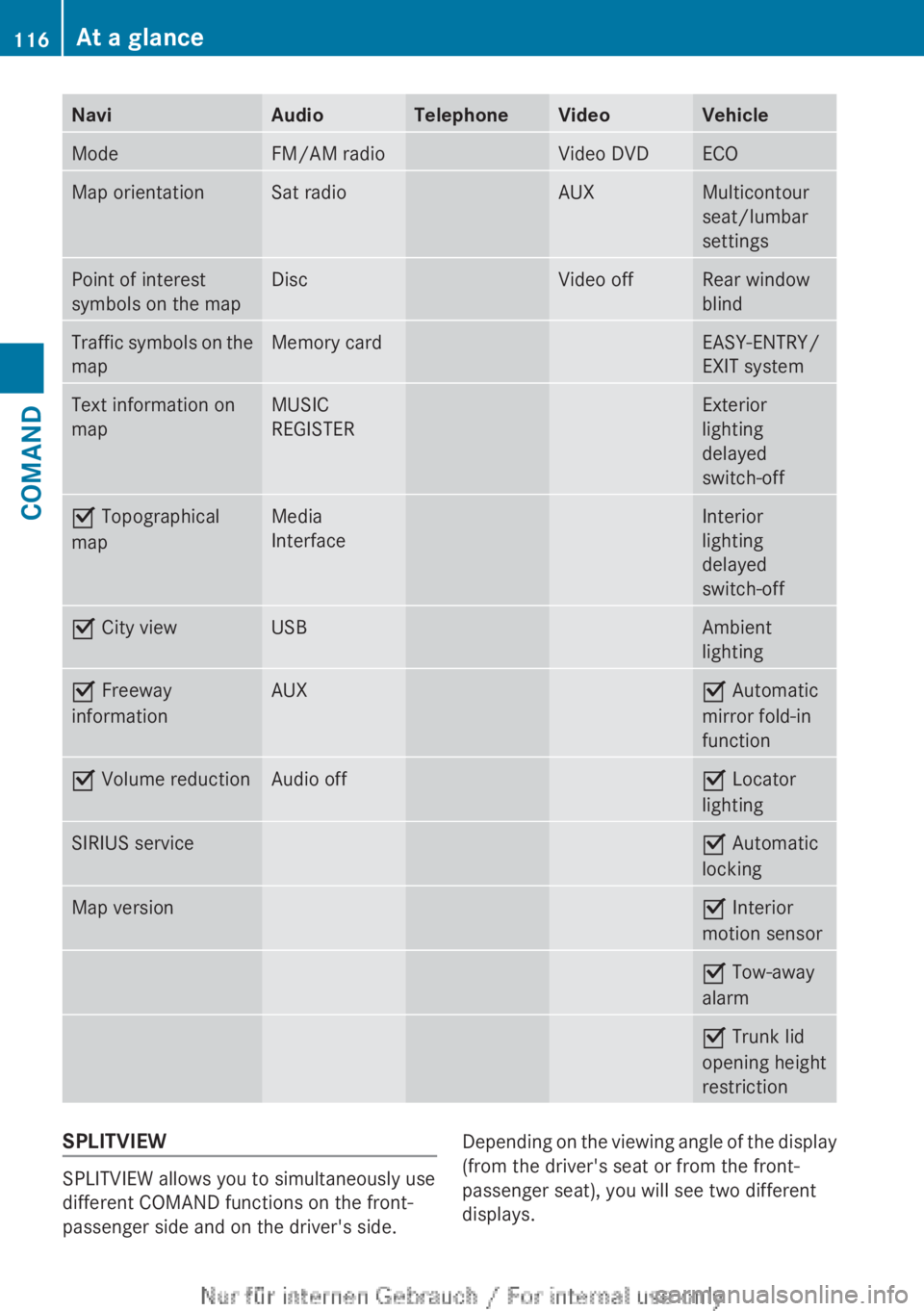
NaviAudioTelephoneVideoVehicleModeFM/AM radioVideo DVDECOMap orientationSat radioAUXMulticontour
seat/lumbar
settingsPoint of interest
symbols on the mapDiscVideo offRear window
blindTraffic symbols on the
mapMemory cardEASY-ENTRY/
EXIT systemText information on
mapMUSIC
REGISTERExterior
lighting
delayed
switch-offO Topographical
mapMedia
InterfaceInterior
lighting
delayed
switch-offO City viewUSBAmbient
lightingO Freeway
informationAUXO Automatic
mirror fold-in
functionO Volume reductionAudio offO Locator
lightingSIRIUS serviceO Automatic
lockingMap versionO Interior
motion sensorO Tow-away
alarmO Trunk lid
opening height
restrictionSPLITVIEW
SPLITVIEW allows you to simultaneously use
different COMAND functions on the front-
passenger side and on the driver's side.
Depending on the viewing angle of the display
(from the driver's seat or from the front-
passenger seat), you will see two different
displays.116At a glanceCOMAND
Page 150 of 496
switched on and the GPS signal is strong
enough.
Moving the map and selecting the
destinationXTo scroll the map: slide XVY, ZV Æ or
aVb the COMAND controller.XTo set the map scale: as soon as you turn
cVd the COMAND controller, the scale bar
appears.XTurn cVd until the desired scale is set.
Turning clockwise zooms out from the map;
turning counter-clockwise zooms in.XTo select a destination: press W the
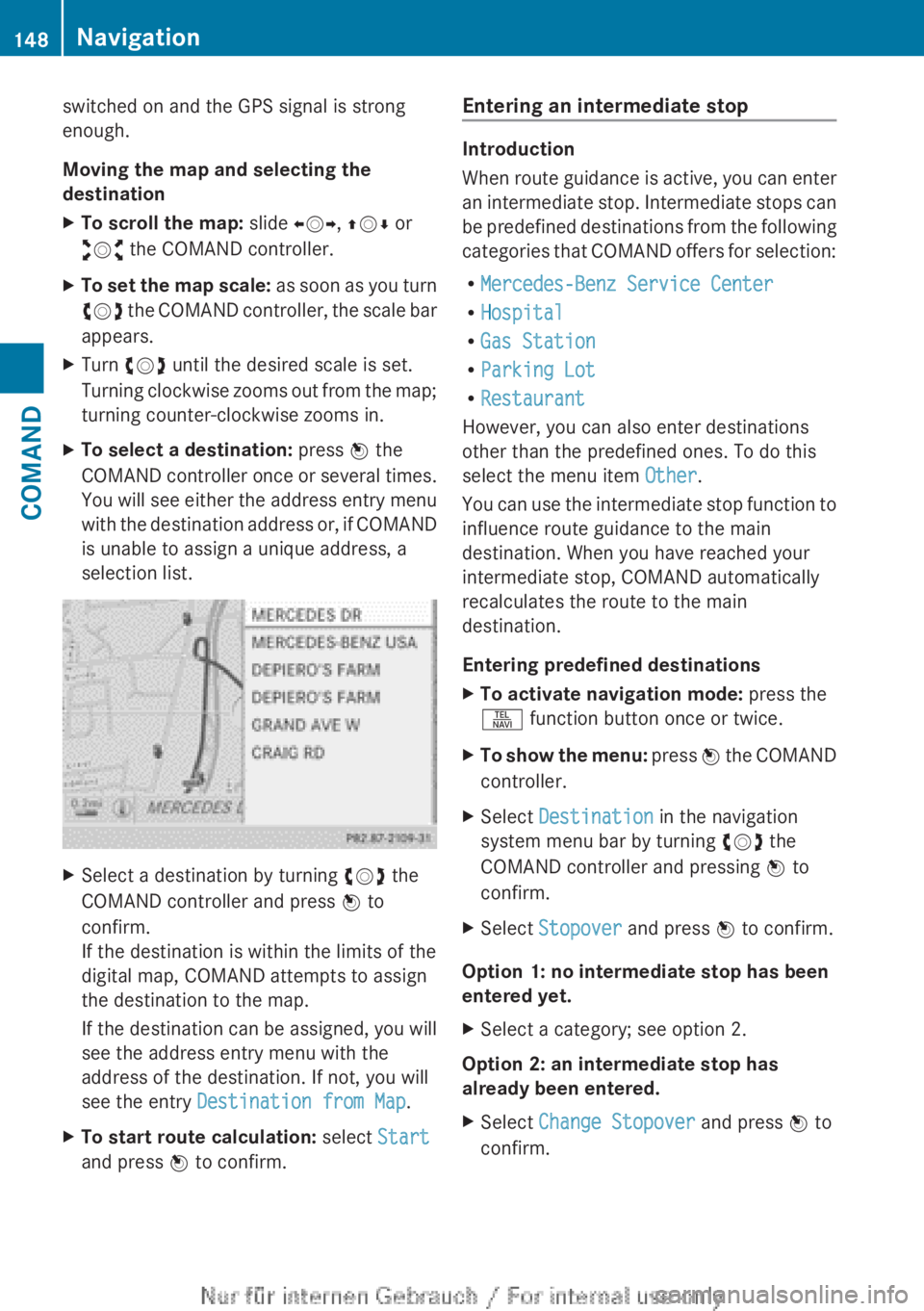
COMAND controller once or several times.
You will see either the address entry menu
with the destination address or, if COMAND
is unable to assign a unique address, a
selection list.XSelect a destination by turning cVd the
COMAND controller and press W to
confirm.
If the destination is within the limits of the
digital map, COMAND attempts to assign
the destination to the map.
If the destination can be assigned, you will
see the address entry menu with the
address of the destination. If not, you will
see the entry Destination from Map .XTo start route calculation: select Start
and press W to confirm.Entering an intermediate stop
Introduction
When route guidance is active, you can enter
an intermediate stop. Intermediate stops can
be predefined destinations from the following
categories that COMAND offers for selection:
R Mercedes-Benz Service Center
R Hospital
R Gas Station
R Parking Lot
R Restaurant
However, you can also enter destinations
other than the predefined ones. To do this
select the menu item Other.
You can use the intermediate stop function to
influence route guidance to the main
destination. When you have reached your
intermediate stop, COMAND automatically
recalculates the route to the main
destination.
Entering predefined destinations
XTo activate navigation mode: press the
S function button once or twice.XTo show the menu: press W the COMAND
controller.XSelect Destination in the navigation
system menu bar by turning cVd the
COMAND controller and pressing W to
confirm.XSelect Stopover and press W to confirm.
Option 1: no intermediate stop has been
entered yet.
XSelect a category; see option 2.
Option 2: an intermediate stop has
already been entered.
XSelect Change Stopover and press W to
confirm.148NavigationCOMAND