service MERCEDES-BENZ CL CLASS 2013 Service Manual
[x] Cancel search | Manufacturer: MERCEDES-BENZ, Model Year: 2013, Model line: CL CLASS, Model: MERCEDES-BENZ CL CLASS 2013Pages: 496, PDF Size: 7.5 MB
Page 352 of 496
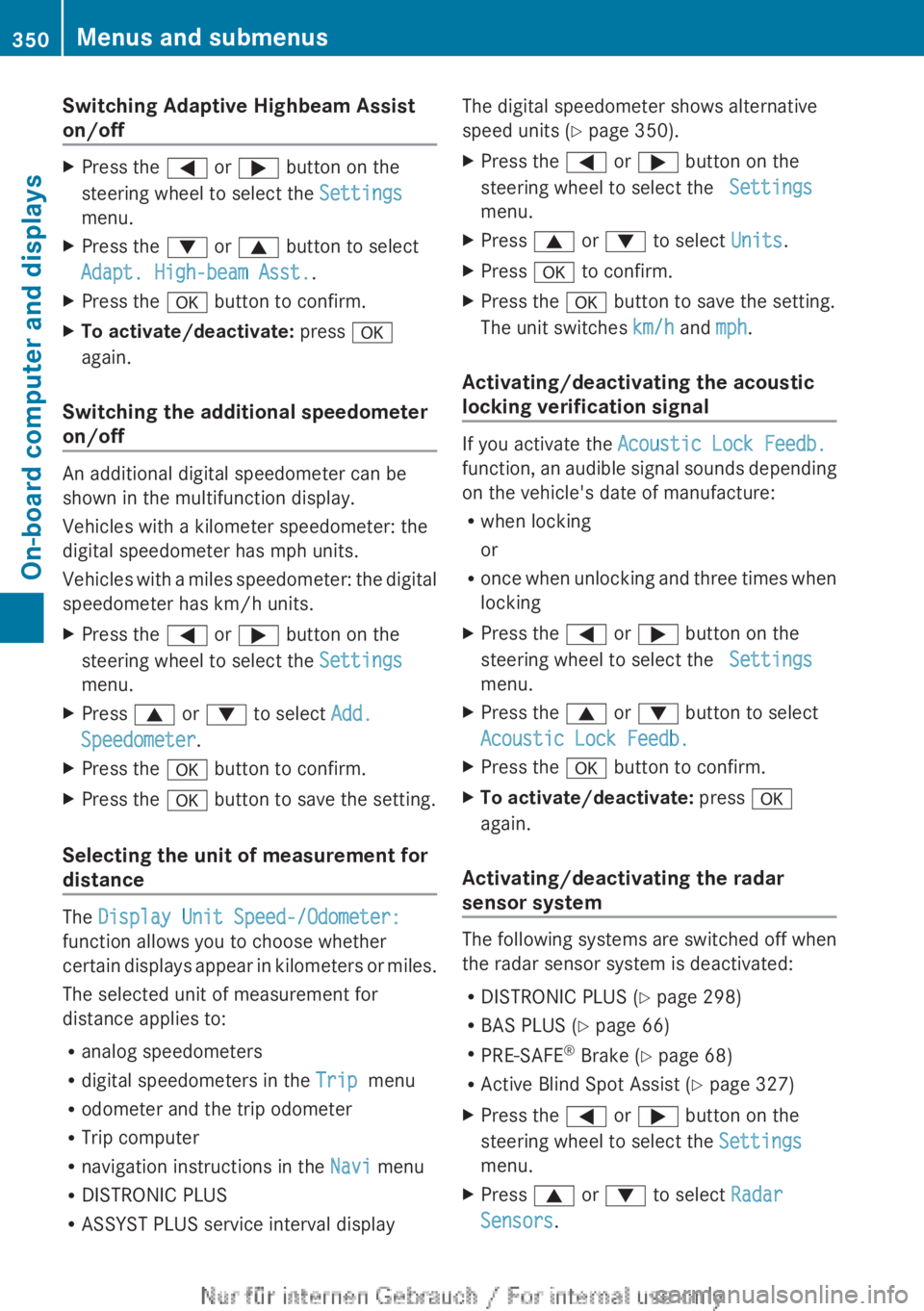
Switching Adaptive Highbeam Assist
on/offXPress the = or ; button on the
steering wheel to select the Settings
menu.XPress the : or 9 button to select
Adapt. High-beam Asst. .XPress the a button to confirm.XTo activate/deactivate: press a
again.
Switching the additional speedometer
on/off
An additional digital speedometer can be
shown in the multifunction display.
Vehicles with a kilometer speedometer: the
digital speedometer has mph units.
Vehicles with a miles speedometer: the digital
speedometer has km/h units.
XPress the = or ; button on the
steering wheel to select the Settings
menu.XPress 9 or : to select Add.
Speedometer .XPress the a button to confirm.XPress the a button to save the setting.
Selecting the unit of measurement for
distance
The Display Unit Speed-/Odometer:
function allows you to choose whether
certain displays appear in kilometers or miles.
The selected unit of measurement for
distance applies to:
R analog speedometers
R digital speedometers in the Trip menu
R odometer and the trip odometer
R Trip computer
R navigation instructions in the Navi menu
R DISTRONIC PLUS
R ASSYST PLUS service interval display
The digital speedometer shows alternative
speed units ( Y page 350).XPress the = or ; button on the
steering wheel to select the Settings
menu.XPress 9 or : to select Units.XPress a to confirm.XPress the a button to save the setting.
The unit switches km/h and mph.
Activating/deactivating the acoustic
locking verification signal
If you activate the Acoustic Lock Feedb.
function, an audible signal sounds depending
on the vehicle's date of manufacture:
R when locking
or
R once when unlocking and three times when
locking
XPress the = or ; button on the
steering wheel to select the Settings
menu.XPress the 9 or : button to select
Acoustic Lock Feedb.XPress the a button to confirm.XTo activate/deactivate: press a
again.
Activating/deactivating the radar
sensor system
The following systems are switched off when
the radar sensor system is deactivated:
R DISTRONIC PLUS ( Y page 298)
R BAS PLUS ( Y page 66)
R PRE-SAFE ®
Brake ( Y page 68)
R Active Blind Spot Assist ( Y page 327)
XPress the = or ; button on the
steering wheel to select the Settings
menu.XPress 9 or : to select Radar
Sensors .350Menus and submenusOn-board computer and displays
Page 354 of 496
Display messages
General notes
GWARNING
All categories of messages contain important information which should be taken note of and,
where a malfunction is indicated, addressed as soon as possible at an authorized Mercedes-Benz
Center.
Failure to repair the condition noted may cause damage not covered by the Mercedes-Benz
Limited Warranty, or result in property damage or personal injury.
Display messages appear in the multifunction display.
Display messages with graphic displays may be shown in simplified form in the Operator's
Manual and may differ from the messages shown in the multifunction display.
Please respond in accordance with the display messages and follow the additional notes in
this Operator's Manual.
Certain display messages are accompanied by an audible warning tone or a continuous tone.
When you stop and park the vehicle, please observe the notes on the HOLD function
( Y page 308) and parking ( Y page 289).
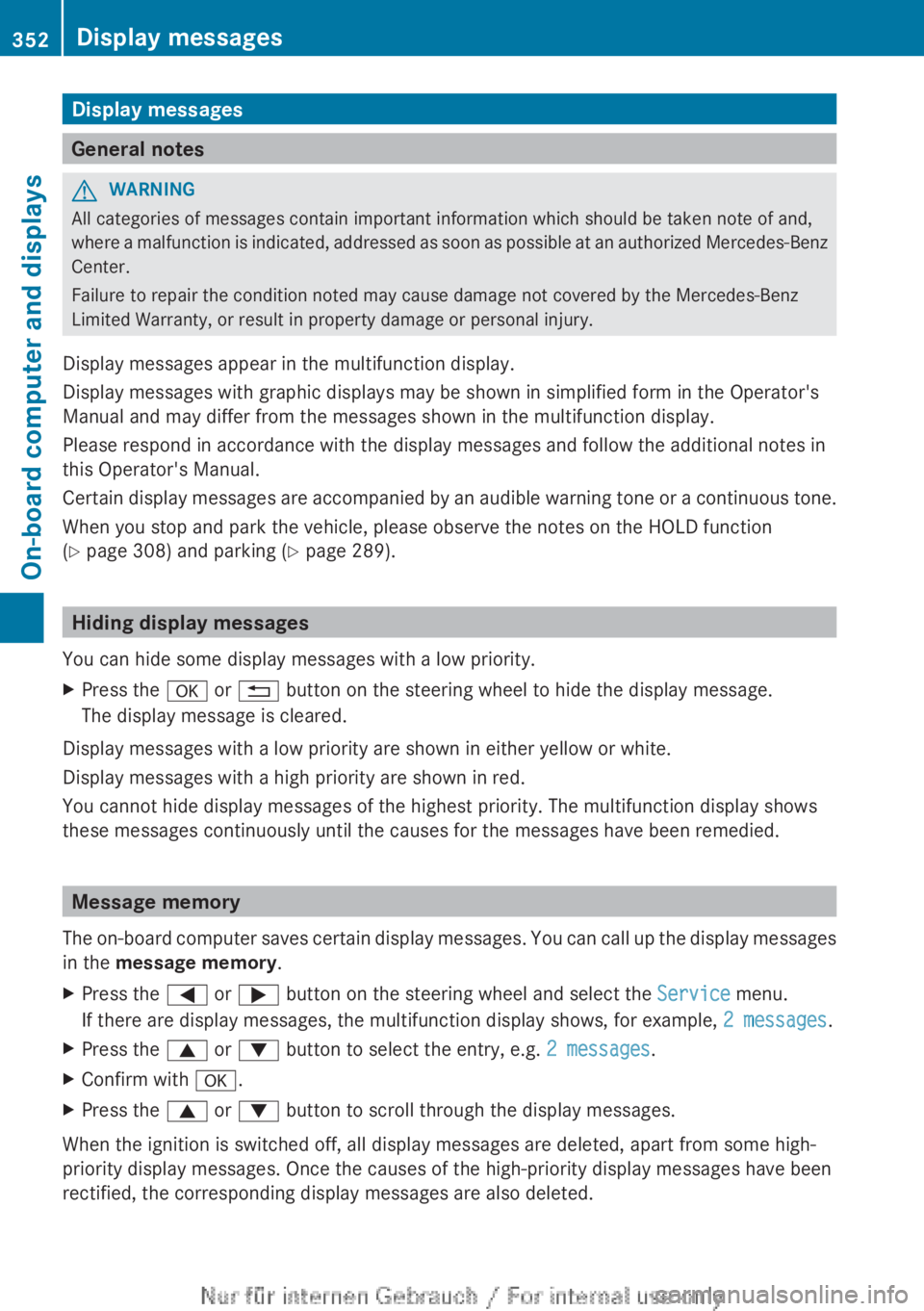
Hiding display messages
You can hide some display messages with a low priority.
XPress the a or % button on the steering wheel to hide the display message.
The display message is cleared.
Display messages with a low priority are shown in either yellow or white.
Display messages with a high priority are shown in red.
You cannot hide display messages of the highest priority. The multifunction display shows
these messages continuously until the causes for the messages have been remedied.
Message memory
The on-board computer saves certain display messages. You can call up the display messages
in the message memory .
XPress the = or ; button on the steering wheel and select the Service menu.
If there are display messages, the multifunction display shows, for example, 2 messages.XPress the 9 or : button to select the entry, e.g. 2 messages.XConfirm with a.XPress the 9 or : button to scroll through the display messages.
When the ignition is switched off, all display messages are deleted, apart from some high-
priority display messages. Once the causes of the high-priority display messages have been
rectified, the corresponding display messages are also deleted.
352Display messagesOn-board computer and displays
Page 363 of 496
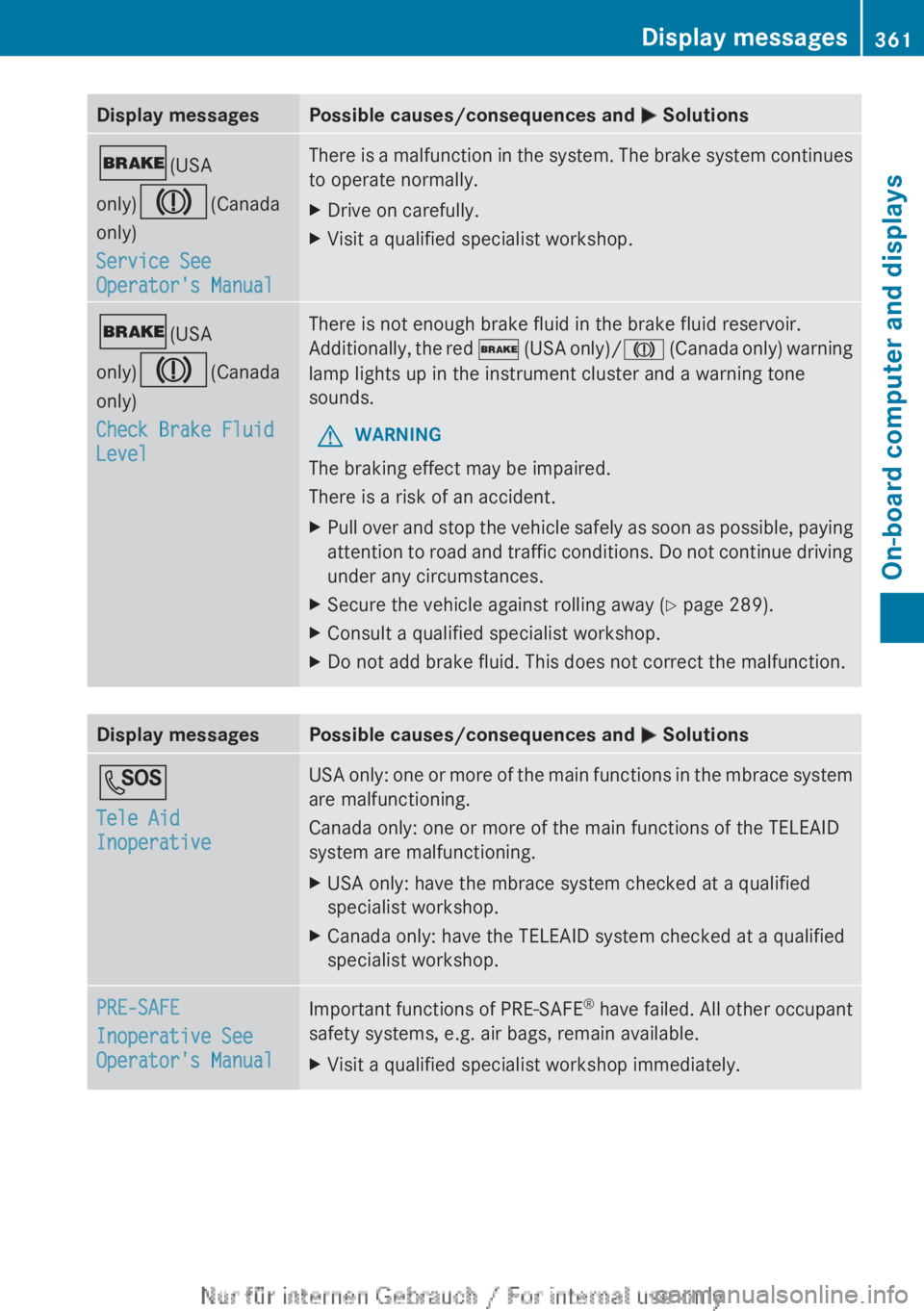
Display messagesPossible causes/consequences and M Solutions$ (USA
only) J (Canada
only)
Service See
Operator's ManualThere is a malfunction in the system. The brake system continues
to operate normally.XDrive on carefully.XVisit a qualified specialist workshop.$ (USA
only) J (Canada
only)
Check Brake Fluid
LevelThere is not enough brake fluid in the brake fluid reservoir.
Additionally, the red $ (USA only)/ J (Canada only) warning
lamp lights up in the instrument cluster and a warning tone
sounds.GWARNING
The braking effect may be impaired.
There is a risk of an accident.
XPull over and stop the vehicle safely as soon as possible, paying
attention to road and traffic conditions. Do not continue driving
under any circumstances.XSecure the vehicle against rolling away ( Y page 289).XConsult a qualified specialist workshop.XDo not add brake fluid. This does not correct the malfunction.Display messagesPossible causes/consequences and M SolutionsG
Tele Aid
InoperativeUSA only: one or more of the main functions in the mbrace system
are malfunctioning.
Canada only: one or more of the main functions of the TELEAID
system are malfunctioning.XUSA only: have the mbrace system checked at a qualified
specialist workshop.XCanada only: have the TELEAID system checked at a qualified
specialist workshop.PRE-SAFE
Inoperative See
Operator's ManualImportant functions of PRE-SAFE ®
have failed. All other occupant
safety systems, e.g. air bags, remain available.XVisit a qualified specialist workshop immediately.Display messages361On-board computer and displaysZ
Page 364 of 496
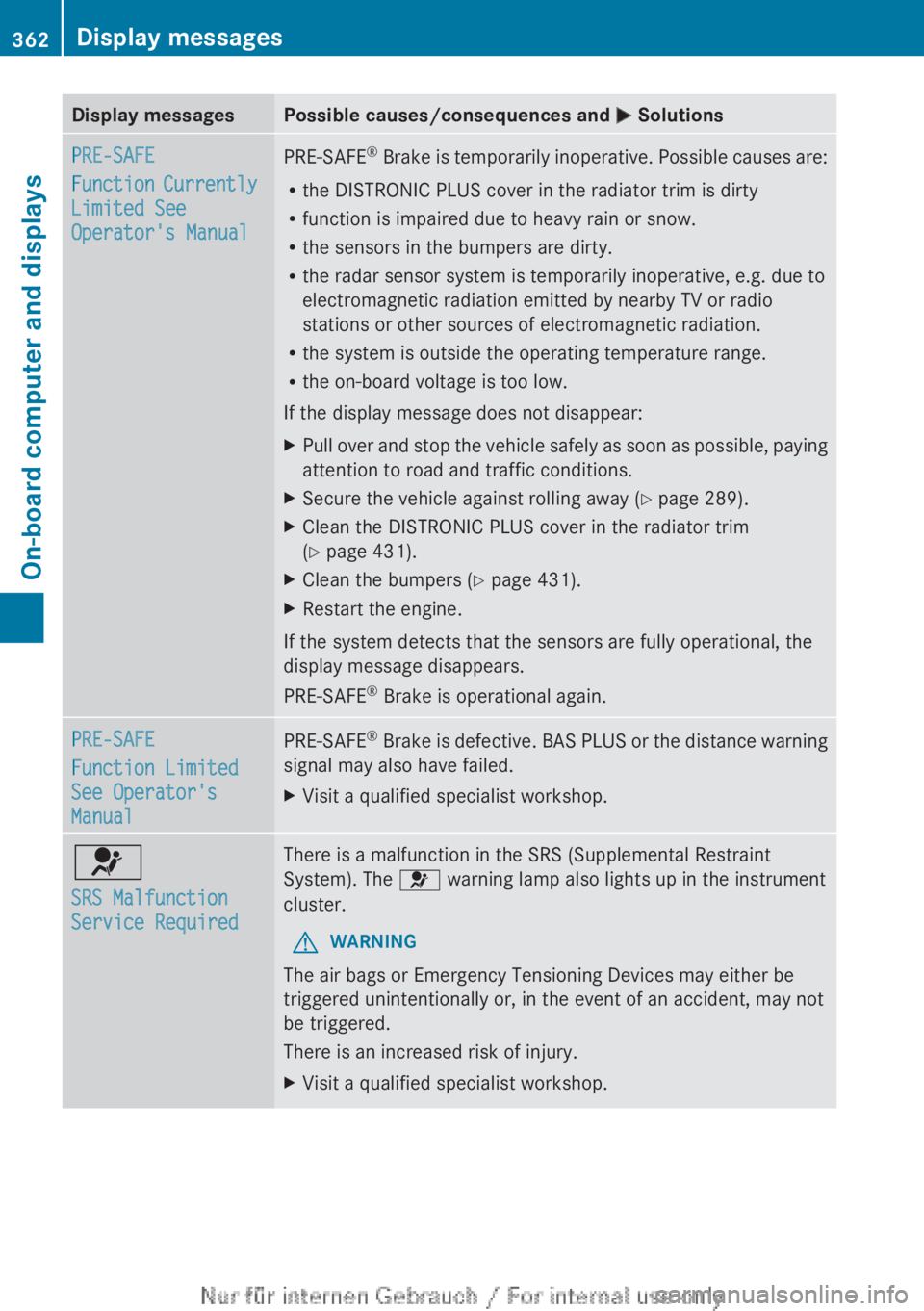
Display messagesPossible causes/consequences and M SolutionsPRE-SAFE
Function Currently
Limited See
Operator's ManualPRE-SAFE ®
Brake is temporarily inoperative. Possible causes are:
R the DISTRONIC PLUS cover in the radiator trim is dirty
R function is impaired due to heavy rain or snow.
R the sensors in the bumpers are dirty.
R the radar sensor system is temporarily inoperative, e.g. due to
electromagnetic radiation emitted by nearby TV or radio
stations or other sources of electromagnetic radiation.
R the system is outside the operating temperature range.
R the on-board voltage is too low.
If the display message does not disappear:XPull over and stop the vehicle safely as soon as possible, paying
attention to road and traffic conditions.XSecure the vehicle against rolling away ( Y page 289).XClean the DISTRONIC PLUS cover in the radiator trim
( Y page 431).XClean the bumpers ( Y page 431).XRestart the engine.
If the system detects that the sensors are fully operational, the
display message disappears.
PRE-SAFE ®
Brake is operational again.
PRE-SAFE
Function Limited
See Operator's
ManualPRE-SAFE ®
Brake is defective. BAS PLUS or the distance warning
signal may also have failed.XVisit a qualified specialist workshop.6
SRS Malfunction
Service RequiredThere is a malfunction in the SRS (Supplemental Restraint
System). The 6 warning lamp also lights up in the instrument
cluster.GWARNING
The air bags or Emergency Tensioning Devices may either be
triggered unintentionally or, in the event of an accident, may not
be triggered.
There is an increased risk of injury.
XVisit a qualified specialist workshop.362Display messagesOn-board computer and displays
Page 365 of 496
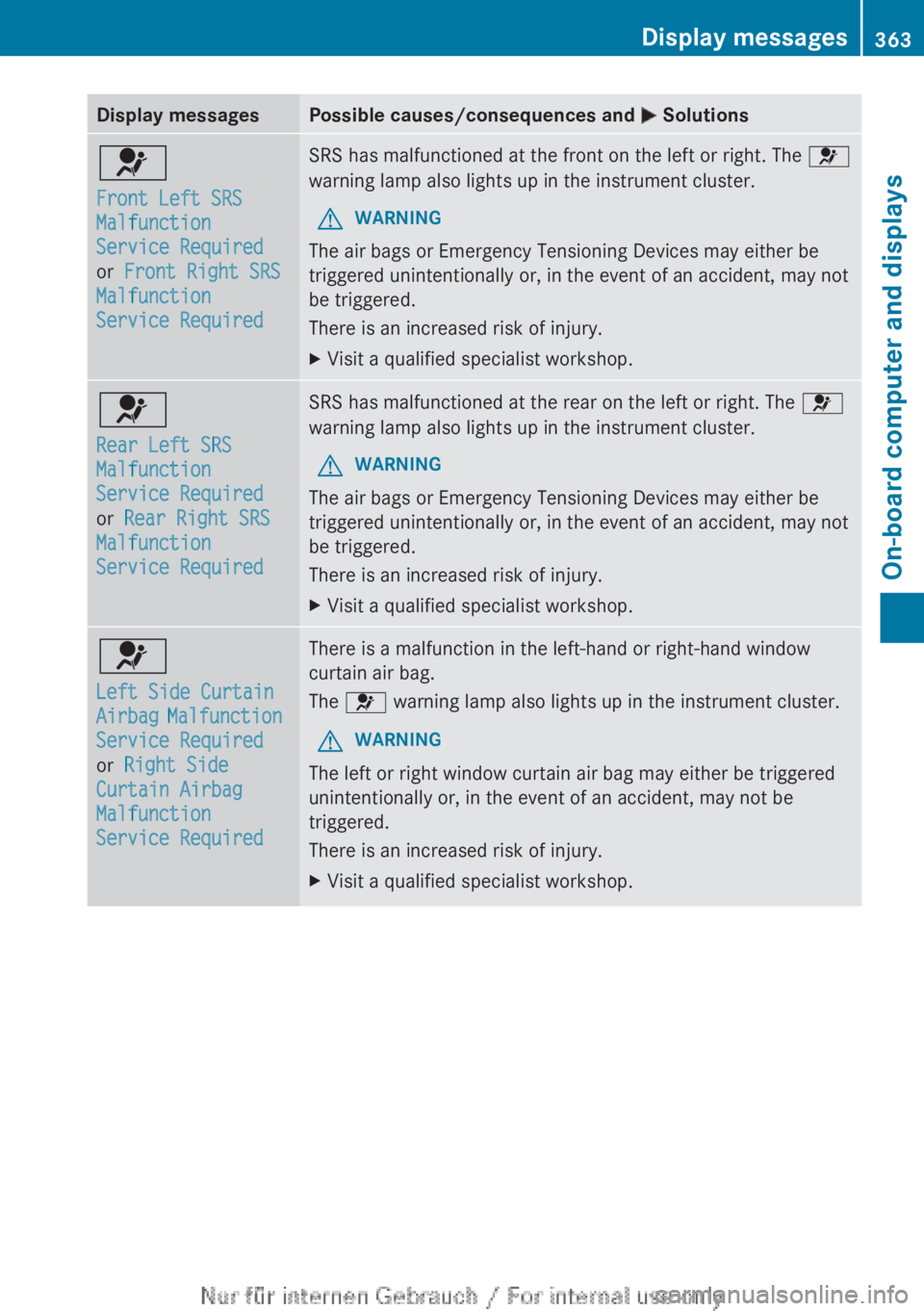
Display messagesPossible causes/consequences and M Solutions6
Front Left SRS
Malfunction
Service Required
or Front Right SRS
Malfunction
Service RequiredSRS has malfunctioned at the front on the left or right. The 6
warning lamp also lights up in the instrument cluster.GWARNING
The air bags or Emergency Tensioning Devices may either be
triggered unintentionally or, in the event of an accident, may not
be triggered.
There is an increased risk of injury.
XVisit a qualified specialist workshop.6
Rear Left SRS
Malfunction
Service Required
or Rear Right SRS
Malfunction
Service RequiredSRS has malfunctioned at the rear on the left or right. The 6
warning lamp also lights up in the instrument cluster.GWARNING
The air bags or Emergency Tensioning Devices may either be
triggered unintentionally or, in the event of an accident, may not
be triggered.
There is an increased risk of injury.
XVisit a qualified specialist workshop.6
Left Side Curtain
Airbag Malfunction
Service Required
or Right Side
Curtain Airbag
Malfunction
Service RequiredThere is a malfunction in the left-hand or right-hand window
curtain air bag.
The 6 warning lamp also lights up in the instrument cluster.GWARNING
The left or right window curtain air bag may either be triggered
unintentionally or, in the event of an accident, may not be
triggered.
There is an increased risk of injury.
XVisit a qualified specialist workshop.Display messages363On-board computer and displaysZ
Page 379 of 496
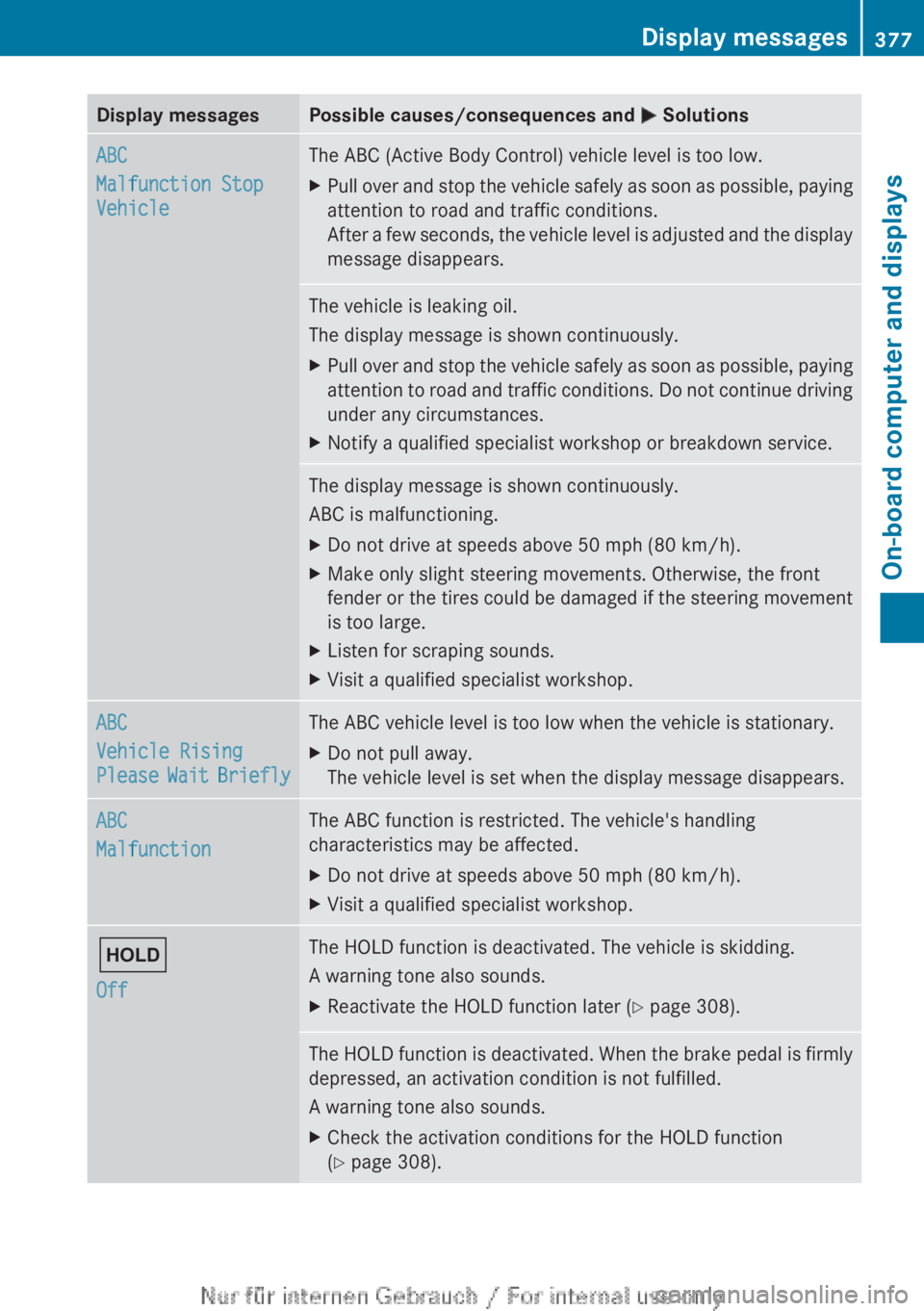
Display messagesPossible causes/consequences and M SolutionsABC
Malfunction Stop
VehicleThe ABC (Active Body Control) vehicle level is too low.XPull over and stop the vehicle safely as soon as possible, paying
attention to road and traffic conditions.
After a few seconds, the vehicle level is adjusted and the display
message disappears.The vehicle is leaking oil.
The display message is shown continuously.XPull over and stop the vehicle safely as soon as possible, paying
attention to road and traffic conditions. Do not continue driving
under any circumstances.XNotify a qualified specialist workshop or breakdown service.The display message is shown continuously.
ABC is malfunctioning.XDo not drive at speeds above 50 mph (80 km/h).XMake only slight steering movements. Otherwise, the front
fender or the tires could be damaged if the steering movement
is too large.XListen for scraping sounds.XVisit a qualified specialist workshop.ABC
Vehicle Rising
Please Wait BrieflyThe ABC vehicle level is too low when the vehicle is stationary.XDo not pull away.
The vehicle level is set when the display message disappears.ABC
MalfunctionThe ABC function is restricted. The vehicle's handling
characteristics may be affected.XDo not drive at speeds above 50 mph (80 km/h).XVisit a qualified specialist workshop.ë
OffThe HOLD function is deactivated. The vehicle is skidding.
A warning tone also sounds.XReactivate the HOLD function later ( Y page 308).The HOLD function is deactivated. When the brake pedal is firmly
depressed, an activation condition is not fulfilled.
A warning tone also sounds.XCheck the activation conditions for the HOLD function
( Y page 308).Display messages377On-board computer and displaysZ
Page 388 of 496
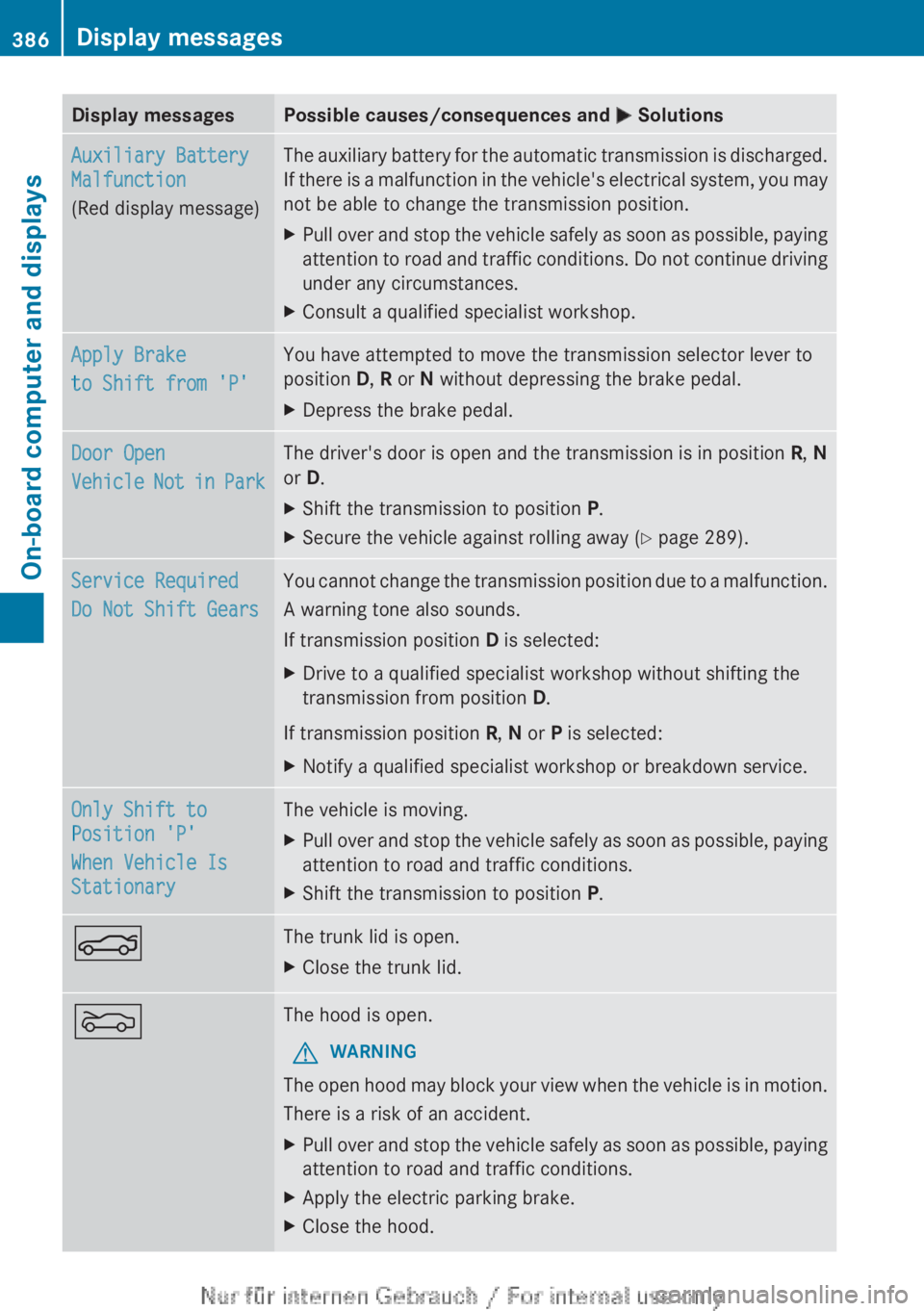
Display messagesPossible causes/consequences and M SolutionsAuxiliary Battery
Malfunction
(Red display message)The auxiliary battery for the automatic transmission is discharged.
If there is a malfunction in the vehicle's electrical system, you may
not be able to change the transmission position.XPull over and stop the vehicle safely as soon as possible, paying
attention to road and traffic conditions. Do not continue driving
under any circumstances.XConsult a qualified specialist workshop.Apply Brake
to Shift from 'P'You have attempted to move the transmission selector lever to
position D, R or N without depressing the brake pedal.XDepress the brake pedal.Door Open
Vehicle Not in ParkThe driver's door is open and the transmission is in position R, N
or D.XShift the transmission to position P.XSecure the vehicle against rolling away ( Y page 289).Service Required
Do Not Shift GearsYou cannot change the transmission position due to a malfunction.
A warning tone also sounds.
If transmission position D is selected:XDrive to a qualified specialist workshop without shifting the
transmission from position D.
If transmission position R, N or P is selected:
XNotify a qualified specialist workshop or breakdown service.Only Shift to
Position 'P'
When Vehicle Is
StationaryThe vehicle is moving.XPull over and stop the vehicle safely as soon as possible, paying
attention to road and traffic conditions.XShift the transmission to position P.NThe trunk lid is open.XClose the trunk lid.MThe hood is open.GWARNING
The open hood may block your view when the vehicle is in motion.
There is a risk of an accident.
XPull over and stop the vehicle safely as soon as possible, paying
attention to road and traffic conditions.XApply the electric parking brake.XClose the hood.386Display messagesOn-board computer and displays
Page 409 of 496
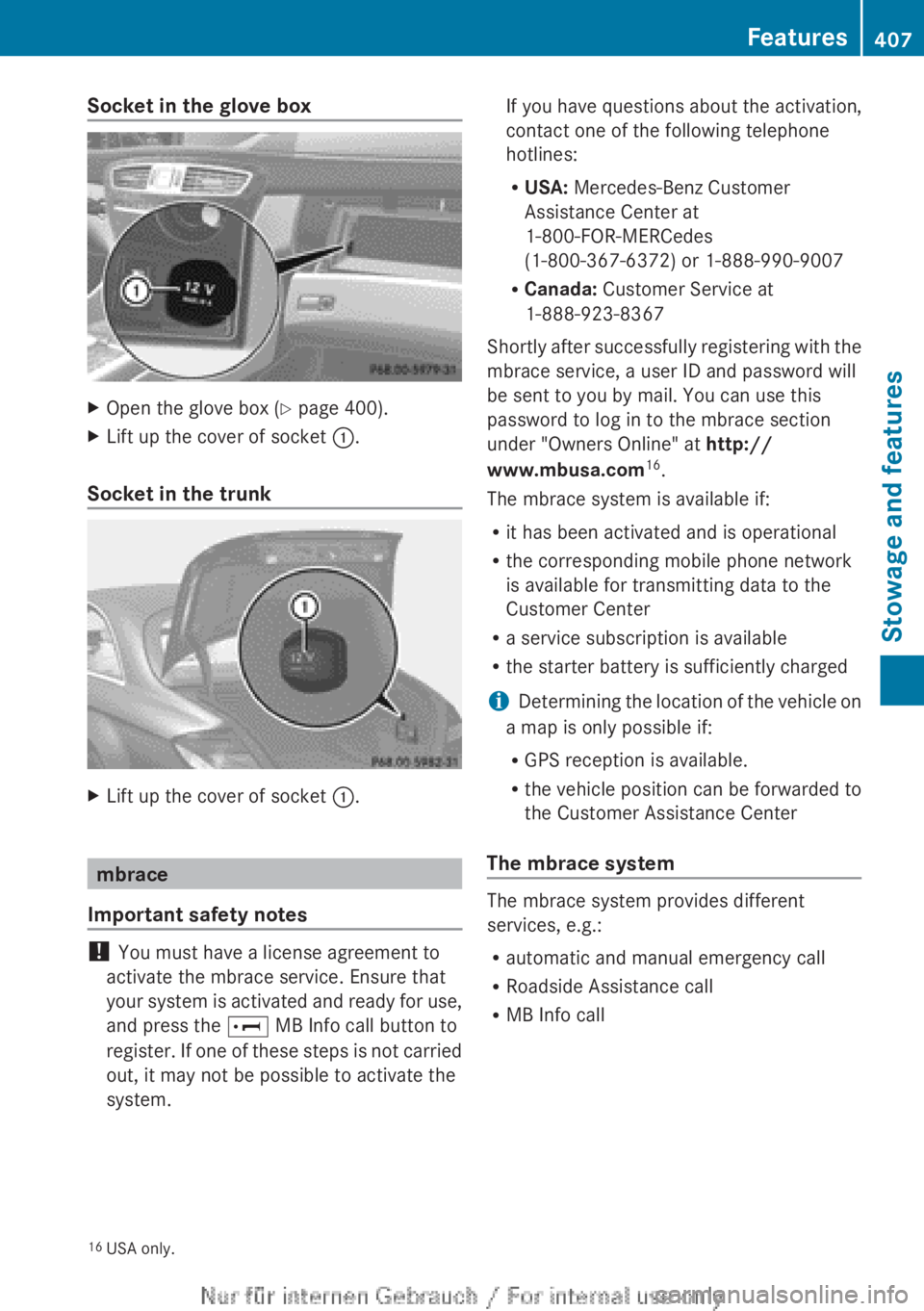
Socket in the glove boxXOpen the glove box (Y page 400).XLift up the cover of socket :.
Socket in the trunk
XLift up the cover of socket :.
mbrace
Important safety notes
! You must have a license agreement to
activate the mbrace service. Ensure that
your system is activated and ready for use,
and press the E MB Info call button to
register. If one of these steps is not carried
out, it may not be possible to activate the
system.
If you have questions about the activation,
contact one of the following telephone
hotlines:
R USA: Mercedes-Benz Customer
Assistance Center at
1-800-FOR-MERCedes
(1-800-367-6372) or 1-888-990-9007
R Canada: Customer Service at
1-888-923-8367
Shortly after successfully registering with the
mbrace service, a user ID and password will
be sent to you by mail. You can use this
password to log in to the mbrace section
under "Owners Online" at http://
www.mbusa.com 16
.
The mbrace system is available if:
R it has been activated and is operational
R the corresponding mobile phone network
is available for transmitting data to the
Customer Center
R a service subscription is available
R the starter battery is sufficiently charged
i Determining the location of the vehicle on
a map is only possible if:
R GPS reception is available.
R the vehicle position can be forwarded to
the Customer Assistance Center
The mbrace system
The mbrace system provides different
services, e.g.:
R automatic and manual emergency call
R Roadside Assistance call
R MB Info call
16USA only.Features407Stowage and featuresZ
Page 410 of 496
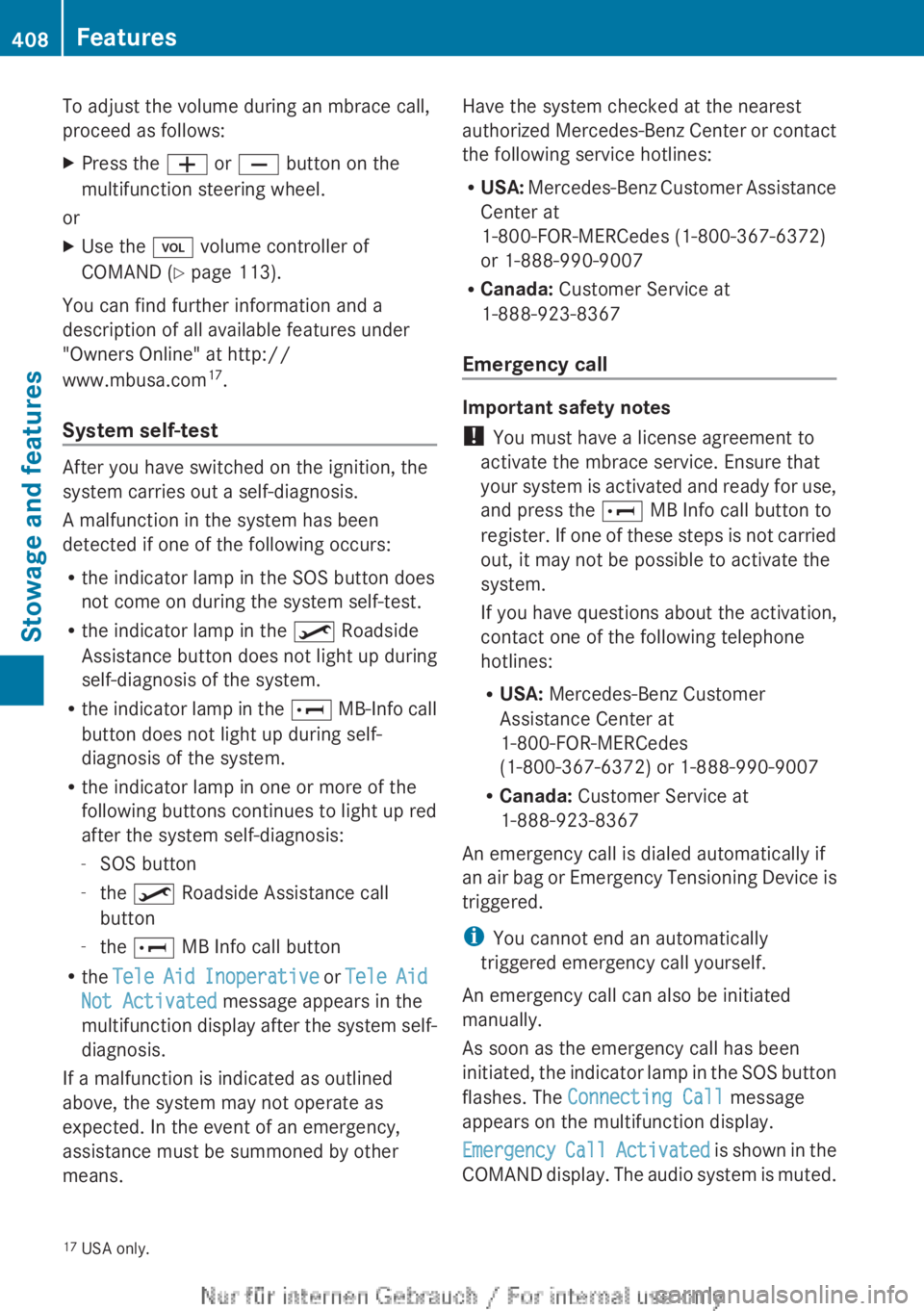
To adjust the volume during an mbrace call,
proceed as follows:XPress the W or X button on the
multifunction steering wheel.
or
XUse the H volume controller of
COMAND ( Y page 113).
You can find further information and a
description of all available features under
"Owners Online" at http://
www.mbusa.com 17
.
System self-test
After you have switched on the ignition, the
system carries out a self-diagnosis.
A malfunction in the system has been
detected if one of the following occurs:
R the indicator lamp in the SOS button does
not come on during the system self-test.
R the indicator lamp in the º Roadside
Assistance button does not light up during
self-diagnosis of the system.
R the indicator lamp in the E MB-Info call
button does not light up during self-
diagnosis of the system.
R the indicator lamp in one or more of the
following buttons continues to light up red
after the system self-diagnosis:
- SOS button
- the º Roadside Assistance call
button
- the E MB Info call button
R the Tele Aid Inoperative or Tele Aid
Not Activated message appears in the
multifunction display after the system self-
diagnosis.
If a malfunction is indicated as outlined
above, the system may not operate as
expected. In the event of an emergency,
assistance must be summoned by other
means.
Have the system checked at the nearest
authorized Mercedes-Benz Center or contact
the following service hotlines:
R USA: Mercedes-Benz Customer Assistance
Center at
1-800-FOR-MERCedes (1-800-367-6372)
or 1-888-990-9007
R Canada: Customer Service at
1-888-923-8367
Emergency call
Important safety notes
! You must have a license agreement to
activate the mbrace service. Ensure that
your system is activated and ready for use,
and press the E MB Info call button to
register. If one of these steps is not carried
out, it may not be possible to activate the
system.
If you have questions about the activation,
contact one of the following telephone
hotlines:
R USA: Mercedes-Benz Customer
Assistance Center at
1-800-FOR-MERCedes
(1-800-367-6372) or 1-888-990-9007
R Canada: Customer Service at
1-888-923-8367
An emergency call is dialed automatically if
an air bag or Emergency Tensioning Device is
triggered.
i You cannot end an automatically
triggered emergency call yourself.
An emergency call can also be initiated
manually.
As soon as the emergency call has been
initiated, the indicator lamp in the SOS button
flashes. The Connecting Call message
appears on the multifunction display.
Emergency Call Activated is shown in the
COMAND display. The audio system is muted.
17 USA only.408FeaturesStowage and features
Page 412 of 496
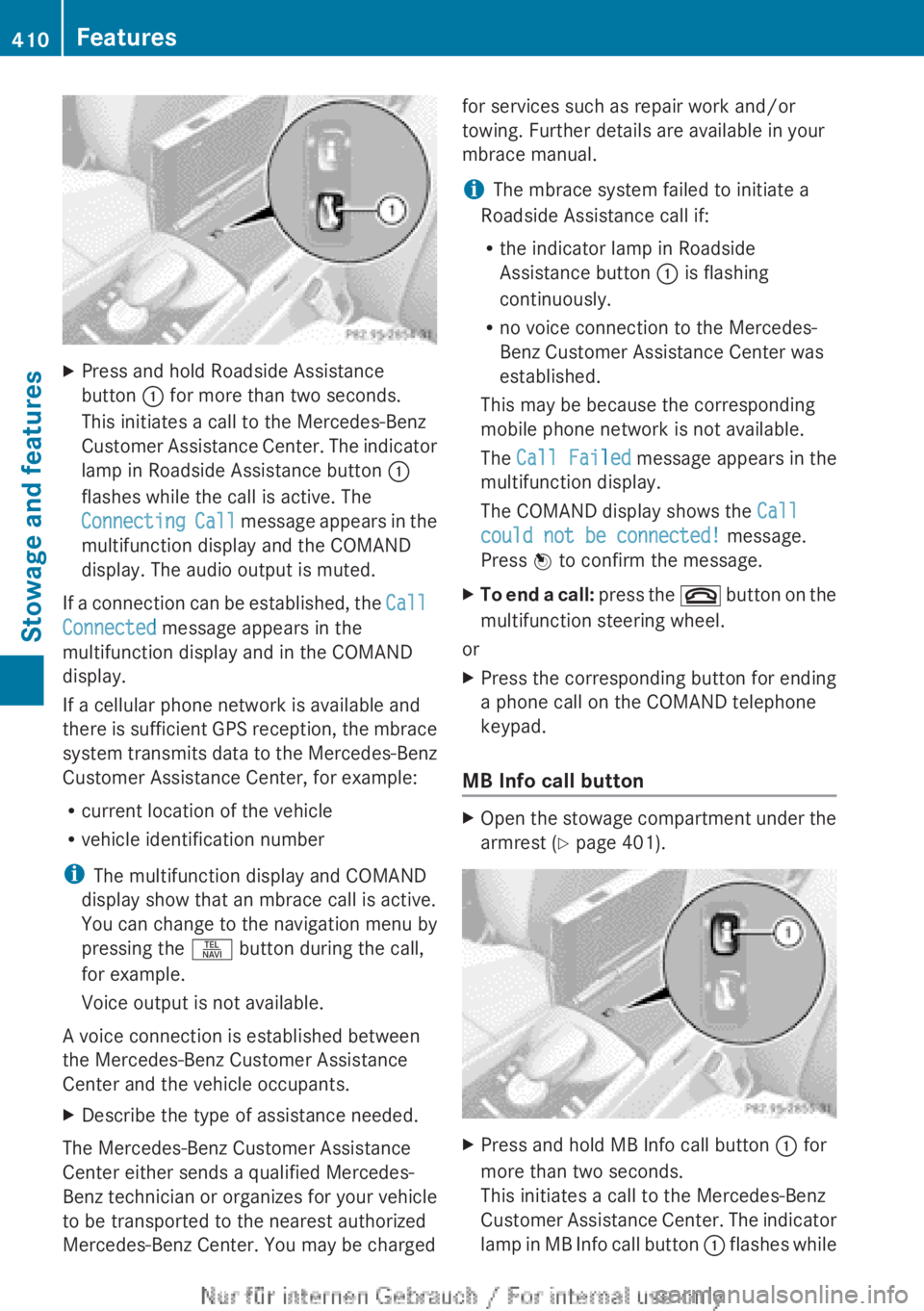
XPress and hold Roadside Assistance
button : for more than two seconds.
This initiates a call to the Mercedes-Benz
Customer Assistance Center. The indicator
lamp in Roadside Assistance button :
flashes while the call is active. The
Connecting Call message appears in the
multifunction display and the COMAND
display. The audio output is muted.
If a connection can be established, the Call
Connected message appears in the
multifunction display and in the COMAND
display.
If a cellular phone network is available and
there is sufficient GPS reception, the mbrace
system transmits data to the Mercedes-Benz
Customer Assistance Center, for example:
R current location of the vehicle
R vehicle identification number
i The multifunction display and COMAND
display show that an mbrace call is active.
You can change to the navigation menu by
pressing the S button during the call,
for example.
Voice output is not available.
A voice connection is established between
the Mercedes-Benz Customer Assistance
Center and the vehicle occupants.
XDescribe the type of assistance needed.
The Mercedes-Benz Customer Assistance
Center either sends a qualified Mercedes-
Benz technician or organizes for your vehicle
to be transported to the nearest authorized
Mercedes-Benz Center. You may be charged
for services such as repair work and/or
towing. Further details are available in your
mbrace manual.
i The mbrace system failed to initiate a
Roadside Assistance call if:
R the indicator lamp in Roadside
Assistance button : is flashing
continuously.
R no voice connection to the Mercedes-
Benz Customer Assistance Center was
established.
This may be because the corresponding
mobile phone network is not available.
The Call Failed message appears in the
multifunction display.
The COMAND display shows the Call
could not be connected! message.
Press W to confirm the message.XTo end a call: press the ~ button on the
multifunction steering wheel.
or
XPress the corresponding button for ending
a phone call on the COMAND telephone
keypad.
MB Info call button
XOpen the stowage compartment under the
armrest ( Y page 401).XPress and hold MB Info call button : for
more than two seconds.
This initiates a call to the Mercedes-Benz
Customer Assistance Center. The indicator
lamp in MB Info call button : flashes while410FeaturesStowage and features