ignition MERCEDES-BENZ CL COUPE 2006 Owner's Guide
[x] Cancel search | Manufacturer: MERCEDES-BENZ, Model Year: 2006, Model line: CL COUPE, Model: MERCEDES-BENZ CL COUPE 2006Pages: 555, PDF Size: 15.94 MB
Page 414 of 555
393
Operation
Servi ce
AS SYST PLUS ,th eAc tiveService Syste m,
tells yo uwh en the next servic eisdue.
Appro xima telyone month be fore thenext
se rvice isdue, oneof the fo llowing mes-
sa ge sw illa pp ear in themulti-func tio ndis-
pl ay while yo uare dri ving or whi lethe
ig ni tion is sw itche don:
"Next servic eA in .. days"
"Next servic eA in .. km"
"Service A due"
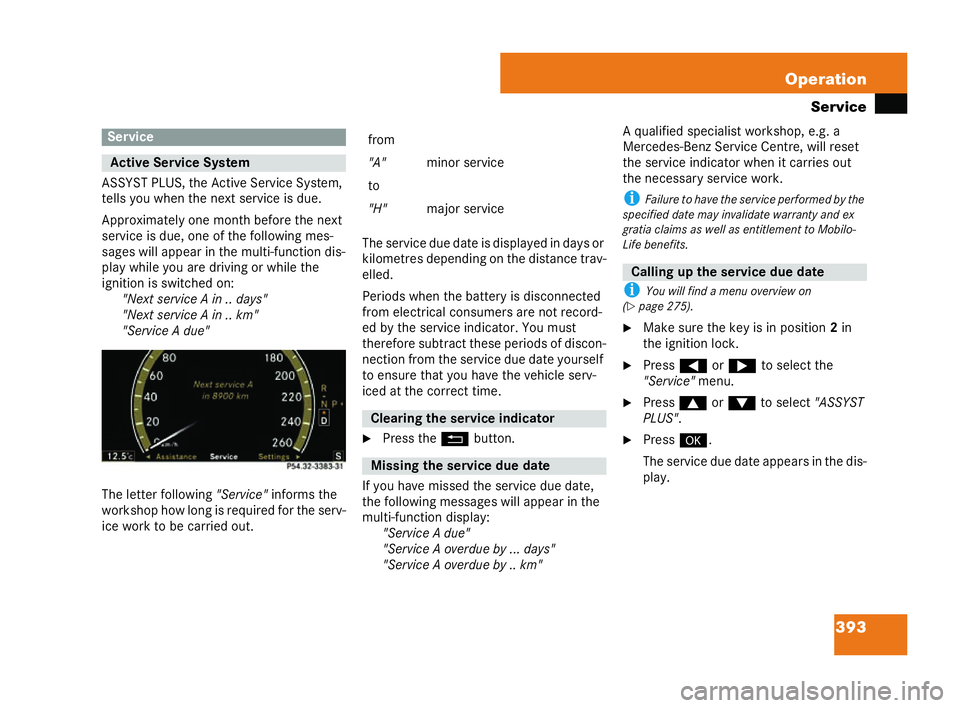
Th e letter following "Service" info rms the
workshop howlong is required for th eserv-
ice work to be carried out. The servic
eduedateis disp laye dindays or
kilo metres de pendi ngon the dista ncetra v-
el led.
Per iods wh enthe batter yis dis conn ected
fr om electrica lco nsumers are not reco rd-
ed by th eser vice indicator. You mu st
the refore subtr act the seperiods of di scon-
nection from the servi ce duedate yourself
to ens urethat you have the vehicle serv-
iced atthe correct tim e.
6 Press theL button.
If yo uha ve missed th eservice due date,
the following messag eswillap pe ar in the
mu lti-fu nc tio ndisplay:
"Ser vice A due"
"Service A overdue by .. .days"
"Se rvice A overdue by .. km" A qualified specialist
worksho p,e.g. a
Mercedes -Ben zS ervice Centre, will reset
the servi ce indi cator wh enitca rries out
the necessary servic ework.
i Failure tohave the servi ceperform edbythe
specified dat emay invalidat ewarrant yand ex
gratia claims as well as entitlement toMo bilo-
Li fe ben efits.
i Youw ill find a menu over view on
(= page 275 ).
6 Make sure the key is in po sition 2in
the ignition lock .
6 Press (or& toselect the
"Se rvice" menu.
6 Press $or% to select"ASSYST
PLUS" .
6 Press #.
Th eservic edue da teappears in the dis-
play. Servi
ce Ac
tive Servi ceSystem
P54.32-3383-31 from
"A"
minor service
to
"H" major servi ce Cle
arin g the service indic ator Mis
sing the serv ice due date Callin
gupthe service due date 216_R
E_2006-12a.book Seit e393 Montag, 2. Oktob er2006 12:06 12
Page 416 of 555
395
Operation
Care
! Make sure that thea utoma tic car wash is
su itab le for thesize of theve hicle. Fo ldinthe ex-
te rior mirrors before theve hicle is washed. The
ex terior mirrors could ot herwise be dam aged.
i After leav ing th eau toma ticcarw ashma ke
su re that the mirror sare folded out fully. Othe r-
wi se, they could vibrate. Hig
h-pr es sure cl eane rs
! Donot use high-pressure cleaners with
rou nd-spray jets to cl ean the ty res, as they could
damage them. Repla cedamaged tyres.
6 Observe the in form ation issued bythe
equi pmentm anufac turer re lating to
how much distance should bemai n-
ta ined betweenth eve hicle and the
noz zle of the hi gh-pre ssur e cleane r.
6 Move the high-pre ssure clea ne rnozzle
around when cl eaning your vehicle.
! When doing so, do notpoint it direct lyat
door joint s,air spring bellows, elec trical compo-
nent s,co nne ctor s, lamp sor seals. Cleanin
gthe wiper blades andth e ou
tside of the wind screen
Vehic lewith key
6 Turn the key to position 1in the ignition
lo ck.
6 Set the windscreen wipe rsto po sition
u onthe comb inat ion sw itch
( = page 253).
6 Turn the key to pos ition 0or remo veit
wh en thew iper arms are vertical .
Ve hicles with KEYLESS GO*
6 Switchof fthe en gine.
6 Remove your foot from theb rake ped-
al.
6 Set the windscreen wipe rsto po sition
u onthe comb inat ion sw itch
( = page 253).
6 PresstheKEY LESS GO button repe at-
ed ly unt ilthe windscreen wi pers start.
6 PresstheKEY LESS GO button when
th ew iper arms are ver tica l. !
Only fold thewindscreen wipers away from
th e windscreen when vertical, ot herwise you will
damage the bonnet.
6 Fold th ewiper arms awa yfrom the
wi nd screen until yo ufeel them engage.
6 Clea nth ewinds cree na nd the wiper
blades.
6 Fold the windscreen wipe rs ba ckagain
be fore sw itching on the ignitio n. Cleanin
gthe windows
! Donot use dry clot hs,abrasiv eprodu cts,
so lvents or cleaning agent scontaining solvents
to cl ean th eins ide ofthe wind ow s.Do not touc h
th e in side of the rea r and side windows with ha rd
obj ects,e .g.ice scrapers or jewellery. Youco uld
ot he rw ise damage the windows. G
Risk of accide nt The vehicle is
brak ed when HOLDis activat-
ed . Therefo re,dea ctivat eHOLD before the
vehi cle is washed in anautomatic carwa sh. G
Risk of inj ury Be
fore cleaning thewind screen or wi per
bl ad es, sw itch the igniti onto0.The wind-
sc ree nw iper sma yotherwi semove an din-
jure you. 216_R
E_2006-12a.book Seit e395 Montag, 2. Oktob er2006 12:06 12
Page 417 of 555
396 Operation
Ca
re i
Sunscr eenfoil re trofit tedto the inside of the
windows could int erfere wit hradioor mobile
phone rec eption, espec ially if these foil sare con-
duc tive or metallically coated. Information
abou tsuns cree nfo ilca n be obtained fro many
Me rced es-Benz Service Centre. Cleanin
gthe headlam ps
6 Clea nthe headlamp lens es with a
da mp cloth.
! Onlyus e was herfluid whic his suitable
for plas tic lense s.Unsuitable was herfluid could
damag ethe plas tic le ns es ofthehe adlamps.
Therefore ,do not use dry clot hs ,abrasive prod-
uc ts, solvents or cleaning agent sco ntaining
solven ts.Y ou could oth erwise scrat chor da m-
age the sur face ofthe lenses. Pla
stic trim
! Donot use dry, coars eor hard clot hsand do
no tscrub .Yo u will ot herwise scrat ch or damage
th e surfaces. Light
soiling
Wi pe pl astic part swi th ada mp ,lin t-free
cloth (e.g.a mi crofibre cloth). As a cl ean-
in g agen t,use asmall amoun toffo ami ng
gre aseso lvent (e.g. washing up liquid) di-
luted inwater.
Th esurface may have adiff erent shade af-
te rc lean ing. The norma lsh ade wi llre turn
if you waitfo r th esurface to dry.
He avy soiling
Wi pe pl astic part swi th ada mp ,lin t-free
cloth (e.g.a mi crofibre cloth). Us easo l-
vent-fre ean dn on-ca ustic clea ning agen t.
Mercede s-Be nz re comm ends th atyouus e
a Me rced es-B enz pro duct.
Th esurface may have adiff erent shade af-
te rc lean ing. The norma lsh ade wi llre turn
if you waitfo r th esurface to dry. Distronic
*or Dis troni cPl us*
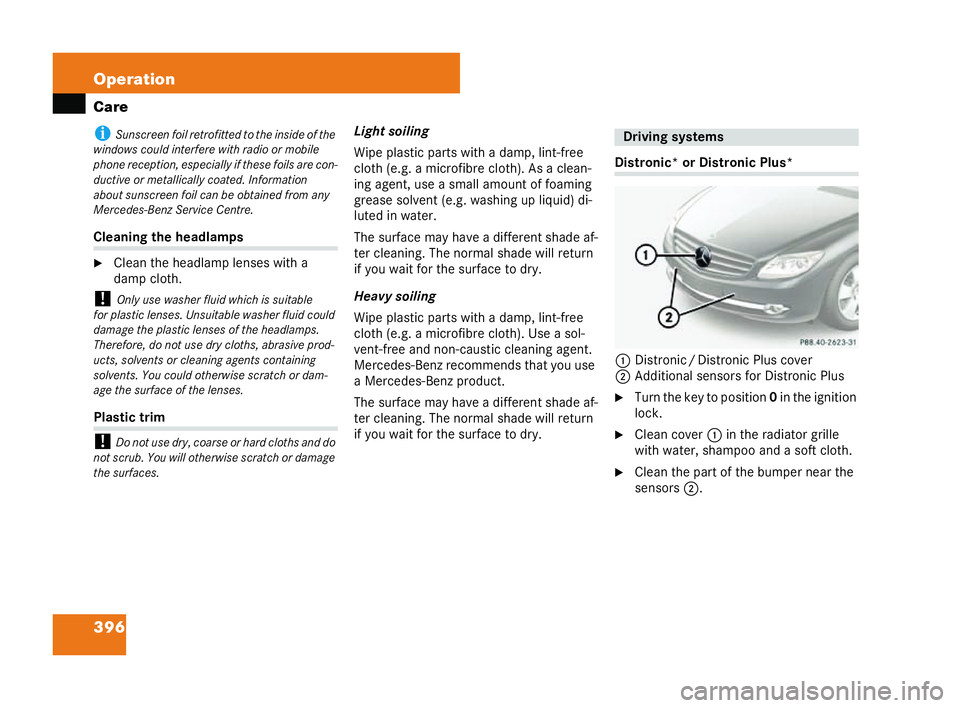
1 Distroni c/Distronic Pl uscover
2 Add itional sensor sfor Di stronic Pl us
6 Turn the key to position0 in theignition
lo ck.
6 Cleancover 1in the radiato rgrille
with water, shampoo and a softcloth.
6 Clean the part ofthebu mper near the
se nsors 2. Driving
systems
P88.40-2623-31 216_R
E_2006-12a.book Seit e396 Montag, 2. Oktob er2006 12:06 12
Page 425 of 555
404 Practical advice
Displ
aymessa ges
Th eon-board com puter shows warnings or
malfunct ions inthemu lti-fu nc tion disp lay.
Ce rta inme ssag es ar eac compani edbya
warn ing tone.
Hi gh -prior ity me ssag es are displayed in
red in the multi-f un ction dis play ,w hile me-
dium-priority messag es are displ ayed in
yell ow and low-p rior ity messages inwh ite.
Pl ease respon din ac cordance with the
messages and follow thead ditional not es
in this Owner’sM anua l.
You can con firm low-p rior ity messag es
wi th # orL .Th ese are then stor ed
in the messag emem oryand can be called
up if necessar y (
=page 285).Yo uca nnot
conf irm me ssag es of the highe stpriority.
If yo uselect the "Messa ges" entry in the
"Se rvice" me nuinthe on-board compu ter
( = page 285), you cansc roll th rough the
messages bypres sing the $ or%
bu ttons on the multi-f un ction ste ering
whe el. i
Turnin g the keytoposition 2in the ignition
lock or press ingt he KEY LESS GO*button twice
ac tiva tes all the warning and indicator la mps
(except for thetu rn signal indicator lamps) and
th e mul ti-func tion display. Pleas emake sure that
th ey are working properly before comm encing a
jour ney. Th
ef ollo wing tables show all the display
me ssag es. Th emessages arediv ided into
se ctions to make itea sier to fi ndthere-
spectiv eme ssage:
! The text-style messag es from
( = page 405) onward s are displ ayed al-
ph abeti cally
! Symbol messages from ( =pa ge 414)
onwa rds Display
messages G
Risk of accident No
messages can be displ ayed ifth ere is a
failure ofthe inst rumen tcl uster an d/orthe
mu lti-fun ction display. Youwill not then be
ab leto see inf orma tion about the vehi cle
stat us, such as spee dan dou tside te mp era-
ture, warning an dindi cato rlam ps,malfu nc-
ti on and warning messages orthef ailu reof
syste ms. The vehicle’ s handling chara cter is-
ti cs ma ybe affe cted.
Imme diately consu ltaqu alified specialist
wo rksh op whic hhasthen ecessary special-
is tk now ledg e an dto ols tocarry out the
wo rk re quired. Mercedes -Ben zre co mmends
th at youu seaMe rcedes -Ben zS ervice Cen-
tr e fo rthis purpose .In particu lar,workrele-
va nt to safety or on safety-rel at ed syst ems
mu stbe ca rried out at aqualifi ed speci alist
wo rksh op. 216_R
E_2006-12a.book Seit e404 Montag, 2. Oktob er2006 12:06 12
Page 448 of 555
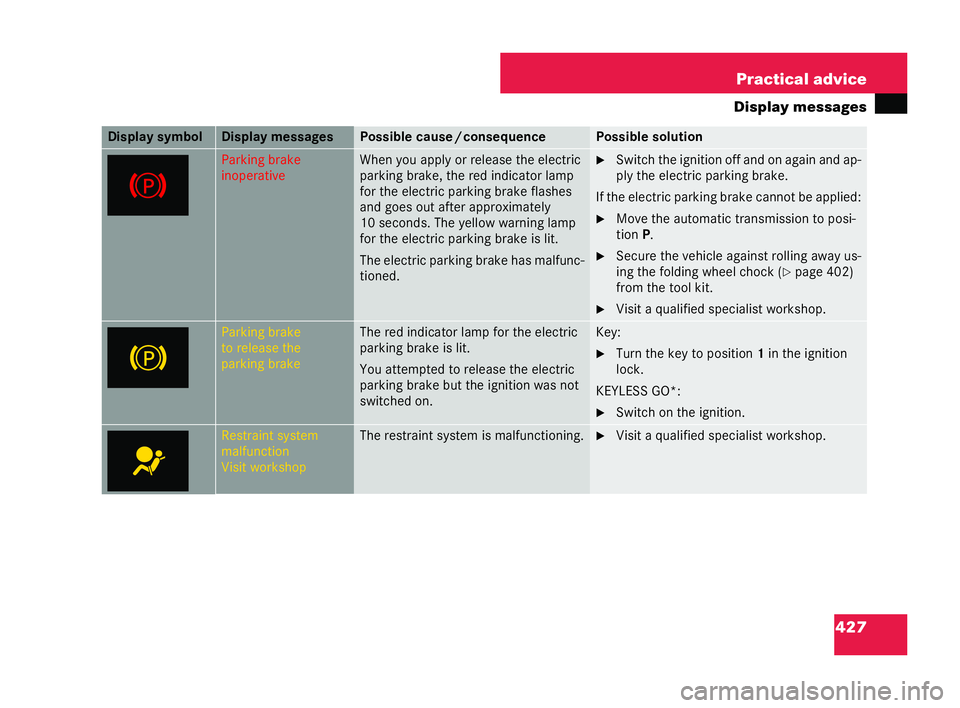
427
Practical advice
Displa ymes sages Pa
rking br ake
in op era tive Wh
en yo uapply orrelease the electric
parki ngbrake, th ered indic ator la mp
fo r the electri cparking brake flas hes
an d goe sout after approx imate ly
10 seco nds.Th e yell ow wa rning la mp
fo r the electri cparking br akeis lit.
Th eelec tric parki ngbrake hasmal func-
tioned. 6
Switch theig ni tion of fand on againand ap-
pl yt he electric parki ngbra ke.
If the elec tric pa rki ng brake cannot be applied:
6 Move the autom atic tr ansmission toposi-
ti on P.
6 Secu re the ve hicle against rolling away us-
in g th efo ldin g wh eel choc k (
=page 402)
from the tool kit.
6 Visit aqualified specialist worksho p. Pa
rking br ake
to rele ase the
park ing brake Th
e red indi cator lamp fo r theelectric
parki ngbrake islit.
Yo uat tempt edto rele ase the electric
parki ngbrake but the ignition wa snot
sw itche don. Key:
6
Turn the key to position 1in the ignition
lock.
KE YLES S GO*:
6 Switch onthe ig nitio n. Re
straint system
malfu nction
Visi twor kshop Th
e restrai ntsyst em is malf unctioning. 6
Visit aqualified specialist worksho p. Di
sp lay sy mbol Di
spla yme ssages Poss
ible cause /consequ ence Pos
sibl eso lution 216_R
E_2006-12a.book Seit e427 Montag, 2. Oktob er2006 12:06 12
Page 450 of 555
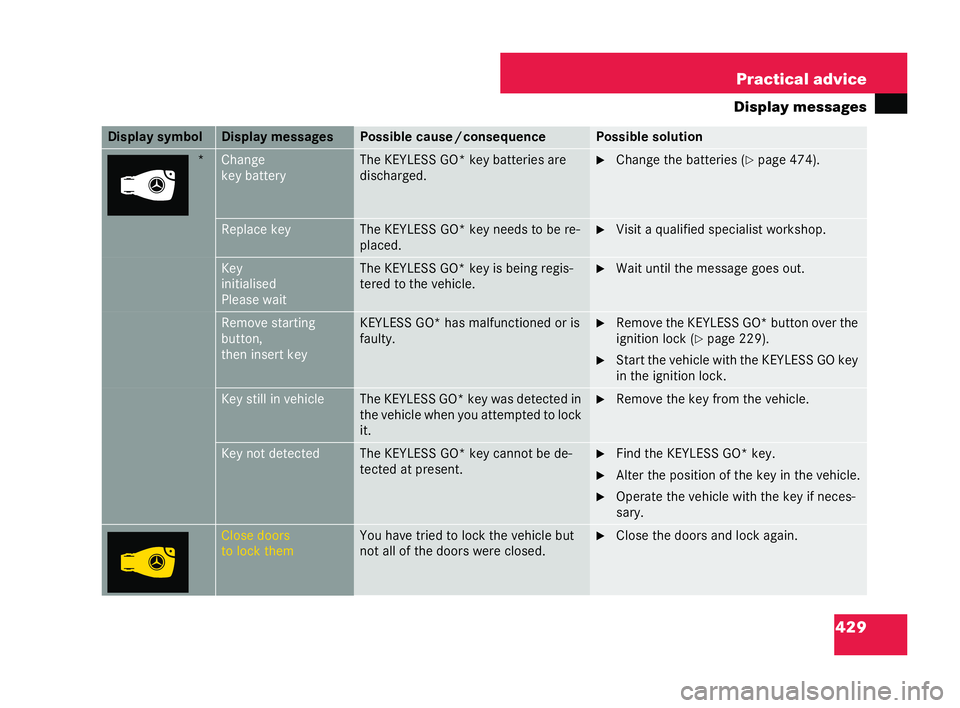
429
Practical advice
Displa ymes sages * Cha
nge
key battery Th
e KE YLES SGO* key batteries are
disc harge d. 6
Change thebatteries ( =page 474). Re
place key Th
e KE YLES SGO* keyneed stobe re-
pl ac ed. 6
Visit aqualified specialist worksho p. Key
in
itialised
Please wait Th
e KE YLES SGO* key is be ing regis-
tered to thevehicl e. 6
Wai tun til th em essa ge goes out. Remov
est ar ting
button,
then ins ertk ey KE
YLESS GO *has mal func tione dor is
faul ty. 6
Remo ve the KEYLESS GO*button over the
ig ni tion lock (
=pa ge 229).
6 Star t the veh iclewith th e KEYLESS GOkey
in theignition lock. Key
still in vehicle Th
eKE YLESS GO* keywa sde tected in
the vehicle wh enyou attem pted to lock
it. 6
Remo ve the key from the vehicle. Key not detected Th
e KE YLES SGO* keycannot be de-
te cted atpresent. 6
Find theKE YLESS GO* key.
6 Alter th eposition of thekey in the vehicle.
6 Opera tethev ehicle with the key if neces-
sar y. Clos
edo ors
to lock them Yo
u ha vetried to lock the ve hiclebu t
not al lof the doors were clos ed. 6
Clos ethe doors andl ock again. Di
sp lay sy mbol Di
spla yme ssages Poss
ible cause /consequ ence Pos
sibl eso lution 216_R
E_2006-12a.book Seit e429 Montag, 2. Oktob er2006 12:06 12
Page 451 of 555
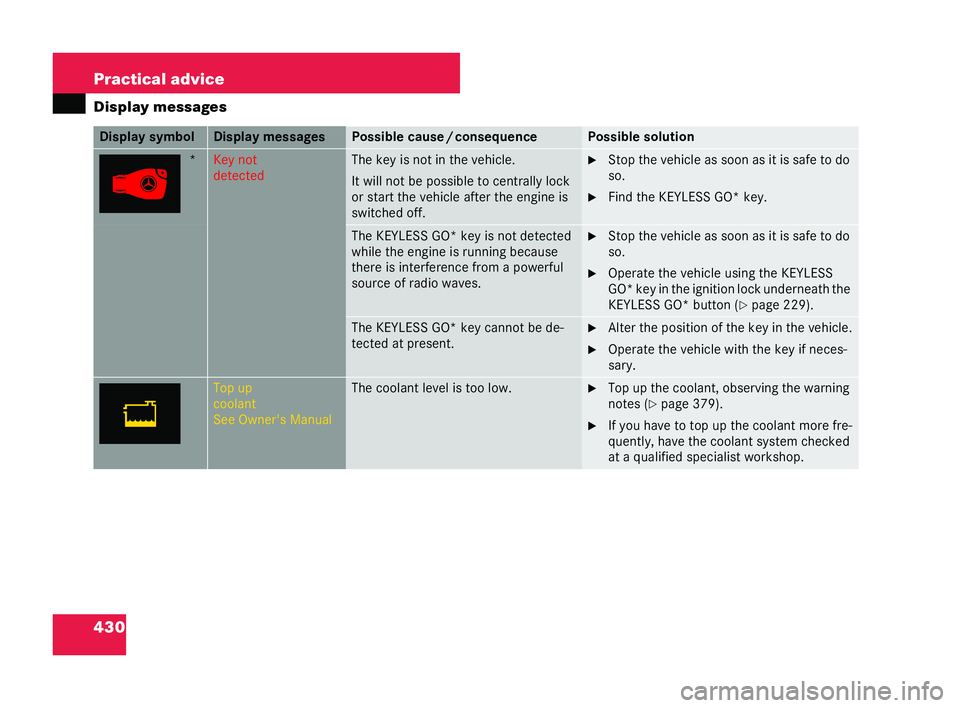
430 Practical advice
Displ
aymessa ges * Key
not
detec ted Th
ekey isnot in the ve hicle.
It wi llnot be po ssible tocentrally lo ck
or st art the vehicle after theengine is
sw itch ed off. 6
Stop theve hicl eas so onasitis sa fe to do
so.
6 Find the KEYLESS GO* key. Th
eKEY LESS GO*key is not detected
whi lethe engine isrunning be cause
there is inter feren cefrom apowe rful
so urce of ra dio wave s. 6
Stop theve hicl eas so onasitis sa fe to do
so.
6 Operate the vehicle usin g the KE YLESS
GO* key in the ignition lock underneath the
KE YLESS GO*button (
=pa ge 229). Th
eKE YLESS GO* ke yca nnot be de-
tec ted atpresent. 6
Alter the position of the keyin the vehicle.
6 Operat e the vehicle wi th th ekey ifne ces-
sary. To
p up
co olant
Se eOwne r's Manual Th
eco olan tle ve lis too low. 6
Topup the coola nt, obs erving the warni ng
note s (
=page 379).
6 Ifyo u have to topup th ecool antmo refre-
quent ly, have the coola ntsyst emchecked
at aqual ifie d sp eciali stwor ksho p. Di
sp laysymb ol Di
sp lay messages Po
ssi blecaus e/cons equence Po
ssib leso lution 216_R
E_2006-12a.book Seit e430 Montag, 2. Oktob er2006 12:06 12
Page 472 of 555
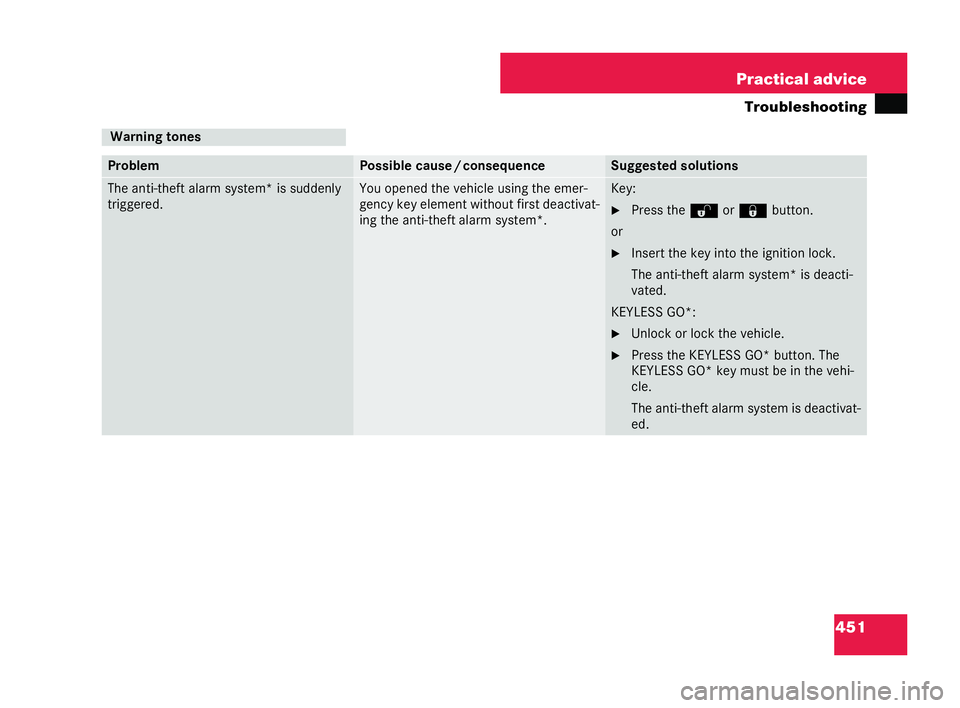
451
Practical advice
Tr oubleshooting Wa
rningto nes Pro
blem Poss
ible cause /consequ ence Sugges
tedsoluti ons Th
eant i-th eftalarm system* is sud denly
tri gg ered. Yo
uop ened theve hicle using theemer-
gency key element without first de activat-
in g th ean ti-th efta larm system *. Key:
6
Press theŒ or‹ button.
or 6 Insert the key into the ignition lock.
The anti-t heft alarm system* is deacti-
va ted.
KE YLES SGO*:
6 Unlockor lock the vehicle.
6 Press the KEYLESS GO*button .The
KE YLES SGO* keymustbe intheve hi-
cle.
The ant i-th eftalarm systemi sde activa t-
ed. 216_R
E_2006-12a.book Seit e451 Montag, 2. Oktob er2006 12:06 12
Page 474 of 555
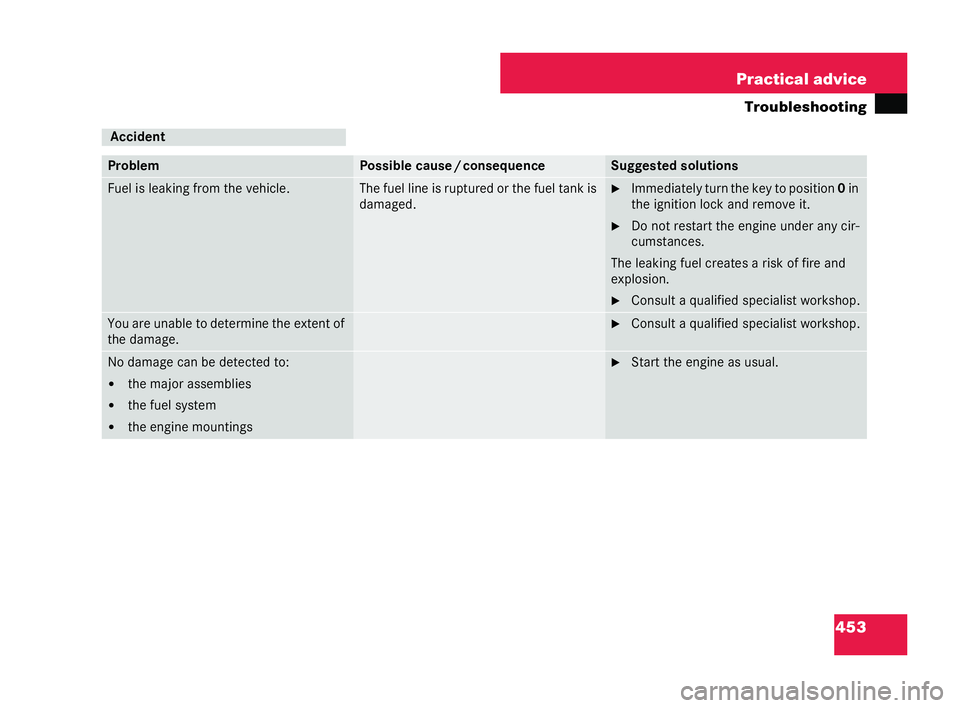
453
Practical advice
Tr oubleshooting Acci
dent Pro
blem Poss
ible cause /consequ ence Sugges
tedsoluti ons Fuel
isleak ing from theve hicl e. Th
efu el li neisruptured orthe fuel ta nkis
damag ed. 6
Imme diately turn th ekeyto position 0in
the ignition lock and re move it.
6 Do not resta rt the engine unde ran y ci r-
cums tance s.
Th elea king fue lcrea tesa risk offire and
expl osion.
6 Consulta qua lifi ed spe cial ist wor ksho p. Yo
ua reuna bleto determine the extent of
th eda ma ge. 6
Consulta qua lifi ed spe cial ist wor ksho p. No da
magecan be dete cted to:
! themajor assemblies
! the fuel system
! the engi nemo unti ngs 6
Start theengine as usual. 216_R
E_2006-12a.book Seit e453 Montag, 2. Oktob er2006 12:06 12
Page 476 of 555
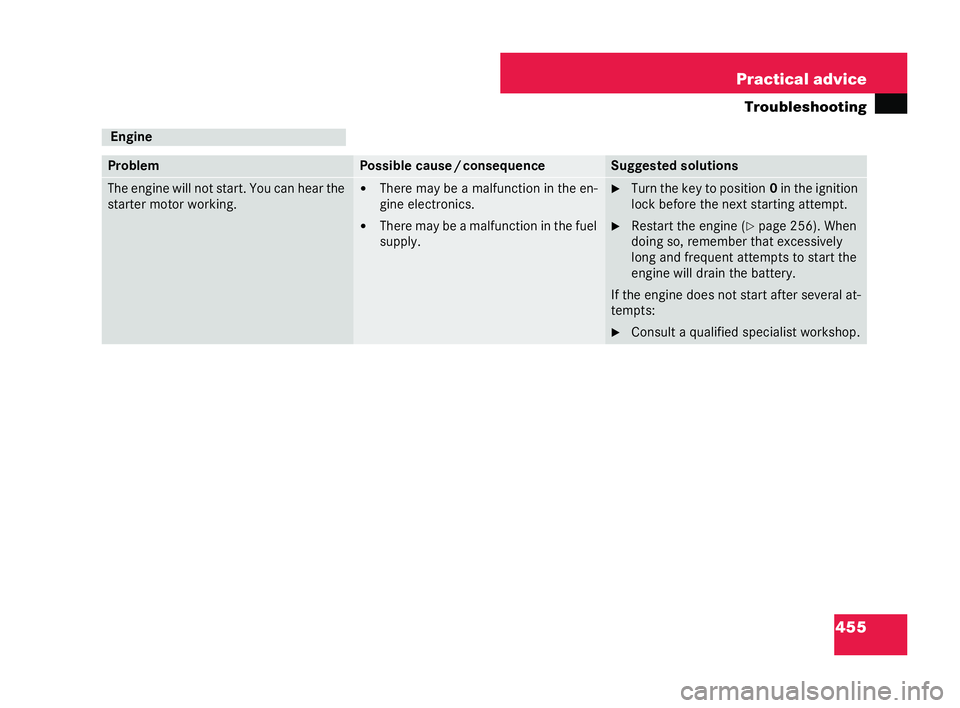
455
Practical advice
Tr oubleshooting Eng
ine Pro
blem Poss
ible cause /consequ ence Sugges
tedsoluti ons Th
een gine wi llnot start. You can hear the
sta rter motor working. !
The remay be a malfunctio nin the en-
gi ne elec tron ics.
! The remay bea malfun ctionin the fuel
supp ly. 6
Turn thekey to po sition 0in the ignition
lock be fore the next star ting attem pt.
6 Resta rttheengine ( =page 256). When
do ing so ,reme mber tha tex ce ssively
long andfreque ntatte mp ts to st artt he
eng ine will drain th ebatter y.
If th e en gine does not sta rtafter several at-
tempt s:
6 Consulta qua lifi ed spe cial ist wor ksho p. 216_R
E_2006-12a.book Seit e455 Montag, 2. Oktob er2006 12:06 12