display MERCEDES-BENZ CL COUPE 2009 Owners Manual
[x] Cancel search | Manufacturer: MERCEDES-BENZ, Model Year: 2009, Model line: CL COUPE, Model: MERCEDES-BENZ CL COUPE 2009Pages: 421, PDF Size: 10.78 MB
Page 304 of 421
i
The tyre pressure values indicated by the
on-board computer may differ from those
measured at a filling station with a pressure
gauge. The tyre pressures shown by the on-
board computer refer to those measured at
sea level. The tyre pressure values indica-
ted by a pressure gauge when the vehicle
is at high altitude are higher than those
shown by the on-board computer. In this
case, do not reduce the tyre pressures.
i After a teach-in period, the tyre pressure
monitor automatically recognises new
wheels or new sensors. As long as a clear
allocation of the tyre pressure values to the
individual wheels is not possible, the dis-
play message Tyre Pressure Monitor
Active is shown instead of the tyre pres-
sure display. The tyre pressures are already
being monitored.
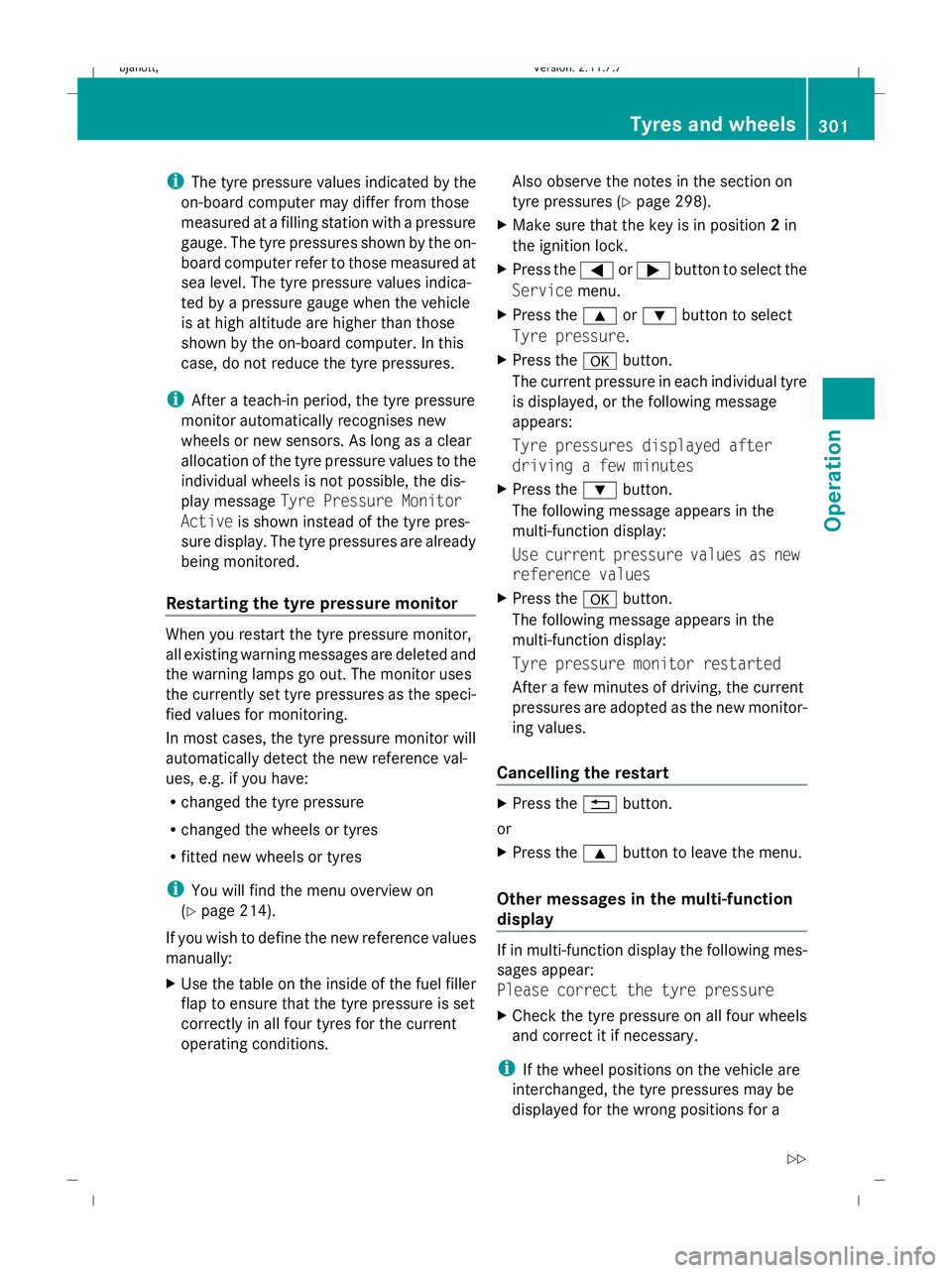
Restarting the tyre pressure monitor When you restart the tyre pressure monitor,
all existing warning messages are deleted and
the warning lamps go out. The monitor uses
the currently set tyre pressures as the speci-
fied values for monitoring.
In most cases, the tyre pressure monitor will
automatically detect the new reference val-
ues, e.g. if you have:
R changed the tyre pressure
R changed the wheels or tyres
R fitted new wheels or tyres
i You will find the menu overview on
(Y page 214).
If you wish to define the new reference values
manually:
X Use the table on the inside of the fuel filler
flap to ensure that the tyre pressure is set
correctly in all four tyres for the current
operating conditions. Also observe the notes in the section on
tyre pressures (Y
page 298).
X Make sure that the key is in position 2in
the ignition lock.
X Press the =or; button to select the
Service menu.
X Press the 9or: button to select
Tyre pressure.
X Press the abutton.
The current pressure in each individual tyre
is displayed, or the following message
appears:
Tyre pressures displayed after
driving a few minutes
X Press the :button.
The following message appears in the
multi-function display:
Use current pressure values as new
reference values
X Press the abutton.
The following message appears in the
multi-function display:
Tyre pressure monitor restarted
After a few minutes of driving, the current
pressures are adopted as the new monitor-
ing values.
Cancelling the restart X
Press the %button.
or
X Press the 9button to leave the menu.
Other messages in the multi-function
display If in multi-function display the following mes-
sages appear:
Please correct the tyre pressure
X
Check the tyre pressure on all four wheels
and correct it if necessary.
i If the wheel positions on the vehicle are
interchanged, the tyre pressures may be
displayed for the wrong positions for a Tyres and wheels
301Operation
216_AKB; 2; 3, en-GB
bjanott, Version: 2.11.7.7 2009-02-27T14:54:17+01:00 - Seite 301 Z
Dateiname: 6515230602_buchblock.pdf; erzeugt am 04. Mar 2009 11:16:28; WK
Page 305 of 421
short time. This is rectified after a few
minutes of driving, and the tyre pressures
are displayed for the correct positions.
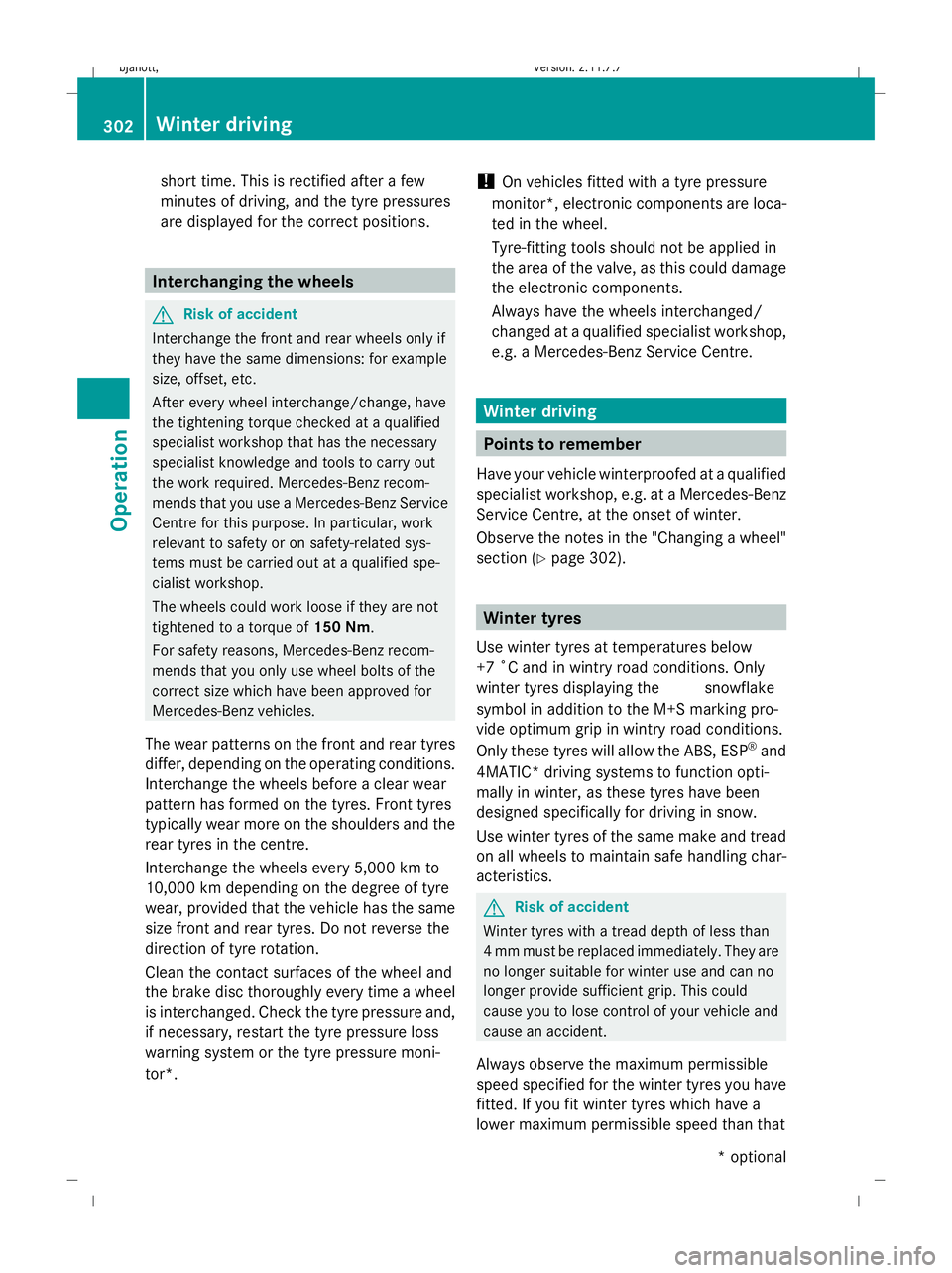
Interchanging the wheels
G
Risk of accident
Interchange the front and rear wheels only if
they have the same dimensions: for example
size, offset, etc.
After every wheel interchange/change, have
the tightening torque checked at a qualified
specialist workshop that has the necessary
specialist knowledge and tools to carry out
the work required. Mercedes-Benz recom-
mends that you use a Mercedes-Benz Service
Centre for this purpose. In particular, work
relevant to safety or on safety-related sys-
tems must be carried out at a qualified spe-
cialist workshop.
The wheels could work loose if they are not
tightened to a torque of 150 Nm.
For safety reasons, Mercedes-Benz recom-
mends that you only use wheel bolts of the
correct size which have been approved for
Mercedes-Benz vehicles.
The wear patterns on the front and rear tyres
differ, depending on the operating conditions.
Interchange the wheels before a clear wear
pattern has formed on the tyres. Front tyres
typically wear more on the shoulders and the
rear tyres in the centre.
Interchange the wheels every 5,000 km to
10,000 km depending on the degree of tyre
wear, provided that the vehicle has the same
size front and rear tyres. Do not reverse the
direction of tyre rotation.
Clean the contact surfaces of the wheel and
the brake disc thoroughly every time a wheel
is interchanged. Check the tyre pressure and,
if necessary, restart the tyre pressure loss
warning system or the tyre pressure moni-
tor*. !
On vehicles fitted with a tyre pressure
monitor*, electronic components are loca-
ted in the wheel.
Tyre-fitting tools should not be applied in
the area of the valve, as this could damage
the electronic components.
Always have the wheels interchanged/
changed at a qualified specialist workshop,
e.g. a Mercedes-Benz Service Centre. Winter driving
Points to remember
Have your vehicle winterproofed at a qualified
specialist workshop, e.g. at a Mercedes-Benz
Service Centre, at the onset of winter.
Observe the notes in the "Changing a wheel"
section (Y page 302). Winter tyres
Use winter tyres at temperatures below
+7 ˚C and in wintry road conditions. Only
winter tyres displaying the isnowflake
symbol in addition to the M+S marking pro-
vide optimum grip in wintry road conditions.
Only these tyres will allow the ABS, ESP ®
and
4MATIC* driving systems to function opti-
mally in winter, as these tyres have been
designed specifically for driving in snow.
Use winter tyres of the same make and tread
on all wheels to maintain safe handling char-
acteristics. G
Risk of accident
Winter tyres with a tread depth of less than
4 mm must be replaced immediately. They are
no longer suitable for winter use and can no
longer provide sufficient grip. This could
cause you to lose control of your vehicle and
cause an accident.
Always observe the maximum permissible
speed specified for the winter tyres you have
fitted. If you fit winter tyres which have a
lower maximum permissible speed than that 302
Winter drivingOperation
* optional
216_AKB; 2; 3, en-GB
bjanott,
Version: 2.11.7.7 2009-02-27T14:54:17+01:00 - Seite 302
Dateiname: 6515230602_buchblock.pdf; erzeugt am 04. Mar 2009 11:16:29; WK
Page 309 of 421
waves. This may cause the maximum per-
missible water depth to be exceeded.
Failure to observe these notes may result
in damage to the engine, electrical systems
and transmission. Driving abroad
Points to remember
An extensive Mercedes-Benz Service network
is also available in other countries. The
Service Hotline's current telephone numbers
for use when you are abroad are to be found
in the "Service24h" chapter of the Service
Booklet.
Only low-octane fuel is available in certain
countries.
You can find further information about fuel
grades on (Y page 290). Symmetrical dipped beam
If your journey takes you to countries where
vehicles are driven on sides of the road oppo-
site to the country in which the vehicle is reg-
istered, your headlamps must be switched to
symmetrical dipped beam. Oncoming traffic
will be dazzled less.
X Have the headlamps switched over at a
qualified specialist workshop, e. g. a
Mercedes-Benz Service Centre. G
Risk of accident
Remember to set the headlamps back to
asymmetrical dipped beam when you return
to driving on the same side of the road as that
of the country in which your vehicle was reg-
istered. You may otherwise dazzle the oncom-
ing traffic and could cause an accident. Service
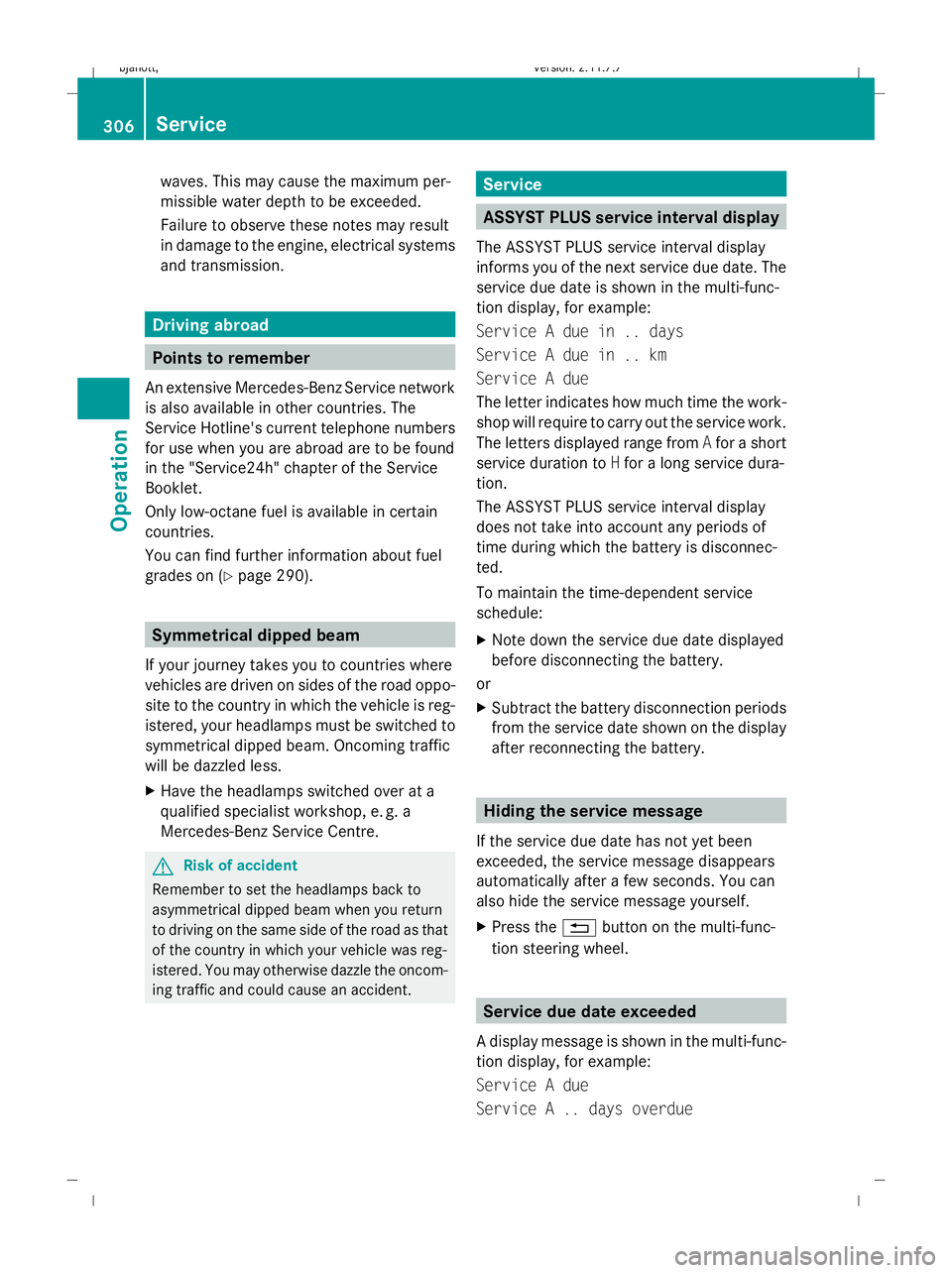
ASSYST PLUS service interval display
The ASSYST PLUS service interval display
informs you of the next service due date. The
service due date is shown in the multi-func-
tion display, for example:
Service A due in .. days
Service A due in .. km
Service A due
The letter indicates how much time the work-
shop will require to carry out the service work.
The letters displayed range from Afor a short
service duration to Hfor a long service dura-
tion.
The ASSYST PLUS service interval display
does not take into account any periods of
time during which the battery is disconnec-
ted.
To maintain the time-dependent service
schedule:
X Note down the service due date displayed
before disconnecting the battery.
or
X Subtract the battery disconnection periods
from the service date shown on the display
after reconnecting the battery. Hiding the service message
If the service due date has not yet been
exceeded, the service message disappears
automatically after a few seconds. You can
also hide the service message yourself.
X Press the %button on the multi-func-
tion steering wheel. Service due date exceeded
A display message is shown in the multi-func-
tion display, for example:
Service A due
Service A .. days overdue 306
ServiceOperation
216_AKB; 2; 3, en-GB
bjanott
,V ersion: 2.11.7.7
2009-02-27T14:54:17+01:00 - Seite 306
Dateiname: 6515230602_buchblock.pdf; erzeugt am 04. Mar 2009 11:16:29; WK
Page 310 of 421
Service A .. km overdue
i
If you fail to have the service performed
by the specified date, you may be violating
applicable laws. Your warranty may be inva-
lidated and goodwill settlements may be
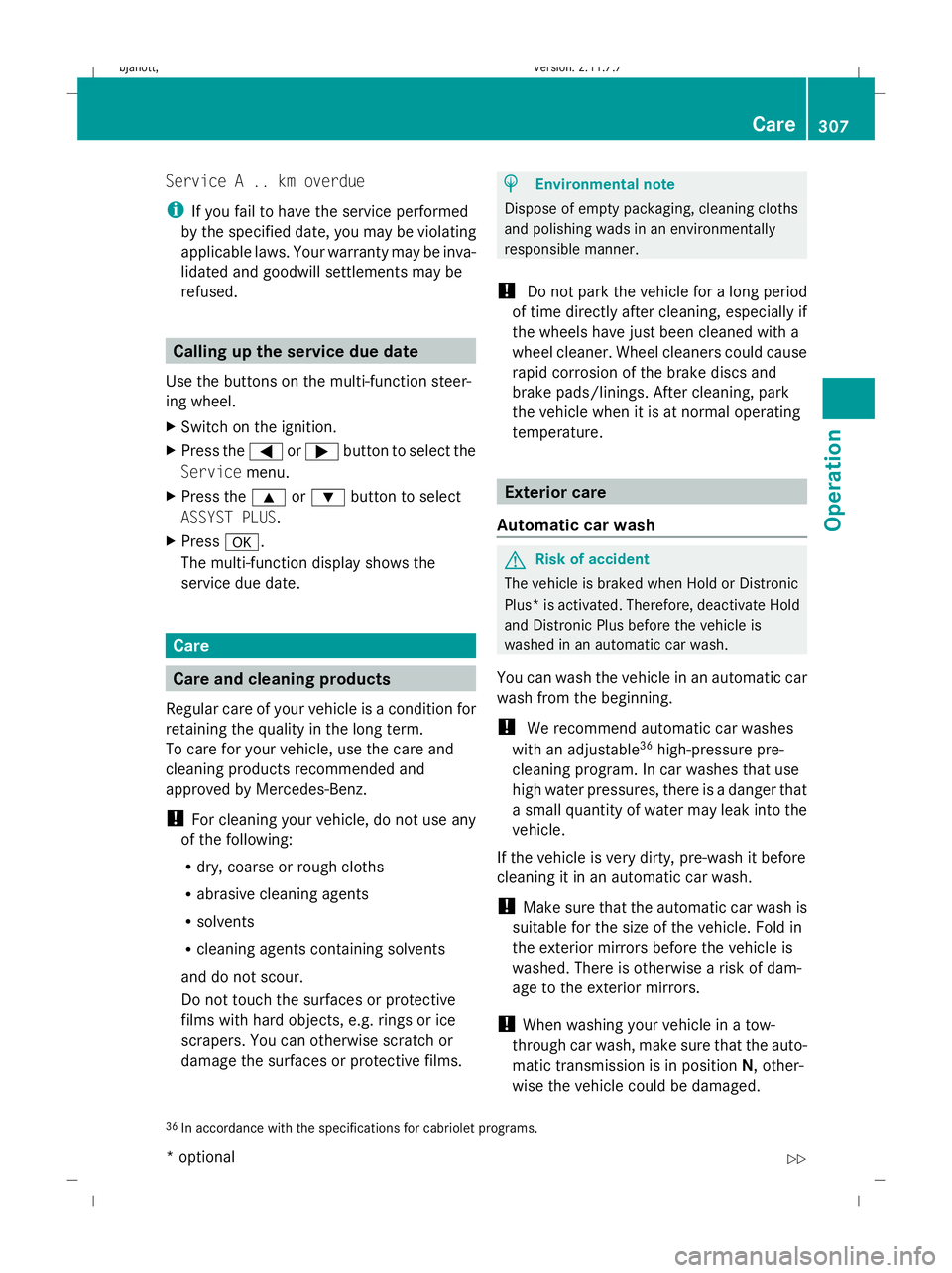
refused. Calling up the service due date
Use the buttons on the multi-function steer-
ing wheel.
X Switch on the ignition.
X Press the =or; button to select the
Service menu.
X Press the 9or: button to select
ASSYST PLUS.
X Press a.
The multi-function display shows the
service due date. Care
Care and cleaning products
Regular care of your vehicle is a condition for
retaining the quality in the long term.
To care for your vehicle, use the care and
cleaning products recommended and
approved by Mercedes-Benz.
! For cleaning your vehicle, do not use any
of the following:
R dry, coarse or rough cloths
R abrasive cleaning agents
R solvents
R cleaning agents containing solvents
and do not scour.
Do not touch the surfaces or protective
films with hard objects, e.g. rings or ice
scrapers. You can otherwise scratch or
damage the surfaces or protective films. H
Environmental note
Dispose of empty packaging, cleaning cloths
and polishing wads in an environmentally
responsible manner.
! Do not park the vehicle for a long period
of time directly after cleaning, especially if
the wheels have just been cleaned with a
wheel cleaner. Wheel cleaners could cause
rapid corrosion of the brake discs and
brake pads/linings. After cleaning, park
the vehicle when it is at normal operating
temperature. Exterior care
Automatic car wash G
Risk of accident
The vehicle is braked when Hold or Distronic
Plus* is activated. Therefore, deactivate Hold
and Distronic Plus before the vehicle is
washed in an automatic car wash.
You can wash the vehicle in an automatic car
wash from the beginning.
! We recommend automatic car washes
with an adjustable 36
high-pressure pre-
cleaning program. In car washes that use
high water pressures, there is a danger that
a small quantity of water may leak into the
vehicle.
If the vehicle is very dirty, pre-wash it before
cleaning it in an automatic car wash.
! Make sure that the automatic car wash is
suitable for the size of the vehicle. Fold in
the exterior mirrors before the vehicle is
washed. There is otherwise a risk of dam-
age to the exterior mirrors.
! When washing your vehicle in a tow-
through car wash, make sure that the auto-
matic transmission is in position N, other-
wise the vehicle could be damaged.
36 In accordance with the specifications for cabriolet programs. Care
307Operation
* optional
216_AKB; 2; 3, en-GB
bjanott,
Version: 2.11.7.7 2009-02-27T14:54:17+01:00 - Seite 307 Z
Dateiname: 6515230602_buchblock.pdf; erzeugt am 04. Mar 2009 11:16:30; WK
Page 313 of 421
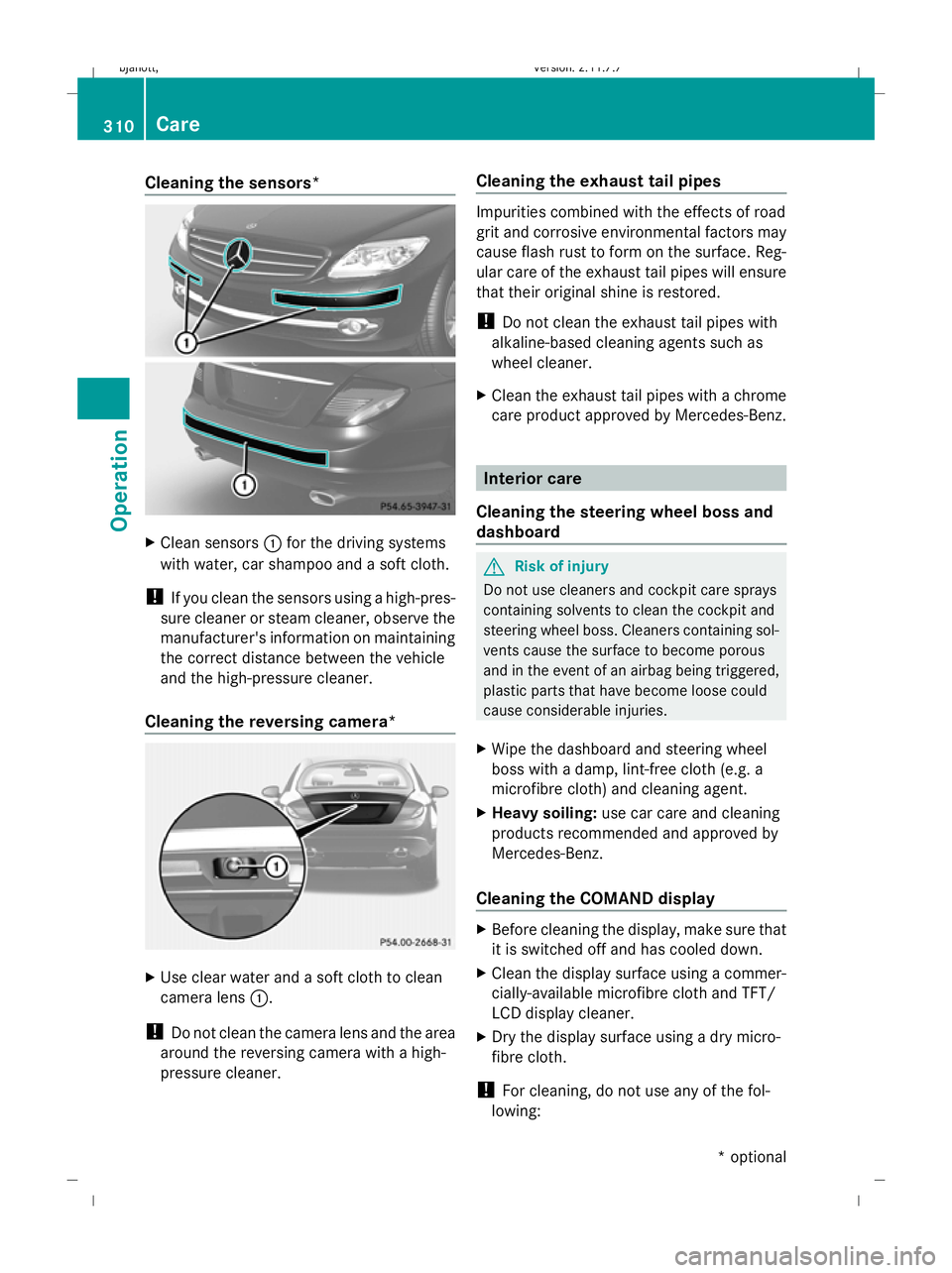
Cleaning the sensors*
X
Clean sensors :for the driving systems
with water, car shampoo and a soft cloth.
! If you clean the sensors using a high-pres-
sure cleaner or steam cleaner, observe the
manufacturer's information on maintaining
the correct distance between the vehicle
and the high-pressure cleaner.
Cleaning the reversing camera* X
Use clear water and a soft cloth to clean
camera lens :.
! Do not clean the camera lens and the area
around the reversing camera with a high-
pressure cleaner. Cleaning the exhaust tail pipes Impurities combined with the effects of road
grit and corrosive environmental factors may
cause flash rust to form on the surface. Reg-
ular care of the exhaust tail pipes will ensure
that their original shine is restored.
!
Do not clean the exhaust tail pipes with
alkaline-based cleaning agents such as
wheel cleaner.
X Clean the exhaust tail pipes with a chrome
care product approved by Mercedes-Benz. Interior care
Cleaning the steering wheel boss and
dashboard G
Risk of injury
Do not use cleaners and cockpit care sprays
containing solvents to clean the cockpit and
steering wheel boss. Cleaners containing sol-
vents cause the surface to become porous
and in the event of an airbag being triggered,
plastic parts that have become loose could
cause considerable injuries.
X Wipe the dashboard and steering wheel
boss with a damp, lint-free cloth (e.g. a
microfibre cloth) and cleaning agent.
X Heavy soiling: use car care and cleaning
products recommended and approved by
Mercedes-Benz.
Cleaning the COMAND display X
Before cleaning the display, make sure that
it is switched off and has cooled down.
X Clean the display surface using a commer-
cially-available microfibre cloth and TFT/
LCD display cleaner.
X Dry the display surface using a dry micro-
fibre cloth.
! For cleaning, do not use any of the fol-
lowing: 310
CareOperation
* optional
216_AKB; 2; 3, en-GB
bjanott
,V ersion: 2.11.7.7
2009-02-27T14:54:17+01:00 - Seite 310
Dateiname: 6515230602_buchblock.pdf; erzeugt am 04. Mar 2009 11:16:31; WK
Page 314 of 421
R
alcohol-based solvents or petrol
R abrasive cleaning agents
R commercially-available household clean-
ing agents
These may damage the display surface. Do
not exert pressure when cleaning the dis-
play surface as this may lead to irreversible
damage.
Cleaning the seat covers !
Do not use microfibre cloths to clean gen-
uine leather, artificial leather or Alcantara
covers, as these are too aggressive and, if
used often, may damage the cover.
! You should clean:
R genuine leather covers with a damp
cloth, then wipe the covers down with a
dry cloth. Make sure that the leather
does not become soaked. For leather
care, use a leather care agent recom-
mended by Mercedes-Benz. You can
obtain information about this from any
Mercedes-Benz Service Centre.
R artificial leather covers with a cloth mois-
tened with a solution containing 1%
detergent (e. g. washing-up liquid).
R fabric covers with a microfibre cloth
moistened with a solution containing 1%
detergent (e. g. washing-up liquid). When
cleaning, take care not to rub too vigo-
rously and always wipe entire seat sec-
tions to avoid leaving visible lines. Leave
the seat to dry afterwards. Cleaning
results depend on the type of dirt and
how long it has been there.
R Alcantara covers with a damp cloth.
Make sure you wipe entire seat sections
to avoid leaving visible lines.
i Note that regular care is essential to
ensure that the quality (both appearance and comfort) of the covers is retained over
time.
Cleaning Night View Assist* !
Do not attempt to clean the lens of the
Night View Assist camera. If the camera
lens is dirty, visit a qualified specialist work-
shop, e.g. a Mercedes-Benz Service
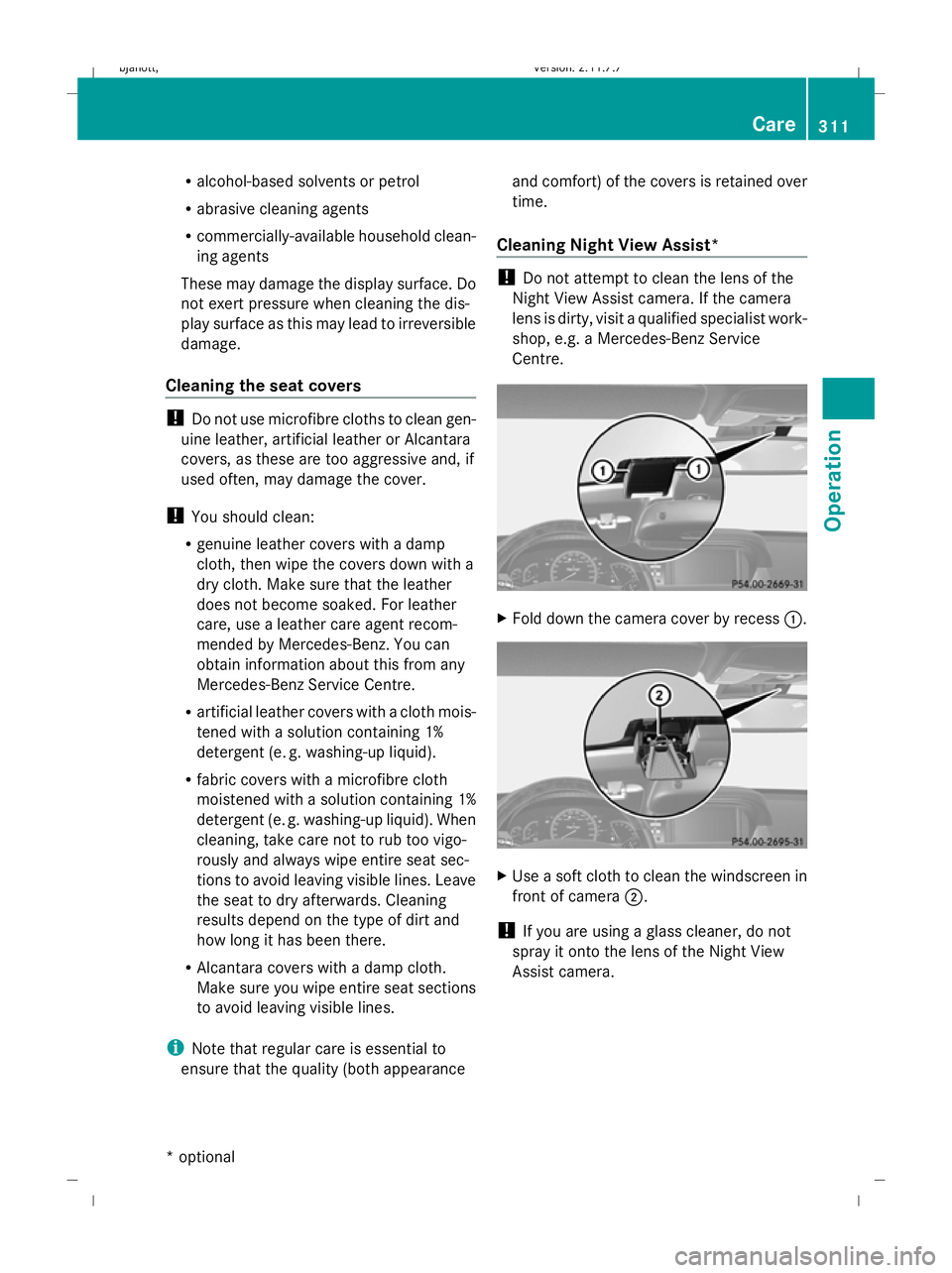
Centre. X
Fold down the camera cover by recess :. X
Use a soft cloth to clean the windscreen in
front of camera ;.
! If you are using a glass cleaner, do not
spray it onto the lens of the Night View
Assist camera. Care
311Operation
* optional
216_AKB; 2; 3, en-GB
bjanott
,V ersion: 2.11.7.7
2009-02-27T14:54:17+01:00 - Seite 311 Z
Dateiname: 6515230602_buchblock.pdf; erzeugt am 04. Mar 2009 11:16:31; WK
Page 316 of 421
Where will I find...?
...........................314
Display messages ............................. 316
Troubleshooting ................................ 349
Locking/unlocking in an emer-
gency ................................................. 365
Replacing batteries (key, remote
control, etc.) ...................................... 367
Changing bulbs ................................. 369
Replacing the wiper blades ..............372
Flat tyre ............................................. 373
Battery ............................................... 382
Towing and tow-starting ..................386
Fuses .................................................. 389 313Practical advice
216_AKB; 2; 3, en-GB
bjanott,
Version: 2.11.7.7 2009-02-27T14:54:17+01:00 - Seite 313
Dateiname: 6515230602_buchblock.pdf; erzeugt am 04. Mar 2009 11:16:32; WK
Page 319 of 421
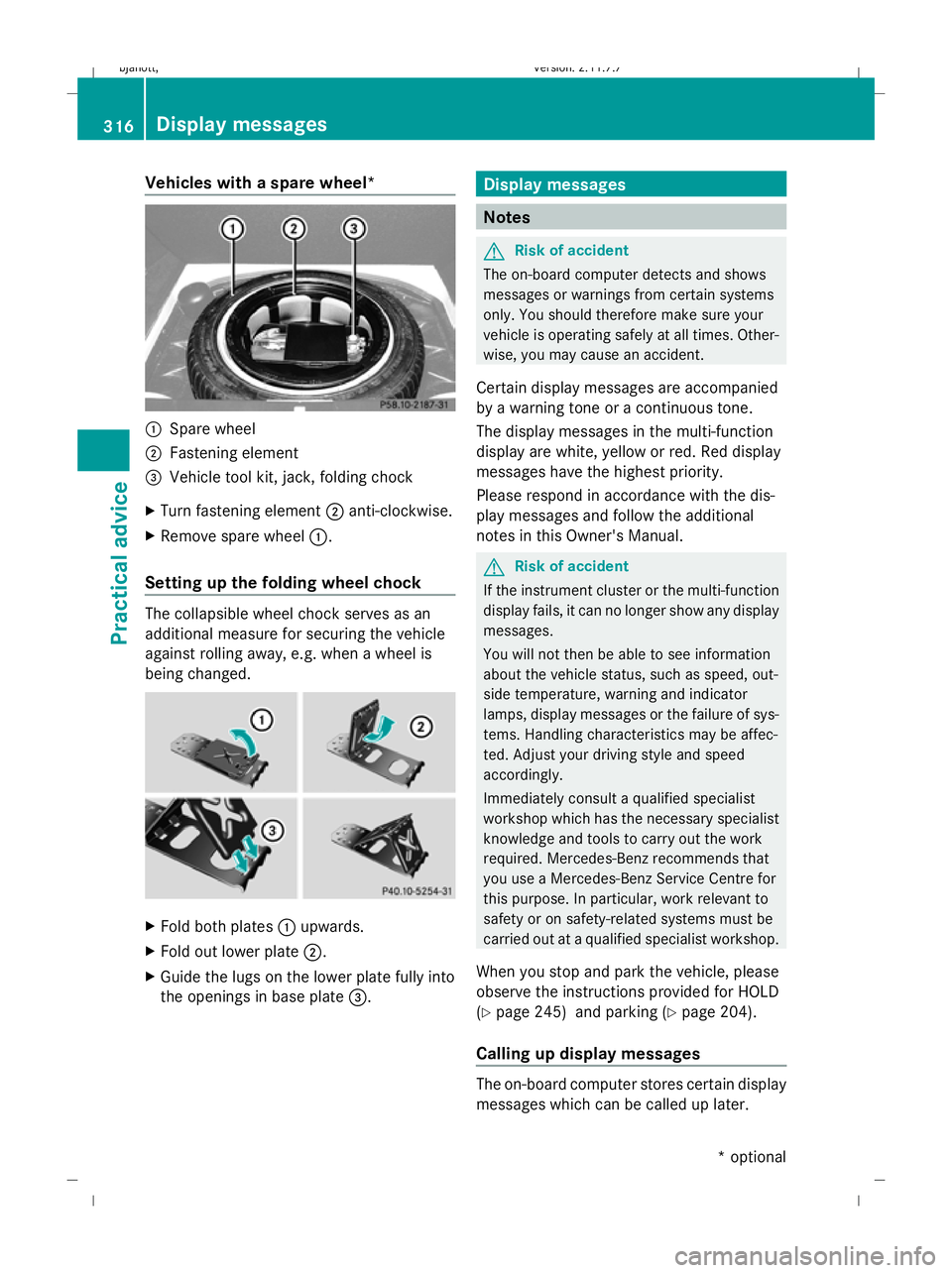
Vehicles with a spare wheel*
:
Spare wheel
; Fastening element
= Vehicle tool kit, jack, folding chock
X Turn fastening element ;anti-clockwise.
X Remove spare wheel :.
Setting up the folding wheel chock The collapsible wheel chock serves as an
additional measure for securing the vehicle
against rolling away, e.g. when a wheel is
being changed. X
Fold both plates :upwards.
X Fold out lower plate ;.
X Guide the lugs on the lower plate fully into
the openings in base plate =. Display messages
Notes
G
Risk of accident
The on-board computer detects and shows
messages or warnings from certain systems
only. You should therefore make sure your
vehicle is operating safely at all times. Other-
wise, you may cause an accident.
Certain display messages are accompanied
by a warning tone or a continuous tone.
The display messages in the multi-function
display are white, yellow or red. Red display
messages have the highest priority.
Please respond in accordance with the dis-
play messages and follow the additional
notes in this Owner's Manual. G
Risk of accident
If the instrument cluster or the multi-function
display fails, it can no longer show any display
messages.
You will not then be able to see information
about the vehicle status, such as speed, out-
side temperature, warning and indicator
lamps, display messages or the failure of sys-
tems. Handling characteristics may be affec-
ted. Adjust your driving style and speed
accordingly.
Immediately consult a qualified specialist
workshop which has the necessary specialist
knowledge and tools to carry out the work
required. Mercedes-Benz recommends that
you use a Mercedes-Benz Service Centre for
this purpose. In particular, work relevant to
safety or on safety-related systems must be
carried out at a qualified specialist workshop.
When you stop and park the vehicle, please
observe the instructions provided for HOLD
(Y page 245) and parking (Y page 204).
Calling up display messages The on-board computer stores certain display
messages which can be called up later.316
Display messagesPractical advice
* optional
216_AKB; 2; 3, en-GB
bjanott,
Version: 2.11.7.7 2009-02-27T14:54:17+01:00 - Seite 316
Dateiname: 6515230602_buchblock.pdf; erzeugt am 04. Mar 2009 11:16:34; WK
Page 320 of 421
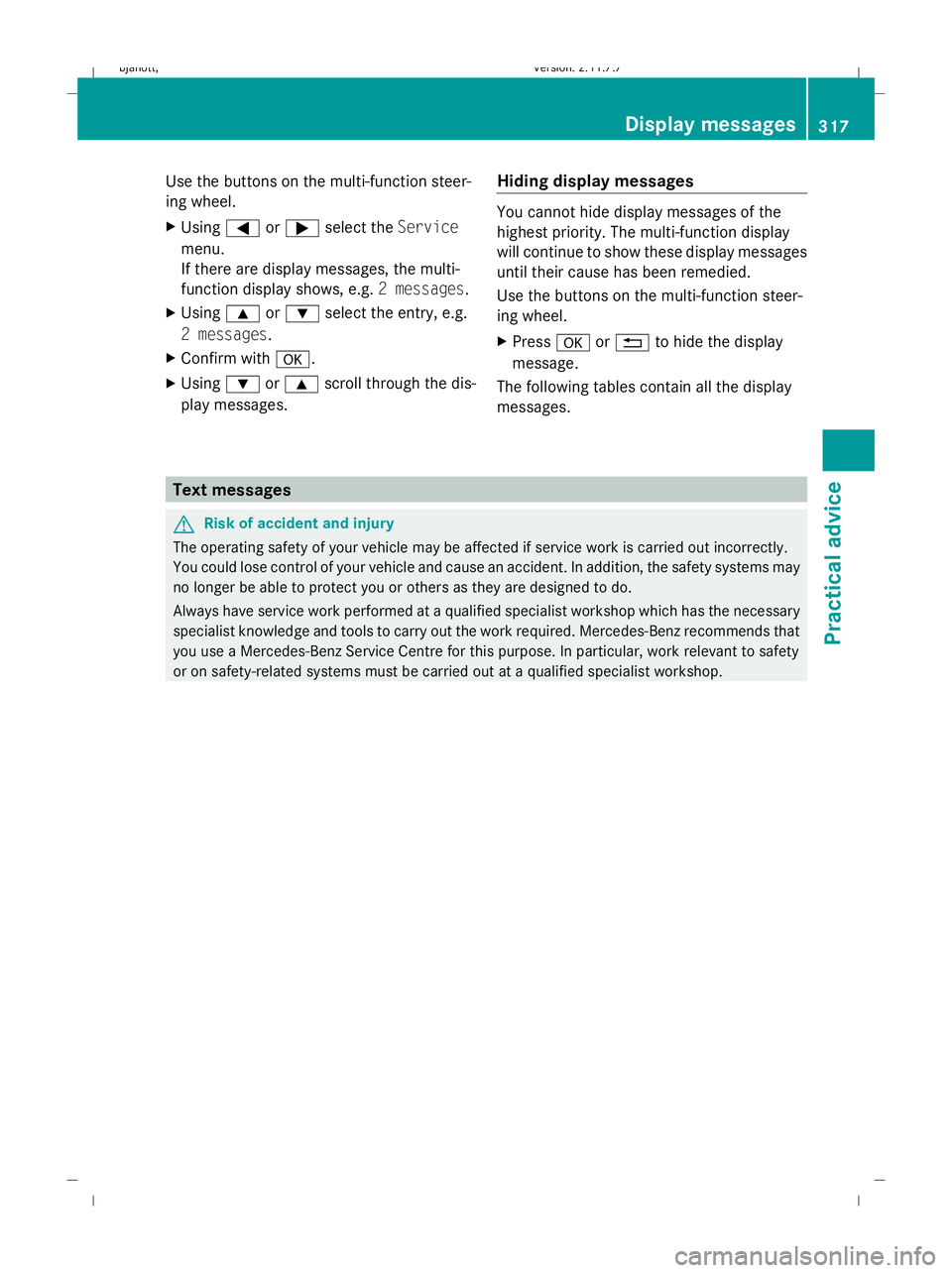
Use the buttons on the multi-function steer-
ing wheel.
X
Using =or; select the Service
menu.
If there are display messages, the multi-
function display shows, e.g. 2 messages.
X Using 9or: select the entry, e.g.
2 messages.
X Confirm with a.
X Using :or9 scroll through the dis-
play messages. Hiding display messages You cannot hide display messages of the
highest priority. The multi-function display
will continue to show these display messages
until their cause has been remedied.
Use the buttons on the multi-function steer-
ing wheel.
X
Press aor% to hide the display
message.
The following tables contain all the display
messages. Text messages
G
Risk of accident and injury
The operating safety of your vehicle may be affected if service work is carried out incorrectly.
You could lose control of your vehicle and cause an accident. In addition, the safety systems may
no longer be able to protect you or others as they are designed to do.
Always have service work performed at a qualified specialist workshop which has the necessary
specialist knowledge and tools to carry out the work required. Mercedes-Benz recommends that
you use a Mercedes-Benz Service Centre for this purpose. In particular, work relevant to safety
or on safety-related systems must be carried out at a qualified specialist workshop. Display messages
317Practical advice
216_AKB; 2; 3, en-GB
bjanott, Version: 2.11.7.7 2009-02-27T14:54:17+01:00 - Seite 317 Z
Dateiname: 6515230602_buchblock.pdf; erzeugt am 04. Mar 2009 11:16:34; WK
Page 321 of 421
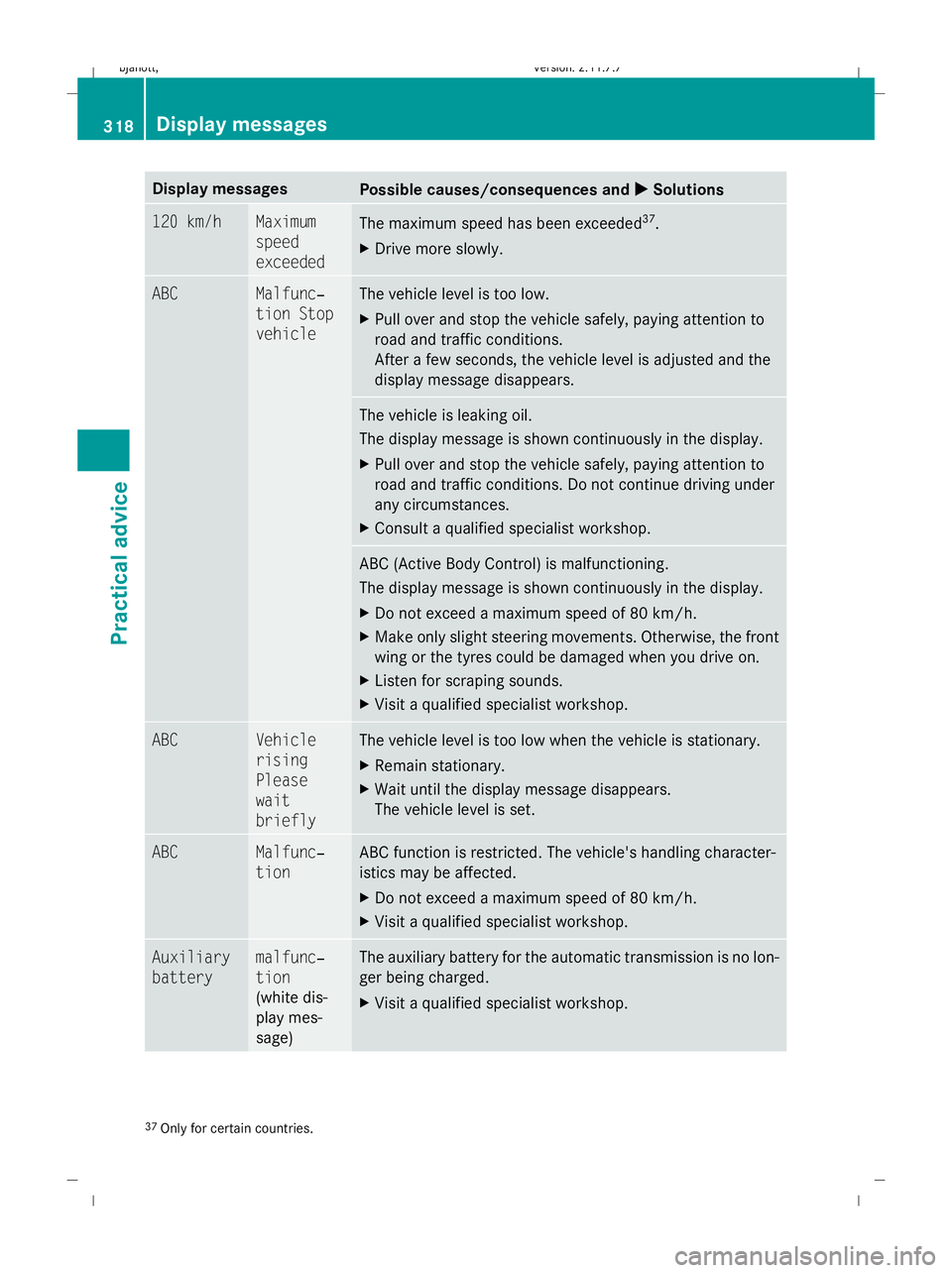
Display messages
Possible causes/consequences and
X
X Solutions 120 km/h Maximum
speed
exceeded
The maximum speed has been exceeded
37
.
X Drive more slowly. ABC Malfunc‐
tion Stop
vehicle The vehicle level is too low.
X
Pull over and stop the vehicle safely, paying attention to
road and traffic conditions.
After a few seconds, the vehicle level is adjusted and the
display message disappears. The vehicle is leaking oil.
The display message is shown continuously in the display.
X
Pull over and stop the vehicle safely, paying attention to
road and traffic conditions. Do not continue driving under
any circumstances.
X Consult a qualified specialist workshop. ABC (Active Body Control) is malfunctioning.
The display message is shown continuously in the display.
X
Do not exceed a maximum speed of 80 km/h.
X Make only slight steering movements. Otherwise, the front
wing or the tyres could be damaged when you drive on.
X Listen for scraping sounds.
X Visit a qualified specialist workshop. ABC Vehicle
rising
Please
wait
briefly The vehicle level is too low when the vehicle is stationary.
X
Remain stationary.
X Wait until the display message disappears.
The vehicle level is set. ABC Malfunc‐
tion ABC function is restricted. The vehicle's handling character-
istics may be affected.
X
Do not exceed a maximum speed of 80 km/h.
X Visit a qualified specialist workshop. Auxiliary
battery malfunc‐
tion
(white dis-
play mes-
sage) The auxiliary battery for the automatic transmission is no lon-
ger being charged.
X
Visit a qualified specialist workshop. 37
Only for certain countries. 318
Display
messagesPractical advice
216_AKB; 2; 3, en-GB
bjanott ,V ersion: 2.11.7.7
2009-02-27T14:54:17+01:00 - Seite 318
Dateiname: 6515230602_buchblock.pdf; erzeugt am 04. Mar 2009 11:16:35; WK