display MERCEDES-BENZ CL COUPE 2009 Owners Manual
[x] Cancel search | Manufacturer: MERCEDES-BENZ, Model Year: 2009, Model line: CL COUPE, Model: MERCEDES-BENZ CL COUPE 2009Pages: 421, PDF Size: 10.78 MB
Page 226 of 421
While the on-board computer reads in the SIM
card:
R
you can dial a telephone number from the
redial memory ( Calls dialled list).
R you can dial a telephone number from the
telephone book stored in COMAND.
R the multi-function display shows the Read‐
ing data... display message below the
phone book entries.
When the multi-function display shows the
display message Updating data...,
COMAND has finished importing data. The
multi-function display then shows all the
phone book entries in COMAND and the
mobile phone.
X Press the =or; button to select the
Telephone menu.
X Press the :,9ora button to call
up the phone book.
X Press the :or9 button to select the
desired name.
To scroll rapidly, press and hold the :
or 9 button for longer than one second.
After passing through eight entries, the
rapid scroll speeds up.
Rapid scrolling stops when you release the
button or reach the end of the list.
X If several telephone numbers are stored for
one name G: useaor6 to open
the list of stored numbers and press :
or 9 to select the desired telephone
number.
X Press the 6ora button to start dial-
ling.
The number dialled is stored in the redial
memory.
The telephone number dialled appears in
the multi-function display. If the name is stored in the phone book, it is also dis-
played.
or
X If you do not want to make a call: press the
~ or% button.
Redialling The on-board computer saves the last names
or numbers dialled in the redial memory
(Calls dialled
list).
X Press the =or; button to select the
Telephone menu.
X Press the 6button to switch to the
redial memory.
X Press the :or9 button to select the
desired phone number or name.
To scroll rapidly, press and hold the :
or 9 button for longer than one second.
X Press the 6ora button to start dial-
ling. Assistance menu
Use the buttons on the multi-function steer-
ing wheel.
In the Assistance menu you can:
R show the distance display* ( Ypage 223)
R switch ESP ®
on/off (Y page 224)
R activate/deactivate the distance warning
function* (Y page 224)
R activate/deactivate PRE-SAFE ®
Brake*
(Y page 224)
R activate/deactivate Blind Spot
Assist* (Y page 224)
Showing the distance display* This function is only available with Dis-
tronic* or Distronic Plus*. On-board computer
223Controls
* optional
216_AKB; 2; 3, en-GB
bjanott,
Version: 2.11.7.7 2009-02-27T14:54:17+01:00 - Seite 223 Z
Dateiname: 6515230602_buchblock.pdf; erzeugt am 04. Mar 2009 11:15:54; WK
Page 227 of 421
X
Press the =or; button to select the
Assistance menu.
X Press the 9or: button to select
Distance display.
X Press the abutton.
The multi-function display shows the Dis-
tronic* or Distronic Plus* distance display.
Activating/deactivating ESP ®G
Risk of accident
If the ÷ warning lamp in the instrument
cluster flashes, proceed as follows:
R Under no circumstances should you deac-
tivate ESP ®
.
R When pulling away, only depress the accel-
erator pedal as far as is necessary.
R Adapt your driving style to the prevailing
road and weather conditions.
The vehicle may otherwise begin to skid.
If you drive too fast, ESP ®
cannot reduce the
risk of an accident. ESP ®
cannot override the
laws of physics.
Further information about ESP ®
(Y page 50)
X Start the engine.
X Press the =or; button to select the
Assistance menu.
X Press the 9or: button to select
ESP.
X Press the abutton.
X To deactivate: pressaagain.
The å warning lamp in the instrument
cluster comes on. G
Risk of accident
If the å warning lamp in the instrument
cluster lights up when the engine is running,
ESP ®
is deactivated or is unavailable due to a
malfunction. The risk that your vehicle may
start to skid then increases in certain situa-
tions. Always adapt your driving style to the prevail-
ing road and weather conditions.
X To activate: pressaagain.
The å warning lamp in the instrument
cluster goes out.
Activating/deactivating the distance
warning function* This function is only available with Dis-
tronic*.
X
Press the =or; button to select the
Assistance menu.
X Press the 9or: button to select
Distance warning.
X Press the abutton.
X To activate/deactivate: pressa
again.
Activating/deactivating PRE-SAFE ®
Brake* This function is only available with Distronic
Plus*.
X
Press the =or; button to select the
Assistance menu.
X Press the 9or: button to select
PRE-SAFE Brake.
X Press the abutton.
X To activate or deactivate: pressa
again.
When PRE-SAFE ®
Brake is activated, the
multi-function display shows the Äsym-
bol.
Activating/deactivating Blind Spot
Assist* X
Press the =or; button to select the
Assistance menu.
X Press the 9or: button to select
Blind Spot Assist 224
On-board computerControls
* optional
216_AKB; 2; 3, en-GB
bjanott,
Version: 2.11.7.7 2009-02-27T14:54:17+01:00 - Seite 224
Dateiname: 6515230602_buchblock.pdf; erzeugt am 04. Mar 2009 11:15:54; WK
Page 228 of 421
X
Press the abutton.
X To activate or deactivate: pressa
again. Service menu
In the Service menu you can:
R call up display messages (Y page 316)
R reset the tyre pressure loss warning system
(Y page 299) or check the tyre pressure
electronically* (Y page 300)
R call up the service due date (Y page 307)
R check the engine oil level* (Y page 293)Settings menu
Use the buttons on the multi-function steer-
ing wheel.
In the Settings menu you can:
R switch the daytime driving lights on/off
(Y page 225)
R activate/deactivate the Intelligent Light
System (Y page 225)
R set permanent SPEEDTRONIC
(Y page 245)
R show/hide the additional speedometer
(Y page 226)
R select the units for speed/distance
(Y page 226)
R activate/deactivate the radar sensor sys-
tem* (Y page 226)
Switching the daytime driving lights
on/off If you set the
Daytime driving lamps and
the light switch is set to $orc, the
side lamps, dipped-beam headlamps and
licence plate lighting are switched on auto-
matically when the engine is running. If you
turn the light switch to a different position,
the corresponding lights are switched on. If you switch off the daytime driving lights
while driving at night, make sure that the light
switch is set to
Lorc.
X Press the =or; button to select the
Settings menu.
X Press 9or: to select Daytime
driving lights.
X Press the abutton.
X To activate/deactivate: pressa
again.
Activating/deactivating the Intelligent
Light System Select
Intell. Light System to switch on
or switch off the following functions:
R motorway mode
R active light function
R cornering light function
R extended range foglamps
X Press the =or; button to select the
Settings menu.
X Press 9or: to select Intell.
Light System.
X Press the abutton.
X To activate/deactivate: pressa
again.
Tourist mode
If you drive in countries in which traffic drives
on the opposite side of the road to the country
where the vehicle is registered, oncoming
traffic may be dazzled by the asymmetrical
dipped-beam headlamps.
If tourist mode is activated, the multi-function
display shows the Intell. Light System
Inoperative display message in the
Intell. Light System function. Motorway
mode and the extended range foglamps are
deactivated.
Have tourist mode activated as near to the
border as possible before crossing into these
countries. The headlamps are switched to
symmetrical dipped beam. When symmetri- On-board computer
225Controls
* optional
216_AKB; 2; 3, en-GB
bjanott,
Version: 2.11.7.7 2009-02-27T14:54:17+01:00 - Seite 225 Z
Dateiname: 6515230602_buchblock.pdf; erzeugt am 04. Mar 2009 11:15:54; WK
Page 229 of 421
cal beam is activated, the edge of the carria-
geway is no longer illuminated as wide and
high. Note that not all light functions are avail-
able when tourist mode is activated.
When you again drive on the same side of the
road as in the country of registration, have
tourist mode deactivated at a qualified spe-
cialist workshop, e.g. a Mercedes-Benz
service centre, as soon as possible after
crossing the border.
Showing/hiding the additional speed-
ometer The additional speedometer can be shown in
the multi-function display.
Vehicles with a kilometre speedometer: the
additional speedometer has mph units.
Vehicles with a miles speedometer: the addi-
tional speedometer has km/h units.
X Press the =or; button to select the
Settings menu.
X Press 9or: to select Dig.
speedo.
X Press the abutton.
X To activate/deactivate: pressa
again.
Selecting the units for speed/distance The
Display unit Speed-/odometer:
function allows you to choose whether the
multi-function display shows km/h or mph in
certain cases.
The selected units apply to:
R the analogue speedometer
R the total distance recorder and the trip
meter
R the trip computer
R the digital speedometer in the Tripmenu
R the distance values in the navigation sys-
tem*
R cruise control R
Speedtronic
R Distronic*
R Distronic Plus*
R the ASSYST PLUS service interval display
The digital speedometer shows alternative
speed units (Y page 226).
X Press the =or; button to select the
Settings menu.
X Press 9or: to select Units.
X Press the abutton.
X To select a different display unit: press
a again.
The unit switches km/handmph.
Activating/deactivating the radar sen-
sor system* !
You must deactivate the radar sensor sys-
tem in certain countries and near radio
telescope facilities. Further information
can be found in the index under "Radar
sensor system".
Vehicles with a navigation system*: the radar
sensor system is deactivated automatically if
you are close to radio telescope facilities.
The following systems are switched off when
the radar sensor system is deactivated:
R Distronic Plus* (Y page 235)
R BAS PLUS* (Y page 49)
R Park Assist* (Y page 251) and Parking
Guidance*(Y page 254)
R PRE-SAFE ®
Brake* (Y page 52)
R Blind Spot Assist* (Y page 260)
X Press the =or; button to select the
Settings menu.
X Press 9or: to select Radar sen‐
sor system. 226
On-board computerControls
* optional
216_AKB; 2; 3, en-GB
bjanott,
Version: 2.11.7.7 2009-02-27T14:54:17+01:00 - Seite 226
Dateiname: 6515230602_buchblock.pdf; erzeugt am 04. Mar 2009 11:15:54; WK
Page 231 of 421
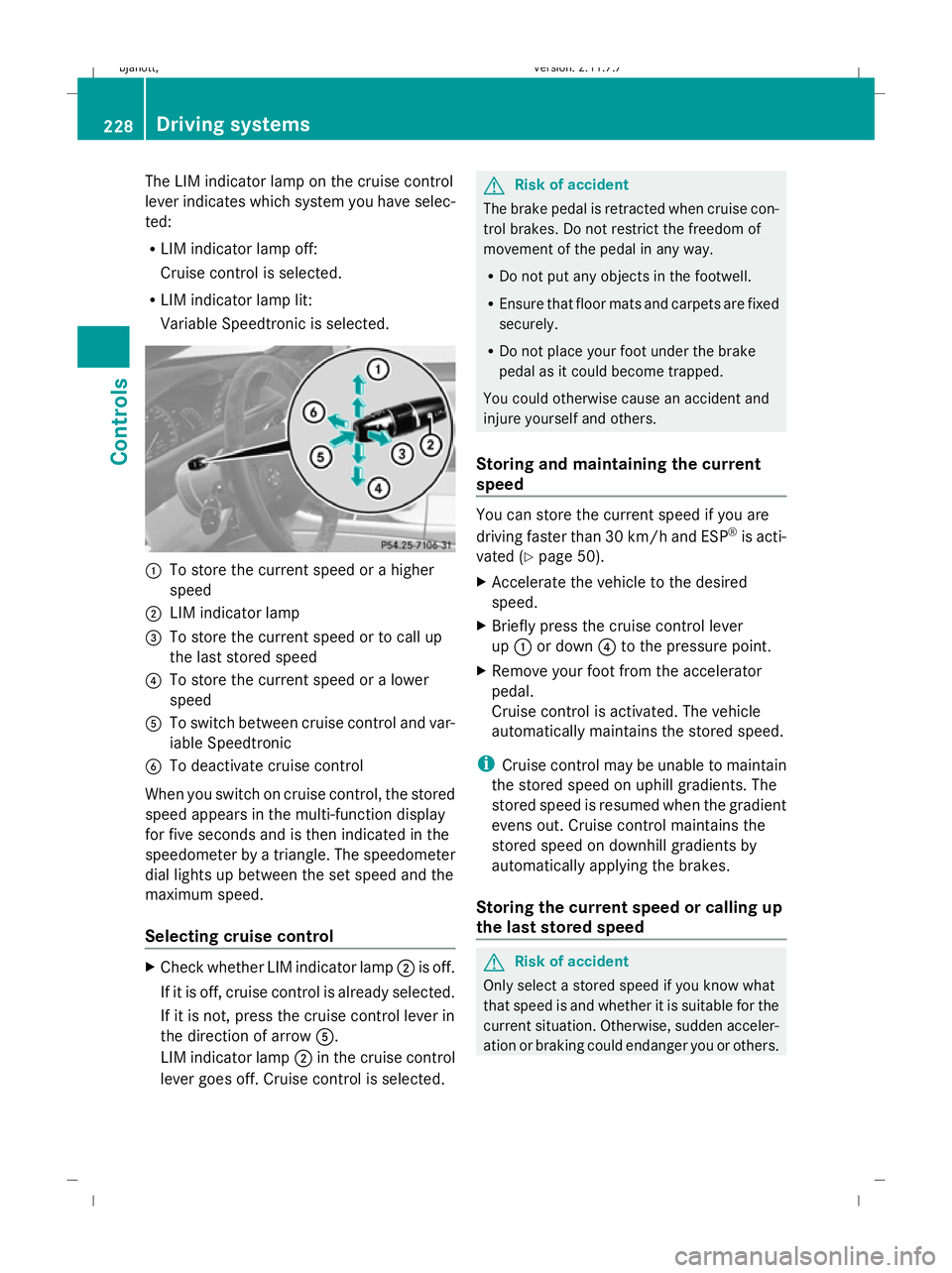
The LIM indicator lamp on the cruise control
lever indicates which system you have selec-
ted:
R
LIM indicator lamp off:
Cruise control is selected.
R LIM indicator lamp lit:
Variable Speedtronic is selected. :
To store the current speed or a higher
speed
; LIM indicator lamp
= To store the current speed or to call up
the last stored speed
? To store the current speed or a lower
speed
A To switch between cruise control and var-
iable Speedtronic
B To deactivate cruise control
When you switch on cruise control, the stored
speed appears in the multi-function display
for five seconds and is then indicated in the
speedometer by a triangle. The speedometer
dial lights up between the set speed and the
maximum speed.
Selecting cruise control X
Check whether LIM indicator lamp ;is off.
If it is off, cruise control is already selected.
If it is not, press the cruise control lever in
the direction of arrow A.
LIM indicator lamp ;in the cruise control
lever goes off. Cruise control is selected. G
Risk of accident
The brake pedal is retracted when cruise con-
trol brakes. Do not restrict the freedom of
movement of the pedal in any way.
R Do not put any objects in the footwell.
R Ensure that floor mats and carpets are fixed
securely.
R Do not place your foot under the brake
pedal as it could become trapped.
You could otherwise cause an accident and
injure yourself and others.
Storing and maintaining the current
speed You can store the current speed if you are
driving faster than 30 km/ha nd ESP®
is acti-
vated (Y page 50).
X Accelerate the vehicle to the desired
speed.
X Briefly press the cruise control lever
up : or down ?to the pressure point.
X Remove your foot from the accelerator
pedal.
Cruise control is activated. The vehicle
automatically maintains the stored speed.
i Cruise control may be unable to maintain
the stored speed on uphill gradients. The
stored speed is resumed when the gradient
evens out. Cruise control maintains the
stored speed on downhill gradients by
automatically applying the brakes.
Storing the current speed or calling up
the last stored speed G
Risk of accident
Only select a stored speed if you know what
that speed is and whether it is suitable for the
current situation. Otherwise, sudden acceler-
ation or braking could endanger you or others. 228
Driving systemsControls
216_AKB; 2; 3, en-GB
bjanott,
Version: 2.11.7.7 2009-02-27T14:54:17+01:00 - Seite 228
Dateiname: 6515230602_buchblock.pdf; erzeugt am 04. Mar 2009 11:15:55; WK
Page 232 of 421
X
Briefly pull the cruise control lever towards
you =.
X Remove your foot from the accelerator
pedal.
The first time cruise control is activated, it
stores the current speed or regulates the
speed of the vehicle to the previously
stored speed.
Setting a speed X
Press the cruise control lever to the pres-
sure point, up :for a higher speed or
down ?for a lower speed.
X Keep the cruise control lever pressed until
the desired speed is reached.
X Release the cruise control lever.
The new speed is stored.
i Cruise control is not deactivated if you
depress the accelerator pedal. For exam-
ple, if you accelerate briefly to overtake,
cruise control adjusts the vehicle's speed
to the last speed stored after you have fin-
ished overtaking.
Making fine adjustments in 1 km/h
increments X
Briefly press the cruise control lever to the
pressure point, up :for a higher speed or
down ?for a lower speed.
The last speed stored is increased or
reduced.
Making adjustments in 10 km/h incre-
ments X
Briefly press the cruise control lever
beyond the pressure point, up :for a
higher speed or down ?for a lower speed.
The last speed stored is increased or
reduced. Deactivating cruise control There are several ways to deactivate cruise
control:
X
Briefly press the cruise control lever for-
wards B.
or
X Brake.
or
X Briefly press the cruise control lever in the
direction of arrow A.
Variable Speedtronic is selected. LIM indi-
cator lamp ;in the cruise control lever
lights up.
Cruise control is automatically deactivated if:
R you engage the electric parking brake
R you drive at less than 30 km/h
R ESP ®
intervenes or you deactivate ESP ®
R you shift the automatic transmission to N
while driving
If cruise control is deactivated, you will hear
a warning tone. You will see the Cruise
control off message in the multi-function
display for approximately five seconds.
i The last speed stored is cleared when you
switch off the engine. Distronic*
i Distronic is only available for certain
countries.
Distronic regulates the speed and automati-
cally maintains the distance to the vehicle in
front. It brakes automatically in order to avoid
exceeding the set speed. On long and steep
downhill gradients, especially if the vehicle is
laden, you must select shift range 1,2or 3in
good time. By doing so, you will make use of
the braking effect of the engine, which
relieves the load on the brake system and
prevents the brakes from overheating and
wearing too quickly. Driving systems
229Controls
* optional
216_AKB; 2; 3, en-GB
bjanott,
Version: 2.11.7.7 2009-02-27T14:54:17+01:00 - Seite 229 Z
Dateiname: 6515230602_buchblock.pdf; erzeugt am 04. Mar 2009 11:15:55; WK
Page 234 of 421
If Distronic detects a risk of collision with a
vehicle in front, an intermittent warning tone
sounds. In addition, the ·distance warn-
ing lamp in the instrument cluster lights up.
Brake to avoid a collision.
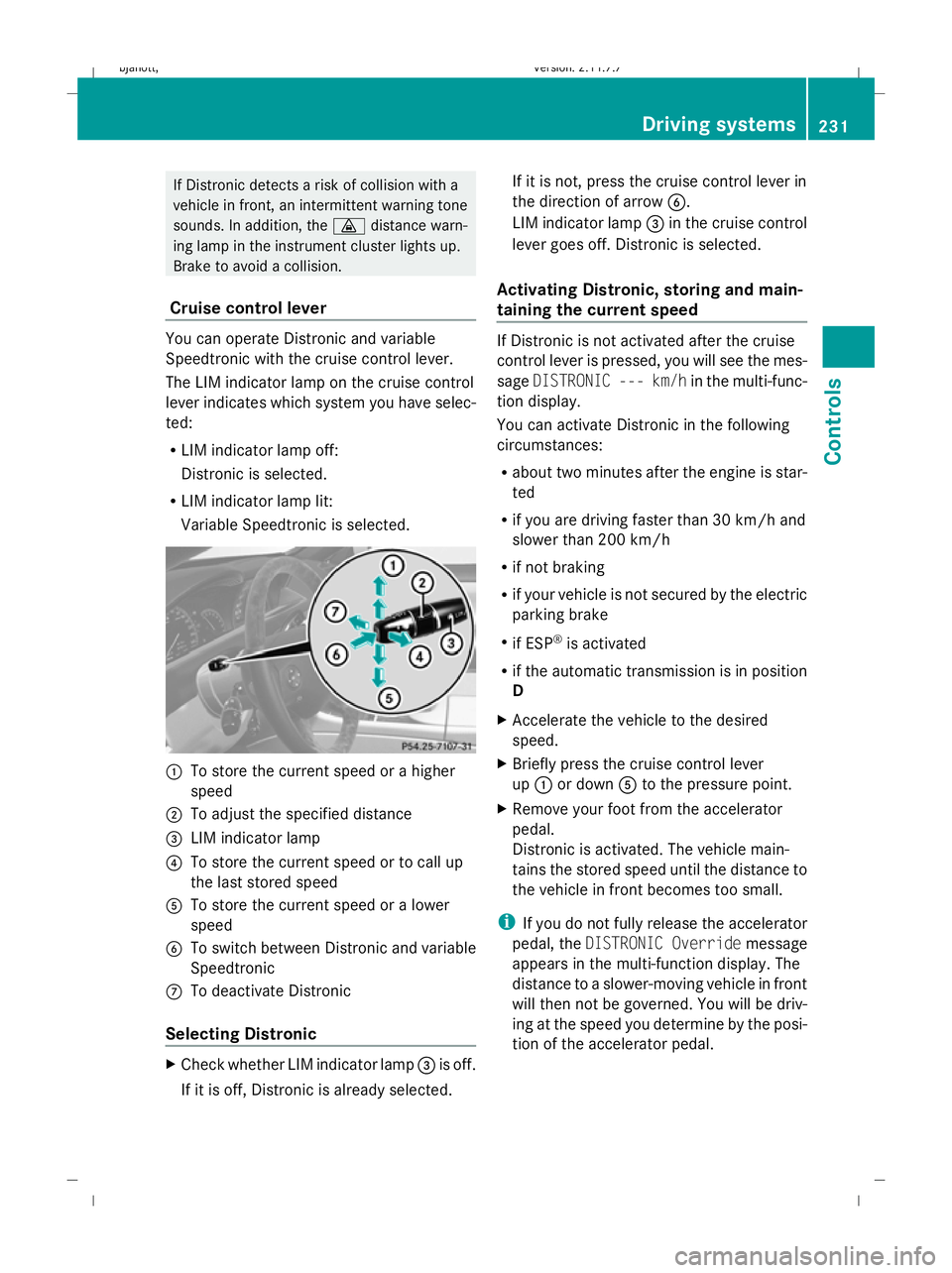
Cruise control lever You can operate Distronic and variable
Speedtronic with the cruise control lever.
The LIM indicator lamp on the cruise control
lever indicates which system you have selec-
ted:
R
LIM indicator lamp off:
Distronic is selected.
R LIM indicator lamp lit:
Variable Speedtronic is selected. :
To store the current speed or a higher
speed
; To adjust the specified distance
= LIM indicator lamp
? To store the current speed or to call up
the last stored speed
A To store the current speed or a lower
speed
B To switch between Distronic and variable
Speedtronic
C To deactivate Distronic
Selecting Distronic X
Check whether LIM indicator lamp =is off.
If it is off, Distronic is already selected. If it is not, press the cruise control lever in
the direction of arrow
B.
LIM indicator lamp =in the cruise control
lever goes off. Distronic is selected.
Activating Distronic, storing and main-
taining the current speed If Distronic is not activated after the cruise
control lever is pressed, you will see the mes-
sage
DISTRONIC --- km/h in the multi-func-
tion display.
You can activate Distronic in the following
circumstances:
R about two minutes after the engine is star-
ted
R if you are driving faster than 30 km/h and
slower than 200 km/h
R if not braking
R if your vehicle is not secured by the electric
parking brake
R if ESP ®
is activated
R if the automatic transmission is in position
D
X Accelerate the vehicle to the desired
speed.
X Briefly press the cruise control lever
up : or down Ato the pressure point.
X Remove your foot from the accelerator
pedal.
Distronic is activated. The vehicle main-
tains the stored speed until the distance to
the vehicle in front becomes too small.
i If you do not fully release the accelerator
pedal, the DISTRONIC Override message
appears in the multi-function display. The
distance to a slower-moving vehicle in front
will then not be governed. You will be driv-
ing at the speed you determine by the posi-
tion of the accelerator pedal. Driving systems
231Controls
216_AKB; 2; 3, en-GB
bjanott, Version: 2.11.7.7 2009-02-27T14:54:17+01:00 - Seite 231 Z
Dateiname: 6515230602_buchblock.pdf; erzeugt am 04. Mar 2009 11:15:56; WK
Page 235 of 421
Setting a speed
X
Press the cruise control lever to the pres-
sure point, up :for a higher speed or
down Afor a lower speed.
X Keep the cruise control lever pressed until
the desired speed is reached.
X Release the cruise control lever.
The new speed is stored.
i Deceleration of the vehicle by means of
the cruise control lever is assisted by auto-
matic application of the brakes. On long
downhill gradients, the automatic trans-
mission also shifts down.
Making adjustments in 1 km/h incre-
ments X
Briefly press the cruise control lever to the
pressure point, up :for a higher speed or
down Afor a lower speed.
The last speed stored is increased or
reduced.
Making adjustments in 10 km/h incre-
ments X
Briefly press the cruise control lever
beyond the pressure point, up :for a
higher speed or down Afor a lower speed.
The last speed stored is increased or
reduced.
Storing the current speed or calling up
the last stored speed G
Risk of accident
Only select a stored speed if you know what
that speed is and whether it is suitable for the
current situation. Otherwise, sudden acceler-
ation or braking could endanger you or others. X
Briefly pull the cruise control lever towards
you ?.
X Remove your foot from the accelerator
pedal.
Distronic is activated and accepts the cur-
rent speed if it is activated for the first time,
or adjusts the vehicle's speed to the last
speed stored.
Setting the specified minimum dis-
tance for Distronic You can set the specified minimum distance
for Distronic by varying the time span
between one and two seconds. This time span
determines the distance that Distronic should
maintain from the vehicle in front, depending
on the road speed. You can read this distance
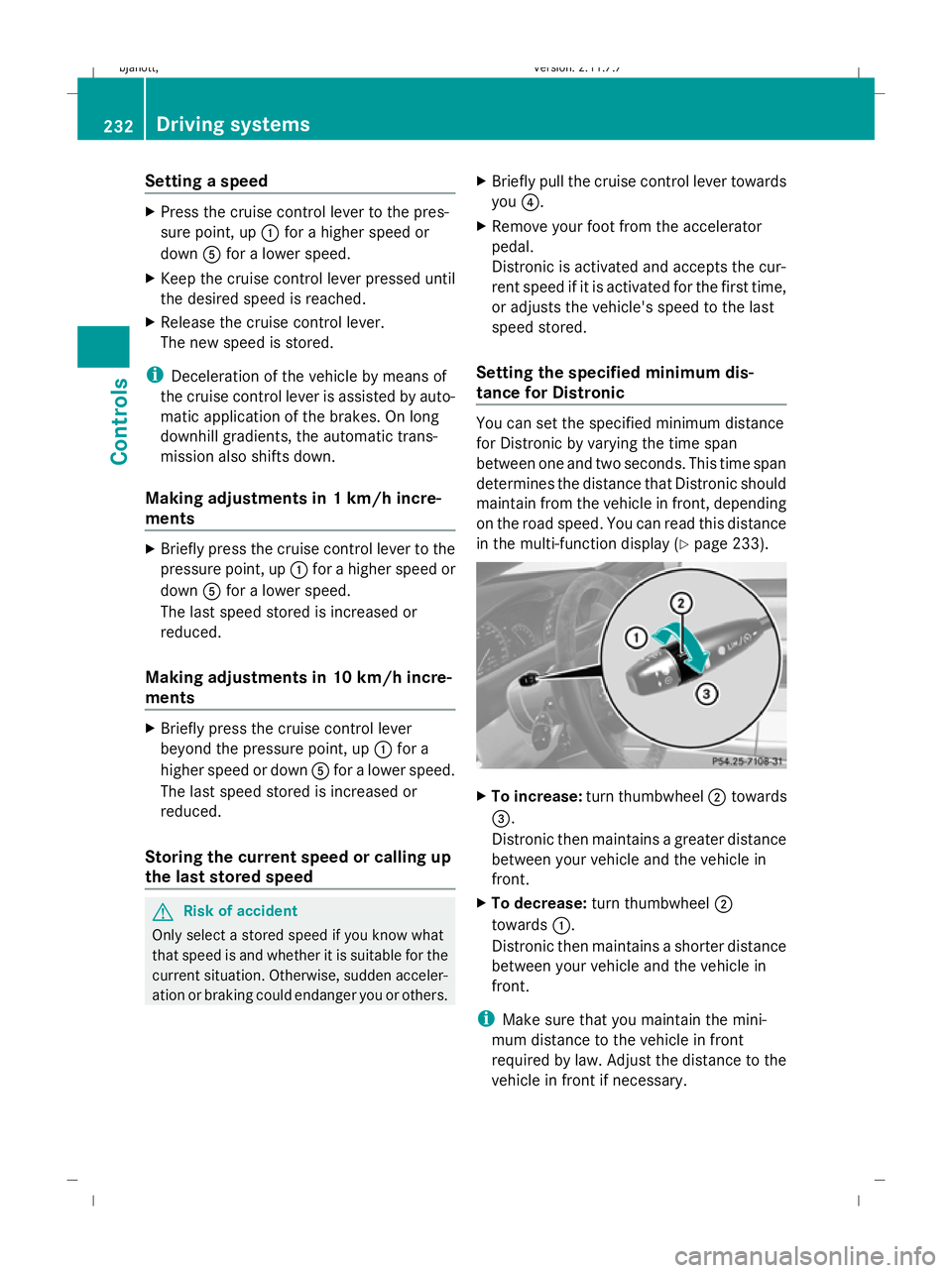
in the multi-function display (Y page 233). X
To increase: turn thumbwheel ;towards
=.
Distronic then maintains a greater distance
between your vehicle and the vehicle in
front.
X To decrease: turn thumbwheel ;
towards :.
Distronic then maintains a shorter distance
between your vehicle and the vehicle in
front.
i Make sure that you maintain the mini-
mum distance to the vehicle in front
required by law. Adjust the distance to the
vehicle in front if necessary. 232
Driving systemsControls
216_AKB; 2; 3, en-GB
bjanott
,V ersion: 2.11.7.7
2009-02-27T14:54:17+01:00 - Seite 232
Dateiname: 6515230602_buchblock.pdf; erzeugt am 04. Mar 2009 11:15:56; WK
Page 236 of 421
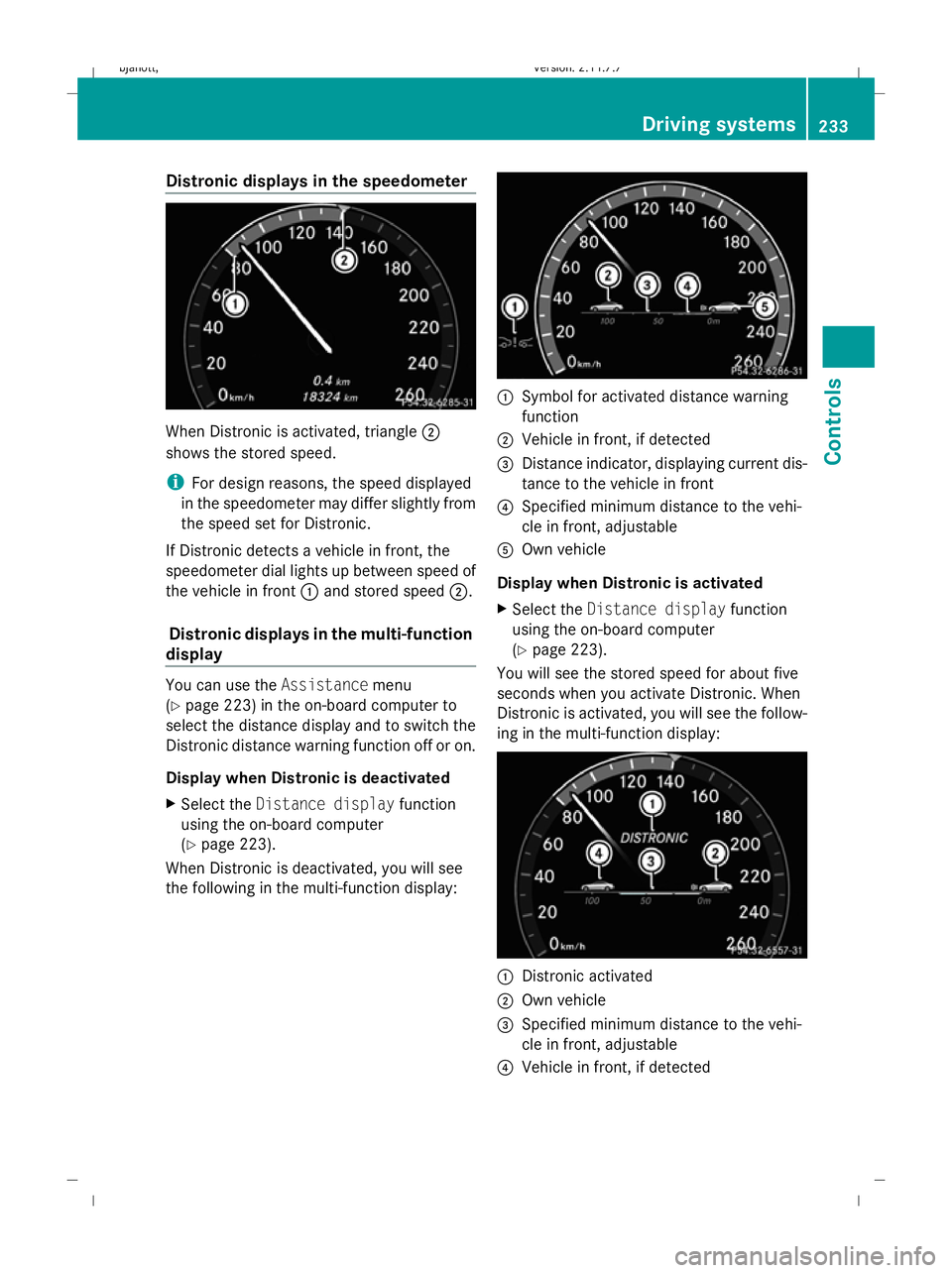
Distronic displays in the speedometer
When Distronic is activated, triangle
;
shows the stored speed.
i For design reasons, the speed displayed
in the speedometer may differ slightly from
the speed set for Distronic.
If Distronic detects a vehicle in front, the
speedometer dial lights up between speed of
the vehicle in front :and stored speed ;.
Distronic displays in the multi-function
display You can use the
Assistancemenu
(Y page 223) in the on-board computer to
select the distance display and to switch the
Distronic distance warning function off or on.
Display when Distronic is deactivated
X Select the Distance display function
using the on-board computer
(Y page 223).
When Distronic is deactivated, you will see
the following in the multi-function display: :
Symbol for activated distance warning
function
; Vehicle in front, if detected
= Distance indicator, displaying current dis-
tance to the vehicle in front
? Specified minimum distance to the vehi-
cle in front, adjustable
A Own vehicle
Display when Distronic is activated
X Select the Distance display function
using the on-board computer
(Y page 223).
You will see the stored speed for about five
seconds when you activate Distronic. When
Distronic is activated, you will see the follow-
ing in the multi-function display: :
Distronic activated
; Own vehicle
= Specified minimum distance to the vehi-
cle in front, adjustable
? Vehicle in front, if detected Driving sys
tems
233Controls
216_AKB; 2; 3, en-GB
bjanott, Version: 2.11.7.7 2009-02-27T14:54:17+01:00 - Seite 233 Z
Dateiname: 6515230602_buchblock.pdf; erzeugt am 04. Mar 2009 11:15:57; WK
Page 237 of 421
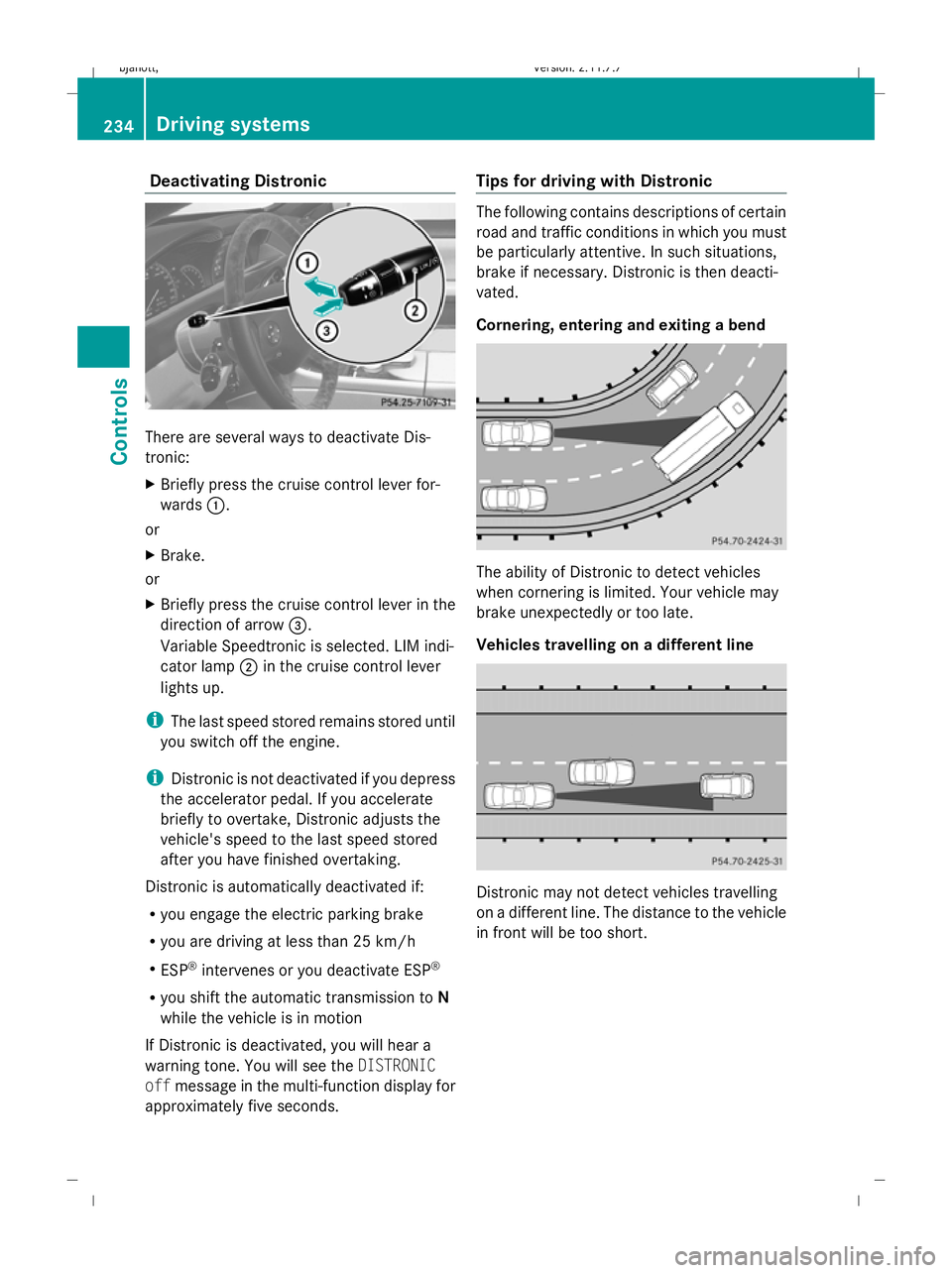
Deactivating Distronic
There are several ways to deactivate Dis-
tronic:
X Briefly press the cruise control lever for-
wards :.
or
X Brake.
or
X Briefly press the cruise control lever in the
direction of arrow =.
Variable Speedtronic is selected. LIM indi-
cator lamp ;in the cruise control lever
lights up.
i The last speed stored remains stored until
you switch off the engine.
i Distronic is not deactivated if you depress
the accelerator pedal. If you accelerate
briefly to overtake, Distronic adjusts the
vehicle's speed to the last speed stored
after you have finished overtaking.
Distronic is automatically deactivated if:
R you engage the electric parking brake
R you are driving at less than 25 km/h
R ESP ®
intervenes or you deactivate ESP ®
R you shift the automatic transmission to N
while the vehicle is in motion
If Distronic is deactivated, you will hear a
warning tone. You will see the DISTRONIC
off message in the multi-function display for
approximately five seconds. Tips for driving with Distronic The following contains descriptions of certain
road and traffic conditions in which you must
be particularly attentive. In such situations,
brake if necessary. Distronic is then deacti-
vated.
Cornering, entering and exiting a bend
The ability of Distronic to detect vehicles
when cornering is limited. Your vehicle may
brake unexpectedly or too late.
Vehicles travelling on a different line
Distronic may not detect vehicles travelling
on a different line. The distance to the vehicle
in front will be too short.234
Driving syste
msControls
216_AKB; 2; 3, en-GB
bjanott, Version: 2.11.7.7 2009-02-27T14:54:17+01:00 - Seite 234
Dateiname: 6515230602_buchblock.pdf; erzeugt am 04. Mar 2009 11:15:57; WK