heating MERCEDES-BENZ CL COUPE 2009 User Guide
[x] Cancel search | Manufacturer: MERCEDES-BENZ, Model Year: 2009, Model line: CL COUPE, Model: MERCEDES-BENZ CL COUPE 2009Pages: 421, PDF Size: 10.78 MB
Page 173 of 421
X
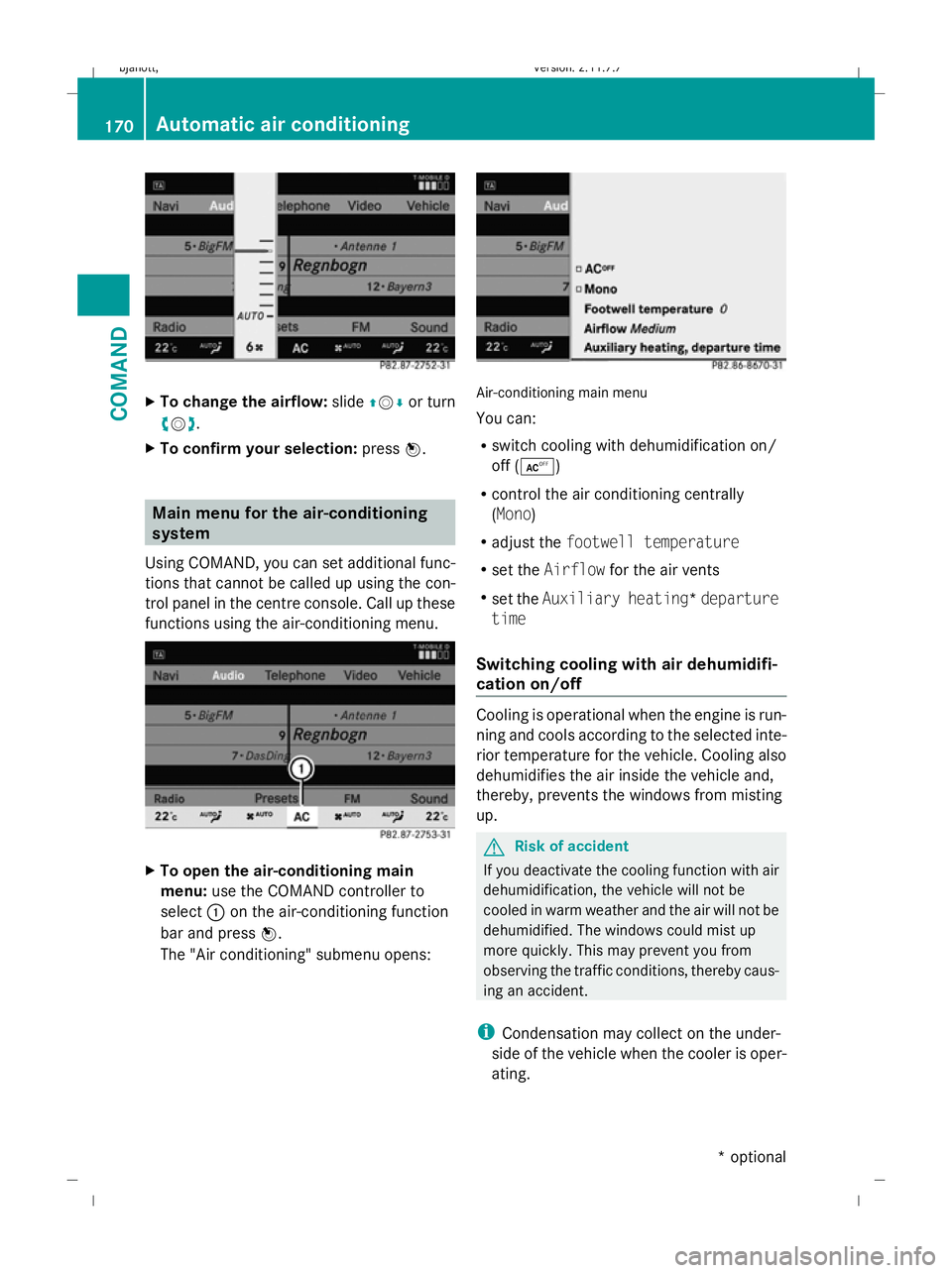
To change the airflow: slideZVÆor turn
cV d.
X To confirm your selection: pressW. Main menu for the air-conditioning
system
Using COMAND, you can set additional func-
tions that cannot be called up using the con-
trol panel in the centre console. Call up these
functions using the air-conditioning menu. X
To open the air-conditioning main
menu: use the COMAND controller to
select :on the air-conditioning function
bar and press W.
The "Air conditioning" submenu opens: Air-conditioning main menu
You can:
R
switch cooling with dehumidification on/
off (Æ)
R control the air conditioning centrally
(Mono)
R adjust the footwell temperature
R set the Airflow for the air vents
R set the Auxiliary heating* departure
time
Switching cooling with air dehumidifi-
cation on/off Cooling is operational when the engine is run-
ning and cools according to the selected inte-
rior temperature for the vehicle. Cooling also
dehumidifies the air inside the vehicle and,
thereby, prevents the windows from misting
up. G
Risk of accident
If you deactivate the cooling function with air
dehumidification, the vehicle will not be
cooled in warm weather and the air will not be
dehumidified. The windows could mist up
more quickly. This may prevent you from
observing the traffic conditions, thereby caus-
ing an accident.
i Condensation may collect on the under-
side of the vehicle when the cooler is oper-
ating. 170
Automatic air conditioningCOMAND
* optional
216_AKB; 2; 3, en-GB
bjanott,
Version: 2.11.7.7 2009-02-27T14:54:17+01:00 - Seite 170
Dateiname: 6515230602_buchblock.pdf; erzeugt am 04. Mar 2009 11:15:32; WK
Page 175 of 421
If the vehicle has become very warm and the
automatic air-conditioning system is cooling
the interior, the blower settings are briefly
suspended.
X Open the air-conditioning main menu via
the air-conditioning function bar.
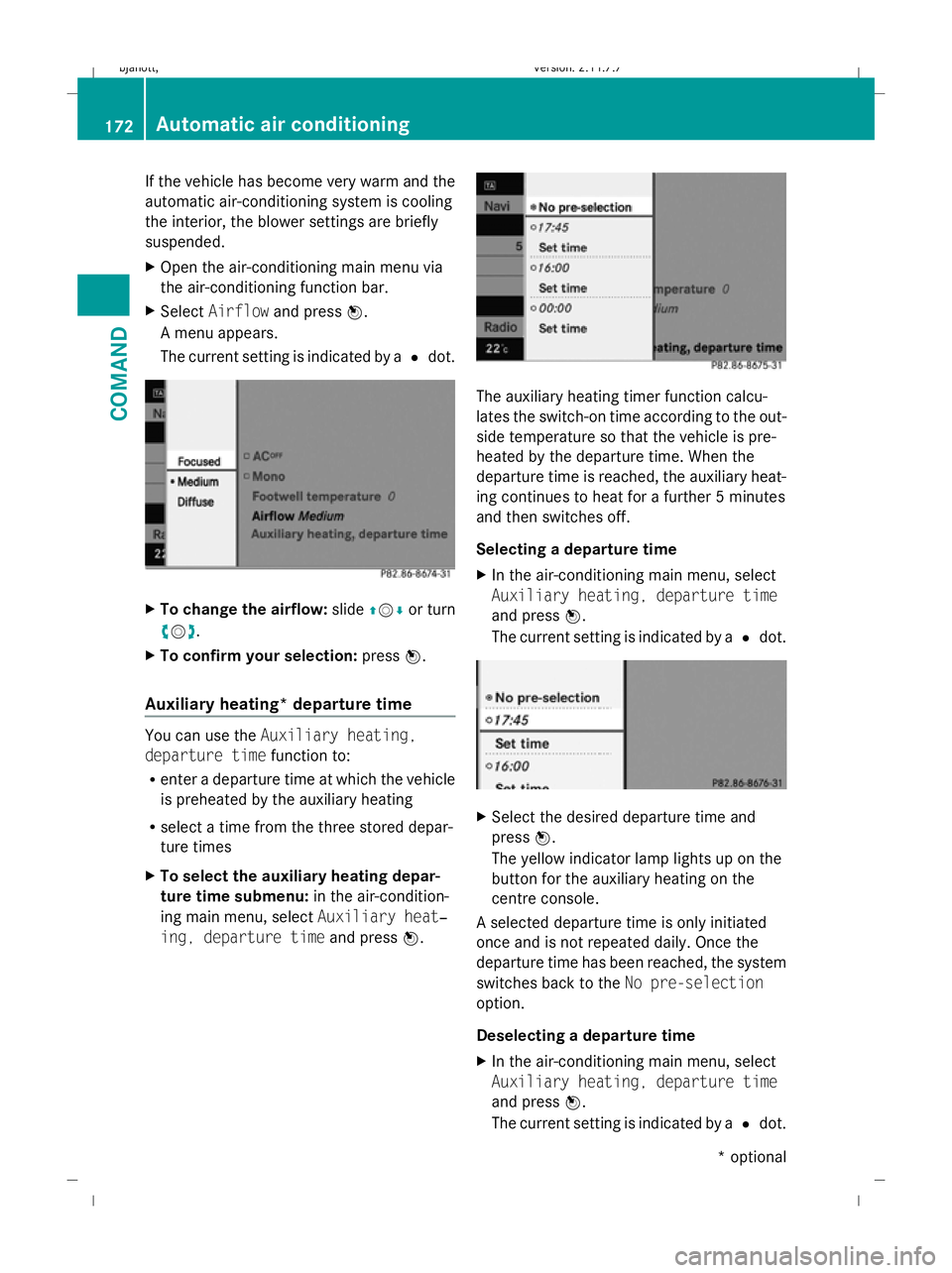
X Select Airflow and press W.
A menu appears.
The current setting is indicated by a #dot. X
To change the airflow: slideZVÆ or turn
cVd.
X To confirm your selection: pressW.
Auxiliary heating* departure time You can use the
Auxiliary heating,
departure time function to:
R enter a departure time at which the vehicle
is preheated by the auxiliary heating
R select a time from the three stored depar-
ture times
X To select the auxiliary heating depar-
ture time submenu: in the air-condition-
ing main menu, select Auxiliary heat‐
ing, departure time and pressW. The auxiliary heating timer function calcu-
lates the switch-on time according to the out-
side temperature so that the vehicle is pre-
heated by the departure time. When the
departure time is reached, the auxiliary heat-
ing continues to heat for a further 5 minutes
and then switches off.
Selecting a departure time
X In the air-conditioning main menu, select
Auxiliary heating, departure time
and press W.
The current setting is indicated by a #dot. X
Select the desired departure time and
press W.
The yellow indicator lamp lights up on the
button for the auxiliary heating on the
centre console.
A selected departure time is only initiated
once and is not repeated daily. Once the
departure time has been reached, the system
switches back to the No pre-selection
option.
Deselecting a departure time
X In the air-conditioning main menu, select
Auxiliary heating, departure time
and press W.
The current setting is indicated by a #dot. 172
Automatic air conditioningCOMAND
* optional
216_AKB; 2; 3, en-GB
bjanott,
Version: 2.11.7.7 2009-02-27T14:54:17+01:00 - Seite 172
Dateiname: 6515230602_buchblock.pdf; erzeugt am 04. Mar 2009 11:15:32; WK
Page 176 of 421
X
Select No pre-selection and pressW.
Entering a departure time
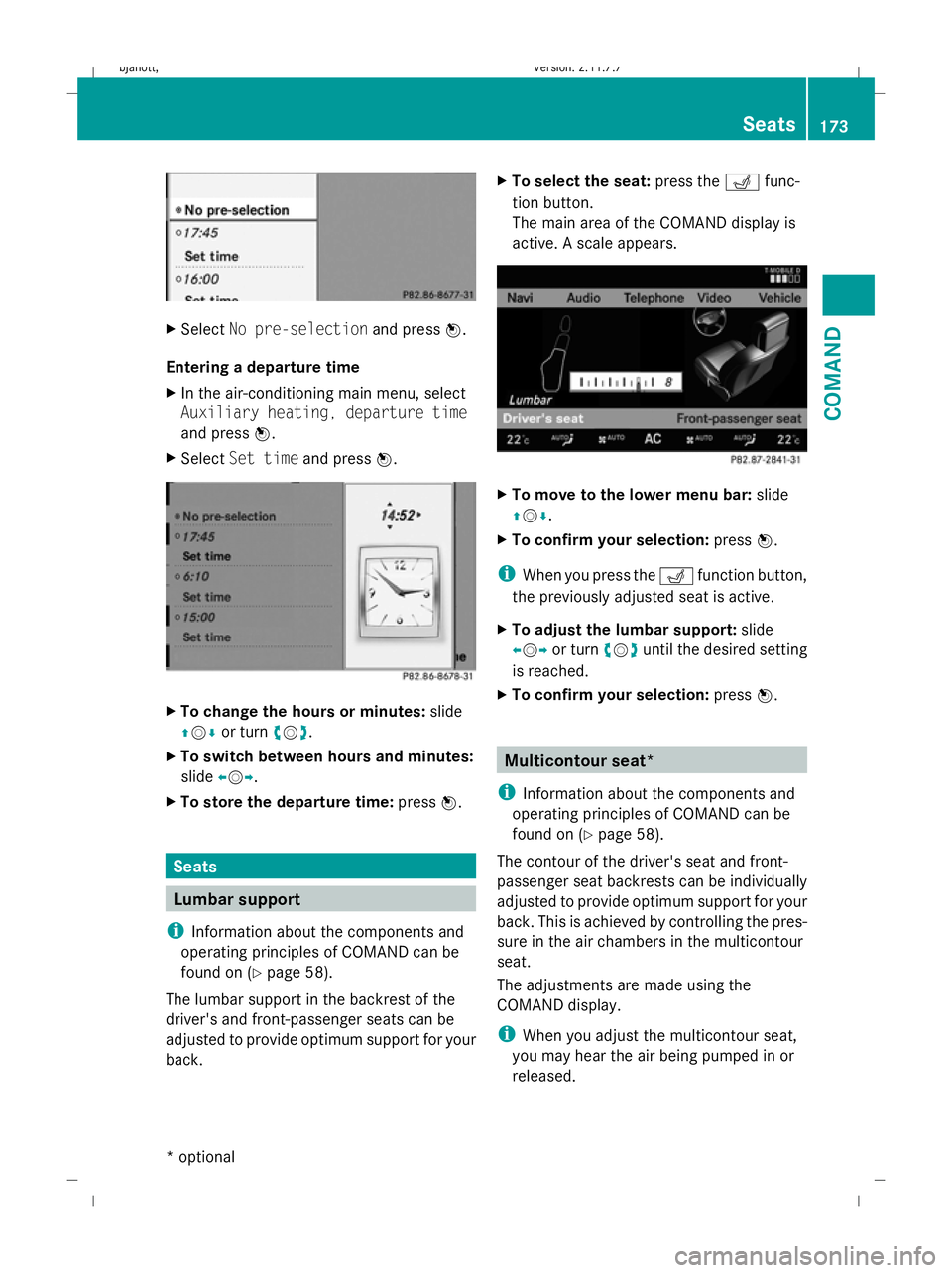
X In the air-conditioning main menu, select
Auxiliary heating, departure time
and press W.
X Select Set time and pressW. X
To change the hours or minutes: slide
ZVÆ or turn cVd.
X To switch between hours and minutes:
slide XVY.
X To store the departure time: pressW. Seats
Lumbar support
i Information about the components and
operating principles of COMAND can be
found on (Y page 58).
The lumbar support in the backrest of the
driver's and front-passenger seats can be
adjusted to provide optimum support for your
back. X
To select the seat: press theTfunc-
tion button.
The main area of the COMAND display is
active. A scale appears. X
To move to the lower menu bar: slide
ZVÆ .
X To confirm your selection: pressW.
i When you press the Tfunction button,
the previously adjusted seat is active.
X To adjust the lumbar support: slide
XVY or turn cVduntil the desired setting
is reached.
X To confirm your selection: pressW. Multicontour seat*
i Information about the components and
operating principles of COMAND can be
found on (Y page 58).
The contour of the driver's seat and front-
passenger seat backrests can be individually
adjusted to provide optimum support for your
back. This is achieved by controlling the pres-
sure in the air chambers in the multicontour
seat.
The adjustments are made using the
COMAND display.
i When you adjust the multicontour seat,
you may hear the air being pumped in or
released. Seats
173COMAND
* optional
216_AKB; 2; 3, en-GB
bjanott,
Version: 2.11.7.7 2009-02-27T14:54:17+01:00 - Seite 173 Z
Dateiname: 6515230602_buchblock.pdf; erzeugt am 04. Mar 2009 11:15:33; WK
Page 188 of 421
X
To activate/deactivate: press button1.
If the indicator lamp in button 1is lit, you
can access the following functions for the
front-passenger seat:
R seat adjustment
R seat heating/ventilation*
R memory function Folding forward the driver's seat and
front-passenger seat backrest
In order to make it convenient for passengers
to get in and out of the rear compartment, the
driver's or front-passenger seat:
R is automatically moved forwards when the
backrest is folded forwards
R is automatically moved backwards when
the backrest is folded back
i The head restraint is lowered automati-
cally when the seat release lever is pulled. G
Risk of injury
Make sure that nobody can become trapped
when moving the seat. If there is a risk of
someone becoming trapped, press the seat
adjustment switch on the door.
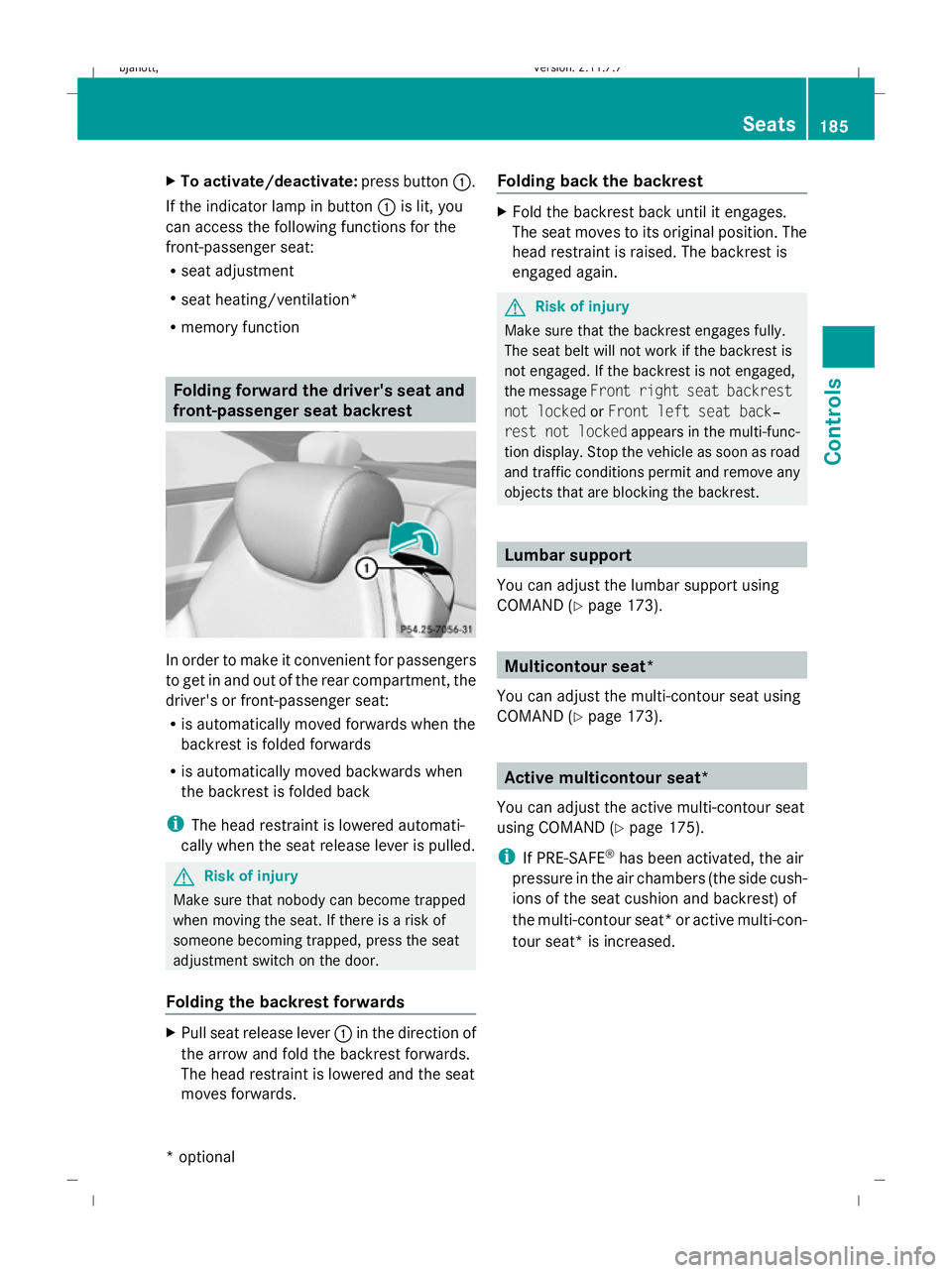
Folding the backrest forwards X
Pull seat release lever 1in the direction of
the arrow and fold the backrest forwards.
The head restraint is lowered and the seat
moves forwards. Folding back the backrest X
Fold the backrest back until it engages.
The seat moves to its original position. The
head restraint is raised. The backrest is
engaged again. G
Risk of injury
Make sure that the backrest engages fully.
The seat belt will not work if the backrest is
not engaged. If the backrest is not engaged,
the message Front right seat backrest
not locked orFront left seat back‐
rest not locked appears in the multi-func-
tion display. Stop the vehicle as soon as road
and traffic conditions permit and remove any
objects that are blocking the backrest. Lumbar support
You can adjust the lumbar support using
COMAND (Y page 173). Multicontour seat*
You can adjust the multi-contour seat using
COMAND (Y page 173). Active multicontour seat*
You can adjust the active multi-contour seat
using COMAND (Y page 175).
i If PRE-SAFE ®
has been activated, the air
pressure in the air chambers (the side cush-
ions of the seat cushion and backrest) of
the multi-contour seat* or active multi-con-
tour seat* is increased. Seats
185Controls
* optional
216_AKB; 2; 3, en-GB
bjanott,
Version: 2.11.7.7 2009-02-27T14:54:17+01:00 - Seite 185 Z
Dateiname: 6515230602_buchblock.pdf; erzeugt am 04. Mar 2009 11:15:39; WK
Page 190 of 421
driver's seat automatically switches to the
highest level.
X To switch off: press button:repeatedly
until all indicator lamps go out.
i If the battery voltage is too low, the seat
ventilation may switch off. Seat heating
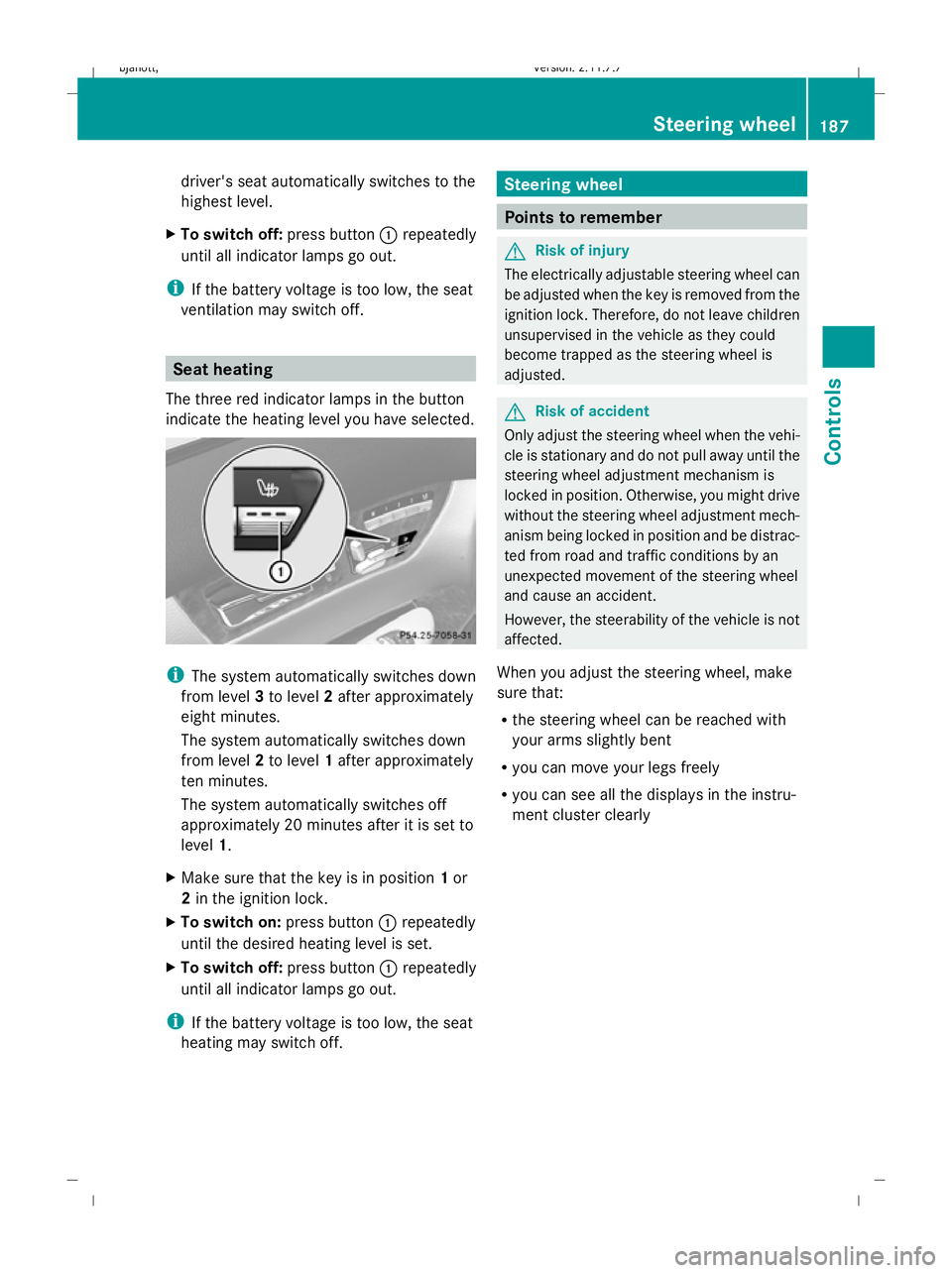
The three red indicator lamps in the button
indicate the heating level you have selected. i
The system automatically switches down
from level 3to level 2after approximately
eight minutes.
The system automatically switches down
from level 2to level 1after approximately
ten minutes.
The system automatically switches off
approximately 20 minutes after it is set to
level 1.
X Make sure that the key is in position 1or
2 in the ignition lock.
X To switch on: press button:repeatedly
until the desired heating level is set.
X To switch off: press button:repeatedly
until all indicator lamps go out.
i If the battery voltage is too low, the seat
heating may switch off. Steering wheel
Points to remember
G
Risk of injury
The electrically adjustable steering wheel can
be adjusted when the key is removed from the
ignition lock. Therefore, do not leave children
unsupervised in the vehicle as they could
become trapped as the steering wheel is
adjusted. G
Risk of accident
Only adjust the steering wheel when the vehi-
cle is stationary and do not pull away until the
steering wheel adjustment mechanism is
locked in position. Otherwise, you might drive
without the steering wheel adjustment mech-
anism being locked in position and be distrac-
ted from road and traffic conditions by an
unexpected movement of the steering wheel
and cause an accident.
However, the steerability of the vehicle is not
affected.
When you adjust the steering wheel, make
sure that:
R the steering wheel can be reached with
your arms slightly bent
R you can move your legs freely
R you can see all the displays in the instru-
ment cluster clearly Steering wheel
187Controls
216_AKB; 2; 3, en-GB
bjanott,V ersion: 2.11.7.7
2009-02-27T14:54:17+01:00 - Seite 187 Z
Dateiname: 6515230602_buchblock.pdf; erzeugt am 04. Mar 2009 11:15:40; WK
Page 191 of 421
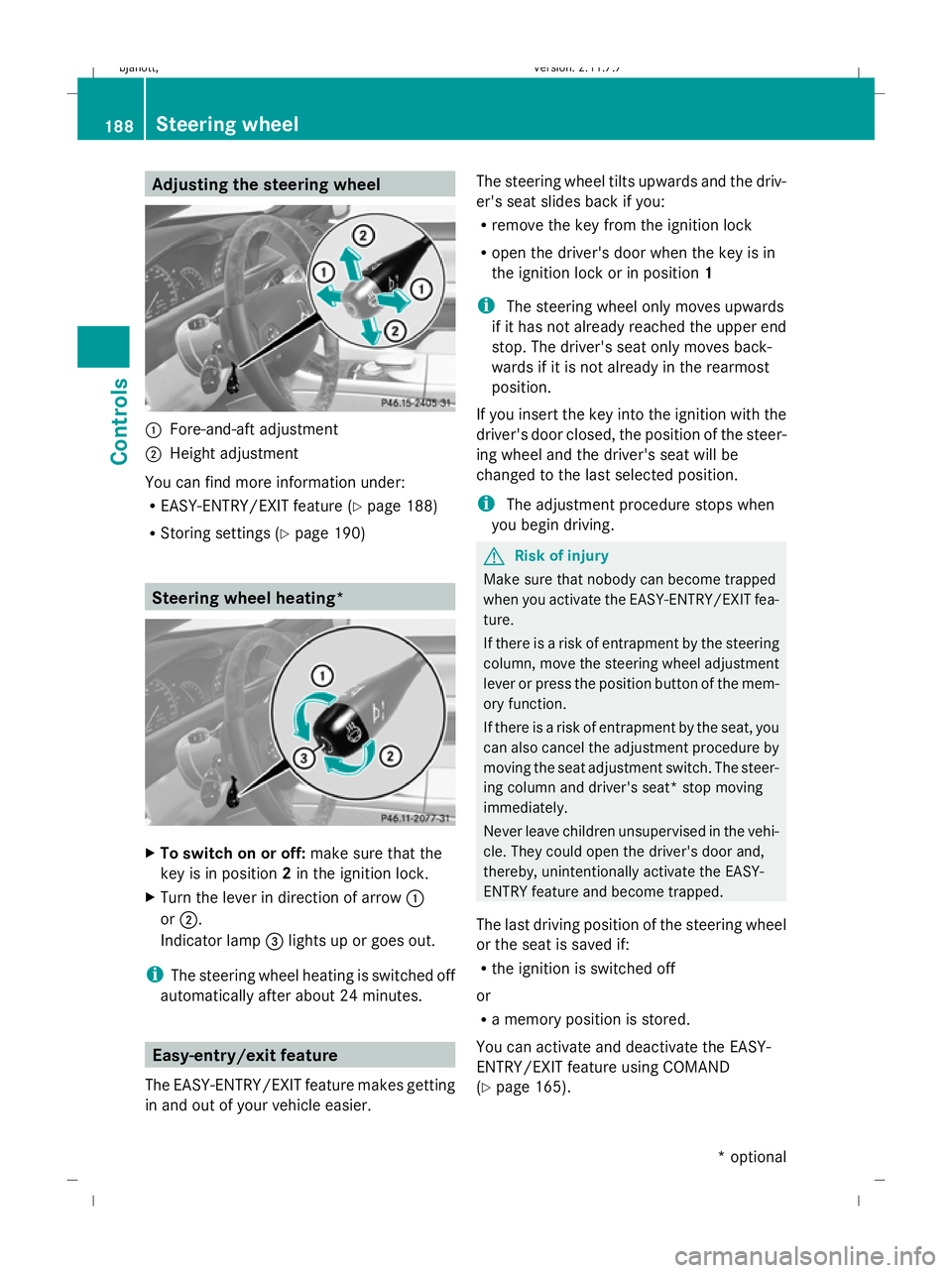
Adjusting the steering wheel
:
Fore-and-aft adjustment
; Height adjustment
You can find more information under:
R EASY-ENTRY/EXIT feature (Y page 188)
R Storing settings (Y page 190) Steering wheel heating*
X
To switch on or off: make sure that the
key is in position 2in the ignition lock.
X Turn the lever in direction of arrow :
or ;.
Indicator lamp =lights up or goes out.
i The steering wheel heating is switched off
automatically after about 24 minutes. Easy-entry/exit feature
The EASY-ENTRY/EXIT feature makes getting
in and out of your vehicle easier. The steering wheel tilts upwards and the driv-
er's seat slides back if you:
R remove the key from the ignition lock
R open the driver's door when the key is in
the ignition lock or in position 1
i The steering wheel only moves upwards
if it has not already reached the upper end
stop. The driver's seat only moves back-
wards if it is not already in the rearmost
position.
If you insert the key into the ignition with the
driver's door closed, the position of the steer-
ing wheel and the driver's seat will be
changed to the last selected position.
i The adjustment procedure stops when
you begin driving. G
Risk of injury
Make sure that nobody can become trapped
when you activate the EASY-ENTRY/EXIT fea-
ture.
If there is a risk of entrapment by the steering
column, move the steering wheel adjustment
lever or press the position button of the mem-
ory function.
If there is a risk of entrapment by the seat, you
can also cancel the adjustment procedure by
moving the seat adjustment switch. The steer-
ing column and driver's seat* stop moving
immediately.
Never leave children unsupervised in the vehi-
cle. They could open the driver's door and,
thereby, unintentionally activate the EASY-
ENTRY feature and become trapped.
The last driving position of the steering wheel
or the seat is saved if:
R the ignition is switched off
or
R a memory position is stored.
You can activate and deactivate the EASY-
ENTRY/EXIT feature using COMAND
(Y page 165). 188
Steering wheelCont
rols
* option al
216_AKB; 2; 3, en-GB
bjanott
,V ersion: 2.11.7.7
2009-02-27T14:54:17+01:00 - Seite 188
Dateiname: 6515230602_buchblock.pdf; erzeugt am 04. Mar 2009 11:15:41; WK
Page 230 of 421
X
Press the abutton.
X To activate/deactivate: pressa
again. Driving systems
Overview of driving systems
The vehicle's driving systems are described
on the following pages:
R cruise control, Distronic*, Distronic Plus*
and Speedtronic, which are used to control
the speed of the vehicle
R HOLD, which makes pulling away easier,
particularly on steep uphill gradients
R AIRMATIC* and Active Body Control (ABC),
which is used to adjust the vehicle’s sus-
pension system
R 4MATIC* (permanent four-wheel drive), for
optimum traction
R PARKTRONIC and Park Assist*, which
assist you when parking
R reversing camera*, which assists you when
parking
R Night View Assist*, which assists you when
driving in the dark
R Parking Guidance*, which assists you when
looking for a parking space and assists you
when parking
R Blind Spot Assist*, which assists you when
changing lanes
The ABS, BAS, BAS PLUS*, adaptive brake
lights, ESP ®
, EBV, ADAPTIVE BRAKE, distance
warning function* and PRE-SAFE ®
Brake*
driving systems are described in the "Driving
safety systems" section (Y page 48).Cruise control
Cruise control maintains a constant road
speed for you. It brakes automatically in order
to avoid exceeding the set speed. On long and steep downhill gradients, especially if the
vehicle is laden, you must select shift range
1,
2or 3in good time. By doing so, you will
make use of the braking effect of the engine,
which relieves the load on the brake system
and prevents the brakes from overheating
and wearing too quickly. G
Risk of accident
Do not change down for additional engine
braking on a slippery road surface. This could
cause the drive wheels to lose their grip and
the vehicle could skid.
Use cruise control only if road and traffic con-
ditions make it appropriate to maintain a
steady speed for a prolonged period. You can
store any road speed above 30 km/h. G
Risk of accident
Cruise control cannot take account of road
and traffic conditions.
Always pay attention to traffic conditions
even when cruise control is activated.
Cruise control is only an aid designed to assist
driving. You are responsible for the vehicle's
speed and for braking in good time. G
Risk of accident
Do not use cruise control:
R in road and traffic conditions which do not
allow you to maintain a constant speed (e.g.
heavy traffic or winding roads). You could
otherwise cause an accident.
R on slippery roads. Braking or accelerating
could cause the drive wheels to lose trac-
tion and the vehicle could then skid.
R when there is poor visibility, e.g. due to fog,
heavy rain or snow
Cruise control lever You can operate cruise control and variable
Speedtronic with the cruise control lever. Driving systems
227Controls
* optional
216_AKB; 2; 3, en-GB
bjanott,
Version: 2.11.7.7 2009-02-27T14:54:17+01:00 - Seite 227 Z
Dateiname: 6515230602_buchblock.pdf; erzeugt am 04. Mar 2009 11:15:54; WK
Page 232 of 421
X
Briefly pull the cruise control lever towards
you =.
X Remove your foot from the accelerator
pedal.
The first time cruise control is activated, it
stores the current speed or regulates the
speed of the vehicle to the previously
stored speed.
Setting a speed X
Press the cruise control lever to the pres-
sure point, up :for a higher speed or
down ?for a lower speed.
X Keep the cruise control lever pressed until
the desired speed is reached.
X Release the cruise control lever.
The new speed is stored.
i Cruise control is not deactivated if you
depress the accelerator pedal. For exam-
ple, if you accelerate briefly to overtake,
cruise control adjusts the vehicle's speed
to the last speed stored after you have fin-
ished overtaking.
Making fine adjustments in 1 km/h
increments X
Briefly press the cruise control lever to the
pressure point, up :for a higher speed or
down ?for a lower speed.
The last speed stored is increased or
reduced.
Making adjustments in 10 km/h incre-
ments X
Briefly press the cruise control lever
beyond the pressure point, up :for a
higher speed or down ?for a lower speed.
The last speed stored is increased or
reduced. Deactivating cruise control There are several ways to deactivate cruise
control:
X
Briefly press the cruise control lever for-
wards B.
or
X Brake.
or
X Briefly press the cruise control lever in the
direction of arrow A.
Variable Speedtronic is selected. LIM indi-
cator lamp ;in the cruise control lever
lights up.
Cruise control is automatically deactivated if:
R you engage the electric parking brake
R you drive at less than 30 km/h
R ESP ®
intervenes or you deactivate ESP ®
R you shift the automatic transmission to N
while driving
If cruise control is deactivated, you will hear
a warning tone. You will see the Cruise
control off message in the multi-function
display for approximately five seconds.
i The last speed stored is cleared when you
switch off the engine. Distronic*
i Distronic is only available for certain
countries.
Distronic regulates the speed and automati-
cally maintains the distance to the vehicle in
front. It brakes automatically in order to avoid
exceeding the set speed. On long and steep
downhill gradients, especially if the vehicle is
laden, you must select shift range 1,2or 3in
good time. By doing so, you will make use of
the braking effect of the engine, which
relieves the load on the brake system and
prevents the brakes from overheating and
wearing too quickly. Driving systems
229Controls
* optional
216_AKB; 2; 3, en-GB
bjanott,
Version: 2.11.7.7 2009-02-27T14:54:17+01:00 - Seite 229 Z
Dateiname: 6515230602_buchblock.pdf; erzeugt am 04. Mar 2009 11:15:55; WK
Page 238 of 421
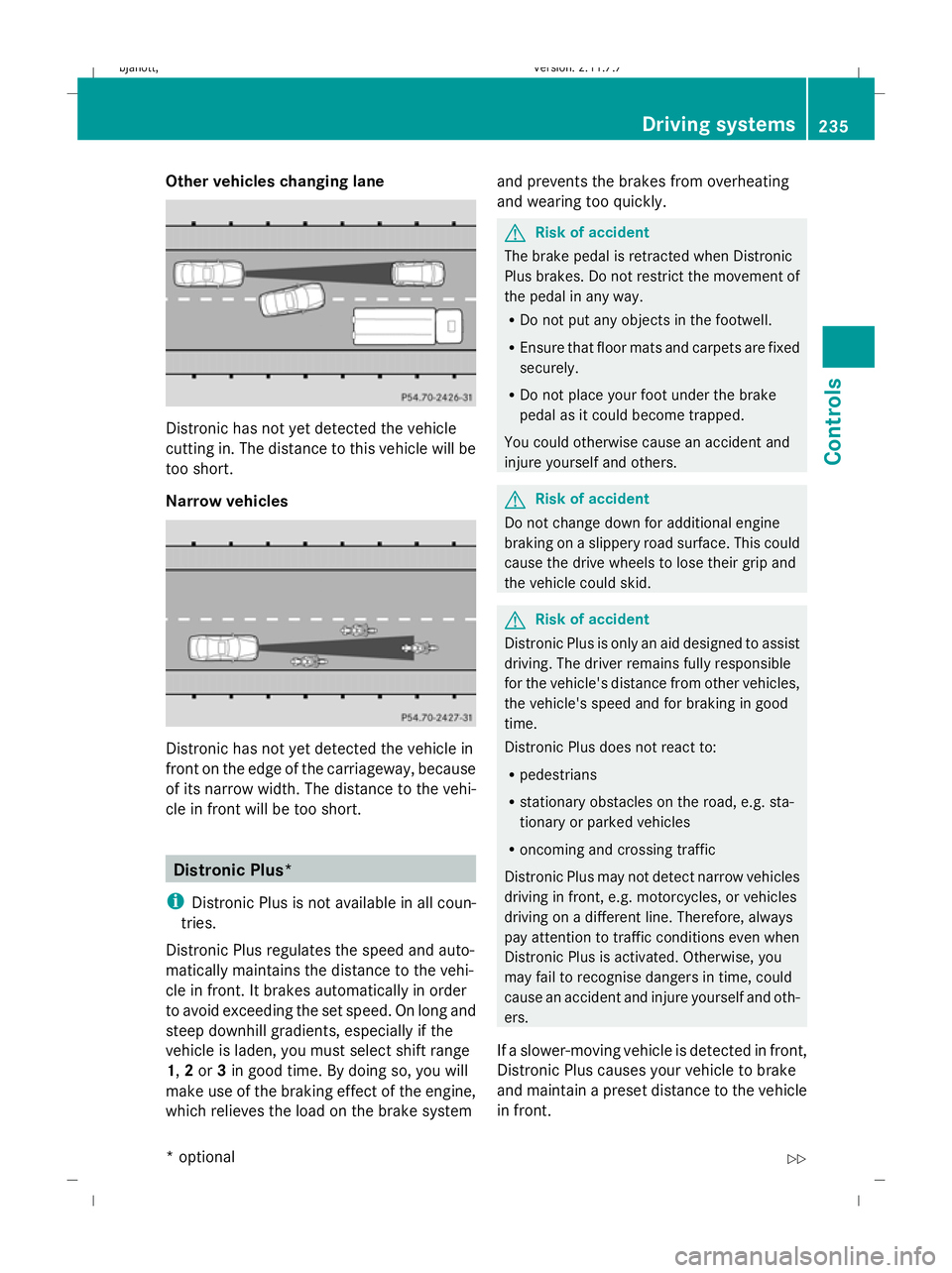
Other vehicles changing lane
Distronic has not yet detected the vehicle
cutting in. The distance to this vehicle will be
too short.
Narrow vehicles
Distronic has not yet detected the vehicle in
front on the edge of the carriageway, because
of its narrow width. The distance to the vehi-
cle in front will be too short. Distronic Plus*
i Distronic Plus is not available in all coun-
tries.
Distronic Plus regulates the speed and auto-
matically maintains the distance to the vehi-
cle in front. It brakes automatically in order
to avoid exceeding the set speed. On long and
steep downhill gradients, especially if the
vehicle is laden, you must select shift range
1, 2or 3in good time. By doing so, you will
make use of the braking effect of the engine,
which relieves the load on the brake system and prevents the brakes from overheating
and wearing too quickly. G
Risk of accident
The brake pedal is retracted when Distronic
Plus brakes. Do not restrict the movement of
the pedal in any way.
R Do not put any objects in the footwell.
R Ensure that floor mats and carpets are fixed
securely.
R Do not place your foot under the brake
pedal as it could become trapped.
You could otherwise cause an accident and
injure yourself and others. G
Risk of accident
Do not change down for additional engine
braking on a slippery road surface. This could
cause the drive wheels to lose their grip and
the vehicle could skid. G
Risk of accident
Distronic Plus is only an aid designed to assist
driving. The driver remains fully responsible
for the vehicle's distance from other vehicles,
the vehicle's speed and for braking in good
time.
Distronic Plus does not react to:
R pedestrians
R stationary obstacles on the road, e.g. sta-
tionary or parked vehicles
R oncoming and crossing traffic
Distronic Plus may not detect narrow vehicles
driving in front, e.g. motorcycles, or vehicles
driving on a different line. Therefore, always
pay attention to traffic conditions even when
Distronic Plus is activated. Otherwise, you
may fail to recognise dangers in time, could
cause an accident and injure yourself and oth-
ers.
If a slower-moving vehicle is detected in front,
Distronic Plus causes your vehicle to brake
and maintain a preset distance to the vehicle
in front. Driving systems
235Controls
* optional
216_AKB; 2; 3, en-GB
bjanott
,V ersion: 2.11.7.7
2009-02-27T14:54:17+01:00 - Seite 235 Z
Dateiname: 6515230602_buchblock.pdf; erzeugt am 04. Mar 2009 11:15:58; WK
Page 245 of 421
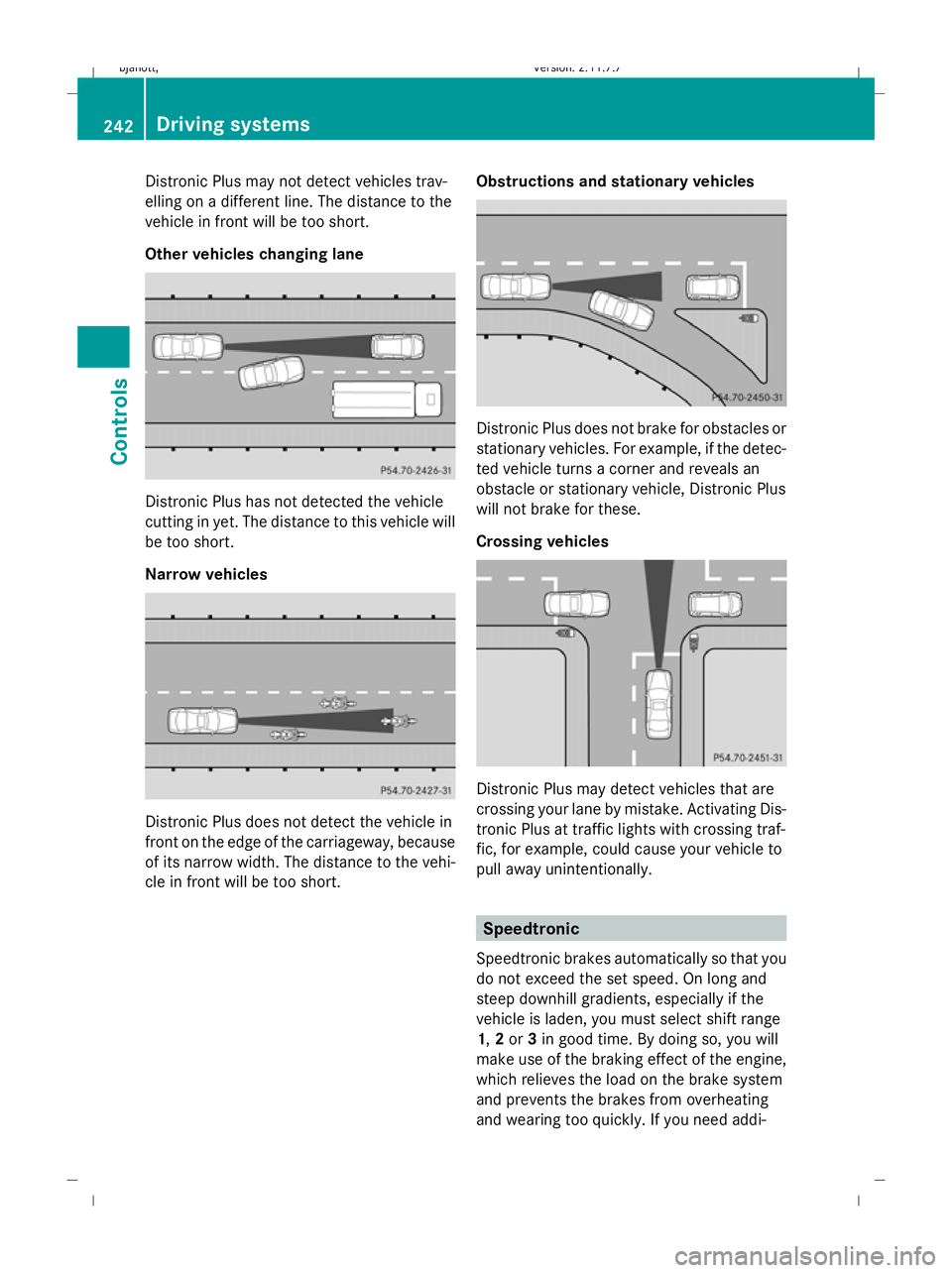
Distronic Plus may not detect vehicles trav-
elling on a different line. The distance to the
vehicle in front will be too short.
Other vehicles changing lane Distronic Plus has not detected the vehicle
cutting in yet. The distance to this vehicle will
be too short.
Narrow vehicles Distronic Plus does not detect the vehicle in
front on the edge of the carriageway, because
of its narrow width. The distance to the vehi-
cle in front will be too short. Obstructions and stationary vehicles Distronic Plus does not brake for obstacles or
stationary vehicles. For example, if the detec-
ted vehicle turns a corner and reveals an
obstacle or stationary vehicle, Distronic Plus
will not brake for these.
Crossing vehicles Distronic Plus may detect vehicles that are
crossing your lane by mistake. Activating Dis-
tronic Plus at traffic lights with crossing traf-
fic, for example, could cause your vehicle to
pull away unintentionally.
Speedtronic
Speedtronic brakes automatically so that you
do not exceed the set speed. On long and
steep downhill gradients, especially if the
vehicle is laden, you must select shift range
1, 2or 3in good time. By doing so, you will
make use of the braking effect of the engine,
which relieves the load on the brake system
and prevents the brakes from overheating
and wearing too quickly. If you need addi- 242
Driving systemsControls
216_AKB; 2; 3, en-GB
bjanott,
Version: 2.11.7.7 2009-02-27T14:54:17+01:00 - Seite 242
Dateiname: 6515230602_buchblock.pdf; erzeugt am 04. Mar 2009 11:16:00; WK