ignition MERCEDES-BENZ CL COUPE 2009 User Guide
[x] Cancel search | Manufacturer: MERCEDES-BENZ, Model Year: 2009, Model line: CL COUPE, Model: MERCEDES-BENZ CL COUPE 2009Pages: 421, PDF Size: 10.78 MB
Page 108 of 421
emergency call. If you attempt to make an
outgoing call, the
No Servicemessage will
appear for a short while.
R If you remove the ignition key from the igni-
tion lock during an active conversation in
hands-free mode, the conversation may be
continued for up to 30 minutes. At this
point, it will be interrupted. You can prevent
this as follows:
XBluetooth ®
interface telephony:
switch the mobile phone to "Private
mode" before switching off COMAND;
see mobile phone operating instruc-
tions.
X Convenience telephony*: remove
the phone from its bracket before
switching off COMAND*.
If you wish to switch off COMAND during an
active conversation in hands-free mode, the
following message will appear: "You cannot
switch off COMAND until the phone call has
been completed."
"999" or "112" emergency call The following conditions must be fulfilled in
order to make a "112" emergency call:
R
the mobile phone must be switched on.
R a network must be available.
R a valid SIM card must be in the phone (not
necessary in all mobile phone networks).
If you cannot make an emergency call, you
must arrange rescue measures yourself.
The "112" emergency call number is a public
service. Any misuse is punishable by law.
Mercedes-Benz Contact Mercedes-Benz Contact can help you when-
ever you have questions relating to your vehi-
cle or when you need help in the event of a
breakdown.
The function will allow you to place a call to
the Mercedes-Benz Customer Centre. All important vehicle data is transferred in order
to ensure optimum support.
The following data is transmitted:
R
the vehicle identification number
R the mileage
R the vehicle's location
You can make use of this function with an
operational mobile phone connected to
COMAND via the Bluetooth ®
interface or con-
venience telephony*.
! Please note: Mercedes-Benz Contact is a
service provided by Mercedes-Benz. In
emergencies, it is vital that you first contact
the standard national emergency services
number.
i Currently (as at June 2009) this service is
available in the following European coun-
tries:
R Belgium
R Germany
R France
R United Kingdom
R Ireland
R Italy
R Luxembourg
R Netherlands
R Austria
R Poland
R Switzerland
R Slovakia
R Spain
R Czech Republic
R Hungary
You will find additional information on
Mercedes Benz Contact in your Service Book-
let. Telephone*
105COMAND
* optional
216_AKB; 2; 3, en-GB
bjanott,
Version: 2.11.7.7 2009-02-27T14:54:17+01:00 - Seite 105 Z
Dateiname: 6515230602_buchblock.pdf; erzeugt am 04. Mar 2009 11:15:05; WK
Page 155 of 421
will see the
Off mapmessage and an arrow.
The arrow shows the compass heading to the
actual destination. The route is highlighted
blue from the nearest road known to the sys-
tem. As soon as the vehicle is back on a road
known to the system, route guidance contin-
ues in the usual way.
Off-road position during route guidance Due to road construction work, for example,
there may be differences between the data
on the digital map and the actual course of
the road. In such cases, the system will tem-
porarily be unable to locate the vehicle posi-
tion on the digital map and thus considers the
vehicle to be in an off-road position. The Off
road message and an arrow indicating the
compass heading to the destination appear in
the display. As soon as the system can assign
the vehicle position to the map again, route
guidance continues in the usual way. Navigation announcements
i Audible navigation announcements are
muted during a telephone call.
If you have missed an announcement, you can
call up the current announcement at any
time.
X To call up a current announcement:
select NaviQ+.
or
X Press the hprogrammable button if the
button has been programmed with this
function (Y page 163).
X To switch off navigation announce-
ments: press and hold the 8button on
the multi-function steering wheel.
i The announcements remain switched
off even if you start a new route guidance
or if COMAND is switched off and on with
the u button. The announcements are
automatically switched back on if you
switch COMAND off by removing the key from the ignition lock and then switch the
ignition back on after more than 3 minutes.
X To switch navigation announcements
back on manually: selectNaviQ+.
X To adjust the volume of the announce-
ments: adjust the volume during an auto-
matic announcement (Y page 63).
or
X Call up an announcement manually using
Navi Q+ and adjust the volume
(Y page 63). Interrupting route guidance
X Make sure that the menu system is shown
in the map display ( Ypage 127)
X Select Destination QCancel route
guidance. Continuing interrupted route guid-
ance
X Make sure that the menu system is shown
in the map display ( Ypage 127).
X Select Destination QContinue
route guidance.
COMAND calculates the route. Displaying information
X Select Infoin map view with the menu
system displayed (Y page 127).152
Navigation system* (route guidance)COMAND
* optional
216_AKB; 2; 3, en-GB
bjanott
,V ersion: 2.11.7.7
2009-02-27T14:54:17+01:00 - Seite 152
Dateiname: 6515230602_buchblock.pdf; erzeugt am 04. Mar 2009 11:15:20; WK
Page 169 of 421
X
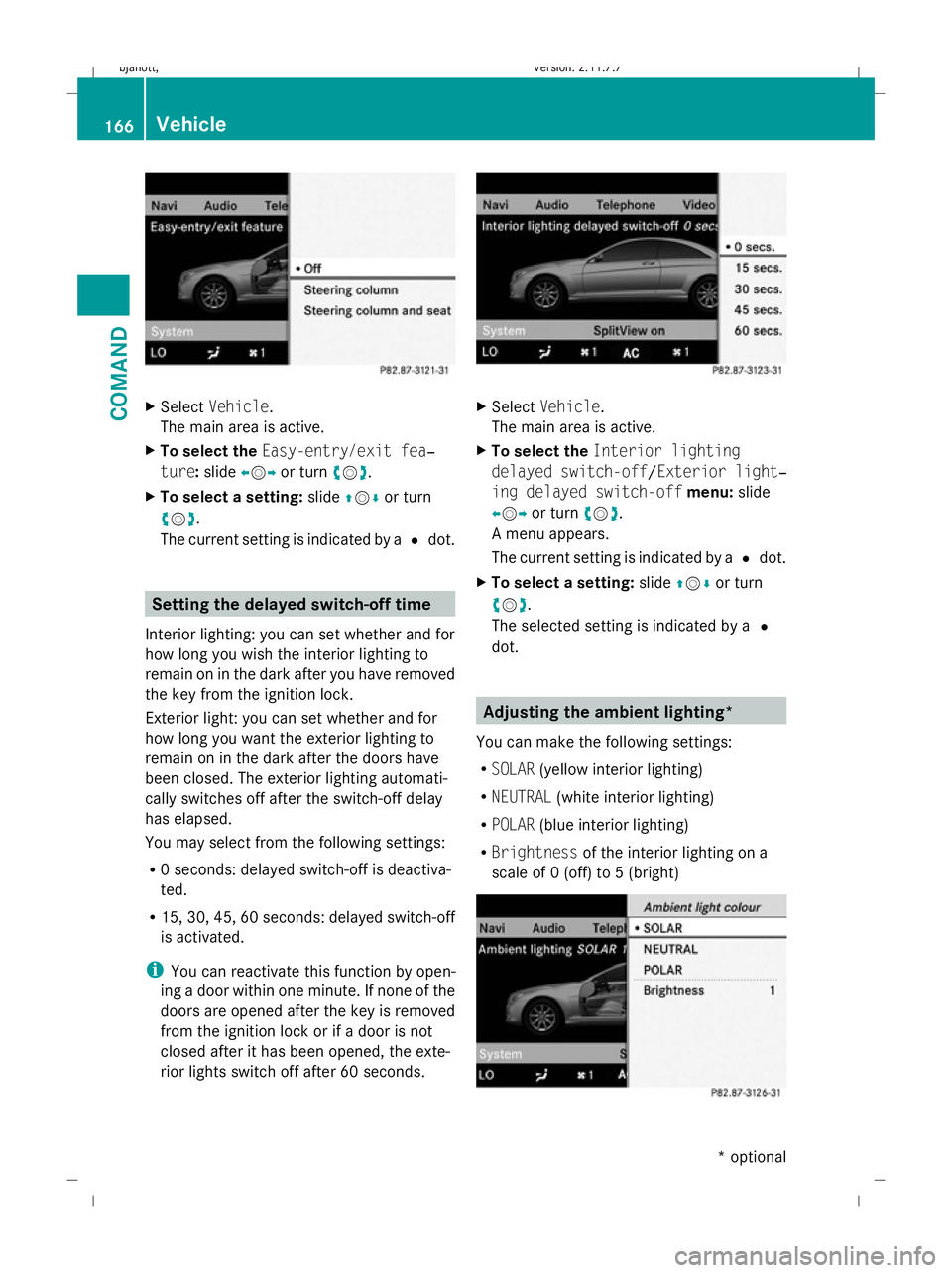
Select Vehicle.
The main area is active.
X To select the Easy-entry/exit fea‐
ture: slideXVY or turn cVd.
X To select a setting: slideZVÆ or turn
cVd .
The current setting is indicated by a #dot. Setting the delayed switch-off time
Interior lighting: you can set whether and for
how long you wish the interior lighting to
remain on in the dark after you have removed
the key from the ignition lock.
Exterior light: you can set whether and for
how long you want the exterior lighting to
remain on in the dark after the doors have
been closed. The exterior lighting automati-
cally switches off after the switch-off delay
has elapsed.
You may select from the following settings:
R 0 seconds: delayed switch-off is deactiva-
ted.
R 15, 30, 45, 60 seconds: delayed switch-off
is activated.
i You can reactivate this function by open-
ing a door within one minute. If none of the
doors are opened after the key is removed
from the ignition lock or if a door is not
closed after it has been opened, the exte-
rior lights switch off after 60 seconds. X
Select Vehicle.
The main area is active.
X To select the Interior lighting
delayed switch-off /Exterior light‐
ing delayed switch-off menu:slide
XVY or turn cVd.
A menu appears.
The current setting is indicated by a #dot.
X To select a setting: slideZVÆ or turn
cVd .
The selected setting is indicated by a #
dot. Adjusting the ambient lighting*
You can make the following settings:
R SOLAR (yellow interior lighting)
R NEUTRAL (white interior lighting)
R POLAR (blue interior lighting)
R Brightness of the interior lighting on a
scale of 0 (off) to 5 (bright) 166
VehicleCOMAND
* optional
216_AKB; 2; 3, en-GB
bjanott,
Version: 2.11.7.7 2009-02-27T14:54:17+01:00 - Seite 166
Dateiname: 6515230602_buchblock.pdf; erzeugt am 04. Mar 2009 11:15:28; WK
Page 171 of 421
X
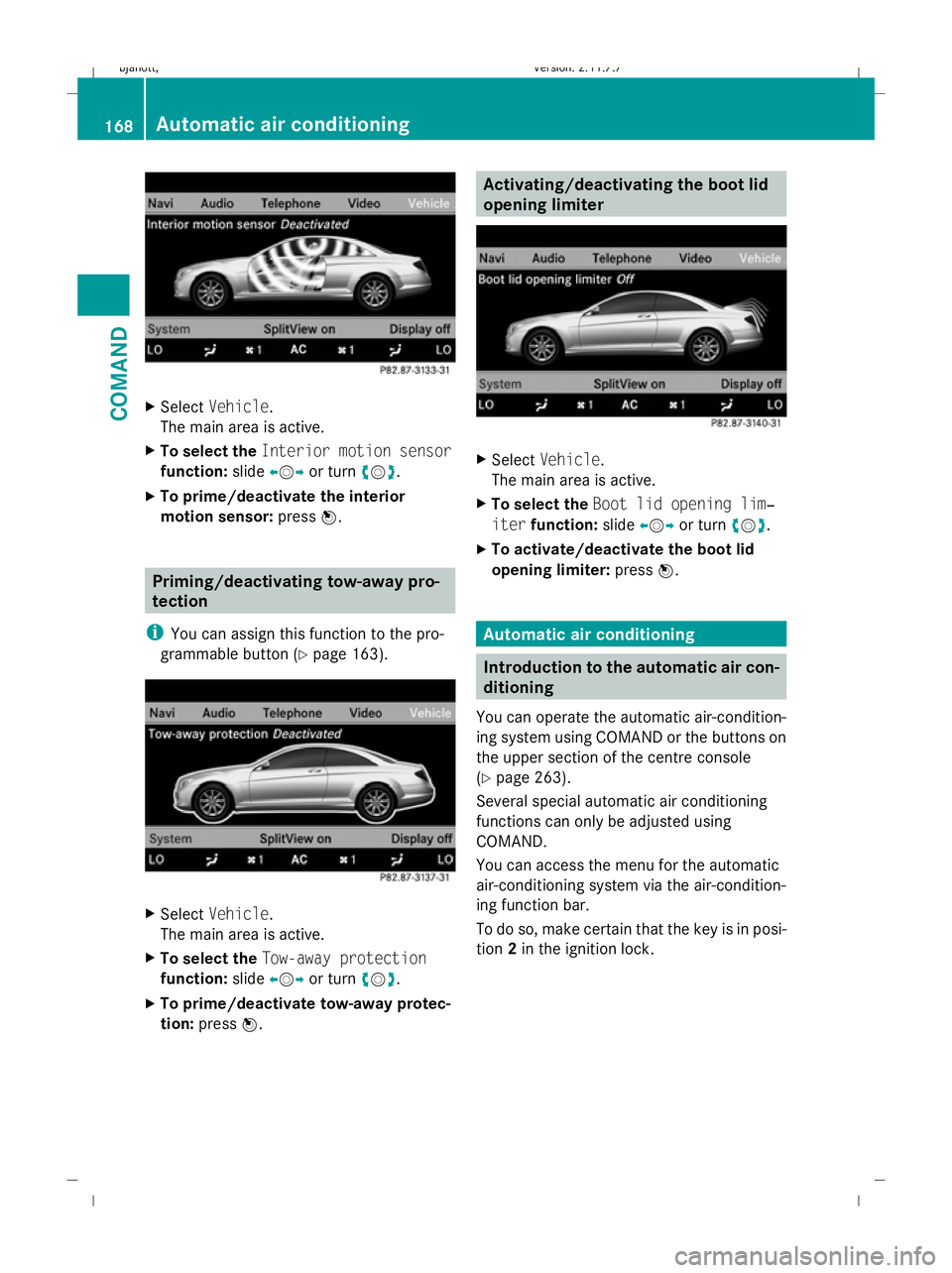
Select Vehicle.
The main area is active.
X To select the Interior motion sensor
function: slideXVY or turn cVd.
X To prime/deactivate the interior
motion sensor: pressW. Priming/deactivating tow-away pro-
tection
i You can assign this function to the pro-
grammable button (Y page 163).X
Select Vehicle.
The main area is active.
X To select the Tow-away protection
function: slideXVY or turn cVd.
X To prime/deactivate tow-away protec-
tion: press W. Activating/deactivating the boot lid
opening limiter
X
Select Vehicle.
The main area is active.
X To select the Boot lid opening lim‐
iter function: slideXVY or turn cVd.
X To activate/deactivate the boot lid
opening limiter: pressW. Automatic air conditioning
Introduction to the automatic air con-
ditioning
You can operate the automatic air-condition-
ing system using COMAND or the buttons on
the upper section of the centre console
(Y page 263).
Several special automatic air conditioning
functions can only be adjusted using
COMAND.
You can access the menu for the automatic
air-conditioning system via the air-condition-
ing function bar.
To do so, make certain that the key is in posi-
tion 2in the ignition lock. 168
Automatic air conditioningCOMAND
216_AKB; 2; 3, en-GB
bjanott,
Version: 2.11.7.7 2009-02-27T14:54:17+01:00 - Seite 168
Dateiname: 6515230602_buchblock.pdf; erzeugt am 04. Mar 2009 11:15:30; WK
Page 177 of 421
You can adjust the following air cushions:
R seat side bolsters
R seat backrest side bolsters
R backrest curvature in the lumbar region
R backrest curvature in the upper back
region
X Make sure that the key is in position 2in
the ignition lock.
X Press the Tfunction button.
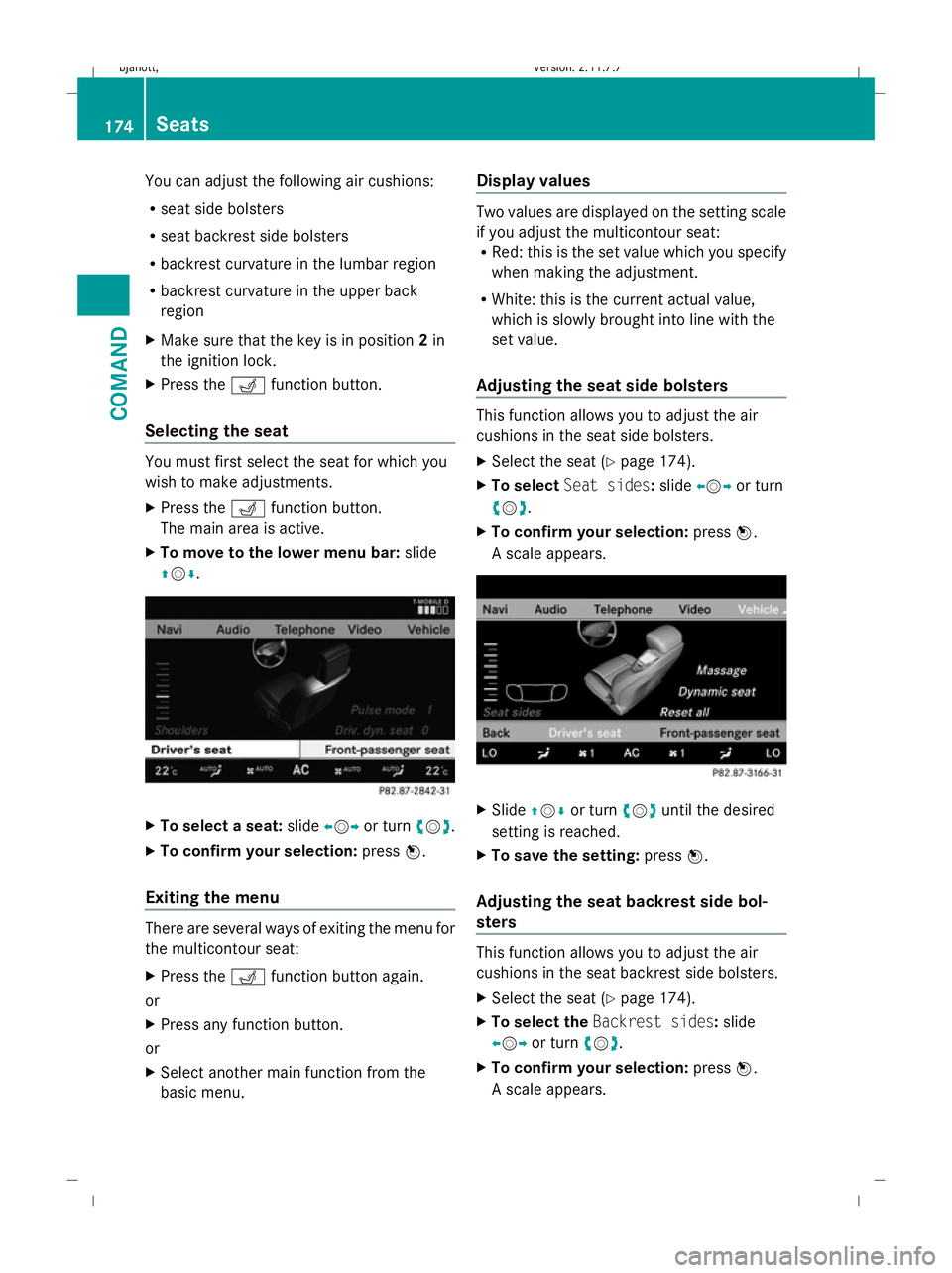
Selecting the seat You must first select the seat for which you
wish to make adjustments.
X Press the Tfunction button.
The main area is active.
X To move to the lower menu bar: slide
ZVÆ. X
To select a seat: slideXVY or turn cVd.
X To confirm your selection: pressW.
Exiting the menu There are several ways of exiting the menu for
the multicontour seat:
X Press the Tfunction button again.
or
X Press any function button.
or
X Select another main function from the
basic menu. Display values Two values are displayed on the setting scale
if you adjust the multicontour seat:
R Red: this is the set value which you specify
when making the adjustment.
R White: this is the current actual value,
which is slowly brought into line with the
set value.
Adjusting the seat side bolsters This function allows you to adjust the air
cushions in the seat side bolsters.
X
Select the seat (Y page 174).
X To select Seat sides: slideXVY or turn
cVd.
X To confirm your selection: pressW.
A scale appears. X
Slide ZVÆ or turn cVduntil the desired
setting is reached.
X To save the setting: pressW.
Adjusting the seat backrest side bol-
sters This function allows you to adjust the air
cushions in the seat backrest side bolsters.
X
Select the seat (Y page 174).
X To select the Backrest sides: slide
XVY or turn cVd.
X To confirm your selection: pressW.
A scale appears. 174
SeatsCOMAND
216_AKB; 2; 3, en-GB
bjanott
,V ersion: 2.11.7.7
2009-02-27T14:54:17+01:00 - Seite 174
Dateiname: 6515230602_buchblock.pdf; erzeugt am 04. Mar 2009 11:15:34; WK
Page 181 of 421
Opening and closing
Key
The key centrally locks/unlocks:
R the doors
R the boot lid
R the fuel filler flap G
Risk of accident
If children are left unsupervised in the vehicle,
they could:
R open a door from the inside at any time,
even if it has been locked
R start the vehicle using a key which has been
left in the vehicle
R release the parking brake
They could thereby endanger themselves and
others. Never leave children unsupervised in
the vehicle. Always take the key with you
when leaving the vehicle, even if you are only
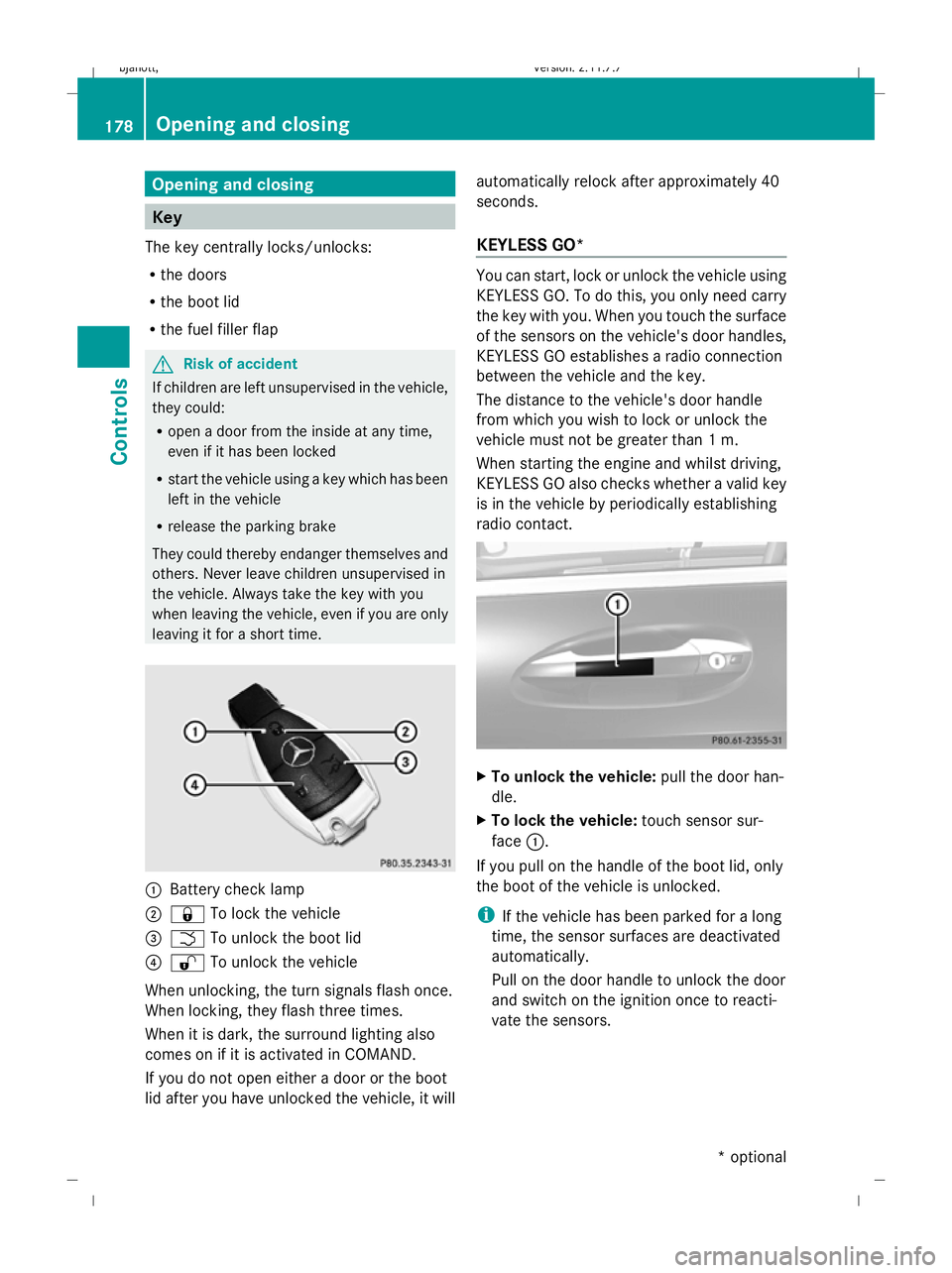
leaving it for a short time. :
Battery check lamp
; & To lock the vehicle
= F To unlock the boot lid
? % To unlock the vehicle
When unlocking, the turn signals flash once.
When locking, they flash three times.
When it is dark, the surround lighting also
comes on if it is activated in COMAND.
If you do not open either a door or the boot
lid after you have unlocked the vehicle, it will automatically relock after approximately 40
seconds.
KEYLESS GO* You can start, lock or unlock the vehicle using
KEYLESS GO. To do this, you only need carry
the key with you. When you touch the surface
of the sensors on the vehicle's door handles,
KEYLESS GO establishes a radio connection
between the vehicle and the key.
The distance to the vehicle's door handle
from which you wish to lock or unlock the
vehicle must not be greater than 1 m.
When starting the engine and whilst driving,
KEYLESS GO also checks whether a valid key
is in the vehicle by periodically establishing
radio contact. X
To unlock the vehicle: pull the door han-
dle.
X To lock the vehicle: touch sensor sur-
face :.
If you pull on the handle of the boot lid, only
the boot of the vehicle is unlocked.
i If the vehicle has been parked for a long
time, the sensor surfaces are deactivated
automatically.
Pull on the door handle to unlock the door
and switch on the ignition once to reacti-
vate the sensors. 178
Opening and closingControls
* optional
216_AKB; 2; 3, en-GB
bjanott,
Version: 2.11.7.7 2009-02-27T14:54:17+01:00 - Seite 178
Dateiname: 6515230602_buchblock.pdf; erzeugt am 04. Mar 2009 11:15:36; WK
Page 183 of 421
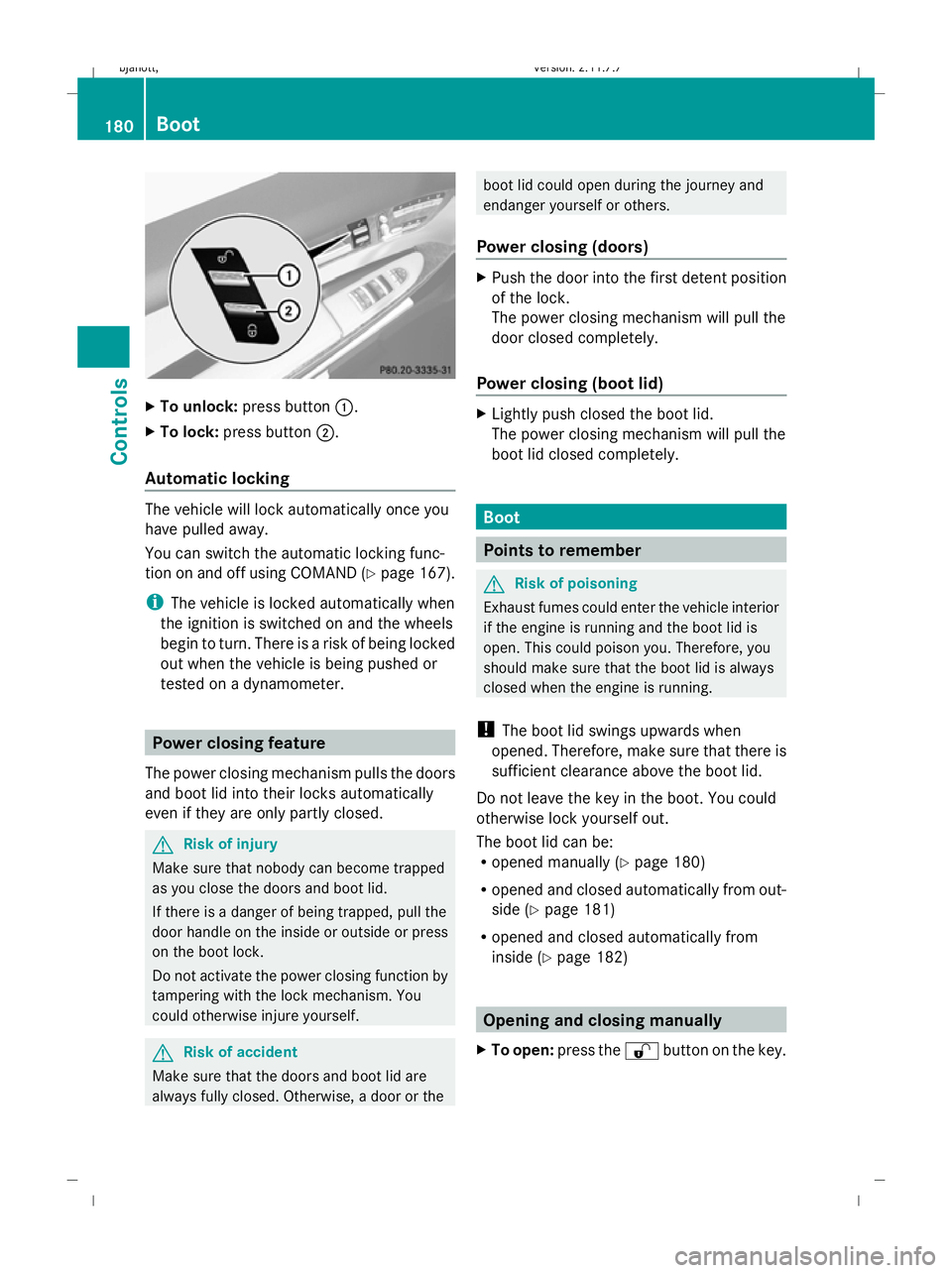
X
To unlock: press button :.
X To lock: press button ;.
Automatic locking The vehicle will lock automatically once you
have pulled away.
You can switch the automatic locking func-
tion on and off using COMAND (Y page 167).
i The vehicle is locked automatically when
the ignition is switched on and the wheels
begin to turn. There is a risk of being locked
out when the vehicle is being pushed or
tested on a dynamometer. Power closing feature
The power closing mechanism pulls the doors
and boot lid into their locks automatically
even if they are only partly closed. G
Risk of injury
Make sure that nobody can become trapped
as you close the doors and boot lid.
If there is a danger of being trapped, pull the
door handle on the inside or outside or press
on the boot lock.
Do not activate the power closing function by
tampering with the lock mechanism. You
could otherwise injure yourself. G
Risk of accident
Make sure that the doors and boot lid are
always fully closed. Otherwise, a door or the boot lid could open during the journey and
endanger yourself or others.
Power closing (doors) X
Push the door into the first detent position
of the lock.
The power closing mechanism will pull the
door closed completely.
Power closing (boot lid) X
Lightly push closed the boot lid.
The power closing mechanism will pull the
boot lid closed completely. Boot
Points to remember
G
Risk of poisoning
Exhaust fumes could enter the vehicle interior
if the engine is running and the boot lid is
open. This could poison you. Therefore, you
should make sure that the boot lid is always
closed when the engine is running.
! The boot lid swings upwards when
opened. Therefore, make sure that there is
sufficient clearance above the boot lid.
Do not leave the key in the boot. You could
otherwise lock yourself out.
The boot lid can be:
R opened manually (Y page 180)
R opened and closed automatically from out-
side (Y page 181)
R opened and closed automatically from
inside (Y page 182) Opening and closing manually
X To open: press the %button on the key. 180
BootControls
216_AKB; 2; 3, en-GB
bjanott,
Version: 2.11.7.7 2009-02-27T14:54:17+01:00 - Seite 180
Dateiname: 6515230602_buchblock.pdf; erzeugt am 04. Mar 2009 11:15:36; WK
Page 185 of 421
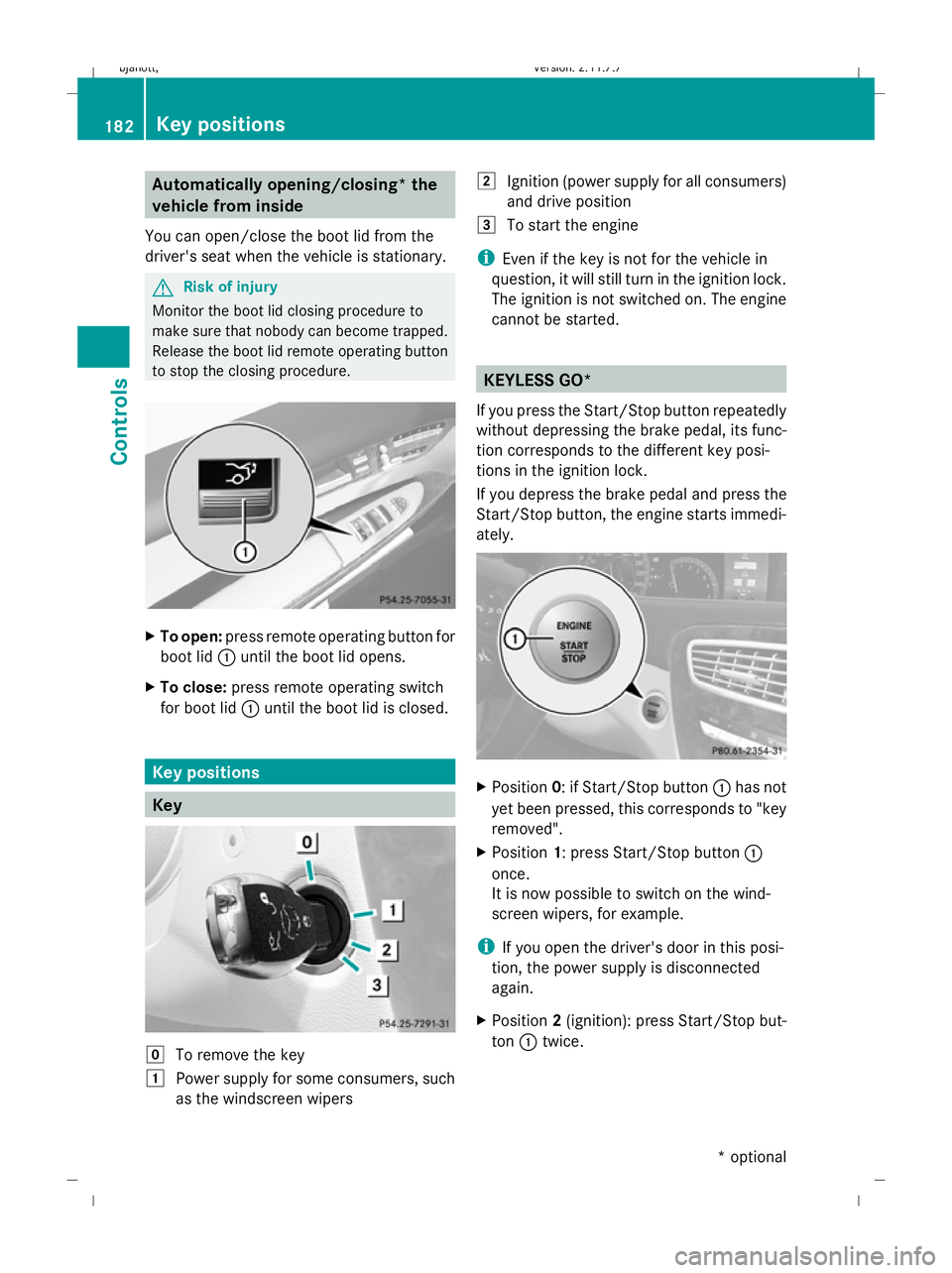
Automatically opening/closing* the
vehicle from inside
You can open/close the boot lid from the
driver's seat when the vehicle is stationary. G
Risk of injury
Monitor the boot lid closing procedure to
make sure that nobody can become trapped.
Release the boot lid remote operating button
to stop the closing procedure. X
To open: press remote operating button for
boot lid :until the boot lid opens.
X To close: press remote operating switch
for boot lid :until the boot lid is closed. Key positions
Key
g
To remove the key
1 Power supply for some consumers, such
as the windscreen wipers 2
Ignition (power supply for all consumers)
and drive position
3 To start the engine
i Even if the key is not for the vehicle in
question, it will still turn in the ignition lock.
The ignition is not switched on. The engine
cannot be started. KEYLESS GO*
If you press the Start/Stop button repeatedly
without depressing the brake pedal, its func-
tion corresponds to the different key posi-
tions in the ignition lock.
If you depress the brake pedal and press the
Start/Stop button, the engine starts immedi-
ately. X
Position 0: if Start/Stop button :has not
yet been pressed, this corresponds to "key
removed".
X Position 1: press Start/Stop button :
once.
It is now possible to switch on the wind-
screen wipers, for example.
i If you open the driver's door in this posi-
tion, the power supply is disconnected
again.
X Position 2(ignition): press Start/Stop but-
ton :twice. 182
Key positionsCont
rols
* option al
216_AKB; 2; 3, en-GB
bjanott
,V ersion: 2.11.7.7
2009-02-27T14:54:17+01:00 - Seite 182
Dateiname: 6515230602_buchblock.pdf; erzeugt am 04. Mar 2009 11:15:38; WK
Page 186 of 421
i
If you press Start/Stop button :in this
position once and the driver's door is open,
the power supply is disconnected again.
Removing the Start/Stop button You can remove Start/Stop button from igni-
tion lock and start the vehicle with a key as
usual.
i
You do not need to remove the Start/
Stop button from the ignition lock when you
leave the vehicle. X
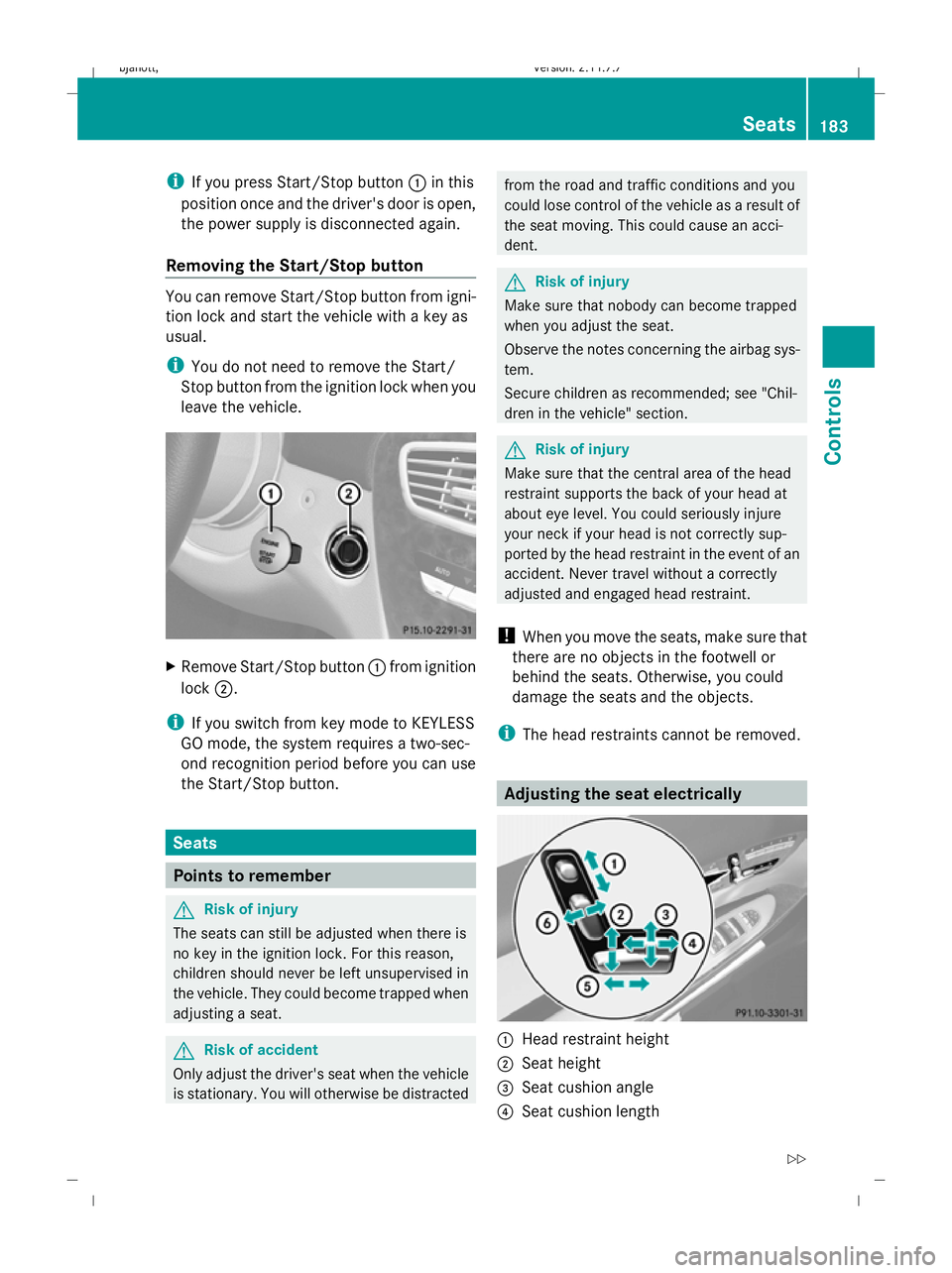
Remove Start/Stop button :from ignition
lock ;.
i If you switch from key mode to KEYLESS
GO mode, the system requires a two-sec-
ond recognition period before you can use
the Start/Stop button. Seats
Points to remember
G
Risk of injury
The seats can still be adjusted when there is
no key in the ignition lock. For this reason,
children should never be left unsupervised in
the vehicle. They could become trapped when
adjusting a seat. G
Risk of accident
Only adjust the driver's seat when the vehicle
is stationary. You will otherwise be distracted from the road and traffic conditions and you
could lose control of the vehicle as a result of
the seat moving. This could cause an acci-
dent. G
Risk of injury
Make sure that nobody can become trapped
when you adjust the seat.
Observe the notes concerning the airbag sys-
tem.
Secure children as recommended; see "Chil-
dren in the vehicle" section. G
Risk of injury
Make sure that the central area of the head
restraint supports the back of your head at
about eye level. You could seriously injure
your neck if your head is not correctly sup-
ported by the head restraint in the event of an
accident. Never travel without a correctly
adjusted and engaged head restraint.
! When you move the seats, make sure that
there are no objects in the footwell or
behind the seats. Otherwise, you could
damage the seats and the objects.
i The head restraints cannot be removed. Adjusting the seat electrically
:
Head restraint height
; Seat height
= Seat cushion angle
? Seat cushion length Seats
183Controls
216_AKB; 2; 3, en-GB
bjanott, Version: 2.11.7.7 2009-02-27T14:54:17+01:00 - Seite 183 Z
Dateiname: 6515230602_buchblock.pdf; erzeugt am 04. Mar 2009 11:15:38; WK
Page 187 of 421
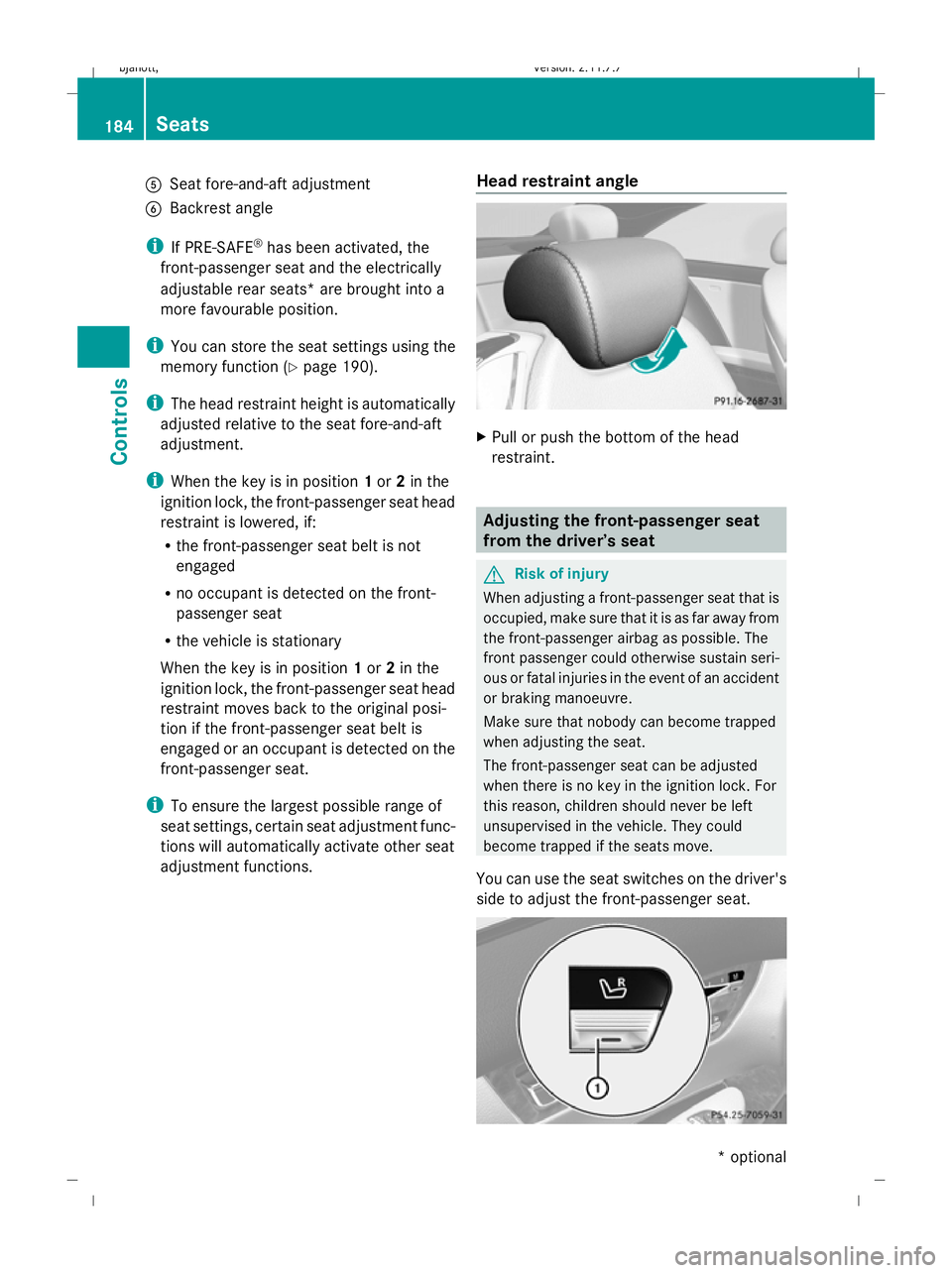
A
Seat fore-and-aft adjustment
B Backrest angle
i If PRE-SAFE ®
has been activated, the
front-passenger seat and the electrically
adjustable rear seats* are brought into a
more favourable position.
i You can store the seat settings using the
memory function (Y page 190).
i The head restraint height is automatically
adjusted relative to the seat fore-and-aft
adjustment.
i When the key is in position 1or 2in the
ignition lock, the front-passenger seat head
restraint is lowered, if:
R the front-passenger seat belt is not
engaged
R no occupant is detected on the front-
passenger seat
R the vehicle is stationary
When the key is in position 1or 2in the
ignition lock, the front-passenger seat head
restraint moves back to the original posi-
tion if the front-passenger seat belt is
engaged or an occupant is detected on the
front-passenger seat.
i To ensure the largest possible range of
seat settings, certain seat adjustment func-
tions will automatically activate other seat
adjustment functions. Head restraint angle X
Pull or push the bottom of the head
restraint. Adjusting the front-passenger seat
from the driver’s seat
G
Risk of injury
When adjusting a front-passenger seat that is
occupied, make sure that it is as far away from
the front-passenger airbag as possible. The
front passenger could otherwise sustain seri-
ous or fatal injuries in the event of an accident
or braking manoeuvre.
Make sure that nobody can become trapped
when adjusting the seat.
The front-passenger seat can be adjusted
when there is no key in the ignition lock. For
this reason, children should never be left
unsupervised in the vehicle. They could
become trapped if the seats move.
You can use the seat switches on the driver's
side to adjust the front-passenger seat. 184
SeatsControls
* optional
216_AKB; 2; 3, en-GB
bjanott,
Version: 2.11.7.7 2009-02-27T14:54:17+01:00 - Seite 184
Dateiname: 6515230602_buchblock.pdf; erzeugt am 04. Mar 2009 11:15:39; WK