ignition MERCEDES-BENZ CL COUPE 2009 Owner's Guide
[x] Cancel search | Manufacturer: MERCEDES-BENZ, Model Year: 2009, Model line: CL COUPE, Model: MERCEDES-BENZ CL COUPE 2009Pages: 421, PDF Size: 10.78 MB
Page 206 of 421
tutes a health hazard and could lead to loss
of consciousness or even death.
! Do not depress the accelerator pedal
when starting the engine.
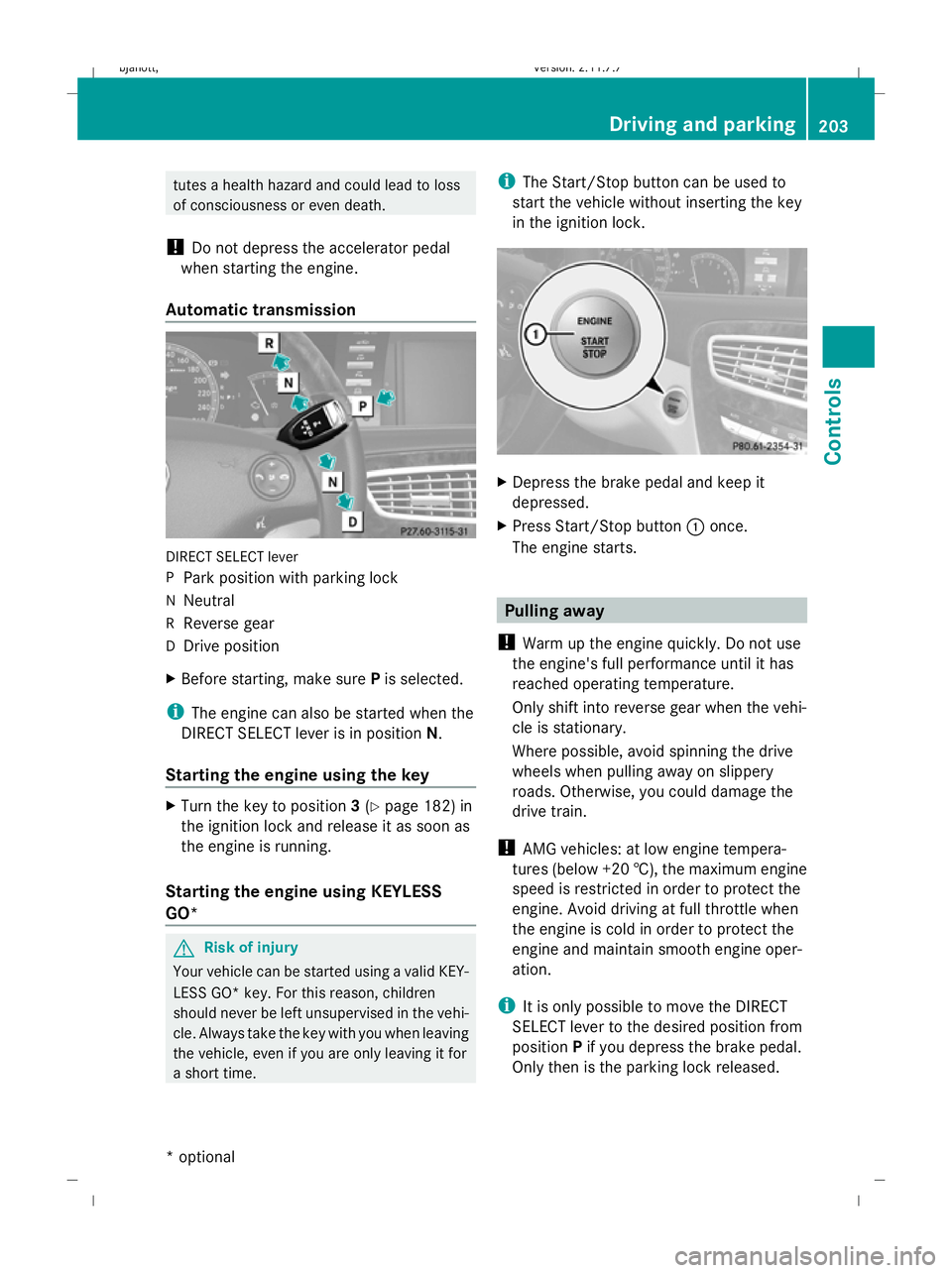
Automatic transmission DIRECT SELECT lever
P
Park position with parking lock
N Neutral
R Reverse gear
D Drive position
X Before starting, make sure Pis selected.
i The engine can also be started when the
DIRECT SELECT lever is in position N.
Starting the engine using the key X
Turn the key to position 3(Y page 182) in
the ignition lock and release it as soon as
the engine is running.
Starting the engine using KEYLESS
GO* G
Risk of injury
Your vehicle can be started using a valid KEY-
LESS GO* key. For this reason, children
should never be left unsupervised in the vehi-
cle. Always take the key with you when leaving
the vehicle, even if you are only leaving it for
a short time. i
The Start/Stop button can be used to
start the vehicle without inserting the key
in the ignition lock. X
Depress the brake pedal and keep it
depressed.
X Press Start/Stop button :once.
The engine starts. Pulling away
! Warm up the engine quickly. Do not use
the engine's full performance until it has
reached operating temperature.
Only shift into reverse gear when the vehi-
cle is stationary.
Where possible, avoid spinning the drive
wheels when pulling away on slippery
roads. Otherwise, you could damage the
drive train.
! AMG vehicles: at low engine tempera-
tures (below +20 †), the maximum engine
speed is restricted in order to protect the
engine. Avoid driving at full throttle when
the engine is cold in order to protect the
engine and maintain smooth engine oper-
ation.
i It is only possible to move the DIRECT
SELECT lever to the desired position from
position Pif you depress the brake pedal.
Only then is the parking lock released. Driving and parking
203Controls
* option al
216_AKB; 2; 3, en-GB
bjanott
,V ersion: 2.11.7.7
2009-02-27T14:54:17+01:00 - Seite 203 Z
Dateiname: 6515230602_buchblock.pdf; erzeugt am 04. Mar 2009 11:15:47; WK
Page 207 of 421
i
The vehicle locks centrally once you have
pulled away. The locking knobs in the doors
drop down.
You can open the doors from the inside at
any time.
You can also deactivate the automatic lock-
ing feature (Y page 167).
X Depress the brake pedal and keep it
depressed.
X Move the DIRECT SELECT lever to position
D or R.
X Release the brake pedal.
X Carefully depress the accelerator pedal.
The electric parking brake is automatically
released (Y page 205).
i Upshifts take place at higher engine
speeds after a cold start. This helps the
catalytic converter to reach its operating
temperature more quickly.
Hill start assist Hill start assist helps you when pulling away
on uphill gradients. It holds the vehicle for a
short time after you have removed your foot
from the brake pedal. This gives you time to
move your foot from the brake pedal to the
accelerator pedal and depress it before the
vehicle begins to roll. G
Risk of accident
Never leave the vehicle when it is held by hill
start assist. After approximately one second,
hill start assist will no longer brake your vehi-
cle and it could roll away.
X Take your foot off the brake pedal.
i Once you have taken your foot off the
brake pedal, the vehicle is held for around
one second.
X Pull away. Hill start assist will not function if:
R
you are pulling away on a level road or a
downhill gradient.
R the DIRECT SELECT lever is in position N.
R the vehicle is secured with the electric
parking brake.
R ESP ®
is malfunctioning. Parking
G
Risk of accident
Only remove the key from the ignition lock
when the vehicle is stationary, as you cannot
steer the vehicle with the key removed.
Never leave children unsupervised in the vehi-
cle. They might release the electric parking
brake. This could lead to a serious or fatal
accident. G
Risk of fire
Make sure that the exhaust system does not
under any circumstances come into contact
with flammable materials such as dry grass or
petrol. The material could otherwise ignite
and set the vehicle on fire.
To ensure that the vehicle is secured against
rolling away unintentionally:
R the parking brake must be applied
R move the DIRECT SELECT lever into posi-
tion Pand remove the ignition key
R for steep uphill or downhill gradients, turn
the front wheels towards kerb 204
Driving and parkingControls
216_AKB; 2; 3, en-GB
bjanott,
Version: 2.11.7.7 2009-02-27T14:54:17+01:00 - Seite 204
Dateiname: 6515230602_buchblock.pdf; erzeugt am 04. Mar 2009 11:15:47; WK
Page 208 of 421
Electric parking brake
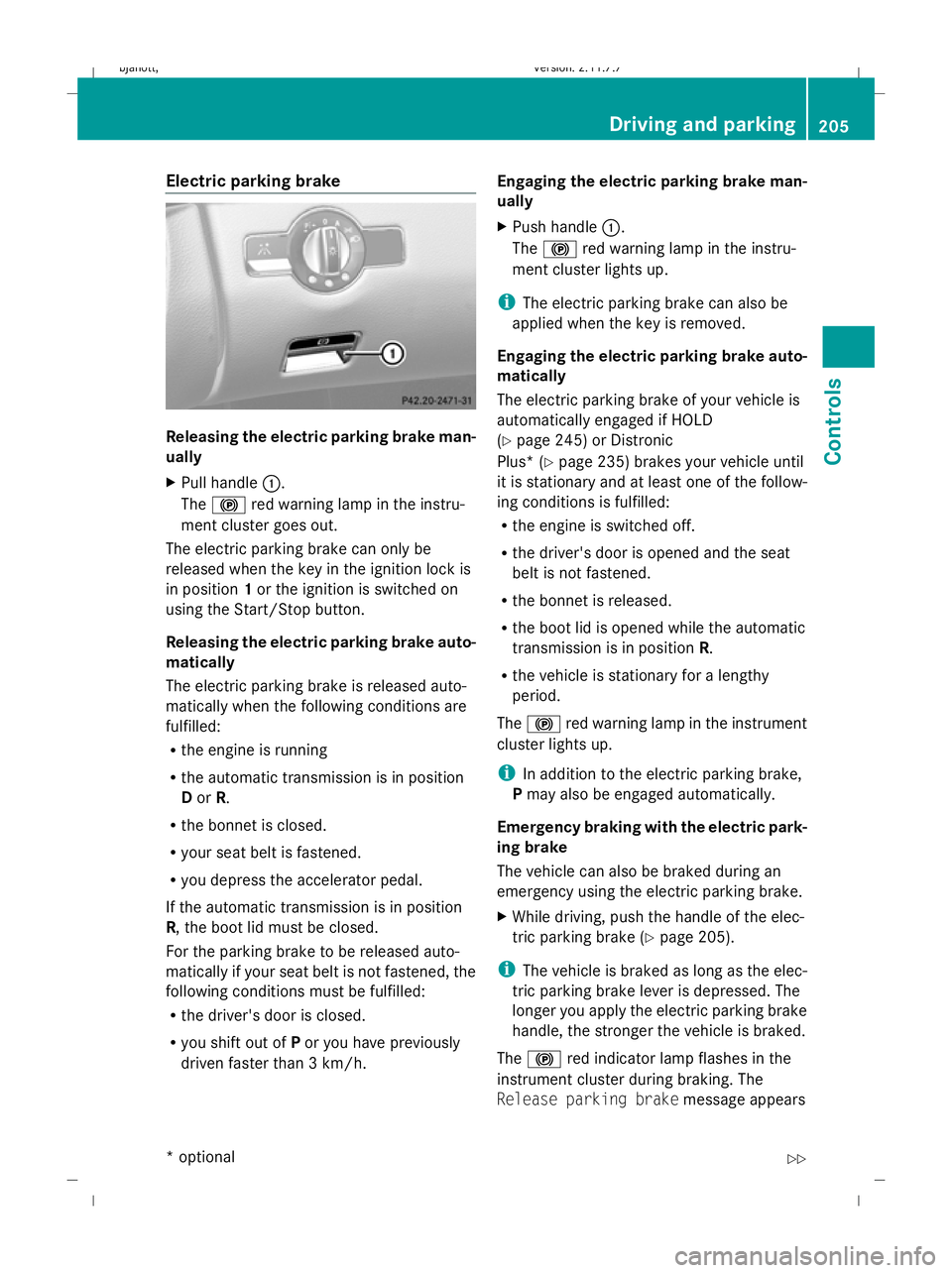
Releasing the electric parking brake man-
ually
X
Pull handle :.
The ! red warning lamp in the instru-
ment cluster goes out.
The electric parking brake can only be
released when the key in the ignition lock is
in position 1or the ignition is switched on
using the Start/Stop button.
Releasing the electric parking brake auto-
matically
The electric parking brake is released auto-
matically when the following conditions are
fulfilled:
R the engine is running
R the automatic transmission is in position
D or R.
R the bonnet is closed.
R your seat belt is fastened.
R you depress the accelerator pedal.
If the automatic transmission is in position
R, the boot lid must be closed.
For the parking brake to be released auto-
matically if your seat belt is not fastened, the
following conditions must be fulfilled:
R the driver's door is closed.
R you shift out of Por you have previously
driven faster than 3 km/h. Engaging the electric parking brake man-
ually
X
Push handle :.
The ! red warning lamp in the instru-
ment cluster lights up.
i The electric parking brake can also be
applied when the key is removed.
Engaging the electric parking brake auto-
matically
The electric parking brake of your vehicle is
automatically engaged if HOLD
(Y page 245) or Distronic
Plus* ( Ypage 235) brakes your vehicle until
it is stationary and at least one of the follow-
ing conditions is fulfilled:
R the engine is switched off.
R the driver's door is opened and the seat
belt is not fastened.
R the bonnet is released.
R the boot lid is opened while the automatic
transmission is in position R.
R the vehicle is stationary for a lengthy
period.
The ! red warning lamp in the instrument
cluster lights up.
i In addition to the electric parking brake,
P may also be engaged automatically.
Emergency braking with the electric park-
ing brake
The vehicle can also be braked during an
emergency using the electric parking brake.
X While driving, push the handle of the elec-
tric parking brake (Y page 205).
i The vehicle is braked as long as the elec-
tric parking brake lever is depressed. The
longer you apply the electric parking brake
handle, the stronger the vehicle is braked.
The ! red indicator lamp flashes in the
instrument cluster during braking. The
Release parking brake message appears Driving and parking
205Controls
* option al
216_AKB; 2; 3, en-GB
bjanott
,V ersion: 2.11.7.7
2009-02-27T14:54:17+01:00 - Seite 205 Z
Dateiname: 6515230602_buchblock.pdf; erzeugt am 04. Mar 2009 11:15:48; WK
Page 209 of 421
in the multi-function display and a warning
tone sounds.
When the vehicle has been braked to a stand-
still, the electric parking brake is applied. Switching off the engine
G
Risk of accident
If the engine is not running, there is no power
assistance for the steering and brakes. Steer-
ing and braking will then require significantly
greater effort.
As a result, you might lose control of the vehi-
cle, cause an accident and injure yourself and
others.
Therefore, do not switch off the engine while
you are driving.
X Move the DIRECT SELECT lever to position
P.
Using the key
X Turn the key to position 0(Y page 182) in
the ignition lock and remove it.
The parking lock is activated.
i If you switch the engine off with the trans-
mission in position Ror D, the automatic
transmission automatically shifts to N.
If you then open the driver's door or the
front-passenger door or remove the key
from the ignition, the automatic transmis-
sion shifts to P.
If you shift the automatic transmission to
N before switching off the engine, the auto-
matic transmission remains in Neven when
a door is opened.
Using KEYLESS GO*
X Press the Start/Stop button (Y page 182).
The engine stops and all the indicator
lamps in the instrument cluster go out
(Y page 27).
i If you use the Start/Stop button to switch
off the engine, the automatic transmission automatically shifts to
N. If you open the
driver's or front-passenger door, the auto-
matic transmission shifts to P.
i The engine can be turned off while the
vehicle is in motion by pressing and holding
the Start/Stop button for three seconds. Automatic transmission
Notes on the transmission
G
Risk of accident
The movement of the pedals must not be
impaired in any way. Do not keep any objects
in the driver's footwell. Make sure that floor-
mats or carpets are correctly secured and
that there is sufficient clearance for the ped-
als.
Do not place several floormats on top of one
another. G
Risk of accident
Do not change down for additional engine
braking on a slippery road surface. This could
cause the drive wheels to lose their grip and
the vehicle could skid. This could cause you
to lose control of your vehicle and cause an
accident. Automatic transmission
! Warm up the engine quickly. Do not use
the engine's full performance until it has
reached operating temperature.
Only set the automatic transmission to the
respective drive positions when the vehicle
is stationary.
Where possible, avoid spinning the drive
wheels when pulling away on slippery
roads. Otherwise, you could damage the
drive train. 206
Automatic transmissionCont
rols
* option al
216_AKB; 2; 3, en-GB
bjanott
,V ersion: 2.11.7.7
2009-02-27T14:54:17+01:00 - Seite 206
Dateiname: 6515230602_buchblock.pdf; erzeugt am 04. Mar 2009 11:15:48; WK
Page 216 of 421
On-board computer
Points to remember
The on-board computer is activated as soon
as you turn the key to position 2in the ignition
lock. G
Risk of accident
Only use the on-board computer when road
and traffic conditions permit. You would oth-
erwise be distracted and unable to concen-
trate properly on driving, and could cause an
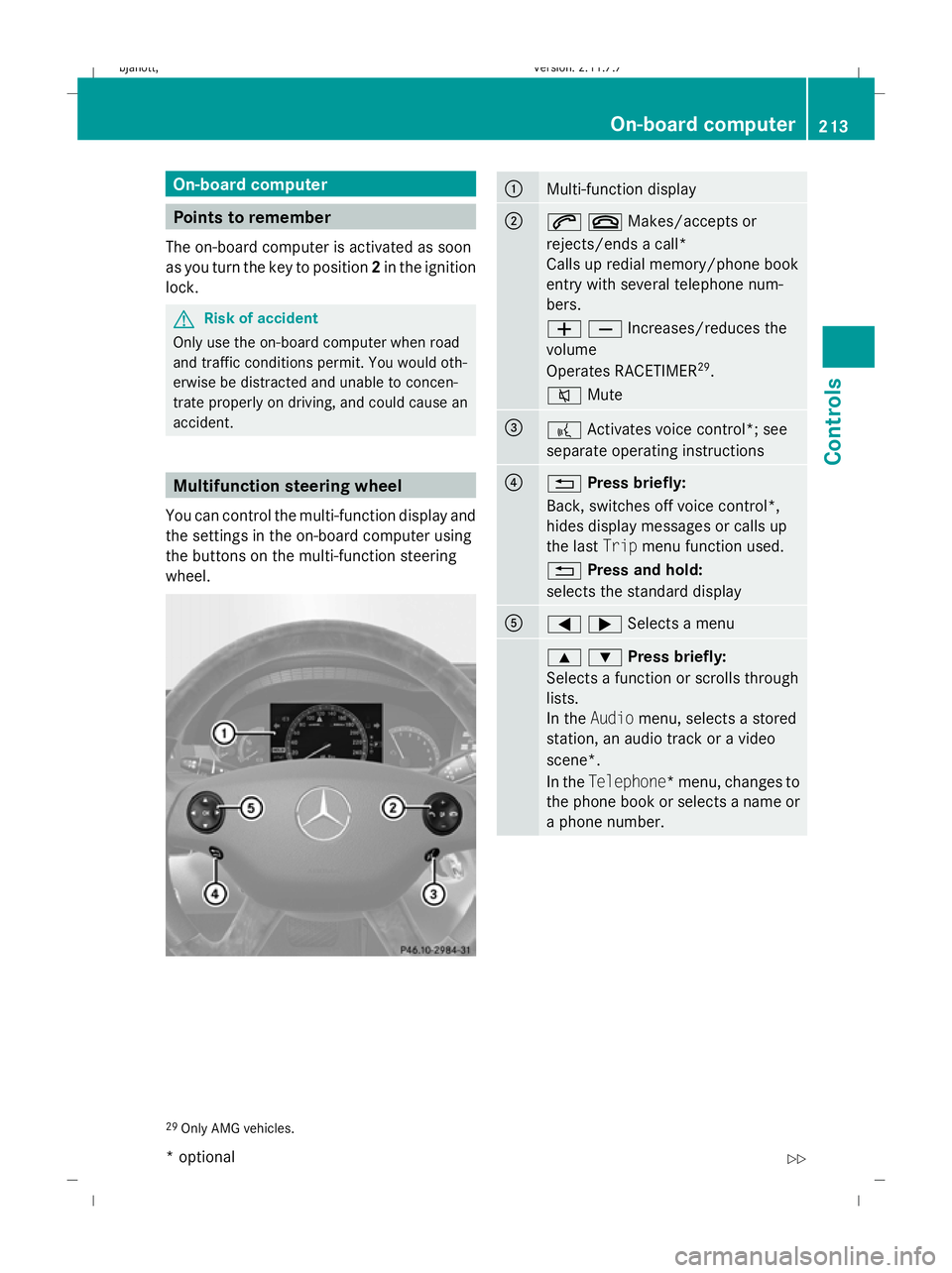
accident. Multifunction steering wheel
You can control the multi-function display and
the settings in the on-board computer using
the buttons on the multi-function steering
wheel. :
Multi-function display
;
6~Makes/accepts or
rejects/ends a call*
Calls up redial memory/phone book
entry with several telephone num-
bers.
WXIncreases/reduces the
volume
Operates RACETIMER 29
.
8 Mute =
?
Activates voice control*; see
separate operating instructions ?
%
Press briefly:
Back, switches off voice control*,
hides display messages or calls up
the last Tripmenu function used.
% Press and hold:
selects the standard display A
=;Selects a menu
9:Press briefly:
Selects a function or scrolls through
lists.
In the
Audio menu, selects a stored
station, an audio track or a video
scene*.
In the Telephone*m enu, changes to
the phone book or selects a name or
a phone number. 29
Only AMG vehicles. On-board computer
213Controls
* optional
216_AKB; 2; 3, en-GB
bjanott,
Version: 2.11.7.7
2009-02-27T14:54:17+01:00 - Seite 213 Z
Dateiname: 6515230602_buchblock.pdf; erzeugt am 04. Mar 2009 11:15:50; WK
Page 217 of 421
9:Press and hold:
In the Audio selects a station from
the alphabetical list of stations,
starts rapid scrolling through an
audio/video disc*.
In the Telephone* menu, starts
rapid scrolling through the telephone
book. a
Confirms selections and hides
display messages
In the Telephone* menu, switches
to the phone book and starts dialling.
In the Audio menu, stops the station
search function at the desired sta-
tion. Multi-function display
To activate the multi-function display:
R switch on the ignition.
R switch on the lights.
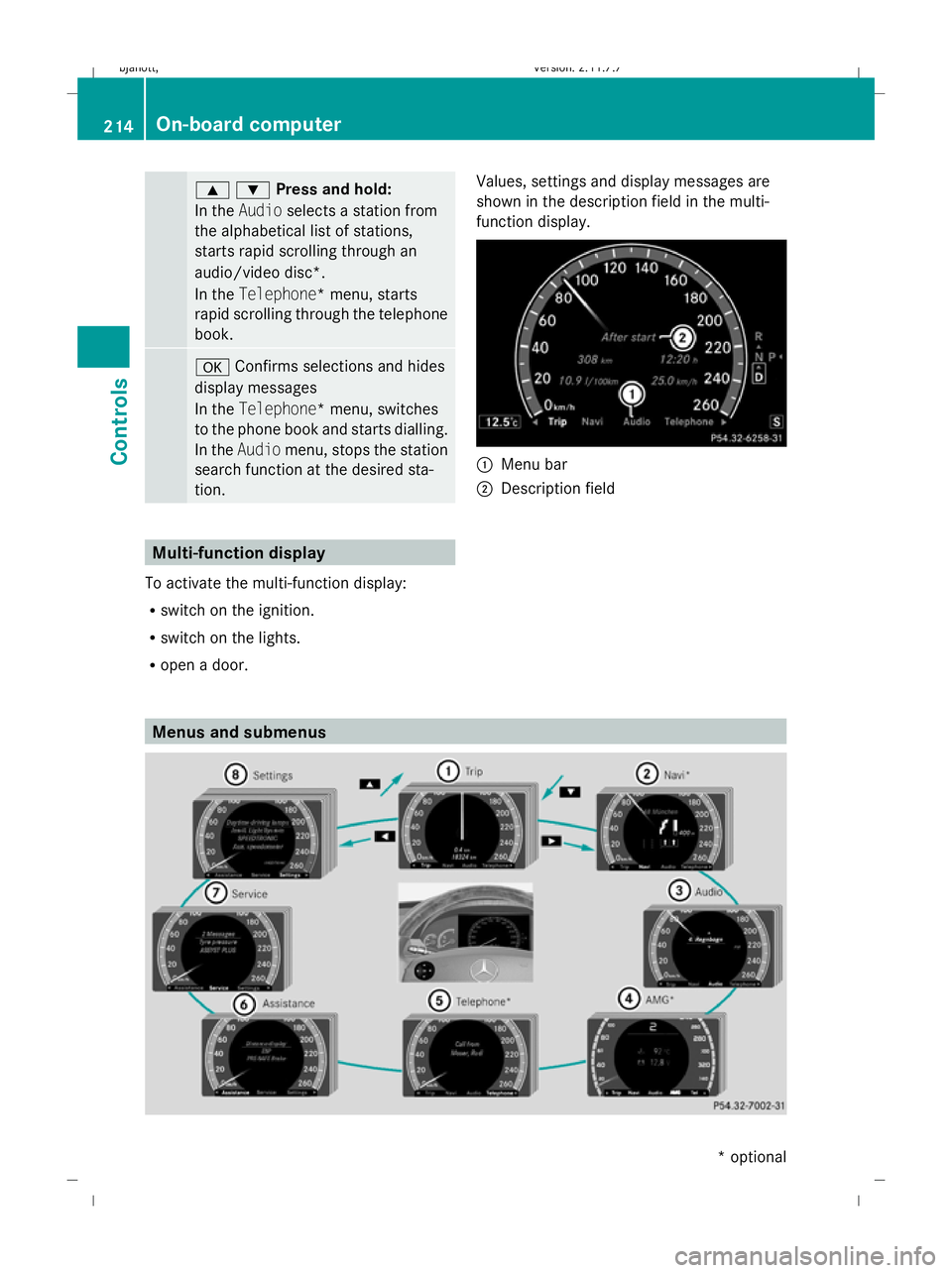
R open a door. Values, settings and display messages are
shown in the description field in the multi-
function display. :
Menu bar
; Description field Menus and submenus214
On-board computerControls
* optional
216_AKB; 2; 3, en-GB
bjanott,
Version: 2.11.7.7 2009-02-27T14:54:17+01:00 - Seite 214
Dateiname: 6515230602_buchblock.pdf; erzeugt am 04. Mar 2009 11:15:51; WK
Page 219 of 421
R
the ignition has been switched off for more
than 4 hours.
R 999 hours have been exceeded.
R 9,999 kilometres/miles have been excee-
ded.
The trip computer After resetis automati-
cally reset if the value exceeds 9,999 hours
or 99,999 kilometres/miles.
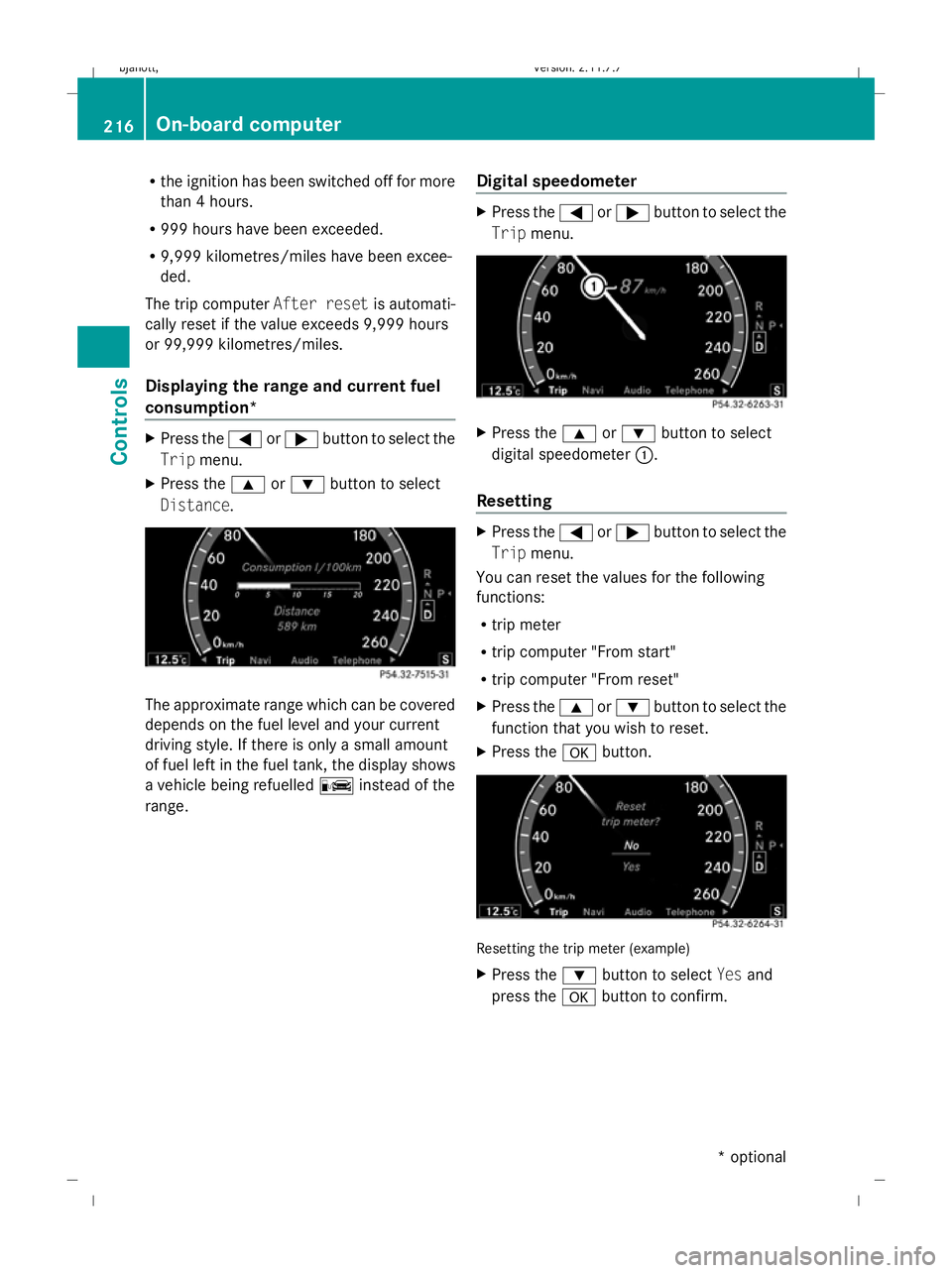
Displaying the range and current fuel
consumption* X
Press the =or; button to select the
Trip menu.
X Press the 9or: button to select
Distance. The approximate range which can be covered
depends on the fuel level and your current
driving style. If there is only a small amount
of fuel left in the fuel tank, the display shows
a vehicle being refuelled Cinstead of the
range. Digital speedometer X
Press the =or; button to select the
Trip menu. X
Press the 9or: button to select
digital speedometer :.
Resetting X
Press the =or; button to select the
Trip menu.
You can reset the values for the following
functions:
R trip meter
R trip computer "From start"
R trip computer "From reset"
X Press the 9or: button to select the
function that you wish to reset.
X Press the abutton. Resetting the trip meter (example)
X
Press the :button to select Yesand
press the abutton to confirm. 216
On-board
computerControls
* optional
216_AKB; 2; 3, en-GB
bjanott,
Version: 2.11.7.7 2009-02-27T14:54:17+01:00 - Seite 216
Dateiname: 6515230602_buchblock.pdf; erzeugt am 04. Mar 2009 11:15:51; WK
Page 223 of 421
not receive channel lists): press and briefly
hold the :or9 button.
X Press ato stop the station search func-
tion at the desired station. AMG* menu
Use the buttons on the multi-function steer-
ing wheel.
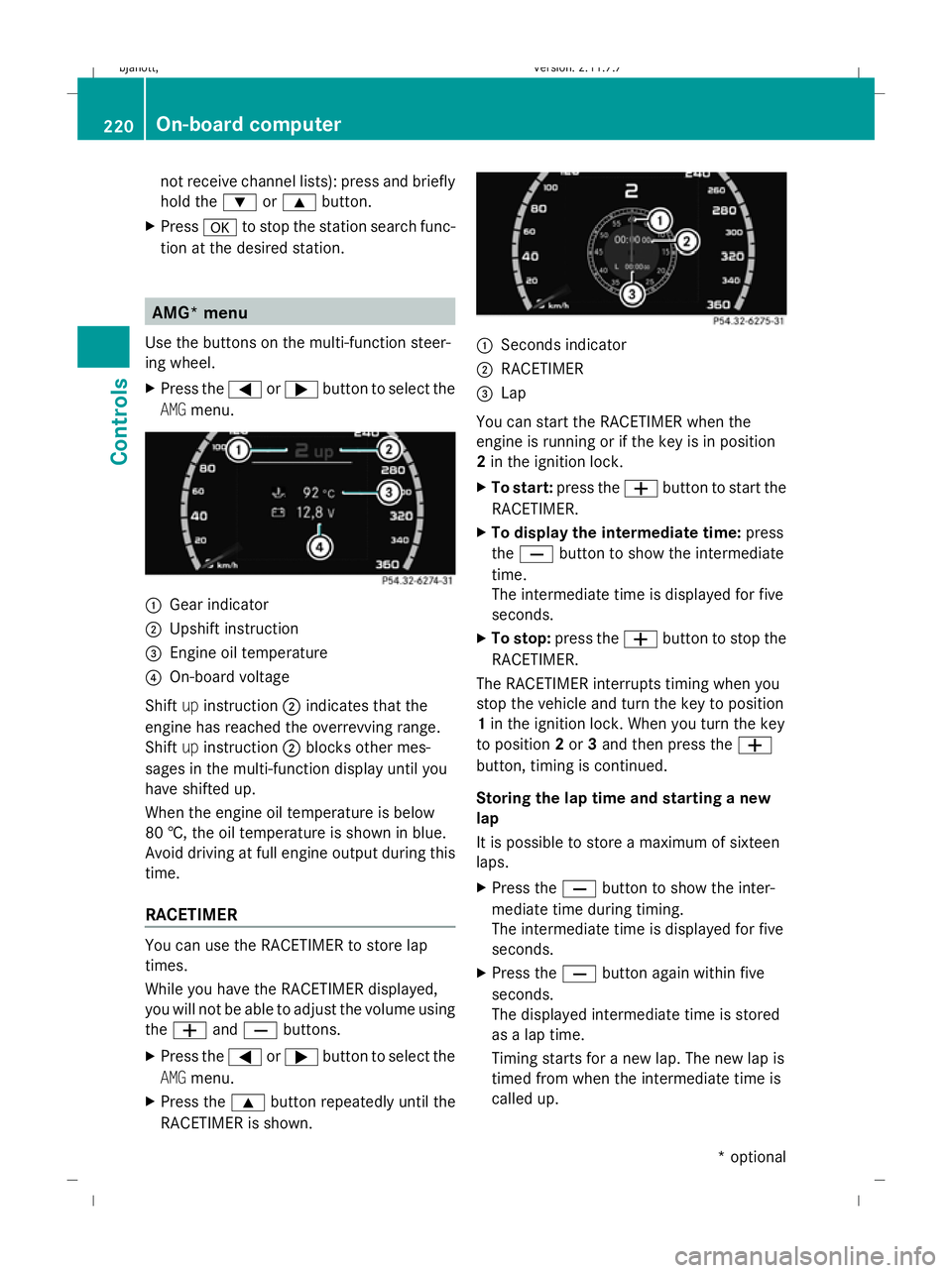
X Press the =or; button to select the
AMG menu. :
Gear indicator
; Upshift instruction
= Engine oil temperature
? On-board voltage
Shift upinstruction ;indicates that the
engine has reached the overrevving range.
Shift upinstruction ;blocks other mes-
sages in the multi-function display until you
have shifted up.
When the engine oil temperature is below
80 †, the oil temperature is shown in blue.
Avoid driving at full engine output during this
time.
RACETIMER You can use the RACETIMER to store lap
times.
While you have the RACETIMER displayed,
you will not be able to adjust the volume using
the W andX buttons.
X Press the =or; button to select the
AMG menu.
X Press the 9button repeatedly until the
RACETIMER is shown. :
Seconds indicator
; RACETIMER
= Lap
You can start the RACETIMER when the
engine is running or if the key is in position
2 in the ignition lock.
X To start: press the Wbutton to start the
RACETIMER.
X To display the intermediate time: press
the X button to show the intermediate
time.
The intermediate time is displayed for five
seconds.
X To stop: press the Wbutton to stop the
RACETIMER.
The RACETIMER interrupts timing when you
stop the vehicle and turn the key to position
1 in the ignition lock. When you turn the key
to position 2or 3and then press the W
button, timing is continued.
Storing the lap time and starting a new
lap
It is possible to store a maximum of sixteen
laps.
X Press the Xbutton to show the inter-
mediate time during timing.
The intermediate time is displayed for five
seconds.
X Press the Xbutton again within five
seconds.
The displayed intermediate time is stored
as a lap time.
Timing starts for a new lap. The new lap is
timed from when the intermediate time is
called up. 220
On-board computerControls
* optional
216_AKB; 2; 3, en-GB
bjanott,
Version: 2.11.7.7 2009-02-27T14:54:17+01:00 - Seite 220
Dateiname: 6515230602_buchblock.pdf; erzeugt am 04. Mar 2009 11:15:53; WK
Page 250 of 421
X
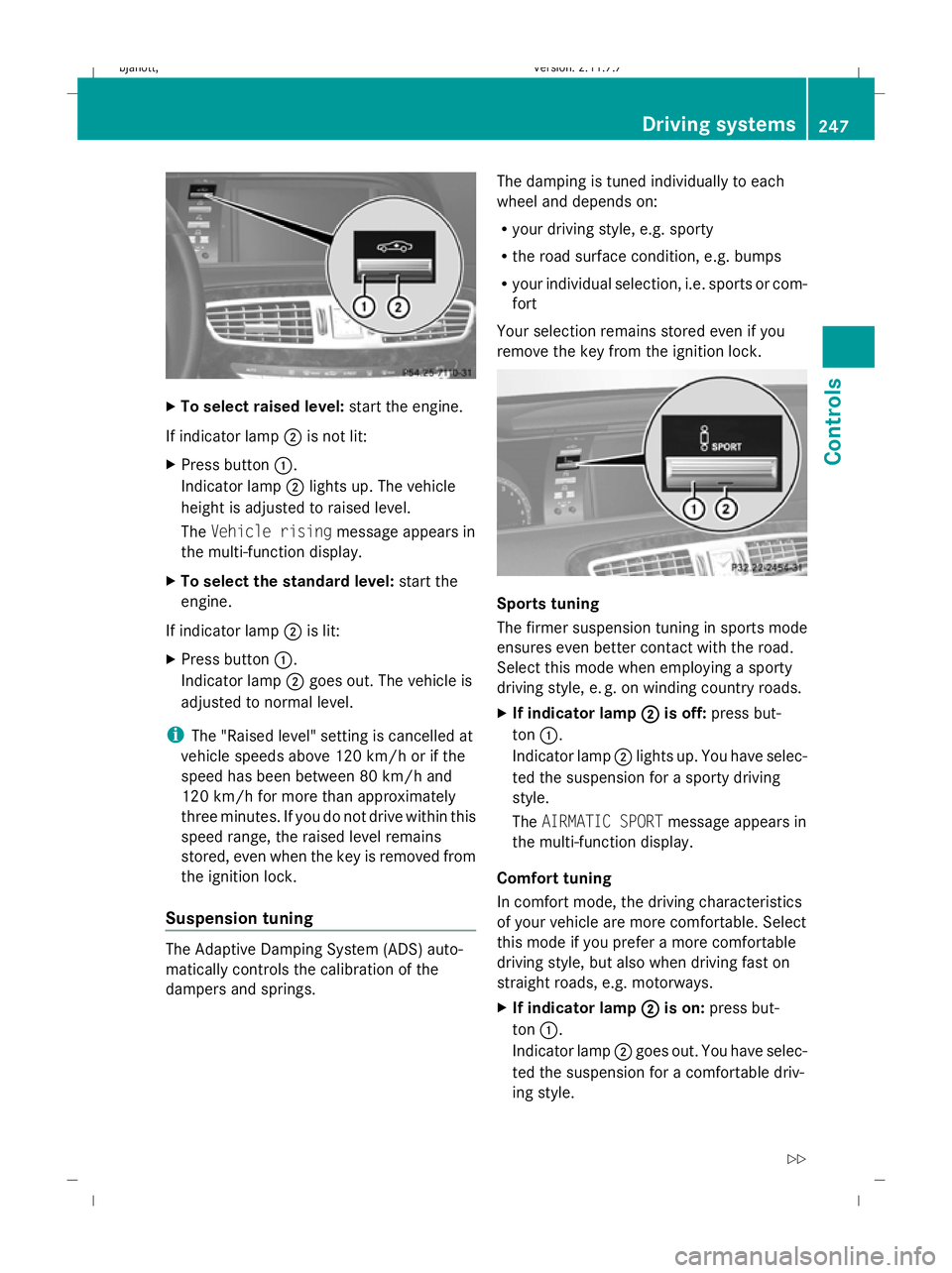
To select raised level: start the engine.
If indicator lamp ;is not lit:
X Press button :.
Indicator lamp ;lights up. The vehicle
height is adjusted to raised level.
The Vehicle rising message appears in
the multi-function display.
X To select the standard level: start the
engine.
If indicator lamp ;is lit:
X Press button :.
Indicator lamp ;goes out. The vehicle is
adjusted to normal level.
i The "Raised level" setting is cancelled at
vehicle speeds above 120 km/h or if the
speed has been between 80 km/h and
120 km/h for more than approximately
three minutes. If you do not drive within this
speed range, the raised level remains
stored, even when the key is removed from
the ignition lock.
Suspension tuning The Adaptive Damping System (ADS) auto-
matically controls the calibration of the
dampers and springs. The damping is tuned individually to each
wheel and depends on:
R
your driving style, e.g. sporty
R the road surface condition, e.g. bumps
R your individual selection, i.e. sports or com-
fort
Your selection remains stored even if you
remove the key from the ignition lock. Sports tuning
The firmer suspension tuning in sports mode
ensures even better contact with the road.
Select this mode when employing a sporty
driving style, e. g. on winding country roads.
X If indicator lamp ;
; is off: press but-
ton :.
Indicator lamp ;lights up. You have selec-
ted the suspension for a sporty driving
style.
The AIRMATIC SPORT message appears in
the multi-function display.
Comfort tuning
In comfort mode, the driving characteristics
of your vehicle are more comfortable. Select
this mode if you prefer a more comfortable
driving style, but also when driving fast on
straight roads, e.g. motorways.
X If indicator lamp ; ;is on: press but-
ton :.
Indicator lamp ;goes out. You have selec-
ted the suspension for a comfortable driv-
ing style. Driving systems
247Controls
216_AKB; 2; 3, en-GB
bjanott, Version: 2.11.7.7 2009-02-27T14:54:17+01:00 - Seite 247 Z
Dateiname: 6515230602_buchblock.pdf; erzeugt am 04. Mar 2009 11:16:02; WK
Page 251 of 421
The
AIRMATIC COMFORT message appears
in the multi-function display. Active Body Control (ABC)
Vehicle level Your vehicle automatically adjusts its ride
height to reduce petrol consumption and
improve driving safety.
Depending on the vehicle height that has
been set, the vehicle automatically adjusts its
height dependent on the current speed. The
vehicle is lowered by up to 10 mm as the
speed increases. As the speed is reduced, the
vehicle is raised up to the set vehicle height. G
Risk of injury
The vehicle is lowered when the engine is
switched off. Therefore, make sure that
nobody is in the vicinity of the wheel housing
or under the vehicle when you switch off the
engine. Otherwise, limbs could become trap-
ped.
! The vehicle is lowered by about 5 mm
when the engine is switched off. When
parking, make sure that you stop your vehi-
cle so that it does not make contact with
the kerb as it is lowered. Otherwise, the
vehicle could be damaged.
Setting the vehicle level manually
Select the "Normal" setting for normal road
surfaces and "Raised" for driving with snow
chains or on particularly poor road surfaces. G
Risk of injury
Make sure that nobody is in the vicinity of the
wheel housing or under the vehicle while low-
ering the vehicle when it is stationary. Other-
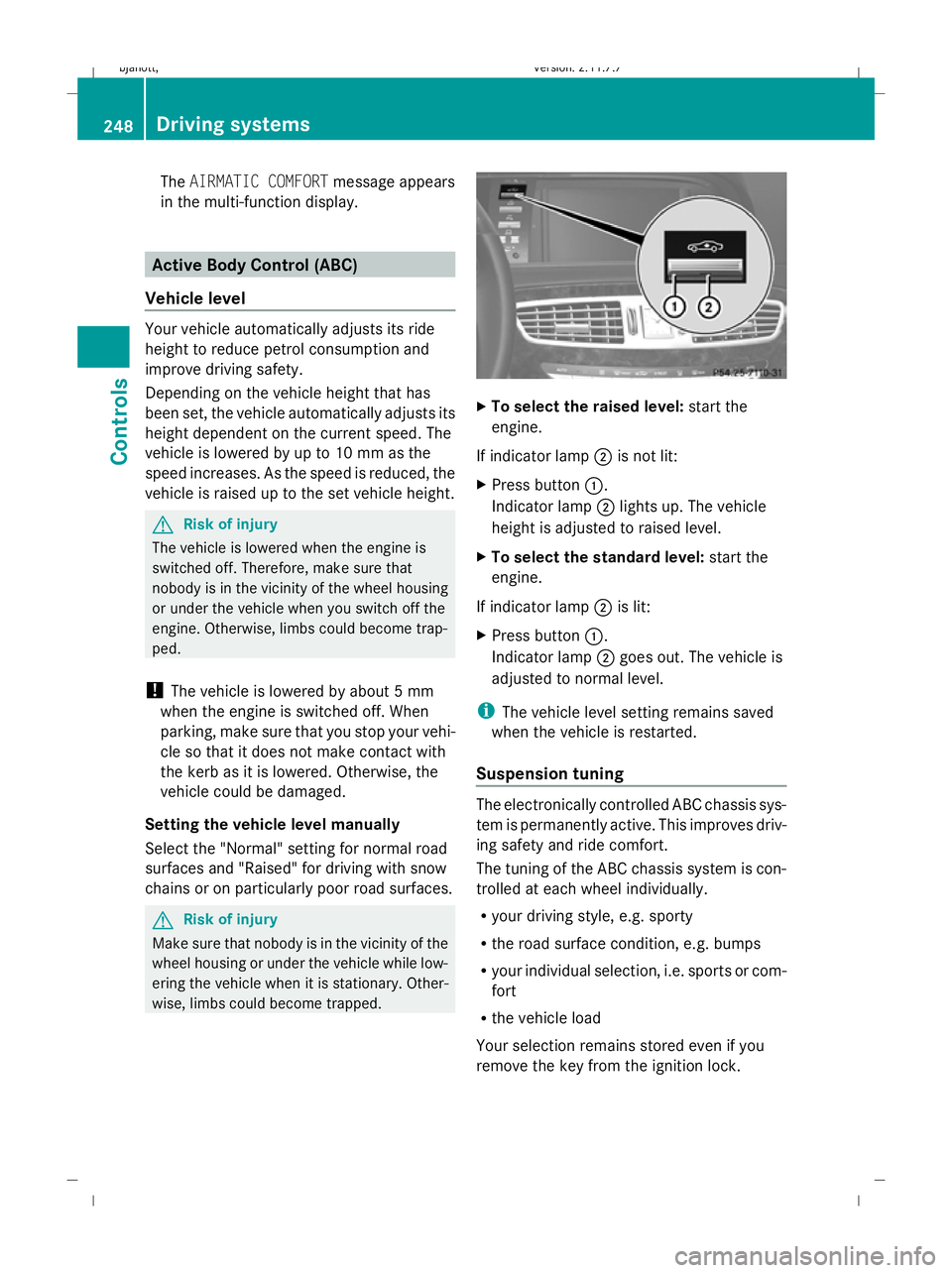
wise, limbs could become trapped. X
To select the raised level: start the
engine.
If indicator lamp ;is not lit:
X Press button :.
Indicator lamp ;lights up. The vehicle
height is adjusted to raised level.
X To select the standard level: start the
engine.
If indicator lamp ;is lit:
X Press button :.
Indicator lamp ;goes out. The vehicle is
adjusted to normal level.
i The vehicle level setting remains saved
when the vehicle is restarted.
Suspension tuning The electronically controlled ABC chassis sys-
tem is permanently active. This improves driv-
ing safety and ride comfort.
The tuning of the ABC chassis system is con-
trolled at each wheel individually.
R your driving style, e.g. sporty
R the road surface condition, e.g. bumps
R your individual selection, i.e. sports or com-
fort
R the vehicle load
Your selection remains stored even if you
remove the key from the ignition lock. 248
Driving systemsControls
216_AKB; 2; 3, en-GB
bjanott,
Version: 2.11.7.7 2009-02-27T14:54:17+01:00 - Seite 248
Dateiname: 6515230602_buchblock.pdf; erzeugt am 04. Mar 2009 11:16:02; WK