reset MERCEDES-BENZ CL COUPE 2009 User Guide
[x] Cancel search | Manufacturer: MERCEDES-BENZ, Model Year: 2009, Model line: CL COUPE, Model: MERCEDES-BENZ CL COUPE 2009Pages: 421, PDF Size: 10.78 MB
Page 95 of 421
X
Select Presets QAutostore .
or
X Select TVQ Save channel QAutos‐
tore.
COMAND searches for channels. The avail-
able channels are automatically stored in
the preset positions. Information about the current pro-
gramme
i This function is only available on digital TV
channels.
X Select VideoQTV.
X Display the menu system if necessary
(Y page 90).
X Select Info.
If the service is provided by the current TV
channel, you will see a field containing
information about the programme.
i It may take a few seconds for the infor-
mation to appear.
X To scroll the display: slideZVÆ or turn
cVd . Displaying the current programme or
programme preview
i This function is only available on digital TV
channels.
X Select VideoQTV.
X Display the menu system if necessary
(Y page 90).
X Select TVQ Channel list.
The channel list appears. It shows the cur-
rent programme on the digital TV channels
which have adequate reception. The #dot
in front of a list entry indicates the currently
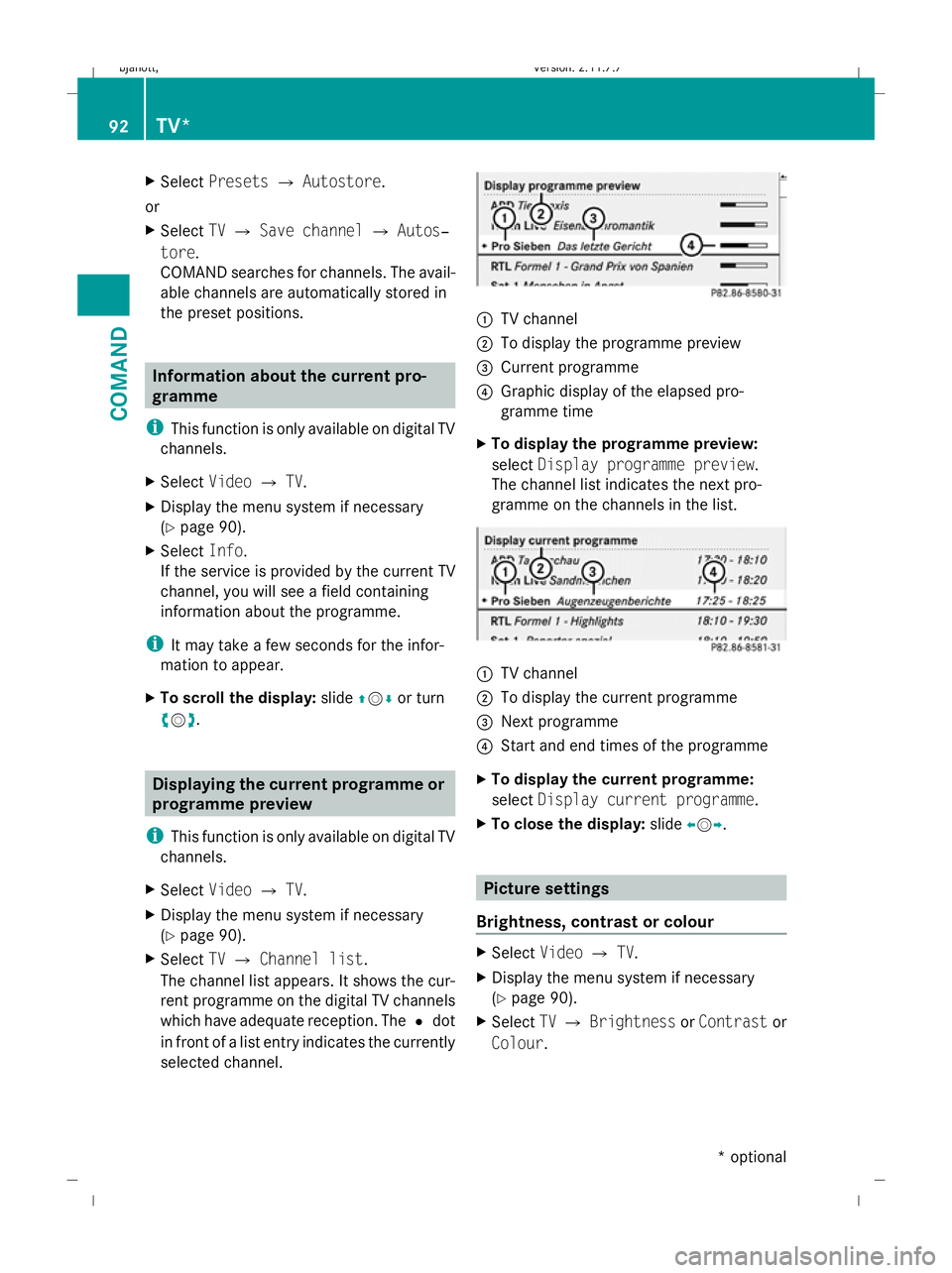
selected channel. :
TV channel
; To display the programme preview
= Current programme
? Graphic display of the elapsed pro-
gramme time
X To display the programme preview:
select Display programme preview.
The channel list indicates the next pro-
gramme on the channels in the list. :
TV channel
; To display the current programme
= Next programme
? Start and end times of the programme
X To display the current programme:
select Display current programme .
X To close the display: slideXVY. Picture settings
Brightness, contrast or colour X
Select VideoQTV.
X Display the menu system if necessary
(Y page 90).
X Select TVQ Brightness orContrast or
Colour . 92
TV*COMAND
* optional
216_AKB; 2; 3, en-GB
bjanott,
Version: 2.11.7.7 2009-02-27T14:54:17+01:00 - Seite 92
Dateiname: 6515230602_buchblock.pdf; erzeugt am 04. Mar 2009 11:15:03; WK
Page 125 of 421
B
To select the language
p To select the character set
*/E To select uppercase and low-
ercase letters
% Back
F To delete your selection
¬ To confirm your selection
? Preset phone category
X Enter the respective data in the data fields.
X To enter data in the data field: select the
respective characters from input speller
=.
X To move the cursor in the data field:
select the respective characters from input
speller =.
X To change data fields: slideZVuntil the
input speller is hidden.
X Slide ZVÆ and push W.
or
X Press Æin the input speller.
X To cancel data entry:select Back.
If one of the data fields contains data, a
prompt will appear asking whether you
wish to store the entry.
X To store data entry: select¬.
The entry is created in the phone book and
in the address book.
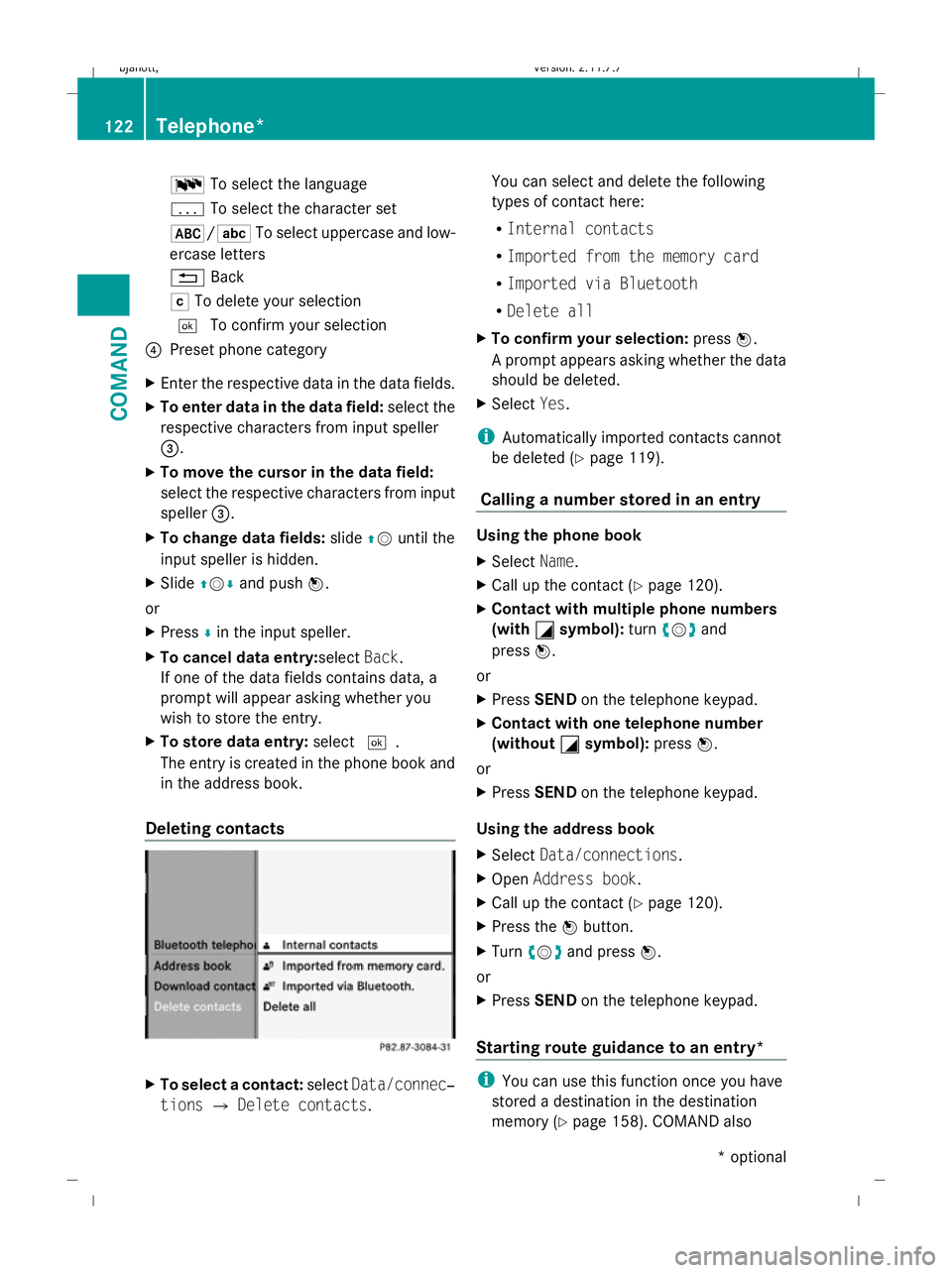
Deleting contacts X
To select a contact: selectData/connec‐
tions QDelete contacts. You can select and delete the following
types of contact here:
R
Internal contacts
R Imported from the memory card
R Imported via Bluetooth
R Delete all
X To confirm your selection: pressW.
A prompt appears asking whether the data
should be deleted.
X Select Yes.
i Automatically imported contacts cannot
be deleted (Y page 119).
Calling a number stored in an entry Using the phone book
X
Select Name.
X Call up the contact (Y page 120).
X Contact with multiple phone numbers
(with G
G symbol): turncVd and
press W.
or
X Press SEND on the telephone keypad.
X Contact with one telephone number
(without G
G symbol): pressW.
or
X Press SEND on the telephone keypad.
Using the address book
X Select Data/connections.
X Open Address book.
X Call up the contact (Y page 120).
X Press the Wbutton.
X Turn cVd and press W.
or
X Press SEND on the telephone keypad.
Starting route guidance to an entry* i
You can use this function once you have
stored a destination in the destination
memory (Y page 158). COMAND also 122
Telephone*COMAND
* optional
216_AKB; 2; 3, en-GB
bjanott,
Version: 2.11.7.7 2009-02-27T14:54:17+01:00 - Seite 122
Dateiname: 6515230602_buchblock.pdf; erzeugt am 04. Mar 2009 11:15:10; WK
Page 163 of 421
i
If the navigable address data for the des-
tination being deleted is also assigned to
an address book entry, COMAND will also
delete this data from there. If the corre-
sponding address book entry does not con-
tain any further data, such as telephone
numbers, COMAND deletes the entire
address book entry. Navigation system* (previous desti-
nations) General notes
COMAND automatically stores the previous
destinations for which the route calculation
was launched. If the memory is full, COMAND
deletes the oldest destination.
You can also store one destination from the
list of previous destinations in the destination
memory. It will be stored there permanently. Storing a destination permanently in
the destination memory
X Proceed as described in the "From the list
of previous destinations" section
(Y page 159) Storing the vehicle position in the list
of previous destinations
X To set the map to the vehicle position:
select NaviQPosition QVehicle
position map.
X To save: selectNaviQPosition Q
Save crosshair position. Storing the crosshair position in the
list of previous destinations
i A crosshair appears on the map if you
have moved the map manually. You can
store the crosshair position as a destina-
tion in the list of previous destinations. X
If necessary, display the menu system:
press W.
X Select PositionQSave crosshair
position. Deleting a previous destination
X Select NaviQDestination QFrom
last destinations .
The list of previous destinations appears.
X Select the desired destination.
The address of the destination appears.
X Select Delete. System
Menu overview
You will not be able to use the system settings
in the following menus:
R Display QDay design, Night design, Auto-
matic
R Time QClock, Date, Format, Time zone
R LINGUATRONIC* QHelp window, New
individualisation, Delete individualisation
R Language QLanguage selection
R Favourites button QAssign programma-
ble button
R Reset QReset COMAND to factory set-
tings
R Text reader QSet read-aloud speed
R Bluetooth ®
Q Search for Bluetooth ®
devi-
ces, activate Bluetooth ®
R Data upload/download QCopy data to
storage medium, import data from storage
medium 160
SystemCOMAND
* optional
216_AKB; 2; 3, en-GB
bjanott,
Version: 2.11.7.7 2009-02-27T14:54:17+01:00 - Seite 160
Dateiname: 6515230602_buchblock.pdf; erzeugt am 04. Mar 2009 11:15:25; WK
Page 166 of 421
Deleting existing individualisation data
X
Select Vehicle QSystem QLingua‐
tronic QDelete individualisation .
A prompt appears asking whether you
really wish to delete.
X Select YesorNo.
The individualisation data will either be
deleted or not, depending on your selec-
tion. Language settings
X Select Vehicle QSystem QLan‐
guage.
The language list appears. The #dot indi-
cates the current setting.
X To change the setting: select the desired
language. Assigning the programmable button
(favourites)
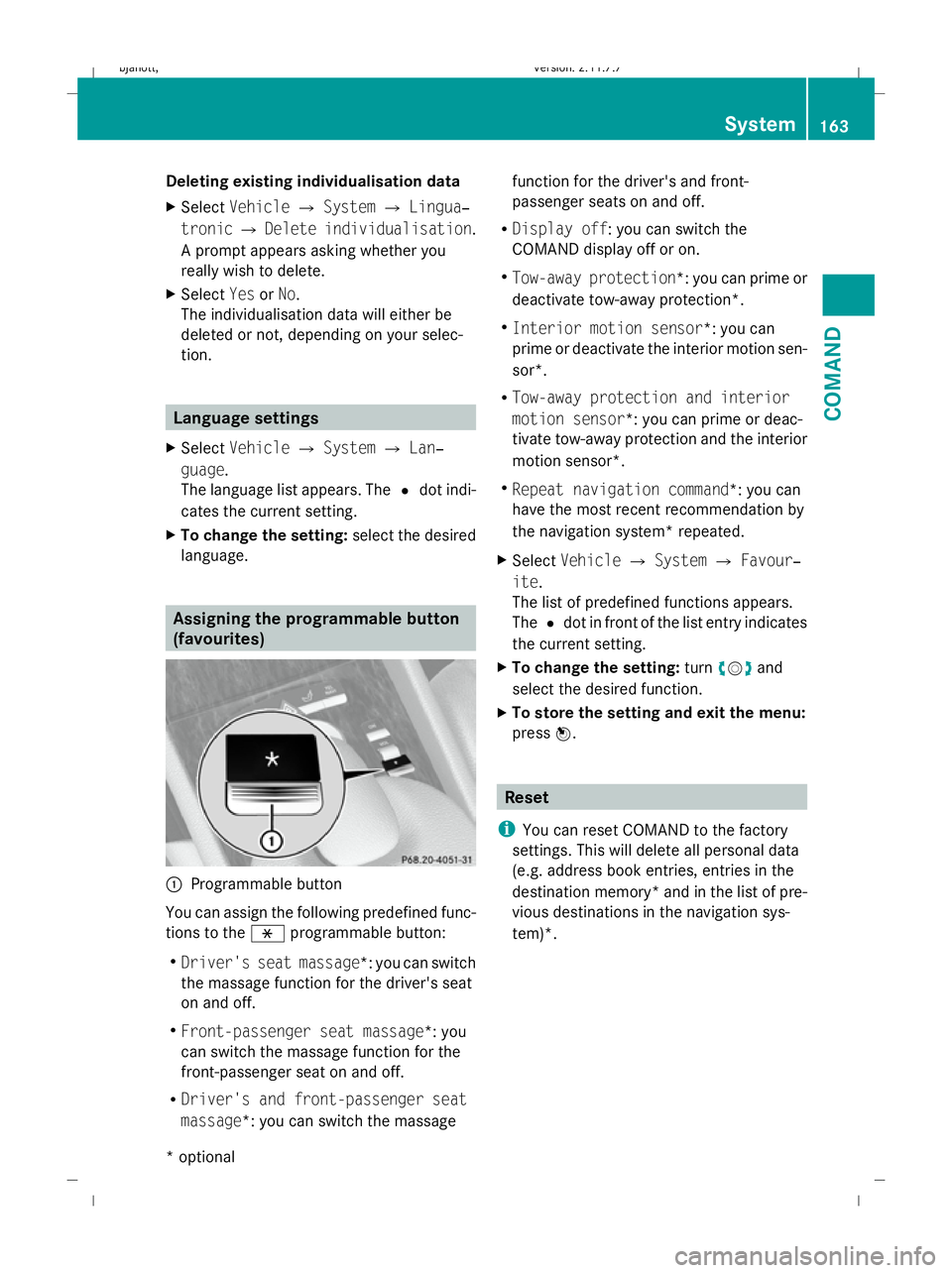
:
Programmable button
You can assign the following predefined func-
tions to the hprogrammable button:
R Driver's seat massage*: you can switch
the massage function for the driver's seat
on and off.
R Front-passenger seat massage*: you
can switch the massage function for the
front-passenger seat on and off.
R Driver's and front-passenger seat
massage*: you can switch the massage function for the driver's and front-
passenger seats on and off.
R Display off : you can switch the
COMAND display off or on.
R Tow-away protection *: you can prime or
deactivate tow-away protection*.
R Interior motion sensor *: you can
prime or deactivate the interior motion sen-
sor*.
R Tow-away protection and interior
motion sensor *: you can prime or deac-
tivate tow-away protection and the interior
motion sensor*.
R Repeat navigation command*: you can
have the most recent recommendation by
the navigation system* repeated.
X Select Vehicle QSystem QFavour‐
ite .
The list of predefined functions appears.
The #dot in front of the list entry indicates
the current setting.
X To change the setting: turncVd and
select the desired function.
X To store the setting and exit the menu:
press W. Reset
i You can reset COMAND to the factory
settings. This will delete all personal data
(e.g. address book entries, entries in the
destination memory* and in the list of pre-
vious destinations in the navigation sys-
tem)*. System
163COMAND
* optional
216_AKB; 2; 3, en-GB
bjanott
,V ersion: 2.11.7.7
2009-02-27T14:54:17+01:00 - Seite 163 Z
Dateiname: 6515230602_buchblock.pdf; erzeugt am 04. Mar 2009 11:15:26; WK
Page 167 of 421
X
Select Vehicle QSystem QReset.
A prompt appears asking whether you
really wish to reset.
X Select YesorNo.
If you select Yes, a prompt will appear again
asking whether you really wish to reset.
X Select YesorNo.
If you select Yes, COMAND will be reset
and restarted. Vehicle
Introduction to the vehicle menu
i Information about the components and
operating principles of COMAND can be
found on (Y page 58).
In this menu, you can set the following vehicle
functions:
R Multicontour seat settings*
R Rear window blind*
R EASY-ENTRY/EXIT feature
R Exterior lighting delayed switch-off time
R Interior lighting delayed switch-off time
R Ambient lighting*
R Automatic folding mirror
R Locator lighting
R Automatic locking feature
R Interior motion sensor*
R Tow-away protection*
R Boot lid opening limiter
You can open the "Vehicle" menu in one of
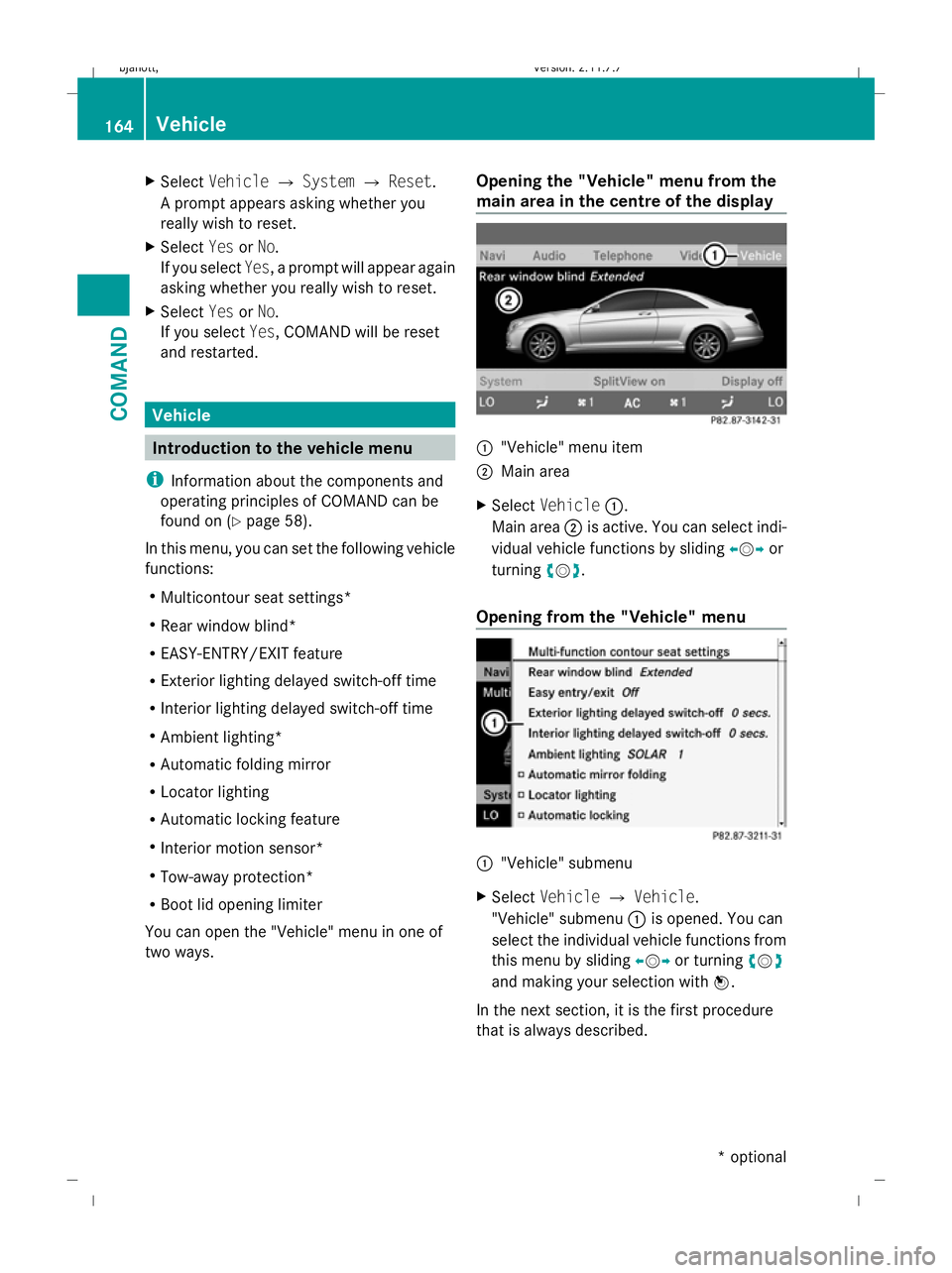
two ways. Opening the "Vehicle" menu from the
main area in the centre of the display :
"Vehicle" menu item
; Main area
X Select Vehicle :.
Main area ;is active. You can select indi-
vidual vehicle functions by sliding XVYor
turning cVd.
Opening from the "Vehicle" menu :
"Vehicle" submenu
X Select Vehicle QVehicle.
"Vehicle" submenu :is opened. You can
select the individual vehicle functions from
this menu by sliding XVYor turning cVd
and making your selection with W.
In the next section, it is the first procedure
that is always described. 164
VehicleCOMAND
* optional
216_AKB; 2; 3, en-GB
bjanott,
Version: 2.11.7.7 2009-02-27T14:54:17+01:00 - Seite 164
Dateiname: 6515230602_buchblock.pdf; erzeugt am 04. Mar 2009 11:15:27; WK
Page 178 of 421
X
Slide ZVÆ or turn cVduntil the desired
setting is reached.
X To save the setting: pressW.
Adjusting the backrest curvature in the
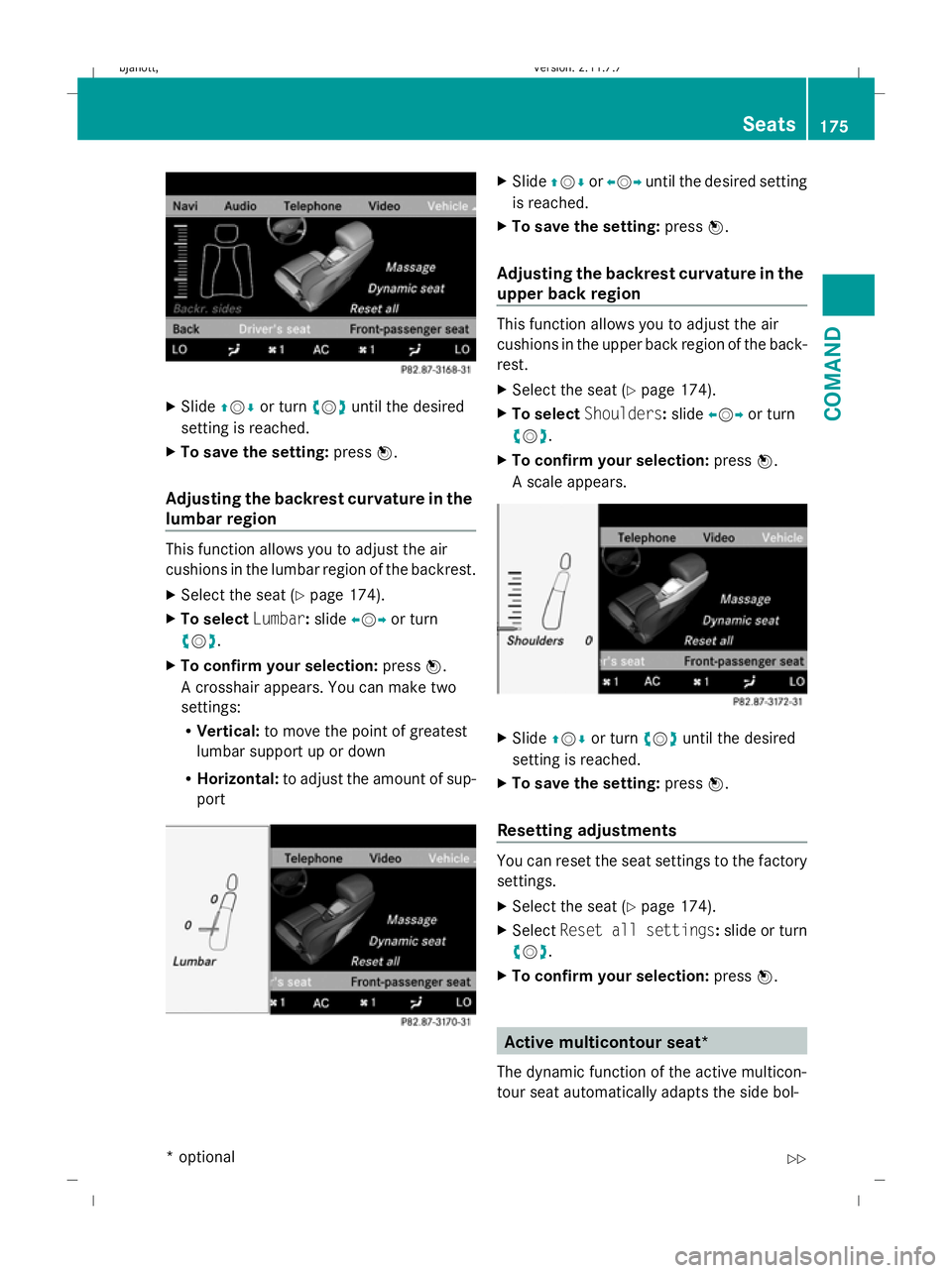
lumbar region This function allows you to adjust the air
cushions in the lumbar region of the backrest.
X
Select the seat ( Ypage 174).
X To select Lumbar:slide XVY or turn
cVd .
X To confirm your selection: pressW.
A crosshair appears. You can make two
settings:
R Vertical: to move the point of greatest
lumbar support up or down
R Horizontal: to adjust the amount of sup-
port X
Slide ZVÆ orXVY until the desired setting
is reached.
X To save the setting: pressW.
Adjusting the backrest curvature in the
upper back region This function allows you to adjust the air
cushions in the upper back region of the back-
rest.
X
Select the seat ( Ypage 174).
X To select Shoulders :slide XVY or turn
cVd .
X To confirm your selection: pressW.
A scale appears. X
Slide ZVÆ or turn cVduntil the desired
setting is reached.
X To save the setting: pressW.
Resetting adjustments You can reset the seat settings to the factory
settings.
X
Select the seat ( Ypage 174).
X Select Reset all settings :slide or turn
cVd .
X To confirm your selection: pressW. Active multicontour seat*
The dynamic function of the active multicon-
tour seat automatically adapts the side bol- Seats
175COMAND
* optional
216_AKB; 2; 3, en-GB
bjanott,
Version: 2.11.7.7 2009-02-27T14:54:17+01:00 - Seite 175 Z
Dateiname: 6515230602_buchblock.pdf; erzeugt am 04. Mar 2009 11:15:34; WK
Page 193 of 421

The mirrors do not go into anti-dazzle mode if
reverse gear is engaged or the interior lighting
is switched on. G
Risk of accident
If the incident light from headlamps cannot
strike the sensor in the rear-view mirror, for
instance, when the rear window blind* is
extended, the mirror's automatic anti-dazzle
function will not operate.
Incident light could then dazzle you. This may
distract you from the traffic conditions, and
you may, thereby, cause an accident. In this
case, adjust the rear-view mirror manually. Memory function
Storing settings
Using the memory button you can store up to
three different settings, e. g. for three differ-
ent people.
The following settings are stored as a single
memory preset:
R seat, backrest, head restraint position and
contour of the backrest in the lumbar
region
R active multicontour seat*: activated/deac-
tivated
R multicontour seat*: the side bolsters of the
seat cushion and the backrest as well as
the contour of the backrest in the lumbar
and shoulder regions
R driver's side: steering wheel position
R driver's side: position of the exterior mir-
rors on the driver's and front-passenger
sides G
Risk of injury
The memory function can still be used when
the key has been removed. For this reason,
children should never be left unsupervised in
the vehicle. Otherwise, they could become
trapped when moving the seat or the steering
wheel. G
Risk of accident
Only use the memory function on the driver’s
side when the vehicle is stationary. Other-
wise, you could be distracted from the traffic
conditions by the steering wheel and seat
moving of their own accord, and as a result
cause an accident. X
Adjust the seat (Y page 183).
X On the driver's side, also adjust the steer-
ing wheel ( Ypage 187) and the mirrors
(Y page 189).
X Press memory button Mand press storage
position switch 1,2or 3within three sec-
onds until you hear an acknowledgement
tone.
The settings are stored in the selected stor-
age position. Calling up a stored setting
X Press and hold the relevant storage posi-
tion button 1,2or 3, until the seat, steering
wheel and exterior mirrors are in the stored
position.
i If you release the storage position switch,
the seat, steering wheel and mirror setting
functions stop immediately. The multicon-
tour seat* setting or the lumbar support
adjustment are still carried out. 190
Memory functionControls
* optional
216_AKB; 2; 3, en-GB
bjanott,
Version: 2.11.7.7 2009-02-27T14:54:17+01:00 - Seite 190
Dateiname: 6515230602_buchblock.pdf; erzeugt am 04. Mar 2009 11:15:41; WK
Page 194 of 421
Storing a parking position
To make it easier to park, you can set and
store the front-passenger side exterior mirror
position in such a way that you can see the
rear wheel on that side as soon as you engage
reverse gear.
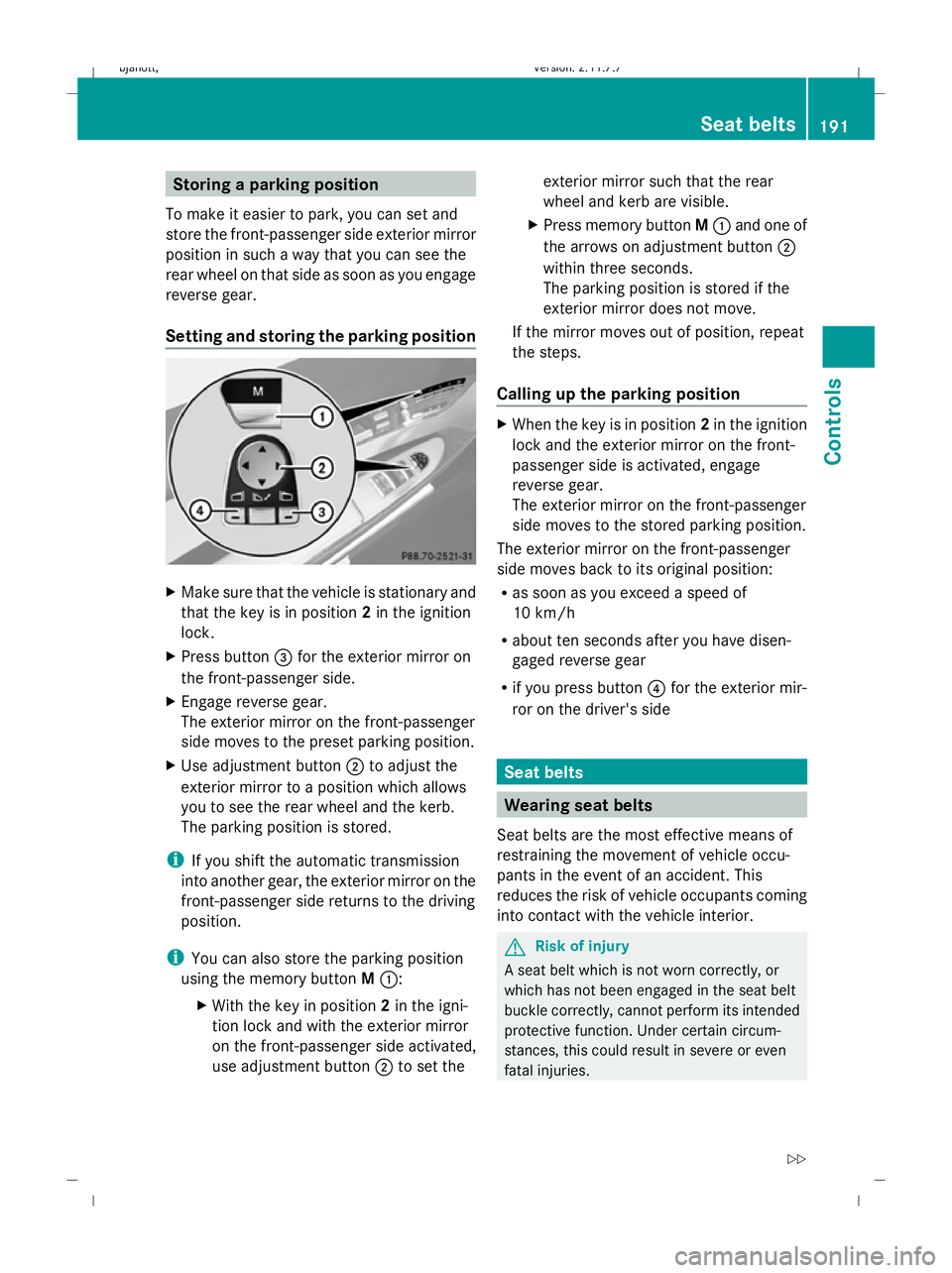
Setting and storing the parking position X
Make sure that the vehicle is stationary and
that the key is in position 2in the ignition
lock.
X Press button =for the exterior mirror on
the front-passenger side.
X Engage reverse gear.
The exterior mirror on the front-passenger
side moves to the preset parking position.
X Use adjustment button ;to adjust the
exterior mirror to a position which allows
you to see the rear wheel and the kerb.
The parking position is stored.
i If you shift the automatic transmission
into another gear, the exterior mirror on the
front-passenger side returns to the driving
position.
i You can also store the parking position
using the memory button M::
X With the key in position 2in the igni-
tion lock and with the exterior mirror
on the front-passenger side activated,
use adjustment button ;to set the exterior mirror such that the rear
wheel and kerb are visible.
X Press memory button M: and one of
the arrows on adjustment button ;
within three seconds.
The parking position is stored if the
exterior mirror does not move.
If the mirror moves out of position, repeat
the steps.
Calling up the parking position X
When the key is in position 2in the ignition
lock and the exterior mirror on the front-
passenger side is activated, engage
reverse gear.
The exterior mirror on the front-passenger
side moves to the stored parking position.
The exterior mirror on the front-passenger
side moves back to its original position:
R as soon as you exceed a speed of
10 km/h
R about ten seconds after you have disen-
gaged reverse gear
R if you press button ?for the exterior mir-
ror on the driver's side Seat belts
Wearing seat belts
Seat belts are the most effective means of
restraining the movement of vehicle occu-
pants in the event of an accident. This
reduces the risk of vehicle occupants coming
into contact with the vehicle interior. G
Risk of injury
A seat belt which is not worn correctly, or
which has not been engaged in the seat belt
buckle correctly, cannot perform its intended
protective function. Under certain circum-
stances, this could result in severe or even
fatal injuries. Seat belts
191Controls
216_AKB; 2; 3, en-GB
bjanott,V ersion: 2.11.7.7
2009-02-27T14:54:17+01:00 - Seite 191 Z
Dateiname: 6515230602_buchblock.pdf; erzeugt am 04. Mar 2009 11:15:42; WK
Page 200 of 421

The hazard warning lamps still operate if the
ignition is switched off. They switch on auto-
matically if an airbag is deployed or if you
brake sharply and bring the vehicle to a halt
from a speed of more than 70 km/h.
X To switch on: press button:.
All turn signals flash. If you now switch on
a turn signal using the combination switch
(Y page 196), only the turn signal lamp on
the corresponding side of the vehicle will
flash.
X To switch off: press button:. Headlamp cleaning system
The headlamps are cleaned automatically if
the "Wipe with washer fluid" function is oper-
ated five times while the lights are on and the
engine is running. When you switch off the
ignition, the automatic headlamp cleaning
system is reset and counting is resumed
from 0. Intelligent Light System
The Intelligent Light System is a system which
adjusts the headlamps automatically to suit
the prevailing driving and weather conditions.
The bi-xenon headlamps offer enhanced func-
tions to improve illumination of the road sur-
face, e.g. depending on the vehicle speed or
weather conditions. The system includes the
active light system, cornering light function,
motorway mode and extended range fog-
lamps. The system is only active when it is
dark. Active light system The active light function is a system that
moves the headlamps according to the steer-
ing movements of the front wheels. In this
way, relevant areas remain illuminated while
driving. This allows you to recognise pedes-
trians, cyclists and animals.
Cornering light
The cornering light function improves the illu-
mination of the road surface in the broad
direction you are turning, e.g. making it easier
to see in tight corners. It can only be activated
when the dipped-beam headlamps are
switched on.
Active:
R
if you are driving at speeds below
40 km/h, the cornering light function is
activated either by the turn signal or by the
steering wheel being turned.
R if you are driving at speeds between
40 km/h and 70 km/h, the cornering light Lights
197Controls
216_AKB; 2; 3, en-GB
bjanott, Version: 2.11.7.7 2009-02-27T14:54:17+01:00 - Seite 197 Z
Dateiname: 6515230602_buchblock.pdf; erzeugt am 04. Mar 2009 11:15:45; WK
Page 218 of 421
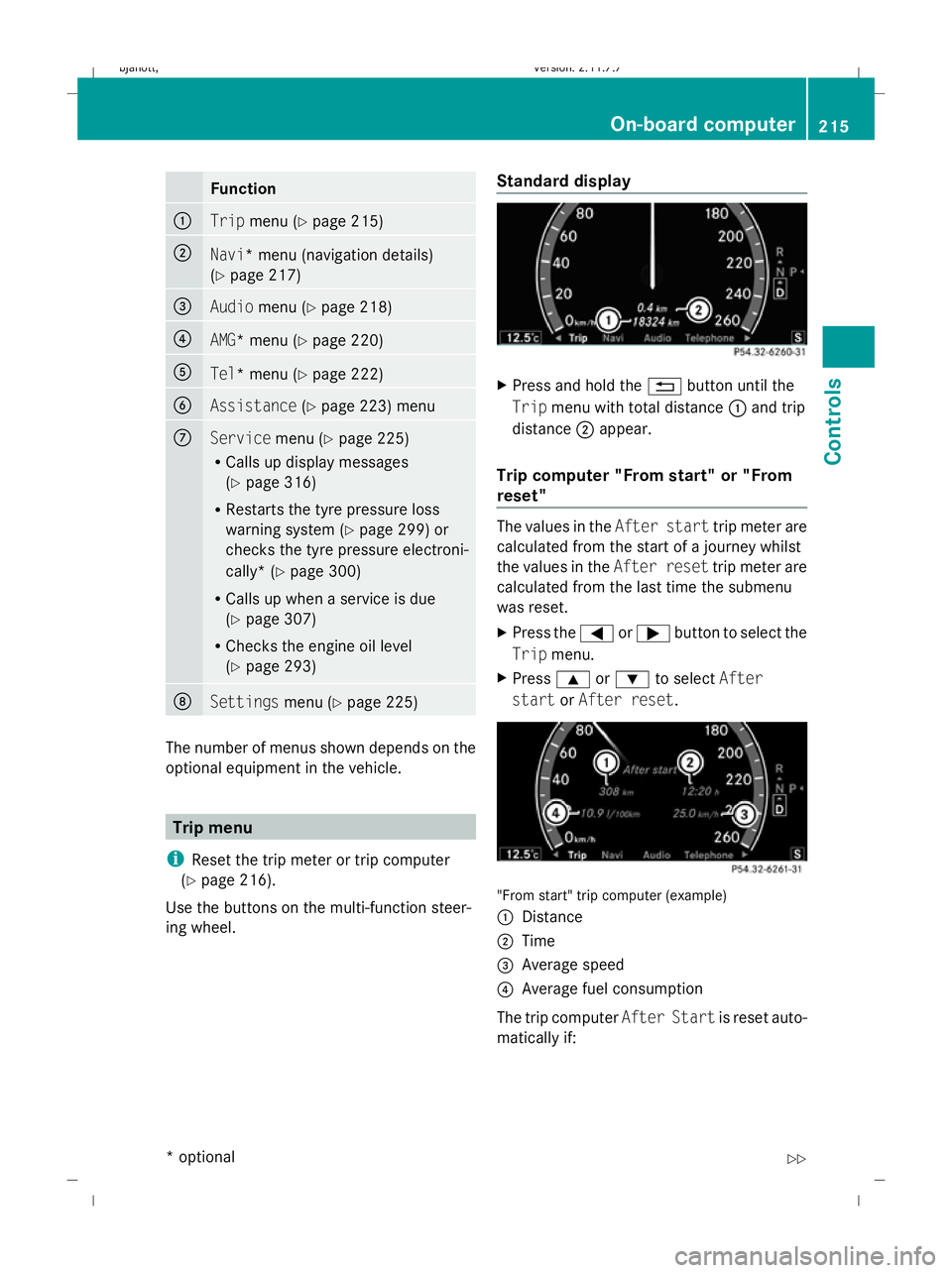
Function
:
Trip
menu (Y page 215) ;
Navi
* menu (navigation details)
(Y page 217) =
Audio
menu (Y page 218) ?
AMG* menu (Y
page 220) A
Tel* menu (Y
page 222) B
Assistance
(Ypage 223) menu C
Service
menu (Ypage 225)
R Calls up display messages
(Y page 316)
R Restarts the tyre pressure loss
warning system (Y page 299) or
checks the tyre pressure electroni-
cally* (Y page 300)
R Calls up when a service is due
(Y page 307)
R Checks the engine oil level
(Y page 293) D
Settings
menu (Ypage 225) The number of menus shown depends on the
optional equipment in the vehicle. Trip menu
i Reset the trip meter or trip computer
(Y page 216).
Use the buttons on the multi-function steer-
ing wheel. Standard display X
Press and hold the %button until the
Trip menu with total distance :and trip
distance ;appear.
Trip computer "From start" or "From
reset" The values in the
After starttrip meter are
calculated from the start of a journey whilst
the values in the After resettrip meter are
calculated from the last time the submenu
was reset.
X Press the =or; button to select the
Trip menu.
X Press 9or: to select After
start orAfter reset. "From start" trip computer (example)
:
Distance
; Time
= Average speed
? Average fuel consumption
The trip computer After Startis reset auto-
matically if: On-board computer
215Controls
* optional
216_AKB; 2; 3, en-GB
bjanott
,V ersion: 2.11.7.7
2009-02-27T14:54:17+01:00 - Seite 215 Z
Dateiname: 6515230602_buchblock.pdf; erzeugt am 04. Mar 2009 11:15:51; WK