sensor MERCEDES-BENZ CL COUPE 2009 User Guide
[x] Cancel search | Manufacturer: MERCEDES-BENZ, Model Year: 2009, Model line: CL COUPE, Model: MERCEDES-BENZ CL COUPE 2009Pages: 421, PDF Size: 10.78 MB
Page 53 of 421
The brakes will work normally again when:
R you release the brake pedal
R no obstacle is detected in front of your
vehicle
R there is no longer any danger of a rear-end
collision
BAS PLUS is then deactivated.
At speeds up to approximately 70 km/h, BAS
PLUS can also detect stationary obstacles,
for example, stopped or parked vehicles.
Vehicles with COMAND and a navigation sys-
tem*: the radar sensor system is switched off
automatically in the vicinity of radio telescope
facilities (Y page 411).
For BAS PLUS to assist you when driving, the
radar sensor system must be switched on and
operational. You can check this by activating
Distronic Plus* (Y page 235) or via the
"Radar sensor" menu in the on-board com-
puter (Y page 226). G
Risk of accident
Only clearly identified obstacles will initiate
braking assistance by BAS PLUS. In particular,
the detection of obstacles can be restricted if
there is:
R dirt on the sensors or the sensors are cov-
ered
R snow or heavy rain
R interference by other radar sources
R strong radar reflections, for example in
multi-storey garages
BAS PLUS does not react to people or ani-
mals, oncoming vehicles and crossing traffic.
BAS PLUS may not detect narrow vehicles
such as motorcycles and vehicles driving on
a different line.
Following a collision or crash-related damage
to the front end of the vehicle, have the con-
figuration and operation of the radar sensors
checked at a Mercedes-Benz Service Centre.
If BAS PLUS is not available due to a malfunc-
tion in the radar sensor system, the braking system remains available with full brake
boosting effect and BAS. Adaptive brake lamps
i Adaptive brake lamps are only available in
certain countries.
If you brake sharply from a speed of more
than 50 km/h or if braking is assisted by BAS
or BAS PLUS*, the brake lamps flash rapidly.
In this way, traffic travelling behind you is
warned in an even more noticeable manner.
If you brake sharply from a speed of more
than 70 km/h to a standstill, the hazard warn-
ing lamps are activated automatically. If the
brakes are applied again, the brake lamps
light up continuously. The hazard warning
lamps switch off automatically if you travel
faster than 10 km/h. You can also switch off
the hazard warning lamps using the hazard
warning switch button (Y page 196). ESP
®
(Electronic Stability Program)
ESP ®
monitors driving stability and traction,
i.e. power transmission between tyres and
the road surface.
If ESP ®
detects that the vehicle is deviating
from the direction desired by the driver, one
or more wheels are braked to stabilise the
vehicle. If necessary, the engine output is also
modified to keep the vehicle on the desired
course within physical limits. ESP ®
assists
the driver when pulling away on wet or slip-
pery roads. ESP ®
can also stabilise the vehi-
cle when braking.
When ESP ®
intervenes, the ÷warning
lamp flashes in the instrument cluster. G
Risk of accident
If the ÷ warning lamp in the instrument
cluster flashes, proceed as follows: 50
Driving safety systemsSafety
* optional
216_AKB; 2; 3, en-GB
bjanott,
Version: 2.11.7.7 2009-02-27T14:54:17+01:00 - Seite 50
Dateiname: 6515230602_buchblock.pdf; erzeugt am 04. Mar 2009 11:14:50; WK
Page 56 of 421
G
Risk of accident
Pay particular attention to the traffic condi-
tions if the distance warning lamp ·in the
instrument cluster lights up or an intermittent
warning tone sounds. If necessary, brake or
manoeuvre to avoid an obstacle.
In addition, at speeds of around 30 km/h or
more, PRE-SAFE ®
Brake can:
R brake the vehicle gently and automatically
within a speed range of up to around
180 km/h
R trigger preventative passenger protection
measures (PRE-SAFE ®
) G
Risk of accident
PRE-SAFE ®
Brake is only an aid to assist you
when driving. You are responsible for main-
taining a safe distance from other vehicles,
the vehicle's speed and for braking in good
time. Always pay attention to the traffic con-
ditions. Otherwise, you may recognise dan-
gers too late, cause an accident and injure
yourself and others.
With the help of the radar sensor system,
PRE-SAFE ®
Brake can detect obstacles that
are in front of your vehicle for an extended
period of time. If you approach an obstacle
and PRE-SAFE ®
Brake detects a risk of a col-
lision, the system will initially alert you both
visually and acoustically. If you do not brake
or steer, the vehicle will automatically brake
slightly. In the event of an increased risk of a
collision, PRE-SAFE ®
is activated
(Y page 42). G
Risk of accident
Only clearly detected obstacles will trigger a
warning and initiate braking assistance by
PRE-SAFE ®
Brake. In particular, the detection of obstacles may
be restricted if there is:
R
dirt on the sensors or the sensors are cov-
ered
R snow or heavy rain
R interference from other radar sources
R strong radar reflections, for example in
multi-storey car parks
PRE-SAFE ®
Brake does not react to persons,
animals, oncoming vehicles and crossing traf-
fic.
PRE-SAFE ®
Brake may not detect narrow
vehicles such as motorcycles or vehicles driv-
ing on a different line. G
Risk of accident
Depending on the vehicle's speed, PRE-
SAFE ®
Brake will brake your vehicle up to
maximum of 4 m/s 2
. This is equivalent to
approximately 40 % of the maximum braking
power of the vehicle. You must also apply the
brakes yourself to avoid a collision.
In order to maintain the appropriate distance
to the vehicle in front and thus prevent a
crash, you must apply the brakes yourself.
At speeds up to approximately 70 km/h,
PRE-SAFE ®
Brake can also detect stationary
obstacles, for example stopped or parked
vehicles. G
Risk of accident
If, in a critical driving situation, you do not
receive a visual and acoustic warning:
R PRE-SAFE ®
Brake did not detect the risk of
a collision
R PRE-SAFE ®
Brake is deactivated
R PRE-SAFE ®
Brake has failed
You must then brake to avoid a collision. Driving safety systems
53Safety
216_AKB; 2; 3, en-GB
bjanott, Version: 2.11.7.7 2009-02-27T14:54:17+01:00 - Seite 53 Z
Dateiname: 6515230602_buchblock.pdf; erzeugt am 04. Mar 2009 11:14:50; WK
Page 57 of 421
X
To activate/deactivate: activate or deac-
tivate PRE-SAFE ®
Brake in the on-board
computer (Y page 224).
After activation, the Äsymbol is dis-
played on the left in the driver display.
Vehicles with COMAND and a navigation sys-
tem*: the radar sensor system is switched off
automatically in the vicinity of radio telescope
facilities (Y page 411).
For PRE-SAFE ®
Brake to assist you when driv-
ing, the radar sensor system must be
switched on and operational.
PRE-SAFE ®
Brake does not always clearly
identify complex traffic situations properly.
You can terminate the intervention of PRE-
SAFE ®
Brake in a non-critical driving situation
at any time if:
R an acoustic and visual warning occurs
R the vehicle brakes gently
To end this you can either depress the accel-
erator pedal further, activate kickdown or
release the brake pedal.
The braking intervention of PRE-SAFE ®
Brake
is ended automatically if:
R you manoeuvre to avoid the obstacle.
R you drive slower than approximately
15 km/h.
R there is no longer an obstacle detected in
front of your vehicle.
R there is no longer any danger of a collision.
i While Distronic Plus is activated, PRE-
SAFE ®
Brake remains passive.
Following a collision or crash-related damage
to the front end of the vehicle, have the con-
figuration and operation of the radar sensors
checked. Choose a qualified specialist work-
shop for this which has the necessary spe-
cialist knowledge and tools for the work
required. Mercedes-Benz recommends that
you use a Mercedes-Benz Service Centre for
this purpose. Anti-theft systems
Immobiliser
The immobiliser prevents your vehicle from
being started without the correct key.
Activating the immobiliser X
With the key: remove the key from the
ignition lock.
X With KEYLESS GO*: press the start/stop
button on the dashboard.
The engine switches off.
Deactivating the immobiliser X
With the key: turn the key to position 2in
the ignition lock.
X With KEYLESS GO*: press the start/stop
button on the dashboard twice without
depressing the brake.
i The immobiliser is always deactivated
when you start the engine. ATA* (anti-theft alarm system)
A visual and audible alarm is triggered when
the alarm system is primed and you open:
R a door
R a door using the emergency key element
R the boot lid
R the bonnet
The alarm is not switched off even if you close
an open door again. 54
Anti-theft systemsSafety
* optional
216_AKB; 2; 3, en-GB
bjanott,
Version: 2.11.7.7 2009-02-27T14:54:17+01:00 - Seite 54
Dateiname: 6515230602_buchblock.pdf; erzeugt am 04. Mar 2009 11:14:50; WK
Page 58 of 421
X
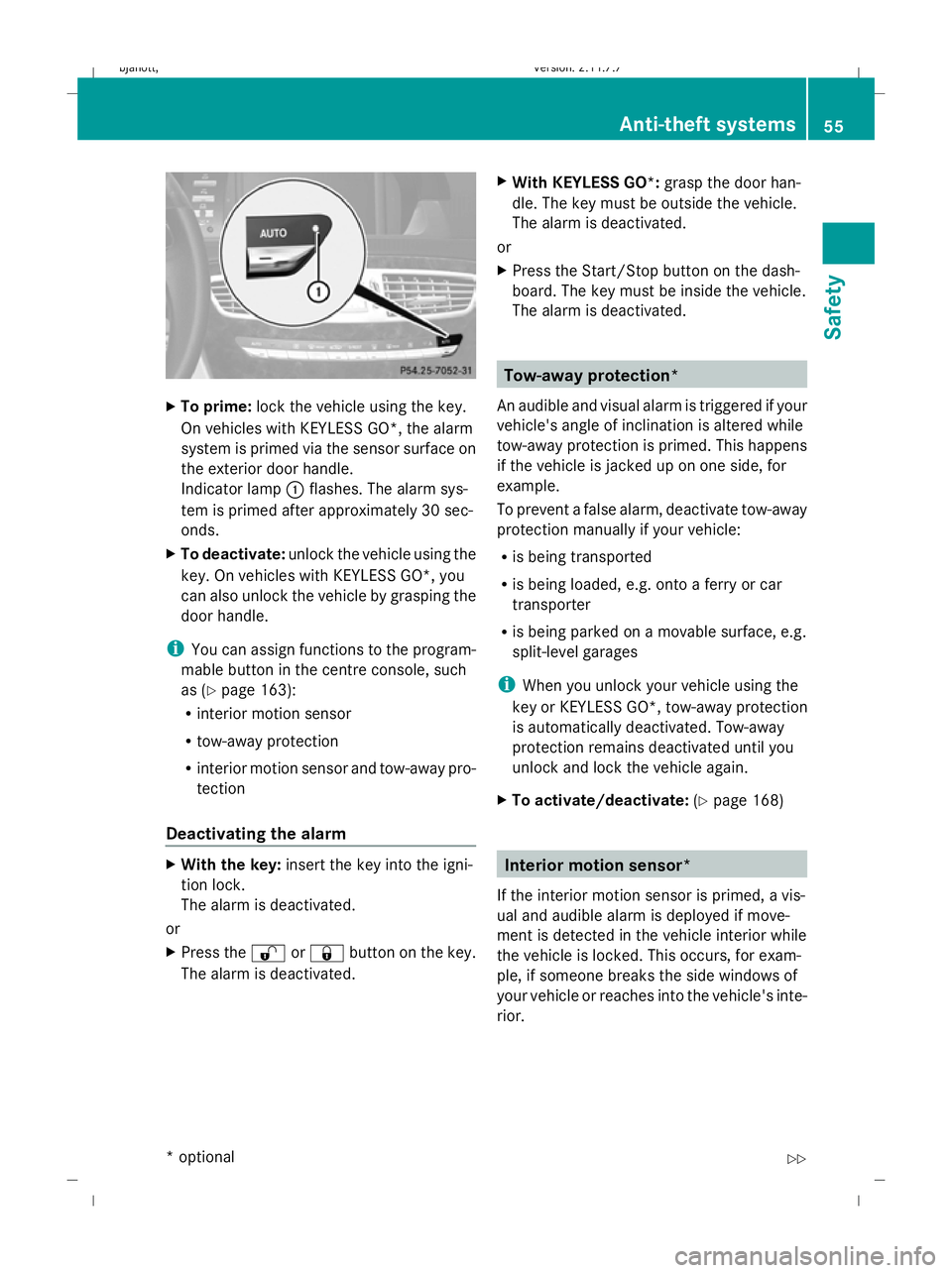
To prime: lock the vehicle using the key.
On vehicles with KEYLESS GO*, the alarm
system is primed via the sensor surface on
the exterior door handle.
Indicator lamp :flashes. The alarm sys-
tem is primed after approximately 30 sec-
onds.
X To deactivate: unlock the vehicle using the
key. On vehicles with KEYLESS GO*, you
can also unlock the vehicle by grasping the
door handle.
i You can assign functions to the program-
mable button in the centre console, such
as (Y page 163):
R interior motion sensor
R tow-away protection
R interior motion sensor and tow-away pro-
tection
Deactivating the alarm X
With the key: insert the key into the igni-
tion lock.
The alarm is deactivated.
or
X Press the %or& button on the key.
The alarm is deactivated. X
With KEYLESS GO*: grasp the door han-
dle. The key must be outside the vehicle.
The alarm is deactivated.
or
X Press the Start/Stop button on the dash-
board. The key must be inside the vehicle.
The alarm is deactivated. Tow-away protection*
An audible and visual alarm is triggered if your
vehicle's angle of inclination is altered while
tow-away protection is primed. This happens
if the vehicle is jacked up on one side, for
example.
To prevent a false alarm, deactivate tow-away
protection manually if your vehicle:
R is being transported
R is being loaded, e.g. onto a ferry or car
transporter
R is being parked on a movable surface, e.g.
split-level garages
i When you unlock your vehicle using the
key or KEYLESS GO*, tow-away protection
is automatically deactivated. Tow-away
protection remains deactivated until you
unlock and lock the vehicle again.
X To activate/deactivate: (Ypage 168) Interior motion sensor*
If the interior motion sensor is primed, a vis-
ual and audible alarm is deployed if move-
ment is detected in the vehicle interior while
the vehicle is locked. This occurs, for exam-
ple, if someone breaks the side windows of
your vehicle or reaches into the vehicle's inte-
rior. Anti-theft systems
55Safety
* optional
216_AKB; 2; 3, en-GB
bjanott,
Version: 2.11.7.7 2009-02-27T14:54:17+01:00 - Seite 55 Z
Dateiname: 6515230602_buchblock.pdf; erzeugt am 04. Mar 2009 11:14:51; WK
Page 59 of 421
To prevent a false alarm, deactivate the inte-
rior motion sensor if you lock your vehicle and
R people or animals remain in the vehicle
R the side windows remain open
R the sliding/tilting sunroof remains open
X Make sure that:
R
the side windows are closed.
R the sliding/tilting sunroof is closed.
R there are no objects, e.g. mascots, hang-
ing on the rear-view mirror or on the
grasp handles on the roof trim.
This will prevent false alarms.
X To activate/deactivate: (Ypage 167).
i The interior motion sensor remains deac-
tivated until you unlock and lock the vehicle
again. 56
Anti-theft systemsSafety
216_AKB; 2; 3, en-GB
bjanott,
Version: 2.11.7.7 2009-02-27T14:54:17+01:00 - Seite 56
Dateiname: 6515230602_buchblock.pdf; erzeugt am 04. Mar 2009 11:14:51; WK
Page 69 of 421
Operation
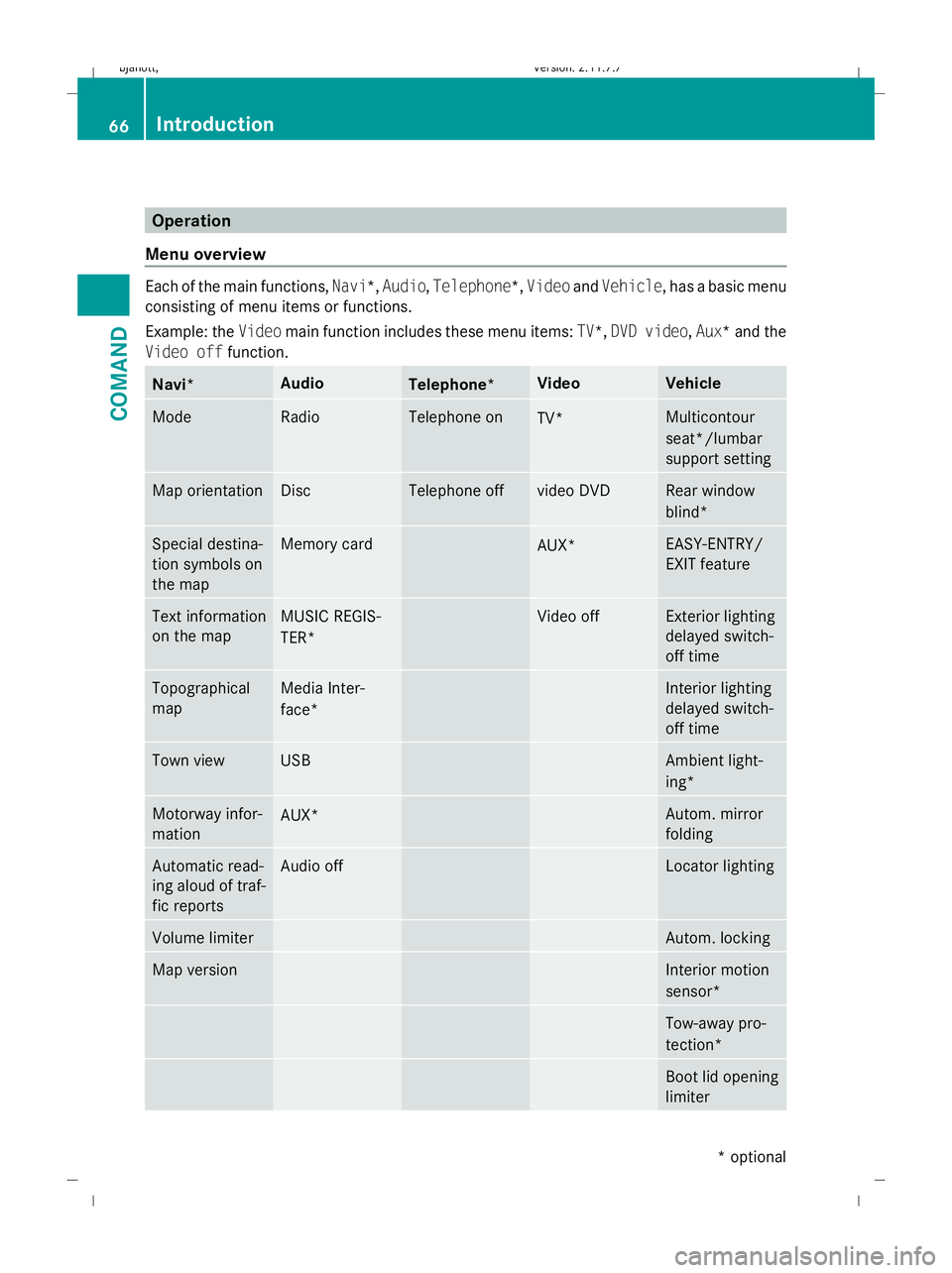
Menu overview Each of the main functions,
Navi*,Audio,Telephone*, VideoandVehicle, has a basic menu
consisting of menu items or functions.
Example: the Videomain function includes these menu items: TV*,DVD video ,Aux*a nd the
Video off function. Navi* Audio
Telephone* Video Vehicle
Mode Radio Telephone on
TV* Multicontour
seat*/lumbar
support setting Map orientation Disc Telephone off video DVD Rear window
blind*
Special destina-
tion symbols on
the map Memory card
AUX* EASY-ENTRY/
EXIT feature
Text information
on the map MUSIC REGIS-
TER* Video off Exterior lighting
delayed switch-
off time Topographical
map Media Inter-
face* Interior lighting
delayed switch-
off time Town view USB Ambient light-
ing*
Motorway infor-
mation
AUX* Autom. mirror
folding Automatic read-
ing aloud of traf-
fic reports Audio off Locator lighting
Volume limiter Autom. locking
Map version Interior motion
sensor*
Tow-away pro-
tection*
Boot lid opening
limiter66
IntroductionCOMAND
* optional
216_AKB; 2; 3, en-GB
bjanott,
Version: 2.11.7.7 2009-02-27T14:54:17+01:00 - Seite 66
Dateiname: 6515230602_buchblock.pdf; erzeugt am 04. Mar 2009 11:14:55; WK
Page 158 of 421
Navigation* (route guidance with
RDS-TMC) Introduction to RDS-TMC
An RDS-TMC radio station transmits free-of-
charge RDS-TMC traffic reports in addition to
the radio programme. COMAND can receive
the RDS-TMC traffic reports and take them
into consideration for dynamic route guid-
ance. Thus, for example, the navigation sys-
tem can guide you around a traffic jam.
In Germany, COMAND uses top-quality traffic
data provided by T-Systems Traffic for the
TMCpro traffic jam warning service. This
information is available nationwide and 24
hours a day. In contrast to the public TMC
service, TMCpro uses reports from public
sources. Moreover, TMCpro utilises exclusive
data from its own automated sensor network
for monitoring traffic conditions. The traffic
announcements which are read over public
radio stations (TA) may differ from TMCpro
traffic announcements. Dynamic route guidance
The Dynamic route is the same type of route
as the Fast route. In addition, COMAND
takes RDS-TMC traffic announcements that
have been received into consideration 23
when calculating the route for dynamic route
guidance. If a quicker route is determined due
to reception of an RDS-TMC traffic announce-
ment, the navigation system changes the
route. If possible, it will bypass blockages.
X To switch on: setDynamic route as the
route type 23
.
Proceed as described in the "Setting the
route type" section (Y page 131).
X To switch off: select a different route type.
i COMAND calculates a new route if you
change the route type setting with route
guidance active. If you change the route
type setting when route guidance is inac- tive, COMAND uses the new setting for the
next route guidance.
If TMCpro is received, this is indicated by the
TMCpro symbol at the lower right in the dis-
play.
If a public TMC service is received, the TMC
symbol appears at the lower right in the dis-
play.
If RDS-TMC reception is not possible, no sym-
bol will appear. RDS-TMC displays on the map
COMAND can show certain traffic incidents
on the map. These displays can be seen on
map scales 50 m (0.05 miles) to 50 km (50
miles).
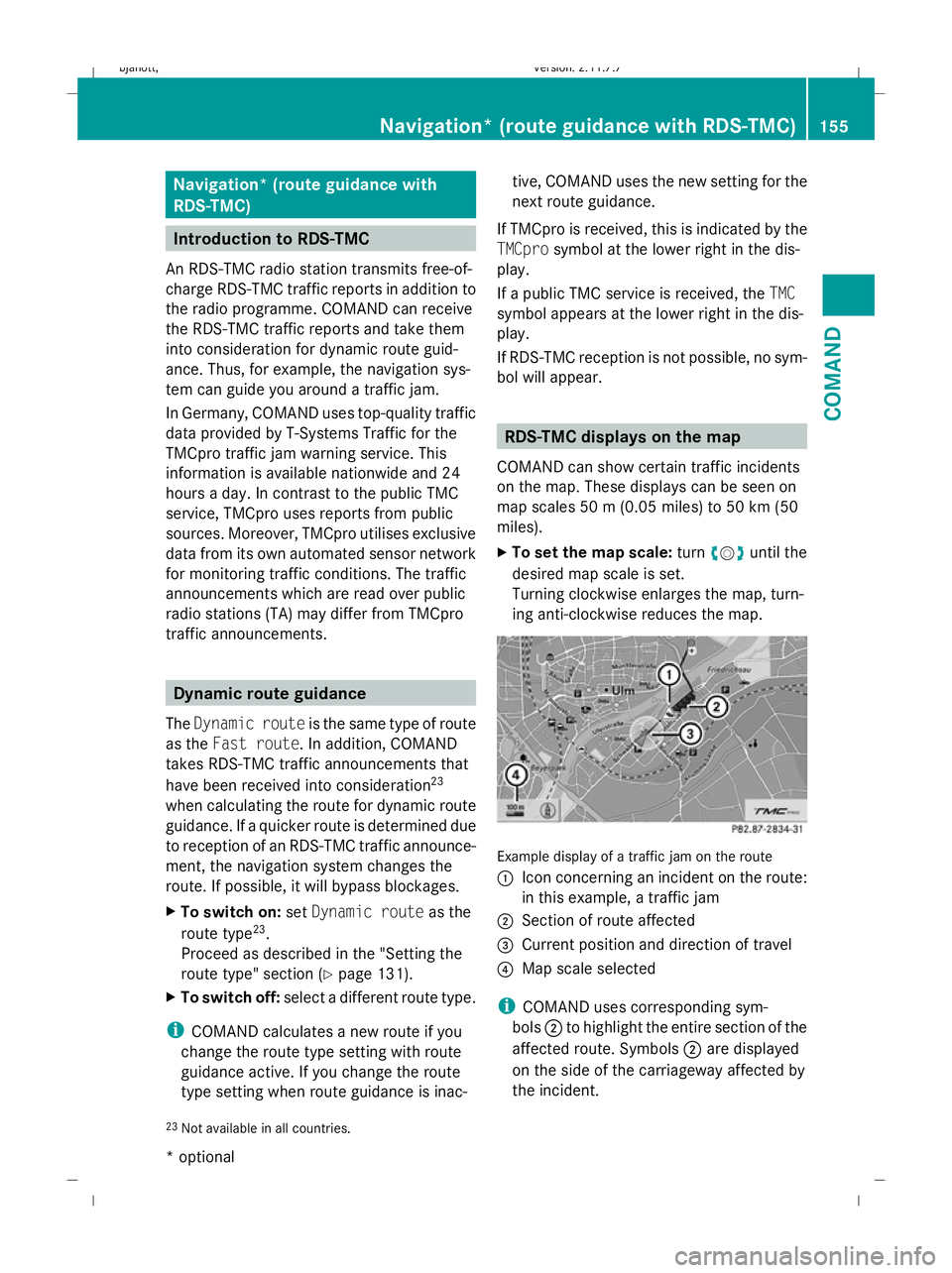
X To set the map scale: turncVduntil the
desired map scale is set.
Turning clockwise enlarges the map, turn-
ing anti-clockwise reduces the map. Example display of a traffic jam on the route
:
Icon concerning an incident on the route:
in this example, a traffic jam
; Section of route affected
= Current position and direction of travel
? Map scale selected
i COMAND uses corresponding sym-
bols ;to highlight the entire section of the
affected route. Symbols ;are displayed
on the side of the carriageway affected by
the incident.
23 Not available in all countries. Navigation* (route guidance
with RDS-TMC)155COMAND
* optional
216_AKB; 2; 3, en-GB
bjanott,
Version: 2.11.7.7
2009-02-27T14:54:17+01:00 - Seite 155 Z
Dateiname: 6515230602_buchblock.pdf; erzeugt am 04. Mar 2009 11:15:23; WK
Page 164 of 421
Display settings
Switching the display on or off X
To switch off: selectVehicle QDis‐
play off .
X To switch back on again: turncVd , slide
ZVÆ , slide XVYor press W.
or
X Press the ubutton.
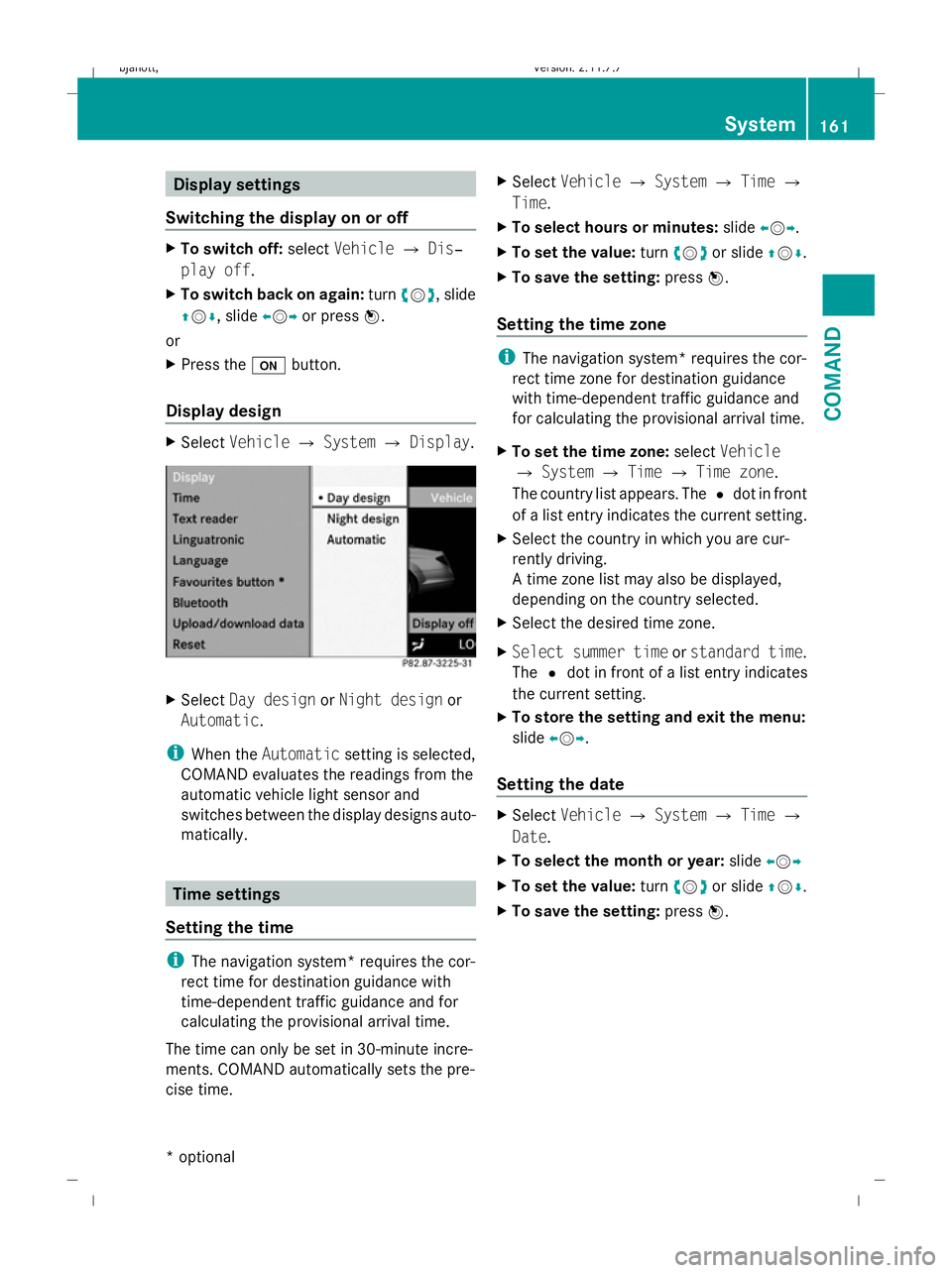
Display design X
Select Vehicle QSystem QDisplay. X
Select Day design orNight design or
Automatic .
i When the Automatic setting is selected,
COMAND evaluates the readings from the
automatic vehicle light sensor and
switches between the display designs auto-
matically. Time settings
Setting the time i
The navigation system* requires the cor-
rect time for destination guidance with
time-dependent traffic guidance and for
calculating the provisional arrival time.
The time can only be set in 30-minute incre-
ments. COMAND automatically sets the pre-
cise time. X
Select Vehicle QSystem QTime Q
Time.
X To select hours or minutes: slideXVY.
X To set the value: turncVd or slide ZVÆ.
X To save the setting: pressW.
Setting the time zone i
The navigation system* requires the cor-
rect time zone for destination guidance
with time-dependent traffic guidance and
for calculating the provisional arrival time.
X To set the time zone: selectVehicle
Q System QTime QTime zone.
The country list appears. The #dot in front
of a list entry indicates the current setting.
X Select the country in which you are cur-
rently driving.
A time zone list may also be displayed,
depending on the country selected.
X Select the desired time zone.
X Select summer time orstandard time .
The #dot in front of a list entry indicates
the current setting.
X To store the setting and exit the menu:
slide XVY.
Setting the date X
Select Vehicle QSystem QTime Q
Date.
X To select the month or year: slideXVY
X To set the value: turncVd or slide ZVÆ.
X To save the setting: pressW. System
161COMAND
* optional
216_AKB; 2; 3, en-GB
bjanott
,V ersion: 2.11.7.7
2009-02-27T14:54:17+01:00 - Seite 161 Z
Dateiname: 6515230602_buchblock.pdf; erzeugt am 04. Mar 2009 11:15:25; WK
Page 166 of 421
Deleting existing individualisation data
X
Select Vehicle QSystem QLingua‐
tronic QDelete individualisation .
A prompt appears asking whether you
really wish to delete.
X Select YesorNo.
The individualisation data will either be
deleted or not, depending on your selec-
tion. Language settings
X Select Vehicle QSystem QLan‐
guage.
The language list appears. The #dot indi-
cates the current setting.
X To change the setting: select the desired
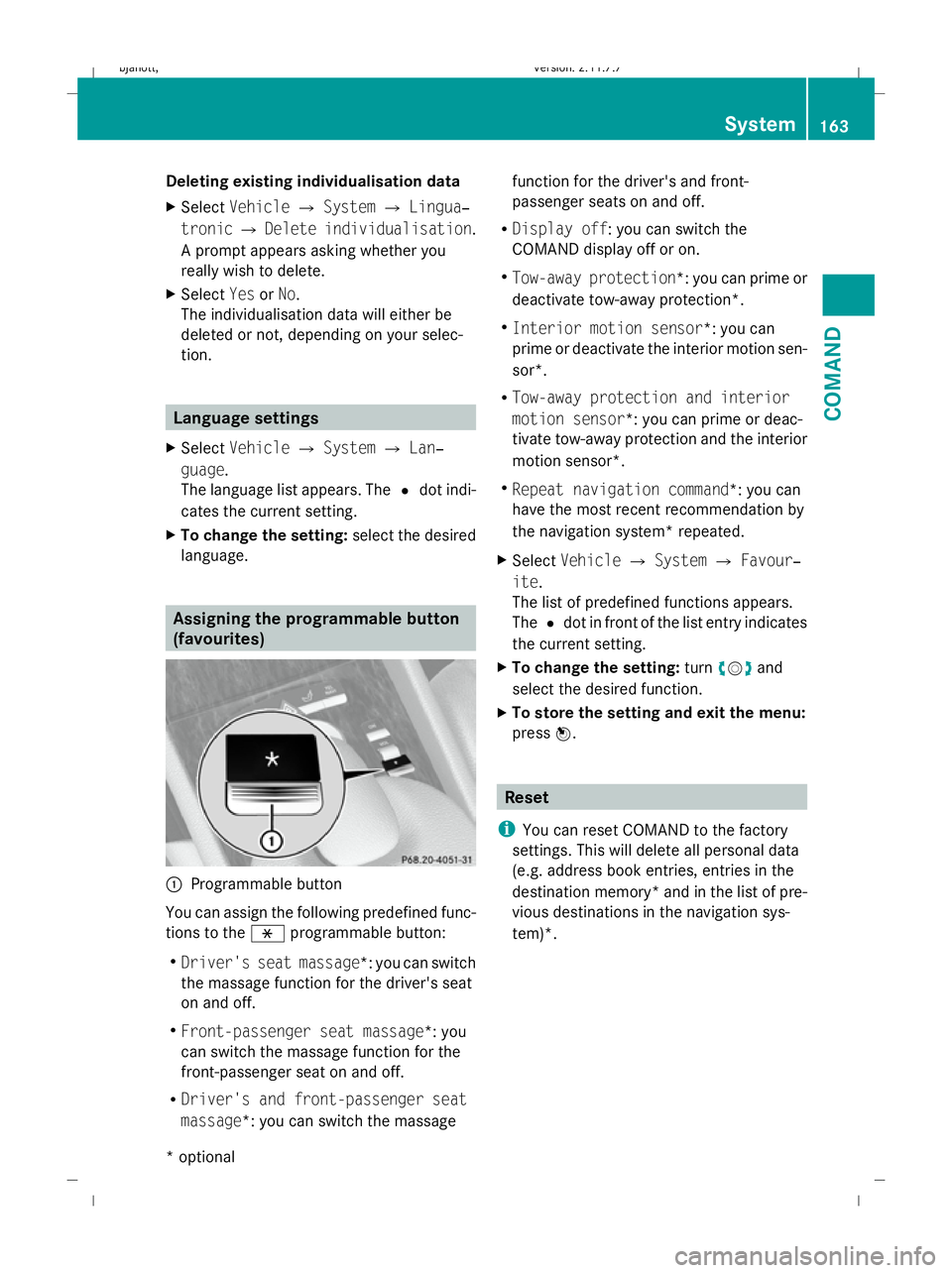
language. Assigning the programmable button
(favourites)
:
Programmable button
You can assign the following predefined func-
tions to the hprogrammable button:
R Driver's seat massage*: you can switch
the massage function for the driver's seat
on and off.
R Front-passenger seat massage*: you
can switch the massage function for the
front-passenger seat on and off.
R Driver's and front-passenger seat
massage*: you can switch the massage function for the driver's and front-
passenger seats on and off.
R Display off : you can switch the
COMAND display off or on.
R Tow-away protection *: you can prime or
deactivate tow-away protection*.
R Interior motion sensor *: you can
prime or deactivate the interior motion sen-
sor*.
R Tow-away protection and interior
motion sensor *: you can prime or deac-
tivate tow-away protection and the interior
motion sensor*.
R Repeat navigation command*: you can
have the most recent recommendation by
the navigation system* repeated.
X Select Vehicle QSystem QFavour‐
ite .
The list of predefined functions appears.
The #dot in front of the list entry indicates
the current setting.
X To change the setting: turncVd and
select the desired function.
X To store the setting and exit the menu:
press W. Reset
i You can reset COMAND to the factory
settings. This will delete all personal data
(e.g. address book entries, entries in the
destination memory* and in the list of pre-
vious destinations in the navigation sys-
tem)*. System
163COMAND
* optional
216_AKB; 2; 3, en-GB
bjanott
,V ersion: 2.11.7.7
2009-02-27T14:54:17+01:00 - Seite 163 Z
Dateiname: 6515230602_buchblock.pdf; erzeugt am 04. Mar 2009 11:15:26; WK
Page 167 of 421
X
Select Vehicle QSystem QReset.
A prompt appears asking whether you
really wish to reset.
X Select YesorNo.
If you select Yes, a prompt will appear again
asking whether you really wish to reset.
X Select YesorNo.
If you select Yes, COMAND will be reset
and restarted. Vehicle
Introduction to the vehicle menu
i Information about the components and
operating principles of COMAND can be
found on (Y page 58).
In this menu, you can set the following vehicle
functions:
R Multicontour seat settings*
R Rear window blind*
R EASY-ENTRY/EXIT feature
R Exterior lighting delayed switch-off time
R Interior lighting delayed switch-off time
R Ambient lighting*
R Automatic folding mirror
R Locator lighting
R Automatic locking feature
R Interior motion sensor*
R Tow-away protection*
R Boot lid opening limiter
You can open the "Vehicle" menu in one of
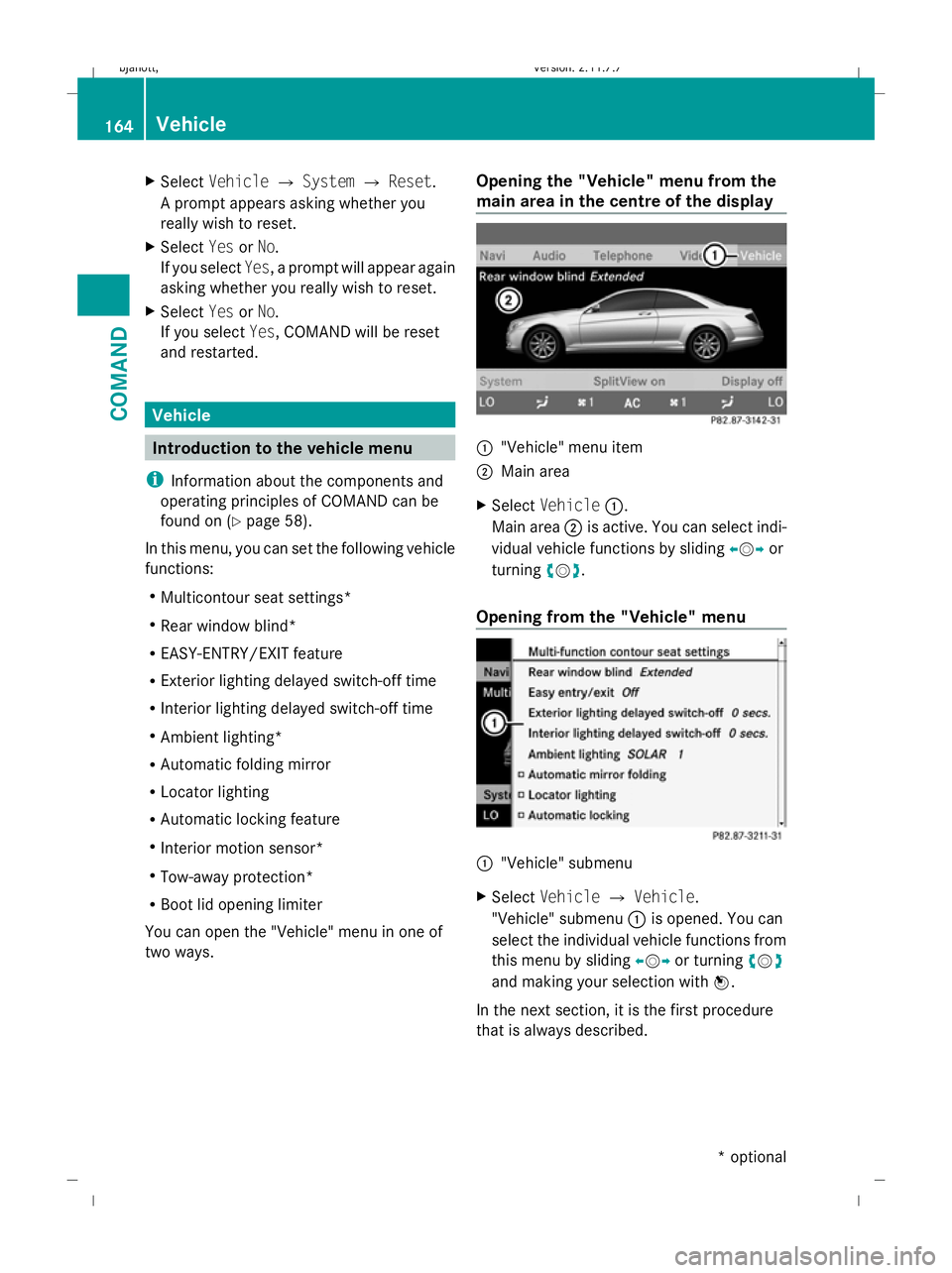
two ways. Opening the "Vehicle" menu from the
main area in the centre of the display :
"Vehicle" menu item
; Main area
X Select Vehicle :.
Main area ;is active. You can select indi-
vidual vehicle functions by sliding XVYor
turning cVd.
Opening from the "Vehicle" menu :
"Vehicle" submenu
X Select Vehicle QVehicle.
"Vehicle" submenu :is opened. You can
select the individual vehicle functions from
this menu by sliding XVYor turning cVd
and making your selection with W.
In the next section, it is the first procedure
that is always described. 164
VehicleCOMAND
* optional
216_AKB; 2; 3, en-GB
bjanott,
Version: 2.11.7.7 2009-02-27T14:54:17+01:00 - Seite 164
Dateiname: 6515230602_buchblock.pdf; erzeugt am 04. Mar 2009 11:15:27; WK