warning light MERCEDES-BENZ CL COUPE 2009 User Guide
[x] Cancel search | Manufacturer: MERCEDES-BENZ, Model Year: 2009, Model line: CL COUPE, Model: MERCEDES-BENZ CL COUPE 2009Pages: 421, PDF Size: 10.78 MB
Page 42 of 421
affect your hearing. The powder that escapes
does not generally constitute a health hazard.
The 6 SRS warning lamp lights up. G
Risk of injury
If the seat belt tensioners have been trig-
gered, they provide no additional protection
in the event of another accident. Therefore,
have belt tensioners which have been trig-
gered replaced at a qualified specialist work-
shop.
Comply with safety regulations when dispos-
ing of belt tensioners. Any Mercedes-Benz
Service Centre can provide details of these
regulations.
Airbags Airbag deployment slows down and restricts
the movement of the vehicle occupant.
If the airbags are deployed, you will hear a
bang and a small amount of powder may also
be released. Only in rare cases will the bang
affect your hearing. The powder that escapes
does not generally constitute a health hazard.
The 6 SRS warning lamp lights up.
The SRS/AIRBAG identification indicates the
location of the airbags. G
Risk of injury
Airbags provide additional protection; they
are not, however, a substitute for seat belts.
Observe the following notes to reduce the risk
of serious or even fatal injury if an airbag is
deployed:
R all vehicle occupants ― in particular preg-
nant women ― must wear their seat belt
correctly at all times and lean back against
the backrest, which should be positioned
as close to the vertical as possible. The
head restraint must support the back of the
head at about eye level.
R always secure children less than 1.50 m tall
or under 12 years of age in suitable child
restraint systems. R
all vehicle occupants must select a seat
position that is as far away from the airbag
as possible. The driver's seat position must
allow the vehicle to be driven safely. The
driver's chest should be as far away from
the middle of the driver's front airbag cover
as possible.
R move the front-passenger seat as far back
as possible, especially if a child is secured
in a child restraint system on the seat.
R vehicle occupants – in particular, children
– must not lean their head into the area of
the window in which the sidebag/window-
bag is deployed.
R rearward-facing child restraint systems
must not be fitted to the front-passenger
seat unless the front-passenger front air-
bag has been disabled. The front-passenger
front airbag of a vehicle fitted with auto-
matic child seat recognition* is only disa-
bled when a child restraint system with
automatic child seat recognition is fitted to
the front-passenger seat. The 4
PASSENGER AIRBAG OFF warning lamp
must be continuously lit.
If the front-passenger seat of your vehicle
does not have automatic child seat recog-
nition*, or your rearward-facing child
restraint system does not have automatic
child seat recognition, children must be
secured in a child restraint system on a
suitable seat in the rear. If you secure a
forward-facing child restraint system to the
front-passenger seat, you must move the
front-passenger seat as far back as possi-
ble.
R make sure there are no heavy or sharp-
edged objects in pockets of clothing.
R do not lean forwards, e.g. over the cover of
the driver's/front-passenger front airbag,
particularly when the vehicle is in motion.
R do not put your feet on the dashboard. Occupant safety
39Safety
* optional
216_AKB; 2; 3, en-GB
bjanott
,V ersion: 2.11.7.7
2009-02-27T14:54:17+01:00 - Seite 39 Z
Dateiname: 6515230602_buchblock.pdf; erzeugt am 04. Mar 2009 11:14:46; WK
Page 47 of 421
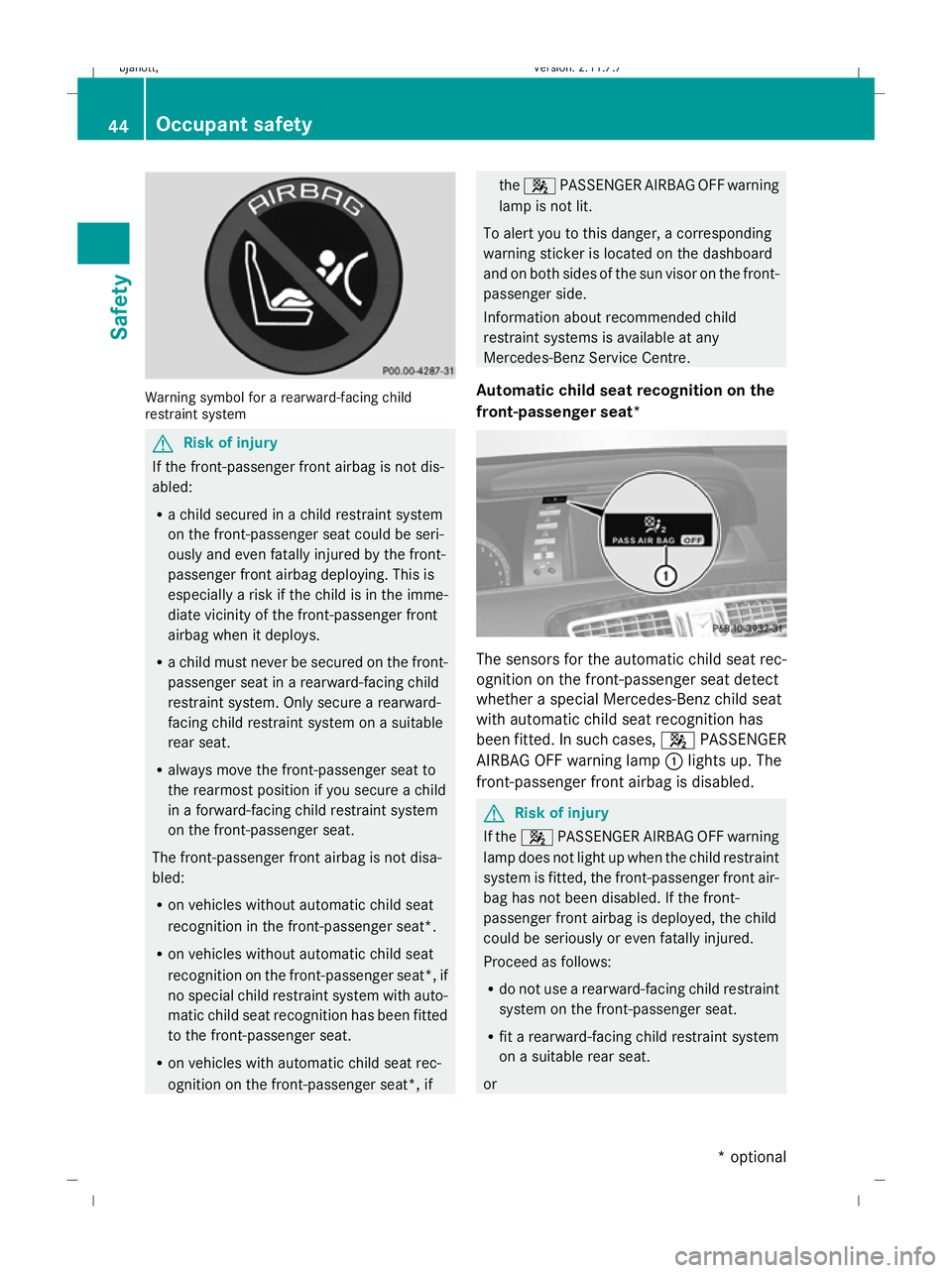
Warning symbol for a rearward-facing child
restraint system G
Risk of injury
If the front-passenger front airbag is not dis-
abled:
R a child secured in a child restraint system
on the front-passenger seat could be seri-
ously and even fatally injured by the front-
passenger front airbag deploying. This is
especially a risk if the child is in the imme-
diate vicinity of the front-passenger front
airbag when it deploys.
R a child must never be secured on the front-
passenger seat in a rearward-facing child
restraint system. Only secure a rearward-
facing child restraint system on a suitable
rear seat.
R always move the front-passenger seat to
the rearmost position if you secure a child
in a forward-facing child restraint system
on the front-passenger seat.
The front-passenger front airbag is not disa-
bled:
R on vehicles without automatic child seat
recognition in the front-passenger seat*.
R on vehicles without automatic child seat
recognition on the front-passenger seat*, if
no special child restraint system with auto-
matic child seat recognition has been fitted
to the front-passenger seat.
R on vehicles with automatic child seat rec-
ognition on the front-passenger seat*, if the
4 PASSENGER AIRBAG OFF warning
lamp is not lit.
To alert you to this danger, a corresponding
warning sticker is located on the dashboard
and on both sides of the sun visor on the front-
passenger side.
Information about recommended child
restraint systems is available at any
Mercedes-Benz Service Centre.
Automatic child seat recognition on the
front-passenger seat* The sensors for the automatic child seat rec-
ognition on the front-passenger seat detect
whether a special Mercedes-Benz child seat
with automatic child seat recognition has
been fitted. In such cases, 4PASSENGER
AIRBAG OFF warning lamp :lights up. The
front-passenger front airbag is disabled. G
Risk of injury
If the 4 PASSENGER AIRBAG OFF warning
lamp does not light up when the child restraint
system is fitted, the front-passenger front air-
bag has not been disabled. If the front-
passenger front airbag is deployed, the child
could be seriously or even fatally injured.
Proceed as follows:
R do not use a rearward-facing child restraint
system on the front-passenger seat.
R fit a rearward-facing child restraint system
on a suitable rear seat.
or 44
Occupant safetySafety
* optional
216_AKB; 2; 3, en-GB
bjanott,
Version: 2.11.7.7 2009-02-27T14:54:17+01:00 - Seite 44
Dateiname: 6515230602_buchblock.pdf; erzeugt am 04. Mar 2009 11:14:48; WK
Page 48 of 421
R
only use a forward-facing child restraint
system on the front-passenger seat and
move the front-passenger seat to its rear-
most position.
R have the automatic child seat recognition
checked at a qualified specialist workshop.
To ensure that the automatic child seat rec-
ognition on the front-passenger seat func-
tions correctly, never place objects (such as
a cushion) under the child restraint system.
The entire base of the child restraint system
must always rest on the seat cushion. An
incorrectly fitted child restraint system can-
not perform its intended protective function
in the event of an accident, and could lead to
injuries.
i The windowbag, the sidebag and the belt
tensioner on the front-passenger side are
still active even if the front-passenger front
airbag is disabled by the automatic child-
seat recognition on the front-passenger
seat. G
Risk of injury
Do not place electronic devices on the front-
passenger seat, e.g.:
R laptops, when switched on
R mobile phones
R cards with transponders, e.g. ski passes or
access cards
Signals from electronic equipment can cause
interference in the automatic child seat rec-
ognition sensor system. This could lead to a
system malfunction. This may cause the
4 PASSENGER AIRBAG OFF warning lamp
to light up without there being a child seat
with automatic child seat recognition fitted.
This means that the front-passenger front air-
bag does not deploy during an accident. It is
also possible that the 4PASSENGER AIR-
BAG OFF warning lamp will not light up briefly
if you turn the key in the ignition lock to posi-
tion 2.
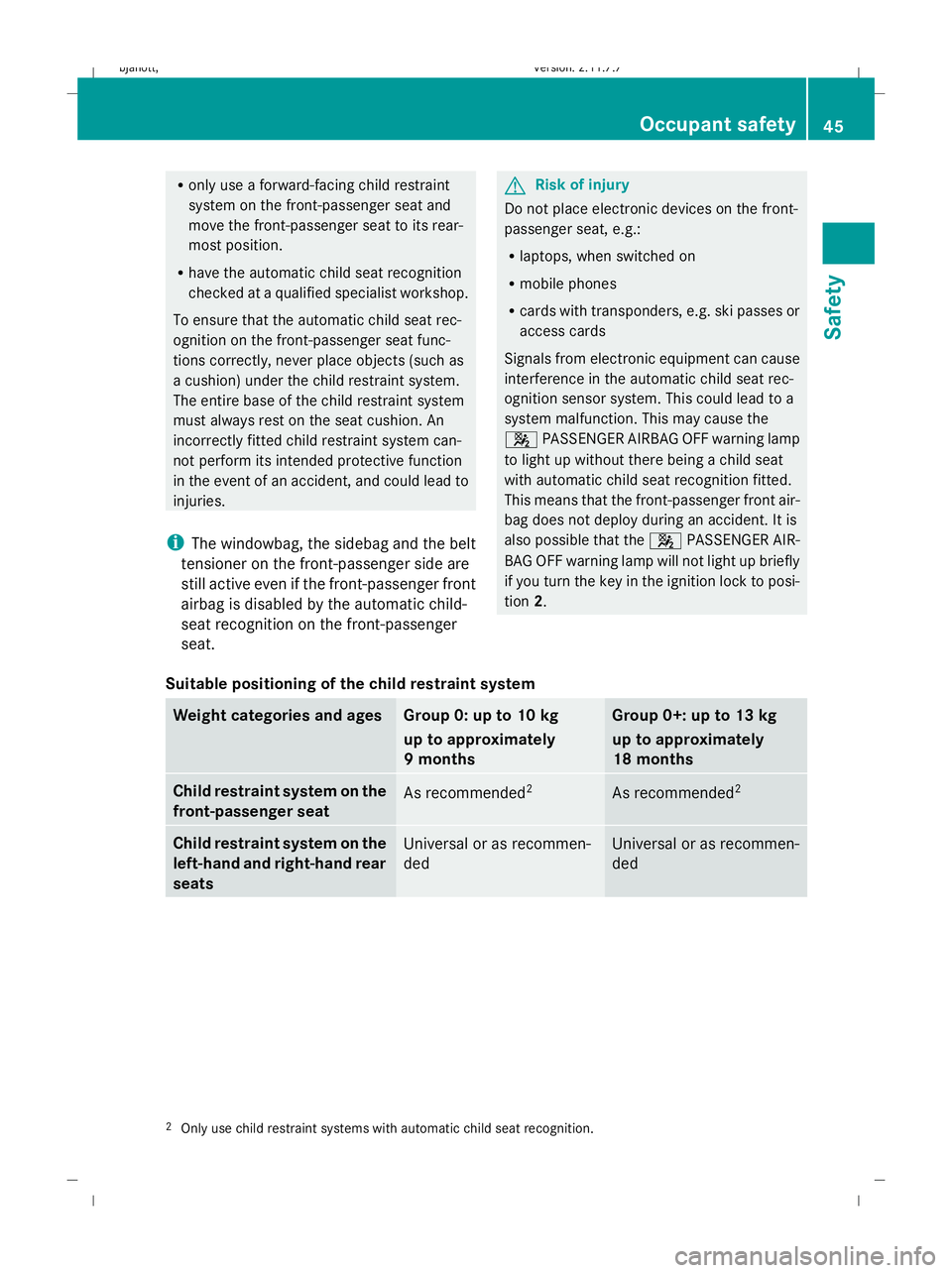
Suitable positioning of the child restraint system Weight categories and ages Group 0: up to 10 kg
up to approximately
9 months Group 0+: up to 13 kg
up to approximately
18 months
Child restraint system on the
front-passenger seat
As recommended
2 As recommended
2 Child restraint system on the
left-hand and right-hand rear
seats
Universal or as recommen-
ded Universal or as recommen-
ded
2
Only use child restraint systems with automatic child seat recognition. Occupant safety
45Safety
216_AKB; 2; 3, en-GB
bjanott,V ersion: 2.11.7.7
2009-02-27T14:54:17+01:00 - Seite 45 Z
Dateiname: 6515230602_buchblock.pdf; erzeugt am 04. Mar 2009 11:14:48; WK
Page 51 of 421
aged or subjected to a load in an accident
checked immediately at a qualified specialist
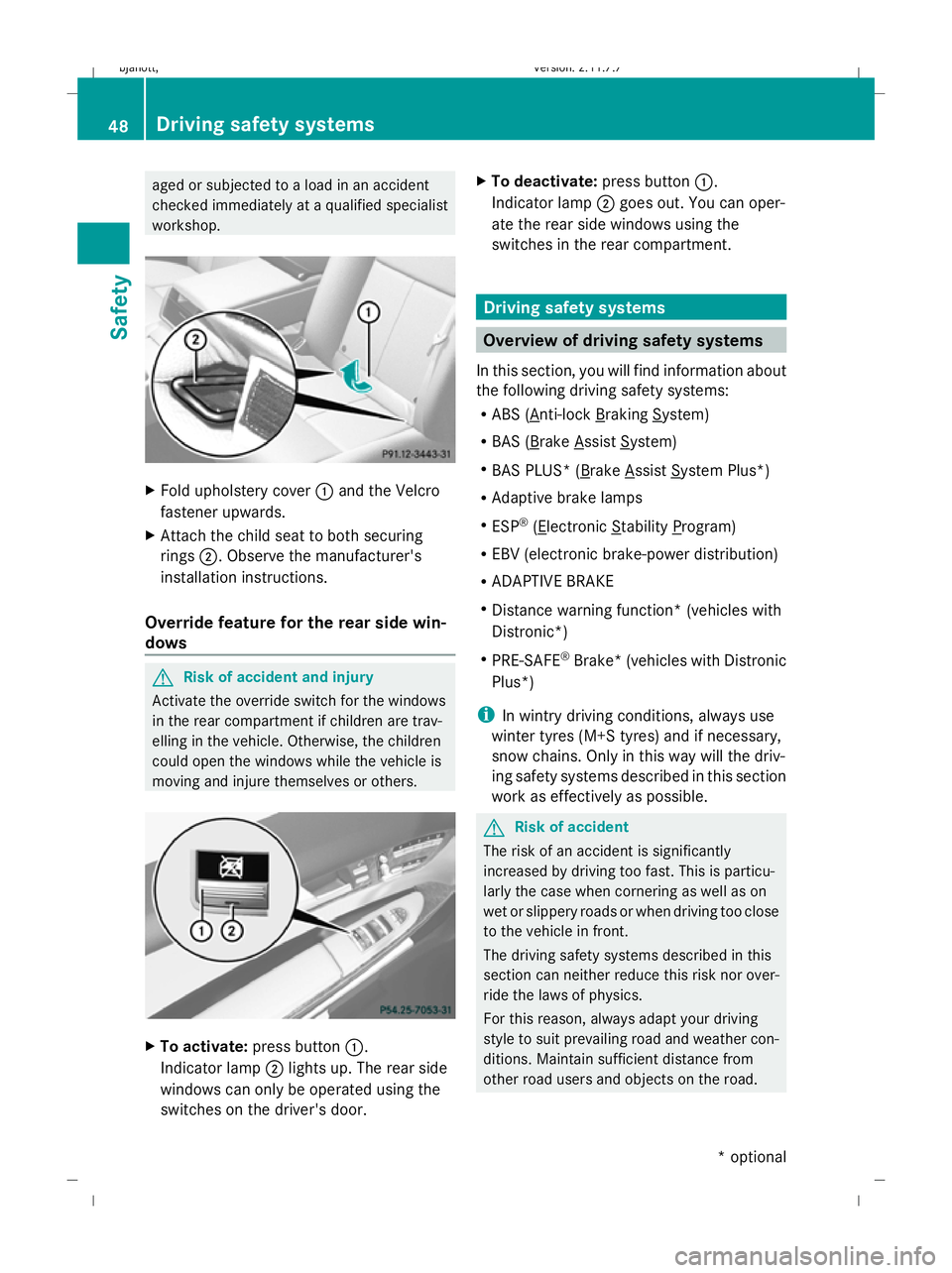
workshop. X
Fold upholstery cover :and the Velcro
fastener upwards.
X Attach the child seat to both securing
rings ;. Observe the manufacturer's
installation instructions.
Override feature for the rear side win-
dows G
Risk of accident and injury
Activate the override switch for the windows
in the rear compartment if children are trav-
elling in the vehicle. Otherwise, the children
could open the windows while the vehicle is
moving and injure themselves or others. X
To activate: press button :.
Indicator lamp ;lights up. The rear side
windows can only be operated using the
switches on the driver's door. X
To deactivate: press button:.
Indicator lamp ;goes out. You can oper-
ate the rear side windows using the
switches in the rear compartment. Driving safety systems
Overview of driving safety systems
In this section, you will find information about
the following driving safety systems:
R ABS ( Anti-lock Braking System)
R BAS ( Brake Assist System)
R BAS PLUS* ( Brake Assist System Plus*)
R Adaptive brake lamps
R ESP ®
( Electronic Stability Program)
R EBV (electronic brake-power distribution)
R ADAPTIVE BRAKE
R Distance warning function* (vehicles with
Distronic*)
R PRE-SAFE ®
Brake* (vehicles with Distronic
Plus*)
i In wintry driving conditions, always use
winter tyres (M+S tyres) and if necessary,
snow chains. Only in this way will the driv-
ing safety systems described in this section
work as effectively as possible. G
Risk of accident
The risk of an accident is significantly
increased by driving too fast. This is particu-
larly the case when cornering as well as on
wet or slippery roads or when driving too close
to the vehicle in front.
The driving safety systems described in this
section can neither reduce this risk nor over-
ride the laws of physics.
For this reason, always adapt your driving
style to suit prevailing road and weather con-
ditions. Maintain sufficient distance from
other road users and objects on the road. 48
Driving safety systemsSafety
* optional
216_AKB; 2; 3, en-GB
bjanott,
Version: 2.11.7.7 2009-02-27T14:54:17+01:00 - Seite 48
Dateiname: 6515230602_buchblock.pdf; erzeugt am 04. Mar 2009 11:14:49; WK
Page 53 of 421
The brakes will work normally again when:
R you release the brake pedal
R no obstacle is detected in front of your
vehicle
R there is no longer any danger of a rear-end
collision
BAS PLUS is then deactivated.
At speeds up to approximately 70 km/h, BAS
PLUS can also detect stationary obstacles,
for example, stopped or parked vehicles.
Vehicles with COMAND and a navigation sys-
tem*: the radar sensor system is switched off
automatically in the vicinity of radio telescope
facilities (Y page 411).
For BAS PLUS to assist you when driving, the
radar sensor system must be switched on and
operational. You can check this by activating
Distronic Plus* (Y page 235) or via the
"Radar sensor" menu in the on-board com-
puter (Y page 226). G
Risk of accident
Only clearly identified obstacles will initiate
braking assistance by BAS PLUS. In particular,
the detection of obstacles can be restricted if
there is:
R dirt on the sensors or the sensors are cov-
ered
R snow or heavy rain
R interference by other radar sources
R strong radar reflections, for example in
multi-storey garages
BAS PLUS does not react to people or ani-
mals, oncoming vehicles and crossing traffic.
BAS PLUS may not detect narrow vehicles
such as motorcycles and vehicles driving on
a different line.
Following a collision or crash-related damage
to the front end of the vehicle, have the con-
figuration and operation of the radar sensors
checked at a Mercedes-Benz Service Centre.
If BAS PLUS is not available due to a malfunc-
tion in the radar sensor system, the braking system remains available with full brake
boosting effect and BAS. Adaptive brake lamps
i Adaptive brake lamps are only available in
certain countries.
If you brake sharply from a speed of more
than 50 km/h or if braking is assisted by BAS
or BAS PLUS*, the brake lamps flash rapidly.
In this way, traffic travelling behind you is
warned in an even more noticeable manner.
If you brake sharply from a speed of more
than 70 km/h to a standstill, the hazard warn-
ing lamps are activated automatically. If the
brakes are applied again, the brake lamps
light up continuously. The hazard warning
lamps switch off automatically if you travel
faster than 10 km/h. You can also switch off
the hazard warning lamps using the hazard
warning switch button (Y page 196). ESP
®
(Electronic Stability Program)
ESP ®
monitors driving stability and traction,
i.e. power transmission between tyres and
the road surface.
If ESP ®
detects that the vehicle is deviating
from the direction desired by the driver, one
or more wheels are braked to stabilise the
vehicle. If necessary, the engine output is also
modified to keep the vehicle on the desired
course within physical limits. ESP ®
assists
the driver when pulling away on wet or slip-
pery roads. ESP ®
can also stabilise the vehi-
cle when braking.
When ESP ®
intervenes, the ÷warning
lamp flashes in the instrument cluster. G
Risk of accident
If the ÷ warning lamp in the instrument
cluster flashes, proceed as follows: 50
Driving safety systemsSafety
* optional
216_AKB; 2; 3, en-GB
bjanott,
Version: 2.11.7.7 2009-02-27T14:54:17+01:00 - Seite 50
Dateiname: 6515230602_buchblock.pdf; erzeugt am 04. Mar 2009 11:14:50; WK
Page 54 of 421
R
Under no circumstances should you deac-
tivate ESP ®
.
R When pulling away, only depress the accel-
erator pedal as far as is necessary.
R Adapt your driving style to the prevailing
road and weather conditions.
The vehicle may otherwise begin to skid.
If you drive too fast, ESP ®
cannot reduce the
risk of an accident. ESP ®
cannot override the
laws of physics.
! If the vehicle is to be towed with the front
or rear axle raised, the ignition must be
switched off (key in position 0or 1in the
ignition lock). Application of the brakes by
ESP ®
could otherwise destroy the brake
system on the front or rear axle.
! Vehicles with 4MATIC* may not be towed
with the front or rear axle raised.
i Only use wheels with the recommended
tyre sizes. Only then will ESP ®
function
properly.
ETS (Electronic Traction Support) Traction control is part of ESP
®
.
Traction control brakes the drive wheels indi-
vidually if they spin. This enables you to pull
away and accelerate on slippery surfaces, for
example, if the road surface is slippery on one
side.
Traction control remains active when you
deactivate ESP ®
. G
Risk of accident
Traction control cannot reduce the risk of an
accident if you drive too fast. Traction control
cannot override the laws of physics.
Activating/deactivating ESP ®ESP
®
is activated automatically when the
engine is running. It may be best to deactivate ESP
®
in the fol-
lowing situations:
R when using snow chains
R in deep snow
R on sand or gravel G
Risk of accident
Activate ESP ®
as soon as the situations
described above no longer apply. ESP ®
will
otherwise not be able to stabilise the vehicle
if the vehicle starts to skid or a wheel starts
to spin.
If you deactivate ESP ®
:
R ESP ®
no longer improves driving stability.
R engine torque is not limited and the drive
wheels are able to spin. The spinning
wheels produce a cutting effect for better
traction.
R traction control is still activated.
R ESP ®
still provides support when you
brake.
i If ESP ®
is deactivated and one or more
wheels start to spin, the ÷warning lamp
in the instrument cluster flashes. In such
situations, ESP ®
will not stabilise the vehi-
cle.
X To deactivate: (Ypage 224).
The å warning lamp in the instrument
cluster lights up. G
Risk of accident
If the å warning lamp in the instrument
cluster lights up when the engine is running,
ESP ®
is deactivated or is unavailable due to a
malfunction. The risk that your vehicle may
start to skid then increases in certain situa-
tions.
Always adapt your driving style to the prevail-
ing road and weather conditions. Driving safety systems
51Safety
* optional
216_AKB; 2; 3, en-GB
bjanott,
Version: 2.11.7.7 2009-02-27T14:54:17+01:00 - Seite 51 Z
Dateiname: 6515230602_buchblock.pdf; erzeugt am 04. Mar 2009 11:14:50; WK
Page 55 of 421
X
To deactivate: (Ypage 224).
The å warning lamp in the instrument
cluster goes out. EBV (electronic brake force distribu-
tion)
EBV monitors and controls the brake pres-
sure on the rear wheels to improve driving
stability when braking. G
Risk of accident
If EBV is malfunctioning, the brake system is
still available with full brake boosting effect.
However, the rear wheels can still lock, e.g.
under full braking. This could cause you to
lose control of your vehicle and cause an acci-
dent. You should therefore adapt your driving
style to the different handling characteristics. ADAPTIVE BRAKE
ADAPTIVE BRAKE offers exceptional braking
comfort and a higher level of braking safety.
In addition to the braking function, ADAPTIVE
BRAKE also has the HOLD convenience func-
tion (Y page 245) and hill start assist
(Y page 204). For further information, see
Driving tips (Y page 304). Distance warning function* (vehicles
with Distronic*)
This function will issue a warning at speeds of
around 30 km/h or more if:
R for a period of several seconds, the dis-
tance to the vehicle in front is too short for
the speed at which you are travelling. The
· distance warning lamp in the instru-
ment cluster will light up.
R you are approaching the vehicle in front too
rapidly. An intermittent warning tone will
then sound and the ·distance warning
lamp will light up in the instrument cluster. In order to maintain the appropriate distance
to the vehicle in front and thus prevent a
crash, you must apply the brakes yourself. G
Risk of accident
Pay particular attention to the traffic condi-
tions if the distance warning lamp ·in the
instrument cluster lights up or an intermittent
warning tone sounds.
If necessary, brake or manoeuvre to avoid an
obstacle.
X To activate/deactivate: activate or deac-
tivate the distance warning function in the
on-board computer (Y page 223).
After activating, the Äsymbol is dis-
played in the left-hand section of the multi-
function display.
For more information on the distance warning
function, see the Distronic section*
(Y page 229). PRE-SAFE
®
Brake* (vehicles with Dis-
tronic Plus*)
PRE-SAFE ®
Brake can help you to minimise
the risk of a frontal collision with a vehicle in
front or reduce the effects of such a collision.
This function will issue a warning at speeds of
around 30 km/h or more if:
R for a period of several seconds, the dis-
tance to the vehicle in front is too short for
the speed at which you are travelling. The
· distance warning lamp in the instru-
ment cluster will light up.
R you are approaching the vehicle in front too
rapidly. An intermittent warning tone will
then sound and the ·distance warning
lamp will light up in the instrument cluster.
Due to the nature of the system, particularly
complicated driving conditions may cause the
system to display an unnecessary warning. 52
Driving safety systemsSafety
* optional
216_AKB; 2; 3, en-GB
bjanott,
Version: 2.11.7.7 2009-02-27T14:54:17+01:00 - Seite 52
Dateiname: 6515230602_buchblock.pdf; erzeugt am 04. Mar 2009 11:14:50; WK
Page 56 of 421
G
Risk of accident
Pay particular attention to the traffic condi-
tions if the distance warning lamp ·in the
instrument cluster lights up or an intermittent
warning tone sounds. If necessary, brake or
manoeuvre to avoid an obstacle.
In addition, at speeds of around 30 km/h or
more, PRE-SAFE ®
Brake can:
R brake the vehicle gently and automatically
within a speed range of up to around
180 km/h
R trigger preventative passenger protection
measures (PRE-SAFE ®
) G
Risk of accident
PRE-SAFE ®
Brake is only an aid to assist you
when driving. You are responsible for main-
taining a safe distance from other vehicles,
the vehicle's speed and for braking in good
time. Always pay attention to the traffic con-
ditions. Otherwise, you may recognise dan-
gers too late, cause an accident and injure
yourself and others.
With the help of the radar sensor system,
PRE-SAFE ®
Brake can detect obstacles that
are in front of your vehicle for an extended
period of time. If you approach an obstacle
and PRE-SAFE ®
Brake detects a risk of a col-
lision, the system will initially alert you both
visually and acoustically. If you do not brake
or steer, the vehicle will automatically brake
slightly. In the event of an increased risk of a
collision, PRE-SAFE ®
is activated
(Y page 42). G
Risk of accident
Only clearly detected obstacles will trigger a
warning and initiate braking assistance by
PRE-SAFE ®
Brake. In particular, the detection of obstacles may
be restricted if there is:
R
dirt on the sensors or the sensors are cov-
ered
R snow or heavy rain
R interference from other radar sources
R strong radar reflections, for example in
multi-storey car parks
PRE-SAFE ®
Brake does not react to persons,
animals, oncoming vehicles and crossing traf-
fic.
PRE-SAFE ®
Brake may not detect narrow
vehicles such as motorcycles or vehicles driv-
ing on a different line. G
Risk of accident
Depending on the vehicle's speed, PRE-
SAFE ®
Brake will brake your vehicle up to
maximum of 4 m/s 2
. This is equivalent to
approximately 40 % of the maximum braking
power of the vehicle. You must also apply the
brakes yourself to avoid a collision.
In order to maintain the appropriate distance
to the vehicle in front and thus prevent a
crash, you must apply the brakes yourself.
At speeds up to approximately 70 km/h,
PRE-SAFE ®
Brake can also detect stationary
obstacles, for example stopped or parked
vehicles. G
Risk of accident
If, in a critical driving situation, you do not
receive a visual and acoustic warning:
R PRE-SAFE ®
Brake did not detect the risk of
a collision
R PRE-SAFE ®
Brake is deactivated
R PRE-SAFE ®
Brake has failed
You must then brake to avoid a collision. Driving safety systems
53Safety
216_AKB; 2; 3, en-GB
bjanott, Version: 2.11.7.7 2009-02-27T14:54:17+01:00 - Seite 53 Z
Dateiname: 6515230602_buchblock.pdf; erzeugt am 04. Mar 2009 11:14:50; WK
Page 158 of 421
Navigation* (route guidance with
RDS-TMC) Introduction to RDS-TMC
An RDS-TMC radio station transmits free-of-
charge RDS-TMC traffic reports in addition to
the radio programme. COMAND can receive
the RDS-TMC traffic reports and take them
into consideration for dynamic route guid-
ance. Thus, for example, the navigation sys-
tem can guide you around a traffic jam.
In Germany, COMAND uses top-quality traffic
data provided by T-Systems Traffic for the
TMCpro traffic jam warning service. This
information is available nationwide and 24
hours a day. In contrast to the public TMC
service, TMCpro uses reports from public
sources. Moreover, TMCpro utilises exclusive
data from its own automated sensor network
for monitoring traffic conditions. The traffic
announcements which are read over public
radio stations (TA) may differ from TMCpro
traffic announcements. Dynamic route guidance
The Dynamic route is the same type of route
as the Fast route. In addition, COMAND
takes RDS-TMC traffic announcements that
have been received into consideration 23
when calculating the route for dynamic route
guidance. If a quicker route is determined due
to reception of an RDS-TMC traffic announce-
ment, the navigation system changes the
route. If possible, it will bypass blockages.
X To switch on: setDynamic route as the
route type 23
.
Proceed as described in the "Setting the
route type" section (Y page 131).
X To switch off: select a different route type.
i COMAND calculates a new route if you
change the route type setting with route
guidance active. If you change the route
type setting when route guidance is inac- tive, COMAND uses the new setting for the
next route guidance.
If TMCpro is received, this is indicated by the
TMCpro symbol at the lower right in the dis-
play.
If a public TMC service is received, the TMC
symbol appears at the lower right in the dis-
play.
If RDS-TMC reception is not possible, no sym-
bol will appear. RDS-TMC displays on the map
COMAND can show certain traffic incidents
on the map. These displays can be seen on
map scales 50 m (0.05 miles) to 50 km (50
miles).
X To set the map scale: turncVduntil the
desired map scale is set.
Turning clockwise enlarges the map, turn-
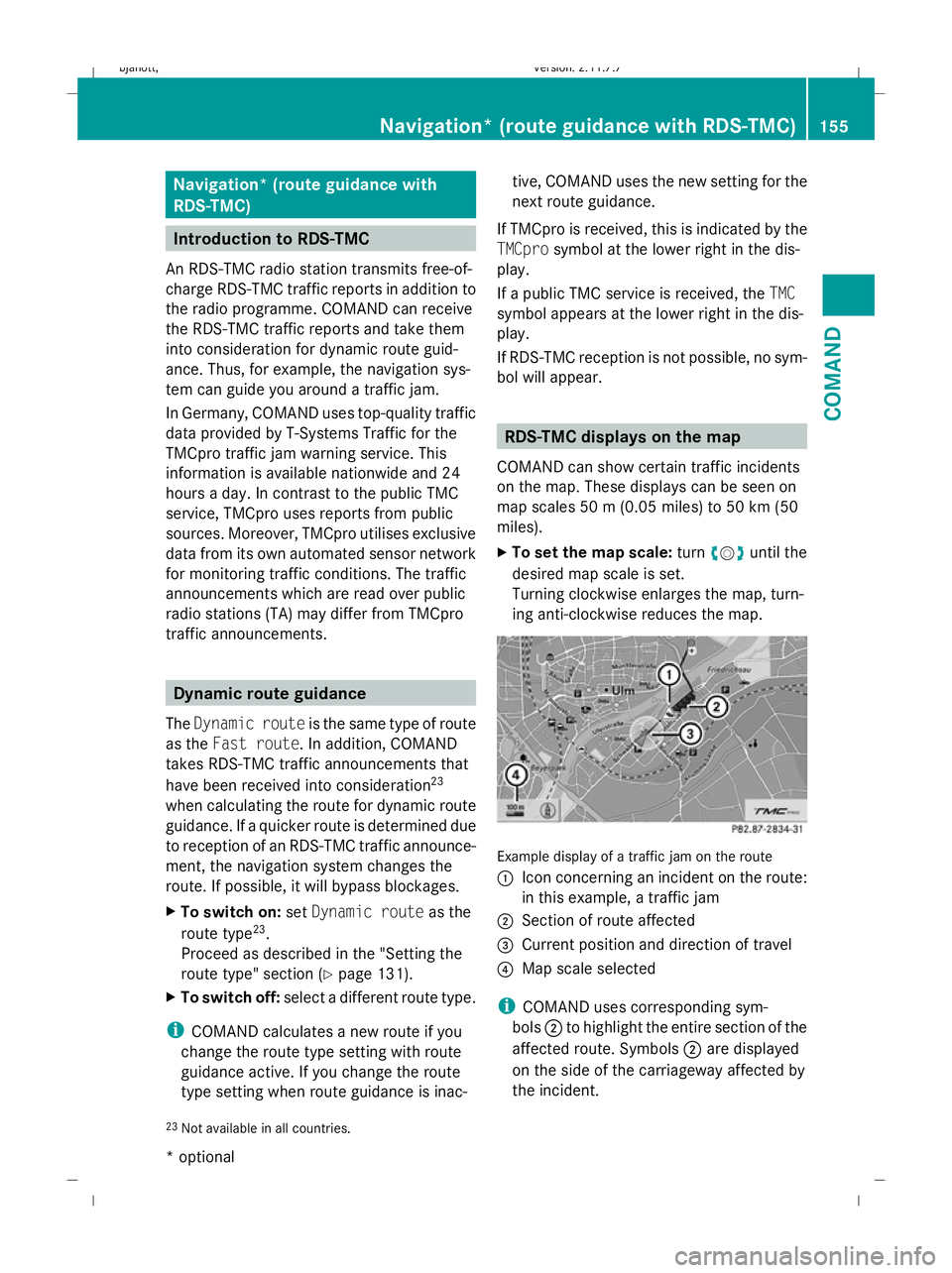
ing anti-clockwise reduces the map. Example display of a traffic jam on the route
:
Icon concerning an incident on the route:
in this example, a traffic jam
; Section of route affected
= Current position and direction of travel
? Map scale selected
i COMAND uses corresponding sym-
bols ;to highlight the entire section of the
affected route. Symbols ;are displayed
on the side of the carriageway affected by
the incident.
23 Not available in all countries. Navigation* (route guidance
with RDS-TMC)155COMAND
* optional
216_AKB; 2; 3, en-GB
bjanott,
Version: 2.11.7.7
2009-02-27T14:54:17+01:00 - Seite 155 Z
Dateiname: 6515230602_buchblock.pdf; erzeugt am 04. Mar 2009 11:15:23; WK
Page 196 of 421
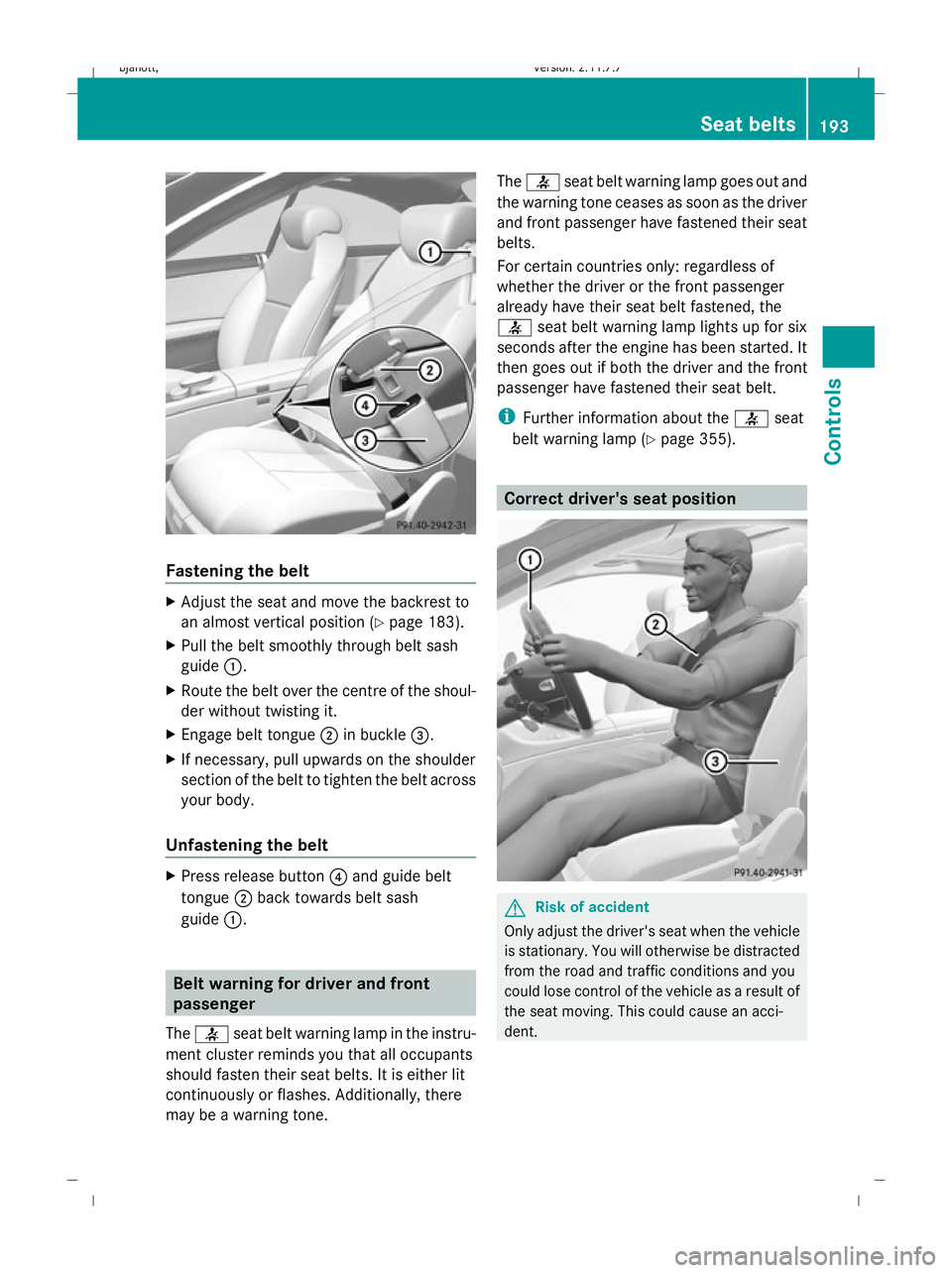
Fastening the belt
X
Adjust the seat and move the backrest to
an almost vertical position (Y page 183).
X Pull the belt smoothly through belt sash
guide :.
X Route the belt over the centre of the shoul-
der without twisting it.
X Engage belt tongue ;in buckle =.
X If necessary, pull upwards on the shoulder
section of the belt to tighten the belt across
your body.
Unfastening the belt X
Press release button ?and guide belt
tongue ;back towards belt sash
guide :. Belt warning for driver and front
passenger
The 7 seat belt warning lamp in the instru-
ment cluster reminds you that all occupants
should fasten their seat belts. It is either lit
continuously or flashes. Additionally, there
may be a warning tone. The
7 seat belt warning lamp goes out and
the warning tone ceases as soon as the driver
and front passenger have fastened their seat
belts.
For certain countries only: regardless of
whether the driver or the front passenger
already have their seat belt fastened, the
7 seat belt warning lamp lights up for six
seconds after the engine has been started. It
then goes out if both the driver and the front
passenger have fastened their seat belt.
i Further information about the 7seat
belt warning lamp (Y page 355). Correct driver's seat position
G
Risk of accident
Only adjust the driver's seat when the vehicle
is stationary. You will otherwise be distracted
from the road and traffic conditions and you
could lose control of the vehicle as a result of
the seat moving. This could cause an acci-
dent. Seat belts
193Controls
216_AKB; 2; 3, en-GB
bjanott, Version: 2.11.7.7 2009-02-27T14:54:17+01:00 - Seite 193 Z
Dateiname: 6515230602_buchblock.pdf; erzeugt am 04. Mar 2009 11:15:43; WK