audio MERCEDES-BENZ CL COUPE 2009 Owner's Manual
[x] Cancel search | Manufacturer: MERCEDES-BENZ, Model Year: 2009, Model line: CL COUPE, Model: MERCEDES-BENZ CL COUPE 2009Pages: 421, PDF Size: 10.78 MB
Page 82 of 421
X
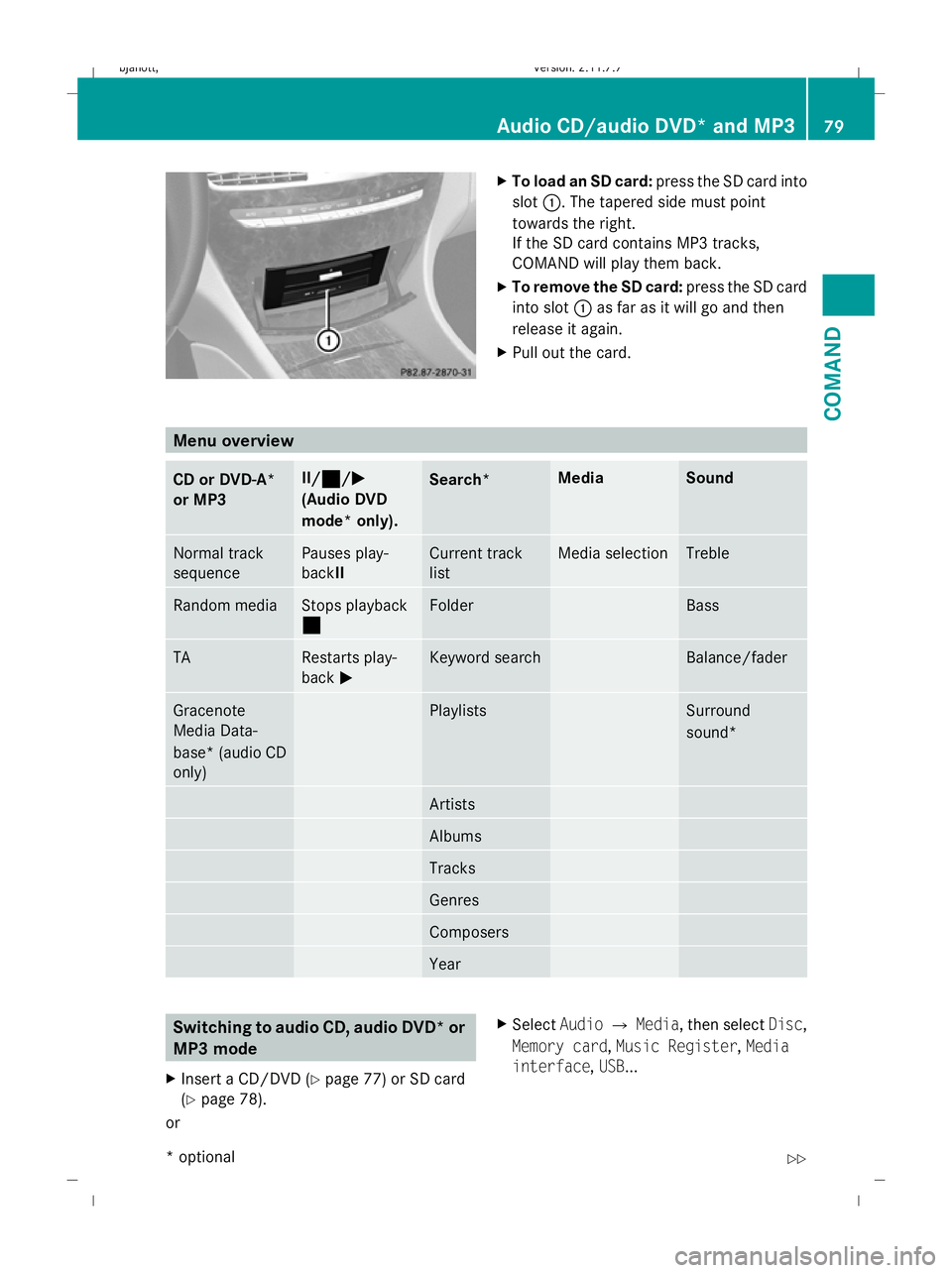
To load an SD card: press the SD card into
slot :. The tapered side must point
towards the right.
If the SD card contains MP3 tracks,
COMAND will play them back.
X To remove the SD card: press the SD card
into slot :as far as it will go and then
release it again.
X Pull out the card. Menu overview
CD or DVD-A*
or MP3 II/¯
¯ /MM
(Audio DVD
mode* only). Search* Media Sound
Normal track
sequence Pauses play-
backII Current track
list Media selection Treble
Random media Stops playback
¯ Folder Bass
TA Restarts play-
back
M Keyword search Balance/fader
Gracenote
Media Data-
base* (audio CD
only) Playlists Surround
sound*
Artists
Albums
Tracks
Genres
Composers
Year
Switching to audio CD, audio DVD* or
MP3 mode
X Insert a CD/DVD ( Ypage 77) or SD card
(Y page 78).
or X
Select AudioQMedia, then select Disc,
Memory card, Music Register, Media
interface ,USB ... Audio CD/audio DVD* and MP3
79COMAND
* optional
216_AKB; 2; 3, en-GB
bjanott,
Version: 2.11.7.7 2009-02-27T14:54:17+01:00 - Seite 79 Z
Dateiname: 6515230602_buchblock.pdf; erzeugt am 04. Mar 2009 11:14:59; WK
Page 83 of 421
or
X
Press the Rfunction button once or
twice.
i The R function button takes you
directly to the previously set disc mode
(audio CD, audio DVD*, MP3 CD or video
DVD). The number of times you have to
press the function button depends on the
previously set mode.
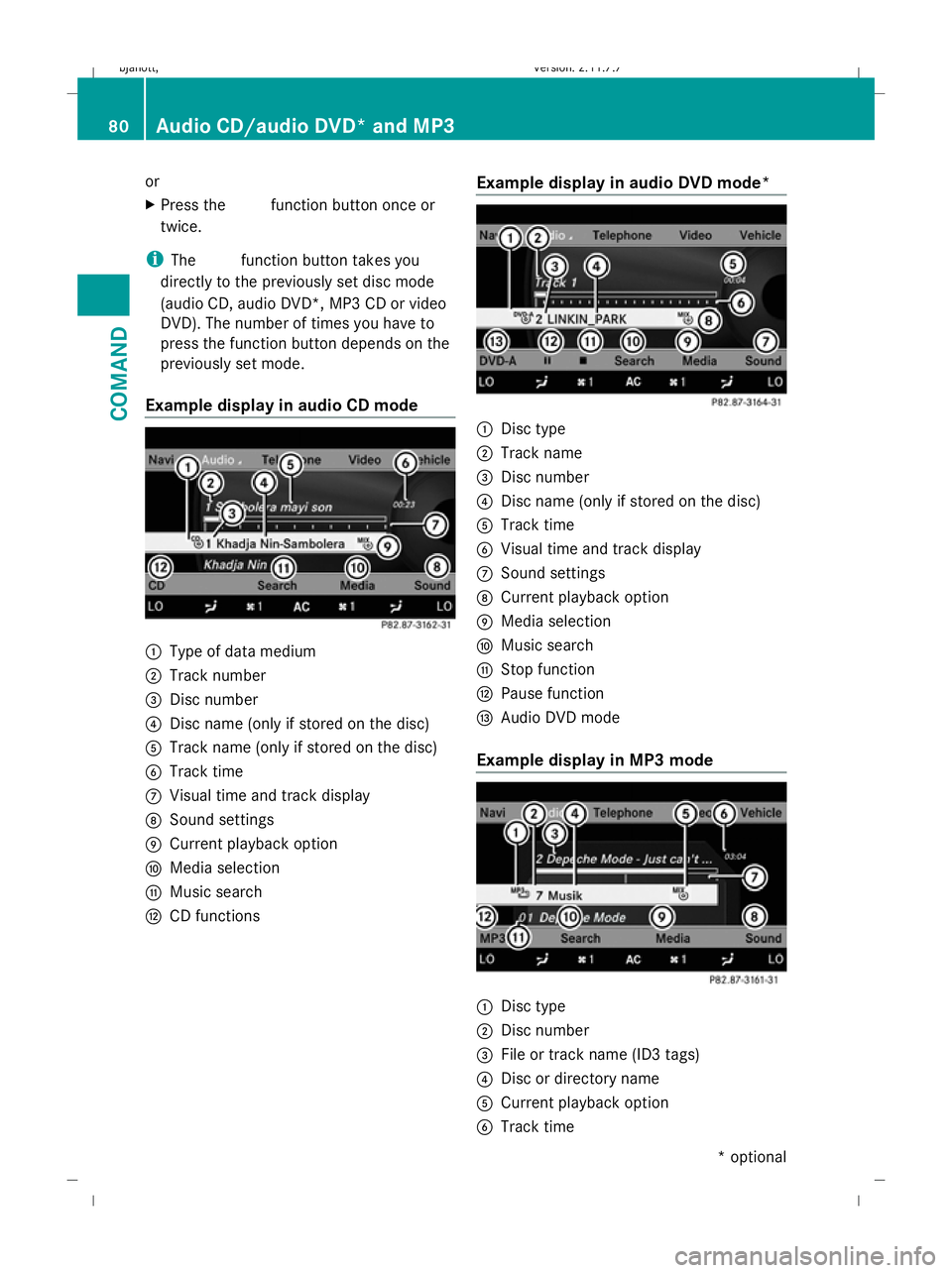
Example display in audio CD mode :
Type of data medium
; Track number
= Disc number
? Disc name (only if stored on the disc)
A Track name (only if stored on the disc)
B Track time
C Visual time and track display
D Sound settings
E Current playback option
F Media selection
G Music search
H CD functions Example display in audio DVD mode* :
Disc type
; Track name
= Disc number
? Disc name (only if stored on the disc)
A Track time
B Visual time and track display
C Sound settings
D Current playback option
E Media selection
F Music search
G Stop function
H Pause function
I Audio DVD mode
Example display in MP3 mode :
Disc type
; Disc number
= File or track name (ID3 tags)
? Disc or directory name
A Current playback option
B Track time 80
Audio CD/audio DVD* and MP3COMAND
* optional
216_AKB; 2; 3, en-GB
bjanott,V
ersion: 2.11.7.7
2009-02-27T14:54:17+01:00 - Seite 80
Dateiname: 6515230602_buchblock.pdf; erzeugt am 04. Mar 2009 11:14:59; WK
Page 84 of 421
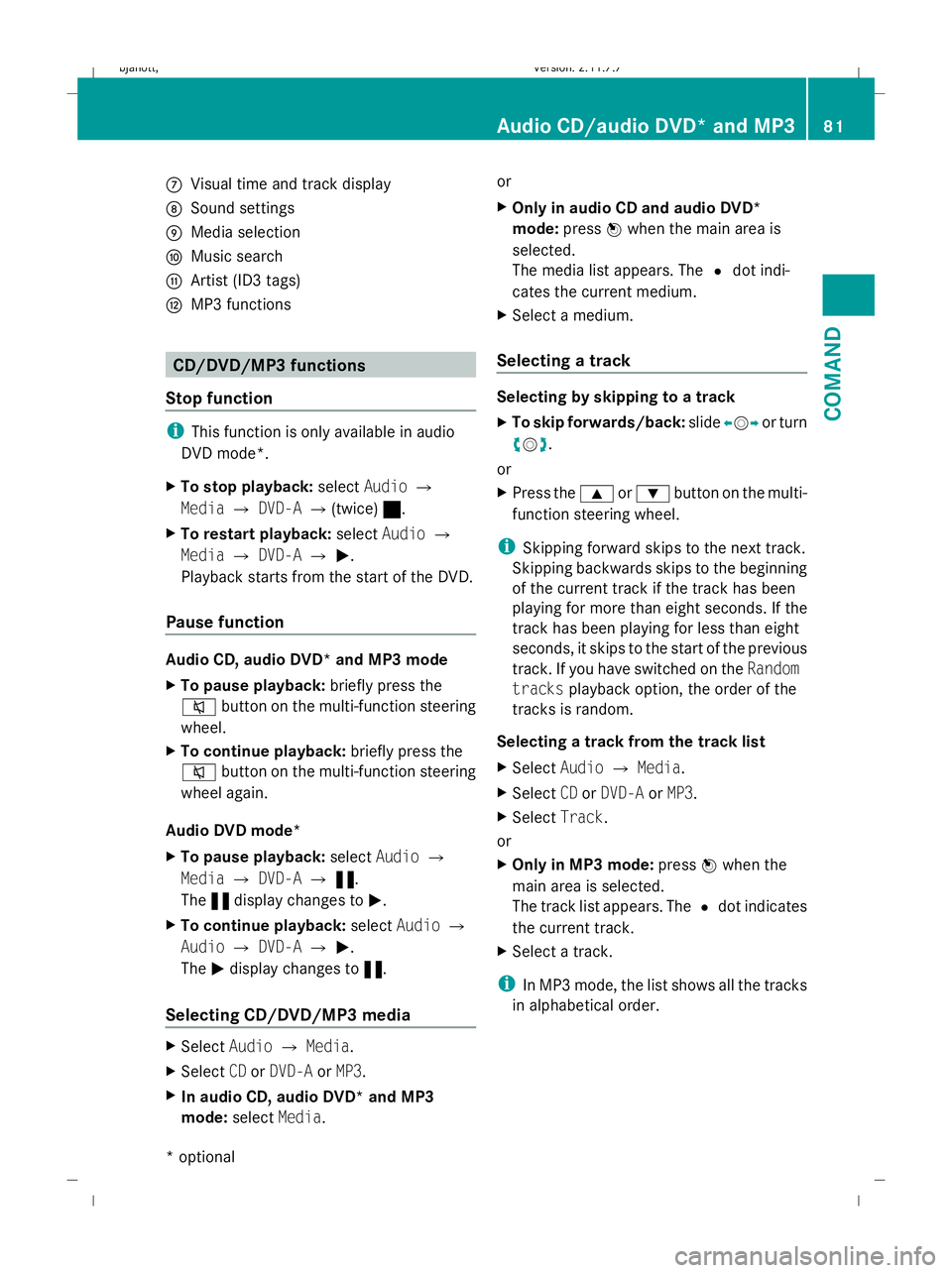
C
Visual time and track display
D Sound settings
E Media selection
F Music search
G Artist (ID3 tags)
H MP3 functions CD/DVD/MP3 functions
Stop function i
This function is only available in audio
DVD mode*.
X To stop playback: selectAudio Q
Media QDVD-A Q(twice) ±.
X To restart playback: selectAudio Q
Media QDVD-A QM.
Playback starts from the start of the DVD.
Pause function Audio CD, audio DVD* and MP3 mode
X
To pause playback: briefly press the
8 button on the multi-function steering
wheel.
X To continue playback: briefly press the
8 button on the multi-function steering
wheel again.
Audio DVD mode*
X To pause playback: selectAudio Q
Media QDVD-A Q«.
The «display changes to M.
X To continue playback: selectAudio Q
Audio QDVD-A QM.
The Mdisplay changes to «.
Selecting CD/DVD/MP3 media X
Select AudioQMedia.
X Select CDorDVD-A orMP3.
X In audio CD, audio DVD* and MP3
mode: selectMedia. or
X
Only in audio CD and audio DVD*
mode: pressWwhen the main area is
selected.
The media list appears. The #dot indi-
cates the current medium.
X Select a medium.
Selecting a track Selecting by skipping to a track
X
To skip forwards/back: slideXVY or turn
cVd.
or
X Press the 9or: button on the multi-
function steering wheel.
i Skipping forward skips to the next track.
Skipping backwards skips to the beginning
of the current track if the track has been
playing for more than eight seconds. If the
track has been playing for less than eight
seconds, it skips to the start of the previous
track. If you have switched on the Random
tracks playback option, the order of the
tracks is random.
Selecting a track from the track list
X Select AudioQMedia.
X Select CDorDVD-A orMP3.
X Select Track.
or
X Only in MP3 mode: pressWwhen the
main area is selected.
The track list appears. The #dot indicates
the current track.
X Select a track.
i In MP3 mode, the list shows all the tracks
in alphabetical order. Audio CD/audio DVD* and MP3
81COMAND
* optional
216_AKB; 2; 3, en-GB
bjanott,
Version: 2.11.7.7 2009-02-27T14:54:17+01:00 - Seite 81 Z
Dateiname: 6515230602_buchblock.pdf; erzeugt am 04. Mar 2009 11:14:59; WK
Page 85 of 421
Fast forward/rewind
X
Select the main area.
X Slide and hold XVYuntil the desired posi-
tion has been reached.
Music search* You can use the following selection criteria to
search music:
R Current track list
R Folder
R Keyword search
R Playlist
R Artists
R Albums
R Tracks
R Genres
R Composers
R Year
X Select AudioQSearch .
The selection criteria list appears. Gracenote
®
Media Database*
i This function is only available in audio CD
mode and during operation with the instal-
led hard disk.
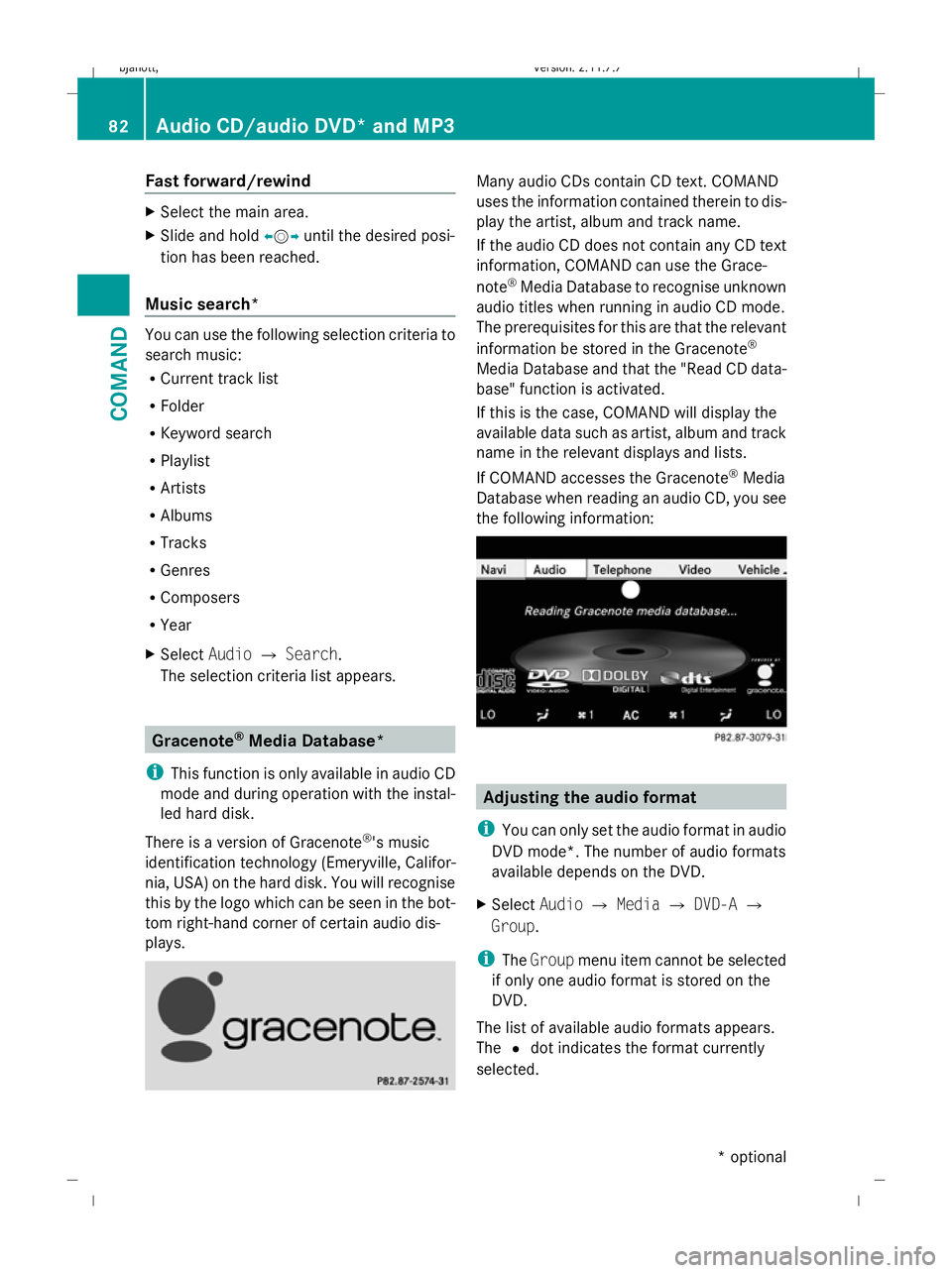
There is a version of Gracenote ®
's music
identification technology (Emeryville, Califor-
nia, USA) on the hard disk. You will recognise
this by the logo which can be seen in the bot-
tom right-hand corner of certain audio dis-
plays. Many audio CDs contain CD text. COMAND
uses the information contained therein to dis-
play the artist, album and track name.
If the audio CD does not contain any CD text
information, COMAND can use the Grace-
note
®
Media Database to recognise unknown
audio titles when running in audio CD mode.
The prerequisites for this are that the relevant
information be stored in the Gracenote ®
Media Database and that the "Read CD data-
base" function is activated.
If this is the case, COMAND will display the
available data such as artist, album and track
name in the relevant displays and lists.
If COMAND accesses the Gracenote ®
Media
Database when reading an audio CD, you see
the following information: Adjusting the audio format
i You can only set the audio format in audio
DVD mode*. The number of audio formats
available depends on the DVD.
X Select AudioQMedia QDVD-A Q
Group.
i The Group menu item cannot be selected
if only one audio format is stored on the
DVD.
The list of available audio formats appears.
The #dot indicates the format currently
selected. 82
Audio CD/audio DVD* and MP3COMAND
* optional
216_AKB; 2; 3, en-GB
bjanott
,V ersion: 2.11.7.7
2009-02-27T14:54:17+01:00 - Seite 82
Dateiname: 6515230602_buchblock.pdf; erzeugt am 04. Mar 2009 11:15:00; WK
Page 86 of 421
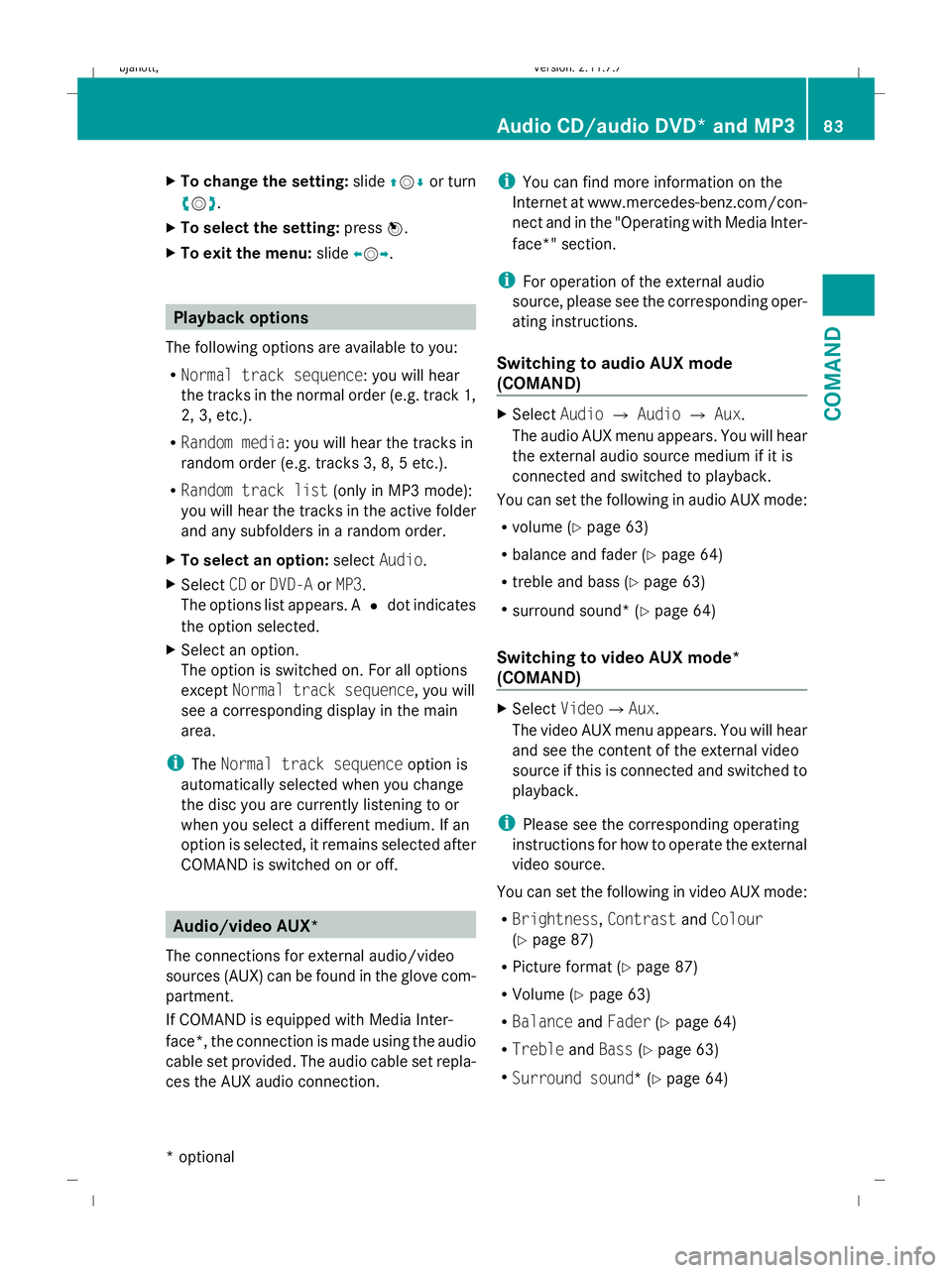
X
To change the setting: slideZVÆ or turn
cVd .
X To select the setting: pressW.
X To exit the menu: slideXVY. Playback options
The following options are available to you:
R Normal track sequence: you will hear
the tracks in the normal order (e.g. track 1,
2, 3, etc.).
R Random media: you will hear the tracks in
random order (e.g. tracks 3, 8, 5 etc.).
R Random track list (only in MP3 mode):
you will hear the tracks in the active folder
and any subfolders in a random order.
X To select an option: selectAudio.
X Select CDorDVD-A orMP3 .
The options list appears. A #dot indicates
the option selected.
X Select an option.
The option is switched on. For all options
except Normal track sequence, you will
see a corresponding display in the main
area.
i The Normal track sequence option is
automatically selected when you change
the disc you are currently listening to or
when you select a different medium. If an
option is selected, it remains selected after
COMAND is switched on or off. Audio/video AUX*
The connections for external audio/video
sources (AUX) can be found in the glove com-
partment.
If COMAND is equipped with Media Inter-
face*, the connection is made using the audio
cable set provided. The audio cable set repla-
ces the AUX audio connection. i
You can find more information on the
Internet at www.mercedes-benz.com/con-
nect and in the "Operating with Media Inter-
face*" section.
i For operation of the external audio
source, please see the corresponding oper-
ating instructions.
Switching to audio AUX mode
(COMAND) X
Select AudioQAudio QAux.
The audio AUX menu appears. You will hear
the external audio source medium if it is
connected and switched to playback.
You can set the following in audio AUX mode:
R volume (Y page 63)
R balance and fader (Y page 64)
R treble and bass (Y page 63)
R surround sound* (Y page 64)
Switching to video AUX mode*
(COMAND) X
Select VideoQ Aux.
The video AUX menu appears. You will hear
and see the content of the external video
source if this is connected and switched to
playback.
i Please see the corresponding operating
instructions for how to operate the external
video source.
You can set the following in video AUX mode:
R Brightness, ContrastandColour
(Y page 87)
R Picture format (Y page 87)
R Volume (Y page 63)
R Balance andFader (Ypage 64)
R Treble andBass (Ypage 63)
R Surround sound* (Y page 64) Audio CD/audio DVD* and MP3
83COMAND
* optional
216_AKB; 2; 3, en-GB
bjanott,
Version: 2.11.7.7 2009-02-27T14:54:17+01:00 - Seite 83 Z
Dateiname: 6515230602_buchblock.pdf; erzeugt am 04. Mar 2009 11:15:00; WK
Page 87 of 421
Video DVD functions
Automatic picture shutoff
The picture automatically switches off on the
driver's side if the vehicle is travelling faster
than approximately 6 km/h when in video
DVD mode. The following message appears
in the display:
As soon as the vehicle speed drops below
about 3 km/h, the picture switches back on
again. Notes about handling DVDs
There may be playback problems when play-
ing copied discs. There are a large variety of
discs, DVD authoring software, disc writing
software and writers available. This variety
means that Mercedes-Benz cannot guarantee
that the system will be able to play discs that
you have copied yourself.
! Do not affix stickers or labels to the discs,
as they could peel off and damage
COMAND. Stickers can also cause the disc
to bend, which can result in read errors and
disc recognition problems.
COMAND is designed to hold discs which
comply with the EN 60908 standard. There-
fore, you can only use discs with a maxi-
mum thickness of 1.3 mm. If you insert
thicker discs, e.g. those that contain data
on both sides (DVD on one side and audio
data on the other), they cannot be ejected
and can damage COMAND.
Do not use discs with a diameter of 8 cm,
even with an adapter. Only use round discs
with a diameter of 12 cm.
R Only hold discs by the edge.
R Handle discs carefully to prevent reading
errors.
R Avoid getting scratches, fingerprints and
dust on discs.
R Clean discs from time to time with a com-
mercially available cleaning cloth. Do not wipe them with a circular motion, but only
in straight lines from the centre outwards.
R To label discs, only use a pen designed for
such a purpose.
R Place discs back in their cases after use.
R Protect discs from heat and direct sunlight. DVD playback conditions
It is possible to buy video DVDs which do not
conform to the current standard. Such DVDs
may have picture, sound or other playback
problems.
COMAND can play back video DVDs pro-
duced according to the following standards:
R region code 2 or region code 0
R PAL or NTSC TV standard
You will generally find the relevant details
either on the DVD itself or on the DVD case.
COMAND is set to region code 2 at the fac-
tory. This setting can be changed a maximum
of five times by a Mercedes-Benz Service
Centre. This will allow you to play video DVDs
with a different region code, provided that
they are produced in accordance with the PAL
or NTSC TV standard. Function restrictions
Depending on the DVD, it is possible that cer-
tain functions or actions will be temporarily
blocked or may not function at all. As soon as
you try to activate these functions or actions,
you will see the Ksymbol in the display. Inserting and ejecting DVDs
X Proceed as described in the "Inserting CDs
and DVDs" section ( Ypage 77). 84
Video DVD functionsCOMAND
216_AKB; 2; 3, en-GB
bjanott,
Version: 2.11.7.7 2009-02-27T14:54:17+01:00 - Seite 84
Dateiname: 6515230602_buchblock.pdf; erzeugt am 04. Mar 2009 11:15:00; WK
Page 88 of 421
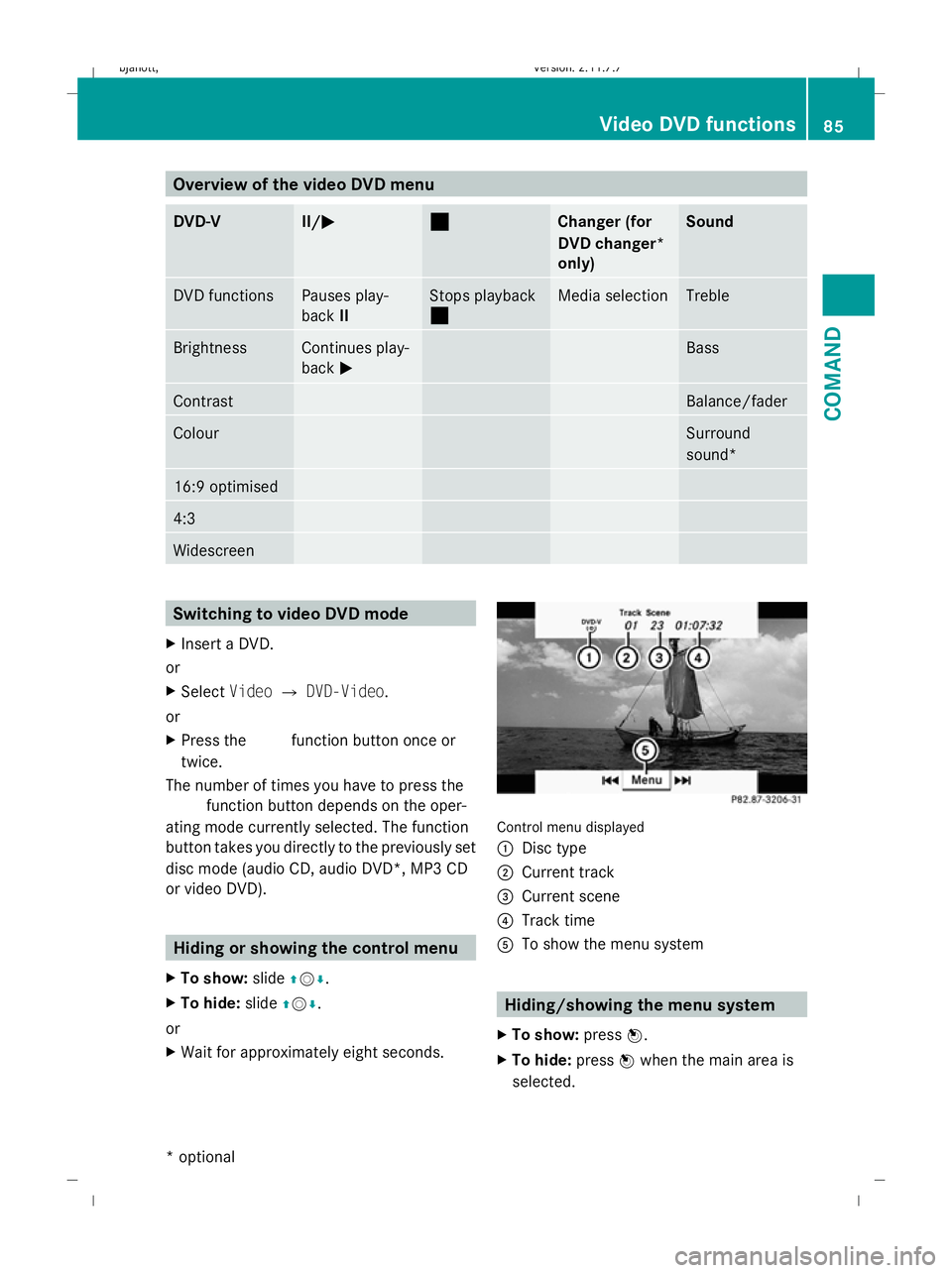
Overview of the video DVD menu
DVD-V II/M
M ¯
¯ Changer (for
DVD changer*
only) Sound
DVD functions Pauses play-
back
II Stops playback
¯ Media selection Treble
Brightness Continues play-
back
M Bass
Contrast Balance/fader
Colour Surround
sound*
16:9 optimised
4:3
Widescreen
Switching to video DVD mode
X Insert a DVD.
or
X Select VideoQDVD-Video.
or
X Press the Rfunction button once or
twice.
The number of times you have to press the
R function button depends on the oper-
ating mode currently selected. The function
button takes you directly to the previously set
disc mode (audio CD, audio DVD*, MP3 CD
or video DVD). Hiding or showing the control menu
X To show: slideZVÆ.
X To hide: slideZVÆ.
or
X Wait for approximately eight seconds. Control menu displayed
:
Disc type
; Current track
= Current scene
? Track time
A To show the menu system Hiding/showing the menu system
X To show: pressW.
X To hide: pressWwhen the main area is
selected. Video DVD functions
85COMAND
* optional
216_AKB; 2; 3, en-GB
bjanott,V
ersion: 2.11.7.7
2009-02-27T14:54:17+01:00 - Seite 85 Z
Dateiname: 6515230602_buchblock.pdf; erzeugt am 04. Mar 2009 11:15:01; WK
Page 91 of 421
X
To stop a film: selectStop:from the
menu.
X To skip to the end of a scene: select
F ;from the menu.
X To skip to the beginning of a scene:
select =E from the menu.
i Depending on the DVD, the ;and =
menu items may not function at all or may
not function at certain points in the DVD
menu.
Moving up one level in the DVD menu X
Press the %button.
or
X Select the corresponding menu item in the
DVD menu.
or
X Select any menu item from the DVD menu.
X Select Go upfrom the menu.
i Depending on the DVD, the Go upmenu
item or the back button may not function
in general or may not function at certain
points in the DVD menu.
Going back to the movie X
Press the %button repeatedly until you
see the film.
or
X Select the corresponding menu item in the
DVD menu.
or
X Select any menu item from the DVD menu.
X Select Back (to the movie) from the
menu.
i Depending on the DVD, the Back (to
the movie) menu item or the back button
may not have a function. Setting the language and audio for-
mat
This function is not available on all DVDs. If it
is available, you can set the DVD menu lan-
guage, the audio language or the audio for-
mat. The number of settings is determined by
the DVD content. It is possible that the set-
tings may also be accessed in the DVD menu
(Y page 87).
X Select VideoQDVD-Video.
X Display the menu system if necessary
(Y page 85).
X Select DVD-VQDVD functions.
X Select Menu language orAudio lan‐
guage.
Both of these will call up a menu. The #
dot in front of a list entry indicates the cur-
rently selected language.
X To change the setting: slideZVÆ or turn
cVd until the desired setting is reached.
X To save the setting: pressW.
X To exit the menu: slideXVY. Subtitles and camera angle
These functions are not available on all DVDs.
The number of subtitle languages and camera
angles available depends on the content of
the DVD. It is possible that the settings may
also be accessed in the DVD menu
(Y page 87).
X Select VideoQDVD-Video.
X Display the menu system if necessary
(Y page 85).
X Select DVD-VQDVD functions.
X Select Subtitles orCamera angle.
Both of these will call up a menu. The #
dot in front of a list entry indicates the cur-
rent setting.
X To change the setting: slideZVÆ or turn
cVd until the desired setting is reached. 88
Video DVD functionsCOMAND
216_AKB; 2; 3, en-GB
bjanott,
Version: 2.11.7.7 2009-02-27T14:54:17+01:00 - Seite 88
Dateiname: 6515230602_buchblock.pdf; erzeugt am 04. Mar 2009 11:15:02; WK
Page 92 of 421
X
To save the setting: pressW.
X To exit the menu: slideXVY. Interactive content
DVDs can contain interactive content (e.g. a
video game). In a video game, you may be able
to influence events by selecting and trigger-
ing actions. The type and number of actions
depend on the DVD.
X To select an action: slideZVÆ orXVY .
X To trigger an action: pressW. TV*
General notes
The TV tuner is designed to receive analogue
terrestrial TV channels (all standards) and
digital TV channels conforming to the DVB-T
standard 8
.
Automatic picture shutoff If the vehicle is travelling faster than approx-
imately 6 km/h, the picture and teletext in TV
mode on the driver's side automatically
switch off. The following message appears in
the display:
In order not to distract
the driver, the picture is faded out
while the vehicle is in motion . As
soon as the vehicle speed drops below about
3 km/h, the picture switches back on again.
Switching off the picture and sound The constantly changing reception conditions
while the vehicle is in motion can interrupt the
signal. If the reception is too poor, COMAND
may switch off the sound and freeze or hide
the picture. In this case, you will see the
respective symbol in the display. TV menu overview
The following menus are available:
R TV Q Station, Save station, Channel
input, Brightness, Contrast, Colour, Auto,
16:9 optimised, 4:3, Widescreen, Channel
fix, TV standard, Audio 1, Audio 2
R Memory QAutostore, Channel preset list
R Info QInformation on current programme
(digital stations only)
R Teletext QSwitch on teletext
R Sound QTrebles, basses, balance/fader,
surround sound* Switching to TV mode
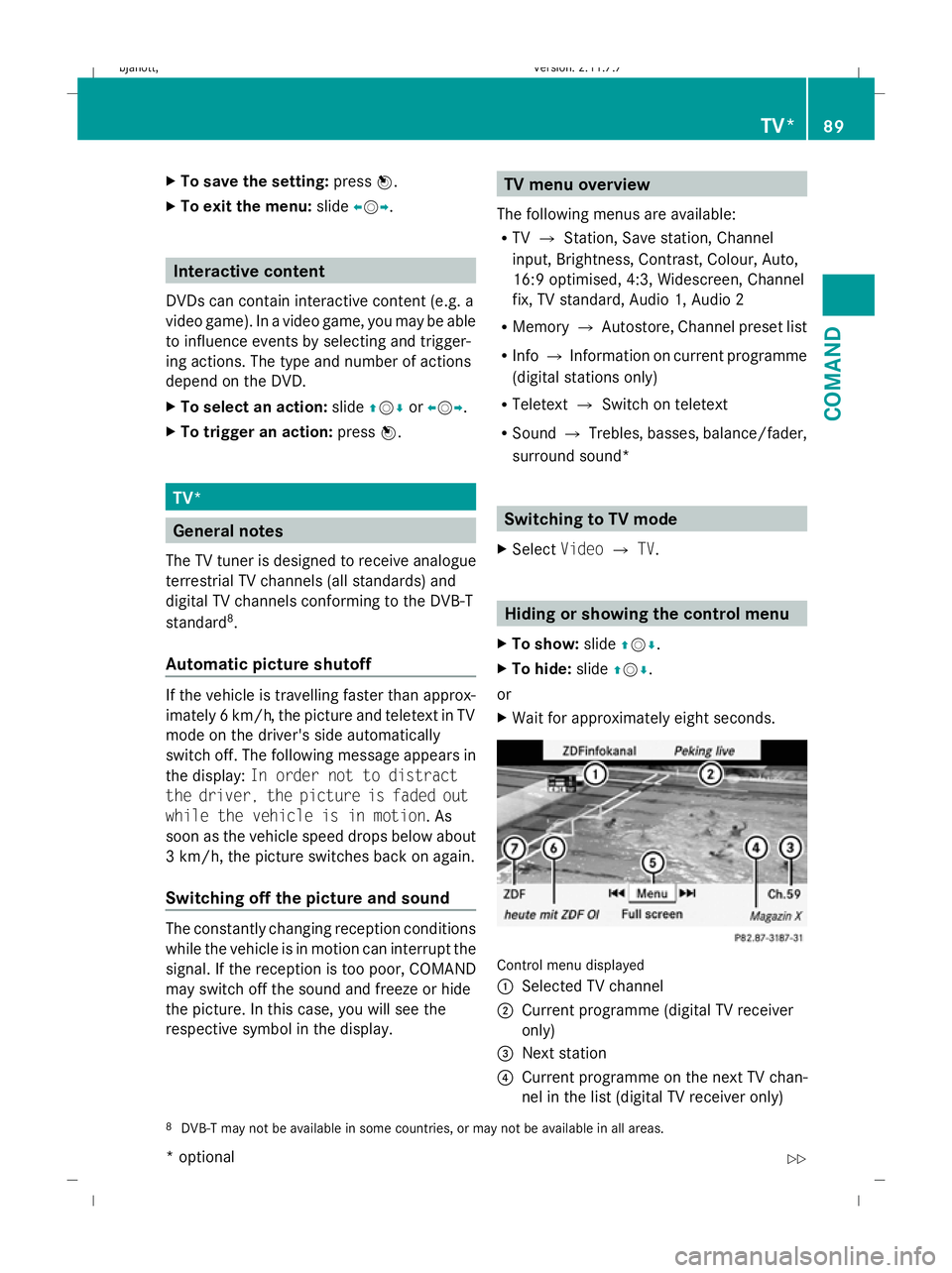
X Select VideoQTV. Hiding or showing the control menu
X To show: slideZVÆ.
X To hide: slideZVÆ.
or
X Wait for approximately eight seconds. Control menu displayed
:
Selected TV channel
; Current programme (digital TV receiver
only)
= Next station
? Current programme on the next TV chan-
nel in the list (digital TV receiver only)
8 DVB-T may not be available in some countries, or may not be available in all areas. TV*
89COMAND
* optional
216_AKB; 2; 3, en-GB
bjanott,
Version: 2.11.7.7
2009-02-27T14:54:17+01:00 - Seite 89 Z
Dateiname: 6515230602_buchblock.pdf; erzeugt am 04. Mar 2009 11:15:02; WK
Page 98 of 421
Switching to the MUSIC REGISTER
From another main mode X
Select Audio.
The system changes to the last active audio
mode.
X Select Audioagain.
The Audio menu appears.
X Select MUSIC REGISTER.
i IfMusic Register was the last mode,
you only need to select Audio.
From audio mode X
Select Audio.
The Audio menu appears.
X Select MUSIC REGISTER.
MUSIC REGISTER is loaded. The MUSIC
REGISTER display appears.
There are no music files:
You see a message to this effect.
X You first need to copy music files to the
MUSIC REGISTER (Y page 95).
There are music files:
You hear the first track in the first folder, or
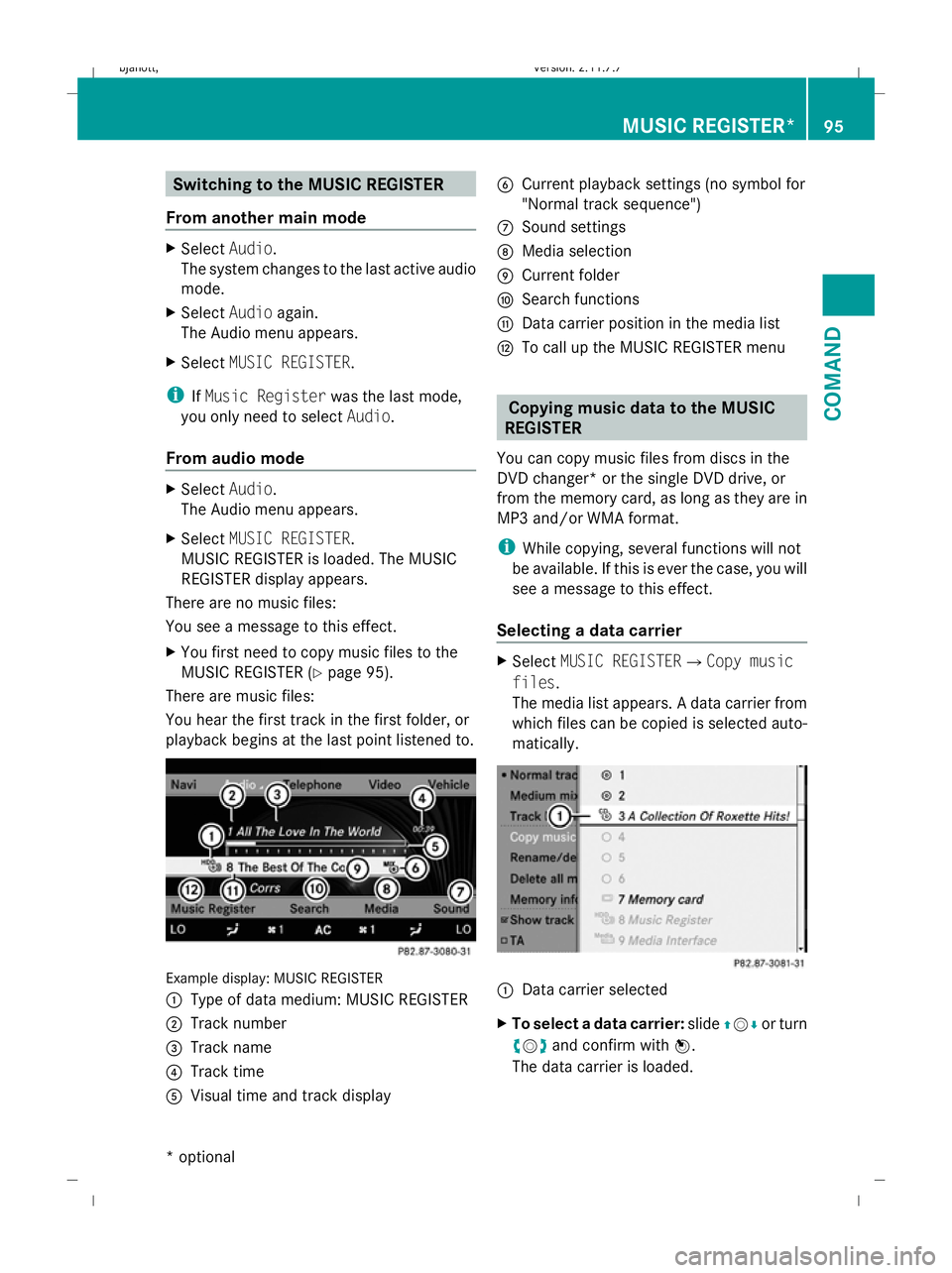
playback begins at the last point listened to. Example display: MUSIC REGISTER
:
Type of data medium: MUSIC REGISTER
; Track number
= Track name
? Track time
A Visual time and track display B
Current playback settings (no symbol for
"Normal track sequence")
C Sound settings
D Media selection
E Current folder
F Search functions
G Data carrier position in the media list
H To call up the MUSIC REGISTER menu Copying music data to the MUSIC
REGISTER
You can copy music files from discs in the
DVD changer* or the single DVD drive, or
from the memory card, as long as they are in
MP3 and/or WMA format.
i While copying, several functions will not
be available. If this is ever the case, you will
see a message to this effect.
Selecting a data carrier X
Select MUSIC REGISTERQCopy music
files.
The media list appears. A data carrier from
which files can be copied is selected auto-
matically. :
Data carrier selected
X To select a data carrier: slideZVÆ or turn
cVd and confirm with W.
The data carrier is loaded. MUSIC REGISTER*
95COMAND
* optional
216_AKB; 2; 3, en-GB
bjanott,
Version: 2.11.7.7 2009-02-27T14:54:17+01:00 - Seite 95 Z
Dateiname: 6515230602_buchblock.pdf; erzeugt am 04. Mar 2009 11:15:03; WK