lock MERCEDES-BENZ CL COUPE 2009 Owners Manual
[x] Cancel search | Manufacturer: MERCEDES-BENZ, Model Year: 2009, Model line: CL COUPE, Model: MERCEDES-BENZ CL COUPE 2009Pages: 421, PDF Size: 10.78 MB
Page 364 of 421
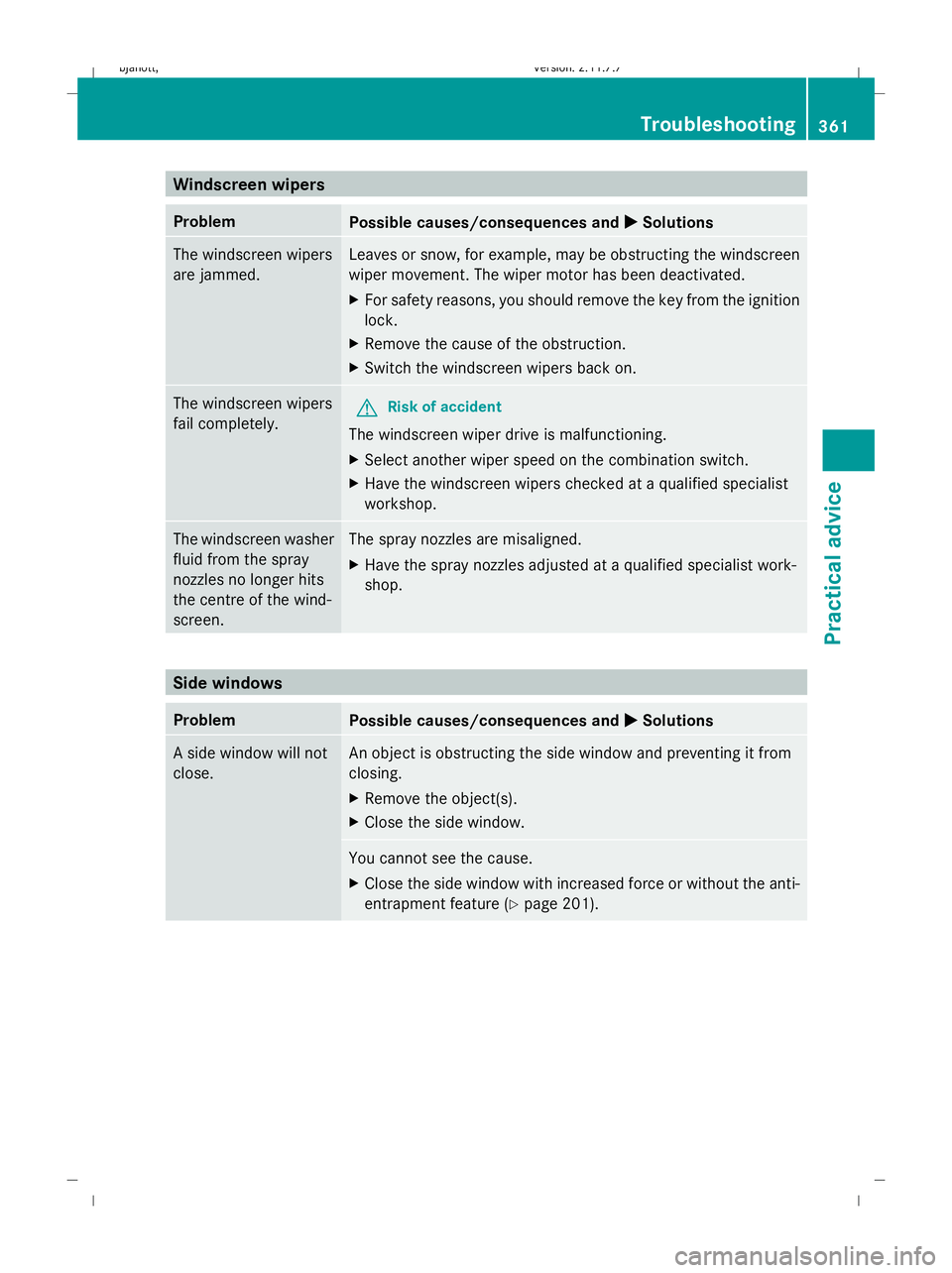
Windscreen wipers
Problem
Possible causes/consequences and
X
X Solutions The windscreen wipers
are jammed. Leaves or snow, for example, may be obstructing the windscreen
wiper movement. The wiper motor has been deactivated.
X For safety reasons, you should remove the key from the ignition
lock.
X Remove the cause of the obstruction.
X Switch the windscreen wipers back on. The windscreen wipers
fail completely.
G
Risk of accident
The windscreen wiper drive is malfunctioning.
X Select another wiper speed on the combination switch.
X Have the windscreen wipers checked at a qualified specialist
workshop. The windscreen washer
fluid from the spray
nozzles no longer hits
the centre of the wind-
screen. The spray nozzles are misaligned.
X
Have the spray nozzles adjusted at a qualified specialist work-
shop. Side windows
Problem
Possible causes/consequences and
X
X Solutions A side window will not
close. An object is obstructing the side window and preventing it from
closing.
X
Remove the object(s).
X Close the side window. You cannot see the cause.
X
Close the side window with increased force or without the anti-
entrapment feature (Y page 201). Troubleshooting
361Practical advice
216_AKB; 2; 3, en-GB
bjanott, Version: 2.11.7.7 2009-02-27T14:54:17+01:00 - Seite 361 Z
Dateiname: 6515230602_buchblock.pdf; erzeugt am 04. Mar 2009 11:16:42; WK
Page 365 of 421
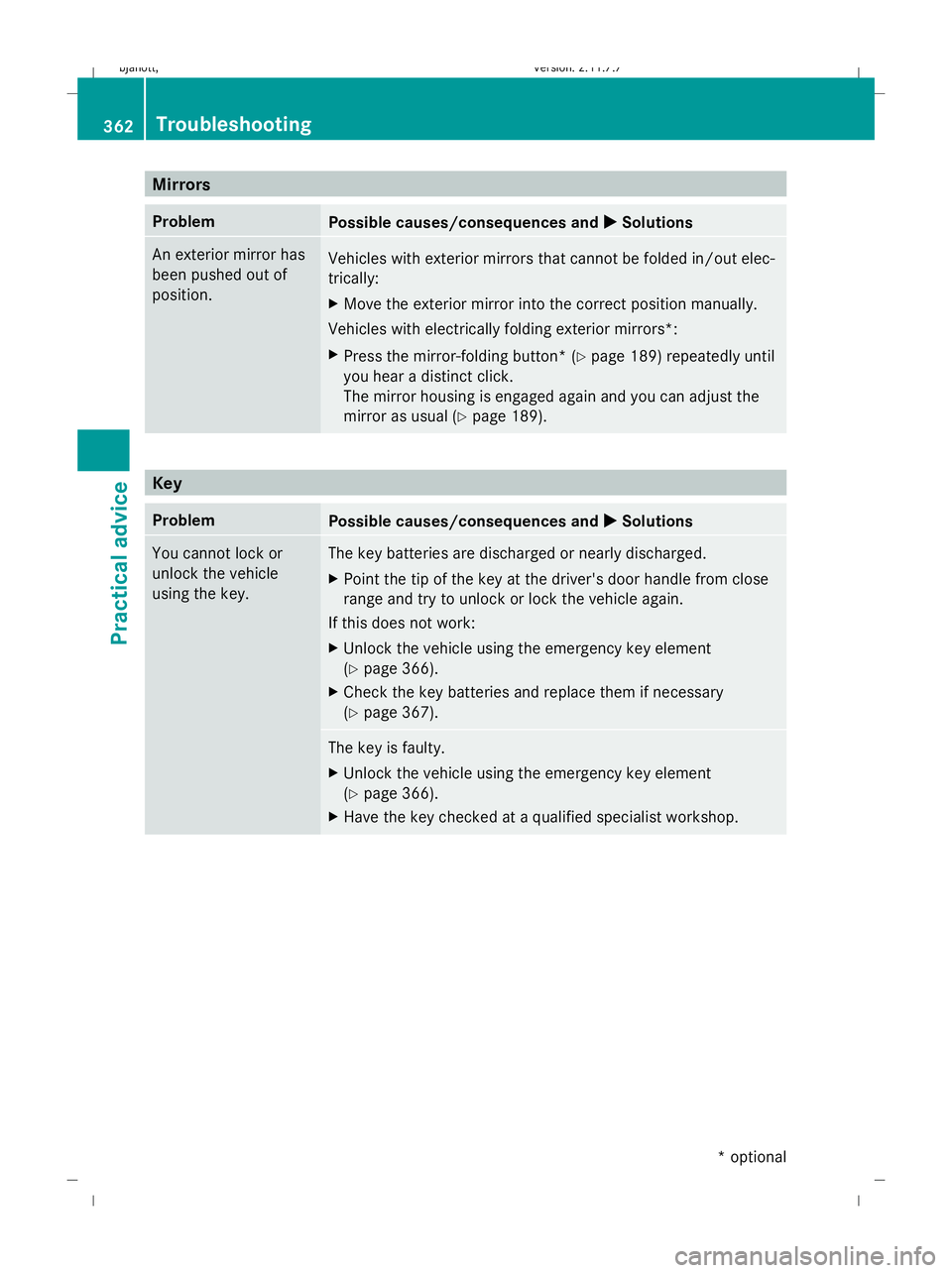
Mirrors
Problem
Possible causes/consequences and
X XSolutions An exterior mirror has
been pushed out of
position.
Vehicles with exterior mirrors that cannot be folded in/out elec-
trically:
X
Move the exterior mirror into the correct position manually.
Vehicles with electrically folding exterior mirrors*:
X Press the mirror-folding button* (Y page 189) repeatedly until
you hear a distinct click.
The mirror housing is engaged again and you can adjust the
mirror as usual (Y page 189). Key
Problem
Possible causes/consequences and
X XSolutions You cannot lock or
unlock the vehicle
using the key. The key batteries are discharged or nearly discharged.
X
Point the tip of the key at the driver's door handle from close
range and try to unlock or lock the vehicle again.
If this does not work:
X Unlock the vehicle using the emergency key element
(Y page 366).
X Check the key batteries and replace them if necessary
(Y page 367). The key is faulty.
X
Unlock the vehicle using the emergency key element
(Y page 366).
X Have the key checked at a qualified specialist workshop. 362
TroubleshootingPractical advice
* optional
216_AKB; 2; 3, en-GB
bjanott,
Version: 2.11.7.7 2009-02-27T14:54:17+01:00 - Seite 362
Dateiname: 6515230602_buchblock.pdf; erzeugt am 04. Mar 2009 11:16:42; WK
Page 366 of 421
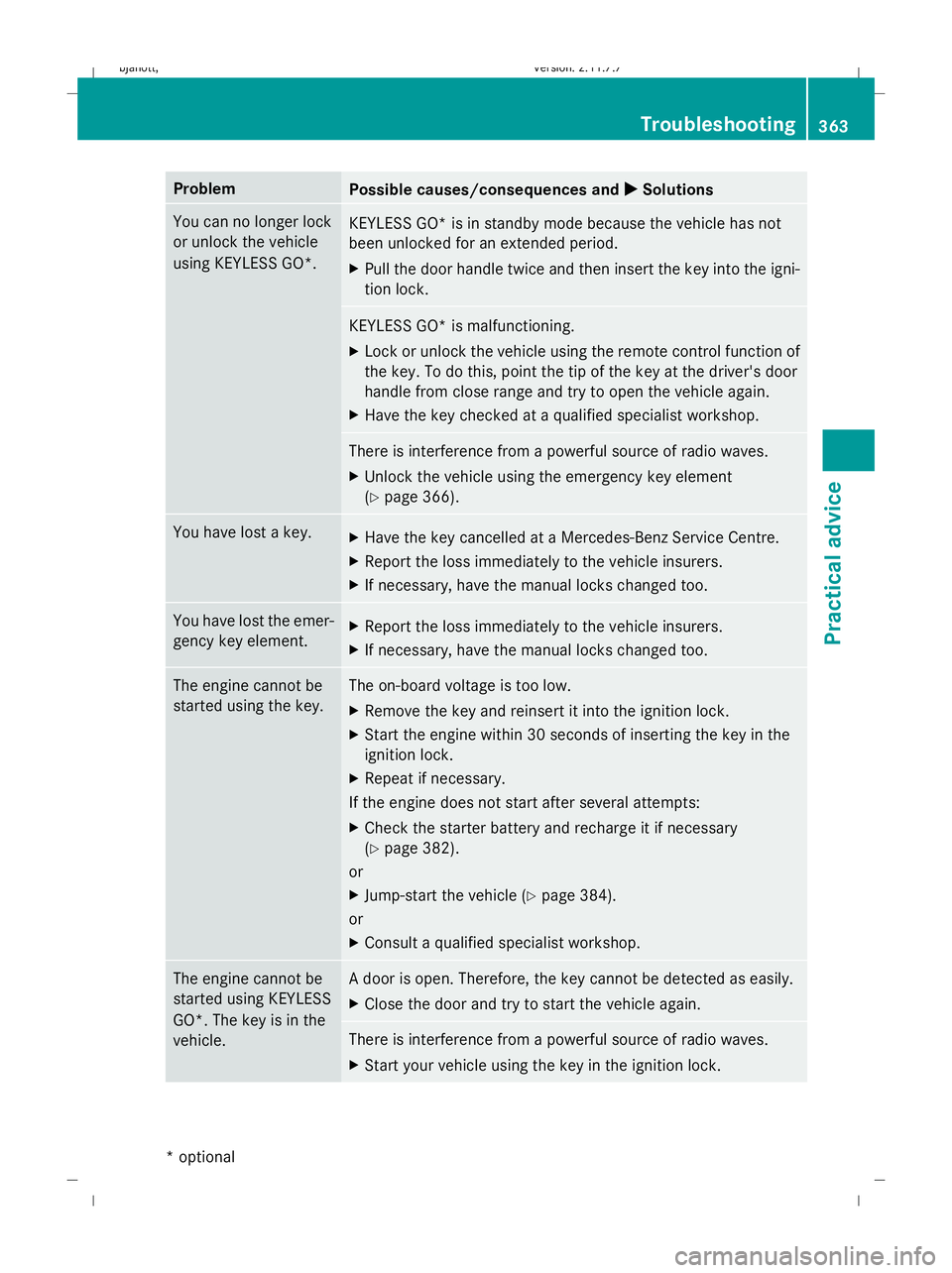
Problem
Possible causes/consequences and
X
X Solutions You can no longer lock
or unlock the vehicle
using KEYLESS GO*.
KEYLESS GO* is in standby mode because the vehicle has not
been unlocked for an extended period.
X
Pull the door handle twice and then insert the key into the igni-
tion lock. KEYLESS GO* is malfunctioning.
X
Lock or unlock the vehicle using the remote control function of
the key. To do this, point the tip of the key at the driver's door
handle from close range and try to open the vehicle again.
X Have the key checked at a qualified specialist workshop. There is interference from a powerful source of radio waves.
X
Unlock the vehicle using the emergency key element
(Y page 366). You have lost a key.
X
Have the key cancelled at a Mercedes-Benz Service Centre.
X Report the loss immediately to the vehicle insurers.
X If necessary, have the manual locks changed too. You have lost the emer-
gency key element.
X
Report the loss immediately to the vehicle insurers.
X If necessary, have the manual locks changed too. The engine cannot be
started using the key. The on-board voltage is too low.
X Remove the key and reinsert it into the ignition lock.
X Start the engine within 30 seconds of inserting the key in the
ignition lock.
X Repeat if necessary.
If the engine does not start after several attempts:
X Check the starter battery and recharge it if necessary
(Y page 382).
or
X Jump-start the vehicle (Y page 384).
or
X Consult a qualified specialist workshop. The engine cannot be
started using KEYLESS
GO*. The key is in the
vehicle. A door is open. Therefore, the key cannot be detected as easily.
X
Close the door and try to start the vehicle again. There is interference from a powerful source of radio waves.
X
Start your vehicle using the key in the ignition lock. Troubleshooting
363Practical advice
* optional
216_AKB; 2; 3, en-GB
bjanott,
Version: 2.11.7.7 2009-02-27T14:54:17+01:00 - Seite 363 Z
Dateiname: 6515230602_buchblock.pdf; erzeugt am 04. Mar 2009 11:16:42; WK
Page 367 of 421
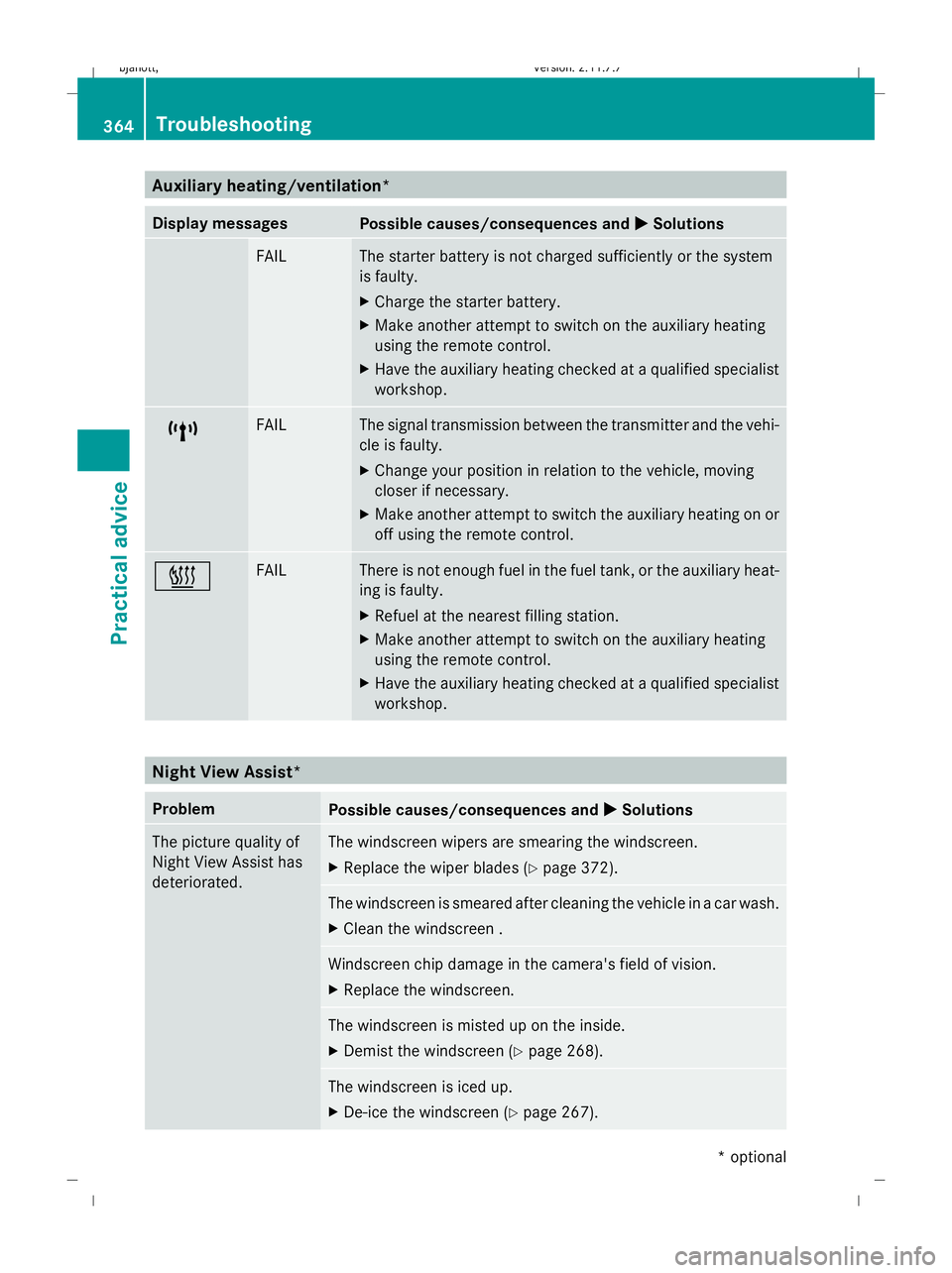
Auxiliary heating/ventilation*
Display messages
Possible causes/consequences and
X
X Solutions FAIL The starter battery is not charged sufficiently or the system
is faulty.
X
Charge the starter battery.
X Make another attempt to switch on the auxiliary heating
using the remote control.
X Have the auxiliary heating checked at a qualified specialist
workshop. $ FAIL The signal transmission between the transmitter and the vehi-
cle is faulty.
X
Change your position in relation to the vehicle, moving
closer if necessary.
X Make another attempt to switch the auxiliary heating on or
off using the remote control. © FAIL There is not enough fuel in the fuel tank, or the auxiliary heat-
ing is faulty.
X
Refuel at the nearest filling station.
X Make another attempt to switch on the auxiliary heating
using the remote control.
X Have the auxiliary heating checked at a qualified specialist
workshop. Night View Assist*
Problem
Possible causes/consequences and
X XSolutions The picture quality of
Night View Assist has
deteriorated. The windscreen wipers are smearing the windscreen.
X
Replace the wiper blades (Y page 372). The windscreen is smeared after cleaning the vehicle in a car wash.
X
Clean the windscreen . Windscreen chip damage in the camera's field of vision.
X
Replace the windscreen. The windscreen is misted up on the inside.
X
Demist the windscreen (Y page 268). The windscreen is iced up.
X
De-ice the windscreen (Y page 267).364
TroubleshootingPractical advice
* optional
216_AKB; 2; 3, en-GB
bjanott,
Version: 2.11.7.7 2009-02-27T14:54:17+01:00 - Seite 364
Dateiname: 6515230602_buchblock.pdf; erzeugt am 04. Mar 2009 11:16:43; WK
Page 368 of 421
Problem
Possible causes/consequences and
X
X Solutions There is dirt on the inside of the windscreen.
X
Clean the inside of the windscreen . Parking up the vehicle
Problem
Possible causes/consequences and
X
X Solutions The vehicle is to be left
parked up for longer
than four weeks. The battery can be damaged through exhaustive discharge.
X
Disconnect the battery (Y page 385) or connect to a trickle
charger.
i Have the battery checked at a qualified specialist workshop,
e.g. a Mercedes-Benz Service Centre. The vehicle is to be left
parked up for longer
than six weeks. Damage resulting from non-use may occur if the vehicle is parked
up for long periods.
X
Visit a qualified specialist workshop and seek advice. Locking/unlocking in an emergency
Emergency key element
If you use the emergency key element to
unlock and open the driver's door or the boot
lid, the anti-theft alarm system* will be trig-
gered (Y page 54).
There are several ways to turn off the alarm:
X Press the %or& button on the key.
or
X Insert the key into the ignition lock.
or
X Press the Start/Stop button* in the ignition
lock. The key must be in the vehicle.
or
X Lock or unlock the vehicle using KEYLESS
GO*. The key must be outside the vehicle. Removing the emergency key element
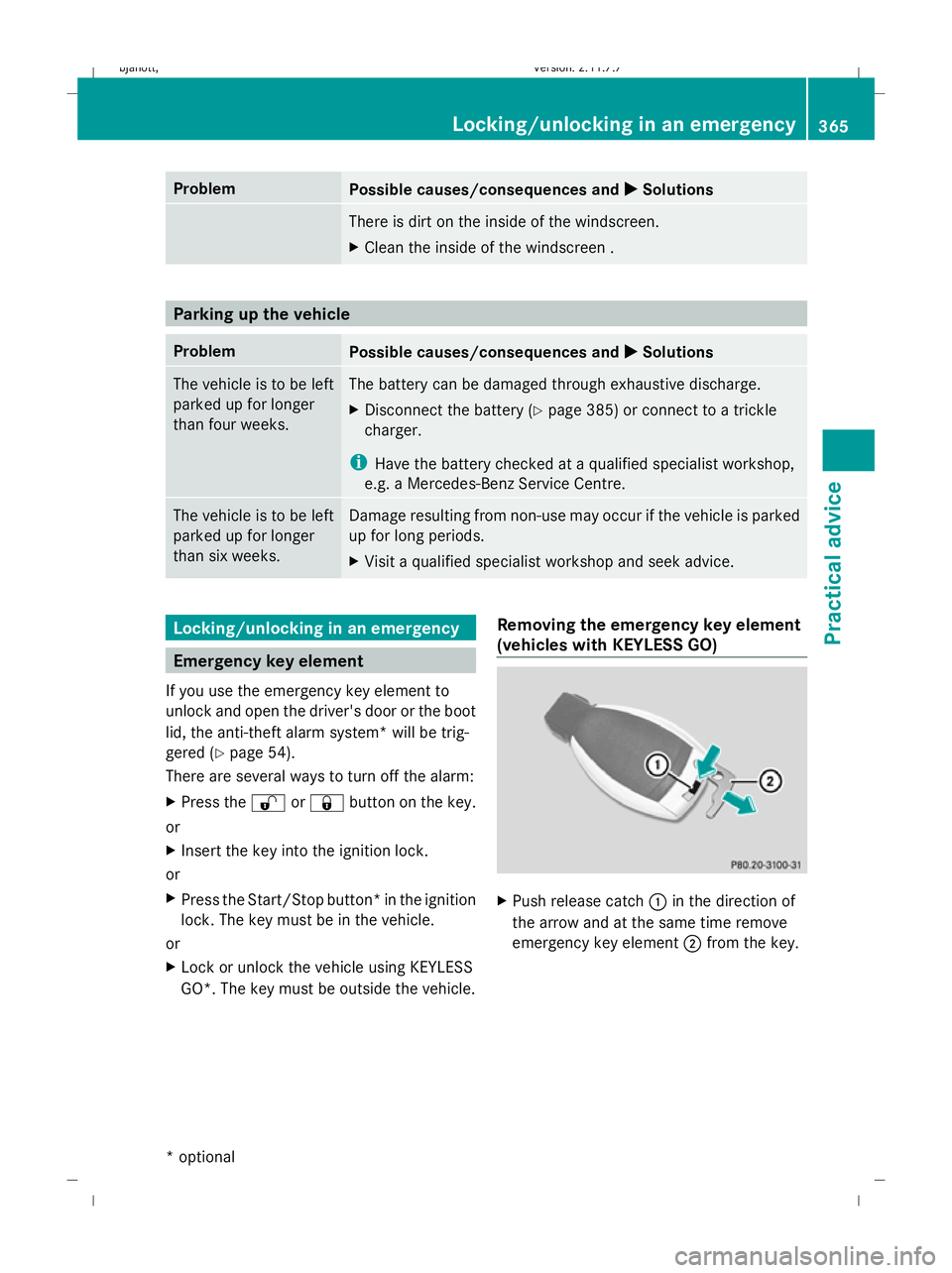
(vehicles with KEYLESS GO) X
Push release catch :in the direction of
the arrow and at the same time remove
emergency key element ;from the key. Locking/unlocking in an emergency
365Practical advice
* optional
216_AKB; 2; 3, en-GB
bjanott,
Version: 2.11.7.7 2009-02-27T14:54:17+01:00 - Seite 365 Z
Dateiname: 6515230602_buchblock.pdf; erzeugt am 04. Mar 2009 11:16:43; WK
Page 369 of 421
Removing the emergency key element
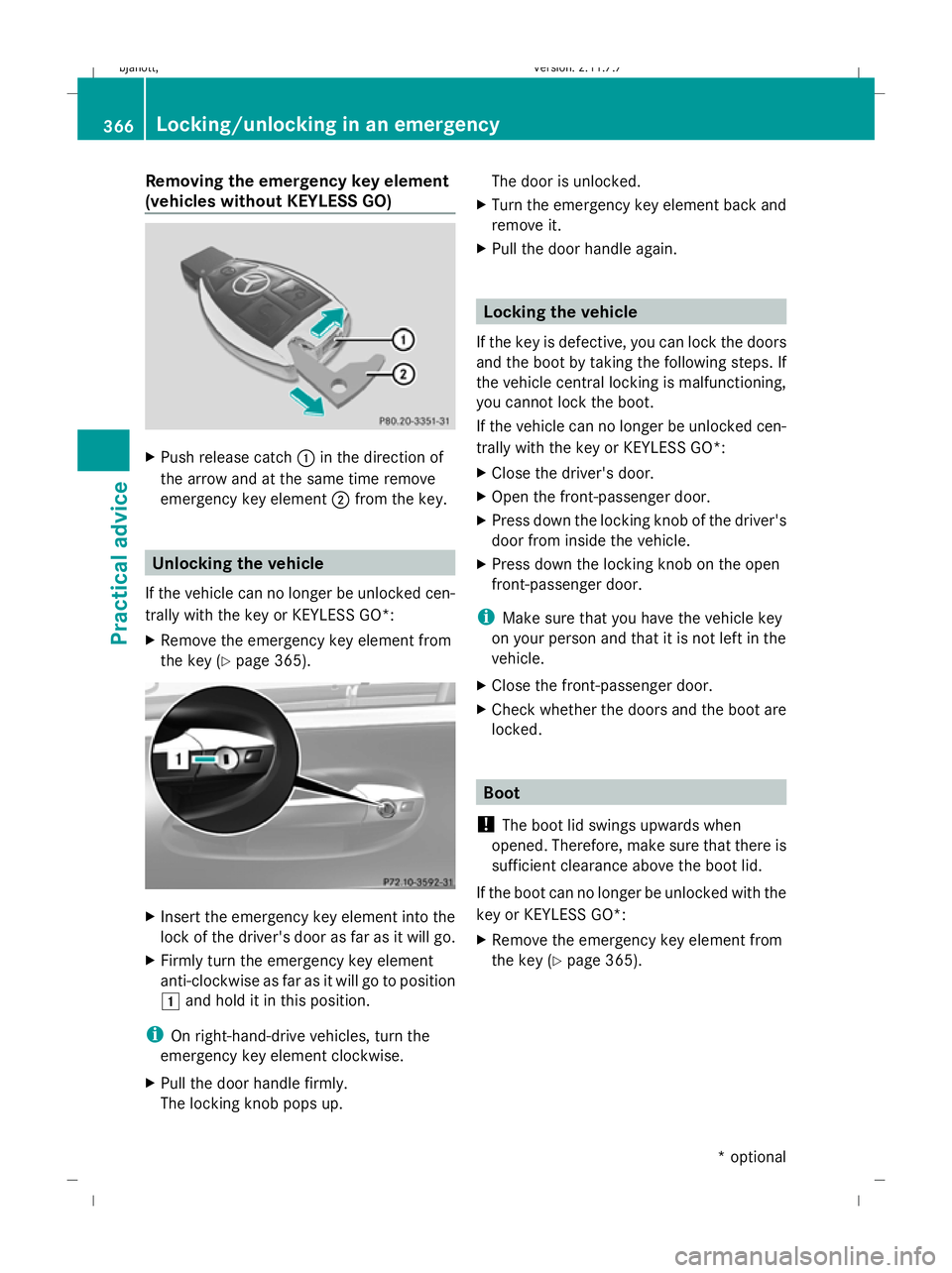
(vehicles without KEYLESS GO) X
Push release catch :in the direction of
the arrow and at the same time remove
emergency key element ;from the key. Unlocking the vehicle
If the vehicle can no longer be unlocked cen-
trally with the key or KEYLESS GO*:
X Remove the emergency key element from
the key (Y page 365). X
Insert the emergency key element into the
lock of the driver's door as far as it will go.
X Firmly turn the emergency key element
anti-clockwise as far as it will go to position
1 and hold it in this position.
i On right-hand-drive vehicles, turn the
emergency key element clockwise.
X Pull the door handle firmly.
The locking knob pops up. The door is unlocked.
X Turn the emergency key element back and
remove it.
X Pull the door handle again. Locking the vehicle
If the key is defective, you can lock the doors
and the boot by taking the following steps. If
the vehicle central locking is malfunctioning,
you cannot lock the boot.
If the vehicle can no longer be unlocked cen-
trally with the key or KEYLESS GO*:
X Close the driver's door.
X Open the front-passenger door.
X Press down the locking knob of the driver's
door from inside the vehicle.
X Press down the locking knob on the open
front-passenger door.
i Make sure that you have the vehicle key
on your person and that it is not left in the
vehicle.
X Close the front-passenger door.
X Check whether the doors and the boot are
locked. Boot
! The boot lid swings upwards when
opened. Therefore, make sure that there is
sufficient clearance above the boot lid.
If the boot can no longer be unlocked with the
key or KEYLESS GO*:
X Remove the emergency key element from
the key (Y page 365). 366
Locking/unlocking in an emergencyPractical advice
* optional
216_AKB; 2; 3, en-GB
bjanott,
Version: 2.11.7.7 2009-02-27T14:54:17+01:00 - Seite 366
Dateiname: 6515230602_buchblock.pdf; erzeugt am 04. Mar 2009 11:16:43; WK
Page 370 of 421
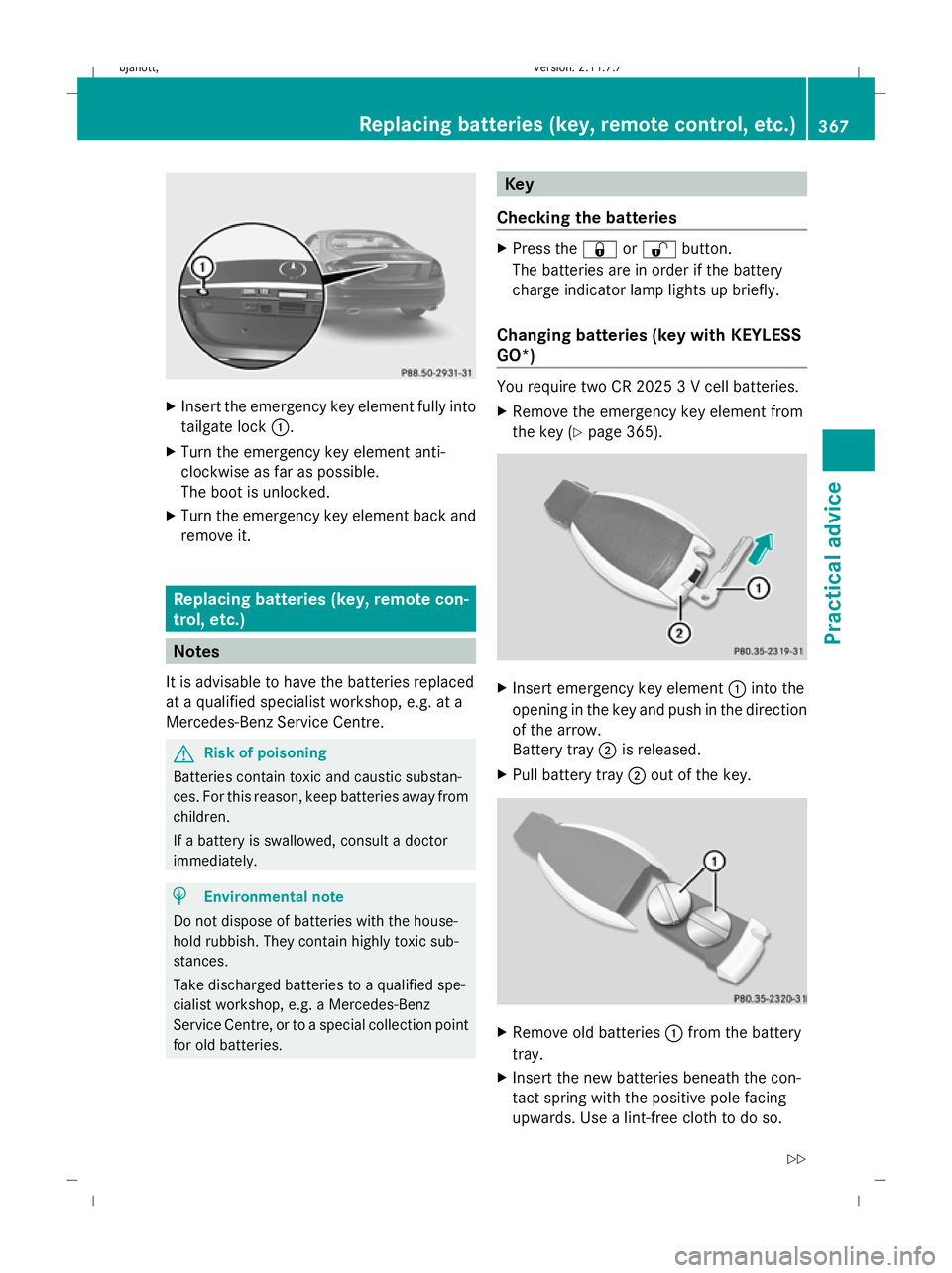
X
Insert the emergency key element fully into
tailgate lock :.
X Turn the emergency key element anti-
clockwise as far as possible.
The boot is unlocked.
X Turn the emergency key element back and
remove it. Replacing batteries (key, remote con-
trol, etc.) Notes
It is advisable to have the batteries replaced
at a qualified specialist workshop, e.g. at a
Mercedes-Benz Service Centre. G
Risk of poisoning
Batteries contain toxic and caustic substan-
ces. For this reason, keep batteries away from
children.
If a battery is swallowed, consult a doctor
immediately. H
Environmental note
Do not dispose of batteries with the house-
hold rubbish. They contain highly toxic sub-
stances.
Take discharged batteries to a qualified spe-
cialist workshop, e.g. a Mercedes-Benz
Service Centre, or to a special collection point
for old batteries. Key
Checking the batteries X
Press the &or% button.
The batteries are in order if the battery
charge indicator lamp lights up briefly.
Changing batteries (key with KEYLESS
GO*) You require two CR 2025 3 V cell batteries.
X
Remove the emergency key element from
the key (Y page 365). X
Insert emergency key element :into the
opening in the key and push in the direction
of the arrow.
Battery tray ;is released.
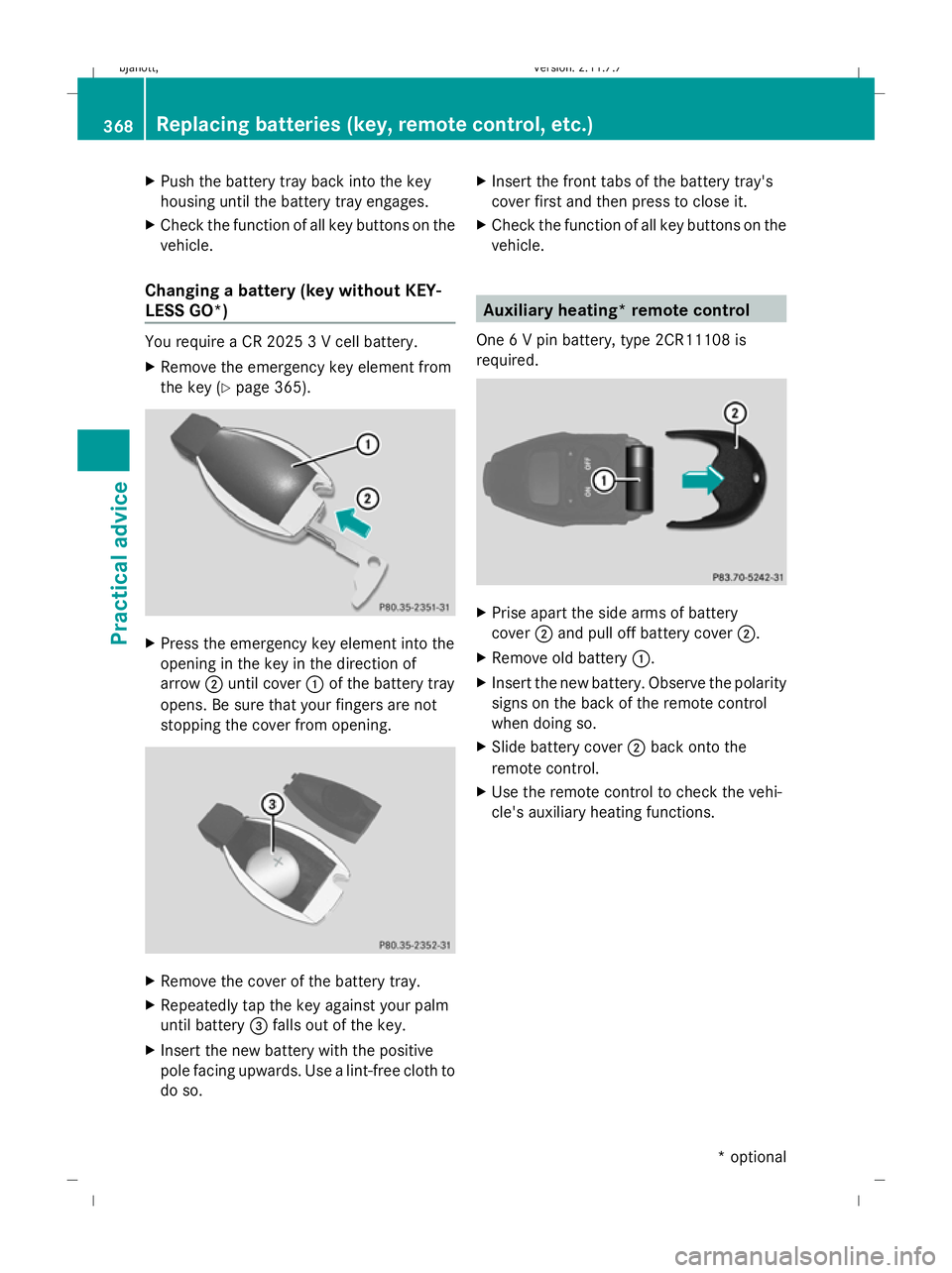
X Pull battery tray ;out of the key. X
Remove old batteries :from the battery
tray.
X Insert the new batteries beneath the con-
tact spring with the positive pole facing
upwards. Use a lint-free cloth to do so. Replacing batteries (key, remote control, etc.)
367Practical advice
216_AKB; 2; 3, en-GB
bjanott,Version: 2.11.7.7 2009-02-27T14:54:17+01:00 - Seite 367 Z
Dateiname: 6515230602_buchblock.pdf; erzeugt am 04. Mar 2009 11:16:44; WK
Page 371 of 421
X
Push the battery tray back into the key
housing until the battery tray engages.
X Check the function of all key buttons on the
vehicle.
Changing a battery (key without KEY-
LESS GO*) You require a CR 2025 3 V cell battery.
X Remove the emergency key element from
the key (Y page 365). X
Press the emergency key element into the
opening in the key in the direction of
arrow ;until cover :of the battery tray
opens. Be sure that your fingers are not
stopping the cover from opening. X
Remove the cover of the battery tray.
X Repeatedly tap the key against your palm
until battery =falls out of the key.
X Insert the new battery with the positive
pole facing upwards. Use a lint-free cloth to
do so. X
Insert the front tabs of the battery tray's
cover first and then press to close it.
X Check the function of all key buttons on the
vehicle. Auxiliary heating* remote control
One 6 V pin battery, type 2CR11108 is
required. X
Prise apart the side arms of battery
cover ;and pull off battery cover ;.
X Remove old battery :.
X Insert the new battery. Observe the polarity
signs on the back of the remote control
when doing so.
X Slide battery cover ;back onto the
remote control.
X Use the remote control to check the vehi-
cle's auxiliary heating functions. 368
Replacing batteries (key, remote control, etc.)Practical advice
* optional
216_AKB; 2; 3, en-GB
bjanott,
Version: 2.11.7.7 2009-02-27T14:54:17+01:00 - Seite 368
Dateiname: 6515230602_buchblock.pdf; erzeugt am 04. Mar 2009 11:16:44; WK
Page 372 of 421
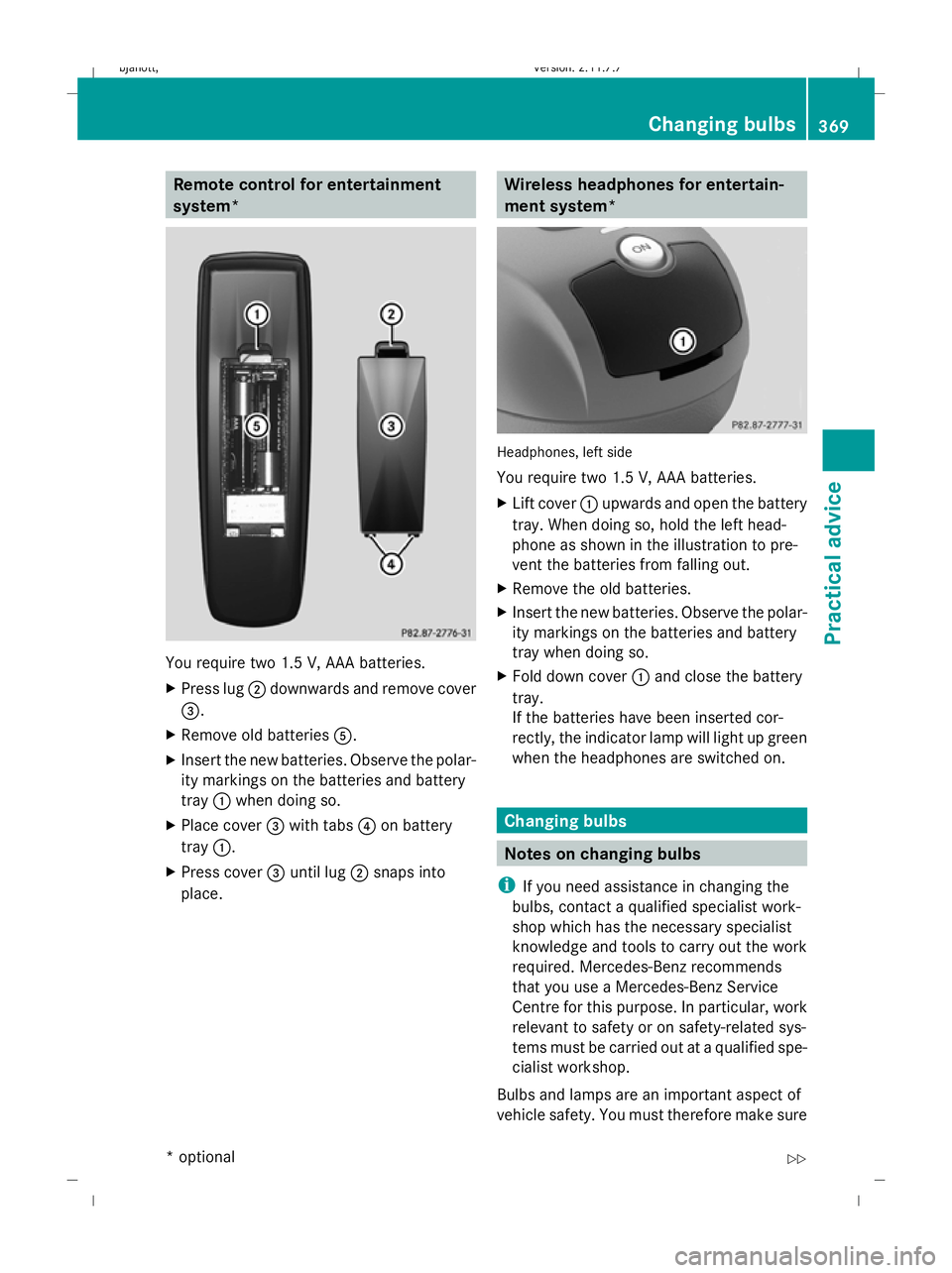
Remote control for entertainment
system*
You require two 1.5 V, AAA batteries.
X
Press lug ;downwards and remove cover
=.
X Remove old batteries A.
X Insert the new batteries. Observe the polar-
ity markings on the batteries and battery
tray :when doing so.
X Place cover =with tabs ?on battery
tray :.
X Press cover =until lug ;snaps into
place. Wireless headphones for entertain-
ment system*
Headphones, left side
You require two 1.5 V, AAA batteries.
X
Lift cover :upwards and open the battery
tray. When doing so, hold the left head-
phone as shown in the illustration to pre-
vent the batteries from falling out.
X Remove the old batteries.
X Insert the new batteries. Observe the polar-
ity markings on the batteries and battery
tray when doing so.
X Fold down cover :and close the battery
tray.
If the batteries have been inserted cor-
rectly, the indicator lamp will light up green
when the headphones are switched on. Changing bulbs
Notes on changing bulbs
i If you need assistance in changing the
bulbs, contact a qualified specialist work-
shop which has the necessary specialist
knowledge and tools to carry out the work
required. Mercedes-Benz recommends
that you use a Mercedes-Benz Service
Centre for this purpose. In particular, work
relevant to safety or on safety-related sys-
tems must be carried out at a qualified spe-
cialist workshop.
Bulbs and lamps are an important aspect of
vehicle safety. You must therefore make sure Changing bulbs
369Practical advice
* optional
216_AKB; 2; 3, en-GB
bjanott,
Version: 2.11.7.7 2009-02-27T14:54:17+01:00 - Seite 369 Z
Dateiname: 6515230602_buchblock.pdf; erzeugt am 04. Mar 2009 11:16:45; WK
Page 373 of 421
that these function correctly at all times.
Have the headlamp settings checked regu-
larly. Only use the types of bulbs specified
here. If the new bulb still does not light up,
consult a qualified specialist workshop.
Do not touch the glass tube of new bulbs with
your bare hands. Even minor contamination
can burn into the glass surface and reduce
the service life of the bulbs. Always use a lint-
free cloth or only touch the base of the bulb
when fitting. G
Risk of injury
Bulbs and lamps can be very hot. You should
therefore allow them to cool down before you
change them. Otherwise, you could be burned
if you touch them.
Keep bulbs out of the reach of children. Oth-
erwise, they could damage them, for example,
and injure themselves.
Never use a bulb which has been dropped.
Such a bulb may explode and injure you. Halogen bulbs are pressurised and could
explode when you change them, particularly
if they are very hot. You should therefore wear
eye protection and gloves when you are
changing them.
G
Risk of injury
Xenon bulbs carry a high voltage. You could
get an electric shock and be seriously or even
fatally injured if you touch the electric con-
tacts on xenon bulbs. Therefore, never
remove the cover from xenon bulbs.
Do not change xenon bulbs yourself but have
them replaced at a qualified specialist work-
shop which has the necessary specialist
knowledge and tools to carry out the work
required.
Mercedes-Benz recommends that you use a
Mercedes-Benz Service Centre for this pur-
pose. In particular, work relevant to safety or
on safety-related systems must be carried out
at a qualified specialist workshop. Overview: changing bulbs/bulb types
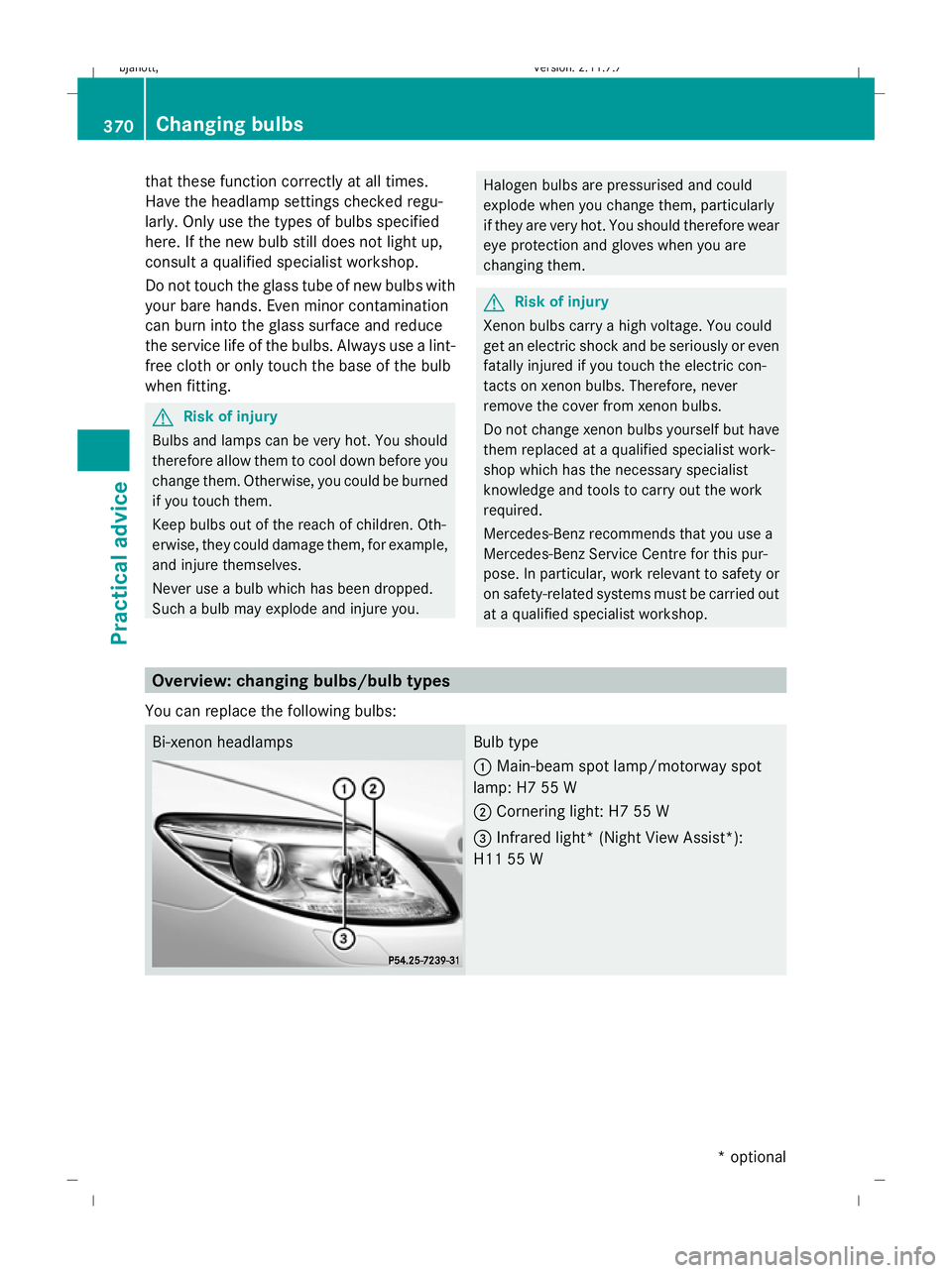
You can replace the following bulbs: Bi-xenon headlamps Bulb type
:
Main-beam spot lamp/motorway spot
lamp: H7 55 W
; Cornering light: H7 55 W
= Infrared light* (Night View Assist*):
H11 55 W 370
Changing bulbsPractical advice
* optional
216_AKB; 2; 3, en-GB
bjanott,
Version: 2.11.7.7 2009-02-27T14:54:17+01:00 - Seite 370
Dateiname: 6515230602_buchblock.pdf; erzeugt am 04. Mar 2009 11:16:45; WK