bulb MERCEDES-BENZ CL COUPE 2009 Owners Manual
[x] Cancel search | Manufacturer: MERCEDES-BENZ, Model Year: 2009, Model line: CL COUPE, Model: MERCEDES-BENZ CL COUPE 2009Pages: 421, PDF Size: 10.78 MB
Page 9 of 421
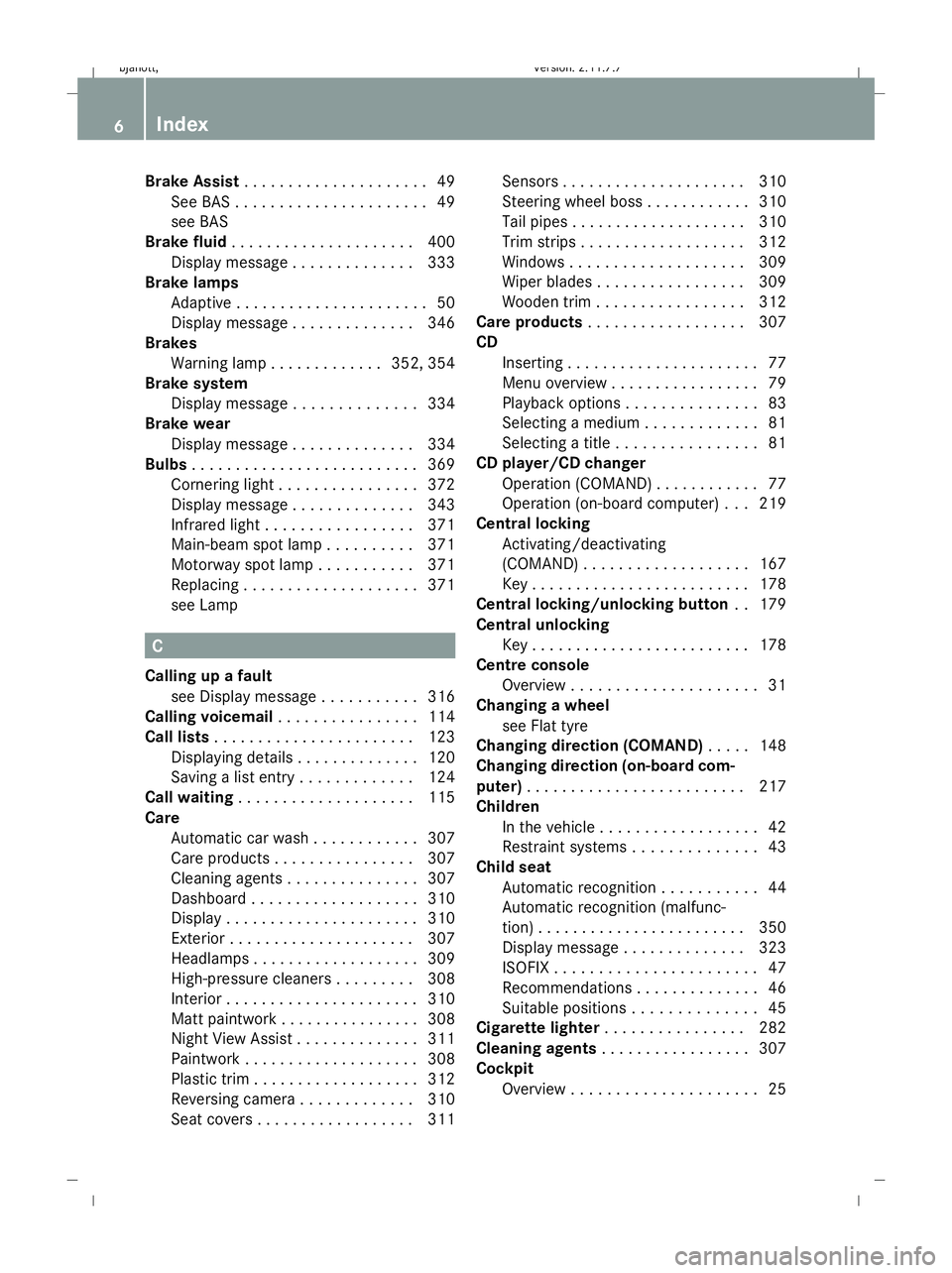
Brake Assist
. . . . . . . . . . . . . . . . . . . . .49
See BAS . . . . . . . . . . . . . . . . . . . . . .49
see BAS
Brake fluid . . . . . . . . . . . . . . . . . . . . .400
Display message . . . . . . . . . . . . . .333
Brake lamps
Adaptive . . . . . . . . . . . . . . . . . . . . . .50
Display message . . . . . . . . . . . . . .346
Brakes
Warning lamp . . . . . . . . . . . . .352, 354
Brake system
Display message . . . . . . . . . . . . . .334
Brake wear
Display message . . . . . . . . . . . . . .334
Bulbs . . . . . . . . . . . . . . . . . . . . . . . . . .369
Cornering light . . . . . . . . . . . . . . . .372
Display message . . . . . . . . . . . . . .343
Infrared light . . . . . . . . . . . . . . . . .371
Main-beam spot lamp . . . . . . . . . .371
Motorway spot lamp . . . . . . . . . . .371
Replacing . . . . . . . . . . . . . . . . . . . .371
see Lamp C
Calling up a fault see Display message . . . . . . . . . . .316
Calling voicemail . . . . . . . . . . . . . . . .114
Call lists . . . . . . . . . . . . . . . . . . . . . . .123
Displaying details . . . . . . . . . . . . . .120
Saving a list entry . . . . . . . . . . . . .124
Call waiting . . . . . . . . . . . . . . . . . . . .115
Care Automatic car wash . . . . . . . . . . . .307
Care products . . . . . . . . . . . . . . . .307
Cleaning agents . . . . . . . . . . . . . . .307
Dashboard . . . . . . . . . . . . . . . . . . .310
Display . . . . . . . . . . . . . . . . . . . . . .310
Exterior . . . . . . . . . . . . . . . . . . . . .307
Headlamps . . . . . . . . . . . . . . . . . . .309
High-pressure cleaners . . . . . . . . .308
Interior . . . . . . . . . . . . . . . . . . . . . .310
Matt paintwork . . . . . . . . . . . . . . . .308
Night View Assist . . . . . . . . . . . . . .311
Paintwork . . . . . . . . . . . . . . . . . . . .308
Plastic trim . . . . . . . . . . . . . . . . . . .312
Reversing camera . . . . . . . . . . . . .310
Seat covers . . . . . . . . . . . . . . . . . .311 Sensors . . . . . . . . . . . . . . . . . . . .
.310
Steering wheel boss . . . . . . . . . . . .310
Tail pipes . . . . . . . . . . . . . . . . . . . .310
Trim strips . . . . . . . . . . . . . . . . . . .312
Windows . . . . . . . . . . . . . . . . . . . .309
Wiper blades . . . . . . . . . . . . . . . . .309
Wooden trim . . . . . . . . . . . . . . . . .312
Care products . . . . . . . . . . . . . . . . . .307
CD Inserting . . . . . . . . . . . . . . . . . . . . . .77
Menu overview . . . . . . . . . . . . . . . . .79
Playback options . . . . . . . . . . . . . . .83
Selecting a mediu m.. . . . . . . . . . . .81
Selecting a titl e.. . . . . . . . . . . . . . .81
CD player/CD changer
Operation (COMAND) . . . . . . . . . . . .77
Operation (on-board computer) . . .219
Central locking
Activating/deactivating
(COMAND) . . . . . . . . . . . . . . . . . . .167
Key . . . . . . . . . . . . . . . . . . . . . . . . .178
Central locking/unlocking button ..1 79
Central unlocking Key . . . . . . . . . . . . . . . . . . . . . . . . .178
Centre console
Overview . . . . . . . . . . . . . . . . . . . . .31
Changing a wheel
see Flat tyre
Changing direction (COMAND) . . . ..148
Changing direction (on-board com-
puter) . . . . . . . . . . . . . . . . . . . . . . . . .217
Children In the vehicle . . . . . . . . . . . . . . . . . .42
Restraint systems . . . . . . . . . . . . . .43
Child seat
Automatic recognitio n.. . . . . . . . . .44
Automatic recognition (malfunc-
tion) . . . . . . . . . . . . . . . . . . . . . . . .350
Display message . . . . . . . . . . . . . .323
ISOFIX . . . . . . . . . . . . . . . . . . . . . . .47
Recommendation s.. . . . . . . . . . . . .46
Suitable positions . . . . . . . . . . . . . .45
Cigarette lighter . . . . . . . . . . . . . . . .282
Cleaning agents . . . . . . . . . . . . . . . . .307
Cockpit Overview . . . . . . . . . . . . . . . . . . . . .256
Index 216_AKB; 2; 3, en-GB
bjanott
,V ersion: 2.11.7.7
2009-02-27T14:54:17+01:00 - Seite 6Dateiname: 6515230602_buchblock.pdf; erzeugt am 04. Mar 2009 11:14:34; WK
Page 316 of 421
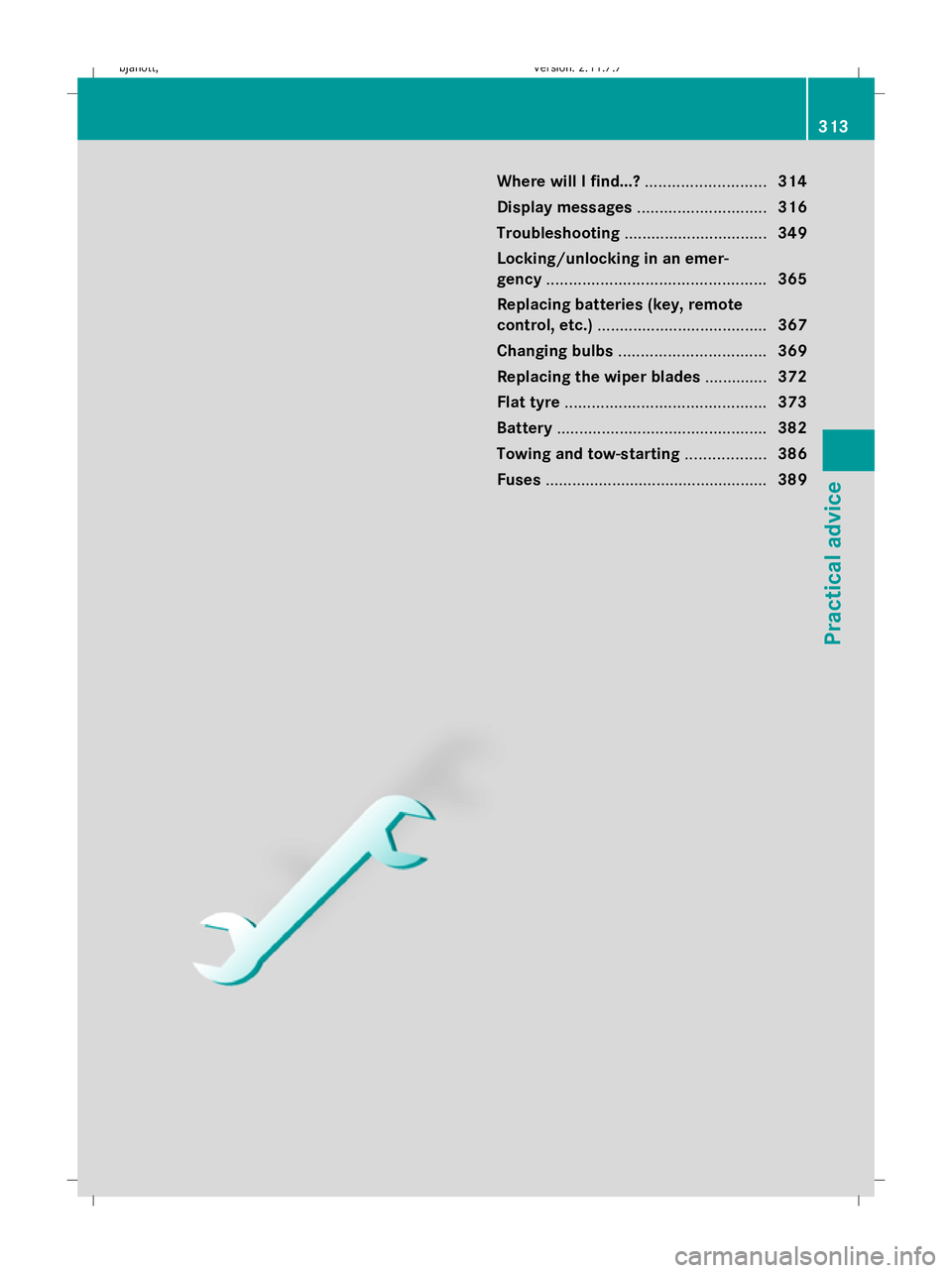
Where will I find...?
...........................314
Display messages ............................. 316
Troubleshooting ................................ 349
Locking/unlocking in an emer-
gency ................................................. 365
Replacing batteries (key, remote
control, etc.) ...................................... 367
Changing bulbs ................................. 369
Replacing the wiper blades ..............372
Flat tyre ............................................. 373
Battery ............................................... 382
Towing and tow-starting ..................386
Fuses .................................................. 389 313Practical advice
216_AKB; 2; 3, en-GB
bjanott,
Version: 2.11.7.7 2009-02-27T14:54:17+01:00 - Seite 313
Dateiname: 6515230602_buchblock.pdf; erzeugt am 04. Mar 2009 11:16:32; WK
Page 346 of 421
Display messages
Possible causes/consequences and
X
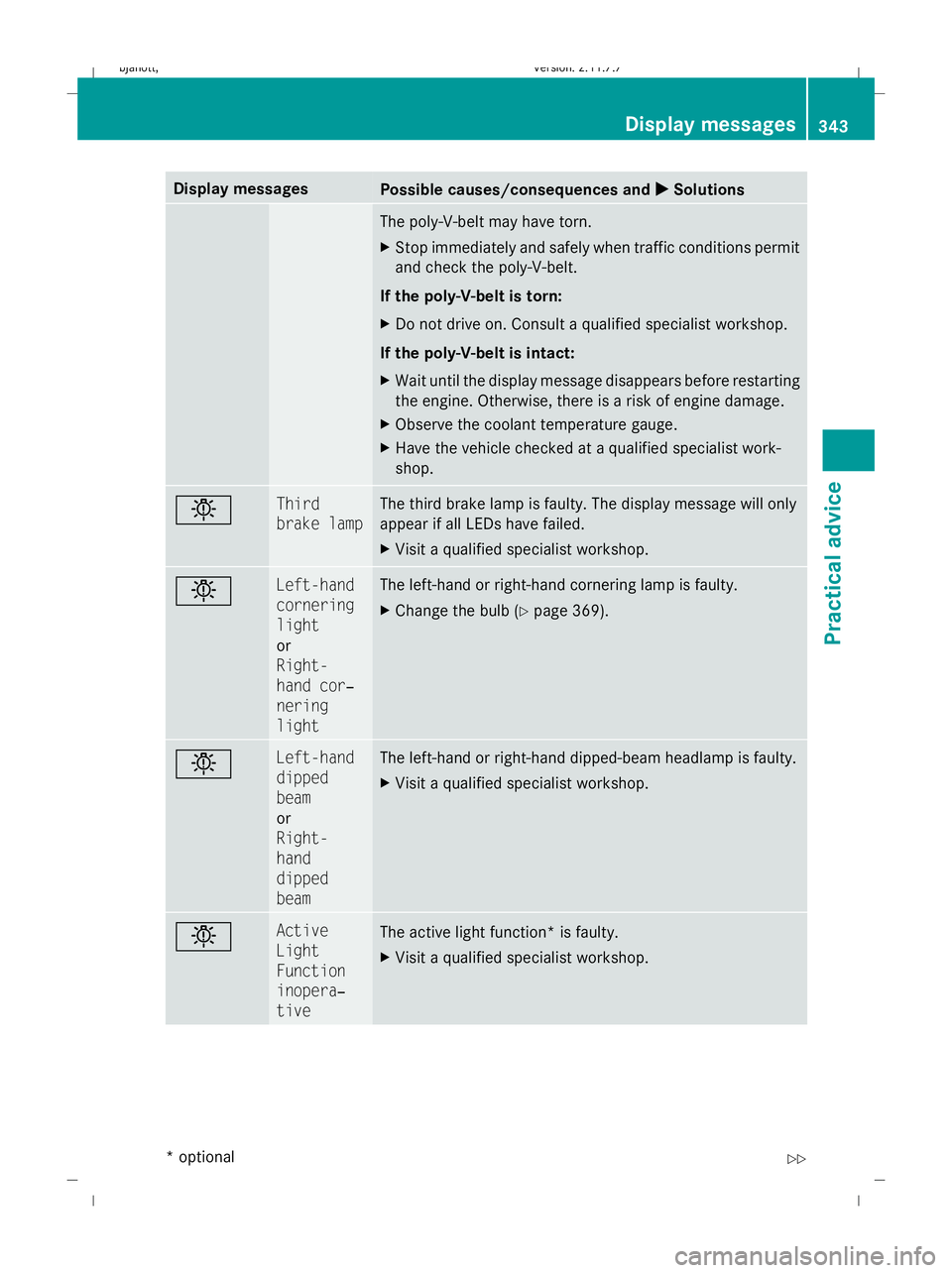
X Solutions The poly-V-belt may have torn.
X
Stop immediately and safely when traffic conditions permit
and check the poly-V-belt.
If the poly-V-belt is torn:
X Do not drive on. Consult a qualified specialist workshop.
If the poly-V-belt is intact:
X Wait until the display message disappears before restarting
the engine. Otherwise, there is a risk of engine damage.
X Observe the coolant temperature gauge.
X Have the vehicle checked at a qualified specialist work-
shop. b Third
brake lamp The third brake lamp is faulty. The display message will only
appear if all LEDs have failed.
X
Visit a qualified specialist workshop. b Left-hand
cornering
light
or
Right-
hand cor‐
nering
light The left-hand or right-hand cornering lamp is faulty.
X
Change the bulb (Y page 369). b Left-hand
dipped
beam
or
Right-
hand
dipped
beam The left-hand or right-hand dipped-beam headlamp is faulty.
X
Visit a qualified specialist workshop. b Active
Light
Function
inopera‐
tive
The active light function* is faulty.
X
Visit a qualified specialist workshop. Display
messages
343Practical advice
* optional
216_AKB; 2; 3, en-GB
bjanott
,V ersion: 2.11.7.7
2009-02-27T14:54:17+01:00 - Seite 343 Z
Dateiname: 6515230602_buchblock.pdf; erzeugt am 04. Mar 2009 11:16:39; WK
Page 347 of 421
Display messages
Possible causes/consequences and
X
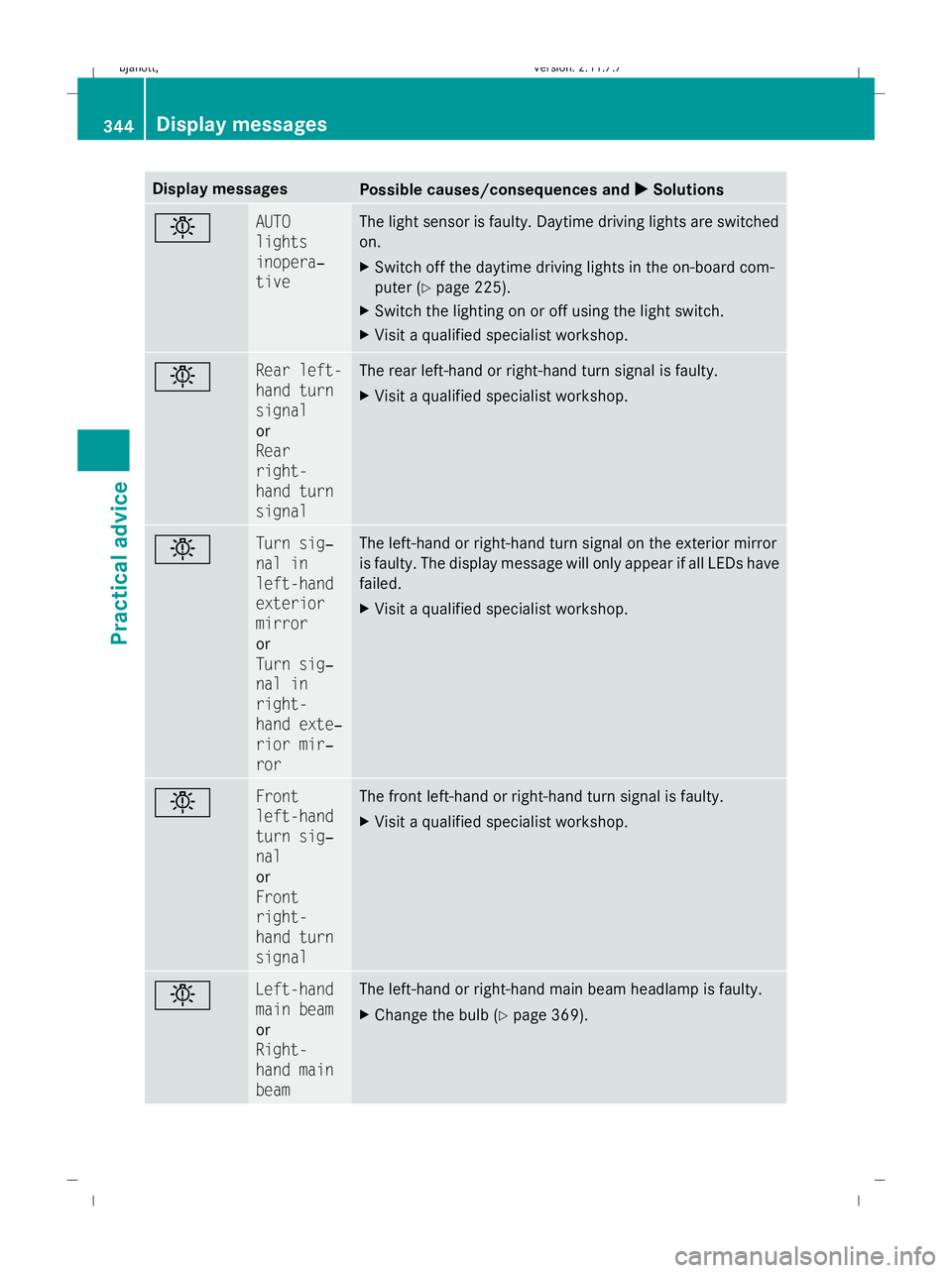
X Solutions b AUTO
lights
inopera‐
tive The light sensor is faulty. Daytime driving lights are switched
on.
X
Switch off the daytime driving lights in the on-board com-
puter (Y page 225).
X Switch the lighting on or off using the light switch.
X Visit a qualified specialist workshop. b Rear left-
hand turn
signal
or
Rear
right-
hand turn
signal The rear left-hand or right-hand turn signal is faulty.
X
Visit a qualified specialist workshop. b Turn sig‐
nal in
left-hand
exterior
mirror
or
Turn sig‐
nal in
right-
hand exte‐
rior mir‐
ror The left-hand or right-hand turn signal on the exterior mirror
is faulty. The display message will only appear if all LEDs have
failed.
X
Visit a qualified specialist workshop. b Front
left-hand
turn sig‐
nal
or
Front
right-
hand turn
signal The front left-hand or right-hand turn signal is faulty.
X
Visit a qualified specialist workshop. b Left-hand
main beam
or
Right-
hand main
beam The left-hand or right-hand main beam headlamp is faulty.
X
Change the bulb (Y page 369).344
Display
messagesPractical advice
216_AKB; 2; 3, en-GB
bjanott ,V ersion: 2.11.7.7
2009-02-27T14:54:17+01:00 - Seite 344
Dateiname: 6515230602_buchblock.pdf; erzeugt am 04. Mar 2009 11:16:39; WK
Page 372 of 421
Remote control for entertainment
system*
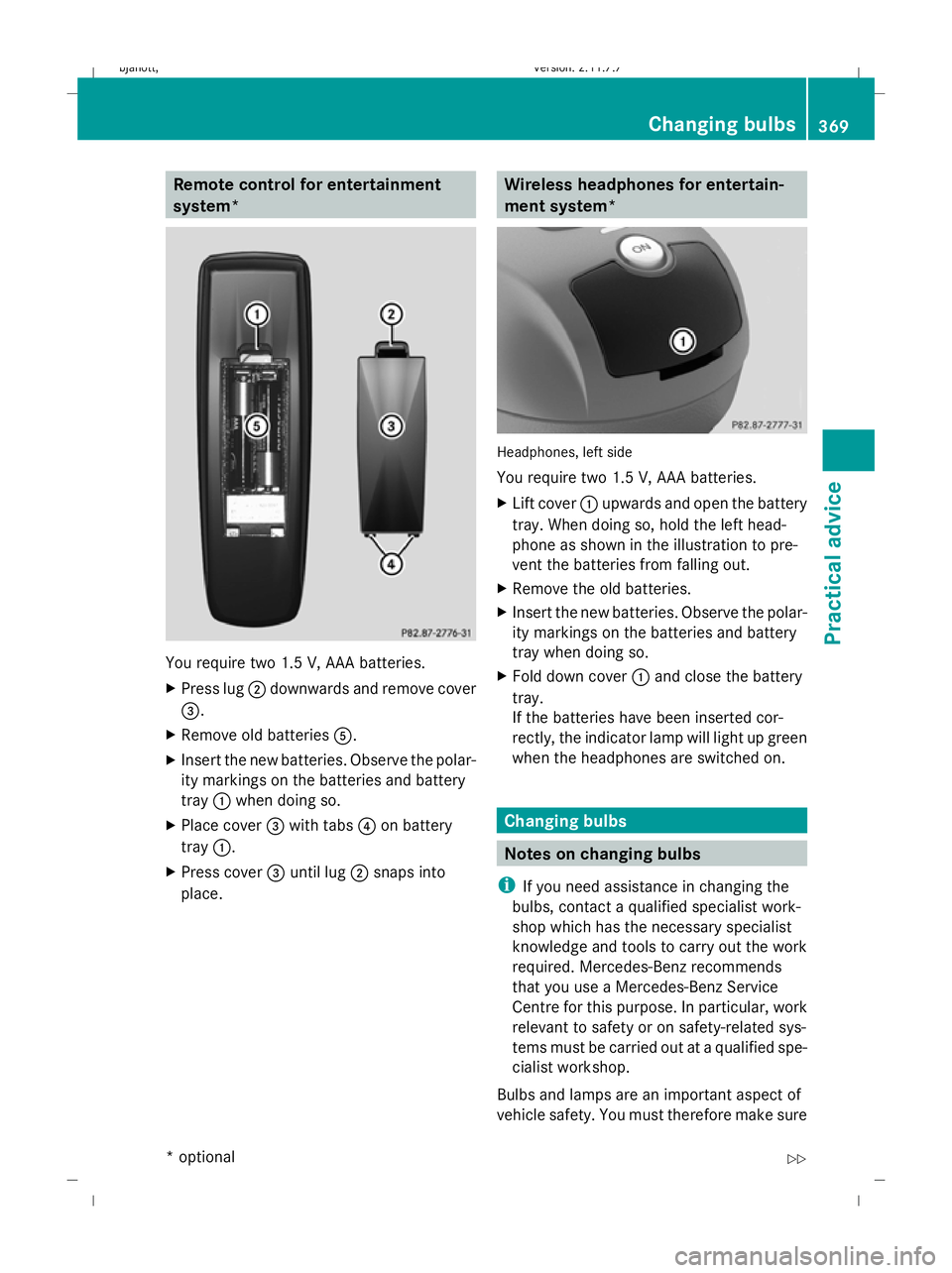
You require two 1.5 V, AAA batteries.
X
Press lug ;downwards and remove cover
=.
X Remove old batteries A.
X Insert the new batteries. Observe the polar-
ity markings on the batteries and battery
tray :when doing so.
X Place cover =with tabs ?on battery
tray :.
X Press cover =until lug ;snaps into
place. Wireless headphones for entertain-
ment system*
Headphones, left side
You require two 1.5 V, AAA batteries.
X
Lift cover :upwards and open the battery
tray. When doing so, hold the left head-
phone as shown in the illustration to pre-
vent the batteries from falling out.
X Remove the old batteries.
X Insert the new batteries. Observe the polar-
ity markings on the batteries and battery
tray when doing so.
X Fold down cover :and close the battery
tray.
If the batteries have been inserted cor-
rectly, the indicator lamp will light up green
when the headphones are switched on. Changing bulbs
Notes on changing bulbs
i If you need assistance in changing the
bulbs, contact a qualified specialist work-
shop which has the necessary specialist
knowledge and tools to carry out the work
required. Mercedes-Benz recommends
that you use a Mercedes-Benz Service
Centre for this purpose. In particular, work
relevant to safety or on safety-related sys-
tems must be carried out at a qualified spe-
cialist workshop.
Bulbs and lamps are an important aspect of
vehicle safety. You must therefore make sure Changing bulbs
369Practical advice
* optional
216_AKB; 2; 3, en-GB
bjanott,
Version: 2.11.7.7 2009-02-27T14:54:17+01:00 - Seite 369 Z
Dateiname: 6515230602_buchblock.pdf; erzeugt am 04. Mar 2009 11:16:45; WK
Page 373 of 421
that these function correctly at all times.
Have the headlamp settings checked regu-
larly. Only use the types of bulbs specified
here. If the new bulb still does not light up,
consult a qualified specialist workshop.
Do not touch the glass tube of new bulbs with
your bare hands. Even minor contamination
can burn into the glass surface and reduce
the service life of the bulbs. Always use a lint-
free cloth or only touch the base of the bulb
when fitting. G
Risk of injury
Bulbs and lamps can be very hot. You should
therefore allow them to cool down before you
change them. Otherwise, you could be burned
if you touch them.
Keep bulbs out of the reach of children. Oth-
erwise, they could damage them, for example,
and injure themselves.
Never use a bulb which has been dropped.
Such a bulb may explode and injure you. Halogen bulbs are pressurised and could
explode when you change them, particularly
if they are very hot. You should therefore wear
eye protection and gloves when you are
changing them.
G
Risk of injury
Xenon bulbs carry a high voltage. You could
get an electric shock and be seriously or even
fatally injured if you touch the electric con-
tacts on xenon bulbs. Therefore, never
remove the cover from xenon bulbs.
Do not change xenon bulbs yourself but have
them replaced at a qualified specialist work-
shop which has the necessary specialist
knowledge and tools to carry out the work
required.
Mercedes-Benz recommends that you use a
Mercedes-Benz Service Centre for this pur-
pose. In particular, work relevant to safety or
on safety-related systems must be carried out
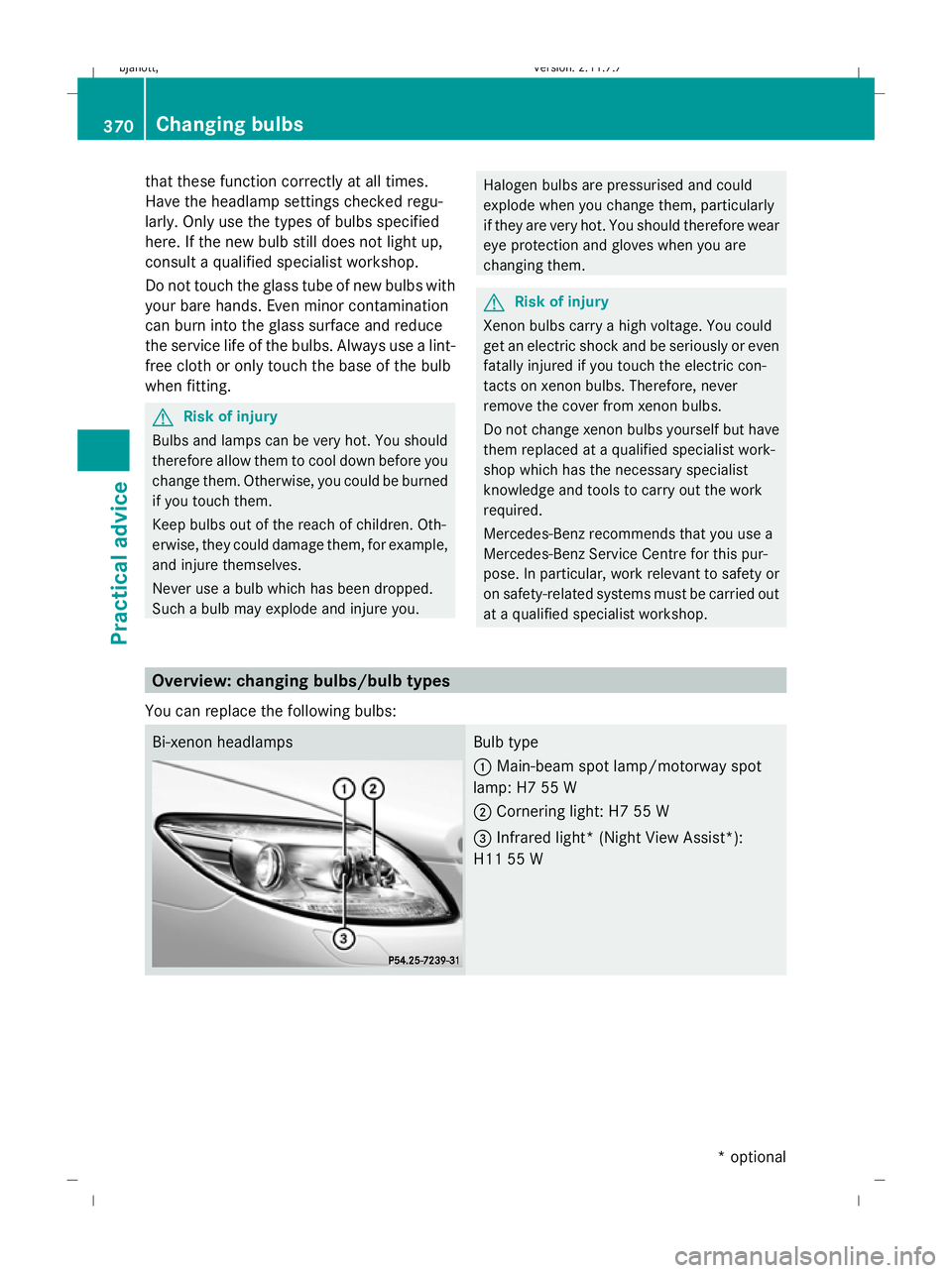
at a qualified specialist workshop. Overview: changing bulbs/bulb types
You can replace the following bulbs: Bi-xenon headlamps Bulb type
:
Main-beam spot lamp/motorway spot
lamp: H7 55 W
; Cornering light: H7 55 W
= Infrared light* (Night View Assist*):
H11 55 W 370
Changing bulbsPractical advice
* optional
216_AKB; 2; 3, en-GB
bjanott,
Version: 2.11.7.7 2009-02-27T14:54:17+01:00 - Seite 370
Dateiname: 6515230602_buchblock.pdf; erzeugt am 04. Mar 2009 11:16:45; WK
Page 374 of 421
Changing bulbs
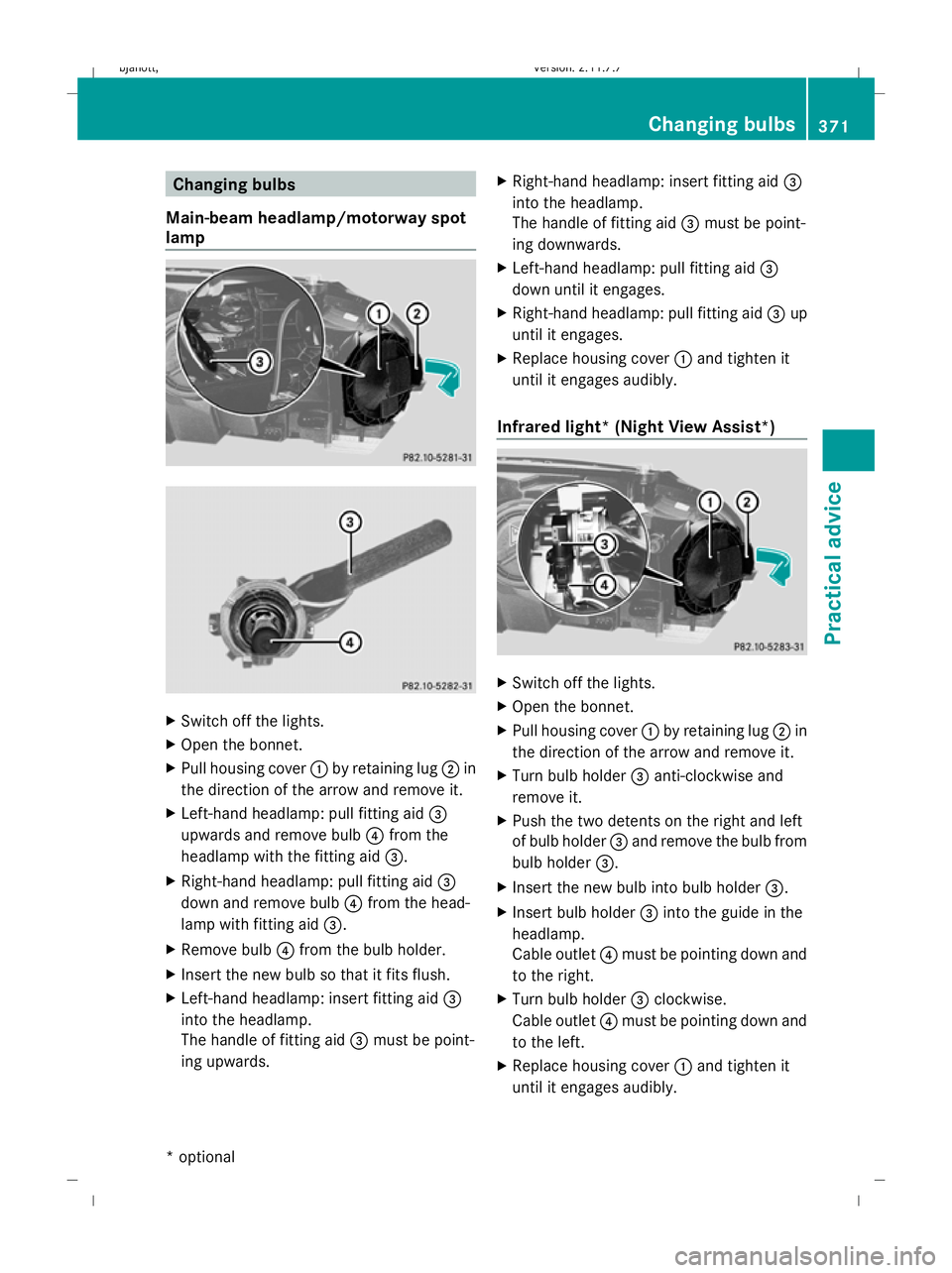
Main-beam headlamp/motorway spot
lamp X
Switch off the lights.
X Open the bonnet.
X Pull housing cover :by retaining lug ;in
the direction of the arrow and remove it.
X Left-hand headlamp: pull fitting aid =
upwards and remove bulb ?from the
headlamp with the fitting aid =.
X Right-hand headlamp: pull fitting aid =
down and remove bulb ?from the head-
lamp with fitting aid =.
X Remove bulb ?from the bulb holder.
X Insert the new bulb so that it fits flush.
X Left-hand headlamp: insert fitting aid =
into the headlamp.
The handle of fitting aid =must be point-
ing upwards. X
Right-hand headlamp: insert fitting aid =
into the headlamp.
The handle of fitting aid =must be point-
ing downwards.
X Left-hand headlamp: pull fitting aid =
down until it engages.
X Right-hand headlamp: pull fitting aid =up
until it engages.
X Replace housing cover :and tighten it
until it engages audibly.
Infrared light* (Night View Assist*) X
Switch off the lights.
X Open the bonnet.
X Pull housing cover :by retaining lug ;in
the direction of the arrow and remove it.
X Turn bulb holder =anti-clockwise and
remove it.
X Push the two detents on the right and left
of bulb holder =and remove the bulb from
bulb holder =.
X Insert the new bulb into bulb holder =.
X Insert bulb holder =into the guide in the
headlamp.
Cable outlet ?must be pointing down and
to the right.
X Turn bulb holder =clockwise.
Cable outlet ?must be pointing down and
to the left.
X Replace housing cover :and tighten it
until it engages audibly. Changing bulbs
371Practical advice
* optional
216_AKB; 2; 3, en-GB
bjanott
,V ersion: 2.11.7.7
2009-02-27T14:54:17+01:00 - Seite 371 Z
Dateiname: 6515230602_buchblock.pdf; erzeugt am 04. Mar 2009 11:16:46; WK
Page 375 of 421
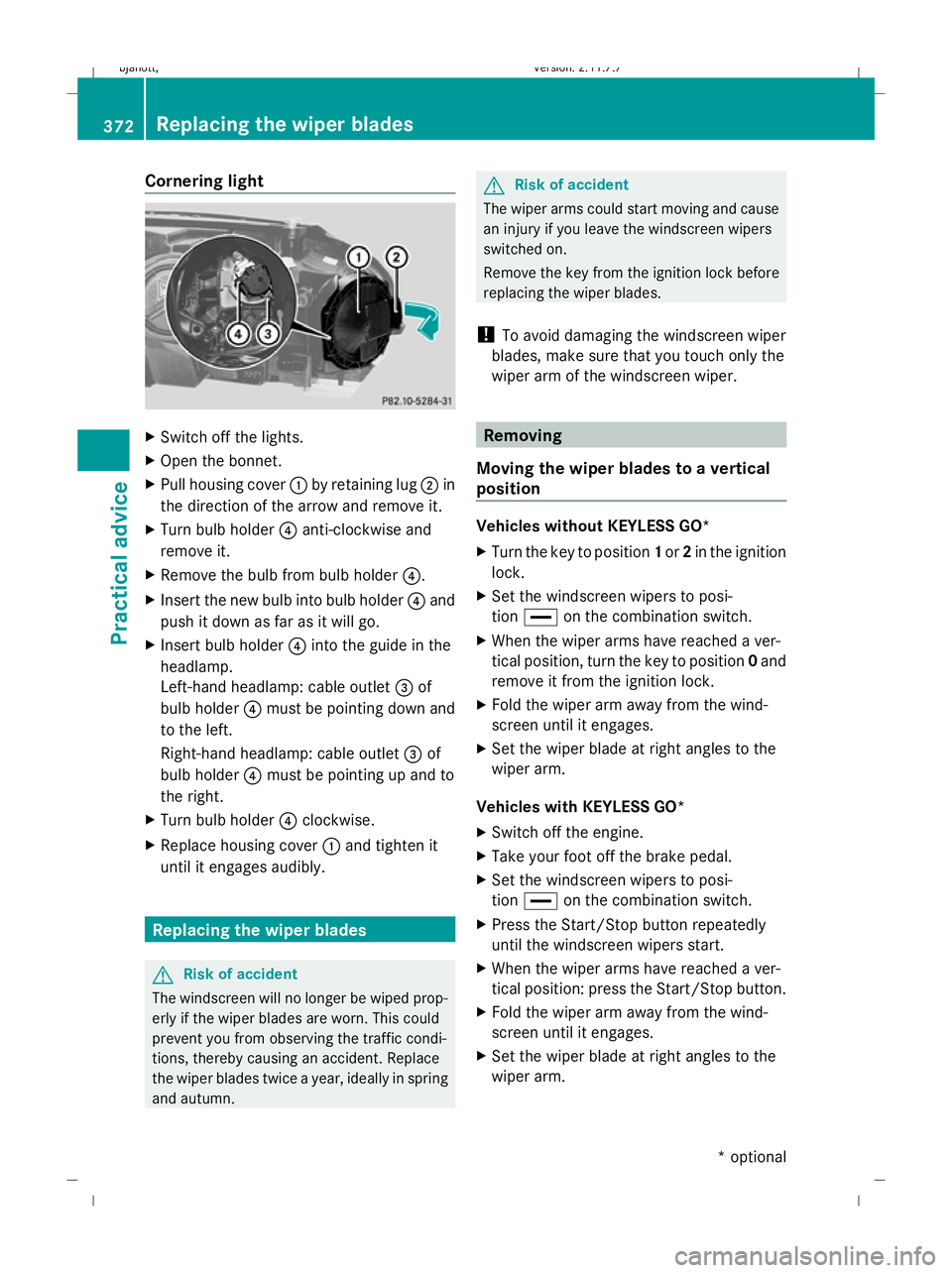
Cornering light
X
Switch off the lights.
X Open the bonnet.
X Pull housing cover :by retaining lug ;in
the direction of the arrow and remove it.
X Turn bulb holder ?anti-clockwise and
remove it.
X Remove the bulb from bulb holder ?.
X Insert the new bulb into bulb holder ?and
push it down as far as it will go.
X Insert bulb holder ?into the guide in the
headlamp.
Left-hand headlamp: cable outlet =of
bulb holder ?must be pointing down and
to the left.
Right-hand headlamp: cable outlet =of
bulb holder ?must be pointing up and to
the right.
X Turn bulb holder ?clockwise.
X Replace housing cover :and tighten it
until it engages audibly. Replacing the wiper blades
G
Risk of accident
The windscreen will no longer be wiped prop-
erly if the wiper blades are worn. This could
prevent you from observing the traffic condi-
tions, thereby causing an accident. Replace
the wiper blades twice a year, ideally in spring
and autumn. G
Risk of accident
The wiper arms could start moving and cause
an injury if you leave the windscreen wipers
switched on.
Remove the key from the ignition lock before
replacing the wiper blades.
! To avoid damaging the windscreen wiper
blades, make sure that you touch only the
wiper arm of the windscreen wiper. Removing
Moving the wiper blades to a vertical
position Vehicles without KEYLESS GO*
X
Turn the key to position 1or 2in the ignition
lock.
X Set the windscreen wipers to posi-
tion ° on the combination switch.
X When the wiper arms have reached a ver-
tical position, turn the key to position 0and
remove it from the ignition lock.
X Fold the wiper arm away from the wind-
screen until it engages.
X Set the wiper blade at right angles to the
wiper arm.
Vehicles with KEYLESS GO*
X Switch off the engine.
X Take your foot off the brake pedal.
X Set the windscreen wipers to posi-
tion ° on the combination switch.
X Press the Start/Stop button repeatedly
until the windscreen wipers start.
X When the wiper arms have reached a ver-
tical position: press the Start/Stop button.
X Fold the wiper arm away from the wind-
screen until it engages.
X Set the wiper blade at right angles to the
wiper arm. 372
Replacing the wiper bladesPractical advice
* optional
216_AKB; 2; 3, en-GB
bjanott
,V ersion: 2.11.7.7
2009-02-27T14:54:17+01:00 - Seite 372
Dateiname: 6515230602_buchblock.pdf; erzeugt am 04. Mar 2009 11:16:46; WK