phone MERCEDES-BENZ CL COUPE 2009 Owners Manual
[x] Cancel search | Manufacturer: MERCEDES-BENZ, Model Year: 2009, Model line: CL COUPE, Model: MERCEDES-BENZ CL COUPE 2009Pages: 421, PDF Size: 10.78 MB
Page 8 of 421
ATA (anti-theft alarm system)
. . . . ..54
Switching off the alarm . . . . . . . . . .55
Audio (COMAND)
AUX mode . . . . . . . . . . . . . . . . . . . .83
CD mod e.. . . . . . . . . . . . . . . . . . . .79
DVD mod e.. . . . . . . . . . . . . . . . . . .79
MP3 mode . . . . . . . . . . . . . . . . . . . .79
Audio DVD
Menu overview . . . . . . . . . . . . . . . . .79
Setting the audio format . . . . . . . . .82
Stop function . . . . . . . . . . . . . . . . . .81
AUTO lights
Display message . . . . . . . . . . . . . .344
Automatic car wash . . . . . . . . . . . ..307
Automatic transmission Display message . . . . . .318, 322, 330
Driving tips . . . . . . . . . . . . . . . . . . .208
Emergency running mode . . . . . . .359
Malfunction . . . . . . . . . . . . . . . . . .359
Program selector button . . . . . . . .210
Shift ranges . . . . . . . . . . . . . . . . . .209
AUX
Audi o.. . . . . . . . . . . . . . . . . . . . . . .83
Video . . . . . . . . . . . . . . . . . . . . . . . .83
Auxiliary heating . . . . . . . . . . . . . . ..270
Display message . . . . . . . . . . . . . .342
Notes . . . . . . . . . . . . . . . . . . . . . . .270
Remote control . . . . . . . . . . . . . . .271
Setting the departure time . . . . . . .172
Auxiliary ventilation . . . . . . . . . . . ..270 B
Back button COMAND . . . . . . . . . . . . . . . . . . . . .68
BAS (Brake Assist) . . . . . . . . . . . . . . ..49
BAS PLUS (Brake Assist System
Plus*) . . . . . . . . . . . . . . . . . . . . . . . . . .49
Batteries Changing (entertainment system
headphones) . . . . . . . . . . . . . . . . .369
Changing (entertainment system
remote control) . . . . . . . . . . . . . . .369
Battery
Changing (auxiliary heating
remote control) . . . . . . . . . . . . . . .368
Charging . . . . . . . . . . . . . . . . . . . . .384
Checking (key ).. . . . . . . . . . . . . . .367 Check lamp (key
).. . . . . . . . . . . . .367
Disconnecting . . . . . . . . . . . . . . . .385
Display message . . . . . . . . . .318, 331
Fitting the battery . . . . . . . . . . . . .386
Jump-starting . . . . . . . . . . . . . . . . .384
Maintenance (vehicle ).. . . . . . . ..382
Reconnecting . . . . . . . . . . . . . . . . .386
Removing the battery . . . . . . . . . . .385
Vehicle battery . . . . . . . . . . . . . . . .382
Voltage (on-board computer) . . . . .220
Belt force limiters
Activatio n.. . . . . . . . . . . . . . . . . . . .37
Belt tensioners
Activation . . . . . . . . . . . . . . . . . . . . .37
Belt warning . . . . . . . . . . . . . . . . . . . .193
Blind see Roller sunblind
Blind Spot Assist . . . . . . . . . . . . . . . .260
Activating/deactivating (on-
board computer) . . . . . . . . . . . . . .224
Display message . . . . . . . . . . . . . .329
Indicator lamp . . . . . . . . . . . . . . . .350
Warning lamp . . . . . . . . . . . . . . . . .350
Bluetooth ®
Authorising devices . . . . . . . . . . . .107
External authorisation . . . . . . . . . .109
Interface . . . . . . . . . . . .106, 109, 112
Telephony . . . . . . . . . . . . . . .106, 112
Bluetooth ®
telephony
Menu overview . . . . . . . . . . . . . . . .110
Bonnet
Bonnet catch . . . . . . . . . . . . . . . . .292
Display message . . . . . . . . . . . . . .330
Opening/closing . . . . . . . . . . . . . .292
Bonnet release lever
Release lever . . . . . . . . . . . . . . . . .292
Boot
Automatic opening . . . . . . . .181, 182
Emergency release . . . . . . . . . . . . .366
Limiting the opening angl e.. . . . ..168
Locking separatel y.. . . . . . . . . . ..181
Boot lid
Display message . . . . . . . . . . . . . .330
Opening/closing . . . . . . . . . . . . . .180
Boot lid opening limiter . . . . . . . . ..168 Index
5 216_AKB; 2; 3, en-GB
bjanott,
Version: 2.11.7.7 2009-02-27T14:54:17+01:00 - Seite 5Dateiname: 6515230602_buchblock.pdf; erzeugt am 04. Mar 2009 11:14:34; WK
Page 13 of 421

Fuse box
Dashboard . . . . . . . . . . . . . . . . . . .389
Engine compartment . . . . . . . . . . .390
Rea r.. . . . . . . . . . . . . . . . . . . . . . .390
Fuses . . . . . . . . . . . . . . . . . . . . . . . . . .389 G
Garage door Opening/closing (with the remote
control) . . . . . . . . . . . . . . . . . . . . .286
Garage door opener . . . . . . . . . . . . ..285
Clearing the memory . . . . . . . . . . .286
Frequencies . . . . . . . . . . . . . . . . . .408
Programming the remote control . .285
Gear indicator . . . . . . . . . . . . . . . . . .208
Gear indicator (on-board computer) 220
Genuine Mercedes-Benz parts . . . ..394
Glove compartment . . . . . . . . . . . . ..276 H
Hands-free system Switching on/off . . . . . . . . . . . . . .114
Switching to the mobile phone . . .116
Headlamp cleaning system . . . . . ..295
Headlamps Cleaning . . . . . . . . . . . . . . . . . . . . .309
Cleaning system . . . . . . . . . . . . . . .197
Misting up . . . . . . . . . . . . . . . . . . .360
Head restraints
Rear compartment . . . . . . . . . . . . .186
Heating
see Air conditioning
High-pressure cleaners . . . . . . . . . ..308
Hill start assist . . . . . . . . . . . . . . . . .204
HOLD . . . . . . . . . . . . . . . . . . . . . . . . . .245
Display message . . . . . . . . . . . . . .322
HomeLink ®
see Garage door opener I
Immobiliser . . . . . . . . . . . . . . . . . . . . .54
Indicator and warning lamp Automatic child seat recognition
(malfunction ).. . . . . . . . . . . . . . . .350
Brakes (red ).. . . . . . . . . . . . .352, 354
Brakes (yellow) . . . . . . . . . . . . . . . .354 Engine diagnostics . . . . . . . . . . . .
.354
ESP ®
. . . . . . . . . . . . . . . . . . . . . . .352
PASSENGER AIRBAG OFF . . . .44, 350
Reserve fuel . . . . . . . . . . . . . . . . . .356
Seat belt . . . . . . . . . . . . . . . . . . . . .355
SRS . . . . . . . . . . . . . . . . . . . . .37, 353
Indicator lamp
Display message . . . . . . . . . . . . . .344
see Indicator and warning lamp . . .351
Instrument cluster . . . . . . . . . . . . ..212
Overview . . . . . . . . . . . . . . . . . . . . .27
Intelligent Light System . . . . . . . . ..197
Display message . . . . . . . . . .323, 346
Menu (on-board computer) . . . . . .225
Tourist mode . . . . . . . . . . . . . . . . .225
Interior lighting
Ambient light (COMAND) . . . . . . . .166
Automatic control system . . . . . . .199
Emergency lighting . . . . . . . . . . . .199
Interior lighting . . . . . . . . . . . . . . . .166
Manual control . . . . . . . . . . . . . . . .198
Reading lamp . . . . . . . . . . . . . . . . .198
Interior motion sensor . . . . . . ..55, 167
ISOFIX child seat securing system ..47 J
Jack Operation . . . . . . . . . . . . . . . . . . . .378
Storage location . . . . . . . . . . . . . . .315
Jump-starting . . . . . . . . . . . . . . . . . . .384
Jump leads . . . . . . . . . . . . . . . . . . .384 K
Key . . . . . . . . . . . . . . . . . . . . . . . . . . .178
Checking the battery . . . . . . . . . . .367
Convenience closing . . . . . . . . . . .201
Convenience opening . . . . . . . . . . .201
Display message . . . . . . . . . . . . . .340
Loss . . . . . . . . . . . . . . . . . . . . . . . .363
Malfunction . . . . . . . . . . . . . . . . . .362
Modifying the programming . . . . . .179
KEYLESS GO
Button . . . . . . . . . . . . . . . . . . . . . .182
Changing the battery . . . . . . . . . . .368
Checking the battery . . . . . . . . . . .367
Convenience closing . . . . . . . . . . .202 10
Index 216_AKB; 2; 3, en-GB
bjanott,
Version: 2.11.7.7 2009-02-27T14:54:17+01:00 - Seite 10Dateiname: 6515230602_buchblock.pdf; erzeugt am 04. Mar 2009 11:14:35; WK
Page 15 of 421

Menu (on-board computer)
AMG . . . . . . . . . . . . . . . . . . . . . . . .220
Assistance . . . . . . . . . . . . . . . . . . .223
Audi o.. . . . . . . . . . . . . . . . . . . . . .218
Distronic . . . . . . . . . . . . . . . . . . . .233
Distronic Plu s.. . . . . . . . . . . . . . . .240
Navi . . . . . . . . . . . . . . . . . . . . . . . .217
Service . . . . . . . . . . . . . . . . . . . . . .225
Settings . . . . . . . . . . . . . . . . . . . . .225
Telephone . . . . . . . . . . . . . . . . . . .222
Trip . . . . . . . . . . . . . . . . . . . . . . . . .215
Menu overview
Bluetooth ®
telephony . . . . . . . . . . .110
Convenience telephony . . . . . . . . .111
Music Register . . . . . . . . . . . . . . . . .94
Mercedes-Benz Contact . . . . . . . . ..105
Message see Display message . . . . . . . . . . .316
see Indicator and warning lamp . . .351
Minispare emergency spare wheel
Technical data . . . . . . . . . . . . . . . .407
Mirrors
Sun viso r.. . . . . . . . . . . . . . . . . . .281
see Exterior mirrors or Rear-view mirror
Mobile phone . . . . . . . . . . . . . . . . . . .283
Connecting (convenience teleph-
ony) . . . . . . . . . . . . . . . . . . . . . . . .111
De-authorising . . . . . . . . . . . . . . . .109
External authorisation . . . . . . . . . .109
Installatio n.. . . . . . . . . . . . . . . . . .395
Operation (on-board computer) . . .222
Registering (authorising) . . . . . . . .107
Modifying the programming
Key . . . . . . . . . . . . . . . . . . . . . . . . .179
MOExtended run-flat system* .297, 381
MP3 Menu overview . . . . . . . . . . . . . . . . .79
Notes . . . . . . . . . . . . . . . . . . . . . . . .75
Operation . . . . . . . . . . . . . . . . . . . . .79
Operation (on-board computer) . . .219
Playback options . . . . . . . . . . . . . . .83
Selecting a mediu m.. . . . . . . . . . . .81
Selecting a titl e.. . . . . . . . . . . . . . .81
Multicontour seat . . . . . . . . . . . . . ..185
Front . . . . . . . . . . . . . . . . . . . . . . .173
Multi-function display . . . . . . . . . . ..214 Multi-function steering wheel
. . . ..213
Overview (on-board computer) . . . . .30
Music Register
Copying music data . . . . . . . . . . . . .95
Deleting all music files . . . . . . . . . . .96
Playback options . . . . . . . . . . . . . . .97 N
Navigation Adjusting the map scale . . . . . . . . .127
Announcements . . . . . . . . . . . . . . .152
Basic settings . . . . . . . . . . . . . . . . .129
Calling up the map displa y.. . . . . .127
Changing direction . . . . . . . . . . . . .148
Changing direction (on-board
computer) . . . . . . . . . . . . . . . . . . .217
Destination memory . . . . . . . . . . . .157
Entering a destination by address .135
Entering a destination by map . . . .144
Entering an intermediate stop . . . .145
Entering special destinations . . . . .147
Installing map software . . . . . . . . .132
Navigation mode . . . . . . . . . . . . . .127
Off-map . . . . . . . . . . . . . . . . . . . . .151
Off-road . . . . . . . . . . . . . . . . . . . . .151
On-board computer . . . . . . . . . . . .217
Route info . . . . . . . . . . . . . . . . . . .153
Route options . . . . . . . . . . . . . . . . .132
Traffic jam function . . . . . . . . . . . .154
Night View Assist . . . . . . . . . . . . . ..259
Activating/deactivating . . . . . . . . .259
Cleaning . . . . . . . . . . . . . . . . . . . . .311
Display in the multi-function dis-
pla y.. . . . . . . . . . . . . . . . . . . . . . .260
Display message . . . . . . . . . . . . . .346
Fault . . . . . . . . . . . . . . . . . . . . . . . .364
Notes on running in a new vehicle .290 O
Odometer see Total distance recorde r.. . . ..215
see Trip meter . . . . . . . . . . . .215, 216
Total distance recorde r.. . . . . . ..215
Trip meter . . . . . . . . . . . . . . . . . . .215
Off-map
Navigation . . . . . . . . . . . . . . . . . . .151 12
Index 216_AKB; 2; 3, en-GB
bjanott,
Version: 2.11.7.7 2009-02-27T14:54:17+01:00 - Seite 12Dateiname: 6515230602_buchblock.pdf; erzeugt am 04. Mar 2009 11:14:35; WK
Page 16 of 421

Oil
Consumption . . . . . . . . . . . . . . . . .293
Topping up . . . . . . . . . . . . . . . . . . .294
Oil level
Checking (dipstick) . . . . . . . . . . . .294
Checking (on-board computer) . . .293
On-board computer . . . . . . . . . . . . ..213
AMG menu . . . . . . . . . . . . . . . . . . .220
Assistance menu . . . . . . . . . . . . . .223
Audio menu . . . . . . . . . . . . . . . . . .218
Display messages . . . . . . . . . . . . .316
Navi menu . . . . . . . . . . . . . . . . . . .217
Overview . . . . . . . . . . . . . . . . . . . .214
Service menu . . . . . . . . . . . . . . . . .225
Settings menu . . . . . . . . . . . . . . . .225
Telephone menu . . . . . . . . . . . . . .222
Trip menu . . . . . . . . . . . . . . . . . . . .215
Opening limiter for boot lid . . . . . ..168
Operating system see On-board computer . . . . . . . . .213
Outside lighting
Delayed switch-off (COMAND) . . . .166
Outside temperature display . . . ..212
Override feature Rear side windows . . . . . . . . . . . . . .48P
Paint code . . . . . . . . . . . . . . . . . . . . . .396
Paintwork Cleaning . . . . . . . . . . . . . . . . . . . . .308
Park Assist . . . . . . . . . . . . . . . . . . . . .251
Activating/deactivating . . . . . . . . .253
Display message . . . . . . . . . . . . . .324
Sensor range . . . . . . . . . . . . . . . . .252
Warning messages . . . . . . . . . . . . .253
Parking . . . . . . . . . . . . . . . . . . . . . . . .204
Parking aid Exterior mirror on the front-
passenger sid e.. . . . . . . . . . . . . . .191
Park Assist . . . . . . . . . . . . . . . . . . .251
PARKTRONI C.. . . . . . . . . . . . . . . .249
Reversing camera . . . . . . . . . . . . .257
Parking brake
Display message . . . . . . . . . . . . . .334
Electric parking brake . . . . . . . . . .205
Parking Guidance . . . . . . . . . . . . . ..254
Display message . . . . . . . . . . . . . .324 Parking lamps
Display message . . . . . . . . . . . . . .345
Parking position
Exterior mirror on the front-
passenger sid e.. . . . . . . . . . . . . . .191
Exterior mirrors (COMAND) . . . . . .165
PARKTRONIC . . . . . . . . . . . . . . . . . . .249
Activating/deactivating . . . . . . . . .251
Malfunction . . . . . . . . . . . . . . . . . .360
Range of the sensors . . . . . . . . . . .250
Warning display . . . . . . . . . . . . . . .251
PASSENGER AIRBAG OFF warning
lamp . . . . . . . . . . . . . . . . . . . . . . .44, 350
Pause function COMAND (Audio) . . . . . . . . . . . . . . .81
PCMCIA card
Operation (on-board computer) . . .219
Permanent four-wheel drive
see 4MATIC
Permanent Speedtronic . . . . . . . . ..245
Petrol Minimum grade . . . . . . . . . . . . . . .291
see Fuel
Phone book
Calling up . . . . . . . . . . . . . . . . . . . .120
Creating an entry . . . . . . . . . . . . . .121
Deleting an entry . . . . . . . . . . . . . .122
Plastic trim
Cleaning . . . . . . . . . . . . . . . . . . . . .312
Playback options . . . . . . . . . . . ..97, 103
Playback options (COMAND) . . . . . ..83
Power closing feature . . . . . . . . . . ..180
Power socket Boot . . . . . . . . . . . . . . . . . . . . . . . .282
Power window switch
see Side windows
Pre-emptive occupant safety system
see PRE-SAFE ®
PRE-SAFE ®
Brake (vehicles with
Distronic Plus) . . . . . . . . . . . . . . . . . . .52
Activating/deactivating (on-
board computer) . . . . . . . . . . . . . .224
PRE-SAFE ®
system . . . . . . . . . . . . . . . .42
Display message . . . . . . . . . . . . . .325
Programmable button . . . . . . . . . . ..163
Program selector button Automatic transmission . . . . . . . . .210 Index
13 216_AKB; 2; 3, en-GB
bjanott,
Version: 2.11.7.7 2009-02-27T14:54:17+01:00 - Seite 13Dateiname: 6515230602_buchblock.pdf; erzeugt am 04. Mar 2009 11:14:35; WK
Page 19 of 421
Tank capacity
. . . . . . . . . . . . . . . . . . .397
Technical data CL 500 . . . . . . . . . . . . . . . . . . . . . .400
CL 500 4MATIC . . . . . . . . . . . . . . .400
CL 600 . . . . . . . . . . . . . . . . . . . . . .401
CL 63 AMG . . . . . . . . . . . . . . . . . . .401
CL 65 AMG . . . . . . . . . . . . . . . . . . .402
Tyres . . . . . . . . . . . . . . .403, 404, 406
Wheels . . . . . . . . . . . . . .403, 404, 406
Telephone
Accepting/ending call . . . . . . . . . .113
Calling voicemai l.. . . . . . . . . . . . .114
Call waiting . . . . . . . . . . . . . . . . . .115
Conference connection . . . . . . . . .115
Ending an active call . . . . . . . . . . .115
Entering phone numbers . . . . . . . .113
Incoming call . . . . . . . . . . . . . . . . .113
Keypad . . . . . . . . . . . . . . . . . . . . . . .60
Outgoing call . . . . . . . . . . . . . . . . .113
Redialling . . . . . . . . . . . . . . . . . . . .114
Sending DTMF tones . . . . . . . . . . .114
Single call . . . . . . . . . . . . . . . . . . . .114
Switching between hands-free
system and mobile phone . . . . . . .116
Switching hands-free system on/
off . . . . . . . . . . . . . . . . . . . . . . . . . .114
Switching on/off . . . . . . . . . . . . . .106
Toggling . . . . . . . . . . . . . . . . . . . . .115
Telephone basic menu
Bluetooth interface . . . . . . . . . . . .109
Convenience telephony . . . . . . . . .111
Telephone compartment . . . . . . . ..277
Telephone keypad . . . . . . . . . . . . . ..106
Telephone number Entering . . . . . . . . . . . . . . . . . . . . .113
Teletext . . . . . . . . . . . . . . . . . . . . . . . . .93
Temperature Coolant . . . . . . . . . . . . . . . . . . . . .212
Engine oil (on-board computer) . . .220
Outside temperature . . . . . . . . . . .212
Setting (COMAND) . . . . . . . . . . . . .169
Text message (SMS)
Call sende r.. . . . . . . . . . . . . . . . . .119
Deleting . . . . . . . . . . . . . . . . . . . . .119
Inbox . . . . . . . . . . . . . . . . . . . . . . .117
Reading . . . . . . . . . . . . . . . . . . . . .118
Reading aloud . . . . . . . . . . . . . . . .118 Storing sender in address book . .
.119
Writing . . . . . . . . . . . . . . . . . . . . . .118
Third brake lamp
Display message . . . . . . . . . . . . . .343
Tightening torque . . . . . . . . . . . . . ..381
Time Adjusting (COMAND) . . . . . . . . . . .161
Lap time (on-board computer) . . . .220
Setting (COMAND) . . . . . . . . . . . . .161
Timer (on-board computer) . . . . . ..220
TIREFIT kit Using . . . . . . . . . . . . . . . . . . . . . . .373
Toggling . . . . . . . . . . . . . . . . . . . . . . .115
Total distance recorder . . . . . . . . . ..215
Tourist mode see Intelligent Light System . . . . . .225
Tow-away protection . . . . . . . ..55, 168
Towing . . . . . . . . . . . . . . . . . . . . . . . .388
Towing eye Fitting . . . . . . . . . . . . . . . . . . . . . . .388
Removing . . . . . . . . . . . . . . . . . . . .388
Traffic jam function . . . . . . . . . . . . ..154
Transmission output (maximum) Telephone/two-way radio . . . . . . .395
Transport (vehicle) . . . . . . . . . . . . ..388
Trim strips Cleaning . . . . . . . . . . . . . . . . . . . . .312
Trip computer (on-board computer) 215
Trip meter . . . . . . . . . . . . . . . . . . . . . .215
Resetting (on-board computer) . . .216
TV . . . . . . . . . . . . . . . . . . . . . . . . . . . . .89
Basic settings . . . . . . . . . . . . . . . . . .93
Information about the current pro-
gramme . . . . . . . . . . . . . . . . . . . . . .92
Menu overview . . . . . . . . . . . . . . . . .89
Operation . . . . . . . . . . . . . . . . . . . . .89
Operation (on-board computer) . . .219
Picture settings . . . . . . . . . . . . . . . .92
Programme . . . . . . . . . . . . . . . . . . .91
Programme preview . . . . . . . . . . . . .92
Selecting a channel . . . . . . . . . . . . .90
Showing/hiding the menu system . .90
Showing/hiding the navigation
menu . . . . . . . . . . . . . . . . . . . . . . . .89
Teletext . . . . . . . . . . . . . . . . . . . . . .93
Two-way radio
Installation . . . . . . . . . . . . . . . . . . .395 16
Index 216_AKB; 2; 3, en-GB
bjanott,
Version: 2.11.7.7 2009-02-27T14:54:17+01:00 - Seite 16Dateiname: 6515230602_buchblock.pdf; erzeugt am 04. Mar 2009 11:14:36; WK
Page 24 of 421
ing stickers unless the sticker clearly states
that you may do so.
If you remove the warning stickers, you or
others could be injured by failing to recognise
certain dangers. Data stored in the vehicle
Fault data
Components critical for vehicle operation are
equipped with fault data memories as stand-
ard. There are also memories dedicated to
storing the technical reactions of vehicle
components to driving situations (e.g. the
triggering of an airbag, ESP ®
intervention).
This data is used exclusively to:
R assist in the rectification of faults and
defects
R help Mercedes-Benz optimise and develop
vehicle functions.
The data cannot be used to trace the vehicle's
movements.
When your vehicle is serviced by Mercedes-
Benz, this technical information can be read
from the fault memories. This is performed by
authorised employees of the Mercedes-Benz
service network using special diagnostic
computers.
After a fault has been rectified, the informa-
tion is deleted from the memory. Other mem-
ory data is constantly overwritten. Other devices that store data
Depending on its equipment, your vehicle
may feature communications and/or enter-
tainment systems (e.g. navigation devices,
telephone systems). These allow you to save
and edit data required for the operation of the
respective device.
Further information on operation (e.g. on
deleting data) can be found in the separate
operating instructions. Introduction
21216_AKB; 2; 3, en-GB
bjanott
,V ersion: 2.11.7.7
2009-02-27T14:54:17+01:00 - Seite 21 ZDateiname: 6515230602_buchblock.pdf; erzeugt am 04. Mar 2009 11:14:36; WK
Page 34 of 421
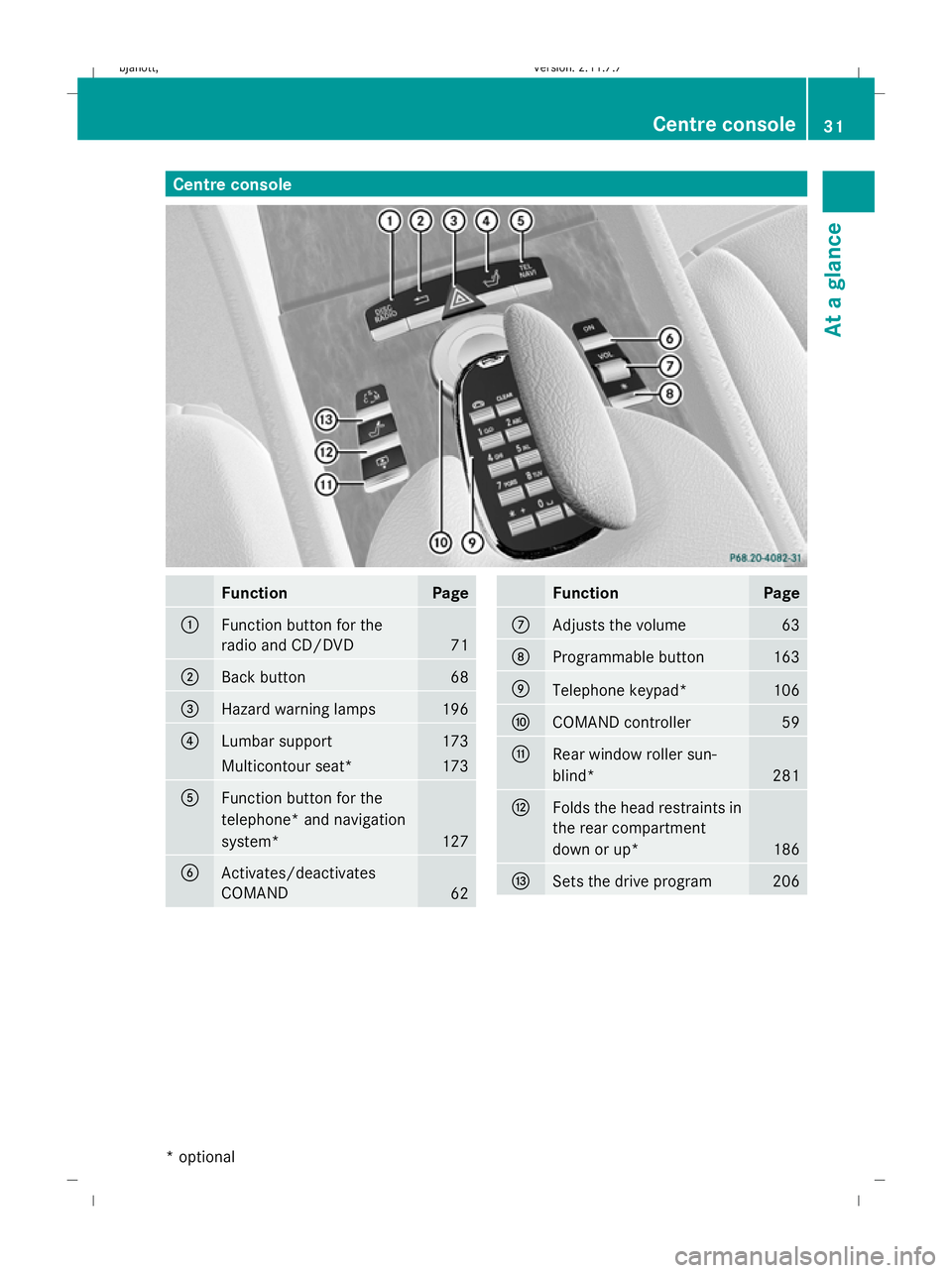
Centre console
Function Page
:
Function button for the
radio and CD/DVD
71
;
Back button 68
=
Hazard warning lamps 196
?
Lumbar support 173
Multicontour seat* 173
A
Function button for the
telephone* and navigation
system*
127
B
Activates/deactivates
COMAND
62 Function Page
C
Adjusts the volume 63
D
Programmable button 163
E
Telephone keypad* 106
F
COMAND controller 59
G
Rear window roller sun-
blind*
281
H
Folds the head restraints in
the rear compartment
down or up* 186
I
Sets the drive program 206Centre console
31At a glance
* optional
216_AKB; 2; 3, en-GB
bjanott
,V ersion: 2.11.7.7
2009-02-27T14:54:17+01:00 - Seite 31 Z
Dateiname: 6515230602_buchblock.pdf; erzeugt am 04. Mar 2009 11:14:43; WK
Page 48 of 421
R
only use a forward-facing child restraint
system on the front-passenger seat and
move the front-passenger seat to its rear-
most position.
R have the automatic child seat recognition
checked at a qualified specialist workshop.
To ensure that the automatic child seat rec-
ognition on the front-passenger seat func-
tions correctly, never place objects (such as
a cushion) under the child restraint system.
The entire base of the child restraint system
must always rest on the seat cushion. An
incorrectly fitted child restraint system can-
not perform its intended protective function
in the event of an accident, and could lead to
injuries.
i The windowbag, the sidebag and the belt
tensioner on the front-passenger side are
still active even if the front-passenger front
airbag is disabled by the automatic child-
seat recognition on the front-passenger
seat. G
Risk of injury
Do not place electronic devices on the front-
passenger seat, e.g.:
R laptops, when switched on
R mobile phones
R cards with transponders, e.g. ski passes or
access cards
Signals from electronic equipment can cause
interference in the automatic child seat rec-
ognition sensor system. This could lead to a
system malfunction. This may cause the
4 PASSENGER AIRBAG OFF warning lamp
to light up without there being a child seat
with automatic child seat recognition fitted.
This means that the front-passenger front air-
bag does not deploy during an accident. It is
also possible that the 4PASSENGER AIR-
BAG OFF warning lamp will not light up briefly
if you turn the key in the ignition lock to posi-
tion 2.
Suitable positioning of the child restraint system Weight categories and ages Group 0: up to 10 kg
up to approximately
9 months Group 0+: up to 13 kg
up to approximately
18 months
Child restraint system on the
front-passenger seat
As recommended
2 As recommended
2 Child restraint system on the
left-hand and right-hand rear
seats
Universal or as recommen-
ded Universal or as recommen-
ded
2
Only use child restraint systems with automatic child seat recognition. Occupant safety
45Safety
216_AKB; 2; 3, en-GB
bjanott,V ersion: 2.11.7.7
2009-02-27T14:54:17+01:00 - Seite 45 Z
Dateiname: 6515230602_buchblock.pdf; erzeugt am 04. Mar 2009 11:14:48; WK
Page 60 of 421
Introduction
......................................... 58
Radio .................................................... 70
DAB* ..................................................... 74
Audio CD/audio DVD* and MP3 ........75
Video DVD functions ...........................84
TV* ........................................................ 89
MUSIC REGISTER* ............................... 94
Media Interface* mode .......................98
Telephone* ........................................ 103
Navigation system* (introduction) .125
Navigation system* (entering a
destination) ....................................... 135
Navigation system* (entering spe-
cial destinations) .............................. 147
Navigation system* (route guid-
ance) .................................................. 148
Navigation* (route guidance with
RDS-TMC) ........................................... 155
Navigation system* (destination
memory) ............................................ 157
Navigation system* (previous des-
tinations) ........................................... 160
System ............................................... 160
Vehicle ............................................... 164
Automatic air conditioning ..............168
Seats .................................................. 173 57COMAND
216_AKB; 2; 3, en-GB
bjanott,
Version: 2.11.7.7 2009-02-27T14:54:17+01:00 - Seite 57
Dateiname: 6515230602_buchblock.pdf; erzeugt am 04. Mar 2009 11:14:52; WK
Page 61 of 421
Introduction
Operating safety
G
Risk of accident
Your attention must always be focused on the
traffic conditions.
Only use COMAND or the telephone* when
the road and traffic conditions permit.
Bear in mind that, at a speed of only
50 km/h, your vehicle covers a distance of
nearly 14 m per second. The navigation sys-
tem* will not provide you with information
about stop signs, give-way signs, traffic regu-
lations or road safety features. It is up to you
to pay attention to these while driving the
vehicle. Only enter a new destination when
the vehicle is stationary. G
Risk of accident and injury
Vehicles with BlueHYBRID *: make sure that
you read the "BlueHYBRID" supplement. You
may otherwise fail to detect dangers.
Dear radio user,
This radio can be operated by anyone in
accordance with the relevant EC directive.
The equipment corresponds to current Euro-
pean and harmonised national standards.
This guarantees that the equipment conforms
to the relevant specifications regarding elec-
tromagnetic compatibility.
As a result, interference caused by your
equipment to other electrical/electronic
equipment and interference to your equip-
ment caused by other electrical/electronic
equipment can be largely prevented.
The equipment is approved by the vehicle
manufacturer in accordance with European
Automotive EMC Directive 95/54/EC.
This means that the equipment in your vehicle
is authorised for use according to the given
regulations. The equipment does not require
certification and conforms to the relevant
equipment-specific EMC specifications in accordance with European standards
EN 55013 and EN 55020. Function restrictions when the vehi-
cle is being driven
For safety reasons, some COMAND functions
are restricted or unavailable while the vehicle
is in motion. This will be indicated by
COMAND displaying a message to this effect. Components
You can use COMAND to operate the follow-
ing in your vehicle:
R the audio functions
R the navigation system*
R the telephone* and communication func-
tions (text messages*)
R video DVD and TV*
R various vehicle settings
COMAND consists of:
R the COMAND display/SPLITVIEW*
R the COMAND controller
R the COMAND function buttons
R the telephone keypad
R connections in the glove compartment
(USB, additional USB*, jack plug* and
iPod ®
connection*)
The entertainment system* comprises:
R a remote control* for the front passenger
R wireless headphones* for the front
passenger 58
IntroductionCOMAND
* optional
216_AKB; 2; 3, en-GB
bjanott,
Version: 2.11.7.7 2009-02-27T14:54:17+01:00 - Seite 58
Dateiname: 6515230602_buchblock.pdf; erzeugt am 04. Mar 2009 11:14:52; WK