start stop button MERCEDES-BENZ CL600 2000 W140 User Guide
[x] Cancel search | Manufacturer: MERCEDES-BENZ, Model Year: 2000, Model line: CL600, Model: MERCEDES-BENZ CL600 2000 W140Pages: 424, PDF Size: 25.71 MB
Page 76 of 424
73 Seats
Te ch n ica l
data Instruments
and controlsOperationDrivingInstrument
cluster displayPractical hints Car care IndexNotes:
The automatic seat slide is provided with a safety
feature.
The automatic process is interrupted, if the backrest of
the sliding seat is pushed against an occupant or object.
The seat will slide forward and stop.
Investigate and correct the cause of interruption.
Now use memory button (page 112) or power seat switch
(page 68) to bring seat into desired position.
When folding the backrest forward from a reclined
position, and then folding it back, the backrest stops in a
more upright position for the safety of any rear-seat
passenger. Adjust the backrest until your arms are
slightly angled when holding the steering wheel, see
page 68.
When leaving the vehicle always remove the
electronic key from the starter switch, take the
KEYLESS-GO-card (if so equipped) with you, and
lock your vehicle.The power seats can also be operated with the
driver’s or passenger door open. Do not leave
children unattended in the vehicle or with access
to an unlocked vehicle. Unsupervised use of vehicle
equipment may cause serious personal injury.Never place hands under seat or near any moving
parts during a seat adjustment procedure.
Page 115 of 424

112 Memory function
Te ch n ica l
data Instruments
and controlsOperationDrivingInstrument
cluster displayPractical hints Car care Index
Storing positions into memory
Driver’s seat: with the electronic key in starter switch
position 1 or 2 or with the driver’s door open and the
electronic key inserted in the starter switch.
Front passenger seat: with electronic key in starter
switch position 1 or 2 or the passenger door open.
Adj ust t he seat a nd mul ticontou r back re st to t he d esired
position. You can also adjust the steering wheel, the
exterior mirrors electrically and the interior rear-view
mirror by hand for the driver’s seat. See page 67 for
front seat adjustment, page 107 for exterior mirror
adjustment and page 105 for steering wheel adjustment.
Push memory button “M”, release and push a stored
position button “1”,“ 2” or “3” within 3 seconds.Recalling positions from memory
To recall a seat/head restraint/steering wheel/inside
rear view mirror and exterior rear view mirror position,
push and hold button “1”, “2” or “3” until seat/head
restraint/steering wheel and exterior rear view mirror
movement has stopped.
The seat/head restraint/steering wheel/inside rear view
mirror and exterior rear view mirror movement stops
when the button is released.
Caution!
Do not operate the power seats using the memory
button if the backrest is in an excessively reclined
position. Doing so could cause damage to front or rear
seats.
First move backrest to an upright position.
Page 142 of 424

139 Multifunction steering wheel, multifunction display
Te ch n ica l
data Instruments
and controlsOperationDrivingInstrument
cluster displayPractical hints Car care Index Press theè or ÿbutton repeatedly until the
individual setting preliminary display (1) appears.
Press thej or kbutton until the setting menu
“SETTINGS” (2) is displayed.
Pressing theæ or çbutton controls the selection
marker (3) in setting menu (2).
“INSTRUMENT CLUSTER”, see page 140.
“HEADLAMP MODE”, see page 142.
“VEHICLE”, see page 144.
Pressing theè or ÿbutton displays the next or
previous system.
Notes:
These settings may only be performed with the vehicle
at standstill and with the electronic key in starter switch
position 1 or 2.
The individual setting preliminary display (1) will
appear if you speed up.
The setting menu previously called up will reappear
when the vehicle stops, providing no other system has
been called up in the meantime.To return menu “SETTINGS” (2) to its factory
setting:
•Call up the individual setting preliminary
display (1).
•Press the Jbutton in the instrument cluster for
approximately 3 seconds. Display (4) will appear.
•Press the JButton once more. The menu
“SETTINGS” is reset to factory settings,
acknowledged by display (5).
The individual setting preliminary display (1) will
appear if you do not press the Jbutton within
about 5 seconds. The setting menus will not be
reset.
Page 157 of 424
154 Engine oil level indicator
Te ch n ica l
data Instruments
and controlsOperationDrivingInstrument
cluster displayPractical hints Car care Index
Engine oil level indicator
To check the engine oil level, park vehicle on level
ground, with engine at normal operational temperature.
Check oil level approximately 5 minutes after stopping
the engine, allowing for the oil to return to the oil pan.
The message “PERF. SERV. ON TIME” (perform service
[engine oil level check] on time) will be displayed if the
required waiting period has not been observed after
stopping the engine:
•with engine at operational temperature approx.
5minutes.•with engine not at operational temperature up to
approx. 30 minutes.
The engine oil level check can be repeated after a short
time.
Turn the electronic key in starter switch to position 2.
To call up the trip odometer and main odometer, press
buttonè orÿ on the multifunction steering
wheel until the display appears. See page 124.
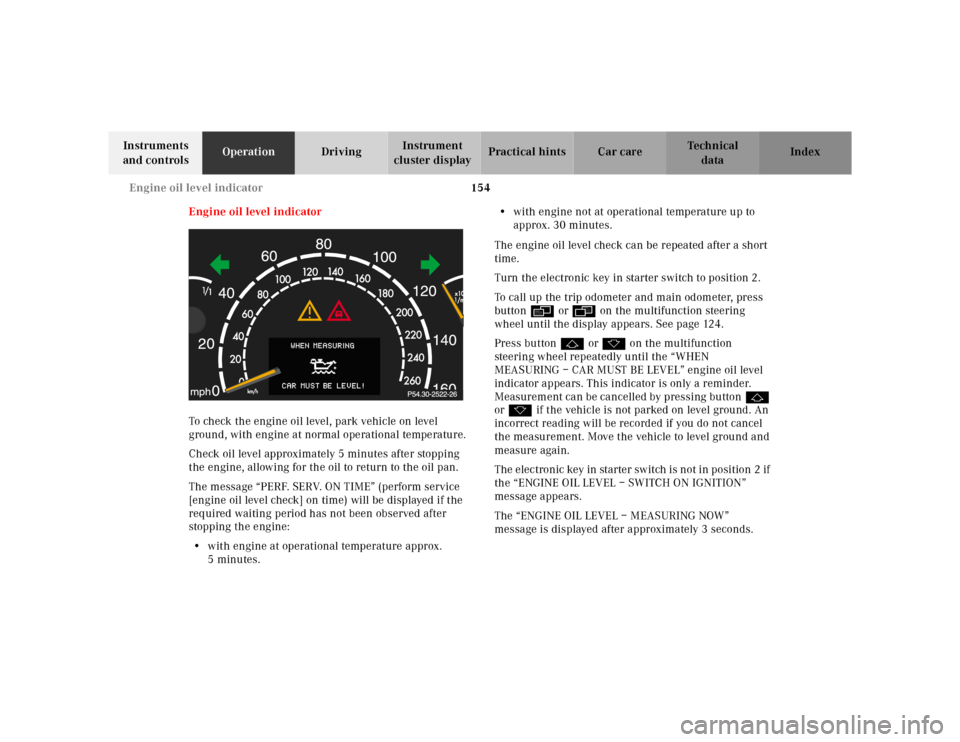
Press buttonj ork on the multifunction
steering wheel repeatedly until the “WHEN
MEASURING – CAR MUST BE LEVEL” engine oil level
indicator appears. This indicator is only a reminder.
Measurement can be cancelled by pressing buttonj
ork if the vehicle is not parked on level ground. An
incorrect reading will be recorded if you do not cancel
the measurement. Move the vehicle to level ground and
measure again.
The electronic key in starter switch is not in position 2 if
the “ENGINE OIL LEVEL – SWITCH ON IGNITION”
message appears.
The “ENGINE OIL LEVEL – MEASURING NOW”
message is displayed after approximately 3 seconds.
Page 182 of 424
179 Interior equipment
Te ch n ica l
data Instruments
and controlsOperationDrivingInstrument
cluster displayPractical hints Car care Index Express opening and closing of windows
Pressk orj on the switch past resistance point
and release – window opens or closes completely.
To interrupt procedure, briefly pressj ork.
If the upward movement of the window is blocked
during the closing procedure, the window will stop
during the last few inches before closure and open
slightly.
When pressing and holding the switchj to close the
window, and upward movement of the window is
blocked during the last few inches before closure, it will
stop but not
open slightly.
Notes:
The power windows can also be opened and closed
using the summer opening/convenience feature, see
page 45.
When opening a door window, the rear side window
opens slightly. The rear side window will close again
when the closing procedure of the door window is
completed.
Wa r n i n g !
When closing the windows, be sure that there is no
danger of anyone being harmed by the closing
procedure.In case of obstruction, the automatic reversal will
not operate if a door window is being closed by
pressing the switch to its resistance point and
holding it there, or when using the electronic main
key.The closing procedure of door windows can be
immediately reversed by either pressing the switch
or pressing buttonŒon the electronic main key
and holding it, or (vehicle with KEYLESS-GO) when
carrying the KEYLESS-GO-card, pull and hold a
door handle.When leaving the vehicle, always remove the
electronic key from starter switch, take the
KEYLESS-GO-card (if so equipped) with you, and
lock your vehicle. Do not leave children unattended
in the vehicle, or with access to an unlocked
vehicle. Unsupervised use of vehicle equipment
can cause serious personal injury.
Page 185 of 424
182 Interior equipment
Te ch n ica l
data Instruments
and controlsOperationDrivingInstrument
cluster displayPractical hints Car care Index
Express opening and closing of sliding/pop-up roof
To select a sunroof opening position, press the switch to
resistance point and release it when the sunroof has
reached the required position.
The sliding/pop-up roof now opens to the position set if
the switch is pressed past resistance point in the “open”
direction.
If you wish to change the opening position of the
sunroof, move the switch to resistance point in the
direction you require.
Stopping the sliding/pop-up roof:
Move the switch in any direction.
If the movement of the sliding/pop-up roof is blocked
during the closing procedure, the sunroof will stop and
reopen slightly.
Note:
Opening the sliding/pop-up roof automatically almost
fully (less approximately 1 inch [3 cm]), the sunroof
must have been opened first by pressing the switch to
resistance point and releasing it when the sunroof has
reached an almost fully open position.
Wa r n i n g !
When closing the sliding/pop-up roof, be sure that
there is no danger of anyone being harmed by the
closing procedure.In case of obstruction, the automatic reversal will
not operate if the sliding/pop-up roof is being
closed by moving the switch to its resistance point
and holding it there, or when using the electronic
main key or the lock button at each door handle
(vehicles with KEYLESS-GO).The closing procedure of the sliding/pop-up roof
can be immediately reversed by either moving the
switch in any direction, or pressing buttonŒon
the electronic main key and holding it; or (vehicles
with KEYLESS-GO) when carrying the KEYLESS-
GO-card, pull and hold a door handle.When leaving the vehicle, always remove the
electronic key from starter switch and take the
KEYLESS-GO-card (if so equipped) with you, and
lock your vehicle. Do not leave children unattended
in the vehicle, or with access to an unlocked
vehicle. Unsupervised use of vehicle equipment
can cause serious personal injury.
Page 229 of 424
224 Starter switch — KEYLESS-GO
Te ch n ica l
data Instruments
and controlsOperationDrivingInstrument
cluster displayPractical hints Car care Index
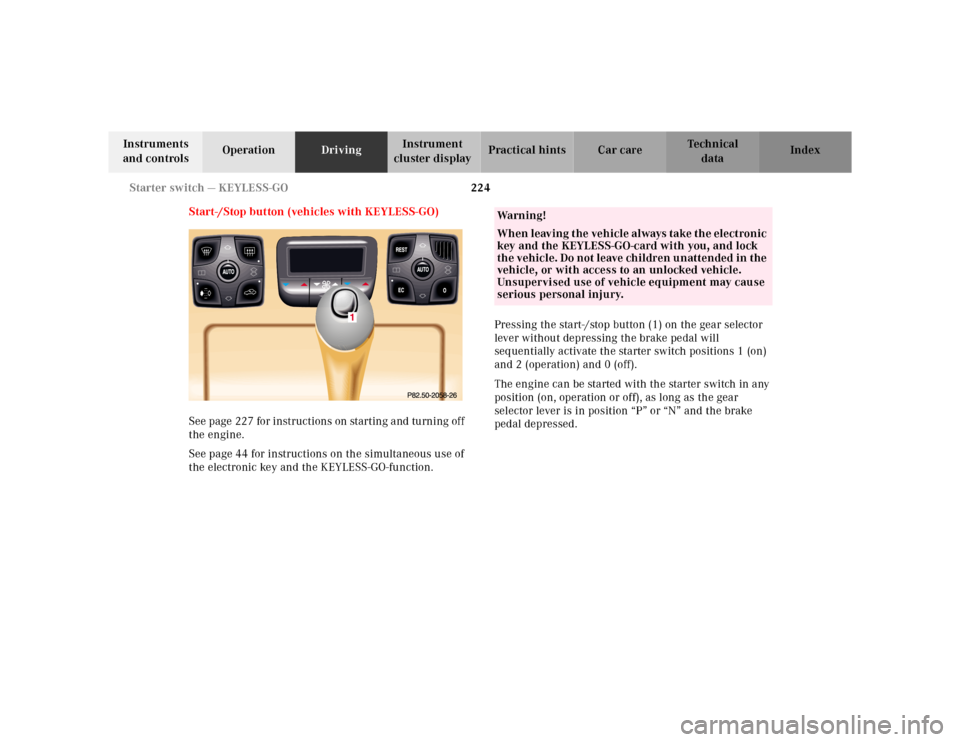
Start-/Stop button (vehicles with KEYLESS-GO)
See page 227 for instructions on starting and turning off
the engine.
See page 44 for instructions on the simultaneous use of
the electronic key and the KEYLESS-GO-function.Pressing the start-/stop button (1) on the gear selector
lever without depressing the brake pedal will
sequentially activate the starter switch positions 1 (on)
and 2 (operation) and 0 (off).
The engine can be started with the starter switch in any
position (on, operation or off), as long as the gear
selector lever is in position “P” or “N” and the brake
pedal depressed.
Wa r n i n g !
When leaving the vehicle always take the electronic
key and the KEYLESS-GO-card with you, and lock
the vehicle. Do not leave children unattended in the
vehicle, or with access to an unlocked vehicle.
Unsupervised use of vehicle equipment may cause
serious personal injury.
Page 230 of 424

225 Starter switch — KEYLESS-GO
Te ch n ica l
data Instruments
and controlsOperationDrivingInstrument
cluster displayPractical hints Car care Index “On” position (starter switch position 1, see page 222).
Most electrical consumers can be operated. For detailed
information see respective subjects.
Operation / driving position (starter switch position 2,
see page 222).
All electrical consumers can be operated. Gear selector
is unlocked.
“Off” position (electronic key removable from starter
switch).
Most electrical consumers cannot be operated.
The selector lever is locked in position “P”.
Notes:
For improved recognition of the KEYLESS-GO-card the
doors should be closed when pressing the start-/stop
button.
The gear selector lever can only be moved with the
vehicle battery charged and connected, and the starter
switch in the Operation position. With the gear selector
lever in position “P”, the brake pedal must also be
depressed.Important!
For the KEYLESS-GO-system to function properly, the
operator should observe the following:
•If the KEYLESS-GO-card is positioned farther away
from the vehicle (e.g. inside clothing or a briefcase),
the vehicle cannot be locked (see page 40) or started
with the start-/stop button (see page 227).
•If the KEYLESS-GO-card is removed from the vehicle
while the engine is running, or by placing the card
in front of the center armrest (see page 190), the
message “CHIP-CARD – NOT RECOGNIZED!” will
appear repeatedly while driving in the
multifunction display, see page 38.
Page 232 of 424
227 Starting and turning off the engine
Te ch n ica l
data Instruments
and controlsOperationDrivingInstrument
cluster displayPractical hints Car care Index Starting and turning off the engine
Before starting
Ensure that parking brake is engaged and that selector
lever is in position “P” or “N”.
Starting
Important!
In areas where temperatures frequently drop below -4°F
(-20°C) we recommend that an engine block heater be
installed. Your authorized Mercedes-Benz Center will
advise you on this subject.
Starting the engine with electronic key:
Do not depress accelerator.
Turn electronic key in starter switch to position 2.
Briefly turn electronic key in starter switch clockwise to
the stop and release. The starter will engage until the
engine is running.
If engine will not run, and the starting procedure stops,
turn electronic key completely to the left and repeat
starting the engine.After several unsuccessful attempts, have the system
checked at the nearest authorized Mercedes-Benz
Center.
Important!
Due to the installed starter non-repeat feature, the
electronic key must be turned completely to the left
before attempting to start the engine again.
Starting the engine with KEYLESS-GO:
Note:
For improved recognition of the chip card the doors
should be closed when pressing the start-/stop button.
Depress brake pedal during the starting procedure.
Briefly press start-/stop button on gear selector lever.
The starter will engage until the engine is running.
If engine will not run, and the starting procedure stops,
press start-/stop button on gear selector lever and repeat
starting the engine.
After several unsuccessful attempts, have the system
checked at the nearest authorized Mercedes-Benz
Center.
Page 233 of 424

228 Starting and turning off the engine
Te ch n ica l
data Instruments
and controlsOperationDrivingInstrument
cluster displayPractical hints Car care Index
Turning off
Turning off the engine with electronic key:
Put the selector lever in position “P” and turn the
electronic key in the starter switch to position 0 to stop
the engine.
The electronic key can only be removed with the
selector lever in position “P”.
Turning off the engine with KEYLESS-GO:
Stop the vehicle and put the selector lever in
position “P”.
Press start-/stop button on the selector lever until the
engine stops. With the driver’s door closed the starter
switch is set to the “On” position (starter switch
position 1). With the driver’s door opened the starter
switch is set to the “Off” position (starter switch
position 0, same as electronic key removed from starter
switch).Note:
The engine can only be turned off with selector lever in
position “P”. If attempting to turn off the engine while
the selector lever is in any other position than “P” a
signal sounds and the message “SELECTOR LEVER
TO P” appears in the multifunction display as a
reminder to move the selector to position “P”.