service indicator MERCEDES-BENZ CL600 2002 C215 User Guide
[x] Cancel search | Manufacturer: MERCEDES-BENZ, Model Year: 2002, Model line: CL600, Model: MERCEDES-BENZ CL600 2002 C215Pages: 430
Page 221 of 430
218 Tele Aid
Te ch n i c a l
data Instruments
and controlsOperationDrivingInstrument
cluster displayPractical hints Car care Index
The Tele Aid system is available if:
•it has been activated and is operational. Activation
requires a subscription for monitoring services and
cellular air time
•the relevant cellular phone network and GPS signals
are available and pass the information on to the
response center.
Note:
Location of the vehicle on a map is possible if the
vehicle is able to receive signals from the GPS satellite
network and pass the information on to the response
center.
Wa r n i n g !
If the indicator lamp in the “SOS” button is
illuminated continuously and there was no voice
connection to the Response Center established,
then the Tele Aid system could not initiate an
emergency call (e.g. the relevant cellular phone
network is not available). The message
“EMERGENCY CALL – CALL FAILED” appears in
the multifunction display for approx. 10 seconds.Should this occur, assistance must be summoned
by other means.
J_OM_215.book Seite 218 Mittwoch, 30. Mai 2001 2:01 14
Page 224 of 430
221 Tele Aid
Te ch n i c a l
data Instruments
and controlsOperationDrivingInstrument
cluster displayPractical hints Car care Index Notes:
The indicator lamp in the Roadside Assistance
button remains illuminated in red for approx.
10 seconds during the system self-check after turning
electronic key in starter switch to position 2 (together
with the “SOS” button and the Information
button¡).
See system self-check on page 216 when the indicator
lamp does not light up in red or stays on longer than
approximately 10 seconds.
If the indicator lamp in the Roadside Assistance
button is illuminated continuously and there was
no voice connection to the Response Center established,
then the Tele Aid system could not initiate an Roadside
Assistance call (e.g. the relevant cellular phone network
is not available). The message “ROADSIDE
ASSISTANCE – CALL FAILED” appears in the
multifunction display.
Roadside Assistance calls can be terminated using the
ìbutton on the multifunction steering wheel.Information button ¡
Located below the center armrest cover is the
Information button¡. Pressing and holding the
button (for longer than 2 seconds) will initiate a call to
the Customer Assistance Center. The button will flash
while the call is in progress. The message “INFO –
CONNECTING CALL” will appear in the multifunction
display. When the connection is established, the
message “INFO – CALL CONNECTED” appears in the
multifunction display. The Tele Aid system will transmit
data generating the vehicle identification number,
model, color and location (subject to availability of
cellular and GPS signals).
A voice connection between the Customer Assistance
Center representative and the occupants of the vehicle
will be established. When a voice connection is
established the audio system mutes and the message
“TELE AID – INFO CALL ACTIVE” appears in the
multifunction display. Information regarding the
operation of your vehicle, the nearest Mercedes-Benz
Center or Mercedes-Benz USA products and services is
ava i l ab le to yo u .
For more details concerning Tele Aid, please visit
www.mbusa.com and use your ID and password, sent to
you separately, to learn more (USA only).
J_OM_215.book Seite 221 Mittwoch, 30. Mai 2001 2:01 14
Page 225 of 430
222 Tele Aid
Te ch n i c a l
data Instruments
and controlsOperationDrivingInstrument
cluster displayPractical hints Car care Index
Notes:
The indicator lamp in the Information button¡
remains illuminated in red for approx. 10 seconds
during the system self-check after turning electronic
key in starter switch to position 2 (together with the
“SOS” button and the Roadside Assistance button).
See system self-check on page 216 when the indicator
lamp does not light up in red or stays on longer than
approximately 10 seconds.
If the indicator lamp in the Information button¡ is
illuminated continuously and there was no voice
connection to the Response Center established, then the
Tele Aid system could not initiate an Information call
(e.g. the relevant cellular phone network is not
available). The message “info – CALL FAILED” appears
in the multifunction display.
Information calls can be terminated using the
ìbutton on the multifunction steering wheel.Important!
If the indicator lamps do not start flashing after
pressing one of the buttons or remain illuminated (in
red) at any time, the Tele Aid system has detected a fault
or the service is not currently active, and may not
initiate a call. Visit your Mercedes-Benz Center and
have the system checked or contact the Response Center
at 1-800-756-9018 (in the USA) or 1-888-923-8367 (in
Canada) as soon as possible.
Upgrade Signals
Tele Aid system processes calls using the following
priority.
•Automatic emergency – First priority
•Manual emergency – Second priority
•Roadside assistance – Third priority
•Information – Fourth priority
Should a higher priority call be initiated while you are
connected, an upgrade (alternating) tone will be heard,
and the appropriate indicator lamp will flash. If certain
information such as vehicle identification number or
customer information is not available, the operator may
need to retransmit.
J_OM_215.book Seite 222 Mittwoch, 30. Mai 2001 2:01 14
Page 226 of 430
223 Tele Aid
Te ch n i c a l
data Instruments
and controlsOperationDrivingInstrument
cluster displayPractical hints Car care Index During this time you will hear a chirp and voice contact
will be interrupted. Voice contact will resume once the
retransmission is completed. Once a call is concluded, a
chirp will be heard and the appropriate indicator lamp
will stop flashing. The COMAND system operation will
resume.
Important!
If the indicator lamp continues to flash or the system
does not reset, contact the Response Center at
1-800-756-9018 (in the USA) or 1-888-923-8367 (in
Canada), or Mercedes-Benz Customer Assistance at
1-800-FOR-MERCedes (1-800-367-6372) in the USA or
Customer Service at 1-800-387-0100 in Canada.Notes:
The indicator lamp in the respective button flashes until
the call is concluded. Calls can only be terminated by a
Response Center or Customer Assistance Center
representative except Roadside Assistance and
Information calls, which can also be terminated by
pressing ìbutton on the multifunction steering
wheel.
When a Tele Aid call has been initiated, the COMAND
system audio is muted and the selected mode (radio,
tape or CD) pauses. The optional cellular phone (if
installed) switches off. If you must use this phone, the
vehicle must be parked. Disconnect the coiled cord and
place the call. The navigation system (if engaged) will
continue to run. The display in the instrument cluster is
available for use and spoken commands are only
available by pressing the RPT button on the COMAND
unit. A pop-up window will appear in the COMAND
display to indicate that a Tele Aid call is in progress.
J_OM_215.book Seite 223 Mittwoch, 30. Mai 2001 2:01 14
Page 228 of 430
225 Tele Aid
Te ch n i c a l
data Instruments
and controlsOperationDrivingInstrument
cluster displayPractical hints Car care Index Stolen vehicle tracking services
In the event your vehicle was stolen, report the incident
to the police who will issue a numbered incident report.
Pass this number on to the Mercedes-Benz Response
Center.
The Response Center will then attempt to covertly
contact the vehicle’s Tele Aid system. Once the vehicle
is located, the Response Center will contact the local
Law Enforcement and you. The vehicle’s location will
only be provided to Law Enforcement.
Info Services (optional, except Canada)
Info Services categories include news, sports, stocks,
weather and calendar reminders. Choices can be
selected via www.mbusa.com or by calling 1-800-FOR-
MERcedes.
To request Info Services, press the SVC button on the
COMAND system, then select “SEND NEW REQUEST
FOR INFO SERVICE”. “NEW INFO SERVICE REQUEST
TRANSMITTED” will appear in the COMAND display
and call status messages will appear in the
multifunction display.Once information is available, the message “NEW INFO
RECEIVED – READ LATER WHEN STOPPED?” will
appear. Select “Yes”. With the vehicle stopped in a safe
location press SVC, then select “View Info Service of
mm.dd.yyyy hh.mm”. Messages will be retained for
30 minutes once the ignition is switched off.
Important!
Tele Aid utilizes the cellular network for
communication and the GPS (Global Positioning
System) satellites for vehicle location. If either of these
signals are unavailable, the Tele Aid system may not
function and if this occurs, assistance must be
summoned by other means.
Wa r n i n g !
If the indicator lamp in the “SOS” button does not
illuminate during or remains illuminated after the
system self-check or if the message “TELE AID –
VISIT WORKSHOP” appears in the multifunction
display, have the system checked at the nearest
Mercedes-Benz Center as soon as possible.
J_OM_215.book Seite 225 Mittwoch, 30. Mai 2001 2:01 14
Page 240 of 430
237 Automatic transmission
Te ch n i c a l
data Instruments
and controlsOperationDrivingInstrument
cluster displayPractical hints Car care Index Stopping
For brief stops, e.g. at traffic lights, leave the
transmission in gear and hold vehicle with the service
brake.
For longer stops with the engine idling, shift into “N”
or “P” and hold the vehicle with the service brake.
When stopping the vehicle on an uphill gradient, do not
hold it with the accelerator, use the brake. This avoids
unnecessary transmission heat build up.
Maneuvering
To maneuver in tight areas, e.g. when pulling into a
parking space, control the vehicle speed by gradually
releasing the brakes. Accelerate gently and never
abruptly step on the accelerator.
To rock a vehicle out of soft ground (mud or snow),
alternately shift from forward to reverse, while applying
slight partial throttle.Rocking a vehicle free in this manner may cause the
ABS or traction system malfunction indicator lamp to
come on. Turn off and restart the engine to clear the
malfunction indication.
Wa r n i n g !
Getting out of your vehicle with the selector lever
not fully engaged in position “P” is dangerous.
A ls o, w hen pa rked on a n in c li ne, pos i tion “P” a lon e
may not prevent your vehicle from moving,
possibly hitting people or objects.Always set the parking brake in addition to shifting
to position “P”, see page 244 for parking brake. When parked on an incline, also turn front wheel
against curb.Wa r n i n g !
When leaving the vehicle always remove the
electronic key from the starter switch, take the
KEYLESS-GO-card (if so equipped) with you and
lock the vehicle. Do not leave children unattended
in the vehicle, or with access to an unlocked
vehicle. Children could move the gear selector lever
from position “P”, which could result in an
accident or serious injury.
J_OM_215.book Seite 237 Mittwoch, 30. Mai 2001 2:01 14
Page 266 of 430
263 Driving systems
Te ch n i c a l
data Instruments
and controlsOperationDrivingInstrument
cluster displayPractical hints Car care Index •For a more precise setting the speed can be
increased in increments of 1 mph (Canada: 1 km/h)
by briefly pulling the control lever in direction (4).
Caution!
If the driver’s foot is not fully removed from the
accelerator pedal, the message “DISTRONIC OVERRIDE”
is displayed while the Distronic control system is being
overridden and it will not regulate the preset vehicle
speed and following distance. The vehicle speed and
following distance will be determined only by the
accelerator pedal position.Invalid attempts to activate
The multifunction display will show “–––MPH” during
invalid attempts to activate Distronic. Distronic will not
activate in the following situations:
•below a speed of approx. 25 mph
(Canada: 40 km/h),
•while the electronic stability program (ESP) is
switched off – ESP warning lampv in
speedometer dial is illuminated, see page 114,
•by moving the distronic control lever in “RESUME”
direction (4) when no speed is stored in memory,
•during the initialization and self-test phase after the
engine is started – this can take up to 2 minutes,
•while depressing the service brake pedal,
•while the parking brake is set – check ;warning
lamp (Canada: !) in instrument cluster, see
page 114,
•with the gear selector lever in position “P”, “R”
or “N” – check gear range indicator display in
instrument cluster, see page 114.
See page 327 for malfunction and warning messages if
the Distronic is malfunctioning.
Wa r n i n g !
Distronic brakes (up to 20% of vehicle braking
power) the vehicle to restore the preset distance or
to maintain the speed. The brake pedal is
automatically applied as this happens.Keep driver’s foot area clear at all times, including
the area under the brake pedal. Objects stored in
this area may impair pedal movement which could
interfere with the braking ability of the Distronic
system.Do not place your foot under the brake pedal – your
foot could become caught.
J_OM_215.book Seite 263 Mittwoch, 30. Mai 2001 2:01 14
Page 299 of 430
296 Malfunction and indicator lamps
Te ch n i c a l
data Instruments
and controlsOperation DrivingInstrument
cluster displayPractical hints Car care Index
Malfunction and indicator lamps
in the instrument cluster
General information:
If a bulb in the instrument cluster fails to light up
during the bulb self-check when turning the electronic
key in starter switch to position 2, have it checked and
replaced if necessary.
Emission control
Certain systems of the engine serve to keep the toxic
components of the exhaust gases within permissible
limits required by law.
These systems, of course, will function properly only
when maintained strictly according to factory
specifications. Any adjustments on the engine should,
therefore, be carried out only by authorized Mercedes-
Benz Center qualified technicians. Engine adjustments
should not be altered in any way. Moreover, the
specified service jobs must be carried out regularly
according to Mercedes-Benz servicing requirements.
For details refer to the Service Booklet.On-board diagnostic system
Check engine malfunction indicator lamp
Engine malfunction indicator lamp. If the
“CHECK ENGINE” malfunction indicator
lamp comes on when the engine is running,
it indicates a malfunction of the fuel management
system, emission control system, systems which impact
emissions, or the fuel cap is not closed tight (check the
fuel cap). If the “CHECK ENGINE” lamp is illuminated
continuously and the vehicle is driving normally, you
Wa r n i n g !
Inhalation of exhaust gas is hazardous to your
health. All exhaust gas contains carbon monoxide,
and inhaling it can cause unconsciousness and
lead to death. Do not run the engine in confined areas (such as a
garage) which are not properly ventilated. If you
think that exhaust gas fumes are entering the
vehicle while driving, have the cause determined
and corrected immediately. If you must drive under
these conditions, drive only with at least one
window fully open.
J_OM_215.book Seite 296 Mittwoch, 30. Mai 2001 2:01 14
Page 323 of 430
320 Malfunction and warning messages
Te ch n i c a l
data Instruments
and controlsOperation DrivingInstrument
cluster displayPractical hints Car care Index
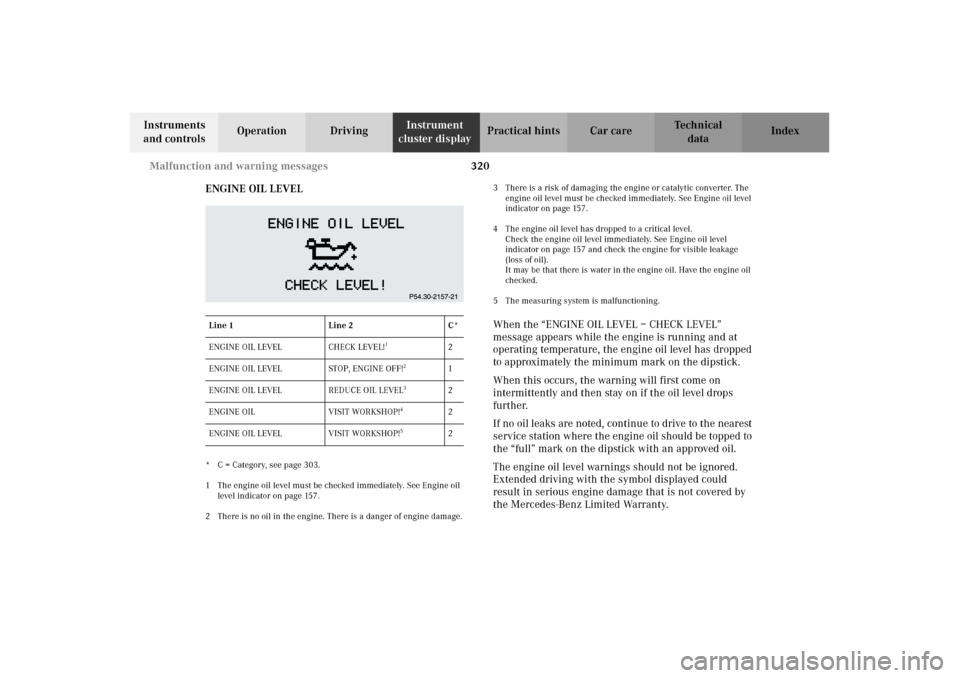
ENGINE OIL LEVEL
* C = Category, see page 303.
1 The engine oil level must be checked immediately. See Engine oil
level indicator on page 157.
2 There is no oil in the engine. There is a danger of engine damage.3 There is a risk of damaging the engine or catalytic converter. The
engine oil level must be checked immediately. See Engine oil level
indicator on page 157.
4 The engine oil level has dropped to a critical level.
Check the engine oil level immediately. See Engine oil level
indicator on page 157 and check the engine for visible leakage
(loss of oil).
It may be that there is water in the engine oil. Have the engine oil
checked.
5 The measuring system is malfunctioning.
When the “ENGINE OIL LEVEL – CHECK LEVEL”
message appears while the engine is running and at
operating temperature, the engine oil level has dropped
to approximately the minimum mark on the dipstick.
When this occurs, the warning will first come on
intermittently and then stay on if the oil level drops
further.
If no oil leaks are noted, continue to drive to the nearest
service station where the engine oil should be topped to
the “full” mark on the dipstick with an approved oil.
The engine oil level warnings should not be ignored.
Extended driving with the symbol displayed could
result in serious engine damage that is not covered by
the Mercedes-Benz Limited Warranty.
Line 1 Line 2 C*
ENGINE OIL LEVEL CHECK LEVEL!
1
2
ENGINE OIL LEVEL STOP, ENGINE OFF!
2
1
ENGINE OIL LEVEL REDUCE OIL LEVEL
3
2
ENGINE OIL VISIT WORKSHOP!
4
2
ENGINE OIL LEVEL VISIT WORKSHOP!
5
2
J_OM_215.book Seite 320 Mittwoch, 30. Mai 2001 2:01 14
Page 415 of 430
412 Index
Te ch n i c a l
data Instruments
and controlsOperation DrivingInstrument
cluster displayPractical hints Car careIndex
FFastening seat belts ......................................................... 85
First aid kit ..................................................................... 330
Flat tire
See Changing wheels ...............................................346
Flexible service system (FSS) ...................................... 150
Footwell lighting ............................................................ 190
Front airbags .................................................................... 92
Front center console
storage compartment ventilation ........................... 180
Front seat adjustment ..................................................... 67
Fuel
Gasoline additives ....................................................403
Premium unleaded gasoline ................. 292, 400, 402
Fuel cap placement warning
See CHECK ENGINE
malfunction indicator lamp ................................ 296
Fuel filler flap, manual release ................................... 374
Fuel requirements ......................................................... 402
Fuel reserve warning ....................................................299
Fuels, coolants, lubricants etc. - capacities ...............399
Fuse box .......................................................................... 331
Fuses, electrical ............................................................. 331
GGarage door opener ...................................................... 208
Gasoline
Additives .................................................................... 403
Fuel requirements ................................................... 402
Premium unleaded .................................................. 402
General notes on the central locking system .............. 32
Global locking
See Central locking system ....................................... 33
Glove box ......................................................................... 194HHazard warning flasher switch ................................... 167
Head restraints
Power head restraints, rear ....................................... 81
Head restraints, front seats
Removal and installation ........................................... 71
Headlamp adjustment .................................................. 360
Headlamp cleaning system ........................................... 163
Headlamp mode .............................................................. 160
Headlights ....................................................................... 159
Heated seats ...................................................................... 76
High beams
See combination switch ........................................... 164
J_OM_215.book Seite 412 Mittwoch, 30. Mai 2001 2:01 14