lock MERCEDES-BENZ CL600 2002 C215 Workshop Manual
[x] Cancel search | Manufacturer: MERCEDES-BENZ, Model Year: 2002, Model line: CL600, Model: MERCEDES-BENZ CL600 2002 C215Pages: 430
Page 108 of 430
105 Steering wheel adjustment
Te ch n i c a l
data Instruments
and controlsOperationDrivingInstrument
cluster displayPractical hints Car care Index Steering wheel adjustment
To adjust the steering wheel position, turn the electronic
key in starter switch to position 1 or 2. With the driver’s
door open, the steering wheel can also be operated with
the electronic key removed or in starter switch
position 0. However any adjustment will be cancelled
and the steering wheel will return to it’s position stored
in memory if the driver’s door is closed or the electronic
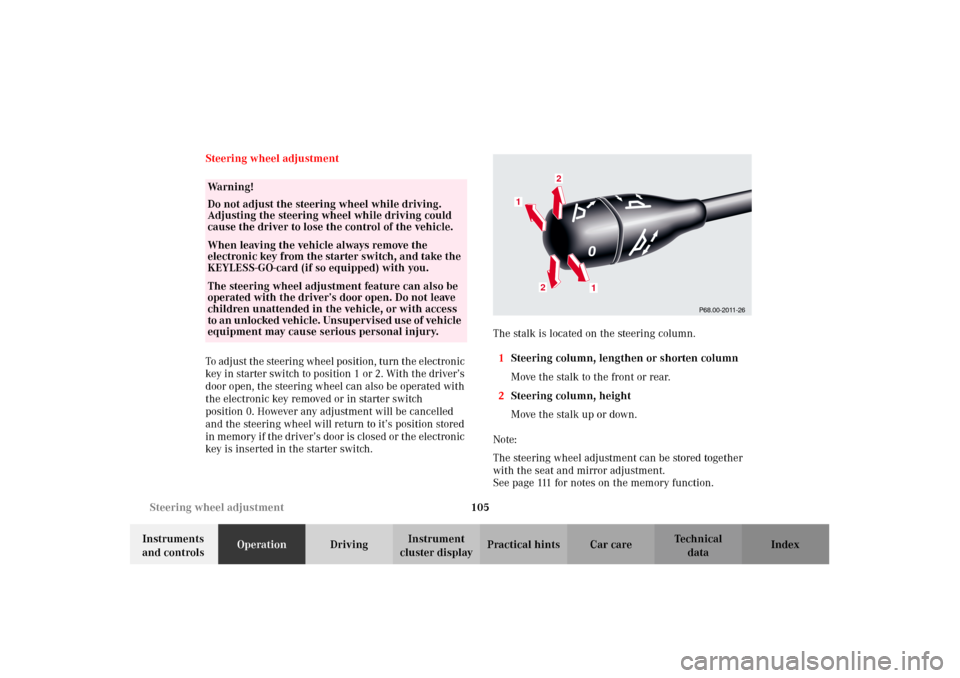
key is inserted in the starter switch.The stalk is located on the steering column.
1Steering column, lengthen or shorten column
Move the stalk to the front or rear.
2Steering column, height
Move the stalk up or down.
Note:
The steering wheel adjustment can be stored together
with the seat and mirror adjustment.
See page 111 for notes on the memory function.
Wa r n i n g !
Do not adjust the steering wheel while driving.
Adjusting the steering wheel while driving could
cause the driver to lose the control of the vehicle.When leaving the vehicle always remove the
electronic key from the starter switch, and take the
KEYLESS-GO-card (if so equipped) with you. The steering wheel adjustment feature can also be
operated with the driver’s door open. Do not leave
children unattended in the vehicle, or with access
to a n un locked vehi cle. Un supervi sed use of vehicl e
equipment may cause serious personal injury.
P68.00-2011-26
1
1
2
2
J_OM_215.book Seite 105 Mittwoch, 30. Mai 2001 2:01 14
Page 116 of 430
113 Memory function
Te ch n i c a l
data Instruments
and controlsOperationDrivingInstrument
cluster displayPractical hints Car care Index All seat, head restraint, steering wheel, and rear view
mirror adjustments as well as fastening of seat belts
should be done before the vehicle is put into motion.Key dependent memory settings
The setting of the automatic climate control and the
memory settings are stored together for each individual
electronic key or for both KEYLESS-GO-cards (vehicles
with KEYLESS-GO) when the electronic key is removed
from the starter switch or when the vehicle is locked
using the KEYLESS-GO-card.
The stored settings are activated when the electronic
key is inserted into the starter switch or when the
vehicle is unlocked using the KEYLESS-GO-card
(vehicles with KEYLESS-GO). See page 111 for Memory-
function and page 168 for automatic climate control.
Wa r n i n g !
Children 12 years old and under must never ride in
the front seat, except in a Mercedes-Benz
authorized BabySmart
TM compatible child seat,
which operates with the BabySmart
TM system
installed in the vehicle to deactivate the passenger
front airbag when it is properly installed.
Otherwise they will be struck by the airbag when it
inflates in a crash. If this happens, serious or fatal
injury can result.
According to accident statistics, children are safer
when properly restrained in the rear seating
positions than in the front seating positions.
Infants and small children must ride in back seats
and be seated in an appropriate infant or child
restraint system, which is properly secured with
the vehicle’s seat belt, fully in accordance with the
child seat manufacturer’s instructions.A child’s risk of serious or fatal injuries is
significantly increased if the child restraints are
not properly secured in the vehicle and the child is
not properly secured in the child restraint.
J_OM_215.book Seite 113 Mittwoch, 30. Mai 2001 2:01 14
Page 118 of 430
115 Instrument cluster
Te ch n i c a l
data Instruments
and controlsOperationDrivingInstrument
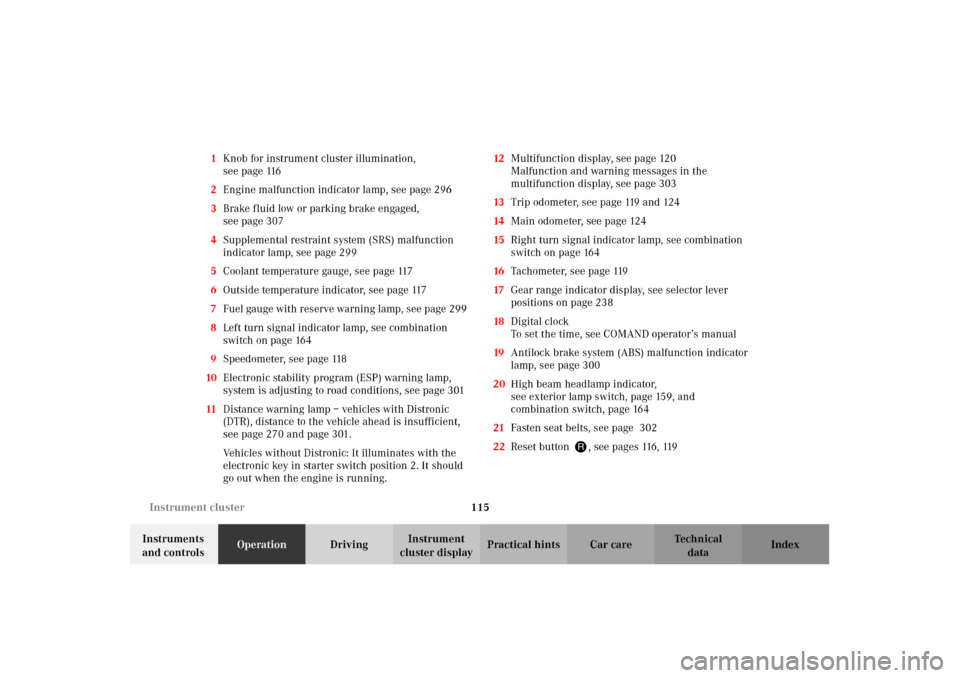
cluster displayPractical hints Car care Index 1Knob for instrument cluster illumination,
seepage116
2Engine malfunction indicator lamp, see page 296
3Brake fluid low or parking brake engaged,
seepage307
4Supplemental restraint system (SRS) malfunction
indicator lamp, see page 299
5Coolant temperature gauge, see page 117
6Outside temperature indicator, see page 117
7Fuel gauge with reserve warning lamp, see page 299
8Left turn signal indicator lamp, see combination
switch on page 164
9Speedometer, see page 118
10Electronic stability program (ESP) warning lamp,
system is adjusting to road conditions, see page 301
11Distance warning lamp – vehicles with Distronic
(DTR), distance to the vehicle ahead is insufficient,
see page 270 and page 301.
Vehicles without Distronic: It illuminates with the
electronic key in starter switch position 2. It should
go out when the engine is running.12Multifunction display, see page 120
Malfunction and warning messages in the
multifunction display, see page 303
13Trip odometer, see page 119 and 124
14Main odometer, see page 124
15Right turn signal indicator lamp, see combination
switch on page 164
16Tachometer, see page 119
17Gear range indicator display, see selector lever
positions on page 238
18Digital clock
To set the time, see COMAND operator’s manual
19Antilock brake system (ABS) malfunction indicator
lamp, see page 300
20High beam headlamp indicator,
see exterior lamp switch, page 159, and
combination switch, page 164
21Fasten seat belts, see page 302
22Reset buttonJ, s e e p a g e s 116 , 119
J_OM_215.book Seite 115 Mittwoch, 30. Mai 2001 2:01 14
Page 119 of 430
116 Instrument cluster
Te ch n i c a l
data Instruments
and controlsOperationDrivingInstrument
cluster displayPractical hints Car care Index
Activating the instrument cluster display
The instrument cluster is activated by:
•Opening the door
1.
•Pressing button Jon the instrument cluster
1.
•Turning the electronic key in starter switch to
position 1 or 2.
•Switching on the exterior lamps.
1 The instrument cluster is activated for approximately 30 seconds.Instrument cluster illumination
The instrument cluster illumination is dimmed or
brightened automatically to suit daylight lighting
conditions.
The instrument cluster illumination will also be
adjusted when the vehicle’s exterior lamps are
switched on.Display illumination, changing basic settings for driving
at dusk or in darkness:
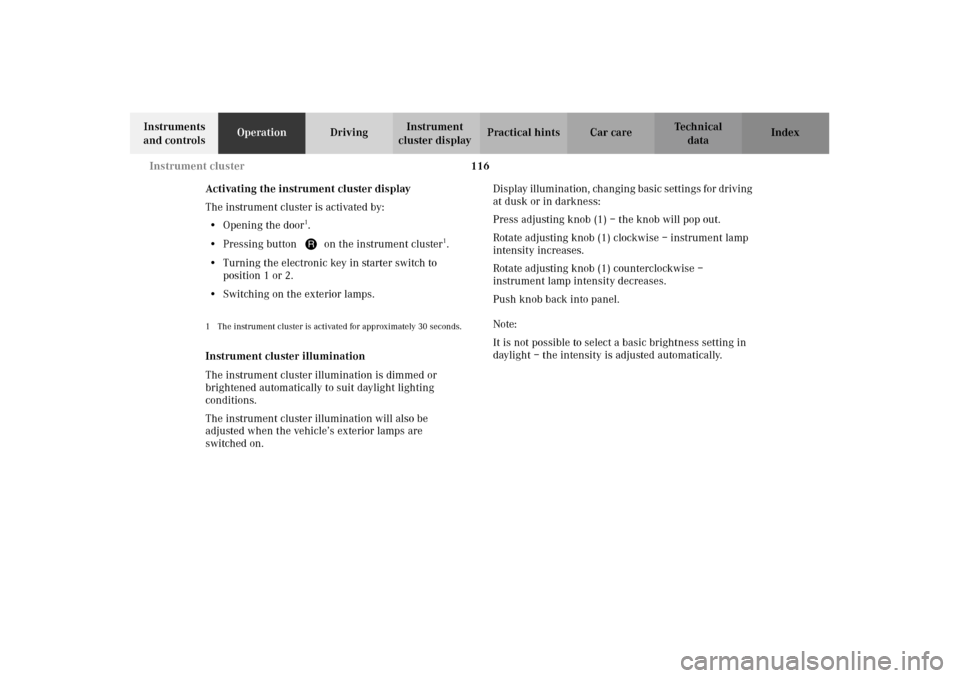
Press adjusting knob (1) – the knob will pop out.
Rotate adjusting knob (1) clockwise – instrument lamp
intensity increases.
Rotate adjusting knob (1) counterclockwise –
instrument lamp intensity decreases.
Push knob back into panel.
Note:
It is not possible to select a basic brightness setting in
daylight – the intensity is adjusted automatically.
J_OM_215.book Seite 116 Mittwoch, 30. Mai 2001 2:01 14
Page 146 of 430
143 Multifunction steering wheel, multifunction display
Te ch n i c a l
data Instruments
and controlsOperationDrivingInstrument
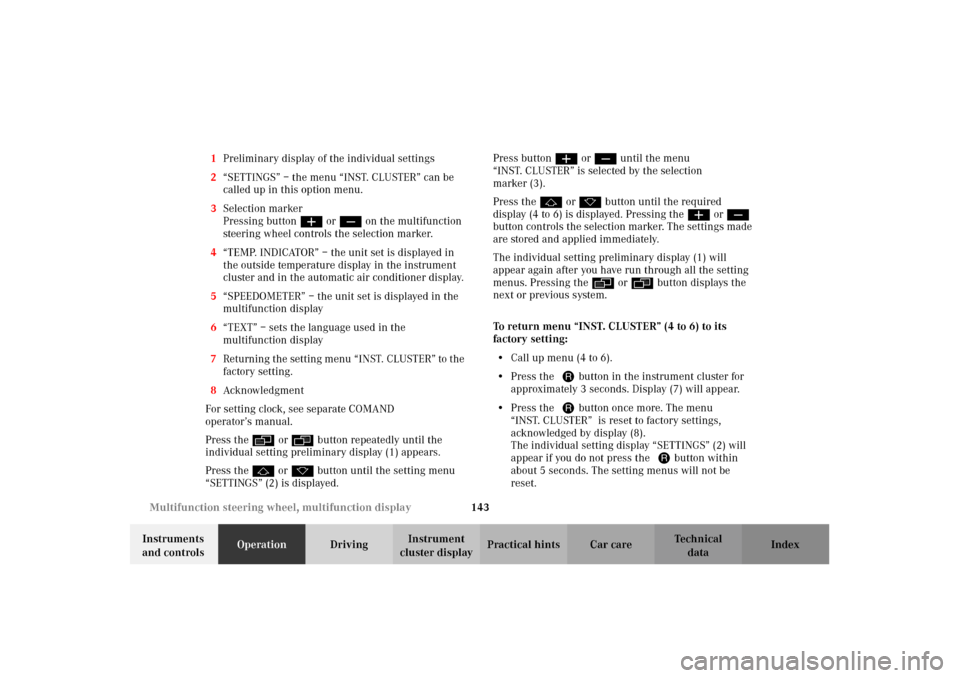
cluster displayPractical hints Car care Index 1Preliminary display of the individual settings
2“SETTINGS” – the menu “INST. CLUSTER” can be
called up in this option menu.
3Selection marker
Pressing buttonæ orç on the multifunction
steering wheel controls the selection marker.
4“TEMP. INDICATOR” – the unit set is displayed in
the outside temperature display in the instrument
cluster and in the automatic air conditioner display.
5“SPEEDOMETER” – the unit set is displayed in the
multifunction display
6“TEXT” – sets the language used in the
multifunction display
7Returning the setting menu “INST. CLUSTER” to the
factory setting.
8Acknowledgment
For setting clock, see separate COMAND
operator’s manual.
Press theè or ÿbutton repeatedly until the
individual setting preliminary display (1) appears.
Press thej or kbutton until the setting menu
“SETTINGS” (2) is displayed.Press buttonæ orç until the menu
“INST. CLUSTER” is selected by the selection
marker (3).
Press thej or kbutton until the required
display (4 to 6) is displayed. Pressing theæ orç
button controls the selection marker. The settings made
are stored and applied immediately.
The individual setting preliminary display (1) will
appear again after you have run through all the setting
menus. Pressing theè or ÿbutton displays the
next or previous system.
To return menu “INST. CLUSTER” (4 to 6) to its
factory setting:
•Call up menu (4 to 6).
•Press the Jbutton in the instrument cluster for
approximately 3 seconds. Display (7) will appear.
•Press the Jbutton once more. The menu
“INST. CLUSTER” is reset to factory settings,
acknowledged by display (8).
The individual setting display “SETTINGS” (2) will
appear if you do not press the Jbutton within
about 5 seconds. The setting menus will not be
reset.
J_OM_215.book Seite 143 Mittwoch, 30. Mai 2001 2:01 14
Page 150 of 430
147 Multifunction steering wheel, multifunction display
Te ch n i c a l
data Instruments
and controlsOperationDrivingInstrument
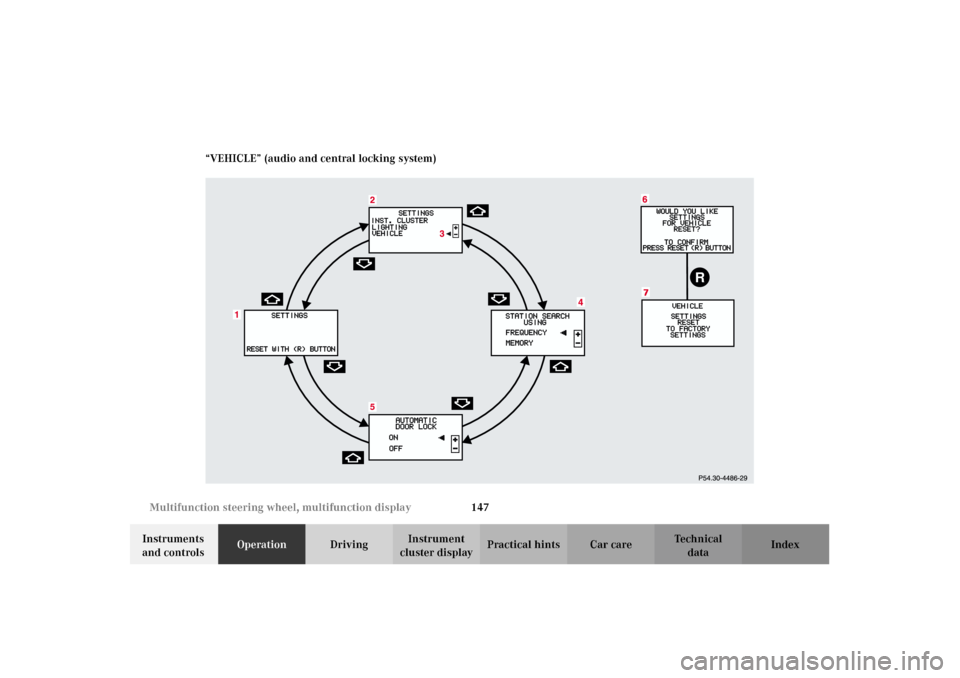
cluster displayPractical hints Car care Index “VEHICLE” (audio and central locking system)
R
5
J_OM_215.book Seite 147 Mittwoch, 30. Mai 2001 2:01 14
Page 151 of 430
148 Multifunction steering wheel, multifunction display
Te ch n i c a l
data Instruments
and controlsOperationDrivingInstrument
cluster displayPractical hints Car care Index
1Preliminary display of the individual settings
2“SETTINGS” – the menu “VEHICLE” can be called
up in this option menu.
3Selection marker
Pressing buttonæ orç on the multifunction
steering wheel controls the selection marker.
4“STATION SEARCH USING”
– radio adjustment “FREQUENCY”: use thej
ork button to select a frequency.
– radio adjustment “MEMORY”: use thej
ork button to select a stored station (preset
memory).
5“AUTOMATIC DOOR LOCK”, see automatic central
locking on page 51.
6Returning the setting menu “VEHICLE” to the
factory setting.
7Acknowledgment
Press theè or ÿbutton repeatedly until the
individual setting preliminary display (1) appears.
Press thej or kbutton until the setting menu
“SETTINGS” (2) is displayed.Press buttonæ orç until t he men u “ V EHI CLE” i s
selected by the selection marker (3).
Press thej or kbutton until the required
display (4 or 5) is displayed. Pressing theæ orç
button controls the selection marker. The settings made
are stored and applied immediately.
The individual setting preliminary display (1) will
appear again after you have run through all the setting
menus. Pressing theè or ÿbutton displays the
next or previous system.
To return menu “VEHICLE” (4 and 5) to its factory
setting:
•Call up menu (4 or 5).
•Press the Jbutton in the instrument cluster for
approximately 3 seconds. Display (6) will appear.
•Press the Jbutton once more. The menu
“VEHICLE” is reset to factory settings,
acknowledged by display (7).
The individual setting display “SETTINGS” (2) will
appear if you do not press the Jbutton within
about 5 seconds. The setting menus will not be
reset.
J_OM_215.book Seite 148 Mittwoch, 30. Mai 2001 2:01 14
Page 166 of 430
163 Exterior lamp switch
Te ch n i c a l
data Instruments
and controlsOperationDrivingInstrument
cluster displayPractical hints Car care Index Locator lighting
Turn exterior lamp switch to positionU.
After unlocking the vehicle with the electronic key
during darkness the fog lamps and parking lamps
switch on for a approximately 40 seconds.
The exterior lamps will be switched off when opening
the driver’s door.
To activate the function see the individual setting menu
“LIGHTING” –“LOCATOR LIGHTING” on page 144.Headlamp cleaning system
Turn the electronic key in starter switch to position 1
or 2.
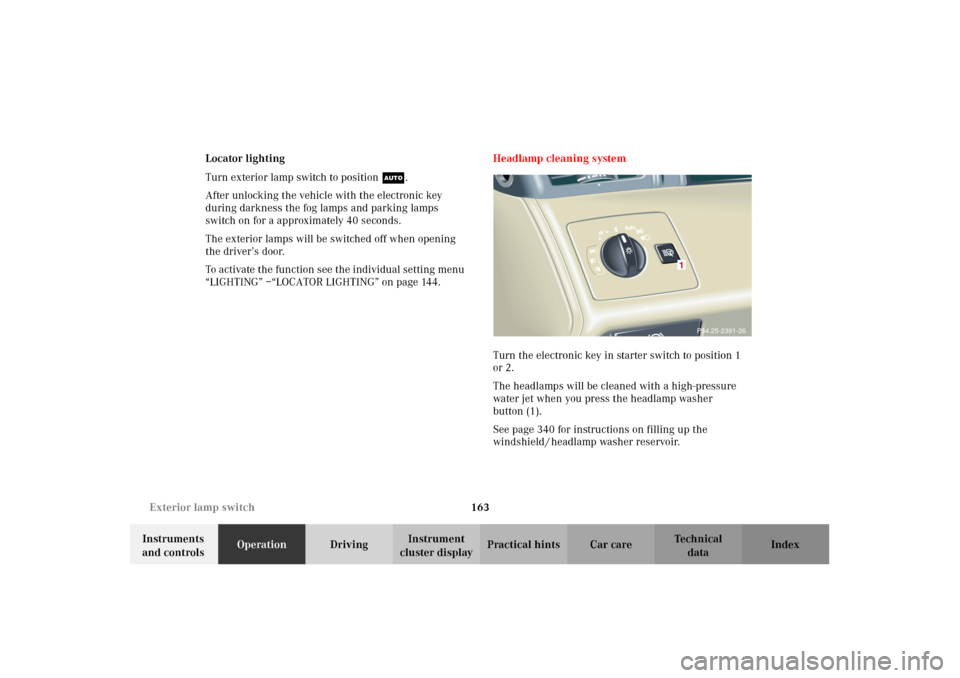
The headlamps will be cleaned with a high-pressure
water jet when you press the headlamp washer
button (1).
See page 340 for instructions on filling up the
windshield / headlamp washer reservoir.
P54.25-2391-26
1
J_OM_215.book Seite 163 Mittwoch, 30. Mai 2001 2:01 14
Page 169 of 430
166 Combination switch
Te ch n i c a l
data Instruments
and controlsOperationDrivingInstrument
cluster displayPractical hints Car care Index
Blocked windshield wipers
If the windshield wipers become blocked (for example,
due to snow), switch off the wipers.
For safety reasons before removing ice or snow, remove
electronic key from starter switch. Remove blockage.
Activate combination switch again (electronic key in
starter switch position 1).
Emergency operation of windshield wipers
In case of windshield wiper malfunction in switch
positions I or III, turn combination switch to wiper
setting II. Have the system checked at your authorized
Mercedes-Benz Center as soon as possible.Windshield wipers smear
If the windshield wipers smear the windshield, even
during rain, activate the washer system as often as
necessary. The fluid in the washer reservoir should be
mixed in the correct ratio.
See page 340 for instructions on filling up the
windshield / headlamp washer reservoir.
Windshield and headlamp washer fluid mixing ratio
For temperatures above freezing:
MB windshield washer concentrate “S” and water.
1 part “S” to 100 parts water
(40 ml “S” to 1 gallon water).
For temperature below freezing:
MB windshield washer concentrate “S” and
commercially available premixed windshield washer
solvent/antifreeze.
1 part “S” to 100 parts solvent
(40 ml “S” to 1 gallon solvent).
J_OM_215.book Seite 166 Mittwoch, 30. Mai 2001 2:01 14
Page 174 of 430
171 Automatic climate control
Te ch n i c a l
data Instruments
and controlsOperationDrivingInstrument
cluster displayPractical hints Car care Index Automatic climate control
The system is always at operational readiness, except
when manually switched off.
The automatic climate control only operates with the
engine running.
The temperature selector should be left at the desired
temperature setting. The temperature selected is
reached as quickly as possible.
The system will not heat or cool any quicker by setting a
higher or lower temperature.
The desired interior temperature and air distribution
can be selected separately for the left and right side of
the passenger compartment. Make the temperature
settings in small increments.
The automatic climate control removes considerable
moisture from the air during operation in the cooling
mode. It is normal for water to drip on the ground
through ducts in the underbody.
The air conditioning will not engage (no cooling) if the
economy mode AC
OFF
selected, see page 178. Notes:
The current settings (Temperature, Air volume, AC
OFF,
Activated charcoal filter, ON / OFF) are stored for each
electronic key before the electronic key is removed from
the starter switch or when the vehicle is locked using
the KEYLESS-GO-card (vehicles with keyless-go), see
key dependent memory settings on page 113.
Do not obstruct the air flow by placing objects on the air
flow-through exhaust slots below the rear window.
Also keep the air intake grill in front of the windshield
free of snow and debris.
The storage compartment between the front seats can be
ventilated. See page 180 for notes on ventilating the
storage space under the armrest in the center console.
The air conditioner switches itself off for its own
protection if refrigerant is lost. No cooling will then take
place. Economy mode AC
OFF
cannot be switched off.
Have the air conditioner checked by a Mercedes-Benz
Center should this happen.
If the vehicle interior has been heated by direct sunlight
and it is very hot, ventilate the interior (open door or
windows for a short period) before driving off.
J_OM_215.book Seite 171 Mittwoch, 30. Mai 2001 2:01 14