wheel MERCEDES-BENZ CLA 2013 User Guide
[x] Cancel search | Manufacturer: MERCEDES-BENZ, Model Year: 2013, Model line: CLA, Model: MERCEDES-BENZ CLA 2013Pages: 352, PDF Size: 5.37 MB
Page 25 of 352
GWARNING
If you switch off the ignition while driving,
safety-relevant functions are only available
with limitations, or not at all. This could affect,
for example, the power steering and the brake
boosting effect. You will require considerably
more effort to steer and brake. There is a risk
of an accident.
Do not switch off the ignition while driving.
GWARNING
Modifications to electronic components, their
software as well as wiring could effect their
function and/or the operation of other net-
worked components. This could in particular
also be the case for systems relevant to
safety. They might not function properly any
more and/or jeopardise the operational
safety of the vehicle. There is an increased
risk of an accident and injury.
Do not attempt to modify the wiring as well as
electronic components or their software.
Always have work on electrical and electronic
components carried out at a qualified special-
ist workshop.
! There is a risk of damage to the vehicle if:
R the vehicle makes contact with the
ground, e.g. on a high kerb or a loose
road surface
R you drive too quickly over an obstacle,
e.g. a kerb or a pothole
R a heavy object hits the underbody or
chassis component
In these or similar situations, the vehicle
body, the underbody, chassis components,
wheels or tyres could be damaged even if
this is not visible. Components that have
been damaged in this way can unexpect-
edly fail or no longer be able to assimilate
the loads occurring in the event of an acci-
dent.
If the underbody panelling is damaged,
flammable material, such as leaves, grass
or twigs, could collect between the under-
body and underbody panelling. These
materials could ignite if they remain in con-
tact with hot components of the exhaust
system for an extended period.
Have the vehicle checked and repaired
immediately at a qualified specialist work-
shop. If you become aware when continu-
ing the journey that driving safety has been
effected, stop as soon as possible in
accordance with the traffic conditions. In
such cases, consult a qualified specialist
workshop.
Declarations of conformity
Wireless vehicle components
The following information applies to all com-
ponents of the vehicle and the information
systems and communication devices integra-
ted into the vehicle which receive and/or
transmit radio waves:
The components of this vehicle that receive
and/or transmit radio waves are compliant
with the basic requirements and all other rel-
evant conditions of Directive 1999/5/EC.
You can obtain further information from any
Mercedes-Benz Service Centre.
Electromagnetic compatibility
The electromagnetic compatibility of the vehi-
cle components has been checked and certi-
fied according to the currently valid version
of Regulation ECE-R 10.
Diagnostics connection
The diagnostics connection is only intended
for the connection of diagnostic equipment at
a qualified specialist workshop.
GWARNING
If you connect equipment to a diagnostics
connection in the vehicle, it can affect the
operation of the vehicle systems. This may
affect the operating safety of the vehicle.
There is a risk of an accident.
Introduction23Z
Page 27 of 352
Data stored in the vehicle
A wide range of electronic components in
your vehicle contain data memories.
These data memories temporarily or perma-
nently store technical information about:
R the vehicle's operating state
R events
R faults
In general, this technical information docu-
ments the state of a component, a module, a
system or the surroundings.
These include, for example:
R operating conditions of system compo-
nents, e.g. fluid levels
R the vehicle's status messages and those of
its individual components, e.g. number of
wheel revolutions/speed, deceleration in
movement, lateral acceleration, accelera-
tor pedal position
R malfunctions and defects in important sys-
tem components, e.g. lights, brakes
R vehicle reactions and operating conditions
in special driving situations, e.g. airbag
deployment, intervention of stability con-
trol systems
R ambient conditions, e.g. outside tempera-
ture
This data is of an exclusively technical nature
and can be used to:
R assist in recognising and rectifying faults
and defects
R analyse vehicle functions, e.g. after an acci-
dent
R optimise vehicle functions
The data cannot be used to trace the vehicle's
movements.
When your vehicle is serviced, technical infor-
mation can be read from the event data mem-
ory and fault data memory.
Services include, for example:
R repair services
R service processesRwarranties
R quality assurance
It is read by employees of the service network
(including manufacturers) using special diag-
nostic testers. More detailed information is
obtained from it, if required.
After a fault has been rectified, the informa-
tion is deleted from the fault memory or is
continually overwritten.
When operating the vehicle, situations are
conceivable in which this technical data, in
connection with other information (if neces-
sary, under consultation with an authorised
expert), could be traced to a person.
Examples include:
R accident reports
R damage to the vehicle
R witness statements
Further additional functions that have been
contractually agreed upon with the customer
allow certain vehicle data to be conveyed by
the vehicle as well. The additional functions
include, for example, vehicle location in case
of an emergency.
Copyright information
General notes
Information on licences for free and open-
source software used in your vehicle and its
electronic components is available on the fol-
lowing website:
http://www.mercedes-benz.com/
opensource
Introduction25Z
Page 29 of 352

Cockpit ................................................. 28
Instrument cluster ..............................30
Multifunction steering wheel .............33
Centre console .................................... 34
Overhead control panel ......................36
Door control panel .............................. 3727At a glance
Page 30 of 352
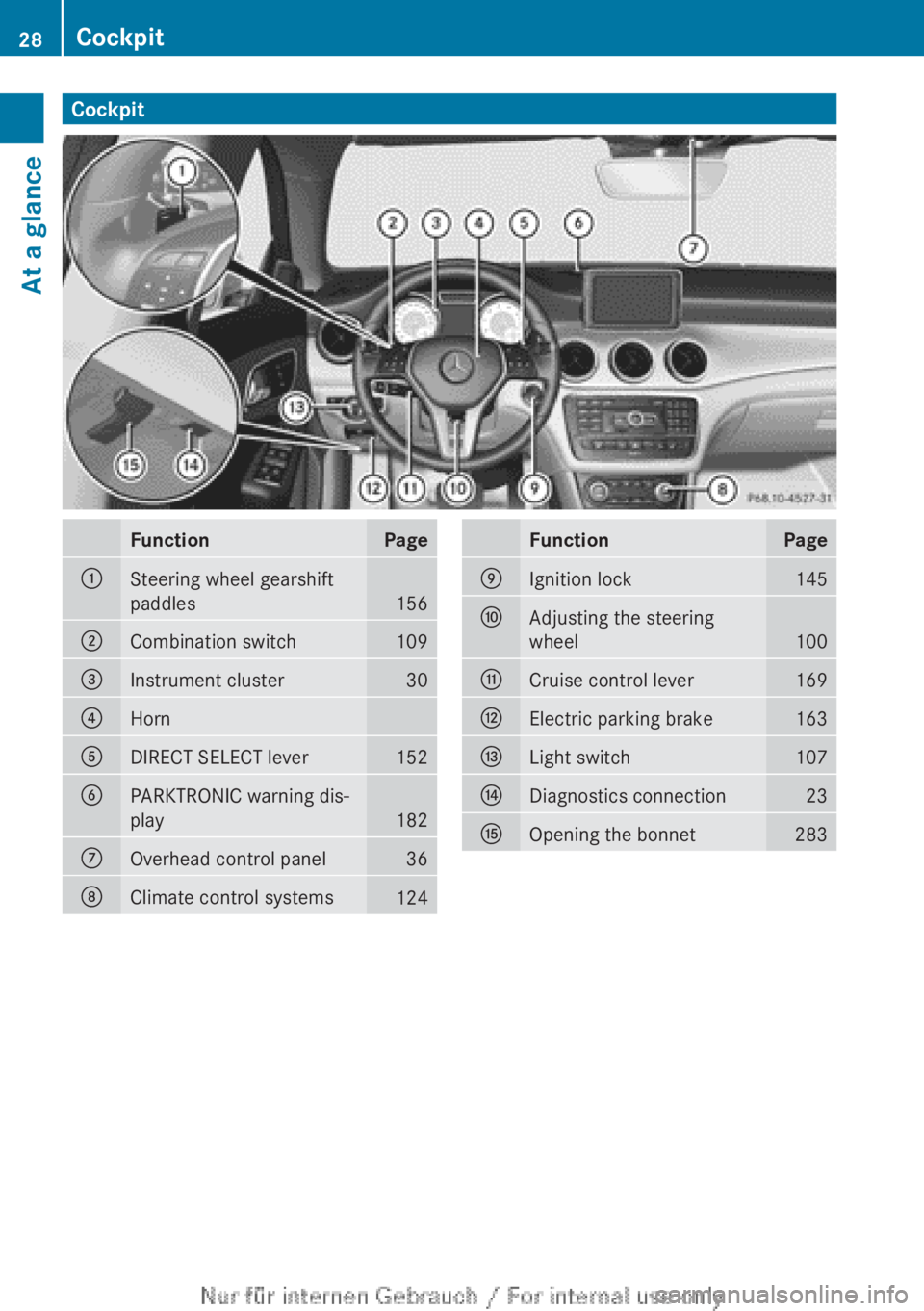
CockpitFunctionPage:Steering wheel gearshift
paddles
156
;Combination switch109=Instrument cluster30?HornADIRECT SELECT lever152BPARKTRONIC warning dis-
play
182
COverhead control panel36DClimate control systems124FunctionPageEIgnition lock145FAdjusting the steering
wheel
100
GCruise control lever169HElectric parking brake163ILight switch107JDiagnostics connection23KOpening the bonnet28328CockpitAt a glance
Page 31 of 352
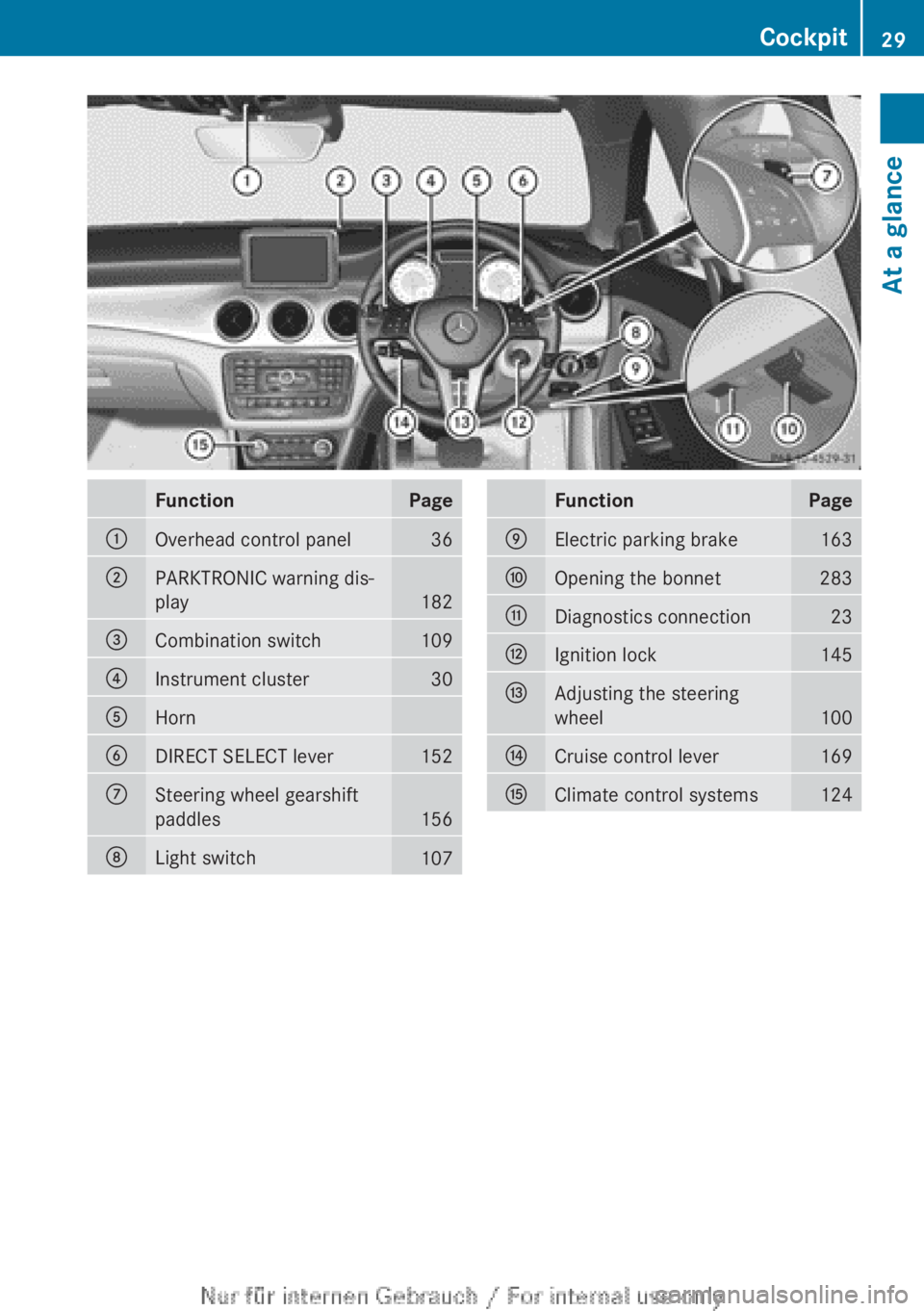
FunctionPage:Overhead control panel36;PARKTRONIC warning dis-
play
182
=Combination switch109?Instrument cluster30AHornBDIRECT SELECT lever152CSteering wheel gearshift
paddles
156
DLight switch107FunctionPageEElectric parking brake163FOpening the bonnet283GDiagnostics connection23HIgnition lock145IAdjusting the steering
wheel
100
JCruise control lever169KClimate control systems124Cockpit29At a glance
Page 35 of 352
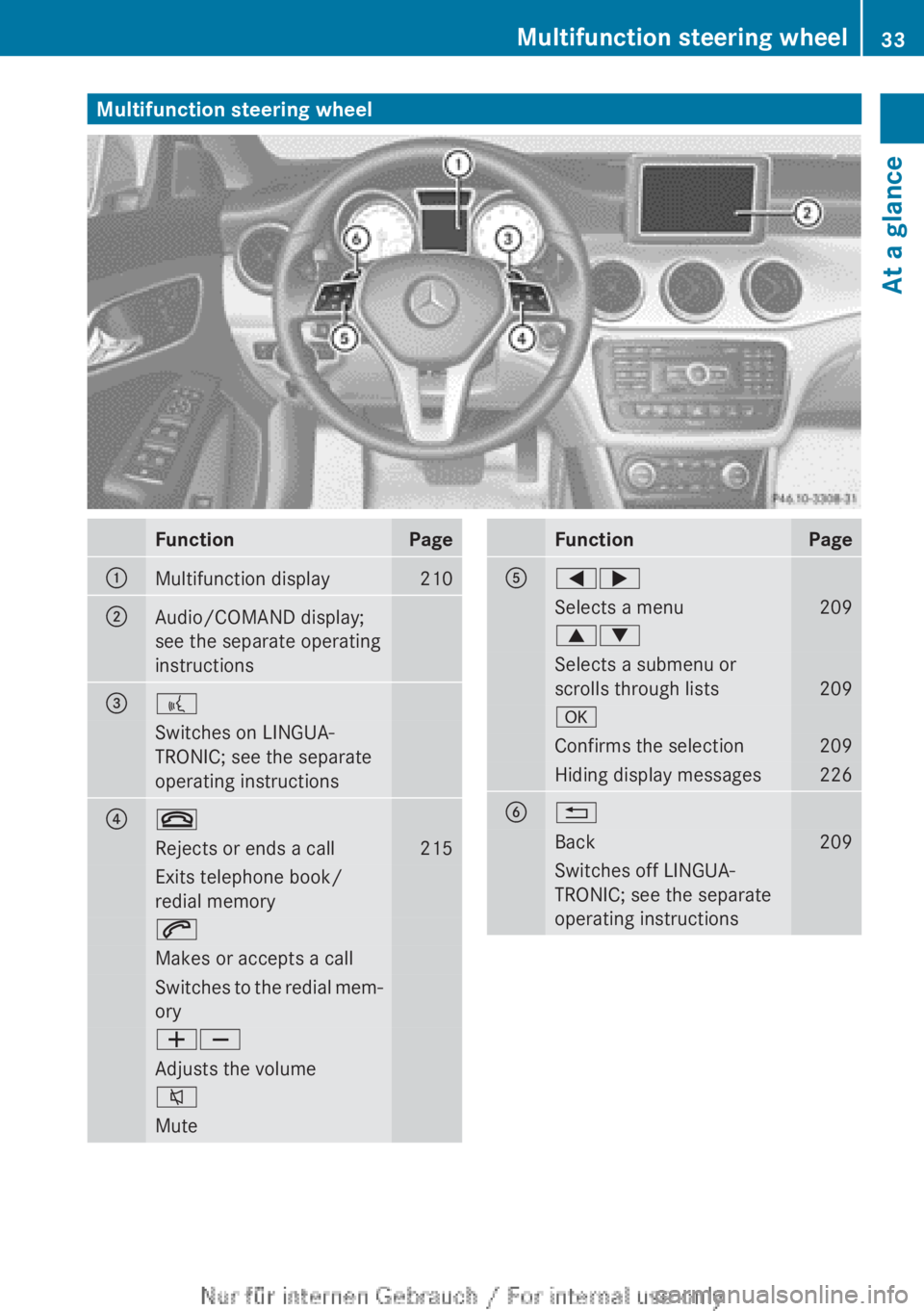
Multifunction steering wheelFunctionPage:Multifunction display210;Audio/COMAND display;
see the separate operating
instructions=?Switches on LINGUA-
TRONIC; see the separate
operating instructions?~Rejects or ends a call215Exits telephone book/
redial memory6Makes or accepts a callSwitches to the redial mem-
oryWXAdjusts the volume8MuteFunctionPageA=;Selects a menu2099:Selects a submenu or
scrolls through lists
209
aConfirms the selection209Hiding display messages226B%Back209Switches off LINGUA-
TRONIC; see the separate
operating instructionsMultifunction steering wheel33At a glance
Page 42 of 352
Useful information
i This Owner's Manual describes all mod-
els, series and optional equipment for your
vehicle that were available at the time of
going to press. National variations are pos-
sible. Note that your vehicle may not be
equipped with all of the functions descri-
bed. This is also the case for systems and
functions relevant to safety.
i Read the information on qualified special-
ist workshops: ( Y page 24).
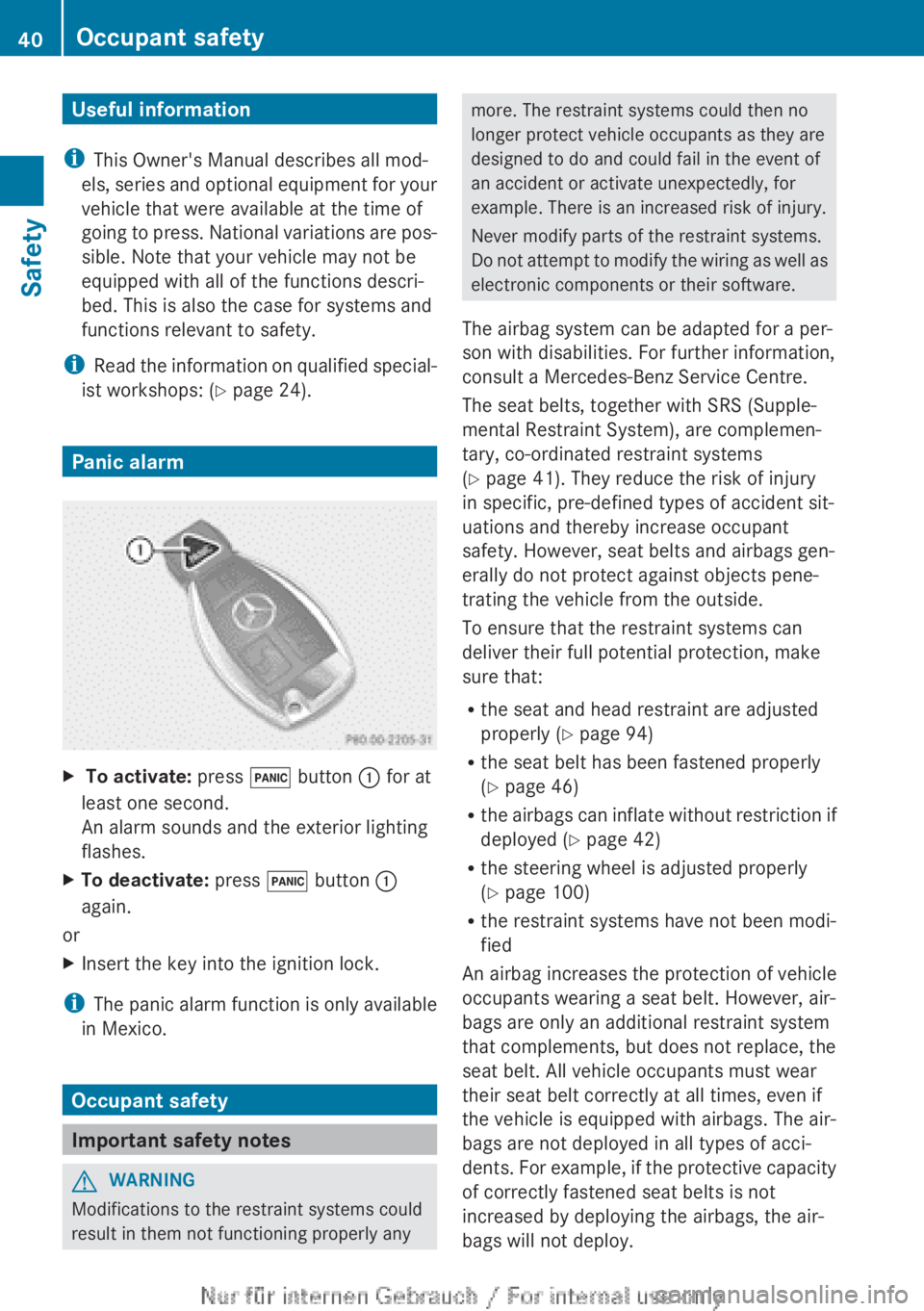
Panic alarm
X To activate: press ! button : for at
least one second.
An alarm sounds and the exterior lighting
flashes.XTo deactivate: press ! button :
again.
or
XInsert the key into the ignition lock.
i The panic alarm function is only available
in Mexico.
Occupant safety
Important safety notes
GWARNING
Modifications to the restraint systems could
result in them not functioning properly any
more. The restraint systems could then no
longer protect vehicle occupants as they are
designed to do and could fail in the event of
an accident or activate unexpectedly, for
example. There is an increased risk of injury.
Never modify parts of the restraint systems.
Do not attempt to modify the wiring as well as
electronic components or their software.
The airbag system can be adapted for a per-
son with disabilities. For further information,
consult a Mercedes-Benz Service Centre.
The seat belts, together with SRS (Supple-
mental Restraint System), are complemen-
tary, co-ordinated restraint systems
( Y page 41). They reduce the risk of injury
in specific, pre-defined types of accident sit-
uations and thereby increase occupant
safety. However, seat belts and airbags gen-
erally do not protect against objects pene-
trating the vehicle from the outside.
To ensure that the restraint systems can
deliver their full potential protection, make
sure that:
R the seat and head restraint are adjusted
properly ( Y page 94)
R the seat belt has been fastened properly
( Y page 46)
R the airbags can inflate without restriction if
deployed ( Y page 42)
R the steering wheel is adjusted properly
( Y page 100)
R the restraint systems have not been modi-
fied
An airbag increases the protection of vehicle
occupants wearing a seat belt. However, air-
bags are only an additional restraint system
that complements, but does not replace, the
seat belt. All vehicle occupants must wear
their seat belt correctly at all times, even if
the vehicle is equipped with airbags. The air-
bags are not deployed in all types of acci-
dents. For example, if the protective capacity
of correctly fastened seat belts is not
increased by deploying the airbags, the air-
bags will not deploy.40Occupant safetySafety
Page 45 of 352
OFF indicator lamp must be continuously
lit.
If the front-passenger seat of your vehicle
does not have automatic child seat recog-
nition, or your rearward-facing child
restraint system does not have a trans-
ponder for automatic child seat recogni-
tion, children must be secured in a child
restraint system on a suitable seat in the
rear. If you secure a forward-facing child
restraint system to the front-passenger
seat, you must move the front-passenger
seat as far back as possible.
R make sure there are no heavy or sharp-
edged objects in the pockets of clothing.
R do not lean forwards, e.g. over the cover of
the driver's/front-passenger front airbag,
particularly when the vehicle is in motion.
R do not put your feet on the dashboard.
R only hold the steering wheel on the outside.
This allows the airbag to be fully deployed.
You could be injured if the airbag is
deployed and you are holding the inside of
the steering wheel.
R do not lean on the doors from inside the
vehicle.
R make sure that there are no people, ani-
mals or objects between the vehicle occu-
pants and the area where the airbags are
deployed.
R do not place any objects between the seat
backrest and the door.
R do not hang any hard objects, e.g. coat
hangers, on the grab handles or coat hooks.
R do not attach accessories, e.g. cup holders,
to the doors.
It is not possible to rule out a risk of injury
being caused by an airbag, due to the high
speed at which the airbag must be deployed.GWARNING
If you modify the airbag covers or affix
objects, e.g. stickers to them, the airbags may
no longer function as intended. There is an
increased risk of injury.
Never modify the airbag covers and do not
affix any objects to them.GWARNING
Unsuitable seat covers may obstruct or even
prevent deployment of the airbags integrated
into the seats. The airbags may then fail to
protect the vehicle occupants as intended.
Operation of the automatic child seat recog-
nition may also be impaired. There is an
increased risk of injury, possibly even fatal.
Use only seat covers which have been specif-
ically approved for the respective seat by
Mercedes-Benz.
GWARNING
After the driver's airbag has been deployed,
the airbag parts are hot. There is a risk of
injury.
Do not touch the airbag parts. Have deployed
airbags replaced immediately at a qualified
specialist workshop.
Airbag deployment slows down and restricts
the movement of the vehicle occupant.
If the airbags are deployed, you will hear a
bang and a small amount of powder may also
be released. Only in rare cases will the bang
affect your hearing. The powder that is
released generally does not constitute a
health hazard and does not indicate that there
is a fire in the vehicle. The powder may cause
short-term breathing difficulties to persons
suffering from asthma or other pulmonary
conditions. In order to prevent potential
breathing difficulties, you should leave the
vehicle as soon as it is safe to do so. You can
also open the window to allow fresh air to
enter the vehicle interior. The 6 SRS warn-
ing lamp lights up.
The airbag installation locations are identified
by the AIRBAG symbol.
i After an airbag has been deployed, have
the vehicle towed to the nearest qualified
specialist workshop, even if your vehicle
can still be driven.
Occupant safety43SafetyZ
Page 46 of 352
Front airbags
! Do not place heavy objects on the front-
passenger seat. This could cause the sys-
tem to identify the seat as being occupied.
In the event of an accident, the restraint
systems on the front-passenger side may
be triggered and have to be replaced.
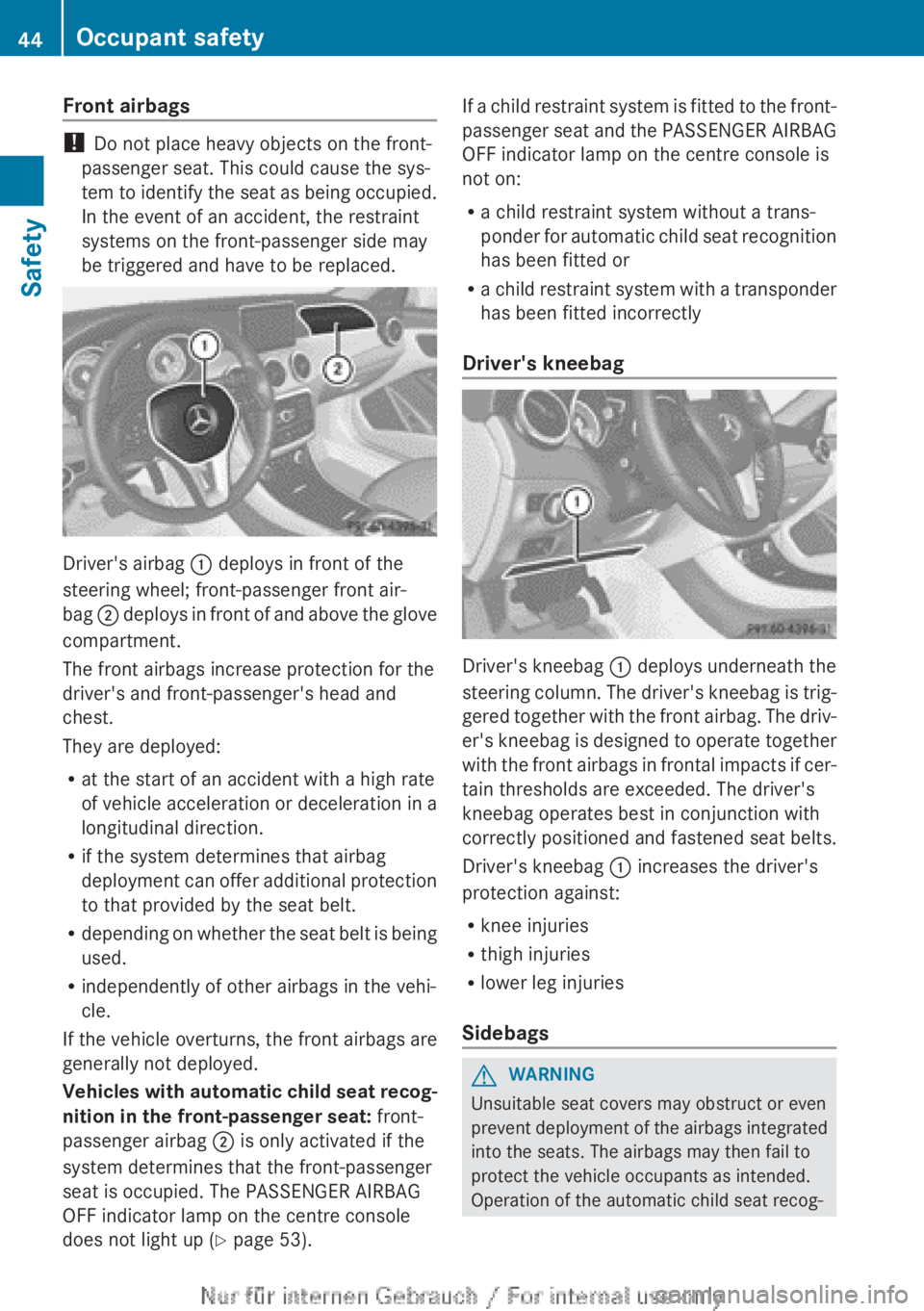
Driver's airbag : deploys in front of the
steering wheel; front-passenger front air-
bag ; deploys in front of and above the glove
compartment.
The front airbags increase protection for the
driver's and front-passenger's head and
chest.
They are deployed:
R at the start of an accident with a high rate
of vehicle acceleration or deceleration in a
longitudinal direction.
R if the system determines that airbag
deployment can offer additional protection
to that provided by the seat belt.
R depending on whether the seat belt is being
used.
R independently of other airbags in the vehi-
cle.
If the vehicle overturns, the front airbags are
generally not deployed.
Vehicles with automatic child seat recog-
nition in the front-passenger seat: front-
passenger airbag ; is only activated if the
system determines that the front-passenger
seat is occupied. The PASSENGER AIRBAG
OFF indicator lamp on the centre console
does not light up ( Y page 53).
If a child restraint system is fitted to the front-
passenger seat and the PASSENGER AIRBAG
OFF indicator lamp on the centre console is
not on:
R a child restraint system without a trans-
ponder for automatic child seat recognition
has been fitted or
R a child restraint system with a transponder
has been fitted incorrectly
Driver's kneebag
Driver's kneebag : deploys underneath the
steering column. The driver's kneebag is trig-
gered together with the front airbag. The driv-
er's kneebag is designed to operate together
with the front airbags in frontal impacts if cer-
tain thresholds are exceeded. The driver's
kneebag operates best in conjunction with
correctly positioned and fastened seat belts.
Driver's kneebag : increases the driver's
protection against:
R knee injuries
R thigh injuries
R lower leg injuries
Sidebags
GWARNING
Unsuitable seat covers may obstruct or even
prevent deployment of the airbags integrated
into the seats. The airbags may then fail to
protect the vehicle occupants as intended.
Operation of the automatic child seat recog-
44Occupant safetySafety
Page 66 of 352
Important safety notes
If you fail to adapt your driving style or if you
are inattentive, the driving safety systems can
neither reduce the risk of accident nor over-
ride the laws of physics. Driving safety sys-
tems are merely aids designed to assist driv-
ing. You are responsible for the distance to
the vehicle in front, for vehicle speed and for
braking in good time. Always adapt your driv-
ing style to suit the prevailing road, weather
and traffic conditions and maintain a safe dis-
tance from the vehicle in front. Drive care-
fully.
i The driving safety systems described only
work as effectively as possible when there
is adequate contact between the tyres and
the road surface. Pay particular attention
to the information regarding tyres, recom-
mended minimum tyre tread depths etc. in
the "Wheels and tyres" section
( Y page 316).
In wintry driving conditions, always use
winter tyres (M+S tyres) and, if necessary,
snow chains. Only in this way will the driv-
ing safety systems described in this section
work as effectively as possible.
ABS (Anti-lock Braking System)
General notes
ABS regulates brake pressure in such a way
that the wheels do not lock when you brake.
This allows you to continue steering the vehi-
cle when braking.
The ! ABS warning lamp in the instrument
cluster lights up when the ignition is switched
on. It goes out when the engine is running.
Important safety notes
i Observe the "Important safety notes" sec-
tion for driving safety systems
( Y page 64).
GWARNING
If ABS is faulty, the wheels could lock when
braking. The steerability and braking charac-
teristics may be severely impaired. Addition-
ally, further driving safety systems are deac-
tivated. There is an increased danger of skid-
ding and accidents.
Drive on carefully. Have ABS checked imme-
diately at a qualified specialist workshop.
If ABS is malfunctioning, other systems,
including driving safety systems, will also
become inoperative. Observe the information
on the ABS warning lamp ( Y page 256) and
display messages which may be shown in the
instrument cluster ( Y page 227).
ABS works from a speed of about
8 km/hupwards, regardless of road-surface
conditions. ABS works on slippery surfaces,
even when you only brake gently.
Braking
XIf ABS intervenes: continue to depress the
brake pedal with force until the braking sit-
uation is over.XTo make a full brake application:
depress the brake pedal with full force.
If ABS intervenes when braking, you will feel
a pulsing in the brake pedal.
The pulsating brake pedal can be an indica-
tion of hazardous road conditions, and func-
tions as a reminder to take extra care while
driving.
BAS (Brake Assist)
General notes
BAS operates in emergency braking situa-
tions. If you depress the brake pedal quickly,
BAS automatically boosts the braking force,
thus shortening the stopping distance.
64Driving safety systemsSafety