lights MERCEDES-BENZ CLA 2013 Workshop Manual
[x] Cancel search | Manufacturer: MERCEDES-BENZ, Model Year: 2013, Model line: CLA, Model: MERCEDES-BENZ CLA 2013Pages: 352, PDF Size: 5.37 MB
Page 165 of 352
cle from rolling away by applying the parking
brake.
Vehicles with manual transmissionXShift to either first gear or reverse gear R.XTurn the key to position 0 in the ignition
lock and remove it.
The immobiliser is activated.XApply the electric parking brake.
Vehicles with automatic transmission
XApply the electric parking brake.XShift the transmission to position P.XTurn the key to position 0 in the ignition
lock and remove it.
The immobiliser is activated.
i If you switch the engine off with the trans-
mission in position R or D, the automatic
transmission shifts to N automatically.
If you then open one of the front doors or
remove the key from the ignition, the auto-
matic transmission shifts to P.
If you shift the automatic transmission to
N before switching off the engine, the auto-
matic transmission remains in N even if a
door is opened.
Electric parking brake
General notes
GWARNING
If you leave children unattended in the vehi-
cle, they could set the vehicle in motion by,
for example:
R releasing the parking brake
R shifting an automatic transmission out of
parking position P
R shifting a manual transmission into neutral
R starting the engine
They could also operate vehicle equipment.
There is a risk of an accident and injury.
When leaving the vehicle, always take the key
with you and lock the vehicle. Never leave
children unattended in the vehicle.
i The electric parking brake carries out a
function check at regular intervals when
the engine is switched off. Noises that
occur are normal.
Engaging/releasing manually
Engaging
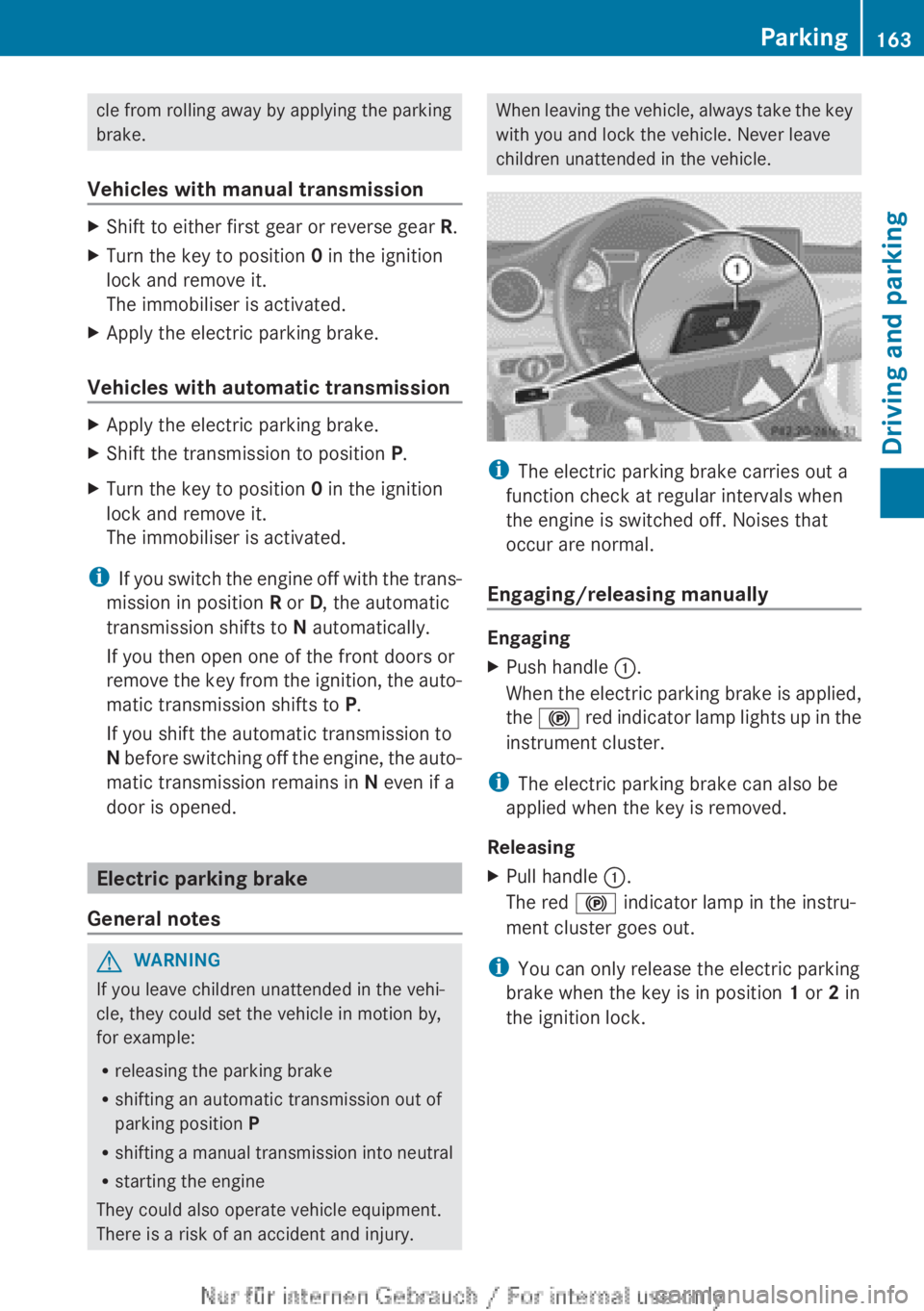
XPush handle :.
When the electric parking brake is applied,
the ! red indicator lamp lights up in the
instrument cluster.
i The electric parking brake can also be
applied when the key is removed.
Releasing
XPull handle :.
The red ! indicator lamp in the instru-
ment cluster goes out.
i You can only release the electric parking
brake when the key is in position 1 or 2 in
the ignition lock.
Parking163Driving and parkingZ
Page 166 of 352
Applying automatically
The electric parking brake is applied auto-
matically:
R if DISTRONIC PLUS brings the vehicle to a
standstill (vehicles with automatic trans-
mission) or
R if the HOLD function is keeping the vehicle
stationary or
R if Active Parking Assist is holding the vehi-
cle at a standstill
In addition, at least one of the following con-
ditions must be fulfilled:
R the engine is switched off
R the driver's door is open and the seat belt
is not fastened
R there is a system malfunction
R the power supply is insufficient
R the vehicle is stationary for a lengthy period
The red ! indicator lamp in the instrument
cluster lights up.
i The electric parking brake is not automat-
ically applied if the engine is switched off
by the ECO start/stop function.
Releasing automatically
i The electric parking brake can only be
released automatically in vehicles with
automatic transmission.
The electric parking brake of your vehicle is
released automatically when all of the follow-
ing conditions are fulfilled:
R the engine is running.
R the transmission is in position D or R.
R the seat belt is fastened.
R you depress the accelerator pedal.
If the transmission is in position R, the tailgate
must be closed.
If your seat belt is not fastened, the following
conditions must be fulfilled to automatically
release the electric parking brake:
R the driver's door is closed.
R you have shifted out of transmission posi-
tion P or you have previously driven faster
than 3 km/h.
Emergency braking
The vehicle can also be braked during an
emergency using the electric parking brake.
XWhile driving, push handle : of the electric
parking brake ( Y page 163).
i
The vehicle is braked for as long as han-
dle : of the electric parking brake
pressed. The longer the electric parking
brake handle : is depressed, the greater
the braking force.
During braking:
R a warning tone sounds
R the Release parking brake message
appears
R the red ! indicator lamp in the instru-
ment cluster flashes
When the vehicle has been braked to a stand-
still, the electric parking brake is engaged.
Parking up the vehicle
If you leave the vehicle parked up for longer
than four weeks, the battery may be damaged
by exhaustive discharging.
If you leave the vehicle parked up for longer
than six weeks, the vehicle may suffer dam-
age as a result of lack of use.
XVisit a qualified specialist workshop and
seek advice.
i You can obtain information about trickle
chargers from a qualified specialist work-
shop.
164ParkingDriving and parking
Page 172 of 352
Storing the current speed and calling up
the last stored speedGWARNING
If you call up a stored speed and this is dif-
ferent from the current speed, the vehicle
accelerates or brakes. If you do not know
what the stored speed is, the vehicle may
accelerate or brake unexpectedly. There is a
risk of an accident.
Take the traffic conditions into account
before calling up the stored speed. If you do
not know what the stored speed is, store the
desired speed again.
XBriefly pull the cruise control lever towards
you =.XRemove your foot from the accelerator
pedal.
The first time cruise control is activated, it
stores the current speed or regulates the
speed of the vehicle to the previously
stored speed.
Setting a speed
Keep in mind that it may take a brief moment
until the vehicle has accelerated or braked to
the set speed.
XPress the cruise control lever up : for a
higher speed or down ? for a lower speed.XKeep the cruise control lever pressed until
the desired speed is reached.XRelease the cruise control lever.
The new speed is stored.XTo adjust the set speed in 1 km/h incre-
ments: briefly press the cruise control
lever up : or down ? to the pressure
point.
The last stored speed increases or decrea-
ses in 1 km/h increments.XTo adjust the set speed in 10 km/h
increments: press the cruise control lever
briefly up : or down ? beyond the pres-
sure point.
The last stored speed increases or decrea-
ses in 10 km/h increments.i Cruise control is not deactivated if you
depress the accelerator pedal. For exam-
ple, if you accelerate briefly to overtake,
cruise control adjusts the vehicle's speed
to the last speed stored after you have fin-
ished overtaking.
Deactivating cruise control
There are several ways to deactivate cruise
control:
XBriefly press the cruise control lever for-
wards B.
or
XBrake
or
XBriefly press the cruise control lever in the
direction of arrow A.
Variable SPEEDTRONIC is selected. LIM
indicator lamp ; in the cruise control lever
lights up.
Cruise control is automatically deactivated if:
R the vehicle is secured with the electric
parking brake
R you are driving at less than 30 km/h
R ESP ®
intervenes or you deactivate ESP ®
R while driving a vehicle with manual trans-
mission, you shift into neutral or depress
the clutch pedal for longer than six seconds
R on vehicles with manual transmission, you
shift to a gear that is too high, and as a
result the engine speed is too low
R on vehicles with automatic transmission,
you shift into position N while driving
If cruise control is deactivated, you will hear
a warning tone. You will see the Cruise
control off message in the multifunction
display for approximately five seconds.
i The last speed stored is cleared when you
switch off the engine.
170Driving systemsDriving and parking
Page 173 of 352
SPEEDTRONIC
Important safety notes
SPEEDTRONIC brakes automatically so that
you do not exceed the set speed. On long and
steep downhill gradients, especially if the
vehicle is laden or towing a trailer, you must
select shift range 1, 2 or 3 in good time. By
doing so, you will make use of the braking
effect of the engine. This relieves the load on
the brake system and prevents the brakes
from overheating and wearing too quickly. If
you need additional braking, depress the
brake pedal repeatedly rather than continu-
ously.
If you fail to adapt your driving style, SPEED-
TRONIC can neither reduce the risk of an
accident nor override the laws of physics.
SPEEDTRONIC cannot take into account
road, weather or traffic conditions. SPEED-
TRONIC is only an aid. You are responsible for
the distance to the vehicle in front, for vehicle
speed, for braking in good time, and for stay-
ing in the lane.
If there is a change of drivers, advise the new
driver of the speed stored.
General notes
You can set a variable or permanent limit
speed:
R variable for speed limits, e.g. in built-up
areas
R permanent for long-term speed restric-
tions, e.g. when driving with winter tyres
fitted ( Y page 173)
i The speed indicated in the speedometer
may differ slightly from the limit speed
stored.
Variable SPEEDTRONIC
General notes
With the cruise control lever, you can operate
cruise control or DISTRONIC PLUS and vari-
able SPEEDTRONIC.
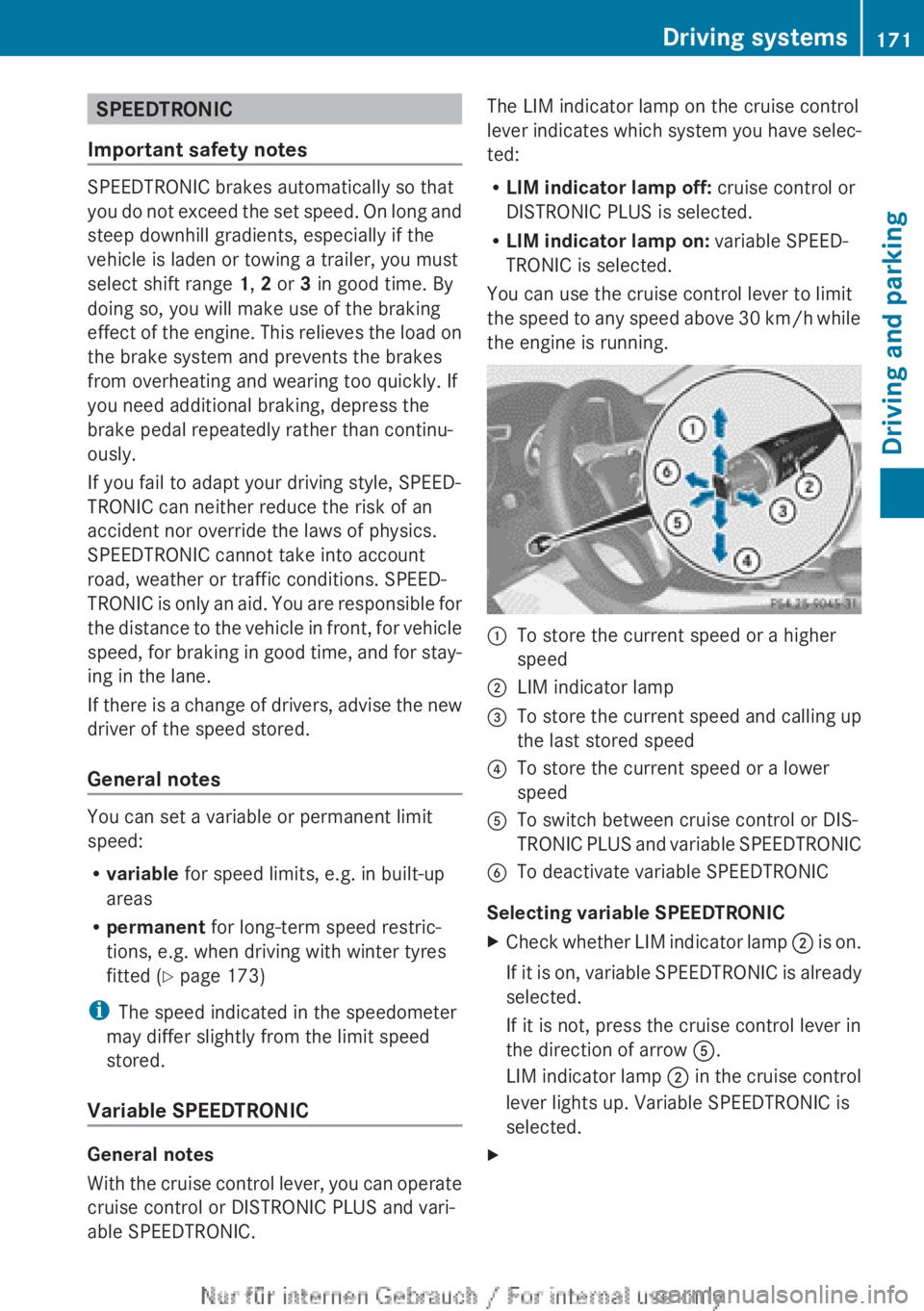
The LIM indicator lamp on the cruise control
lever indicates which system you have selec-
ted:
R LIM indicator lamp off: cruise control or
DISTRONIC PLUS is selected.
R LIM indicator lamp on: variable SPEED-
TRONIC is selected.
You can use the cruise control lever to limit
the speed to any speed above 30 km/h while
the engine is running.:To store the current speed or a higher
speed;LIM indicator lamp=To store the current speed and calling up
the last stored speed?To store the current speed or a lower
speedATo switch between cruise control or DIS-
TRONIC PLUS and variable SPEEDTRONICBTo deactivate variable SPEEDTRONIC
Selecting variable SPEEDTRONIC
XCheck whether LIM indicator lamp ; is on.
If it is on, variable SPEEDTRONIC is already
selected.
If it is not, press the cruise control lever in
the direction of arrow A.
LIM indicator lamp ; in the cruise control
lever lights up. Variable SPEEDTRONIC is
selected.XDriving systems171Driving and parkingZ
Page 180 of 352
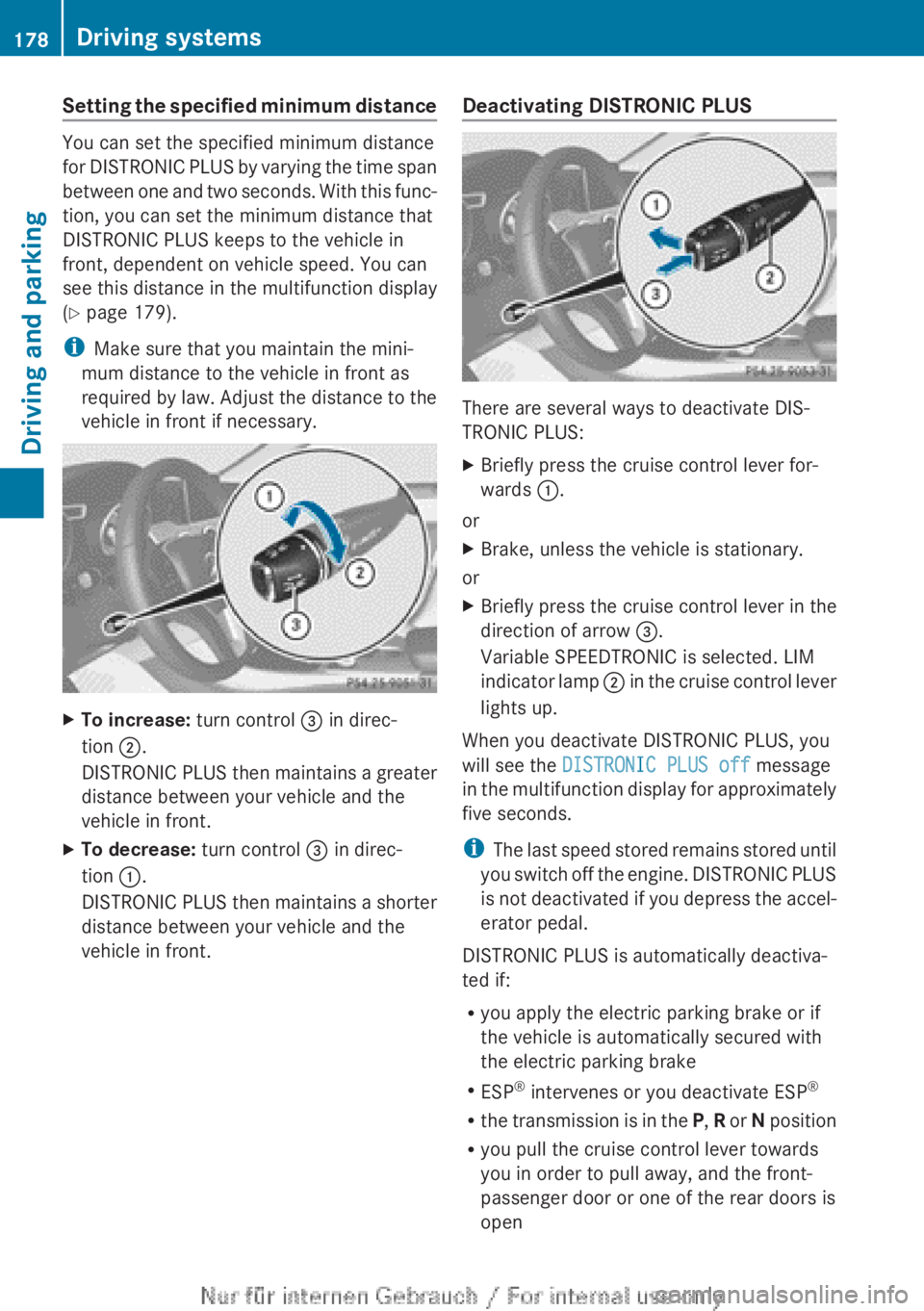
Setting the specified minimum distance
You can set the specified minimum distance
for DISTRONIC PLUS by varying the time span
between one and two seconds. With this func-
tion, you can set the minimum distance that
DISTRONIC PLUS keeps to the vehicle in
front, dependent on vehicle speed. You can
see this distance in the multifunction display
( Y page 179).
i Make sure that you maintain the mini-
mum distance to the vehicle in front as
required by law. Adjust the distance to the
vehicle in front if necessary.
XTo increase: turn control = in direc-
tion ;.
DISTRONIC PLUS then maintains a greater
distance between your vehicle and the
vehicle in front.XTo decrease: turn control = in direc-
tion :.
DISTRONIC PLUS then maintains a shorter
distance between your vehicle and the
vehicle in front.Deactivating DISTRONIC PLUS
There are several ways to deactivate DIS-
TRONIC PLUS:
XBriefly press the cruise control lever for-
wards :.
or
XBrake, unless the vehicle is stationary.
or
XBriefly press the cruise control lever in the
direction of arrow =.
Variable SPEEDTRONIC is selected. LIM
indicator lamp ; in the cruise control lever
lights up.
When you deactivate DISTRONIC PLUS, you
will see the DISTRONIC PLUS off message
in the multifunction display for approximately
five seconds.
i The last speed stored remains stored until
you switch off the engine. DISTRONIC PLUS
is not deactivated if you depress the accel-
erator pedal.
DISTRONIC PLUS is automatically deactiva-
ted if:
R you apply the electric parking brake or if
the vehicle is automatically secured with
the electric parking brake
R ESP ®
intervenes or you deactivate ESP ®
R the transmission is in the P, R or N position
R you pull the cruise control lever towards
you in order to pull away, and the front-
passenger door or one of the rear doors is
open
178Driving systemsDriving and parking
Page 183 of 352
detected vehicle turns a corner and reveals
an obstacle or stationary vehicle, DISTRONIC
PLUS will not brake for these.
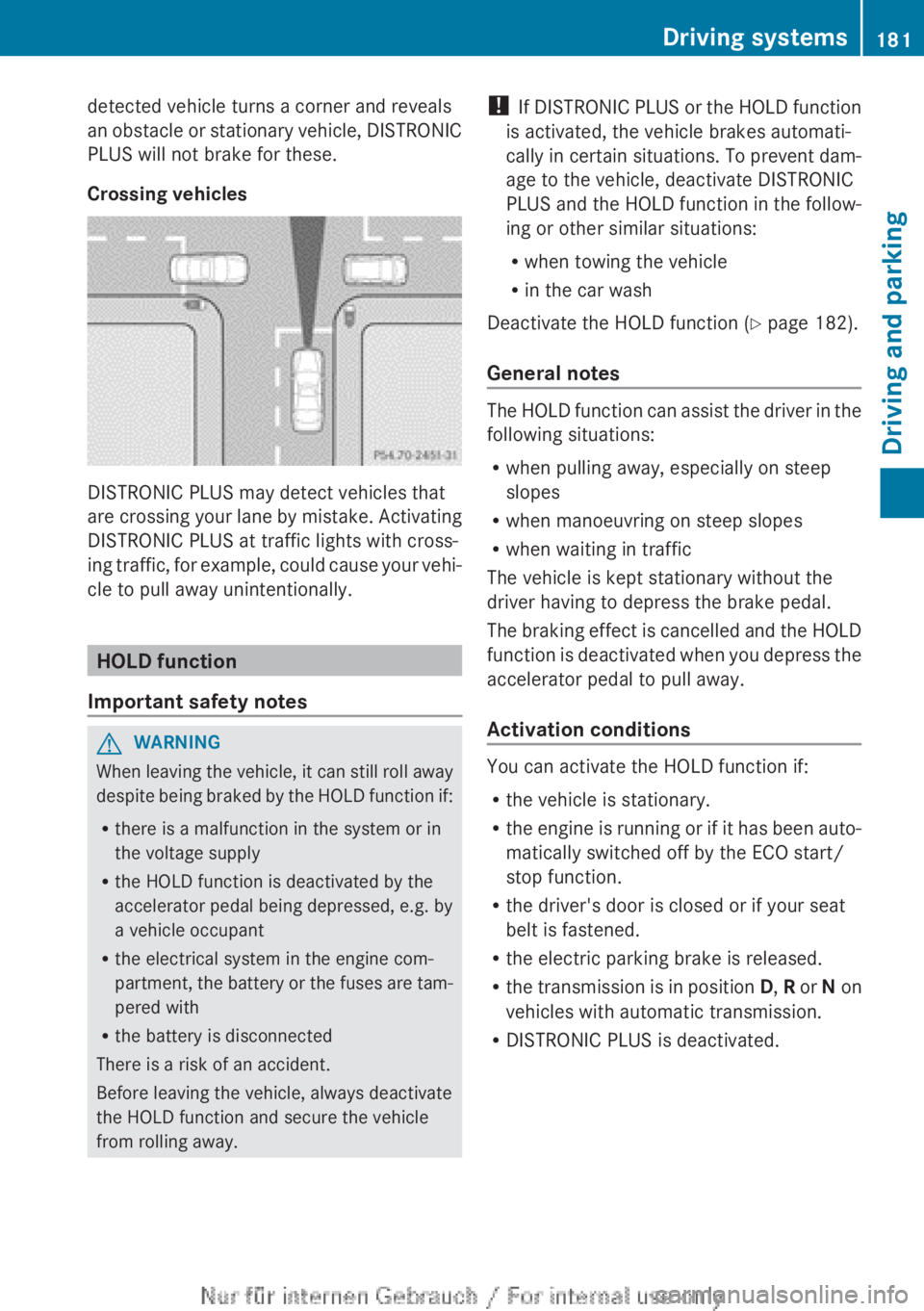
Crossing vehicles
DISTRONIC PLUS may detect vehicles that
are crossing your lane by mistake. Activating
DISTRONIC PLUS at traffic lights with cross-
ing traffic, for example, could cause your vehi-
cle to pull away unintentionally.
HOLD function
Important safety notes
GWARNING
When leaving the vehicle, it can still roll away
despite being braked by the HOLD function if:
R there is a malfunction in the system or in
the voltage supply
R the HOLD function is deactivated by the
accelerator pedal being depressed, e.g. by
a vehicle occupant
R the electrical system in the engine com-
partment, the battery or the fuses are tam-
pered with
R the battery is disconnected
There is a risk of an accident.
Before leaving the vehicle, always deactivate
the HOLD function and secure the vehicle
from rolling away.
! If DISTRONIC PLUS or the HOLD function
is activated, the vehicle brakes automati-
cally in certain situations. To prevent dam-
age to the vehicle, deactivate DISTRONIC
PLUS and the HOLD function in the follow-
ing or other similar situations:
R when towing the vehicle
R in the car wash
Deactivate the HOLD function ( Y page 182).
General notes
The HOLD function can assist the driver in the
following situations:
R when pulling away, especially on steep
slopes
R when manoeuvring on steep slopes
R when waiting in traffic
The vehicle is kept stationary without the
driver having to depress the brake pedal.
The braking effect is cancelled and the HOLD
function is deactivated when you depress the
accelerator pedal to pull away.
Activation conditions
You can activate the HOLD function if:
R the vehicle is stationary.
R the engine is running or if it has been auto-
matically switched off by the ECO start/
stop function.
R the driver's door is closed or if your seat
belt is fastened.
R the electric parking brake is released.
R the transmission is in position D, R or N on
vehicles with automatic transmission.
R DISTRONIC PLUS is deactivated.
Driving systems181Driving and parkingZ
Page 187 of 352
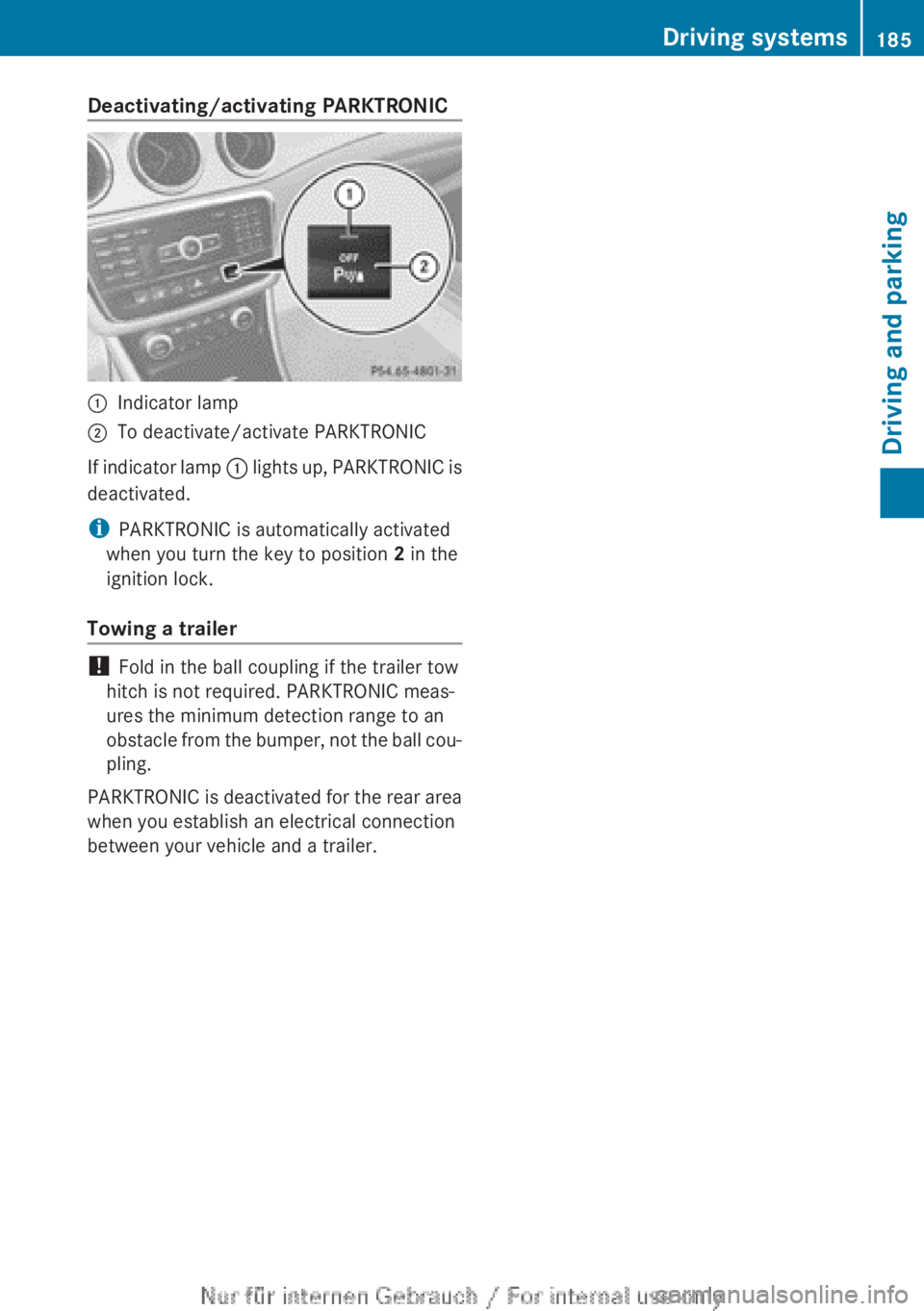
Deactivating/activating PARKTRONIC:Indicator lamp;To deactivate/activate PARKTRONIC
If indicator lamp : lights up, PARKTRONIC is
deactivated.
i PARKTRONIC is automatically activated
when you turn the key to position 2 in the
ignition lock.
Towing a trailer
! Fold in the ball coupling if the trailer tow
hitch is not required. PARKTRONIC meas-
ures the minimum detection range to an
obstacle from the bumper, not the ball cou-
pling.
PARKTRONIC is deactivated for the rear area
when you establish an electrical connection
between your vehicle and a trailer.
Driving systems185Driving and parkingZ
Page 188 of 352
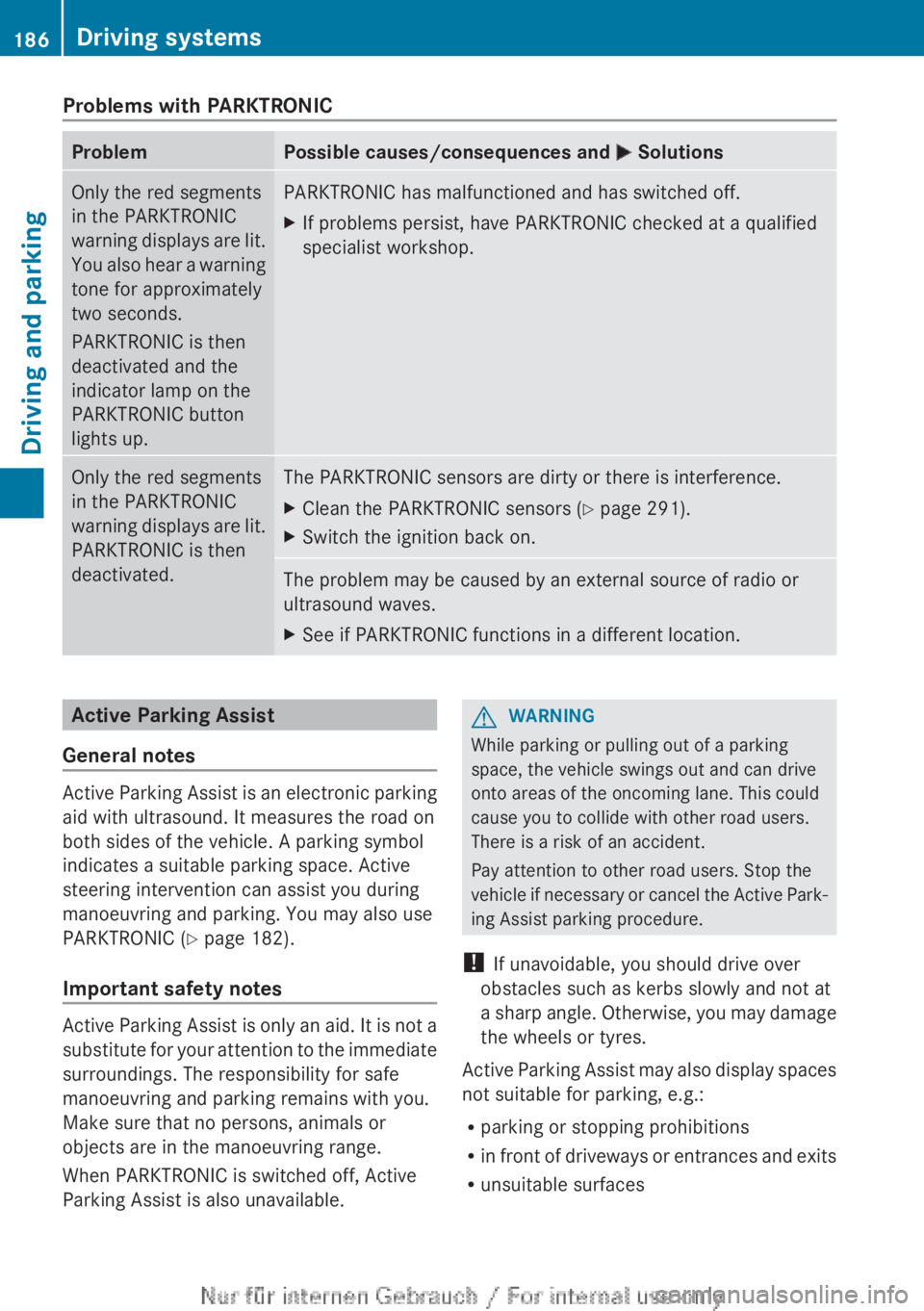
Problems with PARKTRONICProblemPossible causes/consequences and M SolutionsOnly the red segments
in the PARKTRONIC
warning displays are lit.
You also hear a warning
tone for approximately
two seconds.
PARKTRONIC is then
deactivated and the
indicator lamp on the
PARKTRONIC button
lights up.PARKTRONIC has malfunctioned and has switched off.XIf problems persist, have PARKTRONIC checked at a qualified
specialist workshop.Only the red segments
in the PARKTRONIC
warning displays are lit.
PARKTRONIC is then
deactivated.The PARKTRONIC sensors are dirty or there is interference.XClean the PARKTRONIC sensors ( Y page 291).XSwitch the ignition back on.The problem may be caused by an external source of radio or
ultrasound waves.XSee if PARKTRONIC functions in a different location.Active Parking Assist
General notes
Active Parking Assist is an electronic parking
aid with ultrasound. It measures the road on
both sides of the vehicle. A parking symbol
indicates a suitable parking space. Active
steering intervention can assist you during
manoeuvring and parking. You may also use
PARKTRONIC ( Y page 182).
Important safety notes
Active Parking Assist is only an aid. It is not a
substitute for your attention to the immediate
surroundings. The responsibility for safe
manoeuvring and parking remains with you.
Make sure that no persons, animals or
objects are in the manoeuvring range.
When PARKTRONIC is switched off, Active
Parking Assist is also unavailable.
GWARNING
While parking or pulling out of a parking
space, the vehicle swings out and can drive
onto areas of the oncoming lane. This could
cause you to collide with other road users.
There is a risk of an accident.
Pay attention to other road users. Stop the
vehicle if necessary or cancel the Active Park-
ing Assist parking procedure.
! If unavoidable, you should drive over
obstacles such as kerbs slowly and not at
a sharp angle. Otherwise, you may damage
the wheels or tyres.
Active Parking Assist may also display spaces
not suitable for parking, e.g.:
R parking or stopping prohibitions
R in front of driveways or entrances and exits
R unsuitable surfaces
186Driving systemsDriving and parking
Page 192 of 352
XVehicles with manual transmission:
engage first or reverse gear.
Vehicles with automatic transmission:
shift the transmission to position D or R.
The Start Park Assist? Yes: OK No:
% message appears in the multifunction
display.XTo cancel the procedure: press the
% button on the multifunction steering
wheel or pull away.
or
XTo exit a parking space using Active
Parking Assist: press the a button on
the multifunction steering wheel.
The Park Assist active Accelerate
and brake Observe surroundings mes-
sage appears in the multifunction display.XRelease the multifunction steering wheel.XReverse the vehicle or drive forwards, being
ready to brake at all times. Do not exceed
a maximum speed of approximately
10 km/h when exiting a parking space.
Otherwise, Active Parking Assist will be
cancelled.XStop when PARKTRONIC sounds the con-
tinuous warning tone, if not before.XVehicles with manual transmission:
engage first gear or reverse gear when the
vehicle is stationary, depending on the
message or requirement.
Vehicles with automatic transmission:
shift the transmission to position D or R
when the vehicle is stationary, depending
on the message or requirement.
Active Parking Assist immediately steers in
the other direction. The Park Assist
active Accelerate and brake
Observe surroundings message appears
in the multifunction display.
i You will achieve the best results by wait-
ing for the steering procedure to complete
before pulling away.
If you reverse after activation, the steering
wheel is moved to the straight-ahead posi-
tion.
XDrive forwards and reverse as prompted by
the PARKTRONIC warning displays, several
times if necessary.XStop as soon as PARKTRONIC sounds the
continuous warning tone, if not before.
Once you have exited the parking space com-
pletely, the steering wheel is moved to the
straight-ahead position. You hear a tone and
the message Park Assist switched off
appears in the multifunction display. You will
then have to steer and merge into traffic on
your own. PARKTRONIC is still available. You
can take over the steering before the vehicle
has exited the parking space completely. This
is useful, for example when you recognise
that it is already possible to pull out of the
parking space.
Cancelling Active Parking Assist
You can cancel Active Parking Assist at any
time.
XStop the movement of the multifunction
steering wheel or steer yourself.
Active Parking Assist will be cancelled at
once. The Park Assist cancelled mes-
sage appears in the multifunction display.
or
XPress the PARKTRONIC button on the
centre console ( Y page 185).
PARKTRONIC is switched off and Active
Parking Assist is immediately cancelled.
The Park Assist cancelled message
appears in the multifunction display.
Active Parking Assist is cancelled automati-
cally if:
R the electric parking brake is engaged
R transmission position P is selected
R parking using Active Parking Assist is no
longer possible
R you are driving faster than 10 km/h
R a wheel spins and ESP ®
intervenes or fails.
The ÷ warning lamp lights up in the
instrument cluster.
190Driving systemsDriving and parking
Page 201 of 352
Indicator and warning display
Blind Spot Assist is not active at speeds below
approximately 30 km/h. Vehicles in the mon-
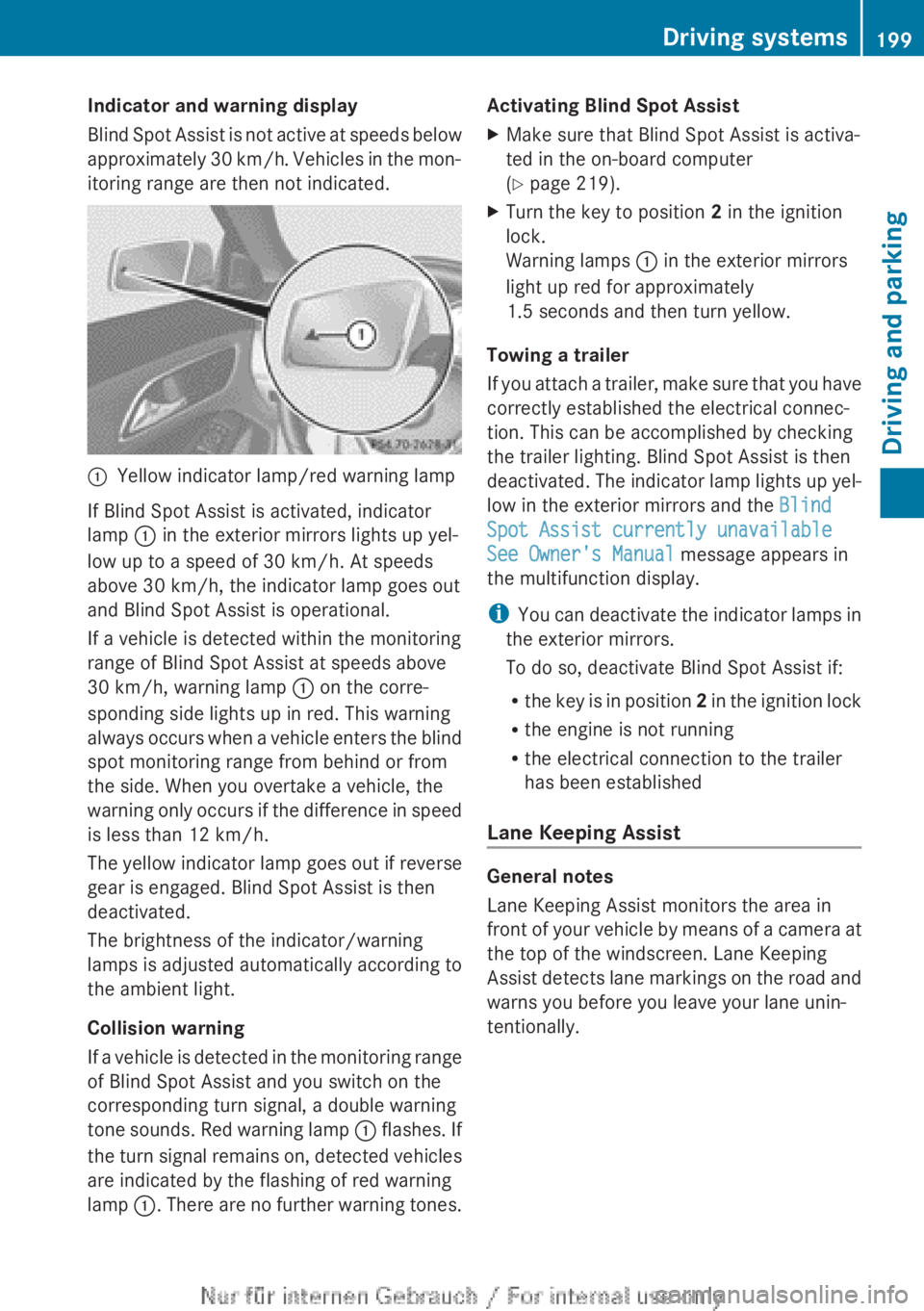
itoring range are then not indicated.:Yellow indicator lamp/red warning lamp
If Blind Spot Assist is activated, indicator
lamp : in the exterior mirrors lights up yel-
low up to a speed of 30 km/h. At speeds
above 30 km/h, the indicator lamp goes out
and Blind Spot Assist is operational.
If a vehicle is detected within the monitoring
range of Blind Spot Assist at speeds above
30 km/h, warning lamp : on the corre-
sponding side lights up in red. This warning
always occurs when a vehicle enters the blind
spot monitoring range from behind or from
the side. When you overtake a vehicle, the
warning only occurs if the difference in speed
is less than 12 km/h.
The yellow indicator lamp goes out if reverse
gear is engaged. Blind Spot Assist is then
deactivated.
The brightness of the indicator/warning
lamps is adjusted automatically according to
the ambient light.
Collision warning
If a vehicle is detected in the monitoring range
of Blind Spot Assist and you switch on the
corresponding turn signal, a double warning
tone sounds. Red warning lamp : flashes. If
the turn signal remains on, detected vehicles
are indicated by the flashing of red warning
lamp :. There are no further warning tones.
Activating Blind Spot AssistXMake sure that Blind Spot Assist is activa-
ted in the on-board computer
( Y page 219).XTurn the key to position 2 in the ignition
lock.
Warning lamps : in the exterior mirrors
light up red for approximately
1.5 seconds and then turn yellow.
Towing a trailer
If you attach a trailer, make sure that you have
correctly established the electrical connec-
tion. This can be accomplished by checking
the trailer lighting. Blind Spot Assist is then
deactivated. The indicator lamp lights up yel-
low in the exterior mirrors and the Blind
Spot Assist currently unavailable
See Owner's Manual message appears in
the multifunction display.
i You can deactivate the indicator lamps in
the exterior mirrors.
To do so, deactivate Blind Spot Assist if:
R the key is in position 2 in the ignition lock
R the engine is not running
R the electrical connection to the trailer
has been established
Lane Keeping Assist
General notes
Lane Keeping Assist monitors the area in
front of your vehicle by means of a camera at
the top of the windscreen. Lane Keeping
Assist detects lane markings on the road and
warns you before you leave your lane unin-
tentionally.
Driving systems199Driving and parkingZ