fuel MERCEDES-BENZ CLA 2016 User Guide
[x] Cancel search | Manufacturer: MERCEDES-BENZ, Model Year: 2016, Model line: CLA, Model: MERCEDES-BENZ CLA 2016Pages: 374, PDF Size: 9.97 MB
Page 79 of 374
The SmartKey centrally locks/unlocks: R
the doors R
the trunk lid R
the fuel filler flap
The turn signals flash once when unlocking
and three times when locking.
When the locator lighting is activated in Audio
20/COMAND, it lights up when it is dark after
the vehicle is unlocked with the remote con-
trol (see separate operating instructions).
You can also set an audible signal to confirm
that the vehicle has been locked. The audible
signal can be activated and deactivated using
the on-board computer ( Y
page 222).X
To open the trunk lid automatically:
press and hold the T button until the
trunk lid opens ( Y
page 86).
KEYLESS-GO
General notes
Bear in mind that the engine can be started by
any of the vehicle occupants if there is a
SmartKey in the vehicle.
Locking and unlocking
You can start, lock or unlock the vehicle using
KEYLESS-GO. To do this, you only need carry
the SmartKey with you. You can combine the
functions of KEYLESS-GO with those of a con-
ventional SmartKey. Unlock the vehicle by
using KEYLESS-GO, for instance, and lock it
using the 7 button on the SmartKey.
The driver's door and the door at which the
handle is used, must both be closed. The
SmartKey must be outside the vehicle. When
locking or unlocking with KEYLESS-GO, the
distance between the SmartKey and the cor-
responding door handle must not be greater
than 3 ft (1 m). A check which periodically establishes a radio
connection between the vehicle and the
SmartKey determines whether a valid Smart-
Key is in the vehicle. This occurs, for example: R
when starting the engine R
whilst driving R
when the external door handles are
touched R
during convenience closing
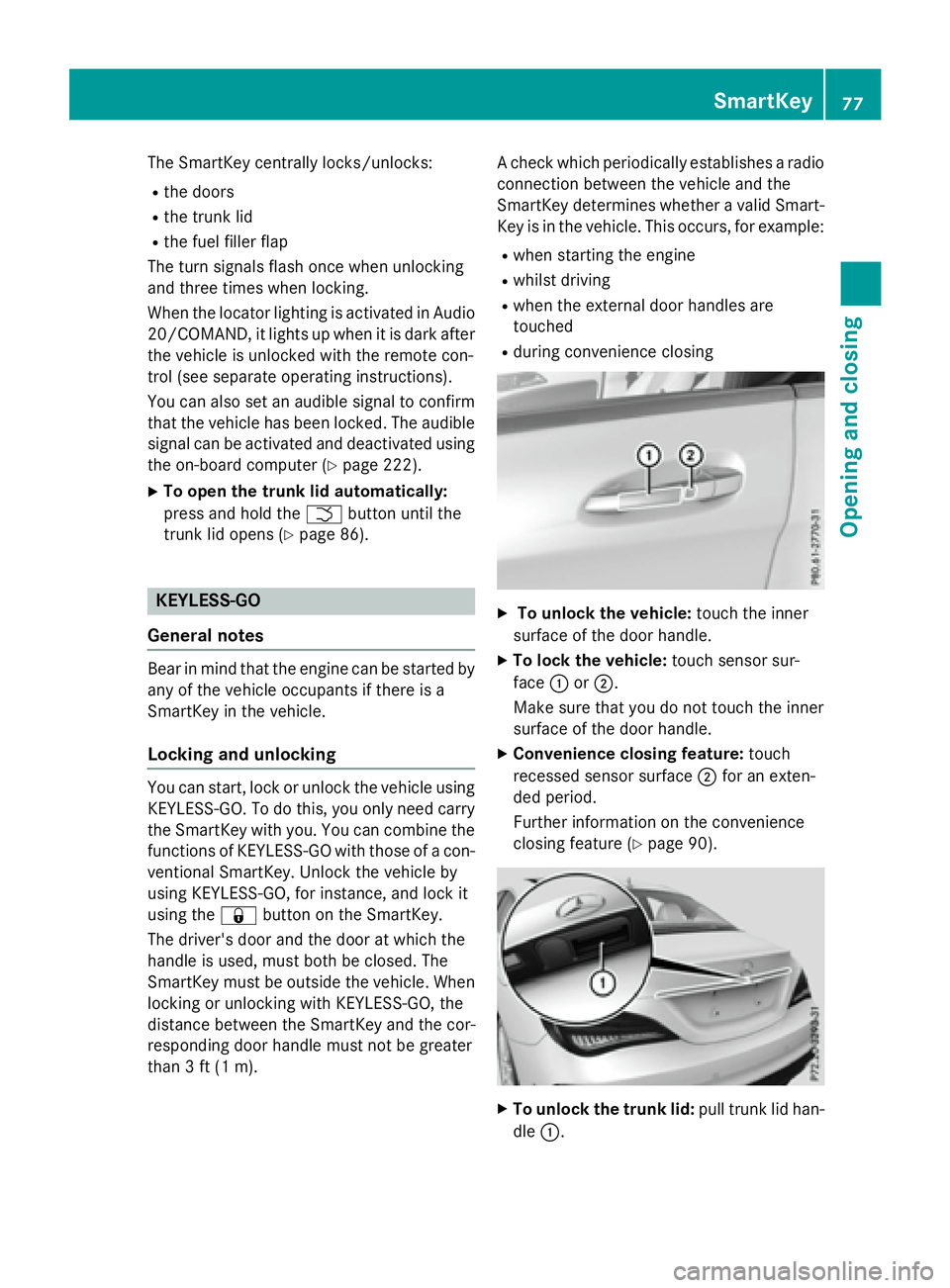
X
To unlock the vehicle: touch the inner
surface of the door handle. X
To lock the vehicle: touch sensor sur-
face C or D .
Make sure that you do not touch the inner
surface of the door handle. X
Convenience closing feature: touch
recessed sensor surface D for an exten-
ded period.
Further information on the convenience
closing feature ( Y
page 90).
X
To unlock the trunk lid: pull trunk lid han-
dle C . SmartKey 77
Opening and closing Z
Page 81 of 374
X
Insert the SmartKey into the ignition lock.
or X
To deactivate the alarm with KEYLESS-
GO: press the Start/Stop button in the igni-
tion lock. The SmartKey must be in the
vehicle.
or X
Lock or unlock the vehicle using KEYLESS-
GO. The SmartKey must be outside the
vehicle.
If you unlock the vehicle using the mechanical
key, the fuel filler flap will not be unlocked
automatically. X
To unlock the fuel filler flap: insert the
SmartKey into the ignition lock.
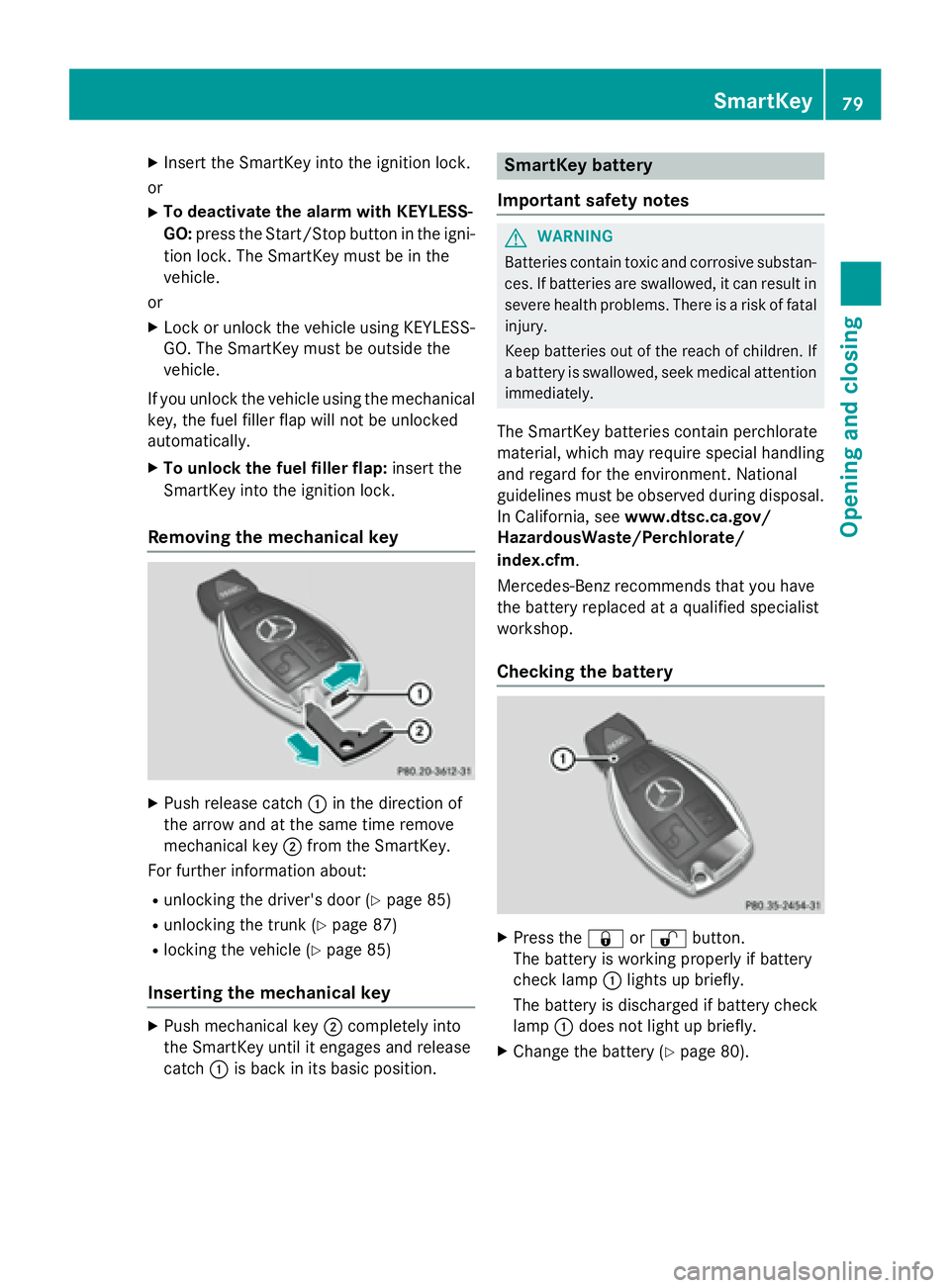
Removing the mechanical key
X
Push release catch C in the direction of
the arrow and at the same time remove
mechanical key D from the SmartKey.
For further information about: R
unlocking the driver's door ( Y
page 85)R
unlocking the trunk ( Y
page 87)R
locking the vehicle ( Y
page 85)
Inserting the mechanical key X
Push mechanical key D completely into
the SmartKey until it engages and release
catch C is back in its basic position. SmartKey battery
Important safety notes
G WARNING
Batteries contain toxic and corrosive substan-
ces. If batteries are swallowed, it can result in
severe health problems. There is a risk of fatal
injury.
Keep batteries out of the reach of children. If
a battery is swallowed, seek medical attention
immediately.
The SmartKey batteries contain perchlorate
material, which may require special handling
and regard for the environment. National
guidelines must be observed during disposal.
In California, see www.dtsc.ca.gov/
HazardousWaste/Perchlorate/
index.cfm .
Mercedes-Benz recommends that you have
the battery replaced at a qualified specialist
workshop.
Checking the battery
X
Press the 7 or 6 button.
The battery is working properly if battery
check lamp C lights up briefly.
The battery is discharged if battery check
lamp C does not light up briefly. X
Change the battery ( Y
page 80).SmartKey 79
Opening and closing Z
Page 86 of 374
alarm system. Switch off the alarm
( Y
page 73).
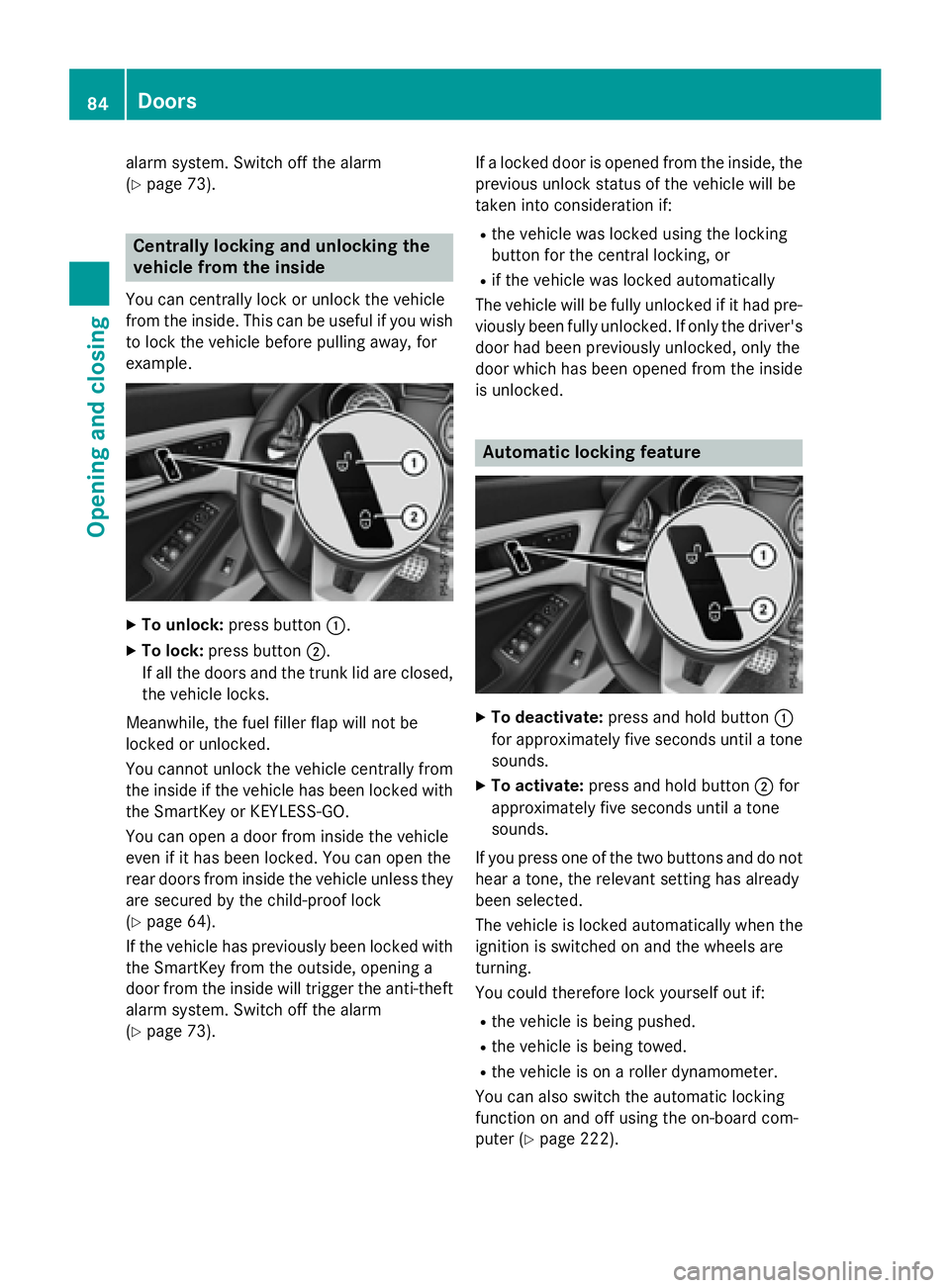
Centrally locking and unlocking the
vehicle from the insideYou can centrally lock or unlock the vehicle
from the inside. This can be useful if you wish
to lock the vehicle before pulling away, for
example.
X
To unlock: press button C .X
To lock: press button D .
If all the doors and the trunk lid are closed,
the vehicle locks.
Meanwhile, the fuel filler flap will not be
locked or unlocked.
You cannot unlock the vehicle centrally from
the inside if the vehicle has been locked with
the SmartKey or KEYLESS-GO.
You can open a door from inside the vehicle
even if it has been locked. You can open the
rear doors from inside the vehicle unless they
are secured by the child-proof lock
( Y
page 64).
If the vehicle has previously been locked with
the SmartKey from the outside, opening a
door from the inside will trigger the anti-theft
alarm system. Switch off the alarm
( Y
page 73). If a locked door is opened from the inside, the
previous unlock status of the vehicle will be
taken into consideration if: R
the vehicle was locked using the locking
button for the central locking, or R
if the vehicle was locked automatically
The vehicle will be fully unlocked if it had pre-
viously been fully unlocked. If only the driver's
door had been previously unlocked, only the
door which has been opened from the inside
is unlocked.
Automatic locking feature
X
To deactivate: press and hold button C
for approximately five seconds until a tone
sounds. X
To activate: press and hold button D for
approximately five seconds until a tone
sounds.
If you press one of the two buttons and do not
hear a tone, the relevant setting has already
been selected.
The vehicle is locked automatically when the
ignition is switched on and the wheels are
turning.
You could therefore lock yourself out if: R
the vehicle is being pushed. R
the vehicle is being towed. R
the vehicle is on a roller dynamometer.
You can also switch the automatic locking
function on and off using the on-board com-
puter ( Y
page 222).84
Doors
Opening and closing
Page 87 of 374
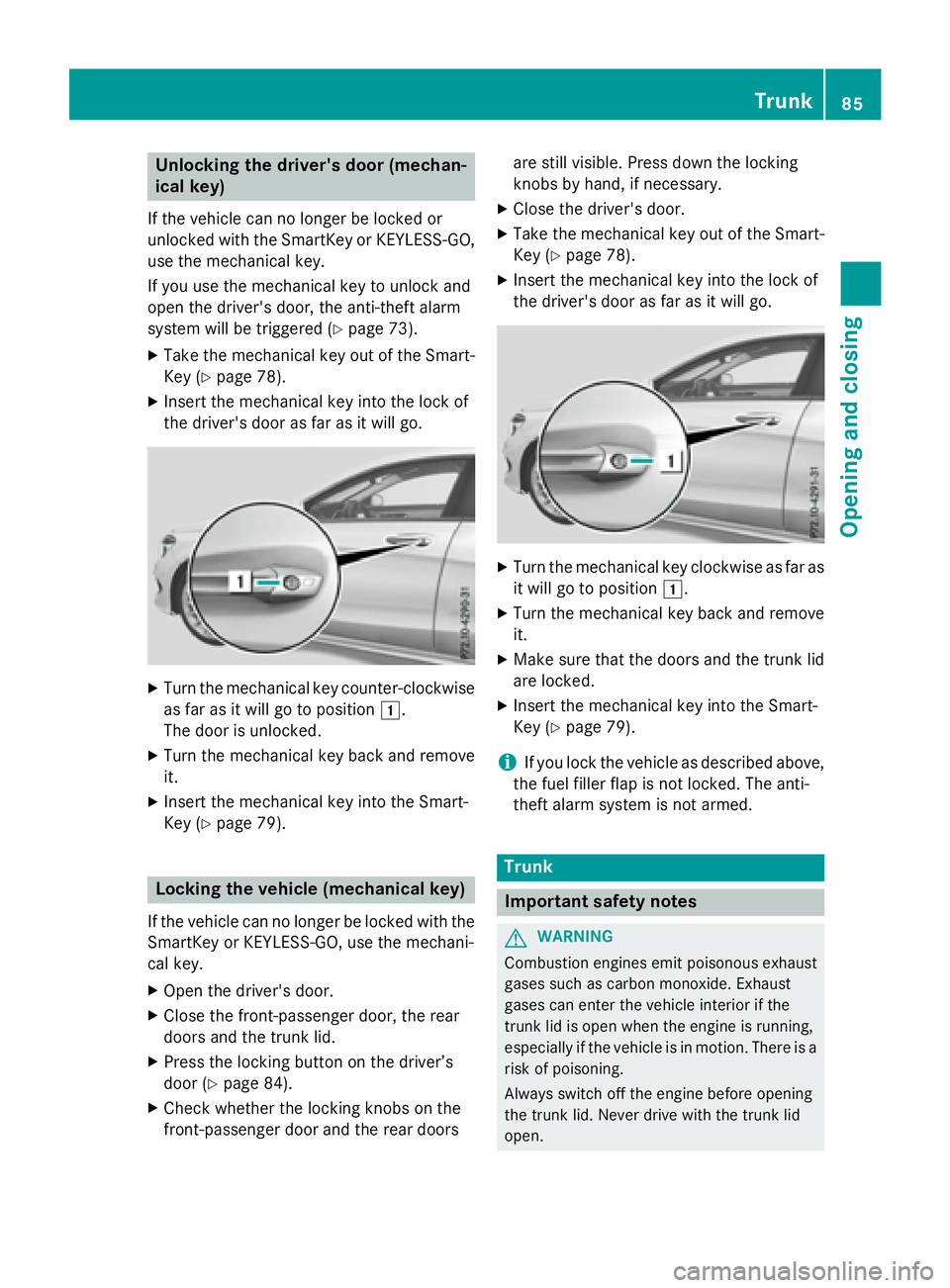
Unlocking the driver's door (mechan-
ical key) If the vehicle can no longer be locked or
unlocked with the SmartKey or KEYLESS-GO,
use the mechanical key.
If you use the mechanical key to unlock and
open the driver's door, the anti-theft alarm
system will be triggered ( Y
page 73).X
Take the mechanical key out of the Smart-
Key ( Y
page 78).X
Insert the mechanical key into the lock of
the driver's door as far as it will go.
X
Turn the mechanical key counter-clockwise
as far as it will go to position G .
The door is unlocked. X
Turn the mechanical key back and remove
it. X
Insert the mechanical key into the Smart-
Key ( Y
page 79).
Locking the vehicle (mechanical key)
If the vehicle can no longer be locked with the
SmartKey or KEYLESS-GO, use the mechani-
cal key. X
Open the driver's door. X
Close the front-passenger door, the rear
doors and the trunk lid. X
Press the locking button on the driver’s
door ( Y
page 84).X
Check whether the locking knobs on the
front-passenger door and the rear doors are still visible. Press down the locking
knobs by hand, if necessary. X
Close the driver's door. X
Take the mechanical key out of the Smart-
Key ( Y
page 78). X
Insert the mechanical key into the lock of
the driver's door as far as it will go.
X
Turn the mechanical key clockwise as far as
it will go to position G .X
Turn the mechanical key back and remove
it. X
Make sure that the doors and the trunk lid
are locked. X
Insert the mechanical key into the Smart-
Key ( Y
page 79).
i If you lock the vehicle as described above,
the fuel filler flap is not locked. The anti-
theft alarm system is not armed.
Trunk
Important safety notes
G WARNING
Combustion engines emit poisonous exhaust
gases such as carbon monoxide. Exhaust
gases can enter the vehicle interior if the
trunk lid is open when the engine is running,
especially if the vehicle is in motion. There is a
risk of poisoning.
Always switch off the engine before opening
the trunk lid. Never drive with the trunk lid
open. Trunk 85
Opening and closing Z
Page 147 of 374
Useful information ............................ 146
Notes on breaking-in a new vehi-
cle ....................................................... 146
Driving ............................................... 146
DYNAMIC SELECT button (all vehi-
cles except Mercedes-AMG vehi-
cles) .................................................... 155
DYNAMIC SELECT controller
(Mercedes-AMG vehicles) ................. 156
Automatic transmission ................... 157
Refueling ............................................ 167
Parking ............................................... 169
Driving tips ........................................ 172
Driving systems ................................ 178 145
Driving and parking
Page 152 of 374
Starting procedure with the Start/Stop
button The Start/Stop button can be used to start
the vehicle manually without inserting the
SmartKey into the ignition lock. The Start/
Stop button must be inserted in the ignition
lock and the SmartKey must be in the vehicle.
This mode for starting the engine operates
independently of the ECO start/stop auto-
matic engine start function.
You can start the engine if a valid SmartKey is
in the vehicle. Switch off the engine and
always take the SmartKey with you when
leaving the vehicle, even if you only leave it for
a short time. Pay attention to the important
safety notes. X
Depress the brake pedal and keep it
depressed. X
Press the Start/Stop button once
( Y
page 147).
The engine starts.
Starting procedure via smartphone
Observe the important safety notes on start-
ing the engine ( Y
page 149).
You can also start your engine via your smart-
phone from outside the vehicle. In this case,
the previously selected climate control set-
ting is activated. In this way you can cool or
heat the interior of the vehicle before starting
the journey.
Only start the engine via your smartphone if it
is safe to start and run the engine where your
vehicle is parked.
Observe the legal stipulations in the area
where your vehicle is parked. Engine start via
smartphone may be limited to certain coun-
tries or regions.
You can execute a maximum of two consec-
utive starting attempts via your smartphone.
If you insert the key into the ignition lock, you
can carry out two more starting attempts.
Once you have started the engine, you can
switch the engine off via your smartphone at
any time. You can only start the engine via your smart-
phone if: R
the key is in the ignition lock R
park position P is selected R
the accelerator pedal is not depressed R
the anti-theft alarm system is not activated R
the panic alarm is not activated R
the hazard warning lamps are switched off R
the hood is closed. R
the doors are closed and locked R
the windows and sliding sunroof are closed
Also make sure that: R
the fuel tank is sufficiently filled R
the starter battery is sufficiently charged
G WARNING
Limbs could be crushed or trapped if the
engine is started unintentionally during ser-
vice or maintenance work. There is a risk of
injury.
Always secure the engine against uninten-
tional starting before carrying out mainte-
nance or repair work.
Make sure that the engine cannot be started
via your smartphone before carrying out
maintenance or repairs. You can prevent an
engine start via your smartphone, for exam-
ple, if you: R
switch on the hazard warning lamps R
do not lock the doors R
open the hood.
Pulling away
General notes
G WARNING
If the engine speed is above the idling speed
and you engage transmission position D or R ,
the vehicle could pull away suddenly. There is
a risk of an accident.150
Driving
Driving and parking
Page 156 of 374
Problems with the engine Problem
Possible causes/consequences and P Solutions
The engine does not
start. The HOLD function or DISTRONIC PLUS is activated. X
Deactivate the HOLD function ( Y
page 187) or DISTRONIC
PLUS ( Y
page 180). X
Try to start the engine again.
The engine does not
start. The starter motor
can be heard. R
There is a malfunction in the engine electronics. R
There is a malfunction in the fuel supply.
Before attempting to start the engine again: X
Turn the SmartKey back to position 0 in the ignition lock.
or X
Press the Start/Stop button repeatedly until all indicator lamps
in the instrument cluster go out. X
Try to start the engine again ( Y
page 149). Avoid excessively
long and frequent attempts to start the engine as these will drain
the battery.
If the engine does not start after several attempts: X
Consult a qualified specialist workshop.
The engine does not
start. You cannot hear
the starter motor. The on-board voltage is too low because the battery is too weak or
discharged. X
Jump-start the vehicle ( Y
page 319).
If the engine does not start despite attempts to jump-start it: X
Consult a qualified specialist workshop.
The starter motor was exposed to a thermal load that was too high. X
Allow the starter motor to cool down for approximately two
minutes. X
Try to start the engine again.
If the engine still does not start: X
Consult a qualified specialist workshop.154
Driving
Driving and parking
Page 157 of 374
Problem
Possible causes/consequences and P Solutions
The engine is not run-
ning smoothly and is
misfiring. There is a malfunction in the engine electronics or in a mechanical
component of the engine management system. X
Only depress the accelerator pedal slightly.
Otherwise, non-combusted fuel may get into the catalytic con-
verter and damage it. X
Have the cause rectified immediately at a qualified specialist
workshop.
The coolant tempera-
ture gauge shows a
value above 248 ‡
(120 †). The coolant
warning lamp may also
be on and a warning
tone may sound. The coolant level is too low. The coolant is too hot and the engine
is no longer being cooled sufficiently. X
Stop as soon as possible and allow the engine and the coolant to
cool down. X
Check the coolant level ( Y
page 299). Observe the warning
notes as you do so and add coolant if necessary.
DYNAMIC SELECT button (all vehicles
except Mercedes-AMG vehicles)
Use the DYNAMIC SELECT button to change
the drive program. Depending on the drive
program selected the following vehicle char-
acteristics will change: R
the drive (engine and transmission man-
agement) R
the suspension (vehicles with damping sys-
tem or AMG adaptive sport suspension sys-
tem) R
the steering R
the availability of the ECO start/stop func-
tion R
the climate control:
Each time you start the engine with the
SmartKey or the Start/Stop button, drive pro-
gram C is activated. For further information
about starting the engine, see ( Y
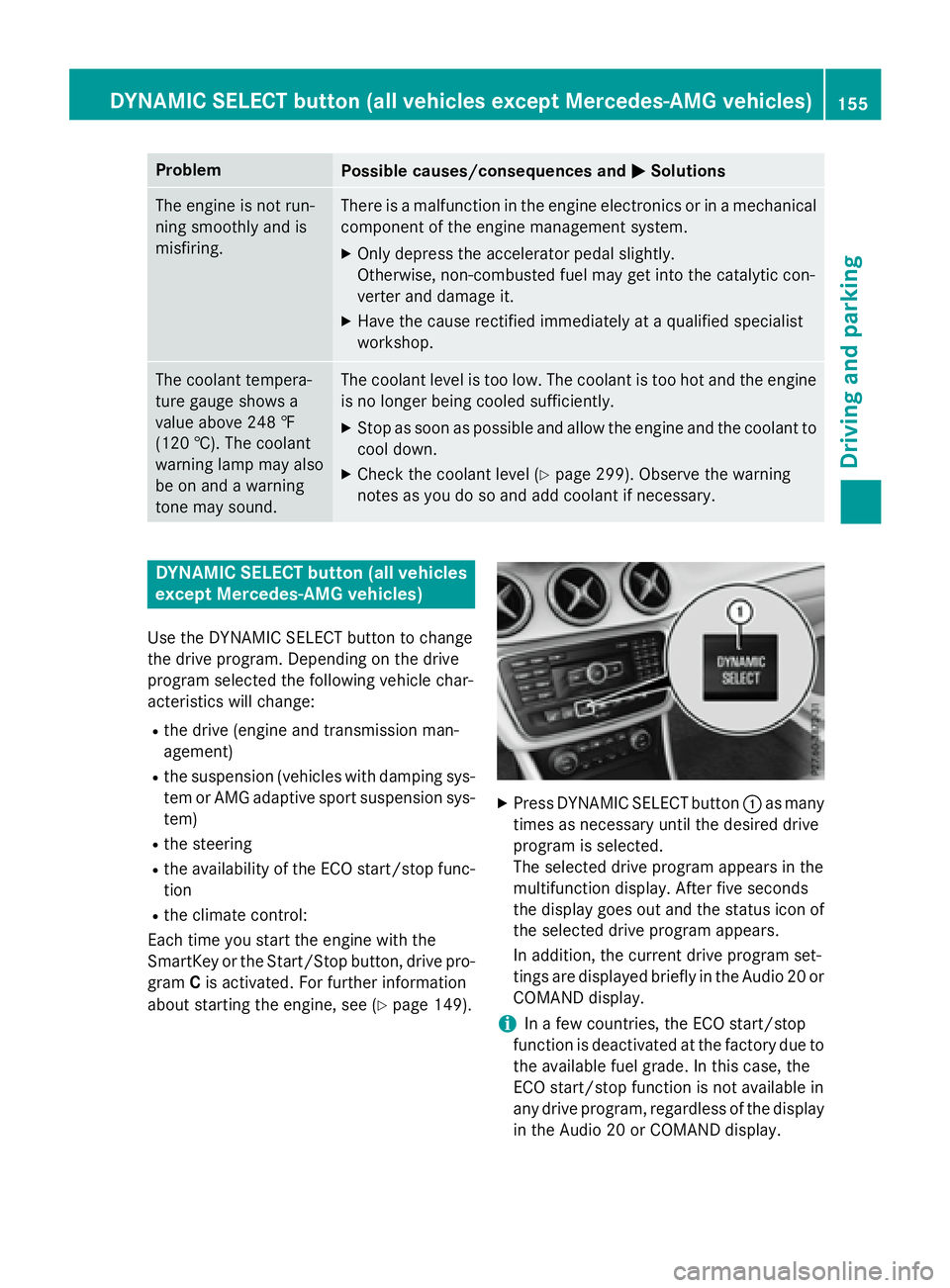
page 149). X
Press DYNAMIC SELECT button C as many
times as necessary until the desired drive
program is selected.
The selected drive program appears in the
multifunction display. After five seconds
the display goes out and the status icon of
the selected drive program appears.
In addition, the current drive program set-
tings are displayed briefly in the Audio 20 or
COMAND display.
i In a few countries, the ECO start/stop
function is deactivated at the factory due to
the available fuel grade. In this case, the
ECO start/stop function is not available in
any drive program, regardless of the display
in the Audio 20 or COMAND display.DYNAMIC SELECT button (all vehicles except Mercedes-AMG vehicles) 155
Driving and parking Z
Page 164 of 374
Mercedes-AMG vehicles: it is only possible
to use kickdown in the automatic drive pro-
gram and the temporary manual drive pro-
gram M . When manual drive program M is
permanently activated, kickdown is not pos-
sible.
For further information on kickdown in man-
ual drive program M ( Y
page 166).
Rocking the vehicle free Shifting the transmission repeatedly between
gears D and R may help to free the vehicle if it
has become stuck in slush or snow. The vehi-
cle's engine management system limits the
speed to a maximum of 5 mph (9 km/h) when
shifting back and forth. To shift back and forth
between transmission positions D and R ,
move the DIRECT SELECT lever up and down
past the point of resistance.
Drive programs
All vehicles (except Mercedes-AMG
vehicles)
Drive program C (Comfort)
Drive program C is characterized by the fol-
lowing: R
the vehicle delivers comfortable, economi-
cal handling characteristics. R
the vehicle pulling away more gently in
forward and reverse gears, unless the
accelerator pedal is depressed fully. R
the vehicle having improved driving stabil-
ity, for example on slippery road surfaces. R
optimal fuel consumption resulting from
the automatic transmission shifting up
sooner. The vehicle is driven in the low
engine speed range and the wheels are less
likely to spin. Drive program S (Sport)
Drive program S is characterized by the fol-
lowing: R
sporty engine settings. R
the automatic transmission shifting up
later. the fuel consumption possibly being
higher as a result of the later automatic
transmission shift points.
Drive program I (Individual)
In drive program I the following properties of
the drive program can be selected: R
the drive (engine and transmission man-
agement) R
the suspension (vehicles with damping sys-
tem or AMG RIDE CONTROL) R
the steering R
the availability of the ECO start/stop func-
tion R
the climate control:
Information about the configuration of drive
program I with COMAND or Audio 20 can be
found in the Digital Operator's Manual.
i To permanently select the gears in drive
program I using the steering wheel paddle
shifters, select the M (manual) setting for
the drive.
Drive program E (Economy)
Drive program E is characterized by the fol-
lowing: R
comfort-oriented engine settings. R
optimal fuel consumption resulting from
the automatic transmission shifting up
sooner. R
the vehicle pulling away more gently in
forward and reverse gears, unless the
accelerator pedal is depressed fully. R
the vehicle having improved driving stabil-
ity, for example on slippery road surfaces. R
the automatic transmission shifting up
sooner. This results in the vehicle being162
Automatic transmission
Driving and parking
Page 165 of 374
driven at lower engine speeds and the
wheels being less likely to spin. R
gliding mode is activated automatically
when engine-internal conditions are fulfil-
led and the accelerator is not depressed. At
the same time the transmission’s clutch
opens and the vehicle rolls freely using its
kinetic energy. As a result great distances
can be completed without the engine brake
and fuel consumption reduced.
Mercedes-AMG vehicles Drive program I (Individual)
In drive program I the following properties of
the drive program can be selected: R
the drive (engine management) R
the transmission management R
the suspension (vehicles with AMG RIDE
CONTROL) R
ESP ®
Information about the configuration of drive
program I with COMAND or Audio 20 can be
found in the Digital Operator's Manual.
Drive program C (Comfort)
Drive program C is characterized by the fol-
lowing: R
the vehicle delivers comfortable, economi-
cal handling characteristics. R
the vehicle pulling away more gently in
forward and reverse gears, unless the
accelerator pedal is depressed fully. R
the vehicle having improved driving stabil-
ity, for example on slippery road surfaces. R
optimal fuel consumption resulting from
the automatic transmission shifting up
sooner. The vehicle is driven in the low
engine speed range and the wheels are less
likely to spin. R
gliding mode is available. R
the ECO start/stop function is available. Drive program S (Sport)
Drive program S is characterized by the fol-
lowing: R
the vehicle exhibits sporty driving charac-
teristics. R
the automatic transmission shifting up
later. the fuel consumption possibly being
higher as a result of the later automatic
transmission shift points. R
the suspension exhibits stiff springing and
damping settings (vehicles with AIR RIDE
CONTROL). R
gliding mode is not available. R
the ECO start/stop function is not availa-
ble.
Drive program S+ (Sport Plus)
Drive program S+ is characterized by the fol-
lowing: R
the vehicle exhibits particularly sporty driv-
ing characteristics. R
the automatic transmission shifting up
later. R
the fuel consumption possibly being higher
as a result of the later automatic transmis-
sion shift points. R
the suspension exhibits particularly stiff
springing and damping settings (vehicles
with AMG adaptive sport suspension sys-
tem). R
gliding mode is not available. R
the ECO start/stop function is not availa-
ble.
Drive program RACE (vehicles with AMG
RIDE CONTROL)
The RACE drive program is characteriz ed by
the following: R
the vehicle exhibits driving characteristics
suitable for the racetrack. R
all vehicle systems are set for maximum
sportiness. R
the automatic transmission shifting up
later.Automatic transmission 163
Driving and parking Z