ignition MERCEDES-BENZ CLA 2016 Owner's Manual
[x] Cancel search | Manufacturer: MERCEDES-BENZ, Model Year: 2016, Model line: CLA, Model: MERCEDES-BENZ CLA 2016Pages: 374, PDF Size: 9.97 MB
Page 111 of 374
R
If electrolyte comes into contact with your
skin or hair or is swallowed, seek medical
attention immediately. R
Immediately change out of clothing which
has come into contact with electrolyte. R
If an allergic reaction occurs, seek medical
attention immediately.
The "Automatic anti-glare mirrors" function is
only available if the vehicle is equipped with
the "Mirrors package".
The rear-view mirror and the exterior mirror
on the driver's side automatically go into anti-
glare mode if: R
the ignition is switched on and R
incident light from headlamps strikes the
sensor in the rear-view mirror
The mirrors do not go into anti-glare mode if
reverse gear is engaged or the interior lighting
is switched on.
Parking position for the exterior mir-
ror on the front-passenger side
General notes
The "Parking position of the exterior mirror on
the front-passenger side" function is only
available if the vehicle is equipped with the
"Mirrors package".
Setting and storing the parking position
You can position the front-passenger side
exterior mirror in such a way that you can see
the rear wheel on that side as soon as you
engage reverse gear. You can store this posi-
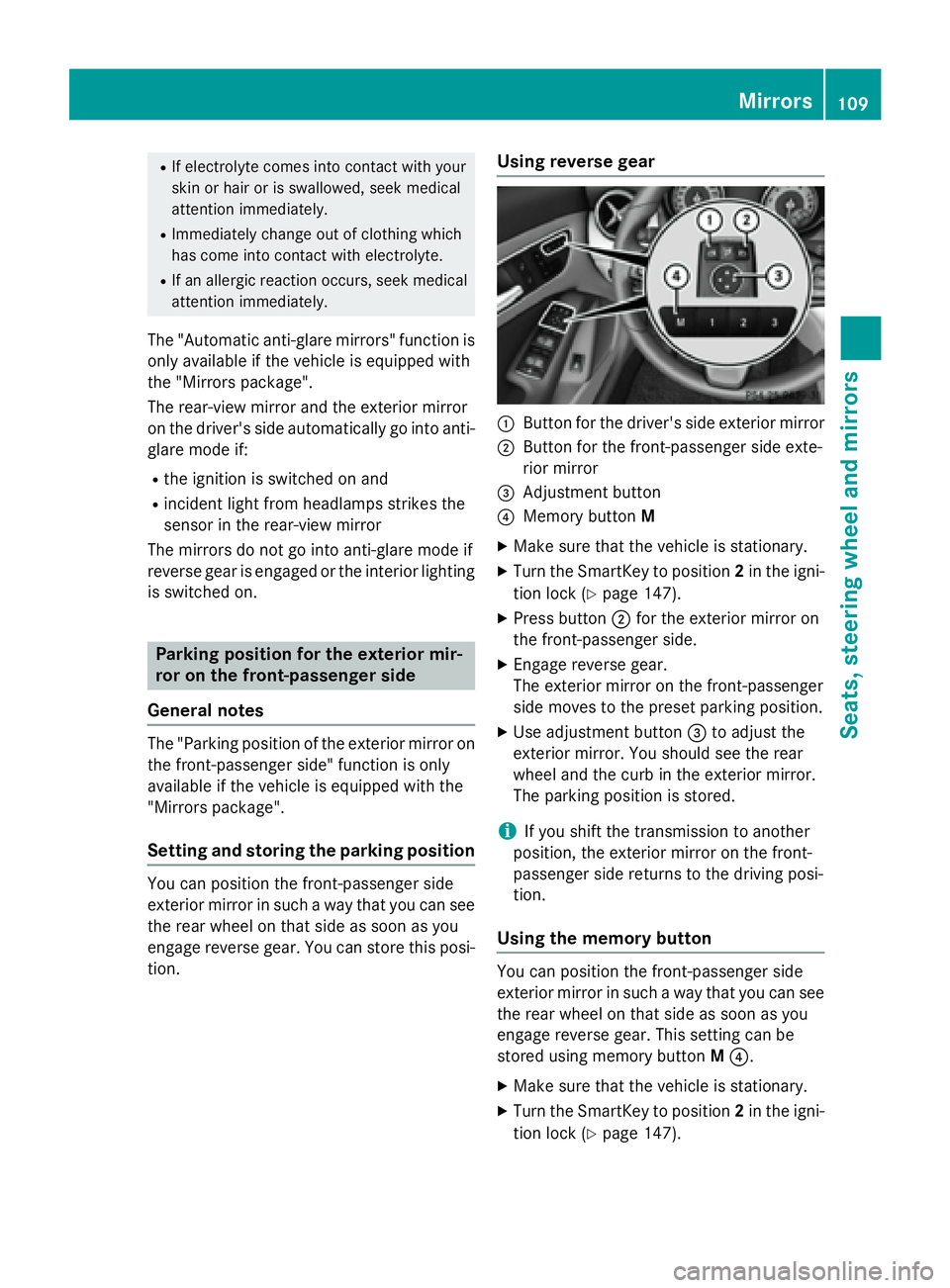
tion. Using reverse gear
C
Button for the driver's side exterior mirror D
Button for the front-passenger side exte-
rior mirror
Page 117 of 374
matically depending on the brightness of
the ambient light. R
With the engine running: if you have acti-
vated the daytime running lamps function
via the on-board computer, the daytime
running lamps or the parking lamps and the
low-beam headlamps are switched on or off
automatically depending on the brightness
of the ambient light. X
To switch on the automatic headlamp
mode: turn the light switch to the X
position.
G WARNING
When the light switch is set to X , the low-
beam headlamps may not be switched on
automatically if there is fog, snow or other
causes of poor visibility due to the weather
conditions such as spray. There is a risk of an
accident.
In such situations, turn the light switch to
X .
The automatic headlamp feature is only an
aid. The driver is responsible for the vehicle's
lighting at all times.
Canada only:
The daytime running lamps improve the visi-
bility of your vehicle during the day. The day-
time running lamps function is required by law
in Canada. It cannot therefore be deactivated.
When the engine is running and the vehicle is
stationary: if you move the selector lever from
a drive position to P , the daytime running
lamps/low-beam headlamps go out after
three minutes.
When the engine is running, the vehicle is
stationary and in bright ambient light: if you
turn the light switch to the ` position, the
daytime running lamps and parking lamps
turn on.
If the engine is running and you turn the light
switch to the X position, the manual set-
tings take precedence over the daytime run-
ning lamps.
USA only: The daytime running lamps improve the visi-
bility of your vehicle during the day. To do this,
the daytime running lamps function must be
switched on using the on-board computer
( Y
page 222).
If the engine is running and you turn the light
switch to the ` or X position, the man-
ual settings take precedence over the day-
time running lamps.
Low-beam headlamps
Even if the light sensor does not detect that it
is dark, the parking lamps and low-beam
headlamps switch on when the ignition is
switched on and the light switch is set to the
X position. This is a pa rticularly useful
fu nction in the event of rain and fog. X
To switch on the low-beam headlamps:
turn the SmartKey in the ignition lock to
position 2 or start the engine. X
Turn the light switch to X .
The green X indicator lamp in the instru-
ment cluster lights up.
Front fog lamps
In conditions where visibility is poor due to
fog, snow or rain, the fog lamps improve vis-
ibility as well as making it easier for other road
users to see you. They can be operated
together with the parking lamps or together
with the parking lamps and low-beam head-
lamps. X
To switch on the fog lamps: turn the key
in the ignition lock to position 2 or start the
engine. X
Turn the light switch to X or X .X
Press the Z button.
The green Z indicator lamp in the instru-
ment cluster lights up. X
To switch off the fog lamps: press the
Z button.
The green Z indicator lamp in the instru-
ment cluster goes out. Exterior lighting 115
Lights and windshield wipers Z
Page 118 of 374
Rear fog lamp
The rear fog lamp improves visibility of your
vehicle for the traffic behind in the event of
thick fog. Please take note of the country-
specific regulations for the use of rear fog
lamps. X
To switch on the rear fog lamp: turn the
SmartKey in the ignition lock to position 2
or start the engine. X
Turn the light switch to X or X .X
Press the ^ button.
The yellow ^ indicator lamp in the
instrument cluster lights up. X
To switch off the rear fog lamp: press the
^ button.
The yellow ^ indicator lamp in the
instrument cluster goes out.
i When the rear fog lamp is switched on,
the center brake lamp in the tail lamp
switches off due to a legal requirement.
Parking lamps
! If the battery has been excessively dis-
charged, the parking lamps or standing
lamps are automatically switched off to
enable the next engine start. Always park
your vehicle safely and sufficiently lit
according to legal standards. Avoid the
continuous use of the ` parking lamps
for several hours. If possible, switch on the
d right or the c left standing lamp.X
To switch on: turn the light switch to ` .
The green ` indicator lamp in the instru-
ment cluster lights up.
Standing lamps
Switching on the standing lamps ensures the
corresponding side of the vehicle is illumina-
ted. X
To switch on the standing lamps: the
Sma rtKey should not be in the ignition lock
or it should be in position 0 .X
Turn the light switch to c (left-hand side
of the vehicle) or d (right-hand side of
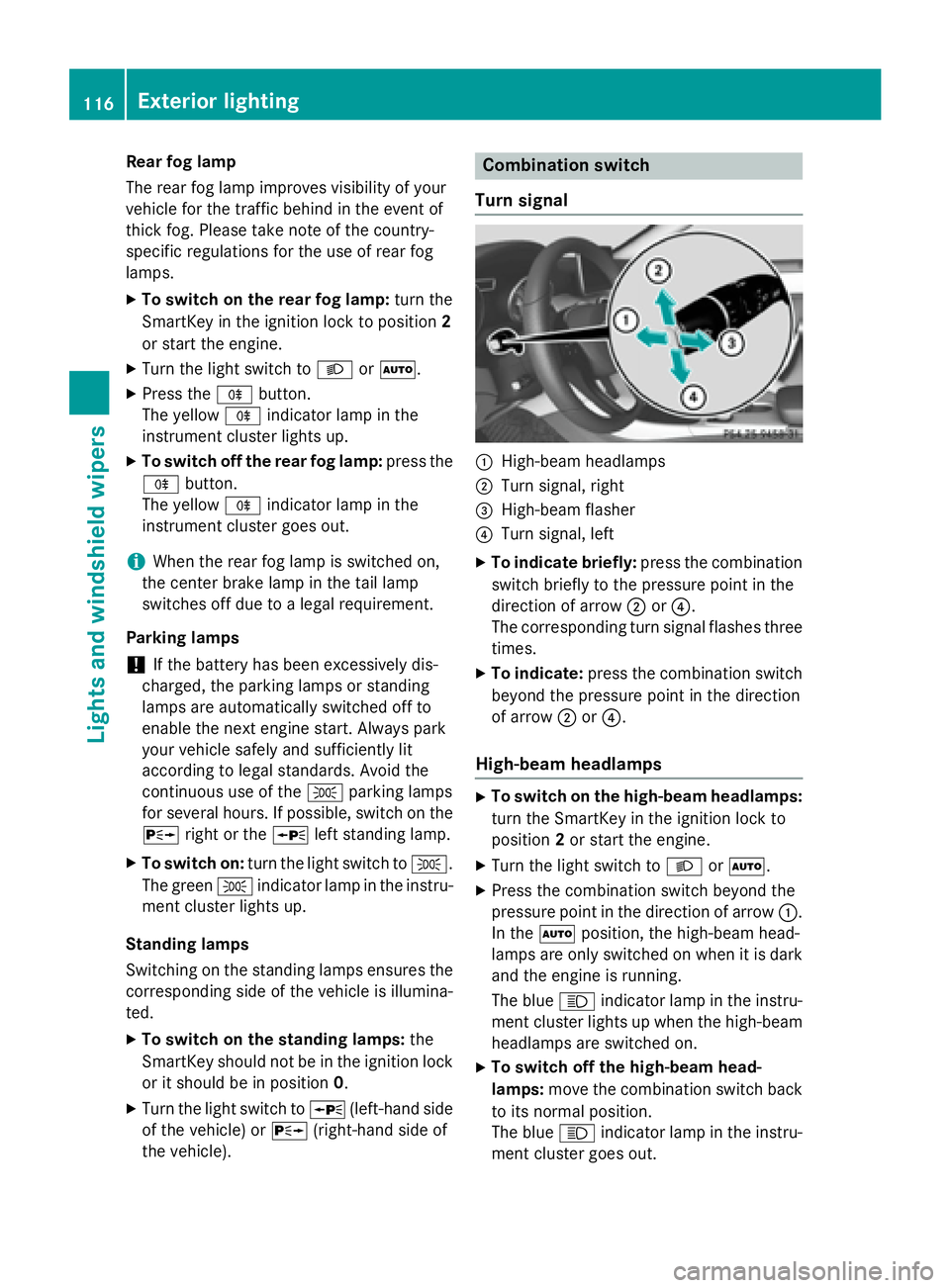
the vehicle). Combination switch
Turn signal
C
High-beam headlamps D
Turn signal, right
Page 119 of 374
Vehicles with Adaptive Highbeam Assist:
when Adaptive Highbeam Assist is active, it
controls activation and deactivation of the
high-beam headlamps ( Y
page 118).
High-beam flasher X
To switch on: turn the SmartKey in the
ignition lock to position 1 or 2 , or start the
engine. X
Pull the combination switch in the direction
of arrow
Page 127 of 374
position, causing the windshield wiper to wipe
more frequently.
If the wiper blades are worn, the windshield
will no longer be wiped properly. This could
prevent you from observing the traffic condi-
tions.
Replacing the wiper blades
Important safety notes
G WARNING
If the windshield wipers begin to move while
you are changing the wiper blades, you could
be trapped by the wiper arm. There is a risk of
injury.
Always switch off the windshield wipers and
ignition before changing the wiper blades.
! To avoid damaging the wiper blades,
make sure that you touch only the wiper
arm of the wiper.
! Never open the hood if a windshield wiper
arm has been folded away from the wind-
shield.
Never fold a windshield wiper arm without a
wiper blade back onto the windshield.
Hold the windshield wiper arm firmly when
you change the wiper blade. If you release
the windshield wiper arm without a wiper
blade and it falls onto the windshield, the
windshield may be damaged by the force of
the impact.
Mercedes-Benz recommends that you have
the wiper blades changed at a qualified
specialist workshop. Replacing the windshield wiper blades
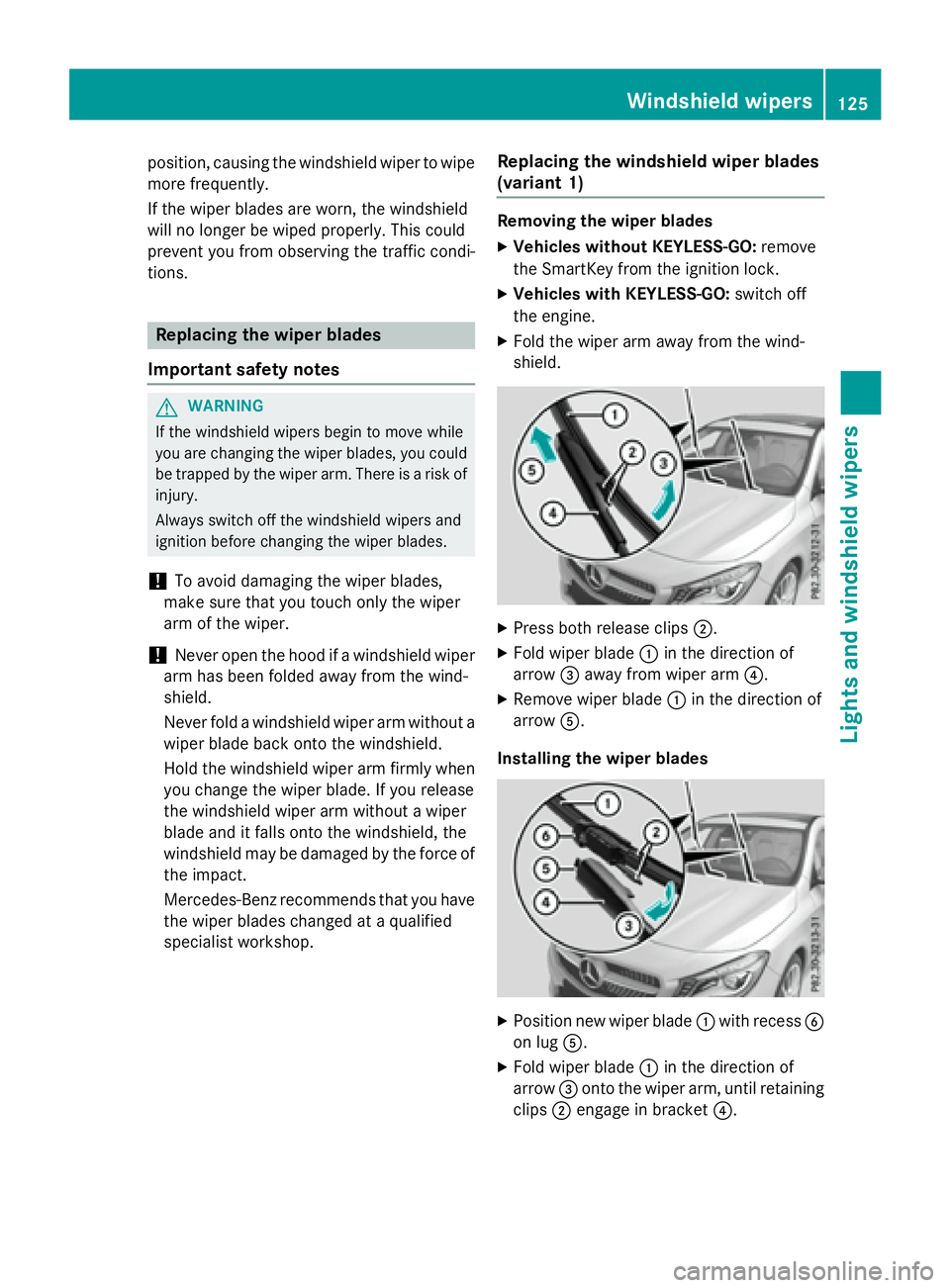
(variant 1) Removing the wiper blades X
Vehicles without KEYLESS-GO: remove
the SmartKey from the ignition lock. X
Vehicles with KEYLESS-GO: switch off
the engine. X
Fold the wiper arm away from the wind-
shield.
X
Press both release clips D .X
Fold wiper blade C in the direction of
arrow
Page 128 of 374
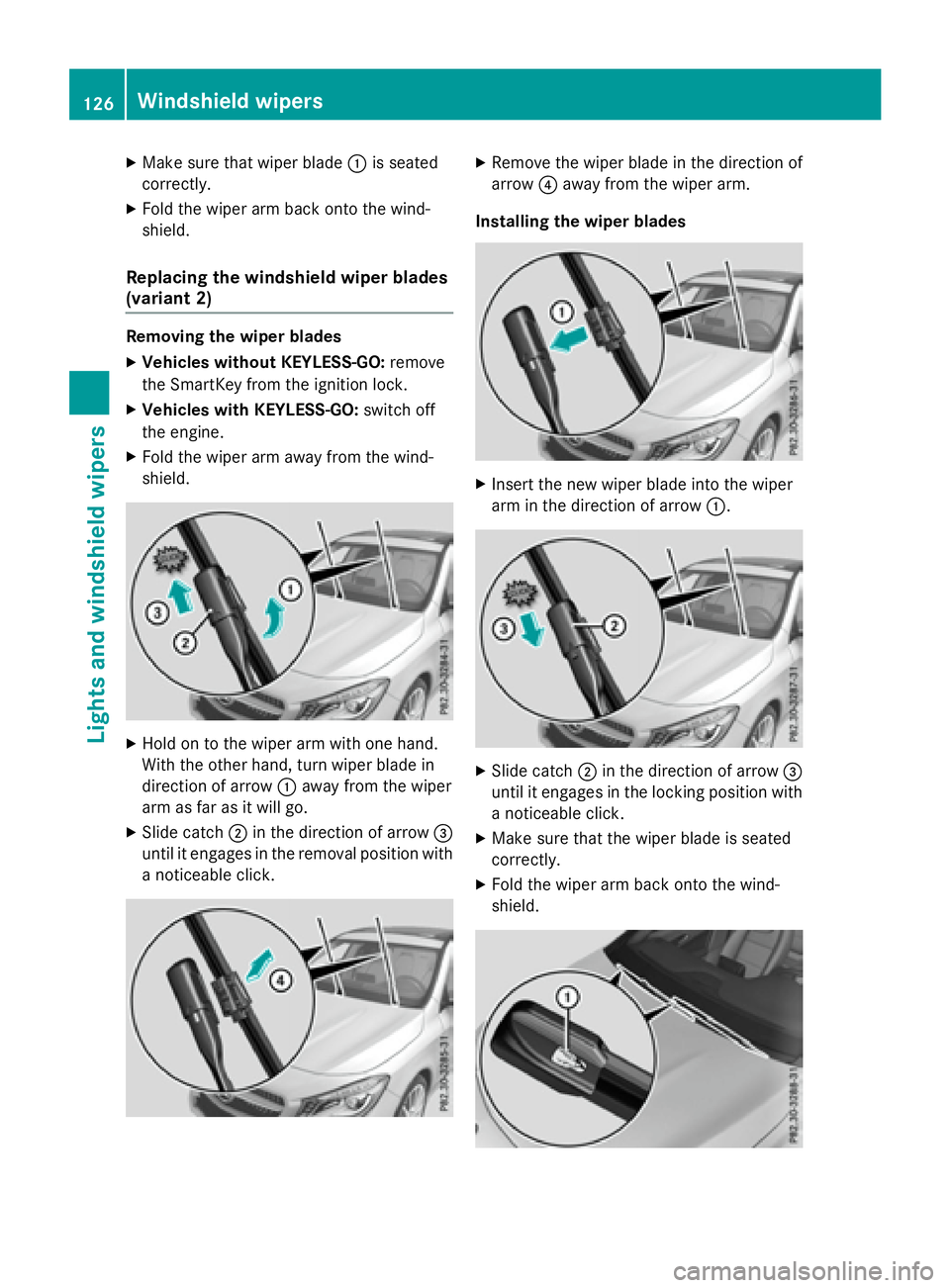
X
Make sure that wiper blade C is seated
correctly. X
Fold the wiper arm back onto the wind-
shield.
Replacing the windshield wiper blades
(variant 2) Removing the wiper blades X
Vehicles without KEYLESS-GO: remove
the SmartKey from the ignition lock. X
Vehicles with KEYLESS-GO: switch off
the engine. X
Fold the wiper arm away from the wind-
shield.
X
Hold on to the wiper arm with one hand.
With the other hand, turn wiper blade in
direction of arrow C away from the wiper
arm as far as it will go. X
Slide catch D in the direction of arrow
Page 130 of 374
Problems with the windshield wipers Problem
Possible causes/consequences and P Solutions
The windshield wipers
are jammed. Leaves or snow, for example, may be obstructing the windshield
wiper movement. The wiper motor has been deactivated. X
For safety reasons, you should remove the SmartKey from the
ignition lock. X
Remove the cause of the obstruction. X
Switch the windshield wipers back on.
The windshield wipers
fail completely. The windshield wiper drive is malfunctioning. X
Select another wiper speed on the combination switch. X
Have the windshield wipers checked at a qualified specialist
workshop.
The windshield washer
fluid from the spray
nozzles no longer hits
the center of the wind-
shield. The spray nozzles are misaligned. X
Have the spray nozzles adjusted at a qualified specialist work-
shop.128
Windshield wipers
Lights and windshield wipers
Page 132 of 374

Useful information
i This Operator's Manual describes all
models and all standard and optional equip-
ment of your vehicle available at the time of
publication of the Operator's Manual.
Country-specific differences are possible.
Please note that your vehicle may not be
equipped with all features described. This
also applies to safety-related systems and
functions.
i Read the information on qualified special-
ist workshops ( Y
page 25).
Overview of climate control systems
General notesObserve the settings recommended on the
following pages. The windows could other-
wise fog up.
To prevent the windows from fogging up: R
switch off climate control only briefly R
switch on air-recirculation mode only
briefly R
switch on the cooling with air dehumidifi-
cation function R
switch on the defrost windshield function
briefly, if required
The air-conditioning system/dual-zone auto-
matic climate control regulates the tempera-
ture and the humidity of the vehicle interior
and filters out undesirable substances from
the air.
The air-conditioning system/dual-zone auto-
matic climate control can only be operated
when the engine is running. Optimum opera-
tion is only achieved with the side windows
and panorama roof with power tilt/sliding
panel closed.
If you start the engine using your smartphone,
the last selected climate control setting is
reactivated ( Y
page 169). The residual heat function can only be acti-
vated or deactivated with the ignition
switched off ( Y
page 141).
Always keep the ventilation flaps behind the
side trim panel in the cargo compartment
clear ( Y
page 123). Otherwise the vehicle will
not be ventilated correctly.
i Ventilate the vehicle for a brief period
during warm weather, e.g. using the con-
venience opening feature ( Y
page 89). This
will speed up the cooling process and the
desired interior temperature will be
reached more quickly.
i The integrated filter filters out most par-
ticles of dust and soot and completely fil-
ters out pollen. It also reduces gaseous pol-
lutants and odors. A clogged filter reduces
the amount of air supplied to the vehicle
interior. For this reason, you should always
observe the interval for replacing the filter,
which is specified in the Maintenance
Booklet. As it depends on environmental
conditions, e.g. heavy air pollution, the
interval may be shorter than stated in t he
Main tenance Booklet.
i It is possible that under certain circum-
stances the residual heat function may be
activated automatically an hour after the
SmartKey has been removed in order to dry
the automatic climate control. The vehicle
is then ventilated for 30 minutes.130
Overview of climate control systems
Climate control
Page 137 of 374
R
Use the residual heat function if you want to
heat or ventilate the vehicle interior when
the ignition is switched off. The residual
heat function can only be activated or deac-
tivated with the ignition switched off. R
If you change the settings of the climate
control system, the climate status display
appears for approximately three seconds
at the bottom of the screen in the Audio/
COMAND display (see separate operating
instructions). You will see the current set-
tings of the various climate control func-
tions.
DYNAMIC SELECT button (except
Mercedes-AMG vehicles) You can choose between various drive pro-
grams with the DYNAMIC SELECT button
( Y
page 155).
If you have selected drive program E :R
when heating, the electrical heater booster
is deactivated and in the warming-up phase
heat output is reduced R
the rear window defroster running time is
reduced
Depending on the configuration, the climate
settings can also be influenced in drive pro-
gram I .
If you have selected drive program C or S , the
climate settings are not affected.
ECO start/stop function
During automatic engine switch-off, the cli-
mate control system only operates at a
reduced capacity. If you require the full cli-
mate control output, you can switch off the
ECO start/stop function by pressing the ECO
button ( Y
page 153). Operating the climate control sys-
tems
Activating/deactivating climate con-
trol
General notes When the climate control is switched off, the
air supply and air circulation are also
switched off. The windows could fog up.
Therefore, switch off climate control only
briefly
Air-conditioning system X
Turn the SmartKey to position 2 in the igni-
tion lock ( Y
page 147). X
To switch on: turn control
Page 144 of 374
Switching on/off X
Turn the key to position 0 in the ignition
lock or remove it ( Y
page 147).X
To activate: press the K button.
The indicator lamp in the K button lights
up. X
To deactivate: press the K button.
The indicator lamp in the K button goes
out.
i Residual heat is deactivated automati-
cally: R
after approximately 30 minutes R
when the ignition is switched on R
if the battery voltage drops
Air vents
Important safety notes
G WARNING
Very hot or very cold air can flow from the air
vents. This could result in burns or frostbite in
the immediate vicinity of the air vents. There
is a risk of injury.
Make sure that all vehicle occupants always
maintain a sufficient distance to the air out-
lets. If necessary, redirect the airflow to
another area of the vehicle interior.
In order to ensure the direct flow of fresh air
through the air vents into the vehicle interior,
please observe the following notes: R
keep the air inlet between the windshield
and the hood free of blockages, such as ice,
snow or leaves. R
never cover the air vents or air intake grilles
in the vehicle interior.
i For optimal climate control in the vehicle,
open the air vents completely and set the
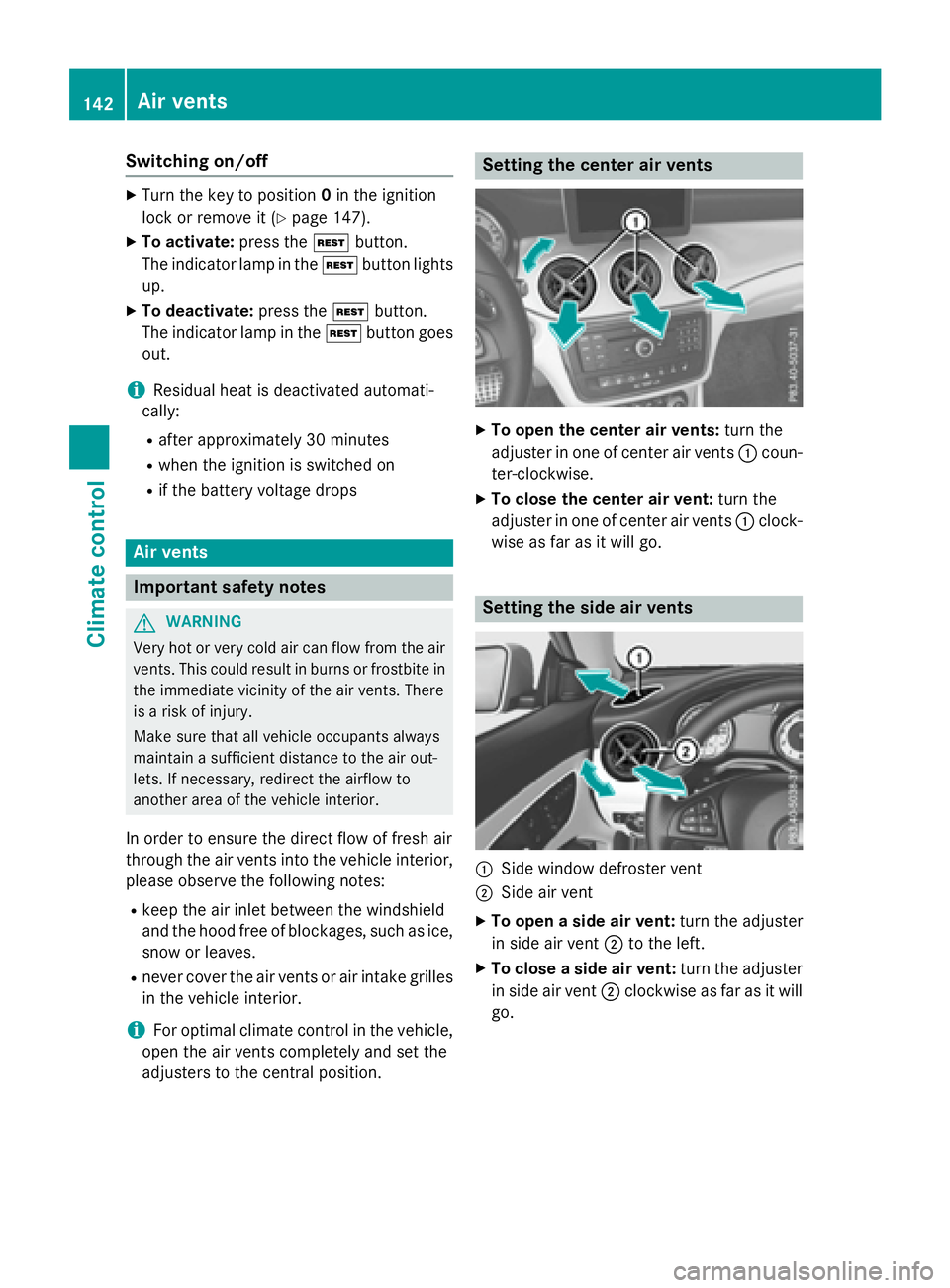
adjusters to the central position. Setting the center air vents X
To open the center air vents: turn the
adjuster in one of center air vents C coun-
ter-clockwise. X
To close the center air vent: turn the
adjuster in one of center air vents C clock-
wise as far as it will go.
Setting the side air vents
C
Side window defroster vent D
Side air vent X
To open a side air vent: turn the adjuster
in side air vent D to the left. X
To close a side air vent: turn the adjuster
in side air vent D clockwise as far as it will
go.142
Air vents
Climate control