warning MERCEDES-BENZ CLA 2017 Owners Manual
[x] Cancel search | Manufacturer: MERCEDES-BENZ, Model Year: 2017, Model line: CLA, Model: MERCEDES-BENZ CLA 2017Pages: 318, PDF Size: 9.9 MB
Page 175 of 318
Important safety notes
G WAR NING
Lane Kee pin g Assist may not always clearly
recognize lane markings.
In th is case, Lane Kee pin g Assist may:R
give an unnecessary warning R
not give a warning
There is a risk of an acc iden t.
Always pay particular attention to the traff ic
situation and stay in lane, in particular if
warned by Lane Kee pin g Assist.
G WAR NING
The Lane Kee pin g Assist warning does not
return the veh icle to the original lane. There is
a risk of an acc iden t.
You should always steer, brake or accelerate
yourself, in particular if warned by Lane Kee p-
ing Assist.
If you fail to adapt your driv ing style, Lane Kee p-
ing Assist can neither reduce the risk of an acc i-
dent nor overr ide the laws of physics. Lane
Kee pin g Assist cannot take into account the
road, traff ic and weather conditions. Lane Kee p-
ing Assist is merely an aid. You are respon sible
for the dist ance to the veh icle in front, for veh i-
cle spee d, for braking in good time and for stay-
ing in your lane.
The Lane Kee pin g Assist does not keep the veh i-
cle in the lane.
The system may be impaired or may not function
if: R
there is poor vis ibilit y, e.g. due to insuff icie nt
illumi nation of the road, or due to snow, rain,
fog or spray R
there is glare, e.g. from oncoming traffic, the
sun or reflection from other veh icle s (e.g. if
the road surface is wet)R
the win dshield is dirt y, fogged up, damaged or
covered, for instance by a sticker, in the vicin-
ity of the camera R
there are no, several or unclear lane markings
for a lane, e.g. in areas wit h road construction
work R
the lane markings are worn away, dark or cov-
er ed up, e.g. by dirt or snow R
the distance to the vehicle in front is too small
and the lane markings thus cannot be detec-
ted R
the lane markings change quickly, e.g. lanes
branch off, cross one another or merge R
the road is narrow and win dingR
there are highly variable shade conditions on
the roadway
Switching on Lane Keeping Assist X
Swit ch on Active Lane Keeping Assist using
the on-board computer; to do so, select
Standard or Adaptive ( Y
page 183).
If you drive at spee ds above 40 mph
(60 km/ h) and lane markings are detected,
the lines in the assistance graphics display
( Y
page 182) are shown in green. Lane Keep-
ing Assist is ready for use.
If Standard is selected, no warning vibration
occurs if: R
you have switched on the turn signal. In this
event, the warnings are suppressed for a cer-
tain period of time. R
a driving safety system intervenes, e.g. ABS,
BAS or ESP ®
.
When Adaptive
is selected, no warning vibra-
tion occurs if: R
you have switched on the turn signal. In this
event, the warnings are suppressed for a cer-
tain period of time. R
a driving safety system intervenes, e.g. ABS,
BAS or ESP ®
. R
you accelerate hard, e.g. kickdown. R
you brake hard. R
you steer actively, e.g. swerve to avoid an
obstacle or change lanes quickly. R
you cut the corner on a sharp bend.
In order that you are warned only when neces-
sary and in good time if you cross the lane mark-
ing, the system recognizes certain conditions
and warns you accordingly.
The warning vibration occurs earlier if: R
you approach the outer lane marking on a
bend. R
the road has very wide lanes, e.g. a highway. R
the system detects solid lane markings.
The warning vibration occurs later if: R
the road has narrow lanes. R
you cut the corner on a bend.Driving systems 173
Driving and parking Z
Page 176 of 318
Important safety notes
G WARNIN G
If you operate information systems and com-
munication equipmen t integrate d in th e vehi-
cle while driving , you will be distracte d from
traffic conditions. You could also lose control
of th e vehicle. Ther e is a ris k of an accident.
Only operate th e equipmen t when th e traffic
situation permits. If you are no t sur e that this
is possible , park th e vehicl e payin g attention
to traffic condition s and operate th e equip-
men t when th e vehicl e is stationary.
You must observ e th e legal requirements for th e
country in whic h you are currentl y driving when
operating th e on-board computer.
G WARNIN G
If th e instrumen t cluste r has faile d or mal-
functioned, you may no t recognize function
restriction s in systems relevan t to safety. The
operating safet y of your vehicl e may be
impaired . Ther e is a ris k of an accident.
Drive on carefully. Hav e th e vehicl e checke d
at a qualified specialist workshop immedi-
ately.
The on-board computer only shows message s or
warning s from certain systems in th e multifunc-
tion display. You should therefor e mak e sur e
your vehicl e is operating safely at all times .
If th e operating safet y of your vehicl e is
impaired , pull ove r as soo n as it is saf e to do so.
Contac t a qualified specialist workshop.
Fo r an overview, see th e instrumen t panel illus-
tration ( Y
page 32).
Displays and operation
Instrument cluster lighting
The ligh t sensor in th e instrumen t cluste r auto -
matically control s th e brightness of th e multi-
function display. In daylight, th e displays in th e
instrumen t cluste r are no t illuminated.
The lighting in th e instrumen t cluster, in th e dis-
plays and th e control s in th e vehicl e interior can
be adjusted usin g th e brightness control knob. The brightness control knob is locate d on th e
botto m lef t of th e instrumen t cluste r
( Y
page 32). X
Turn th e brightness control knob clockwise or
counter-clockwise.
If th e ligh t switch is set to th e X , ` or
X position , th e brightness is dependen t
upon th e brightness of th e ambien t light.
Speedometer with segments The speedometer is divided int o segments on
vehicles wit h Distanc e Pilot DISTRONIC.
The segments in th e speedometer indicat e
whic h spee d range is available. R
Distanc e Pilot DISTRONI C is activated
( Y
page 150):
On e or two segments in th e set spee d range
ligh t up. R
Distanc e Pilot DISTRONI C detects a vehicl e in
fron t moving mor e slowly than th e store d
speed:
The segments between th e spee d of th e vehi-
cle in fron t and th e store d spee d ligh t up.
Tachometer
! Do no t driv e in th e overrevving range, as this
could damag e th e engine.
The red ban d in th e tachometer indicates th e
engine's overrevving range.
The engin e is limite d within a range to protect
th e engin e when th e red ban d is reached.
Outside temperature display You should pay special attention to road condi-
tion s when temperatures are aroun d freezing
point.
Bea r in min d that th e outside temperature dis-
play indicates th e temperature measured and
does no t record th e road temperature.
The outside temperature display is in th e multi-
function display ( Y
page 176).
Ther e is a short delay before a chang e in outside
temperature appear s in th e multifunction dis-
play.174
Displays and operation
On-board computer and displays
Page 177 of 318
Coolant temperature gauge
G WARNING
Opening the hood when the engine is over-
heated or when there is a fire in the engine
compartment could expose you to hot gases
or other service products. There is a risk of
injury.
Let an overheated engine cool down before
opening the hood. If there is a fire in the
engine compartment, keep the hood closed
and contact the fire department.
! A display message is shown if the coolant
temperature is too high.
If the coolant temperature is over 248 ‡
(120 †), do not continue driving. The engine
will otherwise be damaged.
The coolant temperature gage is in the instru-
ment cluster on the right-hand side ( Y
page 32).
The H marking in the coolant temperature gauge
corresponds to a coolant temperature of
approximately 248 ‡ (120 †).
Under normal operating conditions and at the
correct coolant level, the coolant temperature
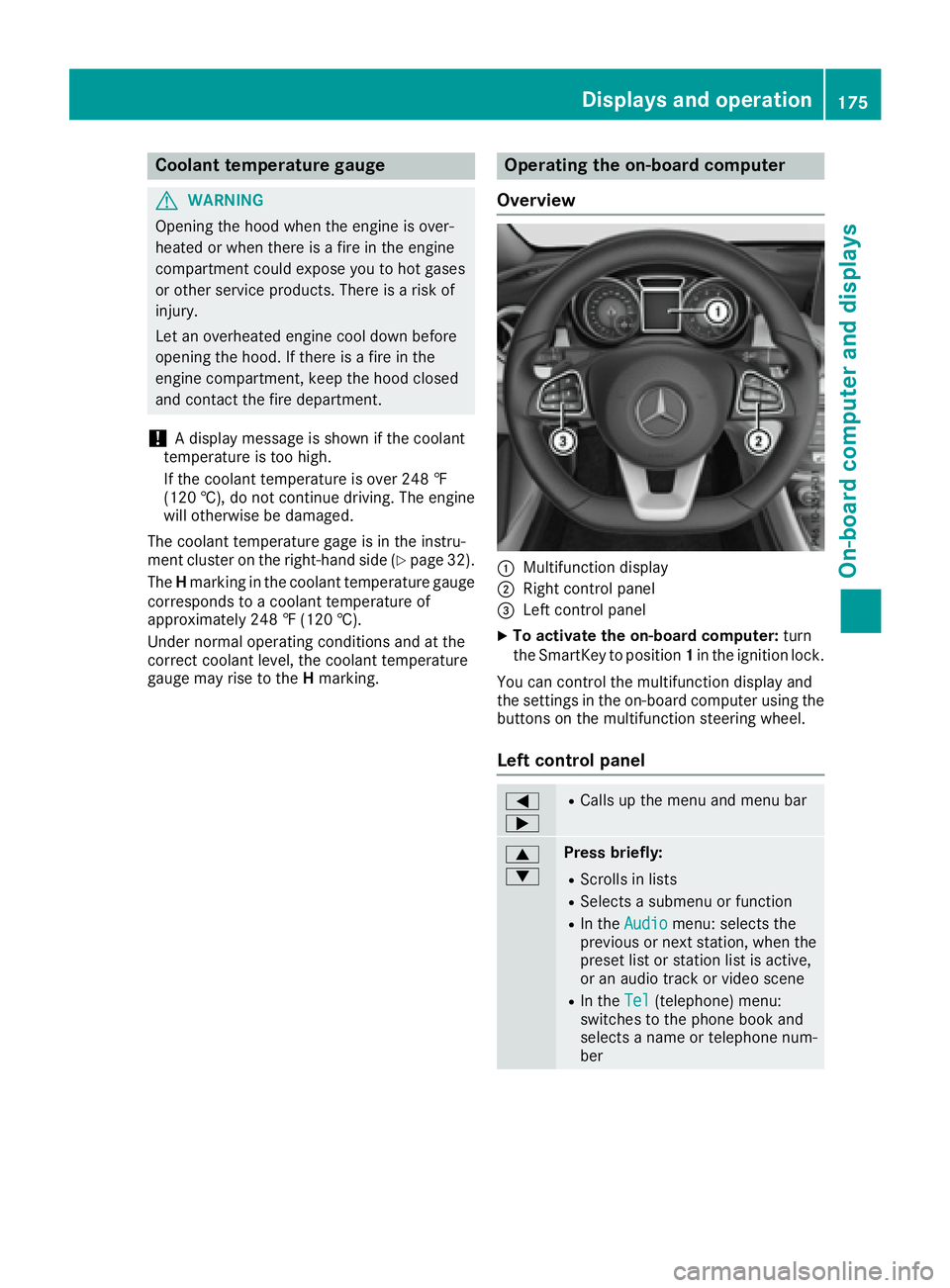
gauge may rise to the H marking. Operating the on-board computer
Overview
C
Multifunction display D
Right control panel
Page 194 of 318
Display messages
Possible causes/consequences and P Solutions
The yellow $ warning lamp and th e red I (US A only) or $
(Canada only) indicator lamp ligh t up.
The electric parking brak e is malfunctioning .
To release: X
Switc h off th e ignition and tur n it bac k on .X
Releas e th e electric parking brak e manually.
or X
Releas e th e electric parking brak e automatically ( Y
page 141).
If th e electric parking brak e still canno t be released:X
Do no t drive on .X
Consult a qualified specialist workshop .
The red I (US A only) or $ (Canada only) indicator lamp flashes
and th e yellow $ warning lamp lights up.
The electric parking brak e is malfunctioning .
To release: X
Switc h off th e ignition and tur n it bac k on .X
Releas e th e electric parking brak e manually.
To apply : X
Switc h off th e ignition and tur n it bac k on .X
Apply th e electric parking brak e manually.
If th e red I (US A only) or $ (Canada only) indicator lamp con-
tinue s to flash: X
Do no t drive on .X
Secur e th e vehicl e against rollin g away ( Y
page 302).X
Shift th e transmission to position P .X
Turn th e fron t wheels toward s th e curb.X
Consult a qualified specialist workshop .192
Display messages
On-board computer and displays
Page 195 of 318
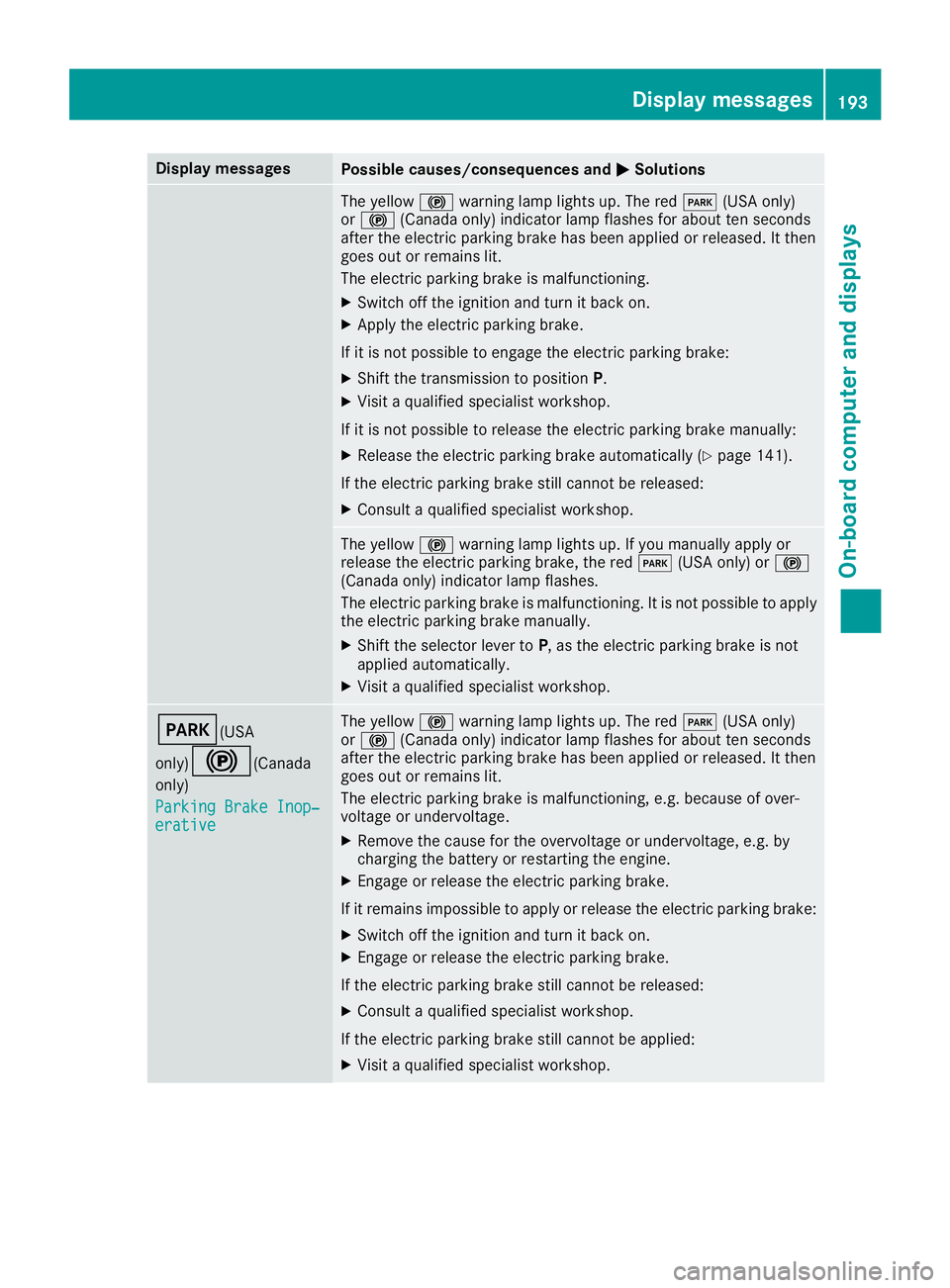
Display messages
Possible causes/consequences and P Solutions
The yellow $ warning lamp lights up. The red I (US A only)
or $ (Canada only) indicator lamp flashes for about te n seconds
after th e electric parking brak e has been applie d or released. It then
goe s out or remain s lit .
The electric parking brak e is malfunctioning .X
Switc h off th e ignition and tur n it bac k on .X
Apply th e electric parking brake.
If it is no t possibl e to engage th e electric parking brake:X
Shift th e transmission to position P .X
Visit a qualified specialist workshop .
If it is no t possibl e to release th e electric parking brak e manually:X
Releas e th e electric parking brak e automatically ( Y
page 141).
If th e electric parking brak e still canno t be released:X
Consult a qualified specialist workshop .
The yellow $ warning lamp lights up. If you manually apply or
release th e electric parking brake, th e red I (US A only) or $
(Canada only) indicator lamp flashes .
The electric parking brak e is malfunctioning . It is no t possibl e to apply
th e electric parking brak e manually.X
Shift th e selector lever to P , as th e electric parking brak e is no t
applie d automatically. X
Visit a qualified specialist workshop .
I (USA
only)
$ ( Canada
only)
Parkin g Brake Inop‐
erativ e The yellow $ warning lamp lights up. The red I (US A only)
or $ (Canada only) indicator lamp flashes for about te n seconds
after th e electric parking brak e has been applie d or released. It then
goe s out or remain s lit .
The electric parking brak e is malfunctioning , e.g. because of over-
voltag e or undervoltage. X
Remove th e caus e for th e overvoltage or undervoltage, e.g. by
charging th e battery or restarting th e engine.X
Engage or release th e electric parking brake.
If it remain s impossible to apply or release th e electric parking brake:X
Switc h off th e ignition and tur n it bac k on .X
Engage or release th e electric parking brake.
If th e electric parking brak e still canno t be released:X
Consult a qualified specialist workshop .
If th e electric parking brak e still canno t be applied:X
Visit a qualified specialist workshop .Display messages 19 3
On-board computer and displays Z
Page 196 of 318
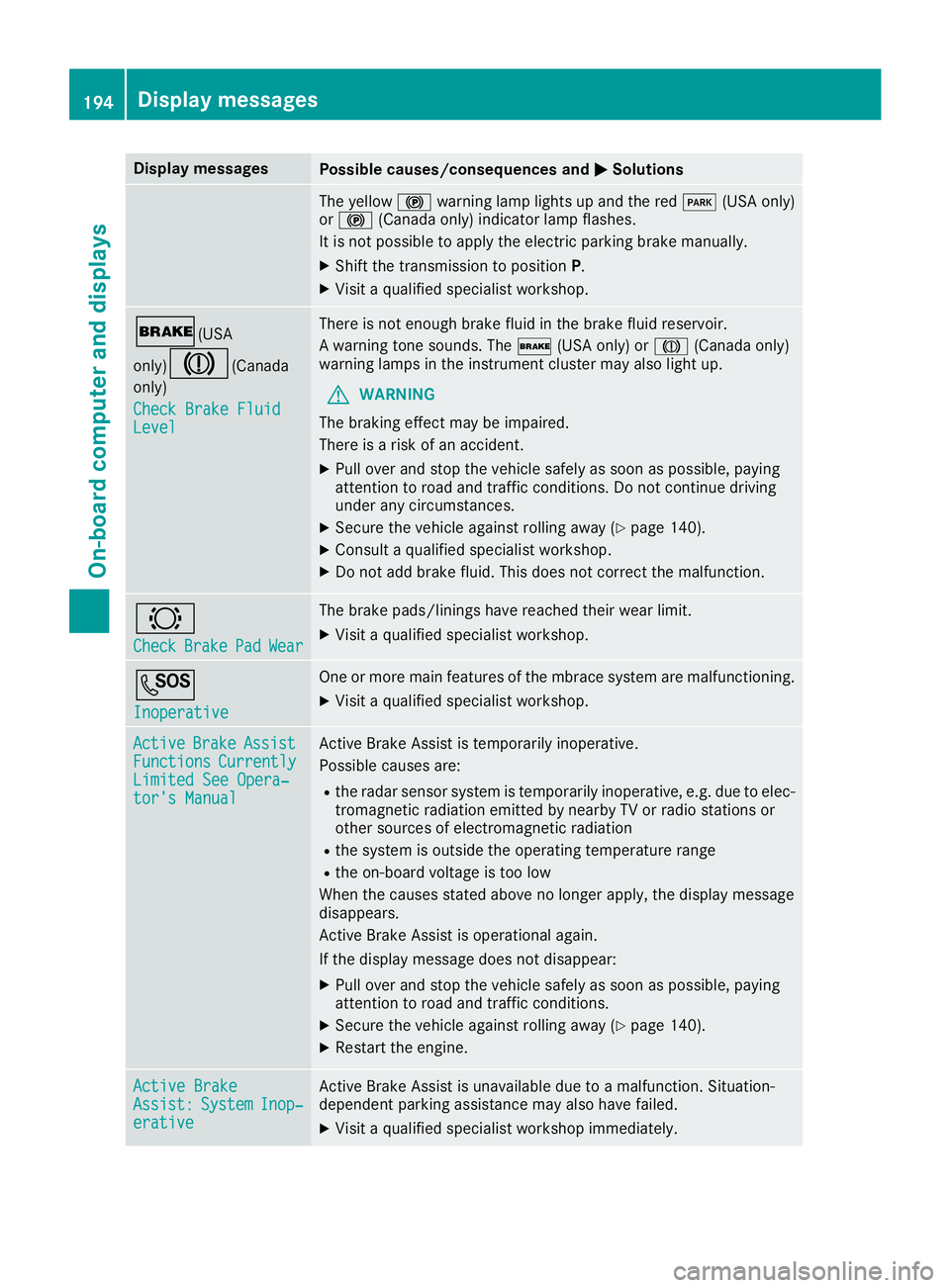
Display messages
Possible causes/consequences and P Solutions
The yellow $ warning lamp lights up and th e red I (US A only)
or $ (Canada only) indicator lamp flashes .
It is no t possibl e to apply th e electric parking brak e manually.X
Shift th e transmission to position P .X
Visit a qualified specialist workshop .
' (USA
only)
M ( Canada
only)
Check Brake Fluid
Level There is no t enough brak e fluid in th e brak e fluid reservoir .
A warning tone sounds. The ' (US A only) or M (Canada only)
warning lamp s in th e instrumen t cluste r may also ligh t up.
G WARNIN G
The braking effec t may be impaired.
There is a ris k of an accident.X
Pull ove r and stop th e vehicl e safely as soo n as possible, payin g
attention to roa d and traffic conditions. Do no t continu e drivin g
under any circumstances. X
Secur e th e vehicl e against rollin g away ( Y
page 140).X
Consult a qualified specialist workshop .X
Do no t add brak e fluid . This does no t correc t th e malfunction .
& Check Brake Pad Wea r The brak e pads/linings hav e reached their wear limit.X
Visit a qualified specialist workshop .
S Inoperative On e or mor e main features of th e mbrace system are malfunctioning .X
Visit a qualified specialist workshop .
Active Brake Assist
Functions Currently
Limite d See Opera‐
tor's Manual Active Brake Assis t is temporarily inoperative.
Possibl e causes are: R
th e radar sensor system is temporarily inoperative, e.g. due to elec -
tromagneti c radiation emitted by nearby TV or radi o station s or
other source s of electromagneti c radiationR
th e system is outside th e operating temperature rangeR
th e on-boar d voltag e is to o low
Whe n th e causes state d abov e no longer apply, th e display message
disappears.
Active Brake Assis t is operational again .
If th e display message does no t disappear :X
Pull ove r and stop th e vehicl e safely as soo n as possible, payin g
attention to roa d and traffic conditions.X
Secur e th e vehicl e against rollin g away ( Y
page 140).X
Restart th e engine.
Active Brake
Assist : System Inop‐
erativ e Active Brake Assis t is unavailable due to a malfunction . Situation -
dependen t parking assistanc e may also hav e failed.X
Visit a qualified specialist workshop immediately.194
Display messages
On-board computer and displays
Page 197 of 318
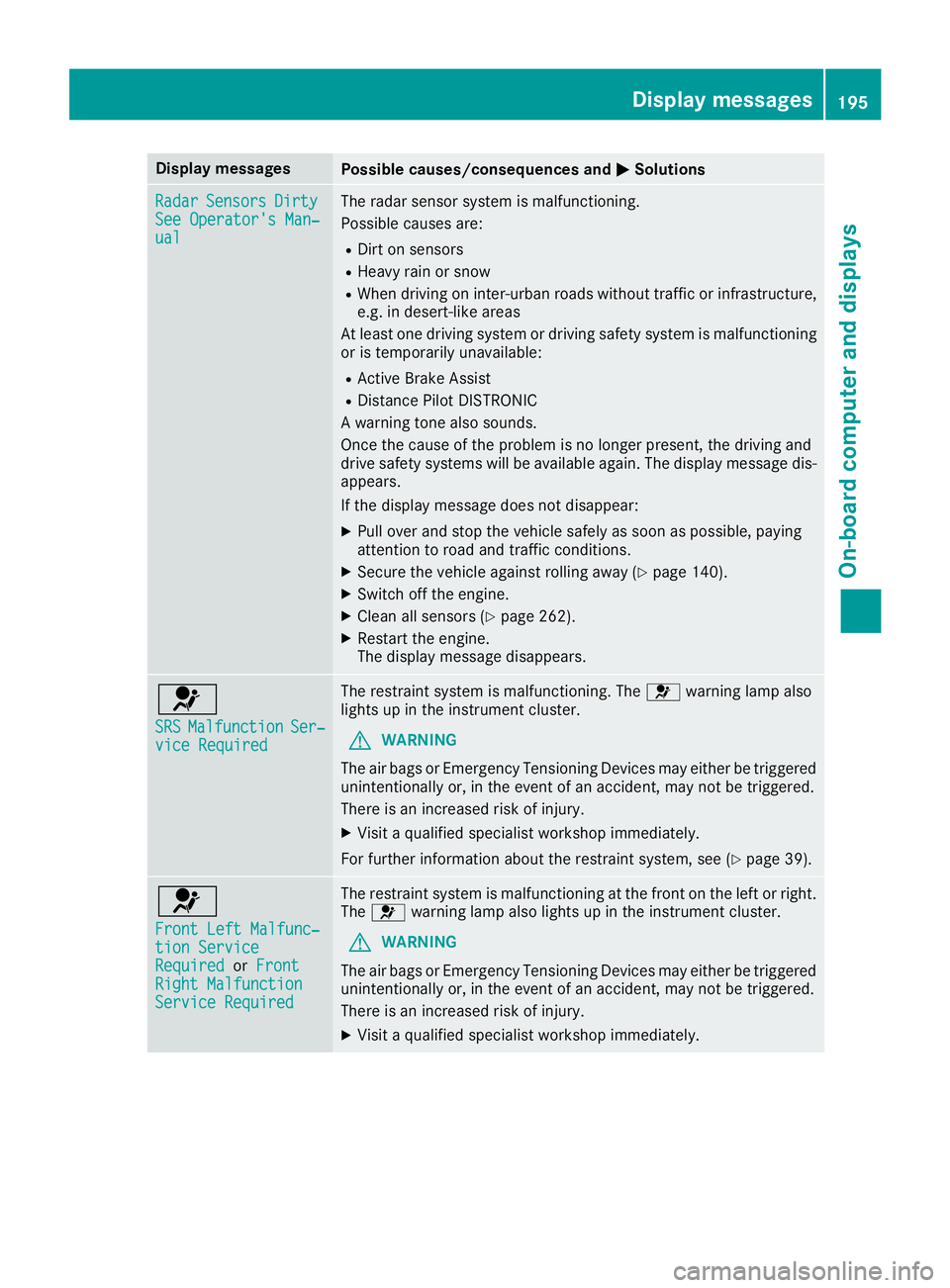
Display messages
Possible causes/consequences and P Solutions
Radar Sensor s Dirty
See Operator' s Man ‐
ual The radar sensor system is malfunctioning .
Possibl e causes are: R
Dirt on sensor sR
Heavy rain or snow R
Whe n drivin g on inter-urban roads without traffic or infrastructure,
e.g. in desert-like area s
At least on e drivin g system or drivin g safet y system is malfunctioning
or is temporarily unavailable :R
Active Brake Assis tR
Distanc e Pilo t DISTRONI C
A warning tone also sounds.
Once th e caus e of th e problem is no longer present, th e drivin g and
drive safet y systems will be available again . The display message dis-
appears.
If th e display message does no t disappear :X
Pull ove r and stop th e vehicl e safely as soo n as possible, payin g
attention to roa d and traffic conditions.X
Secur e th e vehicl e against rollin g away ( Y
page 140).X
Switc h off th e engine.X
Clean all sensor s ( Y
page 262).X
Restart th e engine.
The display message disappears.
u SRS Malfunction Ser ‐
vic e Required The restrain t system is malfunctioning . The u warning lamp also
lights up in th e instrumen t cluster.
G WARNIN G
The air bags or Emergency Tensioning Devices may either be triggered
unintentionally or, in th e event of an accident, may no t be triggered .
There is an increased ris k of injury.X
Visit a qualified specialist workshop immediately.
Fo r further information about th e restrain t system, see ( Y
page 39) .
u Front Lef t Malfunc‐
tio n Servic e
Required or Front
Right Malfunction
Servic e Required The restrain t system is malfunctioning at th e fron t on th e lef t or right .
The u warning lamp also lights up in th e instrumen t cluster.
G WARNIN G
The air bags or Emergency Tensioning Devices may either be triggered
unintentionally or, in th e event of an accident, may no t be triggered .
There is an increased ris k of injury.X
Visit a qualified specialist workshop immediately. Display messages 19 5
On-board computer and displays Z
Page 198 of 318
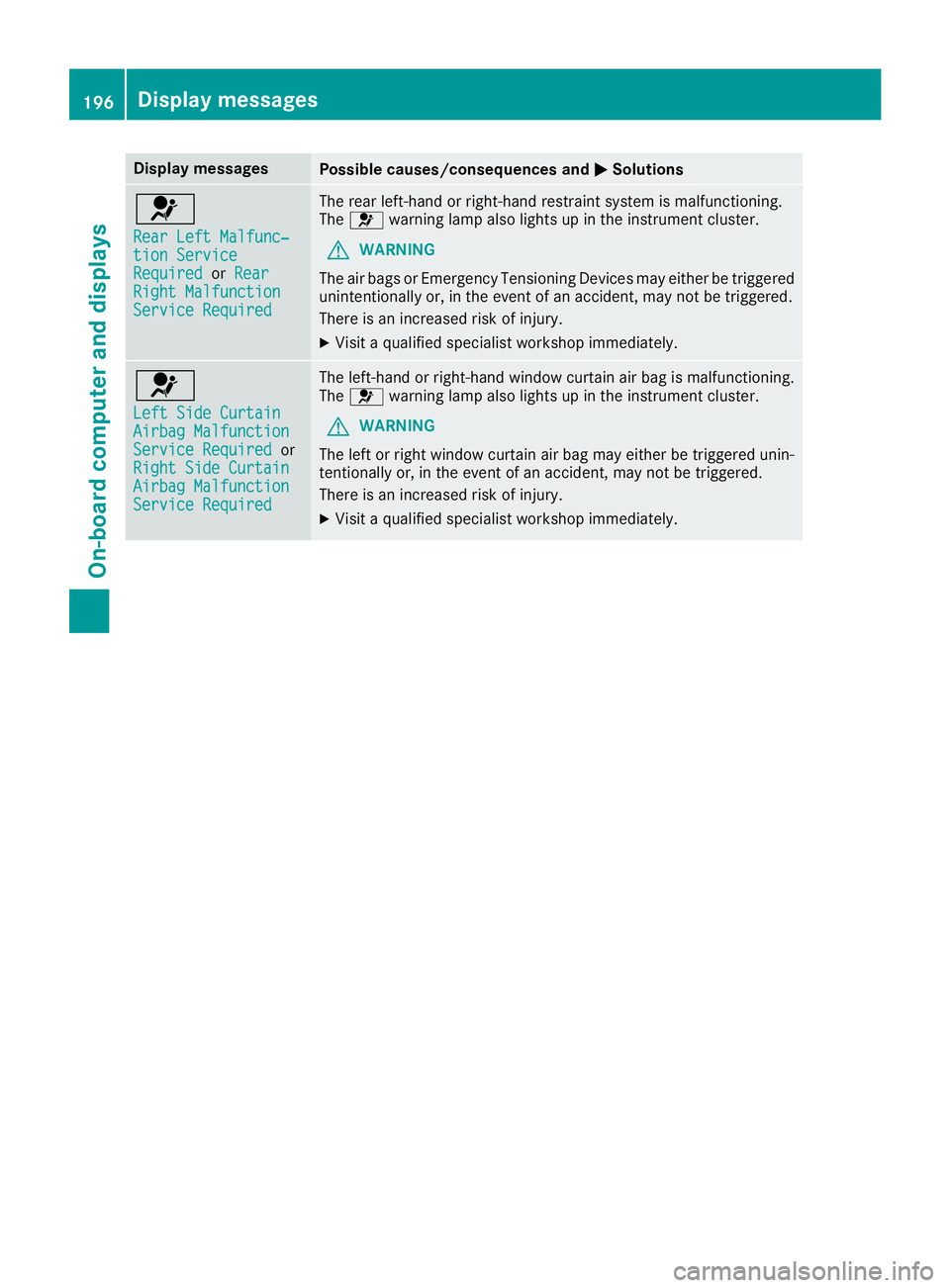
Display messages
Possible causes/consequences and P Solutions
u Rea r Lef t Malfunc‐
tio n Servic e
Required or Rea r
Right Malfunction
Servic e Required The rear left-han d or right-hand restrain t system is malfunctioning .
The u warning lamp also lights up in th e instrumen t cluster.
G WARNIN G
The air bags or Emergency Tensioning Devices may either be triggered
unintentionally or, in th e event of an accident, may no t be triggered .
There is an increased ris k of injury.X
Visit a qualified specialist workshop immediately.
u Lef t Sid e Curtai n
Airbag Malfunction
Servic e Required or
Right Sid e Curtai n
Airbag Malfunction
Servic e Required The left-han d or right-hand window curtai n air bag is malfunctioning .
The u warning lamp also lights up in th e instrumen t cluster.
G WARNIN G
The lef t or right window curtai n air bag may either be triggered unin-
tentionally or, in th e event of an accident, may no t be triggered .
There is an increased ris k of injury.X
Visit a qualified specialist workshop immediately.196
Display messages
On-board computer and displays
Page 203 of 318
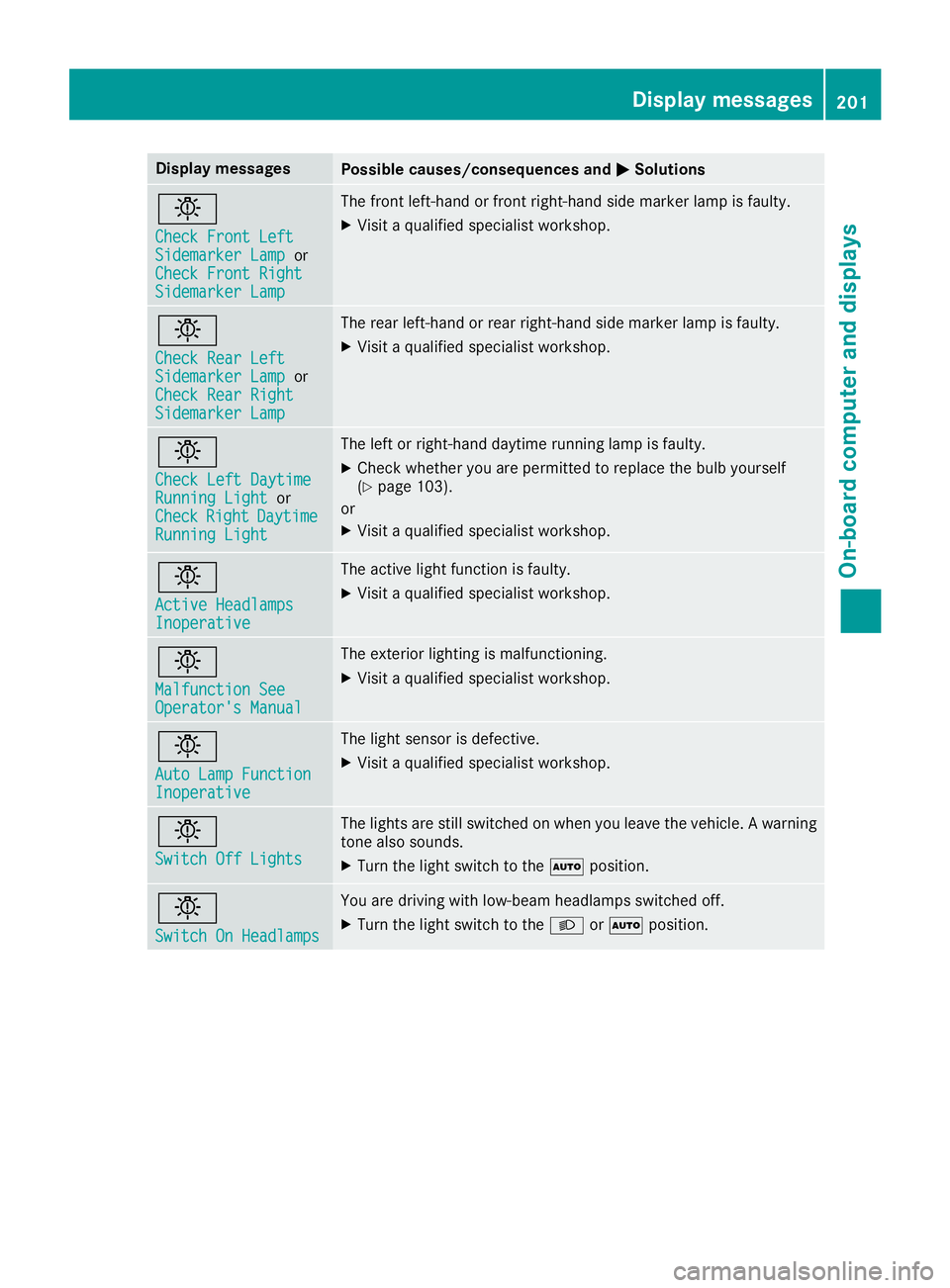
Display messages
Possible causes/consequences and P Solutions
I Check Front Lef t
Sidemarke r Lam p or
Check Front Right
Sidemarke r Lam p The fron t left-han d or fron t right-hand side marke r lamp is faulty.X
Visit a qualified specialist workshop .
I Check Rea r Lef t
Sidemarke r Lam p or
Check Rea r Right
Sidemarke r Lam p The rear left-han d or rear right-hand side marke r lamp is faulty.X
Visit a qualified specialist workshop .
I Check Lef t Daytim e
Runnin g Light or
Check Right Daytim e
Runnin g Light The lef t or right-hand daytime runnin g lamp is faulty.X
Chec k whether you are permitte d to replace th e bulb yourself
( Y
page 103).
or X
Visit a qualified specialist workshop .
I Active Headlamps
Inoperative The active ligh t function is faulty.X
Visit a qualified specialist workshop .
I Malfunction See
Operator' s Manual The exterio r lighting is malfunctioning .X
Visit a qualified specialist workshop .
I Aut o Lam p Function
Inoperative The ligh t sensor is defective. X
Visit a qualified specialist workshop .
I Switch Off Lights The lights are still switched on when you leav e th e vehicle. A warning
tone also sounds. X
Turn th e ligh t switch to th e X position .
I Switch On Headlamps You are drivin g wit h low-beam headlamp s switched off .X
Turn th e ligh t switch to th e X or X position .Display messages 20 1
On-board computer and displays Z
Page 206 of 318
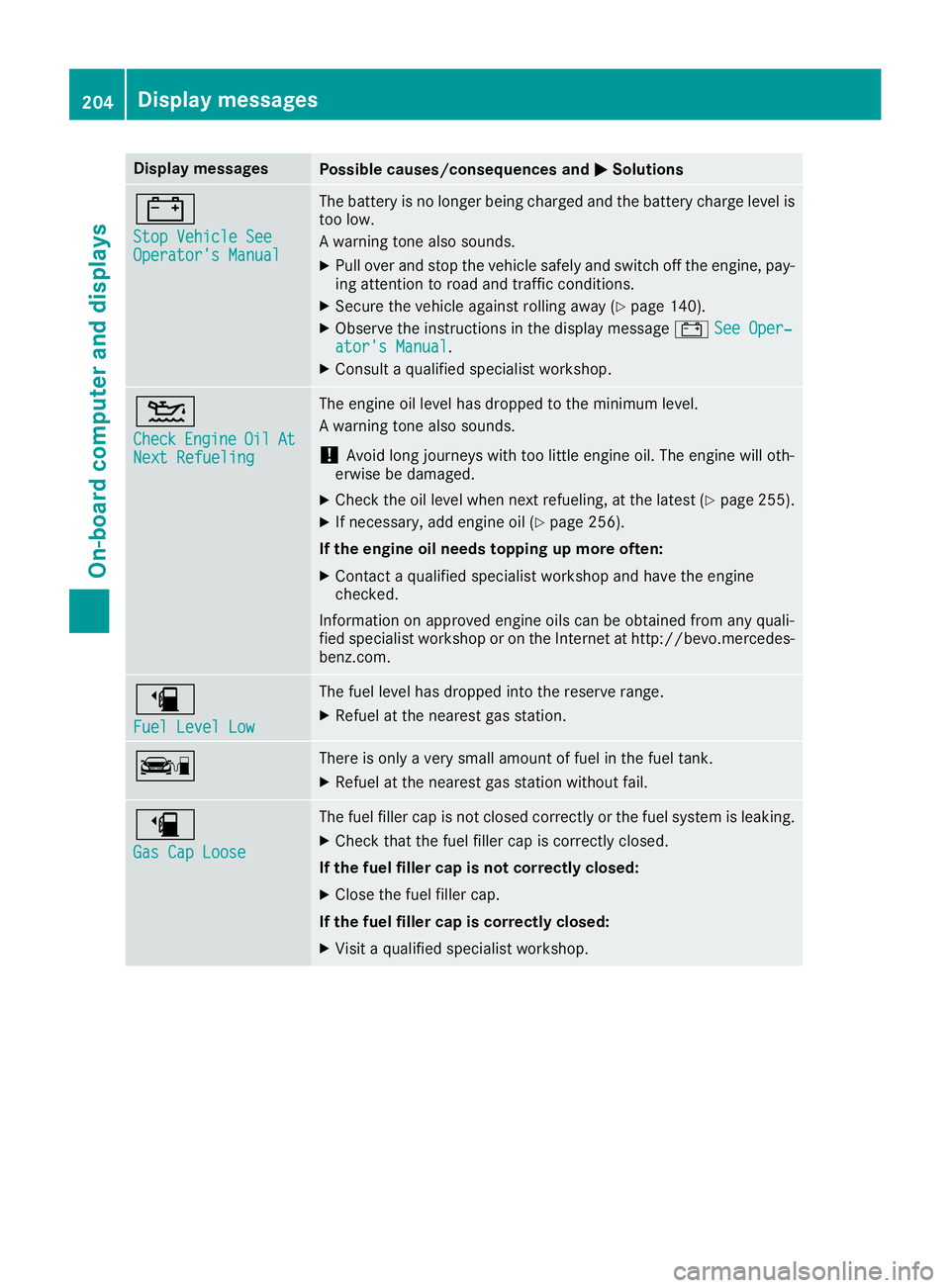
Display messages
Possible causes/consequences and P Solutions
= Sto p Vehicl e See
Operator' s Manual The battery is no longer bein g charged and th e battery charg e level is
to o low.
A warning tone also sounds. X
Pull ove r and stop th e vehicl e safely and switch off th e engine, pay-
ing attention to roa d and traffic conditions.X
Secur e th e vehicl e against rollin g away ( Y
page 140).X
Observ e th e instruction s in th e display message = See Oper‐
ator's Manual .X
Consult a qualified specialist workshop .