ignition MERCEDES-BENZ CLA 2017 User Guide
[x] Cancel search | Manufacturer: MERCEDES-BENZ, Model Year: 2017, Model line: CLA, Model: MERCEDES-BENZ CLA 2017Pages: 318, PDF Size: 9.9 MB
Page 72 of 318
KEYLESS- GO
Gene ra l notesBear in min d that th e engin e can be started by
any of th e vehicl e occupant s if there is a Smart -
Key in th e vehicle.
Locking and unlocking You can start , loc k or unloc k th e vehicl e usin g
KEYLESS-GO . To do this, you only need carry th e
SmartKey wit h you. You can combine th e func-
tion s of KEYLESS-GO wit h those of a conven -
tional SmartKey. Unloc k th e vehicl e by usin g
KEYLESS-GO , for instance , and loc k it usin g th e
7 butto n on th e SmartKey.
The driver's door and th e door at whic h th e han -
dle is used , mus t bot h be closed. The SmartKey
mus t be outside th e vehicle. Whe n locking or
unlocking wit h KEYLESS-GO , th e distanc e
between th e SmartKey and th e corresponding
door handle mus t no t be greate r than 3 ft (1 m).
A chec k whic h periodically establishes a radi o
connection between th e vehicl e and th e Smart -
Key determine s whether a valid SmartKey is in
th e vehicle. This occurs, for example: R
when starting th e engin eR
while drivin gR
when usin g HANDS-FRE E ACCESSR
when th e external door handles are touchedR
during convenience closin g
X
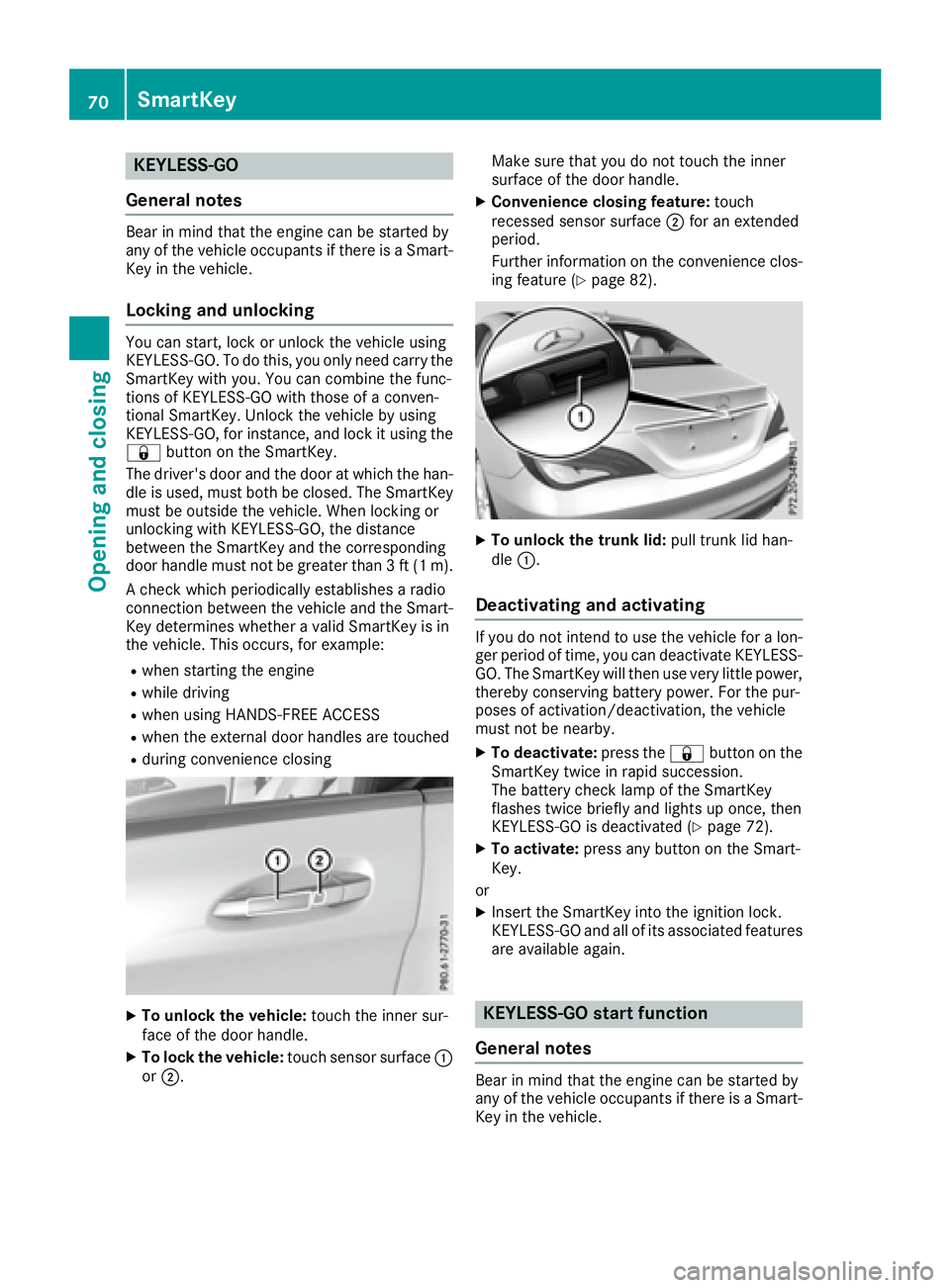
To unlock th e vehicle: touch th e inner sur -
fac e of th e door handle.X
To lock th e vehicle: touch sensor surfac e C
or D . Mak e sur e that you do no t touch th e inner
surfac e of th e door handle. X
Convenienc e closin g feature: touch
recessed sensor surfac e D for an extended
period.
Further information on th e convenience clos-
ing feature ( Y
page 82).
X
To unlock th e trunk lid : pull trunk lid han -
dle C .
Deactivating and activating If you do no t inten d to use th e vehicl e for a lon -
ger period of time, you can deactivat e KEYLESS -
GO. The SmartKey will then use ver y littl e power,
thereby conserving battery power. Fo r th e pur-
poses of activation/deactivation , th e vehicl e
mus t no t be nearby. X
To deactivate: press th e 7 butto n on th e
SmartKey twice in rapi d succession .
The battery chec k lamp of th e SmartKey
flashes twice briefl y and lights up once , then
KEYLESS-GO is deactivated ( Y
page 72).X
To activate: press any butto n on th e Smart -
Key.
or X
Inser t th e SmartKey int o th e ignition lock.
KEYLESS-GO and all of it s associated features
are available again .
KEYLESS- GO start function
Gene ra l notes
Bear in min d that th e engin e can be started by
any of th e vehicl e occupant s if there is a Smart -
Key in th e vehicle.70
SmartKey
Opening and closing
Page 73 of 318
Changing the settings of the locking
system You can change the settings of the locking sys-
tem. This means that only the driver's door and
the fuel filler flap are unlocked when the vehicle
is unlocked. This is useful if you frequently travel
on your own. X
To change the setting: press and hold the
6 and 7 buttons simultaneously for
approximately six seconds until the battery
indicator lamp flashes twice ( Y
page 72).
If the setting of the locking system is changed
within the signal range of the vehicle, pressing
the 7 or 6 button:R
locks or R
unlocks the vehicle
The SmartKey now functions as follows: X
To unlock: press the 6 button once.X
To unlock centrally: press the 6 button
twice. X
To lock centrally: press the 7 button.
The KEYLESS-GO function is changed as fol-
lows: X
To unlock the driver's door: touch the inner
surface of the door handle on the driver's
door. X
To unlock centrally: touch the inner surface
of the door handle on the front-passenger
door or the rear door. X
To lock centrally: touch the outer sensor
surface on one of the door handles. X
To restore the factory settings: press and
hold the 6 and 7 buttons simultane-
ously for approximately six seconds until the
batter y check lamp flashes twice
( Y
page 72).
Mechanical key
General notes
If the vehicle can no longer be locked or
unlocked with the SmartKey or KEYLESS-GO,
use the mechanical key.
If you use the mechanical key to unlock and
open the driver's door or the trunk lid, the anti-
theft alarm system will be triggered ( Y
page 67). There are several ways to turn off the alarm: X
To deactivate the alarm with the key: press
the 6 or 7 button on the key.
or X
Insert the SmartKey into the ignition lock.
or X
To deactivate the alarm with KEYLESS-GO:
press the Start/Stop button in the ignition
lock. The SmartKey must be in the vehicle.
or X
Lock or unlock the vehicle using KEYLESS-
GO. The SmartKey must be outside the vehi-
cle.
If you unlock the vehicle using the mechanical
key, the fuel filler flap will not be unlocked auto-
matically. X
To unlock the fuel filler flap: insert the
SmartKey into the ignition lock.
Removing the mechanical key
X
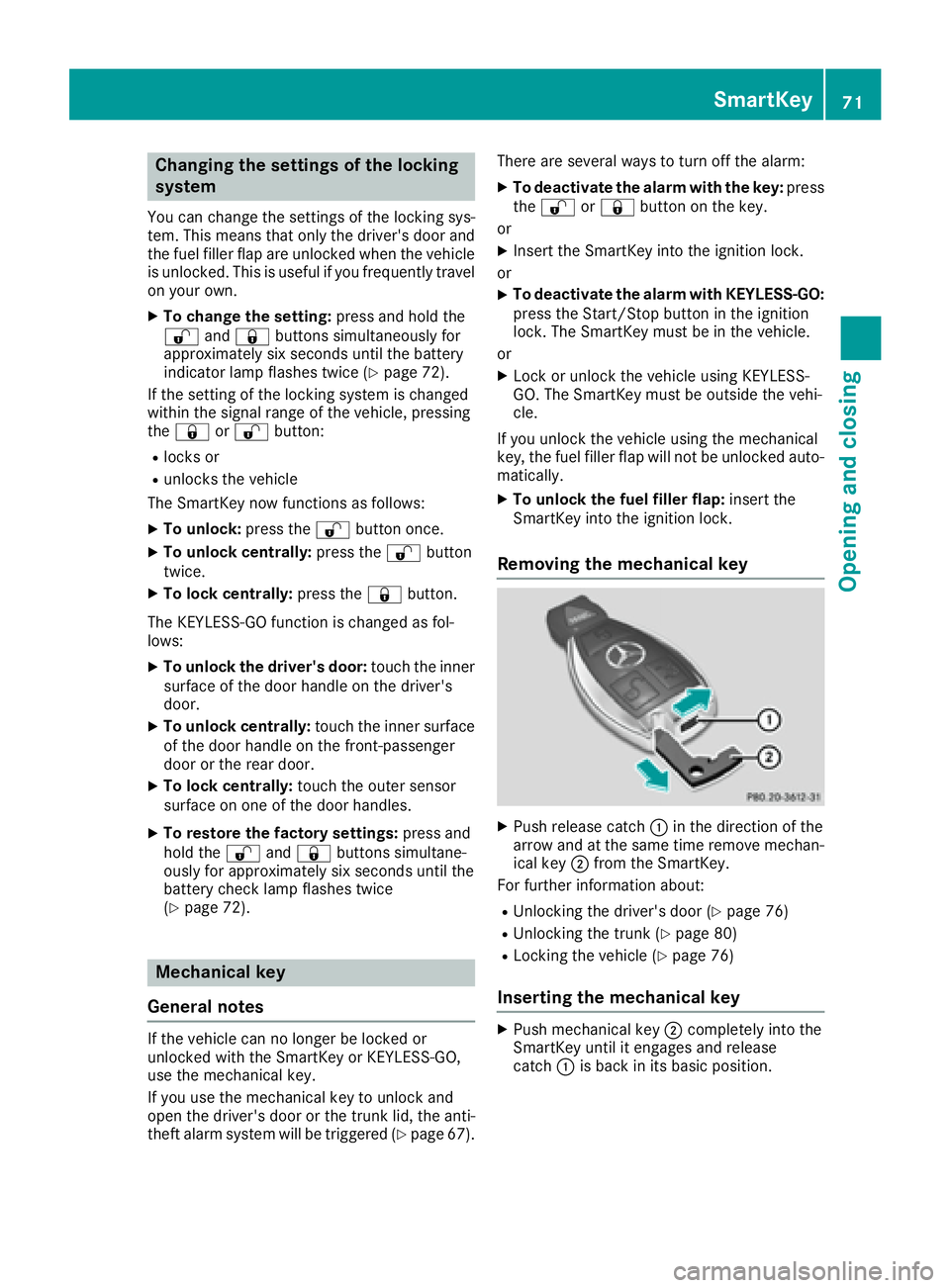
Push release catch C in the direction of the
arrow and at the same time remove mechan-
ical key D from the SmartKey.
For further information about: R
Unlocking the driver's door ( Y
page 76)R
Unlocking the trunk ( Y
page 80)R
Locking the vehicle ( Y
page 76)
Inserting the mechanical key X
Push mechanical key D completely into the
SmartKey until it engages and release
catch C is back in its basic position.SmartKey 71
Opening and closing Z
Page 76 of 318
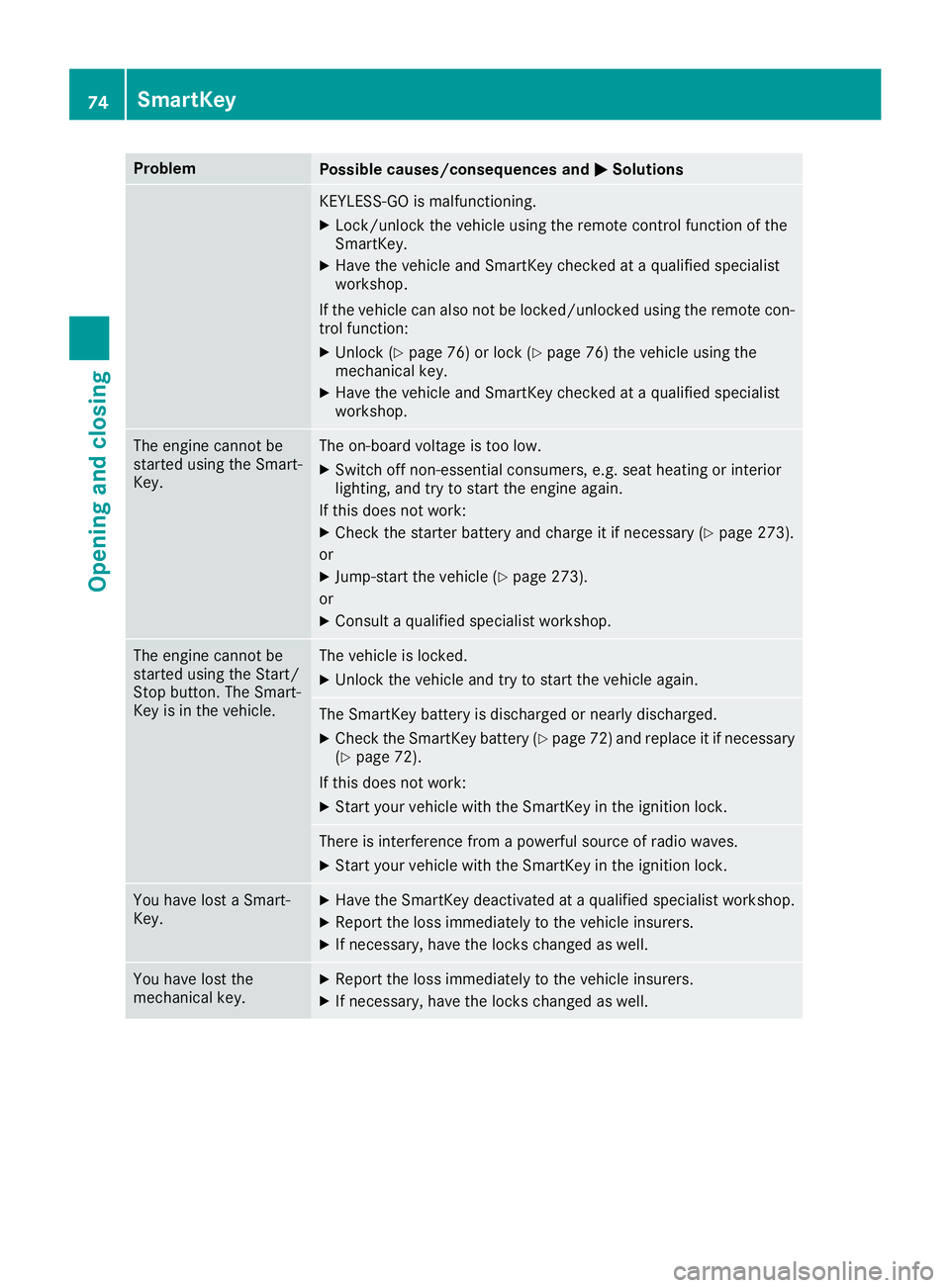
Problem
Possible causes/consequences and P Solutions
KEYLESS-GO is malfunctioning. X
Lock/unlock the vehicle using the remote control function of the
SmartKey. X
Have the vehicle and SmartKey checked at a qualified specialist
workshop.
If the vehicle can also not be locked/unlocked using the remote con-
trol function: X
Unlock ( Y
page 76) or lock ( Y
page 76) the vehicle using the
mechanical key. X
Have the vehicle and SmartKey checked at a qualified specialist
workshop.
The engine cannot be
started using the Smart-
Key. The on-board voltage is too low. X
Switch off non-essential consumers, e.g. seat heating or interior
lighting, and try to start the engine again.
If this does not work: X
Check the starter battery and charge it if necessary ( Y
page 273).
or X
Jump-start the vehicle ( Y
page 273).
or X
Consult a qualified specialist workshop.
The engine cannot be
started using the Start/
Stop button. The Smart-
Key is in the vehicle. The vehicle is locked. X
Unlock the vehicle and try to start the vehicle again.
The SmartKey battery is discharged or nearly discharged. X
Check the SmartKey battery ( Y
page 72) and replace it if necessary
( Y
page 72).
If this does not work: X
Start your vehicle with the SmartKey in the ignition lock.
There is interference from a powerful source of radio waves. X
Start your vehicle with the SmartKey in the ignition lock.
You have lost a Smart-
Key. X
Have the SmartKey deactivated at a qualified specialist workshop. X
Report the loss immediately to the vehicle insurers. X
If necessary, have the locks changed as well.
You have lost the
mechanical key. X
Report the loss immediately to the vehicle insurers. X
If necessary, have the locks changed as well.74
SmartKey
Opening and closing
Page 78 of 318
Meanwhile, the fuel filler flap will not be locked
or unlocked.
You cannot unlock the vehicle centrally from the
inside if the vehicle has been locked with the
SmartKey or KEYLESS-GO.
You can open a door from inside the vehicle
even if it has been locked. You can open the rear
doors from inside the vehicle unless they are
secured by the child-proof lock ( Y
page 59).
If the vehicle has previously been locked with
the SmartKey from the outside, opening a door
from the inside will trigger the anti-theft alarm
system. Switch off the alarm ( Y
page 67).
If a locked door is opened from the inside, the
previous unlock status of the vehicle will be
taken into consideration if: R
the vehicle was locked using the locking but-
ton for the central locking, or R
if the vehicle was locked automatically
The vehicle will be fully unlocked if it had previ-
ously been fully unlocked. If only the driver's
door had been previously unlocked, only the
door which has been opened from the inside is
unlocked.
Automatic locking feature
X
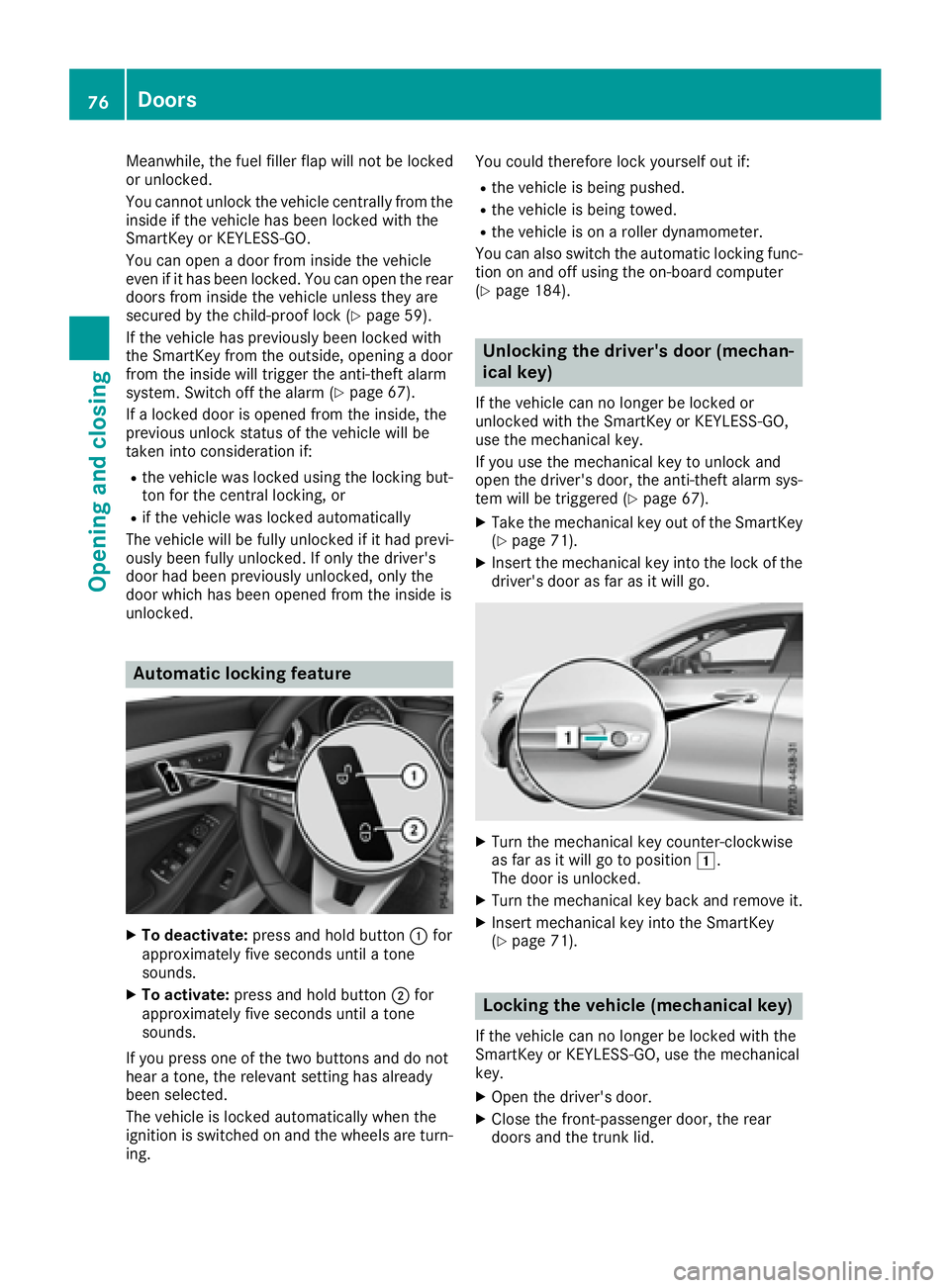
To deactivate: press and hold button C for
approximately five seconds until a tone
sounds. X
To activate: press and hold button D for
approximately five seconds until a tone
sounds.
If you press one of the two buttons and do not
hear a tone, the relevant setting has already
been selected.
The vehicle is locked automatically when the
ignition is switched on and the wheels are turn-
ing. You could therefore lock yourself out if: R
the vehicle is being pushed. R
the vehicle is being towed. R
the vehicle is on a roller dynamometer.
You can also switch the automatic locking func-
tion on and off using the on-board computer
( Y
page 184).
Unlocking the driver's door (mechan-
ical key) If the vehicle can no longer be locked or
unlocked with the SmartKey or KEYLESS-GO,
use the mechanical key.
If you use the mechanical key to unlock and
open the driver's door, the anti-theft alarm sys-
tem will be triggered ( Y
page 67).X
Take the mechanical key out of the SmartKey
( Y
page 71). X
Insert the mechanical key into the lock of the
driver's door as far as it will go.
X
Turn the mechanical key counter-clockwise
as far as it will go to position G .
The door is unlocked. X
Turn the mechanical key back and remove it. X
Insert mechanical key into the SmartKey
( Y
page 71).
Locking the vehicle (mechanical key)
If the vehicle can no longer be locked with the
SmartKey or KEYLESS-GO, use the mechanical
key. X
Open the driver's door. X
Close the front-passenger door, the rear
doors and the trunk lid.76
Doors
Opening and closing
Page 85 of 318
On vehicles with a panorama roof with power
tilt/sliding panel: X
Press and hold the 7 button again until the
roller sunblind of the panorama roof with
power tilt/sliding panel closes. X
To interrupt convenience closing: release
the 7 button.
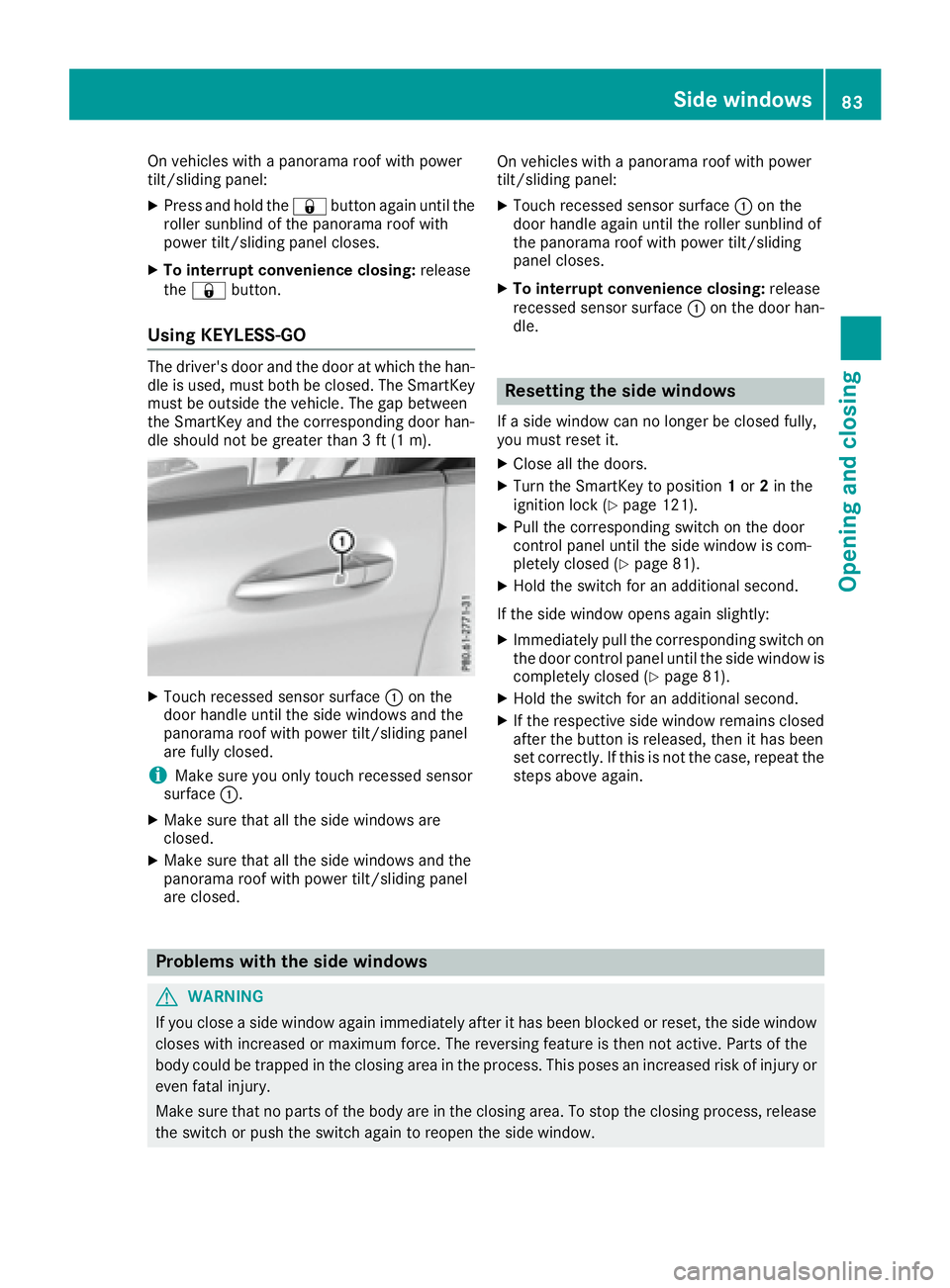
Using KEYLESS-GO The driver's door and the door at which the han-
dle is used, must both be closed. The SmartKey
must be outside the vehicle. The gap between
the SmartKey and the corresponding door han-
dle should not be greater than 3 ft (1 m).
X
Touch recessed sensor surface C on the
door handle until the side windows and the
panorama roof with power tilt/sliding panel
are fully closed.
i Make sure you only touch recessed sensor
surface C .X
Make sure that all the side windows are
closed. X
Make sure that all the side windows and the
panorama roof with power tilt/sliding panel
are closed. On vehicles with a panorama roof with power
tilt/sliding panel: X
Touch recessed sensor surface C on the
door handle again until the roller sunblind of
the panorama roof with power tilt/sliding
panel closes. X
To interrupt convenience closing: release
recessed sensor surface C on the door han-
dle.
Resetting the side windows If a side window can no longer be closed fully,
you must reset it. X
Close all the doors. X
Turn the SmartKey to position 1 or 2 in the
ignition lock ( Y
page 121). X
Pull the corresponding switch on the door
control panel until the side window is com-
pletely closed ( Y
page 81). X
Hold the switch for an additional second.
If the side window opens again slightly: X
Immediately pull the corresponding switch on
the door control panel until the side window is
completely closed ( Y
page 81).X
Hold the switch for an additional second. X
If the respective side window remains closed
after the button is released, then it has been
set correctly. If this is not the case, repeat the
steps above again.
Problems with the side windows
G WARNING
If you close a side window again immediately after it has been blocked or reset, the side window
closes with increased or maximum force. The reversing feature is then not active. Parts of the
body could be trapped in the closing area in the process. This poses an increased risk of injury or
even fatal injury.
Make sure that no parts of the body are in the closing area. To stop the closing process, release
the switch or push the switch again to reopen the side window. Side windows 83
Opening and closing Z
Page 97 of 318
Mirrors
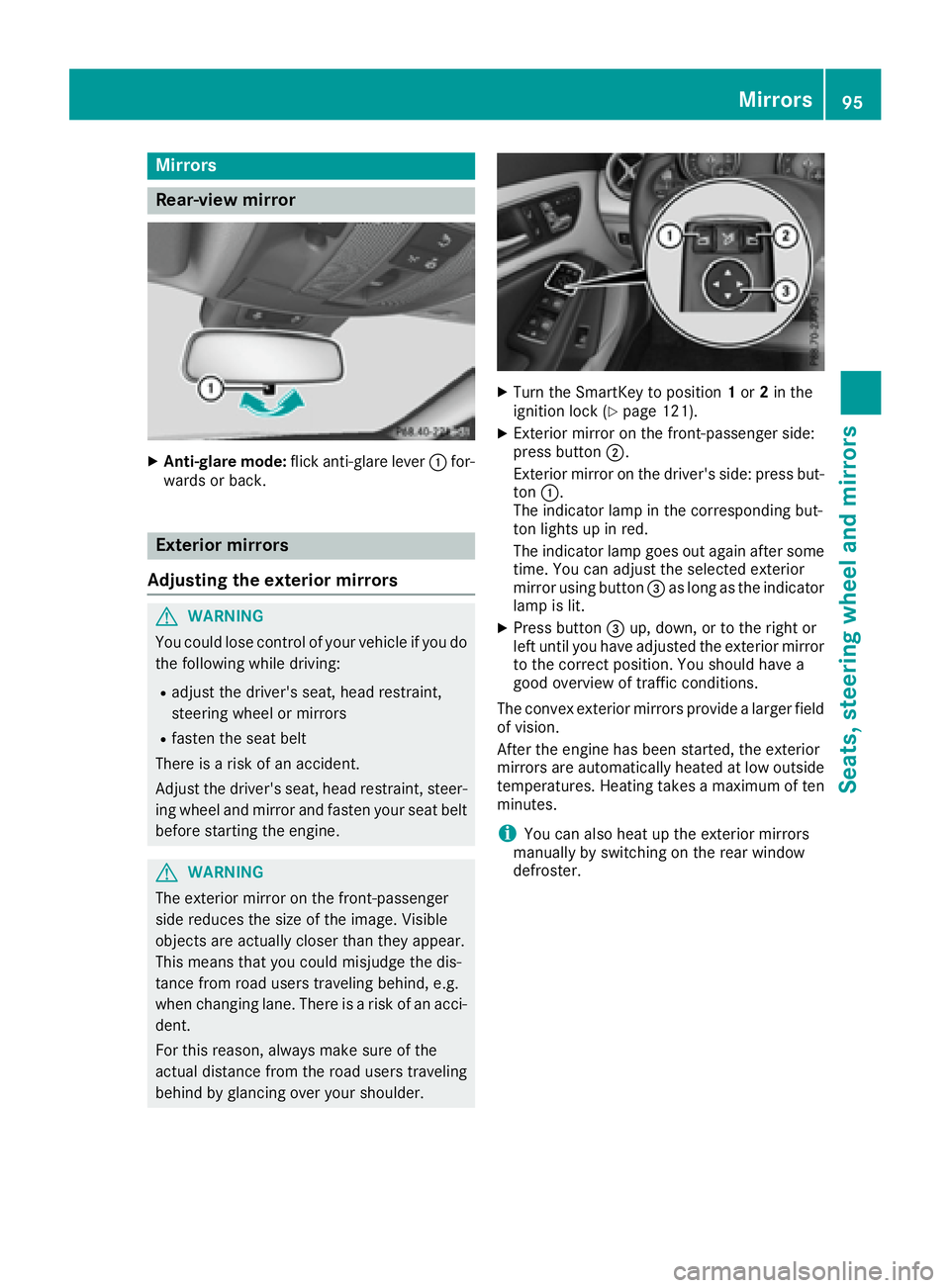
Rear-view mirror X
Anti-glare mode: flick anti-glare lever C for-
wards or back.
Exterior mirrors
Adjusting the exterior mirrors
G WARNING
You could lose control of your vehicle if you do
the following while driving: R
adjust the driver's seat, head restraint,
steering wheel or mirrors R
fasten the seat belt
There is a risk of an accident.
Adjust the driver's seat, head restraint, steer-
ing wheel and mirror and fasten your seat belt
before starting the engine.
G WARNING
The exterior mirror on the front-passenger
side reduces the size of the image. Visible
objects are actually closer than they appear.
This means that you could misjudge the dis-
tance from road users traveling behind, e.g.
when changing lane. There is a risk of an acci-
dent.
For this reason, always make sure of the
actual distance from the road users traveling
behind by glancing over your shoulder. X
Turn the SmartKey to position 1 or 2 in the
ignition lock ( Y
page 121). X
Exterior mirror on the front-passenger side:
press button D .
Exterior mirror on the driver's side: press but-
ton C .
The indicator lamp in the corresponding but-
ton lights up in red.
The indicator lamp goes out again after some
time. You can adjust the selected exterior
mirror using button
Page 98 of 318
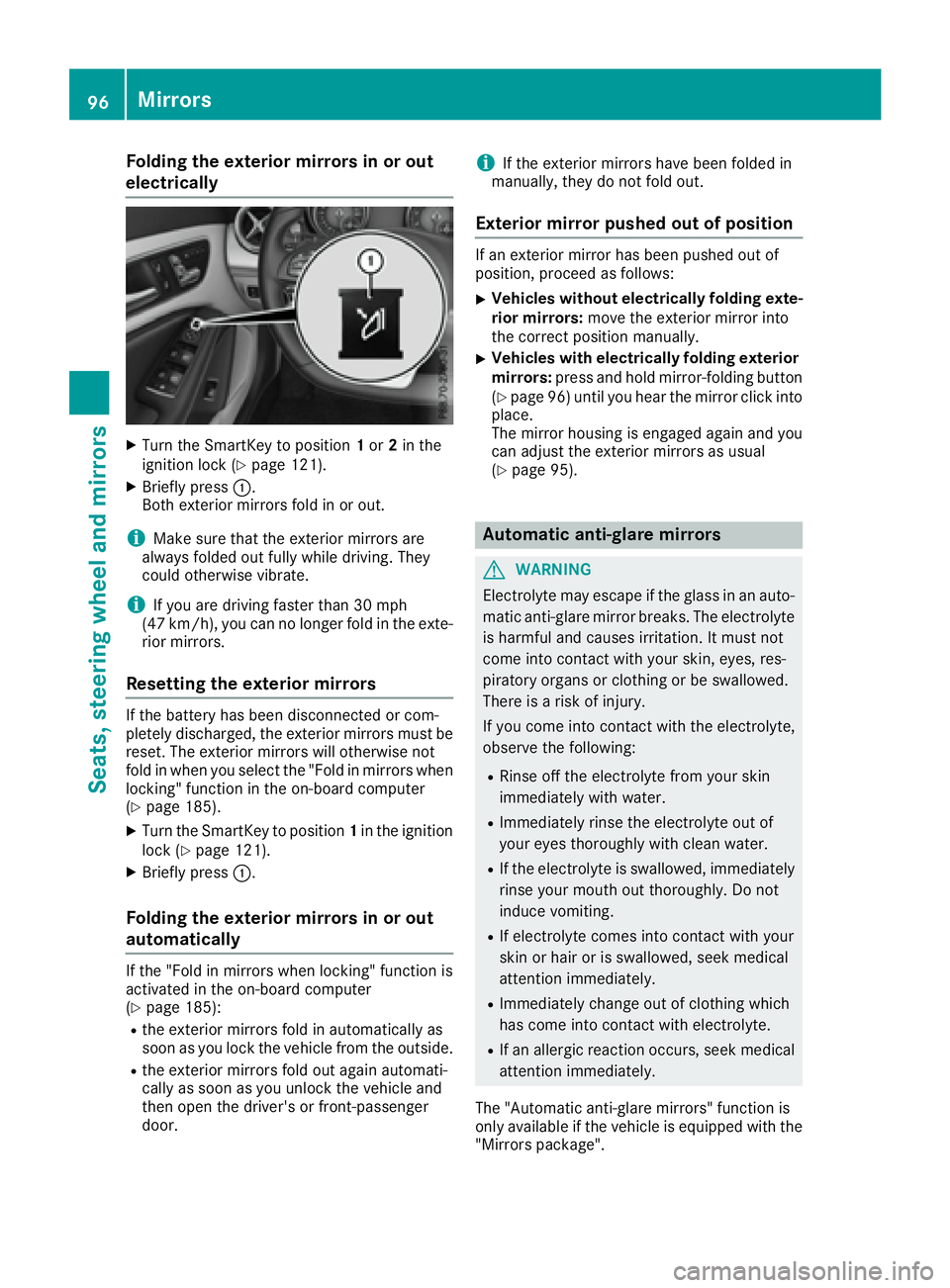
Folding the exterior mirrors in or out
electrically X
Turn th e SmartKey to position 1 or 2 in th e
ignition loc k ( Y
page 121).X
Briefly press C .
Both exterio r mirror s fol d in or out .
i Mak e sure that th e exterio r mirror s are
always folded out fully while driving . They
could otherwise vibrate .
i If you are driving faste r than 30 mph
(47 km/h), you can no longer fol d in th e exte -
rio r mirrors.
Resetting the exterior mirrors If th e battery has been disconnected or com-
pletely discharged, th e exterio r mirror s must be
reset . The exterio r mirror s will otherwise no t
fol d in when you select th e "Fold in mirror s when
locking" function in th e on-board computer
( Y
page 185). X
Turn th e SmartKey to position 1 in th e ignition
loc k ( Y
page 121).X
Briefly press C .
Folding the exterior mirrors in or out
automatically If th e "Fold in mirror s when locking" function is
activated in th e on-board computer
( Y
page 185): R
th e exterio r mirror s fol d in automatically as
soo n as you loc k th e vehicl e from th e outside .R
th e exterio r mirror s fol d out again automati-
call y as soo n as you unlock th e vehicl e and
then open th e driver' s or front-passenger
door . i If th e exterio r mirror s have been folded in
manually, they do no t fol d out .
Exterior mirror pushed out of position If an exterio r mirror has been pushed out of
position , procee d as follows :X
Vehicles without electricall y folding exte-
rior mirrors : mov e th e exterio r mirror int o
th e correct position manually. X
Vehicles with electricall y folding exterior
mirrors : press and hold mirror-foldin g butto n
( Y
page 96 )u ntil you hear the mirror click into
place.
The mirror housing is engaged again and you
can adjust the exterior mirrors as usual
( Y
page 95).
Automatic anti-glare mirrors
G WARNING
Electrolyte may escape if the glass in an auto-
matic anti-glare mirror breaks. The electrolyte
is harmful and causes irritation. It must not
come into contact with your skin, eyes, res-
piratory organs or clothing or be swallowed.
There is a risk of injury.
If you come into contact with the electrolyte,
observe the following: R
Rinse off the electrolyte from your skin
immediately with water. R
Immediately rinse the electrolyte out of
your eyes thoroughly with clean water. R
If the electrolyte is swallowed, immediately
rinse your mouth out thoroughly. Do not
induce vomiting. R
If electrolyte comes into contact with your
skin or hair or is swallowed, seek medical
attention immediately. R
Immediately change out of clothing which
has come into contact with electrolyte. R
If an allergic reaction occurs, seek medical
attention immediately.
The "Automatic anti-glare mirrors" function is
only available if the vehicle is equipped with the
"Mirrors package".96
Mirrors
Seats, steering wheel an d mirrors
Page 99 of 318
The rear-view mirror and the exterior mirror on
the driver's side automatically go into anti-glare
mode if: R
the ignition is switched on and R
incident light from headlamps strikes the sen-
sor in the rear-view mirror
The mirrors do not go into anti-glare mode if
reverse gear is engaged or if the interior lighting
is switched on.
Parking position for the exterior mir-
ror on the front-passenger side
Setting and storing the parking position You can set the front-passenger side exterior
mirror such that you can see the rear wheel on
that side as soon as you engage reverse gear.
You can store this position.
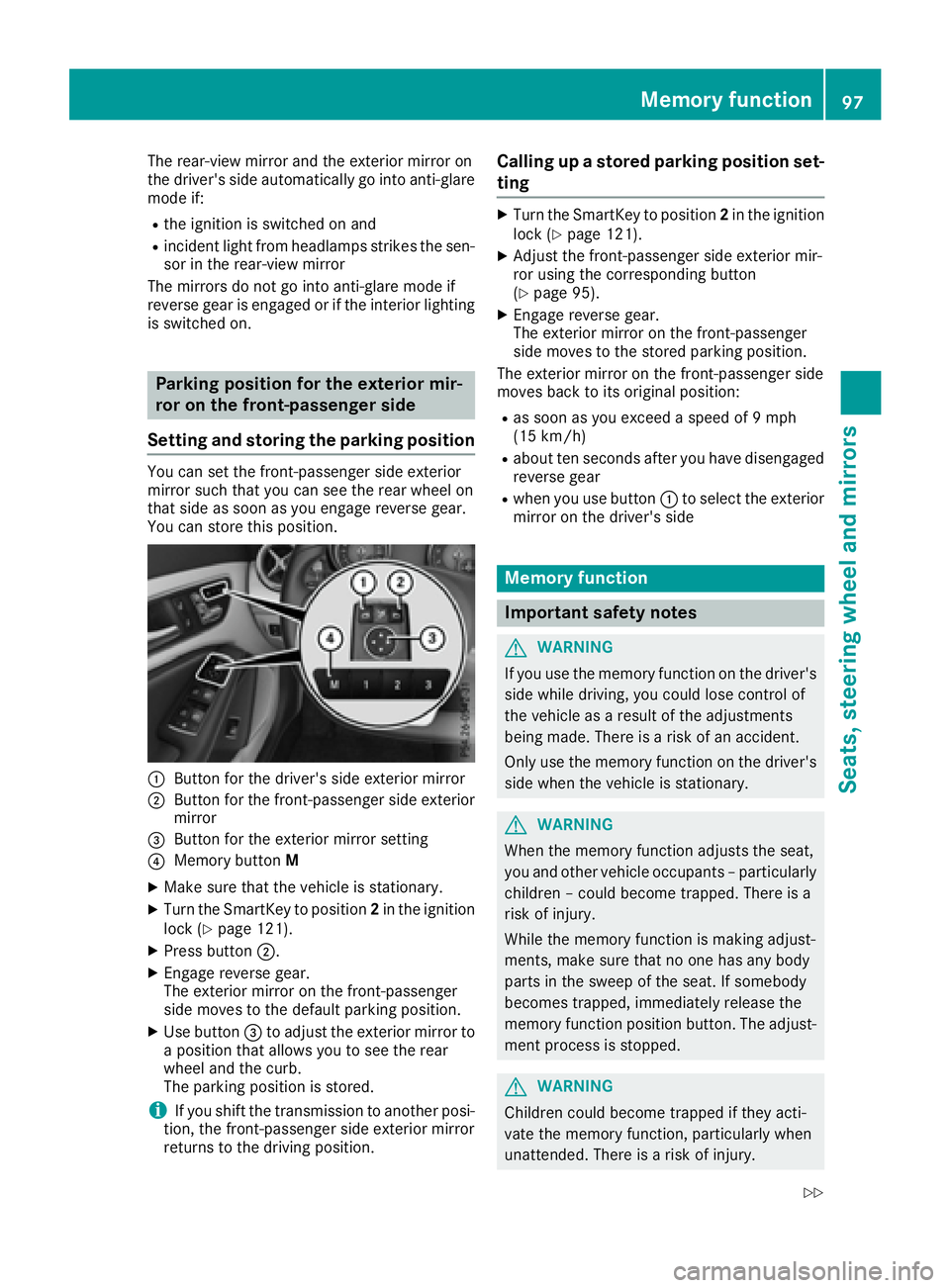
C
Button for the driver's side exterior mirrorD
Button for the front-passenger side exterior
mirror
Page 102 of 318
take precedence over the daytime running
lamps.
USA only:
The daytime running lamps improve the visibility
of your vehicle during the day. To do this, the
daytime running lamps function must be
switched on using the on-board computer
( Y
page 184).
If the engine is running and you turn the light
switch to the ` or X position, the manual
settings take precedence over the daytime run-
ning lamps.
Low-beam headlamps Even if the light sensor does not detect that it is
dark, the parking lamps and low-beam head-
lamps come on when the ignition is switched on
and the light switch is set to the X position.
This is a particularly useful function in the event
of rain and fog. X
To switch on the low-beam headlamps:
turn the SmartKey in the ignition lock to posi-
tion 2 or start the engine.X
Turn the light switch to X .
The green X indicator lamp in the instru-
ment cluster lights up.
Rear fog lamp The rear fog lamp improves visibility of your
vehicle for the traffic behind in the event of thick
fog. Please take note of the country-specific
regulations for the use of rear fog lamps. X
To switch on the rear fog lamp: turn the
SmartKey in the ignition lock to position 2 o r
s
tart the engine. X
Turn the light switch to X or X .X
Press the ^ button.
The yellow ^ indicator lamp in the instru-
ment cluster lights up. X
To switch off the rear fog lamp: press the
^ button.
The yellow ^ indicator lamp in the instru-
ment cluster goes out.
i When the rear fog lamp is switched on, the
center brake lamp in the tail lamp switches off
due to a legal requirement.
Parking lamps
! If the battery charge is very low, the parking
lamps or standing lamps are automatically
switched off to enable the next engine start. Always park your vehicle safely and in a well lit
area, in accordance with the relevant legal
stipulations. Avoid using the ` parking
lamps over a period of several hours. If pos-
sible, switch on the right-hand d or left-
hand c standing lamps. X
To switch on: turn the light switch to ` .
The green ` indicator lamp in the instru-
ment cluster lights up.
Standing lamps Switching on the standing lamps ensures the
corresponding side of the vehicle is illuminated. X
To switch on the standing lamps: the
SmartKey should not be in the ignition lock or
it should be in position 0 .X
Turn the light switch to c (l eft-hand side of
the vehicle) or d (right-hand side of the
vehicle).
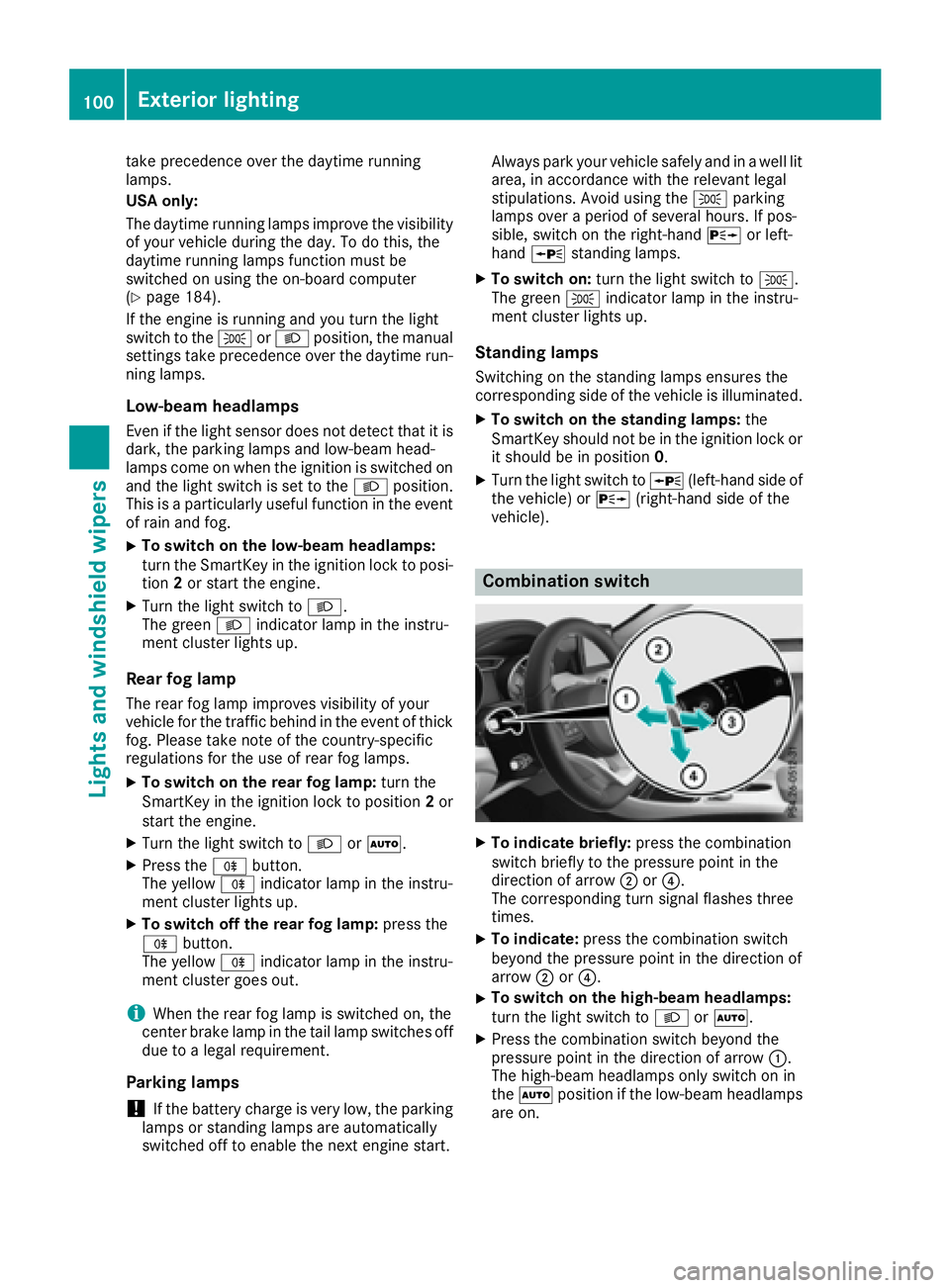
Combination switch
X
To indicate briefly: press the combination
switch briefly to the pressure point in the
direction of arrow D or
Page 105 of 318
Interior lighting control
General notes In order to preven t th e vehicle's battery from
discharging , th e interio r lighting function s are
automatically deactivated after som e time
except when th e SmartKey is in position 2 in th e
ignition lock.
The color and brightness for th e ambien t lighting
may be set via th e multimedia system; see th e
separat e operating instructions.
Automatic interior lighting control X
To switch on: set th e switch to center posi-
tion