warning MERCEDES-BENZ CLA 2017 Service Manual
[x] Cancel search | Manufacturer: MERCEDES-BENZ, Model Year: 2017, Model line: CLA, Model: MERCEDES-BENZ CLA 2017Pages: 318, PDF Size: 9.9 MB
Page 65 of 318
Braking assistance appropriate to the situation
can also detect stationary objects, up to vehicle
speeds of around 44 mph 70 km/h. X
Keep the brake pedal depressed until the
emergency braking situation is over.
ABS prevents the wheels from locking.
The brakes will work normally again if: R
you release the brake pedal. R
there is no longer any danger of a collision. R
no obstacle is detected in front of your vehi-
cle.
Braking assistance appropriate to the situation
is then deactivated.
Important safety notes
i Observe the "Important safety notes" sec-
tion for driving safety systems ( Y
page 60).
G WARNING
Adaptive Brake Assist does not react: R
to people or animals R
to oncoming vehicles R
to crossing traffic R
when cornering
As a result, Adaptive Brake Assist may not
intervene in all critical conditions. There is a
risk of an accident.
Always pay careful attention to the traffic sit-
uation and be ready to brake.
G WARNING
Adaptive Brake Assist cannot always clearly
identify objects and complex traffic situa-
tions.
In such cases, Adaptive Brake Assist might: R
intervene unnecessarily R
not intervene
There is a risk of an accident.
Always pay careful attention to the traffic sit-
uation and be ready to brake. Terminate the
intervention in a non-critical driving situation.
Due to the nature of the system, complex but
non-critical driving conditions may also cause
Active Brake Assist to intervene.
Even if Active Brake Assist is not available due to
a malfunction in the radar sensor system, the brake system is still available with full brake
boosting effect and BAS.
ESP ®
(Electronic Stability Program)
General notes
i Observe the "Important safety notes" sec-
tion ( Y
page 60).
ESP ®
monitors driving stability and traction, i.e.
power transmission between the tires and the
road surface.
If ESP ®
detects that the vehicle is deviating from
the direction desired by the driver, one or more
wheels are braked to stabilize the vehicle. The
engine output is also modified to keep the vehi-
cle on the desired course within physical limits.
ESP ®
assists the driver when pulling away on
wet or slippery roads. ESP ®
can also stabilize
the vehicle during braking.
ETS/4ETS (Electronic Traction System)
i Observe the "Important safety notes" sec-
tion ( Y
page 60).
ETS traction control is part of ESP ®
. On vehicles
with 4MATIC, 4ETS is part of ESP ®
.
Traction control brakes the drive wheels indi-
vidually if they spin. This enables you to pull
away and accelerate on slippery surfaces, for
example if the road surface is slippery on one
side. In addition, more drive torque is transfer-
red to the wheel or wheels with traction.
Traction control remains active, even if you
deactivate ESP ®
.
Important safety notes
i Observe the "Important safety notes" sec-
tion ( Y
page 60).
G WARNING
If ESP ®
is malfunctioning, ESP ®
is unable to
stabilize the vehicle. Additionally, further driv-
ing safety systems are deactivated. This
increases the risk of skidding and an accident.
Drive on carefully. Have ESP ®
checked at a
qualified specialist workshop.Driving safety systems 63
Safety Z
Page 67 of 318
R
Traction control is still activated. R
STEER CONTROL is no longer active R
ESP ®
still provides support when you brake
firmly.
Deactivating/activating ESP ®
(Mercedes ‑ AMG vehicles)Important safety notes
i Observe the "Important safety notes" sec-
tion ( Y
page 60).
You can select between the following states of
ESP ®
: R
ESP ®
is activated.R
SPORT handling mode is activated. R
ESP ®
is deactivated.
G WARNING
When SPORT handling mode is activated,
there is a greater risk of skidding and acci-
dents.
Only activate SPORT handling mode in the sit-
uations described in the following.
G WARNING
If you deactivate ESP ®
, ESP ®
no longer sta-
bilizes the vehicle. There is an increased risk
of skidding and an accident.
Only deactivate ESP ®
in the situations descri-
bed in the following.
In the following situations, it may be better to
activate SPORT handling mode or deactivate
ESP ®
: R
when using snow chains R
in deep snow R
on sand or gravel R
on specially designated roads when the vehi-
cle's own oversteering and understeering
characteristics are desired
Driving in SPORT handling mode or without
ESP ®
requires an extremely qualified and expe-
rienced driver.
i Activate ESP ®
as soon as the situations
described above no longer apply. ESP ®
will
otherwise not be able to stabilize the vehicle if the vehicle starts to skid or a wheel starts to
spin.
! Avoid spinning the driven wheels for an
extended period with ESP ®
deactivated. You
could otherwise damage the drivetrain.
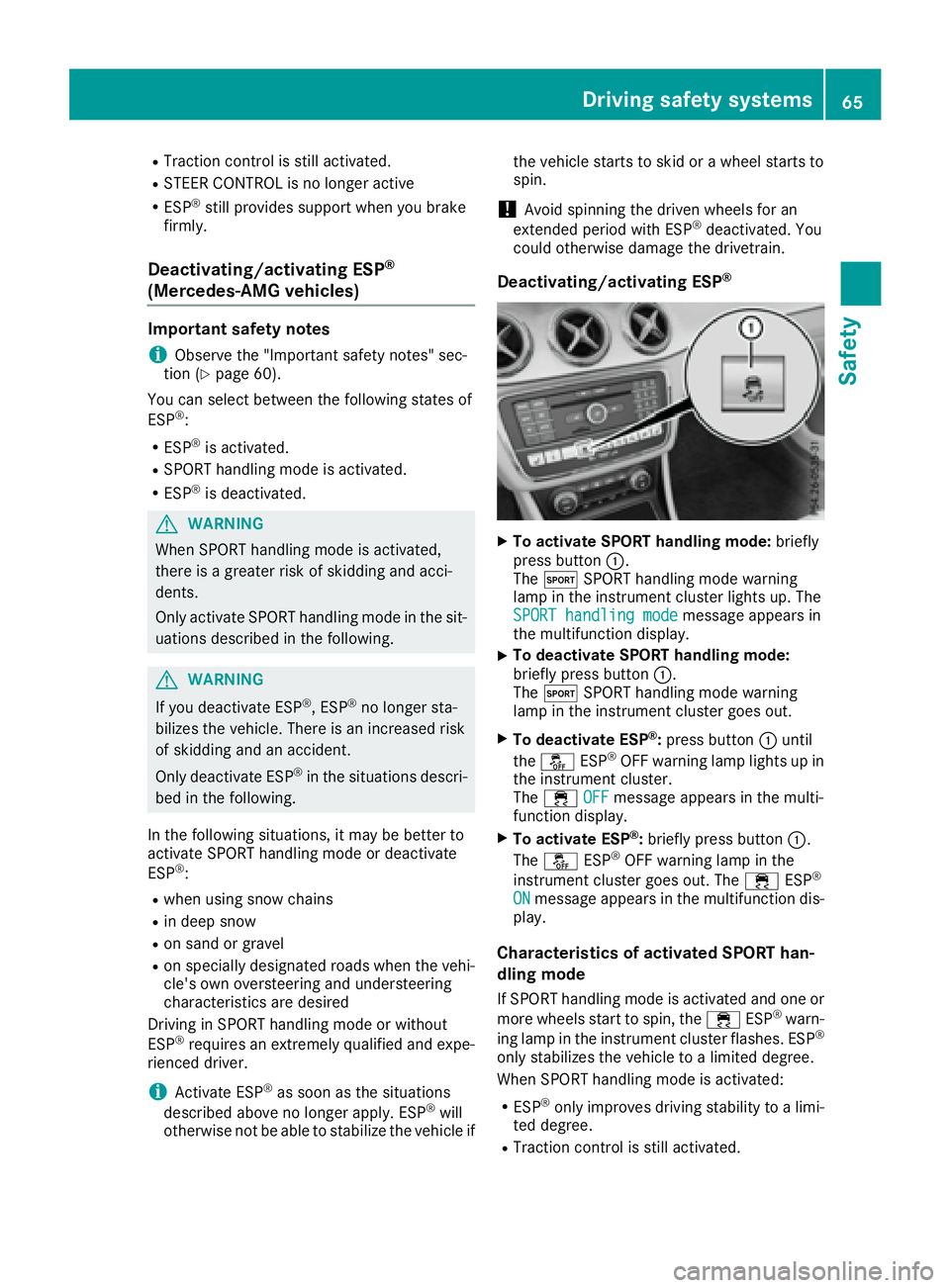
Deactivating/activating ESP ®
X
To activate SPORT handling mode: briefly
press button C .
The t SPORT handling mode warning
lamp in the instrument cluster lights up. The
SPORT handling mode
message appears in
the multifunction display. X
To deactivate SPORT handling mode:
briefly press button C .
The t SPORT handling mode warning
lamp in the instrument cluster goes out. X
To deactivate ESP ®
: press button C until
the
Page 71 of 318
SmartKey
Important safety notes
G WARNING
If children are left unsupervised in the vehicle,
they could: R
open the doors, thus endangering other
people or road users. R
get out and disrupt traffic. R
operate the vehicle's equipment.
Additionally, children could set the vehicle in
motion if, for example, they: R
release the parking brake. R
shifting the automatic transmission out of
park position PR
Start the engine.
There is a risk of an accident and injury.
When leaving the vehicle, always take the
SmartKey with you and lock the vehicle. Never
leave children or animals unattended in the
vehicle. Always keep the SmartKey out of
reach of children.
G WARNING
If you attach heavy or large objects to the
SmartKey, the SmartKey could be uninten-
tionally turned in the ignition lock. This could
cause the engine to be switched off. There is a
risk of an accident.
Do not attach any heavy or large objects to the
SmartKey. Remove any bulky key rings before
inserting the SmartKey into the ignition lock.
! Keep the SmartKey away from strong mag-
netic fields. Otherwise, the remote control
function could be affected.
Strong magnetic fields can occur in the vicin-
ity of powerful electrical installations.
Do not keep the SmartKey: R
with electronic devices, e.g. a mobile phone
or another SmartKey. R
with metallic objects, e.g. coins or metal foil. R
inside metallic objects, e.g. a metal case
Vehicles with KEYLESS-GO start function: do
not keep the SmartKey in the trunk. Otherwise, the SmartKey may not be detected, e.g. when
starting the engine using the Start/Stop button.
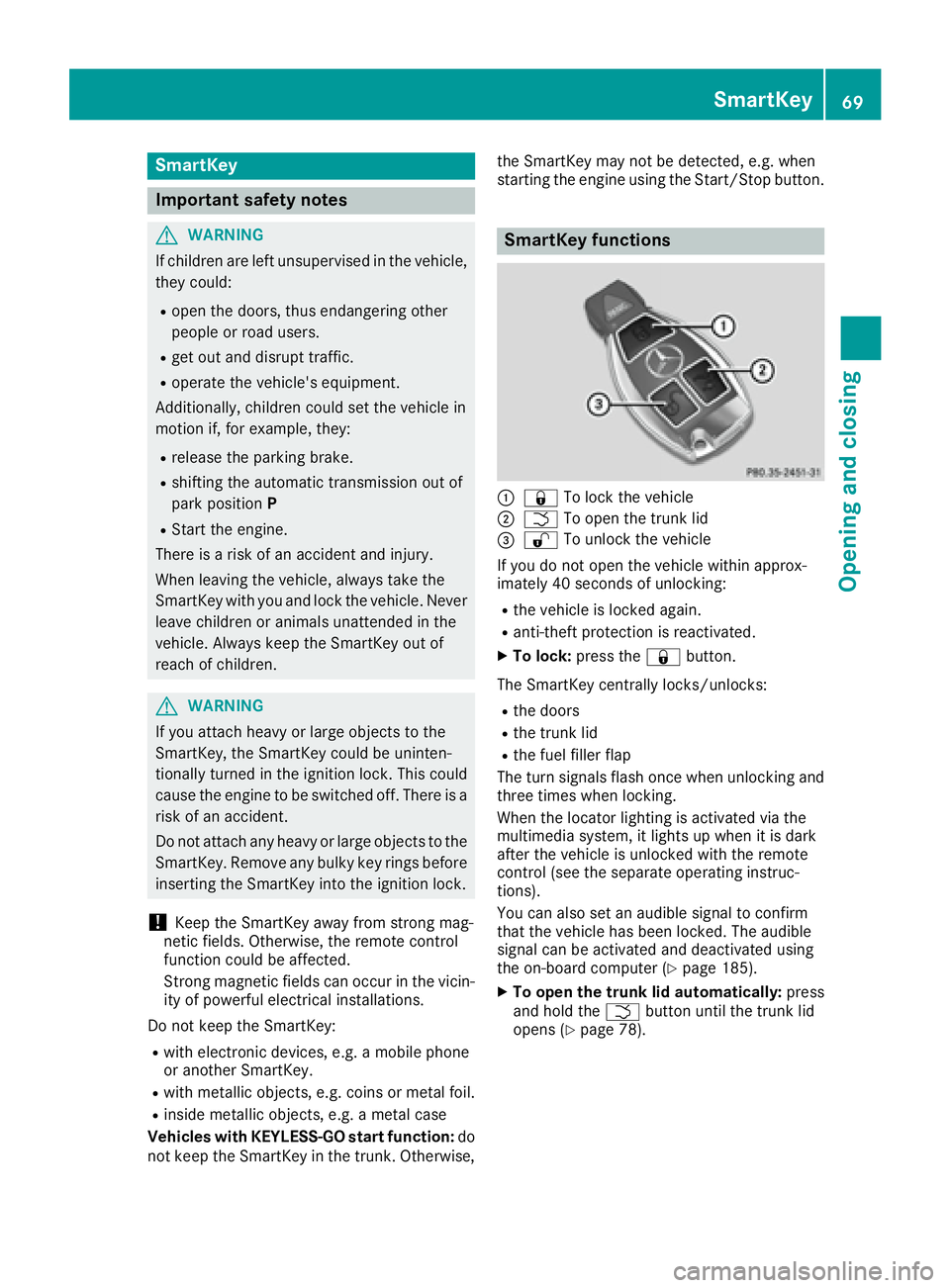
SmartKey functions
C
7 To lock the vehicleD
T To open the trunk lid
Page 74 of 318
SmartKey battery
Important safety notes
G WARNING
Batteries contain toxic and corrosive substan-
ces. If batteries are swallowed, it can result in
severe health problems. There is a risk of fatal
injury.
Keep batteries out of the reach of children. If
a battery is swallowed, seek medical attention
immediately.
The SmartKey batteries contain perchlorate
material, which may require special handling
and regard for the environment. National guide-
lines must be observed during disposal. In Cal-
ifornia, see www.dtsc.ca.gov/
HazardousWaste/Perchlorate/index.cfm .
Mercedes-Benz recommends that you have the
battery replaced at a qualified specialist work-
shop.
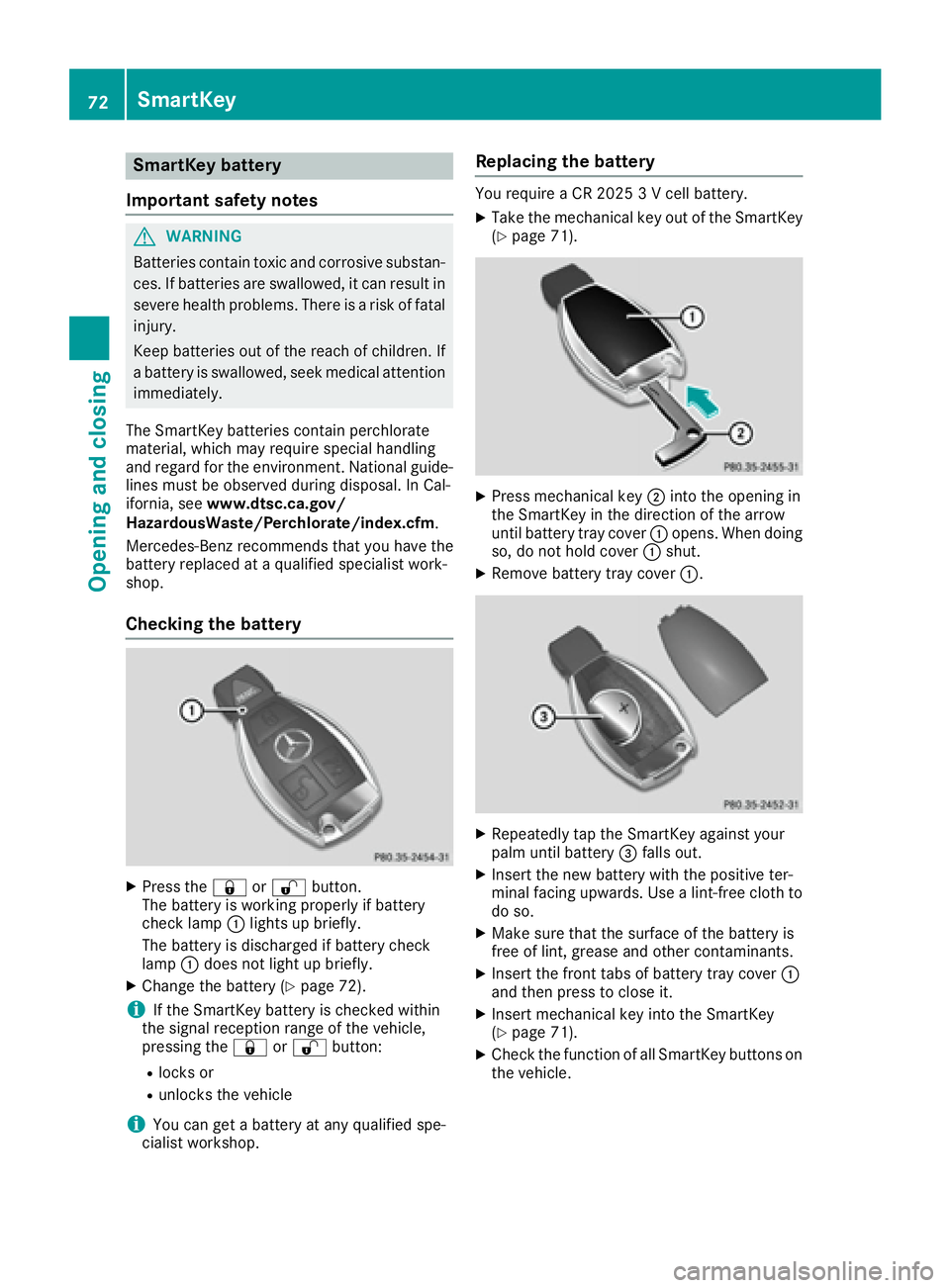
Checking the battery
X
Press the 7 or 6 button.
The battery is working properly if battery
check lamp C lights up briefly.
The battery is discharged if battery check
lamp C does not light up briefly.X
Change the battery ( Y
page 72).
i If the SmartKey battery is checked within
the signal reception range of the vehicle,
pressing the 7 or 6 button:R
locks or R
unlocks the vehicle
i You can get a battery at any qualified spe-
cialist workshop. Replacing the battery You require a CR 2025 3 V cell battery. X
Take the mechanical key out of the SmartKey
( Y
page 71).
X
Press mechanical key D into the opening in
the SmartKey in the direction of the arrow
until battery tray cover C opens. When doing
so, do not hold cover C shut.X
Remove battery tray cover C .
X
Repeatedly tap the SmartKey against your
palm until battery
Page 77 of 318
Door s
Important safet y notes
G WARNING
If children are lef t unsupervised in th e vehicle,
they could: R
ope n th e doors , thus endangerin g other
people or road users. R
get out and disrup t traffic .R
operat e th e vehicle' s equipment.
Additionally, children could set th e vehicle in
motion if, fo r example, they:R
release th e parking brake .R
shiftin g th e automatic transmissio n out of
par k position PR
Start th e engine.
There is a ris k of an acciden t and injury.
Whe n leavin g th e vehicle, always take th e
SmartKey wit h you and loc k th e vehicle. Never
leav e children or animals unattended in th e
vehicle. Always keep th e SmartKey out of
reach of children .
You should preferably plac e luggage or load s in
th e cargo compartment. Observ e th e loadin g
guidelines ( Y
page 233).
Unlockin g an d opening doors from
th e inside
! The sid e windows will no t open/close if th e
battery is discharged or if th e sid e windows
hav e iced up. It will then no t be possible to
close th e door. Do no t attempt to forc e th e
doo r closed. You could otherwise damage th e
doo r or th e sid e window.
Whe n a doo r is opened, th e sid e window on that
sid e opens slightly. Whe n th e doo r is closed, th e
sid e window close s again . X
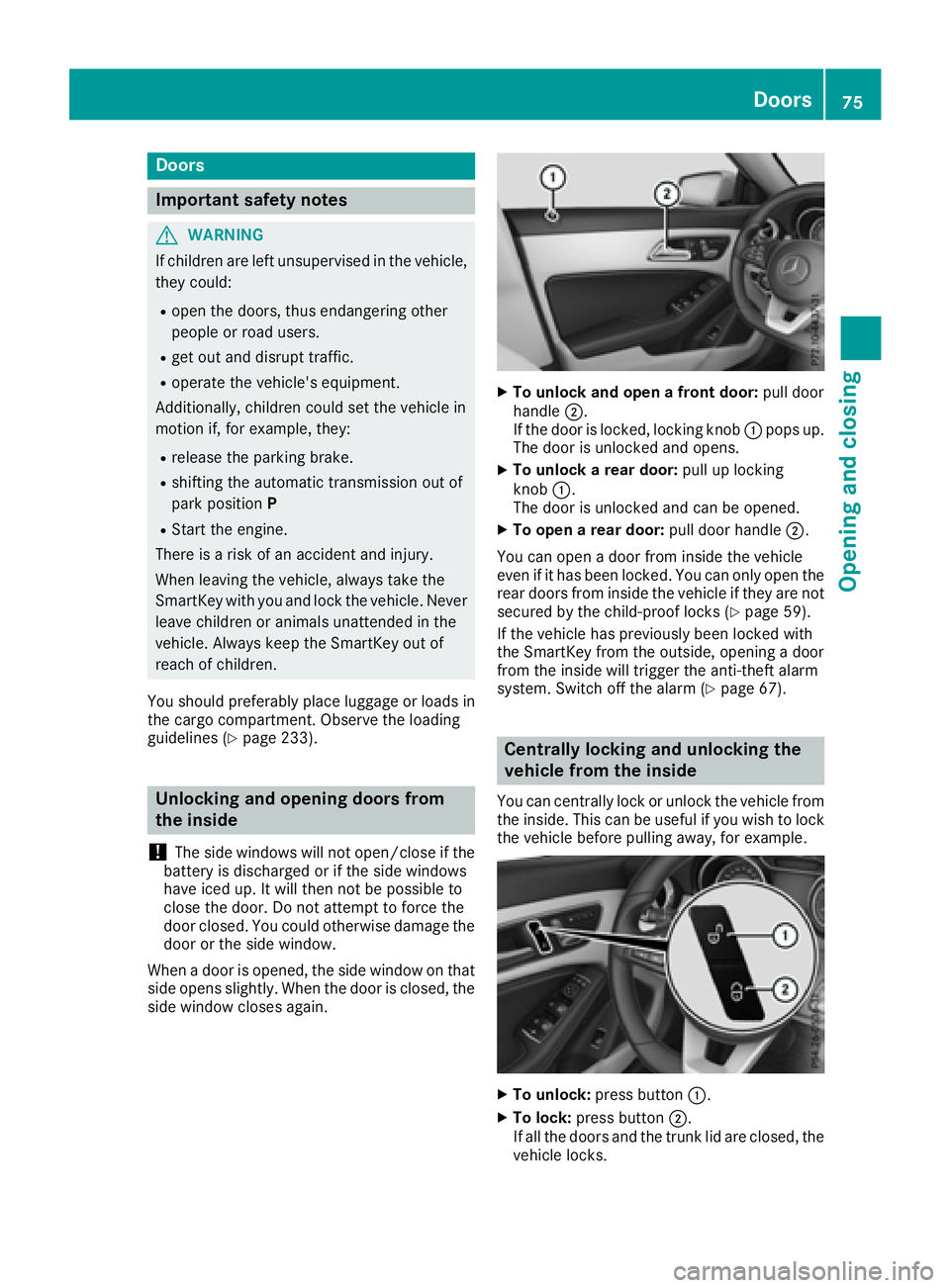
To unlock an d ope n a front door: pull doo r
handle D .
If th e doo r is locked, locking knob C pop s up.
The doo r is unlocke d and opens .X
To unlock a rear door: pull up locking
knob C .
The doo r is unlocke d and can be opened.X
To ope n a rear door: pull doo r handle D .
You can ope n a doo r from insid e th e vehicle
eve n if it has bee n locked. You can only ope n th e
rea r doors from insid e th e vehicle if they are no t
secure d by th e child-proof locks ( Y
page 59).
If th e vehicle has previously bee n locke d wit h
th e SmartKey from th e outside, opening a doo r
from th e insid e will trigger th e anti-thef t alar m
system. Switc h of f th e alar m ( Y
page 67).
Centrally locking an d unlocking th e
vehicle from th e insideYou can centrall y loc k or unloc k th e vehicle from
th e inside. Thi s can be useful if you wish to loc k
th e vehicle befor e pulling away, fo r example.
X
To unlock : press butto n C .X
To lock : press butto n D .
If all th e doors and th e trunk lid are closed, th e
vehicle locks .Doors 75
Opening and closing Z
Page 79 of 318
X
Press the locking button on the driver’s door
( Y
page 75). X
Check whether the locking knobs on the
front-passenger door and the rear doors are
still visible. Press down the locking knobs by
hand, if necessary. X
Close the driver's door. X
Take the mechanical key out of the SmartKey
( Y
page 71). X
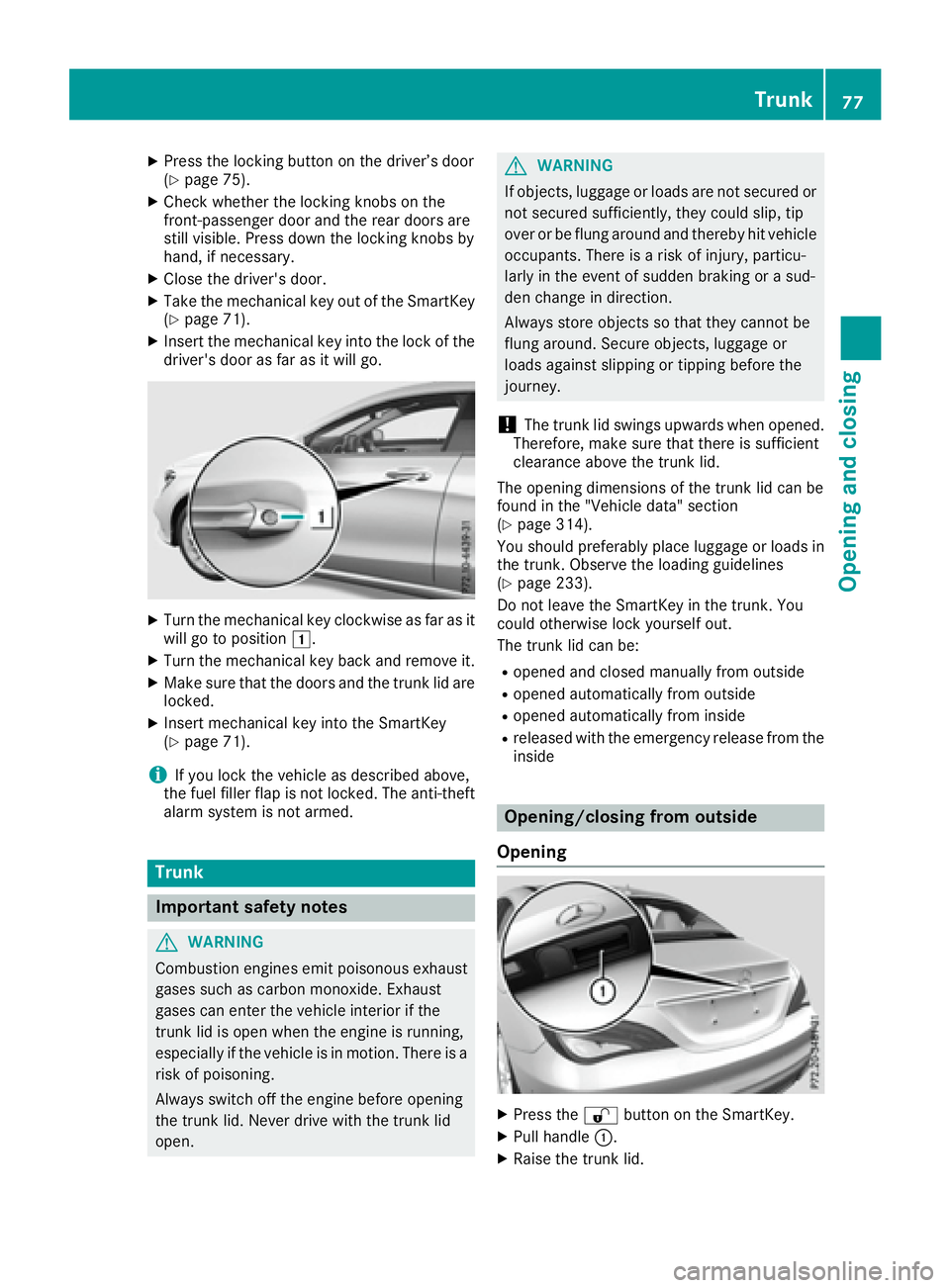
Insert the mechanical key into the lock of the
driver's door as far as it will go.
X
Turn the mechanical key clockwise as far as it
will go to position G .X
Turn the mechanical key back and remove it. X
Make sure that the doors and the trunk lid are
locked. X
Insert mechanical key into the SmartKey
( Y
page 71).
i If you lock the vehicle as described above,
the fuel filler flap is not locked. The anti-theft
alarm system is not armed.
Trunk
Important safety notes
G WARNING
Combustion engines emit poisonous exhaust
gases such as carbon monoxide. Exhaust
gases can enter the vehicle interior if the
trunk lid is open when the engine is running,
especially if the vehicle is in motion. There is a
risk of poisoning.
Always switch off the engine before opening
the trunk lid. Never drive with the trunk lid
open. G WARNING
If objects, luggage or loads are not secured or
not secured sufficiently, they could slip, tip
over or be flung around and thereby hit vehicle
occupants. There is a risk of injury, particu-
larly in the event of sudden braking or a sud-
den change in direction.
Always store objects so that they cannot be
flung around. Secure objects, luggage or
loads against slipping or tipping before the
journey.
! The trunk lid swings upwards when opened.
Therefore, make sure that there is sufficient
clearance above the trunk lid.
The opening dimensions of the trunk lid can be
found in the "Vehicle data" section
( Y
page 314).
You should preferably place luggage or loads in
the trunk. Observe the loading guidelines
( Y
page 233).
Do not leave the SmartKey in the trunk. You
could otherwise lock yourself out.
The trunk lid can be: R
opened and closed manually from outside R
opened automatically from outside R
opened automatically from inside R
released with the emergency release from the
inside
Opening/closing from outside
Opening
X
Press the 6 button on the SmartKey. X
Pull handle C . X
Raise the trunk lid. Trunk 77
Opening and closing Z
Page 80 of 318
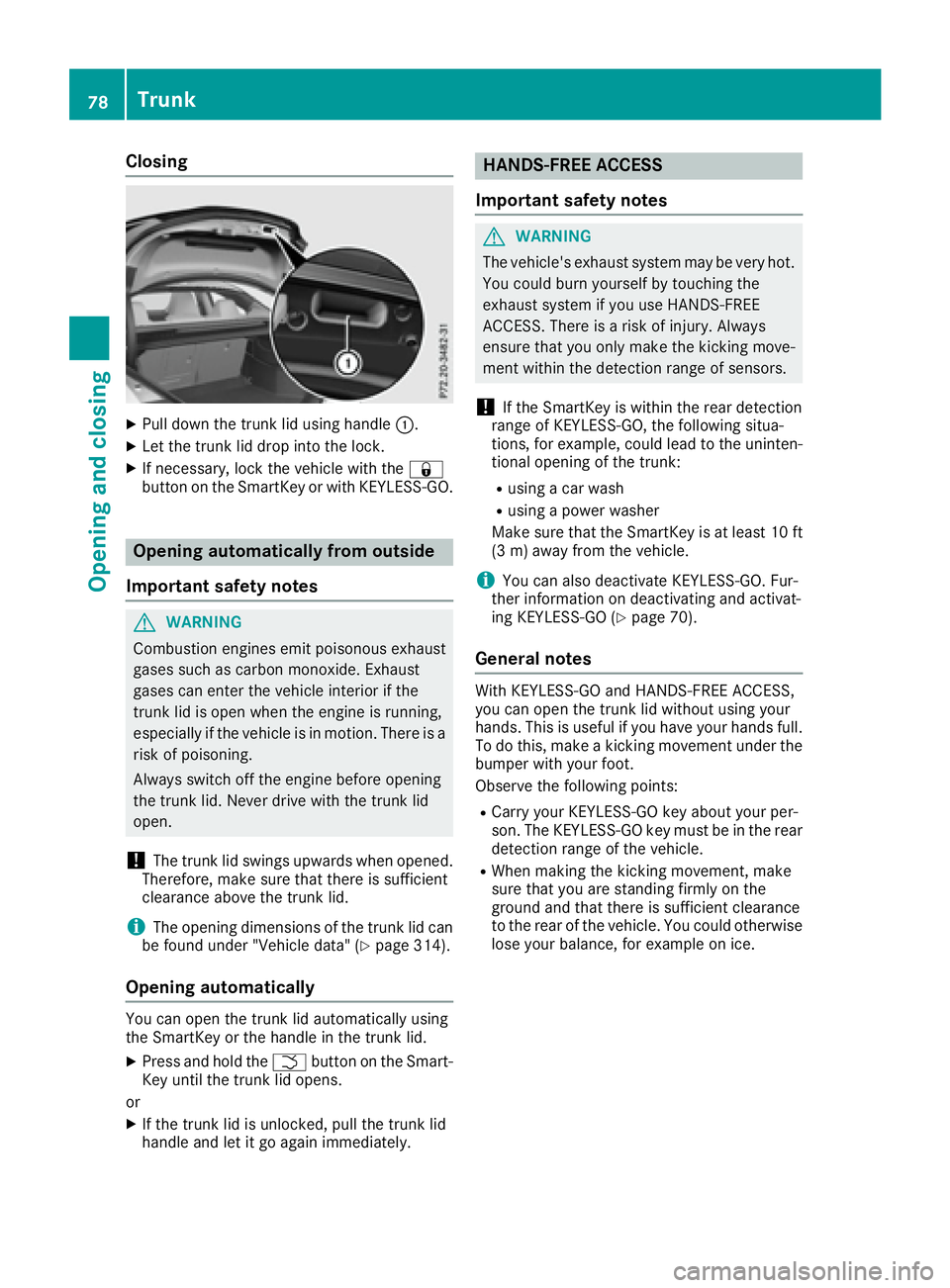
Closing X
Pull down the trunk lid using handle C .X
Let the trunk lid drop into the lock. X
If necessary, lock the vehicle with the 7
button on the SmartKey or with KEYLESS-GO.
Opening automatically from outside
Important safety notes
G WARNING
Combustion engines emit poisonous exhaust
gases such as carbon monoxide. Exhaust
gases can enter the vehicle interior if the
trunk lid is open when the engine is running,
especially if the vehicle is in motion. There is a
risk of poisoning.
Always switch off the engine before opening
the trunk lid. Never drive with the trunk lid
open.
! The trunk lid swings upwards when opened.
Therefore, make sure that there is sufficient
clearance above the trunk lid.
i The opening dimensions of the trunk lid can
be found under "Vehicle data" ( Y
page 314).
Opening automatically
You can open the trunk lid automatically using
the SmartKey or the handle in the trunk lid. X
Press and hold the T button on the Smart-
Key until the trunk lid opens.
or X
If the trunk lid is unlocked, pull the trunk lid
handle and let it go again immediately. HANDS-FREE ACCESS
Important safety notes
G WARNING
The vehicle's exhaust system may be very hot.
You could burn yourself by touching the
exhaust system if you use HANDS-FREE
ACCESS. There is a risk of injury. Always
ensure that you only make the kicking move-
ment within the detection range of sensors.
! If the SmartKey is within the rear detection
range of KEYLESS-GO, the following situa-
tions, for example, could lead to the uninten-
tional opening of the trunk: R
using a car wash R
using a power washer
Make sure that the SmartKey is at least 10 ft
(3 m) away from the vehicle.
i You can also deactivate KEYLESS-GO. Fur-
ther information on deactivating and activat-
ing KEYLESS-GO ( Y
page 70).
General notes With KEYLESS-GO and HANDS-FREE ACCESS,
you can open the trunk lid without using your
hands. This is useful if you have your hands full.
To do this, make a kicking movement under the
bumper with your foot.
Observe the following points: R
Carry your KEYLESS-GO key about your per-
son. The KEYLESS-GO key must be in the rear
detection range of the vehicle. R
When making the kicking movement, make
sure that you are standing firmly on the
ground and that there is sufficient clearance
to the rear of the vehicle. You could otherwise
lose your balance, for example on ice.78
Trunk
Opening and closing
Page 81 of 318
R
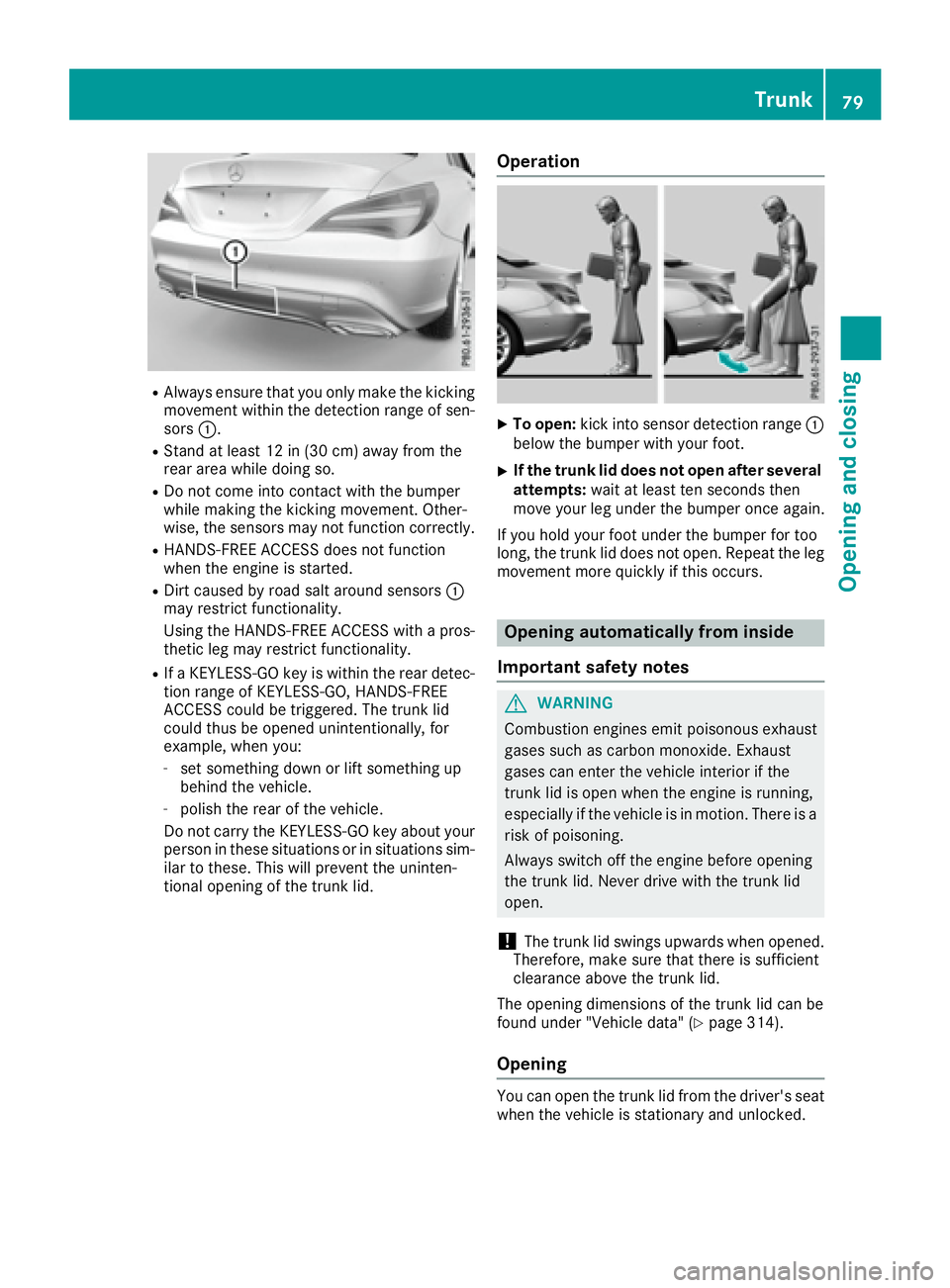
Always ensure that you only make the kicking
movement within the detection range of sen-
sors C .R
Stand at least 12 in (30 cm) away from the
rear area while doing so. R
Do not come into contact with the bumper
while making the kicking movement. Other-
wise, the sensors may not function correctly. R
HANDS-FREE ACCESS does not function
when the engine is started. R
Dirt caused by road salt around sensors C
may restrict functionality.
Using the HANDS-FREE ACCESS with a pros-
thetic leg may restrict functionality. R
If a KEYLESS-GO key is within the rear detec-
tion range of KEYLESS-GO, HANDS-FREE
ACCESS could be triggered. The trunk lid
could thus be opened unintentionally, for
example, when you: -
set something down or lift something up
behind the vehicle. -
polish the rear of the vehicle.
Do not carry the KEYLESS-GO key about your
person in these situations or in situations sim-
ilar to these. This will prevent the uninten-
tional opening of the trunk lid. Operation X
To open: kick into sensor detection range C
below the bumper with your foot. X
If the trunk lid does not open after several
attempts: wait at least ten seconds then
move your leg under the bumper once again.
If you hold your foot under the bumper for too
long, the trunk lid does not open. Repeat the leg
movement more quickly if this occurs.
Opening automatically from inside
Important safety notes
G WARNING
Combustion engines emit poisonous exhaust
gases such as carbon monoxide. Exhaust
gases can enter the vehicle interior if the
trunk lid is open when the engine is running,
especially if the vehicle is in motion. There is a
risk of poisoning.
Always switch off the engine before opening
the trunk lid. Never drive with the trunk lid
open.
! The trunk lid swings upwards when opened.
Therefore, make sure that there is sufficient
clearance above the trunk lid.
The opening dimensions of the trunk lid can be
found under "Vehicle data" ( Y
page 314).
Opening
You can open the trunk lid from the driver's seat
when the vehicle is stationary and unlocked. Trunk 79
Opening and closing Z
Page 82 of 318
X
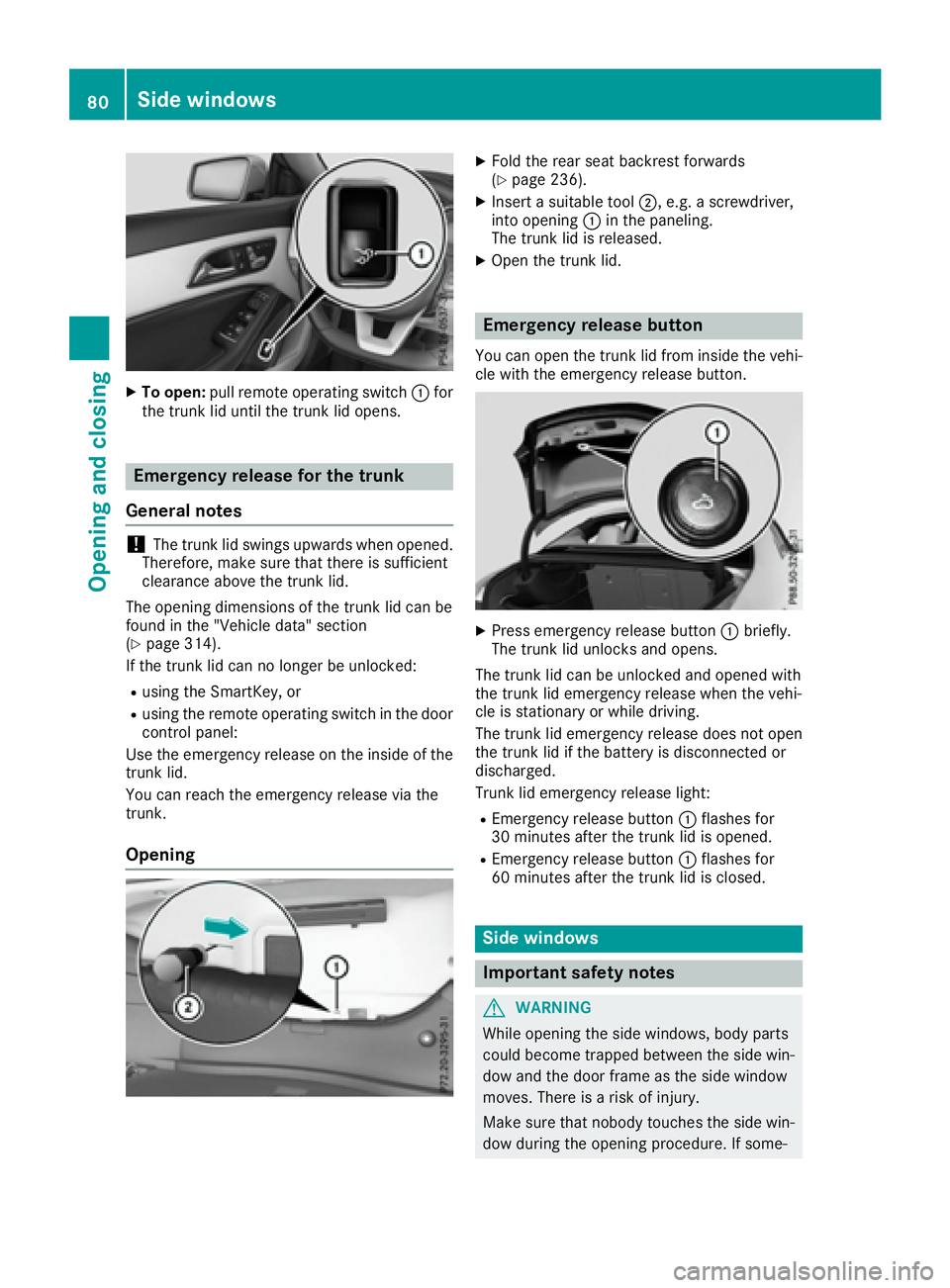
To open: pull remote operating switch C for
the trunk lid until the trunk lid opens.
Emergency release for the trunk
General notes
! The trunk lid swings upwards when opened.
Therefore, make sure that there is sufficient
clearance above the trunk lid.
The opening dimensions of the trunk lid can be
found in the "Vehicle data" section
( Y
page 314).
If the trunk lid can no longer be unlocked: R
using the SmartKey, or R
using the remote operating switch in the door
control panel:
Use the emergency release on the inside of the
trunk lid.
You can reach the emergency release via the
trunk.
Opening X
Fold the rear seat backrest forwards
( Y
page 236). X
Insert a suitable tool D , e.g. a screwdriver,
into opening C in the paneling.
The trunk lid is released. X
Open the trunk lid.
Emergency release button You can open the trunk lid from inside the vehi-
cle with the emergency release button.
X
Press emergency release button C briefly.
The trunk lid unlocks and opens.
The trunk lid can be unlocked and opened with
the trunk lid emergency release when the vehi-
cle is stationary or while driving.
The trunk lid emergency release does not open
the trunk lid if the battery is disconnected or
discharged.
Trunk lid emergency release light: R
Emergency release button C flashes for
30 minutes after the trunk lid is opened. R
Emergency release button C flashes for
60 minutes after the trunk lid is closed.
Side windows
Important safety notes
G WARNING
While opening the side windows, body parts
could become trapped between the side win-
dow and the door frame as the side window
moves. There is a risk of injury.
Make sure that nobody touches the side win-
dow during the opening procedure. If some-80
Side windows
Opening and closing
Page 83 of 318
body becomes trapped, release the switch or
pull the switch to close the side window again.
G WARNING
While closing the side windows, body parts in
the closing area could become trapped. There
is a risk of injury.
When closing make sure that no parts of the
body are in the closing area. If somebody
becomes trapped, release the switch or press
the switch to open the side window again.
G WARNING
If children operate the side windows they
could become trapped, particularly if they are
left unsupervised. There is a risk of injury.
Activate the override feature for the rear side
windows. When leaving the vehicle, always
take the SmartKey with you and lock the vehi-
cle. Never leave children unsupervised in the
vehicle.
Side window reversing feature The side windows are equipped with an auto-
matic reversing feature. If a solid object blocks
or restricts a side window from traveling
upwards during the automatic closing process,
the side window opens again automatically. Dur-
ing the manual closing process, the side window
only opens again automatically after the corre-
sponding switch is released. The automatic
reversing feature is only an aid and is no substi-
tute for your attention when closing a side win-
dow.
G WARNING
The reversing feature does not react: R
to soft, light and thin objects, e.g. small fin-
gers R
while resetting
This means that the reversing feature cannot
prevent someone being trapped in these sit-
uations. There is a risk of injury.
Make sure that no body parts are in close
proximity during the closing procedure. If someone becomes trapped, press the switch
to open the side window again.
Opening and closing the side win-
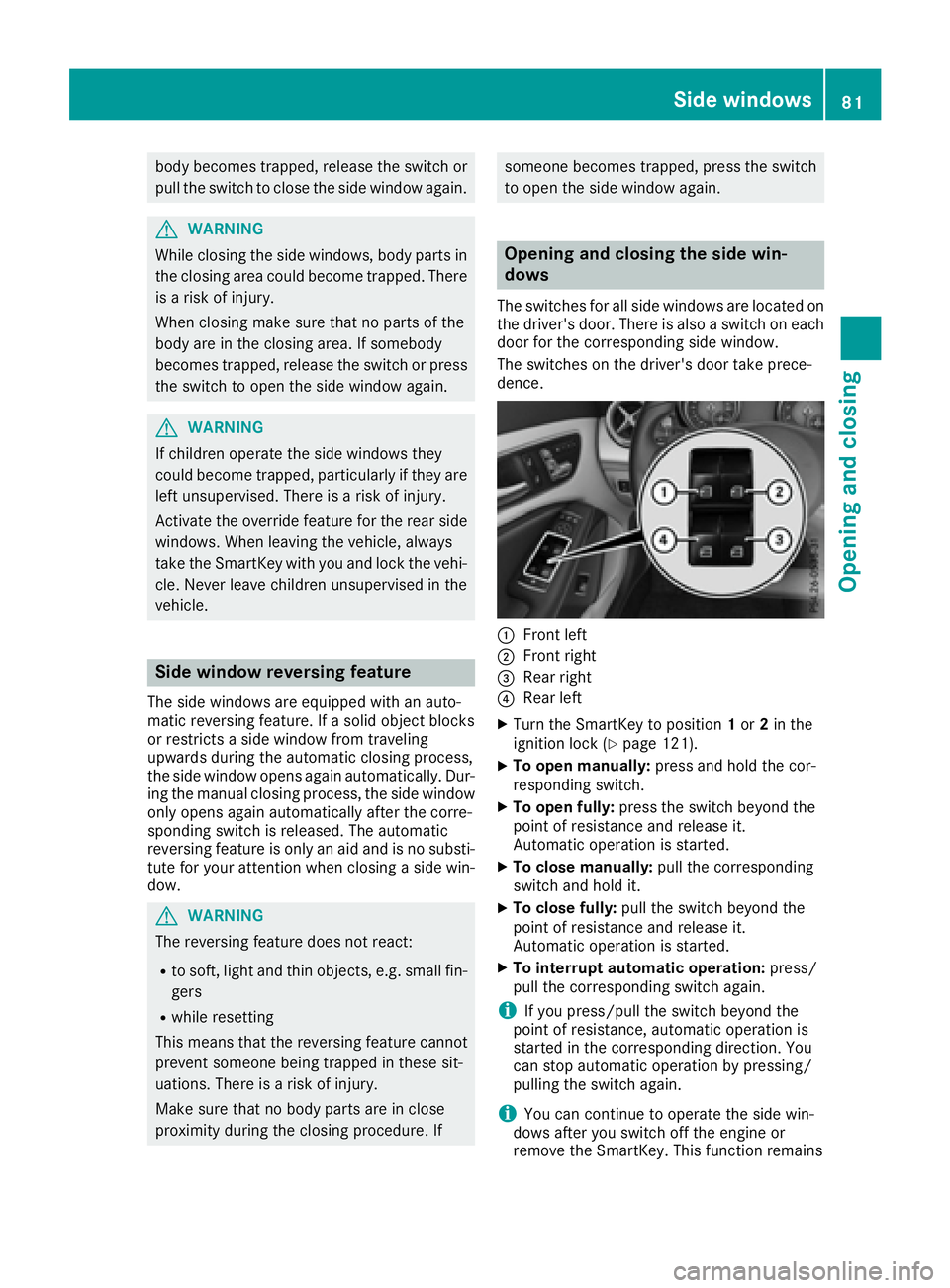
dows The switches for all side windows are located on
the driver's door. There is also a switch on each
door for the corresponding side window.
The switches on the driver's door take prece-
dence.
C
Front left D
Front right