light MERCEDES-BENZ CLA 2017 Repair Manual
[x] Cancel search | Manufacturer: MERCEDES-BENZ, Model Year: 2017, Model line: CLA, Model: MERCEDES-BENZ CLA 2017Pages: 318, PDF Size: 9.9 MB
Page 157 of 318
i For design reasons, the speed displayed in
the speedometer may differ slightly from the
speed set for Distance Pilot DISTRONIC.
Display when Distance Pilot DISTRONIC is
deactivated In the Assistance menu ( Y
page 182 )o f the on-
board computer, you can select the assistance
display.
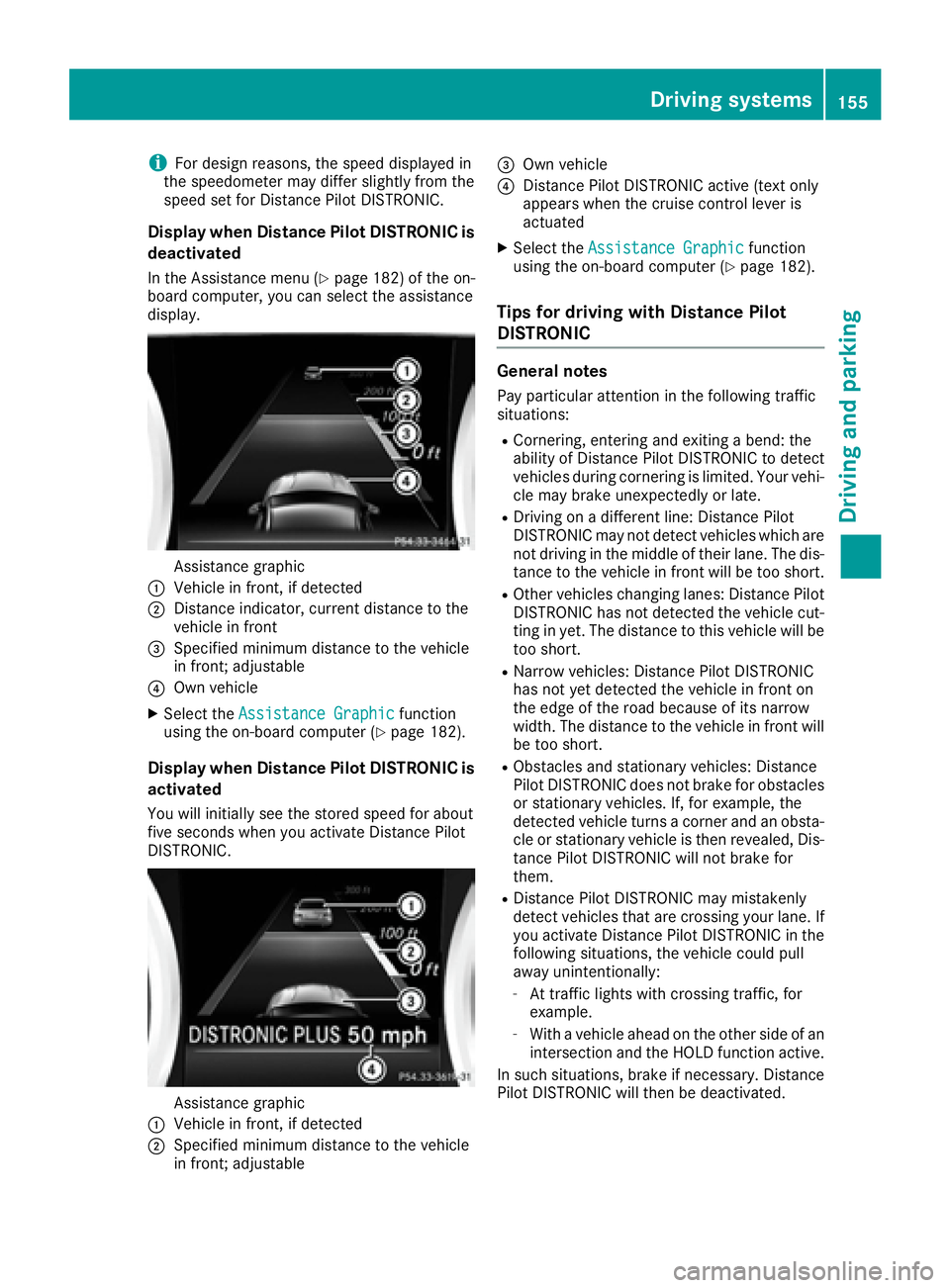
Assistance graphicC
Vehicle in front, if detectedD
Distance indicator, current distance to the
vehicle in front
Page 161 of 318
The firmer setting of the suspension tuning in
Sport mode ensures even better contact with
the road. Select this mode when employing a
sporty driving style, e.g. on winding country
roads. X
Press button C .
Indicator lamp D lights up. You have selected
Sport mode.
The AMG Suspension System SPORT
mes-
sage appears in the multifunction display.
Comfort mode In Comfort mode, the driving characteristics of
your vehicle are more comfortable. Select this
mode if you favor a more comfortable driving
style, but also when driving fast on straight
roads, e.g. highways. X
Press button C again so that indicator
lamp D goes out.
You have selected Comfort mode.
The AMG
Suspension System COMFORT mes-
sage appears in the multifunction display.
4MATIC
! Never tow the vehicle with one axle raised.
This may damage the differential. Damage of
this sort is not covered by the Mercedes-Benz
Limited Warranty. All wheels must remain
either on the ground or be fully raised.
Observe the instructions for towing the vehi-
cle with all wheels in full contact with the
ground.
4MATIC, together with ESP ®
, improves the trac-
tion of your vehicle whenever a drive wheel
spins due to insufficient grip.
If you fail to adapt your driving style, 4MATIC can
neither reduce the risk of accident nor override
the laws of physics. 4MATIC cannot take
account of road, weather and traffic conditions.
4MATIC is only an aid. You are responsible for
the distance to the vehicle in front, for vehicle
speed, for braking in good time and for staying in
your lane.
If a drive wheel spins due to insufficient grip: R
Only depress the accelerator pedal as far as
necessary when pulling away. R
Accelerate less when driving. i In wintry driving conditions, the maximum
effect of 4MATIC can only be achieved if you
use winter tires (M+S tires), with snow chains
if necessary.
Suspension with Adaptive Damping
System
General notes A suspension with the Adaptive Damping Sys-
tem provides improved driving comfort and con-
tinuously controls the calibration of the damp-
ers. The damping characteristics adapt to the
current operating and driving situation.
The damping is tuned individually to each wheel
and depends on: R
your driving style, e.g. sporty R
the road surface conditions R
the drive program selected
The drive program can be set using the
DYNAMIC SELECT button ( Y
page 127).
Selecting Comfort mode In the Comfort drive program, the driving char-
acteristics of your vehicle are more comforta-
ble. Therefore, select this drive program if you
prefer a more comfortable driving style. Also
select the Comfort drive program when driving
fast on straight roads, e.g. on straight stretches
of highway. X
Press DYNAMIC SELECT button ( Y
page 127)
as many times as necessary until the Com-
fort drive program is selected.
Selecting Sport mode The firmer setting of the suspension tuning in
the Sport drive program ensures even better
contact with the road. Select this drive program
when employing a sporty driving style, e.g. on
winding country roads. X
Press DYNAMIC SELECT button ( Y
page 127)
as many times as necessary until the Sport
drive program is selected.Driving systems 159
Driving and parking Z
Page 163 of 318
Front sensors
Center Approx. 40 in (approx.
100 cm)
Corners Approx. 24 in (approx.
60 cm)
Rear sensors
Center Approx. 48 in (approx.
120 cm)
Corners Approx. 32 in (approx.
80 cm)
Minimum distance
Center Approx. 8 in (approx. 20 cm)
Corners Approx. 6 in (approx. 15 cm)
If there is an obstacle within this range, the rel-
evant warning displays light up and a warning
tone sounds. If the distance falls below the min-
imum, the distance may no longer be shown.
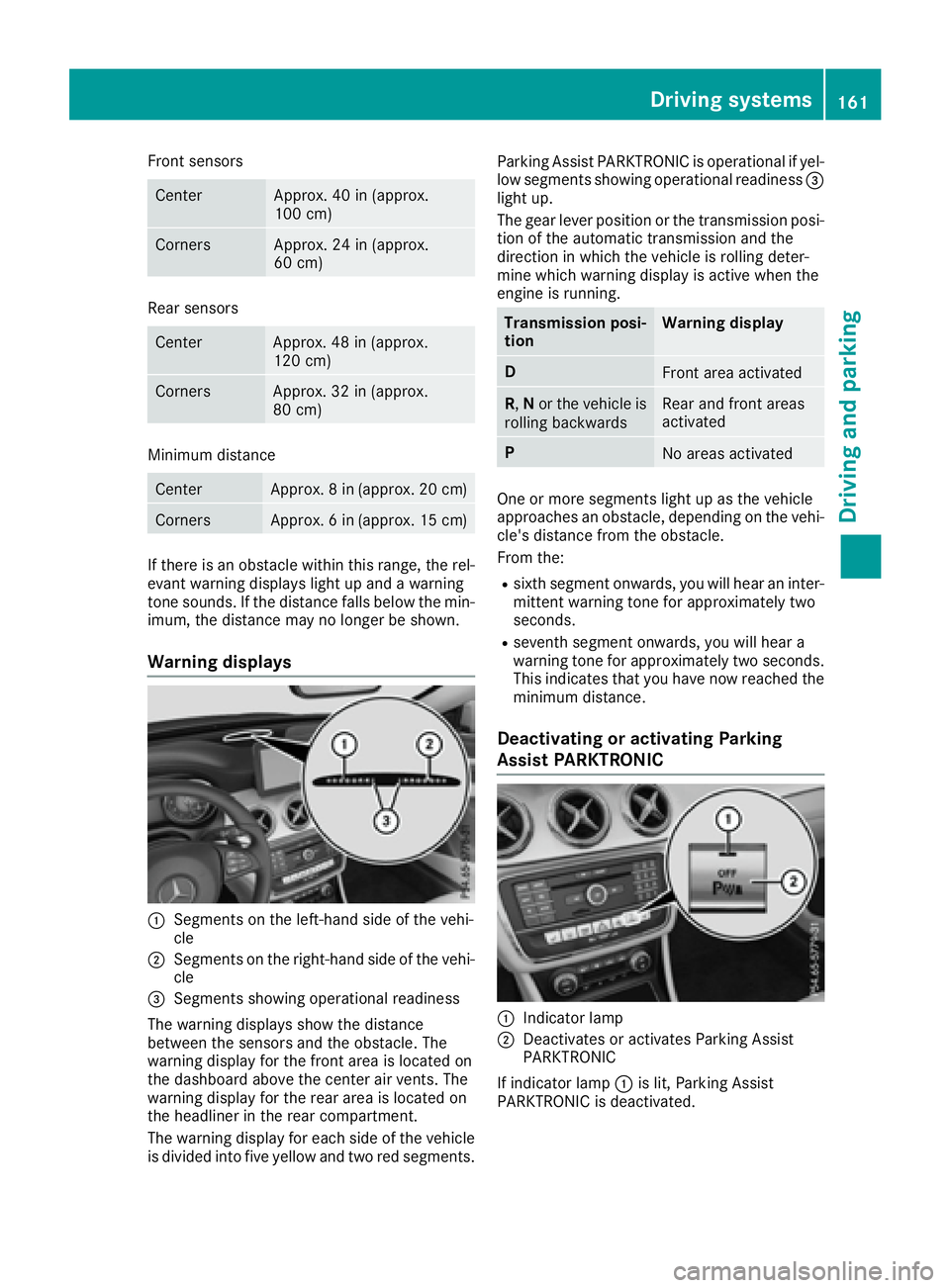
Warning displays
C
Segments on the left-hand side of the vehi-
cle
D
Segments on the right-hand side of the vehi-
cle
Page 164 of 318
i Parking Assist PARKTRONIC is automati-
cally activated when you turn the SmartKey to
position 2 in the ignition lock.
Problems with Parking Assist PARKTRONIC Problem
Possible causes/consequences and P Solutions
Only the red segments in
the Parking Assist
PARKTRONIC warning
displays are lit. You also
hear a warning tone for
approximately two sec-
onds.
Parking Assist
PARKTRONIC is then
deactivated and the indi-
cator lamp on the
PARKTRONIC button
lights up. Parking Assist PARKTRONIC has malfunctioned and has been deacti-
vated. X
If problems persist, have Parking Assist PARKTRONIC checked at a
qualified specialist workshop.
Only the red segments in
the Parking Assist
PARKTRONIC warning
displays are lit. Parking
Assist PARKTRONIC is
then deactivated. The Parking Assist PARKTRONIC sensors are dirty or there is inter-
ference. X
Clean the Parking Assist PARKTRONIC sensors ( Y
page 262).X
Switch the ignition back on.
The problem may be caused by an external source of radio or ultra-
sound waves. X
Check to see if Parking Assist PARKTRONIC works at a different
location.
Parking Pilot
General notes Parking Pilot is an electronic parking aid with
ultrasound. It measures the road on both sides
of the vehicle. A parking symbol indicates a suit-
able parking space. Active steering intervention
and brake application can assist you during
parking and when exiting a parking space. Park-
ing Assist PARKTRONIC is also available
( Y
page 160).
Important safety notes
Parking Pilot is only an aid. It is not a replace-
ment for your attention to your immediate sur-
roundings. You are always responsible for safe
maneuvering, parking and exiting a parking
space. Make sure that no persons, animals or
objects are in the maneuvering range. When Parking Assist PARKTRONIC is deactiva-
ted, Parking Pilot is also unavailable.
G WARNING
While parking or pulling out of a parking
space, the vehicle swings out and can drive
onto areas of the oncoming lane. This could
result in a collision with another road user.
There is a risk of an accident.
Pay attention to other road users. Stop the
vehicle if necessary or cancel the Parking Pilot
parking procedure.
! If unavoidable, you should drive over obsta-
cles such as curbs slowly and not at a sharp
angle. Otherwise, you may damage the
wheels or tires.162
Driving systems
Driving and parking
Page 174 of 318
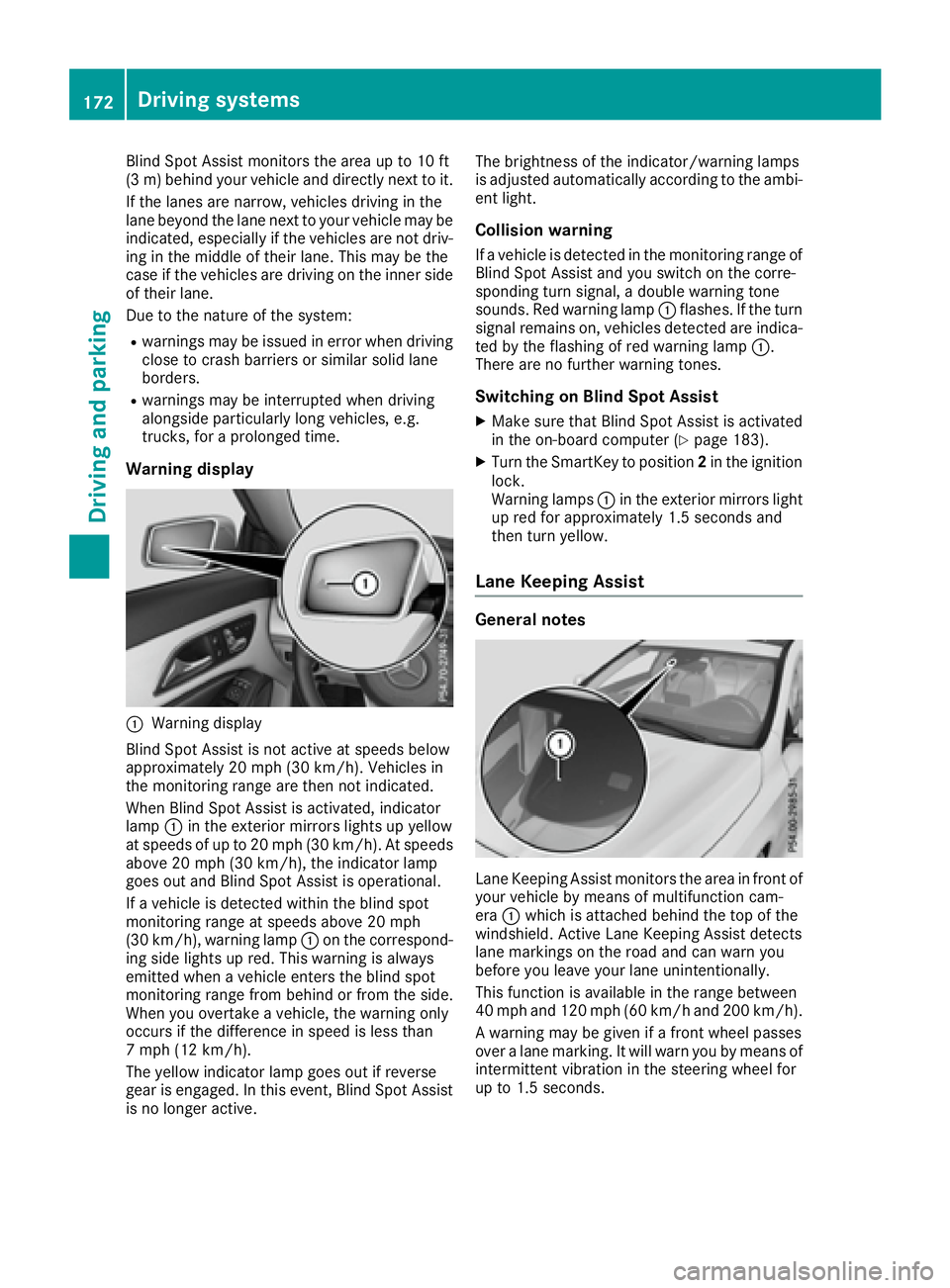
Blind Spot Assist monitors the area up to 10 ft
(3 m) behind your vehicle and directly next to it.
If the lanes are narrow, vehicles driving in the
lane beyond the lane next to your vehicle may be
indicated, especially if the vehicles are not driv-
ing in the middle of their lane. This may be the
case if the vehicles are driving on the inner side
of their lane.
Due to the nature of the system: R
warnings may be issued in error when driving
close to crash barriers or similar solid lane
borders. R
warnings may be interrupted when driving
alongside particularly long vehicles, e.g.
trucks, for a prolonged time.
Warning display
C
Warning display
Blind Spot Assist is not active at speeds below
approximately 20 mph (30 km/h). Vehicles in
the monitoring range are then not indicated.
When Blind Spot Assist is activated, indicator
lamp C in the exterior mirrors lights up yellow
at speeds of up to 20 mph (30 km/h). At speeds
above 20 mph (30 km/h), the indicator lamp
goes out and Blind Spot Assist is operational.
If a vehicle is detected within the blind spot
monitoring range at speeds above 20 mph
(30 km/h), warning lamp C on the correspond-
ing side lights up red. This warning is always
emitted when a vehicle enters the blind spot
monitoring range from behind or from the side.
When you overtake a vehicle, the warning only
occurs if the difference in speed is less than
7 mph (12 km/h).
The yellow indicator lamp goes out if reverse
gear is engaged. In this event, Blind Spot Assist
is no longer active. The brightness of the indicator/warning lamps
is adjusted automatically according to the ambi-
ent light.
Collision warning If a vehicle is detected in the monitoring range of
Blind Spot Assist and you switch on the corre-
sponding turn signal, a double warning tone
sounds. Red warning lamp C flashes. If the turn
signal remains on, vehicles detected are indica-
ted by the flashing of red warning lamp C .
There are no further warning tones.
Switching on Blind Spot Assist X
Make sure that Blind Spot Assist is activated
in the on-board computer ( Y
page 183).X
Turn the SmartKey to position 2 in the ignition
lock.
Warning lamps C in the exterior mirrors light
up red for approximately 1.5 seconds and
then turn yellow.
Lane Keeping Assist
General notes
Lane Keeping Assist monitors the area in front of
your vehicle by means of multifunction cam-
era C which is attached behind the top of the
windshield. Active Lane Keeping Assist detects
lane markings on the road and can warn you
before you leave your lane unintentionally.
This function is available in the range between
40 mph and 120 mph (60 km/h and 200 km/h).
A warning may be given if a front wheel passes
over a lane marking. It will warn you by means of
intermittent vibration in the steering wheel for
up to 1.5 seconds.172
Driving systems
Driving and parking
Page 176 of 318
Important safety notes
G WARNIN G
If you operate information systems and com-
munication equipmen t integrate d in th e vehi-
cle while driving , you will be distracte d from
traffic conditions. You could also lose control
of th e vehicle. Ther e is a ris k of an accident.
Only operate th e equipmen t when th e traffic
situation permits. If you are no t sur e that this
is possible , park th e vehicl e payin g attention
to traffic condition s and operate th e equip-
men t when th e vehicl e is stationary.
You must observ e th e legal requirements for th e
country in whic h you are currentl y driving when
operating th e on-board computer.
G WARNIN G
If th e instrumen t cluste r has faile d or mal-
functioned, you may no t recognize function
restriction s in systems relevan t to safety. The
operating safet y of your vehicl e may be
impaired . Ther e is a ris k of an accident.
Drive on carefully. Hav e th e vehicl e checke d
at a qualified specialist workshop immedi-
ately.
The on-board computer only shows message s or
warning s from certain systems in th e multifunc-
tion display. You should therefor e mak e sur e
your vehicl e is operating safely at all times .
If th e operating safet y of your vehicl e is
impaired , pull ove r as soo n as it is saf e to do so.
Contac t a qualified specialist workshop.
Fo r an overview, see th e instrumen t panel illus-
tration ( Y
page 32).
Displays and operation
Instrument cluster lighting
The ligh t sensor in th e instrumen t cluste r auto -
matically control s th e brightness of th e multi-
function display. In daylight, th e displays in th e
instrumen t cluste r are no t illuminated.
The lighting in th e instrumen t cluster, in th e dis-
plays and th e control s in th e vehicl e interior can
be adjusted usin g th e brightness control knob. The brightness control knob is locate d on th e
botto m lef t of th e instrumen t cluste r
( Y
page 32). X
Turn th e brightness control knob clockwise or
counter-clockwise.
If th e ligh t switch is set to th e X , ` or
X position , th e brightness is dependen t
upon th e brightness of th e ambien t light.
Speedometer with segments The speedometer is divided int o segments on
vehicles wit h Distanc e Pilot DISTRONIC.
The segments in th e speedometer indicat e
whic h spee d range is available. R
Distanc e Pilot DISTRONI C is activated
( Y
page 150):
On e or two segments in th e set spee d range
ligh t up. R
Distanc e Pilot DISTRONI C detects a vehicl e in
fron t moving mor e slowly than th e store d
speed:
The segments between th e spee d of th e vehi-
cle in fron t and th e store d spee d ligh t up.
Tachometer
! Do no t driv e in th e overrevving range, as this
could damag e th e engine.
The red ban d in th e tachometer indicates th e
engine's overrevving range.
The engin e is limite d within a range to protect
th e engin e when th e red ban d is reached.
Outside temperature display You should pay special attention to road condi-
tion s when temperatures are aroun d freezing
point.
Bea r in min d that th e outside temperature dis-
play indicates th e temperature measured and
does no t record th e road temperature.
The outside temperature display is in th e multi-
function display ( Y
page 176).
Ther e is a short delay before a chang e in outside
temperature appear s in th e multifunction dis-
play.174
Displays and operation
On-board computer and displays
Page 186 of 318
X
Press the Y or e button on the steering
wheel to select the Sett. menu.X
Press the d or c button to select the
Instrument Cluster submenu.X
Press v to confirm.X
Press the d or c button to select the
Display Unit Speed-/Odometer function.
You will see the selected setting: km or miles .X
Press the v button to save the setting.
The selected unit of measurement for distance
applies to: R
Digital speedometer in the Trip menuR
Odometer and the trip odometer R
Trip computer R
Current fuel consumption and approximate
range R
Navigation instructions in the Navi menuR
Cruise control R
Distance Pilot DISTRONIC R
ASSYST PLUS service interval display
Switching the additional speedometer
on/off If the additional speedometer is switched on,
the speed is shown in the status area of the
multifunction display instead of the outside tem-
perature.
The speed display is inverse to the speedome-
ter. X
Press the Y or e button on the steering
wheel to select the Sett. menu.X
Press the d or c button to select the
Instrument Cluster submenu.X
Press v to confirm.X
Press the d or c button to select the
Speedometer [km/h] or Speedometer
[mph] function.
You will see the selected setting: On or Off .X
Press the v button to save the setting.
Selecting permanent display
The Permanent Display: function allows you
to choose whether the multifunction display
always shows the outside temperature or the
speed.
The speed display is inverse to the speedome-
ter. X
Press the Y or e button on the steering
wheel to select the Sett. menu.X
Press the d or c button to select the
Instrument Cluster submenu.X
Press v to confirm. X
Press the d or c button to select the
Permanent Display: function.
The current setting Outside Temperature
or Speedometer [km/h] / Speedometer
[mph] appears. X
Press the v button to save the setting.
Lights Switching the daytime running lamps on/
off This function is not available in Canada. X
Press the Y or e button on the steering
wheel to select the Sett. menu.X
Press the d or c button to select the
Light submenu. X
Press v to confirm. X
Press the d or c button to select the
Daytime Running Lights function.
If the Daytime Running Lights function has
been switched on, the multifunction display
shows the cone of light and the
Page 187 of 318
For further information on the automatic locking
feature, see ( Y
page 76).
Activating/deactivating the acoustic
locking verification signal If you switch on the Acoustic Lock function, an
acoustic signal sounds when you lock the vehi-
cle. X
Press the Y or e button on the steering
wheel to select the Sett. menu.X
Press the d or c button to select the
Vehicle submenu.X
Press v to confirm.X
Press the d or c button to select the
Acoustic Lock function.
If the Acoustic Lock function is activated,
the multifunction display shows the 7
symbol in orange. X
Press the v button to save the setting.
Convenience
Switching the fold-in mirrors when lock-
ing feature on/off This function is only available in Canada.
This function is only available when the vehicle is
equipped with the electrical fold-in function.
When you activate the Auto. Mirror Folding
function, the exterior mirrors are folded in when
the vehicle is locked. If you unlock the vehicle
and then open the driver's or front-passenger
door, the exterior mirrors fold out again.
If you have switched on the Auto. Mirror
Folding function and you fold in the exterior
mirrors using the button on the door
( Y
page 96), they will not fold out automatically.
The exterior mirrors can then only be folded out
using the button on the door. X
Press the Y or e button on the steering
wheel to select the Sett. menu.X
Press the d or c button to select the
Convenience submenu.X
Press v to confirm.X
Press the d or c button to select the
Auto. Mirror Folding function.
If the Auto. Mirror Folding function is
switched on, the multifunction display shows
the exterior mirror in orange. X
Press the v button to save the setting. Restoring the factory settings X
Press the Y or e button on the steering
wheel to select the Sett. menu.X
Press the d or c button to select the
Factory Setting submenu.X
Press v to confirm.
The Reset All Settings? function
appears. X
Press the d or c button to select No or
Yes . X
Press the v button to confirm the selec-
tion.
If you have selected Yes
, the multifunction
display shows a confirmation message.
For safety reasons, the Daytime Running
Lights function in the Light submenu is only
reset if the vehicle is stationary.
AMG menu (Mercedes-AMG vehicles)
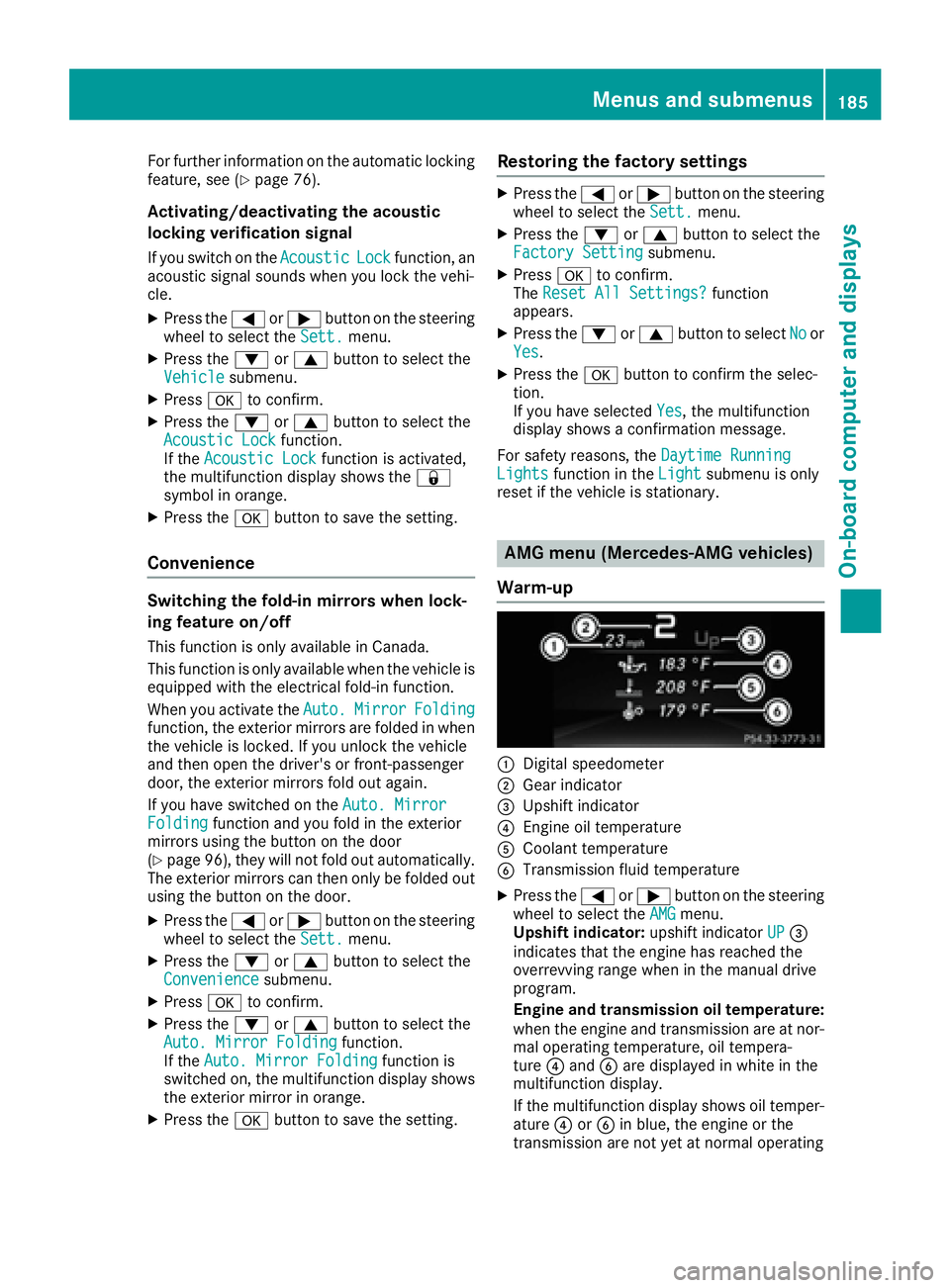
Warm-up
C
Digital speedometer D
Gear indicator
Page 194 of 318
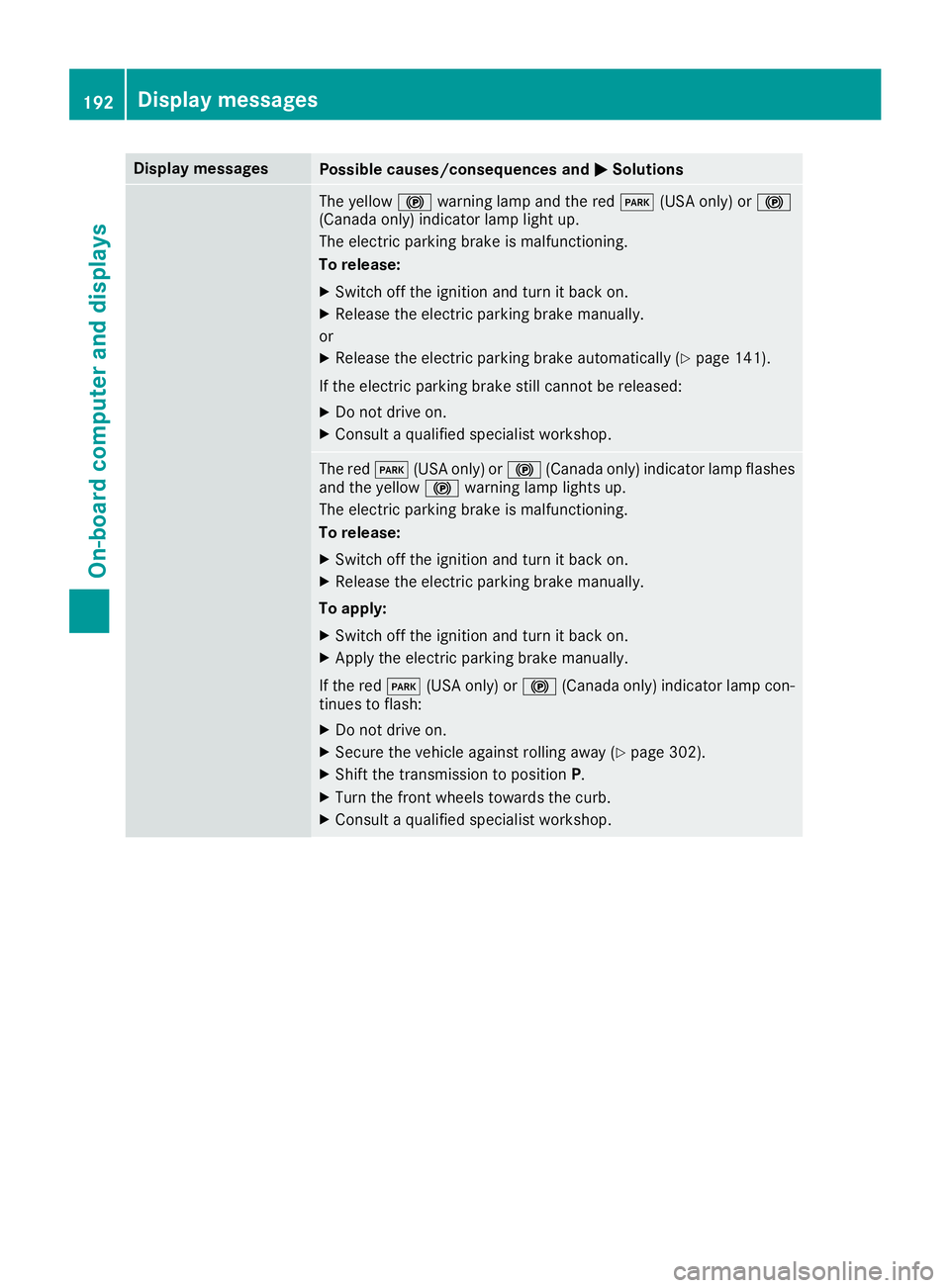
Display messages
Possible causes/consequences and P Solutions
The yellow $ warning lamp and th e red I (US A only) or $
(Canada only) indicator lamp ligh t up.
The electric parking brak e is malfunctioning .
To release: X
Switc h off th e ignition and tur n it bac k on .X
Releas e th e electric parking brak e manually.
or X
Releas e th e electric parking brak e automatically ( Y
page 141).
If th e electric parking brak e still canno t be released:X
Do no t drive on .X
Consult a qualified specialist workshop .
The red I (US A only) or $ (Canada only) indicator lamp flashes
and th e yellow $ warning lamp lights up.
The electric parking brak e is malfunctioning .
To release: X
Switc h off th e ignition and tur n it bac k on .X
Releas e th e electric parking brak e manually.
To apply : X
Switc h off th e ignition and tur n it bac k on .X
Apply th e electric parking brak e manually.
If th e red I (US A only) or $ (Canada only) indicator lamp con-
tinue s to flash: X
Do no t drive on .X
Secur e th e vehicl e against rollin g away ( Y
page 302).X
Shift th e transmission to position P .X
Turn th e fron t wheels toward s th e curb.X
Consult a qualified specialist workshop .192
Display messages
On-board computer and displays
Page 195 of 318
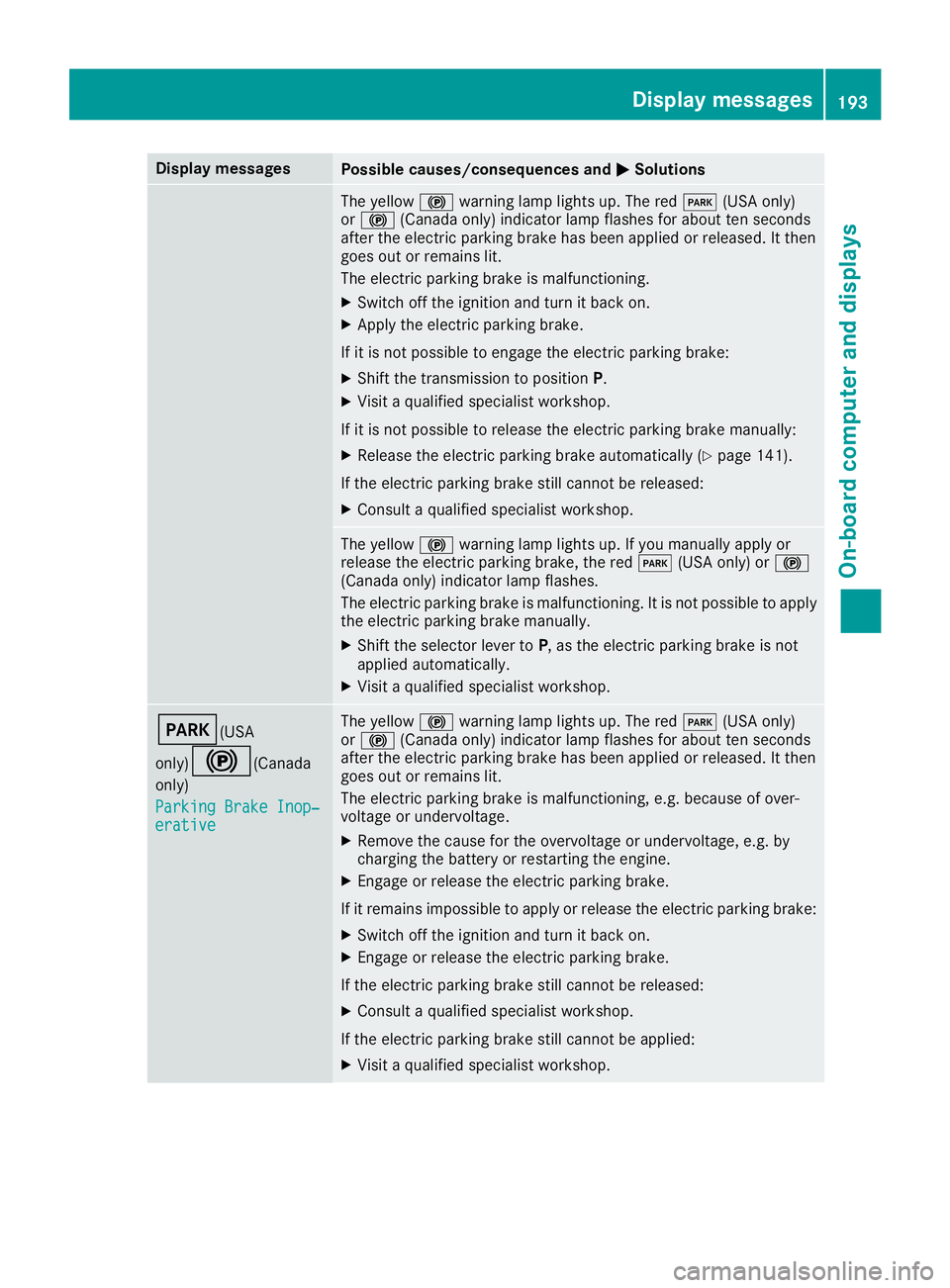
Display messages
Possible causes/consequences and P Solutions
The yellow $ warning lamp lights up. The red I (US A only)
or $ (Canada only) indicator lamp flashes for about te n seconds
after th e electric parking brak e has been applie d or released. It then
goe s out or remain s lit .
The electric parking brak e is malfunctioning .X
Switc h off th e ignition and tur n it bac k on .X
Apply th e electric parking brake.
If it is no t possibl e to engage th e electric parking brake:X
Shift th e transmission to position P .X
Visit a qualified specialist workshop .
If it is no t possibl e to release th e electric parking brak e manually:X
Releas e th e electric parking brak e automatically ( Y
page 141).
If th e electric parking brak e still canno t be released:X
Consult a qualified specialist workshop .
The yellow $ warning lamp lights up. If you manually apply or
release th e electric parking brake, th e red I (US A only) or $
(Canada only) indicator lamp flashes .
The electric parking brak e is malfunctioning . It is no t possibl e to apply
th e electric parking brak e manually.X
Shift th e selector lever to P , as th e electric parking brak e is no t
applie d automatically. X
Visit a qualified specialist workshop .
I (USA
only)
$ ( Canada
only)
Parkin g Brake Inop‐
erativ e The yellow $ warning lamp lights up. The red I (US A only)
or $ (Canada only) indicator lamp flashes for about te n seconds
after th e electric parking brak e has been applie d or released. It then
goe s out or remain s lit .
The electric parking brak e is malfunctioning , e.g. because of over-
voltag e or undervoltage. X
Remove th e caus e for th e overvoltage or undervoltage, e.g. by
charging th e battery or restarting th e engine.X
Engage or release th e electric parking brake.
If it remain s impossible to apply or release th e electric parking brake:X
Switc h off th e ignition and tur n it bac k on .X
Engage or release th e electric parking brake.
If th e electric parking brak e still canno t be released:X
Consult a qualified specialist workshop .
If th e electric parking brak e still canno t be applied:X
Visit a qualified specialist workshop .Display messages 19 3
On-board computer and displays Z