display MERCEDES-BENZ CLA 2018 Owners Manual
[x] Cancel search | Manufacturer: MERCEDES-BENZ, Model Year: 2018, Model line: CLA, Model: MERCEDES-BENZ CLA 2018Pages: 326, PDF Size: 7.97 MB
Page 234 of 326
Traffic reports on the route for the route guid-
ance are taken into account (not availabl ei n
all countries). R
Dynamic TRF. Route After Request
You can decide whether or not current traffic
reports should be included in the route cal-
culation (not availabl eina ll countries).R
Calculate Alternative Routes
Different routes are being calculated. In order
to do so, instead of Start ,s elect the menu
item Continue .X
To avoid/use rout eo ptions: select Avoid
Options .X
Select ar oute option.
Notes for route options: R
Use Toll Roads
The route calculation includes roads which
require you to pay au sage fee (toll).R
Number of Occupants in the Vehicle:
(only availabl eint he USA)
Prerequisite: your vehicle meets the access
conditions for carpool lanes.
Carpool lanes will be included if the carpool
lanes option is activated.
Entering an address Multimedia system: X
Select Navi { Navigation .
The map shows the vehicle's current position. X
Slide 6 the controller.X
Select Destination { Address Entry .
Enter an address, e.g. as follows: R
city or ZIP code, street ,h ouse numberR
state/province, city or ZIP code R
city or ZIP code, center R
street ,c ity or ZIP code, intersectionX
Select City .
The city in which the vehicle is currently loca-
ted (current vehicle position) is at the top.
Below this, you will see locations for which
route guidance has already been carried out. X
Enter the city.
The C symbol: the location is contained on
the digital map multiple times. X
To switch to the list: slide the 5 control-
ler. X
Select the location.
If available, the ZIP code is shown. If there are
different ZIP codes availabl ef or the location,
the corresponding digits are displayed with an
X . X
Enter the street and house number.
The address is in the menu.
Further options for destination entry: R
search for ak eyword
The keyword search finds destinations using
fragment sofw ords. R
select the last destination R
select ac ontact R
select aP OI
You can search for aP OI by location, name or
telephone number. R
select destination on the map R
enter intermediate destination
You can map the route to the destination
yourself with up to four intermediate destina-
tions. R
select destinations from Mercedes-Benz
Apps R
select geo-coordinates
Calculating the route Prerequisite: the address has been entered and
is in the menu. X
Select Start or Continue .
The route is calculated with the selected route
type and the selected route options.
If route guidance has already been activated,
ap rompt will appear asking whether you wish
to end the current route guidance. X
Select Cancel Active Route Guidance or
Set as Intermediat eD estination .
Cancel Active Route Guidance cancels
the current route guidance and start sr oute
calculation to the new destination.
Set as Intermediat eD estination adds
the new destination in addition to the existing
destination and opens the intermediate des-
tinations list.232
Operating system
Multimedia system
Page 236 of 326
Authorization by entering ap as ske y( pass code):X
Select the Bluetooth ®
nam eoft he mobile
phone.
The input menu for the passke yisd is played.X
Choos eao ne to sixteen-digi tn umbe rc ombi-
nation as ap as skey.X
Enter the passke yont he multimedia system.X
Press T to confirm.X
Enter and confirm the passke yont he mobile
phone. Depending on the mobil ep hone used,
confirm the connectio ntot he multimedia sys-
tem and for the PBAP and MAP Bluetooth ®
profiles. The prompt to confirm ma yt ake up
to two minutes to be displayed (se et he man-
ufacturer's operating instructions).
Connectin gam obil ep hon e( Au dio 20)
Requirements For telephony via the Bluetooth ®
interface, you
require at leas to ne Bluetooth ®
-capable mobile
phone depending on us eo f one-telephone
mode or two-telephon em ode .T he mobile
phone must support Hands-Fre eP rofil e1 .0 or
above.
In two-telephon em ode yo uc an us ea ll the
functions of the multimedia system with the
main telephone .W it ht he additional tele-
phone ,y ou can receive incoming calls.
Multimedia system: X
Select Vehicle { Sy stem Set‐
tings { Activate Bluetooth .X
Activate Bluetooth ®
s .
Mobil ep hone:X
Activate Bluetooth ®
and ,ifn ecessary ,B lue-
tooth ®
visibility for othe rd ev ice s( se et he
manufacturer's operating instructions).
The Bluetooth ®
device names for al lofo ne man-
ufacturer's products might be identical .T o
make it possibl etoc learly identify your mobile
phone, change the device nam e( se et he man-
ufacturer's operating instructions). If the mobil ep hone supports the PBAP ( P hone
B ook A ccess P rofile )a nd MAP ( M es sage
A ccess P rofile) Bluetooth ®
profiles, the follow-
ing informatio ni st ransmitte da fte ry ou connect
the main telephone: R
Phone book R
Call lists R
Text messages and e-mail
i Further informatio nons ui tabl em obile
phones can be found at: http://
www.mercedes-benz.com/connect
i In the USA, yo uc an ge tint ouch with the
Mercedes-Benz Customer Assistance Center
on 1-800-FOR-MERCedes (1-800-367-6372).
In Canada, yo uc an ge tint ouch with the Cus-
tome rR elat ions Center on 1-800-387-010 0.
Searching for and authorizing (connect-
ing) am obile phoneBefore using your mobile phone with the multi-
media system for the first time, you will need to
search for the phone and then authorize (con-
nect )i t. Depending on the mobile phone, author-
ization either takes place by means of Secure
Simple Pairing or by enterin gap asskey. The
multimedia system automatically makes the
procedure that is relevant for your mobile phone
available. The mobile phone is always connec-
ted automatically after authorization. Further
information on using am obile phone with the
multimedia system (see the Digital Operator's
Manual).
If the multimedia system does not detect your
mobile phone, this may be due to particular
security settings on your mobile phone (see the
manufacturer's operating instructions).
Searching for am obile phone
Multimedia system: X
Select Tel/
Page 249 of 326
X
To en dac all: press the v button on the
multifunctio ns teering wheel.
or X
Press the corresponding multimedia system
button for ending ap hone call.X
After the emergency call, close cover C .
If the mobil ep hone network is unavailable,
mbrace will not be able to make the emergency
call. If yo ul ea ve the vehicl ei mmediatel ya fter
pressing SOS button D ,y ou do not know if
mbrace ha ss uc cessfull ym ade th ee mergency
call. In thi sc ase, always summon assistance by
othe rm eans.
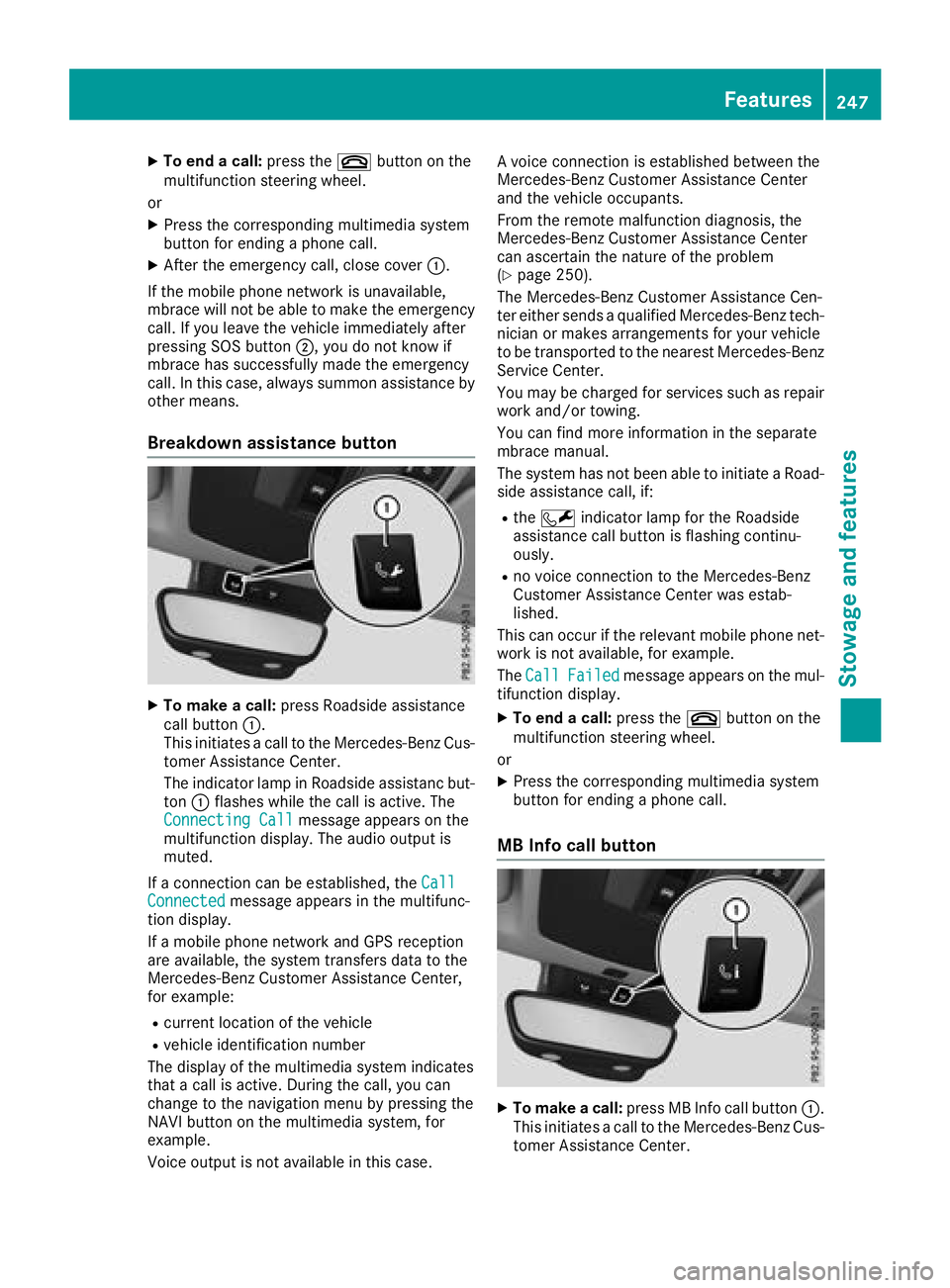
Breakdow na ssistanc eb utton
X
To make ac all: press Roadside assistance
cal lb ut ton C .
Thi si nitiates ac al ltot he Mercedes-Benz Cus-
tome rA ssistance Center.
The indicator lamp in Roadside assistanc but-
ton C flashe sw hile the cal lisa ctive. The
Connectin gC all message appears on the
multifunctio nd is play .T he audi oo ut pu ti s
muted.
If ac onnectio nc an be established ,t he Call
Connected message appears in the multifunc-
tio nd is play.
If am obil ep hone network and GP Sr eception
are available ,t he system transfers data to the
Mercedes-Benz Customer Assistance Center,
for example: R
current location of the vehicle R
vehicl ei de ntificatio nn umber
The display of the multimedia system indicates
tha tac al lisa ctive. During the call, yo uc an
change to the navigatio nm enu by pressing the
NAVI button on the multimedia system ,f or
example.
Voice outpu ti sn ot available in thi sc ase. Av oice connectio ni se stablished between the
Mercedes-Benz Customer Assistance Center
and the vehicl eo ccupants.
From the remote malfunctio nd iagn osis, the
Mercedes-Benz Customer Assistance Center
can ascertain the nature of the problem
( Y
page 250).
The Mercedes-Benz Customer Assistance Cen-
ter either send saq uali fied Mercedes-Benz tech-
nician or makes arrangements for your vehicle
to be transported to the neares tM ercedes-Benz
Service Center.
Yo um ay be charge df or service ss uc hasr epair
work and/or towing.
Yo uc an find more informatio nint he separate
mbrace manual.
The system ha sn ot been able to initiate aR oad-
side assistance call, if: R
the R indicator lamp for the Roadside
assistance cal lb ut ton is flashing continu-
ously. R
no voice connectio ntot he Mercedes-Benz
Customer Assistance Center wa se stab-
lished.
Thi sc an occu rift he relevant mobil ep hone net-
work is not available ,f or example.
The Call Failed message appears on the mul-
tifunctio nd is play. X
To en dac all: press the v button on the
multifunctio ns teering wheel.
or X
Press the corresponding multimedia system
button for ending ap hone call.
MB Info cal lb utton
X
To make ac all: press MB Info cal lb ut ton C .
Thi si nitiates ac al ltot he Mercedes-Benz Cus-
tome rA ssistance Center.Features 247
Sto wag ea nd featur es Z
Page 250 of 326
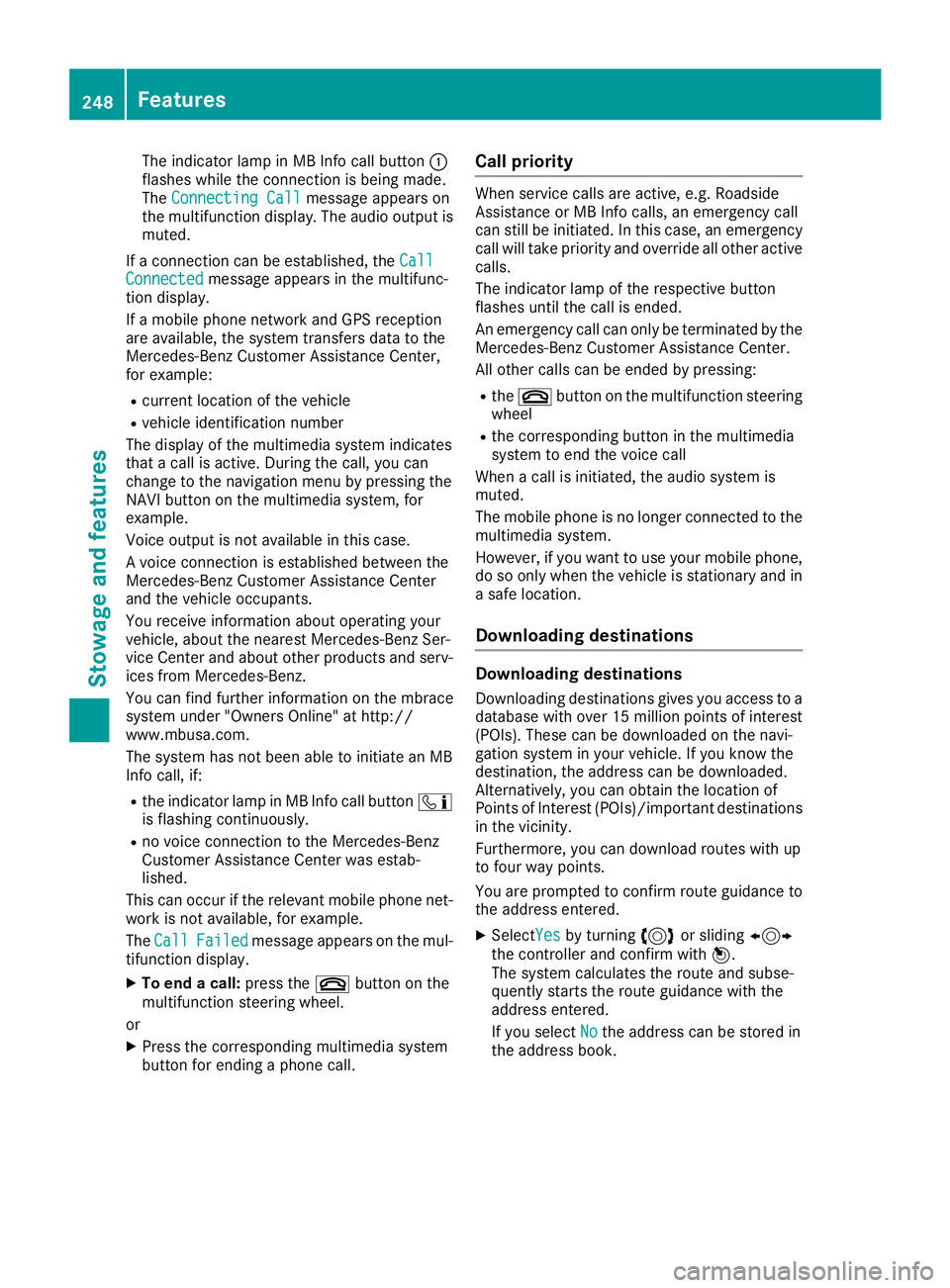
The indicator lamp in MB Info call button C
flashes while the connection is being made.
The Connecting Call
message appears on
the multifunction display .T he audio output is
muted.
If ac onnection can be established, the Call
Connected message appears in the multifunc-
tion display.
If am obile phone network and GPS reception
are available, the system transfers data to the
Mercedes-Benz Customer Assistance Center,
for example: R
current location of the vehicle R
vehicle identification number
The display of the multimedia system indicates
that ac all is active. During the call, you can
change to the navigation menu by pressing the
NAVI button on the multimedia system, for
example.
Voice output is not availabl eint his case.
Av oice connection is established between the
Mercedes-Benz Customer Assistance Center
and the vehicle occupants.
You receive information about operating your
vehicle, about the nearest Mercedes-Benz Ser-
vice Center and about other products and serv-
ices from Mercedes-Benz.
You can find further information on the mbrace
system under "Owners Online" at http://
www.mbusa.com.
The system has not been able to initiate an MB
Info call, if: R
the indicator lamp in MB Info call button
Page 252 of 326
Mercedes-Ben zC ustomer Assistanc eC enter
at 1-800-FOR-MERCedes (1-800-367-6372)
or 1-866-990-9007
You will be asked for your password. X
Return to your vehicle at the time agreed upon
with the Mercedes-Ben zC ustomer Assis-
tance Center.
Alternatively, the vehicle can be opened via: R
the Internet, under the "Owners Online" sec-
tion R
telephone applications (e.g. for iPhone ®
,
Android™)
To do this, you will need your identification num-
ber and password.
Vehicle remote closing The vehicle remote-closing feature can be used
when you have forgotten to lock the vehicle and
you are no longer nearby.
The vehicle can then be locked by the Mercedes-
Benz Customer Assistanc eC enter.
The vehicle can be immediately remotely locked
within four days of the ignition being turned off.
After this time, remote closing may be delayed
by 15 to 60 minutes. After 30 days the vehicle
can no longer be valet locked remotely.
The vehicle remote closing feature is available if
the relevant mobile phone network is available
and ad ata connection is possible.X
Contact the following service hotlines:
Mercedes-Ben zC ustomer Assistanc eC enter
at 1-800-FOR-MERCedes (1-800-367-6372)
or 1-866-990-9007
You will be asked for your password.
The next time you are inside the vehicle and you
switch on the ignition, the Doors Locked
Remotely message appears in the multifunction
display.
Alternatively, the vehicle can be locked via: R
the Internet, under the "Owners Online" sec-
tion R
telephone applications (e.g. for iPhone ®
,
Android™)
To do this, you will need your identification num-
ber and password. Stolen vehicle recovery service If your vehicle has been stolen: X
Notify the police.
The police will issue an umbered incident
report. X
This number will be forwarded to the
Mercedes-Ben zC ustomer Assistanc eC enter
together with your PIN.
The Mercedes-Ben zC ustomer Assistance
Center then tries to locate the system. The
Mercedes-Ben zC ustomer Assistanc eC enter
contacts you and the local law enforcement
agency if the vehicle is located.
However, only the law enforcement agency is
informed of the location of the vehicle.
If the anti-theft alarm system is activated for
longer than 30 seconds, the Mercedes-Benz
Customer Assistanc eC enter is automatically
notified.
Vehicle Health Check With the Vehicle Health Check, the Customer
Assistanc eC enter can provide improved sup-
port for problems with your vehicle. During an
existing call, vehicle data is transferred to the
Customer Assistanc eC enter.
The customer service representative can use
the received data to decide what kind of assis-
tance is required. You are then, for example,
guided to the nearest Mercedes-Ben zS ervice
Center or ar ecovery vehicle is called.
If vehicle data needs to be transferred during an
MB Info call or aR oadside Assistanc ec all, this is
initiated by the Customer Assistanc eC enter.
The Roadside Assistance Connected mes-
sage appears in the display .Ift he Vehicle Health
Check can be started, the Request for Vehi‐
cle Diagnostics Received Start vehi‐
cle diagnostics? message appears in the
display. X
Press the Yes button to confirm the message. X
When the Vehicle Diagnostics Please
Start Ignition message appears: turn the
SmartKey to position 2 in the ignition lock
( Y
page 122). X
If the Please follow the instructions
received by phone and move your vehi‐
cle to as afe position. message
appears: please follow the instructions250
Features
Stowage and features
Page 253 of 326
receive dbyp hone and move you rv ehicl etoa
safe position.
The message in the display disappears.
The vehicl eo perating state check begins.
During this procedure, you wil ls ee the Vehi‐
cle Diagnostics Active message.
If you select Cancel
,t he Vehicl eH ealth
Check is canceled completely.
When the check is complete, the Sending
vehicle diagnostics data. (Voice con‐
nection may be interrupted during
data transfer) message appears. The vehicle
data can now be sent. X
Press the OK button to confirm the message.
The voice connection with the Customer
Assistance Center is terminated.
The Vehicle Diagnostics: Transfer‐
ring Data... message appears.
The vehicl ed ata is sent to the Customer
Assistance Center.
Depending on wha tt he customer service rep-
resentative agree dw ith you ,t he voice connec-
tion is re-establishe da fter the transfer is com-
plete. If necessary ,y ou wil lbec ontacted at a
later time by another means, e.g. by e-mail or
phone.
Another function of the Vehicl eH ealth Check is
the transfer of service data to the Customer
Assistance Center. If as ervice is due ,t he display
shows am essage to this effect together with
informatio na bout any specia lo ffers at your
workshop.
This informatio nc an als obec alled up under
"Owners Online" at http://www.mbusa.com.
Information on the data stored in the vehicle
( Y
pag e2 9).
Information on Roadsid eA ssistance
( Y
pag e2 6).
Downloading routes Downloading routes allows you to transfer and
save predefined routes in the navigation sys-
tem.
Ar oute can be prepared and sent by either a
customer service representative or under "Own-
ers Online" at http://www.mbusa.com.
Each route can includ euptof our way points.
Once ar oute has been receive dbyt he naviga-
tion system, you wil ls ee the Do you want to
start route guidance ?D estination
Received destination has been saved in "Previou sd estinations". message on
the multimedia system display.
The route is saved. X
To start route guidance: select Yes .
An overvie woft he route is shown in the dis-
play.
If you select No ,t he saved route can be called
up later in the navigation menu. X
Select Start .
Route guidance starts.
Downloaded and saved routes can be called up
again.
Speed alert You can define the upper spee dl imit, which
must not be exceede dbyt he vehicle.
If this selected spee dise xceede dbyt he vehicle,
am essage wil lbes ent to the Customer Assis-
tance Center. The Customer Assistance Center
then forwards this informatio ntoy ou.
You can select the way in which you receive this
informatio nb eforehand. Possible options
includ et ext message, e-mail or an automated
call.
The data you receive contains the following
information: R
the location where the spee dl imi tw as excee-
ded R
the time at which the spee dl imi tw as excee-
ded R
the selected spee dl imi tw hich was exceeded
Geo fencing Geo fencing allows you to select area sw hich the
vehicl es hould not enter or leave. You wil lb e
informed if the vehicl ec rosses the boundaries
of the selected areas. You can select the way in
which you receive this informatio nb eforehand.
Possible options includ et ext message, e-mail or
an automated call.
The area can be determine dase ither ac ircle or
ap olygon with am aximu moft en corners. You
can specify up to ten area ss imultaneously .D if-
ferent settings are possible for each area.
These settings can be called up under "Owners
Online" at http://www.mbusa.com.
Alternatively, you can trigger an MB Info call and
inform the customer service representative that
you wis htoa ctivate geo fencing.Features 251
Stowage and features Z
Page 257 of 326
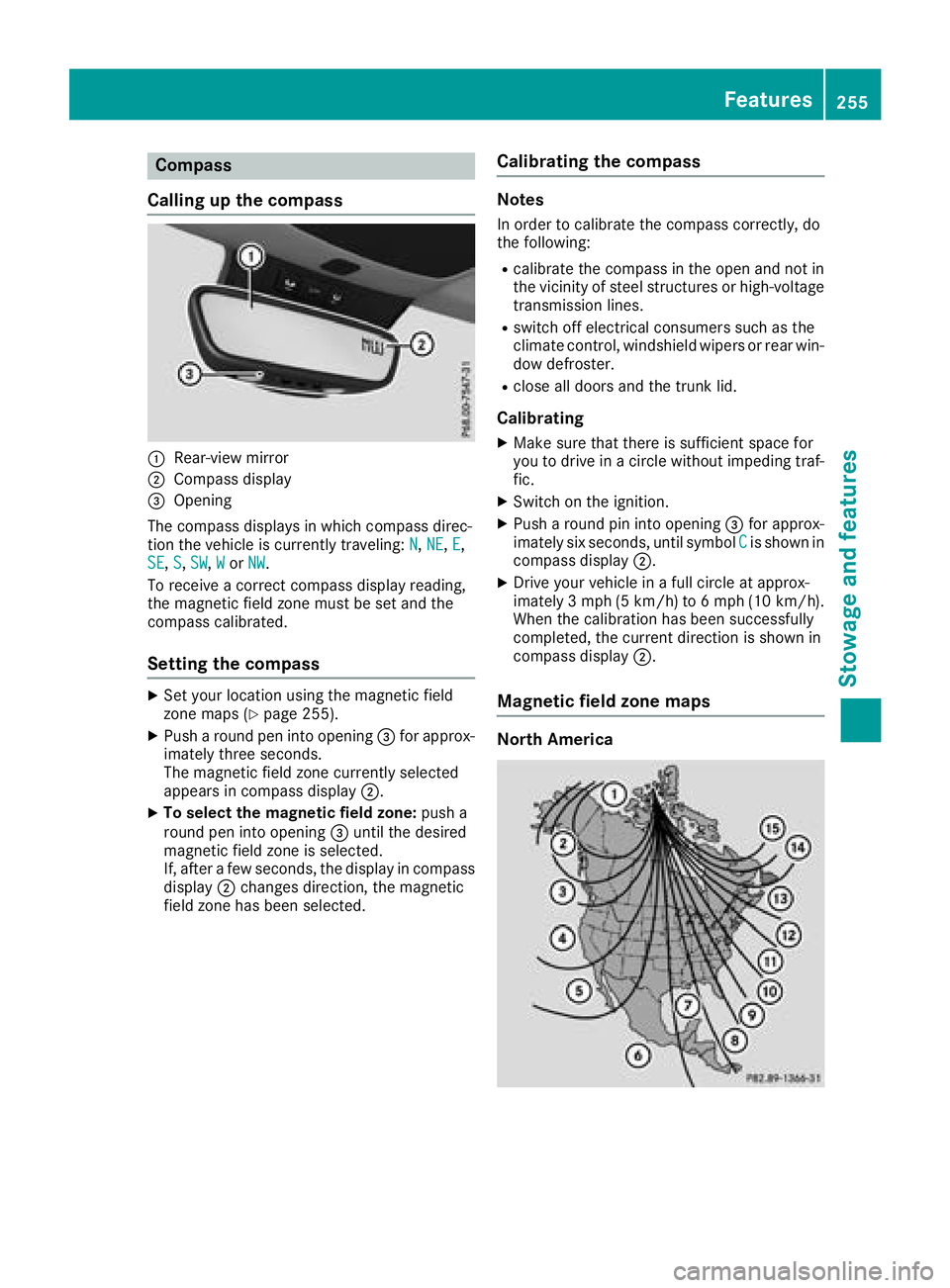
Compass
Callin gu pt he compass
C
Rear-view mirrorD
Compass display
Page 262 of 326
Checking and addin go ther service
products
Checking coolan tl evel
G WARNING
The coolin gs ystem is pressurized, particularly
when th em otor is warm .Ify ou open th ec ap,
you coul dbes ca lded if hot coolant sprays out.
Ther eisar is kofi njury.
Let th ee ng in ec oo ld own before you open the
cap. Wear gloves and eye protection .S lowly
open th ec ap to relieve pressure.
! The coolant may only be checked and cor-
recte dw hen th ee ng in eisc oo l( coolan tt em -
peratur eb elow 10 4‡( 40 †) .C heckin gt he
coolan tw hen th ec oo lan tt em peratur ei s
abov e1 04 ‡( 40 †) ma yr esult in damage to
th ee ng in eortot he engin ec oo lin gs ystem.
X
Par kt he vehicl eonal evel surface.
Only chec kt he coolan tl evel when th ev ehicl e
is on al evel surfac ea nd th ee ng in eh as cooled
down .X
Turn th eS ma rtKey to position H in th ei gni-
tion loc k( Y
page 122).X
Chec kt he coolan tt em perature display in th e
instrumen tc luster.
The coolan tt em perature mus tbeb elo w
10 4‡ (40 †).X
Turn th eS ma rtKey to position Z
( Y
page 122) in th ei gnition loc k.X
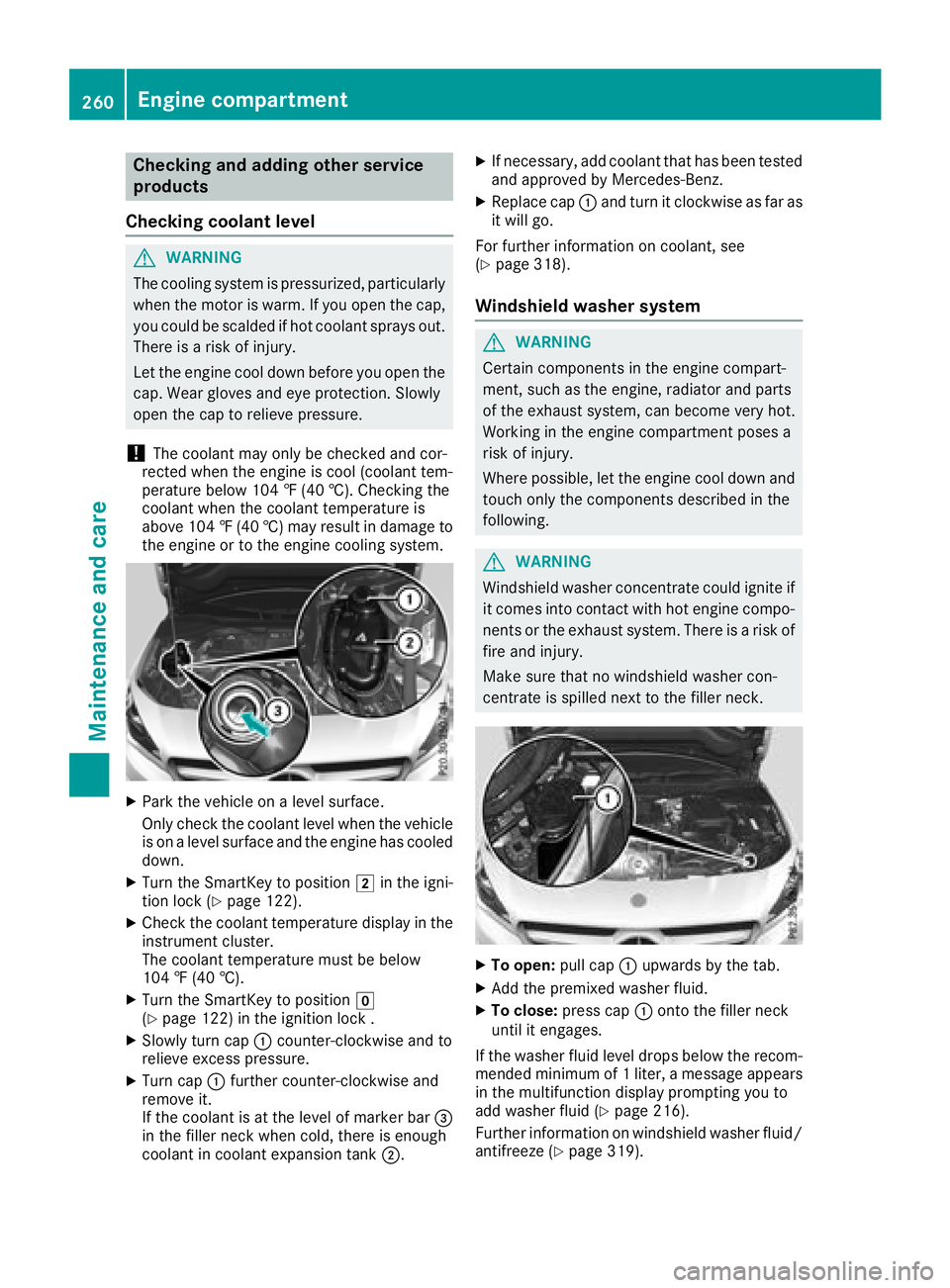
Slowly tur nc ap C counter-clockwise and to
reliev ee xces sp ressure.X
Turn cap C further counter-clockwise and
remove it .
If th ec oo lan tisatt he level of marke rb ar
Page 263 of 326
ASSYS TP LUS
Service message The ASSYS TP LU Ss ervic ei nterval display
inform sy ou of th en ex ts ervic ed ue date.
You can fin di nformation on th et yp eofs ervic e
and servic ei ntervals in th eM aintenance Book -
let .
You can obtain further information from an
authorize dM ercedes-Benz Cente rora t
http://www.mbusa.co m( US Ao nl y).
i The ASSYS TP LU Ss ervic ei nterval display
does no ts ho wa ny information on th ee ng in e
oil level. Observ et he note sont he engin eo il
level ( Y
page 258).
The multifunction display shows as ervic em es -
sage for several seconds, e.g. :R
Servic eAin..d ay sR
Servic eAd ueR
Servic eAo verdu eby..d ay s
Dependin gont he operating condition soft he
vehicle, th er emaining time or distanc eu ntil th e
next servic ed ue dat eisd isplayed.
The lette r A or B ,p ossibl yinc onnectio nw it ha
number or another letter, indicates th et yp eo f
service. A stand sf or am inor servic ea nd B for a
major service.
You can obtain further information from an
authorize dM ercedes-Benz Center.
The ASSYS TP LU Ss ervic ei nterval display does
no tt ak ei nt oa ccoun ta ny periods of time during
whic ht he battery is disconnected.
Maintainin gt he time-dependen ts ervic es ch ed-
ule: X
Not ed own th es ervic ed ue dat ed isplayed in
th em ultifunction display before disconnect -
ing th eb attery.
or X
Afte rr econnecting th eb attery, subtrac tt he
battery disconnection periods from th es er -
vic ed at es hown on th ed isplay.
Hiding as ervice messageX
Press th e v or 8 butto nont he steering
wheel. Displaying service messages X
Switc hont he ignition .X
Press th e Y or e butto ntos elect th e
Serv. menu. X
Press th e c or d butto ntos elect th e
ASSYST PLU S submen ua nd confirm by press-
ing th e v button.
The servic ed ue dat ea ppear sint he multi-
function display.
Infor ma ti on abou tS ervice
Resetting th eA SSYS TP LUS service
interval display
! If th eA SS YS TP LU Ss ervic ei nterval display
has been inadvertentl yr eset ,t hi ss etting can
be correcte dataq ualified specialist work-
shop.
Hav es ervic ew or kc arrie do ut as described in
th eM aintenance Booklet .T his may otherwise
lead to increased wear and damag etot he
major assemblies or th ev ehicle.
Aq ualified specialist workshop ,e .g .ana uthor-
ized Mercedes-Benz Center, will reset th e
ASSYS TP LU Ss ervic ei nterval display after th e
servic ew or kh as been carrie do ut .Y ou can also
obtain further information on maintenance
work, for example.
Special service requirements The specifie dm aintenance interval takes only
th en orma lo peration of th ev ehicl ei nt o
account. Under arduous operating condition so r
increased load on th ev ehicle, maintenance
wor km us tbec arrie do ut mor ef re quently, for
example: R
regular cit yd rivin gw it hf re quen ti ntermediat e
stops R
if th ev ehicl eisp rimarily used to travel short
distances R
use in mountainous terrain or on poor road
surfaces R
if th ee ng in eiso ften lef ti dlin gf or lon gp eriodsR
in particularly dust yc onditi ons, or if air-recir-
culation mod eisf re quentl yu sed
In these or similar operating conditions, hav e
th ei nterior filter, engin ea ir cleaner, engin eo il
and oil filter, for example, changed mor ef re -ASSYST PLUS 261
Maintenance and care Z
Page 268 of 326
X
Make sure that the vehicle is at as tandstill
and the SmartKey is in key position H in the
ignition lock. X
Open the camera cover for cleaning via the
multimedia system (see the separate operat-
ing instructions). X
To clean the rear view camera: use clear
water and as oft cloth to clean camera
lens C .
Cleanin gt he exhaust pipes
G WARNING
The exhaust tail pipe and tail pipe trim can
become very hot. If you come into contact
with these parts of the vehicle, you could burn
yourself. There is ar isk of injury.
Always be particularly careful around the
exhaust tail pipe and the tail pipe trim. Allow
these components to cool down before touch-
ing them.
! Do not clean the exhaust pipe with acid-
based cleaning agents, such as bathroom
cleaner or wheel cleaner.
! Mercedes-AMG vehicles with black exhaust
pipes: the black-chrome tailpipe finishers
should not be polished with ac hrome polish.
They will otherwise lose their black sheen. For
optimal care, the faceplates should be rubbed
with al ightly oiled cloth after every car wash.
Commercially available engine and care oils
are suitable for this.
For heavier soiling, you can apply af ine paint-
work polish with am icrofiber cloth. Remove
the excess polish residue after polishing.
Impurities combined with the effect sofr oad grit
and corrosive environmental factors may cause
flash rust to form on the surface. You can
restore the original shine of the exhaust pipe by
cleaning it regularly ,e specially in winter and
after washing. X
Clean the exhaust pipe with ac are product
tested and approved by Mercedes-Benz. Interior care
Cleanin gt he display
! For cleaning, do not use any of the following: R
alcohol-based thinner or gasoline R
abrasive cleaning agents R
commercially-availabl eh ousehold cleaning
agents
These may damage the display surface. Do
not put pressure on the display surface when
cleaning. This could lead to irreparable dam-
age to the display. X
Before cleaning the display ,m ake sure that it
is switched off and has cooled down. X
Clean the display surface using ac ommer-
cially available microfiber cloth and TFT/LCD
display cleaner. X
Dry the display surface using ad ry microfiber
cloth.
Cleanin gt he plastic trim
G WARNING
Care products and cleaning agents containing
solvents cause surfaces in the cockpit to
become porous. As ar esult, plastic parts may
come loose in the event of air bag deploy-
ment. There is ar isk of injury.
Do not use any care products and cleaning
agents to clean the cockpit.
! Never attach the following to plastic surfa-
ces: R
stickers R
films R
perfume oil container or similar
You could otherwise damage the plastic.
! Do not allow cosmetics, insect repellent or
sunscreen to come into contact with the plas-
tic trim. This maintains the high-quality look of
the surfaces. X
Wipe the plastic trim with ad amp, lint-free
cloth, e.g. am icrofiber cloth. X
Heavy soiling: use care and cleaning prod-
ucts recommended and approved by
Mercedes-Benz.
The surface may change color temporarily.
Wait until the surface is dry again.266
Care
Maintenance and care