ignition MERCEDES-BENZ CLA 2018 Owner's Manual
[x] Cancel search | Manufacturer: MERCEDES-BENZ, Model Year: 2018, Model line: CLA, Model: MERCEDES-BENZ CLA 2018Pages: 326, PDF Size: 7.97 MB
Page 122 of 326
i If you activate the residual heat function at
high temperatures, only the ventilation wil lb e
activated. The blower runs at mediu ms peed.
i You cannot use the ventilation to cool the
vehicle interior to at emperature lowe rt han
the outsid et emperature.
Activating/deactivating X
Turn the SmartKey to position Z in the igni-
tion lock or remove it ( Y
page 122).X
Press the K button.
The indicator lamp in the K button lights
up or goes out.
The indicator lamp in the button indicates that
the respective function is activated.
i Residua lh eat is deactivated automatically:R
after approximately 30 minutes R
when the ignition is switched on R
if the battery voltage drops
Air vents
Important safety notes
G WARNING
Very hot or very cold air can flow from the air
vents. This could resul tinb urns or frostbite in
the immediate vicinity of the air vents. There
is ar isk of injury.
Make sure that all vehicle occupants always
maintain as ufficient distance to the air out-
lets. If necessary ,r edirect the airflow to
another area of the vehicle interior.
In order to ensure the direct flow of fresh air
through the air vents into the vehicle interior,
please observe the following notes: R
keep the air inlet between the windshield and
the hood free of blockages, such as ice, snow
or leaves. R
never cover the air vents or air intake grilles in
the vehicle interior.
i For optimal climate control in the vehicle,
open the air vents completely and set the
adjusters to the central position. Setting the air vents
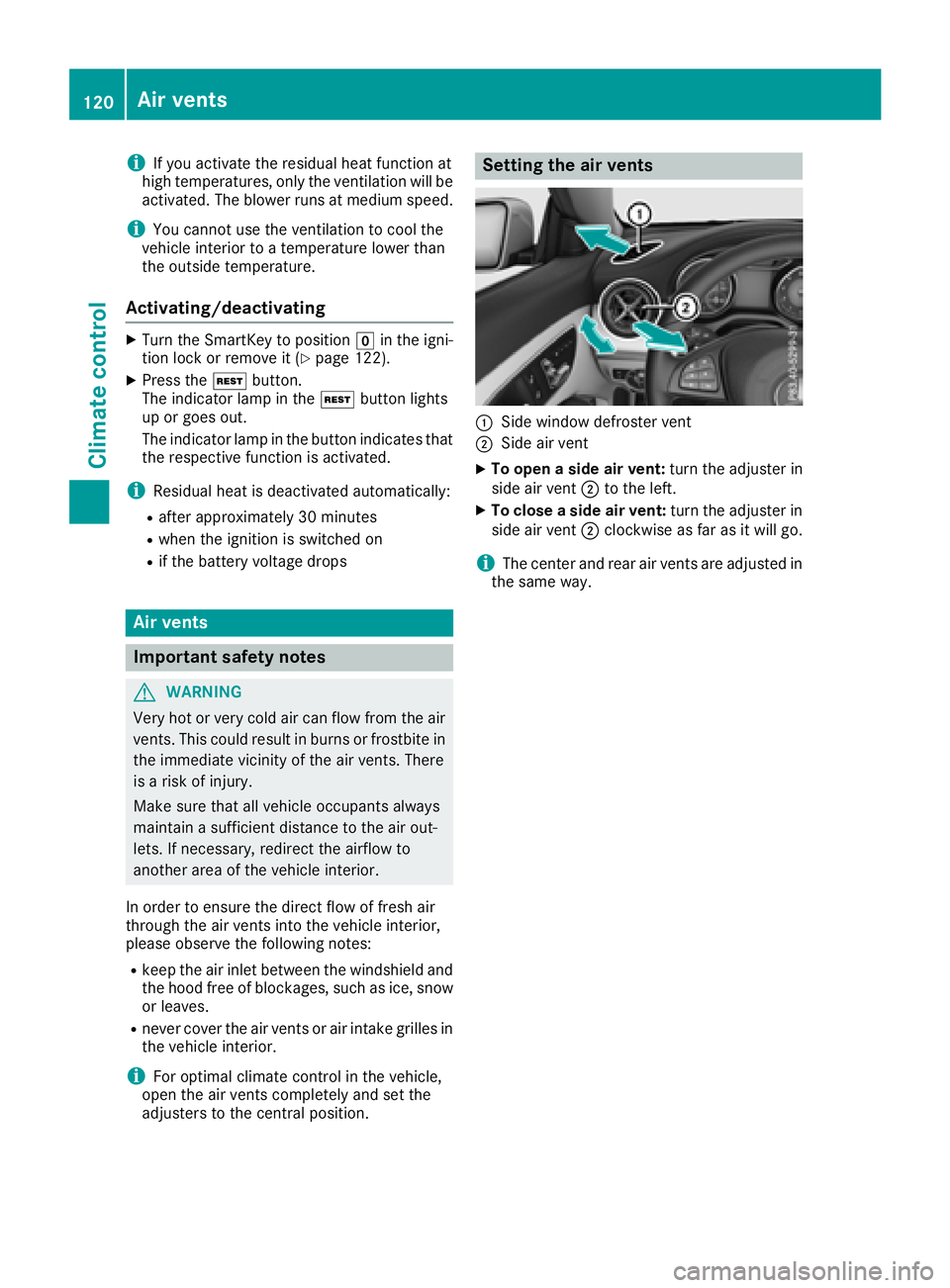
C
Side window defroster vent D
Side air vent X
To open as ide air vent: turn the adjuster in
side air vent D to the left. X
To close as ide air vent: turn the adjuster in
side air vent D clockwise as far as it wil lg o.
i The center and rear air vents are adjusted in
the same way.120
Ai rv ents
Climate control
Page 124 of 326
! Do not warm up the engine with the vehicle
stationary. Drive off immediately .A void high
engine speeds and driving at full throttle until
the engine has reached its operating temper-
ature.
Only shift the automatic transmission to the
desired drive position when the vehicle is sta-
tionary.
Where possible ,a void spinning the drive
wheels when pulling awa yons lippery roads.
You could otherwise damage the drive train.
! Mercedes-AMG vehicles: avoid full-load
operation and engine speeds greater than
5000 rpm when the engine is cold. This helps
to protect the engine and avoids uncomfort-
able driving.
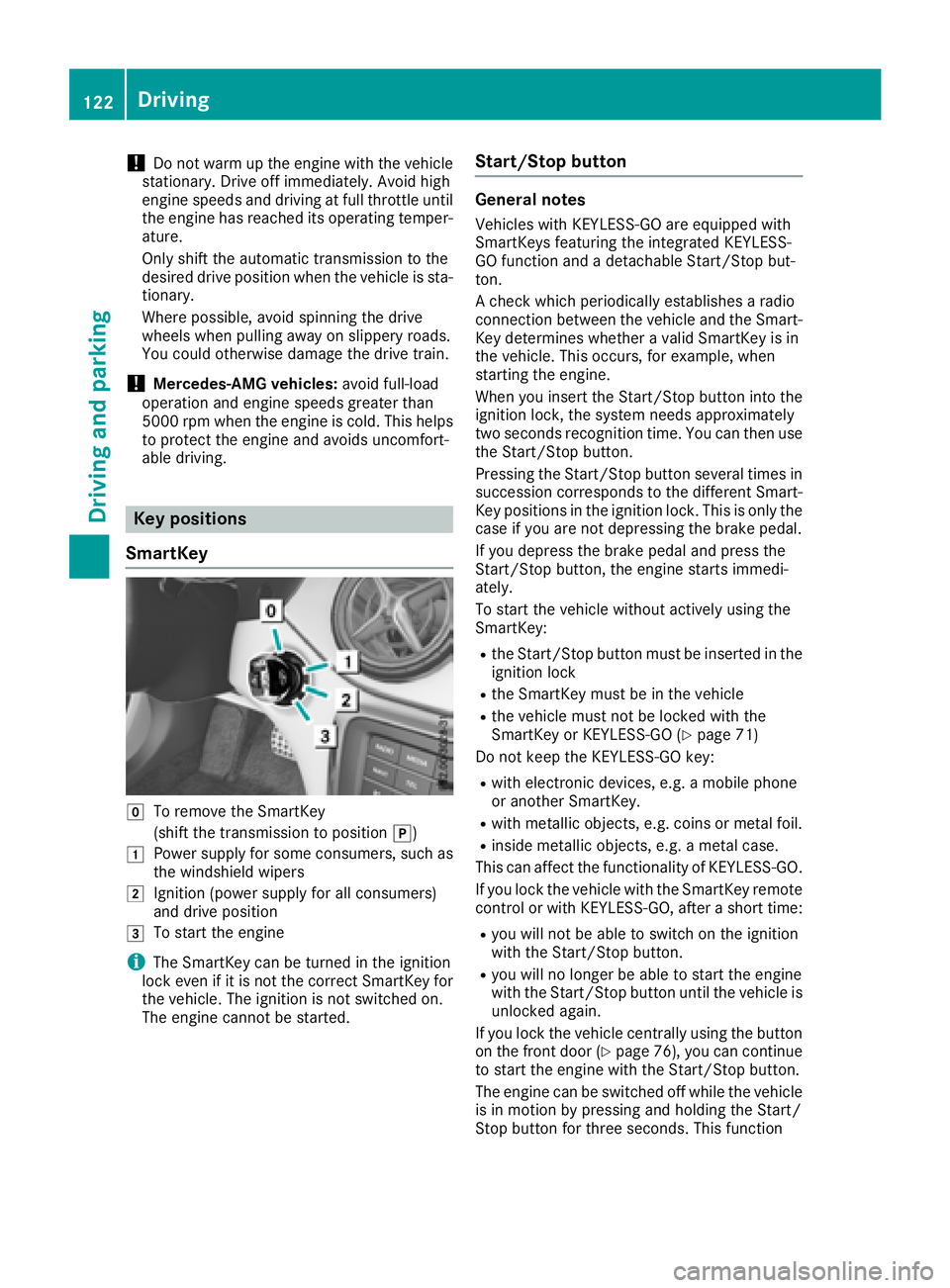
Key positions
SmartKey
Z
To remove the SmartKey
(shift the transmission to position ] )G
Power suppl yf or some consumers, such as
the windshiel dw ipersH
Ignition (power suppl yf or all consumers)
and drive position
I
To start the engine
i The SmartKey can be turned in the ignition
lock even if it is not the correct SmartKey for
the vehicle. The ignition is not switched on.
The engine cannot be started. Start/Stop button General notes Vehicles with KEYLESS-GO are equipped with
SmartKeys featuring the integrated KEYLESS-
GO function and ad etachable Start/Stop but-
ton.
Ac heck which periodically establishes ar adio
connection between the vehicle and the Smart-
Key determines whether av alid SmartKey is in
the vehicle. This occurs, for example, when
starting the engine.
When you insert the Start/Stop button into the
ignition lock, the system needs approximately
two seconds recognition time. You can then use
the Start/Stop button.
Pressing the Start/Stop button several times in
succession corresponds to the different Smart-
Key positions in the ignition lock. This is only the
case if you are not depressing the brake pedal.
If you depress the brake pedal and press the
Start/Stop button, the engine starts immedi-
ately.
To start the vehicle without actively using the
SmartKey: R
the Start/Stop button must be inserted in the
ignition lock R
the SmartKey must be in the vehicle R
the vehicle must not be locked with the
SmartKey or KEYLESS-GO ( Y
page 71)
Do not keep the KEYLESS-GO key: R
with electronic devices, e.g. am obile phone
or another SmartKey. R
with metallic objects, e.g. coins or metal foil. R
inside metallic objects, e.g. am etal case.
This can affect the functionality of KEYLESS-GO.
If you lock the vehicle with the SmartKey remote
control or with KEYLESS-GO, after as hort time:R
you will not be able to switch on the ignition
with the Start/Stop button. R
you will no longer be able to start the engine
with the Start/Stop button until the vehicle is
unlocked again.
If you lock the vehicle centrally using the button
on the front door ( Y
page 76), you can continue
to start the engine with the Start/Stop button.
The engine can be switched off while the vehicle
is in motion by pressing and holding the Start/
Stop button for three seconds. This function122
Driving
Driving and parking
Page 125 of 326
operates independently of the ECO start/stop
automatic engine switch-off function.
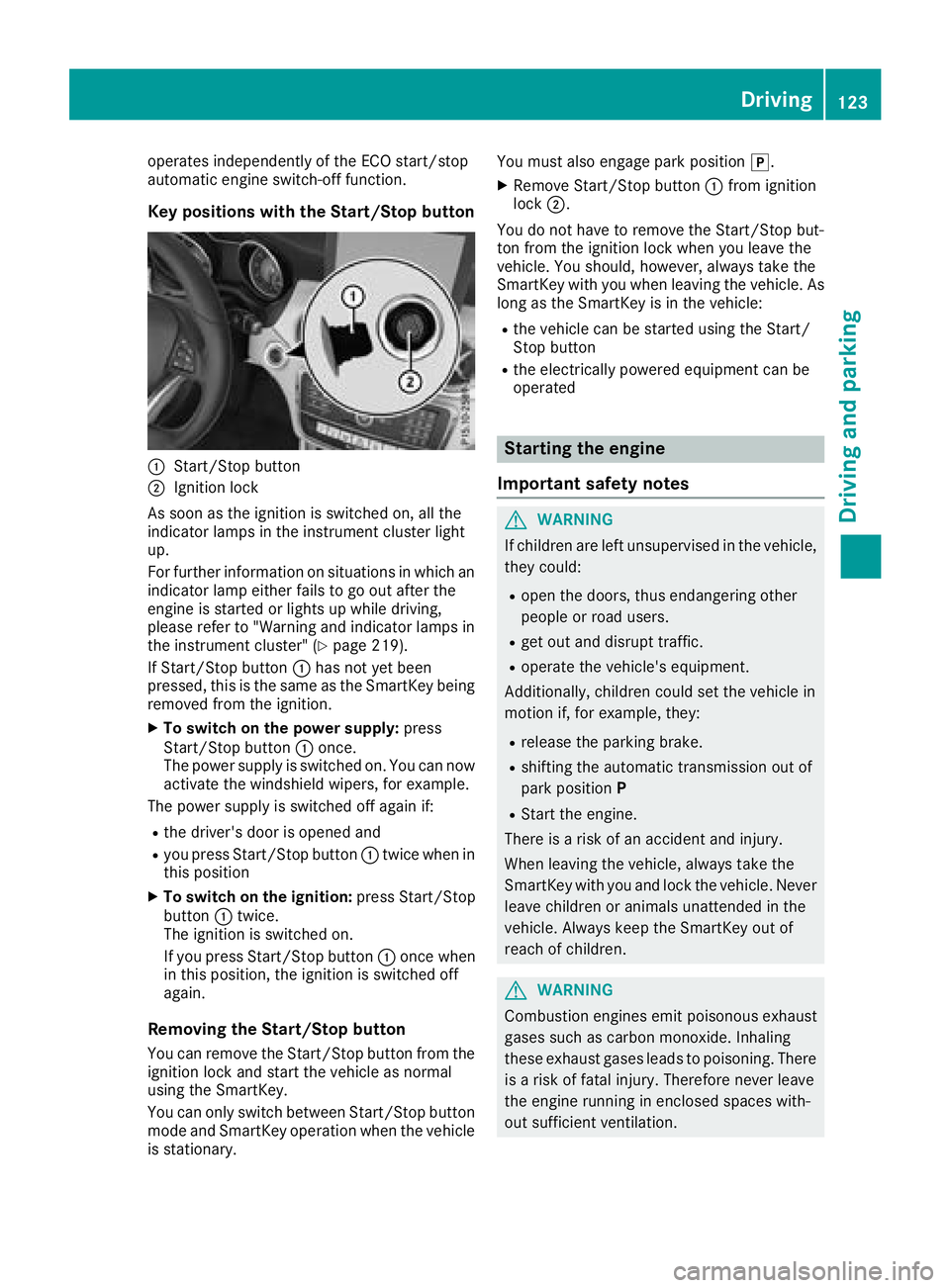
Key positions with the Start/Stop button
C
Start/Stop buttonD
Ignition lock
As soon as the ignition is switched on, all the
indicator lamps in the instrument cluster light
up.
For further information on situations in which an
indicator lamp either fails to go out after the
engine is started or lights up while driving,
please refer to "Warning and indicator lamps in
the instrument cluster" ( Y
page 219).
If Start/Stop button C has not yet been
pressed, this is the same as the SmartKey being
removed from the ignition. X
To switch on the power supply: press
Start/Stop button C once.
The power supply is switched on. You can now
activate the windshield wipers, for example.
The power supply is switched off again if: R
the driver's door is opened and R
you press Start/Stop button C twice when in
this position X
To switch on the ignition: press Start/Stop
button C twice.
The ignition is switched on.
If you press Start/Stop button C once when
in this position, the ignition is switched off
again.
Removing the Start/Stop button
You can remove the Start/Stop button from the
ignition lock and start the vehicle as normal
using the SmartKey.
You can only switch between Start/Stop button
mode and SmartKey operation when the vehicle
is stationary. You must also engage park position ] .X
Remove Start/Stop button C from ignition
lock D .
You do not have to remove the Start/Stop but-
ton from the ignition lock when you leave the
vehicle. You should, however, alway st ake the
SmartKey with you when leaving the vehicle. As
long as the SmartKey is in the vehicle: R
the vehicle can be started using the Start/
Stop button R
the electrically powered equipment can be
operated
Starting the engine
Important safety notes
G WARNING
If children are left unsupervised in the vehicle,
they could: R
open the doors, thus endangering other
people or road users. R
get out and disrupt traffic. R
operate the vehicle's equipment.
Additionally, children could set the vehicle in
motion if, for example, they: R
release the parking brake. R
shifting the automatic transmission out of
park position P R
Start the engine.
There is ar isk of an accident and injury.
When leaving the vehicle, alway st ake the
SmartKey with you and lock the vehicle. Never
leave children or animals unattended in the
vehicle. Always keep the SmartKey out of
reach of children.
G WARNING
Combustion engines emit poisonous exhaust
gases such as carbon monoxide. Inhaling
these exhaust gases leads to poisoning. There
is ar isk of fatal injury. Therefore never leave
the engine runnin gine nclosed spaces with-
out sufficient ventilation. Driving 123
Driving and parking Z
Page 141 of 326
You must make sure that fuel does not come
int oc ontac tw ith your skin ,e yes or clothing
and that it is not swallowed. Do not inhale fuel
vapors .K eep fuel away from children.
If you or others com ei nt oc ontac tw ith fuel,
observ et he following:R
Wash away fuel from skin immediately
using soap and water. R
If fuel comes int oc ontac tw ith your eyes,
immediately rinse the mt horoughly with
clean water. Seek medical assistanc ew ith-
out delay. R
If fuel is swallowed, seek medical assis-
tance without delay. Do not induc ev omit-
ing. R
Immediately change out of clothing which
has com ei nt oc ontac tw ith fuel.
G WARNING
Electrostatic buildup can create spark sa nd
ignit ef uel vapors .T here is ar isk of fire and
explosion.
Always touc ht he vehicle body befor eo pening
the fuel filler flap or touching the fuel pump
nozzle. An ye xisting electrostatic buildup is
thereby discharged.
! Do not use diesel to refuel vehicles with a
gasolin ee ngine. Do not switc hont he ignition
if you accidentally refuel with the wron gf uel.
Otherwise, the fuel will enter the fuel system.
Even small amount soft he wron gf uel could
result in damage to the fuel syste ma nd the
engine. Notify aq ualified specialis tw orkshop
and have the fuel tan ka nd fuel lines drained
completely.
! Overfilling the fuel tan kc ould damage the
fuel system.
! Take care not to spill any fuel on painted
surfaces. You could otherwise damage the
paintwork.
! Use af ilter when adding fuel from af uel can.
The fuel lines and/or the fuel injection system
could otherwise be blocked by particles from
the fuel can. Do not get int ot he vehicle again during the refu-
eling process. Otherwise, electrostatic charge
could build up again.
If you overfill the fuel tank, fuel could spray out
when the fuel pump nozzle is removed.
For further information on fuel and fuel quality
( Y
page 315).
Refueling
Genera li nformationPay attention to the importan ts afet yn otes
( Y
page 138).
The fuel filler flap is unlocked/locked automat-
ically when you unlock/lock the vehicle with the
SmartKey.
The position of the fuel filler cap is displayed
Page 143 of 326
Parking
Important safety notes
G WARNING
Flammable material such as leaves, grass or
twigs may ignite if they come into contact with
hot parts of the exhaust system or exhaust
gas flow. There is ar isk of fire.
Park the vehicle so that no flammable mate-
rials come into contact with parts of the vehi-
cle which are hot. Take particular care not to
park on dry grassland or harvested grain
fields.
G WARNING
If you leave children unsupervised in the vehi-
cle, they could set it in motion by, for example: R
release the parking brake. R
shift the automatic transmission out of the
parking position P .R
start the engine.
In addition, they may operate vehicle equip-
ment and become trapped. There is ar isk of
an accident and injury.
When leaving the vehicle, always take the
SmartKey with you and lock the vehicle. Never
leave children unsupervised in the vehicle.
! Always secure the vehicle correctly against
rolling away .O therwise, the vehicle or its driv-
etrain could be damaged.
To ensure that the vehicle is secured against
rolling away unintentionally: R
the electric parking brake must be applied. R
the transmission must be in position ] and
the transmission position display must show
] in the multifunction display. R
the SmartKey must be removed from the igni-
tion lock. R
on uphill or downhill gradients, the front
wheels must be turned towards the curb. Switching off the engine
Important safety notes
G WARNING
The automatic transmission switches to neu-
tral position N when you switch off the engine.
The vehicle may roll away .T here is ar isk of an
accident.
After switching off the engine, always switch
to parking position P .P revent the parked vehi-
cle from rolling away by applying the parking
brake.
Automatic transmission X
Apply the electric parking brake. X
All vehicles (except Mercedes-AMG vehi-
cles): shift the transmission to position ] .
X
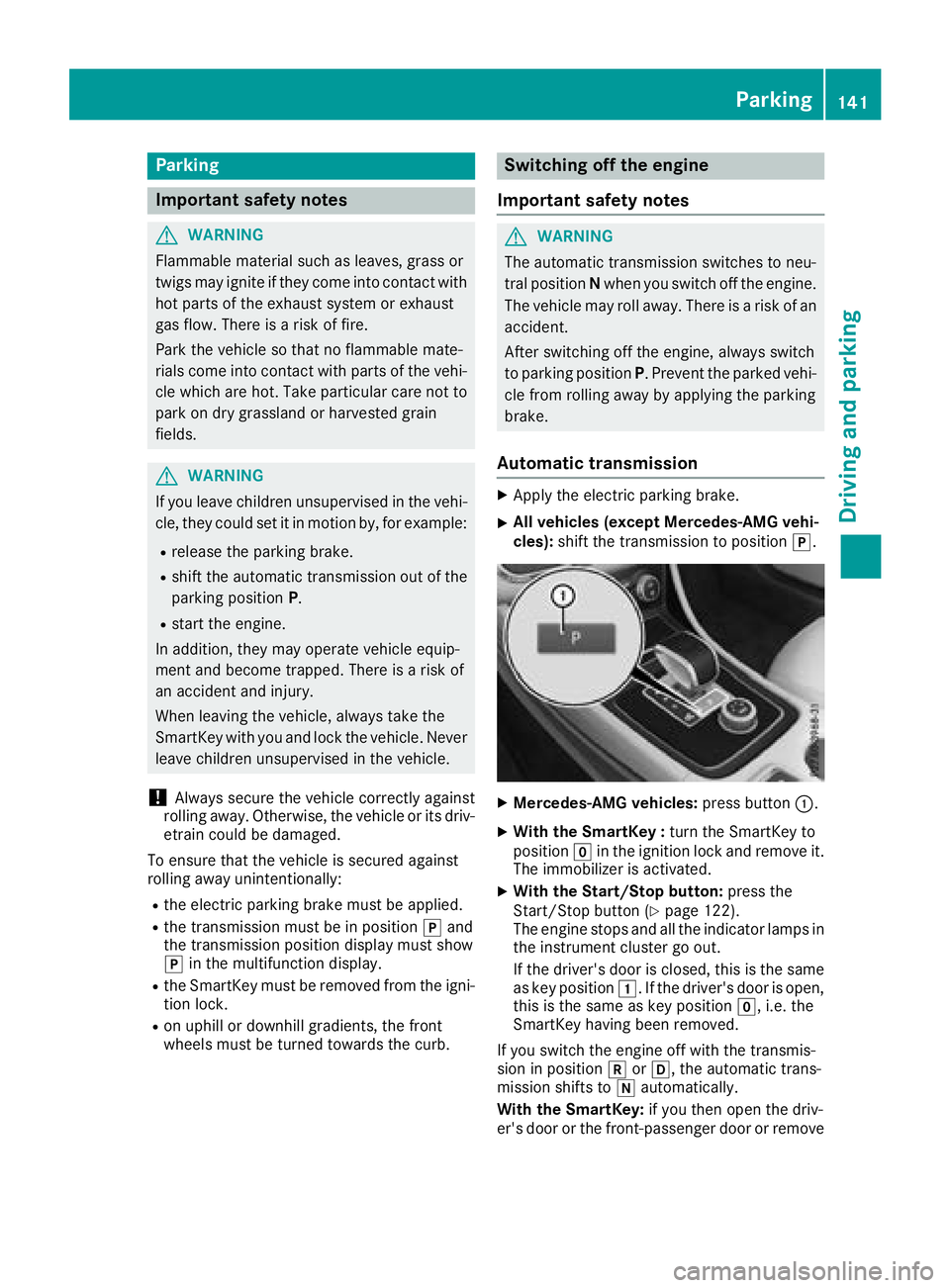
Mercedes-AMG vehicles: press button C .X
With the SmartKey : turn the SmartKey to
position Z in the ignition lock and remove it.
The immobilizer is activated. X
With the Start/Stop button: press the
Start/Stop button ( Y
page 122).
The engine stops and all the indicator lamps in
the instrumen tc luster go out.
If the driver's door is closed, this is the same
as key position G .Ift he driver's door is open,
this is the same as key position Z ,i .e. the
SmartKey having been removed.
If you switch the engine off with the transmis-
sion in position ^ or [ ,t he automatic trans-
mission shifts to \\ automatically.
With the SmartKey: if you then open the driv-
er's door or the front-passenger door or remove Parking 141
Driving and parking Z
Page 144 of 326
![MERCEDES-BENZ CLA 2018 Owners Manual the SmartKe yf ro mt he ignition, the automatic
transmission shifts to ] automatically.
With the Start/Sto pb utton: if yo ut he no pe n
the driver's door or the front-passenge rd oo r,
the autom](/img/4/59040/w960_59040-143.png "MERCEDES-BENZ CLA 2018 Owners Manual the SmartKe yf ro mt he ignition, the automatic
transmission shifts to ] automatically.
With the Start/Sto pb utton: if yo ut he no pe n
the driver's door or the front-passenge rd oo r,
the autom")
the SmartKe yf ro mt he ignition, the automatic
transmission shifts to ] automatically.
With the Start/Sto pb utton: if yo ut he no pe n
the driver's door or the front-passenge rd oo r,
the automatic transmission shifts to ] auto-
matically.
If yo uw an tt he automatic transmission to
remai ninn eutral \\ ,e .g .w he nh av in gt he vehi-
cle cleane dinana ut omatic car wash with a
towing system: X
Vehicle sw it ht he Start-Sto pb utton:
remove the Start-Stop button fro mt he igni-
tio nl oc k.X
Insert the SmartKe yi nto the ignition lock.X
Al lv eh icles: switch the ignition on.X
Depres st he brake peda la nd kee pi t
depressed. X
Engage neutral \\ .X
Releas et he brake pedal.X
Releas et he electri cp ar king brake.X
Switch off the ignition and leav et he SmartKey
in the ignition lock.
Electric parking brake
General notes
G WARNING
If yo ul eave children unsupervised in the vehi-
cle ,t he yc ould se titinm otion by ,f or example:R
release the parking brake. R
shift the automatic transmission ou toft he
parking position P .R
start the engine.
In addition, the ym ay operate vehicl ee quip-
ment and become trapped .T here is ar is ko f
an accident and injury.
When leaving the vehicle, always take the
SmartKe yw it hy ou and lock the vehicle. Never
leav ec hildren unsupervised in the vehicle. The functio noft he electric parking brake is
dependent on the on-board voltage. If the on-
boar dv oltag eisl ow or there is am al functio ni n
the system, it ma yn ot be possibl etoa pply the
release dp ar king brake. X
If thi sist he case, onl yp ar kt he vehicl eo n
level ground and secur eittop revent it rolling
away. X
Shift the automatic transmission to position
] .
It ma yn ot be possibl etor elease an applied
parking brake if the on-board voltag eisl ow or
there is am al functio nint he system. Contact a
qualified specialis tw or kshop.
The electric parking brake performs af un ction
tes tatr egular intervals whil et he engine is
switched off .T he sound st ha tc an be he ar dw hile
thi siso ccurring ar en ormal.
Applyin gorr eleasing manually
X
To engage: push handle C .
When the electric parking brake is applied,
the red I (USA only) or $ (Canada
only) indicator lamp lights up in the instru-
ment cluster.
Th ee le ctric parking brake can also be applied
when the SmartKe yisr emoved.X
To release: pull handle C .
The red I (USA only) or $ (Canada
only) indicator lamp in the instrument cluster
goes out.
Th ee le ctric parking brake can onl yb e
released: R
if the SmartKe yisinp osit ion G or H in
the ignition lock ( Y
page 122 )o rR
if the ignition wa ss wi tched on using the
Start/Stop button142
Parking
Driving an dp arking
Page 146 of 326
Drivin gt ip s
General notes
Important safet yn otes
G WARNING
If you switch of ft he ignition whil ed riving,
safety-relevant function sa re only available
wit hl imitations, or no tata ll. Thi sc ou ld affect,
fo re xa mple, th ep owe rs te erin ga nd th eb rake
boostin ge ffect. You will require considerably
more effort to steer and brake .T here is ar is k
of an accident.
Do no ts witch of ft he ignition whil ed riving.
G WARNING
If you operat em ob ile communication equip -
men tw hen driving, you may be distracted
from th et ra ffic situation .Y ou could also los e
contro loft he vehicle. There is ar is kofa n
accident.
Only operat et hi se quipmen tw hen th ev ehicle
is stationary.
Observ et he lega lr equirements fo rt he country
in whic hy ou are driving. Some jurisdiction sp ro -
hibi tt he driver from usin gam ob ile phone whil e
drivin gav ehicle.
If you mak eac al lw hil ed riving, always use
hands-free mode. Only operat et he telephon e
when th et ra ffic situation permits. If you are
unsure ,p ull over to as af el ocation and stop
befor eo peratin gt he telephone.
Bear in min dt ha tatas peed of only 30 mph
(approximately 50 km/h), th ev ehicle cover sa
distanc eo f4 4f t( approximately 14 m) per sec-
ond.
Drive sensibly –s ave fuelObserve the following tips to save fuel: R
The tires should always be inflated to the rec-
ommended tire pressure. R
Remove unnecessary loads. R
Remove roof rack sw hen they are not needed.R
Warm up the engin eatl ow engin es peeds.R
Avoid frequen ta cceleration or braking.R
Have all maintenanc ew ork carried out as
indicated by the servic ei ntervals in the Main- tenance Booklet or by the servic ei nterval dis-
play.
Fuel consumption also increases when driving in
cold weather, in stop-start traffic and in hilly ter-
rain.
Drinking and driving
G WARNING
Drinkin ga nd driving and/or takin gd rugs and
driving are very dangerous combinations.
Even as mall amount of alcohol or drugs can
affect your reflexes, perceptions and judg-
ment.
The possibility of as erious or even fatal acci-
dent is greatly increased when you drink or
take drugs and drive.
Do not drink or take drugs and drive or allow
anyone to drive who has been drinking or tak-
ing drugs.
Emission control
G WARNING
Combustion engines emit poisonous exhaust
gases such as carbon monoxide. Inhaling
these exhaust gases leads to poisoning. There
is ar isk of fatal injury. Therefor en ever leave
the engin er unning in enclosed spaces with-
out sufficien tv entilation.
Certain engin es ystems are designed to keep
the level of poisonous component sine xhaust
fumes within legal limits.
These systems only work at peak efficiency if
they are serviced exactly in accordance with the
manufacturer's specifications .A lways have
work on the engin ec arried out at aq ualified
specialist workshop. Mercedes-Benz recom-
mends that you use an authorized Mercedes-
Ben zC enter for this purpose. In particular, work
relevant to safety or on safety-related systems
must be carried out at aq ualified specialist
workshop.
The engin es ettings must not be changed under
any circumstances. Furthermore, all specific
servic ew ork must be carried out at regular
intervals and in accordance with the Mercedes-
Ben zs ervic er equirements. Details can be found
in the Maintenance Booklet.144
Driving tips
Driving and parking
Page 163 of 326
Selecting Sport mode The firmer settin goft he suspension tuning in
the Sport drive program ensures even better
contact with the road. Select this drive program
when employing as porty driving style, e.g. on
winding countr yr oads.X
Press DYNAMI CS ELECT button ( Y
page 128)
as many times as necessary until the Sport
drive program is selected.
Parking Assist PARKTRONIC
Important safety notes Parking Assist PARKTRONIC is an electronic
parking aid with ultrasound. It monitor st he area
around your vehicle using six sensors in the
front bumper and six sensors in the rear
bumper. Parking Assist PARKTRONIC visually
and audibly indicates the distance between your
vehicle and an object.
Parking Assist PARKTRONIC is only an aid. It is
not ar eplacement for your attention to your
immediate surroundings. You are always
responsible for safe maneuvering, parking and
exiting ap arking space. Make sure that there
are no persons, animals or object sint he maneu-
vering area while maneuvering and parking in/
leaving parking spaces.
! When parking, pay particular attention to
object sa bove or below the sensors, such as
flower pots or trailer drawbars. Parking Assist
PARKTRONIC does not detect such objects
when they are in the immediate vicinity of the
vehicle. You could damage the vehicle or the
objects.
The sensors may not detect snow and other
object st hat absorb ultrasonic waves.
Ultrasonic sources such as an automatic car
wash, the compressed-air brakes of at ruck or
ap neumatic drill could cause Parking Assist
PARKTRONIC to malfunction.
Parking Assist PARKTRONIC may not function
correctly on uneven terrain.
Parking Assist PARKTRONIC is activated auto-
matically when you: R
switch on the ignition R
shift the transmission to position [ , ^ or
\\ R
release the electric parking brake Parking Assist PARKTRONIC is deactivated at
speeds above 11 mph (18 km/h). It is reactiva-
ted at lower speeds.
Range of the sensors General notes Parking Assist PARKTRONIC does not take into
account obstacles located: R
below the detection range, e.g. people, ani-
mals or objects. R
above the detection range, e.g. overhanging
loads, tail section sorl oading ramps of trucks.
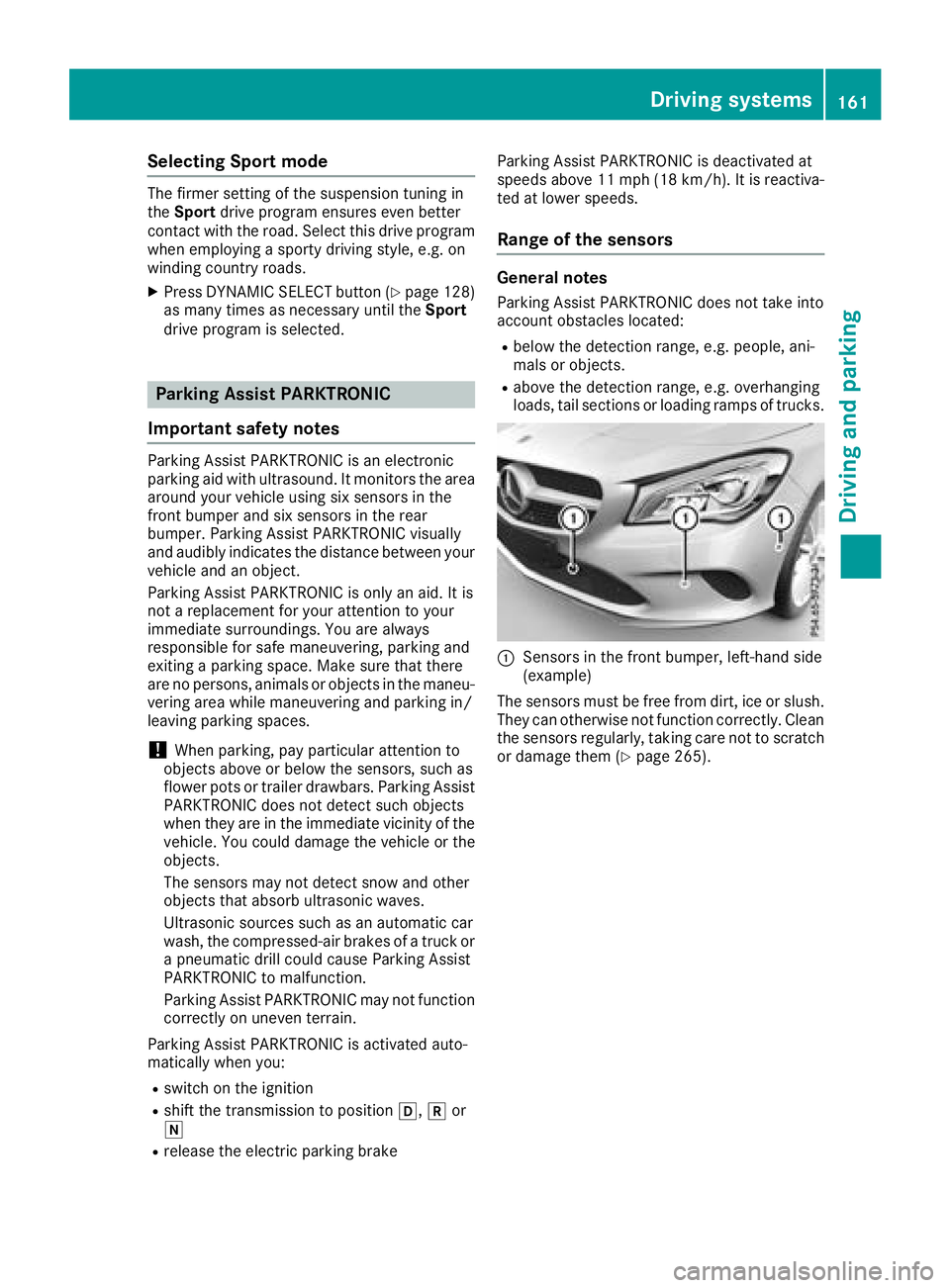
C
Sensors in the front bumper, left-hand side
(example)
The sensors must be free from dirt, ice or slush.
They can otherwise not function correctly. Clean
the sensors regularly ,t aking care not to scratch
or damage them ( Y
page 265).Driving systems 161
Driving and parking Z
Page 165 of 326
becomes .W hen the minimum distance is
reached, you hear ac ontinuous warning tone.
Deactivating or activating Parking
Assist PARKTRONIC
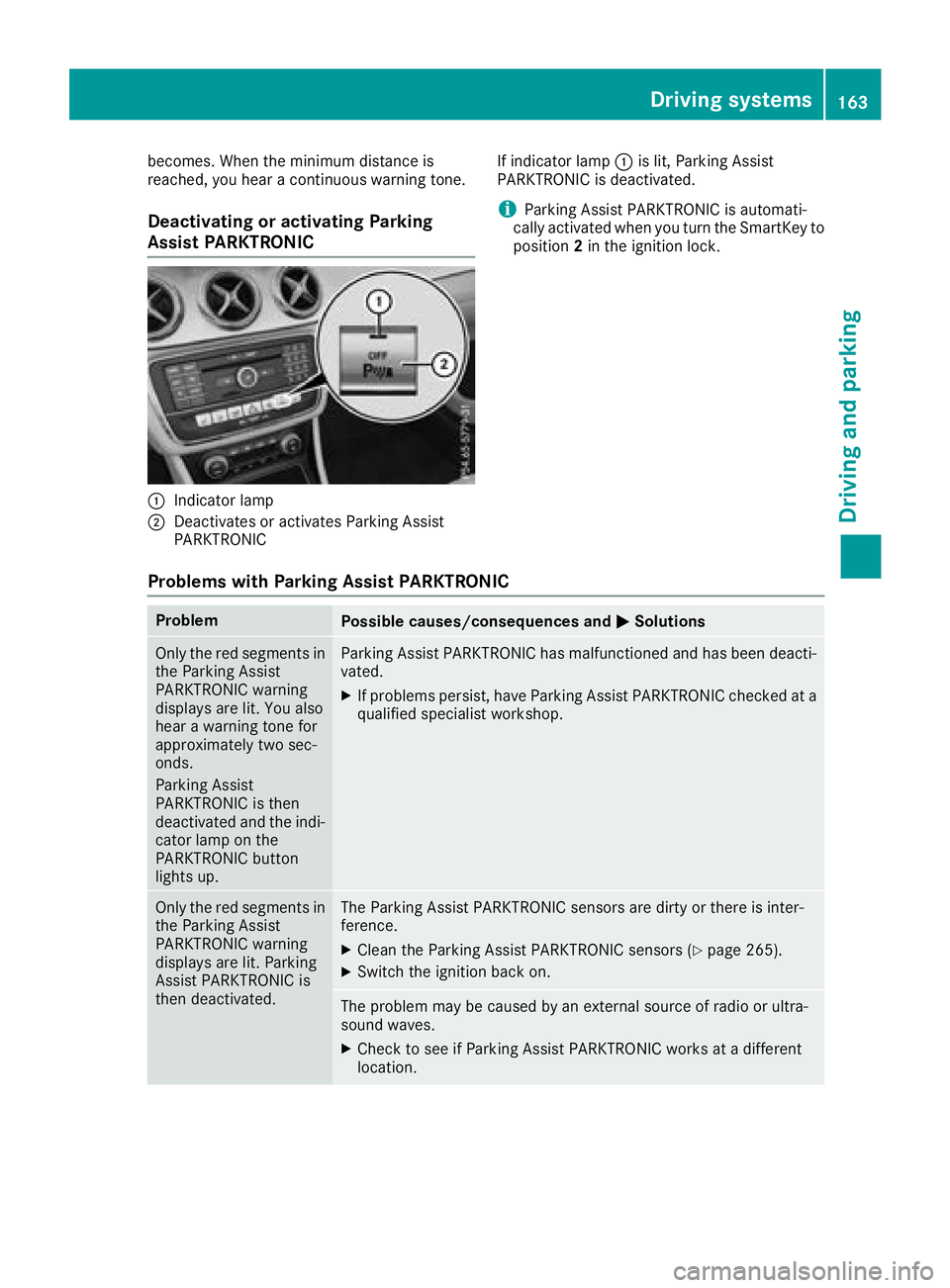
C
Indicator lampD
Deactivates or activates Parkin gA ssist
PARKTRONIC If indicator lamp C is lit, Parkin gA ssist
PARKTRONI Ci sd eactivated.
i Parkin gA ssist PARKTRONI Cisa utomati-
cally activated when you turn the SmartKey to
position 2 in the ignition lock.
Problems with Parking Assist PARKTRONIC Problem
Possible causes/consequences and P Solutions
Only the red segments in
the Parkin gA ssist
PARKTRONI Cw arning
displays are lit. You also
hear aw arning ton ef or
approximately two sec-
onds.
Parkin gA ssist
PARKTRONI Ci st hen
deactivated and the indi-
cator lamp on the
PARKTRONI Cb utton
lights up. Parkin gA ssist PARKTRONI Ch as malfunctioned and has been deacti-
vated. X
If problems persist ,h ave Parkin gA ssist PARKTRONI Cc hecked at a
qualified specialist workshop.
Only the red segments in
the Parkin gA ssist
PARKTRONI Cw arning
displays are lit. Parking
Assist PARKTRONI Ci s
then deactivated. The Parkin gA ssist PARKTRONI Cs ensor sa re dirty or ther eisi nter-
ference. X
Clean the Parkin gA ssist PARKTRONI Cs ensor s( Y
page 265).X
Switc ht he ignition back on.
The problem may be caused by an external source of radio or ultra-
sound waves. X
Check to see if Parkin gA ssist PARKTRONI Cw orks at ad ifferent
location. Driving systems 163
Driving and parking Z
Page 170 of 326
for safe maneuvering and parking. Make sure
that there are no persons, animals or objects in
the maneuvering area while maneuvering and
parking in parking spaces.
Under the following circumstances, the rear
view camera wil ln ot function, or wil lf unction in
al imited manner: R
if the trunk lid is open R
in heavy rain, snow or fog R
at night or in very dark places R
if the camera is expose dtov ery bright lightR
if the area is lit by fluorescent bulbs or LED
lighting (the display may flicker) R
if there is as udden change in temperature,
e.g. when driving into ah eated garage in win-
ter R
if the camera lens is dirty or obstructed.
Observe the notes on cleaning
( Y
pag e2 65)R
if the rear of you rv ehicl eisd amaged. In this
case, have the camera position and setting
checked at aq ualified specialist workshop
The fiel dofv ision and other functions of the rear
view camera may be restricted due to additional
accessories on the rear of the vehicl e( e.g.
license plate holder, rear bicycle rack).
Activating/deactivating the rear view
camera X
To activate: make sure that the SmartKey is
in position H in the ignition lock.X
Make sure that the Activation by Rg ear
function is selected in the multimedi as ystem;
see the Digita lO perator's Manual.X
Engage reverse gear.
The area behind the vehicl eiss how nw ith
guide lines in the multimedi as ystem display.
The image from the rear view camera is avail-
abl et hroughou tt he maneuvering process.
To deactivate: the rear view camera deacti-
vates if you shift the transmission to ] or after
driving forwards as hort distance. Messages in the multimedia system dis-
play The rear view camera may show ad istorted view
of obstacles, show them incorrectly or not at all.
The rear view camera does not show objects in
the following positions: R
very close to the rear bumper R
under the rear bumper R
in close range above the handl eont he trunk
lid
! Objects not at ground leve lm ay appear to
be further away than they actually are, e.g.: R
the bumper of ap arked vehicleR
the drawbar of at railerR
the bal lc oupling of at railer tow hitchR
the rear section of an HGV R
as lanted post
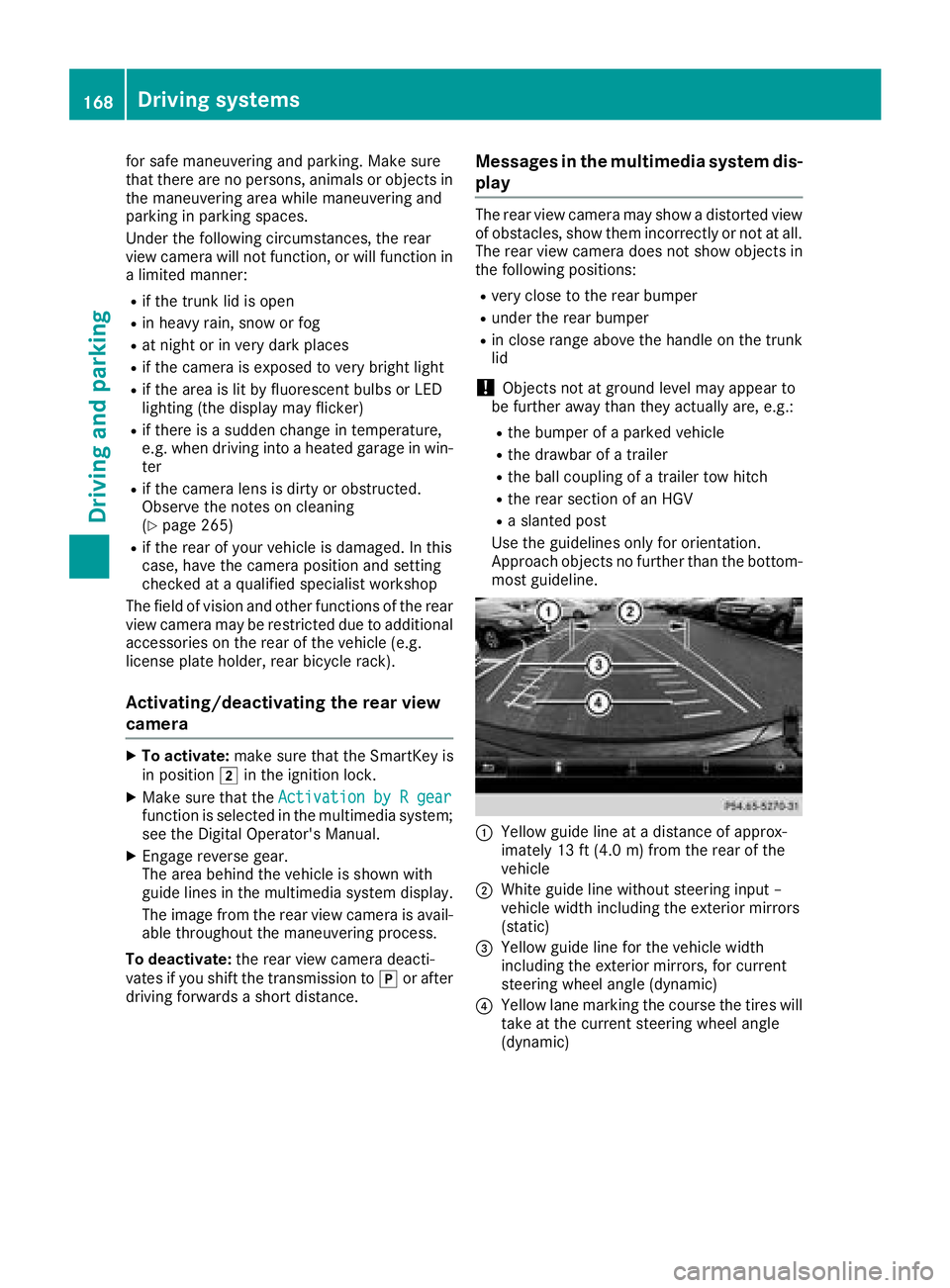
Use the guidelines only for orientation.
Approach objects no further than the bottom-
most guideline.
C
Yellow guide line at ad istance of approx-
imately 13 ft (4.0 m) from the rear of the
vehicle D
White guide line without steering inpu t–
vehicl ew idth including the exterior mirrors
(static)