warning MERCEDES-BENZ CLA 2019 Owners Manual
[x] Cancel search | Manufacturer: MERCEDES-BENZ, Model Year: 2019, Model line: CLA, Model: MERCEDES-BENZ CLA 2019Pages: 330, PDF Size: 23.57 MB
Page 267 of 330
Information about Service
Resetting the ASSYST PLUS service
interval display
!If the ASSYST PLUS service interval displayhas been inadvertently reset, this setting canbe corrected at a qualified specialist work-shop.
Have service work carried out as described inthe Maintenance Booklet. This may otherwiselead to increased wear and damage to themajor assemblies or the vehicle.
A qualified specialist workshop, e.g. an author-ized Mercedes-Benz Center, will reset theASSYST PLUS service interval display after theservice work has been carried out. You can alsoobtain further information on maintenancework, for example.
Special service requirements
The specified maintenance interval takes onlythe normal operation of the vehicle intoaccount. Under arduous operating conditions orincreased load on the vehicle, maintenancework must be carried out more frequently, forexample:
Rregular city driving with frequent intermediatestops
Rif the vehicle is primarily used to travel shortdistances
Ruse in mountainous terrain or on poor roadsurfaces
Rif the engine is often left idling for long periods
Rin particularly dusty conditions, or if air-recir-culation mode is frequently used
In these or similar operating conditions, havethe interior filter, engine air cleaner, engine oiland oil filter, for example, changed more fre-quently. Under arduous operating conditions,the tires must be checked more often. Furtherinformation can be obtained at a qualified spe-cialist workshop, e.g. an authorized Mercedes-Benz Center.
Driving abroad
An extensive Mercedes-Benz Service network isalso available in other countries. You can obtainfurther information from any authorizedMercedes-Benz Center.
Care
General notes
HEnvironmental note
Dispose of empty packaging and cleaning
cloths in an environmentally responsible man-
ner.
!When cleaning your car, do not use:
Rdry, coarse or hard cloths
Rabrasive cleaning agents
Rsolvents
Rcleaning agents containing solvents
Do not scrub.
Do not touch the surfaces and films with hardobjects, e.g. rings or ice scrapers. Otherwise,you may scratch or damage the surfaces andfilms.
!Do not park your vehicle for a long period oftime directly after cleaning, particularly aftercleaning the wheel rim with wheel cleaner.Wheel cleaner can lead to the increased cor-rosion of the brake discs and pads. Therefore,drive for a few minutes after cleaning. Byheating up the brakes, the brake discs andpads dry. The vehicle can then be parked for along period of time.
Regular care of your vehicle is a condition forretaining the quality in the long term.
Use care products and cleaning agents recom-mended and approved by Mercedes-Benz.
Washing the vehicle and cleaning the
paintwork
Automatic car wash
GWARNING
Braking efficiency is reduced after washing
the vehicle. There is a risk of an accident.
After the vehicle has been washed, brake
carefully while paying attention to the traffic
conditions until full braking power is restored.
!When Active Distance Assist DISTRONIC orthe HOLD function is activated, the vehiclebrakes automatically in certain situations.
Care265
Maintenance and care
Z
Page 270 of 330
To clean, use plenty of water and a mild cleaningagent without additional or abrasive products,e.g. use a car shampoo approved for Mercedes-Benz.
XDry vehicles covered with film using a soft,absorbent cloth after every wash.Water marks could otherwise form.
Scratches, corrosive deposits, areas affected bycorrosion and damage caused by inadequatecare cannot always be completely repaired. Insuch cases, visit a qualified specialist workshop.
XRemove dirt immediately, where possible,while avoiding rubbing too hard.The decorative film may be irreparably dam-aged.
XSoak insect remains with insect remover andrinse off the treated areas afterwards.
XSoak bird droppings with water and rinse offthe treated areas afterwards.
The Paint Cleaner cleaning product, which hasbeen approved and recommended byMercedes-Benz, should be used when dirt haspenetrated the decorative film surface or thedecorative film has become dull.
The manufacturer can provide you with infor-mation on special care and cleaning products.
Laminated surfaces may exhibit optical differ-ences to surfaces which were not protected by adecorative film when the decorative film isremoved.
iHave work or repairs on decorative film car-ried out at a qualified specialist workshop.Mercedes-Benz recommends that you use anauthorized Mercedes-Benz Center for thispurpose.
Cleaning the vehicle parts
Cleaning the wheels
GWARNING
The water jet from a circular jet nozzle (dirt
blasters) can cause invisible exterior damage
to the tires or chassis components. Compo-
nents damaged in this way may fail unexpect-
edly. There is a risk of an accident.
Do not use power washers with circular jet
nozzles to clean the vehicle. Have damaged
tires or chassis components replaced imme-
diately.
!Do not use acidic wheel cleaning productsto remove brake dust. This could damagewheel bolts and brake components.
!Do not park your vehicle for a long period oftime directly after cleaning, particularly aftercleaning the wheel rim with wheel cleaner.Wheel cleaner can lead to the increased cor-rosion of the brake discs and pads. Therefore,drive for a few minutes after cleaning. Byheating up the brakes, the brake discs andpads dry. The vehicle can then be parked for along period of time.
Cleaning the windows
GWARNING
You could become trapped by the windshield
wipers if they start moving while cleaning the
windshield or wiper blades. There is a risk of
injury.
Always switch off the windshield wipers and
the ignition before cleaning the windshield or
wiper blades.
!Only fold the windshield wipers away fromthe windshield when vertical. Otherwise, youwill damage the hood.
!Do not use dry cloths, abrasive products,solvents or cleaning agents containing sol-vents to clean the inside of the windows. Donot touch the insides of the windows withhard objects, e.g. an ice scraper or ring. Thereis otherwise a risk of damaging the windows.
!Clean the water drainage channels of thewindshield and the rear window at regularintervals. Deposits such as leaves, petals andpollen may under certain circumstances pre-vent water from draining away. This can leadto corrosion damage and damage to elec-tronic components.
XClean the inside and outside of the windowswith a damp cloth and a cleaning product thatis recommended and approved by Mercedes-Benz.
268Care
Maintenance and care
Page 271 of 330
Cleaning wiper blades
GWARNING
You could become trapped by the windshield
wipers if they start moving while cleaning the
windshield or wiper blades. There is a risk of
injury.
Always switch off the windshield wipers and
the ignition before cleaning the windshield or
wiper blades.
!Only fold the windshield wipers away fromthe windshield when vertical. Otherwise, youwill damage the hood.
!Do not pull the wiper blade. Otherwise, thewiper blade could be damaged.
!Do not clean wiper blades too often and donot rub them too hard. Otherwise, the graph-ite coating could be damaged. This couldcause wiper noise.
!Hold the wiper arm securely when foldingback. The windshield could be damaged if thewiper arm smacks against it suddenly.
XFold the windshield wiper arms away from thewindshield.
XCarefully clean the wiper blades with a dampcloth.
XFold the windshield wiper arms back againbefore switching on the ignition.
Cleaning the exterior lighting
!Only use cleaning agents or cleaning clothswhich are suitable for plastic light lenses.Unsuitable cleaning agents or cleaning clothscould scratch or damage the plastic light len-ses.
XClean the plastic lenses of the exterior lightswith a wet sponge and a mild cleaning agent,e.g. Mercedes-Benz car shampoo or cleaningcloths.
Cleaning the mirror turn signals
!Only use cleaning agents or cleaning clothsthat are suitable for plastic lenses. Unsuitablecleaning agents or cleaning cloths couldscratch or damage the plastic lenses of themirror turn signals.
XClean the plastic lenses of the mirror turn sig-nals in the exterior mirror housing using a wetsponge and mild cleaning agent, e.g.Mercedes-Benz car shampoo or cleaningcloths.
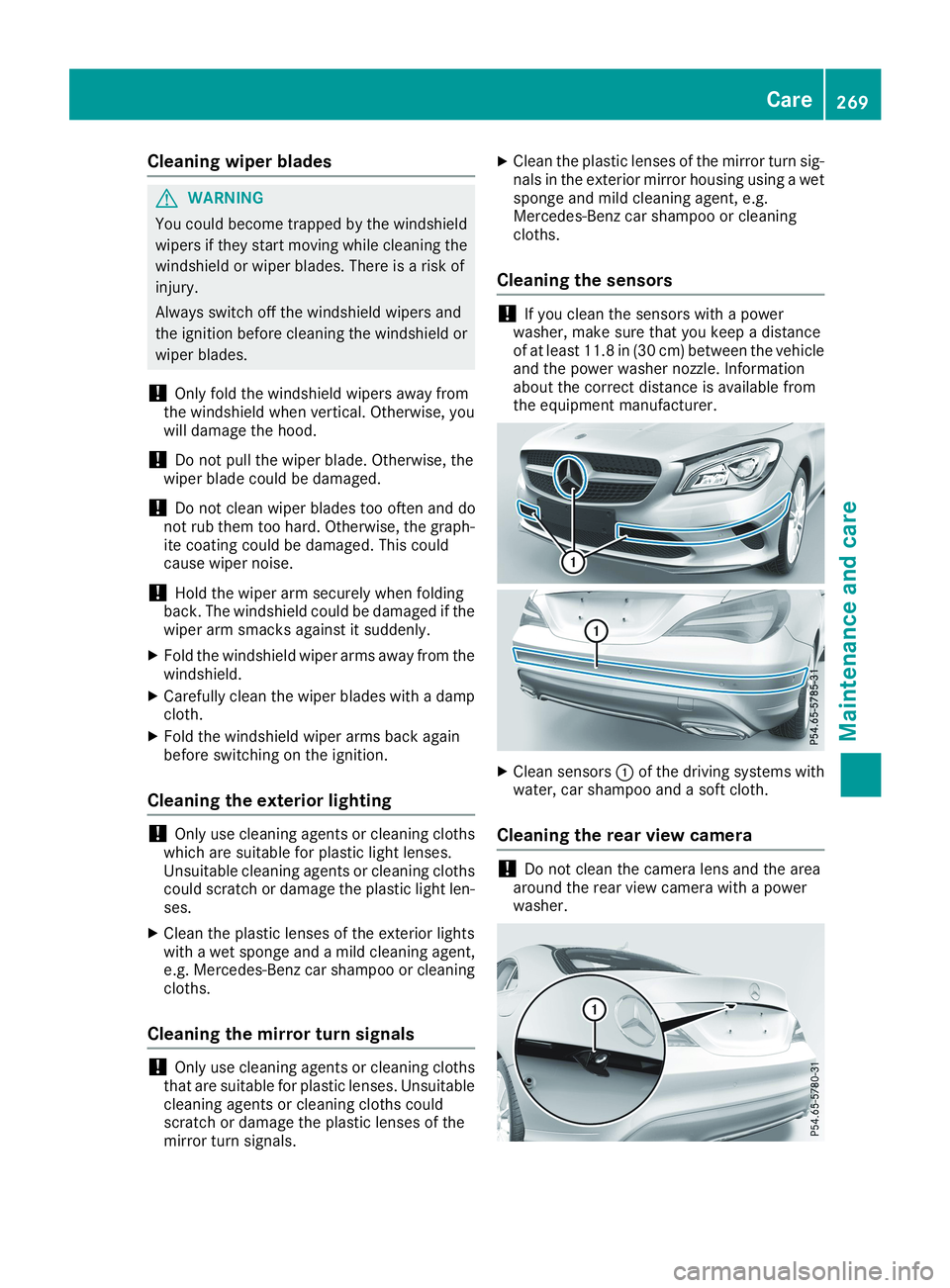
Cleaning the sensors
!If you clean the sensors with a powerwasher, make sure that you keep a distanceof at least 11.8 in(30 cm) between the vehicleand the power washer nozzle. Informationabout the correct distance is available fromthe equipment manufacturer.
XClean sensorsCof the driving systems withwater, car shampoo and a soft cloth.
Cleaning the rear view camera
!Do not clean the camera lens and the areaaround the rear view camera with a powerwasher.
Care269
Maintenance and care
Z
Page 272 of 330
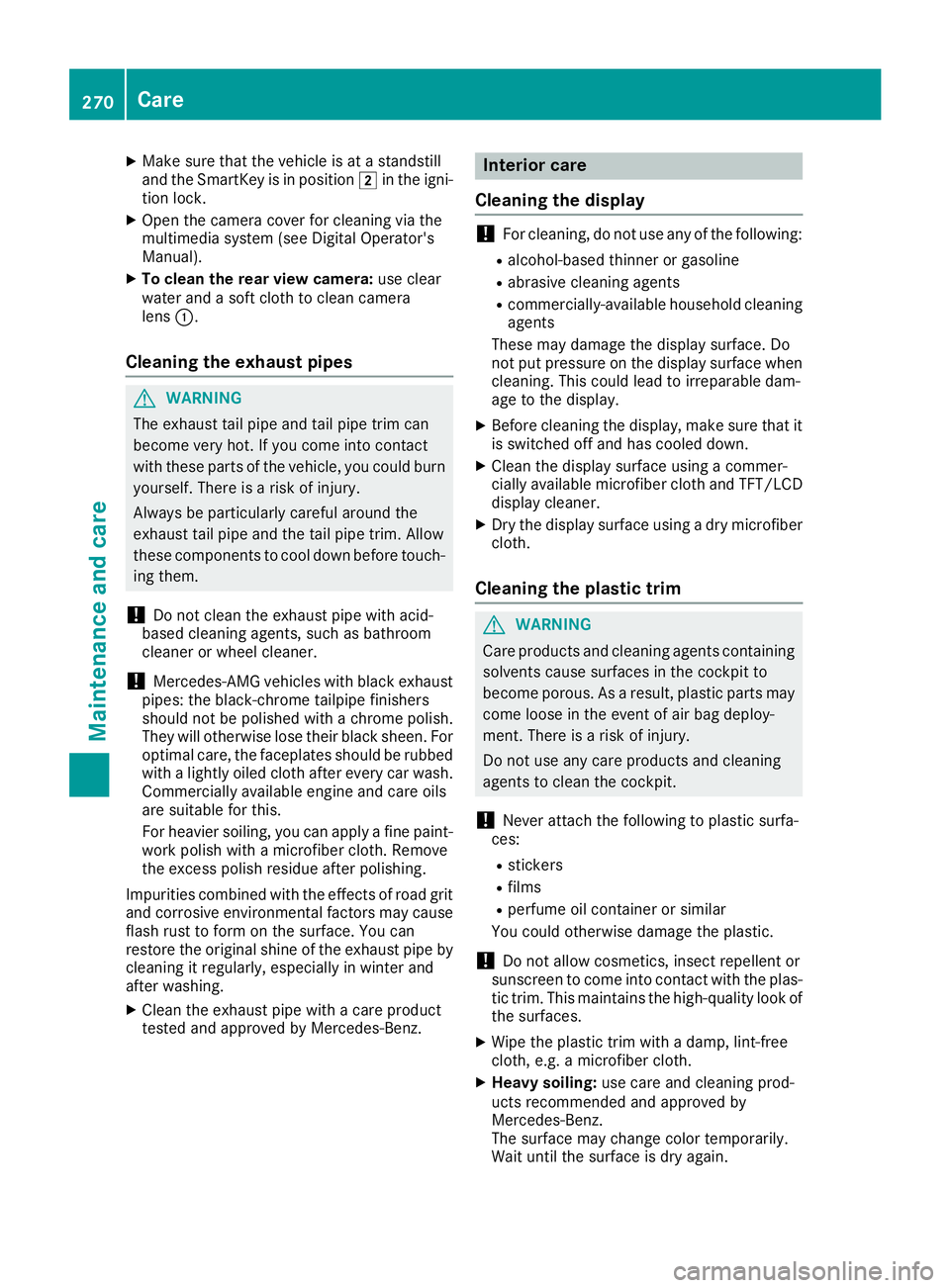
XMake sure that the vehicle is at a standstilland the SmartKey is in positionHin the igni-tion lock.
XOpen the camera cover for cleaning via themultimedia system (see Digital Operator'sManual).
XTo clean the rear view camera:use clearwater and a soft cloth to clean cameralensC.
Cleaning the exhaust pipes
GWARNING
The exhaust tail pipe and tail pipe trim can
become very hot. If you come into contact
with these parts of the vehicle, you could burn
yourself. There is a risk of injury.
Always be particularly careful around the
exhaust tail pipe and the tail pipe trim. Allow
these components to cool down before touch-
ing them.
!Do not clean the exhaust pipe with acid-based cleaning agents, such as bathroomcleaner or wheel cleaner.
!Mercedes-AMG vehicles with black exhaustpipes: the black-chrome tailpipe finishersshould not be polished with a chrome polish.They will otherwise lose their black sheen. Foroptimal care, the faceplates should be rubbedwith a lightly oiled cloth after every car wash.Commercially available engine and care oilsare suitable for this.
For heavier soiling, you can apply a fine paint-work polish with a microfiber cloth. Removethe excess polish residue after polishing.
Impurities combined with the effects of road gritand corrosive environmental factors may causeflash rust to form on the surface. You canrestore the original shine of the exhaust pipe bycleaning it regularly, especially in winter andafter washing.
XClean the exhaust pipe with a care producttested and approved by Mercedes-Benz.
Interior care
Cleaning the display
!For cleaning, do not use any of the following:
Ralcohol-based thinner or gasoline
Rabrasive cleaning agents
Rcommercially-available household cleaningagents
These may damage the display surface. Donot put pressure on the display surface whencleaning. This could lead to irreparable dam-age to the display.
XBefore cleaning the display, make sure that itis switched off and has cooled down.
XClean the display surface using a commer-cially available microfiber cloth and TFT/LCDdisplay cleaner.
XDry the display surface using a dry microfibercloth.
Cleaning the plastic trim
GWARNING
Care products and cleaning agents containing
solvents cause surfaces in the cockpit to
become porous. As a result, plastic parts may
come loose in the event of air bag deploy-
ment. There is a risk of injury.
Do not use any care products and cleaning
agents to clean the cockpit.
!Never attach the following to plastic surfa-ces:
Rstickers
Rfilms
Rperfume oil container or similar
You could otherwise damage the plastic.
!Do not allow cosmetics, insect repellent orsunscreen to come into contact with the plas-tic trim. This maintains the high-quality look ofthe surfaces.
XWipe the plastic trim with a damp, lint-freecloth, e.g. a microfiber cloth.
XHeavy soiling:use care and cleaning prod-ucts recommended and approved byMercedes-Benz.The surface may change color temporarily.Wait until the surface is dry again.
270Care
Maintenance and care
Page 273 of 330
Cleaning the steering wheel and gear or
selector lever
XThoroughly wipe with a damp cloth or useleather care agents that have been recom-mended and approved by Mercedes-Benz.
Cleaning genuine wood and trim ele-
ments
!Do not use solvent-based cleaning agentssuch as tar remover, wheel cleaners, polishesor waxes. There is otherwise a risk of damag-ing the surface.
!Do not use chrome polish on trim pieces.The trim pieces have a chrome look but aremostly made of anodized aluminum and canlose their shine if chrome polish is used. Usea damp, lint-free cloth instead when cleaningthe trim pieces.
If the chrome-plated trim pieces are verydirty, you can use a chrome polish. If you areunsure as to whether the trim pieces arechrome-plated or not, consult an authorizedMercedes-Benz Center.
XWipe the wooden trim and trim pieces with adamp, lint-free cloth, e.g. a microfiber cloth.
XHeavy soiling:use care and cleaning prod-ucts recommended and approved byMercedes-Benz.
Cleaning the seat covers
General notes
!Do not use a microfiber cloth to clean coversmade out of real leather, artificial leather orDINAMICA. If used often, these can damagethe cover.
Note that regular care is essential to ensure thatthe appearance and comfort of the covers isretained over time.
Genuine leather seat covers
!To retain the natural appearance of theleather, observe the following cleaninginstructions:
RClean genuine leather covers carefully witha damp cloth and then wipe the coversdown with a dry cloth.
RMake sure that the leather does notbecome soaked. It may otherwise becomerough and cracked.
ROnly use leather care agents that havebeen tested and approved by Mercedes-Benz. You can obtain these from a qualifiedspecialist workshop.
Leather is a natural product.
It exhibits natural surface characteristics, forexample:
Rdifferences in the texture
Rmarks caused by growth and injury
Rslight nuances of color
These are characteristics of leather and notmaterial defects.
Seat covers of other materials
!Observe the following when cleaning:
Rclean artificial leather covers with a clothmoistened with a solution containing 1%detergent (e.g. dish washing liquid).
Rclean cloth covers with a microfiber clothmoistened with a solution containing 1%detergent (e.g. dish washing liquid). Rubcarefully and always wipe entire seat sec-tions to avoid leaving visible lines. Leavethe seat to dry afterwards. Cleaning resultsdepend on the type of dirt and how long ithas been there.
Rclean DINAMICA covers with a damp cloth.Make sure that you wipe entire seat sec-tions to avoid leaving visible lines.
Cleaning the seat belts
GWARNING
Seat belts can become severely weakened if
bleached or dyed. This could cause the seat
belts to tear or fail, for instance, in the event of
an accident. This poses an increased risk of
injury or fatal injury.
Never bleach or dye the seat belts.
Care271
Maintenance and care
Z
Page 277 of 330
XMake sure that the engine cannot be startedvia your smartphone (Ypage 124).
XMake sure that the passengers are not endan-gered as they do so. Make sure that no one isnear the danger area while a wheel is beingchanged. Anyone who is not directly assistingin the wheel change should, for example,stand behind the barrier.
XGet out of the vehicle. Pay attention to trafficconditions when doing so.
XClose the driver's door.
MOExtended tires (tires with run-flat
properties)
General notes
With MOExtended tires (tires with run flat char-acteristics), you can continue to drive your vehi-cle even if there is a total loss of pressure in oneor more tires. The affected tire must not showany clearly visible damage.
You can recognize a MOExtended tire by theMOExtended marking which appears on thesidewall of the tire. You will find this markingnext to the tire size designation, the load-bear-ing capacity and the speed index (Ypage 305).
MOExtended tires may be used only in conjunc-tion with an activated tire pressure loss warningsystem (Canada only) or tire pressure monitor(USA only).
If a pressure loss warning message appearsin the multifunction display:
Robserve the instructions in the display mes-sages (Ypage 213).
Rcheck the tire for damage
Rif driving on, observe the following notes
The driving distance possible in run-flat mode isapproximately 50 miles (80 km) when the vehi-cle is partially laden. When the vehicle is fullyladen it is approximately 19 miles (30 km).
In addition to the vehicle load, the driving dis-tance possible depends upon:
Rvehicle speed
Rroad condition
Routside temperature
The driving distance possible in run-flat modemay be reduced by extreme driving conditionsor maneuvers, or it can be increased through amoderate style of driving.
The driving distance possible in run-flat mode iscounted from the moment the tire pressure losswarning appears in the multifunction display.
You must not exceed a maximum speed of50 mph (80 km/h).
When replacing one or all tires, please observethe following specifications for your vehicle'stires:
Rsize
Rtype and
Rthe "MOExtended" marking
If a tire has gone flat and cannot be replacedwith a MOExtended tire, a standard tire may beused as a temporary measure. Make sure thatyou use the proper size and type (summer orwinter tire).
Vehicles equipped with MOExtended tires arenot equipped with a TIREFIT kit at the factory. Itis therefore recommended that you additionallyequip your vehicle with a TIREFIT kit if you mounttires that do not feature run-flat properties, e.g.winter tires. A TIREFIT kit may be obtained froma qualified specialist workshop.
Important safety notes
GWARNING
When driving in emergency mode, the driving
characteristics deteriorate, e.g. when corner-
ing, accelerating quickly and when braking.
There is a risk of an accident.
Do not exceed the stated maximum speed.
Avoid abrupt steering and driving maneuvers,
and driving over obstacles (curbs, potholes,
off-road). This applies in particular to a laden
vehicle.
Stop driving in emergency mode if:
Ryou hear banging noises.
Rthe vehicle starts to shake.
Ryou see smoke and smell rubber.
RESP®is intervening constantly.
Rthere are tears in the sidewalls of the tire.
After driving in emergency mode, have the
wheel rims checked at a qualified specialist
workshop with regard to their further use. The
defective tire must be replaced in every case.
Flat tire275
Breakdown assistance
Z
Page 280 of 330
Tire pressure reached
GWARNING
A tire temporarily sealed with tire sealant
impairs the driving characteristics and is not
suitable for higher speeds. There is a risk of
accident.
You should therefore adapt your driving style
accordingly and drive carefully. Do not exceed
the specified maximum speed with a tire that
has been repaired using tire sealant.
USA only:The maximum permissible speed fora tire sealed with tire sealant is 50 mph(80 km/h). The upper part of the TIREFIT stickermust be affixed to the instrument cluster in thedriver's field of vision.
If a tire pressure of 200 kPa (2.0 bar/29 psi) hasbeen attained after ten minutes:
XSwitch off the tire inflation compressor.
XUnscrew the filler hose from the valve of thefaulty tire.Note that tire sealant may escape when youunscrew the filler hose.
XUSA only:Stow the tire sealant bottle and thetire inflation compressor.
XPull away immediately.
XStop after driving for approximately tenminutes and check the tire pressure with thetire inflation compressor.The tire pressure must now be at least130 kPa (1.3 bar/19 psi).
GWARNING
If the required tire pressure is not reached
after driving for a short period, the tire is too
badly damaged. The tire sealant cannot repair
the tire in this instance. Damaged tires and a
tire pressure that is too low can significantly
impair the vehicle's braking and driving char-
acteristics. There is a risk of accident.
Do not continue driving. Contact a qualified
specialist workshop.
iUSA only:In cases such as the one men-tioned above, contact an authorizedMercedes-Benz Center. Or call1-800-FOR-MERCedes (in the USA) or1-800-387-0100 (in Canada).
XUSA only:Correct the tire pressure if it is stillat least 130 kPa (1.3 bar/19 psi). See the Tireand Loading Information placard on the driv-er's side B-pillar or the tire pressure table inthe fuel filler flap for values.
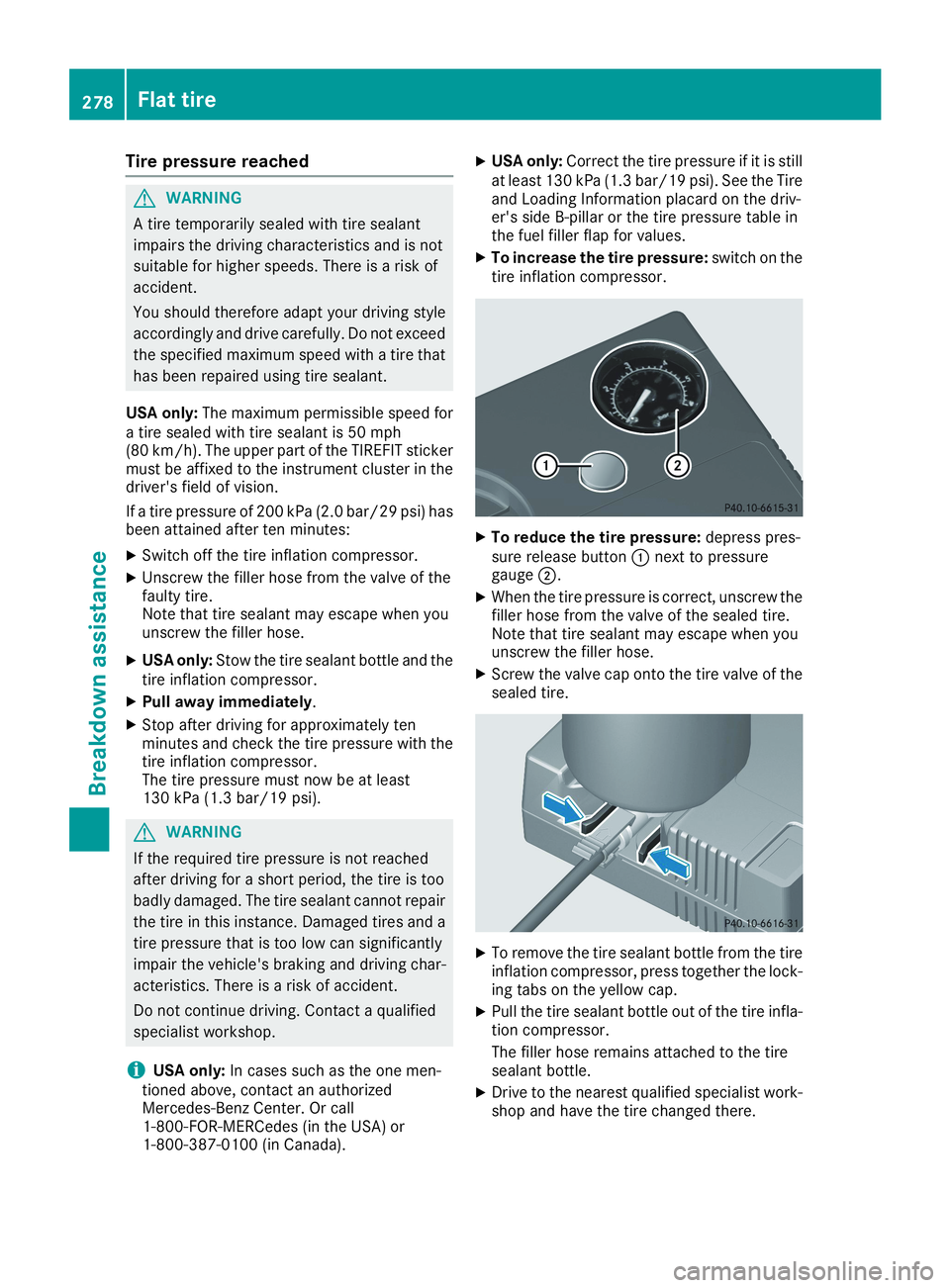
XTo increase the tire pressure:switch on thetire inflation compressor.
XTo reduce the tire pressure:depress pres-sure release buttonCnext to pressuregaugeD.
XWhen the tire pressure is correct, unscrew thefiller hose from the valve of the sealed tire.Note that tire sealant may escape when youunscrew the filler hose.
XScrew the valve cap onto the tire valve of thesealed tire.
XTo remove the tire sealant bottle from the tireinflation compressor, press together the lock-ing tabs on the yellow cap.
XPull the tire sealant bottle out of the tire infla-tion compressor.
The filler hose remains attached to the tiresealant bottle.
XDrive to the nearest qualified specialist work-shop and have the tire changed there.
278Flat tire
Breakdown assistance
Page 281 of 330
XHave the tire sealant bottle and the filler hosereplaced as soon as possible at a qualifiedspecialist workshop.
XHave the tire sealant bottle replaced everyfour years at a qualified specialist workshop.
Battery (vehicle)
Important safety notes
Special tools and expert knowledge are requiredwhen working on the battery, e.g. removal andinstallation. You should therefore have all workinvolving the battery carried out at a qualifiedspecialist workshop.
GWARNING
Work carried out incorrectly on the battery
can lead, for example, to a short circuit and
thus damage the vehicle electronics. This can
lead to function restrictions applying to
safety-relevant systems, e.g. the lighting sys-
tem, the ABS (anti-lock braking system) or the
ESP®(Electronic Stability Program). The oper-
ating safety of your vehicle may be restricted.
You could lose control of the vehicle, for
example:
Rwhen braking
Rin the event of abrupt steering maneuvers
and/or when the vehicle's speed is not
adapted to the road conditions
There is a risk of an accident.
In the event of a short circuit or a similar inci-
dent, contact a qualified specialist workshop
immediately. Do not drive any further. You
should have all work involving the battery car-
ried out at a qualified specialist workshop.
For further information about ABS and ESP®,see (Ypage 61) and (Ypage 64).
GWARNING
Electrostatic build-up can lead to the creation
of sparks, which could ignite the highly explo-
sive gases of a battery. There is a risk of an
explosion.
Before handling the battery, touch the vehicle
body to remove any existing electrostatic
build-up.
The highly flammable gas mixture forms whencharging the battery as well as when jump-start-ing.
Always make sure that neither you nor the bat-tery is electrostatically charged. A build-up ofelectrostatic charge can be caused, for exam-ple:
Rby wearing clothing made from syntheticfibers
Rdue to friction between clothing and seats
Rif you push or pull the battery across the car-pet or other synthetic materials
Rif you rub the battery with a cloth
GWARNING
During the charging process, a battery produ-
ces hydrogen gas. If a short circuit occurs or
sparks are created, the hydrogen gas can
ignite. There is a risk of an explosion.
RMake sure that the positive terminal of a
connected battery does not come into con-
tact with vehicle parts.
RNever place metal objects or tools on a bat-
tery.
RIt is important that you observe the descri-
bed order of the battery terminals when
connecting and disconnecting a battery.
RWhen jump-starting, make sure that the
battery poles with identical polarity are
connected.
RIt is particularly important to observe the
described order when connecting and dis-
connecting the jumper cables.
RNever connect or disconnect the battery
terminals while the engine is running.
GWARNING
Battery acid is caustic. There is a risk of injury.
Avoid contact with skin, eyes or clothing. Do
not inhale any battery gases. Do not lean over
the battery. Keep children away from batter-
ies. Wash away battery acid immediately with
Battery (vehicle)279
Breakdown assistance
Z
Page 283 of 330
Only replace a battery with a battery that hasbeen recommended by Mercedes-Benz.
Remove the SmartKey if you park the vehicleand do not require any electrical consumers.The vehicle will then use very little energy, thusconserving battery power.
If the power supply has been interrupted, e.g. ifyou reconnect the battery, you will have to:
Rset the clock using the multimedia system(see the Digital Operator's Manual)
Rreset the function for folding the exterior mir-rors in/out automatically, by folding the mir-rors out once (Ypage 98)
Charging the battery
GWARNING
During charging and jump-starting, explosive
gases can escape from the battery. There is a
risk of an explosion.
Particularly avoid fire, open flames, creating
sparks and smoking. Ensure there is sufficient
ventilation while charging and jump-starting.
Do not lean over a battery.
GWARNING
Battery acid is caustic. There is a risk of injury.
Avoid contact with skin, eyes or clothing. Do
not inhale any battery gases. Do not lean over
the battery. Keep children away from batter-
ies. Wash away battery acid immediately with
plenty of clean water and seek medical atten-
tion.
GWARNING
A discharged battery can freeze at tempera-
tures below freezing point. When jump-start-
ing the vehicle or charging the battery, gases
can escape from the battery. There is a risk of
an explosion.
Allow the frozen battery to thaw out before
charging it or jump-starting.
!Only use battery chargers with a maximumcharging voltage of 14.8 V.
!Only charge the battery using the jump-starting connection point.
The jump-starting connection point is in theengine compartment (Ypage 282).
XOpen the hood.
XConnect the battery charger to the positiveterminal and ground point in the same orderas when connecting the donor battery in thejump-starting procedure (Ypage 282).
If the indicator/warning lamps do not light up inthe instrument cluster at low temperatures, it isvery likely that the discharged battery has fro-zen. In this case you may neither jump-start thevehicle nor charge the battery. The service life ofa thawed-out battery may be shorter. The start-ing characteristics can be impaired, particularlyat low temperatures. Have the thawed-out bat-tery checked at a qualified specialist workshop.
Only charge the installed battery with a batterycharger which has been tested and approved byMercedes-Benz. A battery charger unit speciallyadapted for Mercedes-Benz vehicles and testedand approved by Mercedes-Benz is available asan accessory. It permits the charging of the bat-tery in its installed position. Contact an author-ized Mercedes-Benz Center for further informa-tion and availability. Read the battery charger'soperating instructions before charging the bat-tery.
Replacing the 12 V battery
Observe the notes on the 12 V battery(Ypage 279).
Mercedes-Benz recommends that you have the12 V battery replaced at a qualified specialistworkshop, e.g. at an authorized Mercedes-BenzCenter.
If you want to replace the battery yourself,observe the following notes:
RAlways replace a defective battery with a bat-tery which meets the specific requirements ofthe vehicle.
The vehicle is equipped with a battery usingAGM (absorbent glass mat) technology or abattery using EFB (enhanced flooded battery)technology. Full vehicle functionality is guar-anteed only with an AGM or EFB battery. Ifreplacement is necessary, always use the bat-tery technology originally installed. Switchingbetween the battery technologies is not per-mitted. For safety reasons, Mercedes-Benzrecommends that you only use batteries
Battery (vehicle)281
Breakdown assistance
Z
Page 284 of 330
which have been tested and approved for yourvehicle by Mercedes-Benz.
RUse detachable parts such as breather hoses,angled connecting pieces or terminal coversfrom the battery which is to be replaced.
RMake sure that the vent hose is always con-nected to the original opening on the batteryside.
RInstall existing or supplied cell caps; other-wise gases or battery acid could escape.
RMake sure that the detachable parts are con-nected again in the same way.
Jump-starting
For the jump-starting procedure, use only the jump-starting connection point, consisting of a pos-itive terminal and a ground point, in the engine compartment.
GWARNING
Battery acid is caustic. There is a risk of injury.
Avoid contact with skin, eyes or clothing. Do not inhale any battery gases. Do not lean over the
battery. Keep children away from batteries. Wash away battery acid immediately with plenty of
clean water and seek medical attention.
GWARNING
During charging and jump-starting, explosive gases can escape from the battery. There is a risk
of an explosion.
Particularly avoid fire, open flames, creating sparks and smoking. Ensure there is sufficient ven-
tilation while charging and jump-starting. Do not lean over a battery.
GWARNING
During the charging process, a battery produces hydrogen gas. If a short circuit occurs or sparks
are created, the hydrogen gas can ignite. There is a risk of an explosion.
RMake sure that the positive terminal of a connected battery does not come into contact with
vehicle parts.
RNever place metal objects or tools on a battery.
RIt is important that you observe the described order of the battery terminals when connecting
and disconnecting a battery.
RWhen jump-starting, make sure that the battery poles with identical polarity are connected.
RIt is particularly important to observe the described order when connecting and disconnecting
the jumper cables.
RNever connect or disconnect the battery terminals while the engine is running.
GWARNING
A discharged battery can freeze at temperatures below freezing point. When jump-starting the
vehicle or charging the battery, gases can escape from the battery. There is a risk of an explosion.
Allow the frozen battery to thaw out before charging it or jump-starting.
!Avoid repeated and lengthy starting attempts. Otherwise, the catalytic converter could bedamaged by the non-combusted fuel.
282Jump-starting
Breakdown assistance