ignition MERCEDES-BENZ CLA 2019 User Guide
[x] Cancel search | Manufacturer: MERCEDES-BENZ, Model Year: 2019, Model line: CLA, Model: MERCEDES-BENZ CLA 2019Pages: 330, PDF Size: 23.57 MB
Page 72 of 330
SmartKey
Important safety notes
GWARNING
If children are left unsupervised in the vehicle,
they could:
Roperate the vehicle's equipment
Additionally, children could set the vehicle in
motion if, for example, they:
Rrelease the parking brake
Rshift the automatic transmission out of park
position]
Rstart the engine
There is a risk of an accident and injury.
Never leave children or animals unattended in
the vehicle.
When leaving the vehicle, always take the
SmartKey with you and lock the vehicle. This
also applies for the Digital Vehicle Key if the
"Digital Vehicle Key" function is activated via
Mercedes me connect.
GWARNING
If you attach heavy or large objects to the
SmartKey, the SmartKey could be uninten-
tionally turned in the ignition lock. This could
cause the engine to be switched off. There is a
risk of an accident.
Do not attach any heavy or large objects to the
SmartKey. Remove any bulky key rings before
inserting the SmartKey into the ignition lock.
!Keep the SmartKey away from strong mag-netic fields. Otherwise, the remote controlfunction could be affected.
Strong magnetic fields can occur in the vicin-ity of powerful electrical installations.
Do not keep the SmartKey:
Rwith electronic devices, e.g. a mobile phoneor another SmartKey
Rwith metallic objects, e.g. coins or metal foil
Rinside metallic objects, e.g. a metal case
Vehicles with KEYLESS-GO start function:donot keep the SmartKey in the trunk. Otherwise,
the SmartKey may not be detected, e.g. whenstarting the engine using the Start/Stop button.
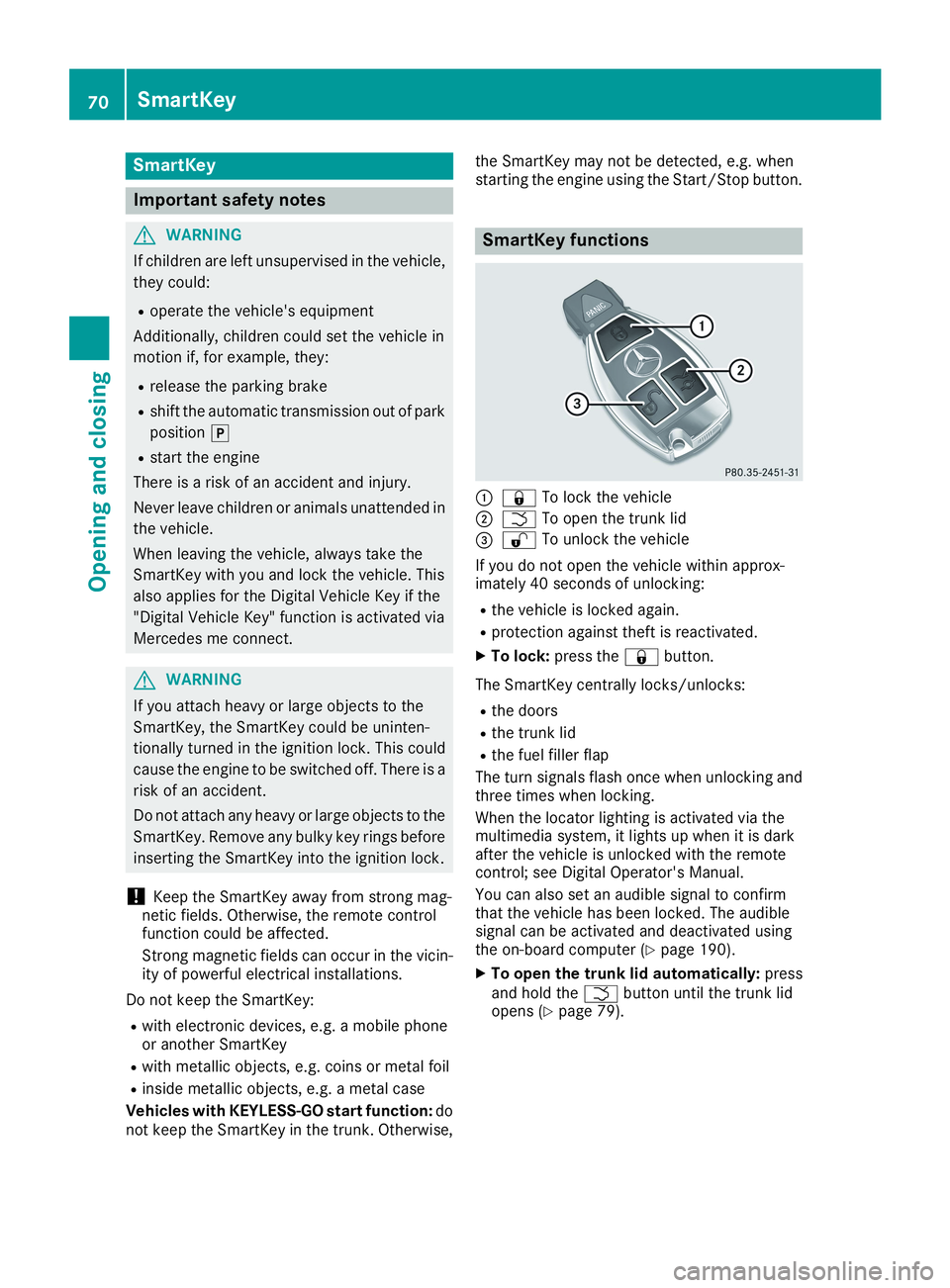
SmartKey functions
C7To lock the vehicle
DTTo open the trunk lid
Page 73 of 330
KEYLESS-GO
General notes
Bear in mind that the engine can be started byany of the vehicle occupants if there is a Smart-Key in the vehicle.
Locking and unlocking
You can start, lock or unlock the vehicle usingKEYLESS-GO. To do this, you only need carry theSmartKey with you. You can combine the func-tions of KEYLESS-GO with those of a conven-tional SmartKey. Unlock the vehicle by usingKEYLESS-GO, for instance, and lock it using the7button on the SmartKey.
The driver's door and the door at which the han-dle is used, must both be closed. The SmartKeymust be outside the vehicle. When locking orunlocking with KEYLESS-GO, the distancebetween the SmartKey and the correspondingdoor handle must not be greater than three feet(one meter).
A check which periodically establishes a radioconnection between the vehicle and the Smart-Key determines whether a valid SmartKey is inthe vehicle. This occurs, for example:
Rwhen starting the engine
Rwhile driving
Rwhen using HANDS-FREE ACCESS
Rwhen the external door handles are touched
Rduring convenience closing
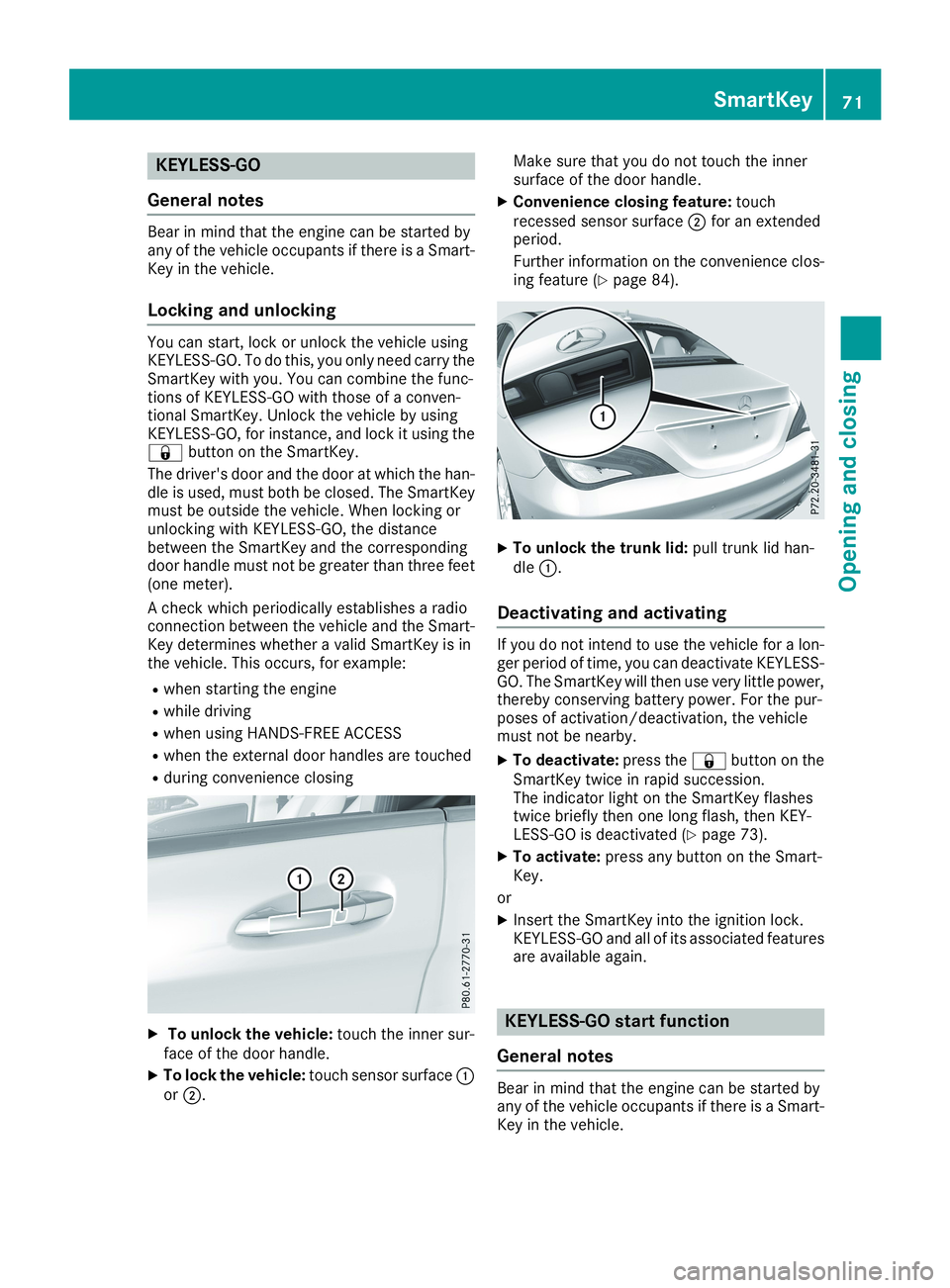
XTo unlock the vehicle:touch the inner sur-face of the door handle.
XTo lock the vehicle:touch sensor surfaceCorD.
Make sure that you do not touch the innersurface of the door handle.
XConvenience closing feature:touchrecessed sensor surfaceDfor an extendedperiod.
Further information on the convenience clos-ing feature (Ypage 84).
XTo unlock the trunk lid:pull trunk lid han-dleC.
Deactivating and activating
If you do not intend to use the vehicle for a lon-ger period of time, you can deactivate KEYLESS-GO. The SmartKey will then use very little power,thereby conserving battery power. For the pur-poses of activation/deactivation, the vehiclemust not be nearby.
XTo deactivate:press the7button on theSmartKey twice in rapid succession.The indicator light on the SmartKey flashestwice briefly then one long flash, then KEY-LESS-GO is deactivated (Ypage 73).
XTo activate:press any button on the Smart-Key.
or
XInsert the SmartKey into the ignition lock.KEYLESS-GO and all of its associated featuresare available again.
KEYLESS-GO start function
General notes
Bear in mind that the engine can be started byany of the vehicle occupants if there is a Smart-Key in the vehicle.
SmartKey71
Opening and closing
Z
Page 74 of 330
Changing the settings of the locking
system
You can change the settings of the locking sys-tem. This means that only the driver's door andthe fuel filler flap are unlocked when the vehicleis unlocked. This is useful if you frequently travelon your own.
XTo change the setting:press and hold the6and7buttons simultaneously forapproximately six seconds until the batteryindicator lamp flashes twice (Ypage 73).
If the setting of the locking system is changedwithin the signal range of the vehicle, pressingthe7or6button:
Rlocks or
Runlocks the vehicle
The SmartKey now functions as follows:
XTo unlock:press the6button once.
XTo unlock centrally:press the6buttontwice.
XTo lock centrally:press the7button.
The KEYLESS-GO function is changed as fol-lows:
XTo unlock the driver's door:touch the innersurface of the door handle on the driver'sdoor.
XTo unlock centrally:touch the inner surfaceof the door handle on the front-passengerdoor or the rear door.
XTo lock centrally:touch the outer sensorsurface on one of the door handles.
XTo restore the factory settings:press andhold the6and7buttons simultane-ously for approximately six seconds until thebattery check lamp flashes twice(Ypage 73).
Mechanical key
General notes
If the vehicle can no longer be locked orunlocked with the SmartKey or KEYLESS-GO,use the mechanical key.
If you use the mechanical key to unlock andopen the driver's door or the trunk lid, the anti-theft alarm system will be triggered (Ypage 68).
There are several ways to turn off the alarm:
XTo deactivate the alarm with the key:pressthe6or7button on the key.
or
XInsert the SmartKey into the ignition lock.
or
XTo deactivate the alarm with KEYLESS-GO:press the Start/Stop button in the ignitionlock. The SmartKey must be in the vehicle.
or
XLock or unlock the vehicle using KEYLESS-GO. The SmartKey must be outside the vehi-cle.
If you unlock the vehicle using the mechanicalkey, the fuel filler flap will not be unlocked auto-matically.
XTo unlock the fuel filler flap:insert theSmartKey into the ignition lock.
Removing the mechanical key
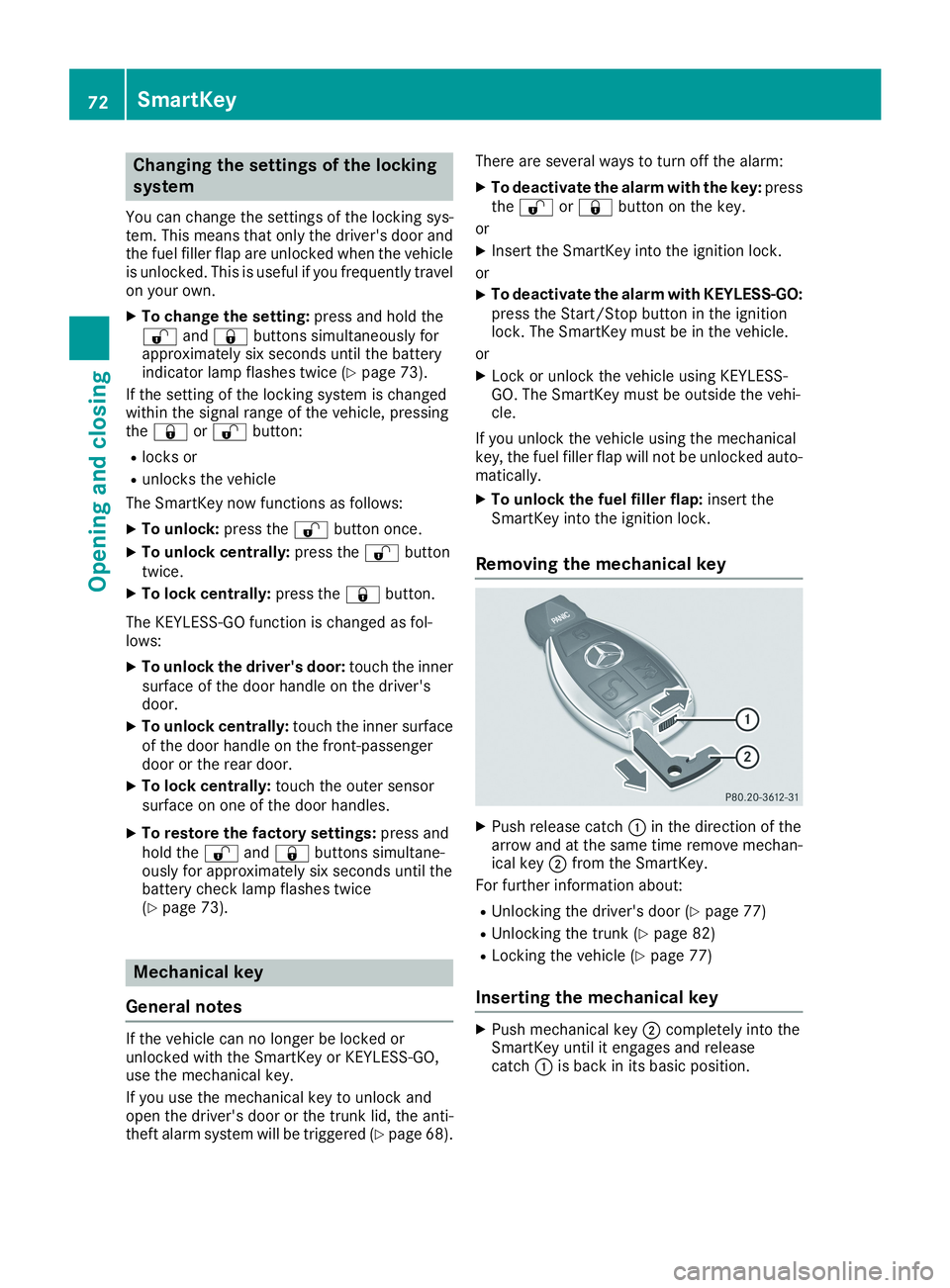
XPush release catchCin the direction of thearrow and at the same time remove mechan-ical keyDfrom the SmartKey.
For further information about:
RUnlocking the driver's door (Ypage 77)
RUnlocking the trunk (Ypage 82)
RLocking the vehicle (Ypage 77)
Inserting the mechanical key
XPush mechanical keyDcompletely into theSmartKey until it engages and releasecatchCis back in its basic position.
72SmartKey
Opening and closing
Page 77 of 330
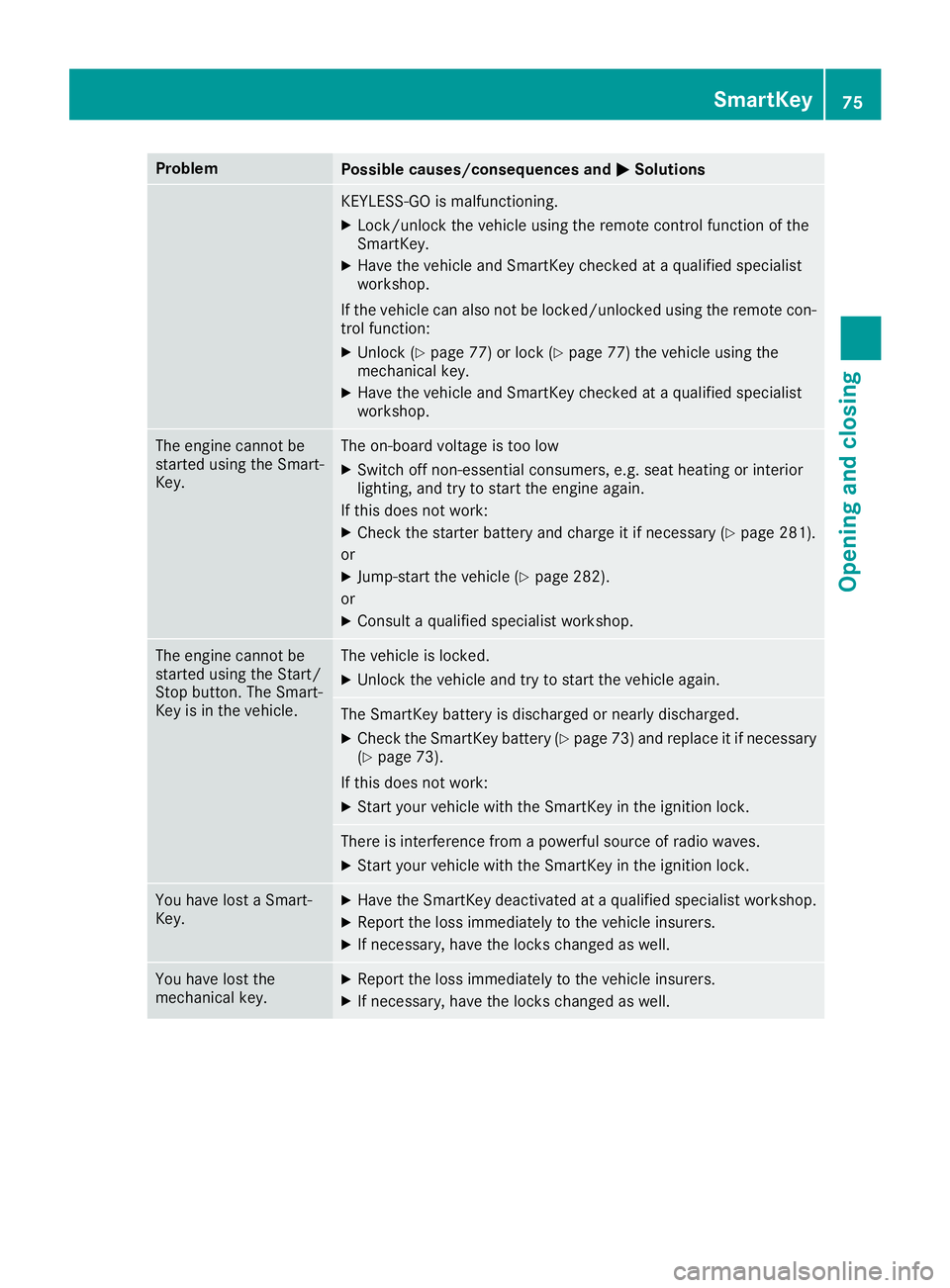
ProblemPossible causes/consequences andPPSolutions
KEYLESS-GO is malfunctioning.
XLock/unlock the vehicle using the remote control function of theSmartKey.
XHave the vehicle and SmartKey checked at a qualified specialistworkshop.
If the vehicle can also not be locked/unlocked using the remote con-trol function:
XUnlock (Ypage 77) or lock (Ypage 77) the vehicle using themechanical key.
XHave the vehicle and SmartKey checked at a qualified specialistworkshop.
The engine cannot bestarted using the Smart-Key.
The on-board voltage is too low
XSwitch off non-essential consumers, e.g. seat heating or interiorlighting, and try to start the engine again.
If this does not work:
XCheck the starter battery and charge it if necessary (Ypage 281).
or
XJump-start the vehicle (Ypage 282).
or
XConsult a qualified specialist workshop.
The engine cannot bestarted using the Start/Stop button. The Smart-Key is in the vehicle.
The vehicle is locked.
XUnlock the vehicle and try to start the vehicle again.
The SmartKey battery is discharged or nearly discharged.
XCheck the SmartKey battery (Ypage 73) and replace it if necessary(Ypage 73).
If this does not work:
XStart your vehicle with the SmartKey in the ignition lock.
There is interference from a powerful source of radio waves.
XStart your vehicle with the SmartKey in the ignition lock.
You have lost a Smart-Key.XHave the SmartKey deactivated at a qualified specialist workshop.
XReport the loss immediately to the vehicle insurers.
XIf necessary, have the locks changed as well.
You have lost themechanical key.XReport the loss immediately to the vehicle insurers.
XIf necessary, have the locks changed as well.
SmartKey75
Opening and closing
Z
Page 79 of 330
Meanwhile, the fuel filler flap will not be lockedor unlocked.
You cannot unlock the vehicle centrally from theinside if the vehicle has been locked with theSmartKey or KEYLESS-GO.
You can open a door from inside the vehicleeven if it has been locked. You can open the reardoors from inside the vehicle unless they aresecured by the child-proof lock (Ypage 60).
If the vehicle has previously been locked withthe SmartKey from the outside, opening a doorfrom the inside will trigger the anti-theft alarmsystem. Switch off the alarm (Ypage 68).
If a locked door is opened from the inside, theprevious unlock status of the vehicle will betaken into consideration if:
Rthe vehicle was locked using the locking but-ton for the central locking, or
Rif the vehicle was locked automatically
The vehicle will be fully unlocked if it had previ-ously been fully unlocked. If only the driver'sdoor had been previously unlocked, only thedoor which has been opened from the inside isunlocked.
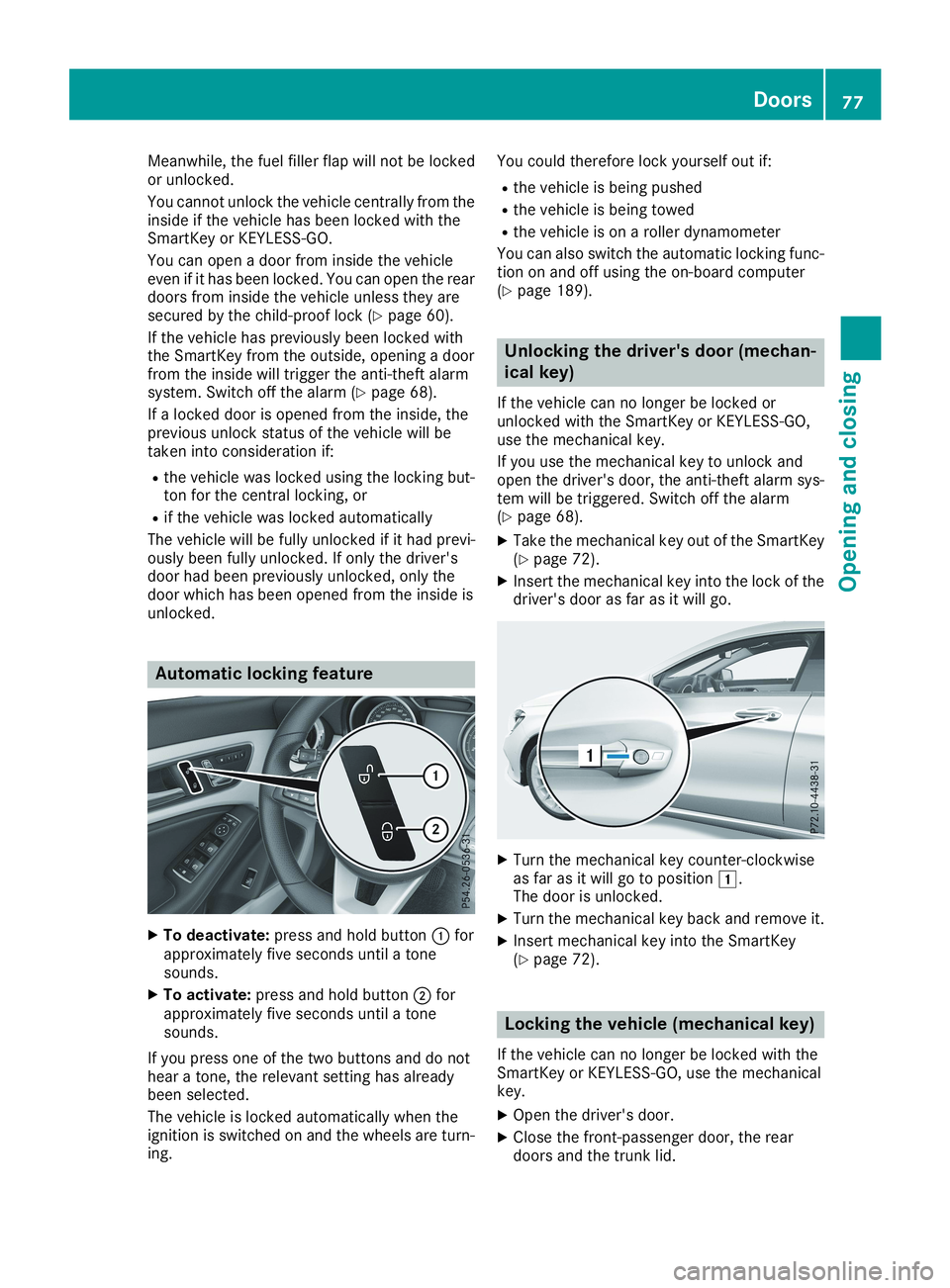
Automatic locking feature
XTo deactivate:press and hold buttonCforapproximately five seconds until a tonesounds.
XTo activate:press and hold buttonDforapproximately five seconds until a tonesounds.
If you press one of the two buttons and do nothear a tone, the relevant setting has alreadybeen selected.
The vehicle is locked automatically when theignition is switched on and the wheels are turn-ing.
You could therefore lock yourself out if:
Rthe vehicle is being pushed
Rthe vehicle is being towed
Rthe vehicle is on a roller dynamometer
You can also switch the automatic locking func-tion on and off using the on-board computer(Ypage 189).
Unlocking the driver's door (mechan-
ical key)
If the vehicle can no longer be locked orunlocked with the SmartKey or KEYLESS-GO,use the mechanical key.
If you use the mechanical key to unlock andopen the driver's door, the anti-theft alarm sys-tem will be triggered. Switch off the alarm(Ypage 68).
XTake the mechanical key out of the SmartKey(Ypage 72).
XInsert the mechanical key into the lock of thedriver's door as far as it will go.
XTurn the mechanical key counter-clockwiseas far as it will go to positionG.The door is unlocked.
XTurn the mechanical key back and remove it.
XInsert mechanical key into the SmartKey(Ypage 72).
Locking the vehicle (mechanical key)
If the vehicle can no longer be locked with theSmartKey or KEYLESS-GO, use the mechanicalkey.
XOpen the driver's door.
XClose the front-passenger door, the reardoors and the trunk lid.
Doors77
Opening and closing
Z
Page 87 of 330
XTouch recessed sensor surfaceCon thedoor handle until the side windows and thepanorama roof with power tilt/sliding panelare fully closed.
iMake sure you only touch recessed sensorsurfaceC.
XMake sure that all the side windows areclosed.
XMake sure that all the side windows and thepanorama roof with power tilt/sliding panelare closed.
On vehicles with a panorama roof with powertilt/sliding panel:
XTouch recessed sensor surfaceCon thedoor handle again until the roller sunblind ofthe panorama roof with power tilt/slidingpanel closes.
XTo interrupt convenience closing:releaserecessed sensor surfaceCon the door han-dle.
Resetting the side windows
If a side window can no longer be closed fully,you must reset it.
XClose all the doors.
XTurn the SmartKey to positionGorHin theignition lock (Ypage 123).
XPull the corresponding switch on the doorcontrol panel until the side window is com-pletely closed (Ypage 83).
XHold the switch for an additional second.
If the side window opens again slightly:
XImmediately pull the corresponding switch onthe door control panel until the side window iscompletely closed (Ypage 83).
XHold the switch for an additional second.
XIf the respective side window remains closedafter the button is released, then it has beenset correctly. If this is not the case, repeat thesteps above.
Problems with the side windows
GWARNING
If you close a side window again immediately after it has been blocked or reset, the side window
closes with increased or maximum force. The reversing feature is then not active. Parts of the
body could be trapped in the closing area in the process. This poses an increased risk of injury or
even fatal injury.
Make sure that no parts of the body are in the closing area. To stop the closing process, release
the switch or push the switch again to reopen the side window.
Side windows85
Opening and closing
Z
Page 90 of 330
automatic operation by pressing/pulling theswitch again.
After opening the sliding sunroof, the roller sun-blind closes slightly automatically. This reducesdrafts in the vehicle interior.
If the sliding sunroof is raised at the rear, it low-ers slightly automatically at higher speeds. Thenoise level in the vehicle interior is reduced as aresult.
At low speeds it raises again automatically.
You can also temporarily deactivate automaticlowering. To do so, press theWswitch. Thesliding sunroof raises again automatically.
You can continue to operate the sliding sunroofafter switching off the engine or removing theSmartKey from the ignition lock. This functionremains active for five minutes or until you opena front door.
The sliding sunroof cannot be opened if a roofcarrier is installed. In order to allow ventilationof the vehicle interior, you can raise the slidingsunroof.
If contact is made with a roof carrier approvedby Mercedes-Benz, the sliding sunroof lowersslightly but remains raised at the rear.
Rain-closing feature
The rain-closing feature is only available for vehi-cles with a rain sensor.
When the SmartKey is in positionZin the igni-tion lock or is removed, the sliding sunroofcloses automatically:
Rif it starts to rain.
Rat extreme outside temperatures.
Rafter six hours.
Rif there is a malfunction in the power supply.
The panorama roof with power tilt/sliding panelremains raised at the rear in order to allow ven-tilation of the vehicle interior.
If the panorama roof with power tilt/slidingpanel is obstructed while being closed by therain-closing feature, it opens again slightly. Therain-closing feature is then deactivated.
The panorama roof with power tilt/sliding paneldoes not close if:
Rit is raised at the rear.
Rit is blocked.
Rno rain is falling on the area of the windshieldbeing monitored by the rain sensor. If thevehicle, for example, is under a bridge or in a
carport, the field of the sensor may be cov-ered.
Operating the roller sunblind for the
panorama roof with power tilt/sliding
panel
Important safety notes
GWARNING
Parts of the body could become trapped
between the roller sunblind and frame or slid-
ing sunroof during automatic opening or clos-
ing. There is a risk of injury.
When opening or closing, make sure that no
body parts are in the sweep of the roller sun-
blind.
If somebody becomes trapped:
Rrelease the switch immediately, or
Rduring automatic operation, push the
switch briefly in any direction
The opening or closing procedure will be stop-
ped.
The roller sunblind shields the vehicle interiorfrom sunlight. The roller sunblind can only beopened and closed when the panorama roofwith power tilt/sliding panel is closed.
Roller sunblind reversing feature
The roller sunblind is equipped with an auto-matic reversing feature. If a solid object blocksor restricts the roller sunblind during the closingprocess, the roller sunblind opens again auto-matically. The automatic reversing feature isonly an aid and is not a substitute for your atten-tiveness when closing the roller sunblind.
GWARNING
The reversing feature does not react:
Rto soft, light and thin objects, e.g. small fin-
gers
Rwhen closing the roller sunblind again man-
ually immediately after automatic reversal
This means that the reversing feature cannot
prevent someone being trapped in these sit-
uations. There is a risk of injury.
88Panorama roof with power tilt/sliding panel
Opening and closing
Page 98 of 330
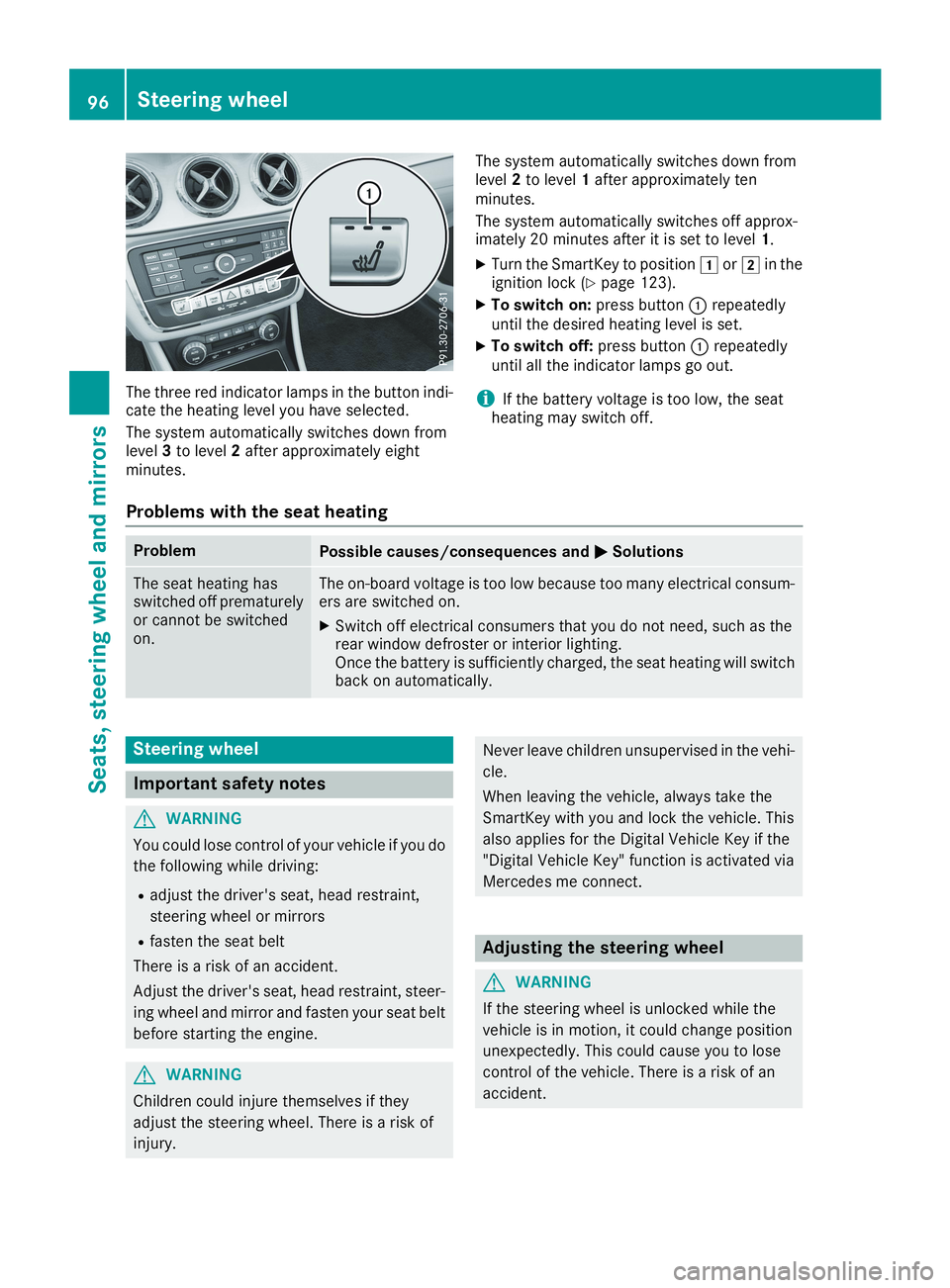
The three red indicator lamps in the button indi-cate the heating level you have selected.
The system automatically switches down fromlevel3to level2after approximately eightminutes.
The system automatically switches down fromlevel2to level1after approximately tenminutes.
The system automatically switches off approx-imately 20 minutes after it is set to level1.
XTurn the SmartKey to positionGorHin theignition lock (Ypage 123).
XTo switch on:press buttonCrepeatedlyuntil the desired heating level is set.
XTo switch off:press buttonCrepeatedlyuntil all the indicator lamps go out.
iIf the battery voltage is too low, the seatheating may switch off.
Problems with the seat heating
ProblemPossible causes/consequences andPPSolutions
The seat heating hasswitched off prematurelyor cannot be switchedon.
The on-board voltage is too low because too many electrical consum-ers are switched on.
XSwitch off electrical consumers that you do not need, such as therear window defroster or interior lighting.Once the battery is sufficiently charged, the seat heating will switchback on automatically.
Steering wheel
Important safety notes
GWARNING
You could lose control of your vehicle if you do
the following while driving:
Radjust the driver's seat, head restraint,
steering wheel or mirrors
Rfasten the seat belt
There is a risk of an accident.
Adjust the driver's seat, head restraint, steer-
ing wheel and mirror and fasten your seat belt
before starting the engine.
GWARNING
Children could injure themselves if they
adjust the steering wheel. There is a risk of
injury.
Never leave children unsupervised in the vehi-
cle.
When leaving the vehicle, always take the
SmartKey with you and lock the vehicle. This
also applies for the Digital Vehicle Key if the
"Digital Vehicle Key" function is activated via
Mercedes me connect.
Adjusting the steering wheel
GWARNING
If the steering wheel is unlocked while the
vehicle is in motion, it could change position
unexpectedly. This could cause you to lose
control of the vehicle. There is a risk of an
accident.
96Steering wheel
Seats, steering wheel and mirrors
Page 101 of 330
If you come into contact with the electrolyte,
observe the following:
RRinse off the electrolyte from your skin
immediately with water.
RImmediately rinse the electrolyte out of
your eyes thoroughly with clean water.
RIf the electrolyte is swallowed, immediately
rinse your mouth out thoroughly. Do not
induce vomiting.
RIf electrolyte comes into contact with your
skin or hair or is swallowed, seek medical
attention immediately.
RImmediately change out of clothing which
has come into contact with electrolyte.
RIf an allergic reaction occurs, seek medical
attention immediately.
The "Automatic anti-glare mirrors" function isonly available if the vehicle is equipped with the"Mirrors package".
The rear-view mirror and the exterior mirror onthe driver's side automatically go into anti-glaremode if:
Rthe ignition is switched on and
Rincident light from headlamps strikes the sen-sor in the rear-view mirror
The mirrors do not go into anti-glare mode ifreverse gear is engaged or if the interior lightingis switched on.
Parking position for the exterior mir-
ror on the front-passenger side
Setting and storing the parking position
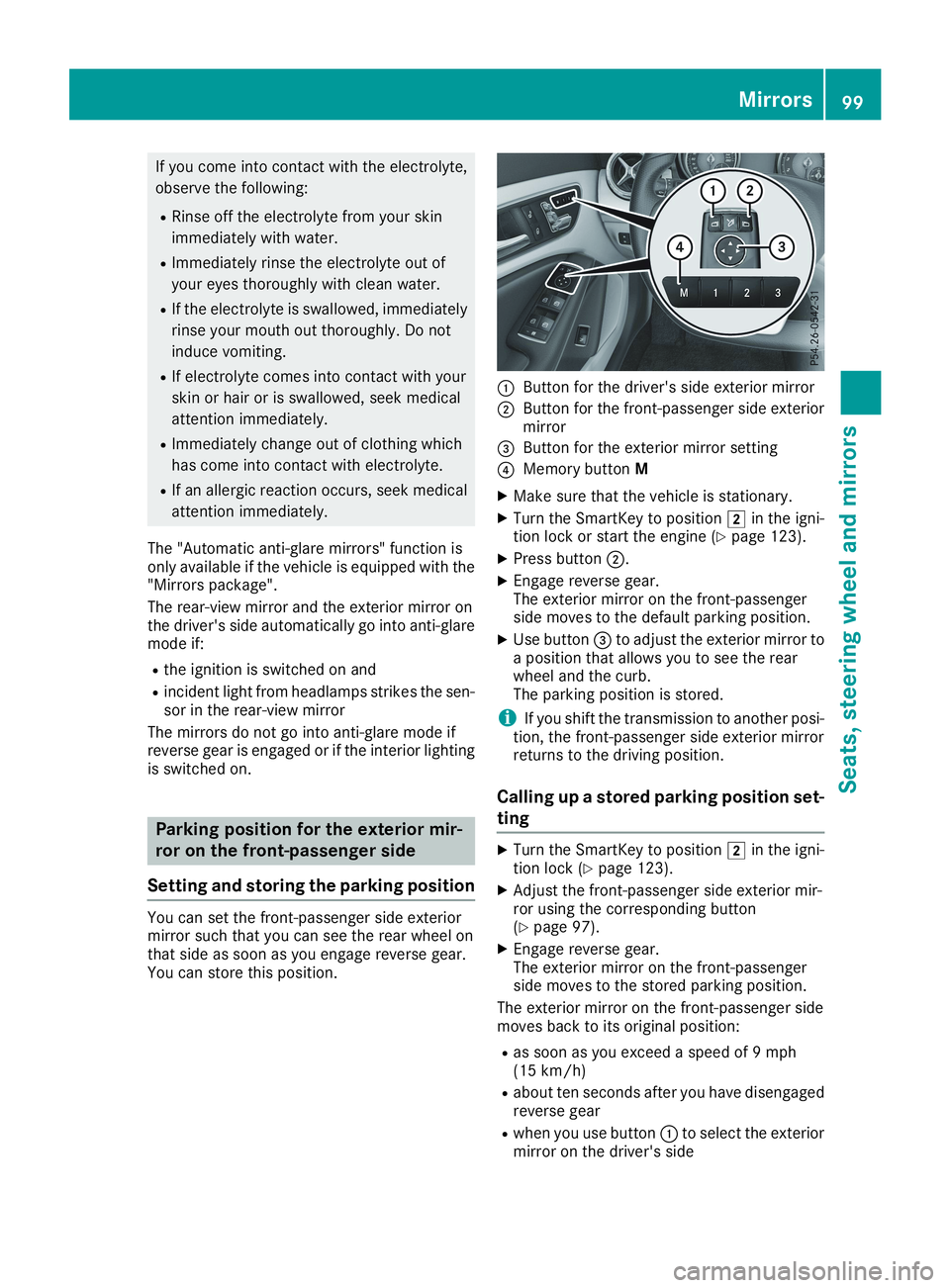
You can set the front-passenger side exteriormirror such that you can see the rear wheel onthat side as soon as you engage reverse gear.You can store this position.
CButton for the driver's side exterior mirror
DButton for the front-passenger side exteriormirror
Page 104 of 330
take precedence over the daytime runninglamps.
USA only:
The daytime running lamps improve the visibilityof your vehicle during the day. To do this, thedaytime running lamps function must beswitched on using the on-board computer(Ypage 189).
If the engine is running and you turn the lightswitch to the`orXposition, the manualsettings take precedence over the daytime run-ning lamps.
Low-beam headlamps
Even if the light sensor does not detect that it isdark, the parking lamps and low-beam head-lamps switch on when the ignition is switched onand the light switch is set to theXposition.This is a particularly useful function in the eventof rain and fog.
XTo switch on the low-beam headlamps:turn the SmartKey to positionHin the igni-tion lock or start the engine.
XTurn the light switch toX.The greenXindicator lamp in the instru-ment cluster lights up.
Rear fog lamp
The rear fog lamp improves visibility of yourvehicle for the traffic behind in the event of thickfog. Please take note of the country-specificregulations for the use of rear fog lamps.
XTo switch on the rear fog lamp:turn theSmartKey in the ignition lock to positionHorstart the engine.
XTurn the light switch toXorX.
XPress the^button.The yellow^indicator lamp in the instru-ment cluster lights up.
XTo switch off the rear fog lamp:press the^button.The yellow^indicator lamp in the instru-ment cluster goes out.
iWhen the rear fog lamp is switched on, thecenter brake lamp in the tail lamp switches offdue to a legal requirement.
Parking lamps
!If the battery charge is very low, the parkinglamps or standing lamps are automaticallyswitched off to enable the next engine start.Always park your vehicle safely and in a well lit
area, in accordance with the relevant legalstipulations. Avoid using the`parkinglamps over a period of several hours. If pos-sible, switch on the right-handdor left-handcstanding lamps.
XTo switch on:turn the light switch to`.The green`indicator lamp in the instru-ment cluster lights up.
Standing lamps
Switching on the standing lamps ensures thecorresponding side of the vehicle is illuminated.
XTo switch on the standing lamps:theSmartKey is not in the ignition lock or it is inpositionZin the ignition lock.
XTurn the light switch toc(left-hand side ofthe vehicle) ord(right-hand side of thevehicle).
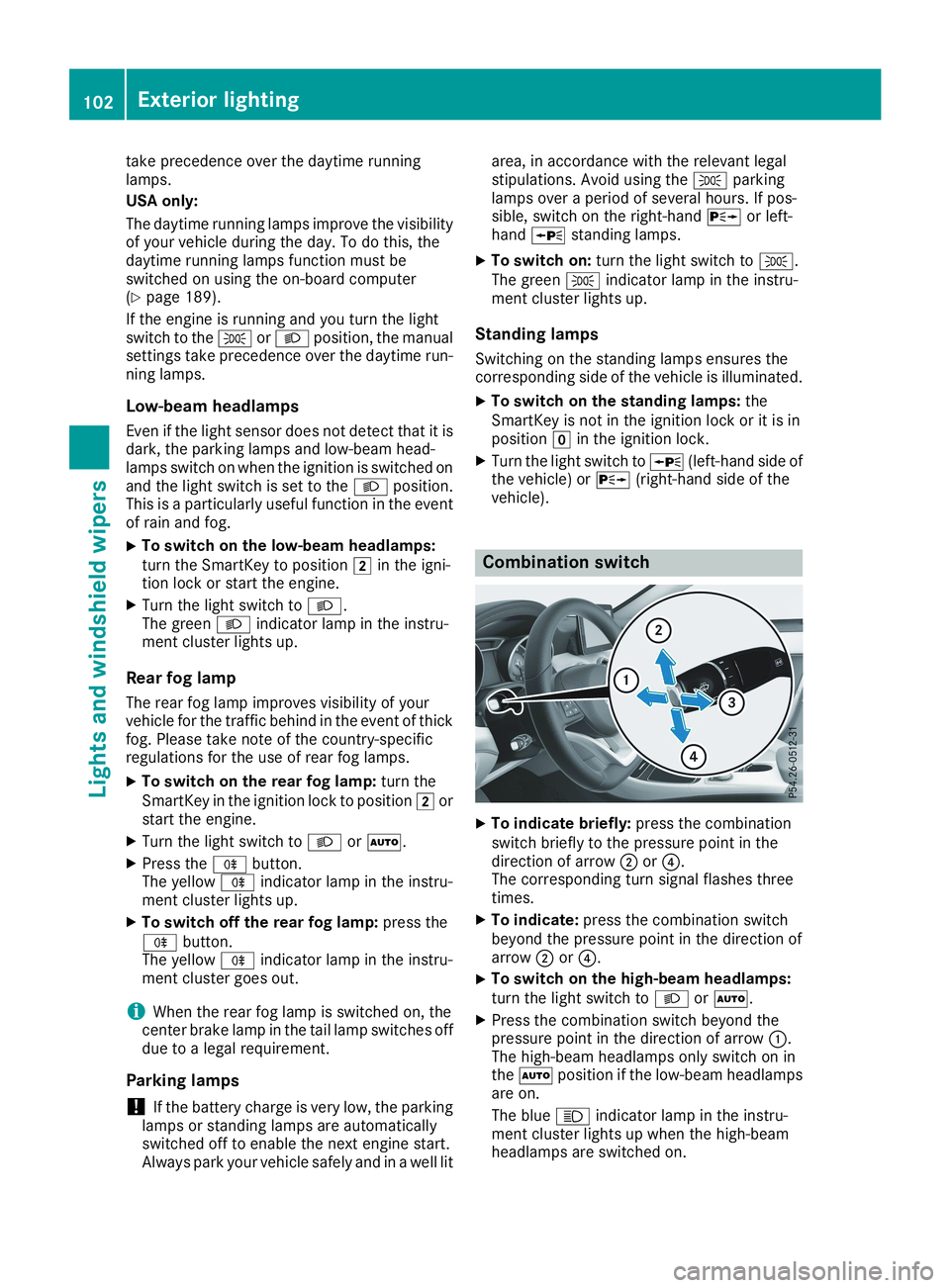
Combination switch
XTo indicate briefly:press the combinationswitch briefly to the pressure point in thedirection of arrowDor