ESP MERCEDES-BENZ CLA 2019 Owner's Guide
[x] Cancel search | Manufacturer: MERCEDES-BENZ, Model Year: 2019, Model line: CLA, Model: MERCEDES-BENZ CLA 2019Pages: 330, PDF Size: 23.57 MB
Page 104 of 330
take precedence over the daytime runninglamps.
USA only:
The daytime running lamps improve the visibilityof your vehicle during the day. To do this, thedaytime running lamps function must beswitched on using the on-board computer(Ypage 189).
If the engine is running and you turn the lightswitch to the`orXposition, the manualsettings take precedence over the daytime run-ning lamps.
Low-beam headlamps
Even if the light sensor does not detect that it isdark, the parking lamps and low-beam head-lamps switch on when the ignition is switched onand the light switch is set to theXposition.This is a particularly useful function in the eventof rain and fog.
XTo switch on the low-beam headlamps:turn the SmartKey to positionHin the igni-tion lock or start the engine.
XTurn the light switch toX.The greenXindicator lamp in the instru-ment cluster lights up.
Rear fog lamp
The rear fog lamp improves visibility of yourvehicle for the traffic behind in the event of thickfog. Please take note of the country-specificregulations for the use of rear fog lamps.
XTo switch on the rear fog lamp:turn theSmartKey in the ignition lock to positionHorstart the engine.
XTurn the light switch toXorX.
XPress the^button.The yellow^indicator lamp in the instru-ment cluster lights up.
XTo switch off the rear fog lamp:press the^button.The yellow^indicator lamp in the instru-ment cluster goes out.
iWhen the rear fog lamp is switched on, thecenter brake lamp in the tail lamp switches offdue to a legal requirement.
Parking lamps
!If the battery charge is very low, the parkinglamps or standing lamps are automaticallyswitched off to enable the next engine start.Always park your vehicle safely and in a well lit
area, in accordance with the relevant legalstipulations. Avoid using the`parkinglamps over a period of several hours. If pos-sible, switch on the right-handdor left-handcstanding lamps.
XTo switch on:turn the light switch to`.The green`indicator lamp in the instru-ment cluster lights up.
Standing lamps
Switching on the standing lamps ensures thecorresponding side of the vehicle is illuminated.
XTo switch on the standing lamps:theSmartKey is not in the ignition lock or it is inpositionZin the ignition lock.
XTurn the light switch toc(left-hand side ofthe vehicle) ord(right-hand side of thevehicle).
Combination switch
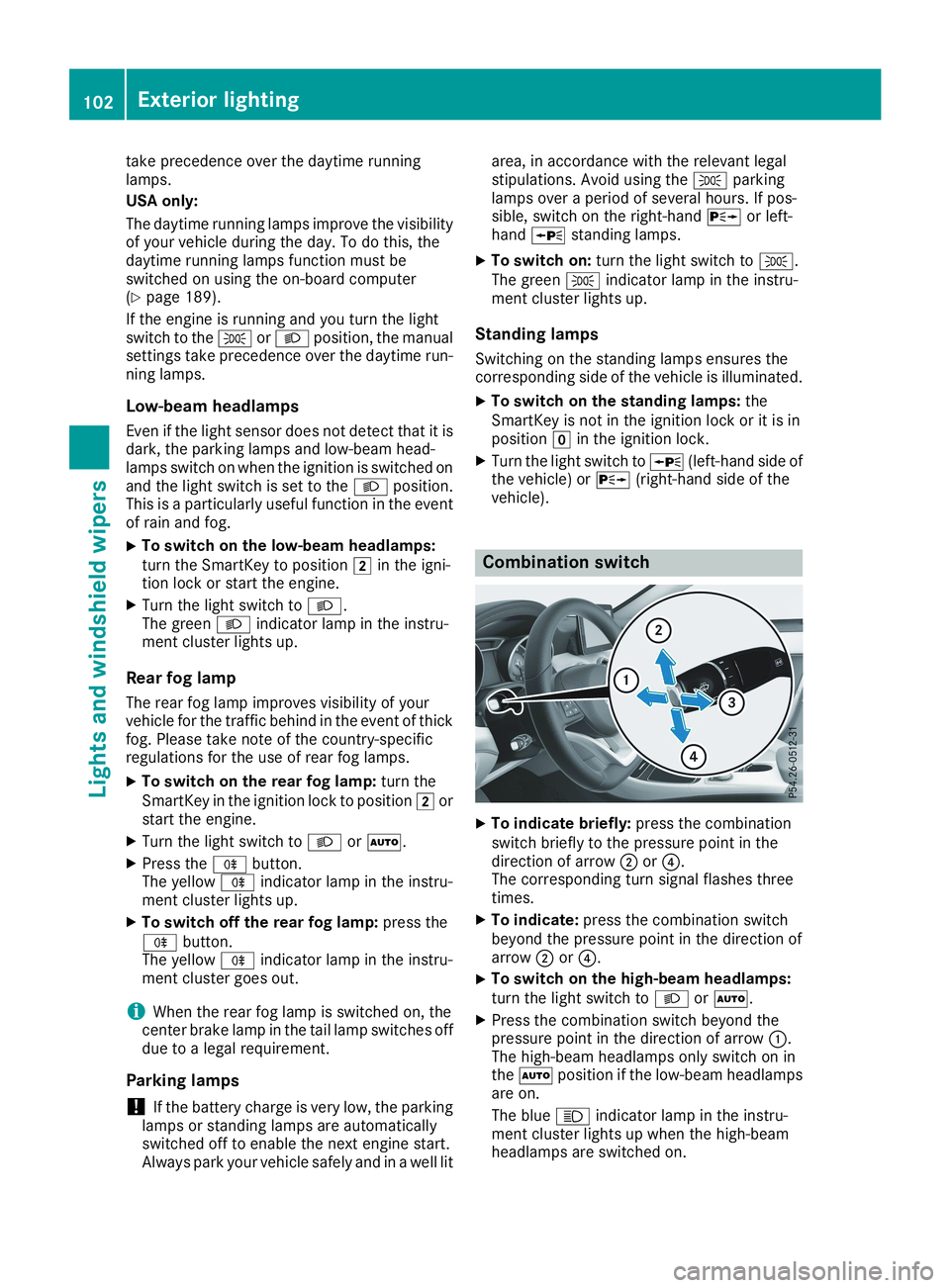
XTo indicate briefly:press the combinationswitch briefly to the pressure point in thedirection of arrowDor
Page 123 of 330
iIf you activate the residual heat function athigh temperatures, only the ventilation will beactivated. The blower runs at medium speed.
iYou cannot use the ventilation to cool thevehicle interior to a temperature lower thanthe outside temperature.
Activating/deactivating
XTurn the SmartKey to positionZin the igni-tion lock or remove it (Ypage 123).
XPress theKbutton.The indicator lamp in theKbutton lightsup or goes out.
The indicator lamp in the button indicates thatthe respective function is activated.
iResidual heat is deactivated automatically:
Rafter approximately 30 minutes
Rwhen the ignition is switched on
Rif the battery voltage drops
Air vents
Important safety notes
GWARNING
Very hot or very cold air can flow from the air
vents. This could result in burns or frostbite in
the immediate vicinity of the air vents. There
is a risk of injury.
Make sure that all vehicle occupants always
maintain a sufficient distance to the air out-
lets. If necessary, redirect the airflow to
another area of the vehicle interior.
In order to ensure the direct flow of fresh airthrough the air vents into the vehicle interior,please observe the following notes:
Rkeep the air inlet between the windshield andthe hood free of blockages, such as ice, snowor leaves.
Rnever cover the air vents or air intake grilles inthe vehicle interior.
iFor optimal climate control in the vehicle,open the air vents completely and set theadjusters to the central position.
Setting the air vents
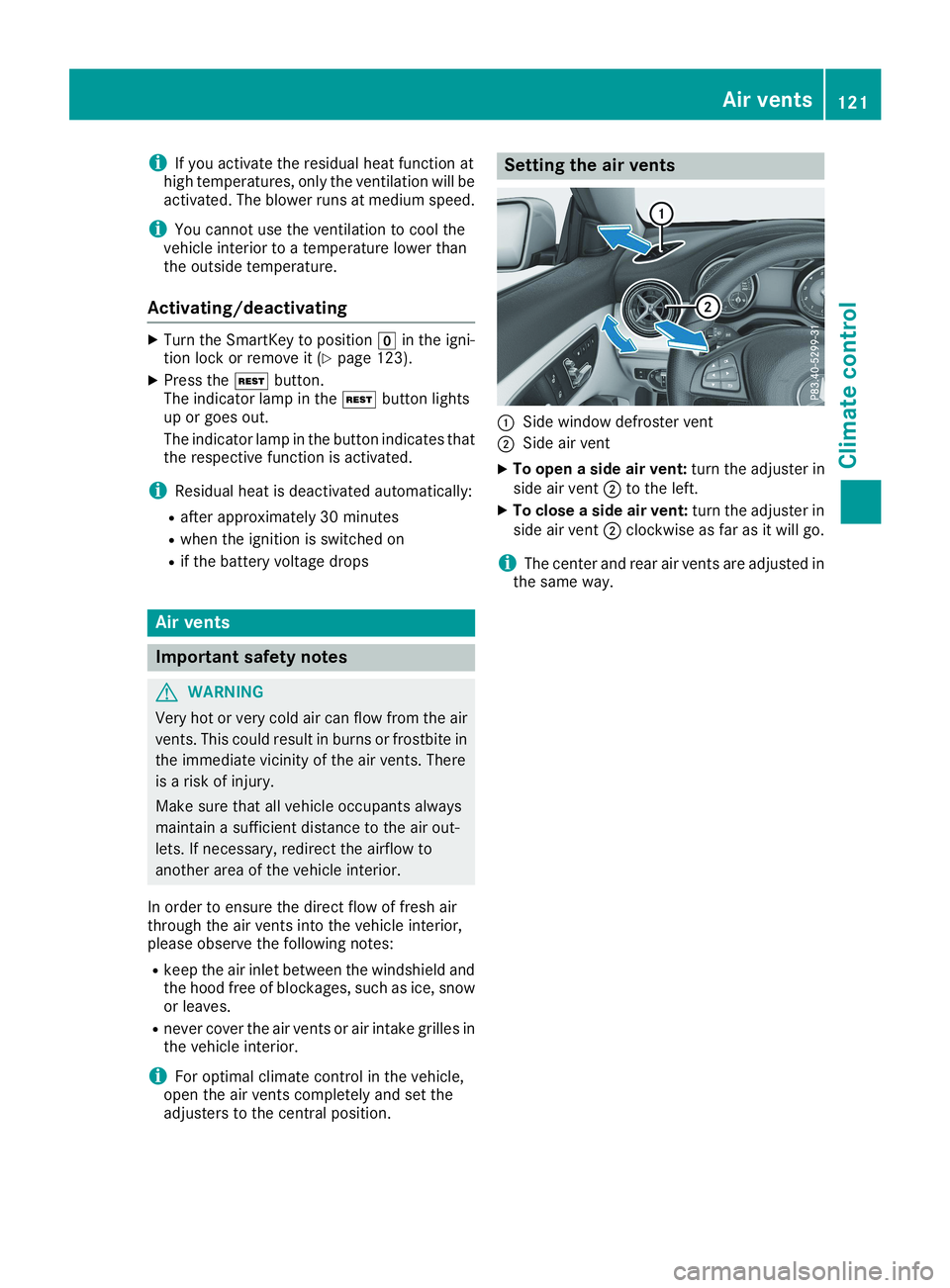
CSide window defroster vent
DSide air vent
XTo open a side air vent:turn the adjuster inside air ventDto the left.
XTo close a side air vent:turn the adjuster inside air ventDclockwise as far as it will go.
iThe center and rear air vents are adjusted inthe same way.
Air vents121
Climate control
Z
Page 125 of 330
!Do not warm up the engine while stationary.Pull away immediately. Avoid high enginespeeds and full throttle until the engine hasreached its operating temperature.
In vehicles with automatic transmission,engage positions P and R only when the vehi-cle is stationary.
Where possible, avoid spinning the drivewheels when pulling away on slippery roads.You could otherwise damage the drive train.
!Mercedes-AMG vehicles:avoid full-loadoperation and engine speeds greater than5000 rpm when the engine is cold. This helpsto protect the engine and avoids uncomfort-able driving.
Key positions
SmartKey
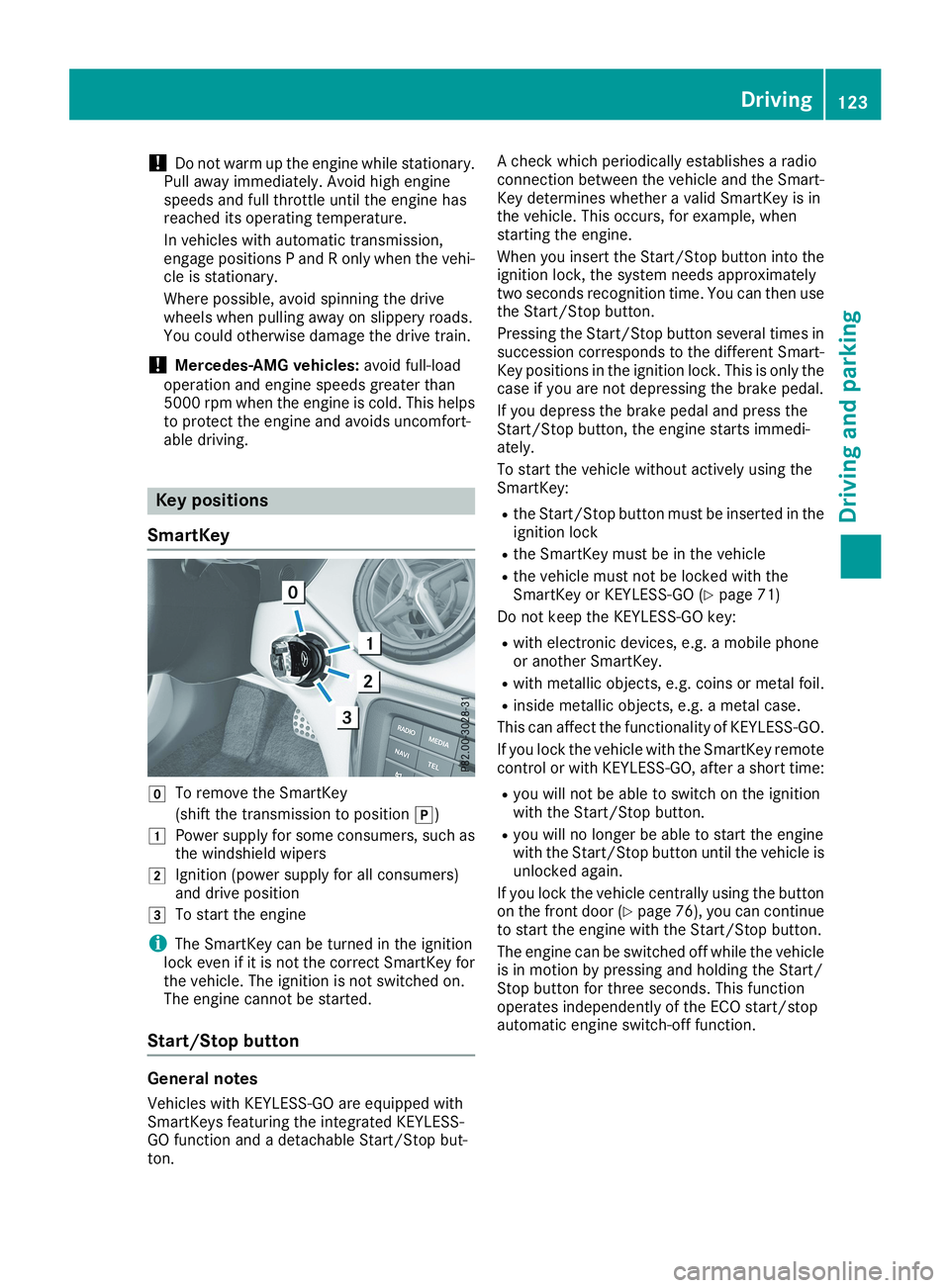
ZTo remove the SmartKey
(shift the transmission to position])
GPower supply for some consumers, such asthe windshield wipers
HIgnition (power supply for all consumers)and drive position
ITo start the engine
iThe SmartKey can be turned in the ignitionlock even if it is not the correct SmartKey forthe vehicle. The ignition is not switched on.The engine cannot be started.
Start/Stop button
General notes
Vehicles with KEYLESS-GO are equipped withSmartKeys featuring the integrated KEYLESS-GO function and a detachable Start/Stop but-ton.
A check which periodically establishes a radioconnection between the vehicle and the Smart-Key determines whether a valid SmartKey is inthe vehicle. This occurs, for example, whenstarting the engine.
When you insert the Start/Stop button into theignition lock, the system needs approximatelytwo seconds recognition time. You can then usethe Start/Stop button.
Pressing the Start/Stop button several times insuccession corresponds to the different Smart-Key positions in the ignition lock. This is only thecase if you are not depressing the brake pedal.
If you depress the brake pedal and press theStart/Stop button, the engine starts immedi-ately.
To start the vehicle without actively using theSmartKey:
Rthe Start/Stop button must be inserted in theignition lock
Rthe SmartKey must be in the vehicle
Rthe vehicle must not be locked with theSmartKey or KEYLESS-GO (Ypage 71)
Do not keep the KEYLESS-GO key:
Rwith electronic devices, e.g. a mobile phoneor another SmartKey.
Rwith metallic objects, e.g. coins or metal foil.
Rinside metallic objects, e.g. a metal case.
This can affect the functionality of KEYLESS-GO.
If you lock the vehicle with the SmartKey remotecontrol or with KEYLESS-GO, after a short time:
Ryou will not be able to switch on the ignitionwith the Start/Stop button.
Ryou will no longer be able to start the enginewith the Start/Stop button until the vehicle isunlocked again.
If you lock the vehicle centrally using the buttonon the front door (Ypage 76), you can continueto start the engine with the Start/Stop button.
The engine can be switched off while the vehicleis in motion by pressing and holding the Start/Stop button for three seconds. This functionoperates independently of the ECO start/stopautomatic engine switch-off function.
Driving123
Driving and parking
Z
Page 131 of 330
ProblemPossible causes/consequences andPPSolutions
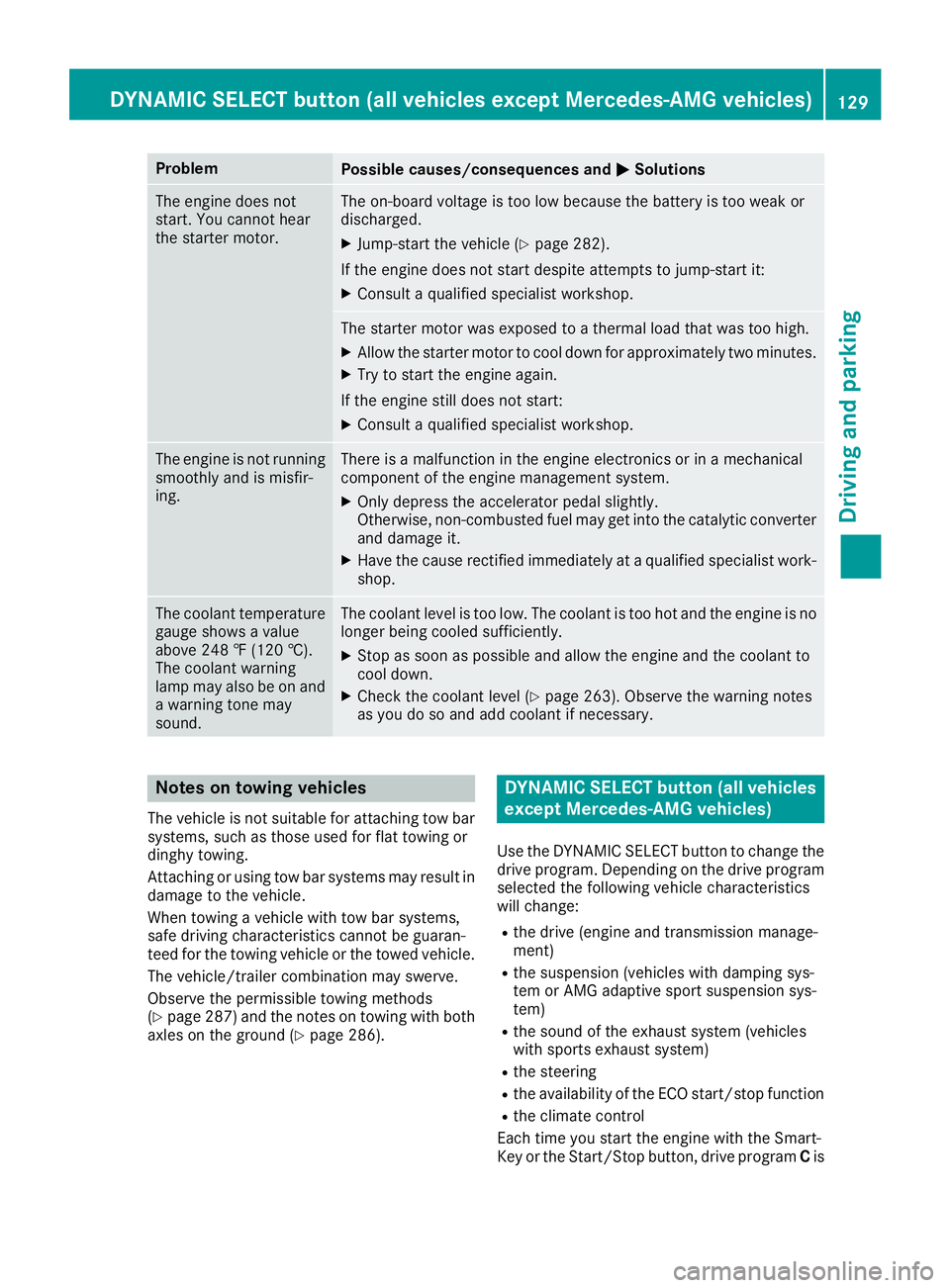
The engine does notstart. You cannot hearthe starter motor.
The on-board voltage is too low because the battery is too weak ordischarged.
XJump-start the vehicle (Ypage 282).
If the engine does not start despite attempts to jump-start it:
XConsult a qualified specialist workshop.
The starter motor was exposed to a thermal load that was too high.
XAllow the starter motor to cool down for approximately two minutes.
XTry to start the engine again.
If the engine still does not start:
XConsult a qualified specialist workshop.
The engine is not runningsmoothly and is misfir-ing.
There is a malfunction in the engine electronics or in a mechanicalcomponent of the engine management system.
XOnly depress the accelerator pedal slightly.Otherwise, non-combusted fuel may get into the catalytic converterand damage it.
XHave the cause rectified immediately at a qualified specialist work-shop.
The coolant temperaturegauge shows a valueabove 248 ‡ (120 †).The coolant warninglamp may also be on anda warning tone maysound.
The coolant level is too low. The coolant is too hot and the engine is nolonger being cooled sufficiently.
XStop as soon as possible and allow the engine and the coolant tocool down.
XCheck the coolant level (Ypage 263). Observe the warning notesas you do so and add coolant if necessary.
Notes on towing vehicles
The vehicle is not suitable for attaching tow barsystems, such as those used for flat towing ordinghy towing.
Attaching or using tow bar systems may result indamage to the vehicle.
When towing a vehicle with tow bar systems,safe driving characteristics cannot be guaran-teed for the towing vehicle or the towed vehicle.
The vehicle/trailer combination may swerve.
Observe the permissible towing methods(Ypage 287) and the notes on towing with bothaxles on the ground (Ypage 286).
DYNAMIC SELECT button (all vehicles
except Mercedes-AMG vehicles)
Use the DYNAMIC SELECT button to change thedrive program. Depending on the drive programselected the following vehicle characteristicswill change:
Rthe drive (engine and transmission manage-ment)
Rthe suspension (vehicles with damping sys-tem or AMG adaptive sport suspension sys-tem)
Rthe sound of the exhaust system (vehicleswith sports exhaust system)
Rthe steering
Rthe availability of the ECO start/stop function
Rthe climate control
Each time you start the engine with the Smart-Key or the Start/Stop button, drive programCis
DYNAMIC SELECT button (all vehicles except Mercedes-AMG vehicles)129
Driving and parking
Z
Page 132 of 330
activated. For further information about startingthe engine, see (Ypage 124).
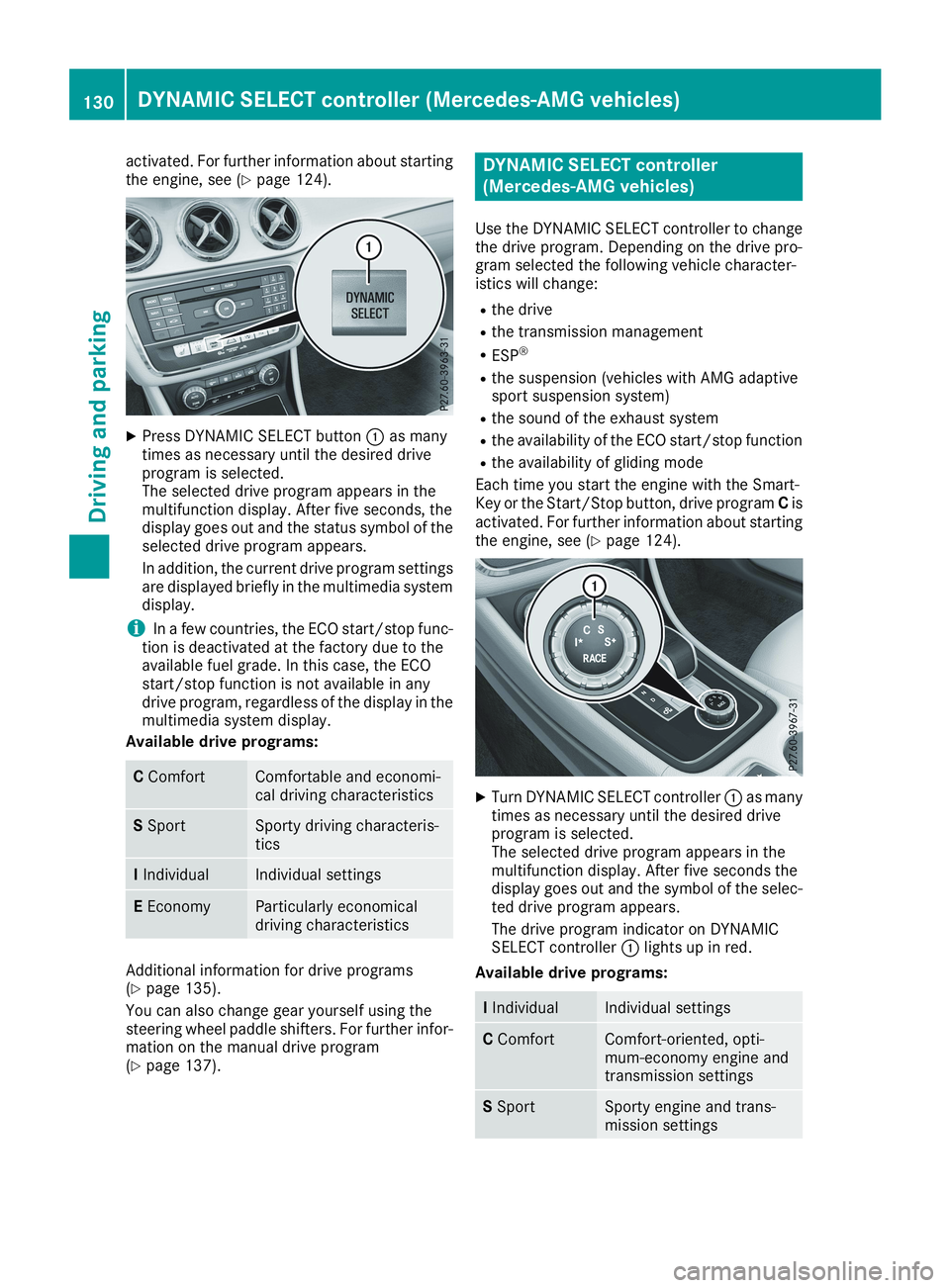
XPress DYNAMIC SELECT buttonCas manytimes as necessary until the desired driveprogram is selected.The selected drive program appears in themultifunction display. After five seconds, thedisplay goes out and the status symbol of theselected drive program appears.
In addition, the current drive program settingsare displayed briefly in the multimedia systemdisplay.
iIn a few countries, the ECO start/stop func-tion is deactivated at the factory due to theavailable fuel grade. In this case, the ECOstart/stop function is not available in anydrive program, regardless of the display in themultimedia system display.
Available drive programs:
CComfortComfortable and economi-cal driving characteristics
SSportSporty driving characteris-tics
IIndividualIndividual settings
EEconomyParticularly economicaldriving characteristics
Additional information for drive programs(Ypage 135).
You can also change gear yourself using thesteering wheel paddle shifters. For further infor-mation on the manual drive program(Ypage 137).
DYNAMIC SELECT controller
(Mercedes-AMG vehicles)
Use the DYNAMIC SELECT controller to changethe drive program. Depending on the drive pro-gram selected the following vehicle character-istics will change:
Rthe drive
Rthe transmission management
RESP®
Rthe suspension (vehicles with AMG adaptivesport suspension system)
Rthe sound of the exhaust system
Rthe availability of the ECO start/stop function
Rthe availability of gliding mode
Each time you start the engine with the Smart-Key or the Start/Stop button, drive programCisactivated. For further information about startingthe engine, see (Ypage 124).
XTurn DYNAMIC SELECT controllerCas manytimes as necessary until the desired driveprogram is selected.The selected drive program appears in themultifunction display. After five seconds thedisplay goes out and the symbol of the selec-ted drive program appears.
The drive program indicator on DYNAMICSELECT controllerClights up in red.
Available drive programs:
IIndividualIndividual settings
CComfortComfort-oriented, opti-mum-economy engine andtransmission settings
SSportSporty engine and trans-mission settings
130DYNAMIC SELECT controller (Mercedes-AMG vehicles)
Driving and parking
Page 136 of 330
![MERCEDES-BENZ CLA 2019 Owners Guide Transmission positions
EPark position
This prevents the vehicle from rollingaway when stopped.
Only shift the transmission to posi-tion]when the vehicle is station-ary. The parking lock should not b](/img/4/59041/w960_59041-135.png "MERCEDES-BENZ CLA 2019 Owners Guide Transmission positions
EPark position
This prevents the vehicle from rollingaway when stopped.
Only shift the transmission to posi-tion]when the vehicle is station-ary. The parking lock should not b")
Transmission positions
EPark position
This prevents the vehicle from rollingaway when stopped.
Only shift the transmission to posi-tion]when the vehicle is station-ary. The parking lock should not beused as a brake when parking.Always apply the electronic parkingbrake in addition to the parking lockin order to secure the vehicle.
In the event of a malfunction of thevehicle's electronics, the transmis-sion may lock in position]. Havethe vehicle electronics checkedimmediately at a qualified specialistworkshop.
Park position]is automaticallyengaged if:
Ryou switch off the engine using theSmartKey and remove the Smart-Key
Ryou switch off the engine using theSmartKey or using the Start/Stopbutton and open the driver's dooror front-passenger door
Ryou open the driver's door whenthe vehicle is stationary or whendriving at a very low speed and thetransmission is in position[or^
FReverse gear
Only shift the transmission into posi-tion^when the vehicle is station-ary.
DNeutral
Do not shift the transmission to\\while driving. The automatic trans-mission could otherwise be dam-aged.
No power is transmitted from theengine to the drive wheels.
Releasing the brakes will allow you tomove the vehicle freely, e.g. to pushit or tow it.
If ESP®is deactivated or faulty: shiftthe transmission to position\\if thevehicle is in danger of skidding, e.g.on icy roads.
If you switch the engine off with thetransmission in position^or[,the automatic transmission shifts to\\automatically.
!Coasting in neutral\\maycause damage to the drive train.
:Drive
The automatic transmission changesgear automatically. All forward gearsare available.
Driving tips
Changing gear
The automatic transmission shifts through theindividual gears automatically when it is in trans-mission position[. This automatic gear shift-ing behavior is determined by:
Rthe selected drive program
Rthe position of the accelerator pedal
Rthe road speed
Accelerator pedal position
Your style of driving influences how the auto-matic transmission shifts gear:
Rlittle throttle: early upshifts
Rmore throttle: late upshifts
134Automatic transmission
Driving an d parking
Page 137 of 330
Holding the vehicle stationary on uphill
gradients
GWARNING
If the clutch overheats, the electronic man-
agement system is automatically deactivated.
This interrupts the power transmission. The
vehicle may, for example, roll backwards on
gradients. There is a risk of an accident.
Never hold the vehicle stationary on uphill
gradients by depressing the accelerator.
The clutch may overheat if you hold the vehiclestationary on uphill gradients by depressing theaccelerator pedal. If the clutch overheats, awarning tone sounds.
All vehicles (except Mercedes-AMG vehi-
cles):theStop Vehicle Shift to 'P'Stop Vehicle Shift to 'P'
Leave Engine RunningLeave Engine Runningdisplay messageappears in the multifunction display. You willonly be able to continue your journey once theclutch has cooled down and the display mes-sage in the multifunction display has disap-peared.
Mercedes-AMG vehicles:theTrans. OilTrans. Oil
Overheated Drive on with CareOverheated Drive on with Caredisplaymessage appears in the multifunction display.
Do not hold the vehicle stationary on uphill gra-dients by depressing the accelerator pedal.Instead, only ever hold the vehicle stationary onuphill gradients by:
Rdepressing the brake pedal
Ractivating the HOLD function
Rengaging the electric parking brake
Kickdown
Use kickdown for maximum acceleration.
XDepress the accelerator pedal beyond thepressure point.The automatic transmission shifts to a lowergear depending on the engine speed.
XEase off the accelerator pedal once thedesired speed is reached.The automatic transmission shifts back up.
Mercedes-AMG vehicles:it is only possible touse kickdown in the automatic drive programand the temporary manual drive programM.When manual drive programMis permanentlyactivated, kickdown is not possible.
For further information on kickdown in manualdrive programM(Ypage 139).
Rocking the vehicle free
Shifting back and forth between transmissionpositions[and^can help to free up thevehicle if it gets stuck in mud or snow. The vehi-cle's engine management system limits thespeed to a maximum of 5 mph (9 km/h) whenshifting back and forth. To shift repeatedlybetween transmission positions[and^,move the DIRECT SELECT lever up and downpast the point of resistance.
Drive programs
All vehicles (except Mercedes-AMG
vehicles)
Drive program C (Comfort)
Drive programCis characterized by the follow-ing:
Rthe vehicle delivers comfortable, economicalhandling characteristics.
Rthe vehicle pulls away more gently in forwardand reverse gears, unless the acceleratorpedal is depressed fully.
Rthe vehicle has improved driving stability, forexample on slippery road surfaces.
Roptimal fuel consumption resulting from theautomatic transmission shifting up sooner.The vehicle is driven in the low engine speedrange and the wheels are less likely to spin.
Drive program S (Sport)
Drive programSis characterized by the follow-ing:
Rsporty engine settings.
Rthe automatic transmission shifts up later.The fuel consumption possibly being higheras a result of the later automatic transmissionshift points.
Automatic transmission135
Driving and parking
Z
Page 138 of 330
Drive program I (Individual)
In drive programIthe following properties of thedrive program can be selected:
Rthe drive (engine and transmission manage-ment)
Rthe suspension (vehicles with damping sys-tem or AMG adaptive sport suspension sys-tem)
Rthe steering
Rthe availability of the ECO start/stop function
Rthe climate control
Information about configuring drive programIwith the multimedia system can be found in theDigital Operator's Manual.
iTo permanently select the gears in driveprogramIusing the steering wheel paddleshifters, select theM(manual) setting for thedrive.
Drive program E (Economy)
Drive programEis characterized by the follow-ing:
Rcomfort-oriented engine settings.
Roptimal fuel consumption resulting from theautomatic transmission shifting up sooner.
Rthe vehicle pulls away more gently in forwardand reverse gears, unless the acceleratorpedal is depressed fully.
Rthe vehicle has improved driving stability, forexample on slippery road surfaces.
Rthe automatic transmission shifting upsooner. This results in the vehicle being drivenat lower engine speeds and the wheels beingless likely to spin.
Rgliding mode is activated automatically whenengine-internal conditions are fulfilled andthe accelerator is not depressed. At the sametime the transmission’s clutch opens and thevehicle rolls freely using its kinetic energy. Asa result great distances can be completedwithout the engine brake and fuel consump-tion reduced.
iThe availability of gliding mode depends onvarious factors, including the following:
Rthe engine and transmission temperature
Rthe downhill gradient
Rthe vehicle speed
Rperforming regular adaptation functions
When you depress the brake pedal, glidingmode is deactivated, depending on pedalpressure.
When you activate cruise control or ActiveDistance Assist DISTRONIC, gliding mode isnot available.
Mercedes-AMG vehicles
Drive program I (Individual)
In drive programIthe following properties of thedrive program can be selected:
Rthe drive (engine management)
Rthe transmission management
Rthe suspension (vehicles with AMG adaptivesport suspension system)
RESP®
Information about configuring drive programIwith the multimedia system can be found in theDigital Operator's Manual.
Drive program C (Comfort)
Drive programCis characterized by the follow-ing:
Rthe vehicle delivers comfortable, economicalhandling characteristics.
Rthe vehicle pulls away more gently in forwardand reverse gears, unless the acceleratorpedal is depressed fully.
Rthe vehicle has improved driving stability, forexample on slippery road surfaces.
Roptimal fuel consumption resulting from theautomatic transmission shifting up sooner.The vehicle is driven in the low engine speedrange and the wheels are less likely to spin.
Rgliding mode is available.
Rthe ECO start/stop function is available.
Drive program S (Sport)
Drive programSis characterized by the follow-ing:
Rthe vehicle exhibits sporty driving character-istics.
Rthe automatic transmission shifts up later.The fuel consumption possibly being higheras a result of the later automatic transmissionshift points.
Rthe suspension exhibits stiff springing anddamping settings (vehicles with AIR adaptivesport suspension system).
136Automatic transmission
Driving and pa rking
Page 140 of 330
Permanent setting (Mercedes-AMG
vehicles)
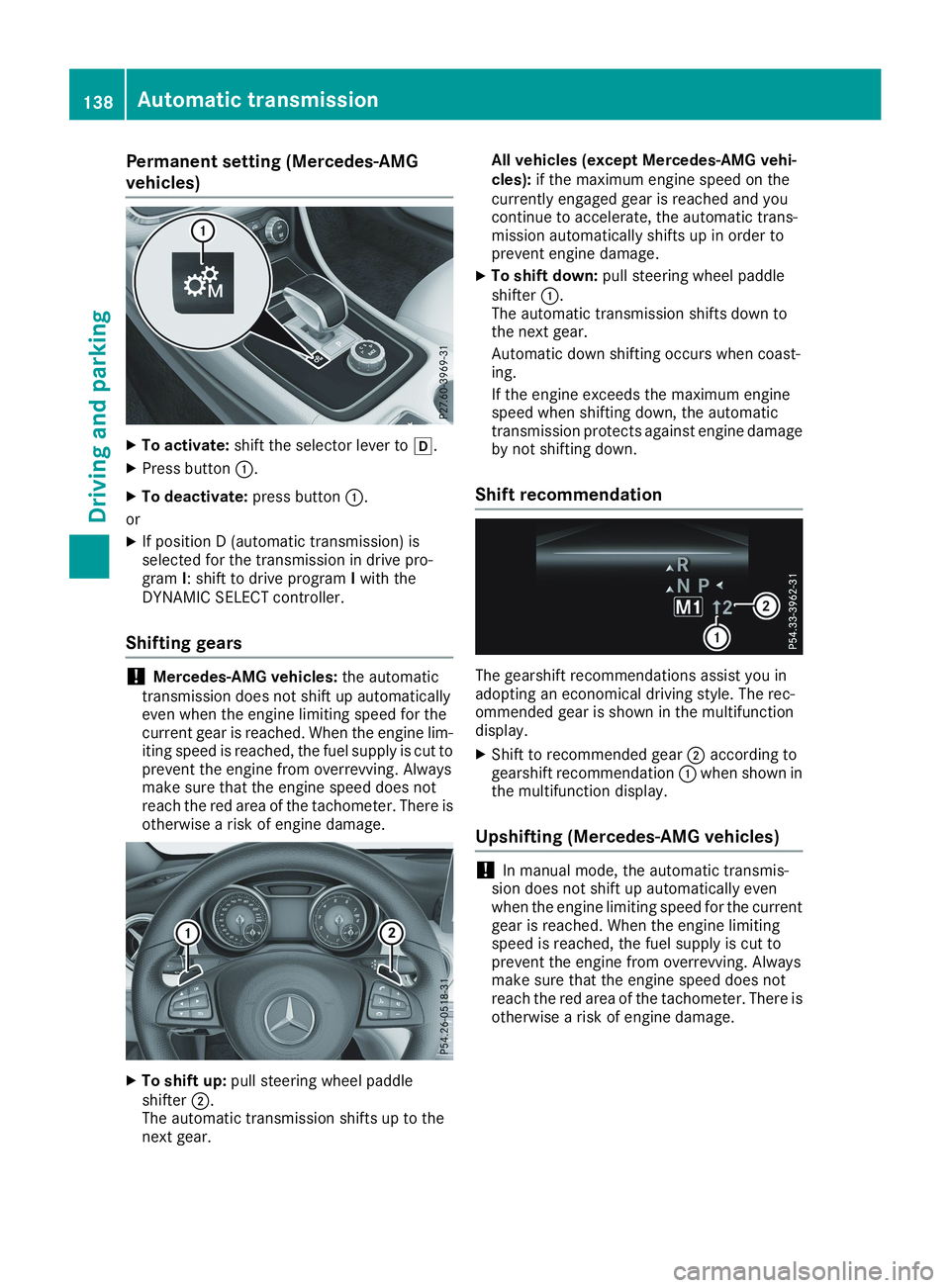
XTo activate:shift the selector lever to[.
XPress buttonC.
XTo deactivate:press buttonC.
or
XIf position D (automatic transmission) isselected for the transmission in drive pro-gramI: shift to drive programIwith theDYNAMIC SELECT controller.
Shifting gears
!Mercedes-AMG vehicles:the automatictransmission does not shift up automaticallyeven when the engine limiting speed for thecurrent gear is reached. When the engine lim-iting speed is reached, the fuel supply is cut toprevent the engine from overrevving. Alwaysmake sure that the engine speed does notreach the red area of the tachometer. There isotherwise a risk of engine damage.
XTo shift up:pull steering wheel paddleshifterD.The automatic transmission shifts up to thenext gear.
All vehicles (except Mercedes-AMG vehi-cles):if the maximum engine speed on thecurrently engaged gear is reached and youcontinue to accelerate, the automatic trans-mission automatically shifts up in order toprevent engine damage.
XTo shift down:pull steering wheel paddleshifterC.The automatic transmission shifts down tothe next gear.
Automatic down shifting occurs when coast-ing.
If the engine exceeds the maximum enginespeed when shifting down, the automatictransmission protects against engine damageby not shifting down.
Shift recommendation
The gearshift recommendations assist you inadopting an economical driving style. The rec-ommended gear is shown in the multifunctiondisplay.
XShift to recommended gearDaccording togearshift recommendationCwhen shown inthe multifunction display.
Upshifting (Mercedes-AMG vehicles)
!In manual mode, the automatic transmis-sion does not shift up automatically evenwhen the engine limiting speed for the currentgear is reached. When the engine limitingspeed is reached, the fuel supply is cut toprevent the engine from overrevving. Alwaysmake sure that the engine speed does notreach the red area of the tachometer. There isotherwise a risk of engine damage.
138Automatic transmission
Driving and parking
Page 149 of 330
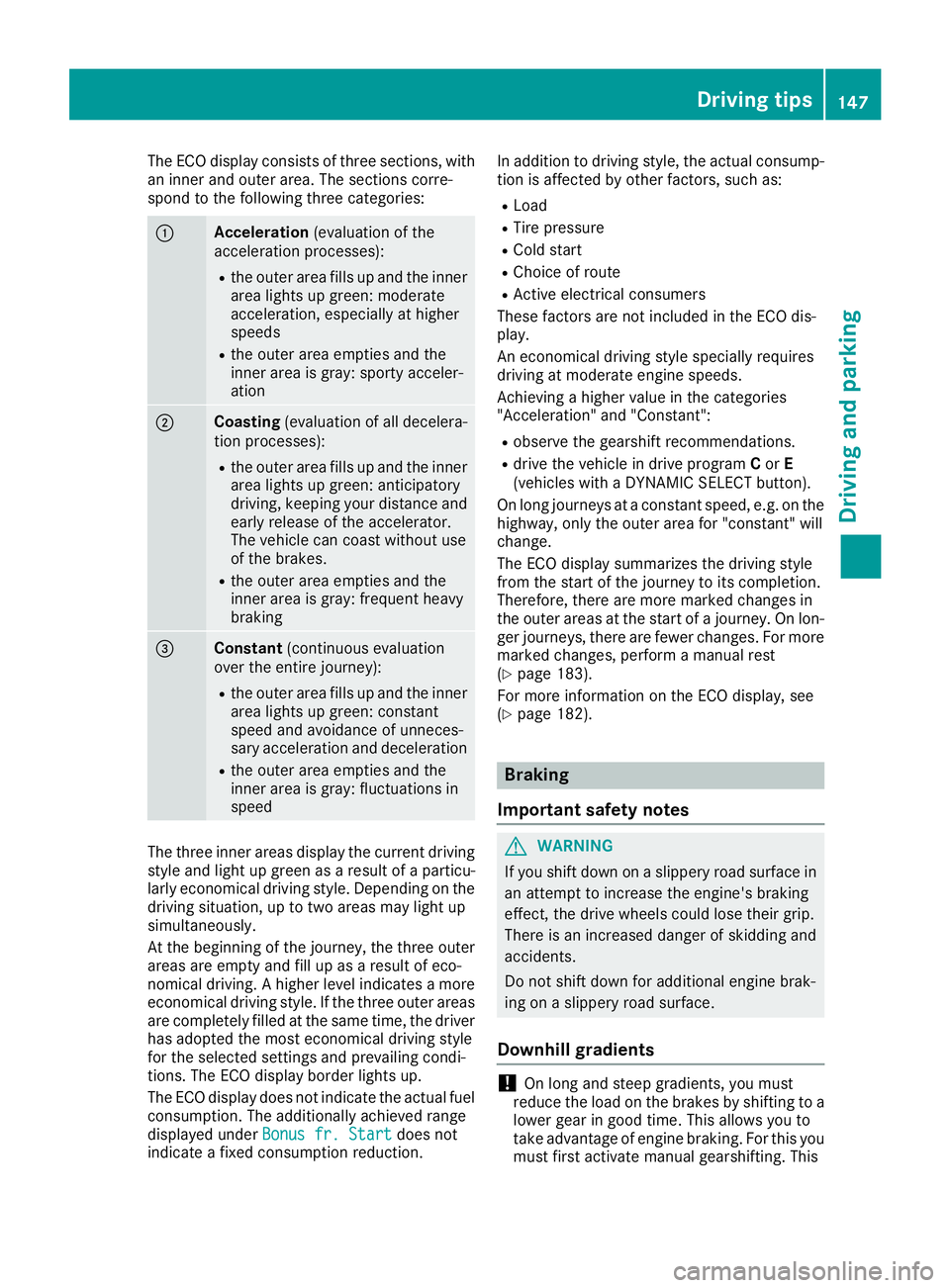
The ECO display consists of three sections, withan inner and outer area. The sections corre-spond to the following three categories:
CAcceleration(evaluation of theacceleration processes):
Rthe outer area fills up and the innerarea lights up green: moderateacceleration, especially at higherspeeds
Rthe outer area empties and theinner area is gray: sporty acceler-ation
DCoasting(evaluation of all decelera-tion processes):
Rthe outer area fills up and the innerarea lights up green: anticipatorydriving, keeping your distance andearly release of the accelerator.The vehicle can coast without useof the brakes.
Rthe outer area empties and theinner area is gray: frequent heavybraking