audio MERCEDES-BENZ CLA 2019 Owners Manual
[x] Cancel search | Manufacturer: MERCEDES-BENZ, Model Year: 2019, Model line: CLA, Model: MERCEDES-BENZ CLA 2019Pages: 330, PDF Size: 23.57 MB
Page 7 of 330
Alarm system
see ATA (Anti-Theft Alarm system)
AMG
Adaptive sport suspension sys-
tem ................................................ 161
Performance Seat ............................ 95
AMG adaptive sport suspension
system
General Information .......................161
AMG menu (on-board computer)..... 190
AMG Performance exhaust sys-
tem..................................................... 128
Anti-lock braking system
see ABS (Anti-lock Braking System)
Anti-skid chains
see Snow chains
Anti-theft alarm system
see ATA (Anti-Theft Alarm system)
Ashtray............................................... 246
Assistance display (on-board com-
puter)..................................................187
Assistance menu (on-board com-
puter)..................................................186
ASSYST PLUS
Displaying a service message ........264
Driving abroad ............................... 265
Hiding a service message .............. 264
Information about Service ............. 265
Resetting the service interval dis-
play ................................................ 265
Service message ............................ 264
Special service requirements ......... 265
ATA (Anti-Theft Alarm system)
Activating/deactivating ................... 68
Function ...........................................68
Switching off the alarm .................... 68
ATTENTION ASSIST
Activating/deactivating ................. 187
Display message ............................ 209
Function/notes............................. 173
Audio menu (on-board computer).... 184
Audio system
see Digital Operator's Manual
Authorized Mercedes-Benz Center
see Qualified specialist workshop
Authorized workshop
see Qualified specialist workshop
AUTO lights
Display message ............................ 206
see Lights
Automatic car wash (care)............... 265
Automatic engine start (ECO start/
stop function).................................... 127
Automatic engine switch-off (ECO
start/stop function).......................... 127
Automatic headlamp mode.............. 101
Automatic transmission
Accelerator pedal position ............. 134
Changing gear ............................... 134
DIRECT SELECT lever ..................... 131
Drive program ................................ 135
Drive program display .................... 131
Driving tips .................................... 134
DYNAMIC SELECT button (all vehi-
cles except Mercedes-AMG vehi-
cles) ............................................... 129
DYNAMIC SELECT controller
(Mercedes-AMG vehicles) .............. 130
Emergency running mode.............. 139
Engaging drive position .................. 133
Engaging neutral ............................ 132
Engaging park position
(Mercedes-AMG vehicles) .............. 133
Engaging park position automati-
cally ............................................... 132
Engaging reverse gear ................... 132
Engaging the park position ............ 132
Holding the vehicle stationary on
uphill gradients .............................. 135
Kickdown ....................................... 135
Manual shifting .............................. 137
Oil temperature (on-board com-
puter, Mercedes-AMG vehicles) ..... 190
Overview ........................................ 131
Problem (malfunction) ................... 139
Pulling away ................................... 126
Selector lever ................................ 133
Starting the engine ........................ 125
Steering wheel paddle shifters ...... 137
Transmission position display ........ 133
Transmission position display
(DIRECT SELECT lever) ................... 131
Transmission positions .................. 134
Index5
Page 15 of 330
Locking centrally
see Central locking
Locking verification signal (on-
board computer)...............................190
Low-beam headlamps
Display message ............................ 204
Replacing bulbs .............................106
Switching on/off ........................... 102
Lumbar support
Adjusting the 4-way lumbar sup-
port ..................................................95
M
M+S tires............................................ 292
Malfunction message
see Display messages
Matte finish (cleaning instruc-
tions).................................................. 267
Mechanical key
Function/notes ................................ 72
Inserting .......................................... 72
Locking vehicle ................................ 77
Removing .........................................72
Unlocking the driver's door .............. 77
Memory card (audio).........................185
Memory function............................... 100
Mercedes me connect
Call priority ....................................251
Display message ............................ 199
Downloading destinations
(COMAND) ..................................... 251
Downloading routes ....................... 254
General notes ................................ 248
Geo fencing ................................... 254
Info call button .............................. 250
Mercedes-Benz emergency call ..... 249
Recovering a stolen vehicle ........... 253
Remote Vehicle Health Check ....... 253
Roadside Assistance call button .... 250
Search & Send ............................... 252
Self-diagnosis ................................ 248
Speed alert ....................................254
System .......................................... 248
Triggering the vehicle alarm ........... 255
Vehicle remote locking .................. 253
Vehicle remote unlocking .............. 252
Message memory (on-board com-
puter)..................................................193
Messages
see Display messages
Mirror turn signal
Cleaning ......................................... 269
Mirrors
see Exterior mirrors
see Rear-view mirror
see Vanity mirror (in the sun visor)
Mobile phone
Connecting (Bluetooth®inter-
face) .............................................. 235
Connecting (device manager) ........236
Frequencies ................................... 317
Installation ..................................... 317
Menu (on-board computer) ............ 185
Transmission output (maximum) .... 317
Modifying the programming
(SmartKey)...........................................72
MOExtended tires.............................. 275
Mounting wheels
Lowering the vehicle ...................... 314
Mounting a new wheel ................... 313
Preparing the vehicle .....................311
Raising the vehicle ......................... 312
Removing a wheel .......................... 313
Securing the vehicle against roll-
ing away ........................................ 312
MP3
Operation ....................................... 185
see also Digital Operator's Man-
ual ..................................................231
Multifunction display
Function/notes .............................181
Permanent display ......................... 189
Multifunction steering wheel
Operating the on-board computer .. 179
Overview .......................................... 34
Multimedia system
Switching on and off ......................232
Music files
see also Digital Operator's Man-
ual ..................................................231
Index13
Page 16 of 330
N
Navigation
Entering a destination .................... 233
Menu (on-board computer) ............ 183
see also Digital Operator's Man-
ual.................................................. 231
Notes on breaking-in a new vehi-
cle....................................................... 122
O
Occupant Classification System
(OCS)
Conditions ....................................... 48
Faults ............................................... 51
Operation ......................................... 48
System self-test ............................... 50
Occupant safety
Air bags ........................................... 45
Automatic measures after an acci-
dent ................................................. 54
Belt warning ..................................... 44
Children in the vehicle ..................... 54
Important safety notes .................... 40
Introduction to the restraint sys-
tem .................................................. 40
Occupant Classification System
(OCS) ............................................... 47
PASSENGER AIR BAG indicator
lamps ............................................... 41
Pets in the vehicle ........................... 60
Restraint system warning lamp ........ 41
Seat belt .......................................... 41
Odometer........................................... 182
On-board computer
AMG menu ..................................... 190
Assistance graphic menu ............... 187
Assistance menu ........................... 186
Audio menu ................................... 184
Convenience submenu .................. 190
Display messages .......................... 193
Displaying a service message ........ 264
Factory settings ............................. 190
Important safety notes .................. 178
Instrument cluster submenu .......... 188
Lighting submenu .......................... 189
Menu overview .............................. 181
Message memory .......................... 193
Navigation menu ............................ 183
Operation ....................................... 179
RACETIMER ................................... 191
Service menu ................................. 188
Settings menu ............................... 188
Standard display ............................ 182
Telephone menu ............................ 185
Trip menu ...................................... 182
Vehicle submenu ........................... 189
Video DVD operation ..................... 185
Opening and closing the side trim
panels................................................. 107
Operating safety
Declaration of conformity ................ 27
Important safety notes .................... 27
Operating system
see On-board computer
Operation
Digital Operator's Manual................ 23
Operator's Manual
Vehicle equipment ........................... 25
Outside temperature display........... 178
Overhead control panel...................... 39
Override feature
Rear side windows........................... 60
P
Paint code number............................ 318
Paintwork (cleaning instructions)... 267
Panic alarm.......................................... 40
Panorama roof with power tilt/
sliding panel
Important safety notes .................... 86
Operating ......................................... 87
Operating the roller sunblinds for
the sliding sunroof ........................... 88
Problem (malfunction) ..................... 89
Reversing feature ............................. 87
Parking
Important safety notes .................. 142
Parking brake ................................ 143
Parking position for the exterior
mirror on the front-passenger
side .................................................. 99
Rear view camera .......................... 169
14Index
Page 182 of 330
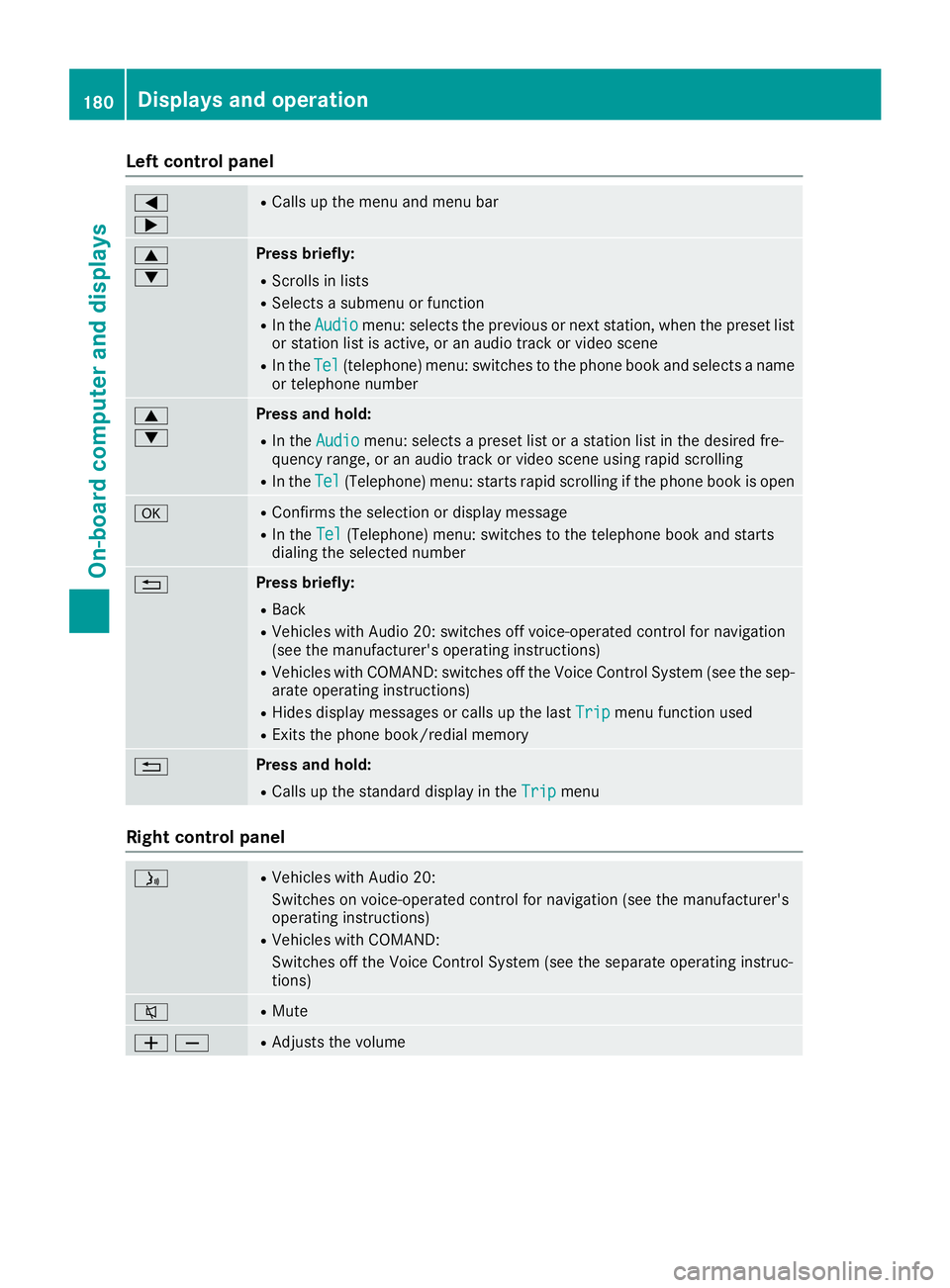
Left control panel
Y
e
RCalls up the menu and menu bar
c
d
Press briefly:
RScrolls in lists
RSelects a submenu or function
RIn theAudioAudiomenu: selects the previous or next station, when the preset listor station list is active, or an audio track or video scene
RIn theTelTel(telephone) menu: switches to the phone book and selects a nameor telephone number
c
d
Press and hold:
RIn theAudioAudiomenu: selects a preset list or a station list in the desired fre-quency range, or an audio track or video scene using rapid scrolling
RIn theTelTel(Telephone) menu: starts rapid scrolling if the phone book is open
vRConfirms the selection or display message
RIn theTelTel(Telephone) menu: switches to the telephone book and startsdialing the selected number
8Press briefly:
RBack
RVehicles with Audio 20: switches off voice-operated control for navigation(see the manufacturer's operating instructions)
RVehicles with COMAND: switches off the Voice Control System (see the sep-arate operating instructions)
RHides display messages or calls up the lastTripTripmenu function used
RExits the phone book/redial memory
8Press and hold:
RCalls up the standard display in theTripTripmenu
Right control panel
Page 187 of 330
the preset list or station list in the desiredfrequency range is shown.
XTo select a station:briefly presscord.
iSIRIUS XM satellite radio functions like anormal radio.
You can find further information on operationin the "Satellite radio" section of the DigitalOperator's Manual for the multimedia sys-tem.
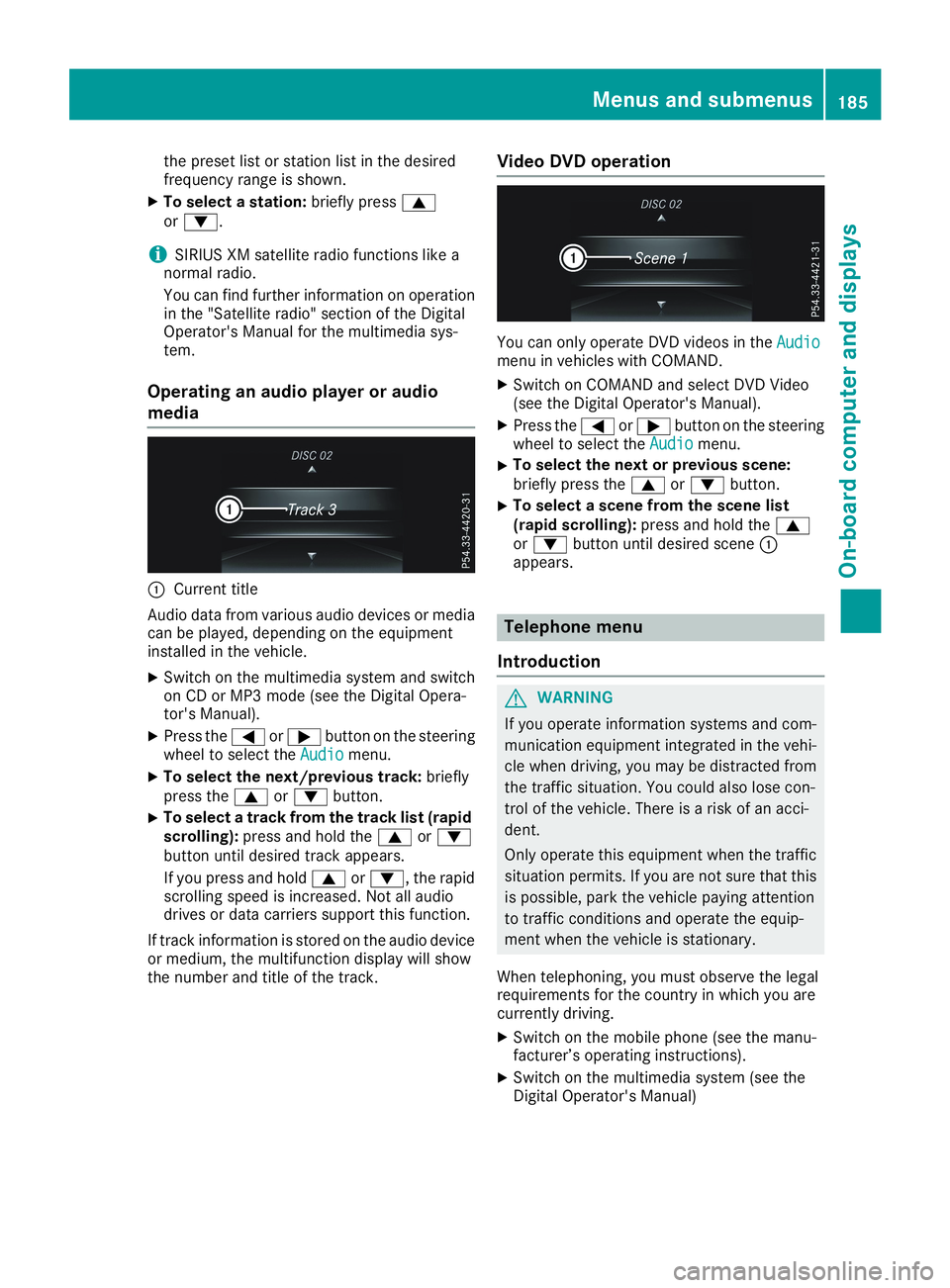
Operating an audio player or audio
media
CCurrent title
Audio data from various audio devices or mediacan be played, depending on the equipmentinstalled in the vehicle.
XSwitch on the multimedia system and switchon CD or MP3 mode (see the Digital Opera-tor's Manual).
XPress theYorebutton on the steeringwheel to select theAudioAudiomenu.
XTo select the next/previous track:brieflypress thecordbutton.
XTo select a track from the track list (rapidscrolling):press and hold thecordbutton until desired track appears.
If you press and holdcord, the rapidscrolling speed is increased. Not all audiodrives or data carriers support this function.
If track information is stored on the audio deviceor medium, the multifunction display will showthe number and title of the track.
Video DVD operation
You can only operate DVD videos in theAudioAudiomenu in vehicles with COMAND.
XSwitch on COMAND and select DVD Video(see the Digital Operator's Manual).
XPress theYorebutton on the steeringwheel to select theAudioAudiomenu.
XTo select the next or previous scene:briefly press thecordbutton.
XTo select a scene from the scene list(rapid scrolling):press and hold thecordbutton until desired sceneCappears.
Telephone menu
Introduction
GWARNING
If you operate information systems and com-
munication equipment integrated in the vehi-
cle when driving, you may be distracted from
the traffic situation. You could also lose con-
trol of the vehicle. There is a risk of an acci-
dent.
Only operate this equipment when the traffic
situation permits. If you are not sure that this
is possible, park the vehicle paying attention
to traffic conditions and operate the equip-
ment when the vehicle is stationary.
When telephoning, you must observe the legalrequirements for the country in which you arecurrently driving.
XSwitch on the mobile phone (see the manu-facturer’s operating instructions).
XSwitch on the multimedia system (see theDigital Operator's Manual)
Menus and submenus185
On-board computer and displays
Z
Page 234 of 330
Operating system
Overview
General notes
!Do not use the space in front of the displayfor storage. Objects placed here could dam-age the display or impair its function. Avoidany direct contact with the display surface.Pressure on the display surface may result inimpairments to the display, which could beirreversible.
Wearing polarized sunglasses may impair yourability to read the display.
The display has an automatic temperature-con-trolled switch-off feature. The brightness isautomatically reduced if the temperature is toohigh. The display may temporarily switch offcompletely.
Cleaning instructions
!Do not touch the display. The display has avery sensitive high-gloss surface; there is arisk of scratching. If you have to clean thescreen, however, use a mild cleaning agentand a soft, lint-free cloth.
The display must be switched off and havecooled down before you start cleaning. Do notapply pressure to the display surface whencleaning it, as this could cause irreversible dam-age to the display.
Switching the multimedia system
on/off
XPress theCcontrol knob.
Adjusting the volume
XTurn theCcontrol knob.
The volume is adjusted:
Rfor the currently selected media source
Rduring traffic or navigation announcements
Rin hands-free mode during an active call
Switching the sound on or off
XPress thecbutton on the control panel.If the audio output is switched off, the statusline will show thecsymbol. If you switch
the media source or set the volume, the soundis automatically switched on.
iNavigation announcements will be heardeven if the sound is muted.
Functions
The multimedia system has the following func-tions:
RRadio mode
RMedia mode with media search
RSound systems
RNavigation system
COMAND: navigation via the hard drive
Audio 20: navigation via SD card
RCommunication functions
RSIRIUS Weather (COMAND)
RVehicle functions with system settings
RFavorites functions
Controller
The controller in the center console lets you:
Rselect menu items on the display
Renter characters
Rselect a destination on the map
Rsave entries
The controller can be:
Rturned3
Rslid left or right1
Rslid forwards or back4
Rslid diagonally2
Rpressed briefly or pressed and held7
Back button
You can use the8button to exit a menu or tocall up the main menu of the current operatingmode.
XTo exit the menu:briefly press the8button.The multimedia system changes to the nexthigher menu level in the current operatingmode.
XTo call up the main menu:press the8button for longer than two seconds.The multimedia system changes to the mainmenu of the current operating mode.
232Operating system
Multimedia system
Page 235 of 330
Favorites button
You can assign predefined functions using the}favorites button and call them up by press-ing the button (Ypage 233).
Favorites
Calling up and exiting favorites
XTo call up:press the}button on the con-troller.
XSelect a favorite, e.g.VehicleVehicle.The favorites are displayed.
XTo exit:press the}button again.
Adding favorites
Adding predefined favorites
XPress the}button.
XCOMAND:slide6the controller.
XAudio 20:slide5or6the controller.The menu bar is displayed.
XSelectReassignReassign.The categories are displayed.
XSelect a category.The favorites are displayed.
XSelect a favorite.
XCOMAND:to add the favorite to the desiredposition, turn and press the controller.If a favorite has already been added at thisposition, it will be overwritten.
XAudio 20:to add the favorite to the desiredposition, turn, slide5or6and press thecontroller.If a favorite has already been added at thisposition, it will be overwritten.
Adding your own favorites
You can add climate control as a favorite, forexample.
XSelectVehicleVehicle{Vehicle SettingsVehicle Settings.
XPress and hold the}button until thefavorites are displayed.
XAdd a favorite to the desired position.If a favorite has already been added at thisposition, it will be overwritten.
Navigation mode
Important safety notes
GWARNING
If you operate information systems and com-
munication equipment integrated in the vehi-
cle when driving, you may be distracted from
the traffic situation. You could also lose con-
trol of the vehicle. There is a risk of an acci-
dent.
Only operate this equipment when the traffic
situation permits. If you are not sure that this
is possible, park the vehicle paying attention
to traffic conditions and operate the equip-
ment when the vehicle is stationary.
You must observe the legal requirements for thecountry in which you are currently driving whenoperating the navigation system.
General notes
Among other things, correct functioning of thenavigation system depends on GPS reception. Incertain situations, GPS reception may beimpaired, there may be interference or theremay be no reception at all, e.g. in tunnels orparking garages.
Audio 20 is equipped with Garmin®MAP PILOT(see the manufacturer's operating instructions).
The Garmin®MAP PILOT operating instructionsare stored on the SD card as a PDF file. The SDcard box contains a quick guide.
The following descriptions apply to navigationwith COMAND. Further information can befound in the Digital Operator's Manual.
Selecting a route type and route options
Multimedia system:
XSelectNaviNavi{NavigationNavigation.The map shows the vehicle's current position.
XSlide6the controller.
XSelectOptionsOptions{Route SettingsRoute Settings.
Notes for route types:
REco RouteEco Route
RDynamic Traffic RouteDynamic Traffic Route
Operating system233
Multimedia system
Z
Page 238 of 330
Authorization by entering a passkey (passcode):
XSelect the Bluetooth®name of the mobilephone.The input menu for the passkey is displayed.
XChoose a one to sixteen-digit number combi-nation as a passkey.
XEnter the passkey on the multimedia system.
XPressTto confirm.
XEnter and confirm the passkey on the mobilephone. Depending on the mobile phone used,confirm the connection to the multimedia sys-
tem and for the PBAP and MAP Bluetooth®
profiles. The prompt to confirm may take upto two minutes to be displayed (see the man-ufacturer's operating instructions).
Connecting a mobile phone (Audio 20)
Requirements
For telephony via the Bluetooth®interface, you
require at least one Bluetooth®-capable mobilephone depending on use ofone-telephonemodeortwo-telephone mode. The mobilephone must support Hands-Free Profile 1.0 orabove.
Intwo-telephone modeyou can use all thefunctions of the multimedia system with themain telephone. With theadditional tele-phone, you can receive incoming calls.
Multimedia system:
XSelectVehicleVehicle{System Set‐System Set‐tingstings{Activate BluetoothActivate Bluetooth.
XActivate Bluetooth®s.
Mobile phone:
XActivate Bluetooth®and, if necessary, Blue-
tooth®visibility for other devices (see themanufacturer's operating instructions).
The Bluetooth®device names for all of one man-ufacturer's products might be identical. Tomake it possible to clearly identify your mobilephone, change the device name (see the man-ufacturer's operating instructions).
If the mobile phone supports the PBAP (PhoneBookAccessProfile) and MAP (Message
AccessProfile) Bluetooth®profiles, the follow-ing information is transmitted after you connectthe main telephone:
RPhone book
RCall lists
RText messages and e-mail
iFurther information on suitable mobilephones can be found at:http://www.mercedes-benz.com/connect
iIn the USA, you can get in touch with theMercedes-Benz Customer Assistance Centeron 1-800-FOR-MERCedes (1-800-367-6372).
In Canada, you can get in touch with the Cus-tomer Relations Center on 1-800-387-0100.
Searching for and authorizing (connect-
ing) a mobile phone
Before using your mobile phone with the multi-media system for the first time, you will need tosearch for the phone and then authorize (con-nect) it. Depending on the mobile phone, author-ization either takes place by means of SecureSimple Pairing or by entering a passkey. Themultimedia system automatically makes theprocedure that is relevant for your mobile phoneavailable. The mobile phone is always connec-ted automatically after authorization. Furtherinformation on using a mobile phone with themultimedia system (see the Digital Operator'sManual).
If the multimedia system does not detect yourmobile phone, this may be due to particularsecurity settings on your mobile phone (see themanufacturer's operating instructions).
Searching for a mobile phone
Multimedia system:
XSelectTel/Tel/
Page 251 of 330
Have the system checked at the nearestMercedes-Benz Service Center or contact thefollowing service hotlines:
Mercedes-Benz Customer Assistance Center at1-800-FOR-MERCedes (1-800-367-6372) or1-866-990-9007
Emergency call
Important safety notes
GWARNING
It can be dangerous to remain in the vehicle,
even if you have pressed the SOS button in an
emergency if:
Ryou see smoke inside or outside of the vehi-
cle, e.g. if there is a fire after an accident
Rthe vehicle is on a dangerous section of
road
Rthe vehicle is not visible or cannot easily be
seen by other road users, particularly when
dark or in poor visibility conditions
There is a risk of an accident and injury.
Leave the vehicle immediately in this or simi-
lar situations as soon as it is safe to do so.
Move to a safe location along with other vehi-
cle occupants. In such situations, secure the
vehicle in accordance with national regula-
tions, e. g. with a warning triangle.
General notes
Observe the notes on system activation(Ypage 248).
An emergency call is dialed automatically if anair bag or Emergency Tensioning Device is trig-gered. You cannot end an automatically trig-gered emergency call yourself.
An emergency call can also be initiated man-ually.
As soon as the emergency call has been initi-ated, the indicator lamp in the SOS buttonflashes. TheConnecting CallConnecting Callmessageappears in the multifunction display.
The audio output is muted.
Once the connection has been made, theCallCallConnectedConnectedmessage appears in the multifunc-tion display.
All important information on the emergency istransmitted, for example:
RCurrent location of the vehicle (as determinedby the GPS system)
RVehicle identification number
RInformation on the severity of the accident
Shortly after the emergency call has been initi-ated, a voice connection is automatically estab-lished between the Customer Assistance Centerand the vehicle occupants.
RIf the vehicle occupants are responsive, theMercedes-Benz Customer Assistance Centerattempts to get more information on theemergency.
RIf there is no response from the vehicle occu-pants, an ambulance is immediately sent tothe vehicle
If no voice connection can be established to theMercedes-Benz Customer Assistance Center,the system has been unable to initiate an emer-gency call.
This can occur, for example, if the relevantmobile phone network is not available. The indi-cator lamp in the SOS button flashes continu-ously.
TheCall FailedCall Failedmessage appears in the mul-tifunction display and must be confirmed.
In this case, summon assistance by othermeans.
Making an emergency call
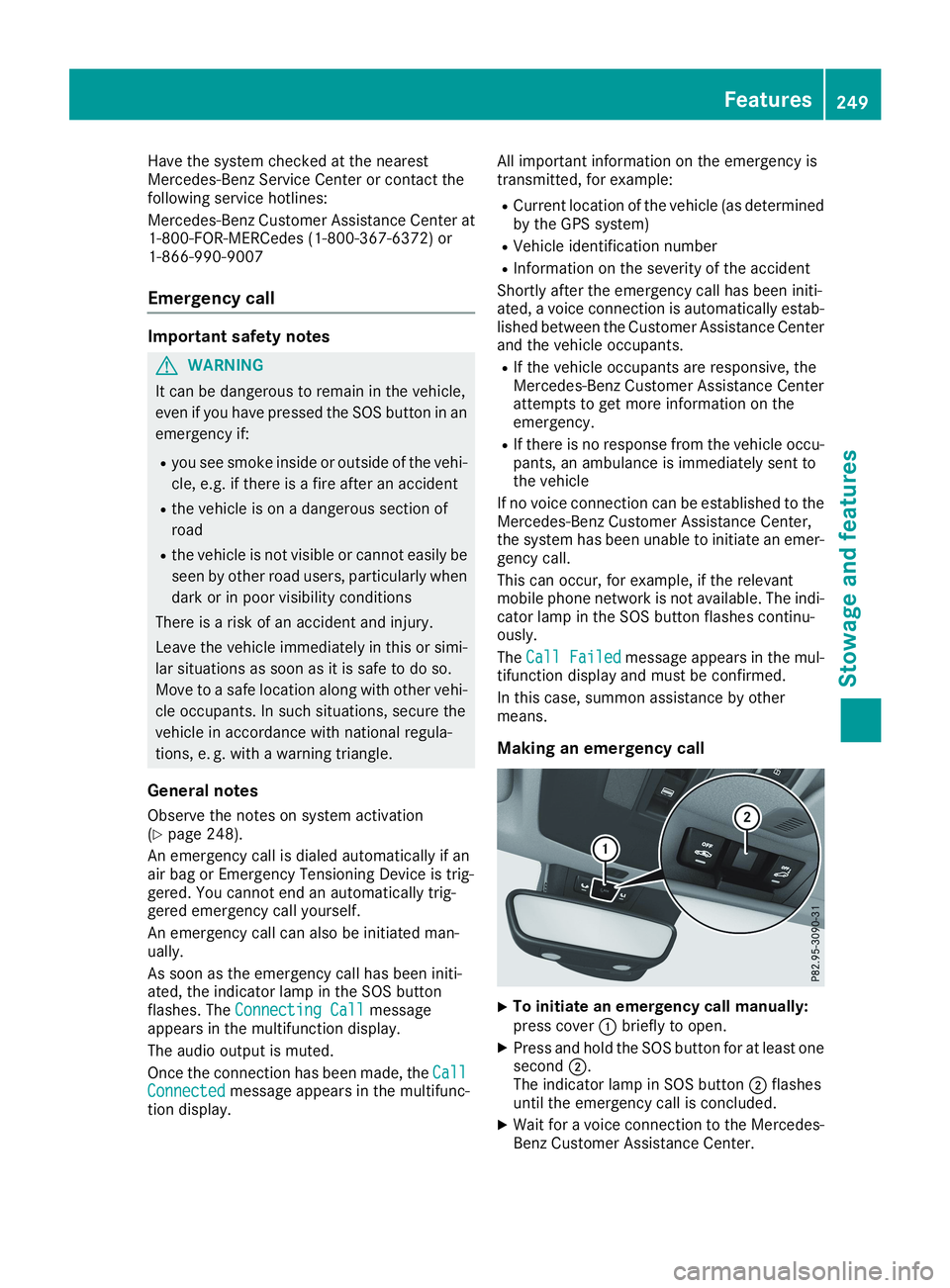
XTo initiate an emergency call manually:press coverCbriefly to open.
XPress and hold the SOS button for at least onesecondD.The indicator lamp in SOS buttonDflashesuntil the emergency call is concluded.
XWait for a voice connection to the Mercedes-Benz Customer Assistance Center.
Features249
Sto wage an d features
Z
Page 252 of 330
XTo end a call:press thevbutton on themultifunction steering wheel.
or
XPress the corresponding multimedia systembutton for ending a phone call.
XAfter the emergency call, close coverC.
If the mobile phone network is unavailable,Mercedes me connect is not able to make anemergency call. If you leave the vehicle imme-diately after pressing the SOS buttonD, you donot know if Mercedes me connect has success-fully made the emergency call. In this case,always summon assistance by other means.
Roadside Assistance button
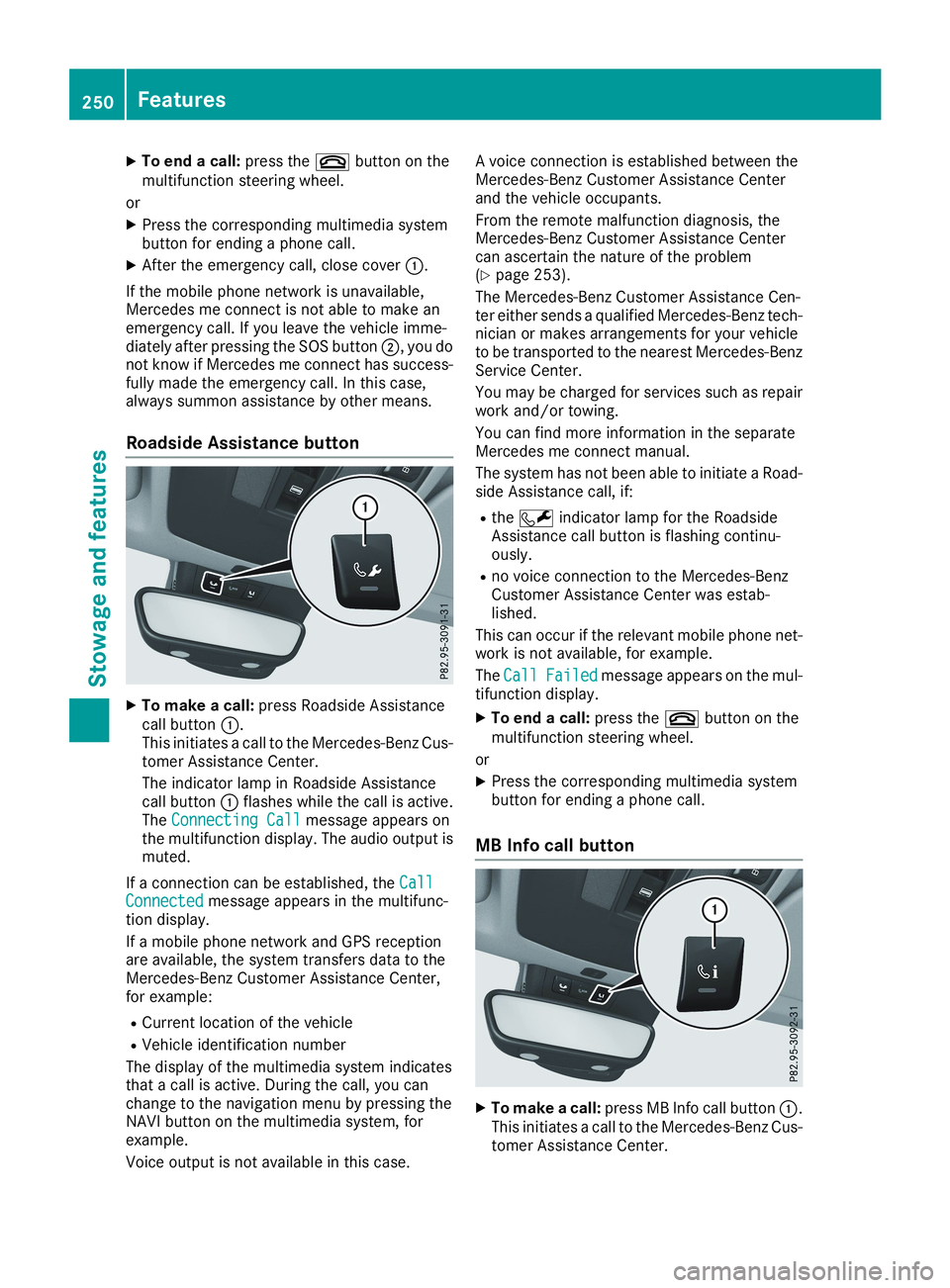
XTo make a call:press Roadside Assistancecall buttonC.This initiates a call to the Mercedes-Benz Cus-tomer Assistance Center.
The indicator lamp in Roadside Assistancecall buttonCflashes while the call is active.TheConnecting CallConnecting Callmessage appears onthe multifunction display. The audio output ismuted.
If a connection can be established, theCallCallConnectedConnectedmessage appears in the multifunc-tion display.
If a mobile phone network and GPS receptionare available, the system transfers data to theMercedes-Benz Customer Assistance Center,for example:
RCurrent location of the vehicle
RVehicle identification number
The display of the multimedia system indicatesthat a call is active. During the call, you canchange to the navigation menu by pressing theNAVI button on the multimedia system, forexample.
Voice output is not available in this case.
A voice connection is established between theMercedes-Benz Customer Assistance Centerand the vehicle occupants.
From the remote malfunction diagnosis, theMercedes-Benz Customer Assistance Centercan ascertain the nature of the problem(Ypage 253).
The Mercedes-Benz Customer Assistance Cen-ter either sends a qualified Mercedes-Benz tech-nician or makes arrangements for your vehicleto be transported to the nearest Mercedes-BenzService Center.
You may be charged for services such as repairwork and/or towing.
You can find more information in the separateMercedes me connect manual.
The system has not been able to initiate a Road-side Assistance call, if:
RtheRindicator lamp for the RoadsideAssistance call button is flashing continu-ously.
Rno voice connection to the Mercedes-BenzCustomer Assistance Center was estab-lished.
This can occur if the relevant mobile phone net-work is not available, for example.
TheCallCallFailedFailedmessage appears on the mul-tifunction display.
XTo end a call:press thevbutton on themultifunction steering wheel.
or
XPress the corresponding multimedia systembutton for ending a phone call.
MB Info call button
XTo make a call:press MB Info call buttonC.This initiates a call to the Mercedes-Benz Cus-tomer Assistance Center.
250Features
Sto wage an d features