phone MERCEDES-BENZ CLA 2019 Owner's Guide
[x] Cancel search | Manufacturer: MERCEDES-BENZ, Model Year: 2019, Model line: CLA, Model: MERCEDES-BENZ CLA 2019Pages: 330, PDF Size: 23.57 MB
Page 254 of 330
The destination download function is availableif:
Rthe vehicle is equipped with a navigation sys-tem.
Rthe relevant mobile phone network is availa-ble and data transfer is possible.
Route Assistance
This service is part of the Mercedes me connectPLUS Package and cannot be obtained sepa-rately.
You can use the Route Assistance function evenif the vehicle is not equipped with a navigationsystem.
Within the framework of this service, you receivea professional and reliable form of navigationsupport without having to leave your vehicle.
The customer service representative finds asuitable route depending on your vehicle's cur-rent position and the desired destination. Youwill then be guided live through the current routesection.
Search and Send
General notes
To use "Search & Send", your vehicle must beequipped with Mercedes me connect and a nav-igation system. Additionally, a Mercedes meconnect service subscription must be comple-ted.
"Search & Send" is a destination entry service. Adestination address found on Google Maps™can be transferred via Mercedes me connectdirectly to your vehicle's navigation system.
Specifying and sending the destination
address
XGo to the website http://maps.google.comand enter a destination address into the entryfield.
XTo send the destination address to the e-mail address of your Mercedes me con-nect account:click the corresponding but-ton on the website.
Example:
If you select 'Send to vehicle' and then'Mercedes-Benz', the destination address willbe sent to your vehicle.
XWhen the "Send" dialog window appears:
Enter the e-mail address you specified whensetting up your Mercedes me connectaccount into the corresponding field.
XClick "Send".
Information on specific commands such as"Address entry" or "Send" can be found on thewebsite.
Calling up a transmitted destination
address
XTurn the SmartKey to positionHin the igni-tion lock (Ypage 123).The transmitted destination address is loadedinto the vehicle's navigation system.
A display message appears, asking whethernavigation should be started.
XSelectYesYesby turning3or sliding1the controller and confirm with7.The system calculates the route and subse-quently starts the route guidance with theaddress entered.
If you selectNoNothe address can be stored inthe address book.
If you have sent more than one destinationaddress, each individual destination must beconfirmed separately.
Destination addresses are loaded in the sameorder as the order in which they were sent.
If you have multiple Mercedes-Benz vehicleswith Mercedes me connect and activeMercedes me connect accounts:
If multiple vehicles are registered under thesame e-mail address, the destination will besent to all the vehicles.
Vehicle remote opening
You can use the vehicle remote opening if youhave unintentionally locked your vehicle and areplacement SmartKey is not available.
The vehicle can be unlocked by the Mercedes-Benz Customer Assistance Center.
The vehicle can be immediately unlockedremotely within four days of the ignition beingturned off. After this time, remote unlockingmay be delayed by 15 to 60 minutes. After30 days, the vehicle can no longer be unlockedremotely.
The vehicle remote opening feature is availableif the relevant mobile phone network is availableand a data connection is possible.
XContact the following service hotlines:
252Features
Stowage and features
Page 255 of 330
Mercedes-Benz Customer Assistance Centerat 1-800-FOR-MERCedes (1-800-367-6372)or 1-866-990-9007
XYou will be asked for your password.
XReturn to your vehicle at the time agreed uponwith the Mercedes-Benz Customer Assis-tance Center.
Alternatively, the vehicle can be opened via:
Rthe Internet, under the "Owners Online" sec-tion
Rtelephone applications (e.g. for iPhone®,Android™)
To do this, you will need your identification num-ber and password.
Vehicle remote closing
The valet locking feature can be used when youhave forgotten to lock the vehicle and you are nolonger nearby.
The vehicle can then be locked by the Mercedes-Benz Customer Assistance Center.
The vehicle can be immediately locked remotelyup to four days after the ignition was lastswitched off. After this time, the valet lockingmay be delayed by 15 to 60 minutes. After30 days the vehicle can no longer be lockedremotely.
The valet locking feature is available if the rele-vant mobile phone network is available and adata connection is possible.
XContact the following service hotlines:
Mercedes-Benz Customer Assistance Centerat 1-800-FOR-MERCedes (1-800-367-6372)or 1-866-990-9007You will be asked for your password.
The next time you are inside the vehicle and youswitch on the ignition, theDoors LockedDoors LockedRemotelyRemotelymessage appears in the multifunctiondisplay.
Alternatively, the vehicle can be locked via:
Rthe Internet, under the "Owners Online" sec-tion
Rtelephone applications (e.g. for iPhone®,Android™)
To do this, you will need your identification num-ber and password.
Stolen vehicle recovery service
If your vehicle has been stolen:
XNotify the police.The police will issue a numbered incidentreport.
XThis number will be forwarded to theMercedes-Benz Customer Assistance Centertogether with your PIN.The Mercedes-Benz Customer AssistanceCenter then tries to locate the system. TheMercedes-Benz Customer Assistance Centercontacts you and the local law enforcementagency if the vehicle is located.
However, only the law enforcement agency isinformed of the location of the vehicle.
If the anti-theft alarm system is activated forlonger than 30 seconds, Mercedes me connectautomatically notifies the Mercedes-Benz Cus-tomer Assistance Center.
Vehicle Health Check
With the Vehicle Health Check, the CustomerAssistance Center can provide improved sup-port for problems with your vehicle. During anexisting call, vehicle data is transferred to theCustomer Assistance Center.
The customer service representative can usethe received data to decide what kind of assis-tance is required. You are then, for example,guided to the nearest Mercedes-Benz ServiceCenter or a recovery vehicle is called.
If vehicle data needs to be transferred during anMB Info call or a Roadside Assistance call, this isinitiated by the Customer Assistance Center.
TheRoadside Assistance ConnectedRoadside Assistance Connectedmes-sage appears in the display. If the Vehicle HealthCheck can be started, theRequestRequestforforVehi‐Vehi‐cle Diagnostics Received Start vehi‐cle Diagnostics Received Start vehi‐cle diagnostics?cle diagnostics?message appears in thedisplay.
XPress theYesYesbutton to confirm the message.
XIf theVehicle Diagnostics PleaseVehicle Diagnostics PleaseStart IgnitionStart Ignitionmessage appears: turn theSmartKey to positionHin the ignition lock(Ypage 123).
XIf thePlease follow the instructionsPlease follow the instructionsreceivedreceivedbybyphonephoneandandmovemoveyouryourvehi‐vehi‐cle to a safe position.cle to a safe position.messageappears: please follow the instructions
Features253
Stowage and features
Z
Page 256 of 330
received by phone and move your vehicle to asafe position.The message in the display disappears.
The vehicle operating state check begins.During this procedure, you will see theVehi‐Vehi‐cle Diagnostics Activecle Diagnostics Activemessage.
If you selectCancelCancel, the Vehicle HealthCheck is canceled completely.
When the check is complete, theSendingSendingvehicle diagnostics data. (Voice con‐vehicle diagnostics data. (Voice con‐nection may be interrupted duringnection may be interrupted duringdatadatatransfer)transfer)message appears. The vehicledata can now be sent.
XPress theOKOKbutton to confirm the message.The voice connection with the CustomerAssistance Center is terminated.
TheVehicle Diagnostics: Transfer‐Vehicle Diagnostics: Transfer‐ring Data...ring Data...message appears.
The vehicle data is sent to the CustomerAssistance Center.
Depending on what the customer service rep-resentative agreed with you, the voice connec-tion is re-established after the transfer is com-plete. If necessary, you will be contacted at alater time by another means, e.g. by e-mail orphone.
Another function of the Vehicle Health Check isthe transfer of service data to the CustomerAssistance Center. If a service is due, the displayshows a message to this effect together withinformation about any special offers at yourworkshop.
This information can also be called up under"Owners Online" at http://www.mbusa.com.
Information on the data stored in the vehicle(Ypage 29).
Information on Roadside Assistance(Ypage 26).
Downloading routes
Downloading routes allows you to transfer andsave predefined routes in the navigation sys-tem.
A route can be prepared and sent by either acustomer service representative or under "Own-ers Online" at http://www.mbusa.com.
Each route can include up to four intermediatedestinations.
Once a route has been received by the naviga-tion system, you will see theDoDoyouyouwantwanttotostart route guidance? Destinationstart route guidance? Destination
Received destination has been savedReceived destination has been savedin "Previous destinations".in "Previous destinations".message onthe multimedia system display.
The route is saved.
XTo start route guidance:selectYesYes.An overview of the route is shown in the dis-play.
If you selectNoNo, the saved route can be calledup later in the navigation menu.
XSelectStartStart.Route guidance starts.
Downloaded and saved routes can be called upagain.
Speed alert
You can define the upper speed limit, whichmust not be exceeded by the vehicle.
If this selected speed is exceeded by the vehicle,a message will be sent to the Customer Assis-tance Center. The Customer Assistance Centerthen forwards this information to you.
You can select the way in which you receive thisinformation beforehand. Possible optionsinclude text message, e-mail or an automatedcall.
The data you receive contains the followinginformation:
Rthe location where the speed limit was excee-ded
Rthe time at which the speed limit was excee-ded
Rthe selected speed limit which was exceeded
Geo fencing
Geo fencing allows you to select areas which thevehicle should not enter or leave. You will beinformed if the vehicle crosses the boundariesof the selected areas. You can select the way inwhich you receive this information beforehand.Possible options include text message, e-mail oran automated call.
The area can be determined as either a circle ora polygon with a maximum of ten corners. Youcan specify up to ten areas simultaneously. Dif-ferent settings are possible for each area.
These settings can be called up under "OwnersOnline" at http://www.mbusa.com.
Alternatively, you can trigger an MB Info call andinform the customer service representative thatyou wish to activate geo fencing.
254Features
Stowage and features
Page 257 of 330
Currently inactive areas can be activated by textmessage.
Triggering the vehicle alarm
With this function, you can trigger the vehicle'spanic alarm via text message. An alarm soundsand the exterior lighting flashes. Depending onthe setting, the panic alarm lasts five or ten sec-onds. Afterwards, the alarm switches off.
Garage door opener
General notes
The HomeLink®garage door opener integratedin the rear-view mirror allows you to operate upto three different door and gate systems.
Use the integrated garage door opener only ongarage doors that:
Rhave safety stop and reverse features and
Rmeet current U.S. federal safety standards
Once programed, the integrated garage dooropener in the rear-view mirror will assume thefunction of the garage door system's remotecontrol. Please also read the operating instruc-tions for the garage door system.
When programming a garage door opener, parkthe vehicle outside the garage. Do not leave theengine running while programming.
Certain garage door drives are incompatiblewith the integrated garage door opener. If youhave difficulty programing the integrated garagedoor opener, contact a Mercedes-Benz ServiceCenter.
Alternatively, you can call the following tele-phone assistance services:
RUSA:Mercedes-Benz Customer AssistanceCenter at 1-800-FOR-MERCedes
RCanada:Customer Service at1-800-387-0100
RHomeLink®hotline 1-800-355-3515 (free ofcharge)
More information on HomeLink®and/or com-patible products is also available online athttp://www.homelink.com.
Notes on the declaration of conformity(Ypage 27).
USA: FCC ID: CB2HMIHL4
Canada: IC: 279B-HMIHL4
Important safety notes
GWARNING
When you operate or program the door with
the integrated garage door opener, persons in
the range of movement of the door may
become trapped or be struck by the door.
There is a risk of injury.
When using the integrated garage door
opener, always make sure that nobody is
within the range of movement of the door.
GDANGER
Combustion engines emit poisonous exhaust
gases such as carbon monoxide. Inhaling
these exhaust gases is hazardous to health
and can result in poisoning. There is a risk of
fatal injury. Therefore, never leave the engine
running in an enclosed space without ade-
quate ventilation.
Programming
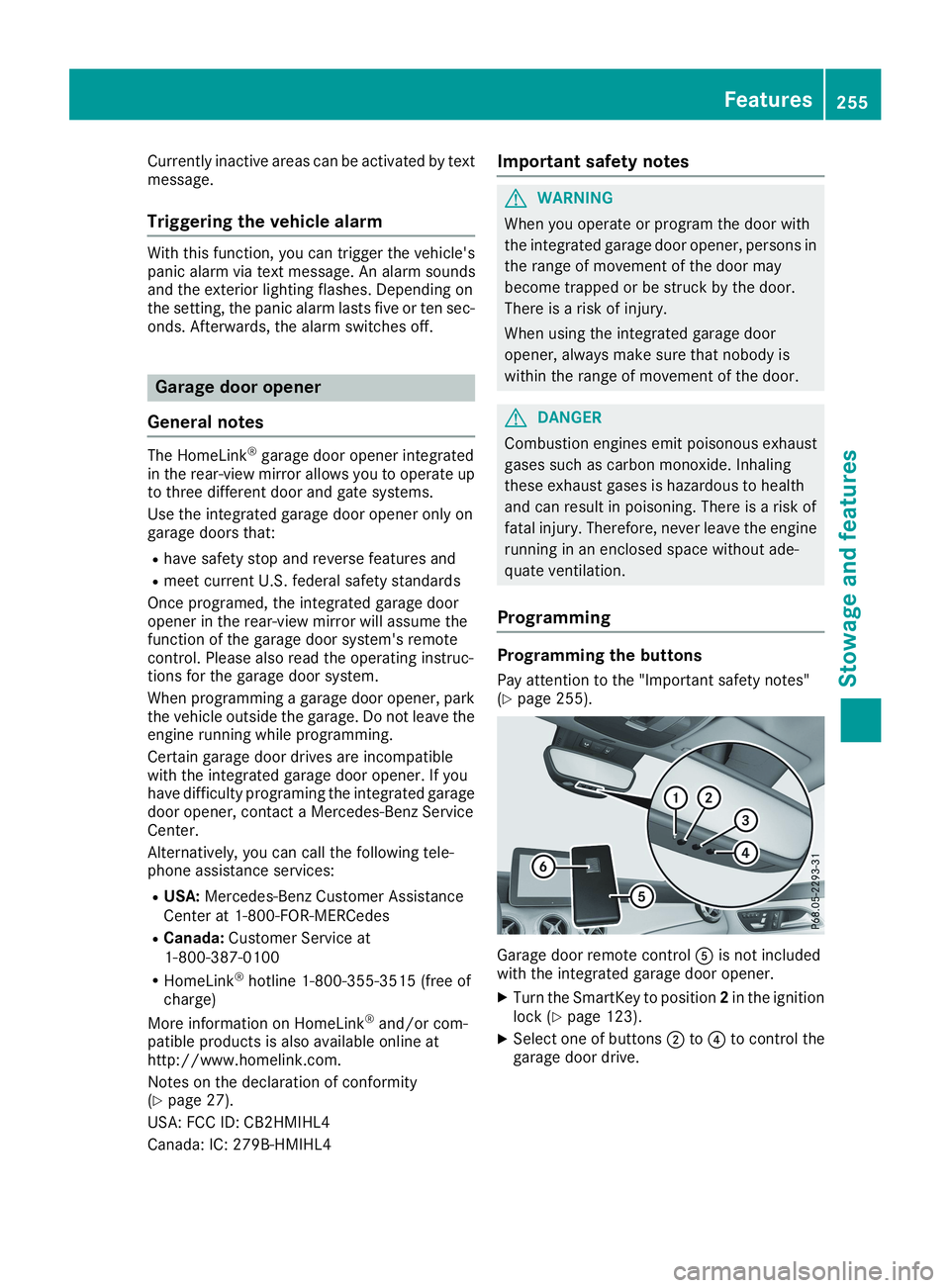
Programming the buttons
Pay attention to the "Important safety notes"(Ypage 255).
Garage door remote control
Page 277 of 330
XMake sure that the engine cannot be startedvia your smartphone (Ypage 124).
XMake sure that the passengers are not endan-gered as they do so. Make sure that no one isnear the danger area while a wheel is beingchanged. Anyone who is not directly assistingin the wheel change should, for example,stand behind the barrier.
XGet out of the vehicle. Pay attention to trafficconditions when doing so.
XClose the driver's door.
MOExtended tires (tires with run-flat
properties)
General notes
With MOExtended tires (tires with run flat char-acteristics), you can continue to drive your vehi-cle even if there is a total loss of pressure in oneor more tires. The affected tire must not showany clearly visible damage.
You can recognize a MOExtended tire by theMOExtended marking which appears on thesidewall of the tire. You will find this markingnext to the tire size designation, the load-bear-ing capacity and the speed index (Ypage 305).
MOExtended tires may be used only in conjunc-tion with an activated tire pressure loss warningsystem (Canada only) or tire pressure monitor(USA only).
If a pressure loss warning message appearsin the multifunction display:
Robserve the instructions in the display mes-sages (Ypage 213).
Rcheck the tire for damage
Rif driving on, observe the following notes
The driving distance possible in run-flat mode isapproximately 50 miles (80 km) when the vehi-cle is partially laden. When the vehicle is fullyladen it is approximately 19 miles (30 km).
In addition to the vehicle load, the driving dis-tance possible depends upon:
Rvehicle speed
Rroad condition
Routside temperature
The driving distance possible in run-flat modemay be reduced by extreme driving conditionsor maneuvers, or it can be increased through amoderate style of driving.
The driving distance possible in run-flat mode iscounted from the moment the tire pressure losswarning appears in the multifunction display.
You must not exceed a maximum speed of50 mph (80 km/h).
When replacing one or all tires, please observethe following specifications for your vehicle'stires:
Rsize
Rtype and
Rthe "MOExtended" marking
If a tire has gone flat and cannot be replacedwith a MOExtended tire, a standard tire may beused as a temporary measure. Make sure thatyou use the proper size and type (summer orwinter tire).
Vehicles equipped with MOExtended tires arenot equipped with a TIREFIT kit at the factory. Itis therefore recommended that you additionallyequip your vehicle with a TIREFIT kit if you mounttires that do not feature run-flat properties, e.g.winter tires. A TIREFIT kit may be obtained froma qualified specialist workshop.
Important safety notes
GWARNING
When driving in emergency mode, the driving
characteristics deteriorate, e.g. when corner-
ing, accelerating quickly and when braking.
There is a risk of an accident.
Do not exceed the stated maximum speed.
Avoid abrupt steering and driving maneuvers,
and driving over obstacles (curbs, potholes,
off-road). This applies in particular to a laden
vehicle.
Stop driving in emergency mode if:
Ryou hear banging noises.
Rthe vehicle starts to shake.
Ryou see smoke and smell rubber.
RESP®is intervening constantly.
Rthere are tears in the sidewalls of the tire.
After driving in emergency mode, have the
wheel rims checked at a qualified specialist
workshop with regard to their further use. The
defective tire must be replaced in every case.
Flat tire275
Breakdown assistance
Z
Page 301 of 330
halt by braking carefully. Avoid abrupt steeringmovements.
The tire pressure monitor has a yellow warninglamp in the instrument cluster for indicatingpressure loss or a malfunction. Whether thewarning lamp flashes or lights up indicateswhether a tire pressure is too low or the tirepressure monitor is malfunctioning:
Rif the warning lamp is lit continuously, the tirepressure on one or more tires is significantlytoo low. The tire pressure monitor is not mal-functioning.
Rif the warning lamp flashes for around aminute and then remains lit constantly, thetire pressure monitor is malfunctioning.
In addition to the warning lamp, a messageappears in the multifunction display. Observethe information on display messages(Ypage 213).
It may take up to ten minutes for a malfunctionof the tire pressure monitor to be indicated. Amalfunction will be indicated by the tire pres-sure warning lamp flashing for approximatelyone minute and then remaining lit. When themalfunction has been rectified, the tire pressurewarning lamp goes out after a few minutes ofdriving.
The tire pressure values indicated by the on-board computer may differ from those meas-ured at a gas station with a pressure gauge. Thetire pressures shown by the on-board computerrefer to those measured at sea level. At highaltitudes, the tire pressure values indicated by apressure gauge are higher than those shown bythe on-board computer. In this case, do notreduce the tire pressures.
The operation of the tire pressure monitor canbe affected by interference from radio transmit-ting equipment (e.g. radio headphones, two-wayradios) that may be being operated in or near thevehicle.
Checking the tire pressure electroni-
cally
XMake sure that the SmartKey is in positionHin the ignition lock (Ypage 123).
XPressYoreon the steering wheel toselect theServ.Serv.menu.
XPress thecordbutton to selectTire PressureTire Pressure.
XPress thevbutton.The current tire pressure of each tire is shownin the multifunction display.
If the vehicle was parked for longer than20 minutes, theTire pressure will beTire pressure will bedisplayed after driving a few minutesdisplayed after driving a few minutesmessage is shown.
After a teach-in process, the tire pressure mon-itor automatically detects new wheels or newsensors. As long as a clear allocation of the tirepressure value to the individual wheels is notpossible, theTireTirePressurePressureMonitorMonitorActiveActivemessage is shown instead of the tire pressuredisplay. The tire pressures are already beingmonitored.
If an emergency spare wheel is mounted, thesystem may continue to show the tire pressureof the wheel that has been removed for a fewminutes. If this occurs, note that the value dis-played for the position where the spare wheel isfitted is not the same as the current tire pres-sure of the emergency spare wheel.
Tire pressure monitor warning mes-
sages
If the tire pressure monitor detects a pressureloss in one or more tires, a warning message isshown in the multifunction display. The yellowtire pressure warning lamp then lights up.
RIf thePlease Correct Tire PressurePlease Correct Tire Pressuremessage appears in the multifunction display,the tire pressure in at least one tire is too low.The tire pressure must be corrected when theopportunity arises.
RIf theCheck Tire PressureCheck Tire Pressuremessageappears in the multifunction display, the tirepressure in one or more tires has droppedsignificantly. The tires must be checked.
RIf theTireTirePressurePressureWarningWarningTireTireFail‐Fail‐ureuremessage appears, the tire pressure in oneor more tires has dropped suddenly. The tiresmust be checked.
Observe the instructions and safety notes in thedisplay messages in the "Tires" section(Ypage 213).
If the wheel positions on the vehicle are rotated,the tire pressures may be displayed for thewrong positions for a short time. This is rectifiedafter a few minutes of driving, and the tire pres-sures are displayed for the correct positions.
Tire pressure299
Wheels and tires
Z
Page 319 of 330
Information regarding technical data
iThe data stated here specifically refers to avehicle with standard equipment. Consult anauthorized Mercedes-Benz Center for thedata for all vehicle variants and trim levels.
Vehicle electronics
Installing two-way radios and mobile
phones (RF transmitters)
GWARNING
The electromagnetic radiation from two-way
radios can interfere with the vehicle electron-
ics if two-way radios are manipulated or ret-
rofitted incorrectly. This could jeopardize the
operating safety of the vehicle. There is a risk
of an accident.
You should have all work on electrical and
electronic components carried out at a quali-
fied specialist workshop.
GWARNING
If you incorrectly operate two-way radios in
the vehicle, the electromagnetic radiation
may interfere with the vehicle electronics, for
example if:
Rthe two-way radio is not connected to an
exterior antenna
Rthe exterior antenna is not correctly moun-
ted or is not low-reflection
This could jeopardize the operating safety of
the vehicle. There is a risk of an accident.
Have the low-reflection exterior antenna
installed at a qualified specialist workshop.
Always connect two-way radios to the low-
reflection exterior antenna when operating in
the vehicle.
!The operating permit may be invalidated ifthe instructions for installation and use oftwo-way radios are not observed.
In particular, the following conditions must becomplied with:
Ronly approved wavebands may be used
Robserve the maximum permissible outputin these wavebands
Ronly approved antenna positions may beused
Excessive levels of electromagnetic radiationmay cause damage to your health and the healthof others. Using an exterior antenna takes intoaccount current scientific discussions relatingto the possible health hazards that may resultfrom electromagnetic fields.
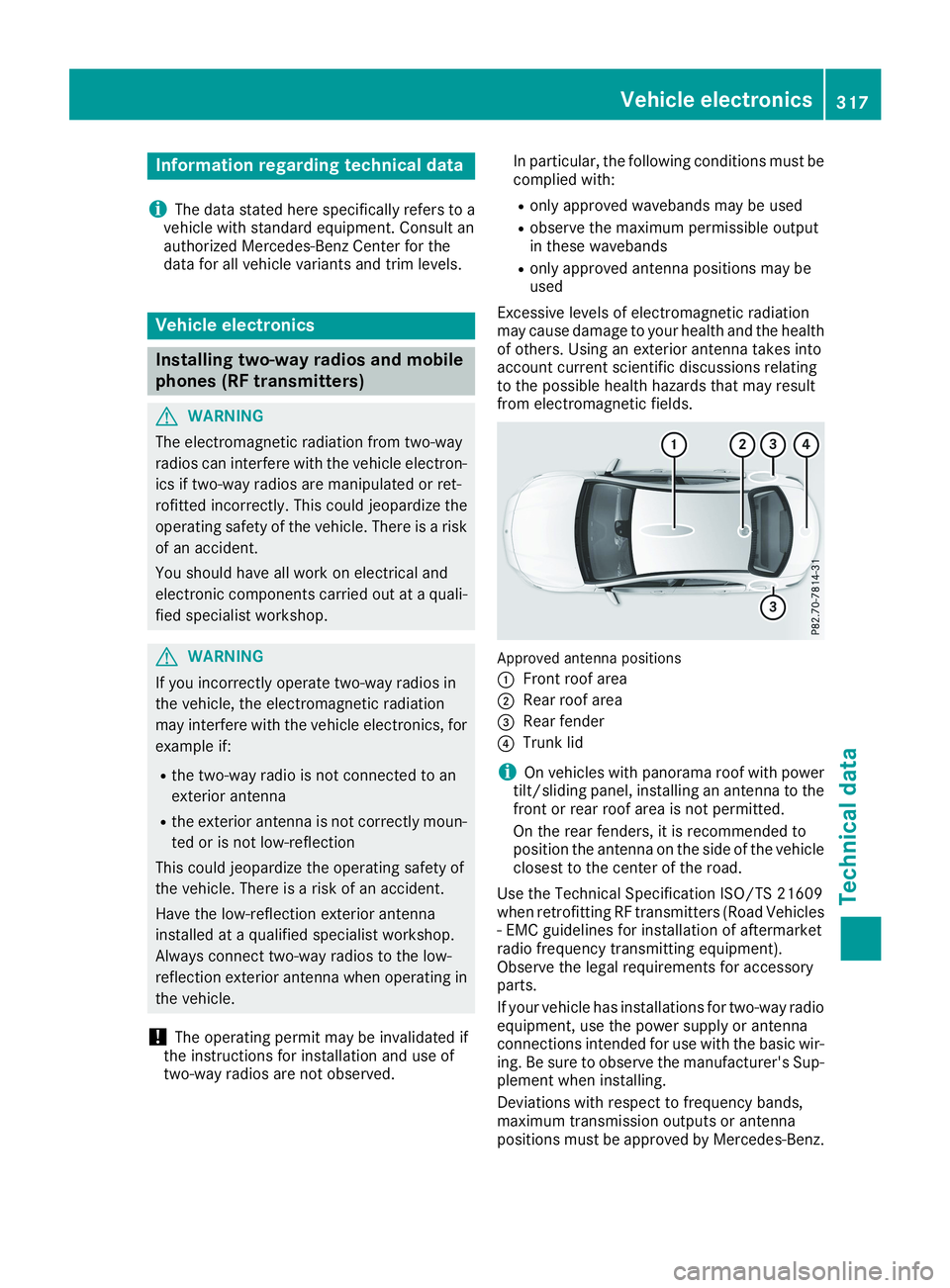
Approved antenna positions
CFront roof area
DRear roof area
Page 320 of 330
The maximum transmission output (PEAK) at thebase of the antenna must not exceed the fol-lowing values:
Frequency bandMaximumtransmissionoutput
Short wave
3 - 54 MHz
100 W
4 m waveband
74 - 88 MHz
30 W
2 m waveband
144 - 174 MHz
50 W
Trunked radio system/Tetra
380 - 460 MHz
10 W
70 cm waveband
400 - 460 MHz
35 W
Mobile communications(2G/3G/4G)10 W
The following can be used in the vehicle withoutrestrictions:
RRF transmitters with a maximum transmis-sion output of up to 100 mW
RRF transmitters with transmitter frequenciesin the 380 - 410 MHz frequency band and amaximum transmission output of up to 2 W(trunked radio system/Tetra)
RMobile phones (2G/3G/4G)
There is no restriction for antenna positions onthe outside of the vehicle for the following fre-quency bands:
RTrunked radio system/Tetra
R70 cm waveband
R2G/3G/4G
Identification plates
Vehicle identification plate with vehi-
cle identification number (VIN)
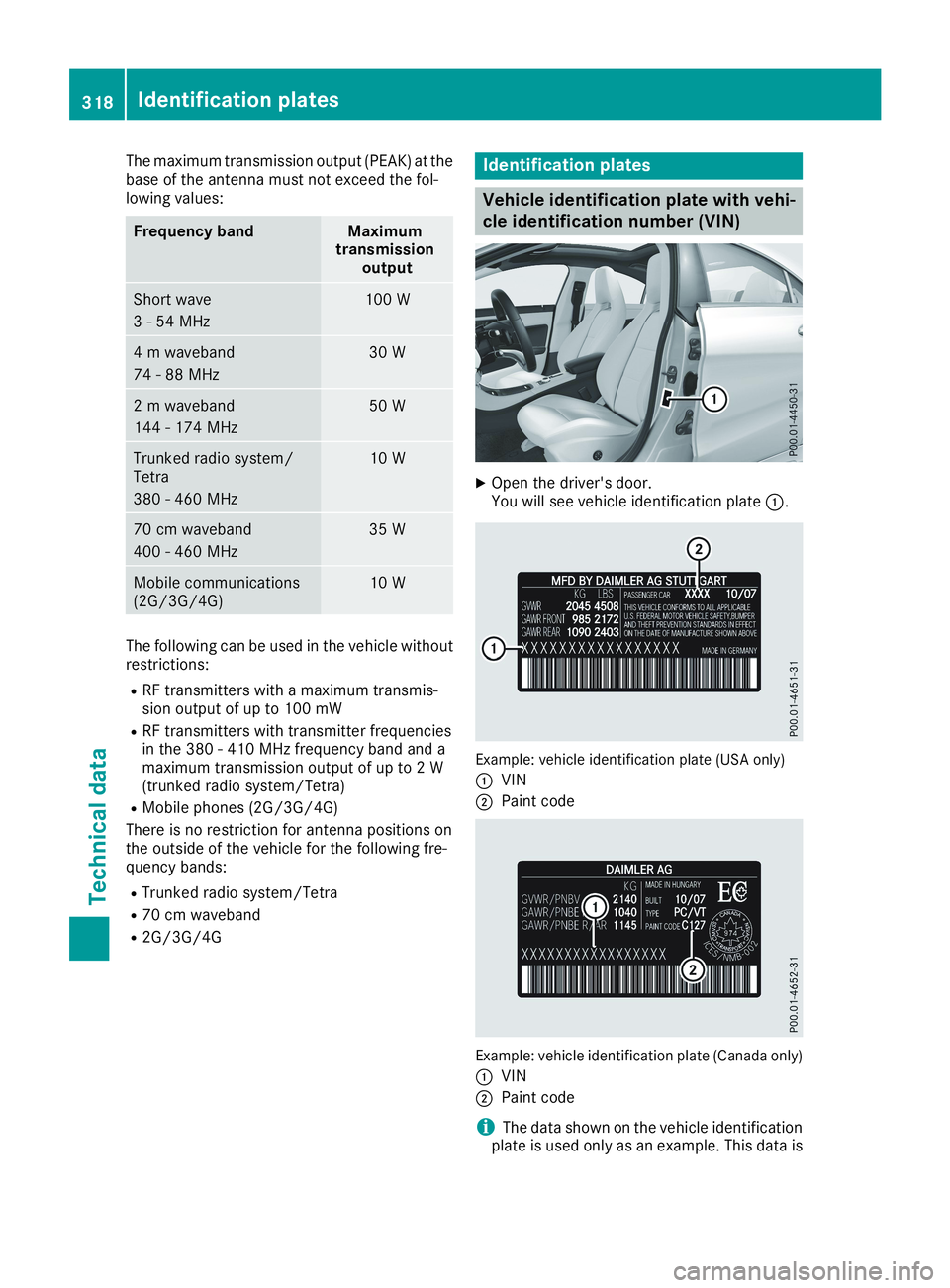
XOpen the driver's door.You will see vehicle identification plateC.
Example: vehicle identification plate (USA only)
CVIN
DPaint code
Example: vehicle identification plate (Canada only)
CVIN
DPaint code
iThe data shown on the vehicle identificationplate is used only as an example. This data is
318Identification plates
Technical data