warning MERCEDES-BENZ CLA 2019 Repair Manual
[x] Cancel search | Manufacturer: MERCEDES-BENZ, Model Year: 2019, Model line: CLA, Model: MERCEDES-BENZ CLA 2019Pages: 330, PDF Size: 23.57 MB
Page 96 of 330
Adjusting the head restraints
Important safety notes
GWARNING
You could lose control of your vehicle if you do
the following while driving:
Radjust the driver's seat, head restraint,
steering wheel or mirrors
Rfasten the seat belt
There is a risk of an accident.
Adjust the driver's seat, head restraint, steer-
ing wheel and mirror and fasten your seat belt
before starting the engine.
GWARNING
If the head restraints are not installed or not
adjusted correctly, they cannot provide pro-
tection as intended. There is an increased risk
of injury in the head and neck area, e.g. in the
event of an accident or when braking.
Always drive with the head restraints instal-
led. Before driving off, make sure for every
vehicle occupant that the center of the head
restraint supports the back of the head at
about eye level.
Using the fore-and-aft adjustment, adjust thehead restraint so that it is as close as possible toyour head.
General notes
For vehicles with sports seats you cannot adjustthe front head restraints or the outer rear headrestraints.
Adjusting the head restraints manually
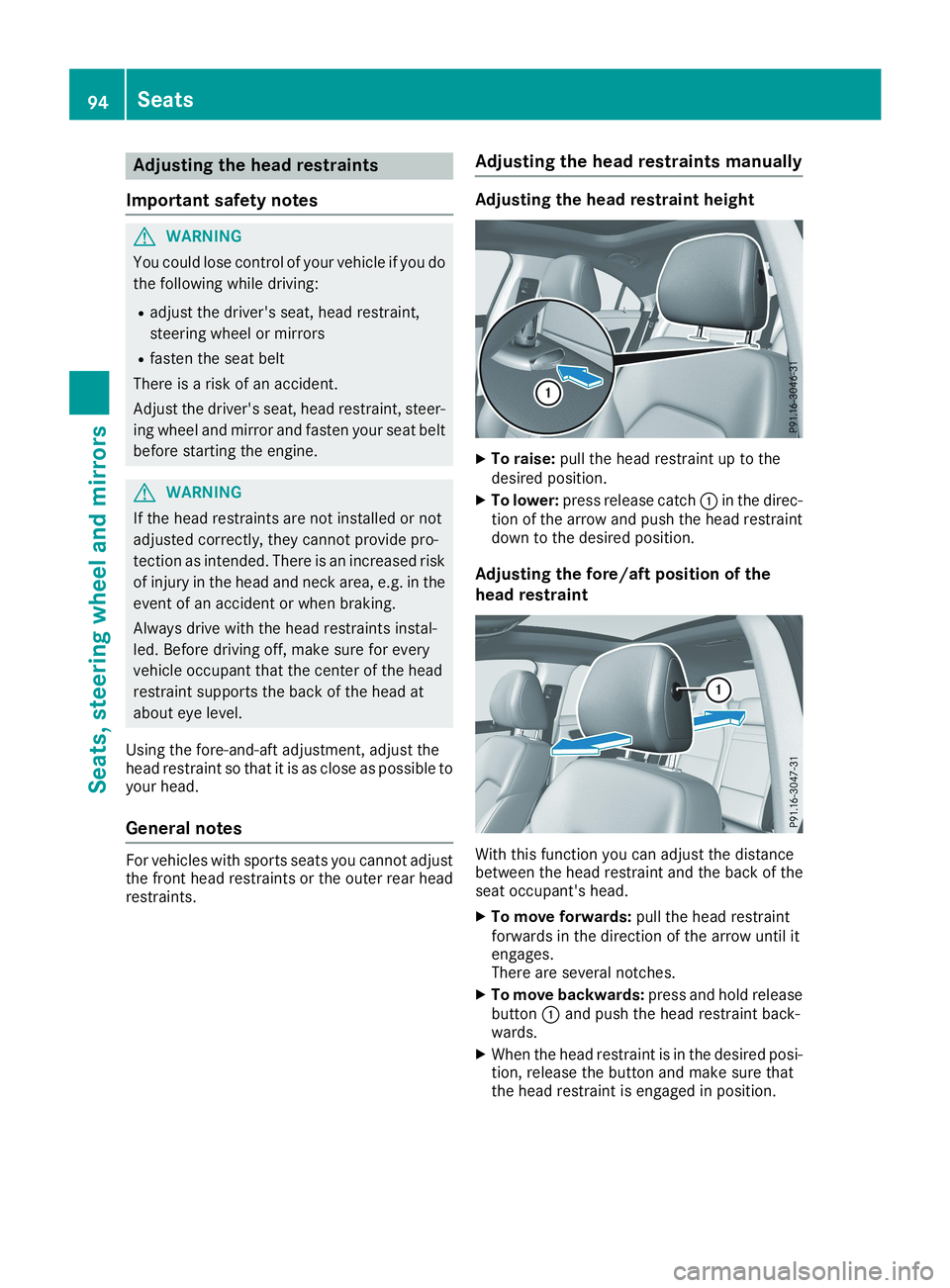
Adjusting the head restraint height
XTo raise:pull the head restraint up to thedesired position.
XTo lower:press release catchCin the direc-tion of the arrow and push the head restraintdown to the desired position.
Adjusting the fore/aft position of the
head restraint
With this function you can adjust the distancebetween the head restraint and the back of theseat occupant's head.
XTo move forwards:pull the head restraintforwards in the direction of the arrow until itengages.There are several notches.
XTo move backwards:press and hold releasebuttonCand push the head restraint back-wards.
XWhen the head restraint is in the desired posi-tion, release the button and make sure thatthe head restraint is engaged in position.
94Seats
Seats , ste ering wheel and mirrors
Page 98 of 330
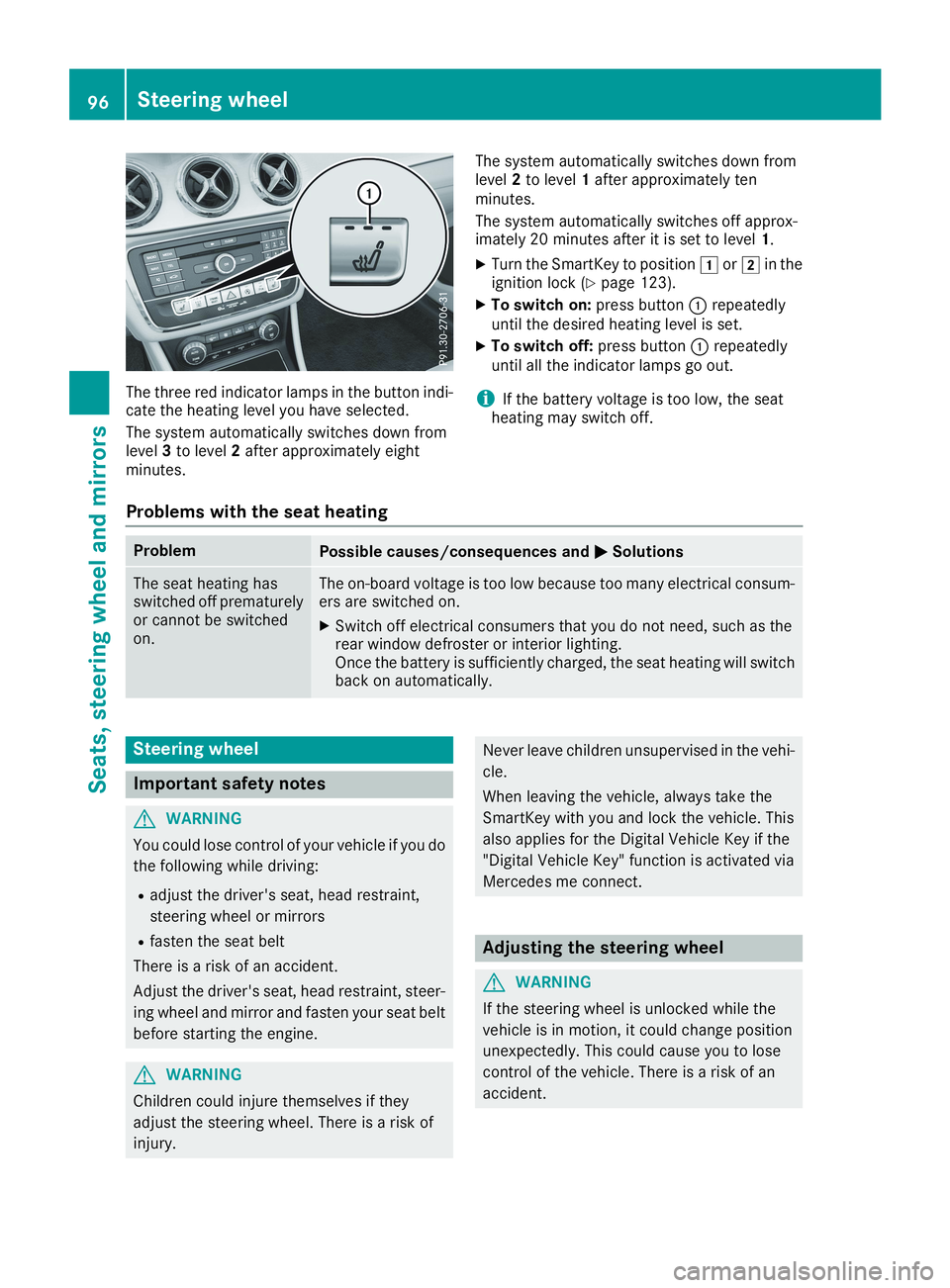
The three red indicator lamps in the button indi-cate the heating level you have selected.
The system automatically switches down fromlevel3to level2after approximately eightminutes.
The system automatically switches down fromlevel2to level1after approximately tenminutes.
The system automatically switches off approx-imately 20 minutes after it is set to level1.
XTurn the SmartKey to positionGorHin theignition lock (Ypage 123).
XTo switch on:press buttonCrepeatedlyuntil the desired heating level is set.
XTo switch off:press buttonCrepeatedlyuntil all the indicator lamps go out.
iIf the battery voltage is too low, the seatheating may switch off.
Problems with the seat heating
ProblemPossible causes/consequences andPPSolutions
The seat heating hasswitched off prematurelyor cannot be switchedon.
The on-board voltage is too low because too many electrical consum-ers are switched on.
XSwitch off electrical consumers that you do not need, such as therear window defroster or interior lighting.Once the battery is sufficiently charged, the seat heating will switchback on automatically.
Steering wheel
Important safety notes
GWARNING
You could lose control of your vehicle if you do
the following while driving:
Radjust the driver's seat, head restraint,
steering wheel or mirrors
Rfasten the seat belt
There is a risk of an accident.
Adjust the driver's seat, head restraint, steer-
ing wheel and mirror and fasten your seat belt
before starting the engine.
GWARNING
Children could injure themselves if they
adjust the steering wheel. There is a risk of
injury.
Never leave children unsupervised in the vehi-
cle.
When leaving the vehicle, always take the
SmartKey with you and lock the vehicle. This
also applies for the Digital Vehicle Key if the
"Digital Vehicle Key" function is activated via
Mercedes me connect.
Adjusting the steering wheel
GWARNING
If the steering wheel is unlocked while the
vehicle is in motion, it could change position
unexpectedly. This could cause you to lose
control of the vehicle. There is a risk of an
accident.
96Steering wheel
Seats, steering wheel and mirrors
Page 102 of 330

Memory function
Important safety notes
GWARNING
If you use the memory function on the driver's
side while driving, you could lose control of
the vehicle as a result of the adjustments
being made. There is a risk of an accident.
Only use the memory function on the driver's
side when the vehicle is stationary.
GWARNING
When the memory function adjusts the seat,
you and other vehicle occupants – particularly
children – could become trapped. There is a
risk of injury.
While the memory function is making adjust-
ments, make sure that no one has any body
parts in the sweep of the seat. If somebody
becomes trapped, immediately release the
memory function position button. The adjust-
ment process is stopped.
GWARNING
Children could become trapped if they acti-
vate the memory function, particularly when
unattended. There is a risk of injury.
Never leave children unsupervised in the vehi-
cle.
When leaving the vehicle, always take the
SmartKey with you and lock the vehicle. This
also applies for the Digital Vehicle Key if the
"Digital Vehicle Key" function is activated via
Mercedes me connect.
The memory function can be used at any time,e.g. even when the SmartKey is not in the igni-tion lock.
Storing settings
With the memory function, you can store up tothree different settings, e.g. for three differentpeople.
The following settings are stored as a singlememory preset:
RSeat and backrest position
RDriver's side: position of the exterior mirrorson the driver's and front-passenger sides
XAdjust the seat (Ypage 93).
XAdjust the exterior mirror on the driver's side(Ypage 97).
XBriefly press theMmemory button and thenpress preset position button1,2or3withinthree seconds.The settings are stored in the selected presetposition. A tone sounds when the settingshave been completed.
Calling up a stored setting
XPress and hold the relevant preset positionbutton1,2or3until the seat and exteriormirrors are in the stored position.
iThe setting procedure is interrupted as soonas you release the storage position button.
100Memory function
Seats, steering wheel and mirrors
Page 111 of 330
Replacing the wiper blades
Important safety notes
GWARNING
If the windshield wipers begin to move while
you are changing the wiper blades, you could
be trapped by the wiper arm. There is a risk of
injury.
Always switch off the windshield wipers and
ignition before changing the wiper blades.
!To avoid damaging the wiper blades, makesure that you touch only the wiper arm of thewiper.
!Never open the hood if a windshield wiperarm has been folded away from the wind-shield.
Never fold a windshield wiper arm without awiper blade back onto the windshield.
Hold the windshield wiper arm firmly whenyou change the wiper blade. If you release thewindshield wiper arm without a wiper bladeand it falls onto the windshield, the windshieldmay be damaged by the force of the impact.
Mercedes-Benz recommends that you havethe wiper blades changed at a qualified spe-cialist workshop.
Changing the windshield wiper blades
Removing the wiper blades
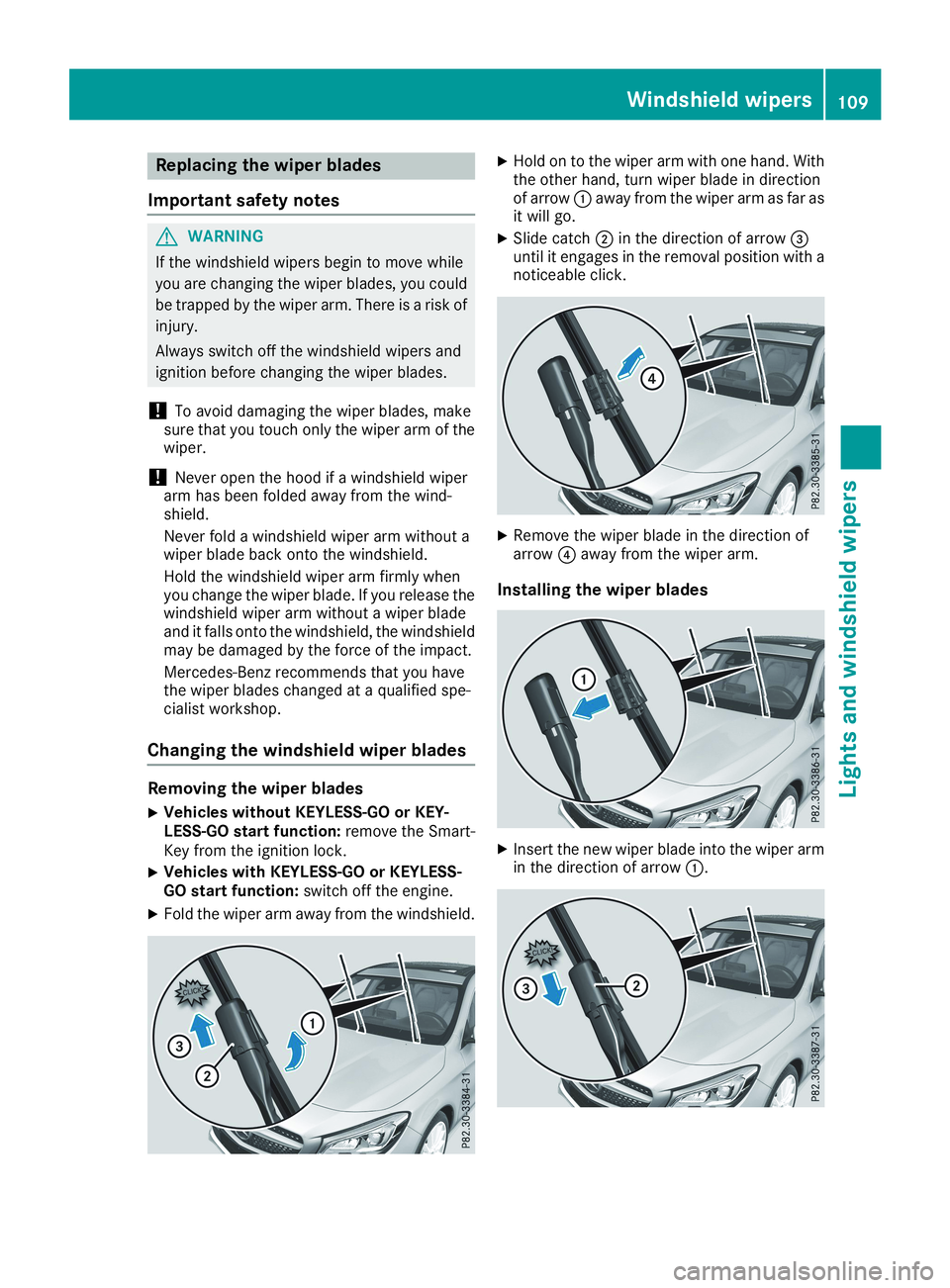
XVehicles without KEYLESS-GO or KEY-LESS-GO start function:remove the Smart-Key from the ignition lock.
XVehicles with KEYLESS-GO or KEYLESS-GO start function:switch off the engine.
XFold the wiper arm away from the windshield.
XHold on to the wiper arm with one hand. Withthe other hand, turn wiper blade in directionof arrowCaway from the wiper arm as far asit will go.
XSlide catchDin the direction of arrow
Page 123 of 330
iIf you activate the residual heat function athigh temperatures, only the ventilation will beactivated. The blower runs at medium speed.
iYou cannot use the ventilation to cool thevehicle interior to a temperature lower thanthe outside temperature.
Activating/deactivating
XTurn the SmartKey to positionZin the igni-tion lock or remove it (Ypage 123).
XPress theKbutton.The indicator lamp in theKbutton lightsup or goes out.
The indicator lamp in the button indicates thatthe respective function is activated.
iResidual heat is deactivated automatically:
Rafter approximately 30 minutes
Rwhen the ignition is switched on
Rif the battery voltage drops
Air vents
Important safety notes
GWARNING
Very hot or very cold air can flow from the air
vents. This could result in burns or frostbite in
the immediate vicinity of the air vents. There
is a risk of injury.
Make sure that all vehicle occupants always
maintain a sufficient distance to the air out-
lets. If necessary, redirect the airflow to
another area of the vehicle interior.
In order to ensure the direct flow of fresh airthrough the air vents into the vehicle interior,please observe the following notes:
Rkeep the air inlet between the windshield andthe hood free of blockages, such as ice, snowor leaves.
Rnever cover the air vents or air intake grilles inthe vehicle interior.
iFor optimal climate control in the vehicle,open the air vents completely and set theadjusters to the central position.
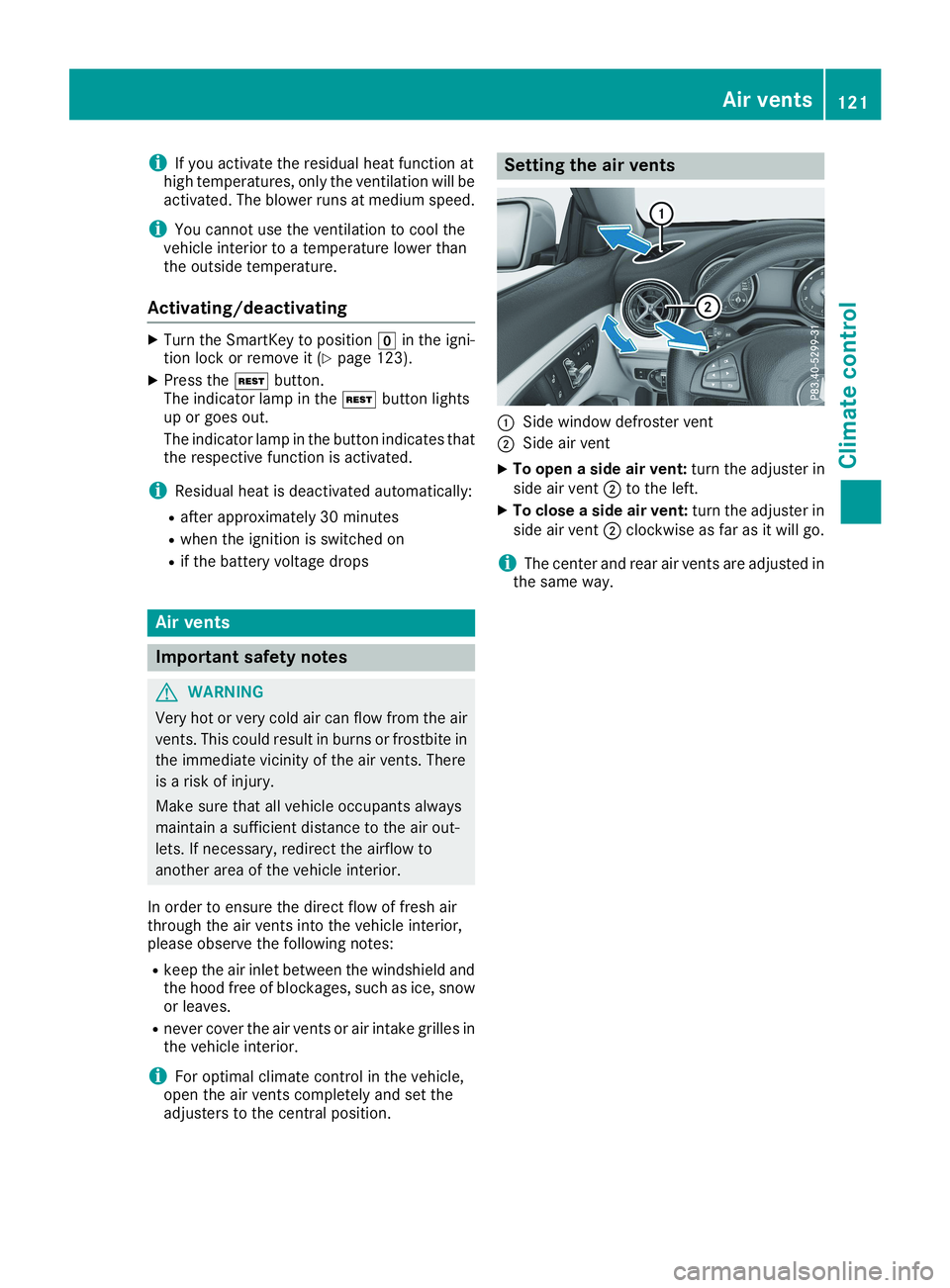
Setting the air vents
CSide window defroster vent
DSide air vent
XTo open a side air vent:turn the adjuster inside air ventDto the left.
XTo close a side air vent:turn the adjuster inside air ventDclockwise as far as it will go.
iThe center and rear air vents are adjusted inthe same way.
Air vents121
Climate control
Z
Page 126 of 330
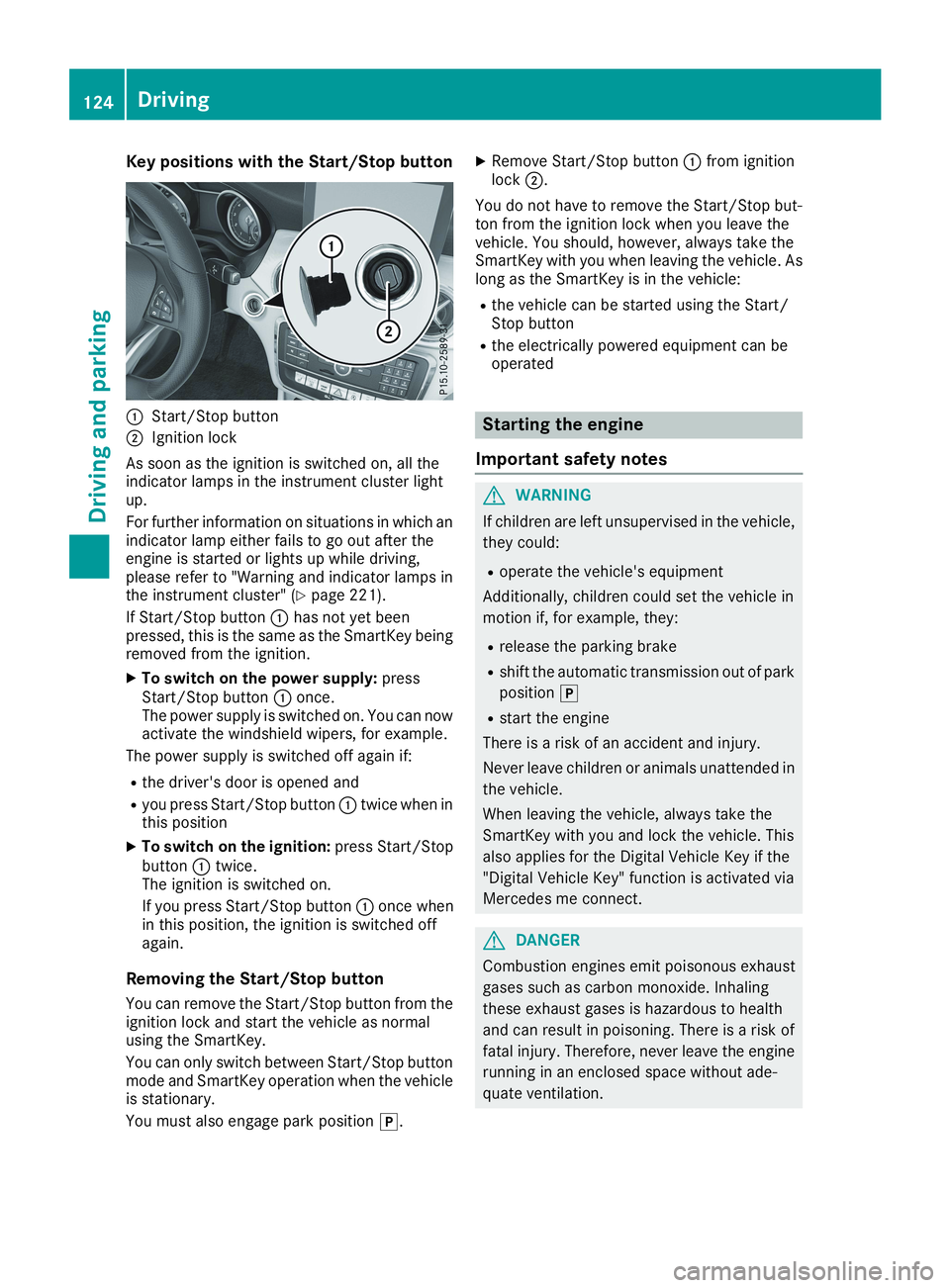
Key positions with the Start/Stop button
CStart/Stop button
DIgnition lock
As soon as the ignition is switched on, all theindicator lamps in the instrument cluster lightup.
For further information on situations in which anindicator lamp either fails to go out after theengine is started or lights up while driving,please refer to "Warning and indicator lamps inthe instrument cluster" (Ypage 221).
If Start/Stop buttonChas not yet beenpressed, this is the same as the SmartKey beingremoved from the ignition.
XTo switch on the power supply:pressStart/Stop buttonConce.The power supply is switched on. You can nowactivate the windshield wipers, for example.
The power supply is switched off again if:
Rthe driver's door is opened and
Ryou press Start/Stop buttonCtwice when inthis position
XTo switch on the ignition:press Start/StopbuttonCtwice.The ignition is switched on.
If you press Start/Stop buttonConce whenin this position, the ignition is switched offagain.
Removing the Start/Stop button
You can remove the Start/Stop button from theignition lock and start the vehicle as normalusing the SmartKey.
You can only switch between Start/Stop buttonmode and SmartKey operation when the vehicleis stationary.
You must also engage park position].
XRemove Start/Stop buttonCfrom ignitionlockD.
You do not have to remove the Start/Stop but-ton from the ignition lock when you leave thevehicle. You should, however, always take theSmartKey with you when leaving the vehicle. Aslong as the SmartKey is in the vehicle:
Rthe vehicle can be started using the Start/Stop button
Rthe electrically powered equipment can beoperated
Starting the engine
Important safety notes
GWARNING
If children are left unsupervised in the vehicle,
they could:
Roperate the vehicle's equipment
Additionally, children could set the vehicle in
motion if, for example, they:
Rrelease the parking brake
Rshift the automatic transmission out of park
position]
Rstart the engine
There is a risk of an accident and injury.
Never leave children or animals unattended in
the vehicle.
When leaving the vehicle, always take the
SmartKey with you and lock the vehicle. This
also applies for the Digital Vehicle Key if the
"Digital Vehicle Key" function is activated via
Mercedes me connect.
GDANGER
Combustion engines emit poisonous exhaust
gases such as carbon monoxide. Inhaling
these exhaust gases is hazardous to health
and can result in poisoning. There is a risk of
fatal injury. Therefore, never leave the engine
running in an enclosed space without ade-
quate ventilation.
124Driving
Driving and pa rking
Page 127 of 330
GWARNING
Flammable materials introduced through
environmental influence or by animals can
ignite if in contact with the exhaust system or
parts of the engine that heat up. There is a risk
of fire.
Carry out regular checks to make sure that
there are no flammable foreign materials in
the engine compartment or in the exhaust
system.
General notes
During a cold start, the engine runs at higherspeeds to enable the catalytic converter toreach its operating temperature. The sound ofthe engine may change during this time.
Automatic transmission
XShift the transmission to position](Ypage 132).The transmission position indicator on themultifunction display shows](Ypage 131).
iYou can start the engine in transmissionpositions]and\\.
Starting procedure with the SmartKey
To start the engine using the SmartKey insteadof the Start/Stop button, pull the Start/Stopbutton out of the ignition lock.
XTurn the SmartKey to positionIin the igni-tion lock (Ypage 123) and release it as soonas the engine is running.
Starting procedure with the Start/Stop
button
The Start/Stop button can be used to start thevehicle manually without inserting the SmartKeyinto the ignition lock. The Start/Stop buttonmust be inserted in the ignition lock and theSmartKey must be in the vehicle. This mode forstarting the engine operates independently ofthe ECO start/stop automatic engine start func-tion.
You can start the engine if a valid SmartKey is inthe vehicle. Switch off the engine and alwaystake the SmartKey with you when leaving the
vehicle, even if you only leave it for a short time.Pay attention to the important safety notes.
XDepress the brake pedal and keep itdepressed.
XPress the Start/Stop button once(Ypage 123).The engine starts.
Starting procedure via smartphone
Observe the important safety notes on startingthe engine (Ypage 124).
You can also start your engine via your smart-phone from outside the vehicle. In this case, thepreviously selected climate control setting isactivated. In this way you can cool or heat theinterior of the vehicle before starting the jour-ney.
Only start the engine via your smartphone if it issafe to start and run the engine where your vehi-cle is parked.
Observe the legal stipulations in the area whereyour vehicle is parked. Engine start via smart-phone may be limited to certain countries orregions.
You can execute a maximum of two consecutivestarting attempts via your smartphone. If youinsert the SmartKey into the ignition lock, youcan carry out two more starting attempts.
Once you have started the engine, you canswitch the engine off via your smartphone at anytime.
You can only start the engine via your smart-phone if:
Rthe SmartKey is in the ignition lock
Rpark position]is selected
Rthe accelerator pedal is not depressed
Rthe alarm for the anti-theft alarm system isnot set
Rthe panic alarm is not activated
Rthe hazard warning lamps are switched off
Rthe hood is closed
Rthe doors are closed and locked
Rthe windows and sliding sunroof are closed
Also make sure that:
Rthe fuel tank is sufficiently filled
Rthe starter battery has been sufficientlycharged
Driving125
Driving and parking
Z
Page 128 of 330
GWARNING
Limbs could be crushed or trapped if the
engine is started unintentionally during ser-
vice or maintenance work. There is a risk of
injury.
Always secure the engine against uninten-
tional starting before carrying out mainte-
nance or repair work.
Make sure that the engine cannot be started viayour smartphone before carrying out mainte-nance or repairs. You can prevent an enginestart via your smartphone, for example, if you:
Rswitch on the hazard warning lamps
Rdo not lock the doors
Ropen the hood
Pulling away
General notes
GWARNING
If the engine speed is above the idling speed
and you engage transmission position:
orF, the vehicle could pull away suddenly.
There is a risk of an accident.
When engaging transmission position:or
F, always firmly depress the brake pedal
and do not simultaneously accelerate.
Depress the accelerator carefully when pullingaway.
The vehicle locks centrally once you have pulledaway. The locking knobs in the doors drop down.
You can open the doors from the inside at anytime.
You can also deactivate the automatic lockingfeature (Ypage 189).
Vehicles with automatic transmission:it ispossible to shift the transmission from position]to the desired position only if you depressthe brake pedal. Only then can the parking lockbe deactivated.
All vehicles (except Mercedes-AMG vehi-cles):if you do not depress the brake pedal, theDIRECT SELECT lever can still be moved but theparking lock remains engaged.
Mercedes-AMG vehicles:if you do not depressthe brake pedal, the selector lever can still bemoved but the parking lock remains engaged.
At transmission fluid temperatures below
Page 129 of 330
The engine starts automatically when the driverwants to pull away again. The ECO start/stopfunction thereby helps you to reduce the fuelconsumption and emissions of your vehicle.
Important safety notes
GWARNING
If the engine is switched off automatically and
you exit the vehicle, the engine is restarted
automatically. The vehicle may begin moving.
There is a risk of accident and injury.
If you wish to exit the vehicle, always turn off
the ignition and secure the vehicle against
rolling away.
General notes
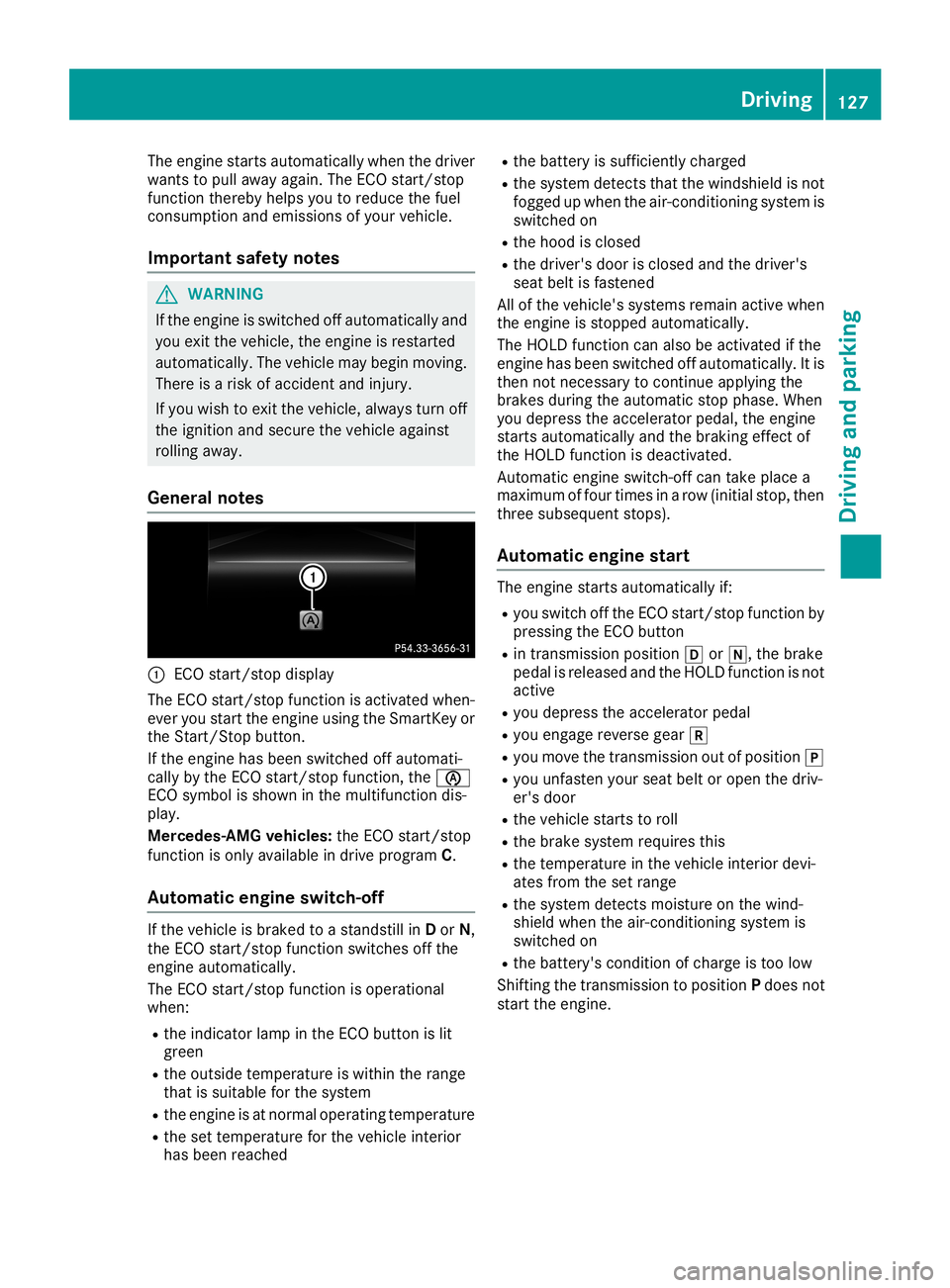
CECO start/stop display
The ECO start/stop function is activated when-ever you start the engine using the SmartKey orthe Start/Stop button.
If the engine has been switched off automati-cally by the ECO start/stop function, the
Page 131 of 330
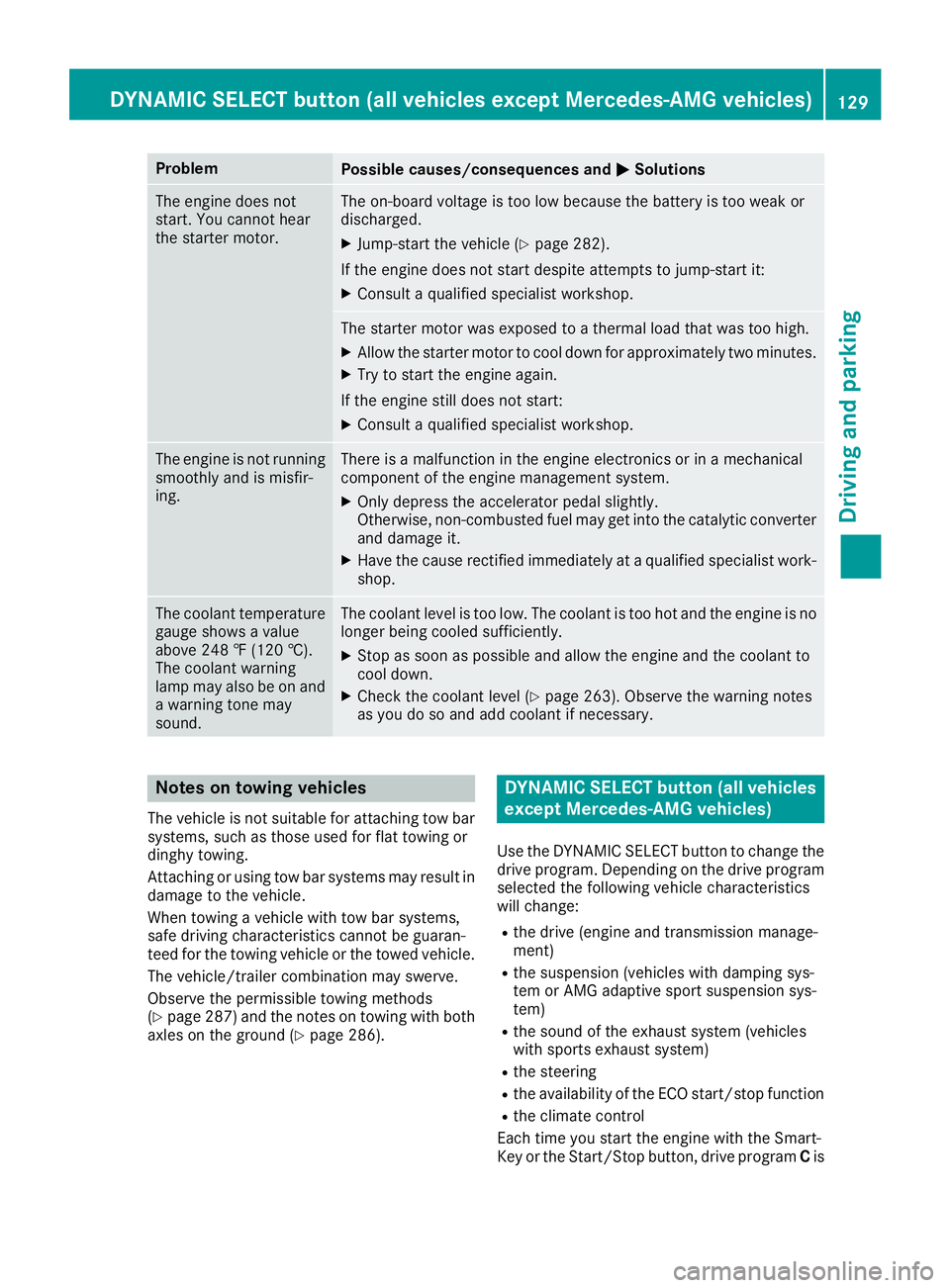
ProblemPossible causes/consequences andPPSolutions
The engine does notstart. You cannot hearthe starter motor.
The on-board voltage is too low because the battery is too weak ordischarged.
XJump-start the vehicle (Ypage 282).
If the engine does not start despite attempts to jump-start it:
XConsult a qualified specialist workshop.
The starter motor was exposed to a thermal load that was too high.
XAllow the starter motor to cool down for approximately two minutes.
XTry to start the engine again.
If the engine still does not start:
XConsult a qualified specialist workshop.
The engine is not runningsmoothly and is misfir-ing.
There is a malfunction in the engine electronics or in a mechanicalcomponent of the engine management system.
XOnly depress the accelerator pedal slightly.Otherwise, non-combusted fuel may get into the catalytic converterand damage it.
XHave the cause rectified immediately at a qualified specialist work-shop.
The coolant temperaturegauge shows a valueabove 248 ‡ (120 †).The coolant warninglamp may also be on anda warning tone maysound.
The coolant level is too low. The coolant is too hot and the engine is nolonger being cooled sufficiently.
XStop as soon as possible and allow the engine and the coolant tocool down.
XCheck the coolant level (Ypage 263). Observe the warning notesas you do so and add coolant if necessary.
Notes on towing vehicles
The vehicle is not suitable for attaching tow barsystems, such as those used for flat towing ordinghy towing.
Attaching or using tow bar systems may result indamage to the vehicle.
When towing a vehicle with tow bar systems,safe driving characteristics cannot be guaran-teed for the towing vehicle or the towed vehicle.
The vehicle/trailer combination may swerve.
Observe the permissible towing methods(Ypage 287) and the notes on towing with bothaxles on the ground (Ypage 286).
DYNAMIC SELECT button (all vehicles
except Mercedes-AMG vehicles)
Use the DYNAMIC SELECT button to change thedrive program. Depending on the drive programselected the following vehicle characteristicswill change:
Rthe drive (engine and transmission manage-ment)
Rthe suspension (vehicles with damping sys-tem or AMG adaptive sport suspension sys-tem)
Rthe sound of the exhaust system (vehicleswith sports exhaust system)
Rthe steering
Rthe availability of the ECO start/stop function
Rthe climate control
Each time you start the engine with the Smart-Key or the Start/Stop button, drive programCis
DYNAMIC SELECT button (all vehicles except Mercedes-AMG vehicles)129
Driving and parking
Z