ECU MERCEDES-BENZ CLA 2020 Owners Manual
[x] Cancel search | Manufacturer: MERCEDES-BENZ, Model Year: 2020, Model line: CLA, Model: MERCEDES-BENZ CLA 2020Pages: 570, PDF Size: 18.59 MB
Page 335 of 570
Blue
tooth®
pr ofile
of the mobi lephon eFu
nction
MAP (Messag e
Access Profile) Messag
efunc tions
can beused Te
lephon yoper ating mod esove rview
Depen dingonyour equipme nt,th efo llo wing tel‐
ephon yoper atingmodes areav ailable:
R Amobi lephon eis con nectedto themultime‐
dia system viaBlue tooth®
(/ pag e333).
R Twomobile phones areconn ectedwithth e
multime diasystem viaBlue tooth®
(tw o
phone mode) (/page334 ).
- Youcan useallthefunc tionsof themulti‐
media system withth emobile phonein
th efo re grou nd .
- Youcan recei veinc omin gcalls andmes‐
sag eswit hth emobile phoneinthebac k‐
gr ound.
Yo ucan interch ang eth emobile phonein
th efo re grou nd and background anytim e
(/ page33 4). %
Irre spectiv eof this, Blue tooth®
audio func‐
tio nalit ycan byused withan ymob ilephon e
(/ page36 9).
Inf orma tionon telephon y
The follo wing situat ionscanlead tothecall
being discon nectedwhile theve hicle isin
mo tion:
R ther eis insuf ficie ntnetworkco verage inthe
ar ea
R youmo vefrom one transmis sion/reception
st atio nto ano ther and nocomm unication
ch ann elsarefree
R theSIM cardused isno tcom patible withth e
ne tworkav ailable
R amobi lephon ewit h"T winc ard" islogg edinto
th ene tworkwit hth esecon dSIM cardat the
same time
The multimedia system suppor tscalls inHD
Vo ice ®
forim prov ed speec hqu alit y.Arequ ire‐
men tfo rth is isthat themobile phoneandthe
mobil ephone networkpr ov ider oftheper son
yo uar ecalli ngsuppo rtHD Voice ®
. Depe
ndingon thequ alit yof thecon nect ion,the
vo ice qualit yma yfluct uate.
Connect ingamob ilephone
Re quirement s:
R Blue tooth®
is act ivat ed on themobile phone
(see themanuf acturer'soper ating instruc‐
tion s).
R Blue tooth®
is act ivat ed on themultimedia
sy stem (/ page283).
Multimedia system:
4 © 5
Phone
Sear ching fora mob ile pho ne #
Select í. #
Select Connect NewDevice.
Co nnectin gamob ile pho ne(au thor ization
usi ng Secure Sim plePairing) #
Selec ta mobile phone. #
Acode isdispla yedin themultimedia system
and onthemobile phone. #
Ifth ecodes match: con firm thecode on
th emobile phone. MBUX
multimedia system 333
Page 347 of 570
Dele
ting ames sage
Mult imediasystem:
4 © 5
Phone 5
5 l #
Select acon tact. #
Press and holdon amess age. #
Todel eteth emess age:selec tDele te. Mer
cedes- Benzlink Ov
ervie wof Mer cedes- BenzLink &
WARNIN GRisk ofdist ra ction from infor‐
mati onsystems andcomm unication s
eq uipment
If yo uoper ateinf ormat ionand comm unic a‐
tio neq uipme ntintegratedin theve hicle
when driving, youwill bedistract ed from the
tr af fic situ ation. Thiscou ldalso cau seyouto
lose control of theve hicle. #
Onlyoper ateth is eq uipmen twhen the
tr af fic situ ation per mits. #
Ifyo ucan notbe sur eof this, stop the
ve hicle whilstpa ying attention toroad
and traffic condi tions andoperate the
eq uipment withth eve hicle statio nary. Yo
umus tobse rveth eleg alrequ iremen tsforth e
cou ntryin whi chyouar ecur rentl ydr ivi ng when
op erati ng themultimedia system.
Wi th Mer cedes-Ben zLink youcan usemob ile
phon efun ction svia themultimedia system. Itis
oper ated using theto uc hsc reen orthevo ice-
opera tedcon trol system. Youcan activat eth e
vo ice- opera tedcon trol system bypressing and
holding the£ buttononthemultifunc tion
st eer ing wheel.
When usingMercedes- BenzLinkviathevo ice-
opera tedcon trol system, themultimedia system
can still be oper ated via theVo ice Cont rolSy s‐
te m (/ page230).
The Mercedes-Benz Linkcontr olbo xsupp lemen‐
ta ry equipment isrequ ired forth is. This isavaila‐
ble atan aut hor izedMer cedes-Ben zCent er. On
lyone mobile phoneatatime canbeconn ec‐
te dvia Mer cedes- BenzLink tothemultimedia
sy stem.
When amobile phoneiscon nect edwith
Mer cedes- BenzLink,onl yone additional mobile
phone canbecon nect edusing Bluetooth®
wit h
th emultimedia system when intwophone
mode.
% The Mercedes- BenzLinkcontrol bo xuses
th eAn droid oper ating system.
% The service prov ider isresponsible forth ese
apps andtheser vices andcontent conne c‐
te dto it.
No teson Mer cedes-Benz Link
If amobile phoneisused withMer cedes-B enz
Link ,USB access usingthemedia menuispossi‐
ble forth is mobile phone.
% Onlyone routeguidan cecan beact ive at a
tim e.Ifro uteguidan ceisact ive on themulti‐
media system, itis closed whenrouteguid‐
anc eis star tedon themobile phone. MBUX
multimedia system 34
5
Page 349 of 570
App
leCar Play® Ov
ervie wof App leCar Play® &
WARNIN GRisk ofdist ra ction from infor‐
mati onsystems andcomm unication s
eq uipment
If yo uoper ateinf ormat ionand comm unic a‐
tio neq uipme ntintegratedin theve hicle
when driving, youwill bedistract edfrom the
tr af fic situ ation. Thiscou ldalso cau seyouto
lose control of theve hicle. #
Onlyoper ateth is eq uipmen twhen the
tr af fic situ ation per mits. #
Ifyo ucan notbe sur eof this, stop the
ve hicle whilstpa ying attention toroad
and traffic condi tions andoperate the
eq uipment withth eve hicle statio nary. Yo
umus tobse rveth eleg alrequ iremen tsforth e
cou ntryin whi chyouar ecur rentl ydr ivi ng when
op erati ng themultimedia system.
iPhone ®
func tionscan beused viathemultime‐
dia system using Apple CarPla y®
.The yar eoper‐
at ed using theto uc hsc reen, touc hpad, Touc h Con
trol or theSir i®
vo ice- oper ated con trol sys‐
te m. Youcan activat eth evo ice- oper ated con trol
sy stem bypressing andholding the£ button
on themultifunc tionsteer ing wheel.
When usingApple CarPla y®
via thevo ice- oper‐
at ed con trol system, themultimedia system can
st ill be opera tedvia theVo ice Cont rolSy stem
(/ page230).
Onl yone iPhone ®
at atime canbecon nect edvia
Apple CarPla y®
wit hth emultimedia system.
Also foruse ofApple CarPla y®
wit htw ophone
mode, onlyone additional mobilephone canbe
connect edusing Blue tooth®
wit hth emultimedia
sy stem.
The availabilit yof App leCarPla y®
ma yva ry
acc ordin gto thecount ry.
The service prov ider isresponsible forth is appli‐
cat ion and theser vices andcontent conne cted
to it.
Apple CarPla y®
is are gis tere dtra demar kof
Apple Inc. Inf
ormat iononApple CarPla y®
When Apple CarPla y®
is being used,theiPod ®
media sourceisno tav ailable forth ere spectiv e
iPhone ®
.
Onl yone routeguidan cecan beact ive at atim e.
If ro uteguidan ceisact ive on themultimedia sys‐
te m, itis closed whenrouteguidan ceisstar ted
on themobile phone.
Connecting aniPhone ®
via Apple CarPla y®
(cable)
Re quirement s:
R The current version ofyour devic e's operat‐
ing system isbeing used(seethemanuf ac‐
tur er's oper ating instruction s).
R Ther eis an Interne tcon nect ionforth efull
ra ng eof func tions forApple CarPla y®
.
R The iPho ne®
is connect edtothemultimedia
sy stem viatheUSB portç using asuit a‐
ble cable (/page369). MBUX
multimedia system 34
7
Page 351 of 570
Yo
umus tobse rveth eleg alrequ iremen tsforth e
cou ntryin whi chyouar ecur rentl ydr ivi ng when
op erati ng themultimedia system.
Mobile phonefunctionscan beused with
An droid Autousin gth eAn droid oper ating sys‐
te m on themultimedia system. Itis oper ated
using theto uc hsc reen orthevo ice- opera ted
contr olsystem. Youcan activat eth evo ice- oper‐
at ed con trol system bypressing andholding the
£ buttononthemultifunc tionsteer ing wheel.
When usingAndroid Autovia thevo ice- opera ted
contr olsystem, themultimedia system can still
be opera tedvia theVo ice Cont rolSy stem
(/ page230).
Onl yone mobile phoneatatime canbecon nec‐
te dvia Android Auto wit hth emultimedia sys‐
te m.
Also foruse ofAndr oidAutowit htw ophon e
mode ,onl yone addit ional mobile phonecan be
con nectedusing Bluetooth®
wit hth emultimedia
sy stem.
The availabilit yof An droid Autoand Android Auto
apps mayva ry acc ordin gto thecount ry. The
service prov ider isresponsible forth is appli‐
cat ion and theser vices andcontent conne cted
to it.
Inf orma tion onAndr oidAuto
If amobil ephone isused withAndr oidAuto,
USB access usingthemedia menuisno tpossi‐
ble forth is mobile phone.
Onl yone routeguidan cecan beact ive at atim e.
If ro uteguidan ceisact ive on themultimedia sys‐
te m, itis closed whenrouteguidan ceisstar ted
on themobile phone.
Connecting amobile phoneviaAndr oidAuto
(wir ed)
Re quirement s:
R The mobile phonesuppor tsAn droid Auto
fr om Andr oid5.0.
R The Andr oidAutoapp isins talled onthe
mobil ephone.
R Inorder touse thete lephon efunc tions,the
mobil ephone mustbe connect edtothemul‐
timedia system viaBlue tooth®
( / pag e333 ). If
th er ewa sno prior Interne tconn ection, this
is es tab lished withth euse ofthemobile
phone withAn droid Auto.
R The mobile phoneisconn ectedtothemulti‐
media system viatheUSB portç using a
suit able cable (/page369).
R Ther eis an Interne tcon nect ionforth efull
ra ng eof func tions forAndr oidAuto.
Multimedia system:
4 © 5
Mercedes me&Apps
5 Smart phone 5
Android Auto
5 Start Android Auto #
Alternativ e:Ifan Android Autoapplic ationis
act ive (e. g.when music isbein gpla yedor
ro uteguidan ceisact ive), youcan callupthe
act ive applic ationusin gth e|, zor
002B application buttons (/page260).
% Contr olusing theapplication buttons canbe
switc hedonoroff(/ page350).
% The firs tacti vatio nof Andr oid Au toon the
multime diasystem mus tbe car ried out
when theve hicle isstatio naryfo rsaf etyre a‐
son s. MBU
Xmult imed iasystem 34
9
Page 355 of 570
If
no Mer cedes meconnect services areactiv a‐
te dand thedat apr otect ion prom pthas been
conf irmed thefo llo wing datais transm itted:
R Vehicle identif ication number
R Mer cedes mecustomer identif ication num‐
ber
R Reason forth einitiat ionofthecall
R Languag ese tin themultimedia system
R Conf irmation ofthedat apr otect ion prom pt
If acall ismade fora ser vice appointment via
th eser vice reminder ,th efo llo wing datama ybe
tr ansm itted:
R Cur rent mil eage and main tenance data
Tr ans feris possi bleassu ming there qu ired
dat atransf ertech nol ogy issu pp ortedby the
mobil eser vice operator and thequ alit yof
th emobile connect ionissuf ficie nt. If
Ac cid ent and Brea kdo wnManag eme ntis
cal led via thevo ice con trol system and no
ser vice hasbeen activated, but thedat apr otec‐
tion queryhas been confirm ed, thefo llo wing
dat acan also becalled upfrom theve hicle by
th eMer cedes- BenzCustomer Cent er:
R Current vehicle location
% Atthetime ofgoing topress, this func tion is
te ch nica llynotye tav ailable butcan besup‐
por tedin thefutur e.
If th edat apr otect ion prom pthas been reject ed
th efo llo wing datais transm itted:
R Reason forth einitiat ionofthecall
R Rejecti onofthedat apr otect ion prom pt Mer
cede sme connect No
teson Mer cedes meconnect
Mer cedes meconn ectcons ists of multiple serv‐
ices. Dependin
gon whe ther theser vices areactiv ated
and ontheve hicle equipment, youcan usethe
fo llo wing service svia themultimedia system and
th eove rhead control panel, forex am ple:
R Accid ent and brea kdo wnmana gement (me
butt on)
R Ifth eser vice isactiv ated: Concier geSer vice
(me button)
R Mer cede s-Benz emergency callsy stem (aut o‐
matic emergency callor SOS button)
Mercede sme conne ctacci dent and brea kdo wn
ma nag eme nt,theMer cedes meconnect Con‐
cier geSer vice (if ser vice isacti vated) and the
Mer cedes-Ben zemer gency callcent erareav aila‐
ble foryo uar oun dth ecloc k.
The mebutt onand theSOS buttoncan befound
on theve hicle's overhead control panel
(/ page35 1).
Yo ucan also calltheMer cedes- BenzCustomer
Cent erusi ng themultimedia system
(/ page352).
Please note that Mer cedesme connectis a
Mer cedes-Ben zser vice.In emer gencie s,alwa ys MBUX
multimedia system 353
Page 356 of 570
cal
lth enation alemer gency service sfirs tus ing
th est andar dnat ionalemer gency service phone
num bers.In eme rgenci es,youcan also usethe
Mer cedes-Ben zemer gency callsy stem
(/ page356).
Obser vethecon ditions ofuse forMer cedes me
connect andother services. These canbe
obt ained intheMer cedes meportal:htt ps:/ /
me. secur e.mercedes -benz.com
Fu rther information aboutMercedes meconn ect
ser vices canbeobt ained intheMer cedes me
por tal:htt ps:/ /me .secure.m ercedes -benz.com
Inf orma tion onMer cedes meconnect acci‐
dent andbreakd ownmana gemen t
The accident and brea kdo wnmanag eme ntcan
incl udeth efo llo wing functions:
R Supplem enttotheMer cedes- Benzemer‐
ge ncy callsy stem (/ page356)
If neces sary,thecon tact per son atthe
Mer cedes-Ben zemer gency callcent erfor‐
wa rdsth ecall toMer cedes meconn ect
br eakdo wnand accident management. For‐
wa rding thecall isho we verno tpossi bleinall
countr ies. R
Breakdo wnassi stanc eby amec hanicon
loc atio nand/ ortheto wing away oftheve hi‐
cle tothenear estaut hor ized Mercedes- Benz
Cent er
Yo uma ybe charge dfo rth ese services.
Mor einf ormation aboutMercedes meconnect
ser vices canbeobt ained intheMer cedes me
por tal:htt ps:/ /me .secure.m ercedes -benz.com
Data transf erre ddur ing Mer cedes mecon‐
ne ct cal lse rvices
The datatransf erreddur ing aMer cedes mecon‐
nec tcall depends onthere ason thecall wasini‐
tiat ed, whic hser vice isselect edinthevo ice
con trol system and whic hMer cedes meconnect
ser vices areactiv ated.
Whic hdat ais transf erredfo rth eser vices canbe
ta ke nfrom thecur rentl yva lid term sof use.
These canbeobt ained intheMer cedes mepor‐
ta l:htt ps:/ /me .secure.m ercedes -benz.com Mer
cedes meand apps Inf
orma tion about Mercedes me
When youlog inwit hauser accoun tto the
Mer cedes meportal,th en ser vices andoffers
fr om Mer cedes-Benz willbe available toyou.
Av ailabilit yis coun try- dependen t.
Fo rmor einf ormation consult anauthor ized
Mer cedes-B enzCent eror visit theMer cedes me
por tal:htt p:/ /me .secure.m ercedes -benz.com
% Mak esur eyo ualw ayske ep theMer cedes
me apps updat ed.
Calling uptheMer cedes meuser accoun t
Multi media system:
4 © 5
Mercedes me&Apps
Yo ur vehicl eis co nne cted with auser
acc ount #
Select Merced esme.
Inf ormation aboutthecon nect eduser
account appears. 35
4
MBUX multimedia system
Page 360 of 570
R
Number ofpeop lede term ined tobe inthe
ve hicle
R Whe ther Mer cedes meconnect isavailable
or not
R Whe ther theemer gency callwa sinitiat ed
manually oraut omatically
R Time oftheacciden t
R Languag ese tting onthemultimedia system
Dat atra nsmit tedis vehicle information. Foran y
qu estion sabout thecollect ion,useand shar ing
of theeCall system data,please contact MBU‐
SA 'sCus tomer Assis tance Center at800-F OR-
MER C.
Fo rCa nada ,plea secont actMBC's Customer
Assis tance Center at1-800-38 7-0100.
Cu stomer requ ests forco veredinf ormation
should besubmitt edvia thesame chann els.
Fo raccide ntclar ificatio npur poses ,th efo llo wing
measur escan betake nup toan hour afte rth e
emer gency callha sbe en initia ted:
R The current vehicle position canbecalled up.R
Avo ice con nection totheve hicle occupants
can beestablished Online
andInterne tfunctions Int
erne tconnection Inf
ormat iononconnecting totheInt erne t &
WARNIN GRisk ofdist ra ction from infor‐
mati onsystems andcomm unication s
eq uipment
If yo uoper ateinf ormat ionand comm unic a‐
tio neq uipme ntintegratedin theve hicle
when driving, youwill bedistract edfrom the
tr af fic situ ation. Thiscou ldalso cau seyouto
lose control of theve hicle. #
Onlyoper ateth is eq uipmen twhen the
tr af fic situ ation per mits. #
Ifyo ucan notbe sur eof this, stop the
ve hicle whilstpa ying attention toroad
and traffic condi tions andoperate the
eq uipment withth eve hicle statio nary. Yo
umus tobse rveth eleg alrequ iremen tsforth e
cou ntryin whi chyouar ecur rentl ydr ivi ng when
op erati ng themultimedia system. &
WARNIN GRisk ofan acci dent from
ope rating mob ile comm unicati onequip ‐
ment while th eve hicle isin mo tion
Mobile communication sde vices distract the
dr iver from thetraf fic situ ation. Thiscou ld
al so cau sethedr iver tolose control of the
ve hicle. #
Asthedr iver ,onl yoper atemobile com‐
municat ionsdevices when theve hicle is
st atio nary. #
Asave hicle occupant, onlyuse mobile
communication sde vices inthear eas
int ended forth is pur pose, e.g.inthe
re ar passe nger com partment . Yo
umus tobse rveth eleg alrequ iremen tsforth e
cou ntryin whi chyouar ecur rentl ydr ivi ng when
op erati ng mob ile comm unicati onequip ment in
th eve hicle.
The Interne tfunct ionscanonlybe used toalimi‐
te ddeg reewhils tdr iving. 358
MBUX multimedia system
Page 362 of 570
Disp
laying theconnecti onstatus
Mul timedi asy stem:
4 © 5
Set ting s5
System
5 Wi-Fi &Bluetoot h #
Select Internet Status .
% Inthecase ofacon nect ionviathecomm uni‐
cation module thefo llo wing status informa‐
tio nis sho wn:
R Type ofnetwork
R Status online /offline We
bbr ow ser Calling
upawe bpag e &
WARNIN GRisk ofdist ra ction from infor‐
mati onsystems andcomm unication s
eq uipment
If yo uoper ateinf ormat ionand comm unic a‐
tio neq uipme ntintegratedin theve hicle
when driving, youwill bedistract ed from the
tr af fic situ ation. Thiscou ldalso cau seyouto
lose control of theve hicle. #
Onlyoper ateth is eq uipmen twhen the
tr af fic situ ation per mits. #
Ifyo ucan notbe sur eof this, stop the
ve hicle whilstpa ying attention toroad
and traffic condi tions andoperate the
eq uipment withth eve hicle statio nary. Yo
umus tobse rveth eleg alrequ iremen tsforth e
cou ntryin whi chyouar ecur rentl ydr ivi ng when
op erati ng themultimedia system.
Multimedia system:
4 © 5
Mercedes me&Apps
5 z Browser
Calling upane wwe bpag e #
Select ä. #
Entering awe baddr ess #
Select 0054.
% The func tion iscount ry-de pende nt.
% Websit escann otbe sho wnwhile theve hicle
is in mo tion. Calling
upawe bsit efrom thebr ows erhis‐
to ry #
Tocal lup thepr ev ious ornext pag efrom the
his tory:sel ect 0095or 0096. 360
MBUX multime diasy stem
Page 366 of 570
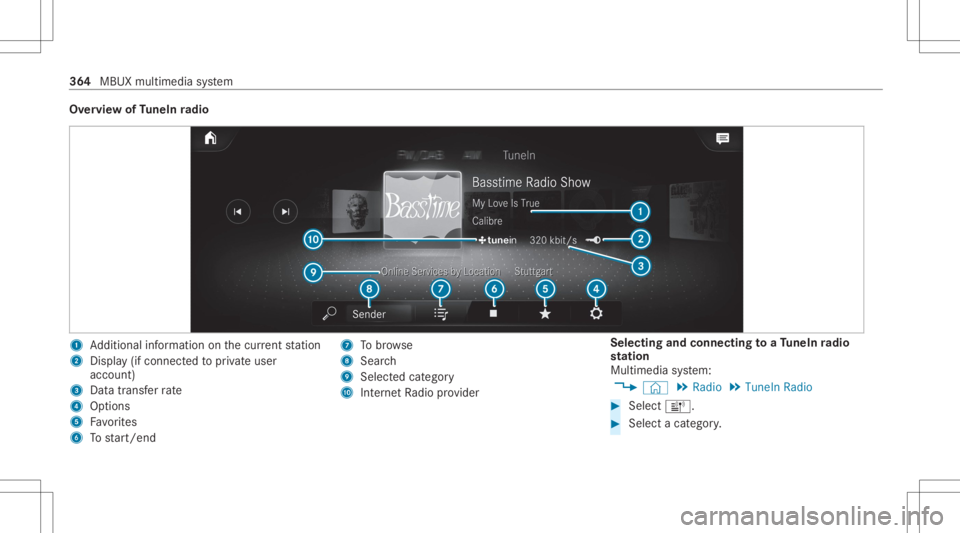
Ov
ervie wof TuneIn radio 1
Addition alinf ormation onthecur rent statio n
2 Display(if con nectedto privat euser
accoun t)
3 Datatra nsf errate
4 Options
5 Favorite s
6 Tostar t/ end 7
Tobrow se
8 Sear ch
9 Selectedcatego ry
A Interne tRa dio prov ider Selecting
andconnecting toaTu neIn radio
st ation
Mul timedi asy stem:
4 © 5
Radio 5
TuneIn Radio #
Select =. #
Select acat egor y. 36
4
MBUX multimedia system
Page 367 of 570
#
Select ast atio n.
The connectionis es tablished automatic ally.
or #
Select thesear chfield. #
Entera st atio nnam e.
% Arelativ elylar ge volume ofdat acan be
transmit tedwhen usingTuneIn radio.
Sa ving/dele tingaTu neIn radio station asa
fa vo rite
Multimedia system:
4 © 5
Radio 5
TuneIn Radio #
Select ast atio n. #
Select ß.
The listof save dfavo rite statio nsappear s. #
Select Add toFav orites.
or #
Creat ean acc oun tfo rth eonline prov ider
(T uneIn radio) andthen log inon themulti‐
media system.
Yo ur favo rite sar eim por tedto themultimedia
sy stem. Dele
ting favo rite s #
Select ast atio n. #
Select ß. #
Select DeleteFav orite.
Se tting theTu neIn radio optio ns
Mu ltimed iasystem:
4 © 5
Radio 5
TuneIn Radio5
Z
5 TuneIn Radio
The follo wing option sar eav ailable:
R Select Stream: selectth est re am qualit y.
R Login toTuneIn Account :log into your
Tu neIn user acco unt.
R Log Outof Accou nt:lo g ou tof your TuneIn
us er acco unt. #
Select anoptio n. Sho
wing the station listfo rthe lastca tegor y
select ed
Multimedia system:
4 © 5
Radio 5
TuneIn Radio #
Press theco verof thecur rent statio n.
De pen dingon howthest atio nwa sselect ed,
a st atio nlis tis sho wn. Med
ia Inf
orma tion abou tmed iamod e Inf
orma tion abou tsup portedfo rm ats and
data storage medi a &
WARNIN GRisk ofdist ra ction whenha n‐
dl ing data stor ag emedia
If yo uhan dleadat ast or ag emedium while
dr iving, your att entio nis div ertedfrom the
tr af fic condi tions.Thi scou ldalso cau seyou
to lose control of theve hicle. #
Onlyhandle adat ast or ag emedium
when theve hicle isstatio nary. MBUX
multimedia system 365