ECU MERCEDES-BENZ CLA 2020 Workshop Manual
[x] Cancel search | Manufacturer: MERCEDES-BENZ, Model Year: 2020, Model line: CLA, Model: MERCEDES-BENZ CLA 2020Pages: 570, PDF Size: 18.59 MB
Page 204 of 570
#
Con firm select edpar king space 4.
% The turnsignal indicat orisswitc hedonaut o‐
matically whenthepar king procedur e
begins. Theturnsignal indicat orisswitc hed
of faut omaticall ywhen youswit chto005B .
Yo uar ere sponsible forsele cting thetur nsignal
indicat orinaccor dance withth etraf fic condi ‐
tions .If neces sary,select thetur nsignal indica‐
to raccor dingly. &
WARNIN GRisk ofacci dent dueto vehi‐
cle swinging outwhile parking orpulli ng
out ofapar king space
While parking orexitin gapar kingspace, the
ve hicle swings outand candrive ont oar eas
of theonc oming lane.
This could cause youto coll ide wi th object s
or other road user s. #
Payatt ention toobject sand other road
user s. #
Wher enec essar y,stop theve hicle or
cancel thepar king procedur ewit h
Ac tivePa rking Assist. #
If,forex am ple, thePlease Engage Reverse
Gear messag eappear sin themedia display:
select thecor responding transmission posi‐
tion.
Ve hicl eswith automatic transmiss ion:
The vehicle drives intoth eselect edpar king
space.
On com pletion ofthepar king procedur e,the
Parking AssistFinished, TakeContr olof Vehicle
displa ymessag eappear s.Fu rther maneuv ering
ma yst ill be nec essar y. #
Aftercom pletion ofthepar king procedur e,
saf eguar dth eve hicle agains tro lling away.
When requ ired bylegalrequ iremen tsor local
con dition s:tur nth ewheels towa rdsth ecurb.
% Youcan stop theve hicle andchang eth e
tr ans missi on positio ndu ring thepar king pro‐
cedur e.The system then calculat esane w
ve hicle path.The parking procedur ecan
th en be con tinued. Ifno newvehicle pathis
av ailable, thetransmission positionwillbe
ch ang edagain. Ifth eve hicle hasnotye t
re ac hed thepar king space, thepar king pro‐ cedur
ewill becanc eled, should age ar be
ch ang ed.
Exit ingapa rking spacewit hAc tiv ePa rking
Assis t
Re quirement s:
R The vehicle hasbeen parkedwit hAc tive
Pa rking Assist.
% Depe ndingon theve hicle's equipment, the
butt onmayalso belocat edatadif fere nt
po sitio nin thecent ercon sole.
Please note that youar ere sponsible forth eve hi‐
cle and surround ingsdur ing theent ire par king
pr ocedur e. #
Startth eve hicle. 202
Driving andparking
Page 210 of 570
Disp
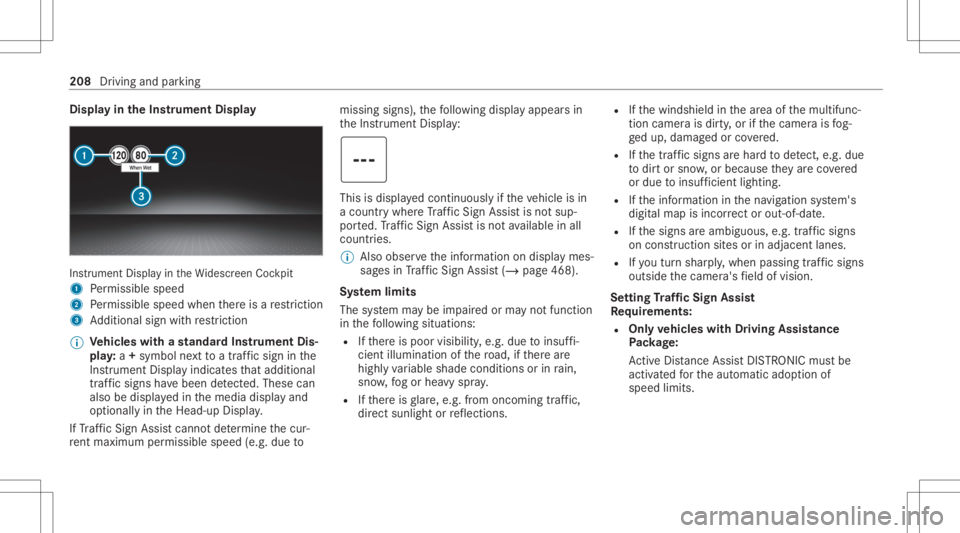
layin theIns trum ent Displa y In
stru ment Displa yin theWi descr eenCockpit
1 Perm issible speed
2 Perm issible speedwhenther eis are striction
3 Addition alsign withre striction
% Ve
hicl eswith ast andar dIns trument Dis‐
pla y:a+ symbo lne xt to atraf fic sig nin the
Ins trument Displayindicat esthat addit ional
traf fic sig ns have been detected. Thesecan
al so be displ ayed inthemedia displayand
op tion ally intheHead-up Display.
If Traf fic Sign Assistcanno tde term ine thecur‐
re nt ma ximu mperm issible speed(e.g.dueto missi
ngsigns), thefo llo wing displa yappear sin
th eIns trument Display: This
isdispla yedcon tinuousl yif th eve hicle isin
a countr ywher eTr af fic Sign Assistisno tsup‐
por ted. Traf fic Sign Assistisno tav ailable inall
coun tries.
% Alsoobse rveth einf ormation ondispla ymes‐
sag esinTraf fic Sign Assist(/ pag e468 ).
Sy stem limit s
The system maybe impair edorma yno tfunc tion
in thefo llo wing situat ions:
R Ifth er eis poor visibility ,e.g. due toinsuf fi‐
cie ntillu mina tionofthero ad, ifth er ear e
highl yva riable shade condition sor inrain,
sno w,fogor hea vyspr ay.
R Ifth er eis glar e, e.g .fr om oncom ingtraf fic,
di re ct sunli ght orreflect ions. R
Ifth ewindshield inthear ea ofthemultifunc ‐
tion camer ais dir ty,or ifth ecamer ais fog‐
ge dup, damag edorcovered.
R Ifth etra ffic sign sar ehar dto detect, e.g. due
to dir tor sno w,orbecause they areco vered
or due toinsuf ficie ntlighti ng.
R Ifth einf ormation inthena vig ation system's
digit almap isincor rect or out-of-da te.
R Ifth esigns areambiguous, e.g.traffic sign s
on con stru ction sites orinad jace ntlanes.
R Ifyo utur nshar ply, when passin gtraf fic sig ns
ou tsid eth ecamer a'sfield ofvision.
Se tting Traf fic Sign Assis t
Re quirement s:
R Onl yve hicl eswith Drivin gAss istanc e
Pa ckag e:
Ac tiveDis tance AssistDIS TRONI Cmu stbe
activ ated forth eaut omatic adoptionof
speed limits. 208
Driving andparking
Page 219 of 570
0061
Makes/accep tsacall
0076 Rejects /end sa cal l
5 00E2 Calls up thehome screen
6 Touc hCon trol mult imed iasystem
7 0038 Backbutt on Oper
ating theon-boa rdcom puter
Mer cede s-AMG vehicl es:obse rveth eno tesin
th eSupplement .Ot her wise, youma yfa ilto rec‐
ogni zedangers. &
WARNIN GRisk ofdist ra ction from infor‐
mati onsystems andcomm unication s
eq uipment
If yo uoper ateinf ormat ionand comm unic a‐
tio neq uipme ntintegratedin theve hicle
when driving, youwill bedistract ed from the
tr af fic situ ation. Thiscou ldalso cau seyouto
lose control of theve hicle. #
Onlyoper ateth is eq uipmen twhen the
tr af fic situ ation per mits. #
Ifyo ucan notbe sur eof this, stop the
ve hicle whilstpa ying attention toroad and
traffic condi tions andoperate the
eq uipment withth eve hicle statio nary. Obser
vetheleg alrequ iremen tsforth ecount ry
in whic hyo uar ecur rently drivi ng when operat‐
ing theon- boar dcom puter.
% The on-boar dcom puterdispla yswill appear
on themultifunc tiondispla y(/ page220). The
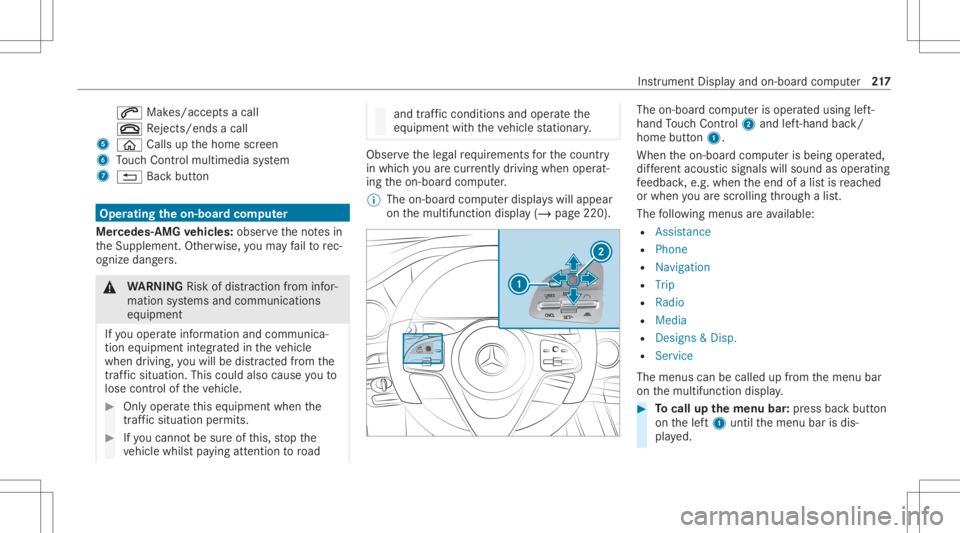
on-boar dcom puterisoper ated using left-
hand Touc hCon trol 2 and left-han dbac k/
hom ebut ton1.
Whe nth eon- boar dcom puterisbeing operated,
dif fere nt aco ustic signa lswillsou ndasoperati ng
fe edbac k,e.g. when theend ofalis tis reac hed
or when youar esc rolling thro ugh alis t.
The follo wing menusareav ailable:
R Assist anc e
R Phon e
R Navi gation
R Trip
R Radio
R Media
R Design s& Dis p.
R Service
The men uscan becalle dup from themenu bar
on themultifunc tiondispla y. #
Tocall upthemenu bar:press backbutt on
on thelef t1 until themenu barisdis‐
pla yed. Ins
trument Displayand on-boar dcom puter 217
Page 226 of 570
3
Estima tedar riva ltim eat next des tination
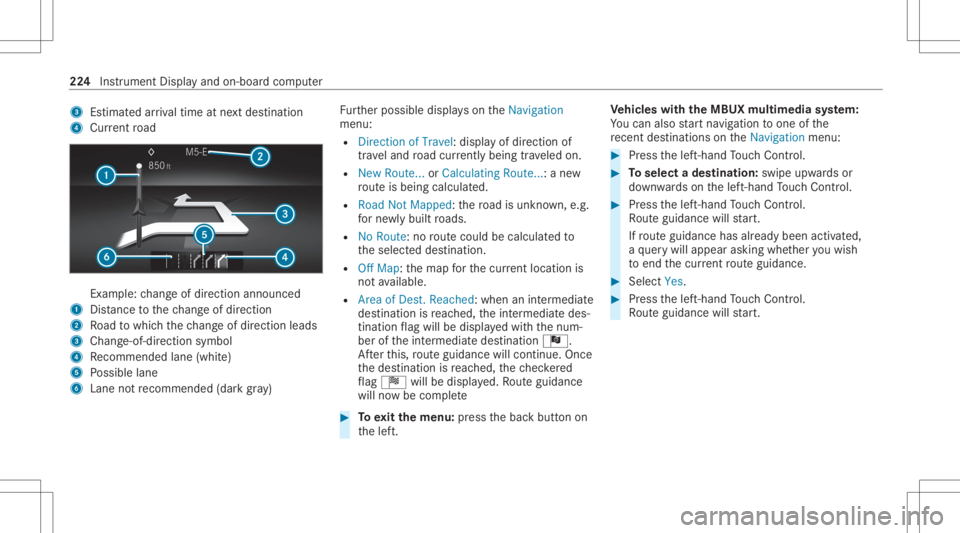
4 Current road Ex
am ple: chang eof dir ect ion ann oun ced
1 Distance tothech ang eof dir ect ion
2 Road towhic hth ech ang eof dir ect ion leads
3 Chan ge-of-d irection symbo l
4 Recomme ndedlane (whit e)
5 Possible lane
6 Lane notre comme nded(darkgray ) Fu
rther possible displayson theNavigation
menu:
R Direc tionofTravel: displayof dir ect ion of
tra veland road cur rentl ybe ing trave led on.
R New Route. ..or Calculatin gRoute. ..:a ne w
ro uteis bein gcalc ulated.
R Road NotMappe d:th ero ad isunk nown, e.g.
fo rne wly builtro ads.
R NoRout e: no routeco uld becalc ulatedto
th eselect eddes tinat ion.
R Off Map: themap forth ecur rent locati onis
no tav ailable.
R Area ofDe st.Reach ed:when anintermedi ate
des tinatio nis reac hed, theint ermediat edes‐
tinat ionflag will bedispla yedwit hth enum‐
ber oftheint ermediat edes tinat ionÎ.
Af terth is, routeguidan cewill continue .On ce
th edes tinat ionisreac hed, thech eckered
fl ag Í willbedispla yed. Ro uteguidan ce
will nowbe comp lete #
Toexitth emenu :pr ess thebac kbutt onon
th elef t. Ve
hicl eswith theMB UX multim edia system:
Yo ucan also star tna vig atio nto one ofthe
re cent destina tions ontheNavigation menu: #
Press thelef t-hand Touc hCon trol. #
Toselect ades tinat ion:swipe upwards or
do wn wardson thelef t-hand Touc hCon trol. #
Press thelef t-hand Touc hCon trol.
Ro uteguidan cewill star t.
If ro uteguidan cehas already been activat ed,
a qu erywill appear askingwhether youwish
to end thecur rent routeguidan ce. #
Select Yes. #
Press thelef t-hand Touc hCon trol.
Ro uteguidan cewill star t. 22
4
Instru ment Displa yand on-boar dcom puter
Page 231 of 570
No
teson oper ating safety &
WARNIN GRisk ofdist ra ction from infor‐
mati onsystems andcomm unication s
eq uipment
If yo uoper ateinf ormat ionand comm unic a‐
tio neq uipme ntintegratedin theve hicle
when driving, youwill bedistract ed from the
tr af fic situ ation. Thiscou ldalso cau seyouto
lose control of theve hicle. #
Onlyoper ateth is eq uipmen twhen the
tr af fic situ ation per mits. #
Ifyo ucan notbe sur eof this, stop the
ve hicle whilstpa ying attention toroad
and traffic condi tions andoperate the
eq uipment withth eve hicle statio nary. &
WARNIN GRisk ofan acci dent from
ope rating mob ile comm unicati onequip ‐
ment while th eve hicle isin mo tion
Mobile communication sde vices distract the
dr iver from thetraf fic situ ation. Thiscou ld al
so cau sethedr iver tolose control of the
ve hicle. #
Asthedr iver ,onl yoper atemobile com‐
municat ionsdevices when theve hicle is
st atio nary. #
Asave hicle occupant, onlyuse mobile
communication sde vices inthear eas
int ended forth is pur pose, e.g.inthe
re ar passe nger com partment . &
WARNIN GRisk ofinju rydue toobject s
being stowe dincor rectl y
If obje ctsintheve hicle interior arestowe d
inc orrectly ,th ey can slide orbe throw n
ar oun dand hitvehicle occupants. Inaddi‐
tion, cupholder s,open stow agespac esand
mobi lephon ere cep tacle scanno tal wa ys
re tain all obje ctsth ey cont ain.
The reisarisk ofinjur y,par ticular lyin the
ev ent ofsudden braking orasudden chang e
in dir ect ion. #
Alw aysst ow object sso that they can‐
no tbe throw nar ou nd insuch situa‐
tions. #
Alw aysmak esur eth at obj ect sdo not
pr otru de from stow agespac es,lugg age
ne ts or stow agene ts. #
Close theloc kable stow agespac es
bef orest ar tin gajo ur ne y. #
Alw aysst ow and securehea vy,har d,
poin ted, shar p-edg ed,fragile orbulky
objec tsinthetrunk/ loadcompartmen t. Fo
ryo ur ow nsa fety,al wa ys obser vethefo llo w‐
ing point swhen operatingmobile communic a‐
tion seq uipmen tand espec iallyyo ur voice con ‐
tr ol system:
R Obser vetheleg alrequ iremen tsforth ecoun‐
tr y in whic hyo uar edr ivin g.
R While drivin g,on lyop eratemobi lecom mun i‐
cat ionseq uipme ntand your voice con trol
sy stem when thetra ffic con dition sper mit it.
Yo uma yot her wise bedistract ed from the
tr af fic condi tions andcausean acci dent,
inju ring yourself and other s. Vo
ice Cont rolSy stem 229
Page 247 of 570
Vo
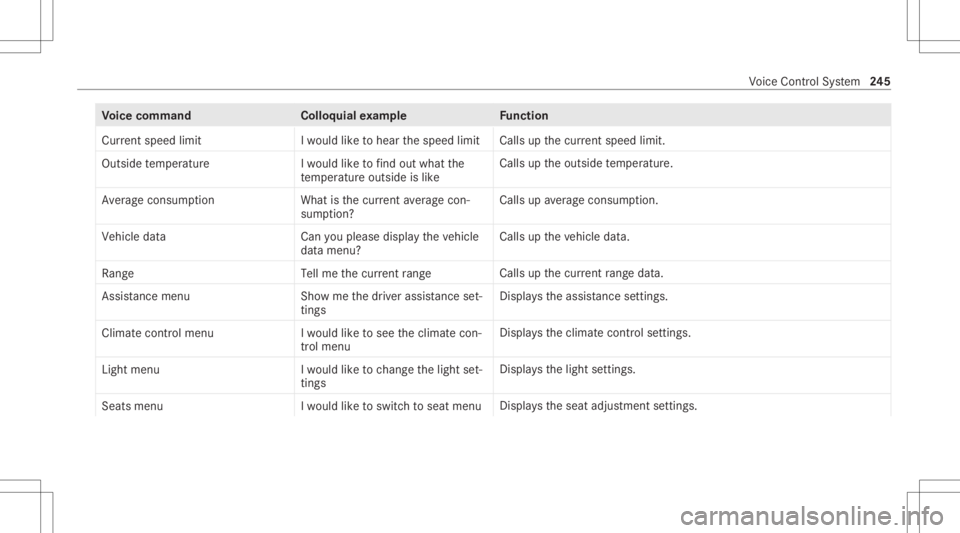
ice comm and Colloquialexam ple Function
Current speedlimit Iwould liketohear thespeed limit Calls
upthecur rent spe edlimit.
Ou tsid etemp erature Iwo uld like tofind outwh atthe
temp erature outsid eis like Ca
lls up theoutside temp eratur e.
Aver ageconsumption Whatisthe curren taverage con-
sumption ? Calls
upave rage consu mption.
Veh icleda ta Canyo uplea se disp laythe vehicle
da ta menu ? Ca
lls up theve hicle data.
Range Tellmethe current range Call
sup thecur rent rang eda ta.
Assi stance menu Showmethe driver assista nce set-
ting s Dis
play sth eassis tance settings .
Cl ima tecontro lmenu Iwo uld like tosee theclima tecon-
trol menu Disp
lays theclimat econ trol settings.
Light menu Iwould liketochange thelight set-
ting s Displa
ysthelight settings.
Seats menu Iwould liketoswitch toseat menu Displa
ystheseat adjus tmentse ttings. Vo
ice Cont rolSy stem 24
5
Page 249 of 570
Ov
ervie wand oper ation Ov
ervie wof theMB UX multim edia system &
WARNIN GRisk ofdist ra ction from infor‐
mati onsystems andcomm unication s
eq uipment
If yo uoper ateinf ormat ionand comm unic a‐
tio neq uipme ntintegratedin theve hicle
when driving, youwill bedistract ed from the
tr af fic situ ation. Thiscou ldalso cau seyouto
lose control of theve hicle. #
Onlyoper ateth is eq uipmen twhen the
tr af fic situ ation per mits. #
Ifyo ucan notbe sur eof this, stop the
ve hicle whilstpa ying attention toroad
and traffic condi tions andoperate the
eq uipment withth eve hicle statio nary. Yo
umus tobse rveth eleg alrequ iremen tsforth e
cou ntryin whi chyouar ecur rentl ydr ivi ng when
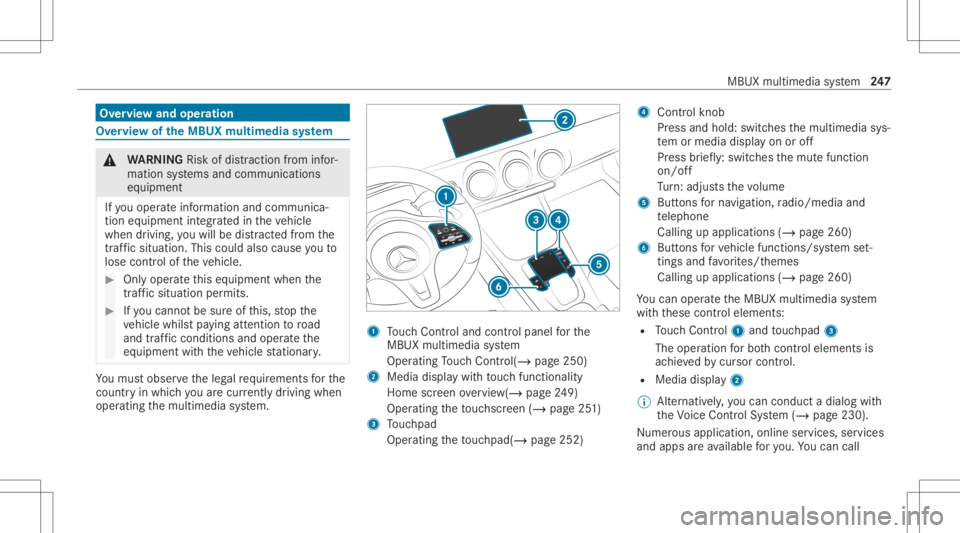
op erati ng themultimedia system. 1
Touc hCon trol and contro lpanel forth e
MBUX multimedia system
Oper ating Touc hCon trol (/ page25 0)
2 Media displaywit hto uc hfun ction alit y
Hom esc reen ove rview(/ page24 9)
Oper ating theto uc hsc reen (/ page25 1)
3 Touc hpad
Operatin gth eto uc hpad( /pag e25 2) 4
Con trol kn ob
Pr ess and hold:swit ches themultimedia sys‐
te m or media display on oroff
Pr ess brief ly:swi tches themut efunc tion
on/ off
Tu rn:ad jus tsthevo lume
5 Buttons forna vig ation, radio/media and
te lephon e
Calling upapplicat ions(/page260)
6 Buttons forve hicle functions/sy stem set‐
ting sand favo rite s/t hemes
Cal ling upappli cations (/page260)
Yo ucan operat eth eMBUX multimedia system
wit hth ese control element s:
R Touc hCon trol 1 and touc hpad 3
The oper ationfo rbo th contr oleleme ntsis
ac hie vedby cur sor contr ol.
R Med iadispl ay2
% Alternati vely,yo ucan cond uct adialog with
th eVo ice Cont rolSy stem (/ page230).
Nu mer ous application, online services, services
and appsar eav ailable foryo u. Youcan call MB
UX mult imed iasystem 24
7
Page 251 of 570
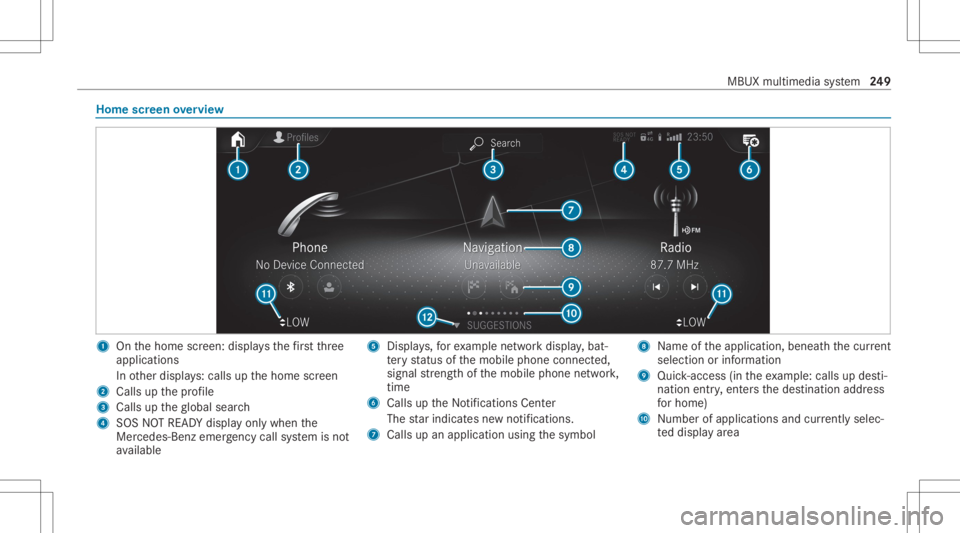
Home
screen overvie w 1
Onthehome screen: displa ysthefirs tth re e
applic ations
In other displa ys:cal lsup thehome screen
2 Calls upthepr ofile
3 Calls uptheglobal search
4 SOS NOTREAD Ydispl ayonl ywhen the
Mer cedes-Ben zemer gency callsy stem isno t
av ailable 5
Displays,fo rex am ple networkdispla y,bat‐
te ry status ofthemobile phoneconnect ed,
signal stre ngt hof themobile phonenetwork,
tim e
6 Calls up theNo tification sCent er
The star ind icat esnewno tificat ions.
7 Calls upanapplic ationusin gth esymbol 8
Name oftheapplication, beneathth ecur rent
sel ecti onorinforma tion
9 Quick-acce ss(in th eex am ple: calls updes ti‐
nat ion entry,ent ersth edes tinat ionaddr ess
fo rhome)
A Number ofapp lications andcurrently selec‐
te ddispla yar ea MBUX
multimedia system 24
9
Page 257 of 570
&
WARNIN GRisk ofdist ra ction from infor‐
mati onsystems andcomm unication s
eq uipment
If yo uoper ateinf ormat ionand comm unic a‐
tio neq uipme ntintegratedin theve hicle
when driving, youwill bedistract ed from the
tr af fic situ ation. Thiscou ldalso cau seyouto
lose control of theve hicle. #
Onlyoper ateth is eq uipmen twhen the
tr af fic situ ation per mits. #
Ifyo ucan notbe sur eof this, stop the
ve hicle whilstpa ying attention toroad
and traffic condi tions andoperate the
eq uipment withth eve hicle statio nary. Yo
umus tobse rveth eleg alrequ iremen tsforth e
cou ntryin whi chyouar ecur rentl ydr ivi ng when
op erati ng themultimedia system. Ov
ervie wof theMB UX Interior Assis tant
If th eve hicle iseq uipped withth eMBUX Interior
Assis tant, select edfunc tions ofthemultimedia
sy stem can beoper ated con tact-fr ee.Inaddi‐
tion, there adin glight orsear chlight canbe
switc hedonoroffcon tact-fr ee.
The MBUX Interior Assi stant can differe ntia te
be tween driver and front passeng erinteraction s.
The MBUX Interior Assis tant recogni zescertain
hand positions(poses) . MBU
Xmultim ediasystem 255
Page 260 of 570
Ac
tiv atin gco verch ang ein thera dio menu
and medi amenu
The MBUX Interior Assi stant reduces thenumber
of oper ating steps. #
Moveahan dto wa rdsth eto uc hsc reen or
to uc hpad.
The current informa tion,e.g .ab ou tth era dio
st atio n,trac kand artis tar ehidde n.Co ver
ch ang eis act ivat ed. #
Con tinue operation andselec ta co ver. #
Asthehand ismo vedaw ay from the
to uc hsc reen ortouc hpad, thecur rent infor‐
ma tionis sho wnagain.
% Further information onthera dio menu
(/ page37 3) andth emedia menu
(/ page368).
Sho wing thena vig ation menu onthema p
The MBU XInte rior Assis tant sho wsthena vig a‐
tion menu. #
Moveahan dto wa rdsth eto uc hsc reen or
to uc hpad.
The navig atio nmen uis sho wn. #
Con tinue operation andselectasymb ol. #
Asthehand ismo vedaw ay from the
to uc hsc reen ortouc hpad, themedia display
hides thena vig ation menu.
% Further information onthena vig ation menu
(/ page290).
Sho wing operating symbols intheAc tiv e
Pa rking Assis tcamer aima ge(onl yfrom driv‐
er' sseat )
The MBU XInte rior Assis tant facil itat es quick-
acc ess forth edr iver tovarious camer avie ws. #
With theAc tivePa rking Assistdispla yact ive,
mo vethehand inthedir ect ion ofthe
to uc hsc reen.
The camer aoper ation symbols aredispla yed. #
Cont inue operation anddispla yth edesir ed
fr ont ,re ar,lef tand right camer avie ws.
% Further information onActivePa rking Assist
func tions(/ page19 9).
Op eratingafu nct ion withth efa vo rite spose
Re quirement s:
R Tocall upfavo rite s: ther eis at leas tone
fa vo rite . R
The area forre cogni tionofthefa vo rite 's
pose isabo vethecent ercon sole atthe
height oftheclimat econ trol vents and the
media display. The hand should have adis‐
ta nce ofat leas t4 in (10 cm) from themedia
displa y.
R The pose isheld fora br ief time.
Call ingupfavo rite s
A po se callsup afa vo rite .
The driver and front passeng ercan conn ecttwo
dif fere nt favo rite swit hth eV pose.
% Ifafa vo rite has notye tbe en save dand con‐
nec tedwit hth eMBUX Interior Assis tant, the
multime diasystem will assis tyo u. 258
MBUX mult imed iasystem