light MERCEDES-BENZ CLA 2020 Manual PDF
[x] Cancel search | Manufacturer: MERCEDES-BENZ, Model Year: 2020, Model line: CLA, Model: MERCEDES-BENZ CLA 2020Pages: 570, PDF Size: 18.59 MB
Page 201 of 570
th
is event ,ha ve thecamer as,their position s
and their setting checkedat aqu alif ied spe‐
cialis two rkshop.
% Donotuse the360° Camer aunder suchcir‐
cums tances. Youco uld other wise injureot h‐
er sor collide withobject swhen parking the
ve hicle.
If th eve hicle iscar rying ahea vyload, leavingth e
st andar dheigh tcan result ininaccur aciesinthe
guide linesandinthedispla yof thege ner ated
ima ges,depending ontech nica lcond itions.
The field ofvision andother funct ionsofthe
came rasystem maybe restrict ed dueto addi‐
tio nal attachme ntson theve hicle (e.g.license
plat ebr ac ket,bicy cle rack ).
% The contras tof thedispla yma ybe impair ed
by abr uptdir ect sunlight orby other light
sour ces, e.g.when driving outofaga rage .In
th is case, paypar ticular attent ion.
% Have thedispla yre pair edorreplaced if,for
ex am ple, pixelerro rs consi derablyrestrict its
us e.
See theno teson cleaning the360° Camer a
(/ page396). Selecting
avie wforthe 360° Camer a #
Eng agere ve rsege ar. #
Select thedesir edviewin themultimedia
sy stem (/ page19 6).
Op eni ng thecam eraco verof the rear vie w
camer a
Mul timedi asy stem:
4 © 5
Set ting s5
Assist ance
5 Camera &Parkin g #
Select OpenCamera Cover.
% The camer aco vercloses automatical lyafte r
some timeorafte ran ignitio ncy cle. Ac
tiv ePa rking Assis t Fu
nction ofActiv ePa rking Assis t
Ac tivePa rking Assistis an elect ronic parking
assis tance system whic huses ultrasound andis
aut omaticall yactiv ated dur ing forw ardtra vel.
The system isoper ational atspeeds below
appr oximat ely22 mph(35 km/h).
If all requ iremen tsareme t,th eÇ displa y
appear sin themultifunc tiondispla y.The system th
en independen tly locat esand measur espar al‐
lel and perpendicular parking spaces onboth
sides oftheve hicle.
When ActivePa rking Assisthas detected parking
spaces ,th eÈ displa yappear sin themulti‐
func tion displa y.The arro ws sho won whic hside
of thero ad detected parking spaces arelocat ed.
The yar eth en sho wninthemedia display.The
par king space and,ifnecessar y,thepar king
dir ect ion can beselect edasdesir ed.Active
Pa rking Assistcalc ulatesasuit able vehicle path,
switc hesonthetur nsignal indicat orand assis ts
yo uin par kingand exitin gth epar king space.
Ve hicl eswith automatic transmiss ion:Ac tive
Pa rking Assistpr ov ides assis tance when chang ‐
ing gear,acc elerating ,br akin gand steer ing the
ve hicle.
Ac tivePa rking Assistis onl yan aid. Itis no ta
subs titutefo ryo ur att entio nto thesur round ings.
The responsibili tyforsaf emaneu vering and
pa rking remains withyo u. Mak esur eth at no
per son s,anim alsorobj ect set c. arein the
maneu vering rang e. Dr
iving and parking 19
9
Page 210 of 570
Disp
layin theIns trum ent Displa y In
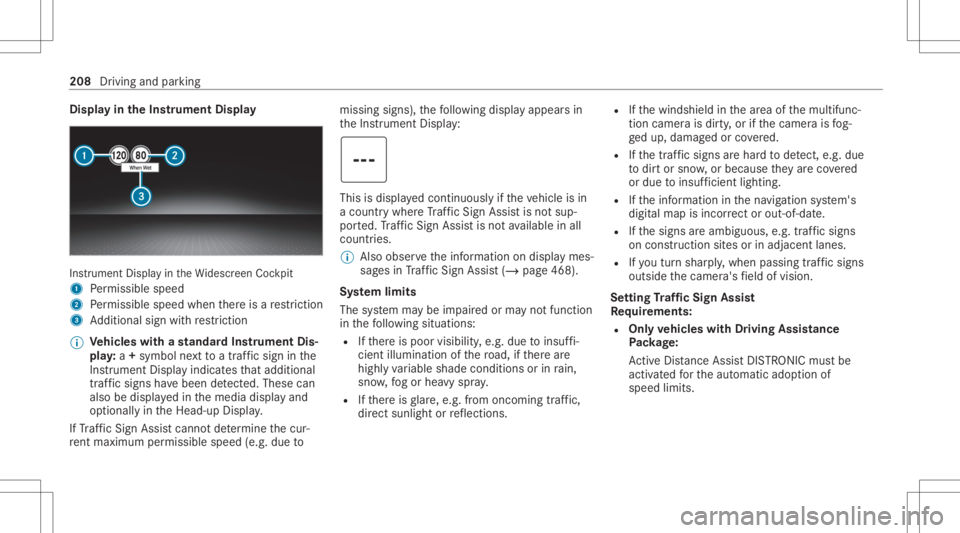
stru ment Displa yin theWi descr eenCockpit
1 Perm issible speed
2 Perm issible speedwhenther eis are striction
3 Addition alsign withre striction
% Ve
hicl eswith ast andar dIns trument Dis‐
pla y:a+ symbo lne xt to atraf fic sig nin the
Ins trument Displayindicat esthat addit ional
traf fic sig ns have been detected. Thesecan
al so be displ ayed inthemedia displayand
op tion ally intheHead-up Display.
If Traf fic Sign Assistcanno tde term ine thecur‐
re nt ma ximu mperm issible speed(e.g.dueto missi
ngsigns), thefo llo wing displa yappear sin
th eIns trument Display: This
isdispla yedcon tinuousl yif th eve hicle isin
a countr ywher eTr af fic Sign Assistisno tsup‐
por ted. Traf fic Sign Assistisno tav ailable inall
coun tries.
% Alsoobse rveth einf ormation ondispla ymes‐
sag esinTraf fic Sign Assist(/ pag e468 ).
Sy stem limit s
The system maybe impair edorma yno tfunc tion
in thefo llo wing situat ions:
R Ifth er eis poor visibility ,e.g. due toinsuf fi‐
cie ntillu mina tionofthero ad, ifth er ear e
highl yva riable shade condition sor inrain,
sno w,fogor hea vyspr ay.
R Ifth er eis glar e, e.g .fr om oncom ingtraf fic,
di re ct sunli ght orreflect ions. R
Ifth ewindshield inthear ea ofthemultifunc ‐
tion camer ais dir ty,or ifth ecamer ais fog‐
ge dup, damag edorcovered.
R Ifth etra ffic sign sar ehar dto detect, e.g. due
to dir tor sno w,orbecause they areco vered
or due toinsuf ficie ntlighti ng.
R Ifth einf ormation inthena vig ation system's
digit almap isincor rect or out-of-da te.
R Ifth esigns areambiguous, e.g.traffic sign s
on con stru ction sites orinad jace ntlanes.
R Ifyo utur nshar ply, when passin gtraf fic sig ns
ou tsid eth ecamer a'sfield ofvision.
Se tting Traf fic Sign Assis t
Re quirement s:
R Onl yve hicl eswith Drivin gAss istanc e
Pa ckag e:
Ac tiveDis tance AssistDIS TRONI Cmu stbe
activ ated forth eaut omatic adoptionof
speed limits. 208
Driving andparking
Page 213 of 570
Fu
nction ofbrak eapp lication (Activ eBlind
Spo tAssis t)
% The brak eapplication functionisonl yav aila‐
ble forve hicles withaDr iving Assistance
Pa ckag e.
If Ac tiveBli nd Spo tAssi stdetects arisk ofaside
im pact inthemonit oring rang e, acou rse-co r‐
re cting brak eap plica tion iscar ried out. This is
designed tohelp youavo idacollis ion.
The cour se-cor recting brak eap plica tion isavaila‐
ble inthespeed rang ebe twee nap prox imat ely
20 mph(30 km/h) and125mp h(200 km/h). &
WARNIN GRisk ofacci dent despite
br ak eapplication ofActiveBli nd Spo t
Assi st
A cou rse-co rrect ing brak eapplication cannot
alw ayspr eve ntacol lisi on. #
Alw aysst eer ,br ak eor accelera teyour‐
self ,espe ciallyif Ac tiveBli nd Spo t
Assi stwa rnsyo uor mak esaco urse-
co rrect ing brak eapplication. #
Alw aysmaint ainasaf edis tance atthe
sides. &
WARNIN GRisk ofacci dent despite
Ac tiveBli nd Spo tAssi st
Ac tiveBli nd Spo tAssi stdoes notre act tothe
fo llo wing:
R Ifve hicles overtak eto oclosel yon the
side, placing them intheblind spotar ea
R Vehicles approaching andovertakin gyo u
at agr ea tly differ ent speed
As are sult, ActiveBli nd Spo tAssi stma ynei‐
th er giv ewa rnings norinterve ne insuch sit‐
uations. #
Alw ayspa ycar eful attention tothetra f‐
fi c situ ation and maintain asaf edis‐
ta nce attheside oftheve hicle. If
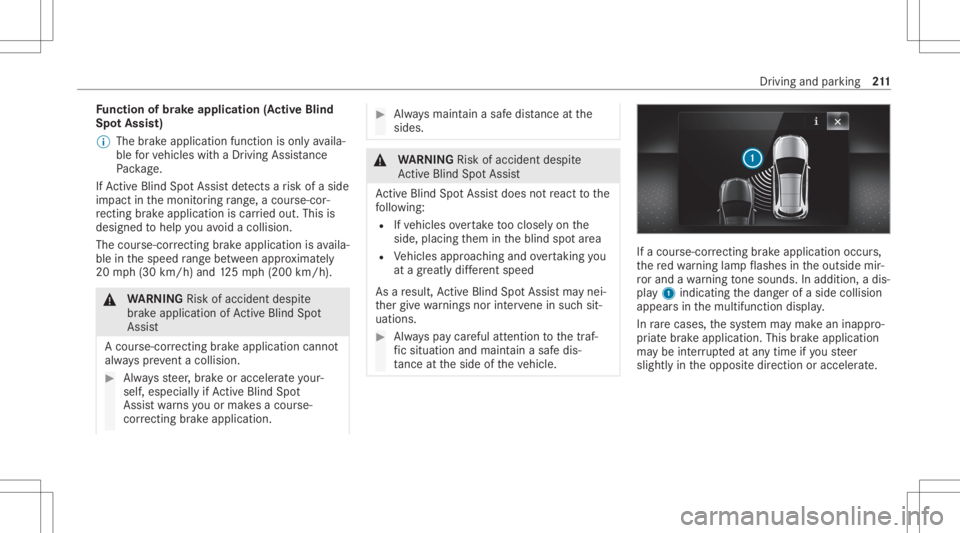
acour se-cor recting brak eap plica tion occu rs,
th ere dwa rning lam pflashes intheoutside mir‐
ro rand awa rning tone sou nds. Inadditio n,adi s‐
pl ay 1 indic atingth edang erofaside collision
appear sin themultifunc tiondispla y.
In rare case s,thesy stem maymak ean inappr o‐
pr iat ebr ak eapplication. Thisbrak eapplication
ma ybe interru pte dat anytime ifyo usteer
slightl yin theopposit edir ect ion oraccelera te. Dr
iving and parking 21
1
Page 221 of 570
R
Spor t
R Progressive
R Unde rstated
R Stand ardDisp lays Sho
wing displa yco nten ton the inst ru men t
cl us ter
Ve hicl eswith anIns trument Displayin the
Wi des cree nCo ckpit :ad ditiona ldi spl aycont ent
can besho wnontheins trument cluster.
% The displa ycont entontheins trument clus‐
te rada ptsto there spectiv eto pic select ion
in themultimedia system. #
Toselect displaycont ent:swipe tothe
ri ght orlefton thelef t-hand Touc hCon trol. #
Swip eupw ards ordown wardson thelef t-
hand Touc hCon trol to select there qu ired
displa ycon tent.
Whe nth edispla ycon tent issel ect ed,it wi ll
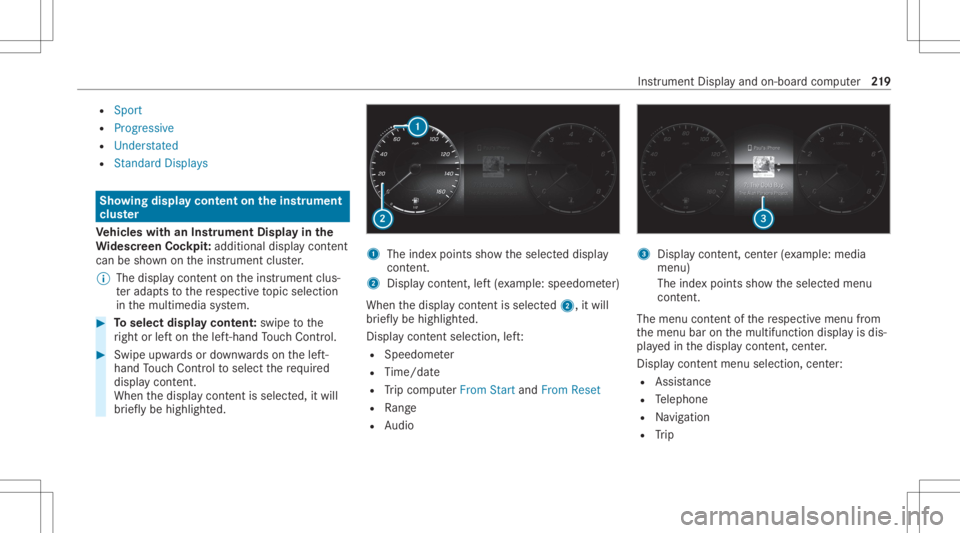
br iefly be high lighted. 1
The inde xpoint ssho wtheselect eddispla y
con tent.
2 Disp lay cont ent, left (exa mp le:speedom eter)
When thedispla ycon tent issel ect ed2, itwi ll
br iefly be high lighted.
Displa ycon tent sel ecti on, left:
R Spee dometer
R Time/dat e
R Trip com puterFro mStart and FromReset
R Range
R Audio 3
Displa ycon tent, cent er(exa mp le:media
men u)
The inde xpoint ssho wtheselect edmenu
con tent.
The menu contentofthere spectiv emenu from
th emenu baronthemultifunc tiondispla yis dis‐
pla yedin thedispla ycon tent, cent er.
Disp lay cont entmenu selecti on, cent er:
R Assi stanc e
R Telephon e
R Navig ation
R Trip Ins
trumen tDisp lay and on-boar dcom puter 21
9
Page 223 of 570
00CE
Ad
aptiveHig hbeam Assis t(/ page11 6)
Ve hicl eswith Traf fic Sign Assis t:De tected
ins tructi ons and traf fic sig ns (/ page 207). Ad
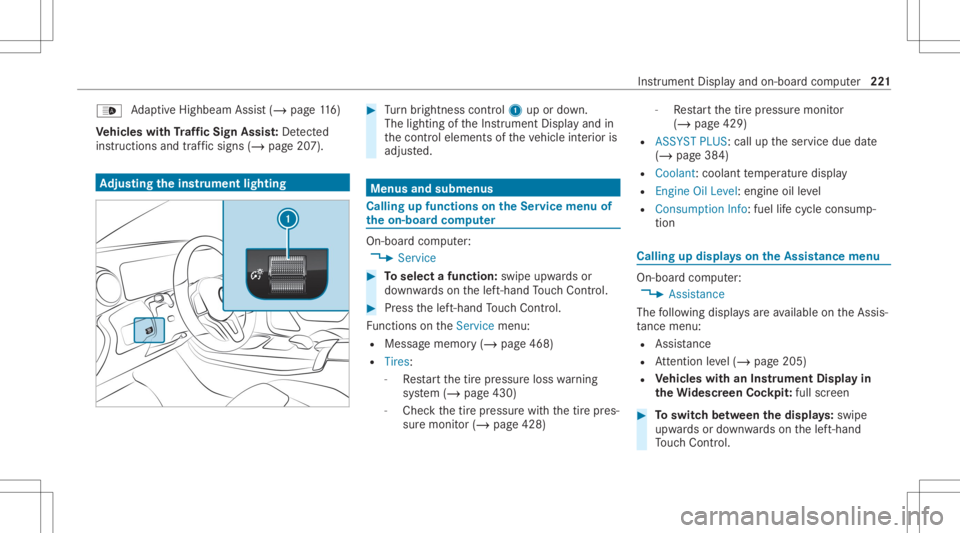
jus tingthe inst ru men tlighti ng #
Turn brightn esscontrol 1 upordown.
The lightin gof theIns trument Displayand in
th econ trol element sof theve hicle interior is
adjus ted. Menus
andsubmenu s Calling
upfunctions ontheSer vice menu of
th eon-boa rdcom puter On-boar
dcom puter:
4 Service #
Toselect afunction: swipeupwards or
do wn wardson thelef t-hand Touc hCon trol. #
Press thelef t-hand Touc hCon trol.
Fu nctio nson theServ icemenu:
R Messag ememor y(/ page468)
R Tires :
- Restar tth etir epr essur eloss warning
sy stem (/ page430)
- Chec kth etir epr essur ewit hth etir epr es‐
sur emonit or(/ page428) -
Restar tth etir epr essur emonit or
(/ page429)
R ASSYST PLUS: calluptheser vice duedate
(/ page38 4)
R Coolant: coolanttemp eratur edispla y
R Engine OilLevel: engine oilleve l
R Con sump tionInfo: fuel life cy cle consum p‐
tio n Calli
ngup displa yson theAssis tance menu On
-bo ardcom puter:
4 Assist anc e
The follo wing displa ysareav ailable ontheAssis‐
ta nce menu :
R Assi stanc e
R Attentio nleve l(/ page205)
R Vehicl eswith anIns trument Displayin
th eWi des cree nCo ckpit :ful lscr een #
Toswitc hbe tw een thedisp lays :sw ipe
up wa rdsor down wardson thelef t-hand
To uc hCon trol. In
stru ment Displa yand on-boar dcom puter 22
1
Page 230 of 570
Tr
af fic Sign Assist
Assi stant displa y
5 Toselect these ttings
6 Inde xpoint s
Displa yar eas 2to4 that areno tre qu ired can
be hidden .
% Inaudio mode, thest atio nnam e,trac kor
las tcalls willbesho wntemp orarily when the
audio sourceisbein gact ivel yoperat ed. #
Toselect adispla y:swipe upwards ordown‐
wa rdson thelef t-hand Touc hCon trol. Hea
d-up Disp lay Fu
nction oftheHead -upDispla y The
Head- upDis playpr oje ctsinf ormat ionabove
th ecoc kpit intoth edr iver's field ofvision, e.g.
th espeed oftheve hicle, information from the
na vig ation system ordriver assis tance systems
and some warning mess ages.
Depe ndingon theve hicle's equipment, differe nt
cont entcan besho wnintheth re edispla yar eas
of theHead-up Display(/ page22 7). Displa
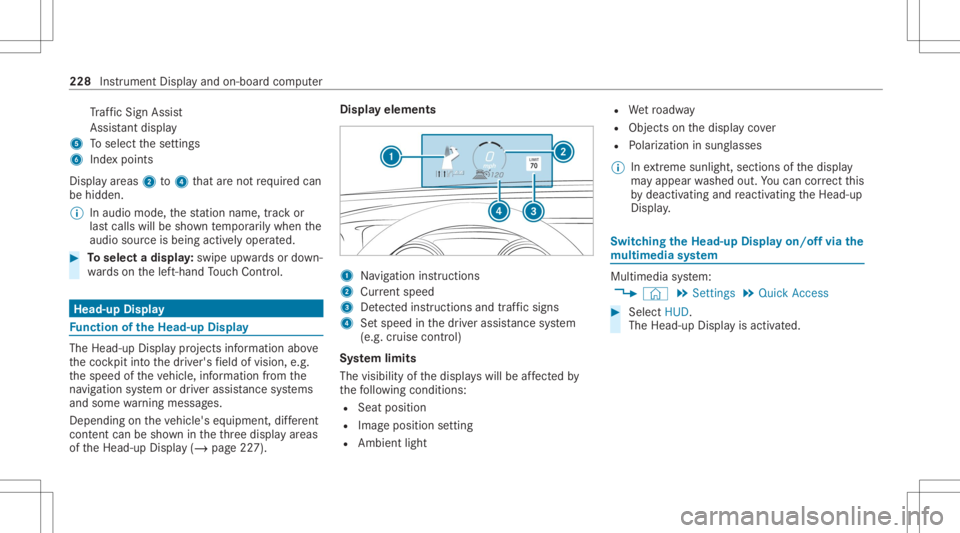
yelements 1
Navig ation instructions
2 Current speed
3 Detected instructi ons and traf fic sig ns
4 Setspe edinthedr iver assis tance system
(e.g. cruise control)
Sy stem limit s
The visib ilityofthedispla yswill beaffect ed by
th efo llo wing condition s:
R Seat position
R Imag eposit ionsetting
R Ambient light R
Wetro adw ay
R Objects onthedispla yco ver
R Polar izat ion insung lasses
% Inextreme sunli ght, sectio nsofthedispla y
ma yappear washed out.Youcan correct this
by deactiv atingandreact ivatin gth eHead-up
Displa y. Switc
hingtheHead -upDispla yon/of fvia the
mu ltim edia system Multi
media system:
4 © 5
Set ting s5
Quick Access #
Select HUD.
The Head-up Displayis activ ated. 228
Instrument Displayand on-boar dcom puter
Page 246 of 570
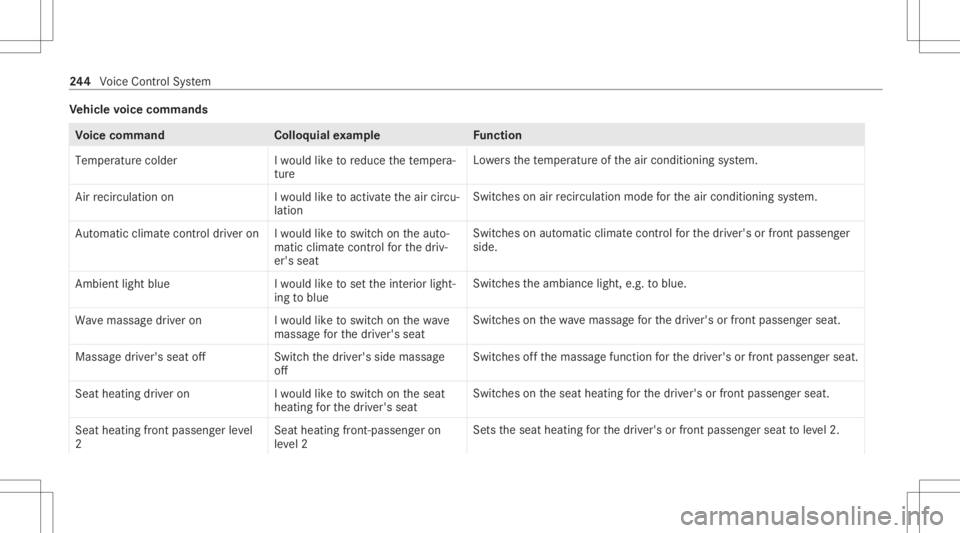
Ve
hicl evo ice comm ands Vo
ice comm and Colloquialexam ple Function
Temperature colder Iwould liketoreduce thetemper a-
ture Lo
we rsthete mp eratur eof theair con ditionin gsy stem.
Air recirc ulation on Iwould liketoactivat ethe aircirc u-
lation Switc
hesonair recir cul ation mod efo rth eair con ditionin gsy stem.
Autom aticclimate control driver onIwould liketoswitch onthe auto-
matic climate control forthe driv-
er's seat Switc
hesonaut omatic climatecon trol forth edr iver's orfront passeng er
side.
Ambien tlight blue Iwould liketoset the inter iorlight-
ing toblue Switc
hestheambiance light,e.g.toblue.
Wave massage driveron Iwould liketoswitch onthe wave
massage forthe driver' sseat Switc
hesonthewav emassag efo rth edr iver's orfront passeng erseat.
Massage driver'sseatoff Switchthe driver's sidemassage
off Switc
hesoffth emassag efunc tion forth edr iver's orfront passeng erseat.
Seat heating driveron Iwould liketoswitch onthe seat
heating forthe driver's seat Switc
hesontheseat heating forth edr iver's orfront passeng erseat.
Seat heating frontpassenger level
2 Seat
heating front-passenger on
level 2 Se
tstheseat heating forth edr iver's orfront passeng erseat toleve l2. 24
4
Voice Cont rolSy stem
Page 247 of 570
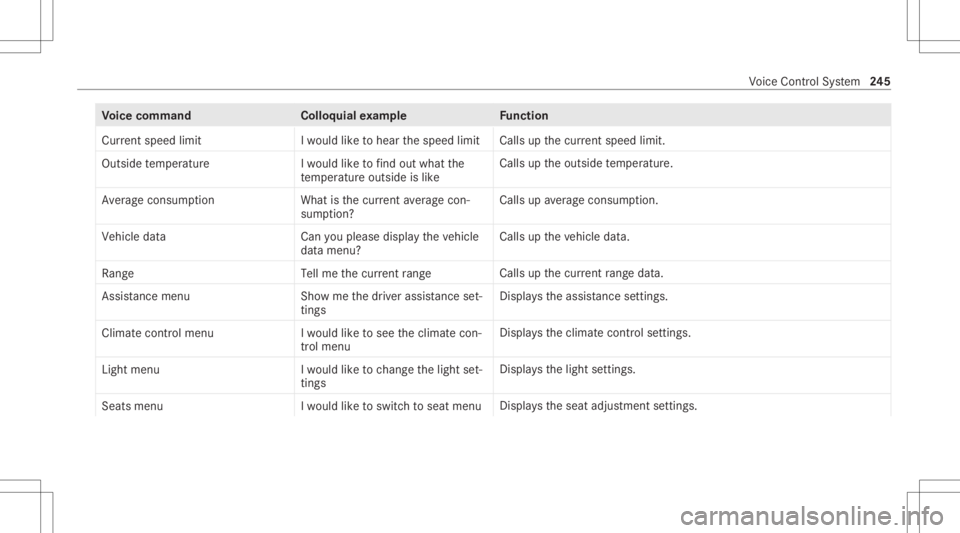
Vo
ice comm and Colloquialexam ple Function
Current speedlimit Iwould liketohear thespeed limit Calls
upthecur rent spe edlimit.
Ou tsid etemp erature Iwo uld like tofind outwh atthe
temp erature outsid eis like Ca
lls up theoutside temp eratur e.
Aver ageconsumption Whatisthe curren taverage con-
sumption ? Calls
upave rage consu mption.
Veh icleda ta Canyo uplea se disp laythe vehicle
da ta menu ? Ca
lls up theve hicle data.
Range Tellmethe current range Call
sup thecur rent rang eda ta.
Assi stance menu Showmethe driver assista nce set-
ting s Dis
play sth eassis tance settings .
Cl ima tecontro lmenu Iwo uld like tosee theclima tecon-
trol menu Disp
lays theclimat econ trol settings.
Light menu Iwould liketochange thelight set-
ting s Displa
ysthelight settings.
Seats menu Iwould liketoswitch toseat menu Displa
ystheseat adjus tmentse ttings. Vo
ice Cont rolSy stem 24
5
Page 257 of 570
&
WARNIN GRisk ofdist ra ction from infor‐
mati onsystems andcomm unication s
eq uipment
If yo uoper ateinf ormat ionand comm unic a‐
tio neq uipme ntintegratedin theve hicle
when driving, youwill bedistract ed from the
tr af fic situ ation. Thiscou ldalso cau seyouto
lose control of theve hicle. #
Onlyoper ateth is eq uipmen twhen the
tr af fic situ ation per mits. #
Ifyo ucan notbe sur eof this, stop the
ve hicle whilstpa ying attention toroad
and traffic condi tions andoperate the
eq uipment withth eve hicle statio nary. Yo
umus tobse rveth eleg alrequ iremen tsforth e
cou ntryin whi chyouar ecur rentl ydr ivi ng when
op erati ng themultimedia system. Ov
ervie wof theMB UX Interior Assis tant
If th eve hicle iseq uipped withth eMBUX Interior
Assis tant, select edfunc tions ofthemultimedia
sy stem can beoper ated con tact-fr ee.Inaddi‐
tion, there adin glight orsear chlight canbe
switc hedonoroffcon tact-fr ee.
The MBUX Interior Assi stant can differe ntia te
be tween driver and front passeng erinteraction s.
The MBUX Interior Assis tant recogni zescertain
hand positions(poses) . MBU
Xmultim ediasystem 255
Page 258 of 570
The
MBUX Inte rior Assis tantsupportsthefo llo wing interactions: Int
eraction area Interaction Description
In front ofthemedia display/abo vetheto uc h‐
pad Pr
ox imit yto thecon trol element TheMBUX Interior Assis tant recogni zestheappr oachof the
hand towa rdsa cont rolelemen t.
Depe ndingon theactiv eapplication, thedispla ywill be
adjus tedin themedia display.Some functionsdiffer ent iate
be tween driver and front passeng er.
No specif ichand position isrequ ired.
Abo vethecent ercon sole Defined poses With def ined poses afunc tion istrigg ered dependin gon the
applic ationact ive.
Belo wtheinside rear vie wmir rorB rief up and down movements With brief vertical upand down movements belowtheinside
re ar vie wmir rorth ere adin glight forth edr iver or thefront
passeng erisswitc hedonand off.
Fr ont passeng erseat Stretching outth ehand abovethe
fr ont passeng ersea t By
stre tching outth ehand abovethefront passeng erseat
th esear chlight isswitc hedon.Ifth ehand iswit hdr awnfrom
th is area, thesear chlight isswitc hedoffag ain. Oper
ating funct ionsbyprox imit yof thehan d
to theto uc hscr eenand touc hpad
Re quirement s: R
One ofthefo llo wing applicat ionsappear sin
th emedia display: -
Seat settings withdispla ysforth edr iver
and front passeng erseat, e.g.Seat Com-
fort
- Home screen 256
MBUX multimedia system