ECO mode MERCEDES-BENZ CLA 2021 User Guide
[x] Cancel search | Manufacturer: MERCEDES-BENZ, Model Year: 2021, Model line: CLA, Model: MERCEDES-BENZ CLA 2021Pages: 430, PDF Size: 5.88 MB
Page 145 of 430
#
Ifge arshif tre comme ndation 1appea rs
ne xt to thetra nsmiss ionposition display,
shif tto there comme ndedgear. Using
kickdow n #
Maximum acceleration: depress theaccel‐
er ator pedal beyond thepr essur epoint .
To protect agains tengine overrev ,th eaut omatic
tra nsmiss ionshiftsup tothene xt gear when
max imum enginespee dhas been reac hed. Glid
emod efu ncti on *
NO
TEMercede s-AMG vehicles #
Obser vetheno tesin theSupplement .
Yo uco uld other wise failto recogni ze
da ngers. Wi
th an ant icip ator ydr ivin gst yle, glide mode
helps youto reduce fuelconsum ption. Glide
mode isch aract erize dby thefo llo wing:
R The com bustion engin eis disco nnect edfrom
th edr ivet ra in and continues torunin neu tral .
R The trans mis sion positio ndispl ay005B is
sho wningreen.
Glide mode isact ivat ed ifth efo llo wing condi‐
tion sar eme t:
R Drive pr og ram ; issele cted.
R The speed iswit hin asui table rang e.
R The road's courseissuit able, e.g.no steep
uphill ordownhill inclinesortight curves.
R youdo notdepr esstheaccelera toror brak e
peda l(e xc ep tfo rlig ht brak eapp lications).
% Glide mode canalsobe activ ated ifyo uha ve
select edthe"Eco" setting forth edr ive in the
dr ive pr og ram =.
Gli de mode isdea ctivated again ifone ofthe
condi tions isno long erme t.
Ve hicl eswith Activ eDi stance Assist
DI ST RO NIC :wh en ActiveDis tance Assist
DIS TRONI Cis acti ve,th eglide mode function is
no tav ailable. Glide
mode canalso bepreve nted bythefo llo w‐
ing parame ters:
R Incline
R Downhill gradi ent
R Temp eratur e
R Height
R Speed
R Oper ating status oftheengine
R Traf fic situ ation
% Glide mod ecan beende dby pressing a
st eer ing wheel gearshif tpaddle
(/ page14 2). Fu
nction ofthe4MA TIC
4MA TICensures that all four wheel sar edr iven .
To get her withESP ®
and 4ETS,4MA TICimprove s
th etraction ofyour vehicle whene vera dr iven
whee lspins duetoinsuf ficie nttracti on.
If yo ufa ilto adap tyo ur drivin gst yle, 4MA TICcan
neit her reduce therisk ofan accident norover‐
ri de thelaws ofphysics. 4MA TICcannotta ke Dr
iving and parking 14
3
Page 159 of 430
ET
S/4ET S(Electr onicTractio nSy stem)
ET S/ 4ETS tracti oncontr olispa rtof ESP ®
and
mak esitpossible topull away and accelerat eon
a slippe ryroad.
ET S/ 4ETS can improve theve hicle's traction by
int erve ning inthefo llo wing ways:
R The drive wheels arebr ak ed individually if
th ey spin.
R Mor edr ive to rq ue istrans ferred tothewheel
or wheels withtra ction.
Inf luence ofdrive pr og rams onESP®
The drive pr og rams enabl eESP ®
to adap tto dif‐
fe re nt we ather and road con dition sas wellas
th edr iver's prefer reddr iving style. Depen dingon
th eselect eddrive pr ogr am, theappr opriate
ES P®
mode willbeactiv ated. Youcan selectthe
dr ive pr og rams using theDY NA MIC SELE CT
switc h(/ page13 7). Fu
nction ofESP ®
Cr osswind Assist ES
P®
Cr osswind Assistde tects sudde ngu stsof
side wind andhelps thedr iver tokeep theve hi‐
cle inthelane:
R ESP®
Cr osswind Assistis activ eat vehicle
speeds between appr ox.47 mp h(7 5 km/h)
and 125mp h(200 km/h) whendriving
st ra ight ahead orcor ner ing slight ly.
R The vehicle isstabiliz edbymeans ofindivi d‐
ua lbr ak eapp lication onone side. Ac
tiv atin g/deac tivatin gES P®
(E lectr onicSta‐
bil ity Prog ram) Mu
ltimed iasystem:
4 © 5
Set ting s5
Quick Access
% ESP®
can onlybe activ ated/deact ivat ed
using quick acc ess when atleas tone other
funct ionisavailable inqu ick acc ess. ESP®
can other wise befound intheAssist ance
menu. *
NO
TEMer cedes-AMG vehicles #
Obser vetheno tesin theSupplement .
Yo uco uld other wise failto recogni ze
da ngers. #
Sele ctESP . #
Sele ctOn or00BB Off.
ESP ®
is dea ctivated ifth e00BB ESP®
OFF warn‐
ing lam plight sup con tinuousl yin theins trument
clus ter.
Obser vetheinf ormation onwarning lam psand
displa ymess ages whic hma ybe sho wninthe
ins trumen tclus ter. Fu
nction ofEBD Elect
ronic Brea kfor ce Dis trib uti on (EBD) isch ar‐
act erize dby thefo llo wing:
R Mon itor ing and regulating thebr ak epr essur e
on there ar wheels .
R Improve ddr iving stabilit ywhen brakin g,
espe ciallyon ben ds. Dr
ivin gand parking 15
7
Page 167 of 430
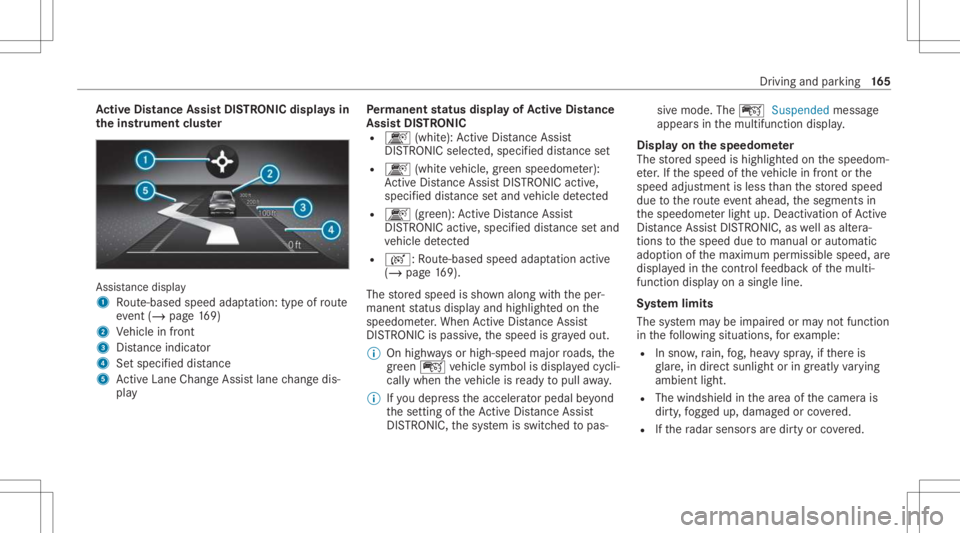
Ac
tiv eDi stance AssistDI ST RO NIC displa ysin
th eins trum ent clus ter Assi
stanc edispla y
1 Route-based speedadap tatio n:typ eof route
eve nt(/ page 169)
2 Vehicle infront
3 Distance indicator
4 Setspe cified dist anc e
5 ActiveLa ne Chang eAssi stlane chang edis‐
pla y Pe
rm anen tst atus displa yof Activ eDi stance
Ass istDI ST RO NIC
R k (white ):Ac tiveDis tance Assist
DIS TRONI Csel ect ed,sp eci fied distance set
R k (white vehicle, green speedome ter):
Ac tiveDis tance AssistDIS TRONI Cacti ve,
specif ieddistance setand vehicle detected
R k (green) :Ac tiveDis tance Assist
DIS TRONI Cacti ve,specif ieddistance setand
ve hicle detected
R r: Route-based speedadap tatio nacti ve
( / pag e16 9).
Th estor ed speed issho wnalong withth eper‐
manen tst atus displa yand highlight edon the
speedome ter.When ActiveDis tance Assist
DIS TRONI Cis pa ssi ve,th espeed isgray ed out.
% Onhighw aysor high-speed major roads, the
gr een ç vehicle symbol isdispla yedcy cli‐
cally when theve hicle isready topull away.
% Ifyo udepr esstheacceler ator pedal beyond
th ese tting oftheAc tiveDis tance Assist
DIS TRONI C,thesy stem isswitc hedtopas‐ siv
emode. Theç Suspen dedmessag e
appear sin themultifunc tiondispla y.
Disp layon thespeed ometer
The stor ed speed ishighlight edon thespeedom‐
et er.If th espeed oftheve hicle infront orthe
speed adjustment isless than thestor ed speed
due tothero uteeve ntahead, thesegmen tsin
th espeedome terlig ht up. Deactiv ationofActive
Dis tance AssistDIS TRONI C,as wellas altera‐
tion sto thespeed duetomanua lor automatic
adop tionofthemaximum permissible speed,are
displa yedin thecon trol feedbac kof themulti‐
func tion displa yon asing leline.
Sy stem limit s
The system maybe impair edorma yno tfunc tion
in thefo llo wing situat ions,fo rex am ple:
R Insnow ,ra in, fog, hea vyspr ay,if th er eis
gl ar e, indir ect sunlight oringrea tly varying
ambien tlight .
R The windsh ieldinthear ea ofthecamer ais
dir ty,fo gg ed up, damag edorcovered.
R Ifth era dar sensor sar edir tyor covered. Dr
iving andparking16
5
Page 170 of 430
&
WARNIN GRisk ofan acci dent dueto
Ac tiveDis tan ceAssi stDIS TRONI Cbe ing
acti vewhen youlea vethedr iver's seat
If yo ulea vethedr iver's seat while theve hicle
is being brak ed byActiveDis tan ceAssi st
DIS TRONI Conly ,th eve hicle canrollaw ay. #
Alw aysdeactiv ateAc tiveDis tance
Assi stDIS TRONI Cand secureth eve hi‐
cle topreve ntitfrom rolling away
bef oreyo ulea vethedr iver's seat. #
Select Owithth elef tro ck er switc h.
% Ifyo ubr ak e, deac tivateES P®
or ifES P®
int erve nes, ActiveDis tance Assist
DIS TRONI Cis de acti vated.
Incr easing ordecr easing thespeed #
1mp h(1 km/h) :pr ess rock er switc h1 up
M ordown N tothepr essur epoint .
or #
5mp h(1 0 km/h) :pr ess rock er switc h1 up
M ordown N beyond thepr essur e
point . or #
Accel erateth eve hicle tothedesir edspeed
and press rock er switc h1 upM.
Changing thespecif ieddistance totheve hi‐
cle infront #
Toreduce thespecified distance: press
th eright rock er switc hup (Ñ). #
Toincr ease thespecif ieddistance: press
th eright rock er switc hdo wn (Ò).
Fu nction ofActiv eSpe edLimit Assist
If speed limitch ang ebe tween 12mp h
(20 km/ h)and 80mph(1 30 km/h) isde tected
and theaut omatic adoptionofspeed limitsis
activ e,itwill beaut omaticall yadop tedas the
st or ed speed (/page18 1).
Th edr iven spee dis adj ustedwhen theve hicle is
le ve lwit hth etraf fic sig nat thelat est.In the
case ofsig ns indi cati ngentr yint oan urb anarea ,
th espeed isadap tedaccor dingtothespeed
per mitt edwithin theurban area. The speed limit
displa yin theIns trument Displayis alw aysupda ‐
te dwhen theve hicle isleve lwit hth etra ffic sign .If
th er eis no speed restriction onanunlimited
st re tchof road (e.g.on afree wa y), there com‐
mend edspe edisau tomatical lyadop tedas the
st or ed speed. Thesystem uses thespeed stor ed
on anunlimit edstre tchof road asthere com‐
mend edspe ed. Ifyo udo notalt er thestor ed
speed onanunlimit edstre tchof road, there c‐
omme ndedspeedis80 mph(1 30 km/h) .
If Ac tiveDis tance AssistDIS TRONI Cha sbe en
pu tint opa ssi ve mode bypressing theaccelera ‐
to rpeda l,onl yspee dlimi tswhi charehigh er
th an these tspeed areadop ted.
Obser vetheno teson driving systems andyour
re sponsibili ty;yo uma yot her wise failto recog‐
nize dangers(/ page 153).
Sy stem limit s
The system limits ofTraf fic Sign Assistappl yto
th ede tection oftraf fic sig ns (/ page 180).
Spee dlimits below 12mp h(2 0km/h) areno t
au tomatical lyadop tedby thesy stem asthe
st or ed speed. Temp orar yspeed restrictions (e.g.
fo ra cer tain tim eor due towe ather condition s)
can notbe proper lyde tected bythesy stem. The 16
8
Driving and parking
Page 172 of 430
is
responsible forcom plying withro ad traf fic
re gulations anddriving atasuit able speed.
The speed adaptatio nma de bythesy stem may
no talw aysbe suit able, particular lyin thefo llo w‐
ing situat ions:
R The road's coursenotcle arly visib le
R Road nar rowing
R Varying maxim umpermissib lespeeds inindi‐
vidual lanes
R Wetro ad sur faces, snowor ice
In these situation sth edr iver mus tint erve ne
acco rding ly. &
WARNIN GRisk ofacci dent inspi teof
ro ute-based speedadap tatio n
Ro ute-based speedadap tatio ncan malfunc‐
tio nor be temp orarily una vailable inthefo l‐
lo wing situat ions:
R Ifth edr iver does notfo llo wthecalcula‐
te dro ute
R Ifmap datais no tup-t o-dat eor available R
Intheeve ntofroadw orks
R Inbad weather orroad con dition s
R Ifth eacceler ator pedal isdepr essed
R Intheeve ntofelectr onicallydispl ayed
speed limitations #
Adaptth espeed tothetraf fic situ ation. Se
tting rout e-base dspee dadap tation
Re quirement s:
R ActiveDis tance AssistDIS TRONI Cis acti va‐
te d.
R ECOAssis tis activ e.
Multimedia system:
4 © 5
Set ting s5
Assist ance
5 Route-based Speed #
Activateor deacti vate thefunc tion.
When thefunc tion isactiv e,theve hicle
speed isadjus teddependin gon thero ute
eve nts ahead.
% Further information onthero ute-based
spee dadap tatio n(/ page 169). Ac
tiv eSte ering Assis t Fu
nction ofActiv eSte ering Assis t
Ac tiveSt eer ing Assis tis onl yav ailable uptoa
speed of130mp h(210 km/h) .The system helps
yo uto stay inthecent erofthelane bymeans of
moder atesteer ing interve ntio ns.Dep endingon
th espeed driven, ActiveSt eer ing Assis tuses the
ve hicles ahead andlane markings asare fer‐
ence.
% Dependi ngon thecount ry,in thelowe r
speed rang eAc tiveSt eer ing Assis tcan use
th esur round ingtraf fic as are fere nce. Ifnec‐
ess ary, Ac tiveSt eer ing Assis tcan then also
pr ov ide assis tance when drivi ng away from
th ecent erofthelane, forex am ple, toform a
re scue lane.
If th ede tection oflane mar kings andvehicles
ahead isim pair ed,ActiveSt eer ing Assis t
switc hestopassiv emode. Thesystem prov ides
no suppor tin this case.
St atus displa yof Activ eSte ering Assis tin
th emu ltifunct iondisp lay
R Ø (gra y): act ivat ed and pass ive
R Ø (gre en): activ ated and activ e 17
0
Driving and parking
Page 173 of 430
R
Ø (red): system limits detected
R Ø (whit e,redhands): "handsonthesteer‐
ing wheel" prom pt
% During thetransition from activ eto passiv e
st atus ,th eØ symbol issho wnas
enlar gedand flashin g.On ce thesy stem is
passiv e,theØ symbol issho wnasgray in
th emultifunc tiondispla y.
% Dep endingontheselect edvehicle settin gs,
Ac tiveSt eer ing Assis tma ybe una vailable.
Ste ering and touc hde tection
The driver isrequ ired tokeep their hands onthe
st eer ing wheel atall times andbeable tointer‐
ve ne atanytime tocor rect thecour seofthe
ve hicle andkeep itin lane. Thedriver mus t
ex pect ach ang efrom active to passiv emode or
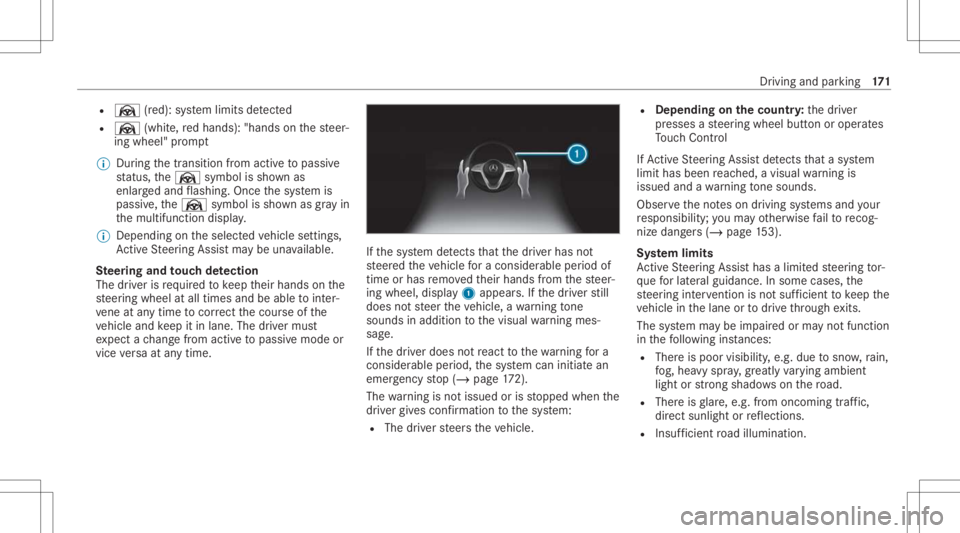
vice versaat anytim e. If
th esy stem detects that thedr iver has not
st eer edtheve hicle fora consider ableper iod of
time orhas remo vedth eir hands from thesteer‐
ing wheel, display1 appear s.Ifth edr iver still
does notst eer theve hicle, awa rning tone
sou nds inad ditio nto thevisual warning mes‐
sag e.
If th edr iver does notre act tothewa rning fora
consider ableper iod, thesy stem can initiat ean
emer gency stop (/ page17 2).
Th ewa rning isno tissued orisstopped whenthe
dr iver giv es con firm atio nto thesy stem:
R The driver steer sth eve hicle. R
Depending onthecount ry:th edr iver
pr esses ast eer ing wheel buttonoroper ates
To uc hCon trol
If Ac tiveSt eer ing Assis tde tects that asy stem
limit hasbeen reac hed, avisual warning is
issued andawa rning tone sou nds.
Obs erve theno teson driving systems andyour
re sponsibili ty;yo uma yot her wise failto recog‐
nize dangers(/ page 153).
Sy stem limit s
Ac tiveSt eer ing Assis thas alimit edsteer ing tor‐
qu efo rlat eral gui dance. Insome cases, the
st eer ing interve ntio nis no tsu fficien tto keep the
ve hicle inthelane ortodrive th ro ugh exits.
The system maybe impair edorma yno tfunc tion
in thefo llo wing instances:
R The reispoor visibilit y,e.g. due tosno w,rain,
fo g, hea vyspr ay,gr eatl yva rying ambien t
light orstro ng sha dows onthero ad.
R Ther eis glar e, e.g .fr om oncom ingtraf fic,
di re ct sunli ght orreflect ions.
R Insuf ficie ntroad illumin ation. Dr
ivin gand parking 17
1
Page 235 of 430
Te
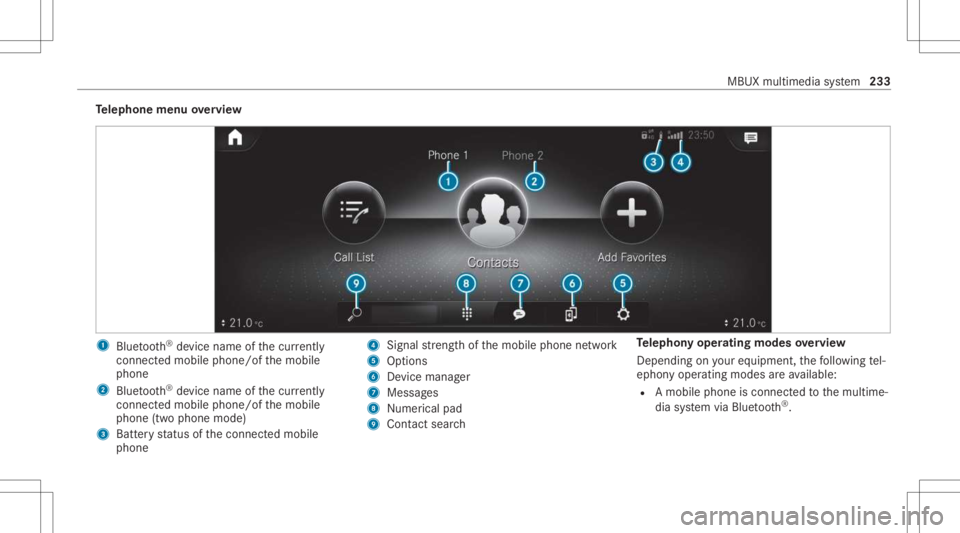
lephone menuoverview 1
Blue tooth®
de vice name ofthecur rently
conne cted mob ile pho ne/o fth emobile
phone
2 Blue tooth®
de vice name ofthecur rently
conne cted mob ile pho ne/o fth emobile
phone (twophone mode)
3 Batt eryst atus ofthecon nect edmobile
phone 4
Signal stre ngt hof themobile phonenetwork
5 Option s
6 Device manag er
7 Messag es
8 Nume rical pad
9 Contact search Te
lephon yoper ating mod esove rview
Depen dingonyour equipme nt,th efo llo wing tel‐
ephon yoper atingmodes areav ailable:
R Amobi lephon eis con nectedto themultime‐
dia system viaBlue tooth®
. MBUX
multimedia system 233
Page 236 of 430
R
Twomobile phones areconn ectedwithth e
multime diasystem viaBlue tooth®
(tw o
phone mode).
- Youcan useallthefunc tionsof themulti‐
media system withth emobile phonein
th efo re ground.
- Youcan recei veinc omin gcalls andmes‐
sag eswit hth emobile phoneinthebac k‐
gr ound.
Yo ucan interch ang eth emobile phonein
th efo re ground andbackground .
Connect ingamob ilephone
Re quirement s:
R Blue tooth®
is act ivat ed on themobile phone
(see themanuf acturer'soper ating instruc‐
tion s).
R Blue tooth®
is act ivat ed on themultimedia
sy stem. Multimedia
system:
4 © 5
Phone
Sear ching fora mob ile pho ne #
Select í. #
Select Connect NewDevice.
Co nnectin gamob ile pho ne
Au thor ization follo ws usin gsec uresim ple pair‐
ing . #
Select amob ilephon e.
A co de isdispl ayed inthemultimedia system
and onthemobile phone. #
Ifbo th code smatc h,conf irm thecode onthe
mobil ephone.
Fu nctions inthete lephon ymenu
In thete lephon ymen uyo uha ve thefo llo wing
func tions,forex am ple:
R Mak ingcalls ,e.g .:
- R Accep ta cal l
- k EndCall
- i Create Confer. Call -
Accep ting orrejecti ngawa itin gcall
R Managin gcon tacts, e.g.:
- Downl oading mob ile pho necont acts
- Managi ngthefo rm atofacon tact's name
- Saving acont actasafa vo rite
R Recei ving andsend ingmess ages, e.g.:
- Usingthere ad-al oudfunction
- Dictating ane wmes sage Mer
cede sme and apps Mer
cede sme connect Inf
ormation onMer cede sme connect
Mer cedes meconnect consistsof multi pleserv‐
ices.
Yo ucan usethefo llo wing service svia themulti‐
media system and theov erhead control panel,
fo rex am ple:
R Accid ent and Brea kdo wnManag eme nt(me
bu tton orsitu ation-de pendentdispl ayinthe
multime diasystem) 23
4
MBUX multimedia system
Page 243 of 430
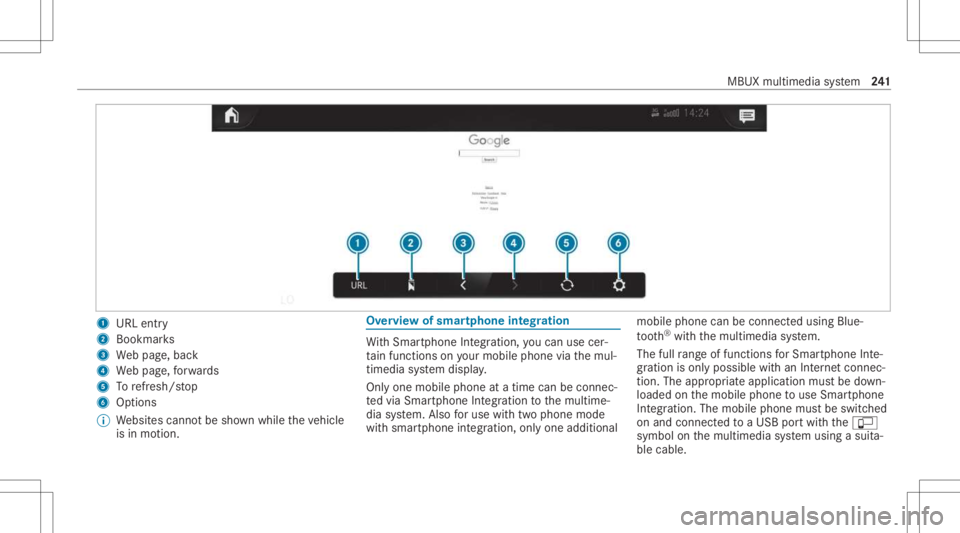
1
URL entry
2 Bookmar ks
3 Webpag e,bac k
4 Webpag e,forw ards
5 Torefresh/s top
6 Options
% Websit escann otbe sho wnwhile theve hicle
is in mo tion. Ov
ervie wof smar tphone integratio n Wi
th Smar tphoneIntegr ation, youcan usecer‐
ta in func tionson your mob ilephon evia themul‐
timedia system displa y.
Onl yone mobile phoneatatime canbeconnec ‐
te dvia Smar tphon eInt egratio nto themultime‐
dia system. Also foruse withtw ophone mode
wit hsmar tphone integr ation, onlyoneadditional mobil
ephone canbeconnect edusing Blue ‐
to oth®
wit hth emultimedia system.
The fullrang eof func tions forSmar tphone Inte‐
gr ation isonly possi blewithan Interne tconnec‐
tion. Theappropr iat eapplication mustbe down‐
loaded onthemobile phonetouse Smartphon e
In te gr ation. Themobile phonemustbe switc hed
on and conn ectedtoaUS Bpor twit hth eç
symbol onthemultimedia system using asuit a‐
ble cable. MBUX
multimedia system 24
1
Page 249 of 430
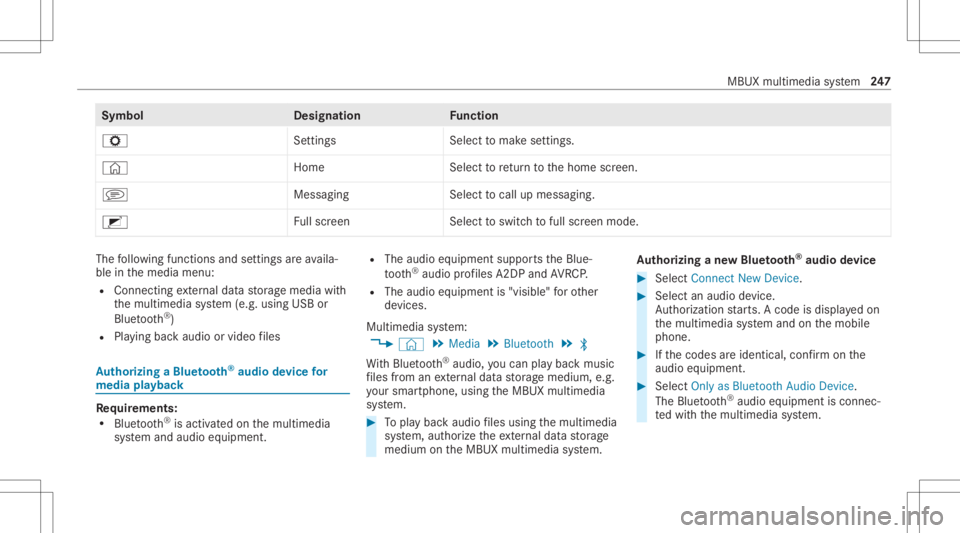
Symbol
Designation Function
Z Settings Selecttomak ese ttings.
© HomeSelecttoretur nto thehome screen.
j MessagingSelecttocal lup mess aging.
2 Fullscr een Selectto switc hto full screen mode. The
follo wing functionsand settings areav aila‐
ble inthemedia menu:
R Connec tingextern al dat ast or ag emedia with
th emultimedia system (e.g. using USBor
Blue tooth®
)
R Playing backaudio orvideo files Au
thorizing aBlu etoo th®
audio devic efo r
medi apla yba ck Re
quirement s:
R Blue tooth®
is act ivat ed on themultimedia
sy stem and audio equipment. R
The audio equipment supportstheBlue‐
to oth®
audio profiles A2DP and AVRC P.
R The audio equipment is"visible" forot her
de vices.
Multimedia system:
4 © 5
Media 5
Bluetoot h5
00A5
Wi th Blu etoo th®
audio, youcan playbac kmusi c
fi les from anextern al dat ast or ag emedium, e.g.
yo ur smar tphon e,usin gth eMBUX multimedia
sy stem. #
Topla ybac kaudio files using themultimedia
sy stem, author ize theex tern al dat ast or ag e
medium ontheMBUX multimedia system. Au
thorizing ane wBlu etoo th®
audio devic e #
Select Connect NewDevice . #
Select anaudio device.
Au thor ization star ts.A cod eis displa yedon
th emultimedia system and onthemobile
phone. #
Ifth ecodes areidentic al,con firm onthe
audio equipme nt. #
Select Onlyas Bluet oothAudi oDe vic e.
The Blue tooth®
audio equipme ntiscon nec‐
te dwit hth emultimedia system. MBUX
multimedia system 24
7