air condition MERCEDES-BENZ CLA-CLASS 2013 User Guide
[x] Cancel search | Manufacturer: MERCEDES-BENZ, Model Year: 2013, Model line: CLA-CLASS, Model: MERCEDES-BENZ CLA-CLASS 2013Pages: 352, PDF Size: 5.64 MB
Page 69 of 352
the braking force to a level suitable for the
traffic conditions.XKeep the brake pedal depressed until the
emergency braking situation is over.
ABS prevents the wheels from locking.
The brakes will work normally again if:
R you release the brake pedal
R there is no longer any danger of a collision
R no obstacle is detected in front of your
vehicle
Adaptive Brake Assist is then deactivated.
Vehicles with PRE-SAFE ®
: if adaptive Brake
Assist requires particularly high brake pres-
sure, preventive passenger protection meas-
ures (PRE-SAFE ®
) are deployed simultane-
ously.
Up to vehicle speeds of around 250 km/h,
adaptive Brake Assist is capable of reacting
to moving objects that have already been rec-
ognised as such at least once over the period
of observation. Adaptive Brake Assist does
not react to stationary obstacles.
If adaptive Brake Assist is not available due
to a malfunction in the radar sensor system,
the brake system remains available with full
brake boosting effect and BAS.
In particular, the detection of obstacles can
be impaired if there is:
R dirt on the sensors or the sensors are
obscured
R snow or heavy rain
R interference by other radar sources
R strong radar reflections, for example, in
multi-storey car parks
R a narrow vehicle travelling in front, e.g. a
motorcycle
R a vehicle travelling in front on a different
line
Following damage to the front end of the vehi-
cle, have the configuration and operation of
the radar sensor checked at a qualified spe-
cialist workshop. This also applies to colli-
sions at slow speeds where there is no visible
damage to the front of the vehicle.
COLLISION PREVENTION ASSIST PLUS
General notes
COLLISION PREVENTION ASSIST PLUS is
only available on vehicles with DISTRONIC.
COLLISION PREVENTION ASSIST PLUS
extends the functionality of COLLISION PRE-
VENTION ASSIST with an automatic braking
function. COLLISION PREVENTION ASSIST
PLUS can help you to minimise the risk of a
front-end collision with a vehicle ahead or
reduce the effects of such a collision. If COL-
LISION PREVENTION ASSIST PLUS detects
that there is a risk of a collision, you will be
warned visually and acoustically. In critical
situations COLLISION PREVENTION ASSIST
PLUS also initiates automatic braking.
Function
XTo activate/deactivate: activate or deac-
tivate COLLISION PREVENTION ASSIST
PLUS in the on-board computer
( Y page 218).
If COLLISION PREVENTION ASSIST PLUS is
deactivated, the æ symbol appears in the
assistance graphics display.
If the driver's seat belt is fastened, COLLI-
SION PREVENTION ASSIST PLUS can brake
automatically within a speed range of
between 7 km/h and 200 km/h.
COLLISION PREVENTION ASSIST PLUS can
also react to stationary obstacles with auto-
matic braking within a speed range of
between 7 km/h and 30 km/h.
Vehicles with PRE-SAFE ®
: if the automatic
braking function of COLLISION PREVENTION
ASSIST PLUS intervenes powerfully, preven-
tive passenger protection measures (PRE-
SAFE ®
) are deployed simultaneously.
In particular, the detection of obstacles can
be impaired in the case of:
R dirt on the sensors or the sensors are
obscured
R snow or heavy rain
R interference by other radar sources
Driving safety systems67SafetyZProCarManuals.com
Page 91 of 352
Problems with the side windowsGWARNING
If you close a side window again immediately
after it has been blocked or reset, the side
window closes with increased or maximum
force. The reversing function is then not
active. Parts of the body could be trapped in
the closing area in the process. This poses an
increased risk of injury or even fatal injury.
Make sure that no parts of the body are in the
closing area. To stop the closing process,
release the switch or push the switch again to
reopen the side window.
Problem: a side window cannot be closed
because it is blocked by objects, e.g.
leaves in the window guide.
XRemove the objects.XClose the side window.
Problem: a side window cannot be closed
and you cannot see the cause. If a side
window is obstructed during closing and
reopens again slightly:
XImmediately after the window blocks, pull
the corresponding switch again until the
side window has closed.
The side window is closed with increased
force.
If a side window is obstructed again during
closing and reopens again slightly:
XImmediately after the window blocks, pull
the corresponding switch again until the
side window has closed.
The side window is closed without the anti-
entrapment feature.
Panorama sliding sunroof
Important safety notes
In the following section, the term "sliding sun-
roof" refers to the panorama sliding sunroof.
GWARNING
While opening and closing the sliding sunroof,
body parts in close proximity could become
trapped. There is a risk of injury.
Make sure that no body parts are in close
proximity during the opening and closing pro-
cedures.
If somebody becomes trapped:
R release the switch immediately, or
R during automatic operation, push the
switch briefly in any direction
The opening or closing procedure will be stop-
ped.
GWARNING
If children operate the sliding sunroof they
could become trapped, particularly if they are
left unsupervised. There is a risk of injury.
When leaving the vehicle, always take the key
with you and lock the vehicle. Never leave
children unattended in the vehicle.
GWARNING
At high speeds the raised sliding sunroof auto-
matically lowers slightly at the rear. This could
trap you or other persons. There is a risk of
injury. Make sure that nobody reaches into
the sweep of the sliding sunroof whilst the
vehicle is in motion.
If somebody becomes trapped, reduce speed
immediately, paying attention to road and
traffic conditions. The sliding sunroof opens
again to its original position.
If the sliding sunroof is not completely raised,
you can then raise it further with the switch.
! Only open the panorama sliding sunroof
if it is free of snow and ice. Otherwise, mal-
functions may occur.
Do not allow anything to protrude from the
sliding sunroof. Otherwise, the seals could
be damaged.
i Resonance noises can occur in addition
to the usual airflow noises when the sliding
sunroof is open. They are caused by minor
Panorama sliding sunroof89Opening and closingZProCarManuals.com
Page 112 of 352
Hazard warning lamps
The hazard warning lamps switch on auto-
matically if:
R an airbag is deployed or
R the vehicle decelerates rapidly from a
speed of more than 70 km/h and comes to
a standstill
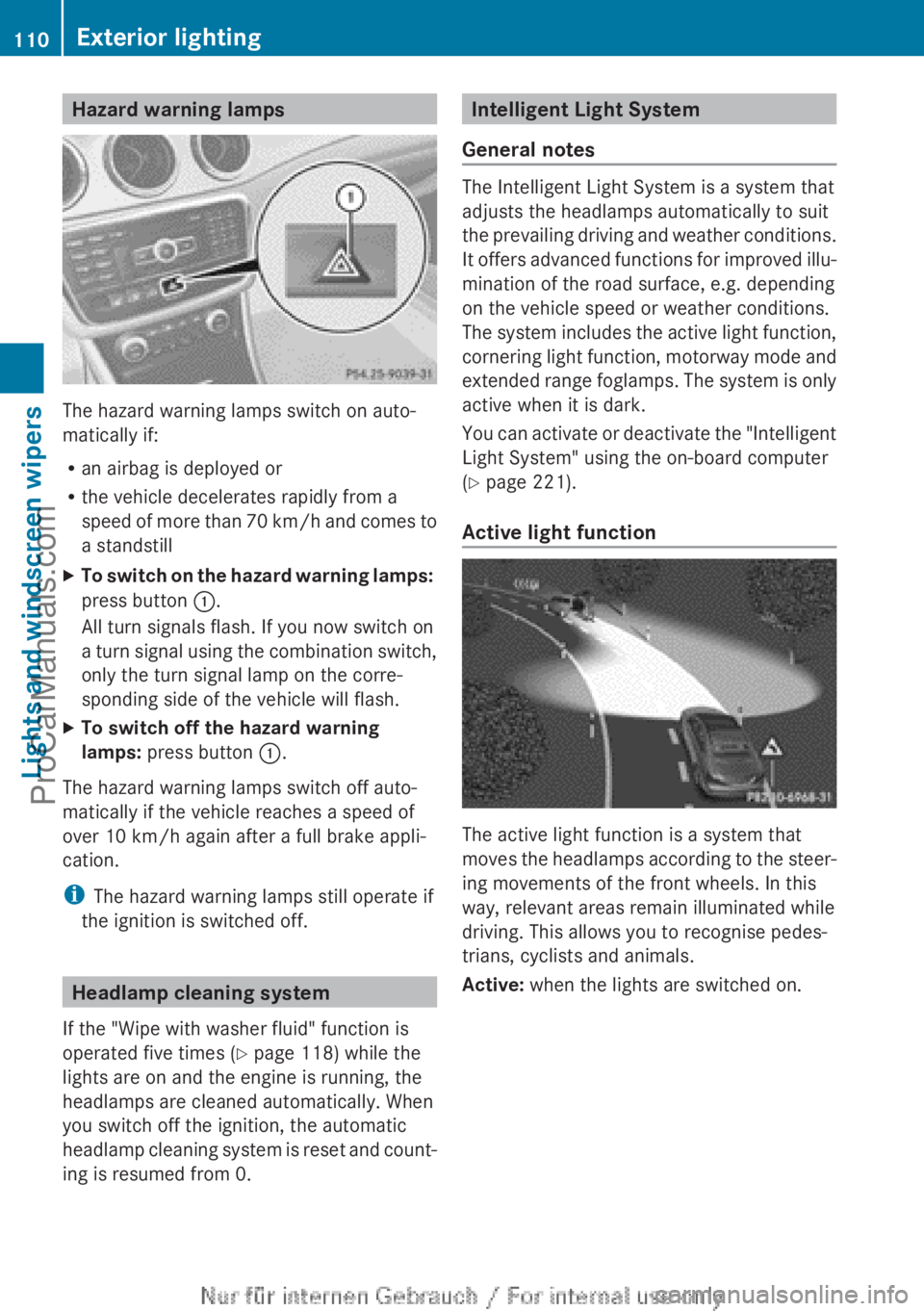
XTo switch on the hazard warning lamps:
press button :.
All turn signals flash. If you now switch on
a turn signal using the combination switch,
only the turn signal lamp on the corre-
sponding side of the vehicle will flash.XTo switch off the hazard warning
lamps: press button :.
The hazard warning lamps switch off auto-
matically if the vehicle reaches a speed of
over 10 km/h again after a full brake appli-
cation.
i The hazard warning lamps still operate if
the ignition is switched off.
Headlamp cleaning system
If the "Wipe with washer fluid" function is
operated five times ( Y page 118) while the
lights are on and the engine is running, the
headlamps are cleaned automatically. When
you switch off the ignition, the automatic
headlamp cleaning system is reset and count-
ing is resumed from 0.
Intelligent Light System
General notes
The Intelligent Light System is a system that
adjusts the headlamps automatically to suit
the prevailing driving and weather conditions.
It offers advanced functions for improved illu-
mination of the road surface, e.g. depending
on the vehicle speed or weather conditions.
The system includes the active light function,
cornering light function, motorway mode and
extended range foglamps. The system is only
active when it is dark.
You can activate or deactivate the "Intelligent
Light System" using the on-board computer
( Y page 221).
Active light function
The active light function is a system that
moves the headlamps according to the steer-
ing movements of the front wheels. In this
way, relevant areas remain illuminated while
driving. This allows you to recognise pedes-
trians, cyclists and animals.
Active: when the lights are switched on.
110Exterior lightingLights and windscreen wipers
ProCarManuals.com
Page 126 of 352
Useful information
i This Owner's Manual describes all mod-
els, series and optional equipment for your
vehicle that were available at the time of
going to press. National variations are pos-
sible. Note that your vehicle may not be
equipped with all of the functions descri-
bed. This is also the case for systems and
functions relevant to safety.
i Read the information on qualified special-
ist workshops: ( Y page 24).
Overview of climate control systems
Important safety notes
Observe the settings recommended on the
following pages. The windows could other-
wise mist up.
To prevent the windows from misting up:
R switch off climate control only briefly
R switch on air-recirculation mode only
briefly
R switch on the cooling with air dehumidifi-
cation function
R switch on the defrost windscreen function
briefly, if required
THERMATIC automatic climate control/
THERMOTRONIC automatic climate control
regulates the temperature and the humidity
of the vehicle interior and filters out undesir-
able substances from the air.
THERMATIC automatic climate control/
THERMOTRONIC automatic climate control is
only operational when the engine is running.
Optimum operation is only achieved with the
side windows and panorama sliding sunroof
closed.
The residual heat function can only be acti-
vated or deactivated with the ignition
switched off ( Y page 135).
i Ventilate the vehicle for a brief period
during warm weather, e.g. using the con-
venience opening feature (Y page 88). This
will speed up the cooling process and the
desired vehicle interior temperature will be
reached more quickly.
i The integrated filter filters out most par-
ticles of dust and soot and completely fil-
ters out pollen. With THERMOTRONIC auto-
matic climate control, gaseous pollutants
and odours will also be reduced. A clogged
filter reduces the amount of air supplied to
the vehicle interior. For this reason, you
should always observe the interval for
replacing the filter, which is specified in the
Service Booklet. As it depends on environ-
mental conditions, e.g. heavy air pollution,
the interval may be shorter than stated in
the Service Booklet.
i It is possible that the residual heat func-
tion may be activated automatically an hour
after the key has been removed in order to
dry the air-conditioning system. The vehicle
is then ventilated for 30 minutes.124Overview of climate control systemsClimate control
ProCarManuals.com
Page 127 of 352
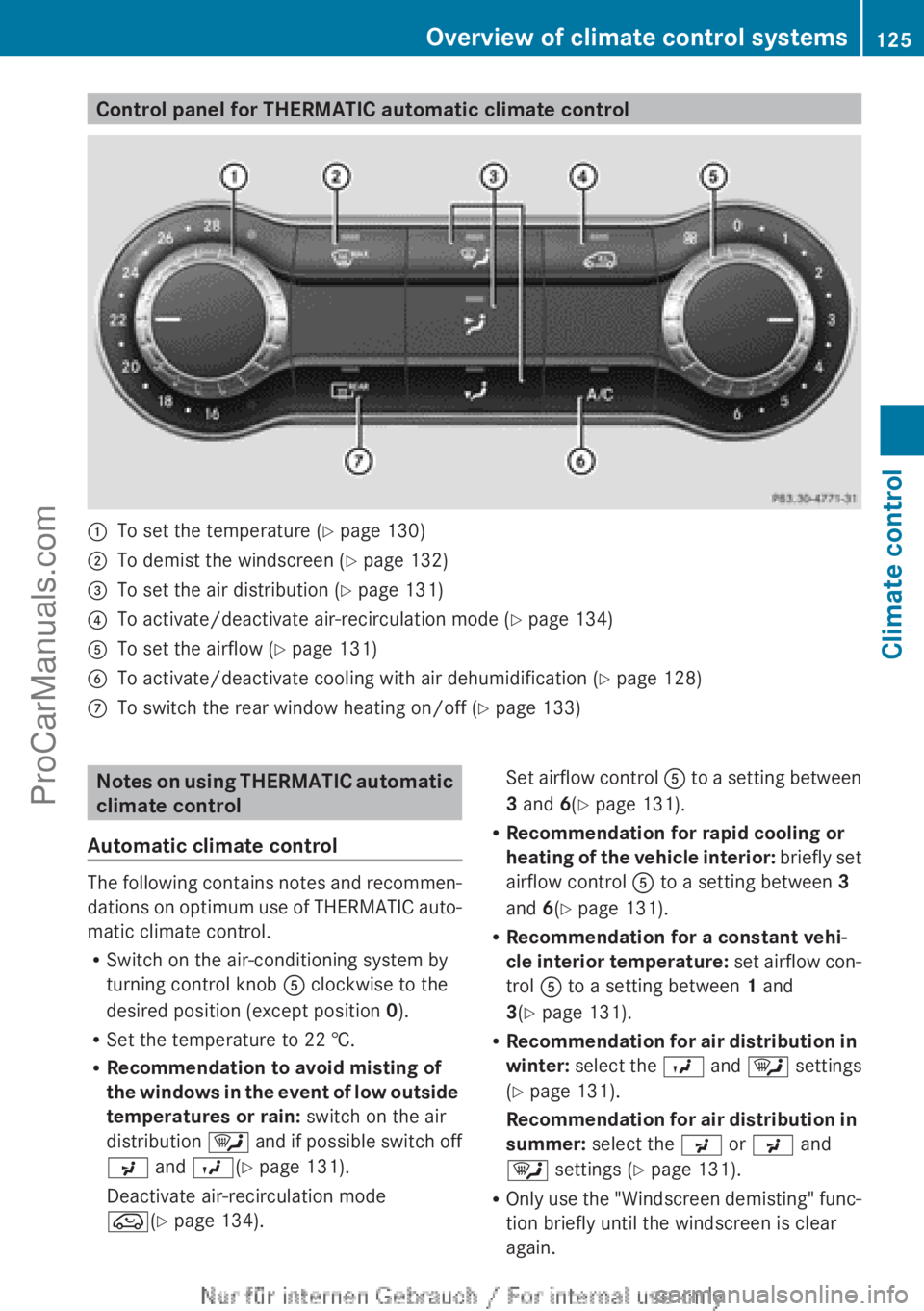
Control panel for THERMATIC automatic climate control:To set the temperature (Y page 130);To demist the windscreen ( Y page 132)=To set the air distribution ( Y page 131)?To activate/deactivate air-recirculation mode ( Y page 134)ATo set the airflow ( Y page 131)BTo activate/deactivate cooling with air dehumidification ( Y page 128)CTo switch the rear window heating on/off ( Y page 133)Notes on using THERMATIC automatic
climate control
Automatic climate control
The following contains notes and recommen-
dations on optimum use of THERMATIC auto-
matic climate control.
R Switch on the air-conditioning system by
turning control knob A clockwise to the
desired position (except position 0).
R Set the temperature to 22 †.
R Recommendation to avoid misting of
the windows in the event of low outside
temperatures or rain: switch on the air
distribution ¯ and if possible switch off
P and O (Y page 131).
Deactivate air-recirculation mode
e (Y page 134).
Set airflow control A to a setting between
3 and 6(Y page 131).
R Recommendation for rapid cooling or
heating of the vehicle interior: briefly set
airflow control A to a setting between 3
and 6(Y page 131).
R Recommendation for a constant vehi-
cle interior temperature: set airflow con-
trol A to a setting between 1 and
3 (Y page 131).
R Recommendation for air distribution in
winter: select the O and ¯ settings
( Y page 131).
Recommendation for air distribution in
summer: select the P or P and
¯ settings ( Y page 131).
R Only use the "Windscreen demisting" func-
tion briefly until the windscreen is clear
again.Overview of climate control systems125Climate controlProCarManuals.com
Page 138 of 352
Auxiliary heating
Important safety notesGDANGER
If the exhaust pipe is blocked or sufficient
ventilation is not possible, toxic exhaust
fumes can enter the vehicle, especially car-
bon monoxide. This is the case, e.g. in
enclosed spaces, or if the vehicle is stuck in
snow. There is a risk of fatal injuries.
You should switch off the auxiliary heating in
enclosed spaces which do not have an extrac-
tion system, e.g. a garage. If the vehicle is
stuck in snow and you must leave the auxiliary
heating running, keep the exhaust pipe and
the area around the vehicle clear of snow. To
guarantee a sufficient supply of fresh air, open
a window on the side of the vehicle away from
the wind.
GWARNING
When the auxiliary heating is switched on,
parts of the vehicle can become very hot.
Flammable material such as leaves, grass or
twigs may ignite if they come into contact with
hot parts of the exhaust system for extended
periods. There is a risk of fire.
When the auxiliary heating is switched on,
make sure that no flammable material can
come into contact with hot vehicle compo-
nents.
! Operating the auxiliary heating/ventila-
tion draws on the vehicle battery. After you
have heated or ventilated the vehicle a
maximum of two times, drive for a longer
distance.
i Switch the auxiliary heating on regularly
once a month for about ten minutes.
The auxiliary heating heats the air in the vehi-
cle interior to the set temperature. This
occurs without using the heat of the running
engine. The auxiliary heating is operated
directly using the vehicle's fuel. For this rea-
son, the fuel tank must be at least ¼ full to
ensure that the auxiliary heating functions.
The auxiliary heating/ventilation automati-
cally adjusts to changes in temperature and
weather conditions. For this reason, the aux-
iliary heating could switch from ventilation
mode to heating mode or from heating mode
to ventilation mode.
The auxiliary heating switches off when the
engine is switched off. The auxiliary ventila-
tion switches off when you turn the key to key
position 2(Y page 145).
The auxiliary heating switches off automati-
cally after 30 minutes.
You cannot use the auxiliary ventilation to
cool the vehicle interior to a temperature
lower than the outside temperature.
Before switching onXTurn the key to position 2 in the ignition
lock ( Y page 145).XSet the desired temperature.
Auxiliary heating or ventilation can also be
switched on if the manually set climate con-
trol is activated. Optimum comfort can be
attained when the system is set to automatic
mode. Set the temperature to 22 †.
The auxiliary heating/ventilation can be acti-
vated or deactivated using the remote control
or the button on the centre console.
The on-board computer can be used to spec-
ify up to three departure times, one of which
may be preselected ( Y page 224).
136Operating the climate control systemClimate control
ProCarManuals.com
Page 150 of 352
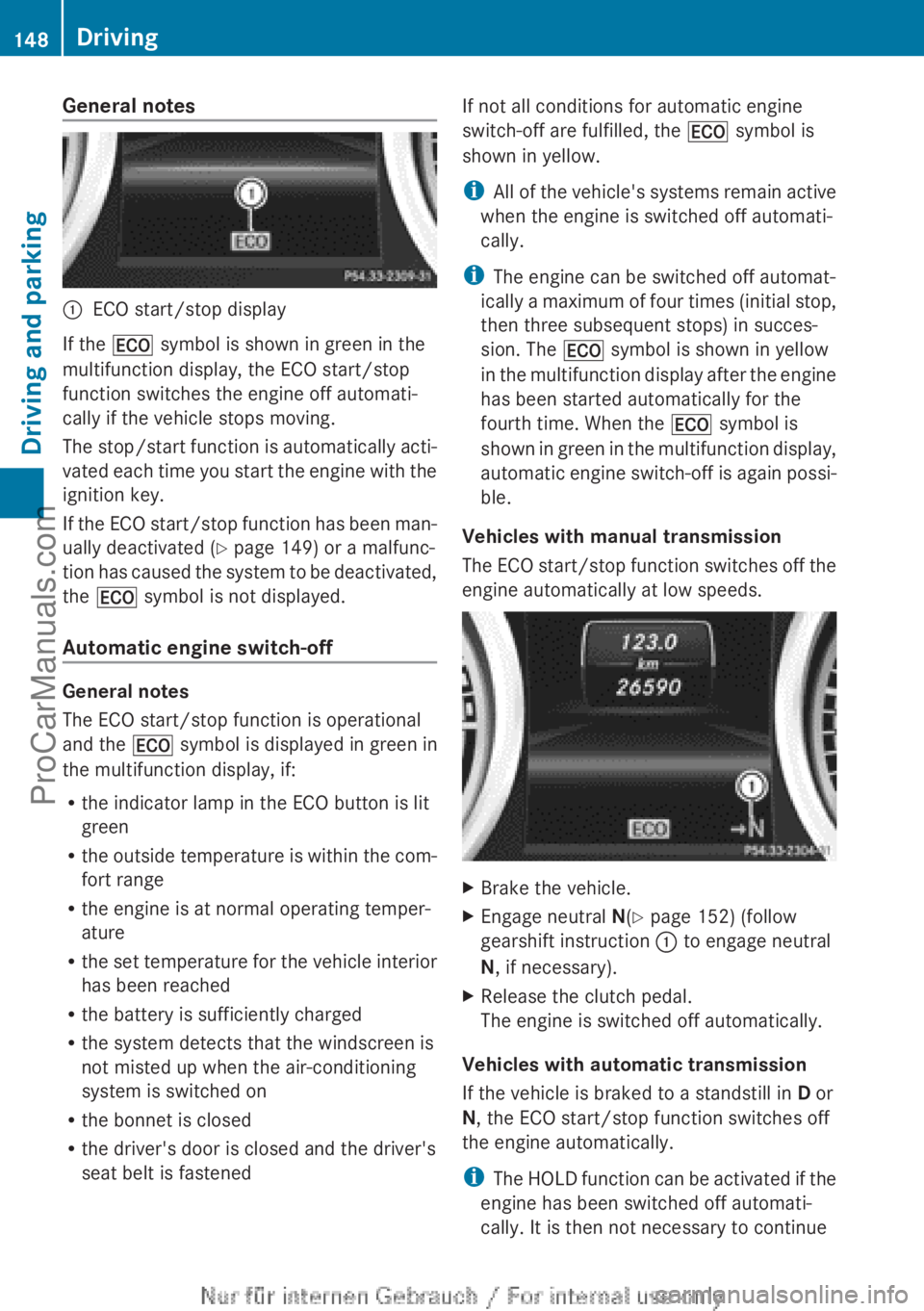
General notes:ECO start/stop display
If the ¤ symbol is shown in green in the
multifunction display, the ECO start/stop
function switches the engine off automati-
cally if the vehicle stops moving.
The stop/start function is automatically acti-
vated each time you start the engine with the
ignition key.
If the ECO start/stop function has been man-
ually deactivated ( Y page 149) or a malfunc-
tion has caused the system to be deactivated,
the ¤ symbol is not displayed.
Automatic engine switch-off
General notes
The ECO start/stop function is operational
and the ¤ symbol is displayed in green in
the multifunction display, if:
R the indicator lamp in the ECO button is lit
green
R the outside temperature is within the com-
fort range
R the engine is at normal operating temper-
ature
R the set temperature for the vehicle interior
has been reached
R the battery is sufficiently charged
R the system detects that the windscreen is
not misted up when the air-conditioning
system is switched on
R the bonnet is closed
R the driver's door is closed and the driver's
seat belt is fastened
If not all conditions for automatic engine
switch-off are fulfilled, the ¤ symbol is
shown in yellow.
i All of the vehicle's systems remain active
when the engine is switched off automati-
cally.
i The engine can be switched off automat-
ically a maximum of four times (initial stop,
then three subsequent stops) in succes-
sion. The ¤ symbol is shown in yellow
in the multifunction display after the engine
has been started automatically for the
fourth time. When the ¤ symbol is
shown in green in the multifunction display,
automatic engine switch-off is again possi-
ble.
Vehicles with manual transmission
The ECO start/stop function switches off the
engine automatically at low speeds.XBrake the vehicle.XEngage neutral N(Y page 152) (follow
gearshift instruction : to engage neutral
N , if necessary).XRelease the clutch pedal.
The engine is switched off automatically.
Vehicles with automatic transmission
If the vehicle is braked to a standstill in D or
N , the ECO start/stop function switches off
the engine automatically.
i The HOLD function can be activated if the
engine has been switched off automati-
cally. It is then not necessary to continue
148DrivingDriving and parking
ProCarManuals.com
Page 151 of 352
applying the brakes during the automatic
stop phase. When you depress the accel-
erator pedal, the engine starts automati-
cally and the braking effect of the HOLD
function is deactivated.
Automatic engine start
General notes
The engine is started automatically if:
R you switch off the ECO start/stop function
by pressing the ECO button
R you engage reverse gear R
R the vehicle starts to roll
R the brake system requires this
R the temperature in the vehicle interior devi-
ates from the set range
R the system detects moisture on the wind-
screen when the air-conditioning system is
switched on
R the battery's charge status is too low
R the driver's seat belt is released or the driv-
er's door is opened
Vehicles with manual transmission
! Only engage gear when the clutch pedal
is depressed.
The engine is started automatically if you:
R depress the clutch pedal fully
R depress the accelerator pedal
Vehicles with automatic transmission
The engine is started automatically if you:
R release the brake pedal when HOLD is not
activated and the transmission is in posi-
tion D or N
R depress the accelerator pedal
R move the transmission out of position P
i Shifting the transmission to position P
does not start the engine.
i If you shift the transmission from R to D,
the ECO start/stop function is available
again once the ¤ symbol reappears in
green in the multifunction display.
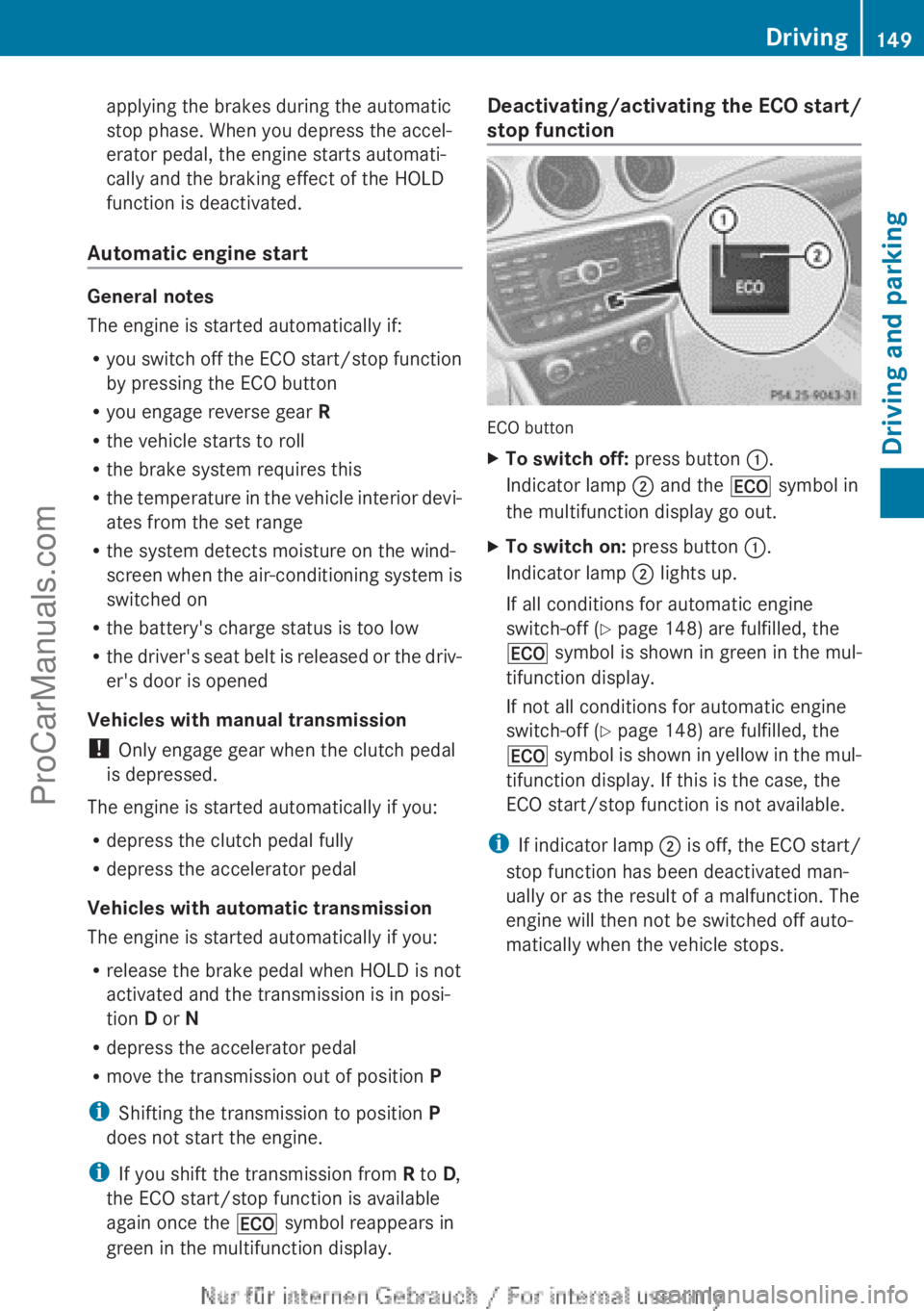
Deactivating/activating the ECO start/
stop function
ECO button
XTo switch off: press button :.
Indicator lamp ; and the ¤ symbol in
the multifunction display go out.XTo switch on: press button :.
Indicator lamp ; lights up.
If all conditions for automatic engine
switch-off ( Y page 148) are fulfilled, the
¤ symbol is shown in green in the mul-
tifunction display.
If not all conditions for automatic engine
switch-off ( Y page 148) are fulfilled, the
¤ symbol is shown in yellow in the mul-
tifunction display. If this is the case, the
ECO start/stop function is not available.
i If indicator lamp ; is off, the ECO start/
stop function has been deactivated man-
ually or as the result of a malfunction. The
engine will then not be switched off auto-
matically when the vehicle stops.
Driving149Driving and parkingZProCarManuals.com
Page 168 of 352
dynamic changes in the bars at the start of
a journey. During a prolonged driving time,
these changes are smaller. For more
dynamic changes, perform a manual reset.
For further information on the ECO display,
see ( Y page 212).
Braking
Important safety notes
GWARNING
If you shift down on a slippery road surface in
an attempt to increase the engine's braking
effect, the drive wheels could lose their grip.
This increases the risk of skidding and having
an accident.
Do not shift down for additional engine brak-
ing on a slippery road surface.
Downhill gradients
Change into a lower gear in good time on long
and steep downhill gradients. Take particular
note of this when driving a laden vehicle and
when towing a trailer. For vehicles with auto-
matic transmission, you need to have selec-
ted manual drive program M(Y page 156).
i This also applies if you have activated
cruise control, SPEEDTRONIC or DIS-
TRONIC PLUS.
This will use the braking effect of the engine,
so less braking will be required to prevent the
vehicle from gaining speed. This relieves the
load on the brake system and prevents the
brakes from overheating and wearing too
quickly.
i Briefly depressing the accelerator pedal
on downhill gradients while the manual
drive program M is temporarily activated
(vehicles with automatic transmission): the
automatic transmission may switch back to
the last active automatic drive program E
or S. The automatic transmission may shift
to a higher gear. This can reduce the
engine's braking effect.
Heavy and light loadsGWARNING
The braking system can overheat if you leave
your foot on the brake pedal while driving.
This increases the braking distance and could
even cause the braking system to fail. There
is a risk of an accident.
Never use the brake pedal as a footrest. Do
not simultaneously depress both the brake
pedal and the accelerator pedal while driving.
! Depressing the brake pedal constantly
results in excessive and premature wear to
the brake pads.
If heavy demands are made on the brakes, do
not park the vehicle immediately. Drive on for
a short while. This allows the airflow to cool
the brakes more quickly.
If the brakes have been used only moderately,
you should occasionally test their effective-
ness. To do this, brake more firmly from a
higher speed, paying attention to traffic con-
ditions. This improves the grip of the brakes.
Wet road surfaces
If you have driven for a long time in heavy rain
without braking, there may be a delayed reac-
tion from the brakes when braking for the first
time. This may also occur after a car wash or
after driving through deep water.
You have to depress the brake pedal more
firmly. Maintain a greater distance from the
vehicle in front.
After driving on a wet road or having the vehi-
cle washed, brake firmly while paying atten-
tion to the traffic conditions. This will warm
up the brake discs, thereby drying them more
quickly and protecting them against corro-
sion.
166Driving tipsDriving and parking
ProCarManuals.com
Page 176 of 352
Apply the brakes yourself in these situations
and try to take evasive action.
! If DISTRONIC PLUS or the HOLD function
is activated, the vehicle brakes automati-
cally in certain situations. To prevent dam-
age to the vehicle, deactivate DISTRONIC
PLUS and the HOLD function in the follow-
ing or other similar situations:
R when towing the vehicle
R in the car wash
If you fail to adapt your driving style, DIS-
TRONIC PLUS can neither reduce the risk of
an accident nor override the laws of physics.
DISTRONIC PLUS cannot take road and
weather conditions or traffic conditions into
account. DISTRONIC PLUS is only an aid. You
are responsible for the distance to the vehicle
in front, for vehicle speed, for braking in good
time, and for staying in the lane.
Do not use DISTRONIC PLUS:
R in road and traffic conditions which do not
allow you to maintain a constant speed
(e.g. in heavy traffic or on winding roads)
R on smooth or slippery roads. Braking or
accelerating can cause the drive wheels to
lose traction and the vehicle could then
skid
R when there is poor visibility, e.g. due to fog,
heavy rain or snow.
DISTRONIC PLUS may not detect narrow
vehicles driving in front, e.g. motorcycles, or
vehicles driving on a different line.
In particular, the detection of obstacles can
be impaired in the case of:
R dirt on the sensors or the sensors are
obscured
R snow or heavy rain
R interference by other radar sources
R the possibility of strong radar reflections,
for example, in multi-storey car parks
If DISTRONIC PLUS no longer detects a vehi-
cle in front, it may unexpectedly accelerate to
the speed stored.This speed can:
R be too high for a filter lane or a slip road
R be so high in the right lane that you pass
vehicles driving on the left
R be so high in the left lane that you pass
vehicles driving on the right
If there is a change of drivers, advise the new
driver of the speed stored
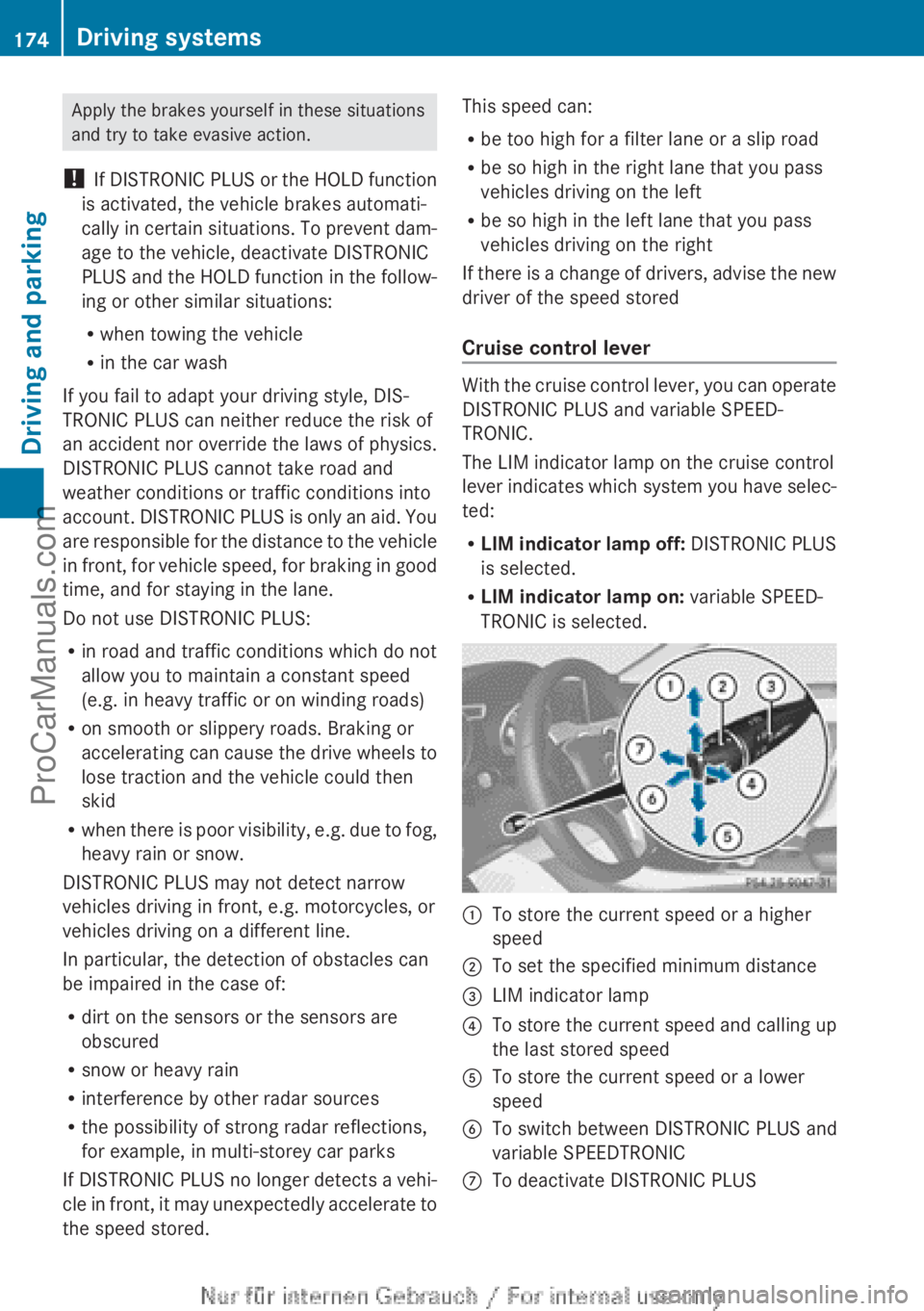
Cruise control lever
With the cruise control lever, you can operate
DISTRONIC PLUS and variable SPEED-
TRONIC.
The LIM indicator lamp on the cruise control
lever indicates which system you have selec-
ted:
R LIM indicator lamp off: DISTRONIC PLUS
is selected.
R LIM indicator lamp on: variable SPEED-
TRONIC is selected.
:To store the current speed or a higher
speed;To set the specified minimum distance=LIM indicator lamp?To store the current speed and calling up
the last stored speedATo store the current speed or a lower
speedBTo switch between DISTRONIC PLUS and
variable SPEEDTRONICCTo deactivate DISTRONIC PLUS174Driving systemsDriving and parking
ProCarManuals.com