air condition MERCEDES-BENZ CLA-CLASS 2013 Owner's Manual
[x] Cancel search | Manufacturer: MERCEDES-BENZ, Model Year: 2013, Model line: CLA-CLASS, Model: MERCEDES-BENZ CLA-CLASS 2013Pages: 352, PDF Size: 5.64 MB
Page 202 of 352
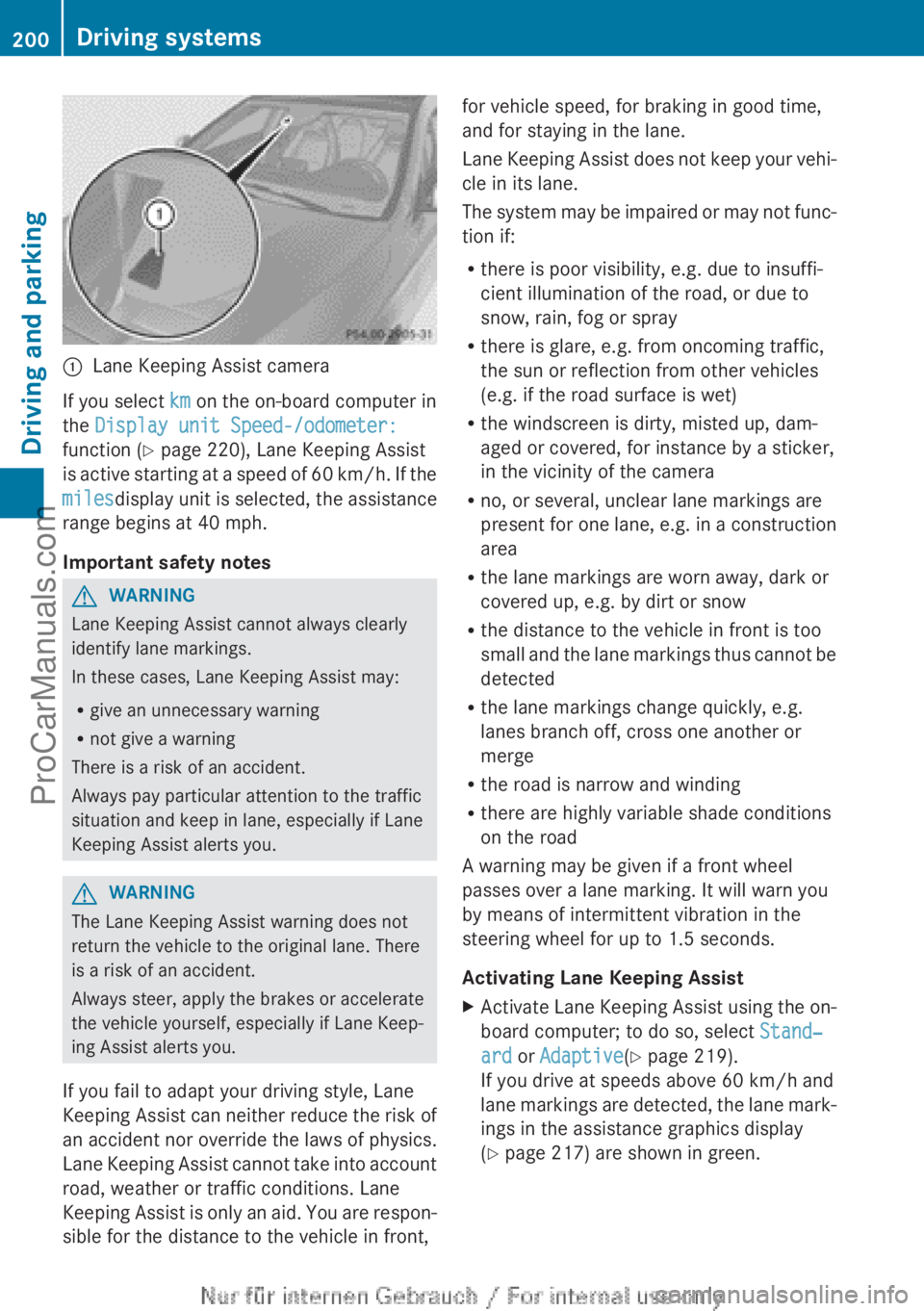
:Lane Keeping Assist camera
If you select km on the on-board computer in
the Display unit Speed-/odometer:
function ( Y page 220), Lane Keeping Assist
is active starting at a speed of 60 km/h. If the
miles display unit is selected, the assistance
range begins at 40 mph.
Important safety notes
GWARNING
Lane Keeping Assist cannot always clearly
identify lane markings.
In these cases, Lane Keeping Assist may:
R give an unnecessary warning
R not give a warning
There is a risk of an accident.
Always pay particular attention to the traffic
situation and keep in lane, especially if Lane
Keeping Assist alerts you.
GWARNING
The Lane Keeping Assist warning does not
return the vehicle to the original lane. There
is a risk of an accident.
Always steer, apply the brakes or accelerate
the vehicle yourself, especially if Lane Keep-
ing Assist alerts you.
If you fail to adapt your driving style, Lane
Keeping Assist can neither reduce the risk of
an accident nor override the laws of physics.
Lane Keeping Assist cannot take into account
road, weather or traffic conditions. Lane
Keeping Assist is only an aid. You are respon-
sible for the distance to the vehicle in front,
for vehicle speed, for braking in good time,
and for staying in the lane.
Lane Keeping Assist does not keep your vehi-
cle in its lane.
The system may be impaired or may not func-
tion if:
R there is poor visibility, e.g. due to insuffi-
cient illumination of the road, or due to
snow, rain, fog or spray
R there is glare, e.g. from oncoming traffic,
the sun or reflection from other vehicles
(e.g. if the road surface is wet)
R the windscreen is dirty, misted up, dam-
aged or covered, for instance by a sticker,
in the vicinity of the camera
R no, or several, unclear lane markings are
present for one lane, e.g. in a construction
area
R the lane markings are worn away, dark or
covered up, e.g. by dirt or snow
R the distance to the vehicle in front is too
small and the lane markings thus cannot be
detected
R the lane markings change quickly, e.g.
lanes branch off, cross one another or
merge
R the road is narrow and winding
R there are highly variable shade conditions
on the road
A warning may be given if a front wheel
passes over a lane marking. It will warn you
by means of intermittent vibration in the
steering wheel for up to 1.5 seconds.
Activating Lane Keeping AssistXActivate Lane Keeping Assist using the on-
board computer; to do so, select Stand‐
ard or Adaptive (Y page 219).
If you drive at speeds above 60 km/h and
lane markings are detected, the lane mark-
ings in the assistance graphics display
( Y page 217) are shown in green.200Driving systemsDriving and parking
ProCarManuals.com
Page 210 of 352
Useful information
i This Owner's Manual describes all mod-
els, series and optional equipment for your
vehicle that were available at the time of
going to press. National variations are pos-
sible. Note that your vehicle may not be
equipped with all of the functions descri-
bed. This is also the case for systems and
functions relevant to safety.
i Read the information on qualified special-
ist workshops: ( Y page 24).
Important safety notes
GWARNING
Operating the integrated information systems
and communications equipment in the vehicle
while driving will distract you from traffic con-
ditions. You could then lose control of the
vehicle. There is a risk of an accident.
Only operate these devices if road traffic con-
ditions permit. If you are unsure about the
surrounding conditions, pull over to a safe
location and make entries only while the vehi-
cle is stationary.
GWARNING
If the instrument cluster has failed or mal-
functioned, you may not recognise function
restrictions relevant to safety. The operating
safety of your vehicle may be impaired. There
is a risk of an accident.
Drive on carefully. Have the vehicle checked
at a qualified specialist workshop immedi-
ately.
You must observe the legal requirements for
the country in which you are currently driving
when operating the on-board computer.
The on-board computer only shows messages
or warnings from certain systems in the mul-
tifunction display. You should therefore make
sure your vehicle is operating safely at all
times. Otherwise, a vehicle that is not oper-
ating safely may cause an accident.
For an overview, see the instrument panel
illustration ( Y page 30).
Displays and operation
Instrument cluster lighting
The lighting in the instrument cluster, in the
displays and the controls in the vehicle inte-
rior can be adjusted using the brightness con-
trol knob.
The brightness control knob is on the bottom
left of the instrument cluster ( Y page 30).
XTurn the brightness control knob clockwise
or anti-clockwise.
If the light switch is set to Ã, T or
L , the brightness is dependant upon
the brightness of the ambient light.
i The light sensor in the instrument cluster
automatically controls the brightness of
the multifunction display.
In daylight, the displays in the instrument
cluster are not illuminated.
Coolant temperature gauge
GWARNING
If you open the bonnet while the engine is
overheating or while there is a fire in the
engine compartment, you could come into
contact with hot gases or other leaking
service products. There is a danger of injury.
Allow an overheating engine to cool down
before opening the bonnet. If there is a fire in
the engine compartment, leave the bonnet
closed and notify the fire brigade.
The coolant temperature gauge is in the
instrument cluster on the right-hand side.
Under normal operating conditions and with
the specified coolant level, the coolant tem-
perature may rise to 120 †.
208Displays and operationOn-board computer and displays
ProCarManuals.com
Page 235 of 352
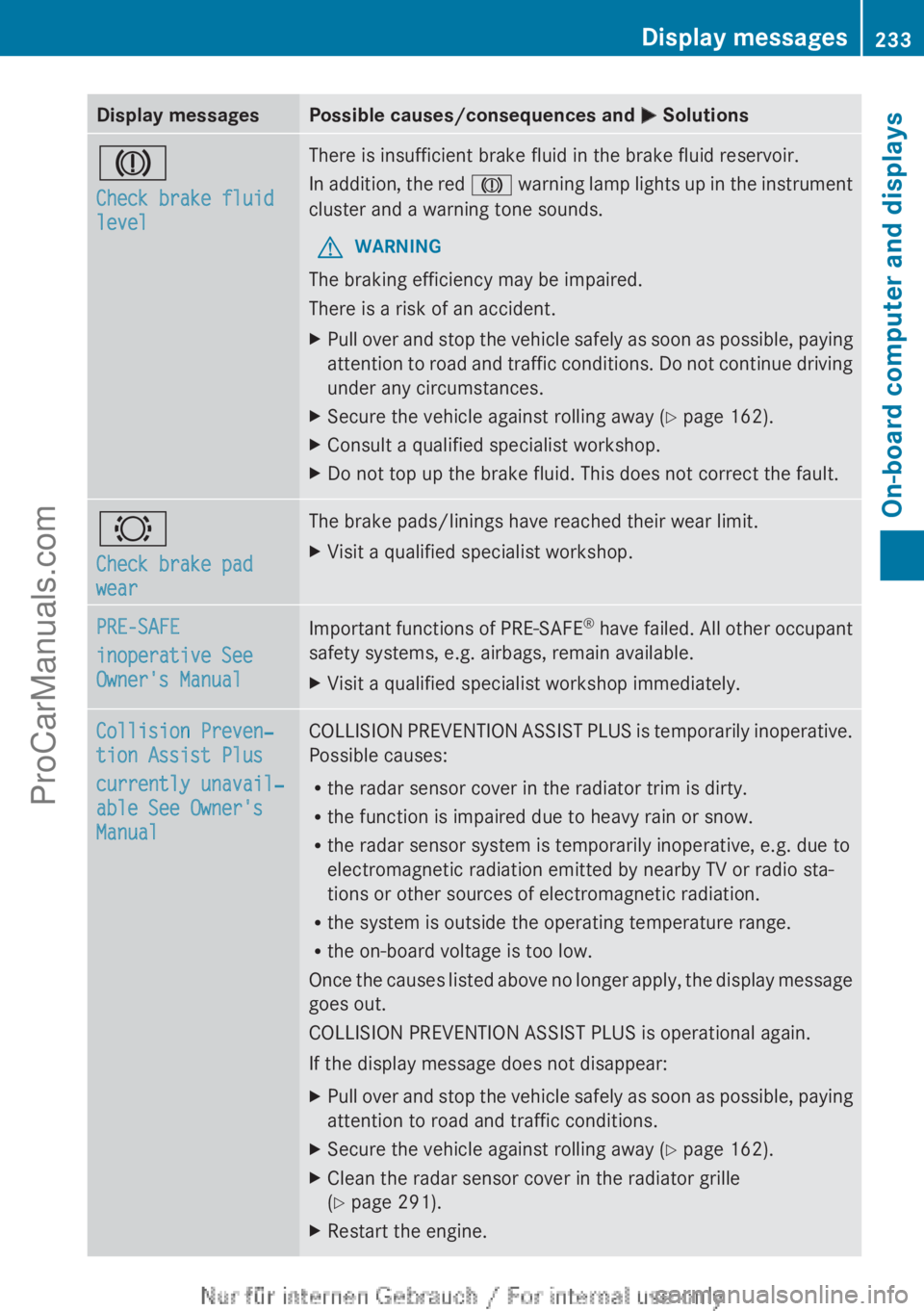
Display messagesPossible causes/consequences and M SolutionsJ
Check brake fluid
levelThere is insufficient brake fluid in the brake fluid reservoir.
In addition, the red J warning lamp lights up in the instrument
cluster and a warning tone sounds.GWARNING
The braking efficiency may be impaired.
There is a risk of an accident.
XPull over and stop the vehicle safely as soon as possible, paying
attention to road and traffic conditions. Do not continue driving
under any circumstances.XSecure the vehicle against rolling away ( Y page 162).XConsult a qualified specialist workshop.XDo not top up the brake fluid. This does not correct the fault.#
Check brake pad
wearThe brake pads/linings have reached their wear limit.XVisit a qualified specialist workshop.PRE-SAFE
inoperative See
Owner's ManualImportant functions of PRE-SAFE ®
have failed. All other occupant
safety systems, e.g. airbags, remain available.XVisit a qualified specialist workshop immediately.Collision Preven‐
tion Assist Plus
currently unavail‐
able See Owner's
ManualCOLLISION PREVENTION ASSIST PLUS is temporarily inoperative.
Possible causes:
R the radar sensor cover in the radiator trim is dirty.
R the function is impaired due to heavy rain or snow.
R the radar sensor system is temporarily inoperative, e.g. due to
electromagnetic radiation emitted by nearby TV or radio sta-
tions or other sources of electromagnetic radiation.
R the system is outside the operating temperature range.
R the on-board voltage is too low.
Once the causes listed above no longer apply, the display message
goes out.
COLLISION PREVENTION ASSIST PLUS is operational again.
If the display message does not disappear:XPull over and stop the vehicle safely as soon as possible, paying
attention to road and traffic conditions.XSecure the vehicle against rolling away ( Y page 162).XClean the radar sensor cover in the radiator grille
( Y page 291).XRestart the engine.Display messages233On-board computer and displaysZProCarManuals.com
Page 236 of 352
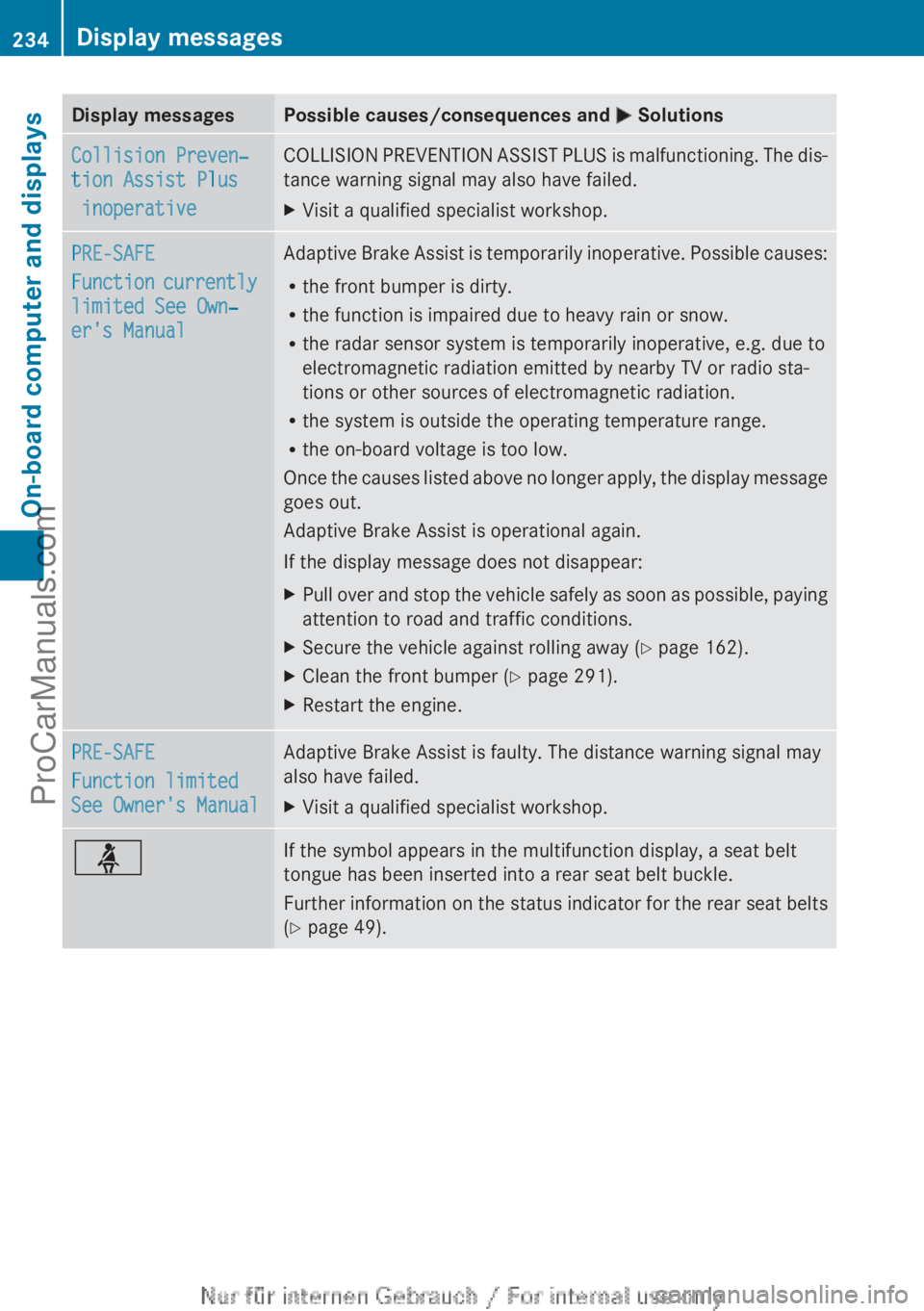
Display messagesPossible causes/consequences and M SolutionsCollision Preven‐
tion Assist Plus
inoperativeCOLLISION PREVENTION ASSIST PLUS is malfunctioning. The dis-
tance warning signal may also have failed.XVisit a qualified specialist workshop.PRE-SAFE
Function currently
limited See Own‐
er's ManualAdaptive Brake Assist is temporarily inoperative. Possible causes:
R the front bumper is dirty.
R the function is impaired due to heavy rain or snow.
R the radar sensor system is temporarily inoperative, e.g. due to
electromagnetic radiation emitted by nearby TV or radio sta-
tions or other sources of electromagnetic radiation.
R the system is outside the operating temperature range.
R the on-board voltage is too low.
Once the causes listed above no longer apply, the display message
goes out.
Adaptive Brake Assist is operational again.
If the display message does not disappear:XPull over and stop the vehicle safely as soon as possible, paying
attention to road and traffic conditions.XSecure the vehicle against rolling away ( Y page 162).XClean the front bumper ( Y page 291).XRestart the engine.PRE-SAFE
Function limited
See Owner's ManualAdaptive Brake Assist is faulty. The distance warning signal may
also have failed.XVisit a qualified specialist workshop.üIf the symbol appears in the multifunction display, a seat belt
tongue has been inserted into a rear seat belt buckle.
Further information on the status indicator for the rear seat belts
( Y page 49).234Display messagesOn-board computer and displays
ProCarManuals.com
Page 243 of 352
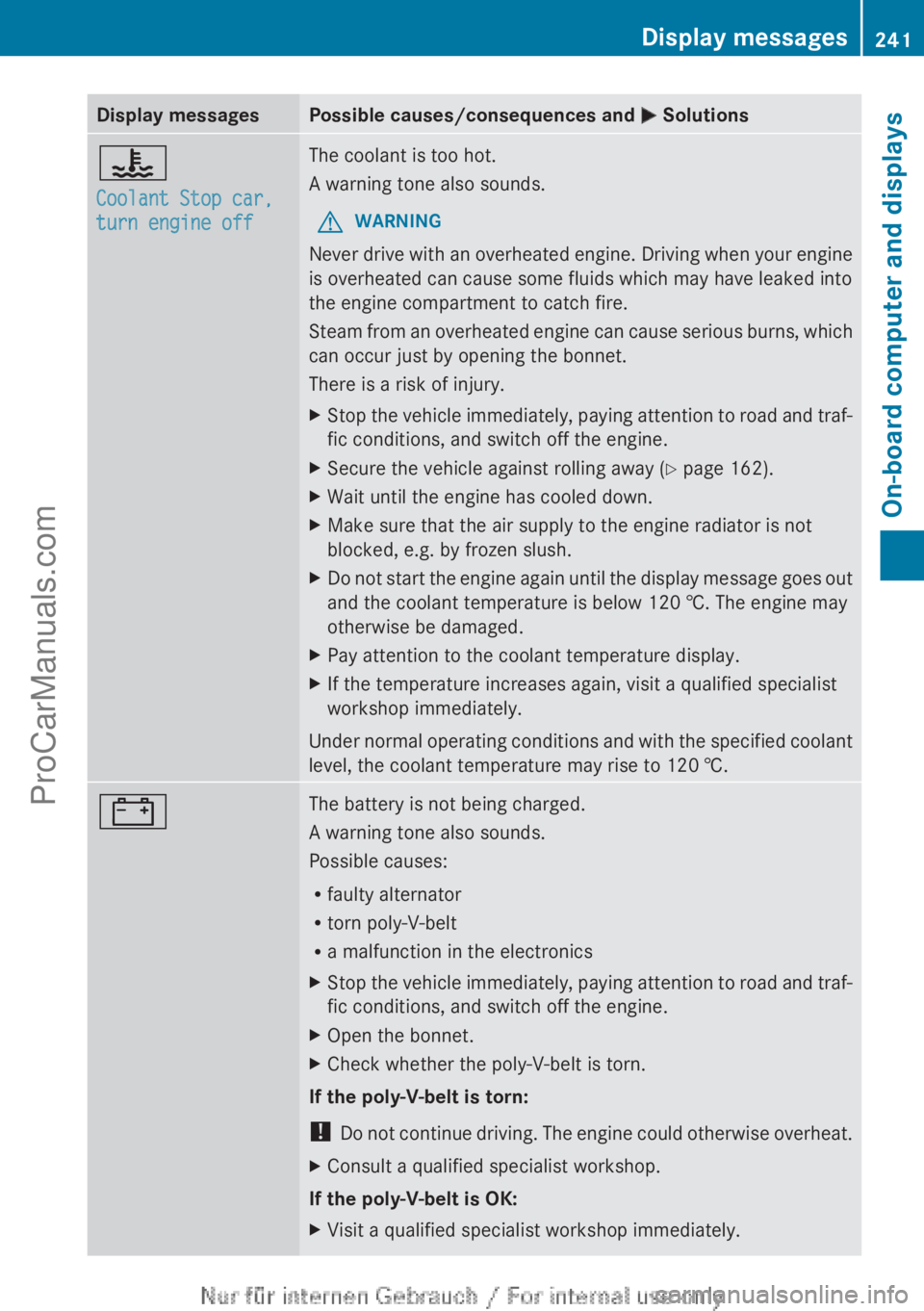
Display messagesPossible causes/consequences and M Solutions?
Coolant Stop car,
turn engine offThe coolant is too hot.
A warning tone also sounds.GWARNING
Never drive with an overheated engine. Driving when your engine
is overheated can cause some fluids which may have leaked into
the engine compartment to catch fire.
Steam from an overheated engine can cause serious burns, which
can occur just by opening the bonnet.
There is a risk of injury.
XStop the vehicle immediately, paying attention to road and traf-
fic conditions, and switch off the engine.XSecure the vehicle against rolling away ( Y page 162).XWait until the engine has cooled down.XMake sure that the air supply to the engine radiator is not
blocked, e.g. by frozen slush.XDo not start the engine again until the display message goes out
and the coolant temperature is below 120 †. The engine may
otherwise be damaged.XPay attention to the coolant temperature display.XIf the temperature increases again, visit a qualified specialist
workshop immediately.
Under normal operating conditions and with the specified coolant
level, the coolant temperature may rise to 120 †.
#The battery is not being charged.
A warning tone also sounds.
Possible causes:
R faulty alternator
R torn poly-V-belt
R a malfunction in the electronicsXStop the vehicle immediately, paying attention to road and traf-
fic conditions, and switch off the engine.XOpen the bonnet.XCheck whether the poly-V-belt is torn.
If the poly-V-belt is torn:
! Do not continue driving. The engine could otherwise overheat.
XConsult a qualified specialist workshop.
If the poly-V-belt is OK:
XVisit a qualified specialist workshop immediately.Display messages241On-board computer and displaysZProCarManuals.com
Page 245 of 352
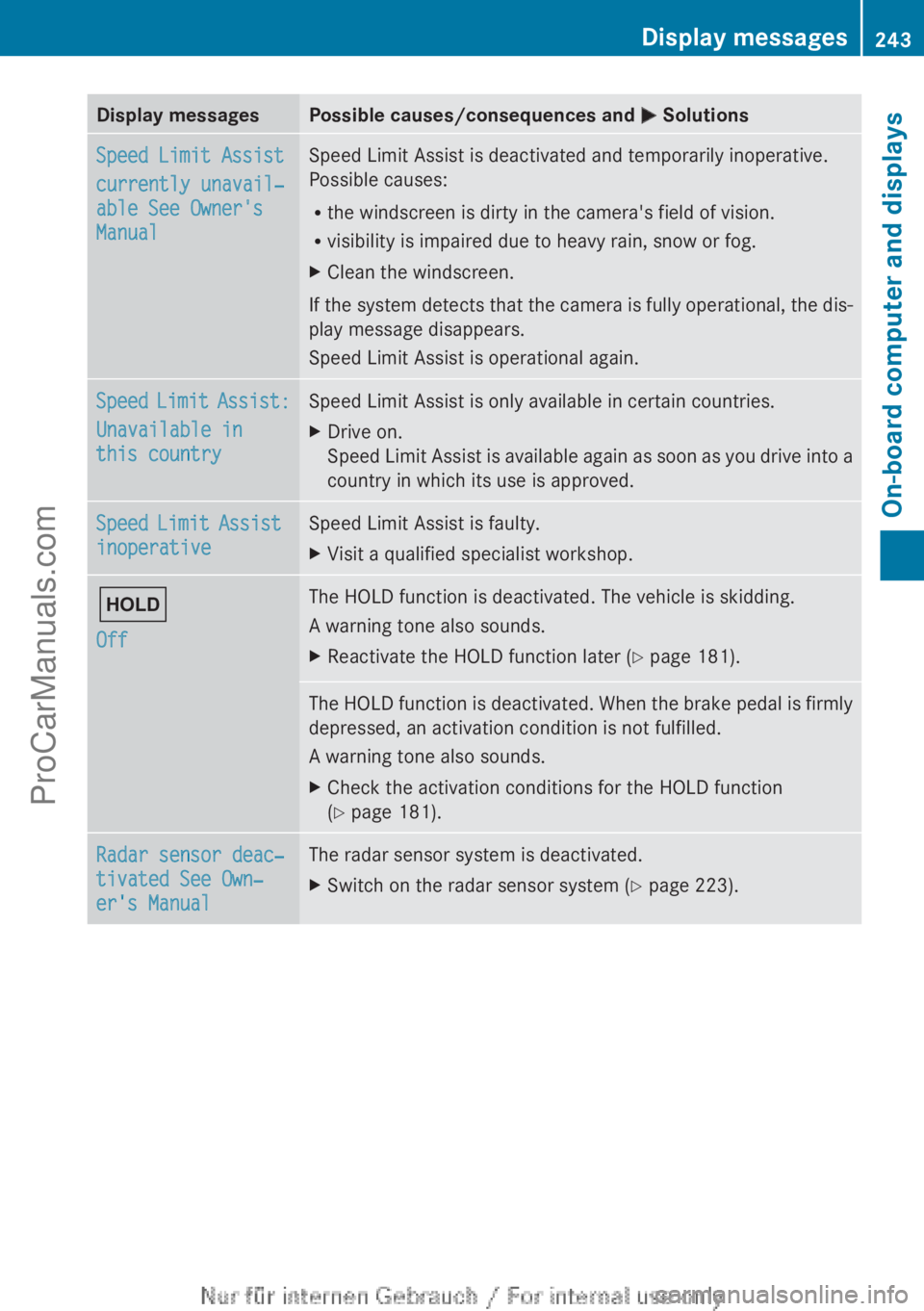
Display messagesPossible causes/consequences and M SolutionsSpeed Limit Assist
currently unavail‐
able See Owner's
ManualSpeed Limit Assist is deactivated and temporarily inoperative.
Possible causes:
R the windscreen is dirty in the camera's field of vision.
R visibility is impaired due to heavy rain, snow or fog.XClean the windscreen.
If the system detects that the camera is fully operational, the dis-
play message disappears.
Speed Limit Assist is operational again.
Speed Limit Assist:
Unavailable in
this countrySpeed Limit Assist is only available in certain countries.XDrive on.
Speed Limit Assist is available again as soon as you drive into a
country in which its use is approved.Speed Limit Assist
inoperativeSpeed Limit Assist is faulty.XVisit a qualified specialist workshop.ë
OffThe HOLD function is deactivated. The vehicle is skidding.
A warning tone also sounds.XReactivate the HOLD function later ( Y page 181).The HOLD function is deactivated. When the brake pedal is firmly
depressed, an activation condition is not fulfilled.
A warning tone also sounds.XCheck the activation conditions for the HOLD function
( Y page 181).Radar sensor deac‐
tivated See Own‐
er's ManualThe radar sensor system is deactivated.XSwitch on the radar sensor system ( Y page 223).Display messages243On-board computer and displaysZProCarManuals.com
Page 246 of 352
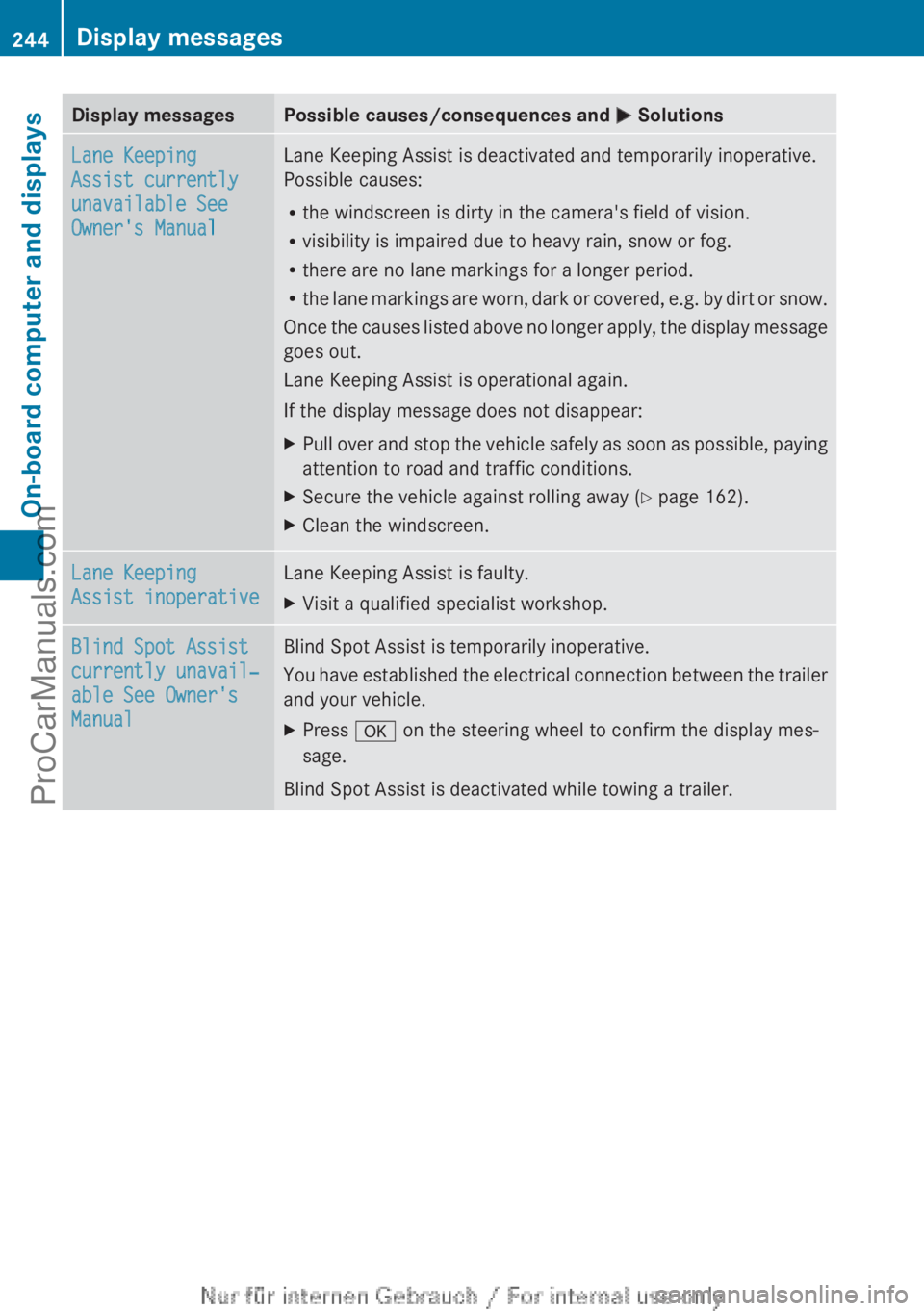
Display messagesPossible causes/consequences and M SolutionsLane Keeping
Assist currently
unavailable See
Owner's ManualLane Keeping Assist is deactivated and temporarily inoperative.
Possible causes:
R the windscreen is dirty in the camera's field of vision.
R visibility is impaired due to heavy rain, snow or fog.
R there are no lane markings for a longer period.
R the lane markings are worn, dark or covered, e.g. by dirt or snow.
Once the causes listed above no longer apply, the display message
goes out.
Lane Keeping Assist is operational again.
If the display message does not disappear:XPull over and stop the vehicle safely as soon as possible, paying
attention to road and traffic conditions.XSecure the vehicle against rolling away ( Y page 162).XClean the windscreen.Lane Keeping
Assist inoperativeLane Keeping Assist is faulty.XVisit a qualified specialist workshop.Blind Spot Assist
currently unavail‐
able See Owner's
ManualBlind Spot Assist is temporarily inoperative.
You have established the electrical connection between the trailer
and your vehicle.XPress a on the steering wheel to confirm the display mes-
sage.
Blind Spot Assist is deactivated while towing a trailer.
244Display messagesOn-board computer and displays
ProCarManuals.com
Page 247 of 352
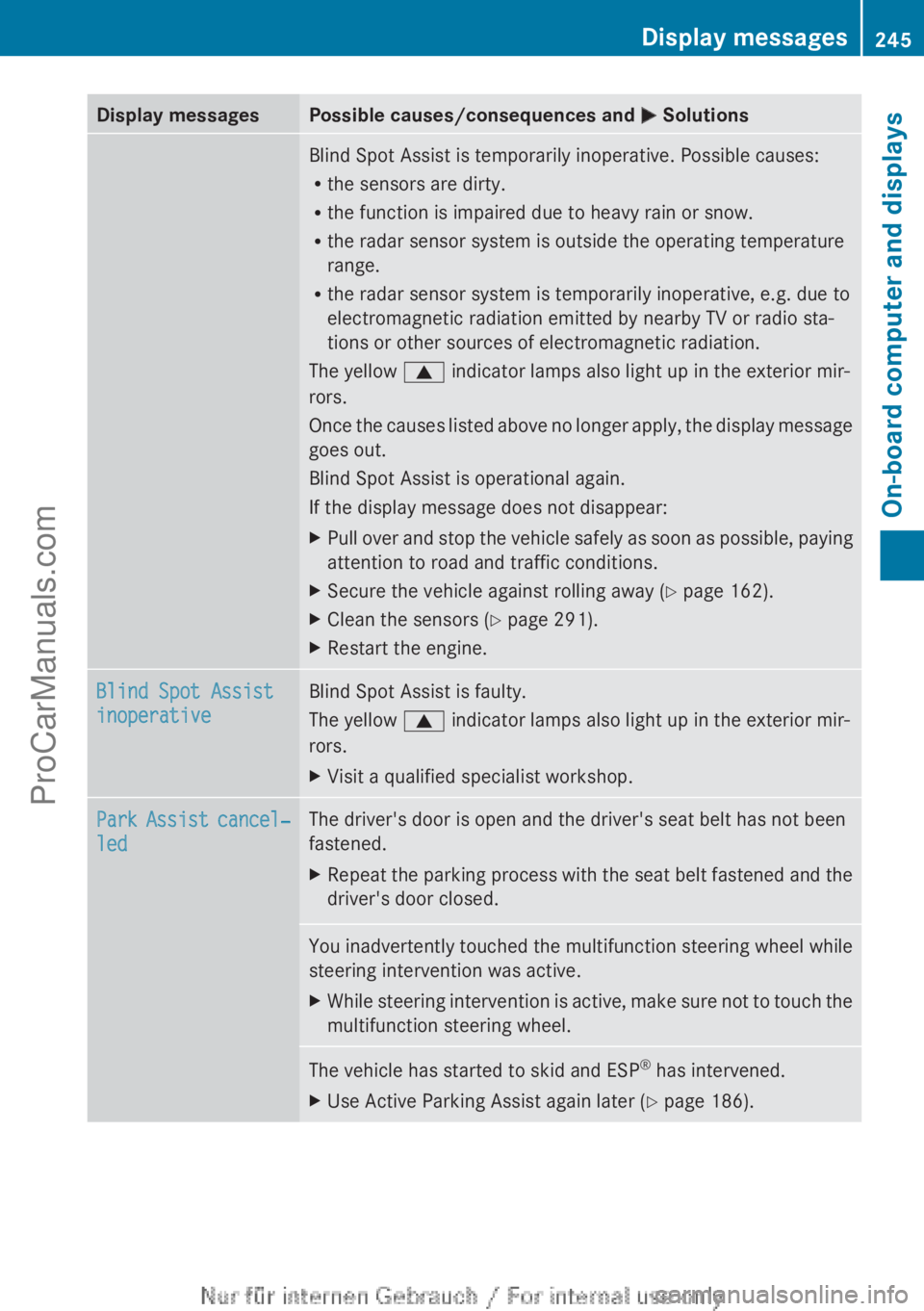
Display messagesPossible causes/consequences and M SolutionsBlind Spot Assist is temporarily inoperative. Possible causes:
R the sensors are dirty.
R the function is impaired due to heavy rain or snow.
R the radar sensor system is outside the operating temperature
range.
R the radar sensor system is temporarily inoperative, e.g. due to
electromagnetic radiation emitted by nearby TV or radio sta-
tions or other sources of electromagnetic radiation.
The yellow 9 indicator lamps also light up in the exterior mir-
rors.
Once the causes listed above no longer apply, the display message
goes out.
Blind Spot Assist is operational again.
If the display message does not disappear:XPull over and stop the vehicle safely as soon as possible, paying
attention to road and traffic conditions.XSecure the vehicle against rolling away ( Y page 162).XClean the sensors ( Y page 291).XRestart the engine.Blind Spot Assist
inoperativeBlind Spot Assist is faulty.
The yellow 9 indicator lamps also light up in the exterior mir-
rors.XVisit a qualified specialist workshop.Park Assist cancel‐
ledThe driver's door is open and the driver's seat belt has not been
fastened.XRepeat the parking process with the seat belt fastened and the
driver's door closed.You inadvertently touched the multifunction steering wheel while
steering intervention was active.XWhile steering intervention is active, make sure not to touch the
multifunction steering wheel.The vehicle has started to skid and ESP ®
has intervened.XUse Active Parking Assist again later ( Y page 186).Display messages245On-board computer and displaysZProCarManuals.com
Page 248 of 352
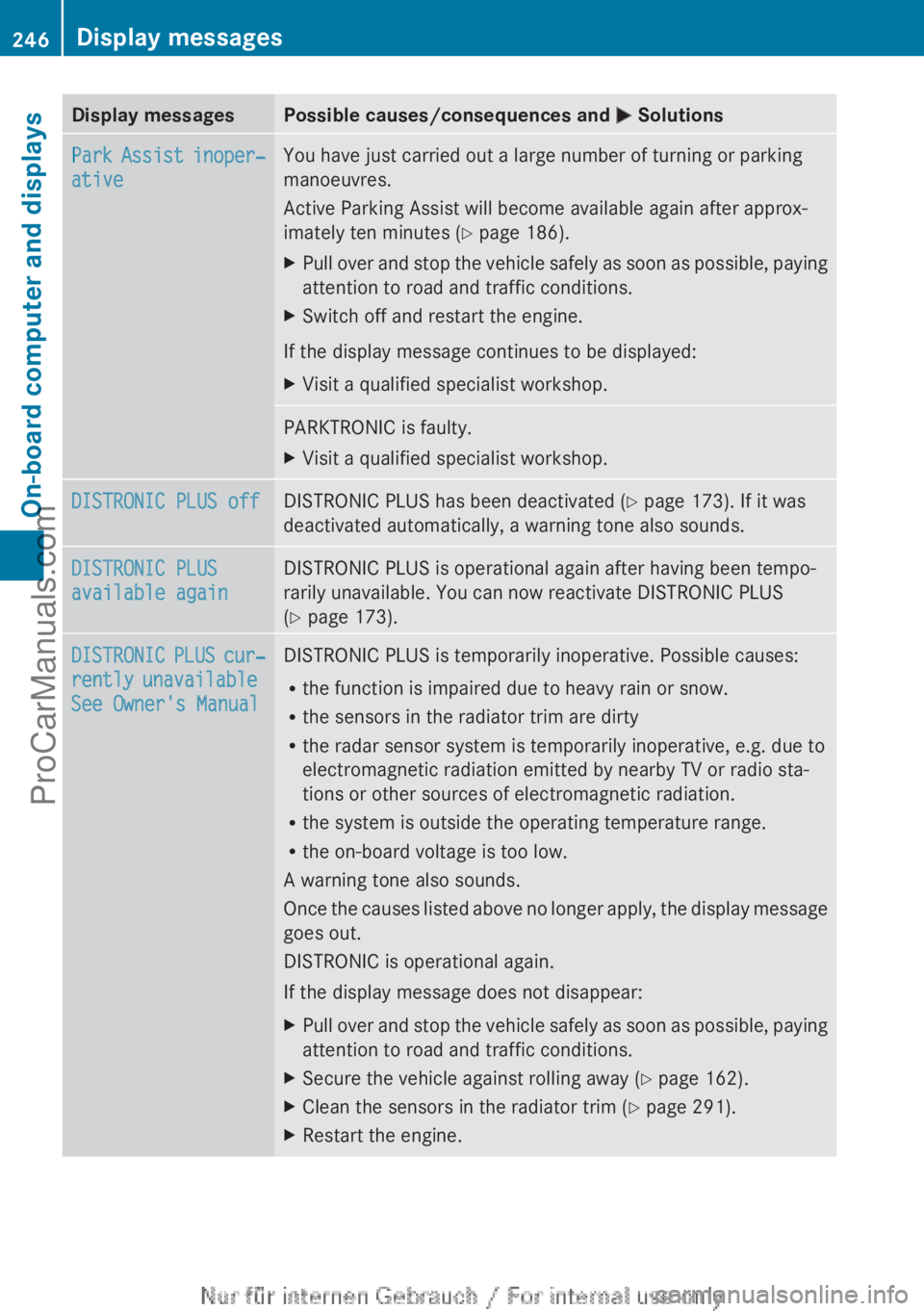
Display messagesPossible causes/consequences and M SolutionsPark Assist inoper‐
ativeYou have just carried out a large number of turning or parking
manoeuvres.
Active Parking Assist will become available again after approx-
imately ten minutes ( Y page 186).XPull over and stop the vehicle safely as soon as possible, paying
attention to road and traffic conditions.XSwitch off and restart the engine.
If the display message continues to be displayed:
XVisit a qualified specialist workshop.PARKTRONIC is faulty.XVisit a qualified specialist workshop.DISTRONIC PLUS offDISTRONIC PLUS has been deactivated ( Y page 173). If it was
deactivated automatically, a warning tone also sounds.DISTRONIC PLUS
available againDISTRONIC PLUS is operational again after having been tempo-
rarily unavailable. You can now reactivate DISTRONIC PLUS
( Y page 173).DISTRONIC PLUS cur‐
rently unavailable
See Owner's ManualDISTRONIC PLUS is temporarily inoperative. Possible causes:
R the function is impaired due to heavy rain or snow.
R the sensors in the radiator trim are dirty
R the radar sensor system is temporarily inoperative, e.g. due to
electromagnetic radiation emitted by nearby TV or radio sta-
tions or other sources of electromagnetic radiation.
R the system is outside the operating temperature range.
R the on-board voltage is too low.
A warning tone also sounds.
Once the causes listed above no longer apply, the display message
goes out.
DISTRONIC is operational again.
If the display message does not disappear:XPull over and stop the vehicle safely as soon as possible, paying
attention to road and traffic conditions.XSecure the vehicle against rolling away ( Y page 162).XClean the sensors in the radiator trim ( Y page 291).XRestart the engine.246Display messagesOn-board computer and displays
ProCarManuals.com
Page 250 of 352
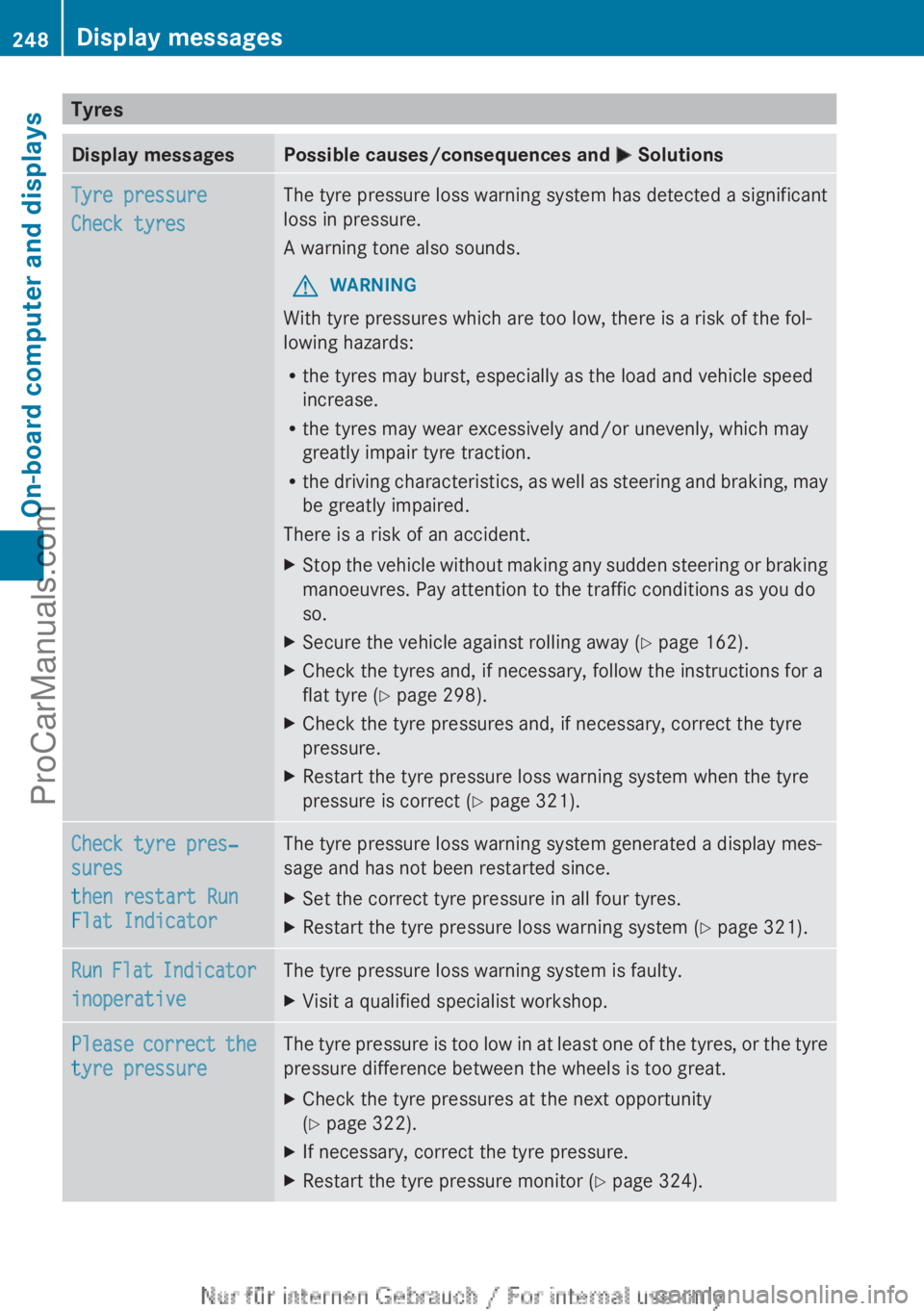
TyresDisplay messagesPossible causes/consequences and M SolutionsTyre pressure
Check tyresThe tyre pressure loss warning system has detected a significant
loss in pressure.
A warning tone also sounds.GWARNING
With tyre pressures which are too low, there is a risk of the fol-
lowing hazards:
R the tyres may burst, especially as the load and vehicle speed
increase.
R the tyres may wear excessively and/or unevenly, which may
greatly impair tyre traction.
R the driving characteristics, as well as steering and braking, may
be greatly impaired.
There is a risk of an accident.
XStop the vehicle without making any sudden steering or braking
manoeuvres. Pay attention to the traffic conditions as you do
so.XSecure the vehicle against rolling away ( Y page 162).XCheck the tyres and, if necessary, follow the instructions for a
flat tyre ( Y page 298).XCheck the tyre pressures and, if necessary, correct the tyre
pressure.XRestart the tyre pressure loss warning system when the tyre
pressure is correct ( Y page 321).Check tyre pres‐
sures
then restart Run
Flat IndicatorThe tyre pressure loss warning system generated a display mes-
sage and has not been restarted since.XSet the correct tyre pressure in all four tyres.XRestart the tyre pressure loss warning system ( Y page 321).Run Flat Indicator
inoperativeThe tyre pressure loss warning system is faulty.XVisit a qualified specialist workshop.Please correct the
tyre pressureThe tyre pressure is too low in at least one of the tyres, or the tyre
pressure difference between the wheels is too great.XCheck the tyre pressures at the next opportunity
( Y page 322).XIf necessary, correct the tyre pressure.XRestart the tyre pressure monitor ( Y page 324).248Display messagesOn-board computer and displays
ProCarManuals.com