check engine MERCEDES-BENZ CLA-CLASS 2013 Owner's Manual
[x] Cancel search | Manufacturer: MERCEDES-BENZ, Model Year: 2013, Model line: CLA-CLASS, Model: MERCEDES-BENZ CLA-CLASS 2013Pages: 352, PDF Size: 5.64 MB
Page 171 of 352
Cruise control lever
You can operate cruise control and variable
SPEEDTRONIC with the cruise control lever.
The LIM indicator lamp on the cruise control
lever indicates which system you have selec-
ted:
R LIM indicator lamp off: cruise control is
selected.
R LIM indicator lamp on: variable SPEED-
TRONIC is selected.
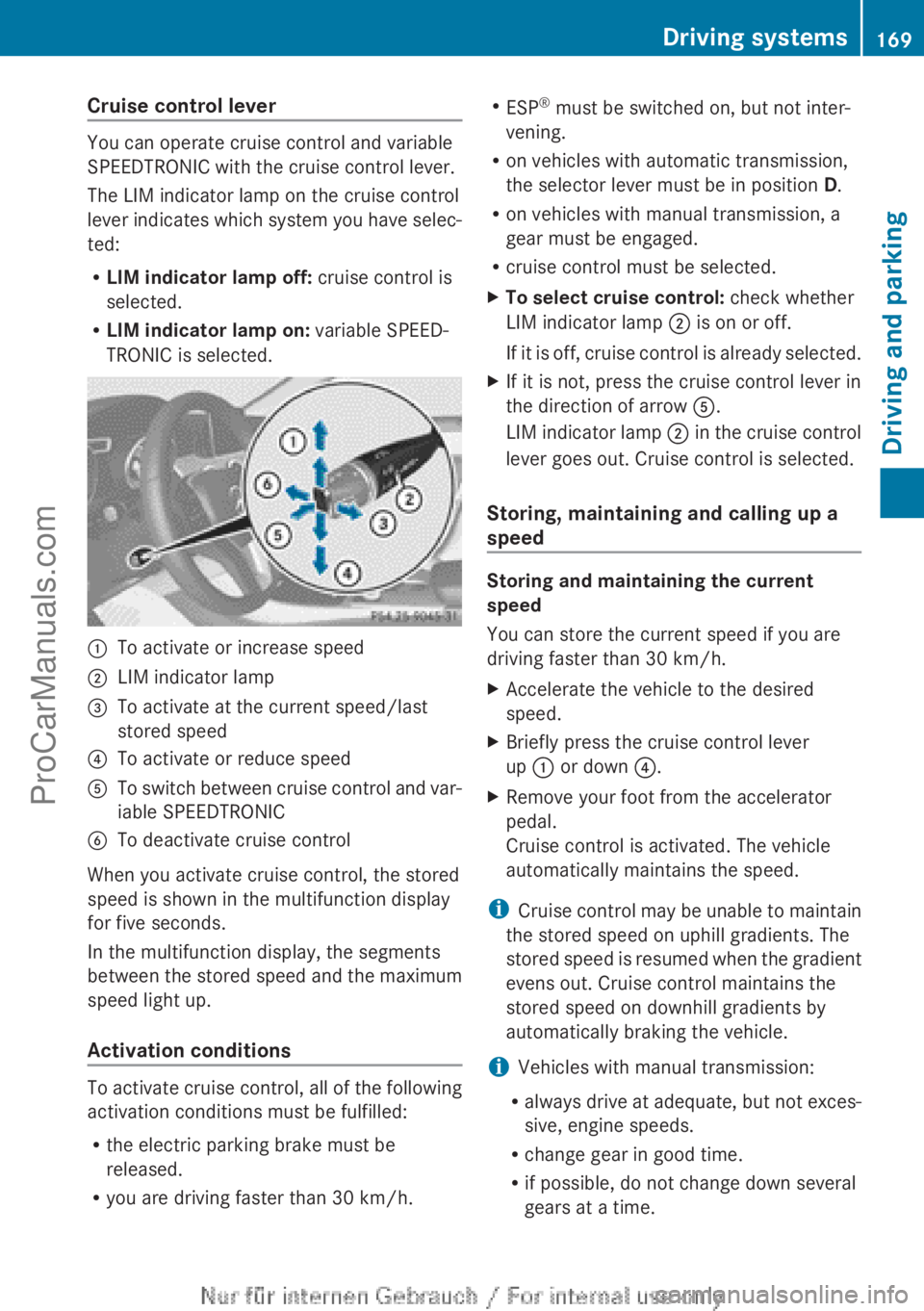
:To activate or increase speed;LIM indicator lamp=To activate at the current speed/last
stored speed?To activate or reduce speedATo switch between cruise control and var-
iable SPEEDTRONICBTo deactivate cruise control
When you activate cruise control, the stored
speed is shown in the multifunction display
for five seconds.
In the multifunction display, the segments
between the stored speed and the maximum
speed light up.
Activation conditions
To activate cruise control, all of the following
activation conditions must be fulfilled:
R the electric parking brake must be
released.
R you are driving faster than 30 km/h.
R
ESP ®
must be switched on, but not inter-
vening.
R on vehicles with automatic transmission,
the selector lever must be in position D.
R on vehicles with manual transmission, a
gear must be engaged.
R cruise control must be selected.XTo select cruise control: check whether
LIM indicator lamp ; is on or off.
If it is off, cruise control is already selected.XIf it is not, press the cruise control lever in
the direction of arrow A.
LIM indicator lamp ; in the cruise control
lever goes out. Cruise control is selected.
Storing, maintaining and calling up a
speed
Storing and maintaining the current
speed
You can store the current speed if you are
driving faster than 30 km/h.
XAccelerate the vehicle to the desired
speed.XBriefly press the cruise control lever
up : or down ?.XRemove your foot from the accelerator
pedal.
Cruise control is activated. The vehicle
automatically maintains the speed.
i Cruise control may be unable to maintain
the stored speed on uphill gradients. The
stored speed is resumed when the gradient
evens out. Cruise control maintains the
stored speed on downhill gradients by
automatically braking the vehicle.
i Vehicles with manual transmission:
R always drive at adequate, but not exces-
sive, engine speeds.
R change gear in good time.
R if possible, do not change down several
gears at a time.
Driving systems169Driving and parkingZProCarManuals.com
Page 173 of 352
SPEEDTRONIC
Important safety notes
SPEEDTRONIC brakes automatically so that
you do not exceed the set speed. On long and
steep downhill gradients, especially if the
vehicle is laden or towing a trailer, you must
select shift range 1, 2 or 3 in good time. By
doing so, you will make use of the braking
effect of the engine. This relieves the load on
the brake system and prevents the brakes
from overheating and wearing too quickly. If
you need additional braking, depress the
brake pedal repeatedly rather than continu-
ously.
If you fail to adapt your driving style, SPEED-
TRONIC can neither reduce the risk of an
accident nor override the laws of physics.
SPEEDTRONIC cannot take into account
road, weather or traffic conditions. SPEED-
TRONIC is only an aid. You are responsible for
the distance to the vehicle in front, for vehicle
speed, for braking in good time, and for stay-
ing in the lane.
If there is a change of drivers, advise the new
driver of the speed stored.
General notes
You can set a variable or permanent limit
speed:
R variable for speed limits, e.g. in built-up
areas
R permanent for long-term speed restric-
tions, e.g. when driving with winter tyres
fitted ( Y page 173)
i The speed indicated in the speedometer
may differ slightly from the limit speed
stored.
Variable SPEEDTRONIC
General notes
With the cruise control lever, you can operate
cruise control or DISTRONIC PLUS and vari-
able SPEEDTRONIC.
The LIM indicator lamp on the cruise control
lever indicates which system you have selec-
ted:
R LIM indicator lamp off: cruise control or
DISTRONIC PLUS is selected.
R LIM indicator lamp on: variable SPEED-
TRONIC is selected.
You can use the cruise control lever to limit
the speed to any speed above 30 km/h while
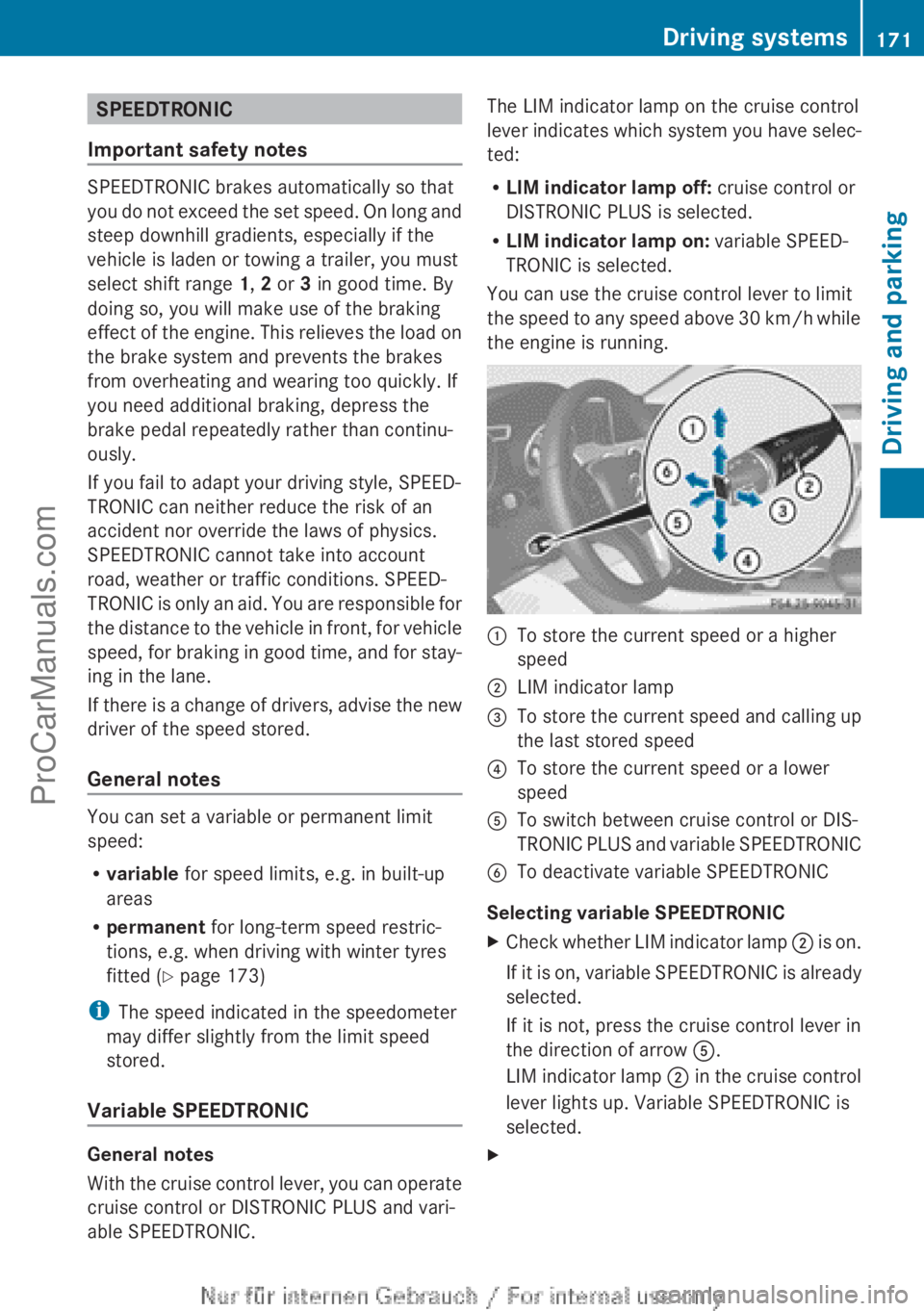
the engine is running.:To store the current speed or a higher
speed;LIM indicator lamp=To store the current speed and calling up
the last stored speed?To store the current speed or a lower
speedATo switch between cruise control or DIS-
TRONIC PLUS and variable SPEEDTRONICBTo deactivate variable SPEEDTRONIC
Selecting variable SPEEDTRONIC
XCheck whether LIM indicator lamp ; is on.
If it is on, variable SPEEDTRONIC is already
selected.
If it is not, press the cruise control lever in
the direction of arrow A.
LIM indicator lamp ; in the cruise control
lever lights up. Variable SPEEDTRONIC is
selected.XDriving systems171Driving and parkingZProCarManuals.com
Page 177 of 352
Selecting DISTRONIC PLUSXCheck whether LIM indicator lamp = is off.
If it is off, DISTRONIC PLUS is already selec-
ted.XIf it is not, press the cruise control lever in
the direction of arrow B.
LIM indicator lamp = in the cruise control
lever goes out. DISTRONIC PLUS is selec-
ted.
Activating DISTRONIC PLUS
Activation conditions
To activate DISTRONIC PLUS, all of the fol-
lowing activation conditions must be fulfilled:
R the engine must be running. It may take up
to two minutes of driving before DIS-
TRONIC PLUS is ready for use.
R the electric parking brake must be
released.
R ESP ®
must be switched on, but not inter-
vening.
R Active Parking Assist must not be activa-
ted.
R the transmission must be in position D.
R the driver's door must be closed when you
shift from P to D or your seat belt must be
fastened.
R the front-passenger door and the rear
doors must be closed.
R the DISTRONIC PLUS function must be
selected with the cruise control lever
( Y page 175).
ActivatingXBriefly pull the cruise control lever towards
you ? or press it up : or down A.
DISTRONIC PLUS is activated.XKeep the cruise control lever pressed
up : or down A until the desired speed
is set.XRemove your foot from the accelerator
pedal.
Your vehicle adapts its speed to that of the
vehicle in front, but only up to the desired
stored speed.
i If you do not fully release the accelerator
pedal, the DISTRONIC PLUS inactive
message appears in the multifunction dis-
play. The set distance to a slower-moving
vehicle in front will then not be maintained.
You will be driving at the speed you deter-
mine by the position of the accelerator
pedal.
You can also activate DISTRONIC PLUS when
stationary. The lowest speed that can be set
is 30 km/h.
XBriefly pull the cruise control lever towards
you ? or press it up : or down A.
DISTRONIC PLUS is activated.
Activating at the current speed/last
stored speed
GWARNING
If you call up a stored speed and this is dif-
ferent from the current speed, the vehicle
accelerates or brakes. If you do not know
what the stored speed is, the vehicle may
accelerate or brake unexpectedly. There is a
risk of an accident.
Take the traffic conditions into account
before calling up the stored speed. If you do
not know what the stored speed is, store the
desired speed again.
Driving systems175Driving and parkingZProCarManuals.com
Page 193 of 352
A warning tone sounds. The parking symbol
disappears and the multifunction display
shows the Park Assist cancelled mes-
sage.
When Active Parking Assist is cancelled, you
must steer again yourself.
Towing a trailer
For vehicles with a trailer tow hitch, the min-
imum required length for parking spaces is
slightly increased.
If you have attached a trailer to your vehicle,
you should not use Active Parking Assist.
Once the electrical connection is established
between your vehicle and the trailer, Active
Parking Assist is no longer available. PARK-
TRONIC is deactivated for the rear area.
Reversing camera
General notes
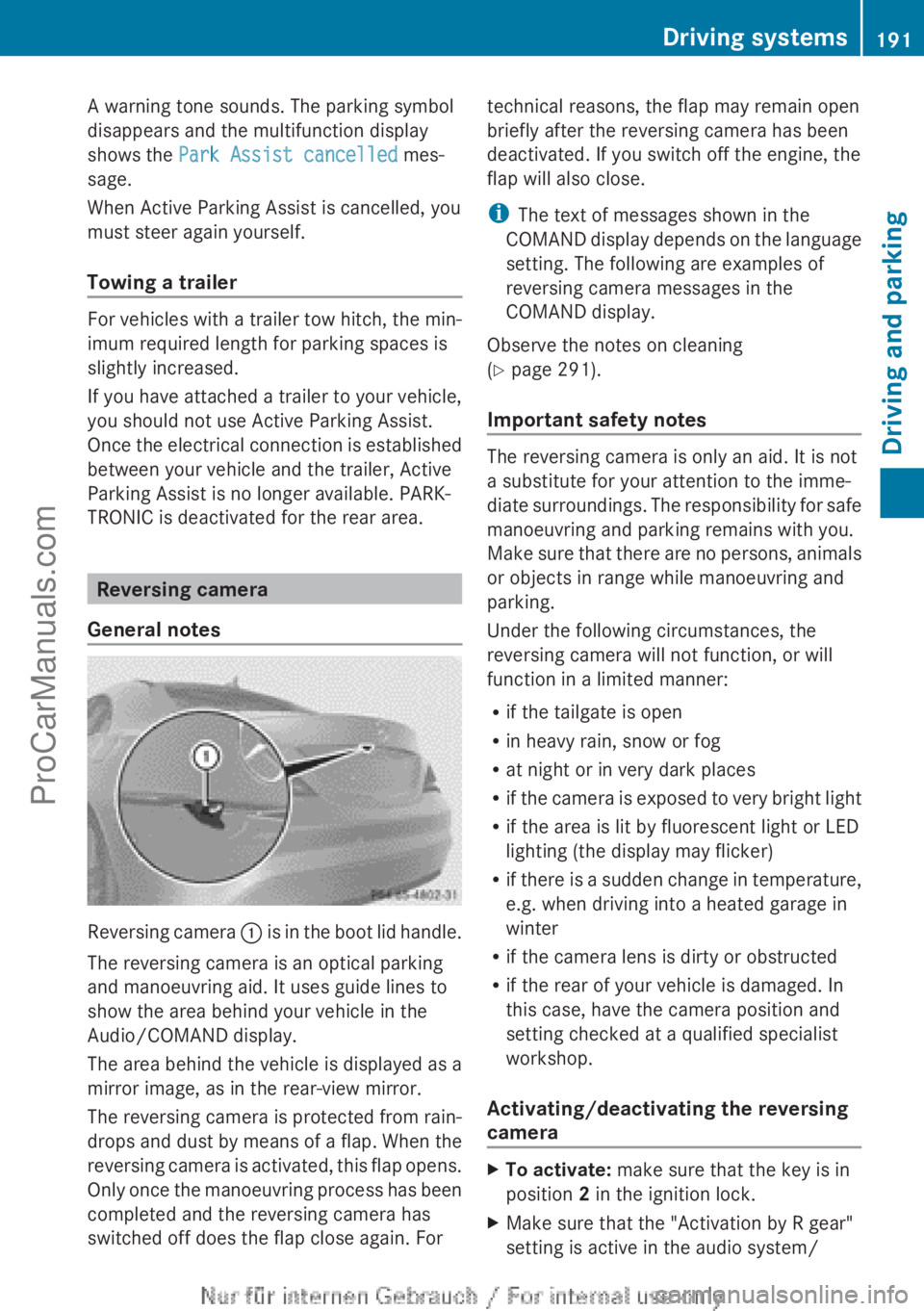
Reversing camera : is in the boot lid handle.
The reversing camera is an optical parking
and manoeuvring aid. It uses guide lines to
show the area behind your vehicle in the
Audio/COMAND display.
The area behind the vehicle is displayed as a
mirror image, as in the rear-view mirror.
The reversing camera is protected from rain-
drops and dust by means of a flap. When the
reversing camera is activated, this flap opens.
Only once the manoeuvring process has been
completed and the reversing camera has
switched off does the flap close again. For
technical reasons, the flap may remain open
briefly after the reversing camera has been
deactivated. If you switch off the engine, the
flap will also close.
i The text of messages shown in the
COMAND display depends on the language
setting. The following are examples of
reversing camera messages in the
COMAND display.
Observe the notes on cleaning
( Y page 291).
Important safety notes
The reversing camera is only an aid. It is not
a substitute for your attention to the imme-
diate surroundings. The responsibility for safe
manoeuvring and parking remains with you.
Make sure that there are no persons, animals
or objects in range while manoeuvring and
parking.
Under the following circumstances, the
reversing camera will not function, or will
function in a limited manner:
R if the tailgate is open
R in heavy rain, snow or fog
R at night or in very dark places
R if the camera is exposed to very bright light
R if the area is lit by fluorescent light or LED
lighting (the display may flicker)
R if there is a sudden change in temperature,
e.g. when driving into a heated garage in
winter
R if the camera lens is dirty or obstructed
R if the rear of your vehicle is damaged. In
this case, have the camera position and
setting checked at a qualified specialist
workshop.
Activating/deactivating the reversing
camera
XTo activate: make sure that the key is in
position 2 in the ignition lock.XMake sure that the "Activation by R gear"
setting is active in the audio system/Driving systems191Driving and parkingZProCarManuals.com
Page 201 of 352
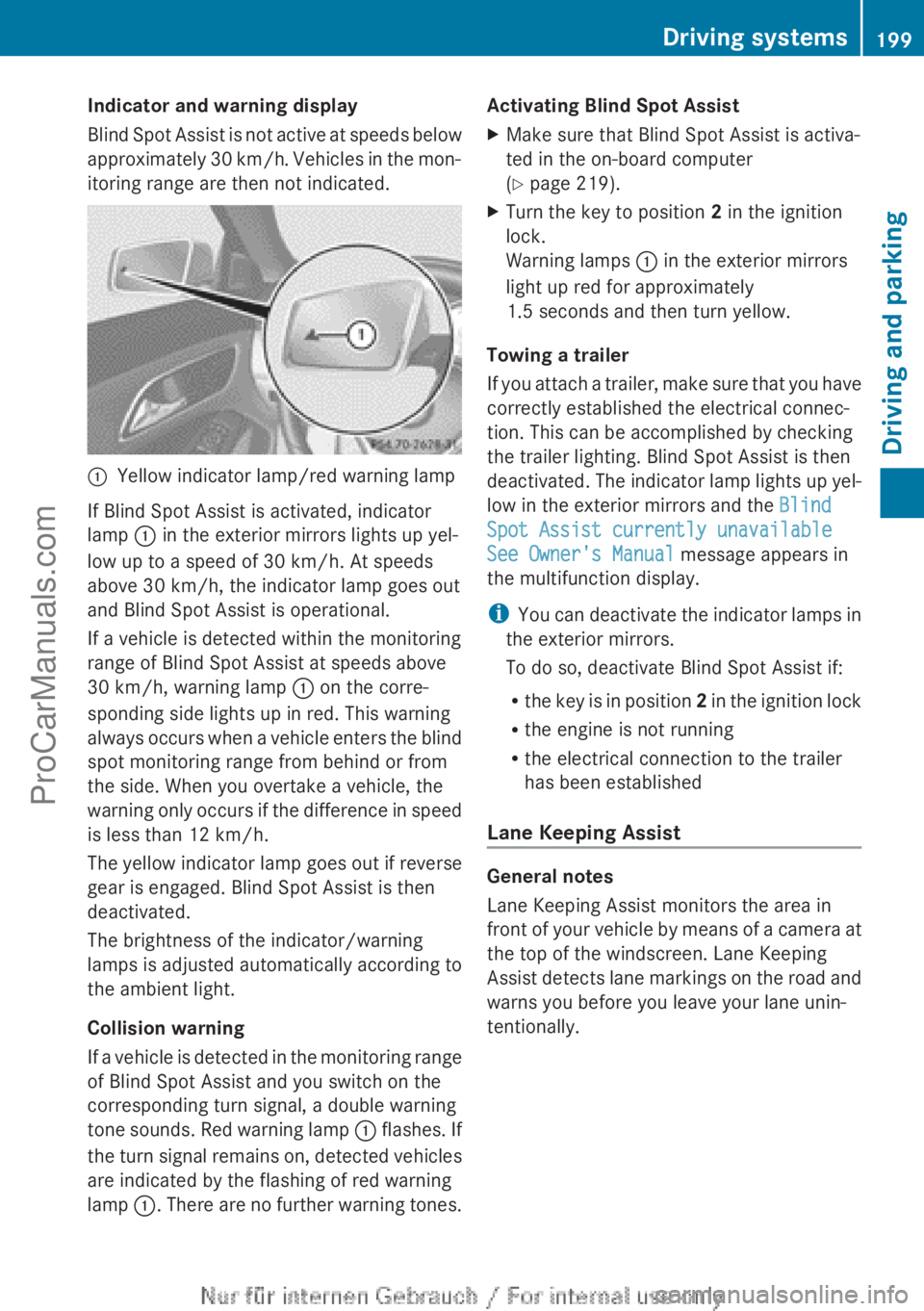
Indicator and warning display
Blind Spot Assist is not active at speeds below
approximately 30 km/h. Vehicles in the mon-
itoring range are then not indicated.:Yellow indicator lamp/red warning lamp
If Blind Spot Assist is activated, indicator
lamp : in the exterior mirrors lights up yel-
low up to a speed of 30 km/h. At speeds
above 30 km/h, the indicator lamp goes out
and Blind Spot Assist is operational.
If a vehicle is detected within the monitoring
range of Blind Spot Assist at speeds above
30 km/h, warning lamp : on the corre-
sponding side lights up in red. This warning
always occurs when a vehicle enters the blind
spot monitoring range from behind or from
the side. When you overtake a vehicle, the
warning only occurs if the difference in speed
is less than 12 km/h.
The yellow indicator lamp goes out if reverse
gear is engaged. Blind Spot Assist is then
deactivated.
The brightness of the indicator/warning
lamps is adjusted automatically according to
the ambient light.
Collision warning
If a vehicle is detected in the monitoring range
of Blind Spot Assist and you switch on the
corresponding turn signal, a double warning
tone sounds. Red warning lamp : flashes. If
the turn signal remains on, detected vehicles
are indicated by the flashing of red warning
lamp :. There are no further warning tones.
Activating Blind Spot AssistXMake sure that Blind Spot Assist is activa-
ted in the on-board computer
( Y page 219).XTurn the key to position 2 in the ignition
lock.
Warning lamps : in the exterior mirrors
light up red for approximately
1.5 seconds and then turn yellow.
Towing a trailer
If you attach a trailer, make sure that you have
correctly established the electrical connec-
tion. This can be accomplished by checking
the trailer lighting. Blind Spot Assist is then
deactivated. The indicator lamp lights up yel-
low in the exterior mirrors and the Blind
Spot Assist currently unavailable
See Owner's Manual message appears in
the multifunction display.
i You can deactivate the indicator lamps in
the exterior mirrors.
To do so, deactivate Blind Spot Assist if:
R the key is in position 2 in the ignition lock
R the engine is not running
R the electrical connection to the trailer
has been established
Lane Keeping Assist
General notes
Lane Keeping Assist monitors the area in
front of your vehicle by means of a camera at
the top of the windscreen. Lane Keeping
Assist detects lane markings on the road and
warns you before you leave your lane unin-
tentionally.
Driving systems199Driving and parkingZProCarManuals.com
Page 205 of 352
(Y page 197) availability is limited or not avail-
able at all.
i The height of the ball coupling changes
with the load of the vehicle. If necessary,
use a trailer with a height-adjustable draw-
bar.
Driving tips
i Observe the notes on ESP ®
trailer stabi-
lisation ( Y page 70).
The maximum permissible speed for vehicle/
trailer combinations depends on the type of
trailer. Before beginning the journey, check
the trailer's documents to see what the max-
imum permitted speed is. Observe the legally
prescribed maximum speed in the relevant
country.
For certain Mercedes-Benz vehicles, the max-
imum permissible rear axle load is increased
when towing a trailer. Refer to the "Technical
data" section to find out whether this applies
to your vehicle. If you utilise any of the added
maximum rear axle load when towing a trailer,
the vehicle/trailer combination may not
exceed a maximum speed of 100 km/h for
reasons concerning the operating permit.
This also applies in countries in which the
permissible maximum speed for vehicle/
trailer combinations is above 100 km/h.
When towing a trailer, your vehicle's handling
characteristics will be different in comparison
to when driving without a trailer and it will
consume more fuel.
Change into a lower gear in good time on long
and steep downhill gradients. For vehicles
with automatic transmission, you need to
have selected manual drive program
M (Y page 156).
i This also applies if you have activated
cruise control, SPEEDTRONIC or DIS-
TRONIC PLUS.
This will use the braking effect of the engine,
so less braking will be required to maintain
vehicle speed. This relieves the load on the
brake system and prevents the brakes from
overheating and wearing too quickly. If you
need additional braking, depress the brake
pedal repeatedly rather than continuously.
i Briefly depressing the accelerator pedal
on downhill gradients while the manual
drive program M is temporarily activated
(vehicles with automatic transmission): the
automatic transmission may switch back to
the last active automatic drive program E
or S. The automatic transmission may shift
to a higher gear. This can reduce the
engine's braking effect.
Driving tips
If the trailer swings from side to side:
XDo not accelerate.XDo not countersteer.XBrake if necessary.
R Maintain a greater distance from the vehi-
cle in front than when driving without a
trailer.
R Avoid braking abruptly. If possible, brake
gently at first to allow the trailer to run on.
Then, increase the braking force rapidly.
R The values given for gradient-climbing
capabilities from a standstill refer to sea
level. When driving in mountainous areas,
note that the power output of the engine,
and consequently the vehicle's gradient-
climbing capability, decrease with increas-
ing altitude.
Folding out the ball coupling
GWARNING
If you release the ball coupling or it does not
engage correctly when folding in, it will swing
out. Within pivoting range of the ball coupling,
there is an increased risk of an accident and
injury.
Only release the ball coupling if the pivoting
range is unobstructed. Always make sure that
the ball coupling engages when folding in.
Towing a trailer203Driving and parkingZProCarManuals.com
Page 210 of 352
Useful information
i This Owner's Manual describes all mod-
els, series and optional equipment for your
vehicle that were available at the time of
going to press. National variations are pos-
sible. Note that your vehicle may not be
equipped with all of the functions descri-
bed. This is also the case for systems and
functions relevant to safety.
i Read the information on qualified special-
ist workshops: ( Y page 24).
Important safety notes
GWARNING
Operating the integrated information systems
and communications equipment in the vehicle
while driving will distract you from traffic con-
ditions. You could then lose control of the
vehicle. There is a risk of an accident.
Only operate these devices if road traffic con-
ditions permit. If you are unsure about the
surrounding conditions, pull over to a safe
location and make entries only while the vehi-
cle is stationary.
GWARNING
If the instrument cluster has failed or mal-
functioned, you may not recognise function
restrictions relevant to safety. The operating
safety of your vehicle may be impaired. There
is a risk of an accident.
Drive on carefully. Have the vehicle checked
at a qualified specialist workshop immedi-
ately.
You must observe the legal requirements for
the country in which you are currently driving
when operating the on-board computer.
The on-board computer only shows messages
or warnings from certain systems in the mul-
tifunction display. You should therefore make
sure your vehicle is operating safely at all
times. Otherwise, a vehicle that is not oper-
ating safely may cause an accident.
For an overview, see the instrument panel
illustration ( Y page 30).
Displays and operation
Instrument cluster lighting
The lighting in the instrument cluster, in the
displays and the controls in the vehicle inte-
rior can be adjusted using the brightness con-
trol knob.
The brightness control knob is on the bottom
left of the instrument cluster ( Y page 30).
XTurn the brightness control knob clockwise
or anti-clockwise.
If the light switch is set to Ã, T or
L , the brightness is dependant upon
the brightness of the ambient light.
i The light sensor in the instrument cluster
automatically controls the brightness of
the multifunction display.
In daylight, the displays in the instrument
cluster are not illuminated.
Coolant temperature gauge
GWARNING
If you open the bonnet while the engine is
overheating or while there is a fire in the
engine compartment, you could come into
contact with hot gases or other leaking
service products. There is a danger of injury.
Allow an overheating engine to cool down
before opening the bonnet. If there is a fire in
the engine compartment, leave the bonnet
closed and notify the fire brigade.
The coolant temperature gauge is in the
instrument cluster on the right-hand side.
Under normal operating conditions and with
the specified coolant level, the coolant tem-
perature may rise to 120 †.
208Displays and operationOn-board computer and displays
ProCarManuals.com
Page 235 of 352
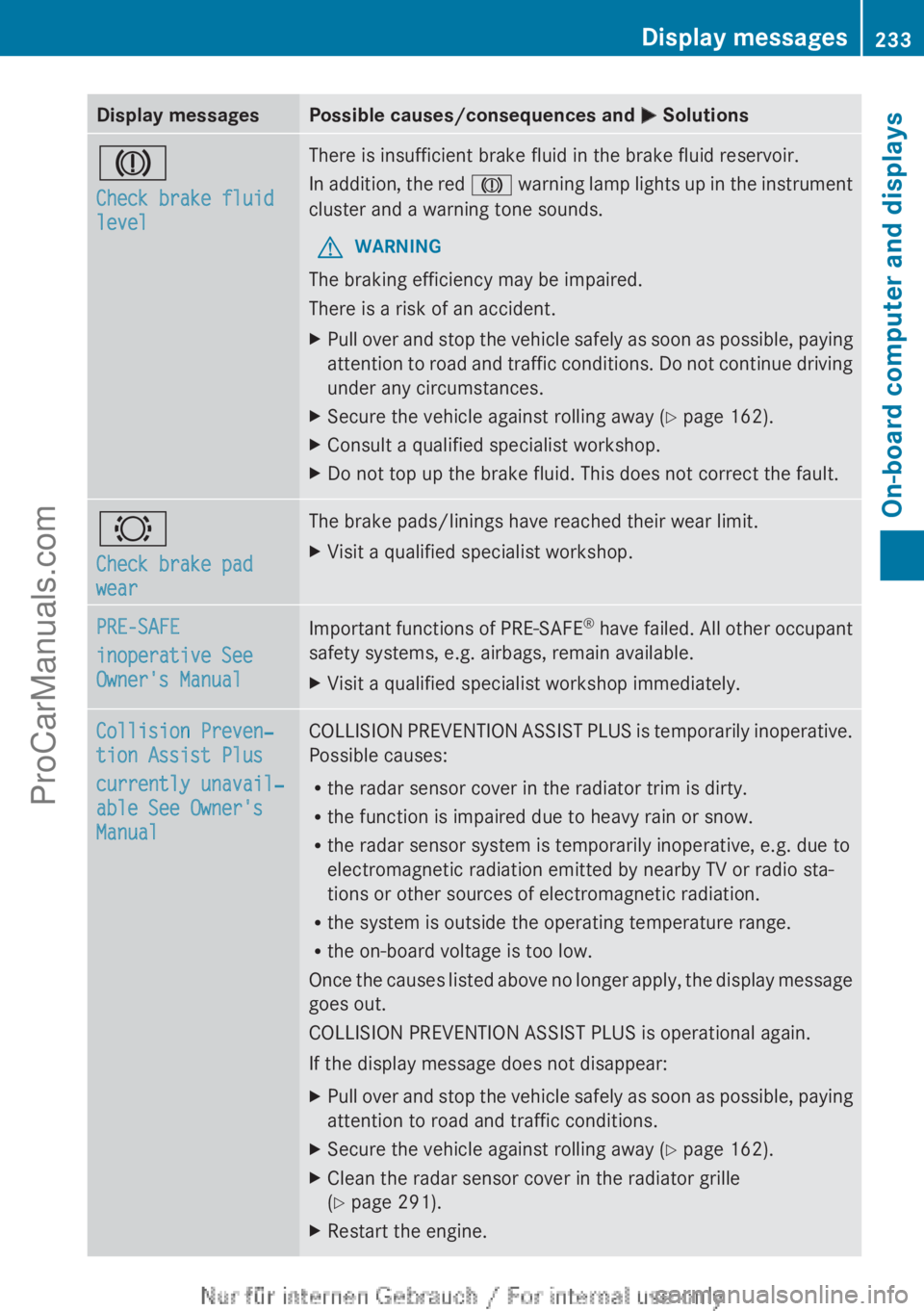
Display messagesPossible causes/consequences and M SolutionsJ
Check brake fluid
levelThere is insufficient brake fluid in the brake fluid reservoir.
In addition, the red J warning lamp lights up in the instrument
cluster and a warning tone sounds.GWARNING
The braking efficiency may be impaired.
There is a risk of an accident.
XPull over and stop the vehicle safely as soon as possible, paying
attention to road and traffic conditions. Do not continue driving
under any circumstances.XSecure the vehicle against rolling away ( Y page 162).XConsult a qualified specialist workshop.XDo not top up the brake fluid. This does not correct the fault.#
Check brake pad
wearThe brake pads/linings have reached their wear limit.XVisit a qualified specialist workshop.PRE-SAFE
inoperative See
Owner's ManualImportant functions of PRE-SAFE ®
have failed. All other occupant
safety systems, e.g. airbags, remain available.XVisit a qualified specialist workshop immediately.Collision Preven‐
tion Assist Plus
currently unavail‐
able See Owner's
ManualCOLLISION PREVENTION ASSIST PLUS is temporarily inoperative.
Possible causes:
R the radar sensor cover in the radiator trim is dirty.
R the function is impaired due to heavy rain or snow.
R the radar sensor system is temporarily inoperative, e.g. due to
electromagnetic radiation emitted by nearby TV or radio sta-
tions or other sources of electromagnetic radiation.
R the system is outside the operating temperature range.
R the on-board voltage is too low.
Once the causes listed above no longer apply, the display message
goes out.
COLLISION PREVENTION ASSIST PLUS is operational again.
If the display message does not disappear:XPull over and stop the vehicle safely as soon as possible, paying
attention to road and traffic conditions.XSecure the vehicle against rolling away ( Y page 162).XClean the radar sensor cover in the radiator grille
( Y page 291).XRestart the engine.Display messages233On-board computer and displaysZProCarManuals.com
Page 242 of 352
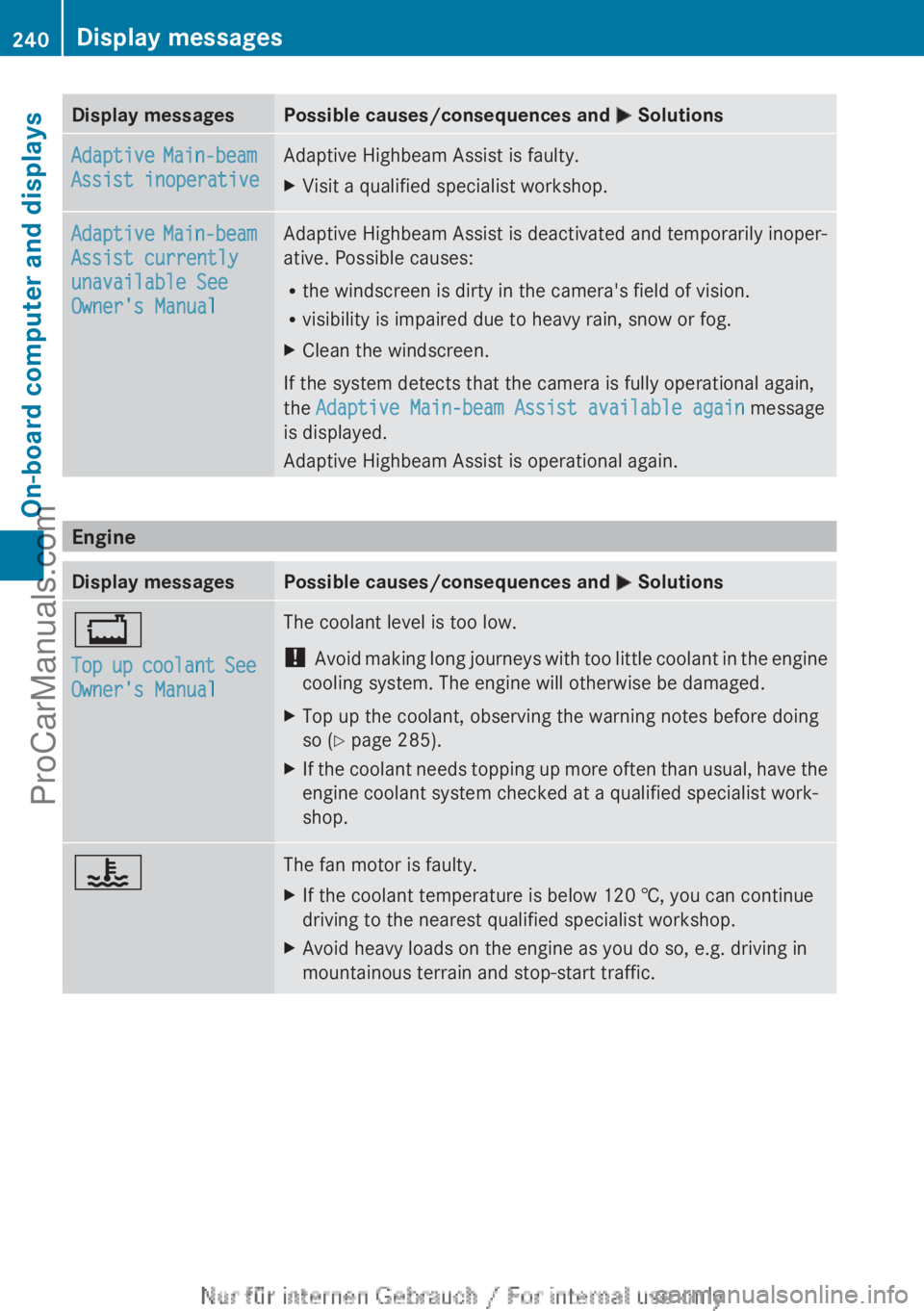
Display messagesPossible causes/consequences and M SolutionsAdaptive Main-beam
Assist inoperativeAdaptive Highbeam Assist is faulty.XVisit a qualified specialist workshop.Adaptive Main-beam
Assist currently
unavailable See
Owner's ManualAdaptive Highbeam Assist is deactivated and temporarily inoper-
ative. Possible causes:
R the windscreen is dirty in the camera's field of vision.
R visibility is impaired due to heavy rain, snow or fog.XClean the windscreen.
If the system detects that the camera is fully operational again,
the Adaptive Main-beam Assist available again message
is displayed.
Adaptive Highbeam Assist is operational again.
Engine
Display messagesPossible causes/consequences and M Solutions+
Top up coolant See
Owner's ManualThe coolant level is too low.
! Avoid making long journeys with too little coolant in the engine
cooling system. The engine will otherwise be damaged.XTop up the coolant, observing the warning notes before doing
so ( Y page 285).XIf the coolant needs topping up more often than usual, have the
engine coolant system checked at a qualified specialist work-
shop.?The fan motor is faulty.XIf the coolant temperature is below 120 †, you can continue
driving to the nearest qualified specialist workshop.XAvoid heavy loads on the engine as you do so, e.g. driving in
mountainous terrain and stop-start traffic.240Display messagesOn-board computer and displays
ProCarManuals.com
Page 243 of 352
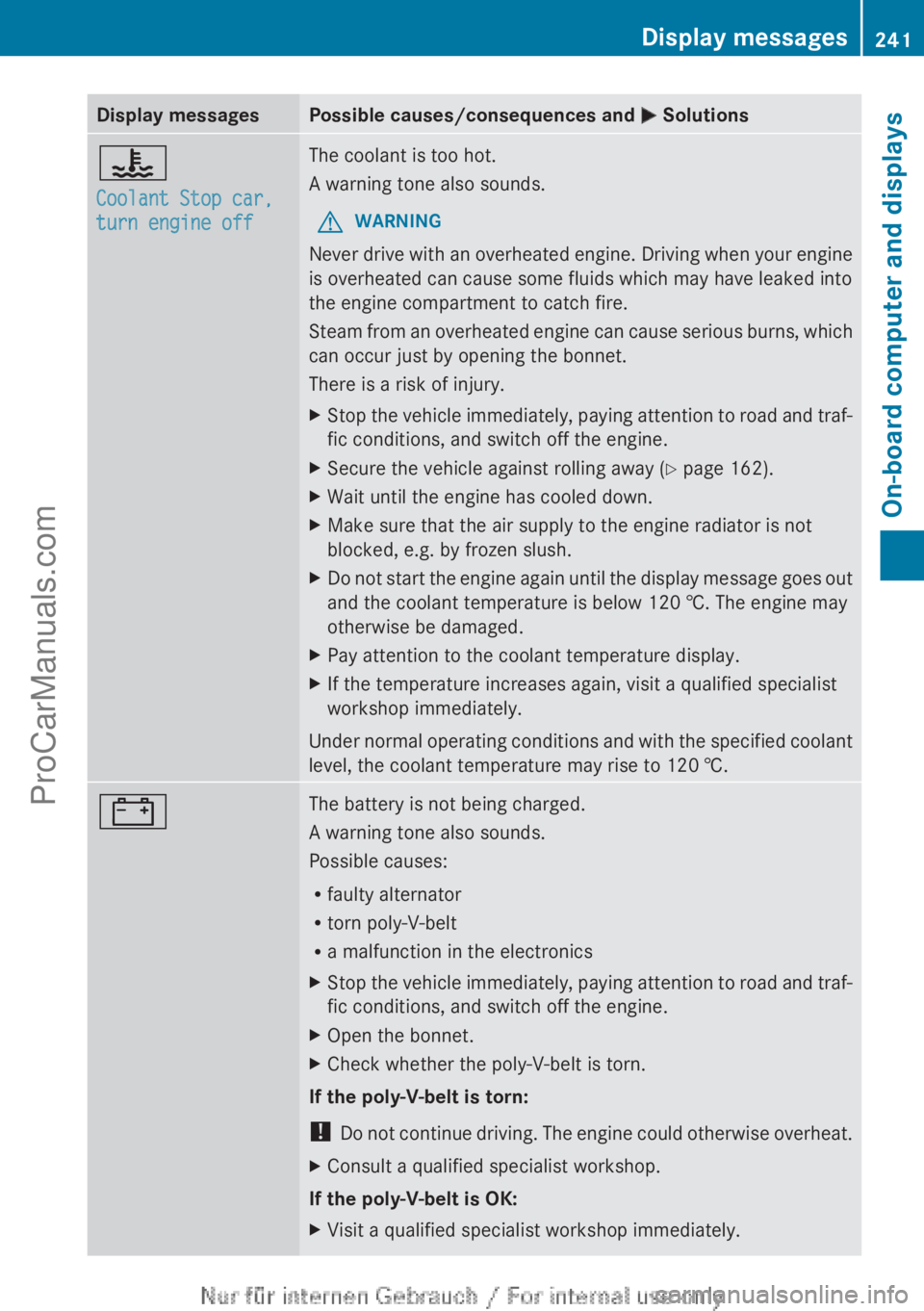
Display messagesPossible causes/consequences and M Solutions?
Coolant Stop car,
turn engine offThe coolant is too hot.
A warning tone also sounds.GWARNING
Never drive with an overheated engine. Driving when your engine
is overheated can cause some fluids which may have leaked into
the engine compartment to catch fire.
Steam from an overheated engine can cause serious burns, which
can occur just by opening the bonnet.
There is a risk of injury.
XStop the vehicle immediately, paying attention to road and traf-
fic conditions, and switch off the engine.XSecure the vehicle against rolling away ( Y page 162).XWait until the engine has cooled down.XMake sure that the air supply to the engine radiator is not
blocked, e.g. by frozen slush.XDo not start the engine again until the display message goes out
and the coolant temperature is below 120 †. The engine may
otherwise be damaged.XPay attention to the coolant temperature display.XIf the temperature increases again, visit a qualified specialist
workshop immediately.
Under normal operating conditions and with the specified coolant
level, the coolant temperature may rise to 120 †.
#The battery is not being charged.
A warning tone also sounds.
Possible causes:
R faulty alternator
R torn poly-V-belt
R a malfunction in the electronicsXStop the vehicle immediately, paying attention to road and traf-
fic conditions, and switch off the engine.XOpen the bonnet.XCheck whether the poly-V-belt is torn.
If the poly-V-belt is torn:
! Do not continue driving. The engine could otherwise overheat.
XConsult a qualified specialist workshop.
If the poly-V-belt is OK:
XVisit a qualified specialist workshop immediately.Display messages241On-board computer and displaysZProCarManuals.com