tow MERCEDES-BENZ CLA-CLASS 2013 Repair Manual
[x] Cancel search | Manufacturer: MERCEDES-BENZ, Model Year: 2013, Model line: CLA-CLASS, Model: MERCEDES-BENZ CLA-CLASS 2013Pages: 352, PDF Size: 5.64 MB
Page 215 of 352
XPress the = or ; button on the steer-
ing wheel to select the Trip menu.XPress the 9 or : button to select the
function that you wish to reset.XPress the a button.XPress the : button to select Yes and
press a to confirm.
i
If you reset the values in the ECO display,
the values in the "From start" trip computer
are also reset. If you reset the values in the
"From start" trip computer, the values in
the ECO display are also reset.
Navigation menu
Displaying navigation instructions
XSwitch on Audio 20 with Becker ®
MAP
PILOT or COMAND Online (see the sepa-
rate operating instructions).XPress the = or ; button on the steer-
ing wheel to select the Navi menu.
In the Navi menu, the multifunction display
shows navigation instructions. For more
information, see the separate operating
instructions.
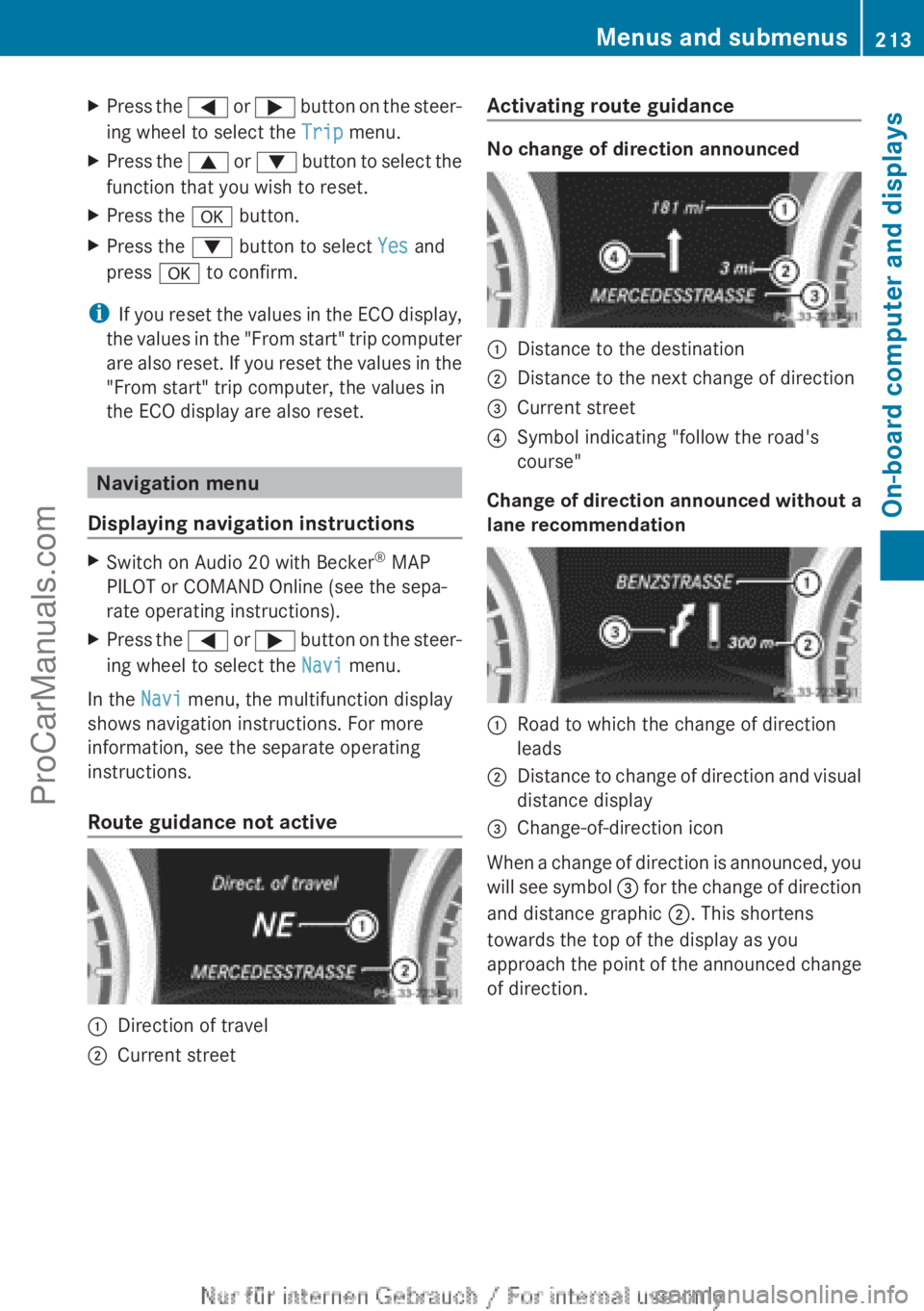
Route guidance not active
:Direction of travel;Current streetActivating route guidance
No change of direction announced
:Distance to the destination;Distance to the next change of direction=Current street?Symbol indicating "follow the road's
course"
Change of direction announced without a
lane recommendation
:Road to which the change of direction
leads;Distance to change of direction and visual
distance display=Change-of-direction icon
When a change of direction is announced, you
will see symbol = for the change of direction
and distance graphic ;. This shortens
towards the top of the display as you
approach the point of the announced change
of direction.
Menus and submenus213On-board computer and displaysZProCarManuals.com
Page 233 of 352
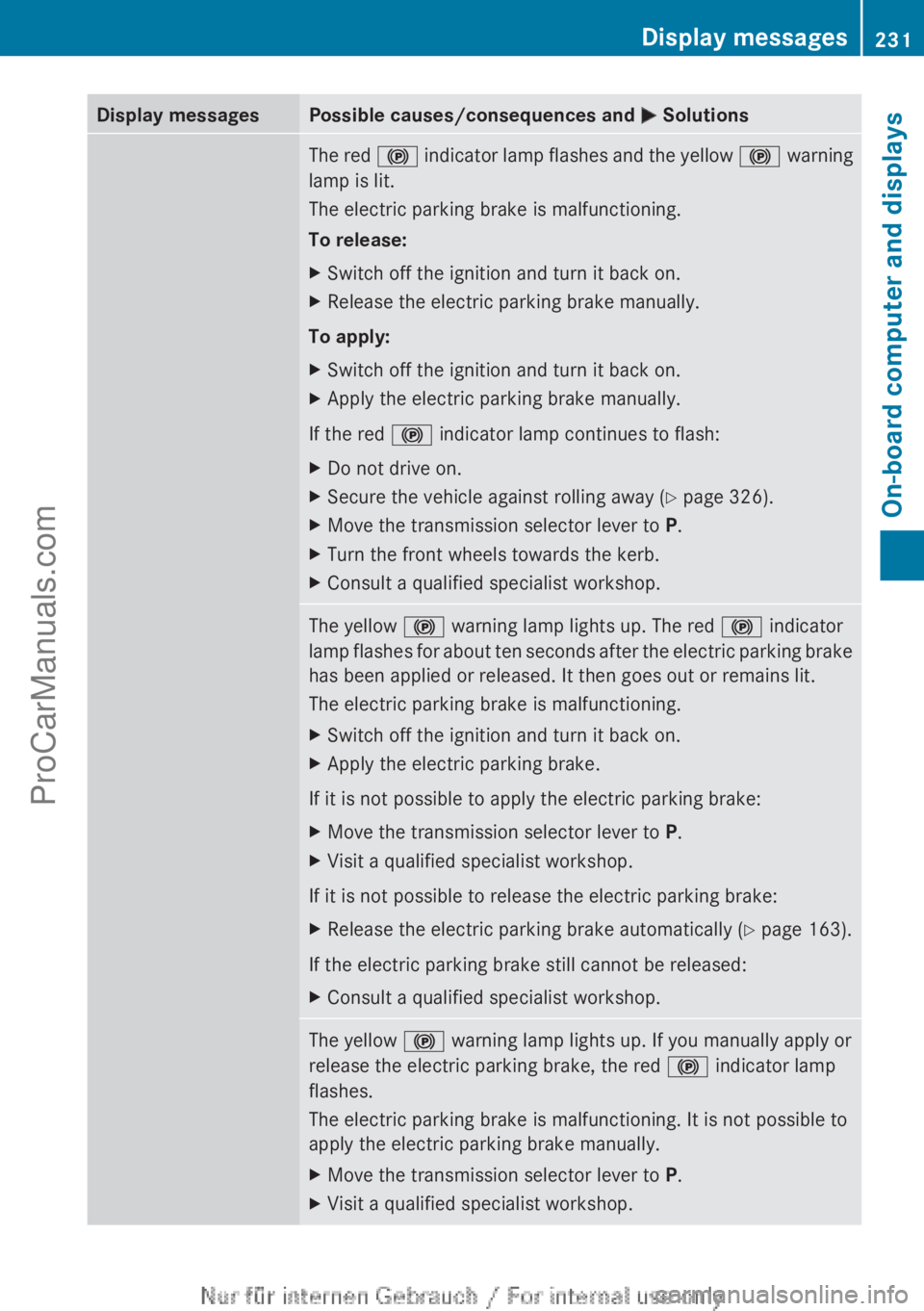
Display messagesPossible causes/consequences and M SolutionsThe red ! indicator lamp flashes and the yellow ! warning
lamp is lit.
The electric parking brake is malfunctioning.
To release:XSwitch off the ignition and turn it back on.XRelease the electric parking brake manually.
To apply:
XSwitch off the ignition and turn it back on.XApply the electric parking brake manually.
If the red ! indicator lamp continues to flash:
XDo not drive on.XSecure the vehicle against rolling away ( Y page 326).XMove the transmission selector lever to P.XTurn the front wheels towards the kerb.XConsult a qualified specialist workshop.The yellow ! warning lamp lights up. The red ! indicator
lamp flashes for about ten seconds after the electric parking brake
has been applied or released. It then goes out or remains lit.
The electric parking brake is malfunctioning.XSwitch off the ignition and turn it back on.XApply the electric parking brake.
If it is not possible to apply the electric parking brake:
XMove the transmission selector lever to P.XVisit a qualified specialist workshop.
If it is not possible to release the electric parking brake:
XRelease the electric parking brake automatically ( Y page 163).
If the electric parking brake still cannot be released:
XConsult a qualified specialist workshop.The yellow ! warning lamp lights up. If you manually apply or
release the electric parking brake, the red ! indicator lamp
flashes.
The electric parking brake is malfunctioning. It is not possible to
apply the electric parking brake manually.XMove the transmission selector lever to P.XVisit a qualified specialist workshop.Display messages231On-board computer and displaysZProCarManuals.com
Page 241 of 352
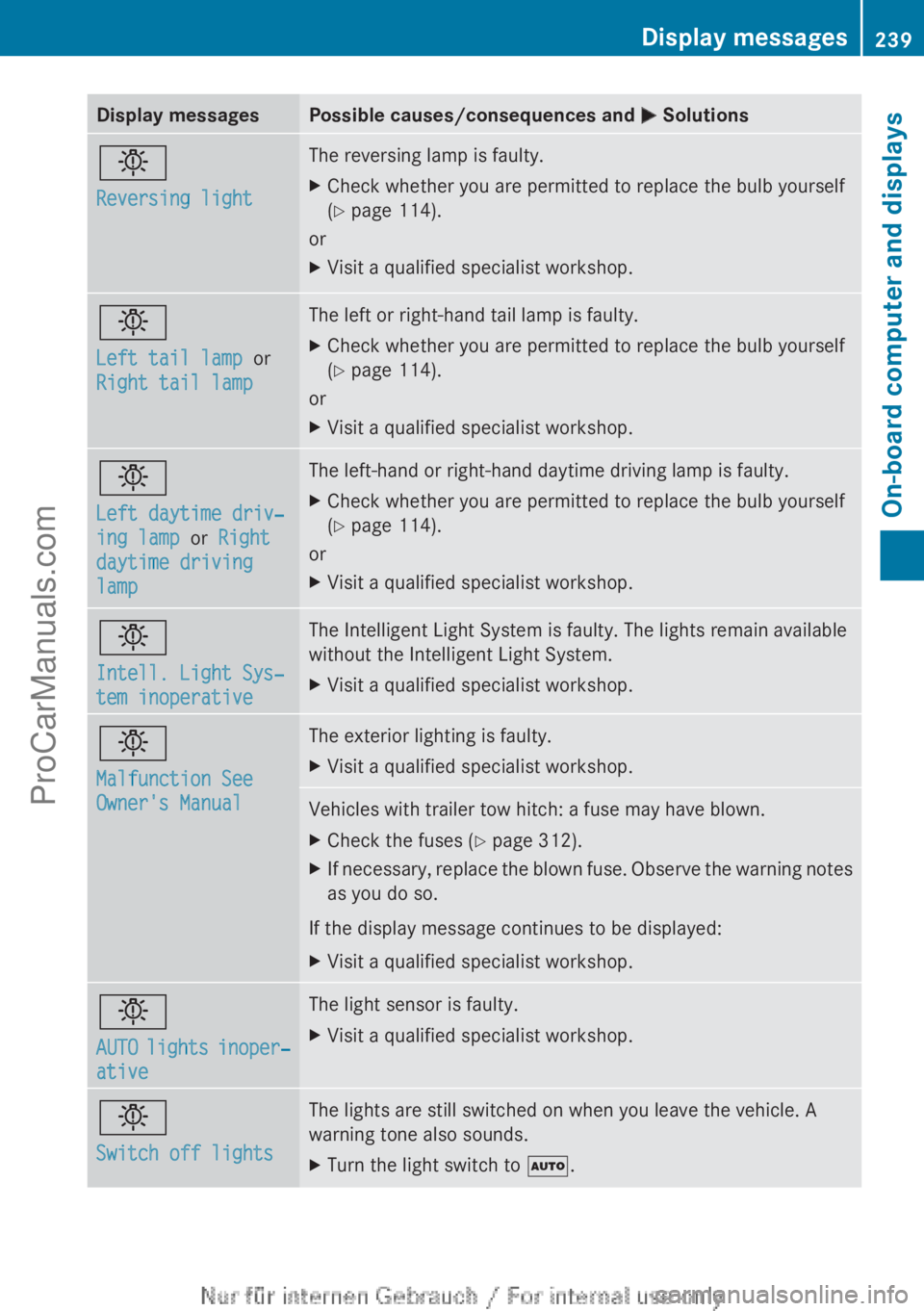
Display messagesPossible causes/consequences and M Solutionsb
Reversing lightThe reversing lamp is faulty.XCheck whether you are permitted to replace the bulb yourself
( Y page 114).
or
XVisit a qualified specialist workshop.b
Left tail lamp or
Right tail lamp The left or right-hand tail lamp is faulty.XCheck whether you are permitted to replace the bulb yourself
( Y page 114).
or
XVisit a qualified specialist workshop.b
Left daytime driv‐
ing lamp or Right
daytime driving
lampThe left-hand or right-hand daytime driving lamp is faulty.XCheck whether you are permitted to replace the bulb yourself
( Y page 114).
or
XVisit a qualified specialist workshop.b
Intell. Light Sys‐
tem inoperativeThe Intelligent Light System is faulty. The lights remain available
without the Intelligent Light System.XVisit a qualified specialist workshop.b
Malfunction See
Owner's ManualThe exterior lighting is faulty.XVisit a qualified specialist workshop.Vehicles with trailer tow hitch: a fuse may have blown.XCheck the fuses ( Y page 312).XIf necessary, replace the blown fuse. Observe the warning notes
as you do so.
If the display message continues to be displayed:
XVisit a qualified specialist workshop.b
AUTO lights inoper‐
ativeThe light sensor is faulty.XVisit a qualified specialist workshop.b
Switch off lightsThe lights are still switched on when you leave the vehicle. A
warning tone also sounds.XTurn the light switch to Ã.Display messages239On-board computer and displaysZProCarManuals.com
Page 246 of 352
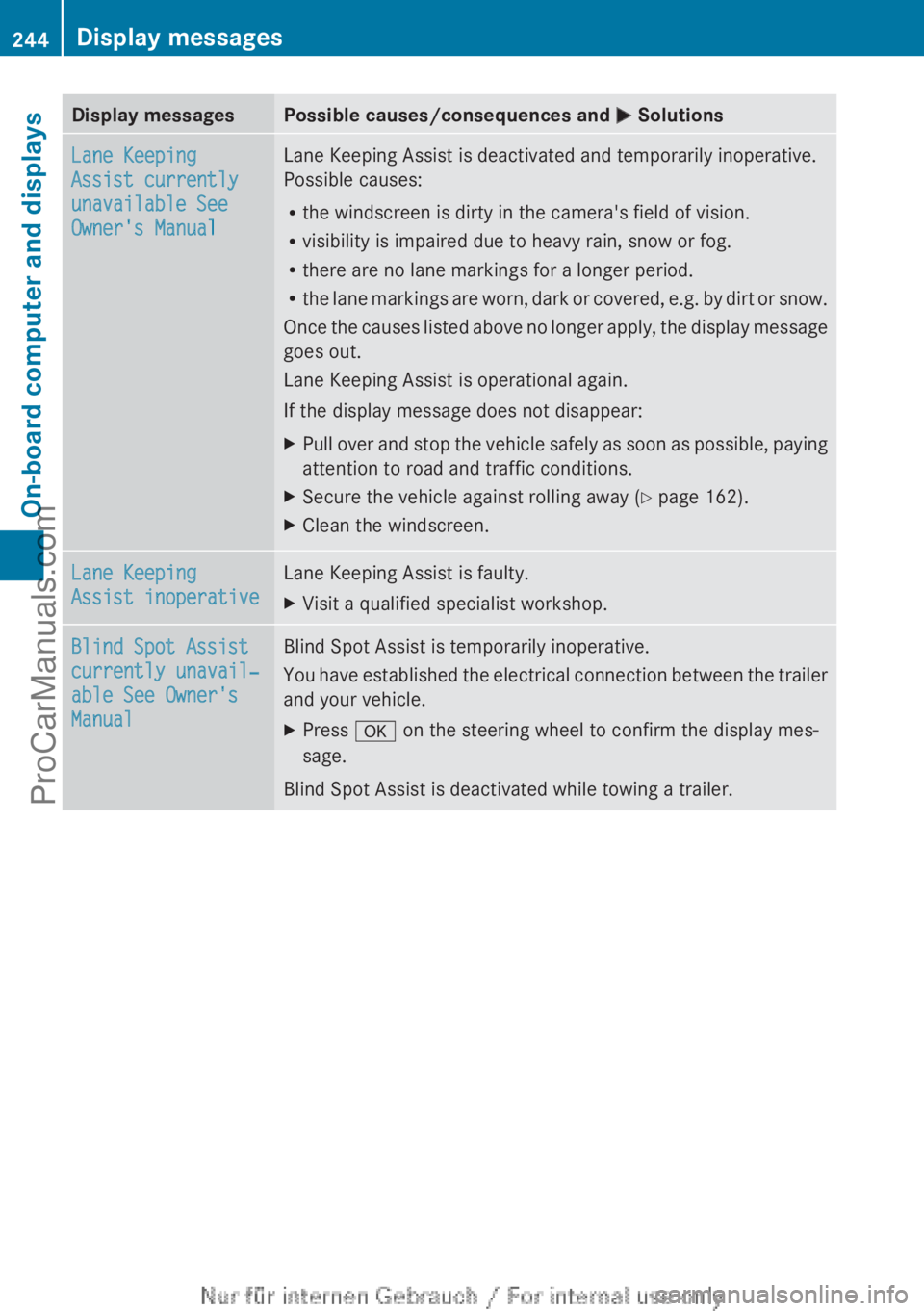
Display messagesPossible causes/consequences and M SolutionsLane Keeping
Assist currently
unavailable See
Owner's ManualLane Keeping Assist is deactivated and temporarily inoperative.
Possible causes:
R the windscreen is dirty in the camera's field of vision.
R visibility is impaired due to heavy rain, snow or fog.
R there are no lane markings for a longer period.
R the lane markings are worn, dark or covered, e.g. by dirt or snow.
Once the causes listed above no longer apply, the display message
goes out.
Lane Keeping Assist is operational again.
If the display message does not disappear:XPull over and stop the vehicle safely as soon as possible, paying
attention to road and traffic conditions.XSecure the vehicle against rolling away ( Y page 162).XClean the windscreen.Lane Keeping
Assist inoperativeLane Keeping Assist is faulty.XVisit a qualified specialist workshop.Blind Spot Assist
currently unavail‐
able See Owner's
ManualBlind Spot Assist is temporarily inoperative.
You have established the electrical connection between the trailer
and your vehicle.XPress a on the steering wheel to confirm the display mes-
sage.
Blind Spot Assist is deactivated while towing a trailer.
244Display messagesOn-board computer and displays
ProCarManuals.com
Page 255 of 352
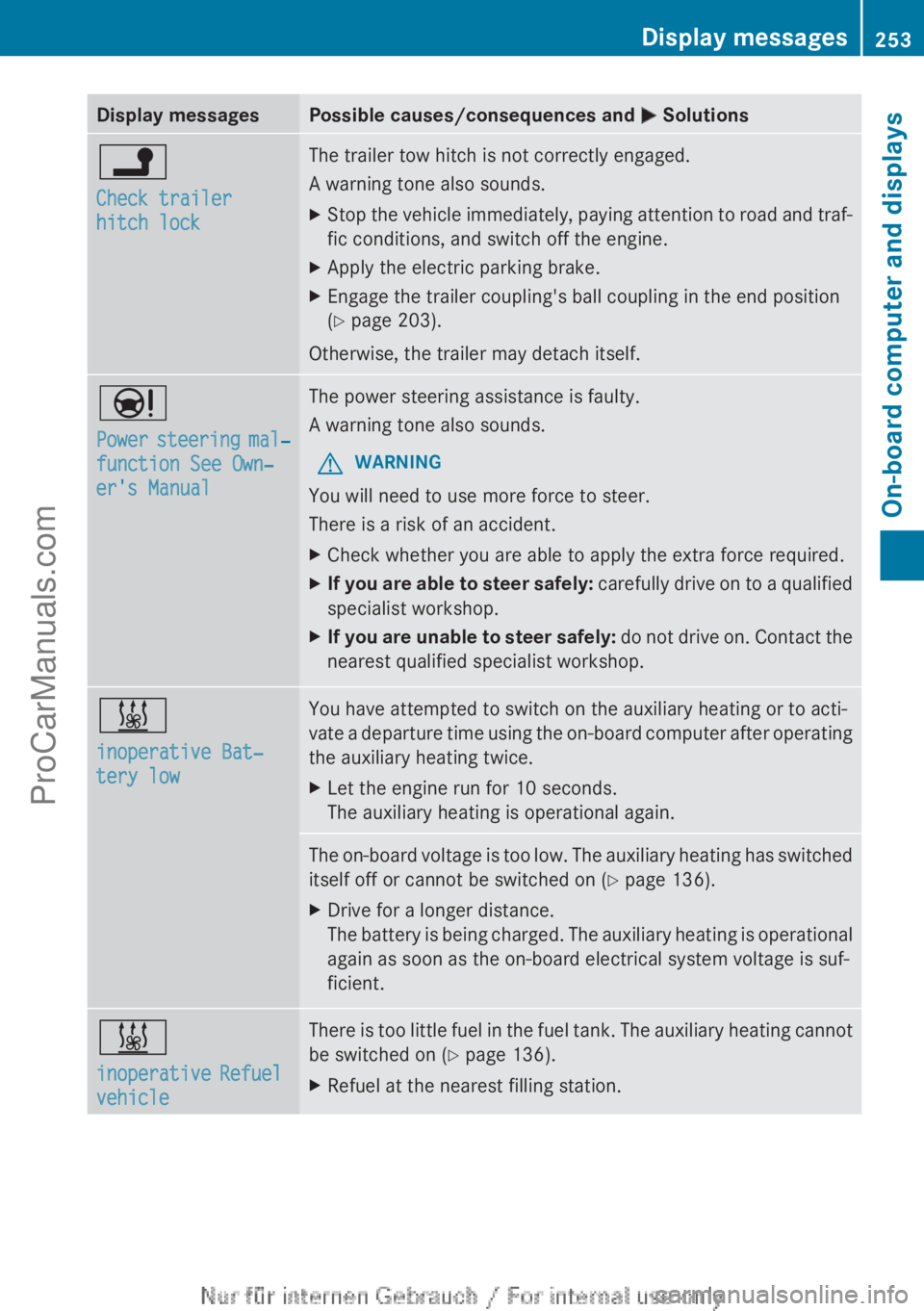
Display messagesPossible causes/consequences and M Solutionsj
Check trailer
hitch lockThe trailer tow hitch is not correctly engaged.
A warning tone also sounds.XStop the vehicle immediately, paying attention to road and traf-
fic conditions, and switch off the engine.XApply the electric parking brake.XEngage the trailer coupling's ball coupling in the end position
( Y page 203).
Otherwise, the trailer may detach itself.
Ð
Power steering mal‐
function See Own‐
er's ManualThe power steering assistance is faulty.
A warning tone also sounds.GWARNING
You will need to use more force to steer.
There is a risk of an accident.
XCheck whether you are able to apply the extra force required.XIf you are able to steer safely: carefully drive on to a qualified
specialist workshop.XIf you are unable to steer safely: do not drive on. Contact the
nearest qualified specialist workshop.&
inoperative Bat‐
tery lowYou have attempted to switch on the auxiliary heating or to acti-
vate a departure time using the on-board computer after operating
the auxiliary heating twice.XLet the engine run for 10 seconds.
The auxiliary heating is operational again.The on-board voltage is too low. The auxiliary heating has switched
itself off or cannot be switched on ( Y page 136).XDrive for a longer distance.
The battery is being charged. The auxiliary heating is operational
again as soon as the on-board electrical system voltage is suf-
ficient.&
inoperative Refuel
vehicleThere is too little fuel in the fuel tank. The auxiliary heating cannot
be switched on ( Y page 136).XRefuel at the nearest filling station.Display messages253On-board computer and displaysZProCarManuals.com
Page 257 of 352
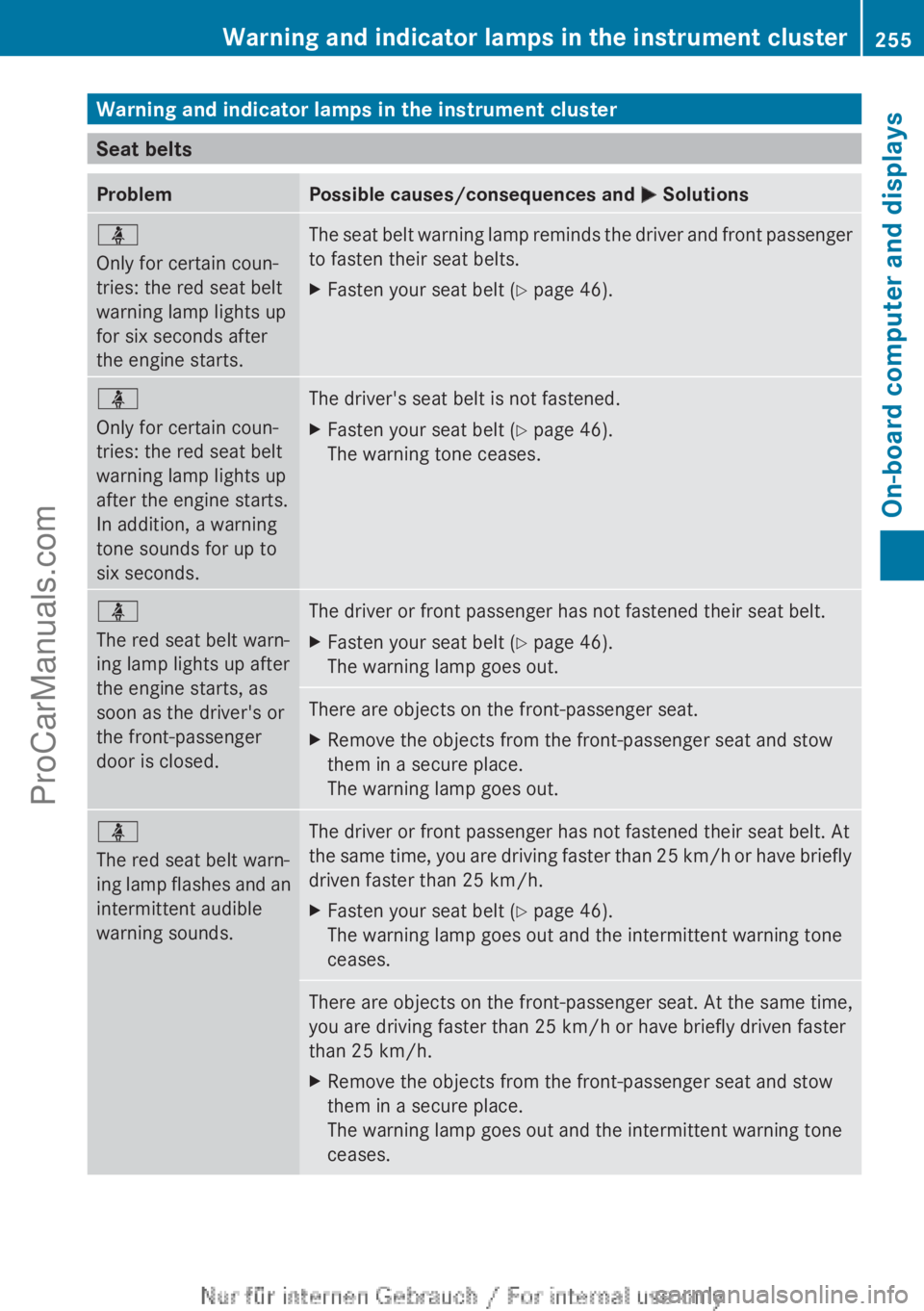
Warning and indicator lamps in the instrument cluster
Seat belts
ProblemPossible causes/consequences and M Solutionsü
Only for certain coun-
tries: the red seat belt
warning lamp lights up
for six seconds after
the engine starts.The seat belt warning lamp reminds the driver and front passenger
to fasten their seat belts.XFasten your seat belt ( Y page 46).ü
Only for certain coun-
tries: the red seat belt
warning lamp lights up
after the engine starts.
In addition, a warning
tone sounds for up to
six seconds.The driver's seat belt is not fastened.XFasten your seat belt ( Y page 46).
The warning tone ceases.ü
The red seat belt warn-
ing lamp lights up after
the engine starts, as
soon as the driver's or
the front-passenger
door is closed.The driver or front passenger has not fastened their seat belt.XFasten your seat belt ( Y page 46).
The warning lamp goes out.There are objects on the front-passenger seat.XRemove the objects from the front-passenger seat and stow
them in a secure place.
The warning lamp goes out.ü
The red seat belt warn-
ing lamp flashes and an
intermittent audible
warning sounds.The driver or front passenger has not fastened their seat belt. At
the same time, you are driving faster than 25 km/h or have briefly
driven faster than 25 km/h.XFasten your seat belt ( Y page 46).
The warning lamp goes out and the intermittent warning tone
ceases.There are objects on the front-passenger seat. At the same time,
you are driving faster than 25 km/h or have briefly driven faster
than 25 km/h.XRemove the objects from the front-passenger seat and stow
them in a secure place.
The warning lamp goes out and the intermittent warning tone
ceases.Warning and indicator lamps in the instrument cluster255On-board computer and displaysZProCarManuals.com
Page 269 of 352
Useful information ............................268
Loading guidelines ............................268
Stowage areas .................................. 268
Features ............................................. 274267Stowing and featuresProCarManuals.com
Page 270 of 352
Useful information
i This Owner's Manual describes all mod-
els, series and optional equipment for your
vehicle that were available at the time of
going to press. National variations are pos-
sible. Note that your vehicle may not be
equipped with all of the functions descri-
bed. This is also the case for systems and
functions relevant to safety.
i Read the information on qualified special-
ist workshops: ( Y page 24).
Loading guidelines
GWARNING
If objects, luggage or loads are not secured or
not secured sufficiently, they could slip, tip
over or be flung around and thereby hit vehicle
occupants. There is a risk of injury, especially
when braking or abruptly changing directions.
Always store objects so that they cannot be
flung around. Secure objects, luggage or
loads against slipping or tipping before the
journey.
GWARNING
Combustion engines emit poisonous exhaust
gases such as carbon monoxide. Exhaust
gases can enter the vehicle interior if the boot
lid is open when the engine is running, espe-
cially if the vehicle is in motion. There is a risk
of poisoning.
Always switch off the engine before opening
the boot lid. Never drive with the boot lid
open.
The handling characteristics of a laden vehi-
cle are dependent on the distribution of the
load within the vehicle. For this reason, you
should observe the following notes when
transporting a load:
R when transporting a load, never exceed the
maximum permissible gross vehicle weight
or the permissible axle loads for the vehicle
(including occupants).
R the boot is the preferred place to carry
objects.
R position heavy loads as far forwards as pos-
sible and as low down in the boot as pos-
sible.
R the load must not protrude above the upper
edge of the seat backrests.
R always place the load against the rear or
front seat backrests. Make sure that the
seat backrests are securely locked into
place.
R always place the load behind unoccupied
seats if possible.
R use the lashing eyelets and the luggage
nets to transport loads and luggage.
R only use lashing eyelets and fastening com-
ponents that are suitable for the weight and
size of the load.
R secure the load with sufficiently strong and
wear-resistant lashing material. Pad sharp
edges for protection.
i Lashing material is available at any quali-
fied specialist workshop.
Stowage areas
Stowage spaces
Important safety notes
GWARNING
If you do not correctly store objects in the
vehicle interior, they can slip or be flung
around, thus striking vehicle occupants.
There is a risk of injury, especially when brak-
ing or abruptly changing directions.
R Always store objects so that they cannot be
flung around in these or in similar situa-
tions.
R Always make sure that objects do not pro-
trude from stowage compartments, lug-
gage nets or stowage nets.
268Stowage areasStowing and features
ProCarManuals.com
Page 271 of 352
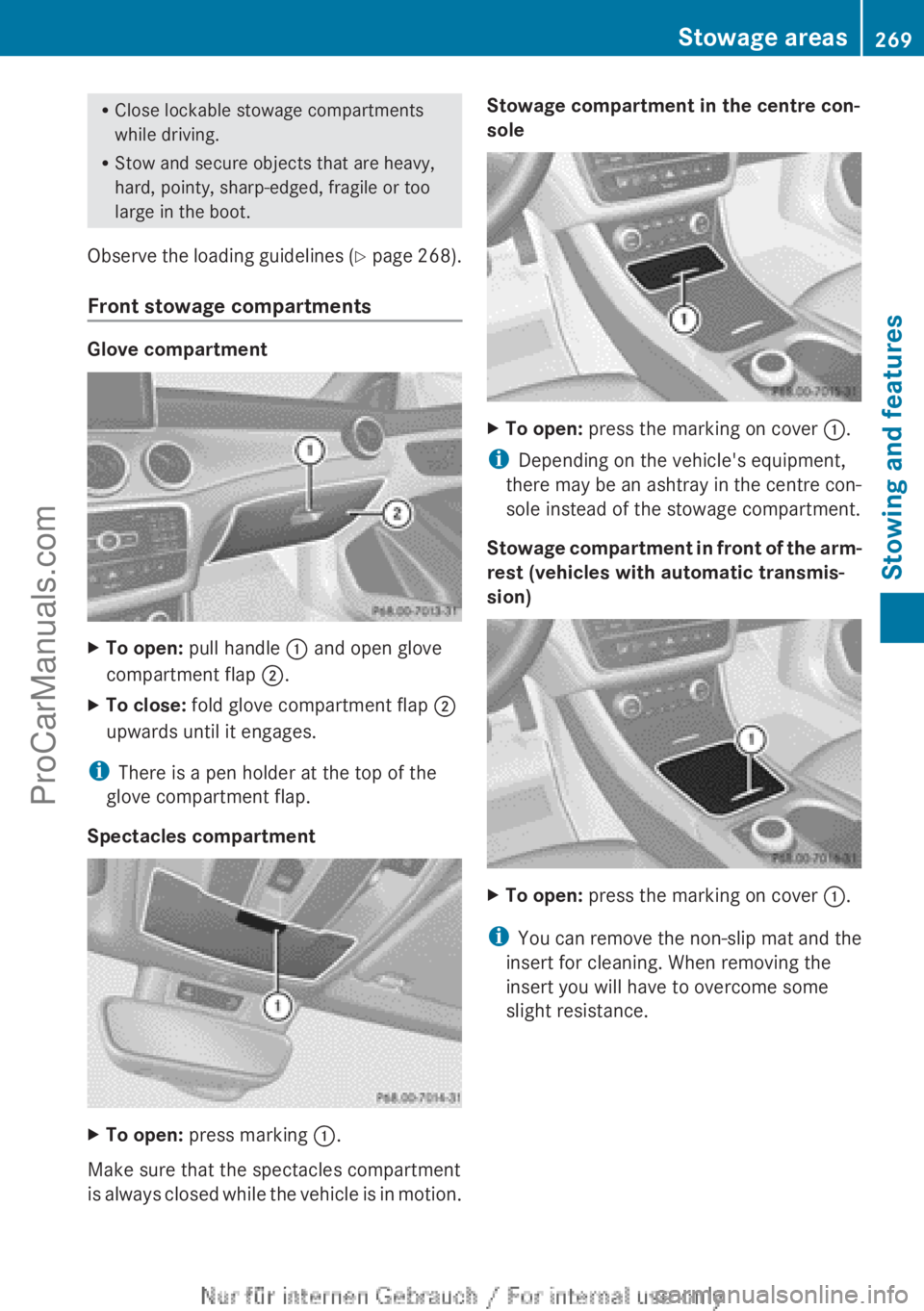
RClose lockable stowage compartments
while driving.
R Stow and secure objects that are heavy,
hard, pointy, sharp-edged, fragile or too
large in the boot.
Observe the loading guidelines (Y page 268).
Front stowage compartments
Glove compartment
XTo open: pull handle : and open glove
compartment flap ;.XTo close: fold glove compartment flap ;
upwards until it engages.
i There is a pen holder at the top of the
glove compartment flap.
Spectacles compartment
XTo open: press marking :.
Make sure that the spectacles compartment
is always closed while the vehicle is in motion.
Stowage compartment in the centre con-
soleXTo open: press the marking on cover :.
i
Depending on the vehicle's equipment,
there may be an ashtray in the centre con-
sole instead of the stowage compartment.
Stowage compartment in front of the arm-
rest (vehicles with automatic transmis-
sion)
XTo open: press the marking on cover :.
i
You can remove the non-slip mat and the
insert for cleaning. When removing the
insert you will have to overcome some
slight resistance.
Stowage areas269Stowing and featuresZProCarManuals.com
Page 272 of 352
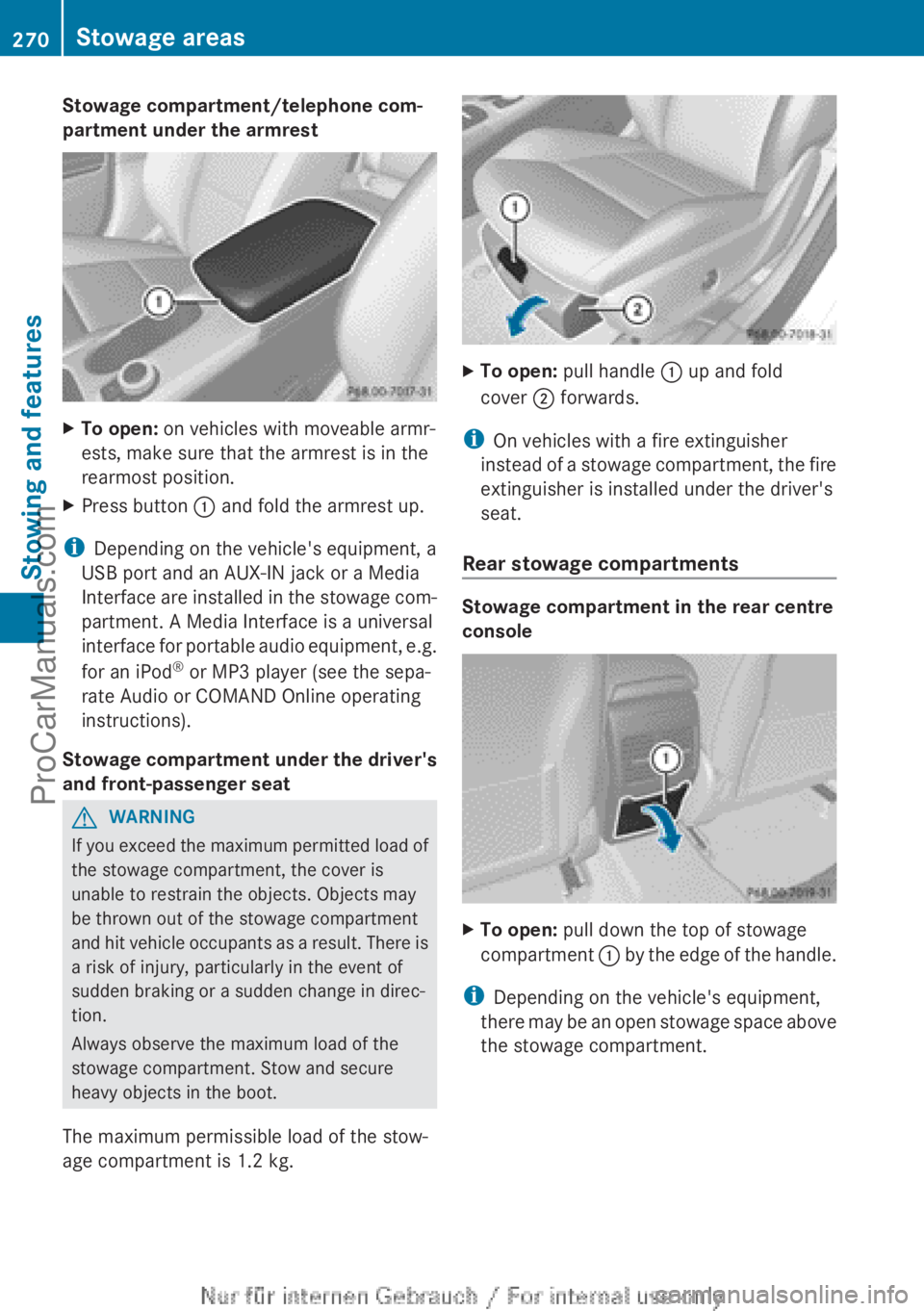
Stowage compartment/telephone com-
partment under the armrestXTo open: on vehicles with moveable armr-
ests, make sure that the armrest is in the
rearmost position.XPress button : and fold the armrest up.
i
Depending on the vehicle's equipment, a
USB port and an AUX-IN jack or a Media
Interface are installed in the stowage com-
partment. A Media Interface is a universal
interface for portable audio equipment, e.g.
for an iPod ®
or MP3 player (see the sepa-
rate Audio or COMAND Online operating
instructions).
Stowage compartment under the driver's
and front-passenger seat
GWARNING
If you exceed the maximum permitted load of
the stowage compartment, the cover is
unable to restrain the objects. Objects may
be thrown out of the stowage compartment
and hit vehicle occupants as a result. There is
a risk of injury, particularly in the event of
sudden braking or a sudden change in direc-
tion.
Always observe the maximum load of the
stowage compartment. Stow and secure
heavy objects in the boot.
The maximum permissible load of the stow-
age compartment is 1.2 kg.
XTo open: pull handle : up and fold
cover ; forwards.
i
On vehicles with a fire extinguisher
instead of a stowage compartment, the fire
extinguisher is installed under the driver's
seat.
Rear stowage compartments
Stowage compartment in the rear centre
console
XTo open: pull down the top of stowage
compartment : by the edge of the handle.
i
Depending on the vehicle's equipment,
there may be an open stowage space above
the stowage compartment.
270Stowage areasStowing and features
ProCarManuals.com