phone MERCEDES-BENZ CLA-Class 2014 C117 Comand Manual
[x] Cancel search | Manufacturer: MERCEDES-BENZ, Model Year: 2014, Model line: CLA-Class, Model: MERCEDES-BENZ CLA-Class 2014 C117Pages: 270, PDF Size: 5.76 MB
Page 143 of 270
on your mobile phone. These calls may or
may not be listed on your mobile phone,
depending on the model.
i If no mobile phone is connected, then the
Call Lists
Call Lists menu item is grayed out and
cannot be selected. If you connect a mobile
phone other than the previous one to
COMAND, the previously available call lists
and their entries will be deleted automati-
cally. They are still available on the mobile
phone itself.
i You will only be able to select the respec-
tive menu items once calls have been
received or dialed from COMAND.
Displaying missed calls in the COMAND
display is not supported by all mobile
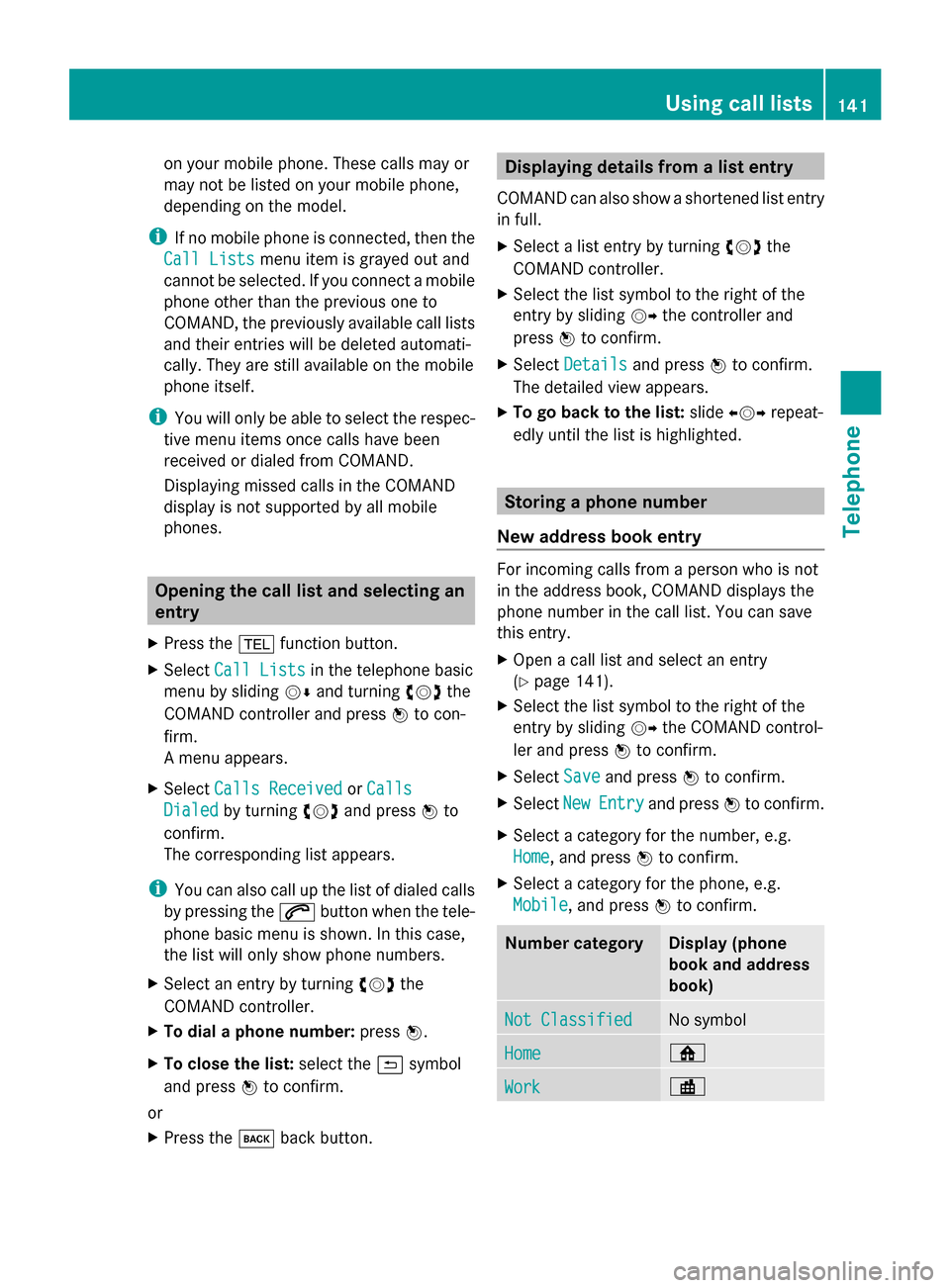
phones. Opening the call list and selecting an
entry
X Press the 002Bfunction button.
X Select Call Lists
Call Lists in the telephone basic
menu by sliding 00520064and turning 00790052007Athe
COMAND controller and press 0098to con-
firm.
A menu appears.
X Select Calls Received Calls Received orCalls
Calls
Dialed
Dialed by turning 00790052007Aand press 0098to
confirm.
The corresponding list appears.
i You can also call up the list of dialed calls
by pressing the 0061button when the tele-
phone basic menu is shown. In this case,
the list will only show phone numbers.
X Select an entry by turning 00790052007Athe
COMAND controller.
X To dial a phone number: press0098.
X To close the list: select the0039symbol
and press 0098to confirm.
or
X Press the 003Dback button. Displaying details from a list entry
COMAND can also show a shortened list entry
in full.
X Select a list entry by turning 00790052007Athe
COMAND controller.
X Select the list symbol to the right of the
entry by sliding 00520096the controller and
press 0098to confirm.
X Select Details Details and press 0098to confirm.
The detailed view appears.
X To go back to the list: slide009500520096 repeat-
edly until the list is highlighted. Storing a phone number
New address book entry For incoming calls from a person who is not
in the address book, COMAND displays the
phone number in the call list. You can save
this entry.
X
Open a call list and select an entry
(Y page 141).
X Select the list symbol to the right of the
entry by sliding 00520096the COMAND control-
ler and press 0098to confirm.
X Select Save
Save and press 0098to confirm.
X Select New NewEntry
Entry and press 0098to confirm.
X Select a category for the number, e.g.
Home Home, and press 0098to confirm.
X Select a category for the phone, e.g.
Mobile Mobile, and press 0098to confirm. Number category Display (phone
book and address
book)
Not Classified Not Classified No symbol
Home
Home 00D5
Work
Work 00D4Using call lists
141Telephone Z
Page 144 of 270
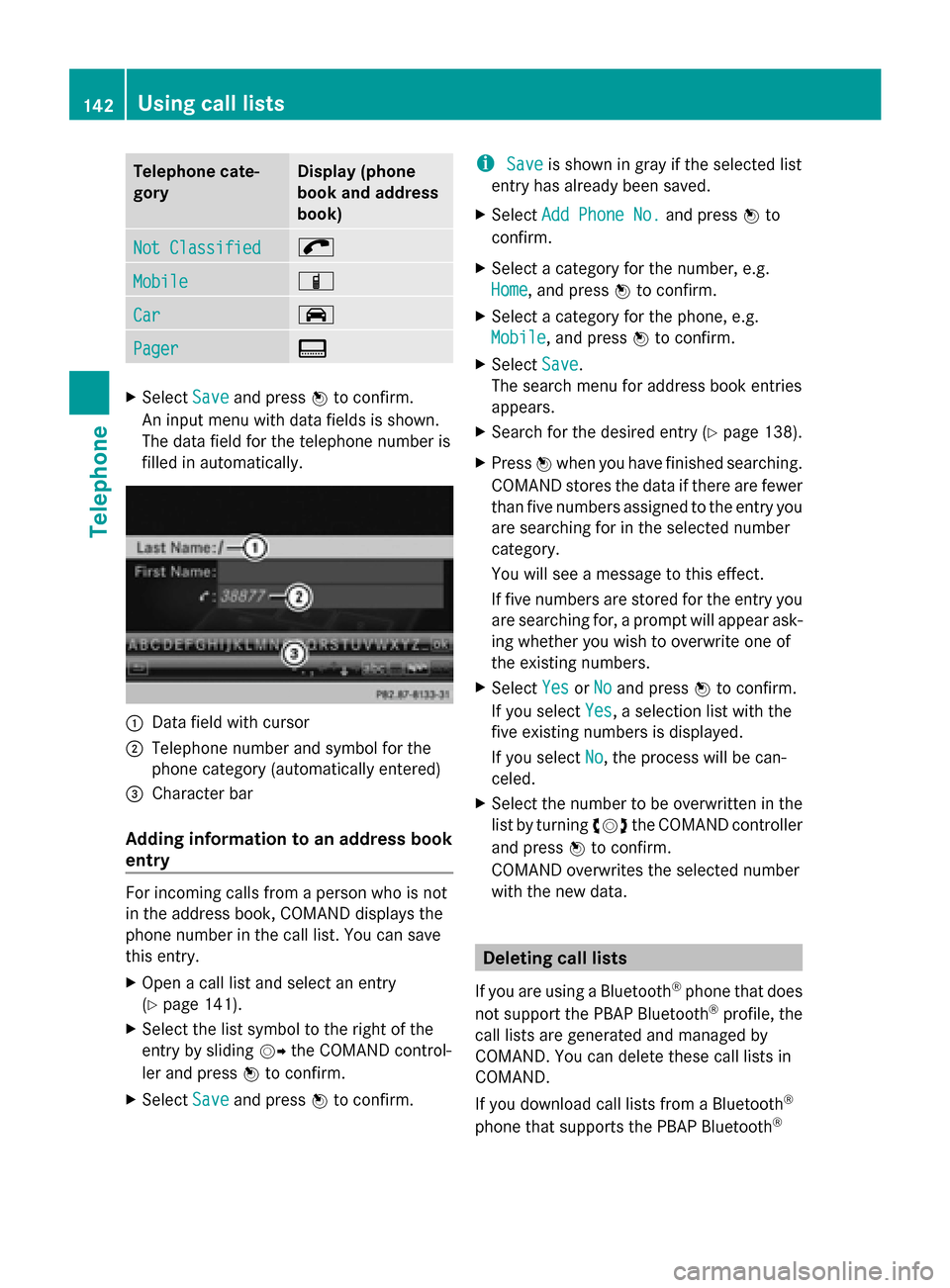
Telephone cate-
gory Display (phone
book and address
book)
Not Classified Not Classified 0066
Mobile
Mobile 00D3
Car Car 00CE
Pager
Pager 009D
X
Select Save Saveand press 0098to confirm.
An input menu with data fields is shown.
The data field for the telephone number is
filled in automatically. 0043
Data field with cursor
0044 Telephone number and symbol for the
phone category (automatically entered)
0087 Character bar
Adding information to an address book
entry For incoming calls from a person who is not
in the address book, COMAND displays the
phone number in the call list. You can save
this entry.
X
Open a call list and select an entry
(Y page 141).
X Select the list symbol to the right of the
entry by sliding 00520096the COMAND control-
ler and press 0098to confirm.
X Select Save
Save and press 0098to confirm. i
Save
Save is shown in gray if the selected list
entry has already been saved.
X Select Add Phone No. Add Phone No. and press0098to
confirm.
X Select a category for the number, e.g.
Home Home, and press 0098to confirm.
X Select a category for the phone, e.g.
Mobile Mobile , and press 0098to confirm.
X Select Save
Save.
The search menu for address book entries
appears.
X Search for the desired entry (Y page 138).
X Press 0098when you have finished searching.
COMAND stores the data if there are fewer
than five numbers assigned to the entry you
are searching for in the selected number
category.
You will see a message to this effect.
If five numbers are stored for the entry you
are searching for, a prompt will appear ask-
ing whether you wish to overwrite one of
the existing numbers.
X Select Yes YesorNo
No and press 0098to confirm.
If you select Yes
Yes, a selection list with the
five existing numbers is displayed.
If you select No No, the process will be can-
celed.
X Select the number to be overwritten in the
list by turning 00790052007Athe COMAND controller
and press 0098to confirm.
COMAND overwrites the selected number
with the new data. Deleting call lists
If you are using a Bluetooth ®
phone that does
not support the PBAP Bluetooth ®
profile, the
call lists are generated and managed by
COMAND. You can delete these call lists in
COMAND.
If you download call lists from a Bluetooth ®
phone that supports the PBAP Bluetooth ®142
Using call listsTelephone
Page 145 of 270
profile, you cannot delete them from
COMAND.
X
Select Call Lists
Call Lists in the telephone basic
menu by turning 00790052007Athe COMAND con-
troller and press 0098to confirm.
X Select Delete Call Lists
Delete Call Lists and press0098
to confirm.
A prompt appears asking whether you wish
to delete all call lists.
X Select Yes
Yes orNo No and press 0098to confirm.
If you select Yes
Yes, the call lists are deleted.
If you select No
No, the process will be can-
celed.
i If you delete these call lists from the
mobile phone (see the separate mobile
phone operating instructions), COMAND
updates the call list display the next time it
connects. Using the speed dial list
Storing an entry
You can assign ten speed dial presets (0 – 9)
to the speed dial list. There are two options
available for this purpose.
Option 1:
X Search for a phone book entry in the phone
book (Y page 138).
X If an entry has several phone numbers,
select the desired number by turning
00790052007A the COMAND controller.
X Select the list symbol to the right of the
entry by sliding 00520096the COMAND control-
ler and press 0098to confirm.
A menu appears.
X Select Speed Dial
Speed Dial by turning00790052007Athe
COMAND controller and press 0098to con-
firm.
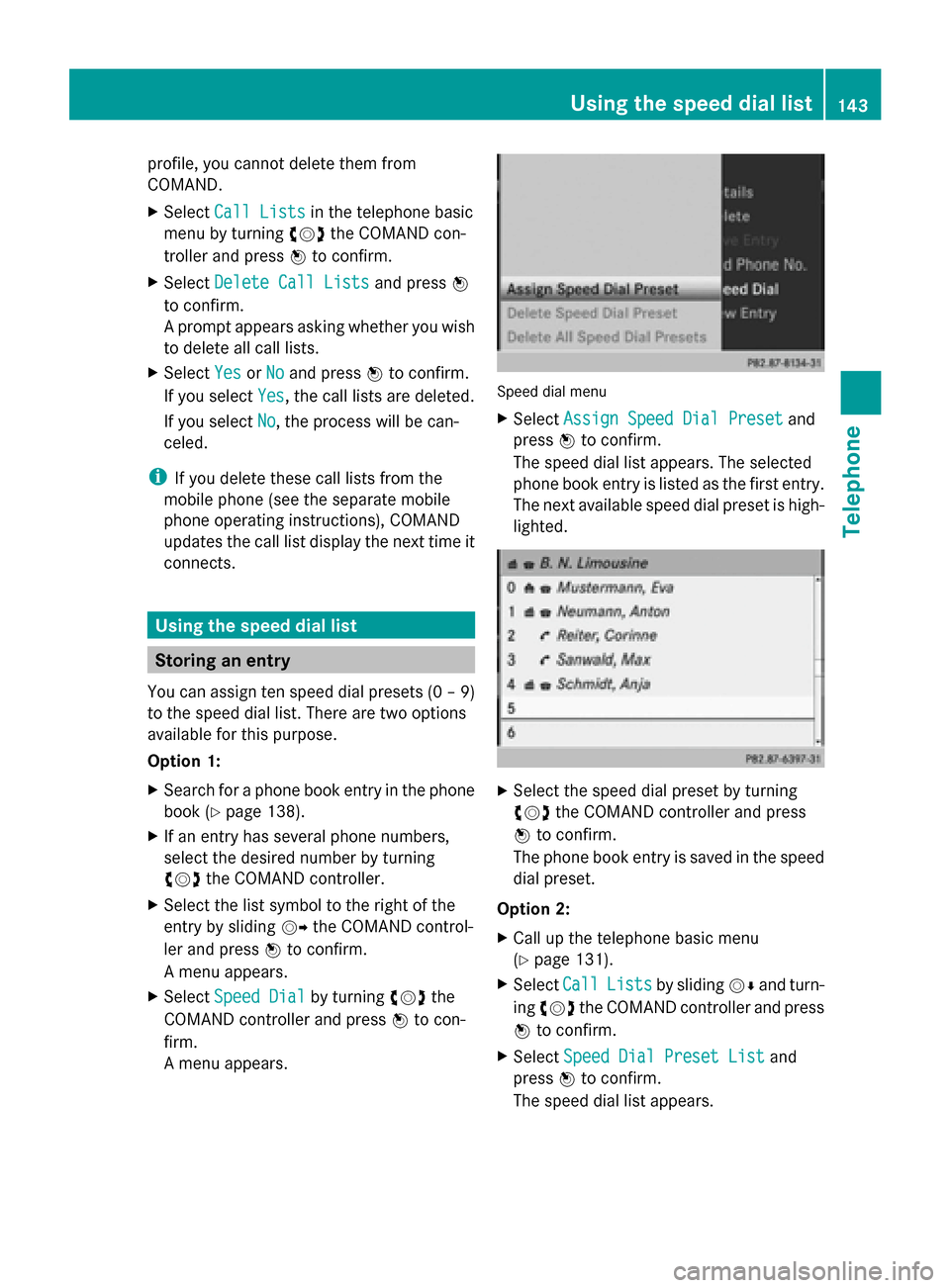
A menu appears. Speed dial menu
X
Select Assign Speed Dial Preset Assign Speed Dial Preset and
press 0098to confirm.
The speed dial list appears. The selected
phone book entry is listed as the first entry.
The next available speed dial preset is high-
lighted. X
Select the speed dial preset by turning
00790052007A the COMAND controller and press
0098 to confirm.
The phone book entry is saved in the speed
dial preset.
Option 2:
X Call up the telephone basic menu
(Y page 131).
X Select Call CallLists
Lists by sliding 00520064and turn-
ing 00790052007A the COMAND controller and press
0098 to confirm.
X Select Speed Dial Preset List
Speed Dial Preset List and
press 0098to confirm.
The speed dial list appears. Using the speed dial list
143Telephone Z
Page 146 of 270
X
Select the list symbol to the right of the
entry by sliding 00520096the COMAND control-
ler and press 0098to confirm.
X Select Assign Speed Dial Preset
Assign Speed Dial Preset and
press 0098to confirm.
The speed dial list appears. The selected
phone book entry is listed as the first entry.
The next available speed dial preset is high-
lighted. X
Select the speed dial preset by turning
00790052007A the COMAND controller and press
0098 to confirm.
The phone book entry is saved in the speed
dial preset. Making a call via speed dial
The speed dial list contains stored phone
book entries (Y page 143).
Option 1:
X Hold down one of the number keys for lon-
ger than two seconds.
The telephone basic menu displays the
selected entry. This initiates dialing.
Option 2:
X Call up the telephone basic menu
(Y page 131).
X Select Call
Call Lists Lists by sliding 00520064and turn-
ing 00790052007A the COMAND controller and press
0098 to confirm.
The speed dial list appears. X
Select Speed
Speed Dial
DialPreset
Preset List
Listby turn-
ing 00790052007A the COMAND controller and press
0098 to confirm.
The speed dial list appears.
X Select preset and press 0098to confirm.
The telephone basic menu displays the
selected entry. This initiates dialing. Deleting a speed dial number
X To delete a speed dial number: select
Delete Speed Dial Preset Delete Speed Dial Preset in the
"Speed dial" menu by turning 00790052007Athe
COMAND controller and press 0098to con-
firm.
The speed dial number is deleted.
X To delete all speed dial numbers: select
Delete All Speed Dial Presets Delete All Speed Dial Presets in the
"Speed dial" menu by turning 00790052007Athe
COMAND controller and press 0098to con-
firm.
You will be asked whether you want to con-
tinue.
X Select Yes
Yes orNo No and press 0098to confirm.
If you select Yes
Yes, all speed dial presets will
be deleted from the speed dial list.
If you select No No, the process will be can-
celed. Text messages
Information and requirements
In order to be able to use the text message
function, the mobile phone has to support the
MAP Bluetooth ®
profile (Message Access
Profile).
If the above conditions are met, new incoming
text messages appear in the COMAND text
message inbox. The 008Fsymbol appears in
the status bar. The symbol disappears once
you have read the text message. The ú
mail symbol is displayed if the text message
memory is full. The symbol is no longer dis- 144
Text messagesTelephone
Page 147 of 270
played once you delete at least one text mes-
sage.
i COMAND may not load all of the most
recent text messages:
This may occur in exceptional cases, for
example when using certain mobile
phones/brackets and if the mobile phone
inbox holds a large number of text mes-
sages. Displaying the text message inbox
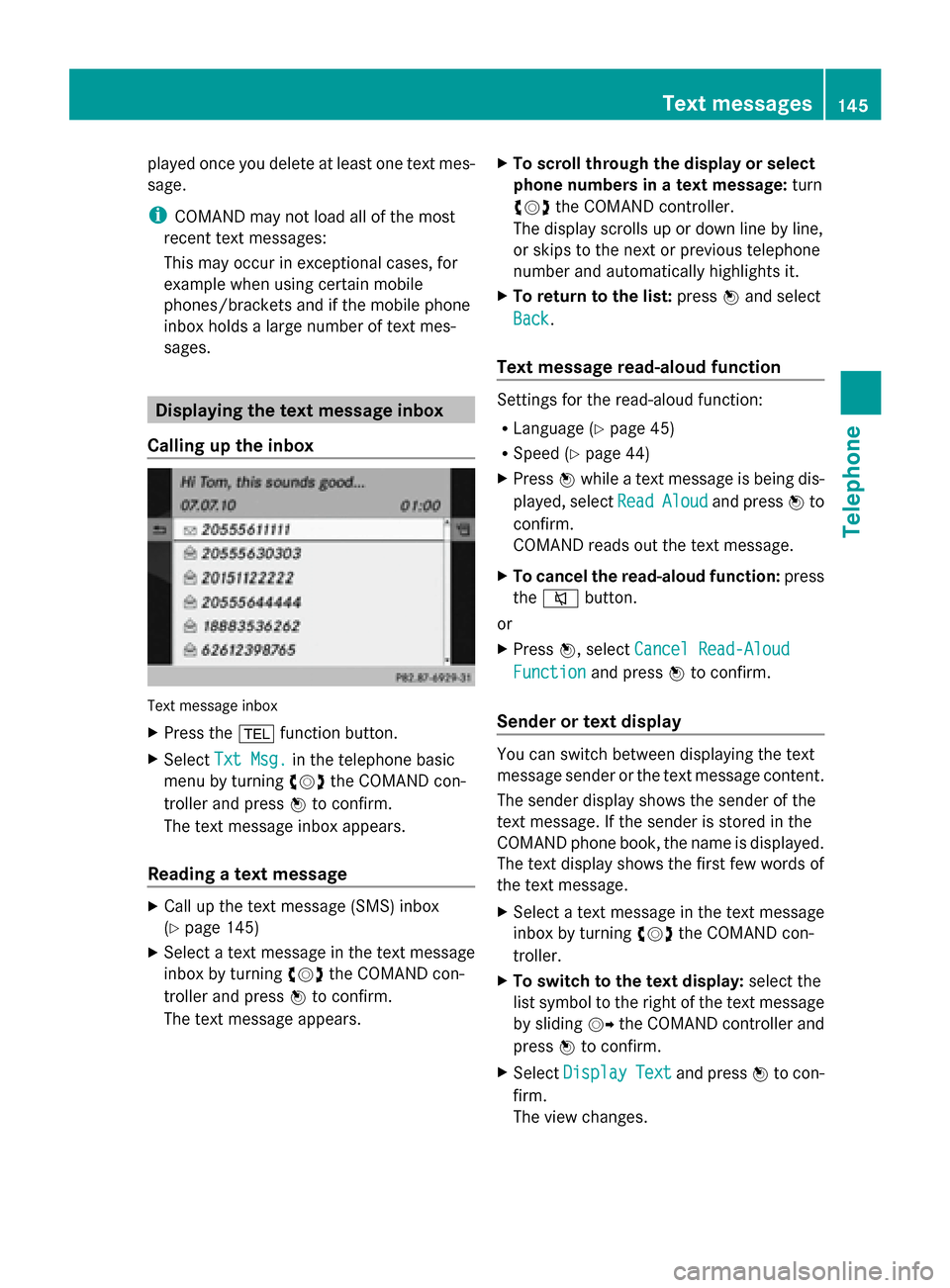
Calling up the inbox Text message inbox
X
Press the 002Bfunction button.
X Select Txt Msg.
Txt Msg. in the telephone basic
menu by turning 00790052007Athe COMAND con-
troller and press 0098to confirm.
The text message inbox appears.
Reading a text message X
Call up the text message (SMS) inbox
(Y page 145)
X Select a text message in the text message
inbox by turning 00790052007Athe COMAND con-
troller and press 0098to confirm.
The text message appears. X
To scroll through the display or select
phone numbers in a text message: turn
00790052007A the COMAND controller.
The display scrolls up or down line by line,
or skips to the next or previous telephone
number and automatically highlights it.
X To return to the list: press0098and select
Back
Back.
Text message read-aloud function Settings for the read-aloud function:
R
Language (Y page 45)
R Speed (Y page 44)
X Press 0098while a text message is being dis-
played, select Read ReadAloud
Aloud and press 0098to
confirm.
COMAND reads out the text message.
X To cancel the read-aloud function: press
the 0063 button.
or
X Press 0098, select Cancel Read-Aloud
Cancel Read-Aloud
Function Function and press0098to confirm.
Sender or text display You can switch between displaying the text
message sender or the text message content.
The sender display shows the sender of the
text message. If the sender is stored in the
COMAND phone book, the name is displayed.
The text display shows the first few words of
the text message.
X
Select a text message in the text message
inbox by turning 00790052007Athe COMAND con-
troller.
X To switch to the text display: select the
list symbol to the right of the text message
by sliding 00520096the COMAND controller and
press 0098to confirm.
X Select Display Display Text
Text and press 0098to con-
firm.
The view changes. Text messages
145Telephone Z
Page 148 of 270
X
To switch to the sender display: select
the list symbol to the right of the text mes-
sage by sliding 00520096the COMAND controller
and press 0098to confirm.
X Select Display Sender
Display Sender and press0098to
confirm.
The view changes.
X To return to the telephone basic menu:
press the 003Dbutton.
Displaying details and phone numbers COMAND can also show a shortened sender
display in full.
X Select a text message in the text message
inbox by turning 00790052007Athe COMAND con-
troller.
X Select the list symbol to the right of the text
message by sliding 00520096the COMAND con-
troller and press 0098to confirm.
X Select Details Details and press 0098to confirm.
The detailed view appears.
X To close the detailed view: slide009500520096 the
COMAND controller.
X To return to the telephone basic menu:
press the 003Dbutton. Managing text messages
Calling a text message sender X
Press 0098the COMAND controller while the
text message is being displayed.
X Select Call Sender
Call Sender and press0098to con-
firm.
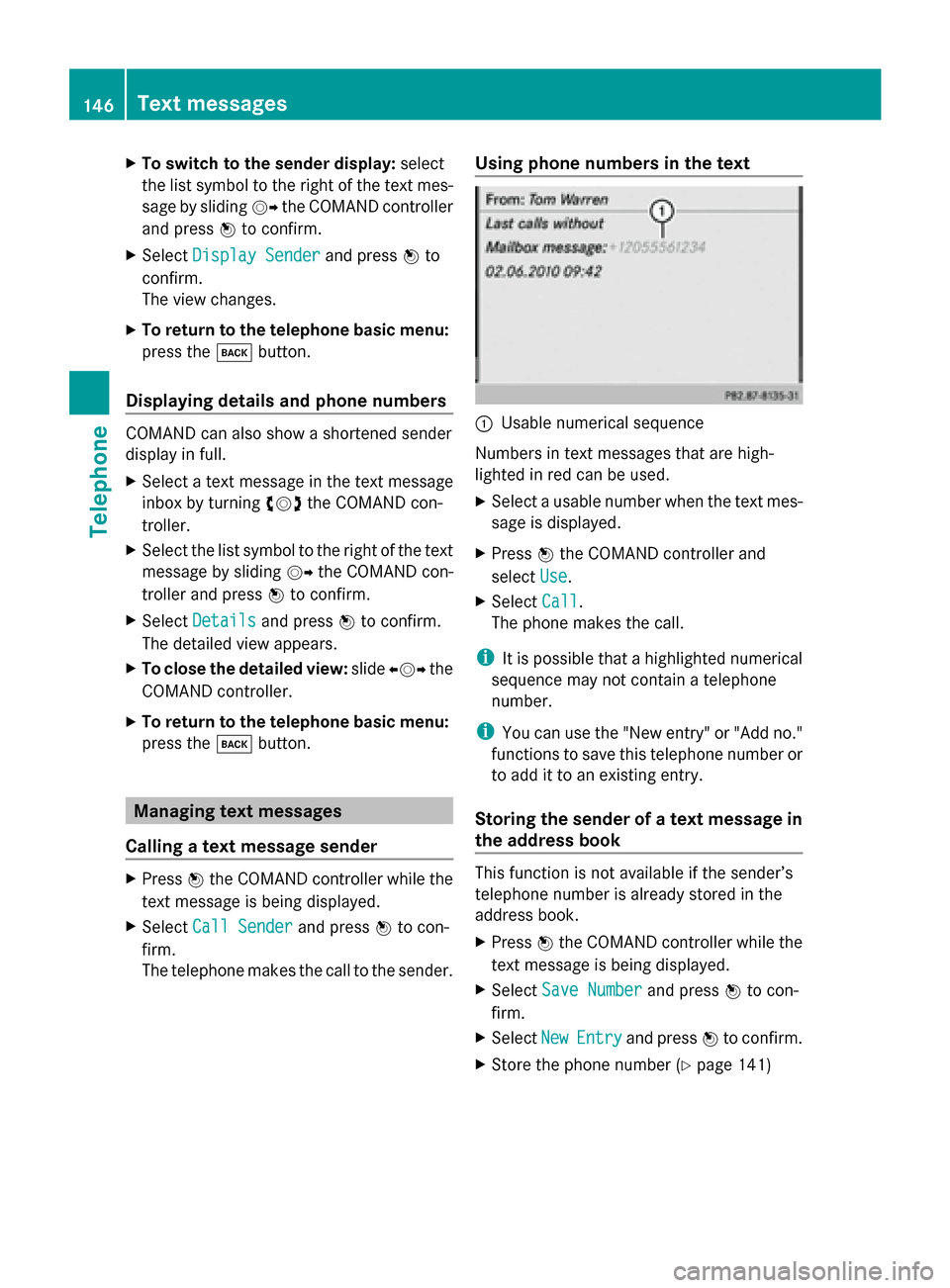
The telephone makes the call to the sender. Using phone numbers in the text 0043
Usable numerical sequence
Numbers in text messages that are high-
lighted in red can be used.
X Select a usable number when the text mes-
sage is displayed.
X Press 0098the COMAND controller and
select Use Use.
X Select Call
Call.
The phone makes the call.
i It is possible that a highlighted numerical
sequence may not contain a telephone
number.
i You can use the "New entry" or "Add no."
functions to save this telephone number or
to add it to an existing entry.
Storing the sender of a text message in
the address book This function is not available if the sender’s
telephone number is already stored in the
address book.
X Press 0098the COMAND controller while the
text message is being displayed.
X Select Save Number Save Number and press0098to con-
firm.
X Select New NewEntry Entry and press 0098to confirm.
X Store the phone number ( Ypage 141) 146
Text messagesTelephone
Page 149 of 270
Adding the sender of a text message to
an address book entry X
Press 0098the COMAND controller while the
text message is being displayed.
X Select Save Number
Save Number and press0098to con-
firm.
X Select Add Phone No.
Add Phone No. and press0098to
confirm.
X Proceed from the step "Select a number
category" ( Ypage 140).
Deleting a text message X
Select a text message in the text message
inbox by turning 00790052007Athe COMAND con-
troller.
X Select the list symbol to the right of the text
message by sliding 00520096the COMAND con-
troller and press 0098to confirm.
X Select Delete
Delete and press 0098to confirm.
A deletion prompt appears.
X Select Yes
Yes orNo
No and press 0098to confirm.
If you select Yes
Yes , the text message is
deleted.
If you select No
No, the process will be can-
celed.
i This delete function is not supported by
all mobile phones. The Delete failed
Delete failed
message appears. Using the address book
Introduction
Always pay attention to traffic conditions.
Before starting the journey, familiarize your-
self with the address book functions.
Only use COMAND when the road and traffic
conditions permit. You could otherwise
become involved in an accident in which you
or others could be injured.
The address book organizes and stores
entries that are entered from different sour- ces (mobile phone, memory card, USB device,
COMAND phone book, navigation system).
You can use these entries to make telephone
calls and for navigation.
i
Number of contacts in the address
book: the address book can store a total of
4000 contacts.
1500 entries each are reserved in the
address book for:
R contacts from the mobile phone
R contacts that you create in COMAND or
import from other sources
The remaining 1,000 entries are assigned
by COMAND as necessary.
i Display of mobile phone contacts: con-
tacts downloaded from the mobile phone
remain in the address book even if you dis-
connect the mobile phone from COMAND.
Contacts that have previously been availa-
ble can be displayed as soon as the mobile
phone is reconnected. COMAND down-
loads the contacts again so that any new
contacts that have been added to the
mobile phone can be displayed.
As soon as you connect a new mobile
phone to COMAND all the contacts from
the previous mobile phone are replaced by
those from the new phone's address book.
Address book entries remain stored when
the mobile phone is disconnected. For this
reason, delete your personal data using the
reset function before selling your vehicle,
for example (Y page 47). Calling up the address book
Using the function button:
X Press the 002Bfunction button.
You see either the telephone basic menu or
the address book, depending on which was
last active.
X If the telephone basic menu is displayed,
press the 002Bfunction button again. Using the address book
147Telephone Z
Page 150 of 270
Using the telephone basic menu:
X
When the telephone basic menu is dis-
played select Phone Phoneby sliding 00520097the
COMAND Controller and press 0098to con-
firm.
X Select Address Book
Address Book from the menu and
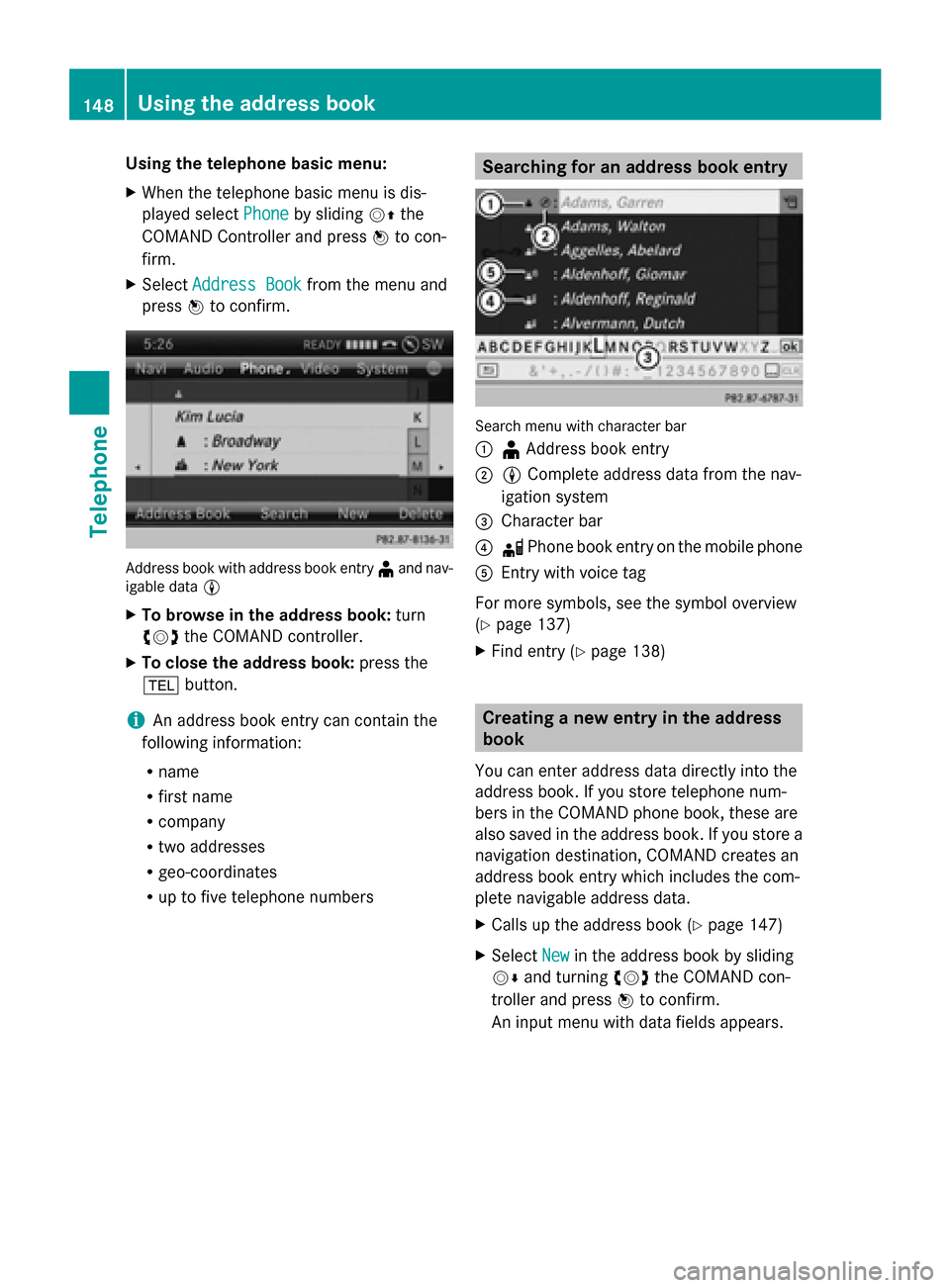
press 0098to confirm. Address book with address book entry
¥and nav-
igable data 0048
X To browse in the address book: turn
00790052007A the COMAND controller.
X To close the address book: press the
002B button.
i An address book entry can contain the
following information:
R name
R first name
R company
R two addresses
R geo-coordinates
R up to five telephone numbers Searching for an address book entry
Search menu with character bar
0043
¥Address book entry
0044 0048 Complete address data from the nav-
igation system
0087 Character bar
0085 0034 Phone book entry on the mobile phone
0083 Entry with voice tag
For more symbols, see the symbol overview
(Y page 137)
X Find entry (Y page 138) Creating a new entry in the address
book
You can enter address data directly into the
address book. If you store telephone num-
bers in the COMAND phone book, these are
also saved in the address book. If you store a
navigation destination, COMAND creates an
address book entry which includes the com-
plete navigable address data.
X Calls up the address book (Y page 147)
X Select New
New in the address book by sliding
00520064 and turning 00790052007Athe COMAND con-
troller and press 0098to confirm.
An input menu with data fields appears. 148
Using the address bookTelephone
Page 151 of 270
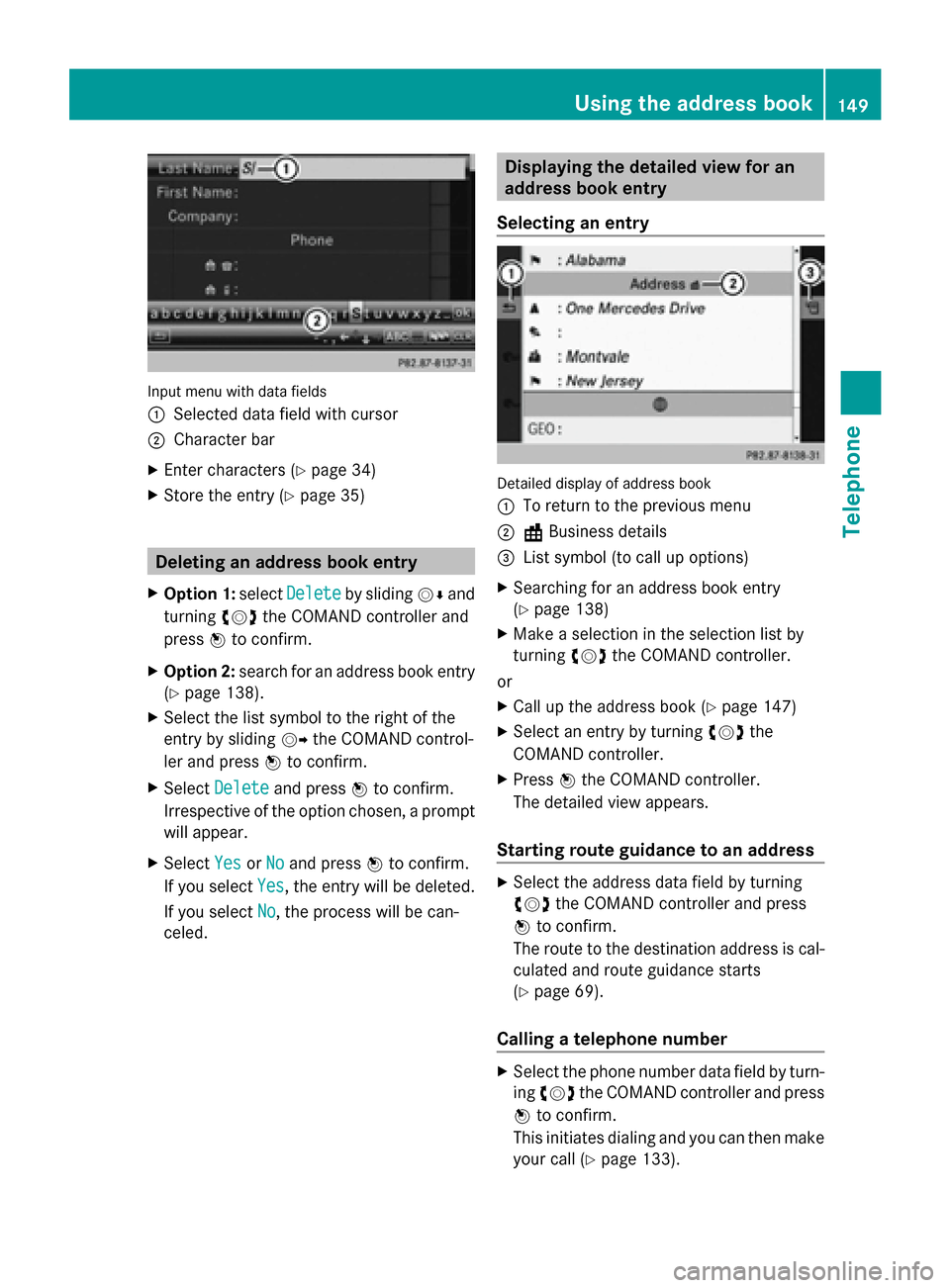
Input menu with data fields
0043
Selected data field with cursor
0044 Character bar
X Enter characters (Y page 34)
X Store the entry (Y page 35) Deleting an address book entry
X Option 1: selectDelete Delete by sliding 00520064and
turning 00790052007Athe COMAND controller and
press 0098to confirm.
X Option 2: search for an address book entry
(Y page 138).
X Select the list symbol to the right of the
entry by sliding 00520096the COMAND control-
ler and press 0098to confirm.
X Select Delete
Delete and press 0098to confirm.
Irrespective of the option chosen, a prompt
will appear.
X Select Yes
Yes orNo
No and press 0098to confirm.
If you select Yes
Yes, the entry will be deleted.
If you select No
No, the process will be can-
celed. Displaying the detailed view for an
address book entry
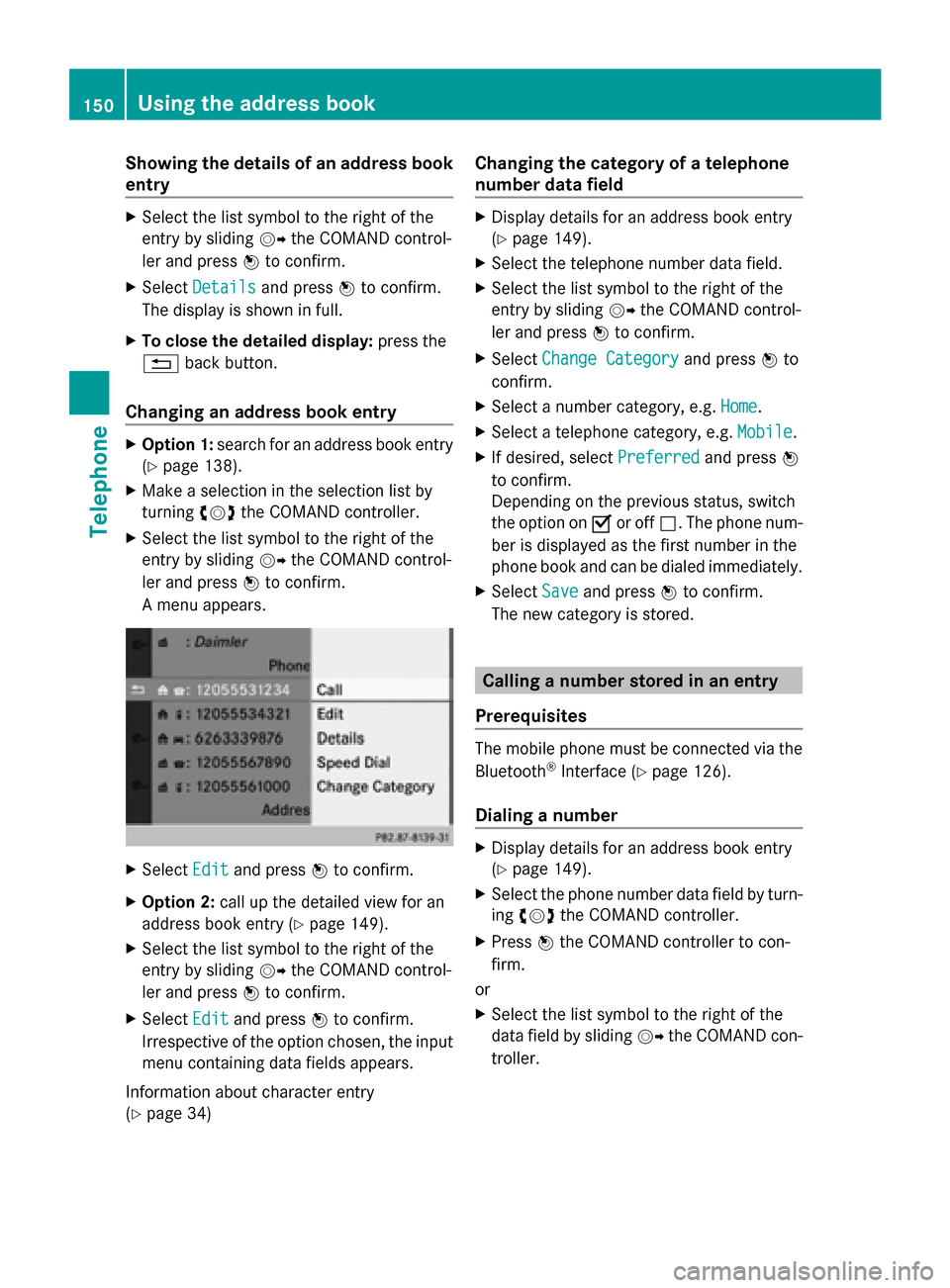
Selecting an entry Detailed display of address book
0043
To return to the previous menu
0044 \Business details
0087 List symbol (to call up options)
X Searching for an address book entry
(Y page 138)
X Make a selection in the selection list by
turning 00790052007Athe COMAND controller.
or
X Call up the address book (Y page 147)
X Select an entry by turning 00790052007Athe
COMAND controller.
X Press 0098the COMAND controller.
The detailed view appears.
Starting route guidance to an address X
Select the address data field by turning
00790052007A the COMAND controller and press
0098 to confirm.
The route to the destination address is cal-
culated and route guidance starts
(Y page 69).
Calling a telephone number X
Select the phone number data field by turn-
ing 00790052007A the COMAND controller and press
0098 to confirm.
This initiates dialing and you can then make
your call (Y page 133). Using the address book
149Telephone Z
Page 152 of 270
Showing the details of an address book
entry X
Select the list symbol to the right of the
entry by sliding 00520096the COMAND control-
ler and press 0098to confirm.
X Select Details
Details and press 0098to confirm.
The display is shown in full.
X To close the detailed display: press the
0038 back button.
Changing an address book entry X
Option 1: search for an address book entry
(Y page 138).
X Make a selection in the selection list by
turning 00790052007Athe COMAND controller.
X Select the list symbol to the right of the
entry by sliding 00520096the COMAND control-
ler and press 0098to confirm.
A menu appears. X
Select Edit Editand press 0098to confirm.
X Option 2: call up the detailed view for an
address book entry (Y page 149).
X Select the list symbol to the right of the
entry by sliding 00520096the COMAND control-
ler and press 0098to confirm.
X Select Edit
Edit and press 0098to confirm.
Irrespective of the option chosen, the input
menu containing data fields appears.
Information about character entry
(Y page 34) Changing the category of a telephone
number data field X
Display details for an address book entry
(Y page 149).
X Select the telephone number data field.
X Select the list symbol to the right of the
entry by sliding 00520096the COMAND control-
ler and press 0098to confirm.
X Select Change Category
Change Category and press0098to
confirm.
X Select a number category, e.g. Home Home.
X Select a telephone category, e.g. Mobile
Mobile.
X If desired, select Preferred
Preferredand press0098
to confirm.
Depending on the previous status, switch
the option on 0073or off 0053. The phone num-
ber is displayed as the first number in the
phone book and can be dialed immediately.
X Select Save Saveand press 0098to confirm.
The new category is stored. Calling a number stored in an entry
Prerequisites The mobile phone must be connected via the
Bluetooth
®
Interface (Y page 126).
Dialing a number X
Display details for an address book entry
(Y page 149).
X Select the phone number data field by turn-
ing 00790052007A the COMAND controller.
X Press 0098the COMAND controller to con-
firm.
or
X Select the list symbol to the right of the
data field by sliding 00520096the COMAND con-
troller. 150
Using the address bookTelephone