key MERCEDES-BENZ CLA-Class 2015 C117 Manual Online
[x] Cancel search | Manufacturer: MERCEDES-BENZ, Model Year: 2015, Model line: CLA-Class, Model: MERCEDES-BENZ CLA-Class 2015 C117Pages: 362, PDF Size: 6.93 MB
Page 216 of 362
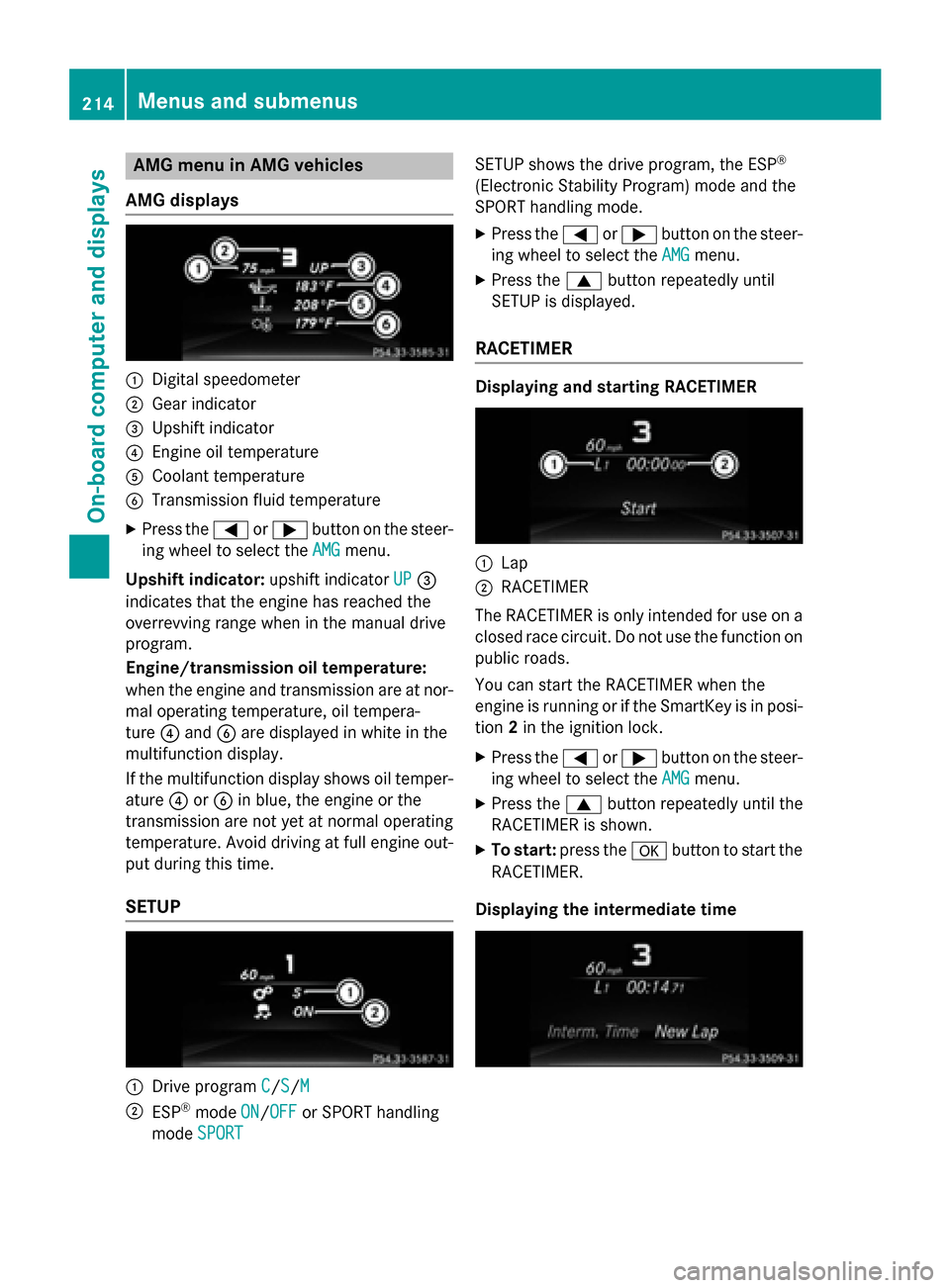
AMG menu in AMG vehicles
AMG displays :
Digital speedometer
; Gear indicator
= Upshift indicator
? Engine oil temperature
A Coolant temperature
B Transmission fluid temperature
X Press the =or; button on the steer-
ing wheel to select the AMG
AMGmenu.
Upshift indicator: upshift indicatorUP
UP=
indicates that the engine has reached the
overrevving range when in the manual drive
program.
Engine/transmission oil temperature:
when the engine and transmission are at nor-
mal operating temperature, oil tempera-
ture ?and Bare displayed in white in the
multifunction display.
If the multifunction display shows oil temper- ature ?orB in blue, the engine or the
transmission are not yet at normal operating
temperature. Avoid driving at full engine out-
put during this time.
SETUP :
Drive program C C/S
S/M M
; ESP ®
mode ON ON/OFF
OFF or SPORT handling
mode SPORT
SPORT SETUP shows the drive program, the ESP
®
(Electronic Stability Program) mode and the
SPORT handling mode.
X Press the =or; button on the steer-
ing wheel to select the AMG
AMG menu.
X Press the 9button repeatedly until
SETUP is displayed.
RACETIMER Displaying and starting RACETIMER
:
Lap
; RACETIMER
The RACETIMER is only intended for use on a closed race circuit. Do not use the function on
public roads.
You can start the RACETIMER when the
engine is running or if the SmartKey is in posi-
tion 2in the ignition lock.
X Press the =or; button on the steer-
ing wheel to select the AMG AMGmenu.
X Press the 9button repeatedly until the
RACETIMER is shown.
X To start: press the abutton to start the
RACETIMER.
Displaying the intermediate time 214
Menus and sub
menusOn-board computer and displays
Page 217 of 362
X
Press =or; to select Interm.
Interm.
Time
Time.
X Press ato confirm.
The intermediate time is displayed for five
seconds.
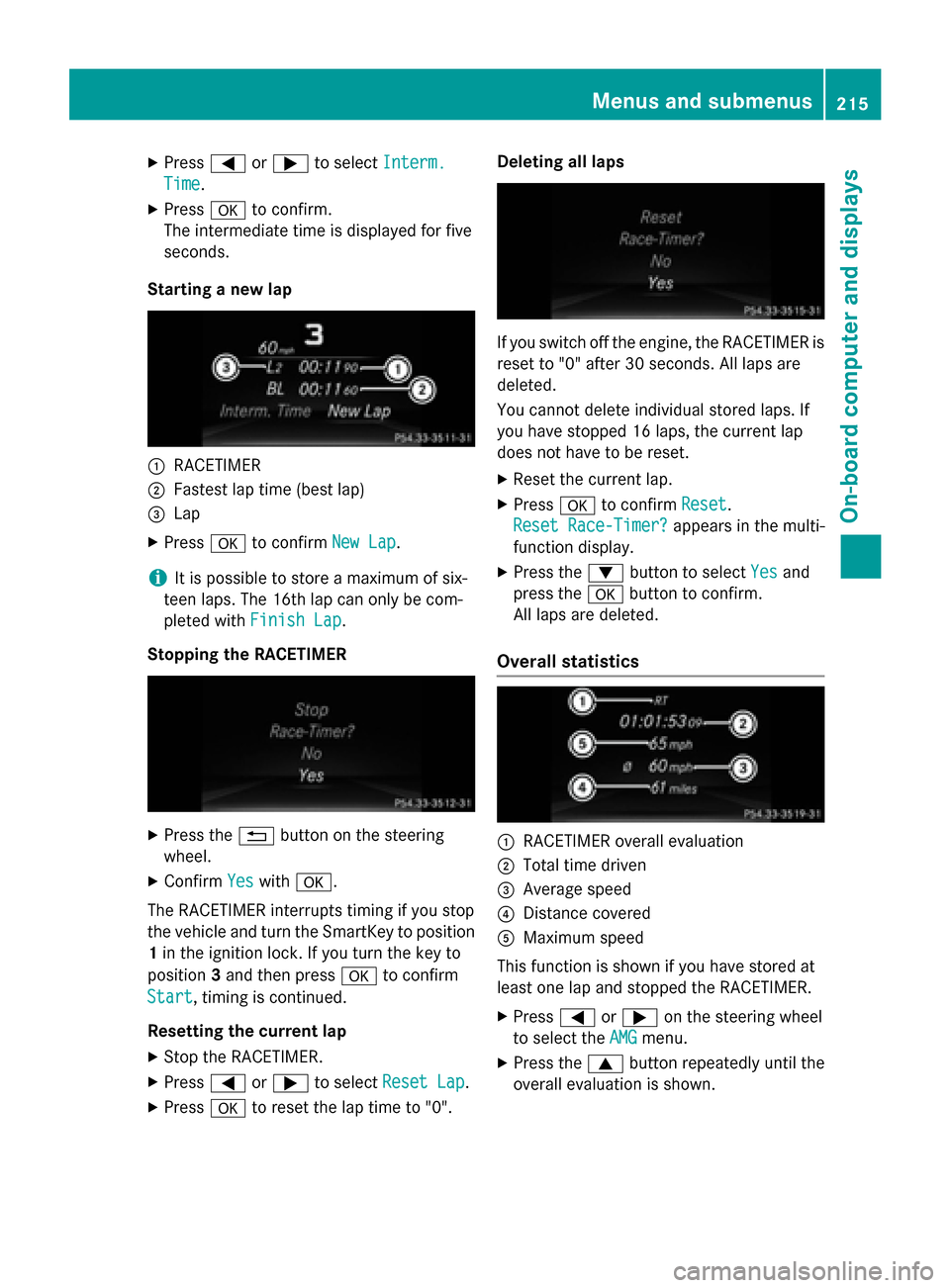
Starting a new lap :
RACETIMER
; Fastest lap time (best lap)
= Lap
X Press ato confirm New Lap
New Lap.
i It is possible to store a maximum of six-
teen laps. The 16th lap can only be com-
pleted with Finish Lap
Finish Lap.
Stopping the RACETIMER X
Press the %button on the steering
wheel.
X Confirm Yes
Yes with a.
The RACETIMER interrupts timing if you stop
the vehicle and turn the SmartKey to position 1 in the ignition lock. If you turn the key to
position 3and then press ato confirm
Start
Start, timing is continued.
Resetting the current lap
X Stop the RACETIMER.
X Press =or; to select Reset Lap Reset Lap.
X Press ato reset the lap time to "0". Deleting all laps
If you switch off the engine, the RACETIMER is
reset to "0" after 30 seconds. All laps are
deleted.
You cannot delete individual stored laps. If
you have stopped 16 laps, the current lap
does not have to be reset.
X Reset the current lap.
X Press ato confirm Reset
Reset.
Reset Race-Timer? Reset Race-Timer? appears in the multi-
function display.
X Press the :button to select Yes
Yesand
press the abutton to confirm.
All laps are deleted.
Overall statistics :
RACETIMER overall evaluation
; Total time driven
= Average speed
? Distance covered
A Maximum speed
This function is shown if you have stored at
least one lap and stopped the RACETIMER.
X Press =or; on the steering wheel
to select the AMG AMGmenu.
X Press the 9button repeatedly until the
overall evaluation is shown. Menus and submenus
215On-board computer and displays Z
Page 223 of 362
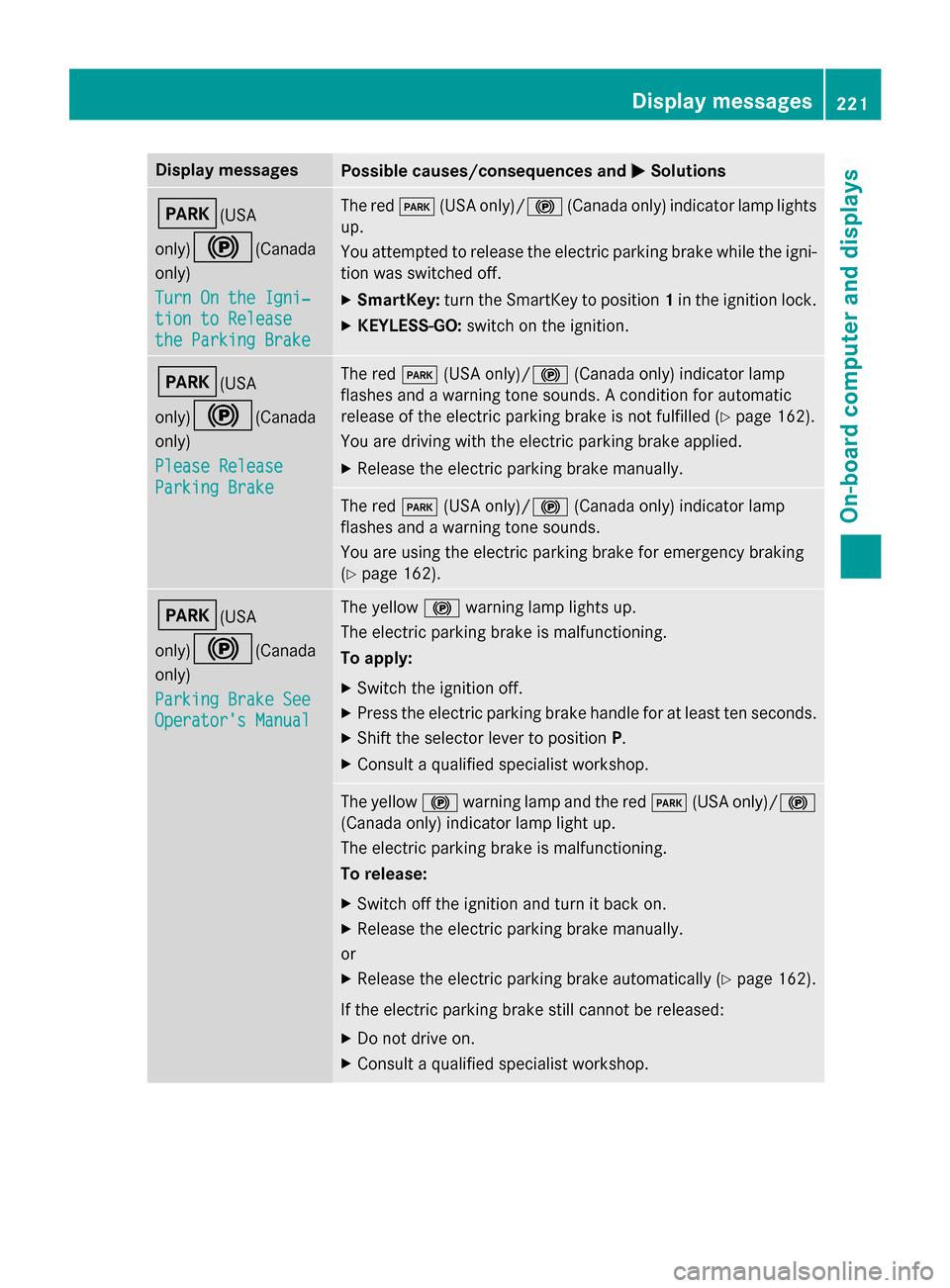
Display messages
Possible causes/consequences and
M
MSolutions F(USA
only)!
(Canada
only)
Turn On the Igni‐ Turn On the Igni‐
tion to Release tion to Release
the Parking Brake the Parking Brake The red
F(USA only)/! (Canada only) indicator lamp lights
up.
You attempted to release the electric parking brake while the igni-
tion was switched off.
X SmartKey: turn the SmartKey to position 1in the ignition lock.
X KEYLESS-GO: switch on the ignition. F(USA
only)!
(Canada
only)
Please Release Please Release
Parking Brake Parking Brake The red
F(USA only)/! (Canada only) indicator lamp
flashes and a warning tone sounds. A condition for automatic
release of the electric parking brake is not fulfilled (Y page 162).
You are driving with the electric parking brake applied.
X Release the electric parking brake manually. The red
F(USA only)/! (Canada only) indicator lamp
flashes and a warning tone sounds.
You are using the electric parking brake for emergency braking
(Y page 162). F(USA
only)!
(Canada
only)
Parking Brake See Parking Brake See
Operator's Manual Operator's Manual The yellow
!warning lamp lights up.
The electric parking brake is malfunctioning.
To apply:
X Switch the ignition off.
X Press the electric parking brake handle for at least ten seconds.
X Shift the selector lever to position P.
X Consult a qualified specialist workshop. The yellow
!warning lamp and the red F(USA only)/ !
(Canada only) indicator lamp light up.
The electric parking brake is malfunctioning.
To release:
X Switch off the ignition and turn it back on.
X Release the electric parking brake manually.
or X Release the electric parking brake automatically (Y page 162).
If the electric parking brake still cannot be released: X Do not drive on.
X Consult a qualified specialist workshop. Display
messages
221On-board computer and displays Z
Page 247 of 362
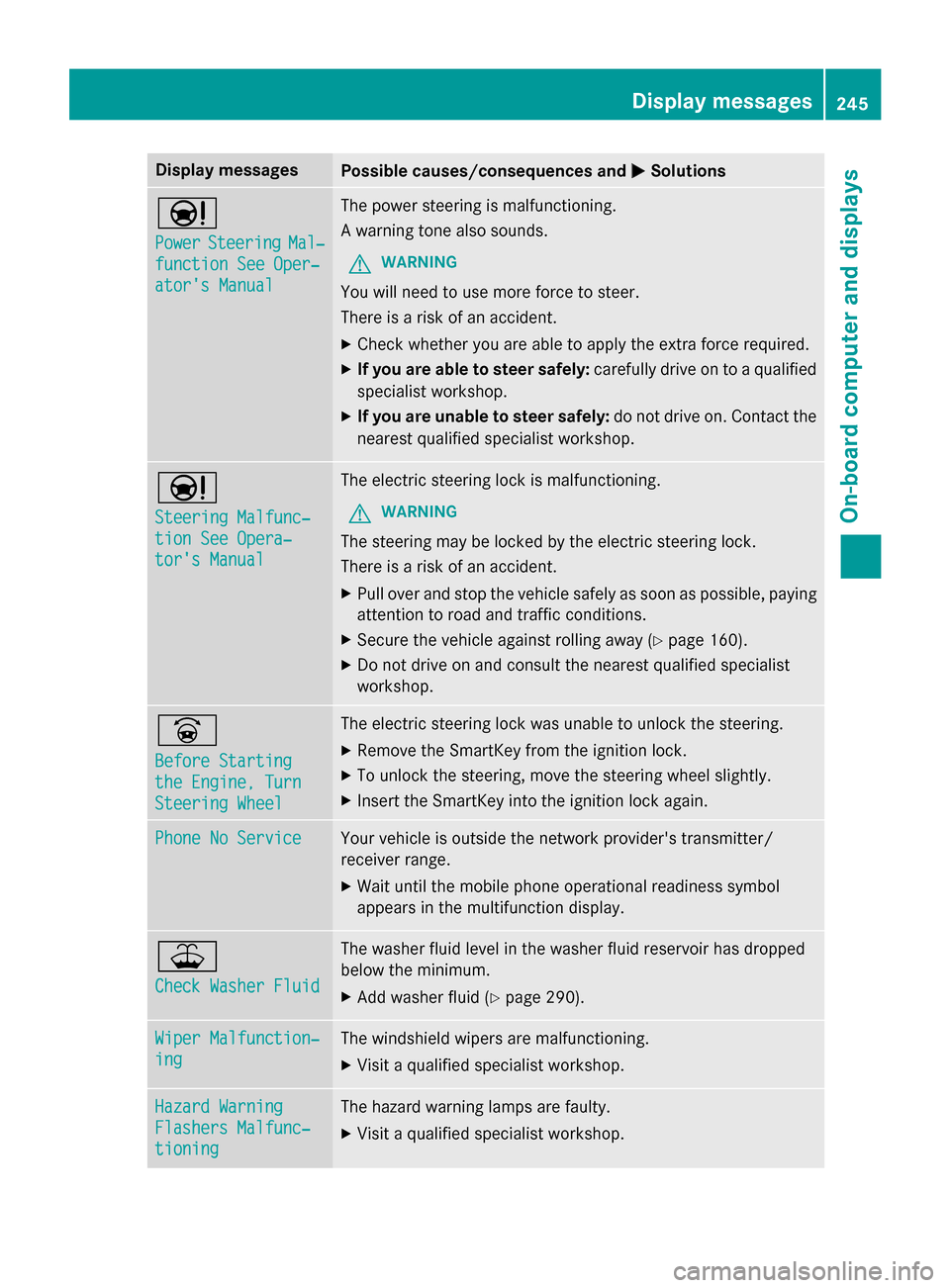
Display messages
Possible causes/consequences and
M
MSolutions Ð
Power Power
Steering
Steering Mal‐
Mal‐
function See Oper‐
function See Oper‐
ator's Manual ator's Manual The power steering is malfunctioning.
A warning tone also sounds.
G WARNING
You will need to use more force to steer.
There is a risk of an accident. X Check whether you are able to apply the extra force required.
X If you are able to steer safely: carefully drive on to a qualified
specialist workshop.
X If you are unable to steer safely: do not drive on. Contact the
nearest qualified specialist workshop. Ð
Steering Malfunc‐ Steering Malfunc‐
tion See Opera‐ tion See Opera‐
tor's Manual tor's Manual The electric steering lock is malfunctioning.
G WARNING
The steering may be locked by the electric steering lock.
There is a risk of an accident. X Pull over and stop the vehicle safely as soon as possible, paying
attention to road and traffic conditions.
X Secure the vehicle against rolling away (Y page 160).
X Do not drive on and consult the nearest qualified specialist
workshop. _
Before Starting Before Starting
the Engine, Turn the Engine, Turn
Steering Wheel Steering Wheel The electric steering lock was unable to unlock the steering.
X Remove the SmartKey from the ignition lock.
X To unlock the steering, move the steering wheel slightly.
X Insert the SmartKey into the ignition lock again. Phone No Service
Phone No Service Your vehicle is outside the network provider's transmitter/
receiver range.
X Wait until the mobile phone operational readiness symbol
appears in the multifunction display. ¥
Check Washer Fluid Check Washer Fluid The washer fluid level in the washer fluid reservoir has dropped
below the minimum.
X Add washer fluid (Y page 290). Wiper Malfunction‐ Wiper Malfunction‐
ing ing The windshield wipers are malfunctioning.
X Visit a qualified specialist workshop. Hazard Warning
Hazard Warning
Flashers Malfunc‐ Flashers Malfunc‐
tioning tioning The hazard warning lamps are faulty.
X Visit a qualified specialist workshop. Display
messages
245On-board computer and displays Z
Page 248 of 362
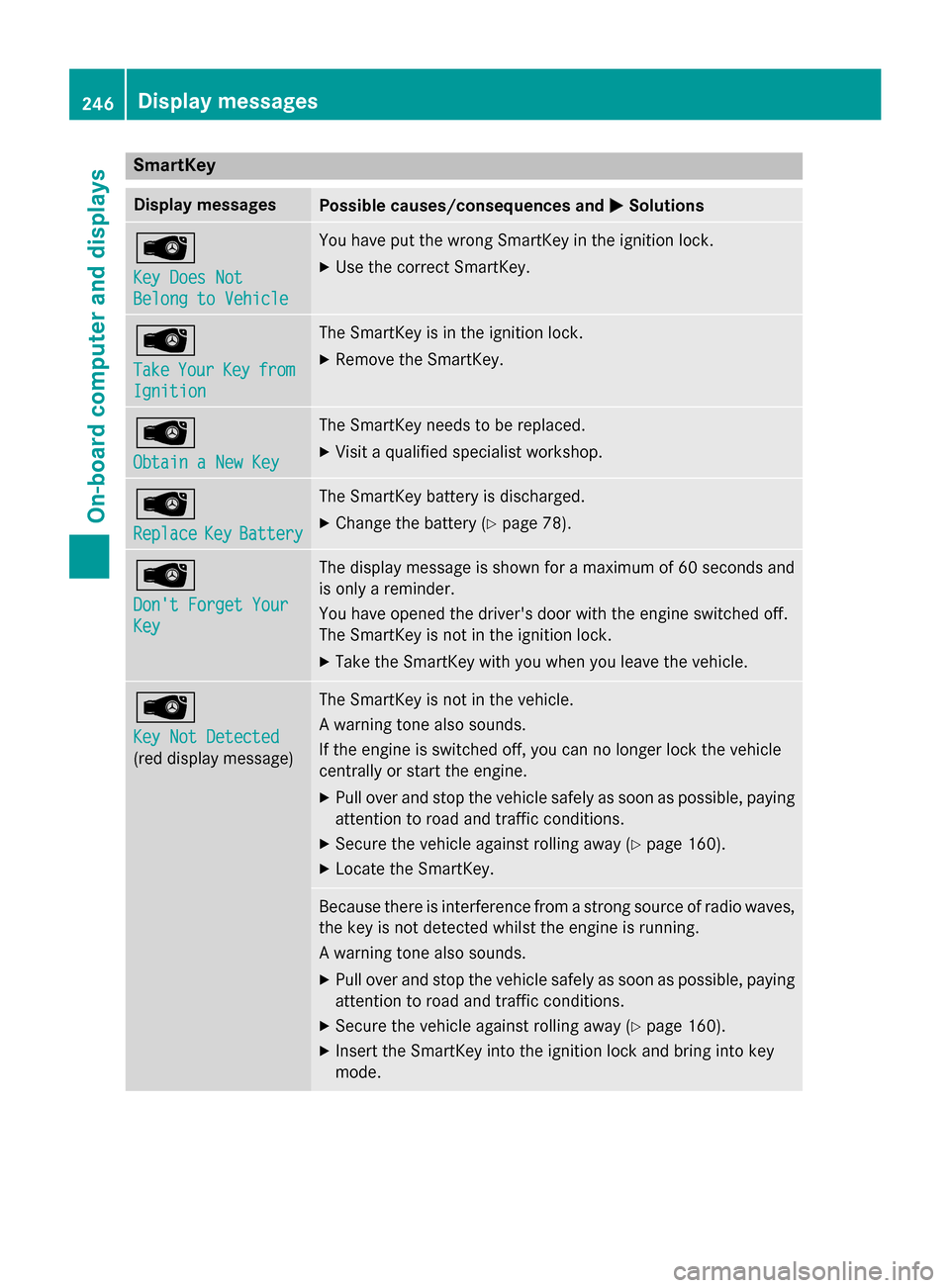
SmartKey
Display messages
Possible causes/consequences and
M
MSolutions Â
Key Does Not Key Does Not
Belong to Vehicle Belong to Vehicle You have put the wrong SmartKey in the ignition lock.
X Use the correct SmartKey. Â
Take Take
Your
YourKey
Keyfrom
from
Ignition
Ignition The SmartKey is in the ignition lock.
X Remove the SmartKey. Â
Obtain a New Key Obtain a New Key The SmartKey needs to be replaced.
X Visit a qualified specialist workshop. Â
Replace Replace
Key
KeyBattery
Battery The SmartKey battery is discharged.
X Change the battery (Y page 78).Â
Don't Forget Your Don't Forget Your
Key Key The display message is shown for a maximum of 60 seconds and
is only a reminder.
You have opened the driver's door with the engine switched off.
The SmartKey is not in the ignition lock.
X Take the SmartKey with you when you leave the vehicle. Â
Key Not Detected Key Not Detected
(red display message) The SmartKey is not in the vehicle.
A warning tone also sounds.
If the engine is switched off, you can no longer lock the vehicle
centrally or start the engine.
X Pull over and stop the vehicle safely as soon as possible, paying
attention to road and traffic conditions.
X Secure the vehicle against rolling away (Y page 160).
X Locate the SmartKey. Because there is interference from a strong source of radio waves,
the key is not detected whilst the engine is running.
A warning tone also sounds.
X Pull over and stop the vehicle safely as soon as possible, paying
attention to road and traffic conditions.
X Secure the vehicle against rolling away (Y page 160).
X Insert the SmartKey into the ignition lock and bring into key
mode. 246
Display messagesOn-board computer and displays
Page 249 of 362
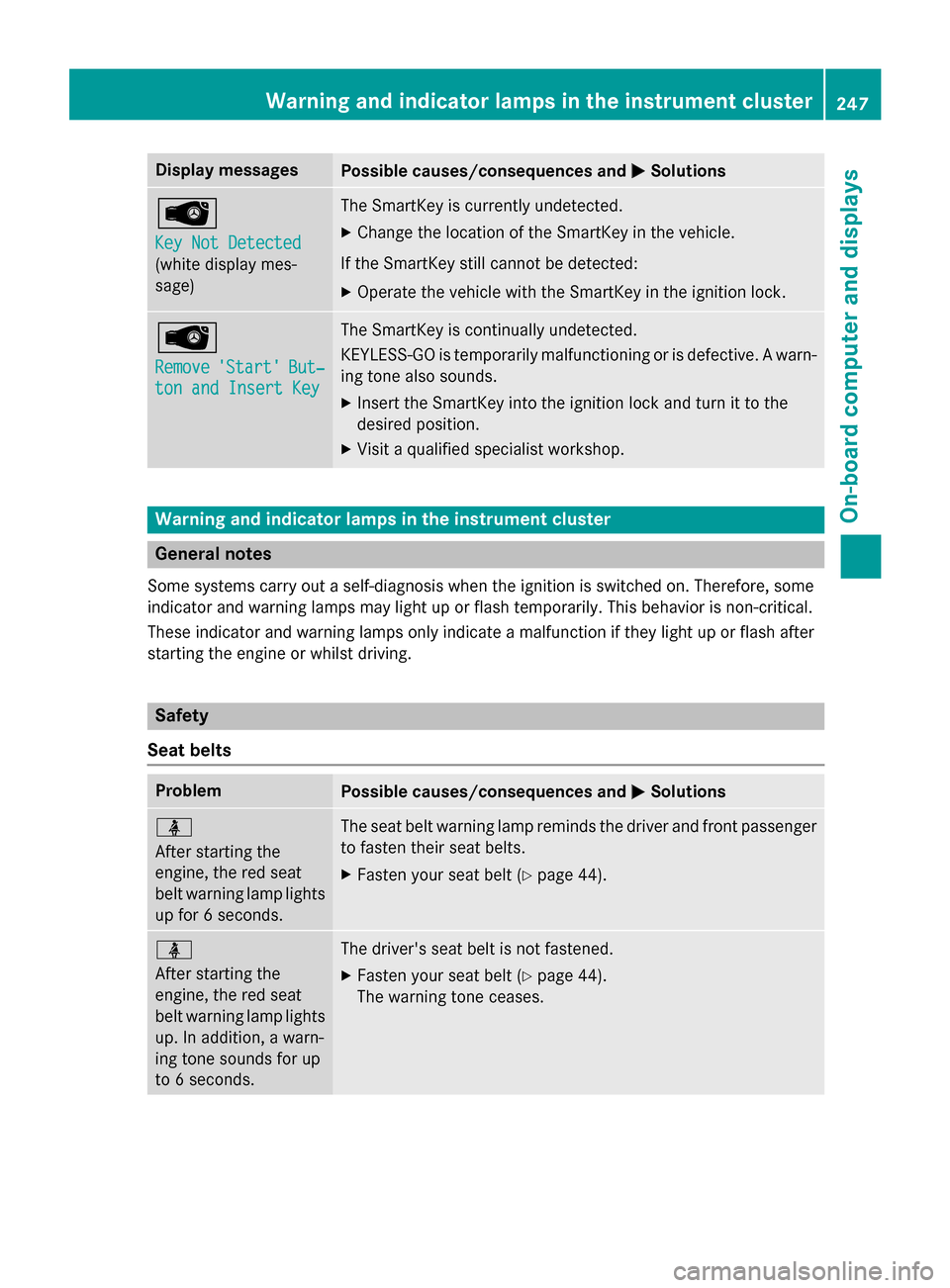
Display messages
Possible causes/consequences and
M
MSolutions Â
Key Not Detected Key Not Detected
(white display mes-
sage) The SmartKey is currently undetected.
X Change the location of the SmartKey in the vehicle.
If the SmartKey still cannot be detected:
X Operate the vehicle with the SmartKey in the ignition lock. Â
Remove Remove
'Start'
'Start' But‐
But‐
ton and Insert Key
ton and Insert Key The SmartKey is continually undetected.
KEYLESS-GO is temporarily malfunctioning or is defective. A warn-
ing tone also sounds.
X Insert the SmartKey into the ignition lock and turn it to the
desired position.
X Visit a qualified specialist workshop. Warning and indicator lamps in the instrument cluster
General notes
Some systems carry out a self-diagnosis when the ignition is switched on. Therefore, some
indicator and warning lamps may light up or flash temporarily. This behavior is non-critical.
These indicator and warning lamps only indicate a malfunction if they light up or flash after
starting the engine or whilst driving. Safety
Seat belts Problem
Possible causes/consequences and
M MSolutions ü
After starting the
engine, the red seat
belt warning lamp lights
up for 6 seconds. The seat belt warning lamp reminds the driver and front passenger
to fasten their seat belts.
X Fasten your seat belt (Y page 44).ü
After starting the
engine, the red seat
belt warning lamp lights
up. In addition, a warn-
ing tone sounds for up
to 6 seconds. The driver's seat belt is not fastened.
X Fasten your seat belt (Y page 44).
The warning tone ceases. Wa
rning and indi cator lamps in the instrument cluster
247On-board computer and displays Z
Page 273 of 362
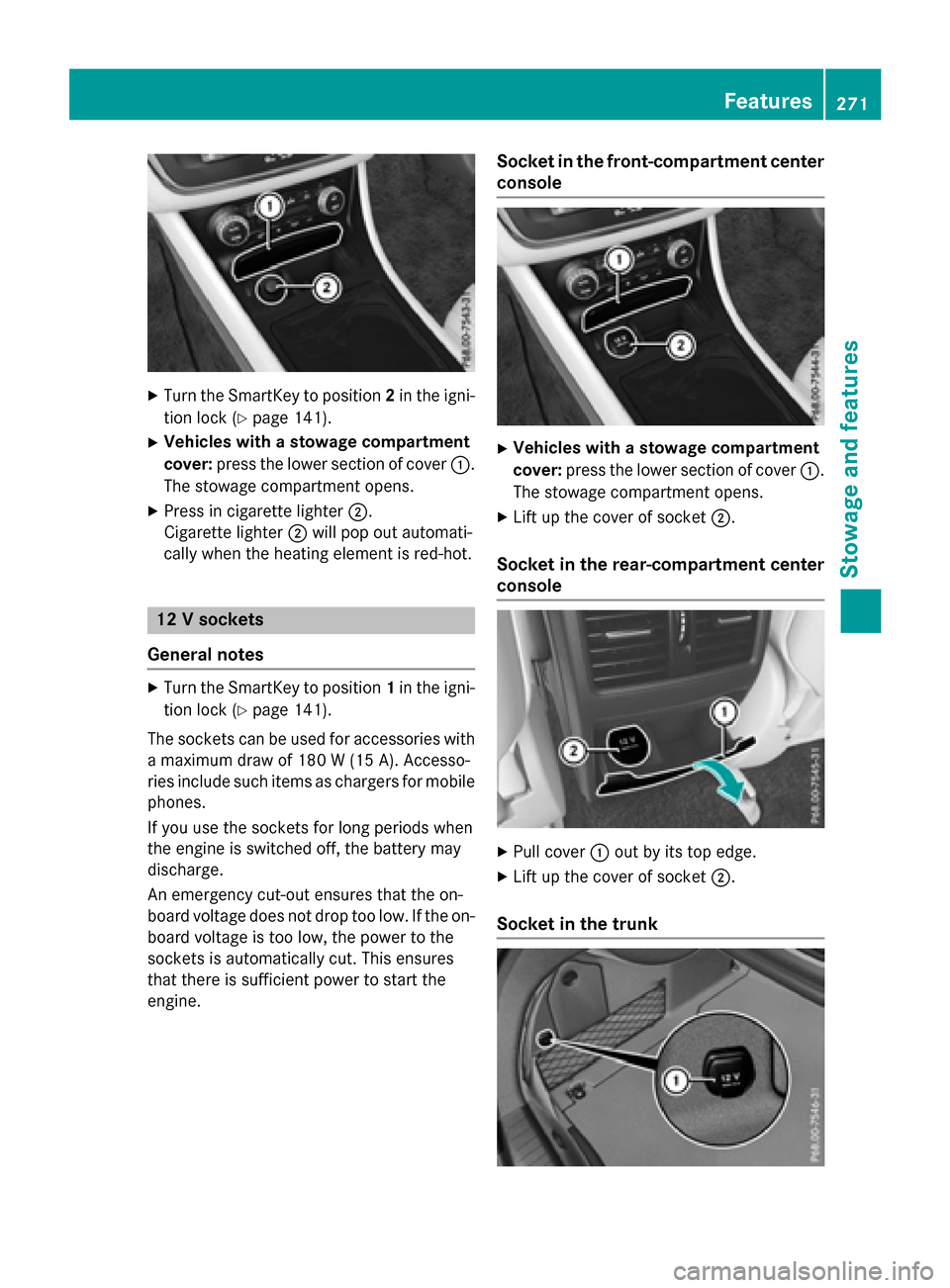
X
Turn the SmartKey to position 2in the igni-
tion lock (Y page 141).
X Vehicles with a stowage compartment
cover: press the lower section of cover :.
The stowage compartment opens.
X Press in cigarette lighter ;.
Cigarette lighter ;will pop out automati-
cally when the heating element is red-hot. 12 V sockets
General notes X
Turn the SmartKey to position 1in the igni-
tion lock (Y page 141).
The sockets can be used for accessories with a maximum draw of 180 W (15 A). Accesso-
ries include such items as chargers for mobile
phones.
If you use the sockets for long periods when
the engine is switched off, the battery may
discharge.
An emergency cut-out ensures that the on-
board voltage does not drop too low. If the on-
board voltage is too low, the power to the
sockets is automatically cut. This ensures
that there is sufficient power to start the
engine. Socket in the front-compartment center
console X
Vehicles with a stowage compartment
cover: press the lower section of cover :.
The stowage compartment opens.
X Lift up the cover of socket ;.
Socket in the rear-compartment center
console X
Pull cover :out by its top edge.
X Lift up the cover of socket ;.
Socket in the trunk Features
271Stowage and features Z
Page 278 of 362
Downloading destinations
Downloading destinations
Downloading destinations gives you access
to a database with over 15 million points of
interest (POIs). These can be downloaded on
the navigation system in your vehicle. If you
know the destination, the address can be
downloaded. Alternatively, you can obtain the
location of Points of Interest (POIs)/impor-
tant destinations in the vicinity.
Furthermore, you can download routes with
up to four way points.
You are prompted to confirm route guidance
to the address entered.
X Select Yes
Yes by turning cVdor sliding XVY
the controller and confirm with W.
The system calculates the route and sub-
sequently starts the route guidance with
the address entered.
If you select No
No the address can be stored in
the address book.
The destination download function is availa-
ble if:
R the vehicle is equipped with a navigation
system.
R the relevant mobile phone network is avail-
able and data transfer is possible.
Route Assistance
This service is part of the mbrace PLUS Pack-
age and cannot be purchased separately.
You can use the route assistance function
even if the vehicle is not equipped with a nav- igation system.
Within the framework of this service, you
receive a professional and reliable form of
navigation support without having to leave
your vehicle.
The customer service representative finds a
suitable route depending on your vehicle's
current position and the desired destination.
You will then be guided live through the cur-
rent route section. Search & Send General notes
To use "Search & Send", your vehicle must be
equipped with mbrace and a navigation sys-
tem. Additionally, an mbrace service sub-
scription must be completed.
"Search & Send" is a destination entry ser-
vice. A destination address which is found on
Google Maps ®
can be transferred via mbrace
directly to your vehicle's navigation system.
Specifying and sending the destination
address
X Go to the website http://
maps.google.com and enter a destination
address into the entry field.
X To send the destination address to the
e-mail address of your mbrace account:
click on the corresponding button on the
website.
Example:
If you select 'Send to vehicle' and then
'Mercedes-Benz', the destination address
will be sent to your vehicle.
X When the "Send" dialog window appears:
Enter the e-mail address you specified
when setting up your mbrace account into
the corresponding field.
X Click "Send".
Information on specific commands such as
"Address entry" or "Send" can be found on the website.
Calling up a transmitted destination
address
X Turn the SmartKey to position 2in the igni-
tion lock (Y page 141).
The transmitted destination address is loa-
ded into the vehicle's navigation system. 276
FeaturesStowage and fea
tures
Page 279 of 362
A display message appears, asking
whether navigation should be started.
X Select Yes Yesby turning cVdor sliding XVY
the controller and confirm with W.
The system calculates the route and sub-
sequently starts the route guidance with
the address entered.
If you select No
No the address can be stored in
the address book.
If you have sent more than one destination address, each individual destination must
be confirmed separately.
Destination addresses are loaded in the same
order as the order in which they were sent.
If you own multiple Mercedes-Benz vehicles
with mbrace and activated mbrace accounts:
If multiple vehicles are registered under the
same e-mail address, the destination will be
sent to all the vehicles.
Vehicle remote opening You can use the vehicle remote opening if you
have unintentionally locked your vehicle and
a replacement SmartKey is not available.
The vehicle can be opened by the Mercedes-
Benz Customer Assistance Center.
The vehicle can be immediately opened
remotely within four days of the ignition being turned off. After this time, the remote unlock-
ing may be delayed by 15 to 60 minutes. After
30 days, the vehicle can no longer be opened remotely.
The vehicle remote unlocking feature is avail-
able if the relevant mobile phone network is
available and a data connection is possible.
X Contact the following service hotlines:
Mercedes-Benz Customer Assistance Cen- ter at 1-800-FOR-MERCedes
(1-800-367-6372) or 1-866-990-9007
You will be asked for your password.
X Return to your vehicle at the time agreed
upon with the Mercedes-Benz Customer
Assistance Center. Alternatively, the vehicle can be opened via:
R the Internet, under the "Owners Online"
section
R the telephone application (e .g. for iPhone ®
,
Android)
To do this, you will need your identification
number and password.
Vehicle remote closing The vehicle remote-closing feature can be
used when you have forgotten to lock the
vehicle and you are no longer nearby.
The vehicle can then be locked by the
Mercedes-Benz Customer Assistance Center.
The vehicle can be immediately remotely
locked within four days of the ignition being
turned off. After this time, remote closing may
be delayed by 15 to 60 minutes. After 30 days the vehicle can no longer be locked remotely.
The vehicle remote closing feature is availa-
ble if the relevant mobile phone network is
available and a data connection is possible.
X Contact the following service hotlines:
Mercedes-Benz Customer Assistance Cen-
ter at 1-800-FOR-MERCedes
(1-800-367-6372) or 1-866-990-9007
You will be asked for your password.
The next time you are inside the vehicle and
you switch on the ignition, the Doors
Doors
Locked Remotely Locked Remotely message appears in the
multifunction display.
Alternatively, the vehicle can be locked via:
R the Internet, under the "Owners Online"
section
R the telephone application (e .g. for iPhone ®
,
Android)
To do this, you will need your identification
number and password. Features
277Stowage and features Z
Page 280 of 362
Stolen vehicle recovery service
If your vehicle has been stolen:
X Notify the police.
The police will issue a numbered incident
report.
X This number will be forwarded to the
Mercedes-Benz Customer Assistance Cen-
ter together with your PIN.
The Mercedes-Benz Customer Assistance
Center then tries to locate the system. The Mercedes-Benz Customer Assistance Cen-ter contacts you and the local law enforce-
ment agency if the vehicle is located.
However, only the law enforcement agency is informed of the location of the vehicle.
If the anti-theft alarm system is activated for
longer than 30 seconds, the Mercedes-Benz
Customer Assistance Center is automatically notified.
Vehicle Health Check With the Vehicle Health Check, the Customer
Assistance Center can provide improved sup-
port for problems with your vehicle. During an existing call, vehicle data is transferred to the Customer Assistance Center.
The customer service representative can use
the received data to decide what kind of
assistance is required. You are then, for
example, guided to the nearest authorized
Mercedes-Benz Center or a recovery vehicle
is called.
If vehicle data needs to be transferred during
an MB Info call or a Roadside Assistance call, this is initiated by the Customer Assistance
Center.
The Roadside Assistance Connected
Roadside Assistance Connected
message appears in the display. If the Vehicle
Health Check can be started, the Request Request
for Vehicle Diagnostics Received
for Vehicle Diagnostics Received
Start vehicle diagnostics? Start vehicle diagnostics? message
appears in the display. X
Press the Yes
Yesbutton to confirm the mes-
sage.
X When the Vehicle Diagnostics
Vehicle Diagnostics
Please Start Ignition
Please Start Ignition message
appears: turn the SmartKey to position 2in
the ignition lock (Y page 141).
X If the Please follow the instruc‐
Please follow the instruc‐
tions received by phone and move
tions received by phone and move
your vehicle to a safe position. your vehicle to a safe position.
message appears: please follow the
instructions received by phone and move
your vehicle to a safe position.
The message in the display disappears.
The vehicle operating state check begins.
During this procedure, you will see the
Vehicle Vehicle Diagnostics
Diagnostics Active
Activemessage.
If you select Cancel
Cancel, the Vehicle Health
Check is canceled completely.
When the check is complete, the Sending
Sending
vehicle diagnostics data. (Voice
vehicle diagnostics data. (Voice
connection may be interrupted dur‐ connection may be interrupted dur‐
ing ing data
data transfer)
transfer) message appears. The
vehicle data can now be sent.
X Press the OK
OKbutton to confirm the mes-
sage.
The voice connection with the Customer
Assistance Center is terminated.
The Vehicle Diagnostics: Transfer‐ Vehicle Diagnostics: Transfer‐
ring Data...
ring Data... message appears.
The vehicle data is sent to the Customer
Assistance Center.
Depending on what the customer service rep-
resentative agreed with you, the voice con-
nection is re-established after the transfer is
complete. If necessary, you will be contacted at a later time by another means, e.g. by e-
mail or phone.
Another function of the Vehicle Health Check is the transfer of service data to the Customer
Assistance Center. If a service is due, the dis-
play shows a message to this effect together with information about any special offers at
your workshop.
This information can also be called up under
"Owners Online" at http://www.mbusa.com. 278
FeaturesStowage and features