turn signal MERCEDES-BENZ CLA-Class 2015 C117 Owner's Manual
[x] Cancel search | Manufacturer: MERCEDES-BENZ, Model Year: 2015, Model line: CLA-Class, Model: MERCEDES-BENZ CLA-Class 2015 C117Pages: 362, PDF Size: 6.93 MB
Page 8 of 362
C
California Important notice for retail cus-
tomers and lessees .......................... 22
Calling up a malfunction
see Display messages
Care
Car wash ........................................ 292
Carpets .......................................... 298
Display .......................................... .296
Exhaust pipe .................................. 296
Exterior lights ................................ 295
Gear or selector lever .................... 297
Interior .......................................... .296
Matte finish ................................... 294
Notes ............................................. 291
Paint .............................................. 293
Plastic trim ................................... .297
Power washer ................................ 293
Rear view camera .......................... 296
Roof lining ...................................... 298
Seat belt ........................................ 298
Seat cover ..................................... 297
Sensors ......................................... 295
Steering wheel ............................... 297
Trim pieces ................................... .297
Washing by hand ........................... 292
Wheels .......................................... .294
Windows ........................................ 294
Wiper blades .................................. 295
Wooden trim .................................. 297
Cargo compartment enlargement ... 265
Cargo tie down rings ......................... 266
CD player/CD changer (on-board
computer) .......................................... 207
Center console
Lower section .................................. 35
Upper section .................................. 34
Central locking
Automatic locking (on-board com-puter) ............................................. 212
Locking/unlocking (SmartKey) ....... .74
Changing bulbs
Brake lamps .................................. .119
Cornering light function ................. 119
High-beam headlamps ................... 118
Low-beam headlamps .................... 118 Rear fog lamp ................................ 119
Turn signals (front) ......................... 119
Turn signals (rear) .......................... 119
Child
Restraint system .............................. 57
Child seat
Forward-facing restraint system ...... 61
LATCH-type (ISOFIX) child seat
anchors ............................................ 58
On the front-passenger seat ............ 60
Rearward-facing restraint system .... 61
Top Tether ....................................... 59
Child-proof locks
Important safety notes .................... 61
Rear doors ....................................... 62
Children
Special seat belt retractor .............. .57
Cigarette lighter ................................ 270
Cleaning
Mirror turn signal .......................... .295
Climate control
Air-conditioning system ................. 125
Automatic climate control (dual-
zone) .............................................. 127
Controlling automatically .............. .131
Cooling with air dehumidification .. 129
Defrosting the windows ................. 134
Defrosting the windshield .............. 133
General notes ................................ 124
Indicator lamp ................................ 131
Information about using auto-
matic climate control ..................... 128
Maximum cooling .......................... 133
Notes on using the air-condition-
ing system ..................................... 126
Overview of systems ..................... .124
Problem with the rear window
defroster ........................................ 135
Problems with cooling with air
dehumidification ............................ 131
Refrigerant ..................................... 358
Refrigerant filling capacity ............. 359
Setting the air distribution ............. 132
Setting the air vents ..................... .136
Setting the airflow ......................... 132
Setting the temperature ................ 131
Switching air-recirculation mode
on/off ............................................ 135 6
Index
Page 13 of 362
Indicator and warning lamps
COLLISION PREVENTION ASSIST
PLUS .............................................. 258
Indicator lamps
see Warning and indicator lamps
Instrument cluster
Overview .......................................... 31
Settings ........................................ .211
Warning and indicator lamps ........... 32
Instrument cluster lighting .............. 200
Interior lighting
Control .......................................... .116
Emergency lighting ........................ 116
Overview ........................................ 115
Reading lamp ................................. 115 J
Jack Storage location ............................ 300
Using ............................................. 342
Jump starting (engine) ......................309 K
Key positions Start/Stop button .......................... 141
KEYLESS-GO
Convenience closing feature ............ 88
Deactivation ..................................... 75
Locking ............................................ 75
Unlocking ......................................... 75
Kickdown
Driving tips ................................... .153
Manual drive program .................... 157
Knee bag .............................................. 48 L
Lamps see Warning and indicator lamps
Lane Keeping Assist
Activating/deactivating (on-
board computer) ............................ 211
Display message ............................ 236
Function/informatio n.................... 196
Lane Tracking package ..................... 194
Lap time (RACETIMER) ...................... 214LATCH-type (ISOFIX) child seat
anchors
................................................ 58
License plate lamp (display mes-
sage) ................................................... 231
Light function, active
Display message ............................ 232
Light sensor (display message) ....... 232
Lights
Adaptive Highbeam Assist ............. 114
Automatic headlamp mod e............ 110
Cornering light function ................. 113
Fog lamps ...................................... 111
Fogged up headlamp s.................... 115
Hazard warning lamps ................... 113
High beam flashe r.......................... 113
High-beam headlamp s................... 112
Light switch ................................... 110
Low-beam headlamp s.................... 111
Parking lamps ................................ 112
Rear fog lamp ................................ 111
Setting exterior lighting ................. 110
Standing lamps .............................. 112
Switching the daytime running
lamps on/off (on-board com-
puter) ............................................. 212
Turn signals ................................... 112
LIM indicator lamp
DISTRONIC PLUS ........................... 173
Loading guidelines ............................ 262
Locking
see Central locking
Locking (doors)
Automatic ........................................ 82
Emergency locking ........................... 83
From inside (central locking but-
ton) .................................................. 82
Locking centrally
see Central locking
Locking verification signal (on-
board computer) ............................... 213
Low-beam headlamps
Changing bulb s.............................. 118
Display message ............................ 229
Switching on/of f........................... 111
Lumbar support
Adjusting the 4-way lumbar sup-
port ................................................ 100 Index
11
Page 14 of 362
M
M+S tires ............................................ 320
Malfunction message
see Display messages
Matte finish (cleaning instruc-
tions) .................................................. 294
mbrace
Call priority ................................... .275
Display message ............................ 224
Downloading destinations
(COMAND) ..................................... 276
Downloading routes ....................... 279
Emergency call .............................. 273
General notes ................................ 272
Geo fencing ................................... 279
Locating a stolen vehicle .............. .278
MB info call button ........................ 275
Remote fault diagnosis .................. 278
Remote vehicle locking .................. 277
Roadside Assistance button .......... 274
Search & Send ............................... 276
Self-test ......................................... 272
Speed alert ................................... .279
System .......................................... 272
Triggering the vehicle alarm ........... 279
Vehicle remote unlocking .............. 277
Mechanical key
Function/notes ................................ 76
Inserting .......................................... 77
Locking vehicle ................................ 83
Removing ......................................... 77
Unlocking the driver's door .............. 83
Memory card (audio) ......................... 207
Memory function ............................... 106
Message memory (on-board com-
puter) ................................................. .217
Messages
see Display messages
Mirror turn signal
Cleaning ......................................... 295
Mirrors
see Exterior mirrors
see Rear-view mirror
see Vanity mirror (in the sun visor)
Mobile phone
Menu (on-board computer) ............ 208 Modifying the programming
(SmartKey)
.......................................... .76
MOExtended tires .............................. 301
Mounting wheels
Lowering the vehicle ...................... 345
Mounting a new wheel ................... 344
Preparing the vehicle .................... .341
Raising the vehicle ......................... 342
Removing a wheel .......................... 344
Securing the vehicle against roll-
ing away ........................................ 342
MP3
Operation ....................................... 207
Multifunction display
Function/notes ............................ .203
Permanent display ......................... 212
Multifunction steering wheel
Operating the on-board computer .. 201Overview .......................................... 33 N
Navigation Menu (on-board computer) ............ 205
Notes on breaking-in a new vehi-
cle ....................................................... 140 O
Occupant Classification System
(OCS) Conditions ....................................... 49
Faults ............................................... 53
Operation ......................................... 49
System self-test ............................... 51
Occupant safety
Automatic measures after an acci-
dent ................................................. 56
Children in the vehicle ..................... 56
Important safety notes .................... 41
Introduction to the restraint sys-
tem ................................................. .40
Occupant Classification System
(OCS) ............................................... 49
PASSENGER AIR BAG indicator
lamps ............................................... 41
Pets in the vehicle ........................... 62
Restraint system warning lamp ........ 41 12
Index
Page 20 of 362
Tire tread (definition) ..................... 340
Total load limit (definition )............. 341
Traction ......................................... 334
Traction (definition) ....................... 340
Tread wear ..................................... 334
Uniform Tire Quality Grading
Standards ...................................... 333
Uniform Tire Quality Grading
Standards (definition) .................... 339
Wear indicator (definition) ............. 340
Wheel and tire combination ........... 347
Wheel rim (definition) .................... 339
see Flat tire
Top Tether ............................................ 59
Tow-starting
Emergency engine starting ............ 314
Important safety notes .................. 311
Installing the towing eye ................ 312
Removing the towing eye ............... 313
Towing a trailer
ESP ®
(Electronic Stability Pro-
gram) ............................................... 70
Towing away
Important safety guidelines ........... 311
Installing the towing eye ................ 312
Notes for 4MATIC vehicles ............ 314
Removing the towing eye ............... 313
Transporting the vehicle ................ 314
With both axles on the ground ....... 313
With front axle raised ..................... 313
Towing eye ......................................... 300
Transmission
see Automatic transmission
Transmission position display
(DIRECT SELECT lever) ...................... 149
Transporting the vehicle .................. 314
Trim pieces (cleaning instruc-
tions) .................................................. 297
Trip computer (on-board com-
puter) .................................................. 204
Trip odometer
Calling up ....................................... 203
Resetting (on-board computer) ...... 205
Trunk
Emergency release .......................... 85
Emergency release button ............... 86
Important safety notes .................... 83 Opening (automatically from out-
side) ................................................. 84
Opening automatically from
inside ............................................... 85
Opening/closing (manually from
outside) ............................................ 84
Trunk emergency release button ....... 86
Trunk lid
Display message ............................ 244
Opening dimensions ...................... 359
Trunk load (maximum) ...................... 359
Turn signals
Changing bulbs (front) ................... 119
Changing bulbs (rear) .................... 119
Display message ............................ 230
Switching on/of f........................... 112
Type identification plate
see Vehicle identification plate U
Unlocking Emergency unlocking ....................... 83
From inside the vehicle (central
unlocking button) ............................. 82
Upshift indicator (on-board com-
puter, AMG vehicles) ......................... 214 V
Vanity mirror (in the sun visor) ........ 269
Vehicle
Correct use ...................................... 25
Data acquisition ............................... 26
Display message ............................ 242
Equipment ....................................... 21
Individual settings .......................... 211
Limited Warranty ............................. 25
Loading .......................................... 329
Locking (in an emergency) ............... 83
Locking (SmartKey ).......................... 74
Lowering ........................................ 345
Maintenance .................................... 22
Parking for a long period ................ 163
Pulling away ................................... 144
Raising ........................................... 342
Reporting problems ......................... 25
Securing from rolling away ............ 342 18
Index
Page 34 of 362
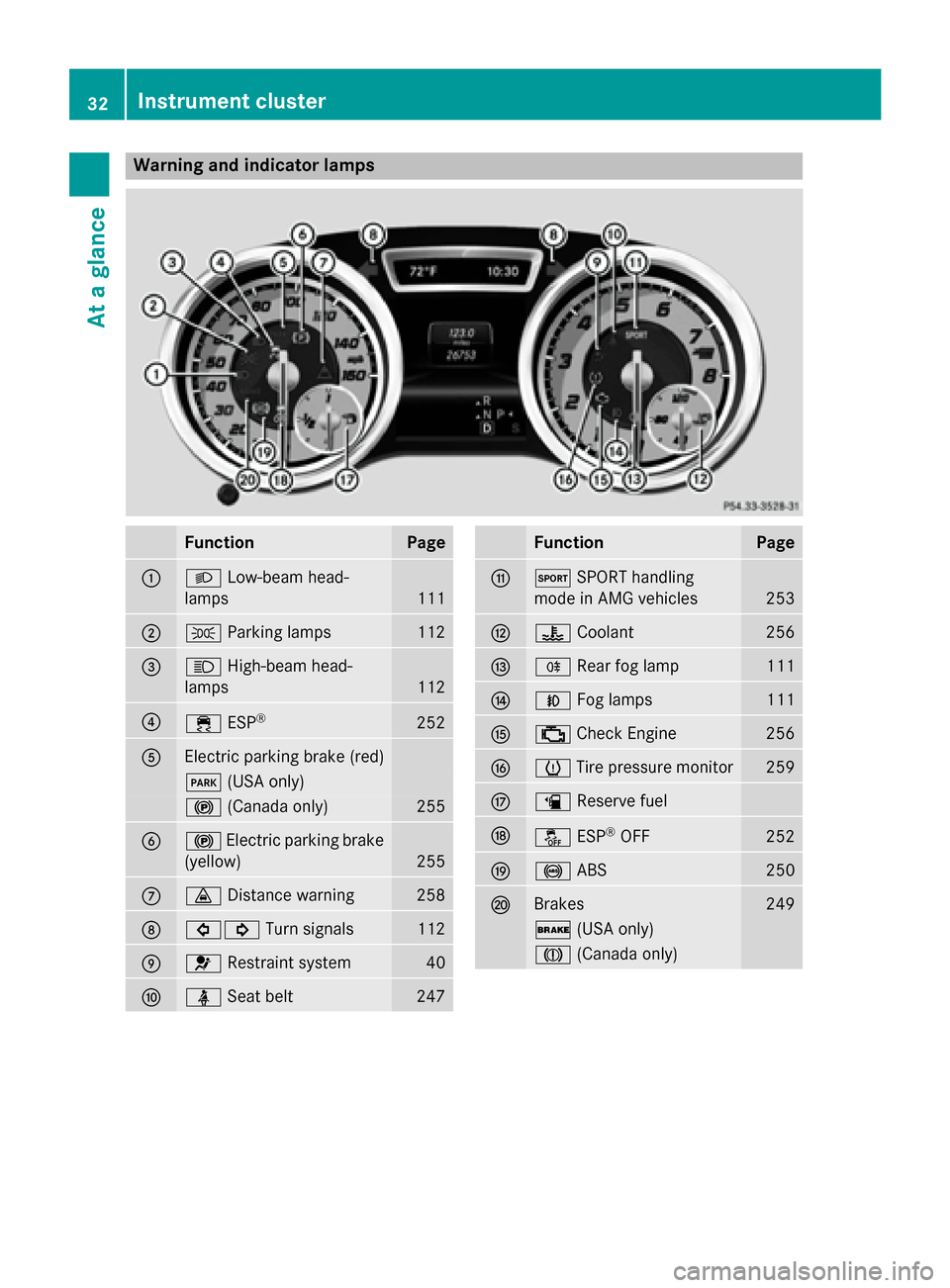
Warning and indicator lamps
Function Page
:
L
Low-beam head-
lamps 111
;
T
Parking lamps 112
=
K
High-beam head-
lamps 112
?
÷
ESP® 252
A
Electric parking brake (red)
F
(USA only) !
(Canada only) 255
B
!
Electric parking brake
(yellow) 255
C
·
Distance warning 258
D
#!
Turn signals 112
E
6
Restraint system 40
F
ü
Seat belt 247 Function Page
G
M
SPORT handling
mode in AMG vehicles 253
H
?
Coolant 256
I
R
Rear fog lamp 111
J
N
Fog lamps 111
K
;
Check Engine 256
L
h
Tire pressure monitor 259
M
æ
Reserve fuel N
å
ESP®
OFF 252
O
!
ABS 250
P
Brakes 249
$
(USA only) J
(Canada only) 32
Instrument clusterAt a glance
Page 77 of 362
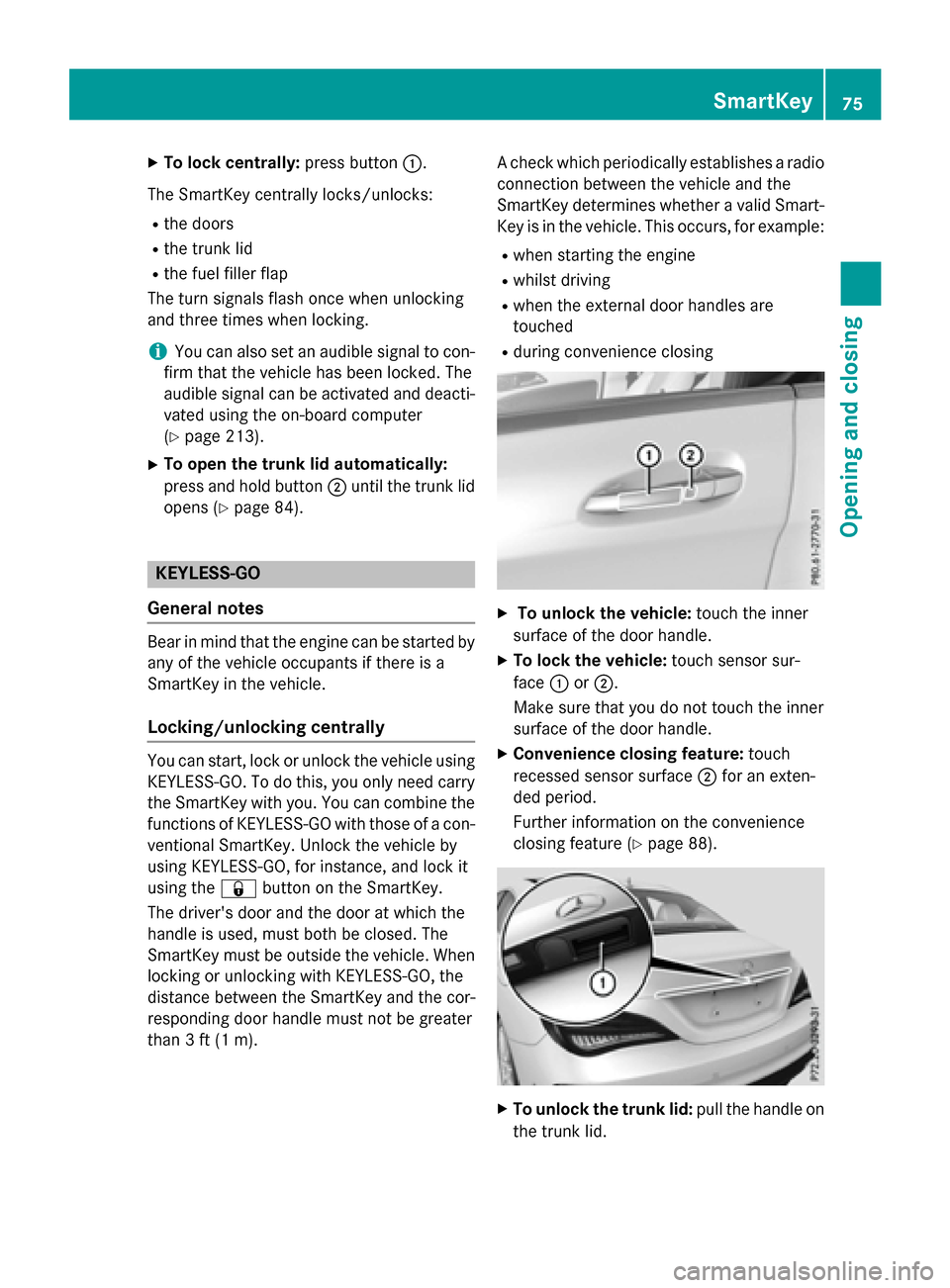
X
To lock centrally: press button:.
The SmartKey centrally locks/unlocks: R the doors
R the trunk lid
R the fuel filler flap
The turn signals flash once when unlocking
and three times when locking.
i You can also set an audible signal to con-
firm that the vehicle has been locked. The
audible signal can be activated and deacti-
vated using the on-board computer
(Y page 213).
X To open the trunk lid automatically:
press and hold button ;until the trunk lid
opens (Y page 84). KEYLESS-GO
General notes Bear in mind that the engine can be started by
any of the vehicle occupants if there is a
SmartKey in the vehicle.
Locking/unlocking centrally You can start, lock or unlock the vehicle using
KEYLESS-GO. To do this, you only need carry
the SmartKey with you. You can combine the
functions of KEYLESS-GO with those of a con- ventional SmartKey. Unlock the vehicle by
using KEYLESS-GO, for instance, and lock it
using the &button on the SmartKey.
The driver's door and the door at which the
handle is used, must both be closed. The
SmartKey must be outside the vehicle. When
locking or unlocking with KEYLESS-GO, the
distance between the SmartKey and the cor-
responding door handle must not be greater
than 3 ft (1 m). A check which periodically establishes a radio
connection between the vehicle and the
SmartKey determines whether a valid Smart- Key is in the vehicle. This occurs, for example:
R when starting the engine
R whilst driving
R when the external door handles are
touched
R during convenience closing X
To unlock the vehicle: touch the inner
surface of the door handle.
X To lock the vehicle: touch sensor sur-
face :or;.
Make sure that you do not touch the inner
surface of the door handle.
X Convenience closing feature: touch
recessed sensor surface ;for an exten-
ded period.
Further information on the convenience
closing feature (Y page 88). X
To unlock the trunk lid: pull the handle on
the trunk lid. SmartKey
75Opening and closing Z
Page 78 of 362
Deactivating and activating
If you do not intend to use the vehicle for a
longer period of time, you can deactivate KEY-
LESS-GO. The SmartKey will then use very lit- tle power, thereby conserving battery power.
For the purposes of activation/deactivation,
the vehicle must not be nearby.
X To deactivate: press the&button on
the SmartKey twice in rapid succession.
The battery check lamp of the SmartKey
(Y page 77) lights up twice briefly and
KEYLESS-GO is deactivated.
X To activate: press any button on the
SmartKey or insert the SmartKey into the
ignition lock.
KEYLESS-GO and all of its associated fea-
tures are available again. KEYLESS-GO start function
Bear in mind that the engine can be started by any of the vehicle occupants if there is a
SmartKey in the vehicle. Changing the settings of the locking
system
You can change the settings of the locking
system. This means that only the driver's door and the fuel filler flap are unlocked when the
vehicle is unlocked. This is useful if you fre-
quently travel on your own.
X To change the setting: simultaneously
press the %and& buttons for
approximately 6 seconds until the battery
check lamp (Y page 77) flashes twice.
i If the setting of the locking system is
changed within the signal range of the vehi- cle, pressing the &or% button:
R locks or
R unlocks the vehicle The SmartKey now functions as follows:
X To unlock the driver's door: press the
% button once.
X To unlock centrally: press the%but-
ton twice.
X To lock centrally: press the&button.
The KEYLESS-GO function is changed as fol-
lows:
X To unlock the driver's door: touch the
inner surface of the door handle on the
driver's door.
X To unlock centrally: touch the inner sur-
face of the door handle on the front-
passenger door or the rear door.
X To lock centrally: touch the outer sensor
surface on one of the door handles.
X To restore the factory settings: simulta-
neously press the %and& buttons
for approximately 6 seconds until the bat-
tery check lamp flashes twice
(Y page 77). Mechanical key
General notes If the vehicle can no longer be locked or
unlocked with the SmartKey or KEYLESS-GO, use the mechanical key.
If you use the mechanical key to unlock and
open the driver's door or the trunk lid, the
anti-theft alarm system will be triggered
(Y page 71).
There are several ways to turn off the alarm:
X To turn the alarm off with the SmartKey:
press the %or& button on the
SmartKey.
or X Insert the SmartKey into the ignition lock.
or
X To deactivate the alarm with KEYLESS-
GO: press the Start/Stop button in the igni- 76
SmartKeyOpening and closing
Page 114 of 362
specific regulations for the use of rear fog
lamps.
X To switch on the rear fog lamps: turn the
SmartKey to position 2in the ignition lock
or start the engine.
X Turn the light switch to LorÃ.
X Press the Rbutton.
The yellow Rindicator lamp in the
instrument cluster lights up.
X To switch off the rear fog lamp: press the
R button.
The yellow Rindicator lamp in the
instrument cluster goes out.
i When the rear fog lamp is switched on,
the center brake lamp in the tail lamp
switches off due to a legal requirement.
Parking lamps ! If the battery has been excessively dis-
charged, the parking lamps or standing
lamps are automatically switched off to
enable the next engine start. Always park
your vehicle safely and sufficiently lit
according to legal standards. Avoid the
continuous use of the Tparking lamps
for several hours. If possible, switch on the
X right or the Wleft standing lamp.
X To switch on: turn the light switch to T.
The green Tindicator lamp in the instru-
ment cluster lights up.
Standing lamps
Switching on the standing lamps ensures the
corresponding side of the vehicle is illumina-
ted.
X To switch on the standing lamps: the
SmartKey is not in the ignition lock or it is in position 0.
X Turn the light switch to W(left-hand side
of the vehicle) or X(right-hand side of
the vehicle). Combination switch
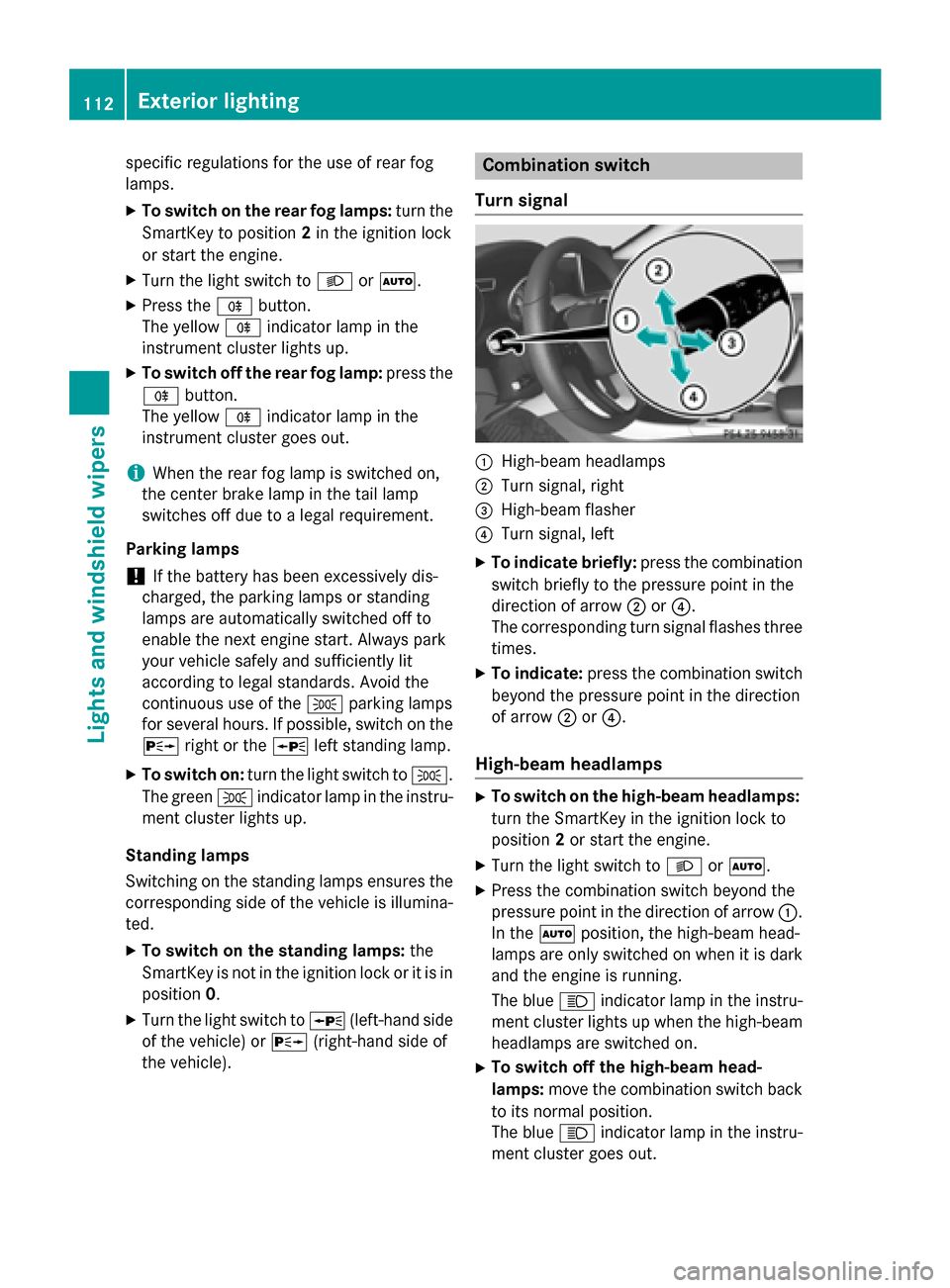
Turn signal :
High-beam headlamps
; Turn signal, right
= High-beam flasher
? Turn signal, left
X To indicate briefly: press the combination
switch briefly to the pressure point in the
direction of arrow ;or?.
The corresponding turn signal flashes three
times.
X To indicate: press the combination switch
beyond the pressure point in the direction
of arrow ;or?.
High-beam headlamps X
To switch on the high-beam headlamps:
turn the SmartKey in the ignition lock to
position 2or start the engine.
X Turn the light switch to LorÃ.
X Press the combination switch beyond the
pressure point in the direction of arrow :.
In the Ãposition, the high-beam head-
lamps are only switched on when it is dark
and the engine is running.
The blue Kindicator lamp in the instru-
ment cluster lights up when the high-beam headlamps are switched on.
X To switch off the high-beam head-
lamps: move the combination switch back
to its normal position.
The blue Kindicator lamp in the instru-
ment cluster goes out. 112
Exterior lightingLights and windshield wipers
Page 115 of 362
Vehicles with Adaptive Highbeam Assist:
when Adaptive Highbeam Assist is active, it
controls activation of the high-beam head-
lamps (Y page 114).
High-beam flasher X
To switch on: turn the SmartKey in the
ignition lock to position 1or 2, or start the
engine.
X Pull the combination switch in the direction
of arrow =. Hazard warning lamps
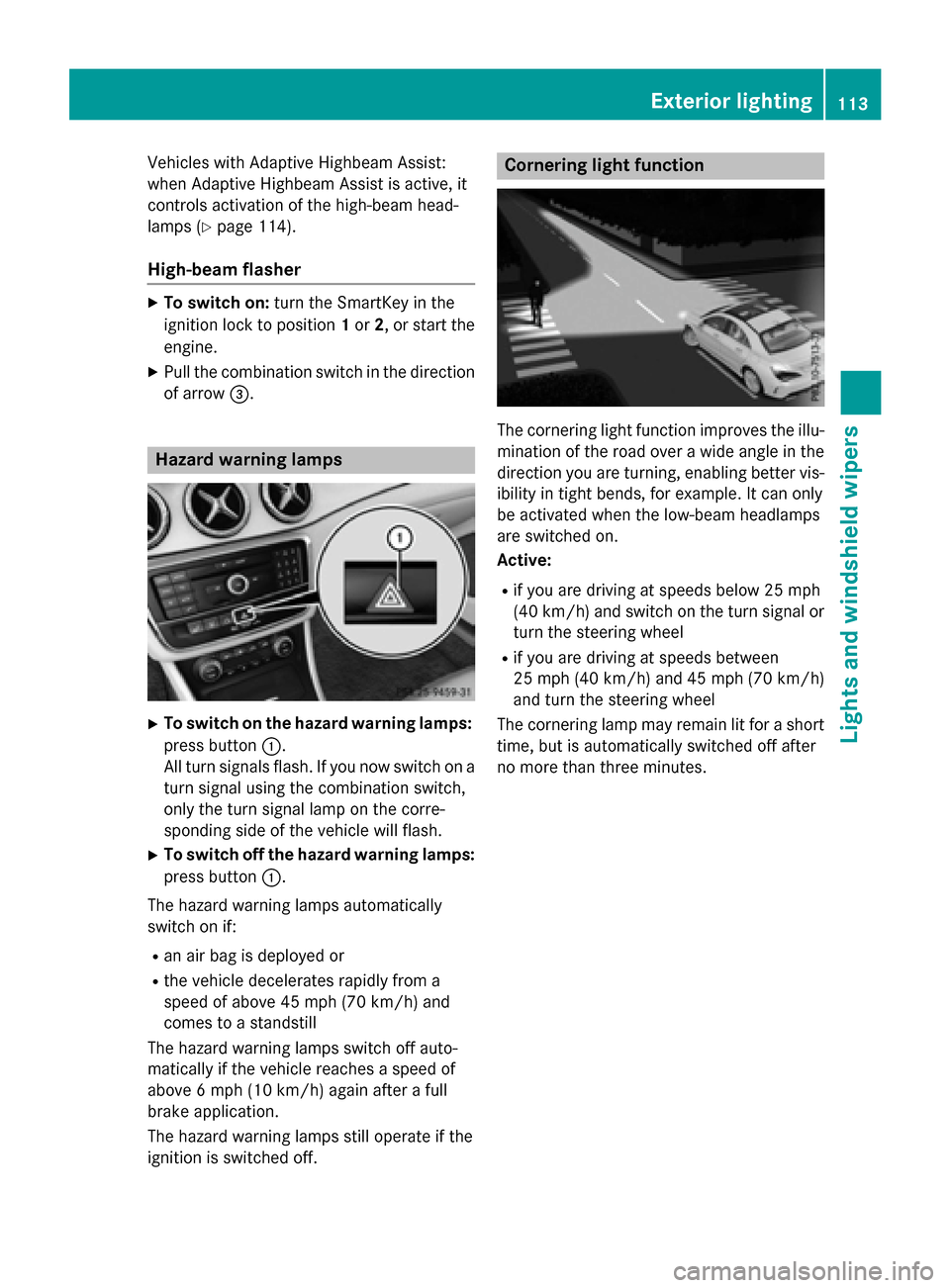
X
To switch on the hazard warning lamps:
press button :.
All turn signals flash. If you now switch on a turn signal using the combination switch,
only the turn signal lamp on the corre-
sponding side of the vehicle will flash.
X To switch off the hazard warning lamps:
press button :.
The hazard warning lamps automatically
switch on if:
R an air bag is deployed or
R the vehicle decelerates rapidly from a
speed of above 45 mph (70 km/h) and
comes to a standstill
The hazard warning lamps switch off auto-
matically if the vehicle reaches a speed of
above 6 mph (10 km/h) again after a full
brake application.
The hazard warning lamps still operate if the
ignition is switched off. Cornering light function
The cornering light function improves the illu-
mination of the road over a wide angle in the direction you are turning, enabling better vis-
ibility in tight bends, for example. It can only
be activated when the low-beam headlamps
are switched on.
Active:
R if you are driving at speeds below 25 mph
(40 km/h) and switch on the turn signal or
turn the steering wheel
R if you are driving at speeds between
25 mph (40 km/h) and 45 mph (70 km/h)
and turn the steering wheel
The cornering lamp may remain lit for a short
time, but is automatically switched off after
no more than three minutes. Exterior lighting
113Lights and windshield wipers Z
Page 119 of 362
Do not use a bulb that has been dropped or if
its glass tube has been scratched.
The bulb may explode if:
R you touch it
R it is hot
R you drop it
R you scratch it
Only operate bulbs in enclosed lamps
designed for that purpose. Only install spare
bulbs of the same type and the specified volt- age.
Marks on the glass tube reduce the service
life of the bulbs. Do not touch the glass tube
with your bare hands. If necessary, clean the
glass tube when cold with alcohol or spirit and
rub it off with a lint-free cloth.
Protect bulbs from moisture during opera-
tion. Do not allow bulbs to come into contact
with liquids.
There are bulbs other than the Xenon bulbs
that you cannot replace. Replace only the
bulbs listed (Y page 117). Have the bulbs that
you cannot replace yourself changed at a
qualified specialist workshop.
If you require assistance changing bulbs, con-
sult a qualified specialist workshop.
If the new bulb still does not light up, consult
a qualified specialist workshop.
Bulbs and lamps are an important aspect of
vehicle safety. You must therefore make sure that these function correctly at all times.
Have the headlamp setting checked regularly. Overview: changing bulbs/bulb types
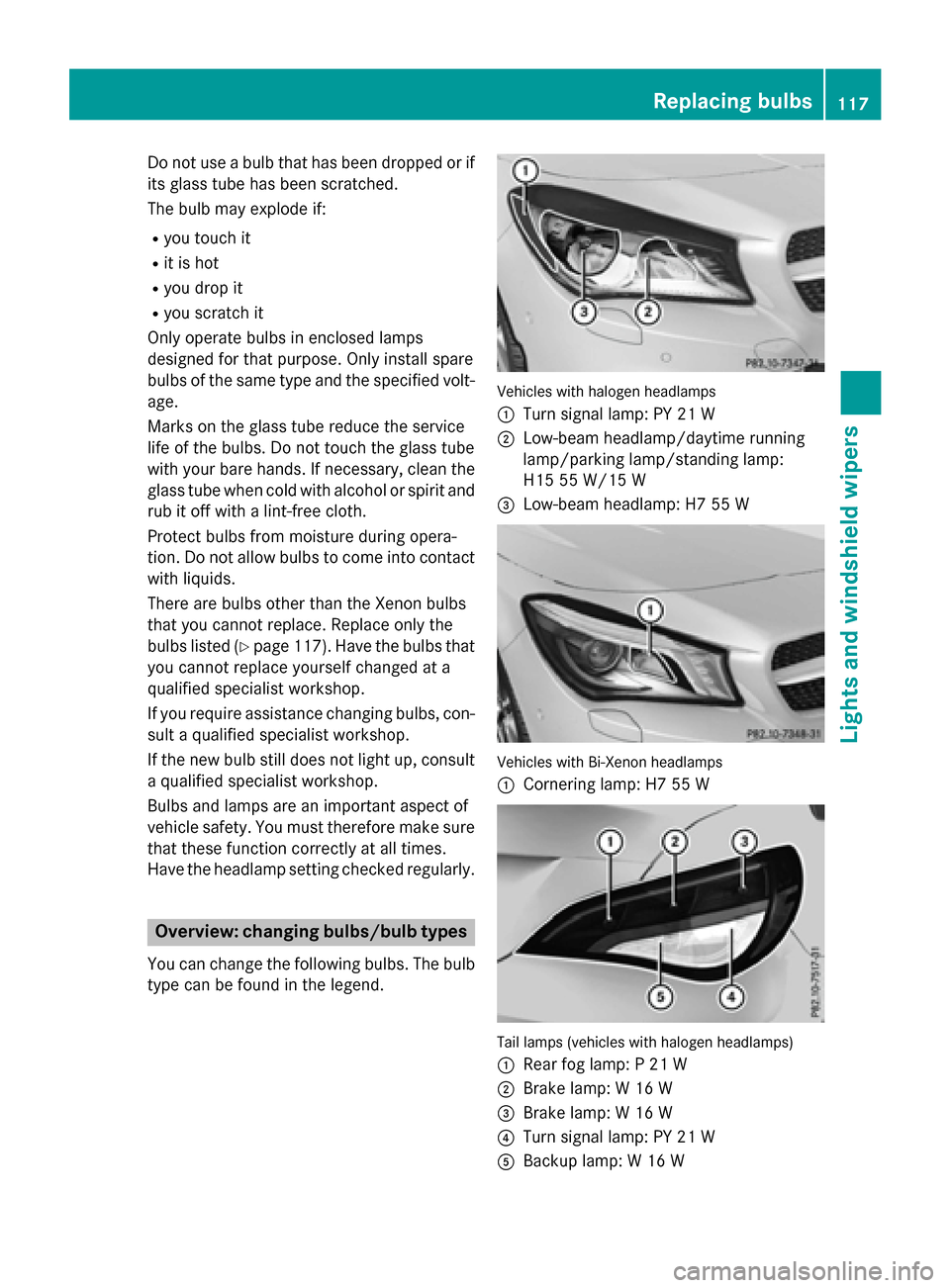
You can change the following bulbs. The bulb
type can be found in the legend. Vehicles with halogen headlamps
:
Turn signal lamp: PY 21 W
; Low-beam headlamp/daytime running
lamp/parking lamp/standing lamp:
H15 55 W/15 W
= Low-beam headlamp: H7 55 W Vehicles with Bi-Xenon headlamps
:
Cornering lamp: H7 55 W Tail lamps (vehicles with halogen headlamps)
: Rear fog lamp: P 21 W
; Brake lamp: W 16 W
= Brake lamp: W 16 W
? Turn signal lamp: PY 21 W
A Backup lamp: W 16 W Replacing bulbs
117Lights andwindshield wipers Z