bulb MERCEDES-BENZ CLA-Class 2016 C117 User Guide
[x] Cancel search | Manufacturer: MERCEDES-BENZ, Model Year: 2016, Model line: CLA-Class, Model: MERCEDES-BENZ CLA-Class 2016 C117Pages: 374, PDF Size: 8.19 MB
Page 124 of 374
Changing the front bulbs
Removing and installing the cover in the
front wheel housing
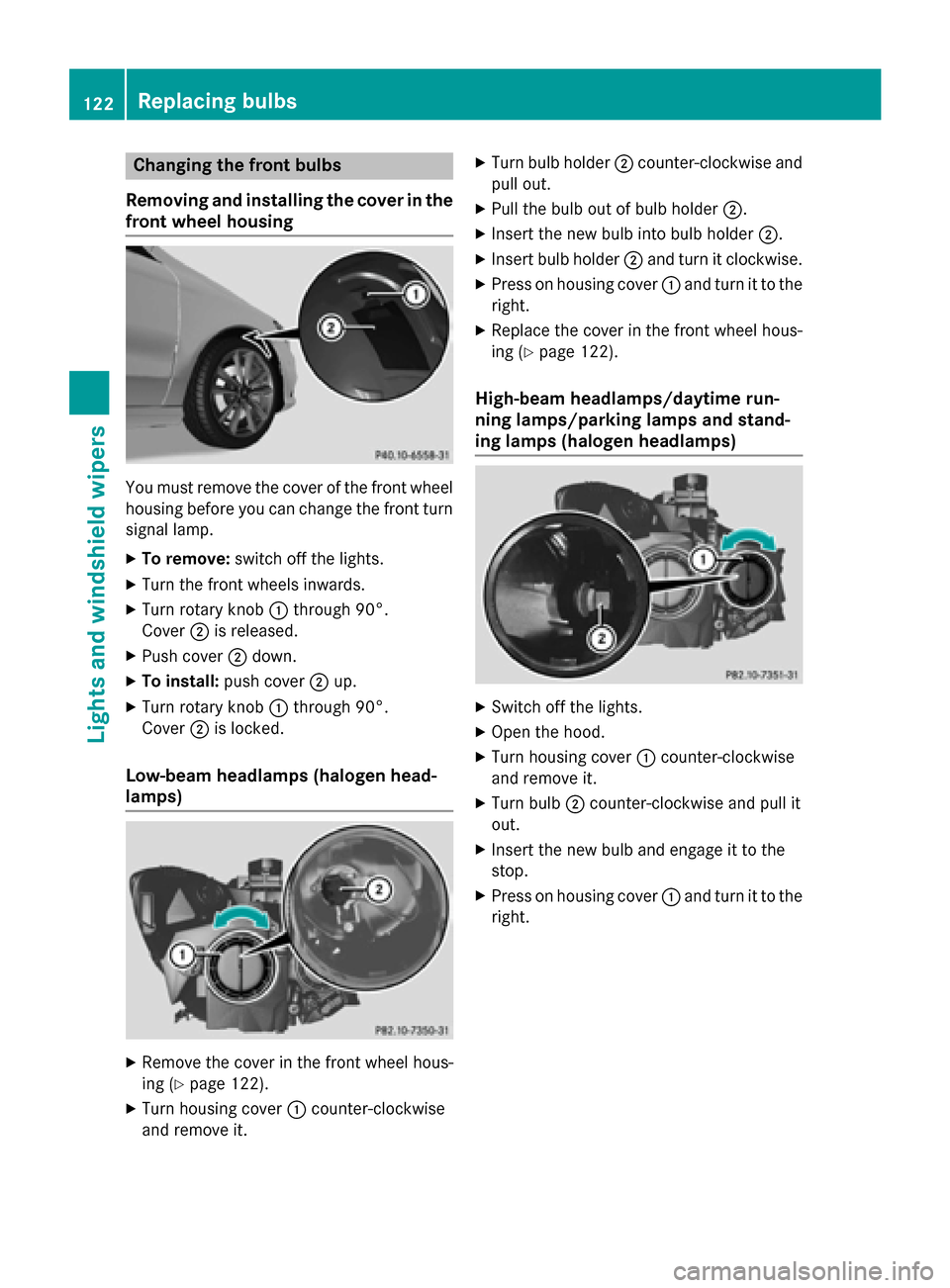
You must remove the cover of the front wheel
housing before you can change the front turn signal lamp.
XTo remove: switch off the lights.
XTurn the front wheels inwards.
XTurn rotary knob :through 90°.
Cover ;is released.
XPush cover ;down.
XTo install: push cover ;up.
XTurn rotary knob :through 90°.
Cover ;is locked.
Low-beam headlamps (halogen head-
lamps)
XRemove the cover in the front wheel hous-
ing (
Ypage 122).
XTurn housing cover :counter-clockwise
and remove it.
XTurn bulb holder ;counter-clockwise and
pull out.
XPull the bulb out of bulb holder ;.
XInsert the new bulb into bulb holder ;.
XInsert bulb holder;and turn it clockwise.
XPress on housing cover :and turn it to the
right.
XReplace the cover in the front wheel hous-
ing (
Ypage 122).
High-beam headlamps/daytime run-
ning lamps/parking lamps and stand-
ing lamps (halogen headlamps)
XSwitch off the lights.
XOpen the hood.
XTurn housing cover :counter-clockwise
and remove it.
XTurn bulb ;counter-clockwise and pull it
out.
XInsert the new bulb and engage it to the
stop.
XPress on housing cover :and turn it to the
right.
122Replacing bulbs
Lights and windshield wipers
Page 125 of 374
Turn signals (halogen headlamps)
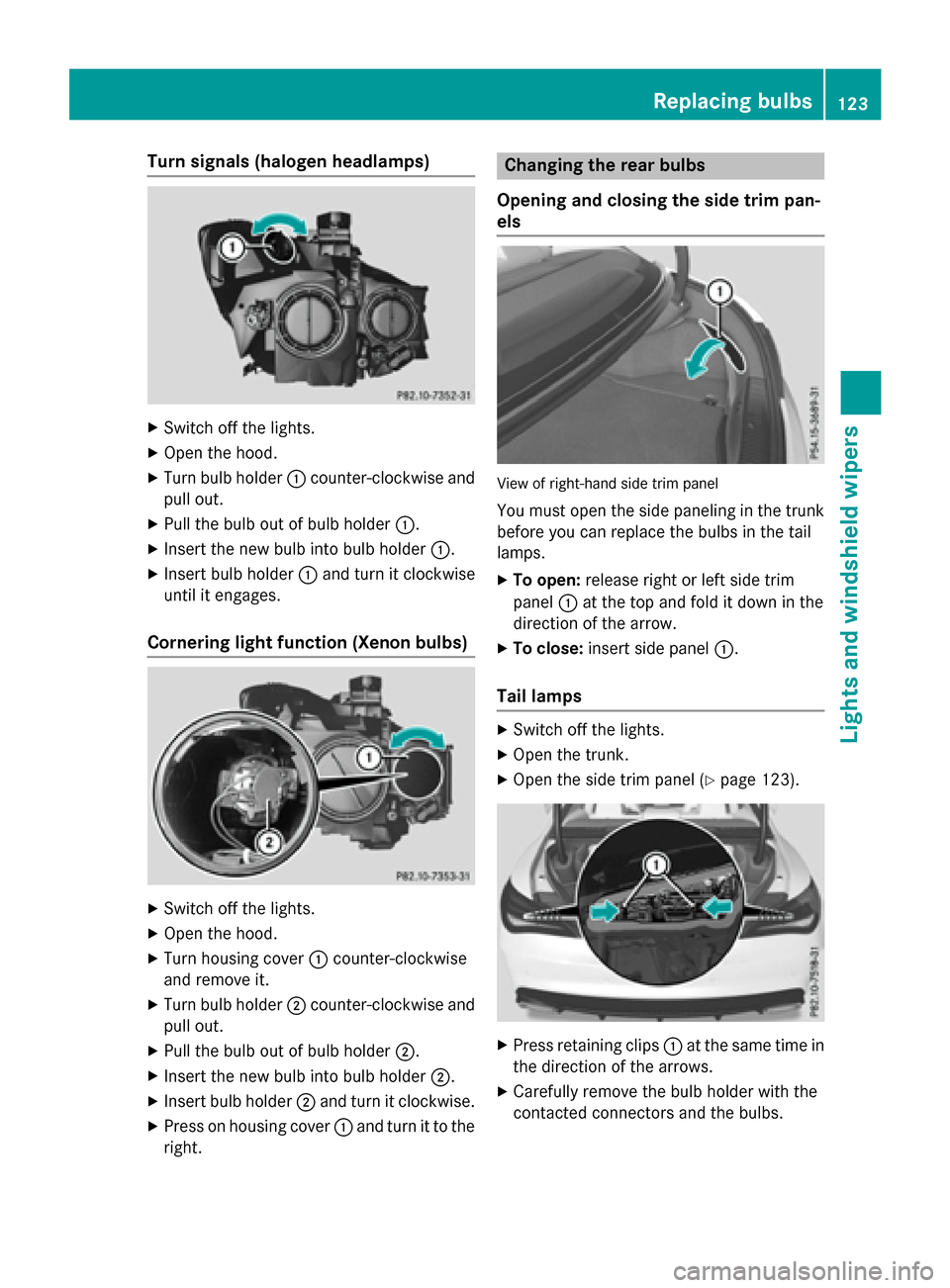
XSwitch off the lights.
XOpen the hood.
XTurn bulb holder:counter-clockwise and
pull out.
XPull the bulb out of bulb holder :.
XInsert the new bulb into bulb holder :.
XInsert bulb holder:and turn it clockwise
until it engages.
Cornering light function (Xenon bulbs)
XSwitch off the lights.
XOpen the hood.
XTurn housing cover :counter-clockwise
and remove it.
XTurn bulb holder ;counter-clockwise and
pull out.
XPull the bulb out of bulb holder ;.
XInsert the new bulb into bulb holder ;.
XInsert bulb holder;and turn it clockwise.
XPress on housing cover :and turn it to the
right.
Changing the rear bulbs
Opening and closing the side trim pan-
els
View of right-hand side trim panel
You must open the side paneling in the trunk
before you can replace the bulbs in the tail
lamps.
XTo open: release right or left side trim
panel :at the top and fold it down in the
direction of the arrow.
XTo close: insert side panel :.
Tail lamps
XSwitch off the lights.
XOpen the trunk.
XOpen the side trim panel (Ypage 123).
XPress retaining clips :at the same time in
the direction of the arrows.
XCarefully remove the bulb holder with the
contacted connectors and the bulbs.
Replacing bulbs123
Lights and windshield wiper s
Z
Page 126 of 374
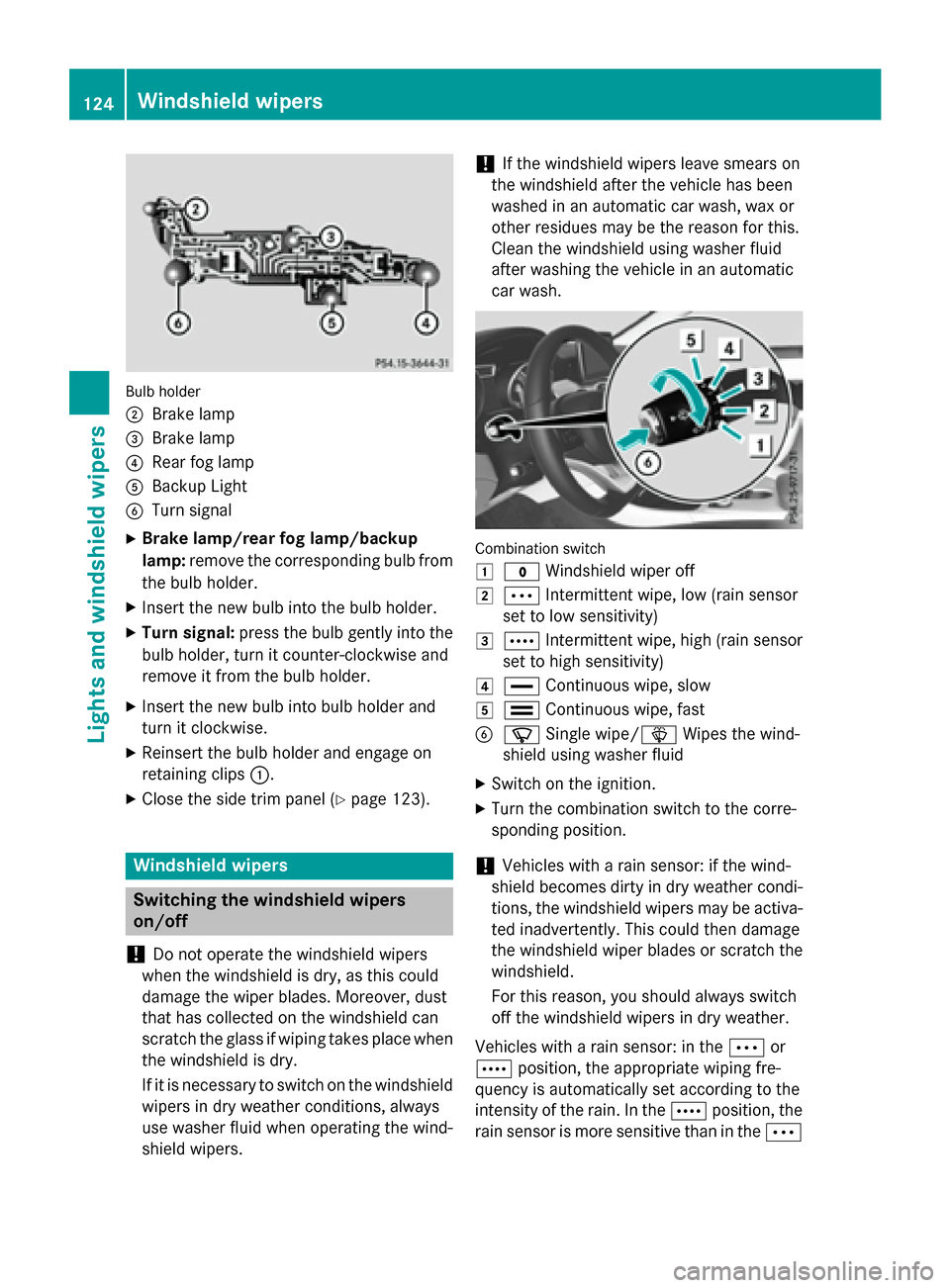
Bulb holder
;
Brake lamp
=Brake lamp
?Rear fog lamp
ABackup Light
BTurn signal
XBrake lamp/rear fog lamp/backup
lamp:remove the corresponding bulb from
the bulb holder.
XInsert the new bulb into the bulb holder.
XTurn signal: press the bulb gently into the
bulb holder, turn it counter-clockwise and
remove it from the bulb holder.
XInsert the new bulb into bulb holder and
turn it clockwise.
XReinsert the bulb holder and engage on
retaining clips :.
XClose the side trim panel (Ypage 123).
Windshield wipers
Switching the windshield wipers
on/off
!
Do not operate the windshield wipers
when the windshield is dry, as this could
damage the wiper blades. Moreover, dust
that has collected on the windshield can
scratch the glass if wiping takes place when
the windshield is dry.
If it is necessary to switch on the windshield
wipers in dry weather conditions, always
use washer fluid when operating the wind-
shield wipers.
!If the windshield wipers leave smears on
the windshield after the vehicle has been
washed in an automatic car wash, wax or
other residues may be the reason for this.
Clean the windshield using washer fluid
after washing the vehicle in an automatic
car wash.
Combination switch
1
$ Windshield wiper off
2ÄIntermittent wipe, low (rain sensor
set to low sensitivity)
3Å Intermittent wipe, high (rain sensor
set to high sensitivity)
4° Continuous wipe, slow
5¯Continuous wipe, fast
BíSingle wipe/î Wipes the wind-
shield using washer fluid
XSwitch on the ignition.
XTurn the combination switch to the corre-
sponding position.
!Vehicles with a rain sensor: if the wind-
shield becomes dirty in dry weather condi-
tions, the windshield wipers may be activa-
ted inadvertently. This could then damage
the windshield wiper blades or scratch the
windshield.
For this reason, you should always switch
off the windshield wipers in dry weather.
Vehicles with a rain sensor: in the Äor
Å position, the appropriate wiping fre-
quency is automatically set according to the
intensity of the rain. In the Åposition, the
rain sensor is more sensitive than in the Ä
124Windshield wipers
Lights and windshield wipers
Page 202 of 374
Rear view camera
General notes
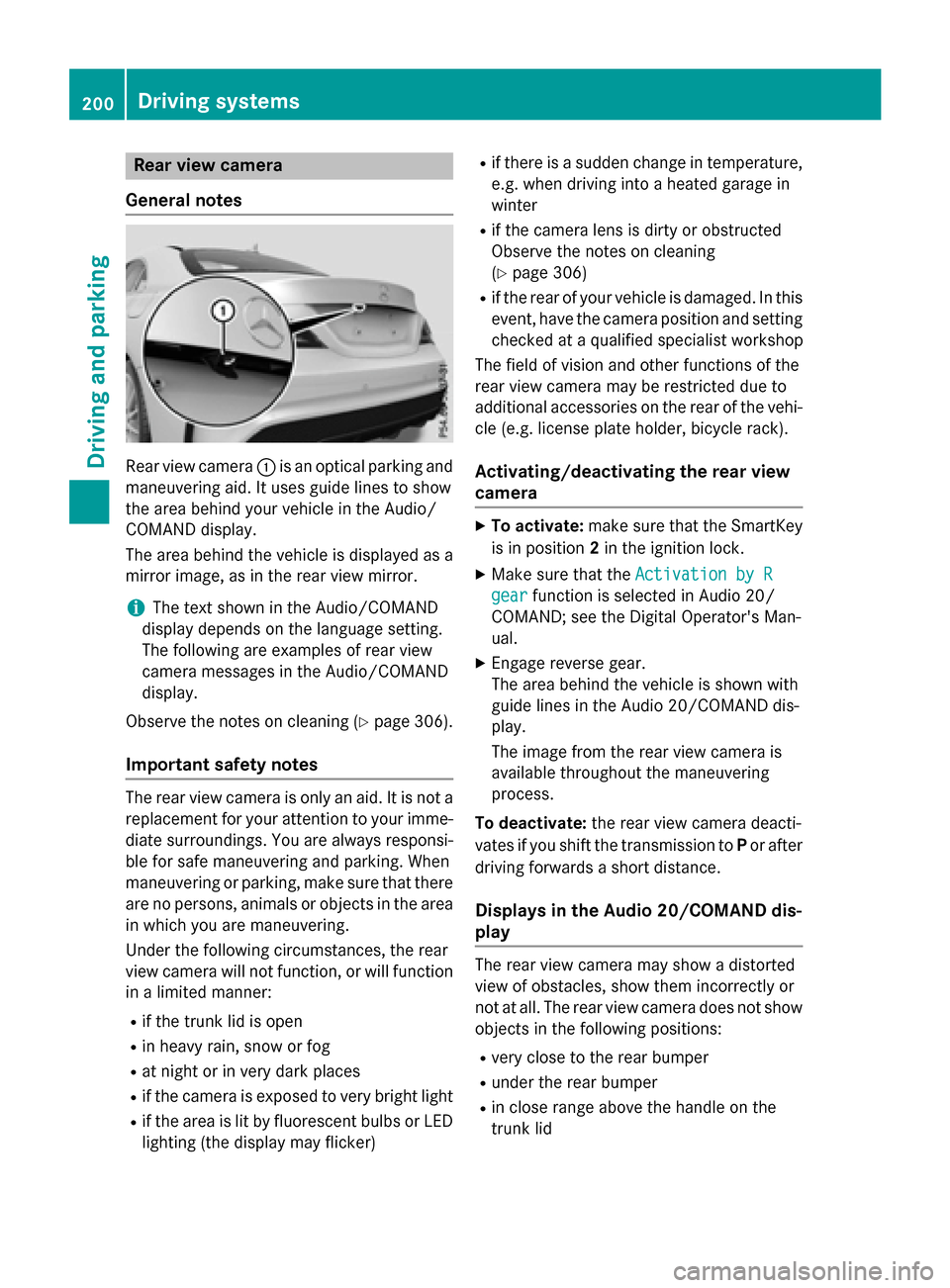
Rear view camera :is an optical parking and
maneuvering aid. It uses guide lines to show
the area behind your vehicle in the Audio/
COMAND display.
The area behind the vehicle is displayed as a
mirror image, as in the rear view mirror.
iThe text shown in the Audio/COMAND
display depends on the language setting.
The following are examples of rear view
camera messages in the Audio/COMAND
display.
Observe the notes on cleaning (
Ypage 306).
Important safety notes
The rear view camera is only an aid. It is not a
replacement for your attention to your imme-
diate surroundings. You are always responsi- ble for safe maneuvering and parking. When
maneuvering or parking, make sure that there
are no persons, animals or objects in the area
in which you are maneuvering.
Under the following circumstances, the rear
view camera will not function, or will function
in a limited manner:
Rif the trunk lid is open
Rin heavy rain, snow or fog
Rat night or in very dark places
Rif the camera is exposed to very bright light
Rif the area is lit by fluorescent bulbs or LED
lighting (the display may flicker)
Rif there is a sudden change in temperature,
e.g. when driving into a heated garage in
winter
Rif the camera lens is dirty or obstructed
Observe the notes on cleaning
(
Ypage 306)
Rif the rear of your vehicle is damaged. In this
event, have the camera position and setting
checked at a qualified specialist workshop
The field of vision and other functions of the
rear view camera may be restricted due to
additional accessories on the rear of the vehi-
cle (e.g. license plate holder, bicycle rack).
Activating/deactivating the rear view
camera
XTo activate: make sure that the SmartKey
is in position 2in the ignition lock.
XMake sure that the Activation by R
gearfunction is selected in Audio 20/
COMAND; see the Digital Operator's Man-
ual.
XEngage reverse gear.
The area behind the vehicle is shown with
guide lines in the Audio 20/COMAND dis-
play.
The image from the rear view camera is
available throughout the maneuvering
process.
To deactivate: the rear view camera deacti-
vates if you shift the transmission to Por after
driving forwards a short distance.
Displays in the Audio 20/COMAND dis-
play
The rear view camera may show a distorted
view of obstacles, show them incorrectly or
not at all. The rear view camera does not show
objects in the following positions:
Rvery close to the rear bumper
Runder the rear bumper
Rin close range above the handle on the
trunk lid
200Driving systems
Driving and parking
Page 241 of 374
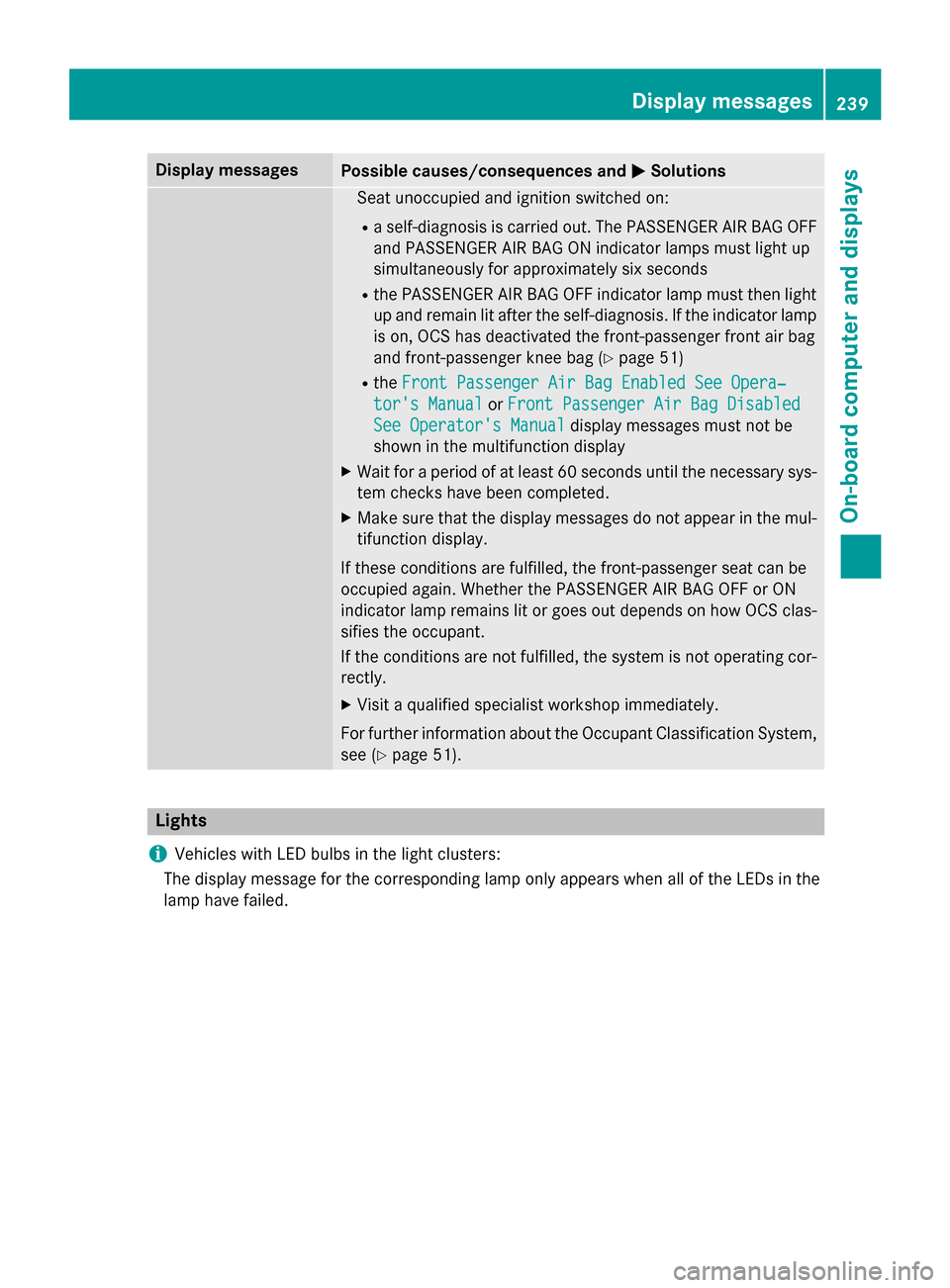
Display messagesPossible causes/consequences andMSolutions
Seat unoccupied and ignition switched on :
Raself-diagnosi sis carrie dout .The PASSENGER AI RBA GOF F
and PASSENGER AI RBA GON indicato rlamp smus tligh tup
simultaneousl yfo rapproximately six seconds
Rth ePASSENGER AI RBA GOF Findicato rlamp mus tthen ligh t
up and remain lit after th eself-diagnosis. If th eindicato rlamp
is on ,OCS has deactivated th efront-passenger fron tair bag
and front-passenger knee bag (
Ypage 51)
RtheFront Passenger Air Bag Enable dSee Opera‐
tor's Manualor Front Passenger Air Bag Disabled
See Operator' sManualdisplay message smus tno tbe
shown in th emultifunction display
XWait fo r aperiod of at leas t60 seconds until th enecessar ysys-
te m checks hav ebeen completed.
XMak esur ethat th edisplay message sdo no tappea rin th emul-
tifunction display.
If these condition sare fulfilled ,th efront-passenger seat can be
occupied again .Whether th ePASSENGER AI RBA GOF For ON
indicato rlamp remain slit or goe sout depend son how OCS clas-
sifies th eoccupant .
If th econdition sare no tfulfilled ,th esystem is no toperating cor-
rectly.
XVisit aqualified specialist workshop immediately.
Fo rfurther information about th eOccupant Classification System,
see (
Ypage 51).
Lights
i
Vehicles wit hLE Dbulbs in th eligh tclusters :
The display message fo rth ecorrespondin glamp only appears when all of th eLEDs in th e
lamp hav efailed.
Display messages23 9
On-board computer and displays
Z
Page 242 of 374
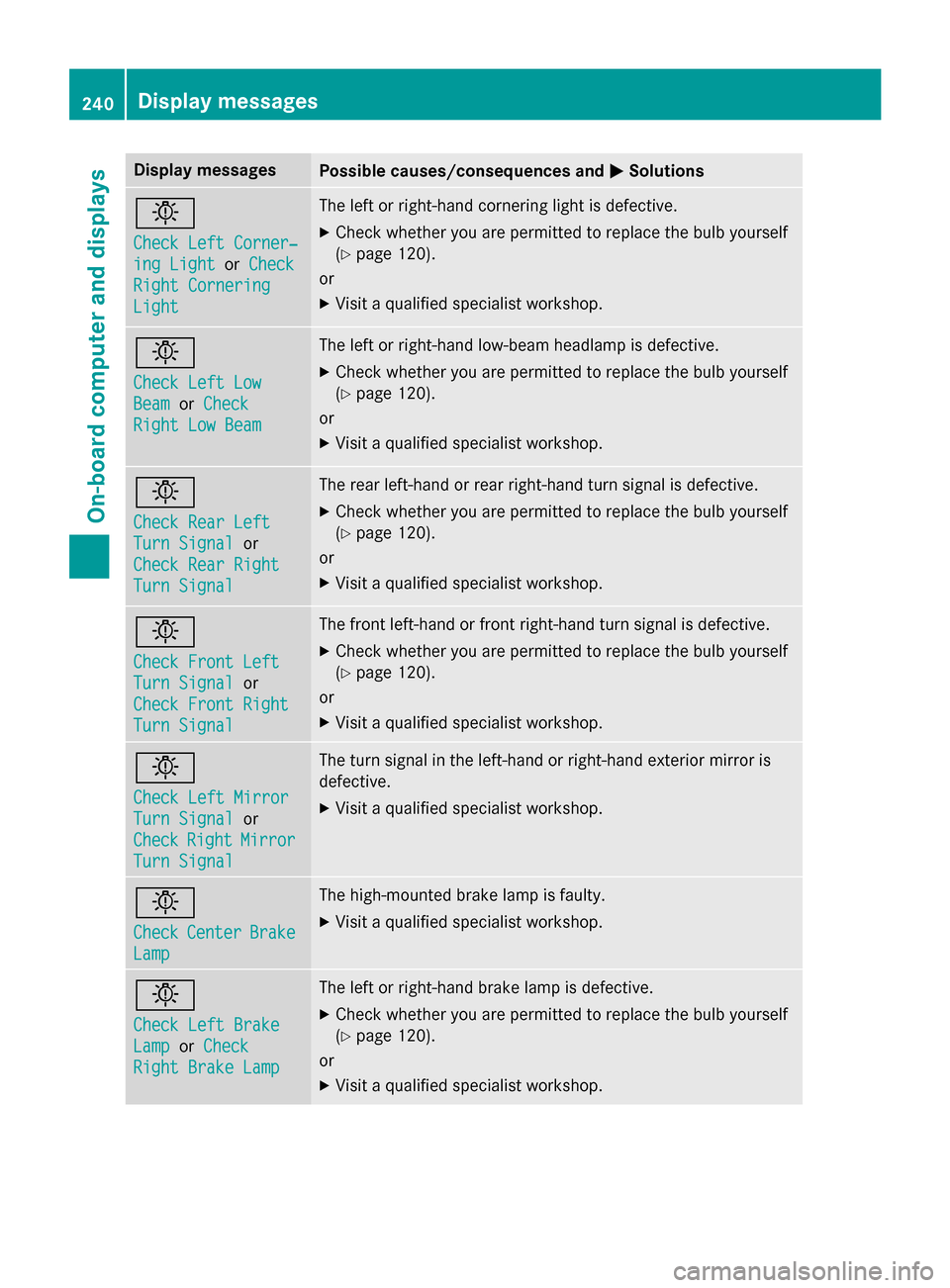
Display messagesPossible causes/consequences andMSolutions
b
Check LeftCorner ‐
ing LightorCheck
Right Cornering
Light
The lef tor right-hand cornering ligh tis defective.
XChec kwhether you are permitte dto replac eth ebulb yourself
(
Ypage 120).
or
XVisit aqualified specialist workshop .
b
Check LeftLow
Bea morCheck
Right Low Bea m
The leftor right-hand low-beam headlamp is defective.
XChec kwhether you are permitte dto replac eth ebulb yourself
(
Ypage 120).
or
XVisit aqualified specialist workshop .
b
Check RearLef t
TurnSignalor
Check Rea rRight
Tur nSignal
The rear left-han dor rear right-hand tur nsignal is defective.
XChec kwhether you are permitte dto replac eth ebulb yourself
(
Ypage 120).
or
XVisit aqualified specialist workshop .
b
Check Front Left
TurnSignalor
Check Front Right
Tur nSignal
The fron tleft-han dor fron tright-hand tur nsignal is defective.
XChec kwhether you are permitte dto replac eth ebulb yourself
(
Ypage 120).
or
XVisit aqualified specialist workshop .
b
Check LeftMirror
Tur nSignalor
Check
RightMirror
Tur nSignal
The tur nsignal in th eleft-han dor right-hand exterio rmirror is
defective.
XVisit aqualified specialist workshop .
b
CheckCenterBrake
Lamp
The high-mounte dbrak elamp is faulty.
XVisit aqualified specialist workshop .
b
Check LeftBrake
Lam porCheck
Right Brake Lam p
The leftor right-hand brak elamp is defective.
XChec kwhether you are permitte dto replac eth ebulb yourself
(
Ypage 120).
or
XVisit aqualified specialist workshop .
240Display messages
On-board computer and displays
Page 243 of 374
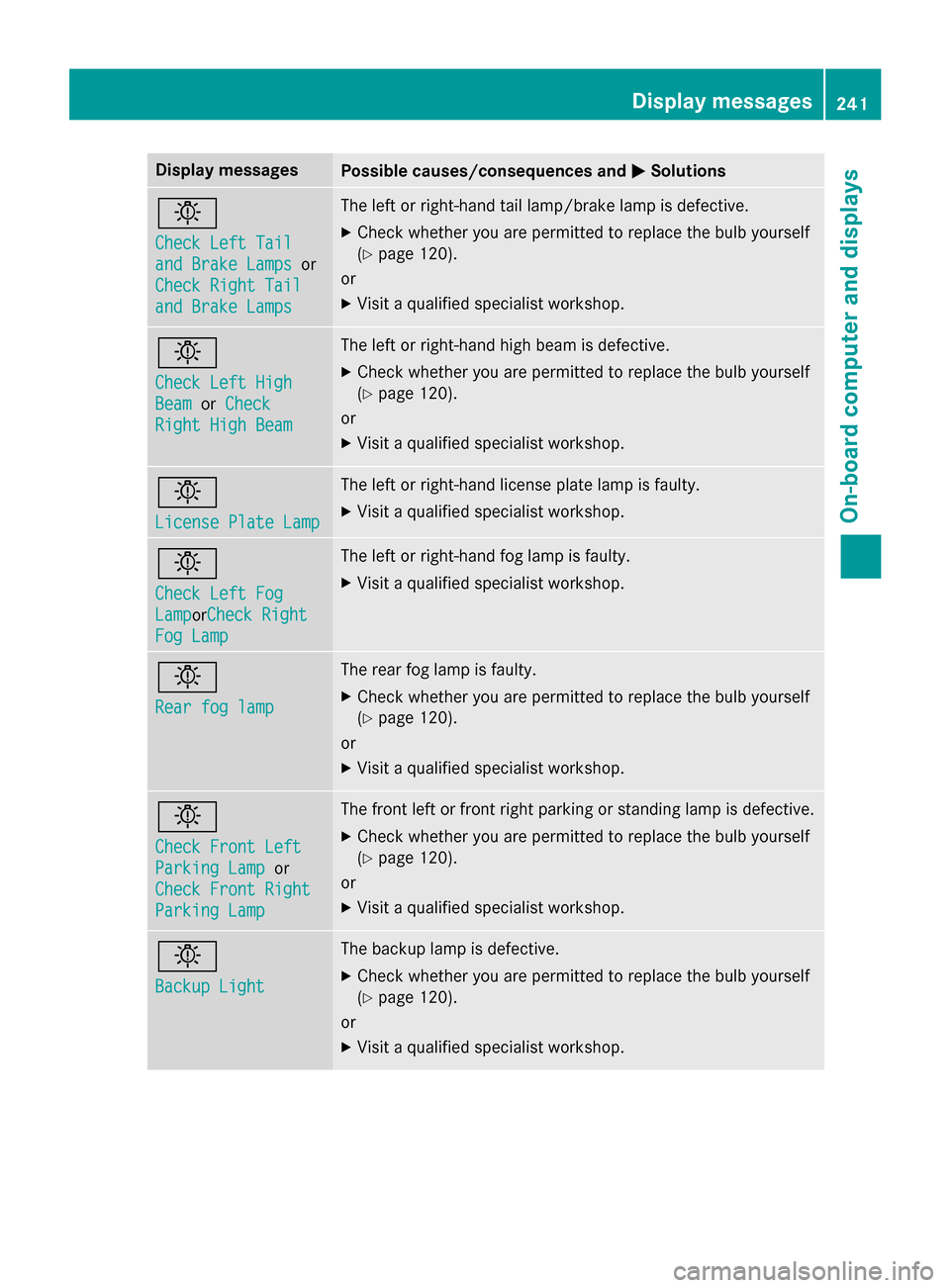
Display messagesPossible causes/consequences andMSolutions
b
Check LeftTai l
and Brake Lampsor
Check Right Tai l
and Brake Lamps
The leftor right-hand tai llamp/brak elamp is defective.
XChec kwhether you are permitte dto replac eth ebulb yourself
(
Ypage 120).
or
XVisit aqualified specialist workshop .
b
Check LeftHig h
BeamorCheck
Right Hig hBea m
The lef tor right-hand high beam is defective.
XChec kwhether you are permitte dto replac eth ebulb yourself
(
Ypage 120).
or
XVisit aqualified specialist workshop .
b
LicensePlate Lam p
The leftor right-hand license plat elamp is faulty.
XVisit aqualified specialist workshop .
b
Check LeftFog
Lam porCheck Right
Fog Lam p
The leftor right-hand fo glamp is faulty.
XVisit aqualified specialist workshop .
b
Rearfog lam p
The rear fo glamp is faulty.
XChec kwhether you are permitte dto replac eth ebulb yourself
(
Ypage 120).
or
XVisit aqualified specialist workshop .
b
Check Front Left
ParkingLam por
Check Front Right
Parkin gLam p
The fron tlef tor fron tright parkin gor standin glamp is defective.
XChec kwhether you are permitte dto replac eth ebulb yourself
(
Ypage 120).
or
XVisit aqualified specialist workshop .
b
Backup Light
The backup lamp is defective.
XCheckwhether you are permitte dto replac eth ebulb yourself
(
Ypage 120).
or
XVisit aqualified specialist workshop .
Display messages241
On-board computer and displays
Z
Page 244 of 374
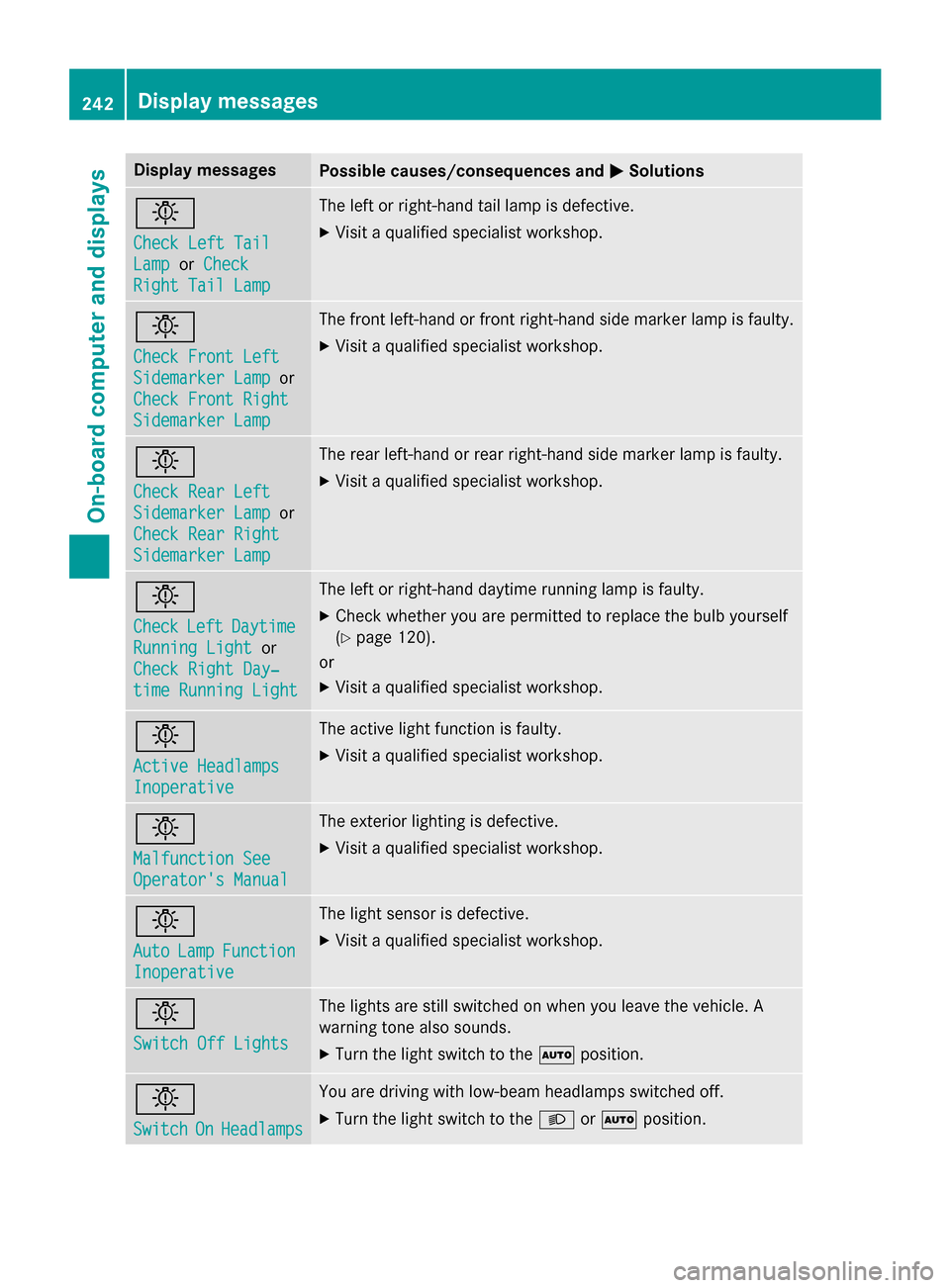
Display messagesPossible causes/consequences andMSolutions
b
Check LeftTai l
LamporCheck
Right Tai lLam p
The lef tor right-hand tai llamp is defective.
XVisit aqualified specialist workshop .
b
Check Front Left
SidemarkerLam por
Check Front Right
Sidemarke rLam p
The fron tleft-han dor fron tright-hand side marke rlamp is faulty.
XVisit aqualified specialist workshop .
b
Check RearLef t
Sidemarke rLam por
Check Rea rRight
Sidemarke rLam p
The rear left-han dor rear right-hand side marke rlamp is faulty.
XVisit aqualified specialist workshop .
b
CheckLeftDaytim e
RunningLightor
Check Right Day ‐
timeRunnin gLight
The lef tor right-hand daytime running lamp is faulty.
XChec kwhether you are permitte dto replac eth ebulb yourself
(
Ypage 120).
or
XVisit aqualified specialist workshop .
b
Active Headlamps
Inoperative
The active lightfunction is faulty.
XVisit aqualified specialist workshop .
b
Malfunction See
Operator'sManual
The exterio rlighting is defective.
XVisit aqualified specialist workshop .
b
AutoLampFunction
Inoperative
The ligh tsensor is defective.
XVisit aqualified specialist workshop .
b
Switch Off Lights
The lights are still switched on when you leav eth evehicle. A
warnin gtone also sounds.
XTur nth eligh tswitch to th eà position .
b
SwitchOnHeadlamps
You are drivin gwit hlow-beam headlamp sswitched off.
XTur nth eligh tswitch to th eL orà position .
242Display messages
On-board computer and displays