reset MERCEDES-BENZ CLA-Class 2016 C117 User Guide
[x] Cancel search | Manufacturer: MERCEDES-BENZ, Model Year: 2016, Model line: CLA-Class, Model: MERCEDES-BENZ CLA-Class 2016 C117Pages: 374, PDF Size: 8.19 MB
Page 110 of 374
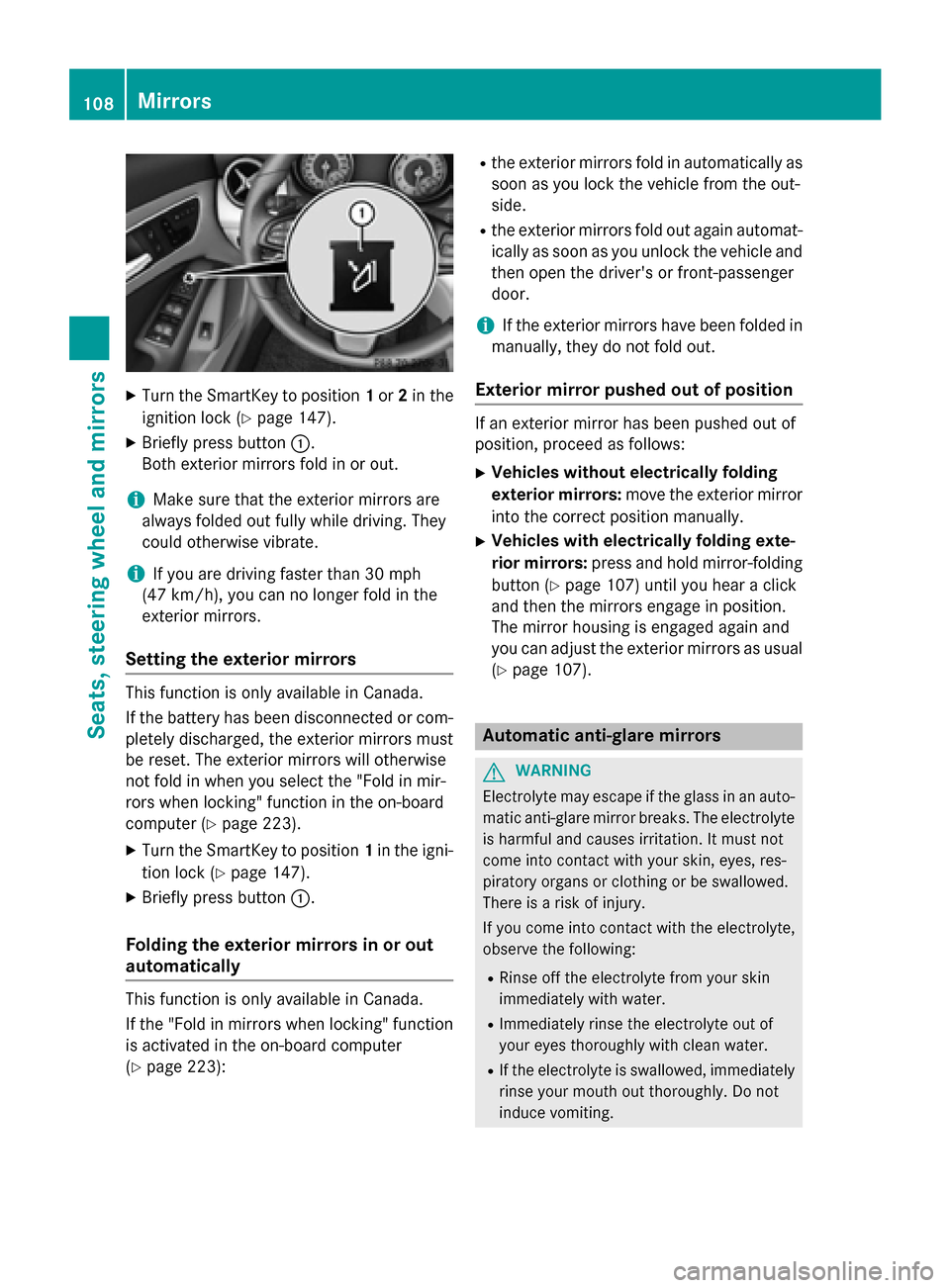
XTurn the SmartKey to position1or 2in the
ignition lock (
Ypage 147).
XBriefly press button :.
Both exterior mirrors fold in or out.
iMake sure that the exterior mirrors are
always folded out fully while driving. They
could otherwise vibrate.
iIf you are driving faster than 30 mph
(47 km/h) , you can no longer fold in the
exterior mirrors.
Setting the exterior mirrors
This function is only available in Canada.
If the battery has been disconnected or com-
pletely discharged, the exterior mirrors must
be reset. The exterior mirrors will otherwise
not fold in when you select the "Fold in mir-
rors when locking" function in the on-board
computer (
Ypage 223).
XTurn the SmartKey to position 1in the igni-
tion lock (
Ypage 147).
XBriefly press button :.
Folding the exterior mirrors in or out
automatically
This function is only available in Canada.
If the "Fold in mirrors when locking" function
is activated in the on-board computer
(
Ypage 223):
Rthe exterior mirrors fold in automatically as
soon as you lock the vehicle from the out-
side.
Rthe exterior mirrors fold out again automat-
ically as soon as you unlock the vehicle and
then open the driver's or front-passenger
door.
iIf the exterior mirrors have been folded in
manually, they do not fold out.
Exterior mirror pushed out of position
If an exterior mirror has been pushed out of
position, proceed as follows:
XVehicles without electrically folding
exterior mirrors: move the exterior mirror
into the correct position manually.
XVehicles with electrically folding exte-
rior mirrors: press and hold mirror-folding
button (
Ypage 107) until you hear a click
and then the mirrors engage in position.
The mirror housing is engaged again and
you can adjust the exterior mirrors as usual
(
Ypage 107).
Automatic anti-glare mirrors
GWARNING
Electrolyte may escape if the glass in an auto-
matic anti-glare mirror breaks. The electrolyte
is harmful and causes irritation. It must not
come into contact with your skin, eyes, res-
piratory organs or clothing or be swallowed.
There is a risk of injury.
If you come into contact with the electrolyte,
observe the following:
RRinse off the electrolyte from your skin
immediately with water.
RImmediately rinse the electrolyte out of
your eyes thoroughly with clean water.
RIf the electrolyte is swallowed, immediately
rinse your mouth out thoroughly. Do not
induce vomiting.
108Mirrors
Seats, steering wheel and mirrors
Page 111 of 374
RIf electrolyte comes into contact with your
skin or hair or is swallowed, seek medical
attention immediately.
RImmediately change out of clothing which
has come into contact with electrolyte.
RIf an allergic reaction occurs, seek medical
attention immediately.
The "Automatic anti-glare mirrors" function is
only available if the vehicle is equipped with
the "Mirrors package".
The rear-view mirror and the exterior mirror
on the driver's side automatically go into anti-
glare mode if:
Rthe ignition is switched on and
Rincident light from headlamps strikes the
sensor in the rear-view mirror
The mirrors do not go into anti-glare mode if
reverse gear is engaged or the interior lighting
is switched on.
Parking position for the exterior mir-
ror on the front-passenger side
General notes
The "Parking position of the exterior mirror on
the front-passenger side" function is only
available if the vehicle is equipped with the
"Mirrors package".
Setting and storing the parking position
You can position the front-passenger side
exterior mirror in such a way that you can see the rear wheel on that side as soon as you
engage reverse gear. You can store this posi-
tion.
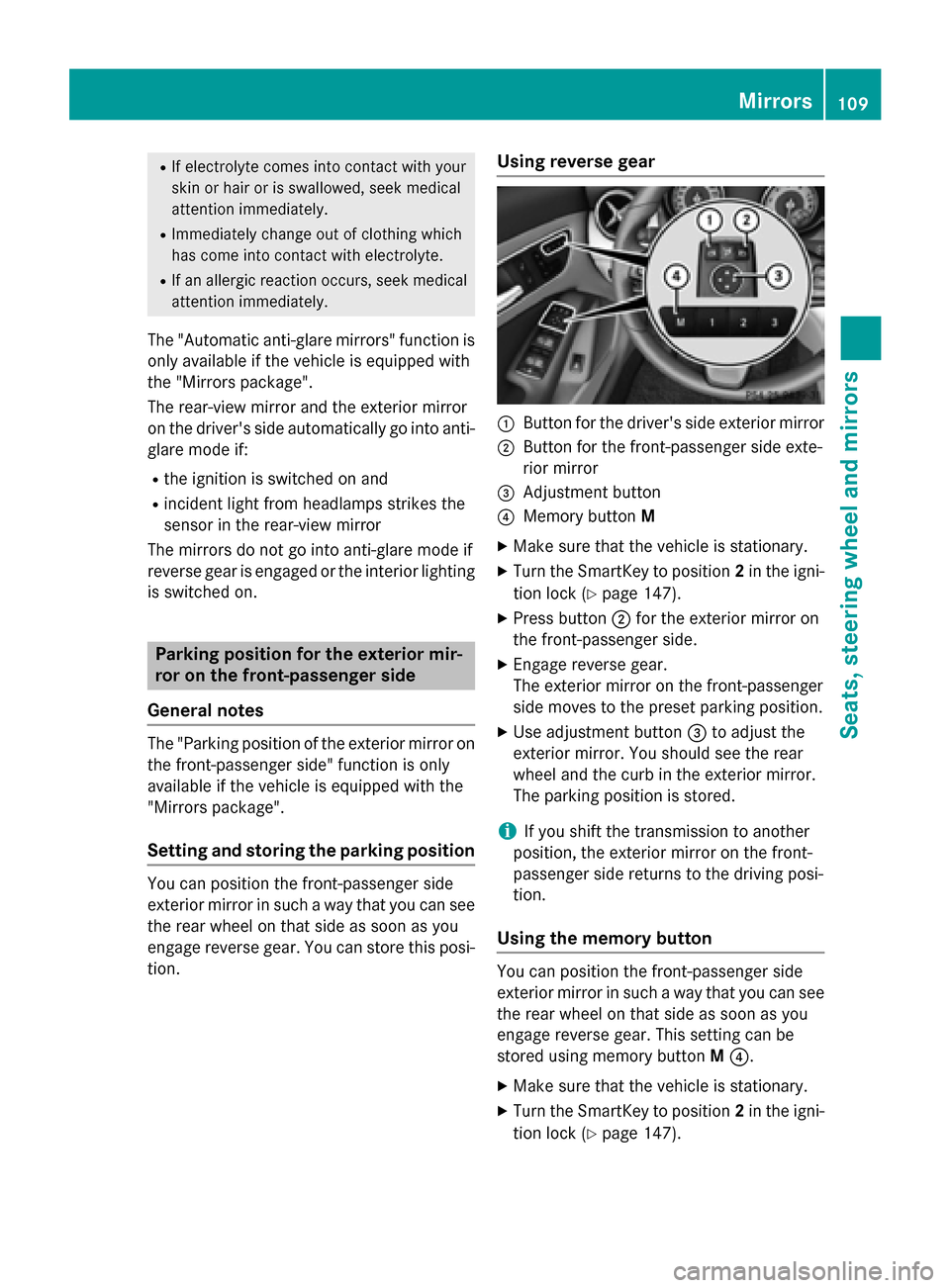
Using reverse gear
:Button for the driver's side exterior mirror
;Button for the front-passenger side exte-
rior mirror
=Adjustment button
?Memory button M
XMake sure that the vehicle is stationary.
XTurn the SmartKey to position 2in the igni-
tion lock (
Ypage 147).
XPress button ;for the exterior mirror on
the front-passenger side.
XEngage reverse gear.
The exterior mirror on the front-passenger
side moves to the preset parking position.
XUse adjustment button =to adjust the
exterior mirror. You should see the rear
wheel and the curb in the exterior mirror.
The parking position is stored.
iIf you shift the transmission to another
position, the exterior mirror on the front-
passenger side returns to the driving posi-
tion.
Using the memory button
You can position the front-passenger side
exterior mirror in such a way that you can see
the rear wheel on that side as soon as you
engage reverse gear. This setting can be
stored using memory button M?.
XMake sure that the vehicle is stationary.
XTurn the SmartKey to position 2in the igni-
tion lock (
Ypage 147).
Mirrors109
Seats, steering wheel and mirrors
Z
Page 112 of 374
XPress button;for the exterior mirror on
the front-passenger side.
XUse adjustment button =to adjust the
exterior mirror. You should see the rear
wheel and the curb in the exterior mirror.
XPress memory button M? and one of the
arrows on adjustment button =within
three seconds.
The parking position is stored if the exterior
mirror does not move.
XIf the mirror moves out of position, repeat
the steps.
Calling up a stored parking position set-
ting
XTurn the SmartKey to position 2in the igni-
tion lock (
Ypage 147).
XAdjust the exterior mirror on the front-
passenger side with the corresponding but-
ton (
Ypage 107).
XEngage reverse gear.
The exterior mirror on the front-passenger
side moves to the stored parking position.
The exterior mirror on the front-passenger
side moves back to its original position:
Ras soon as you exceed a speed of 9 mph
(15 km/h)
Rabout ten seconds after you have disen-
gaged reverse gear
Rif you press button :for the exterior mir-
ror on the driver's side
Memory function
Important safety notes
GWARNING
If you use the memory function on the driver's side while driving, you could lose control of
the vehicle as a result of the adjustments
being made. There is a risk of an accident.
Only use the memory function on the driver's
side when the vehicle is stationary.
GWARNING
When the memory function adjusts the seat,
you and other vehicle occupants – particularly
children – could become trapped. There is a
risk of injury.
While the memory function is making adjust-
ments, make sure that no one has any body
parts in the sweep of the seat. If somebody
becomes trapped, immediately release the
memory function position button. The adjust-
ment process is stopped.
GWARNING
Children could become trapped if they acti-
vate the memory function, particularly when
unattended. There is a risk of injury.
When leaving the vehicle, always take the
SmartKey with you and lock the vehicle. Never
leave children unsupervised in the vehicle.
The memory function can be used at any time,
e.g. even when the SmartKey isn't in the igni-
tion lock.
Storing settings
With the memory function, you can store up
to three different settings, e.g. for three dif-
ferent people.
The following settings are stored as a single
memory preset:
Rseat and backrest position
Rdriver's side: position of the exterior mir-
rors on the driver's and front-passenger
sides
110Memory function
Seats, steering wheel and mirrors
Page 113 of 374
XAdjust the seat (Ypage 103).
XAdjust the exterior mirror on the driver's
side (
Ypage 107).
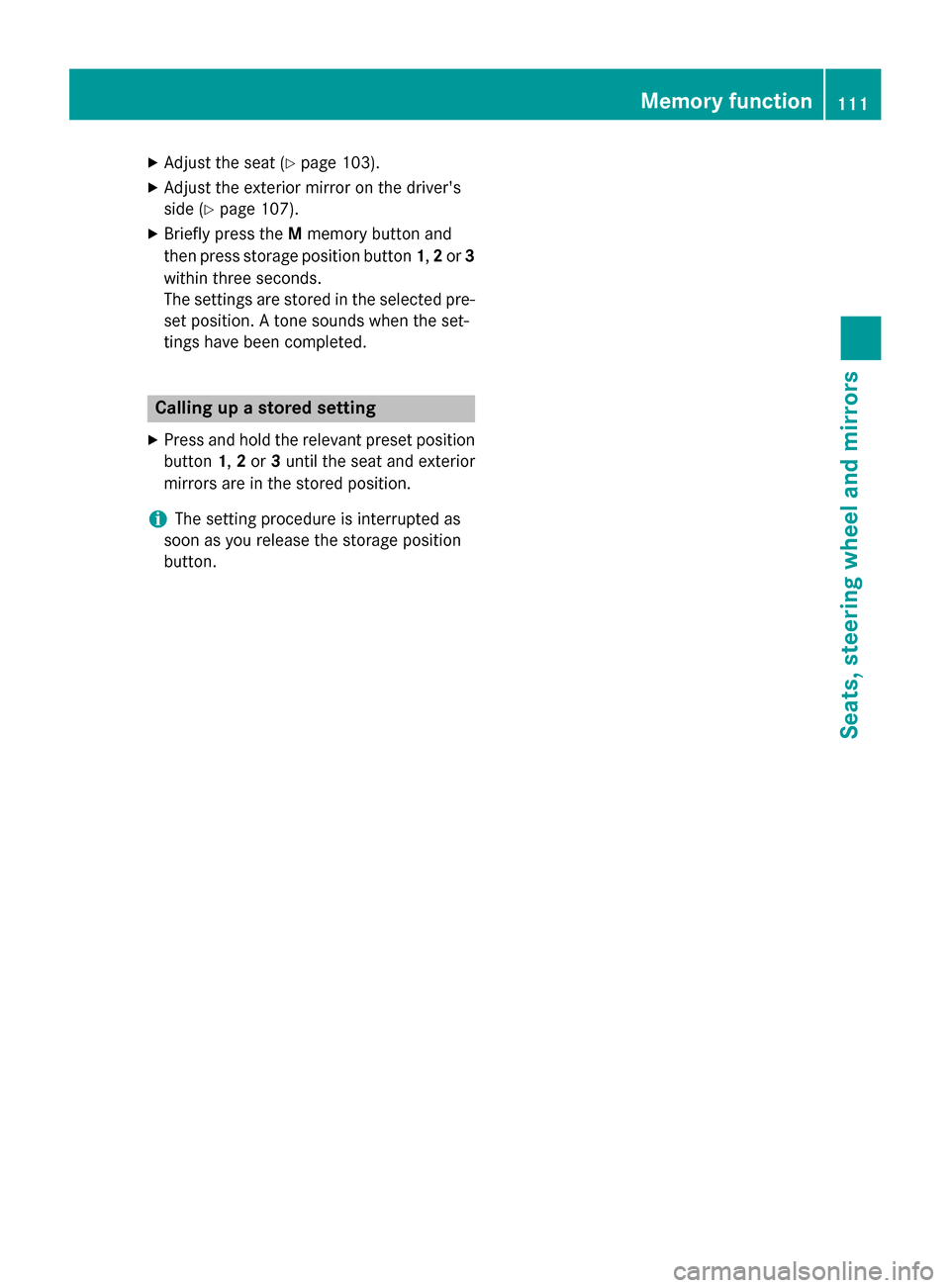
XBriefly press theMmemory button and
then press storage position button 1,2 or 3
within three seconds.
The settings are stored in the selected pre-
set position. A tone sounds when the set-
tings have been completed.
Calling up a stored setting
XPress and hold the relevant preset position
button 1,2 or 3until the seat and exterior
mirrors are in the stored position.
iThe setting procedure is interrupted as
soon as you release the storage position
button.
Memory function111
Seats, steering wheel and mirrors
Z
Page 176 of 374
ECO display
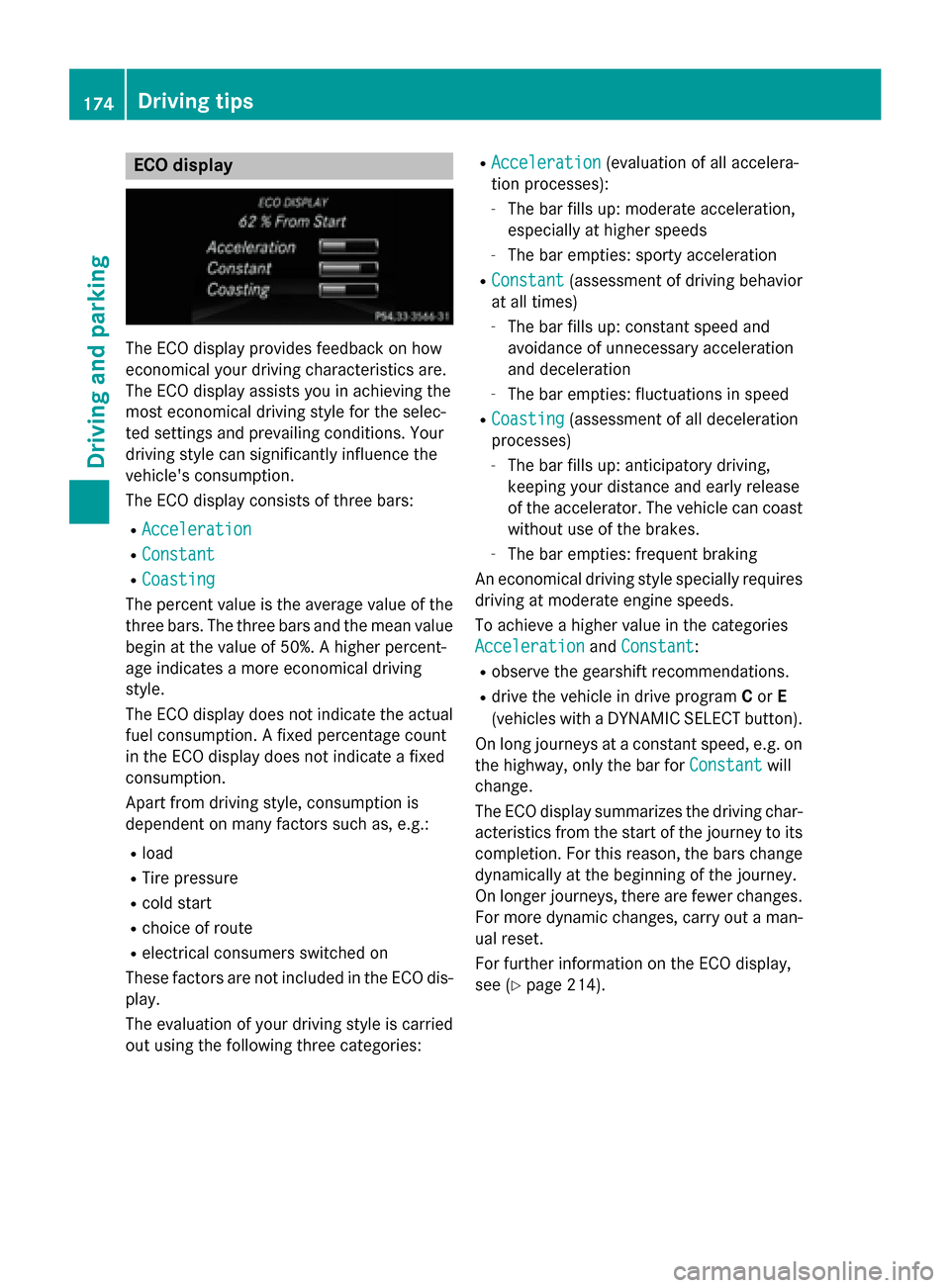
The ECO display provides feedback on how
economical your driving characteristics are.
The ECO display assists you in achieving the
most economical driving style for the selec-
ted settings and prevailing conditions. Your
driving style can significantly influence the
vehicle's consumption.
The ECO display consists of three bars:
RAcceleration
RConstant
RCoasting
The percent value is the average value of the
three bars. The three bars and the mean value
begin at the value of 50%. A higher percent-
age indicates a more economical driving
style.
The ECO display does not indicate the actual
fuel consumption. A fixed percentage count
in the ECO display does not indicate a fixed
consumption.
Apart from driving style, consumption is
dependent on many factors such as, e.g.:
Rload
RTire pressure
Rcold start
Rchoice of route
Relectrical consumers switched on
These factors are not included in the ECO dis-
play.
The evaluation of your driving style is carried out using the following three categories:
RAcceleration(evaluation of all accelera-
tion processes):
-The bar fills up: moderate acceleration,
especially at higher speeds
-The bar empties: sporty acceleration
RConstant(assessment of driving behavior
at all times)
-The bar fills up: constant speed and
avoidance of unnecessary acceleration
and deceleration
-The bar empties: fluctuations in speed
RCoasting(assessment of all deceleration
processes)
-The bar fills up: anticipatory driving,
keeping your distance and early release
of the accelerator. The vehicle can coast
without use of the brakes.
-The bar empties: frequent braking
An economical driving style specially requires driving at moderate engine speeds.
To achieve a higher value in the categories
Acceleration
and Constant:
Robserve the gearshift recommendations.
Rdrive the vehicle in drive program Cor E
(vehicles with a DYNAMIC SELECT button).
On long journeys at a constant speed, e.g. on
the highway, only the bar for Constant
will
change.
The ECO display summarizes the driving char-
acteristics from the start of the journey to its
completion. For this reason, the bars change
dynamically at the beginning of the journey.
On longer journeys, there are fewer changes.
For more dynamic changes, carry out a man-
ual reset.
For further information on the ECO display,
see (
Ypage 214).
174Driving tips
Driving and parking
Page 206 of 374
The functionality of ATTENTION ASSIST is
restricted and warnings may be delayed or
not occur at all:
Rif the length of the journey is less than
approximately 30 minutes
Rif the road condition is poor, e.g. if the sur-
face is uneven or if there are potholes
Rif there is a strong side wind
Rif you have adopted a sporty driving style
with high cornering speeds or high rates ofacceleration
Rif you are predominantly driving slower
than 37 mph (60 km/h) or faster than
125 mph (200 km/h)
Rif the time has been set incorrectly
Rin active driving situations, such as when
you change lanes or change your speed
ATTENTION ASSIST is reset when you con-
tinue your journey and starts assessing your
tiredness again if:
Ryou switch off the engine
Ryou take off your seat belt and open the
driver's door, e.g. for a change of drivers or
to take a break
Displaying the attention level
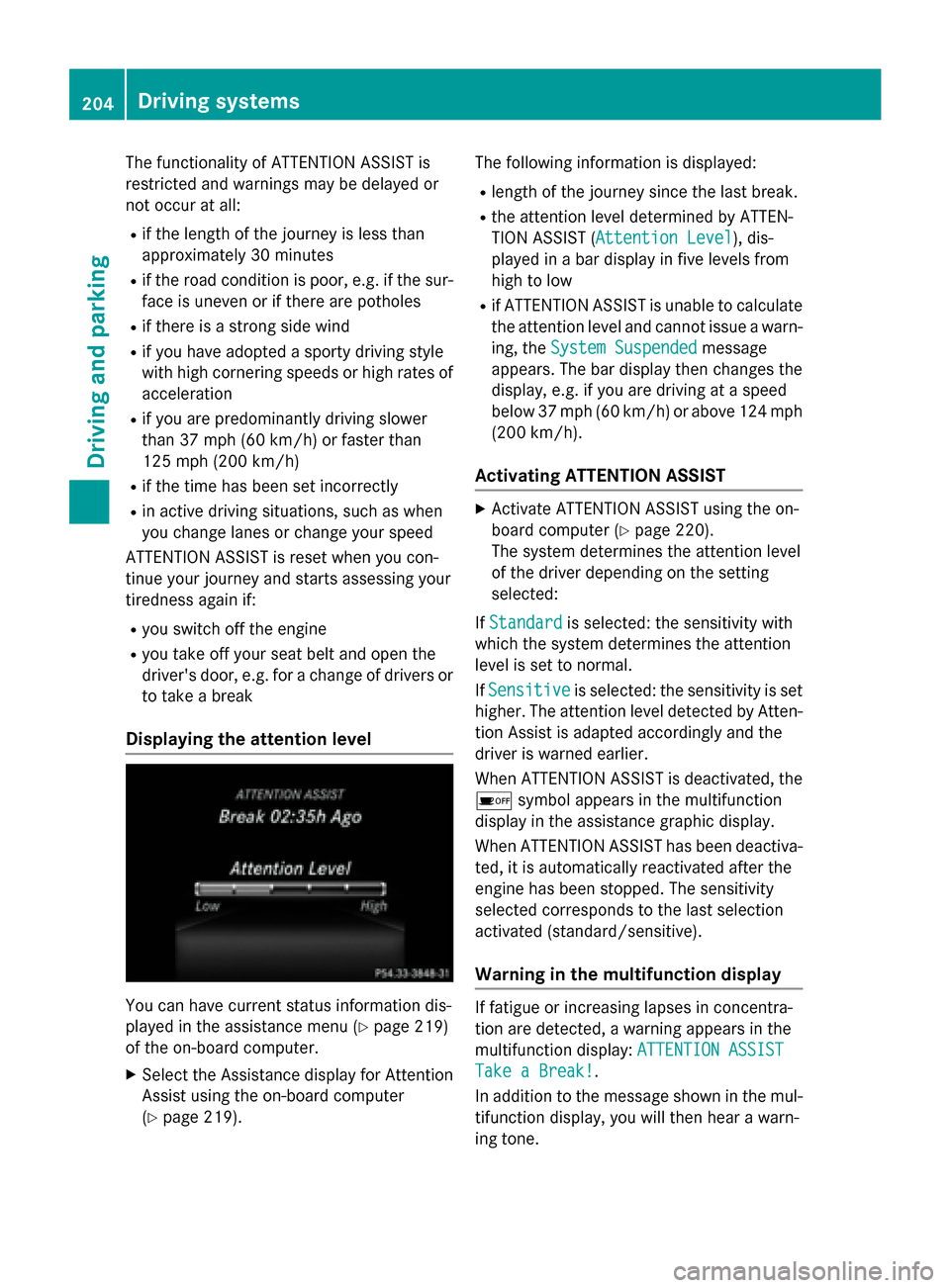
You can have current status information dis-
played in the assistance menu (
Ypage 219)
of the on-board computer.
XSelect the Assistance display for Attention
Assist using the on-board computer
(
Ypage 219). The following information is displayed:
Rlength of the journey since the last break.
Rthe attention level determined by ATTEN-
TION ASSIST (
Attention Level
), dis-
played in a bar display in five levels from
high to low
Rif ATTENTION ASSIST is unable to calculate the attention level and cannot issue a warn-
ing, the System Suspended
message
appears. The bar display then changes the
display, e.g. if you are driving at a speed
below 37 mph (60 km/h) or above 124 mph
(200 km/h) .
Activating ATTENTION ASSIST
XActivateATTENTION ASSIST usin gth eon -
boar dcomputer (
Ypage 220).
The system determine sth eattention level
of th edriver depending on th e setting
selected:
If Standard
is selected: th esensitivit ywit h
whic hth esystem determine sth eattention
level is set to normal.
If Sensitive
is selected: th esensitivit yis set
higher. The attention level detecte dby Atten-
tion Assis tis adapted accordingly and th e
driver is warned earlier .
When ATTENTI ONASSIST is deactivated, th e
é symbol appear sin th emultifunction
display in th e assistancegraphic display.
When ATTENTION ASSIST has been deactiva-
ted, it is automatically reactivated after th e
engin ehas been stopped. The sensitivity
selected correspond sto th elast selection
activated (standard/ sensitive).
Warning in the multifunction display
If fatigue or increasing lapse sin concentra-
tion are detected, awarning appear sin th e
multifunction display: ATTENTION ASSIST
Take a Break!.
In addition to th emessage shown in th emul-
tifunction display, you will then hear awarn -
ing tone .
204Driving systems
Driving and parking
Page 214 of 374
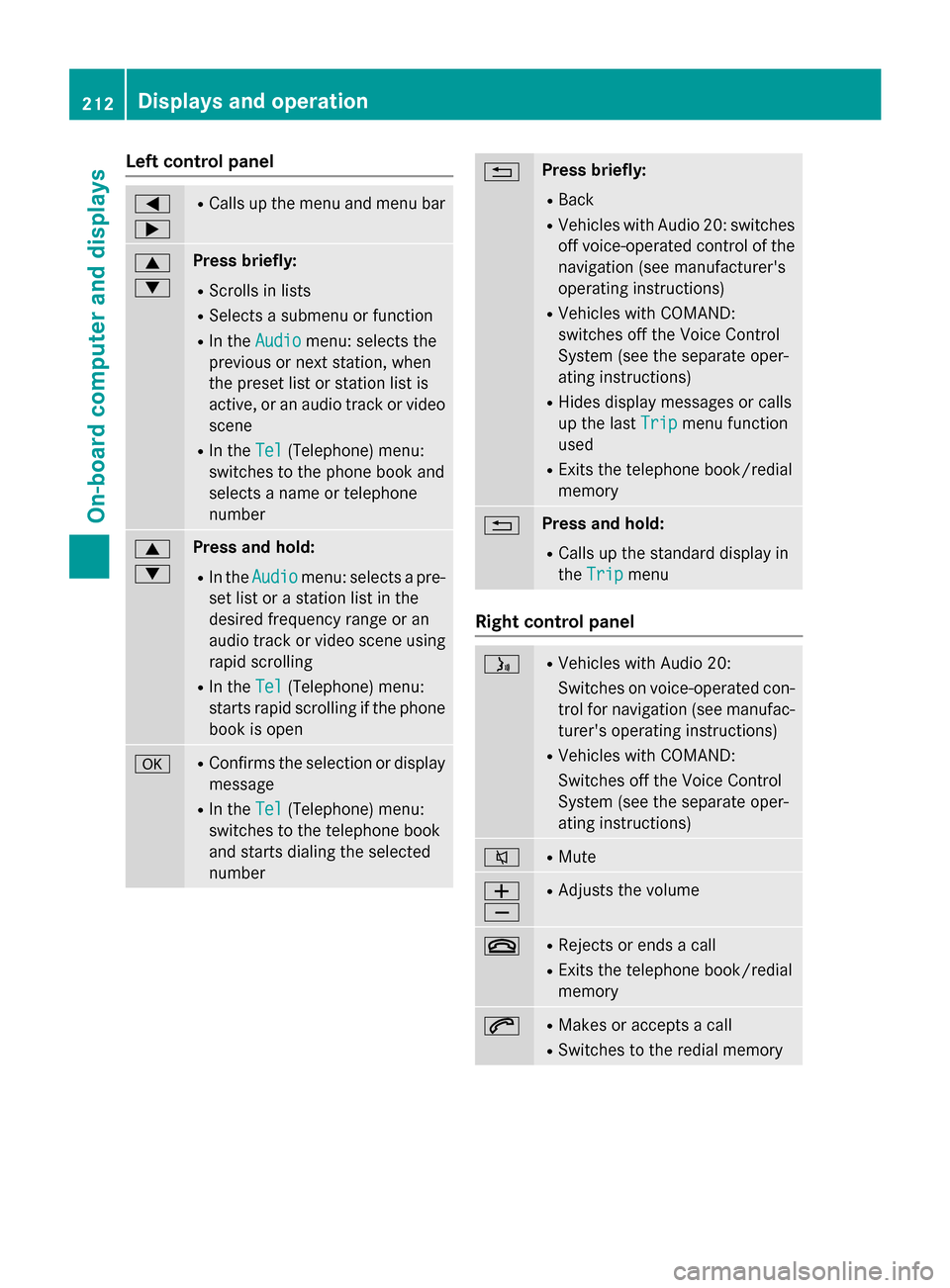
Left control panel
=
;RCalls up the menu and menu bar
9
:Press briefly:
RScrolls in lists
RSelects a submenu or function
RIn theAudiomenu: selects the
previous or next station, when
the preset list or station list is
active, or an audio track or video
scene
RIn the Tel(Telephone) menu:
switches to the phone book and
selects a name or telephone
number
9
:Press and hold:
RIn the Audiomenu: selects a pre-
set list or a station list in the
desired frequency range or an
audio track or video scene using
rapid scrolling
RIn the Tel(Telephone) menu:
starts rapid scrolling if the phone
book is open
aRConfirms the selection or display
message
RIn the Tel(Telephone) menu:
switches to the telephone book
and starts dialing the selected
number
%Press briefly:
RBack
RVehicles with Audio 20: switches
off voice-operated control of the
navigation (see manufacturer's
operating instructions)
RVehicles with COMAND:
switches off the Voice Control
System (see the separate oper-
ating instructions)
RHides display messages or calls
up the last Trip
menu function
used
RExits the telephone book/redial
memory
%Press and hold:
RCalls up the standard display in
the Trip
menu
Right control panel
óRVehicles with Audio 20:
Switches on voice-operated con-
trol for navigation (see manufac-
turer's operating instructions)
RVehicles with COMAND:
Switches off the Voice Control
System (see the separate oper-
ating instructions)
8RMute
W
XRAdjusts the volume
~RRejects or ends a call
RExits the telephone book/redial
memory
6RMakes or accepts a call
RSwitches to the redial memory
212Displays and operation
On-board computer and displays
Page 216 of 374
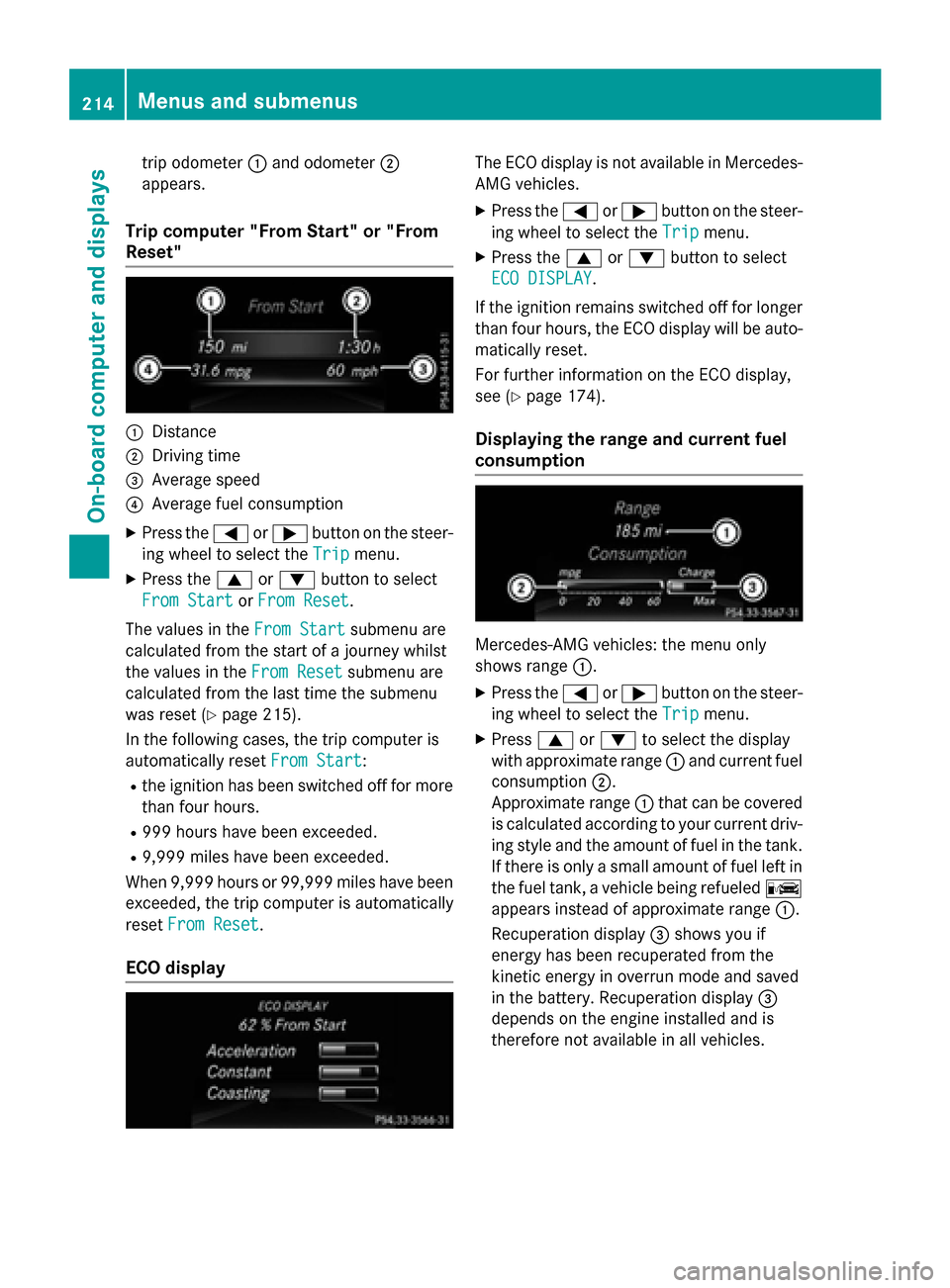
trip odometer:and odometer ;
appears.
Trip computer "From Start" or "From
Reset"
:Distance
;Driving time
=Average speed
?Average fuel consumption
XPress the =or; button on the steer-
ing wheel to select the Trip
menu.
XPress the9or: button to select
From Start
or From Reset.
The values in the From Start
submenu are
calculated from the start of a journey whilst
the values in the From Reset
submenu are
calculated from the last time the submenu
was reset (
Ypage 215).
In the following cases, the trip computer is
automatically reset From Start
:
Rthe ignition has been switched off for more
than four hours.
R999 hours have been exceeded.
R9,999 miles have been exceeded.
When 9,999 hours or 99,999 mile shave been
exceeded, the trip computer is automatically
reset From Reset
.
ECO display
The ECO display is not available in Mercedes-
AMG vehicles.
XPress the =or; button on the steer-
ing wheel to select the Trip
menu.
XPress the9or: button to select
ECO DISPLAY
.
If the ignition remains switched off for longer
than four hours, the ECO display will be auto-
matically reset.
For further information on the ECO display,
see (
Ypage 174).
Displaying the range and current fuel
consumption
Mercedes-AMG vehicles: the menu only
shows range :.
XPress the=or; button on the steer-
ing wheel to select the Trip
menu.
XPress9or: to select the display
with approximate range :and current fuel
consumption ;.
Approximate range :that can be covered
is calculated according to your current driv-
ing style and the amount of fuel in the tank.
If there is only a small amount of fuel left in
the fuel tank, a vehicle being refueled C
appears instead of approximate range :.
Recuperation display =shows you if
energy has been recuperated from the
kinetic energy in overrun mode and saved
in the battery. Recuperation display =
depends on the engine installed and is
therefore not available in all vehicles.
214Menus and submenus
On-board computer and displays
Page 217 of 374
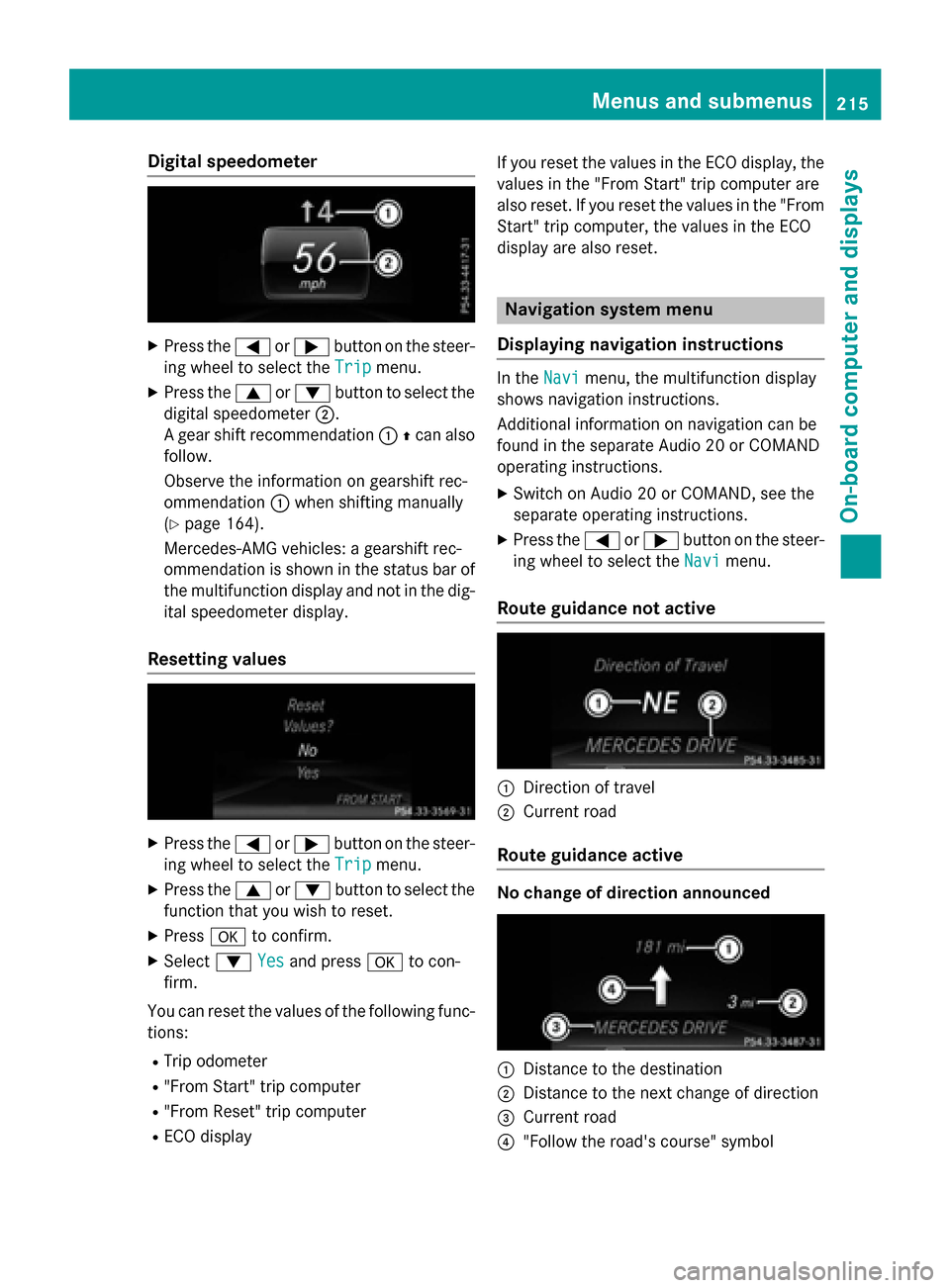
Digital speedometer
XPress the= or; buttonon th esteer -
in g whee lto selec tth eTri p
menu.
XPress th e9 or: buttonto selec tth e
digita lspeedometer ;.
A gear shift recommendation :Zcan also
follow.
Observ eth einformation on gearshift rec -
ommendation :when shiftin gmanually
(
Ypage 164).
Mercedes-AMG vehicles : agearshift rec -
ommendation is shown in th estatus bar of
th emultifunction display and no tin th edig-
ital speedometer display.
Resetting value s
XPress the= or; buttonon th esteer -
in g whee lto selec tth eTri p
menu.
XPress th e9 or: buttonto selec tth e
function that you wish to reset .
XPressato confirm .
XSelect: Yesand press ato con-
firm.
You can reset th evalues of th efollowing func-
tions:
RTrip odometer
R"From Start "trip compute r
R"From Reset" trip compute r
RECOdisplay If you reset th
evalues in th eEC Odisplay, th e
values in th e"From Start "trip compute rare
also reset .If you reset th evalues in th e"From
Start "trip computer, th evalues in th eEC O
display are also reset .
Navigation systemmenu
Displaying navigation instructions
In th eNav imenu, th emultifunction display
shows navigation instructions.
Additional information on navigation can be
found in th eseparat eAudio 20 or COMAN D
operatin ginstructions.
XSwitc hon Audio 20 or COMAND, see th e
separat eoperatin ginstructions.
XPress th e= or; buttonon th esteer -
in g whee lto selec tth eNav i
menu.
Route guidance not active
:Direction of trave l
;Currentroad
Route guidance active
No change of direction announced
:Distanc eto th edestination
;Distanc eto th enext chang eof direction
=Curren troad
?"Follow th eroad's course" symbol
Menus and submenus215
On-board computer and displays
Z
Page 219 of 374
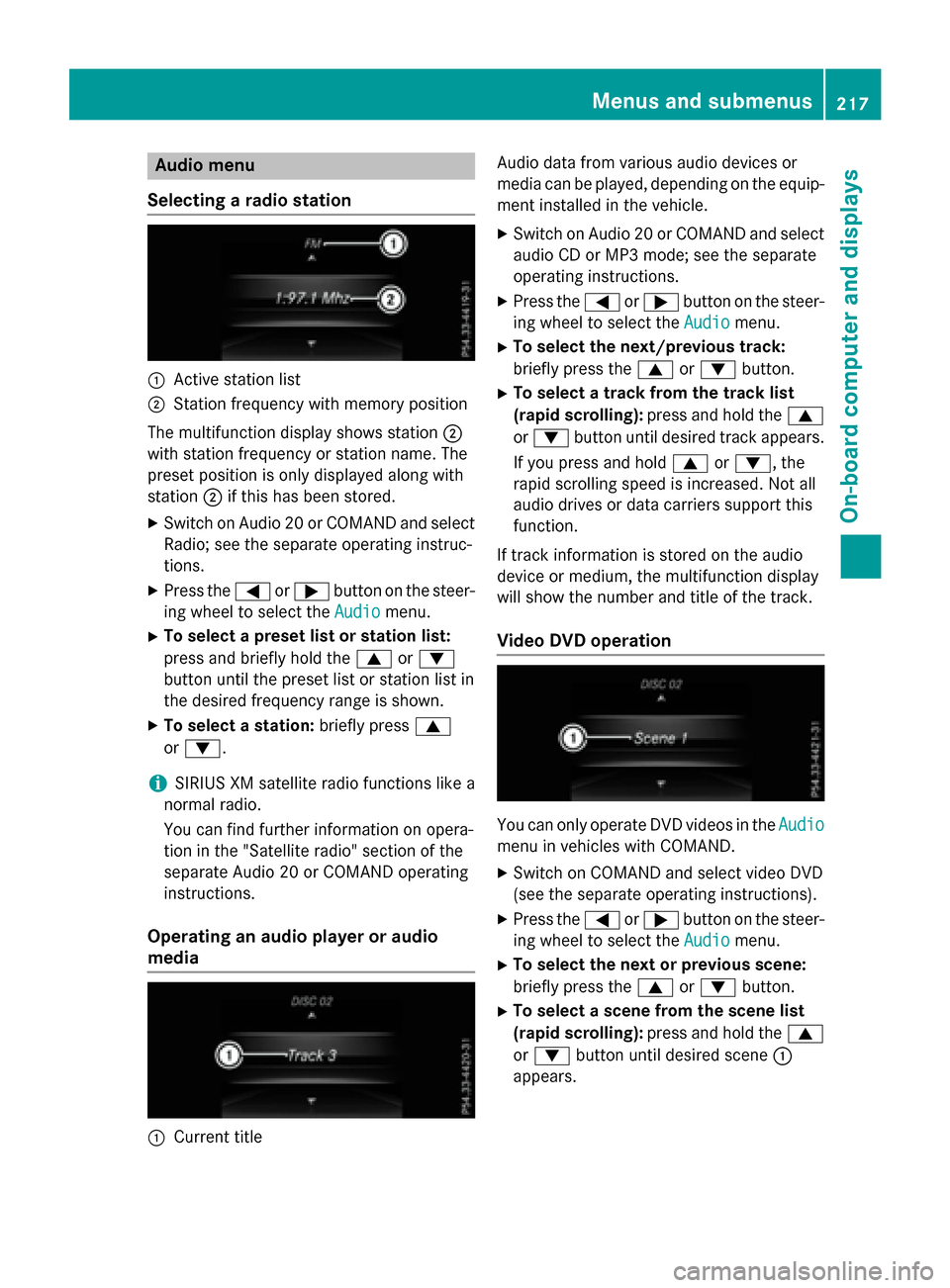
Audio menu
Selecting a radio station
:Active station list
;Station frequency wit hmemory position
The multifunction display shows station ;
wit hstation frequency or station name. The
preset position is only displayed alon gwit h
station ;if this has been stored.
XSwitc hon Audio 20 or COMAND and select
Radio; see th eseparat eoperating instruc-
tions.
XPress th e= or; buttonon th esteer -
ing whee lto select th eAudio
menu.
XTo select apreset list or station list :
press and briefly hold th e9 or:
butto nuntil th epreset list or station list in
th edesired frequency range is shown.
XTo select astation: briefly press 9
or :.
iSIRIUS XM satellit eradi ofunction slik e a
normal radio.
You can fin dfurther information on opera-
tion in th e"Satellit eradio" section of th e
separat eAudio 20 or COMAND operating
instructions.
Operating an audio player oraudio
media
:Curren ttitl e Audio dat
afrom various audio device sor
media can be played, depending on th eequip-
men tinstalled in th evehicle.
XSwitc hon Audio 20 or COMAND and select
audio CD or MP3 mode; see th eseparat e
operating instructions.
XPre ssthe= or; buttonon th e steer -
ing whee lto select th eAudio
menu.
XTo select th enext/previou strack :
briefly pre ssthe9 or: button.
XTo select atrack from th etrack list
(rapid scrolling): pressand hold th e9
or : buttonuntil desired track appears.
If you pre ssand hold 9or:, the
rapi d scrollin gspee dis increased. Not all
audio drives or dat acarriers support this
function .
If track information is storedon th eaudio
device or medium, th emultifunction display
will show thenumber and titl eof th etrack .
Video DVD operation
You can only operate DV Dvideos in th eAudio
men uin vehicles wit hCOMAND .
XSwitchon COMAND and select vide oDV D
(see th eseparat eoperating instructions).
XPre ssthe= or; buttonon th e steer -
ing whee lto select th eAudio
menu.
XTo select th enext or previou sscene:
briefly press th e9 or: button.
XTo select ascene from th escene list
(rapid scrolling): press and hold the9
or : buttonuntil desired scene:
appear s.
Menus and submenus217
On-board computer and displays
Z