phone MERCEDES-BENZ CLA-Class 2016 C117 Owner's Manual
[x] Cancel search | Manufacturer: MERCEDES-BENZ, Model Year: 2016, Model line: CLA-Class, Model: MERCEDES-BENZ CLA-Class 2016 C117Pages: 374, PDF Size: 8.19 MB
Page 12 of 374
ESP®(Electronic Stability Pro-
gram)
AMG menu (on-board computer) .. .224
Characteristics ................................. 69
Deactivating/activating (button
in Mercedes-AMG vehicles) ............. 70
Deactivating/activating (except
Mercedes‑AMG vehicles) ................. 70
Deactivating/activating (on-
board computer, except
Mercedes-AMG vehicles) ...............2 19
Display message ............................ 228
Function/notes ................................ 69
General notes .................................. 69
Important safety information ........... 69
Trailer stabilization ........................... 72
Warning lamp ................................. 263
ETS/4ETS (Electronic Traction Sys-
tem) ...................................................... 69
Exhaust
see Exhaust pipe
Exhaust check ................................... 173
Exhaust pipe
Cleaning ......................................... 306
Exterior lighting
Cleaning ......................................... 305
see Lights
Exterior mirrors
Adjusting ....................................... 107
Dipping (automatic) ....................... 108
Folding in when locking (on-board
computer) ...................................... 223
Folding in/out (automatically) ....... 108
Folding in/out (electrically) ........... 107
Out of position (troubleshooting) ... 108
Setting ........................................... 108
Storing settings (memory func-
tion) ............................................... 110
Storing the parking position .......... 109
Eyeglasses compartment ................. 273
F
Filler cap
see Refueling
Flat tire
MOExtended tires .......................... 311
Preparing the vehicle ..................... 310 TIREFIT kit ...................................... 312
Floormats ........................................... 294
Fog lamps
Switching on/off ........................... 115
Frequencies
Mobile phone ................................. 362
Two-way radio ................................ 362
Front fog lamps
Display message ............................ 241
Switching on/off ........................... 115
Fuel
Additives ........................................ 367
Consumption information .............. 367
Consumption statistics .................. 214
Displaying the current consump-
tion ................................................ 214
Displaying the range ...................... 214
Driving tips .................................... 173
E10 ................................................ 366
Flexible fuel vehicles ...................... 367
Fuel gauge ....................................... 31
Grade (gasoline) ............................ 366
Important safety notes .................. 365
Problem (malfunction) ................... 169
Refueling ........................................ 167
Tank content/reserve fuel ............. 366
Fuel filler flap
Opening ......................................... 168
Fuel level
Calling up the range (on-board
computer) ...................................... 214
Fuel tank
Capacity ........................................ 366
Problem (malfunction) ................... 169
Fuses
Allocation chart ............................. 326
Before changing ............................. 325
Fuse box in the engine compart-
ment .............................................. 325
Fuse box in the front-passenger
footwell .......................................... 326
Important safety notes .................. 325G
Garage door openerClearing the memory ..................... 292
General notes ................................ 289
10Index
Page 15 of 374
Mirror turn signalCleaning .........................................3 05
Mirrors
see Exterior mirrors
see Rear-view mirror
see Vanity mirror (in the sun visor)
Mobile phone
Frequencies ................................... 362
Installation ..................................... 362
Menu (on-board computer) ............ 218
Transmission output (maximum) .... 362
Modifying the programming
(SmartKey) ...........................................7 8
MOExtended tires .............................. 311
Mounting wheels
Lowering the vehicle ...................... 355
Mounting a new wheel ................... 354
Preparing the vehicle .....................3 51
Raising the vehicle ......................... 352
Removing a wheel .......................... 354
Securing the vehicle against roll-
ing away ........................................ 352
MP3
Operation ....................................... 217
Multifunction display
Function/notes .............................2 13
Permanent display ......................... 222
Multifunction steering wheel
Operating the on-board computer .. 211
Overview .......................................... 33
N
NavigationMenu (on-board computer) ............ 215
Notes on breaking-in a new vehi-
cle ....................................................... 146
O
Occupant Classification System
(OCS)
Conditions ....................................... 51
Faults ............................................... 55
Operation ......................................... 51
System self-test ............................... 53 Occupant safety
Automatic measures after an acci-
dent ................................................. 58
Children in the vehicle ..................... 58
Important safety notes .................... 43
Introduction to the restraint sys-
tem ..................................................4 2
Occupant Classification System
(OCS) ............................................... 51
PASSENGER AIR BAG indicator
lamps ............................................... 43
Pets in the vehicle ........................... 64
Restraint system warning lamp ........ 43
Seat belt .......................................... 44
OCS
Conditions ....................................... 51
Faults ............................................... 55
Operation ......................................... 51
System self-test ...............................5 3
Odometer .......................................... .213
On-board computer
AMG menu ..................................... 223
Assistance graphic menu ...............2 19
Assistance menu ........................... 219
Audio menu ................................... 217
Convenience submenu .................. 223
Display messages .......................... 227
Displaying a service message ........3 01
DISTRONIC PLUS ........................... 185
Factory settings .............................2 23
Important safety notes .................. 210
Instrument cluster submenu .......... 221
Lighting submenu .......................... 222
Menu overview .............................. 213
Message memory .......................... 227
Navigati on menu ............................ 215
Operati
on ....................................... 211
RACETIMER ................................... 224
Service menu ................................. 221
Settings menu ............................... 221
Standard display ............................ 213
Telephone menu ............................ 218
Trip menu ...................................... 213
Vehicle submenu ........................... 222
Video DVD operation ..................... 217
Opening and closing the side trim
panels ................................................. 123
Index13
Page 19 of 374
Steering assistant STEER CON-
TROLsee STEER CONTROL
Steering wheel
Adjusting (manually) ......................1 06
Button overview ............................... 33
Buttons (on-board computer) ......... 211
Cleaning ......................................... 307
Important safety notes .................. 106
Paddle shifters ............................... 164
Steering wheel paddle shifters ........164
Stopwatch (RACETIMER) ................... 224
Stowage compartments
Armrest (front) ............................... 274
Armrest (under) .............................2 74
Center console .............................. 273
Center console (rear) ..................... 274
Cup holders ................................... 278
Eyeglasses compartment ...............2 73
Glove box ....................................... 273
Important safety information ......... 273
Map pockets .................................. 275
Stowage net ................................... 275
Under driver's seat/front-
passenger seat .............................. 274
Stowage net ....................................... 275
Stowage well beneath the trunk
floor .................................................... 277
Summer tires ..................................... 330
Sun visor ............................................ 279
Suspension
Adaptive Damping System ............. 191
Suspension setting
AMG adaptive sport suspension
system ........................................... 190
Switching air-recirculation mode
on/off ................................................. 141
T
Tachometer ........................................ 211
Tail lamps
Display message ............................ 241
see Lights
Tank
see Fuel tank
Tank content
Fuel gauge ....................................... 31 Technical data
Capacities ...................................... 365
Information .................................... 362
Tires/wheels ................................. 355
Vehicle data ................................... 371
Telephone
Accepting a call (multifunction
steering wheel) .............................. 218
Display message ............................ 256
Introduction ................................... 218
Menu (on-board computer) ............ 218
Number from the phone book ........ 218
Redialing ........................................ 219
Rejecting/ending a call ................. 218
Temperature
Coolant .......................................... 211
Coolant (on-board computer,
Mercedes-AMG vehicles) ............... 223
Engine oil (on-board computer,
Mercedes-AMG vehicles) ............... 223
Outside temperature ...................... 211
Setting (climate control) ................ 137
Transmission oil (on-board com-
puter, Mercedes-AMG vehicles) ..... 223
Through-loading feature ................... 275
Timing (RACETIMER) ......................... 224
Tire pressure
Calling up (on-board computer) ..... 336
Checking manually ........................ 335
Display message ............................ 250
Maximum ....................................... 334
Not reached (TIREFIT) .................... 314
Notes ............................................. 333
Reached (TIREFIT) .......................... 314
Recommended ............................... 332
Tire pressure loss warning system
General notes ................................ 335
Important safety notes .................. 335
Restarting ...................................... 336
Tire pressure monitor
Checking the tire pressure elec-
tronically ........................................ 338
Function/notes ............................. 336
General notes ................................ 336
Important safety notes .................. 336
Radio type approval for the tire
pressure monitor ........................... 339
Restarting ...................................... 338
Index17
Page 35 of 374
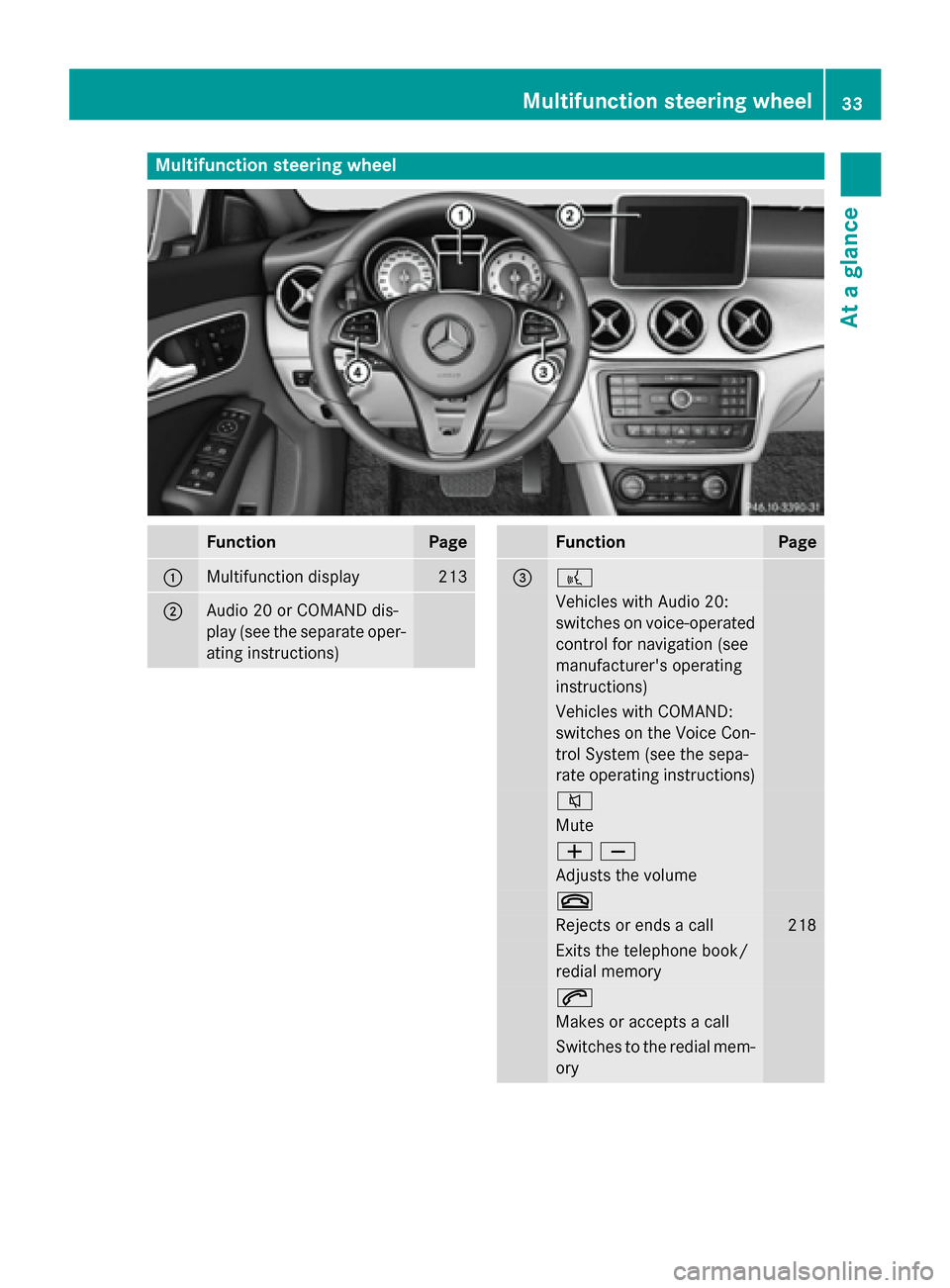
Multifunction steering wheel
FunctionPage
:Multifunction display213
;Audio 20 or COMAND dis-
play (see the separate oper-
ating instructions)
FunctionPage
=?
Vehicles with Audio 20:
switches on voice-operated
control for navigation (see
manufacturer's operating
instructions)
Vehicles with COMAND:
switches on the Voice Con-
trol System (see the sepa-
rate operating instructions)
8
Mute
WX
Adjusts the volume
~
Rejects or ends a call218
Exits the telephone book/
redial memory
6
Makes or accepts a call
Switches to the redial mem-
ory
Multifunction steering wheel33
At a glance
Page 76 of 374

The emergency call system sends the mes-
sage or data provided that:
Ryou have subscribed to the mbrace ser-
vice.
Rthe mbrace service has been activated
properly.
Rthe necessary mobile phone network is
available.
74Protection against theft
Safety
Page 78 of 374
Useful information
i
This Operator's Manual describes all
models and all standard and optional equip-
ment of your vehicle available at the time of
publication of the Operator's Manual.
Country-specific differences are possible.
Please note that your vehicle may not be
equipped with all features described. This
also applies to safety-related systems and
functions.
iRead the information on qualified special-
ist workshops (
Ypage 25).
SmartKey
Important safety notes
GWARNING
If children are left unsupervised in the vehicle,
they could:
Ropen the doors, thus endangering other
people or road users.
Rget out and disrupt traffic.
Roperate the vehicle's equipment.
Additionally, children could set the vehicle in
motion if, for example, they:
Rrelease the parking brake.
Rshifting the automatic transmission out of
park position P
RStart the engine.
There is a risk of an accident and injury.
When leaving the vehicle, always take the
SmartKey with you and lock the vehicle. Never
leave children or animals unattended in the
vehicle. Always keep the SmartKey out of
reach of children.
GWARNING
If you attach heavy or large objects to the
SmartKey, the SmartKey could be uninten-
tionally turned in the ignition lock. This could
cause the engine to be switched off. There is a risk of an accident.
Do not attach any heavy or large objects to theSmartKey. Remove any bulky key rings before
inserting the SmartKey into the ignition lock.
!Keep the SmartKey away from strong
magnetic fields. Otherwise, the remote
control function could be affected.
Strong magnetic fields can occur in the
vicinity of powerful electrical installations.
Do not keep the SmartKey:
Rwith electronic devices, e.g. a mobile
phone or another SmartKey.
Rwith metallic objects, e.g. coins or metal
foil.
Rinside metallic objects, e.g. a metal case.
Vehicles with KEYLESS-GO start function:
do not keep the SmartKey in the cargo com-
partment. Otherwise, the SmartKey may not
be detected, e.g. when starting the engine
using the Start/Stop button.
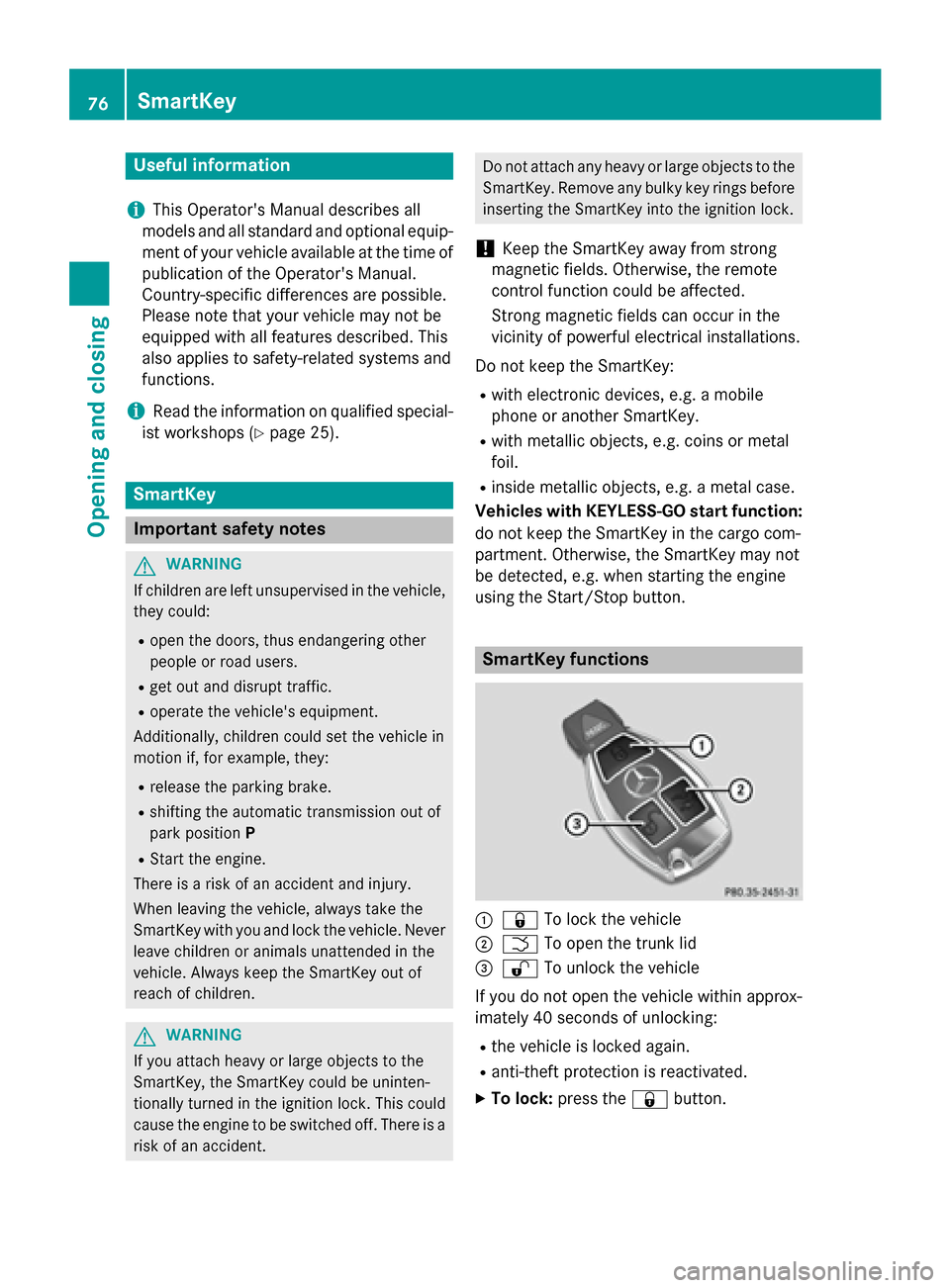
SmartKey functions
:& To lock the vehicle
;FTo open the trunk lid
=%To unlock the vehicle
If you do not open the vehicle within approx-
imately 40 seconds of unlocking:
Rthe vehicle is locked again.
Ranti-theft protection is reactivated.
XTo lock: press the &button.
76SmartKey
Opening and closing
Page 132 of 374
Useful information
i
This Operator's Manual describes all
models and all standard and optional equip-
ment of your vehicle available at the time of
publication of the Operator's Manual.
Country-specific differences are possible.
Please note that your vehicle may not be
equipped with all features described. This
also applies to safety-related systems and
functions.
iRead the information on qualified special-
ist workshops (
Ypage 25).
Overview of climate control systems
General notes
Observe the settings recommended on the
following pages. The windows could other-
wise fog up.
To prevent the windows from fogging up:
Rswitch off climate control only briefly
Rswitch on air-recirculation mode only
briefly
Rswitch on the cooling with air dehumidifi-
cation function
Rswitch on the defrost windshield function
briefly, if required
The air-conditioning system/dual-zone auto-
matic climate control regulates the tempera- ture and the humidity of the vehicle interior
and filters out undesirable substances from
the air.
The air-conditioning system/dual-zone auto-
matic climate control can only be operated
when the engine is running. Optimum opera-
tion is only achieved with the side windows
and panorama roof with power tilt/sliding
panel closed.
If you start the engine using your smartphone,
the last selected climate control setting is
reactivated (
Ypage 169). The residual heat function can only be acti-
vated or deactivated with the ignition
switched off (
Ypage 141).
Always keep the ventilation flaps behind the
side trim panel in the cargo compartment
clear (
Ypage 123). Otherwise the vehicle will
not be ventilated correctly.
iVentilate the vehicle for a brief period
during warm weather, e.g. using the con-
venience opening feature (
Ypage 89). This
will speed up the cooling process and the
desired interior temperature will be
reached more quickly.
iThe integrated filter filters out most par-
ticles of dust and soot and completely fil-
ters out pollen. It also reduces gaseous pol- lutants and odors. A clogged filter reduces
the amount of air supplied to the vehicle
interior. For this reason, you should always
observe the interval for replacing the filter,
which is specified in the Maintenance
Booklet. As it depends on environmental
conditions, e.g. heavy air pollution, the
interval may be shorter than stated in t
he
Maintenance Booklet.
iIt is possible that under certain circum-
stances the residual heat function may be
activated automatically an hour after the
SmartKey has been removed in order to dry the automatic climate control. The vehicle
is then ventilated for 30 minutes.
130Overview of climate control systems
Climate control
Page 150 of 374
Pressing the Start/Stop button several times
in succession corresponds to the different
key positions in the ignition lock. This is only
the case if you are not depressing the brake
pedal.
If you depress the brake pedal and press the
Start/Stop button, the engine starts immedi-
ately.
To start the vehicle without actively using the
SmartKey:
Rthe Start/Stop button must be inserted in
the ignition lock.
Rthe SmartKey must be in the vehicle.
Rthe vehicle must not be locked with the
SmartKey or KEYLESS-GO (
Ypage 77).
Do not keep the KEYLESS-GO key:
Rwith electronic devices, e.g. a mobile
phone or another SmartKey.
Rwith metallic objects, e.g. coins or metal
foil.
Rinside metallic objects, e.g. a metal case.
This can affect the functionality of KEYLESS-
GO.
If you lock the vehicle with the SmartKey's
remote control or with KEYLESS-GO, after a
short time:
Ryou will not be able to switch on the ignition
with the Start/Stop button.
Ryou will not be able to start the engine with the Start/Stop button until the vehicle is
unlocked again.
If you lock the vehicle centrally using the but- ton on the front door (
Ypage 84), you can
continue to start the engine with the Start/
Stop button.
The engine can be switched off while the vehi-
cle is in motion by pressing and holding the
Start/Stop button for three seconds. This
function operates independently of the ECO
start/stop automatic engine switch-off func-
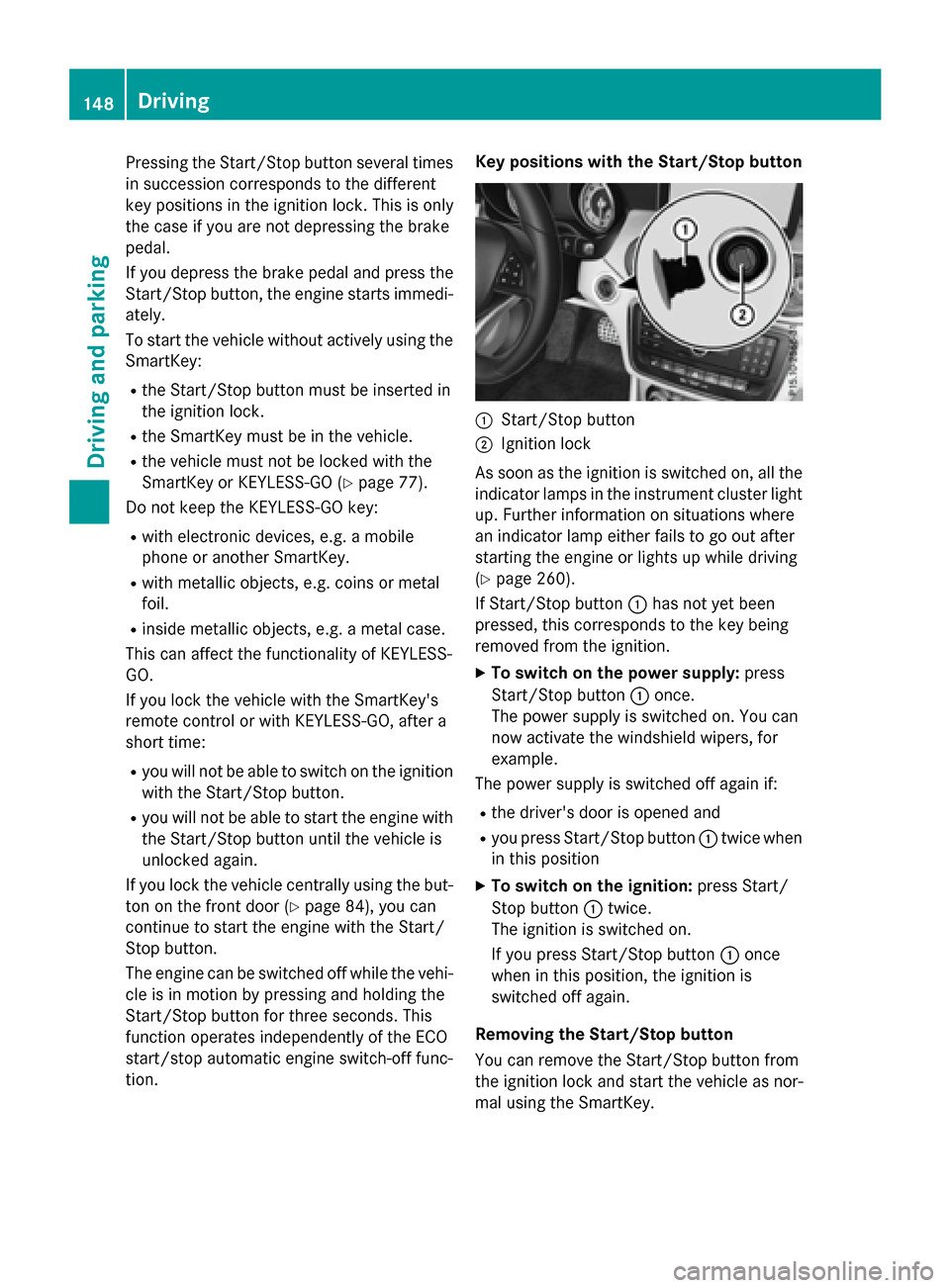
tion. Key positions with the Start/Stop button
:Start/Stop button
;Ignition lock
As soon as the ignition is switched on, all the
indicator lamps in the instrument cluster light
up. Further information on situations where
an indicator lamp either fails to go out after
starting the engine or lights up while driving
(
Ypage 260).
If Start/Stop button :has not yet been
pressed, this corresponds to the key being
removed from the ignition.
XTo switch on the power supply: press
Start/Stop button :once.
The power supply is switched on. You can
now activate the windshield wipers, for
example.
The power supply is switched off again if:
Rthe driver's door is opened and
Ryou press Start/Stop button :twice when
in this position
XTo switch on the ignition: press Start/
Stop button :twice.
The ignition is switched on.
If you press Start/Stop button :once
when in this position, the ignition is
switched off again.
Removing the Start/Stop button
You can remove the Start/Stop button from
the ignition lock and start the vehicle as nor-
mal using the SmartKey.
148Driving
Driving and parking
Page 152 of 374
Starting procedure with the Start/Stop
button
The Start/Stop button can be used to start
the vehicle manually without inserting the
SmartKey into the ignition lock. The Start/
Stop button must be inserted in the ignition
lock and the SmartKey must be in the vehicle.
This mode for starting the engine operates
independently of the ECO start/stop auto-
matic engine start function.
You can start the engine if a valid SmartKey is
in the vehicle. Switch off the engine and
always take the SmartKey with you when
leaving the vehicle, even if you only leave it for
a short time. Pay attention to the important
safety notes.
XDepress the brake pedal and keep it
depressed.
XPress the Start/Stop button once
(
Ypage 147).
The engine starts.
Starting procedure via smartphone
Observe the important safety notes on start-
ing the engine (
Ypage 149).
You can also start your engine via your smart-
phone from outside the vehicle. In this case,
the previously selected climate control set-
ting is activated. In this way you can cool or
heat the interior of the vehicle before starting
the journey.
Only start the engine via your smartphone if it
is safe to start and run the engine where your
vehicle is parked.
Observe the legal stipulations in the area
where your vehicle is parked. Engine start via
smartphone may be limited to certain coun-
tries or regions.
You can execute a maximum of two consec-
utive starting attempts via your smartphone.
If you insert the key into the ignition lock, you
can carry out two more starting attempts.
Once you have started the engine, you can
switch the engine off via your smartphone at
any time. You can only start the engine via your smart-
phone if:
Rthe key is in the ignition lock
Rpark position Pis selected
Rthe accelerator pedal is not depressed
Rthe anti-theft alarm system is not activated
Rthe panic alarm is not activated
Rthe hazard warning lamps are switched off
Rthe hood is closed.
Rthe doors are closed and locked
Rthe windows and sliding sunroof are closed
Also make sure that:
Rthe fuel tank is sufficiently filled
Rthe starter battery is sufficiently charged
GWARNING
Limbs could be crushed or trapped if the
engine is started unintentionally during ser-
vice or maintenance work. There is a risk of
injury.
Always secure the engine against uninten-
tional starting before carrying out mainte-
nance or repair work.
Make sure that the engine cannot be started
via your smartphone before carrying out
maintenance or repairs. You can prevent an
engine start via your smartphone, for exam-
ple, if you:
Rswitch on the hazard warning lamps
Rdo not lock the doors
Ropen the hood.
Pulling away
General notes
GWARNING
If the engine speed is above the idling speed
and you engage transmission position Dor R,
the vehicle could pull away suddenly. There is
a risk of an accident.
150Driving
Driving and parking
Page 175 of 374
with limitations, or not at all. This could affect,for example, the power steering and the brake
boosting effect. You will require considerably
more effort to steer and brake. There is a risk
of an accident.
Do not switch off the ignition while driving.
GWARNING
If you operate mobile communication equip-
ment while driving, you will be distracted from traffic conditions. You could also lose control
of the vehicle. There is a risk of an accident.
Only operate this equipment when the vehicle
is stationary.
Observe the legal requirements for the coun-
try in which you are driving. Some jurisdic-
tions prohibit the driver from using a mobile
phone while driving a vehicle.
If you make a call while driving, always use
hands-free mode. Only operate the telephone
when the traffic situation permits. If you are
unsure, pull over to a safe location and stop
before operating the telephone.
Bear in mind that at a speed of only 30 mph
(approximately 50 km/h), the vehicle covers
a distance of 44 ft (approximately 14 m) per
second.
Drive sensibly – save fuel
Observe the following tips to save fuel:
RThe tires should always be inflated to the
recommended tire pressure.
RRemove unnecessary loads.
RRemove roof racks when they are not nee-
ded.
RWarm up the engine at low engine speeds.
RAvoid frequent acceleration or braking.
RHave all maintenance work carried out as
indicated by the service intervals in the
Maintenance Booklet or by the service
interval display.
Fuel consumption also increases when driv-
ing in cold weather, in stop-start traffic and in
hilly terrain.
Drinking and driving
GWARNING
Drinking and driving and/or taking drugs and driving are very dangerous combinations.
Even a small amount of alcohol or drugs can
affect your reflexes, perceptions and judg-
ment.
The possibility of a serious or even fatal acci-
dent is greatly increased when you drink or
take drugs and drive.
Do not drink or take drugs and drive or allow
anyone to drive who has been drinking or tak-
ing drugs.
Emission control
GWARNING
Combustion engines emit poisonous exhaust
gases such as carbon monoxide. Inhaling
these exhaust gases leads to poisoning. There
is a risk of fatal injury. Therefore never leave
the engine running in enclosed spaces with-
out sufficient ventilation.
Certain engine systems are designed to keep
the level of poisonous components in exhaust
fumes within legal limits.
These systems only work at peak efficiency if
they are serviced exactly in accordance with
the manufacturer's specifications. Always
have work on the engine carried out at a
qualified specialist workshop. Mercedes-
Benz recommends that you use an authorized
Mercedes-Benz Center for this purpose. In
particular, work relevant to safety or on
safety-related systems must be carried out at
a qualified specialist workshop.
The engine settings must not be changed
under any circumstances. Furthermore, all
specific service work must be carried out at
regular intervals and in accordance with the
Mercedes-Benz service requirements. Details
can be found in the Maintenance Booklet.
Driving tips173
Driving and parking
Z