rear view mirror MERCEDES-BENZ CLA-Class 2016 C117 Owner's Manual
[x] Cancel search | Manufacturer: MERCEDES-BENZ, Model Year: 2016, Model line: CLA-Class, Model: MERCEDES-BENZ CLA-Class 2016 C117Pages: 374, PDF Size: 8.19 MB
Page 8 of 374
Display message ............................ 240
Brakes
ABS .................................................. 65
Adaptive Brake Assist ...................... 68
BAS .................................................. 66
Brake fluid (notes) .........................3 69
Display message ............................ 228
EBD ..................................................7 2
Hill start assist ............................... 151
HOLD function ............................... 187
Important safety notes .................. 175
Maintenance .................................. 176
Parking brake ................................ 171
Riding tips ...................................... 175
Warning lamp ................................. 260
Breakdown
Where will I find...? ........................ 310
see Flat tire
see Tow-starting
see Towing away
Brightness control (instrument
cluster lighting) ................................... 31
Buttons on the steering wheel ......... 211
C
California
Important notice for retail cus-
tomers and lessees .......................... 23
Calling up a malfunction
see Display messages
Car
see Vehicle
Care
Car wash ........................................ 302
Carpets .......................................... 308
Display ........................................... 306
Exhaust pipe .................................. 306
Exterior lights ................................ 305
Gear or selector lever .................... 307
Interior ........................................... 306
Matte finish ................................... 304
Notes ............................................. 301
Paint .............................................. 303
Plastic trim .................................... 306
Power washer ................................ 303
Rear view camera .......................... 306
Roof lining ...................................... 308 Seat belt ........................................ 308
Seat cover ..................................... 307
Sensors ......................................... 305
Steering wheel ............................... 307
Trim pieces .................................... 307
Washing by hand ........................... 302
Wheels ........................................... 304
Windows ........................................ 304
Wiper blades .................................. 305
Wooden trim .................................. 307
Cargo compartment enlargement ... 275
Cargo tie down rings ......................... 276
CD player (on-board computer) ........ 217
Center console
Lower section .................................. 36
Upper section .................................. 35
Central locking
Automatic locking (on-board com-puter) ............................................. 222
Locking/unlocking (SmartKey) ........ 76
Changing bulbs
Brake lamps ................................... 123
Cornering light function ................. 123
High-beam headlamps ................... 122
Low-beam headlamps .................... 122
Rear fog lamp ................................ 123
Turn signals (front) ......................... 123
Turn signals (rear) .......................... 123
Child
Restraint system .............................. 59
Child seat
Forward-facing restraint system ...... 63
LATCH-type (ISOFIX) child seat
anchors ............................................ 60
On the front-passenger seat ............ 62
Rearward-facing restraint system .... 63
Top Tether ....................................... 61
Child-proof locks
Important safety no
tes .................... 63
Rear doors ....................................... 64
Children
Special seat belt retractor ............... 59
Cigarette lighter ................................ 280
Cleaning
Mirror turn signal ........................... 305
Climate control
Air-conditioning system ................. 131
6Index
Page 13 of 374
Important safety notes .................. 290
Opening/closing the garage door .. 292
Programming (button in the rear-
view mirror) ................................... 290
Synchronizing the rolling code ....... 291
Gasoline .............................................3 66
Gear indicator (on-board com-
puter, Mercedes-AMG vehicles) ....... 223
Genuine parts ...................................... 21
Glove box ...........................................2 73
H
Handbrake
see Parking brake
Hazard warning lamps
Display message ............................ 256
Switching on/off ........................... 117
Head restraints
Adjusting ....................................... 103
Adjusting (manually) ......................1 03
Adjusting (rear) .............................. 104
Headlamps
Fogging up ..................................... 119
see Automatic headlamp mode
Heating
see Climate control
High beam flasher .............................1 17
High-beam headlamps
Adaptive Highbeam Assist ............. 118
Changing bulbs .............................. 122
Display message ............................ 241
Switching on/off ........................... 116
Hill start assist .................................. 151
HOLD function
Activating ....................................... 188
Deactivating ................................... 188
Display message ............................ 246
Function/notes .............................1 87
Hood
Closing ...........................................2 97
Display message ............................ 255
Important safety notes .................. 296
Opening ......................................... 296
Horn ...................................................... 30
Hydroplaning ..................................... 177
I
Ignition lock
see Key positions
Immobilizer .......................................... 73
Indicator and warning lamps
COLLISION PREVENTION ASSIST
PLUS .............................................. 269
Indicator lamps
see Warning and indicator lamps
Indicators
see Turn signals
Instrument cluster
Overview .......................................... 31
Settings ......................................... 221
Warning and indicator lamps ........... 32
Instrument cluster lighting .............. 210
Interior lighting
Control ...........................................1 20
Emergency lighting ........................ 120
Overview ........................................ 119
Reading lamp ................................. 119
J
Jack
Storage location ............................ 310
Using ............................................. 352
Jump starting (engine) ......................319
K
Key positions
Start/Stop button .......................... 147
KEYLESS-GO
Convenience closing feature ............ 90
Deactivation ..................................... 77
Locking ............................................ 77
Unlocking ......................................... 77
Kickdown
Driving tips ....................................1 61
Manual gearshifting ....................... 166
Knee bag .............................................. 50
L
Lamps
see Warning and indicator lamps
Index11
Page 15 of 374
Mirror turn signalCleaning .........................................3 05
Mirrors
see Exterior mirrors
see Rear-view mirror
see Vanity mirror (in the sun visor)
Mobile phone
Frequencies ................................... 362
Installation ..................................... 362
Menu (on-board computer) ............ 218
Transmission output (maximum) .... 362
Modifying the programming
(SmartKey) ...........................................7 8
MOExtended tires .............................. 311
Mounting wheels
Lowering the vehicle ...................... 355
Mounting a new wheel ................... 354
Preparing the vehicle .....................3 51
Raising the vehicle ......................... 352
Removing a wheel .......................... 354
Securing the vehicle against roll-
ing away ........................................ 352
MP3
Operation ....................................... 217
Multifunction display
Function/notes .............................2 13
Permanent display ......................... 222
Multifunction steering wheel
Operating the on-board computer .. 211
Overview .......................................... 33
N
NavigationMenu (on-board computer) ............ 215
Notes on breaking-in a new vehi-
cle ....................................................... 146
O
Occupant Classification System
(OCS)
Conditions ....................................... 51
Faults ............................................... 55
Operation ......................................... 51
System self-test ............................... 53 Occupant safety
Automatic measures after an acci-
dent ................................................. 58
Children in the vehicle ..................... 58
Important safety notes .................... 43
Introduction to the restraint sys-
tem ..................................................4 2
Occupant Classification System
(OCS) ............................................... 51
PASSENGER AIR BAG indicator
lamps ............................................... 43
Pets in the vehicle ........................... 64
Restraint system warning lamp ........ 43
Seat belt .......................................... 44
OCS
Conditions ....................................... 51
Faults ............................................... 55
Operation ......................................... 51
System self-test ...............................5 3
Odometer .......................................... .213
On-board computer
AMG menu ..................................... 223
Assistance graphic menu ...............2 19
Assistance menu ........................... 219
Audio menu ................................... 217
Convenience submenu .................. 223
Display messages .......................... 227
Displaying a service message ........3 01
DISTRONIC PLUS ........................... 185
Factory settings .............................2 23
Important safety notes .................. 210
Instrument cluster submenu .......... 221
Lighting submenu .......................... 222
Menu overview .............................. 213
Message memory .......................... 227
Navigati on menu ............................ 215
Operati
on ....................................... 211
RACETIMER ................................... 224
Service menu ................................. 221
Settings menu ............................... 221
Standard display ............................ 213
Telephone menu ............................ 218
Trip menu ...................................... 213
Vehicle submenu ........................... 222
Video DVD operation ..................... 217
Opening and closing the side trim
panels ................................................. 123
Index13
Page 16 of 374
Operating safetyDeclaration of conformity ................ 25
Important safety notes .................... 24
Operating system
see On-board computer
Operator's Manual
Vehicle equipment ........................... 22
Outside temperature display ........... 211
Overhead control panel ...................... 39
Override feature
Rear side windows ........................... 64
P
Paint code number ............................ 364
Paintwork (cleaning instructions) ... 303
Panic alarm .......................................... 42
Panorama roof with power tilt/
sliding panel
Important safety notes .................... 92
Operating ......................................... 93
Operating the roller sunblinds for
the sliding sunroof ........................... 94
Problem (malfunction) ..................... 97
Reversing feature ............................. 93
Parking
Important safety notes .................. 169
Parking brake ................................ 171
Position of exterior mirror, front-
passenger side ............................... 109
Rear view camera .......................... 200
see Active Parking Assist
see PARKTRONIC
Parking aid
Active Parking Assist ..................... 195
see Exterior mirrors
see PARKTRONIC
Parking assistance
see PARKTRONIC
Parking brake
Display message ............................ 231
Electric parking brake .................... 171
Warning lamp ................................. 266
Parking lamps
Switching on/off ........................... 116
PARKTRONIC
Deactivating/activating ................. 194
Driving system ............................... 192 Function/notes ............................. 192
Important safety notes .................. 192
Problem (malfunction) ................... 195
Range of the sensors ..................... 192
Warning display ............................. 193
PASSENGER AIR BAG
Display message ............................ 238
Indicator lamps ................................ 43
Problem (malfunction) ................... 238
Pets in the vehicle ............................... 64
Plastic trim (cleaning instruc-
tions) .................................................. 306
Power washers .................................. 303
Power windows
see Side windows
Protection against theft
ATA (Anti-Theft Alarm system) ......... 73
Immobilizer ...................................... 73
Protection of the environment
General notes .................................. 21
Pulling away
Automatic transmission ................. 150
General notes ................................ 150
Hill start assist ............................... 151
Q
QR codeMercedes-Benz Guide App ................. 1
Rescue card ..................................... 27
Qualified specialist workshop ........... 25
R
RACE START
Important safety notes .................. 189
RACE START (AMG vehicles) ............. 189
RACETIMER (on-board computer) .... 224
Radio
Selecting a station ......................... 217
see separate operating instructions
Radio-wave reception/transmis-
sion in the vehicle
Declaration of conformity ................ 25
Rain closing feature (panorama
roof with power tilt/sliding panel) .... 94
Reading lamp ..................................... 119
14Index
Page 17 of 374
Rear compartmentSetting the air vents ...................... 143
Rear fog lamp
Changing bulbs .............................. 123
Display message ............................ 241
Switching on/off ........................... 116
Rear lamps
see Lights
Rear seats
Folding the backrest forwards/
back ............................................... 276
Rear view camera
Cleaning instructions ..................... 306
Displays in the Audio display ......... 200
Displays in the COMAND display ... 200
Function/notes ............................. 200
Switching on/off ........................... 200
Rear window defroster
Problem (malfunction) ................... 141
Switching on/off ........................... 140
Rear-view mirror
Anti-glare (manual) ........................ 107
Dipping (automatic) ....................... 108
Refrigerant (air-conditioning sys-
tem)
Important safety notes .................. 371
Refueling
Fuel gauge ....................................... 31
Important safety notes .................. 167
Refueling process .......................... 168
see Fuel
Remote control
Garage door opener ....................... 289
Programming (garage door
opener) .......................................... 290
Replacing bulbs
Important safety notes .................. 120
Overview of bulb types .................. 121
Removing/replacing the cover
(front wheel arch) .......................... 122
Reporting safety defects .................... 26
Rescue card ......................................... 27
Reserve (fuel tank)
see Fuel
Reserve fuel
Display message ............................ 245
Warning lamp ................................. 267
see Fuel Residual heat (climate control)
........ 141
Restraint system
Display message ............................ 235
Introduction ..................................... 42
Warning lamp ................................. 266
Warning lamp (function) ................... 43
Reverse gear (selector lever) ........... 159
Reversing feature
Panorama sliding sunroof ................ 93
Roller sunblind ................................. 95
Side windows ................................... 88
Roadside As sistanc
e (breakdown)
.... 23
Roller sunblind
Panorama roof with power tilt/
sliding panel ..................................... 94
Roof carrier ........................................ 277
Roof lining and carpets (cleaning
guidelines) ......................................... 308
Roof load (maximum) ........................ 371
S
Safety
Children in the vehicle ..................... 58
Safety system
see Driving safety systems
Seat belts
Adjusting the height ......................... 46
Cleaning ......................................... 308
Correct usage .................................. 46
Fastening ......................................... 46
Important safety guidelines ............. 44
Introduction ..................................... 44
Releasing ......................................... 47
Warning lamp ................................. 258
Warning lamp (function) ................... 47
Seats
Adjusting (electrically) ................... 103
Adjusting (manually) ...................... 102
Adjusting (Performance Seat) ........ 104
Adjusting the 4-way lumbar sup-
port ................................................ 104
Adjusting the head restraint .......... 103
Cleaning the cover ......................... 307
Correct driver's seat position ........ 100
Folding the backrest (rear com-
partment) forwards/back .............. 276
Important safety notes .................. 101
Index15
Page 41 of 374
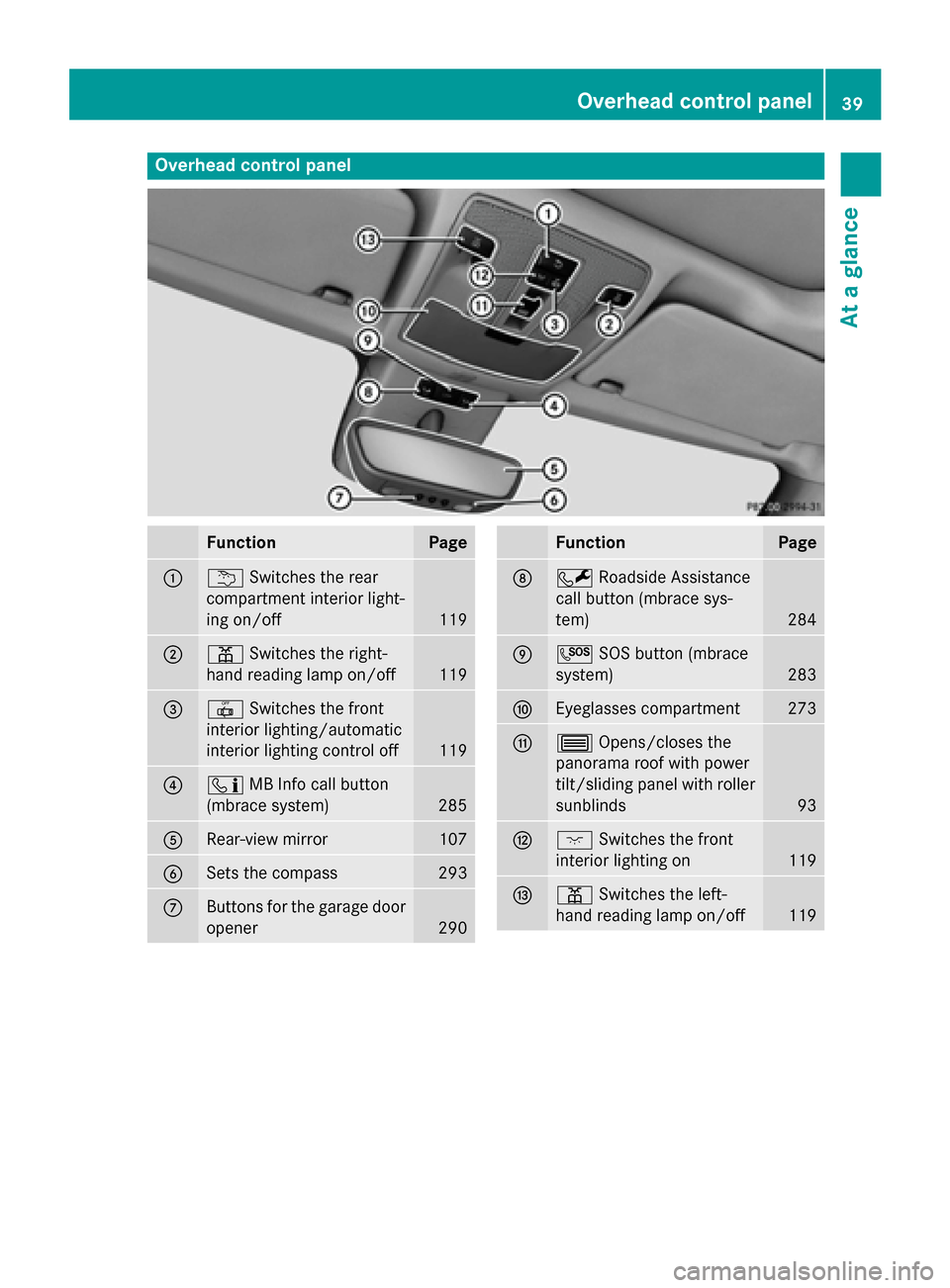
Overhead control panel
FunctionPage
:uSwitches the rear
compartment interior light-
ing on/off
119
;p Switches the right-
hand reading lamp on/off
119
=| Switches the front
interior lighting/automatic
interior lighting control off
119
?ï MB Info call button
(mbrace system)
285
ARear-view mirror107
BSets the compass293
CButtons for the garage door
opener
290
FunctionPage
DF Roadside Assistance
call button (mbrace sys-
tem)
284
EG SOS button (mbrace
system)
283
FEyeglasses compartment273
G3 Opens/closes the
panorama roof with power
tilt/sliding panel with roller
sunblinds
93
Hc Switches the front
interior lighting on
119
Ip Switches the left-
hand reading lamp on/off
119
Overhead control panel39
At a glance
Page 103 of 374
The seat belt should:
Rfit snugly across your body
Rbe routed across the middle of your
shoulder
Rbe routed in your pelvic area across the
hip joints
XBefore starting off, adjust the rear-view mir-
ror and the exterior mirrors (
Ypage 107) in
such a way that you have a good view of
road and traffic conditions.
XVehicles with a memory function: save
the seat and exterior mirror settings
(
Ypage 110).
Seats
Important safety notes
GWARNING
Children could become trapped if they adjust
the seats, particularly when unattended.
There is a risk of injury.
When leaving the vehicle, always take the
SmartKey with you and lock the vehicle. Never
leave children unsupervised in the vehicle.
The seats can still be adjusted when there is
no SmartKey in the ignition lock.
GWARNING
When you adjust a seat, you or other vehicle
occupants could become trapped, e.g. on the seat guide rail. There is a risk of injury.
Make sure when adjusting a seat that no one
has any body parts in the sweep of the seat.
Observe the safety notes on "Air bags"
(
Ypage 48) and "Children in the vehicle"
(
Ypage 58).
GWARNING
If the driver's seat is not engaged, it could
move unexpectedly while the vehicle is in
motion. This could cause you to lose control of the vehicle. There is a risk of an accident.
Always make sure that the driver's seat is
engaged before starting the vehicle.
GWARNING
You could lose control of your vehicle if you do the following while driving:
Radjust the driver's seat, head restraint,
steering wheel or mirrors
Rfasten the seat belt
There is a risk of an accident.
Adjust the driver's seat, head restraint, steer-
ing wheel and mirror and fasten your seat belt before starting the engine.
GWARNING
If you adjust the seat height carelessly, you or
other vehicle occupants could be trapped and
thereby injured. Children in particular could
accidentally press the electrical seat adjust-
ment buttons and become trapped. There is a
risk of injury.
While moving the seats, make sure that your
hands or other body parts do not get under the
lever assembly of the seat adjustment sys-
tem.
!To avoid damage to the seats and the seat
heating, observe the following information:
Rkeep liquids from spilling on the seats. If
liquid is spilled on the seats, dry them as
soon as possible.
Rif the seat covers are damp or wet, do not
switch on the seat heating. The seat
heating should also not be used to dry
the seats.
Rclean the seat covers as recommended;
see the "Interior care" section.
Rdo not transport heavy loads on the
seats. Do not place sharp objects on the
seat cushions, e.g. knives, nails or tools.
The seats should only be occupied by
passengers, if possible.
Rwhen the seat heating is in operation, do not cover the seats with insulating mate-
Seats101
Seats, steering wheel and mirrors
Z
Page 109 of 374
Mirrors
Rear-view mirror
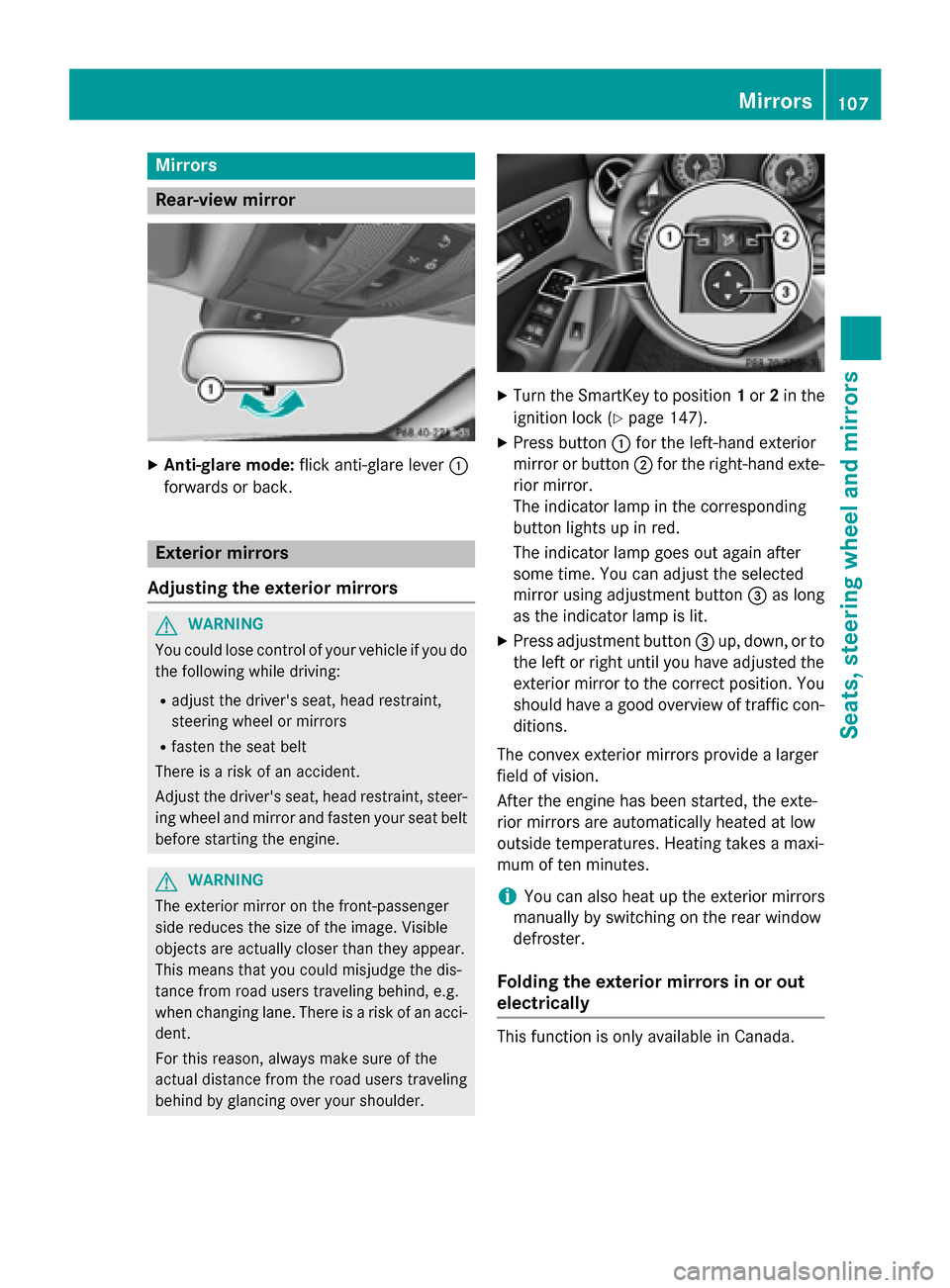
XAnti-glare mode:flick anti-glare lever :
forwards or back.
Exterior mirrors
Adjusting the exterior mirrors
GWARNING
You could lose control of your vehicle if you do the following while driving:
Radjust the driver's seat, head restraint,
steering wheel or mirrors
Rfasten the seat belt
There is a risk of an accident.
Adjust the driver's seat, head restraint, steer-
ing wheel and mirror and fasten your seat belt before starting the engine.
GWARNING
The exterior mirror on the front-passenger
side reduces the size of the image. Visible
objects are actually closer than they appear.
This means that you could misjudge the dis-
tance from road users traveling behind, e.g.
when changing lane. There is a risk of an acci-
dent.
For this reason, always make sure of the
actual distance from the road users traveling
behind by glancing over your shoulder.
XTurn the SmartKey to position 1or 2in the
ignition lock (
Ypage 147).
XPress button :for the left-hand exterior
mirror or button ;for the right-hand exte-
rior mirror.
The indicator lamp in the corresponding
button lights up in red.
The indicator lamp goes out again after
some time. You can adjust the selected
mirror using adjustment button =as long
as the indicator lamp is lit.
XPress adjustment button =up, down, or to
the left or right until you have adjusted the
exterior mirror to the correct position. You
should have a good overview of traffic con-
ditions.
The convex exterior mirrors provide a larger
field of vision.
After the engine has been started, the exte-
rior mirrors are automatically heated at low
outside temperatures. Heating takes a maxi-
mum of ten minutes.
iYou can also heat up the exterior mirrors
manually by switching on the rear window
defroster.
Folding the exterior mirrors in or out
electrically
This function is only available in Canada.
Mirrors107
Seats, steering wheel and mirrors
Z
Page 111 of 374
RIf electrolyte comes into contact with your
skin or hair or is swallowed, seek medical
attention immediately.
RImmediately change out of clothing which
has come into contact with electrolyte.
RIf an allergic reaction occurs, seek medical
attention immediately.
The "Automatic anti-glare mirrors" function is
only available if the vehicle is equipped with
the "Mirrors package".
The rear-view mirror and the exterior mirror
on the driver's side automatically go into anti-
glare mode if:
Rthe ignition is switched on and
Rincident light from headlamps strikes the
sensor in the rear-view mirror
The mirrors do not go into anti-glare mode if
reverse gear is engaged or the interior lighting
is switched on.
Parking position for the exterior mir-
ror on the front-passenger side
General notes
The "Parking position of the exterior mirror on
the front-passenger side" function is only
available if the vehicle is equipped with the
"Mirrors package".
Setting and storing the parking position
You can position the front-passenger side
exterior mirror in such a way that you can see the rear wheel on that side as soon as you
engage reverse gear. You can store this posi-
tion.
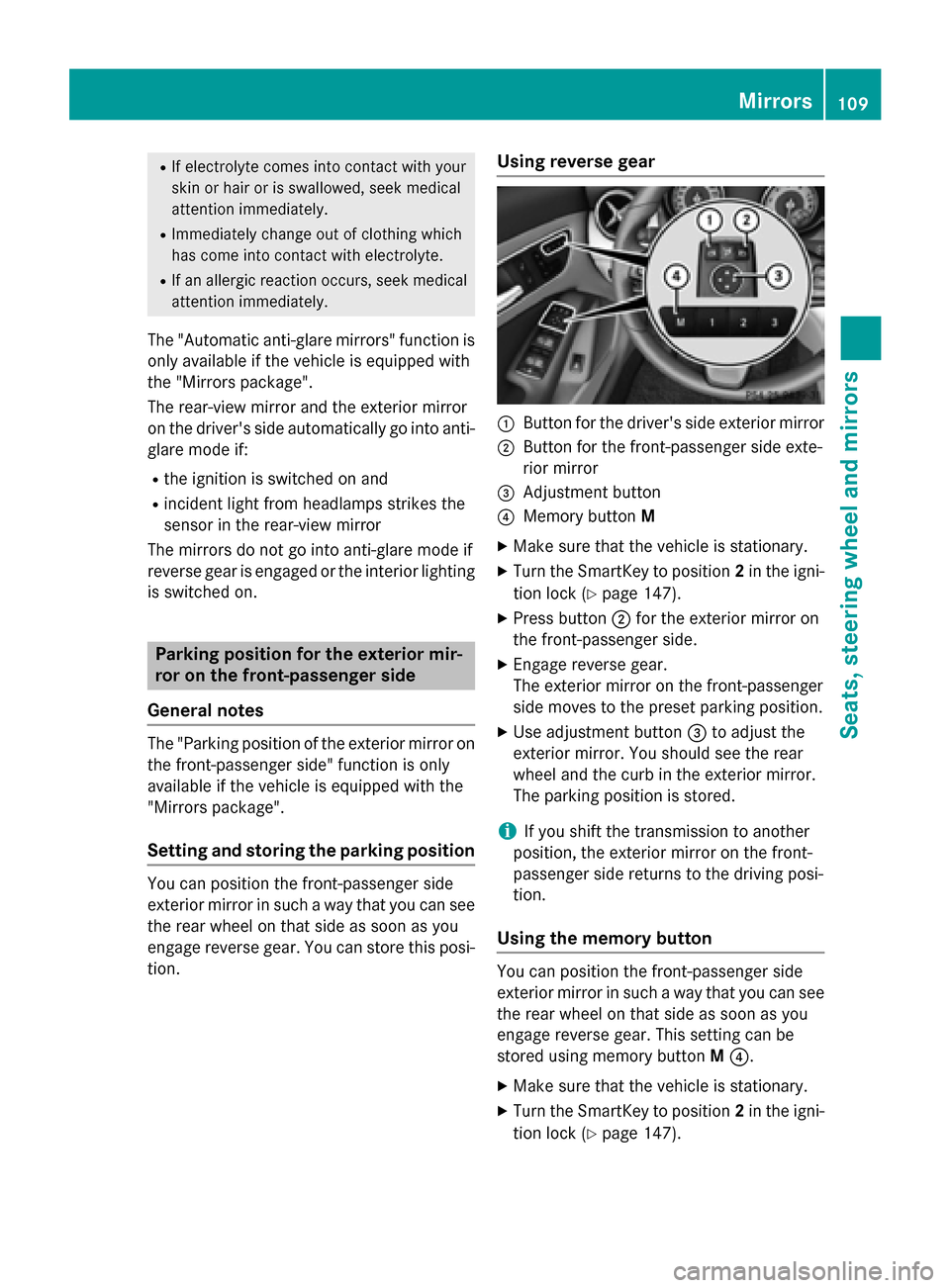
Using reverse gear
:Button for the driver's side exterior mirror
;Button for the front-passenger side exte-
rior mirror
=Adjustment button
?Memory button M
XMake sure that the vehicle is stationary.
XTurn the SmartKey to position 2in the igni-
tion lock (
Ypage 147).
XPress button ;for the exterior mirror on
the front-passenger side.
XEngage reverse gear.
The exterior mirror on the front-passenger
side moves to the preset parking position.
XUse adjustment button =to adjust the
exterior mirror. You should see the rear
wheel and the curb in the exterior mirror.
The parking position is stored.
iIf you shift the transmission to another
position, the exterior mirror on the front-
passenger side returns to the driving posi-
tion.
Using the memory button
You can position the front-passenger side
exterior mirror in such a way that you can see
the rear wheel on that side as soon as you
engage reverse gear. This setting can be
stored using memory button M?.
XMake sure that the vehicle is stationary.
XTurn the SmartKey to position 2in the igni-
tion lock (
Ypage 147).
Mirrors109
Seats, steering wheel and mirrors
Z
Page 202 of 374
Rear view camera
General notes
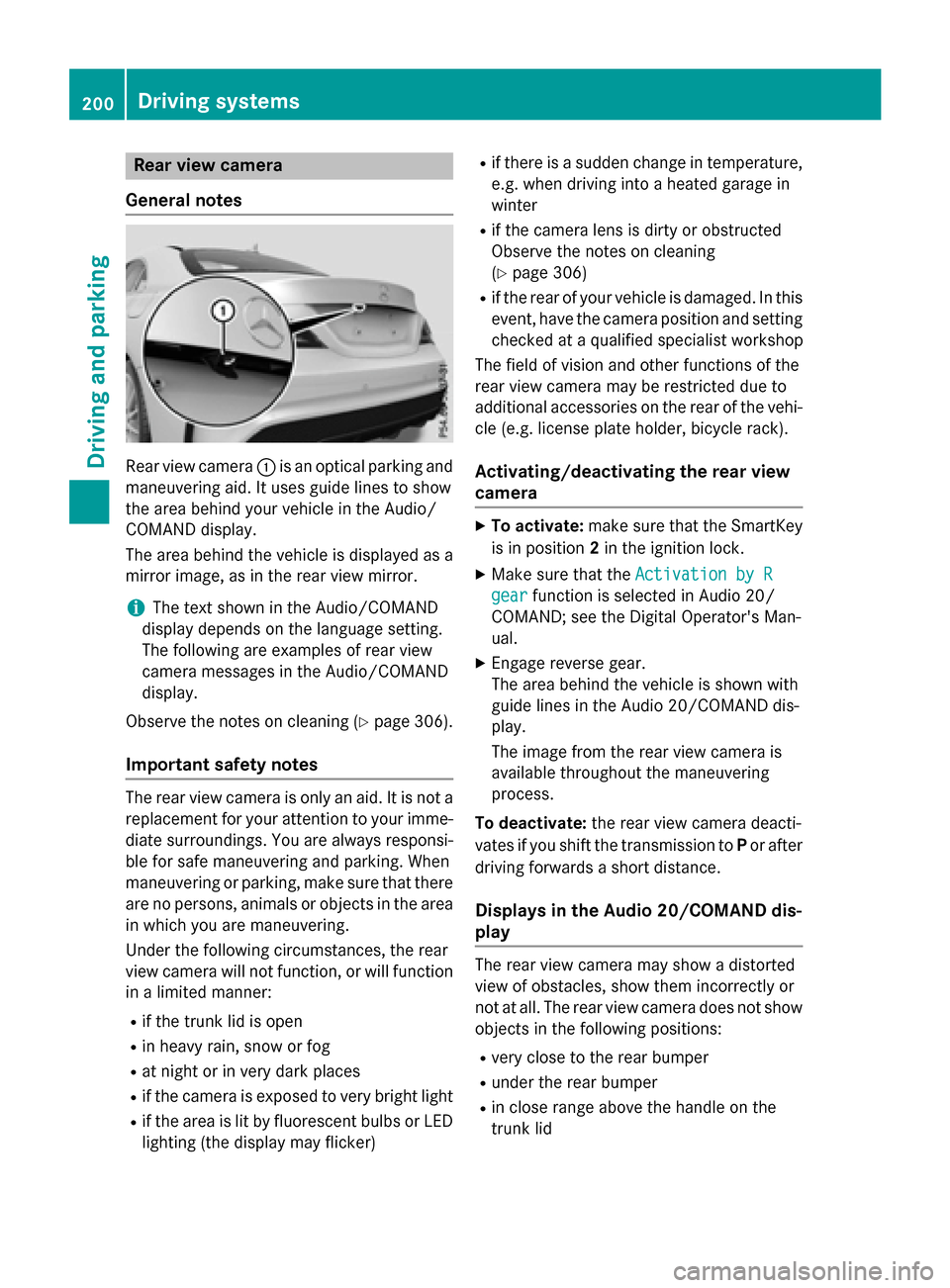
Rear view camera :is an optical parking and
maneuvering aid. It uses guide lines to show
the area behind your vehicle in the Audio/
COMAND display.
The area behind the vehicle is displayed as a
mirror image, as in the rear view mirror.
iThe text shown in the Audio/COMAND
display depends on the language setting.
The following are examples of rear view
camera messages in the Audio/COMAND
display.
Observe the notes on cleaning (
Ypage 306).
Important safety notes
The rear view camera is only an aid. It is not a
replacement for your attention to your imme-
diate surroundings. You are always responsi- ble for safe maneuvering and parking. When
maneuvering or parking, make sure that there
are no persons, animals or objects in the area
in which you are maneuvering.
Under the following circumstances, the rear
view camera will not function, or will function
in a limited manner:
Rif the trunk lid is open
Rin heavy rain, snow or fog
Rat night or in very dark places
Rif the camera is exposed to very bright light
Rif the area is lit by fluorescent bulbs or LED
lighting (the display may flicker)
Rif there is a sudden change in temperature,
e.g. when driving into a heated garage in
winter
Rif the camera lens is dirty or obstructed
Observe the notes on cleaning
(
Ypage 306)
Rif the rear of your vehicle is damaged. In this
event, have the camera position and setting
checked at a qualified specialist workshop
The field of vision and other functions of the
rear view camera may be restricted due to
additional accessories on the rear of the vehi-
cle (e.g. license plate holder, bicycle rack).
Activating/deactivating the rear view
camera
XTo activate: make sure that the SmartKey
is in position 2in the ignition lock.
XMake sure that the Activation by R
gearfunction is selected in Audio 20/
COMAND; see the Digital Operator's Man-
ual.
XEngage reverse gear.
The area behind the vehicle is shown with
guide lines in the Audio 20/COMAND dis-
play.
The image from the rear view camera is
available throughout the maneuvering
process.
To deactivate: the rear view camera deacti-
vates if you shift the transmission to Por after
driving forwards a short distance.
Displays in the Audio 20/COMAND dis-
play
The rear view camera may show a distorted
view of obstacles, show them incorrectly or
not at all. The rear view camera does not show
objects in the following positions:
Rvery close to the rear bumper
Runder the rear bumper
Rin close range above the handle on the
trunk lid
200Driving systems
Driving and parking