snow chains MERCEDES-BENZ CLA COUPE 2013 Owners Manual
[x] Cancel search | Manufacturer: MERCEDES-BENZ, Model Year: 2013, Model line: CLA COUPE, Model: MERCEDES-BENZ CLA COUPE 2013Pages: 373, PDF Size: 11.47 MB
Page 12 of 373
Drive program
Automatic ...................................... 160
Display .......................................... .157
Display (DIRECT SELECT lever) ...... 156
Manual .......................................... .160
Driver's door
see Door
Driving abroad
Mercedes-Benz Service ................. 297
Symmetrical dipped bea m............. 110
Driving on flooded roads .................. 172
Driving safety system
COLLISION PREVENTION ASSIST
PLUS ................................................ 67
EBD (electronic brake force distri-bution) ............................................. 72
Driving safety systems
4ETS (Electronic Traction Sys-
tem) ................................................. 68
ABS (Anti-lock Braking System) ....... 64
ADAPTIVE BRAK E............................. 72
Adaptive Brake Assist ...................... 66
Adaptive brake lights ....................... 68
BAS (Brake Assist System) .............. 64
COLLISION PREVENTION ASSIST .... 65
Distance warning function ............... 65
ESP® (Electronic Stability Pro-
gram) ............................................... 68
ETS (Electronic Traction System) ..... 68
ETS/4ETS (Electronic Traction
System) ........................................... 68
Important safety guidelines ............. 64
Overview .......................................... 63
STEER CONTROL ............................. 72
Driving systems
Active Parking Assist ..................... 192
ATTENTION ASSIST ........................ 201
Blind Spot Assist ............................ 203
Cruise control ................................ 173
Display message ............................ 251
Distronic Plus ................................ 178
HOLD function ............................... 186
Lane Keeping Assist ...................... 205
Lane package ................................ 203
PARKTRONIC ................................. 188
RACE START (AMG vehicles) .......... 187
Reversing camera .......................... 197
Speed Limit Assist ......................... 202 SPEEDTRONIC ............................... 175
Driving tips
Aquaplaning ................................... 172
Automatic transmission ................. 158
Brakes ........................................... 171
DISTRONIC PLUS ........................... 184
Downhill gradient ........................... 171
Driving abroad ............................... 110
Driving in winter ............................. 172
Driving on flooded roads ................ 172
Driving on wet roads ...................... 172
General .......................................... 170
Icy road surfaces ........................... 172
Limited braking efficiency on sal-
ted roads ....................................... 172
New brake pads/linings ................ 172
Running-in tips ............................... 146
Snow chains .................................. 329
Symmetrical dipped beam ............. 110
Towing a traile r.............................. 207
Wet road surface ........................... 171
DVD audio (on-board computer) ...... 221 E
EASY-VARIO-PLUS system Luggage compartment enlarge-
ment .............................................. 279
EBD (electronic brake force distri-
bution)
Display message ............................ 237
Function/note s................................ 72
ECO display
Function/note s............................. 170
On-board computer ....................... 218
ECO start/stop function
Automatic engine start .................. 151
Automatic engine switch-off .......... 150
Deactivating/activating ................. 151
General information ....................... 150
Important safety notes .................. 150
Introduction ................................... 150
Electrical fuses
see Fuses
Electromagnetic compatibility
Declaration of conformity ................ 23
Electronic Stability Program
see ESP® (Electronic Stability Program) Index
9
Page 20 of 373
Setting the air distribution
............... 133
Setting the airflow ............................1 33
Settings
Factory (on-board computer) ......... 231
On-board computer ....................... 225
SETUP (on-board computer) ............. 231
Shifting to neutral (manual trans-
mission) ............................................. 155
Side lamps
Switching on/off ........................... 112
Side windows
Convenience closing ........................ 90
Convenience opening ..................... .90
Important safety notes .................... 88
Opening/closing .............................. 89
Problem (malfunction) .....................91
Resetting ........................................ .90
Sidebag ................................................ 44
Sliding sunroof
see Panorama sliding sunroof
Snow chains ...................................... 329
Socket
Points to observe before use ......... 285
Sockets
Centre console .............................. 285
Rear compartment .........................2 85
Specialist workshop ............................ 24
Spectacles compartment ................. 277
Speed Limit Assist
Activating/deactivating the warn-ing function ................................... .223
Display message ............................ 251
Display message in the multifunc-
tion display ................................... .203
Function/notes ............................ .202
Important safety notes .................. 202
Speed, controlling
see Cruise control
Speedometer
Activating/deactivating the addi-
tional speedometer ........................ 226
Digital ............................................ 218
In the Instrument cluster ................. 30
Segments ...................................... 215
Selecting the unit of measure-
ment .............................................. 226
see Instrument cluster SPEEDTRONIC
Deactivating variable ..................... 177
Display message ............................ 255
Function/notes ............................ .175
Important safety notes .................. 176
LIM indicator lamp ......................... 176
Permanent ..................................... 177
Selecting ........................................ 176
Storing the current spee d.............. 177
Variable ......................................... 176
SPORT handling mode
Activating/deactivating (AMG
vehicles) .......................................... 70
Warning lamp ................................. 268
SRS (Supplemental Restraint Sys-
tem)
Display message ............................ 244
Introduction ..................................... 41
Warning lamp ................................. 270
Warning lamp (function) ................... 41
Start/stop function
see ECO start/stop function
Starting (engine) ................................ 147
STEER CONTROL .................................. 72
Steering (display message) .............. 261
Steering wheel
Adjusting (manually) ...................... 104
Button overview ............................... 33
Buttons (on-board computer) ......... 215
Cleaning ......................................... 302
Gearshift paddle s........................... 160
Important safety notes .................. 104
Steering wheel gearshift paddles .... 160
Stopwatch (RACETIMER) ................... 232
Stowage areas ................................... 276
Stowage compartments
Armrest (front) ............................... 278
Armrest (under )............................. 278
Centre console .............................. 277
Centre console (rear) ..................... 279
Cup holder ..................................... 282
Glove compartment ....................... 277
Important safety information ......... 276
Luggage net ................................... 279
Spectacles compartment ............... 277
Under driver's seat/front-
passenger seat .............................. 278 Index
17
Page 23 of 373
Vehicle maintenance
see ASSYST PLUS
Vehicle tool kit .................................. 307
Vehicle weights ................................. 362
Video (DVD) ........................................ 221
Video DVD (on-board computer) ...... 221
VIN ...................................................... 354 W
Warning and indicator lamps ABS ................................................ 265
Brakes ........................................... 265
Distance warning signal ................. 273
ESP® ............................................. 267
ESP® OFF ...................................... 268
Fuel tank ........................................ 271
LIM (cruise control) ........................ 174
LIM (DISTRONIC PLUS) .................. 179
LIM (variable SPEEDTRONIC) ......... 176
Overview .......................................... 32
PASSENGER AIRBAG OFF ................ 53
Reserve fuel ................................... 271
Seat belt ........................................ 263
SRS ................................................ 270
Tyre pressure monitor ................... 274
Warning triangle ................................ 306
Washer fluid
Display message ............................ 262
Wheel and tyre combinations
see Tyres
Wheel bolt tightening torque ........... 339
Wheel chock ...................................... 336
Wheels
Changing a whee l.......................... 335
Changing/replacing ....................... 335
Checking ........................................ 327
Cleaning ......................................... 298
Cleaning (warning) ......................... 336
Emergency spare wheel ................. 349
Fitting a new wheel ........................ 339
Fitting a wheel ............................... 336
Important safety notes .................. 326
Removing a whee l.......................... 339
Storing ........................................... 336
Tightening torque ........................... 339
Wheel size/tyre size ...................... 340 Windowbag
Display message ............................ 245
Operation ......................................... 45
Windows
Cleaning ......................................... 299
see Side windows
Windscreen
Demisting ...................................... 134
Windscreen washer fluid
see Windscreen washer system
Windscreen washer system
Note s............................................. 361
Topping up ..................................... 295
Windscreen wipers
Display message ............................ 262
Problem (malfunction) ................... 124
Replacing the wiper blades ............ 122
Switching on/of f........................... 121
Winter driving
General notes ................................ 328
Winter operation
Slippery road surfaces ................... 172
Snow chains .................................. 329
Winter tyres
Limiting the speed (on-board com-
puter) ............................................. 228
M+S tyre s...................................... 328
Wiper blades
Cleaning ......................................... 300
Important safety notes .................. 122
Replacing (windscreen) .................. 122
Wooden trim (cleaning instruc-
tions) .................................................. 302
Workshop
see Qualified specialist workshop Z
ZONE function Switching on/of f........................... 133 20
Index
Page 67 of 373
Important safety notes
If you fail to adapt your driving style or if you
are inattentive, the driving safety systems can
neither reduce the risk of accident nor over-
ride the laws of physics. Driving safety sys-
tems are merely aids designed to assist driv- ing. You are responsible for the distance to
the vehicle in front, for vehicle speed and for braking in good time. Always adapt your driv- ing style to suit the prevailing road, weather
and traffic conditions and maintain a safe dis-
tance from the vehicle in front. Drive care-
fully.
i The driving safety systems described only
work as effectively as possible when there
is adequate contact between the tyres and
the road surface. Pay particular attention to the information regarding tyres, recom-
mended minimum tyre tread depths etc. inthe "Wheels and tyres" section
(Y page 326).
In wintry driving conditions, always use
winter tyres (M+S tyres) and, if necessary,
snow chains. Only in this way will the driv-
ing safety systems described in this section work as effectively as possible. ABS (Anti-lock Braking System)
General notes ABS regulates brake pressure in such a way
that the wheels do not lock when you brake.
This allows you to continue steering the vehi- cle when braking.
The ! ABS warning lamp in the instrument
cluster lights up when the ignition is switched on. It goes out when the engine is running.
Important safety notes i
Observe the "Important safety notes" sec-
tion for driving safety systems (Y page 64). G
WARNING
If ABS is faulty, the wheels could lock when
braking. The steerability and braking charac-
teristics may be severely impaired. Addition-
ally, further driving safety systems are deac-
tivated. There is an increased danger of skid- ding and accidents.
Drive on carefully. Have ABS checked imme-
diately at a qualified specialist workshop.
If ABS is malfunctioning, other systems,
including driving safety systems, will also
become inoperative. Observe the information on the ABS warning lamp (Y page 265) and
display messages which may be shown in the
instrument cluster (Y page 235).
ABS works from a speed of about
8 km/hupwards, regardless of road-surface
conditions. ABS works on slippery surfaces,
even when you only brake gently.
Brakes X
If ABS intervenes: continue to depress the
brake pedal with force until the braking sit- uation is over.
X To make a full brake application:
depress the brake pedal with full force.
If ABS intervenes when braking, you will feel a
pulsing in the brake pedal.
The pulsating brake pedal can be an indica-
tion of hazardous road conditions, and func-
tions as a reminder to take extra care while
driving. BAS (Brake Assist)
General notes BAS operates in emergency braking situa-
tions. If you depress the brake pedal quickly,
BAS automatically boosts the braking force,
thus shortening the stopping distance. 64
Driving safety systemsSafety
Page 73 of 373
It may be best to deactivate ESP
®
in the fol-
lowing situations:
R when using snow chains
R in deep snow
R on sand or gravel
i Activate ESP ®
as soon as the situations
described above no longer apply. ESP ®
will
otherwise not be able to stabilise the vehi-
cle if the vehicle starts to skid or a wheel
starts to spin.
Deactivating/activating ESP ®
You can deactivate or activate ESP ®
via the
on-board computer.
X To deactivate: (Ypage 224).
The å ESP®
OFF warning lamp in the
instrument cluster lights up.
X To activate: (Ypage 224).
The å ESP®
OFF warning lamp in the
instrument cluster goes out.
Characteristics when ESP ®
is deactivated
If ESP ®
is deactivated and one or more wheels
start to spin, the ÷ESP®
warning lamp in
the instrument cluster flashes. In such situa-
tions, ESP ®
will not stabilise the vehicle.
If you deactivate ESP ®
:
R ESP ®
no longer improves driving stability.
R engine torque is no longer limited and the
drive wheels are able to spin.
The spinning of the wheels results in a cut-
ting action for better traction on loose sur-faces.
R traction control is still activated.
R ESP ®
still provides support when you
brake. Deactivating/activating ESP
®
(AMG
vehicles) Important safety notes
i Observe the "Important safety notes" sec-
tion (Y page 64).
You can select between the following states
of ESP ®
:
R ESP ®
is activated.
R SPORT handling mode is activated.
R ESP ®
is deactivated. G
WARNING
When SPORT handling mode is activated,
there is a greater risk of skidding and acci-
dents.
Only activate SPORT handling mode in the sit- uations described in the following. G
WARNING
If you deactivate ESP ®
, ESP ®
no longer sta-
bilises the vehicle. There is an increased risk
of skidding and an accident.
Only deactivate ESP ®
in the situations descri-
bed in the following.
In the following situations, it may be better to activate SPORT handling mode or deactivate
ESP ®
:
R when using snow chains
R in deep snow
R on sand or gravel
R on specially designated roads when the
vehicle's own oversteering and understeer-
ing characteristics are desired
Driving in SPORT handling mode or without
ESP ®
requires an extremely qualified and
experienced driver.
i Activate ESP ®
as soon as the situations
described above no longer apply. ESP ®
will
otherwise not be able to stabilise the vehi-
cle if the vehicle starts to skid or a wheel
starts to spin. 70
Driving safety systemsSafety
Page 176 of 373
If you leave the engine or the auxiliary heating
running, make sure the exhaust pipe and area
around the vehicle are clear of snow. To
ensure an adequate supply of fresh air, open a window on the side of the vehicle that is not
facing into the wind.
Have your vehicle winterproofed at a qualified specialist workshop at the onset of winter.
You should drive particularly carefully on slip-
pery road surfaces. Avoid sudden accelera-
tion, steering and braking manoeuvres. Do
not use cruise control or DISTRONIC PLUS.
If the vehicle threatens to skid or cannot be
stopped when moving at low speed:
X Vehicles with manual transmission:
shift to neutral.
X Vehicles with automatic transmission:
shift the transmission to position N.
X Try to bring the vehicle under control by
using corrective steering.
The outside temperature indicator is not
designed to serve as an ice-warning device
and is therefore unsuitable for that purpose.
Changes in the outside temperature are dis-
played after a short delay.
Indicated temperatures just above the freez-
ing point do not guarantee that the road sur-
face is free of ice. The road may still be icy,
especially in wooded areas or on bridges.
You should pay special attention to road con-
ditions when temperatures are around the
freezing point.
For more information on driving with snow
chains, see (Y page 329).
For more information on driving with summer tyres, see (Y page 328).
Observe the notes in the "Winter operation"
section (Y page 328). Driving systems
Cruise control
General notes Cruise control maintains a constant road
speed for you. It brakes automatically in order to avoid exceeding the set speed. You must
select a lower gear in good time on long and
steep downhill gradients, especially if the
vehicle is laden or towing a trailer. For vehi-
cles with automatic transmission, you need to
have selected manual drive program M
(Y page 160). By doing so, you will make use
of the braking effect of the engine. This
relieves the load on the brake system and
prevents the brakes from overheating and
wearing too quickly.
Use cruise control only if road and traffic con-
ditions are appropriate for maintaining a
steady speed for a prolonged period. You can store any road speed above 30 km/h.
Important safety notes If you fail to adapt your driving style, cruise
control can neither reduce the risk of an acci- dent nor override the laws of physics. Cruise
control cannot take into account road,
weather or traffic conditions. Cruise control is
only an aid. You are responsible for the dis-
tance to the vehicle in front, for vehicle speed, for braking in good time, and for staying in thelane.
Do not use cruise control:
R in road and traffic conditions which do not
allow you to maintain a constant speed
(e.g. in heavy traffic or on winding roads).
R on smooth or slippery roads. Braking or
accelerating can cause the drive wheels to
lose traction and the vehicle could then
skid.
R when there is poor visibility, e.g. due to fog,
heavy rain or snow.
If there is a change of drivers, advise the new driver of the speed stored. Driving systems
173Driving and parking Z
Page 191 of 373
X
To cancel: pull the left steering wheel shift
paddle (Y page 160).
or
X To confirm: pull the right steering wheel
shift paddle (Y page 160).
The RACE START available Depress
RACE START available Depress
accelerator
accelerator message appears in the mul-
tifunction display.
i If you do not depress the accelerator
pedal within a few seconds, RACE START is cancelled. The multifunction display shows
the RACE START cancelled
RACE START cancelled message.
X Fully depress the accelerator pedal.
The engine speed is increased.
The RACE START Release brake to RACE START Release brake to
start
start message appears in the multifunc-
tion display.
i If the brake pedal is not released after a
short while, RACE START is cancelled. The
multifunction display shows the RACE
RACE
START cancelled
START cancelled message.
X Take your foot off the brake, but keep the
accelerator pedal depressed.
The vehicle pulls away at maximum accel-
eration.
The RACE
RACE START START active
active message appears
in the multifunction display.
RACE START is deactivated when the vehicle
reaches a speed of approximately 50 km/h.
Drive program Sis activated. SPORT handling
mode remains activated.
RACE START is deactivated immediately if
you release the accelerator pedal during
RACE START or if any of the activation condi-
tions are no longer fulfilled. The RACE
RACE START
START
not possible
not possible orRACE START cancelled
RACE START cancelled
message appears in the multifunction dis-
play.
i After using it several times in short suc-
cession, RACE START will be unavailable
until a certain distance has been driven. 4MATIC
4MATIC ensures that all four wheels are per-
manently driven. Together with ESP ®
, it
improves the traction of your vehicle when-
ever a drive wheel spins due to insufficient
grip.
If you fail to adapt your driving style, 4MATIC
can neither reduce the risk of an accident nor override the laws of physics. 4MATIC cannot
take account of road, weather and traffic con-
ditions. 4MATIC is only an aid. You are
responsible for the distance to the vehicle in
front, for vehicle speed, for braking in good
time, and for staying in lane.
If a drive wheel spins due to insufficient grip:
R when pulling away, only depress the accel-
erator pedal as far as is necessary.
R accelerate less when driving.
! Never tow the vehicle with one axle
raised. This may damage the transfer case. Damage of this sort is not covered by the
Mercedes-Benz implied warranty. All
wheels must remain either on the ground or
be fully raised. Observe the instructions for towing the vehicle with all wheels in full
contact with the ground.
i In wintry driving conditions, the maximum
effect of 4MATIC can only be achieved if
you use winter tyres (M+S tyres), with snow
chains if necessary. PARKTRONIC
Important safety notes PARKTRONIC is an electronic parking aid with
ultrasonic sensors. It monitors the area
around your vehicle using six sensors in the
front bumper and six sensors in the rear
bumper. PARKTRONIC indicates visually and
audibly the distance between your vehicle
and an object.
PARKTRONIC is only an aid. It is not a substi- tute for your attention to the immediate sur-
roundings. The responsibility for safe 188
Driving systemsDriving an
d parking
Page 196 of 373
Parking tips:
R on narrow roads, drive as closely as possi-
ble past the parking space.
R parking spaces that are littered or over-
grown might be identified or measured
incorrectly.
R parking spaces that are partially occupied
by trailer drawbars might not be identified
as such or be measured incorrectly.
R snowfall or heavy rain may lead to a parking
space being measured inaccurately.
R pay attention to the PARKTRONIC
(Y page 190) warning messages during the
parking procedure.
R you can intervene in the steering procedure
to correct it at any time. Active Parking
Assist will then be cancelled.
R when transporting a load which protrudes
from your vehicle, you should not use
Active Parking Assist.
R never use Active Parking Assist when snow
chains are fitted.
R make sure that the tyre pressures are
always correct. This has a direct influence
on the parking characteristics of the vehi-
cle.
Use Active Parking Assist for parking spaces
that are:
R parallel or at right angles to the direction of
travel
R on straight roads, not bends
R on the same level as the road, e.g. not on
the pavement
Detecting parking spaces Objects located above the height range of
Active Parking Assist will not be detected
when the parking space is measured. These
are not taken into account when the parking
procedure is calculated, e.g. overhanging
loads, tail sections or loading ramps of goods
vehicles. G
WARNING
If objects are located above the detection
range, Active Parking Assist may start to steer into the parking space too soon. As a result,
you could cause a collision. There is a risk of
an accident.
If objects are located above the detection
range, stop the vehicle and switch Active
Parking Assist off.
For further information on the detection
range (Y page 189).
Active Parking Assist does not support you
parking in spaces at right angles to the direc-
tion of travel if:
R two parking spaces are located directly
next to one another
R the parking space is directly next to a low
obstacle such as a low kerb stone
R you forward park
Active Parking Assist does not support you
parking in spaces that are parallel or at right
angles to the direction of travel if:
R the parking space is on a kerb stone
R the parking space appears to be blocked,
for example by foliage or grass paving
blocks
R the range of movement is too small
R the parking space is bordered by an obsta-
cle which is not clearly defined such as a
tree or a trailer :
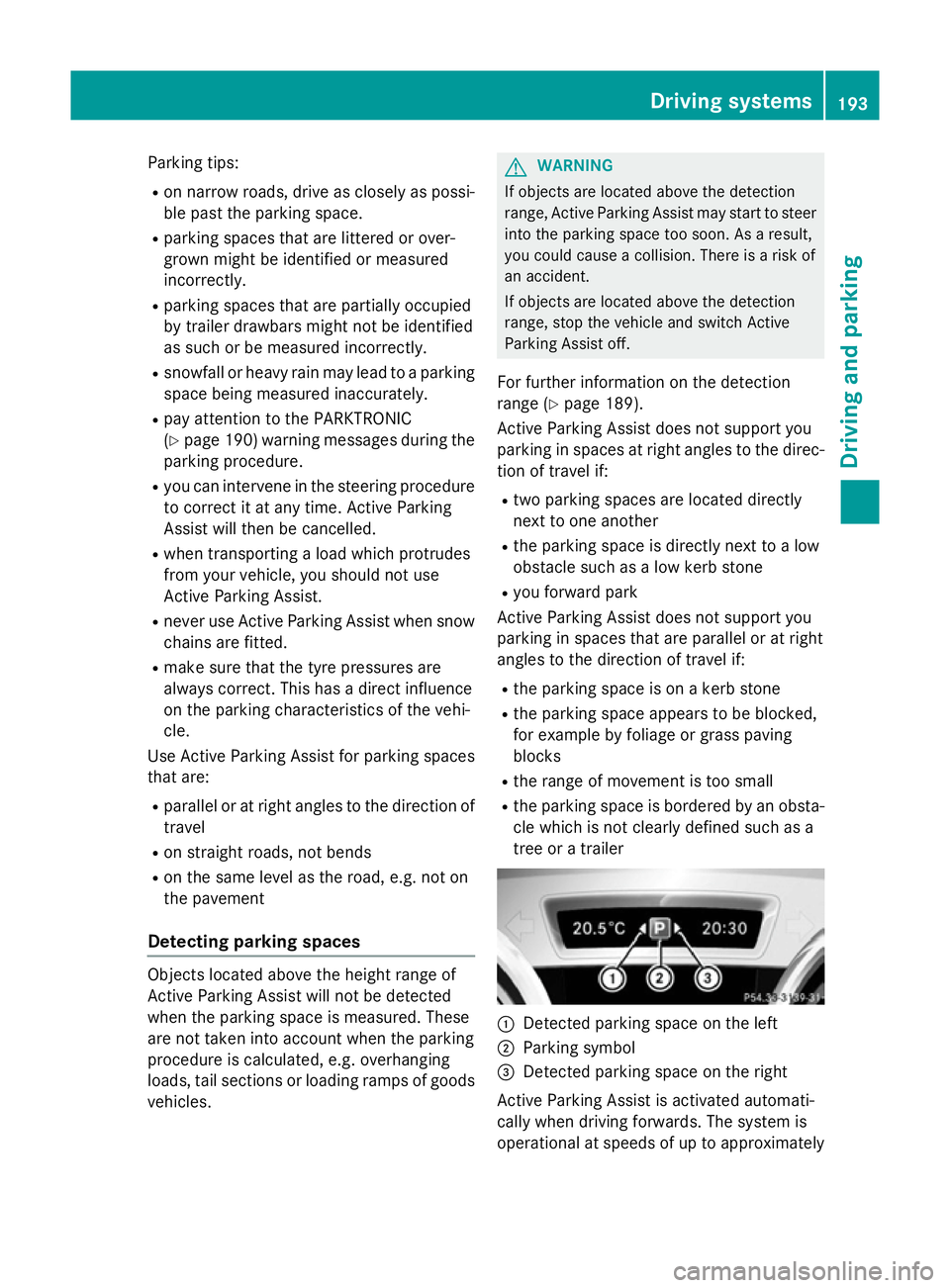
Detected parking space on the left
; Parking symbol
= Detected parking space on the right
Active Parking Assist is activated automati-
cally when driving forwards. The system is
operational at speeds of up to approximately Driving systems
193Driving and parking Z
Page 227 of 373
X
Press the abutton.
The current selection is displayed.
X To activate or deactivate: pressa.
When the Speed Limit Assist message
function is activated, the assistance
graphic shows the Äsymbol.
If the Speed Limit Assist message function is activated, a detected speed limit is auto-
matically displayed for five seconds. Other items in the multifunction display are not
shown during this time.
Deactivating/activating ESP ®Observe the "Important safety notes" section
in the description of ESP ®
(Y page 68). G
WARNING
If you deactivate ESP ®
, ESP ®
no longer sta-
bilises the vehicle. There is an increased risk
of skidding and an accident.
Only deactivate ESP ®
in the situations descri-
bed in the following.
It may be best to deactivate ESP ®
in the fol-
lowing situations:
R when using snow chains
R in deep snow
R on sand or gravel
Deactivating/activating ESP ®
on AMG vehi-
cles (Y page 70).
For further information about ESP ®
, see
(Y page 68).
X Start the engine.
X Press the =or; button on the steer-
ing wheel to select the Assist.
Assist. menu.
X Press the 9or: button to select
ESP ESP.
X Press the abutton.
The current selection is displayed.
X To activate/deactivate: press thea
button again.
ESP ®
is deactivated if the åwarning
lamp in the instrument cluster lights up
continuously when the engine is running. If the
÷ warning lamp and the åwarn-
ing lamp are lit continuously, ESP ®
is not
available due to a malfunction.
Observe the information on warning lamps
(Y page 267).
Observe the information on display messages
(Y page 235).
Activating/deactivating the distance
warning function X
Press the =or; button on the steer-
ing wheel to select the Assist. Assist.menu.
X Press 9or: to select Distance
Distance
warning
warning.
X Press the abutton.
The current selection is displayed.
X To activate/deactivate: press thea
button again.
When the distance warning function is acti-
vated, the Äsymbol appears in the mul-
tifunction display in the assistance graphic display.
Further information on the distance warning
function (Y page 65).
Activating/deactivating COLLISION
PREVENTION ASSIST PLUS X
Press the =or; button on the steer-
ing wheel to select the Assist. Assist.menu.
X Press the 9or: button to select
Collision Prevent. Assist
Collision Prevent. Assist.
X Press the abutton.
The current selection is displayed.
X To activate/deactivate: press thea
button again.
When COLLISION PREVENTION ASSIST
PLUS is activated, the Äsymbol
appears in the multifunction display in the
assistance graphic display.
For further information about COLLISION
PREVENTION ASSIST PLUS, see (Y page 67).224
Menus and submenusOn-board computer and displays
Page 332 of 373
M+S tyres with a tread depth of less than
4 mm must be replaced.
At temperatures below +7 †, use winter tyres or all-season tyres. Both types of tyre are
identified by the M+S marking.
Only winter tyres bearing the isnowflake
symbol in addition to the M+S marking pro-
vide the best possible grip in wintry road con- ditions. Only these tyres will allow driving
safety systems such as ABS and ESP ®
to
function optimally in winter. These tyres have
been developed specifically for driving in
snow.
Use M+S tyres of the same make and tread on
all wheels to maintain safe handling charac-
teristics.
Always observe the maximum permissible
speed specified for the M+S tyres you have
fitted.
If you fit M+S tyres that have a lower maxi-
mum permissible speed than that of the vehi-
cle, affix an appropriate warning sign in the
driver's field of vision. This can be obtained at a qualified specialist workshop.
Under these circumstances, you should also
restrict the maximum speed of the vehicle
using permanent SPEEDTRONIC so that it
does not exceed the maximum permissible
speed for the M+S tyres (Y page 177).
When you have fitted the M+S tyres:
X Check the tyre pressures (Y page 330).
X Restart the tyre pressure loss warning sys-
tem (Y page 331).
X Restart the tyre pressure monitor
(Y page 334).
Information about driving with an emergency spare wheel (Y page 349). Snow chains
G
WARNING
If snow chains are fitted to the rear wheels,
they may scrape against the vehicle body or chassis components. This could cause dam-
age to the vehicle or the tyres. There is a risk
of an accident.
To avoid hazardous situations:
R never fit snow chains on the rear wheels
R always fit snow chains in pairs to the front
wheels.
! Vehicles with steel wheels:
if you fit
snow chains on steel wheels, you may dam-
age the hub caps. Remove the hub caps
from the relevant wheels before fitting the
snow chains.
For safety reasons, Mercedes-Benz recom-
mends that you only use snow chains that
have been specifically approved for your vehi- cle by Mercedes-Benz, or that are of a corre-
sponding standard of quality.
If you intend to fit snow chains, please bear
the following points in mind:
R snow chains cannot be fitted to all wheel-
tyre combinations. Permissible wheel-tyre
combinations (Y page 340).
R only use snow chains if the road surface is
completely snow-covered. Remove the
snow chains as soon as possible when you
come to a road that is not snow-covered.
R local regulations may restrict the use of
snow chains. Observe the appropriate reg- ulations if you wish to fit snow chains.
R do not exceed the maximum permissible
speed of 50 km/h.
R when snow chains are fitted, never use
Active Parking Assist (Y page 192).
i You may wish to deactivate ESP ®
(Y page 68) when pulling away with snow
chains fitted. This way you can allow the
wheels to spin in a controlled manner, ach-
ieving an increased driving force (cutting
action).
Information about driving with an emergency spare wheel (Y page 349). Winter operation
329Wheels and tyres Z